Disconnected
Disconnected
Online
Voice Enabled
Low Power
User Manual
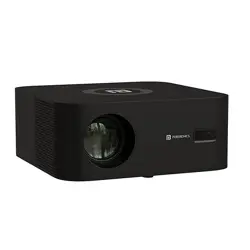
BEEM 500
S M A R T L E D P R O J E C T O R
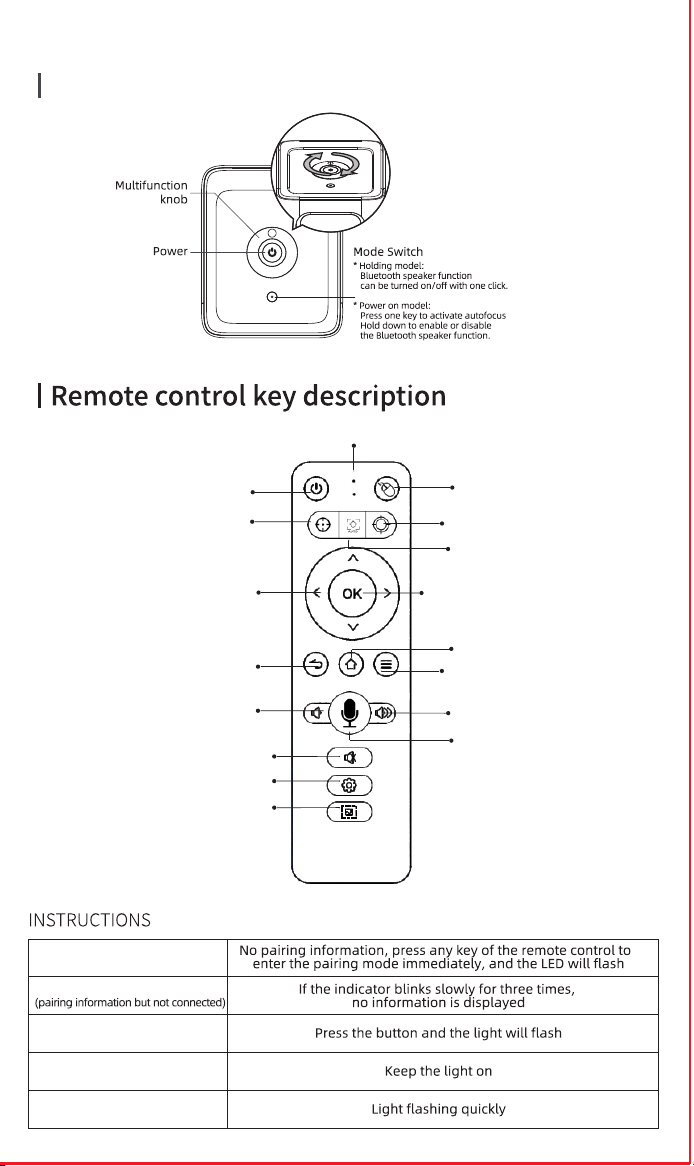
Power Button
Picture Correction
Projector Setting
Mute
Volume+
Volume-
Home
Multi-Function Keys
Return
Arrow Keys
OK
Indicator Light
Auto Focus Key
Mouse Mode
Focus+
Focus-
Voice
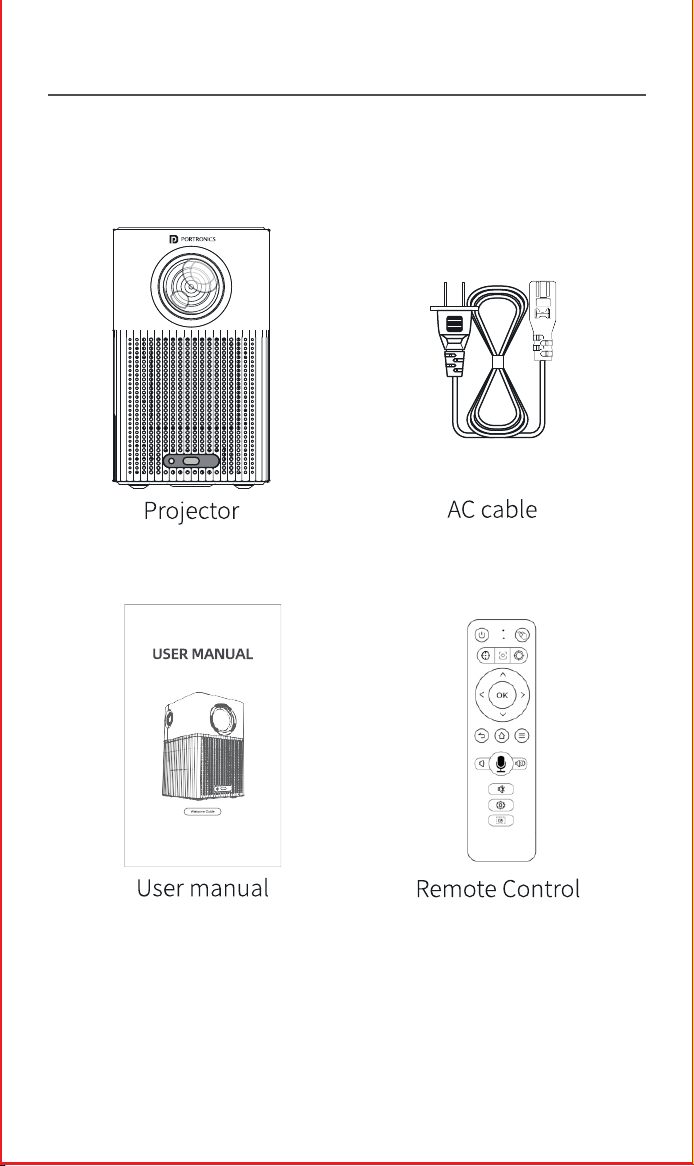
PACKAGE CONTENTS
/////
PRODUCT DESCRIPTION
/////
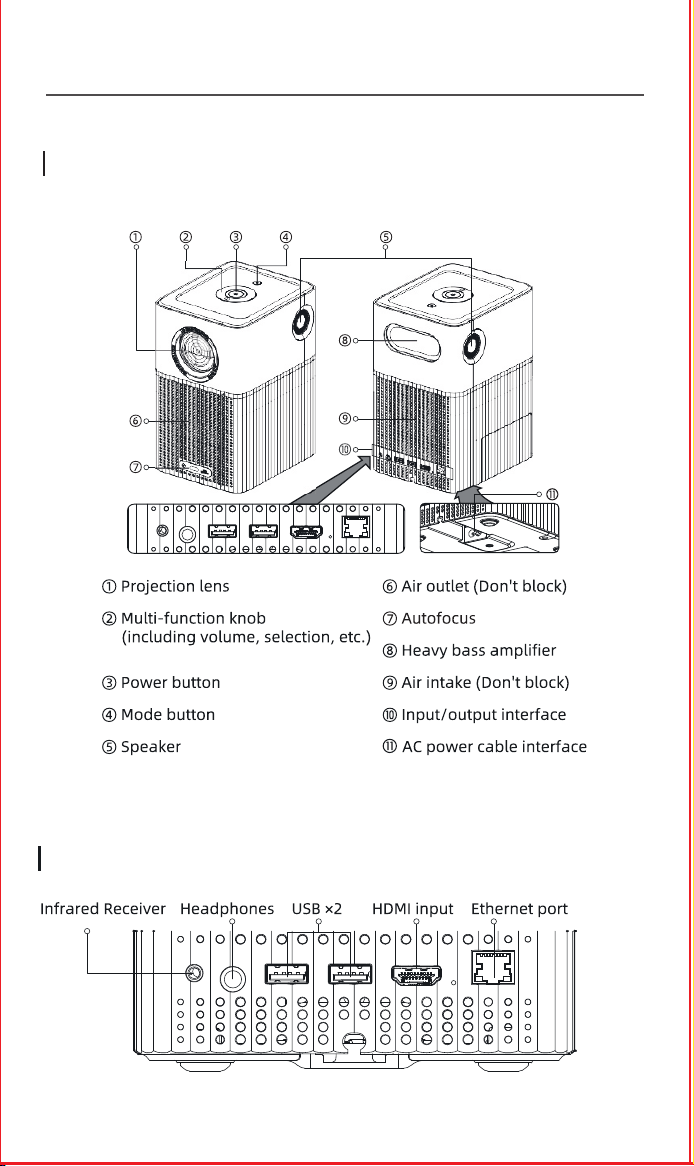
General Description
Ports Interface
Top View
Cable powered
cable
E-Waste Management
For E-Waste & ROHS compliance
refer to www.portronics.com/ewaste
www.portronics.com
For Support
Visit : www.portronics.com
E-mail : [email protected]
Contact No.: +91 9555245245
(Working Hours: Monday - Saturday, 10:00am - 6:00pm)
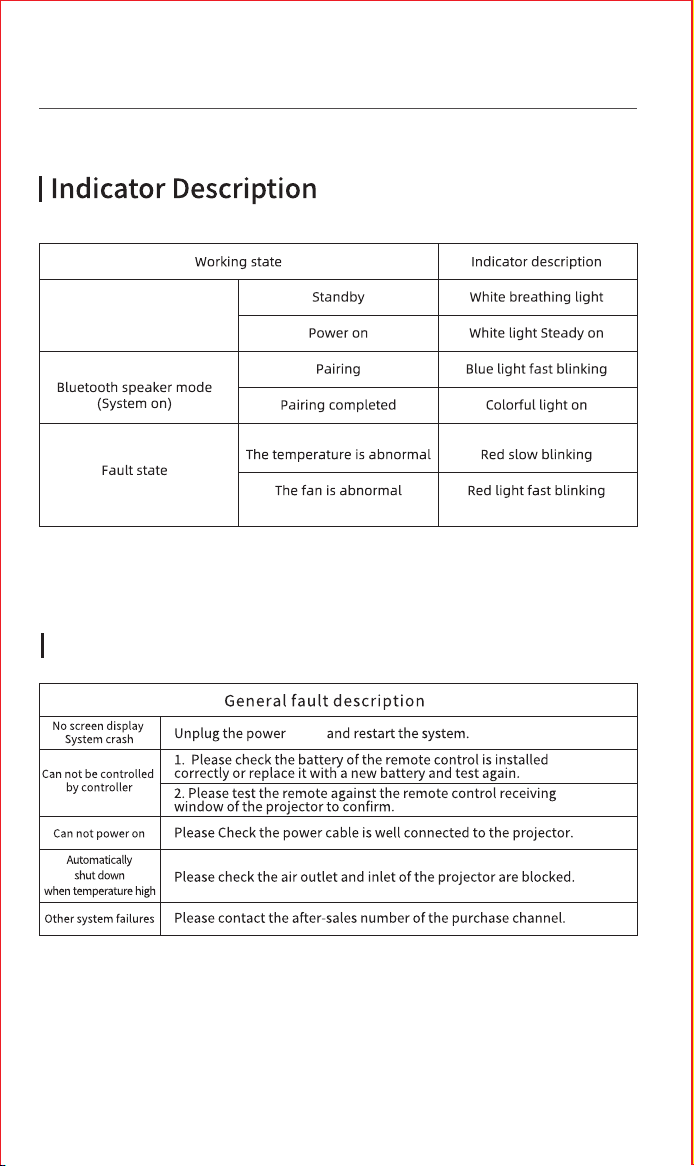
INDICATOR STATUS & TROUBLESHOOTING
/////
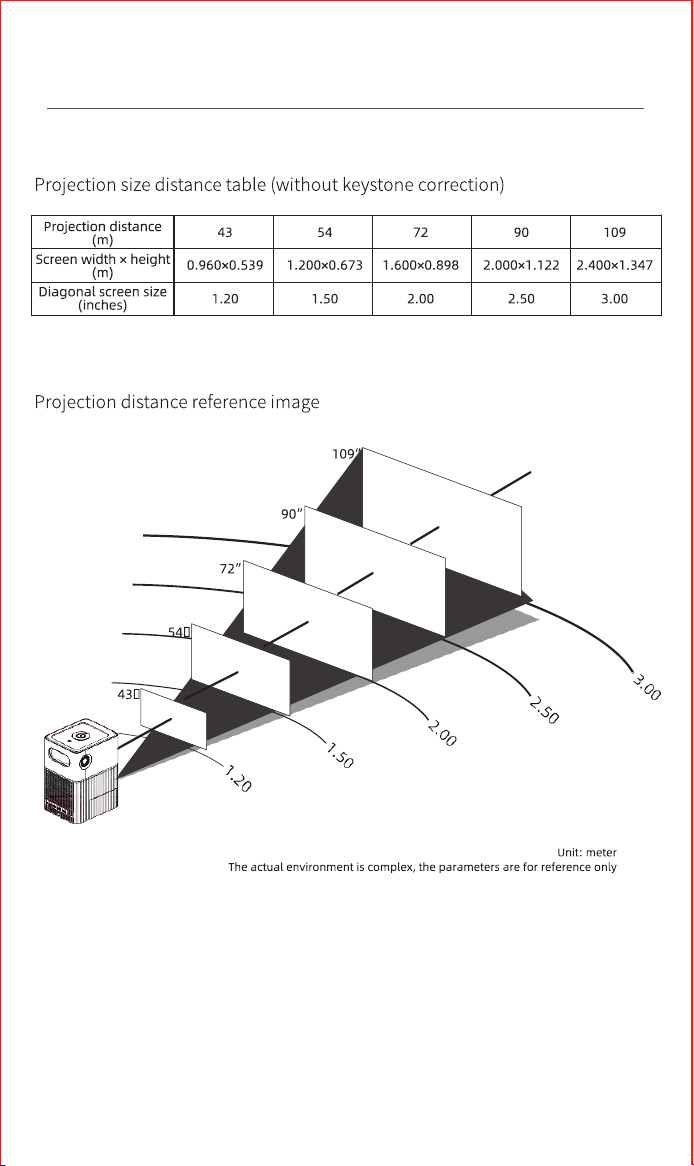
PROJECTION DISTANCE REFERENCE
/////
PLEASE NOTE
/////
Troubleshooting
Sensor
Note: Any damage caused by physical impact, water/ liquid, fire, etc.
caused by the customer or nature shall not be covered under warranty.
Only product design, feature and functionality-related faults can be
considered. As per the brand's discretion, the product is eligible for
repair and not for replacement, during the warranty period.
Please read this manual carefully before use and keep
it for future reference.
•
Avoid exposure of the projector to dust, water / moisture and
extreme temperatures.
•
This device is not dustproof or waterproof, regularly clean
projector vents to avoid cooling malfunction.
•
Please use high quality power cord and under specified rated
power supply.
•
When projector is working, please do not look directly into the
lens, the strong light will flash your eyes and cause slight pain.
Children should use the projector under the supervision of
adults.
•
Do not cover the vents of projector and ensure it is in a well-
ventilated area when in use, positioned at least 2 feet away
from the wall from behind. Heating will reduce the life of
projector and cause danger.
•
Please cut off the power if the projector is out of use for long
time.
•
Users or third-party professionals should not attempt to
disassemble the projector for testing and maintenance, in
which case, the warranty will be void.
•
For optimal viewing performance, the projector should be
positioned at a height of 5 feet from the ground and at least 5
feet away from the wall or screen in the front.
•
Use the remote control from behind the projector for
convenient operation.
Disconnected
Disconnected
Online
Voice Enabled
Low Power
User Manual
BEEM 500
S M A R T L E D P R O J E C T O R
Power Button
Picture Correction
Projector Setting
Mute
Volume+
Volume-
Home
Multi-Function Keys
Return
Arrow Keys
OK
Indicator Light
Auto Focus Key
Mouse Mode
Focus+
Focus-
Voice
PACKAGE CONTENTS
/////
PRODUCT DESCRIPTION
/////
General Description
Ports Interface
Top View
Cable powered
cable
E-Waste Management
For E-Waste & ROHS compliance
refer to www.portronics.com/ewaste
www.portronics.com
For Support
Visit : www.portronics.com
E-mail : [email protected]
Contact No.: +91 9555245245
(Working Hours: Monday - Saturday, 10:00am - 6:00pm)
INDICATOR STATUS & TROUBLESHOOTING
/////
PROJECTION DISTANCE REFERENCE
/////
PLEASE NOTE
/////
Troubleshooting
Sensor
Note: Any damage caused by physical impact, water/ liquid, fire, etc.
caused by the customer or nature shall not be covered under warranty.
Only product design, feature and functionality-related faults can be
considered. As per the brand's discretion, the product is eligible for
repair and not for replacement, during the warranty period.
Please read this manual carefully before use and keep
it for future reference.
•
Avoid exposure of the projector to dust, water / moisture and
extreme temperatures.
•
This device is not dustproof or waterproof, regularly clean
projector vents to avoid cooling malfunction.
•
Please use high quality power cord and under specified rated
power supply.
•
When projector is working, please do not look directly into the
lens, the strong light will flash your eyes and cause slight pain.
Children should use the projector under the supervision of
adults.
•
Do not cover the vents of projector and ensure it is in a well-
ventilated area when in use, positioned at least 2 feet away
from the wall from behind. Heating will reduce the life of
projector and cause danger.
•
Please cut off the power if the projector is out of use for long
time.
•
Users or third-party professionals should not attempt to
disassemble the projector for testing and maintenance, in
which case, the warranty will be void.
•
For optimal viewing performance, the projector should be
positioned at a height of 5 feet from the ground and at least 5
feet away from the wall or screen in the front.
•
Use the remote control from behind the projector for
convenient operation.
Disconnected
Disconnected
Online
Voice Enabled
Low Power
User Manual
BEEM 500
S M A R T L E D P R O J E C T O R
Power Button
Picture Correction
Projector Setting
Mute
Volume+
Volume-
Home
Multi-Function Keys
Return
Arrow Keys
OK
Indicator Light
Auto Focus Key
Mouse Mode
Focus+
Focus-
Voice
PACKAGE CONTENTS
/////
PRODUCT DESCRIPTION
/////
General Description
Ports Interface
Top View
Cable powered
cable
E-Waste Management
For E-Waste & ROHS compliance
refer to www.portronics.com/ewaste
www.portronics.com
For Support
Visit : www.portronics.com
E-mail : [email protected]
Contact No.: +91 9555245245
(Working Hours: Monday - Saturday, 10:00am - 6:00pm)
INDICATOR STATUS & TROUBLESHOOTING
/////
PROJECTION DISTANCE REFERENCE
/////
PLEASE NOTE
/////
Troubleshooting
Sensor
Note: Any damage caused by physical impact, water/ liquid, fire, etc.
caused by the customer or nature shall not be covered under warranty.
Only product design, feature and functionality-related faults can be
considered. As per the brand's discretion, the product is eligible for
repair and not for replacement, during the warranty period.
Please read this manual carefully before use and keep
it for future reference.
•
Avoid exposure of the projector to dust, water / moisture and
extreme temperatures.
•
This device is not dustproof or waterproof, regularly clean
projector vents to avoid cooling malfunction.
•
Please use high quality power cord and under specified rated
power supply.
•
When projector is working, please do not look directly into the
lens, the strong light will flash your eyes and cause slight pain.
Children should use the projector under the supervision of
adults.
•
Do not cover the vents of projector and ensure it is in a well-
ventilated area when in use, positioned at least 2 feet away
from the wall from behind. Heating will reduce the life of
projector and cause danger.
•
Please cut off the power if the projector is out of use for long
time.
•
Users or third-party professionals should not attempt to
disassemble the projector for testing and maintenance, in
which case, the warranty will be void.
•
For optimal viewing performance, the projector should be
positioned at a height of 5 feet from the ground and at least 5
feet away from the wall or screen in the front.
•
Use the remote control from behind the projector for
convenient operation.
Disconnected
Disconnected
Online
Voice Enabled
Low Power
User Manual
BEEM 500
S M A R T L E D P R O J E C T O R
Power Button
Picture Correction
Projector Setting
Mute
Volume+
Volume-
Home
Multi-Function Keys
Return
Arrow Keys
OK
Indicator Light
Auto Focus Key
Mouse Mode
Focus+
Focus-
Voice
PACKAGE CONTENTS
/////
PRODUCT DESCRIPTION
/////
General Description
Ports Interface
Top View
Cable powered
cable
E-Waste Management
For E-Waste & ROHS compliance
refer to www.portronics.com/ewaste
www.portronics.com
For Support
Visit : www.portronics.com
E-mail : [email protected]
Contact No.: +91 9555245245
(Working Hours: Monday - Saturday, 10:00am - 6:00pm)
INDICATOR STATUS & TROUBLESHOOTING
/////
PROJECTION DISTANCE REFERENCE
/////
PLEASE NOTE
/////
Troubleshooting
Sensor
Note: Any damage caused by physical impact, water/ liquid, fire, etc.
caused by the customer or nature shall not be covered under warranty.
Only product design, feature and functionality-related faults can be
considered. As per the brand's discretion, the product is eligible for
repair and not for replacement, during the warranty period.
Please read this manual carefully before use and keep
it for future reference.
•
Avoid exposure of the projector to dust, water / moisture and
extreme temperatures.
•
This device is not dustproof or waterproof, regularly clean
projector vents to avoid cooling malfunction.
•
Please use high quality power cord and under specified rated
power supply.
•
When projector is working, please do not look directly into the
lens, the strong light will flash your eyes and cause slight pain.
Children should use the projector under the supervision of
adults.
•
Do not cover the vents of projector and ensure it is in a well-
ventilated area when in use, positioned at least 2 feet away
from the wall from behind. Heating will reduce the life of
projector and cause danger.
•
Please cut off the power if the projector is out of use for long
time.
•
Users or third-party professionals should not attempt to
disassemble the projector for testing and maintenance, in
which case, the warranty will be void.
•
For optimal viewing performance, the projector should be
positioned at a height of 5 feet from the ground and at least 5
feet away from the wall or screen in the front.
•
Use the remote control from behind the projector for
convenient operation.
Disconnected
Disconnected
Online
Voice Enabled
Low Power
User Manual
BEEM 500
S M A R T L E D P R O J E C T O R
Power Button
Picture Correction
Projector Setting
Mute
Volume+
Volume-
Home
Multi-Function Keys
Return
Arrow Keys
OK
Indicator Light
Auto Focus Key
Mouse Mode
Focus+
Focus-
Voice
PACKAGE CONTENTS
/////
PRODUCT DESCRIPTION
/////
General Description
Ports Interface
Top View
Cable powered
cable
E-Waste Management
For E-Waste & ROHS compliance
refer to www.portronics.com/ewaste
www.portronics.com
For Support
Visit : www.portronics.com
E-mail : [email protected]
Contact No.: +91 9555245245
(Working Hours: Monday - Saturday, 10:00am - 6:00pm)
INDICATOR STATUS & TROUBLESHOOTING
/////
PROJECTION DISTANCE REFERENCE
/////
PLEASE NOTE
/////
Troubleshooting
Sensor
Note: Any damage caused by physical impact, water/ liquid, fire, etc.
caused by the customer or nature shall not be covered under warranty.
Only product design, feature and functionality-related faults can be
considered. As per the brand's discretion, the product is eligible for
repair and not for replacement, during the warranty period.
Please read this manual carefully before use and keep
it for future reference.
•
Avoid exposure of the projector to dust, water / moisture and
extreme temperatures.
•
This device is not dustproof or waterproof, regularly clean
projector vents to avoid cooling malfunction.
•
Please use high quality power cord and under specified rated
power supply.
•
When projector is working, please do not look directly into the
lens, the strong light will flash your eyes and cause slight pain.
Children should use the projector under the supervision of
adults.
•
Do not cover the vents of projector and ensure it is in a well-
ventilated area when in use, positioned at least 2 feet away
from the wall from behind. Heating will reduce the life of
projector and cause danger.
•
Please cut off the power if the projector is out of use for long
time.
•
Users or third-party professionals should not attempt to
disassemble the projector for testing and maintenance, in
which case, the warranty will be void.
•
For optimal viewing performance, the projector should be
positioned at a height of 5 feet from the ground and at least 5
feet away from the wall or screen in the front.
•
Use the remote control from behind the projector for
convenient operation.
Disconnected
Disconnected
Online
Voice Enabled
Low Power
User Manual
BEEM 500
S M A R T L E D P R O J E C T O R
Power Button
Picture Correction
Projector Setting
Mute
Volume+
Volume-
Home
Multi-Function Keys
Return
Arrow Keys
OK
Indicator Light
Auto Focus Key
Mouse Mode
Focus+
Focus-
Voice
PACKAGE CONTENTS
/////
PRODUCT DESCRIPTION
/////
General Description
Ports Interface
Top View
Cable powered
cable
E-Waste Management
For E-Waste & ROHS compliance
refer to www.portronics.com/ewaste
www.portronics.com
For Support
Visit : www.portronics.com
E-mail : [email protected]
Contact No.: +91 9555245245
(Working Hours: Monday - Saturday, 10:00am - 6:00pm)
INDICATOR STATUS & TROUBLESHOOTING
/////
PROJECTION DISTANCE REFERENCE
/////
PLEASE NOTE
/////
Troubleshooting
Sensor
Note: Any damage caused by physical impact, water/ liquid, fire, etc.
caused by the customer or nature shall not be covered under warranty.
Only product design, feature and functionality-related faults can be
considered. As per the brand's discretion, the product is eligible for
repair and not for replacement, during the warranty period.
Please read this manual carefully before use and keep
it for future reference.
•
Avoid exposure of the projector to dust, water / moisture and
extreme temperatures.
•
This device is not dustproof or waterproof, regularly clean
projector vents to avoid cooling malfunction.
•
Please use high quality power cord and under specified rated
power supply.
•
When projector is working, please do not look directly into the
lens, the strong light will flash your eyes and cause slight pain.
Children should use the projector under the supervision of
adults.
•
Do not cover the vents of projector and ensure it is in a well-
ventilated area when in use, positioned at least 2 feet away
from the wall from behind. Heating will reduce the life of
projector and cause danger.
•
Please cut off the power if the projector is out of use for long
time.
•
Users or third-party professionals should not attempt to
disassemble the projector for testing and maintenance, in
which case, the warranty will be void.
•
For optimal viewing performance, the projector should be
positioned at a height of 5 feet from the ground and at least 5
feet away from the wall or screen in the front.
•
Use the remote control from behind the projector for
convenient operation.

Disconnected
Disconnected
Online
Voice Enabled
Low Power
User Manual
BEEM 500
S M A R T L E D P R O J E C T O R
Power Button
Picture Correction
Projector Setting
Mute
Volume+
Volume-
Home
Multi-Function Keys
Return
Arrow Keys
OK
Indicator Light
Auto Focus Key
Mouse Mode
Focus+
Focus-
Voice
PACKAGE CONTENTS
/////
PRODUCT DESCRIPTION
/////
General Description
Ports Interface
Top View
Cable powered
cable
E-Waste Management
For E-Waste & ROHS compliance
refer to www.portronics.com/ewaste
www.portronics.com
For Support
Visit : www.portronics.com
E-mail : [email protected]
Contact No.: +91 9555245245
(Working Hours: Monday - Saturday, 10:00am - 6:00pm)
INDICATOR STATUS & TROUBLESHOOTING
/////
PROJECTION DISTANCE REFERENCE
/////
PLEASE NOTE
/////
Troubleshooting
Sensor
Note: Any damage caused by physical impact, water/ liquid, fire, etc.
caused by the customer or nature shall not be covered under warranty.
Only product design, feature and functionality-related faults can be
considered. As per the brand's discretion, the product is eligible for
repair and not for replacement, during the warranty period.
Please read this manual carefully before use and keep
it for future reference.
•
Avoid exposure of the projector to dust, water / moisture and
extreme temperatures.
•
This device is not dustproof or waterproof, regularly clean
projector vents to avoid cooling malfunction.
•
Please use high quality power cord and under specified rated
power supply.
•
When projector is working, please do not look directly into the
lens, the strong light will flash your eyes and cause slight pain.
Children should use the projector under the supervision of
adults.
•
Do not cover the vents of projector and ensure it is in a well-
ventilated area when in use, positioned at least 2 feet away
from the wall from behind. Heating will reduce the life of
projector and cause danger.
•
Please cut off the power if the projector is out of use for long
time.
•
Users or third-party professionals should not attempt to
disassemble the projector for testing and maintenance, in
which case, the warranty will be void.
•
For optimal viewing performance, the projector should be
positioned at a height of 5 feet from the ground and at least 5
feet away from the wall or screen in the front.
•
Use the remote control from behind the projector for
convenient operation.

Disconnected
Disconnected
Online
Voice Enabled
Low Power
User Manual
BEEM 500
S M A R T L E D P R O J E C T O R
Power Button
Picture Correction
Projector Setting
Mute
Volume+
Volume-
Home
Multi-Function Keys
Return
Arrow Keys
OK
Indicator Light
Auto Focus Key
Mouse Mode
Focus+
Focus-
Voice
PACKAGE CONTENTS
/////
PRODUCT DESCRIPTION
/////
General Description
Ports Interface
Top View
Cable powered
cable
E-Waste Management
For E-Waste & ROHS compliance
refer to www.portronics.com/ewaste
www.portronics.com
For Support
Visit : www.portronics.com
E-mail : [email protected]
Contact No.: +91 9555245245
(Working Hours: Monday - Saturday, 10:00am - 6:00pm)
INDICATOR STATUS & TROUBLESHOOTING
/////
PROJECTION DISTANCE REFERENCE
/////
PLEASE NOTE
/////
Troubleshooting
Sensor
Note: Any damage caused by physical impact, water/ liquid, fire, etc.
caused by the customer or nature shall not be covered under warranty.
Only product design, feature and functionality-related faults can be
considered. As per the brand's discretion, the product is eligible for
repair and not for replacement, during the warranty period.
Please read this manual carefully before use and keep
it for future reference.
•
Avoid exposure of the projector to dust, water / moisture and
extreme temperatures.
•
This device is not dustproof or waterproof, regularly clean
projector vents to avoid cooling malfunction.
•
Please use high quality power cord and under specified rated
power supply.
•
When projector is working, please do not look directly into the
lens, the strong light will flash your eyes and cause slight pain.
Children should use the projector under the supervision of
adults.
•
Do not cover the vents of projector and ensure it is in a well-
ventilated area when in use, positioned at least 2 feet away
from the wall from behind. Heating will reduce the life of
projector and cause danger.
•
Please cut off the power if the projector is out of use for long
time.
•
Users or third-party professionals should not attempt to
disassemble the projector for testing and maintenance, in
which case, the warranty will be void.
•
For optimal viewing performance, the projector should be
positioned at a height of 5 feet from the ground and at least 5
feet away from the wall or screen in the front.
•
Use the remote control from behind the projector for
convenient operation.