EN
USER AND SAFETY GUIDE
ShellyBLU Gateway
Smart BLE to Wi-Fi IoT gateway
Read before use
This document contains important technical
and safety information about the device, its
safe use and installation.
⚠CAUTION! Before beginning the installa-
tion, please read carefully and entirely this
guide and any other documents accompany-
ing the device. Failure to follow the installation
procedures could lead to malfunction, danger
to your health and life, violation of law or re-
fusal of legal and/or commercial guarantee
(if any). Shelly Europe Ltd. is not responsible
for any loss or damage in case of incorrect in-
stallation or improper operation of this device
due to failure of following the user and safety
instructions in this guide.
Product Introduction
Shelly® is a line of innovative microproces-
sor-managed devices, which allow remote
control of electric circuits through a mobile
phone, tablet, PC, or home automation sys-
tem. Shelly® devices can work standalone
in a local Wi-Fi network or they can also be
operated through cloud home automation
services. Shelly Cloud is a service that can be
accessed using either an Android or iOS mo-
bile application or with any internet browser at
https://control.shelly.cloud/. Shelly® devices
can be accessed, controlled, and monitored
remotely from any place where the user has
internet connectivity, as long as the devices
are connected to a Wi-Fi router and the Inter-
net. Shelly® devices have an Embedded Web
Interface accessible at http://192.168.33.1
when connected directly to the device access
point, or at the device IP address on the local
Wi-Fi network. The embedded Web Interface
can be used to monitor and control the device,
as well as adjust its settings.
Shelly® devices can communicate directly
with other Wi-Fi devices through HTTP proto-
col. An API is provided by Shelly Europe Ltd..
For more information, please visit:
https://shelly-api-docs.shelly.cloud/
#shelly-family-overview.
Shelly® devices are delivered with factory-in-
stalled rmware. If rmware updates are
necessary to keep the devices in conformity,
including security updates, Shelly Europe
Ltd. will provide the updates free of charge
through the device Embedded Web Interface
or the Shelly mobile application, where the
information about the current rmware ver-
sion is available. The choice to install or not
the device rmware updates is the user’s sole
responsibility. Shelly Europe Ltd. shall not be
liable for any lack of conformity of the device
caused by failure of the user to install the pro-
vided updates in a timely manner.
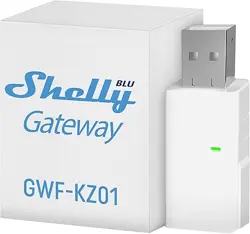
ShellyBLU Gateway (the Device) is a smart
BLE to Wi-Fi gateway in a USB A dongle.
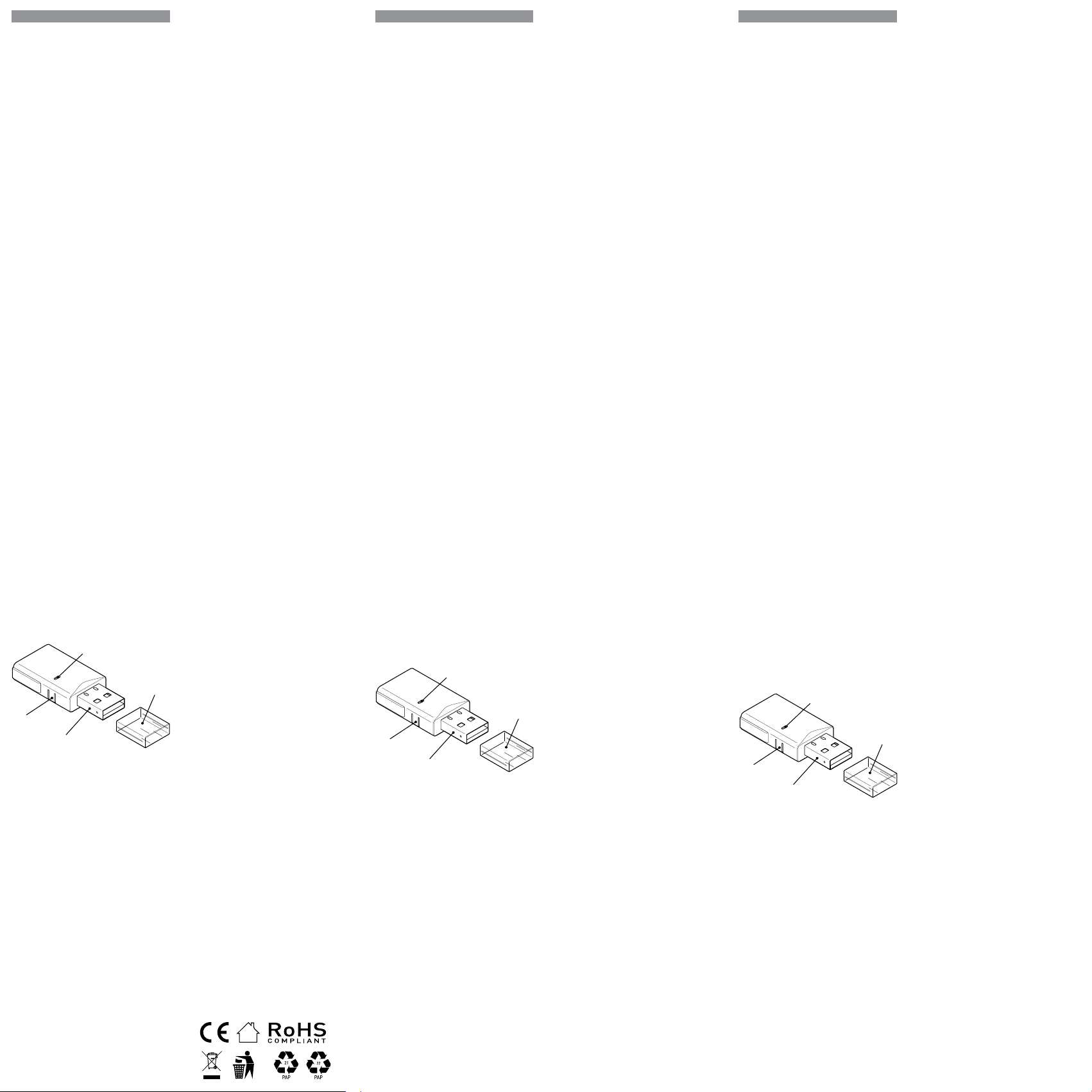
A
B
C
D
Fig. 1
Legend
• A: LED indication
• B: Reset button
• C: USB A plug
• D: Protective cap
Installation Instructions
⚠CAUTION! Do not open the device. It does
not contain any parts that can be maintained
by the user. For safety and licensing reasons,
unauthorized change and/or modication of
the device is not permitted.
⚠CAUTION! Connect the Device only in the
way shown in these instructions. Any other
method could cause damage and/or injury.
⚠CAUTION! Do not use the device if it shows
signs of damage! Do not attempt to service or
repair the Device yourself!
⚠CAUTION! Do not install the Device where
it can get wet.
Remove the protective cap and plug the De-
vice into a standard USB A port.
The LED should turn blue, indicating the De-
vice is powered and is in access point (AP)
mode.
Using Shelly Smart Control mobile
application
If you choose to use the Device with the Shelly
Smart Control mobile application and cloud
service, instructions on how to connect the
Device to the Cloud and control it through the
Shelly Smart Control app can be found in the
mobile application guide.
The Shelly mobile application and Shelly
DE
BENUTZER- UND
SICHERHEITSHANDBUCH
ShellyBLU Gateway
Intelligentes BLE-zu-WLAN IoT-
Gateway
Bitte vor Gebrauch durchlesen
Dieses Dokument enthält wichtige technische
und sicherheitstechnische Informationen über
das Gerät und seine sichere Verwendung und
Installation.
⚠ACHTUNG! Bevor Sie mit der Installation be-
ginnen, lesen Sie bitte die Begleitdokumentation
sorgfältig und vollständig durch. Die Nichtbeach-
tung der empfohlenen Verfahren kann zu Fehl-
funktionen, Lebensgefahr oder Gesetzesverstößen
führen. Shelly Europe Ltd. haftet nicht für Verluste
oder Schäden im Falle einer falschen Installation
oder Bedienung dieses Geräts.
Produktvorstellung
Shelly® ist eine Produktserie innovativer, mi-
kroprozessorgesteuerter Geräte, welche die
Fernsteuerung von Elektrogeräten über ein Mo
-
biltelefon, ein Tablet, einen PC oder ein Haus-
automatisierungssystem ermöglichen. Shelly®
Geräte können eigenständig in einem lokalen
WLAN-Netzwerk arbeiten oder sie können auch
über Cloud-Dienste für die Hausautomatisierung
betrieben werden. Shelly Cloud ist ein solcher
Dienst, auf den entweder über eine Android- oder
iOS-Applikation oder über einen beliebigen Inter-
netbrowser unter https://control.shelly.cloud/
zugegriffen werden kann. Shelly® Geräte können
von jedem Ort aus, an dem der Benutzer eine Inter-
netverbindung hat, angesprochen, gesteuert und
überwacht werden, solange die Geräte mit einem
WLAN-Router und dem Internet verbunden sind.
Shelly® Geräte verfügen über eine integrierte
Web-Schnittstelle, die unter http://192.168.33.1
im WLAN-Netzwerk zugänglich ist, das vom Gerät
im Access Point-Modus erstellt wird, oder unter
der IP-Adresse des Gerätes im WLAN-Netzwerk,
mit dem es verbunden ist. Die integrierte Web-
Schnittstelle kann zur Überwachung und Steue
-
rung des Gerätes sowie zur Anpassung dessen
Einstellungen verwendet werden.
Shelly® Geräte können direkt mit anderen WLAN-
Geräten über das HTTP-Protokoll kommunizieren.
Eine API wird von Shelly Europe Ltd. bereitgestellt.
Für weitere Informationen besuchen Sie bitte:
https://shelly-api-docs.shelly.cloud/
#shelly-family-overview.
Shelly® Geräte werden mit werkseitig installierter
Firmware ausgeliefert. Um die Geräte konform zu
halten, stellt Shelly Europe Ltd. die notwendigen
Firmware-Updates, einschließlich der Sicherheits
-
updates, kostenlos über die im Gerät eingebettete
Web-Schnittstelle sowie über die Shelly-App zur
Verfügung. Die Entscheidung, die Firmware-Up
-
dates des Geräts zu installieren oder nicht, obliegt
der alleinigen Verantwortung des Benutzers. Shel-
ly Europe Ltd. haftet nicht für Konformitätsmän-
gel des Geräts, die darauf zurückzuführen sind,
dass der Benutzer die bereitgestellten Updates
nicht rechtzeitig installiert hat.
ShellyBLU Gateway (das Gerät) ist ein intelligentes
BLE-zu-WLAN-Gateway in einem USB-A Dongle.
A
B
C
D
Abb.1
Legende
• A: LED-Anzeige
• B: Reset-Taste
• C: USB-A Stecker
• D: Schutzkappe
Installationsanleitung
⚠VORSICHT! Öffnen Sie das Gerät nicht. Es ent-
hält keine Teile, die vom Benutzer gewartet werden
können. Aus Sicherheits- und Zulassungsgründen
ist das eigenmächtige Verändern und/oder Modi
-
zieren des Gerätes nicht gestattet
⚠VORSICHT! Schließen Sie das Gerät nur auf die
in dieser Anleitung beschriebene Weise an. Jede
andere Methode kann zu Schäden und/oder Ver
-
letzungen führen!
⚠VORSICHT! Benutzen Sie das Gerät nicht, wenn
es Anzeichen von Beschädigungen aufweist! Ver-
suchen Sie nicht, das Gerät selbst zu warten oder
zu reparieren!
⚠VORSICHT! Installieren Sie das Gerät nicht an
einem Ort, an dem es nass werden kann!
Entfernen Sie die Schutzkappe und schließen Sie
das Gerät an einen Standard-USB-A-Anschluss an.
Die LED sollte blau leuchten, um anzuzeigen, dass
das Gerät mit Strom versorgt wird und sich im Ac-
cess Point (AP) Modus bendet.
Verwendung der
Shelly Smart Control App
Wenn Sie das Gerät mit der Shelly Smart Control
App und unserem Cloud-Dienst nutzen und steu-
IT
GUIDA ALL‘USO E ALLA SICUREZZA
ShellyBLU Gateway
Gateway intelligente IoT da BLE a
Wi-Fi
Leggere prima dell‘uso
Questo documento contiene importanti infor-
mazioni tecniche e di sicurezza sul dispositivo
e sul suo uso e installazione in sicurezza.
⚠
ATTENZIONE! Prima di iniziare l’installazione
leggere attentamente e completamente la docu-
mentazione allegata. La mancata osservanza
delle procedure consigliate potrebbe portare a
malfunzionamenti, pericolo per la vita o viola-
zione della legge. Shelly Europe Ltd. non è re-
sponsabile per eventuali perdite o danni in caso
di installazione o funzionamento errati di questo
dispositivo.
Introduzione al prodotto
Shelly® è una linea di dispositivi innovativi
gestiti da microprocessori che permettono il
controllo remoto degli elettrodomestici attra-
verso un telefono cellulare, un tablet, un PC o
un sistema domotico. I dispositivi Shelly® sono
in grado di funzionare autonomamente in una
rete Wi-Fi locale o possono anche essere gestiti
attraverso servizi di automazione domestica
cloud. Shelly Cloud è un servizio di questo tipo a
cui si può accedere utilizzando un‘applicazione
mobile Android o iOS o con qualsiasi browser
internet su https://control.shelly.cloud/. I di-
spositivi Shelly® sono accessibili, controllati
e monitorati a distanza da qualsiasi luogo in
cui l‘utente abbia una connettività Internet,
purché i dispositivi siano collegati a un router
Wi-Fi e a Internet. I dispositivi Shelly® hanno
un‘interfaccia web incorporata accessibile a
http://192.168.33.1 nella rete Wi Fi, creata dal
dispositivo in modalità Access Point, o all‘indi
-
rizzo URL del dispositivo nella rete Wi-Fi a cui
è connesso. L‘interfaccia web incorporata può
essere utilizzata per monitorare e controllare il
dispositivo, così come per regolare le sue im-
postazioni.
I dispositivi Shelly® sono in grado di comuni-
care direttamente con altri dispositivi Wi-Fi at-
traverso il protocollo HTTP. Un‘API è fornita da
Shelly Europe Ltd.. Per maggiori informazioni,
visitare:
https://shelly-api-docs.shelly.cloud/
#shelly-family-overview.
I dispositivi Shelly® vengono consegnati con un
rmware installato in fabbrica. Se sono neces
-
sari aggiornamenti del rmware per mantenere
i dispositivi in conformità, compresi gli aggior-
namenti di sicurezza, Shelly Europe Ltd. fornirà
gli aggiornamenti gratuitamente attraverso
l‘interfaccia web incorporata del dispositivo o
l‘applicazione mobile Shelly, dove sono dispo
-
nibili le informazioni sulla versione corrente
del rmware. La scelta di installare o meno gli
aggiornamenti del rmware del dispositivo è di
esclusiva responsabilità dell‘utente. Shelly Euro-
pe Ltd. non è responsabile per qualsiasi man-
canza di conformità del dispositivo causata dal-
la mancata installazione degli aggiornamenti
forniti dall‘utente in modo tempestivo.
ShellyBLU Gateway (il Dispositivo) è un gateway
intelligente IoT da BLE a Wi-Fi in un dongle USB
A.
A
B
C
D
Fig. 1
Legenda
• A: indicazione LED
• B: Pulsante di reset
• C: Spina USB A
• D: Cappuccio protettivo
Istruzioni per l‘installazione
⚠
ATTENZIONE! Non aprire l‘unità. L‘unità non
contiene parti che possono essere riparate
dall‘utente. Per motivi di sicurezza e di omologa-
zione, non è consentito apportare modiche e/o
alterazioni non autorizzate all‘apparecchio.
⚠
ATTENZIONE! Collegare l‘apparecchio solo
nel modo indicato in queste istruzioni. Qualsiasi
altro metodo potrebbe causare danni e/o lesioni.
⚠
ATTENZIONE! Non utilizzare l‘apparecchio se
presenta segni di danneggiamento! Non tentare
di eseguire da soli la manutenzione o la ripara-
zione dell‘apparecchio!
⚠
ATTENZIONE! Non installare il dispositivo in
un luogo che possa bagnarsi.
Rimuovere il cappuccio protettivo e collegare il
dispositivo a una porta USB A standard.
Il LED dovrebbe diventare blu, a indicare che il
dispositivo è alimentato ed è in modalità ac-
cess point (AP).
ern möchten, nden Sie Anweisungen dazu in der
Anleitung zur Mobilanwendung.
Die Shelly App und der Shelly Cloud Service sind
keine Voraussetzung für die ordnungsgemäße
Funktion des Geräts! Dieses Gerät kann eigen-
ständig oder mit verschiedenen anderen Haus-
automatisierungsplattformen und -protokollen
verwendet werden.
⚠VORSICHT! Erlauben Sie Kindern nicht, mit den
an das Gerät angeschlossenen Tasten/Schaltern
zu spielen. Halten Sie die Geräte zur Fernsteuerung
des Shelly (z.B.: Mobiltelefone, Tablets, PCs) von
Kindern fern.
Folgen Sie der Anleitung Ihres Shelly BLE-Geräts,
um es in die Shelly Smart Control Mobilanwen-
dung und den Cloud-Dienst einzubinden.
Fortgeschrittene Benutzer
Wenn Sie das Gerät lokal verwenden möchten,
verbinden Sie sich mit einem WLAN-fähigen
Gerät mit seinem AP (SSID: ShellyBluGw-
xxxxxxxxxxxx) und geben Sie in Ihrem Browser
http://192.168.33.1 ein, um auf die integrierte
Webschnittstelle des Geräts zuzugreifen.
Klicken Sie oben auf das WLAN-Symbol, um die
WLAN-Einstellungen des Geräts aufzurufen.
Verbinden Sie das Gerät mit einem lokalen WLAN-
Netzwerk. Wir empfehlen die Einstellung einer
statischen IP-Adresse.
Eine ausführliche Beschreibung nden Sie in der
Anleitung zur Webschnittstelle des Geräts unter
https://shelly.link/blugw_wig
Klicken Sie oben auf das Bluetooth-Symbol, um
die Bluetooth-Einstellungen des Geräts aufzu
-
rufen.
Aktivieren Sie das Bluetooth-Gateway.
Mithilfe von Skripten können Sie nun BLE-Ge-
räte erkennen, die dem BT Home-Protokoll ent-
sprechen, ihre Übertragungen lesen und auf der
Grundlage der empfangenen Daten andere intel-
ligente Geräte steuern, die mit demselben Netz-
werk verbunden sind.
LED-Anzeige
• leuchtet blau: Gerät ist im AP-Modus.
• leuchtet rot: Gerät ist im STA-Modus und nicht
mit einem WLAN-Netzwerk verbunden.
• leuchtet gelb: Gerät ist im STA-Modus und mit
einem WLAN-Netzwerk verbunden, nicht aber
mit der Shelly Cloud oder Shelly Cloud ist de-
aktiviert.
• leuchtet grün, Gerät ist im STA-Modus, mit
einem WLAN-Netzwerk und der Shelly Cloud
verbunden.
• blinkt rot/blau: Gerät führt eine OTA-Aktualisie-
rung durch.
Reset-Taste
• Drücken und halten Sie 5 Sekunden lang für
den AP-Modus.
• Zum Zurücksetzen auf Werkseinstellungen 10
Sekunden lang gedrückt halten.
Spezikation
• Abmessungen (LxBxH): 45x20x8 mm /
1.77x0.79x0.21 in
• Umgebungstemperatur: -20 °C bis 40 °C / -5 °F
bis 105 °F
• Luftfeuchtigkeit 30 % bis 70 % RH
• Spannungsversorgung: 5 VDC (über USB-Typ-
A-Anschluss)
• Elektrischer Verbrauch: < 1 W
• Frequenzband: 2400 - 2495 MHz
• Max. Sendeleistung in Frequenzband: <20 dBm
• WLAN-Protokoll: 802.11 b/g/n
• WLAN-Reichweite (abhängig von den örtlichen
Gegebenheiten):
- bis zu 50 m / 160 ft im Freien
- bis zu 30 m / 100 ft in Innenräumen
• Bluetooth-Protokoll: 4.2
• Bluetooth-Reichweite (abhängig von den ört-
lichen Gegebenheiten):
- bis zu 30 m / 100 ft im Freien
- bis zu 10 m / 33 ft in Innenräumen
• CPU: ESP32
• Flash: 4 MB
• Zeitpläne: 20
• WebHooks (URL-Aktionen): 20 mit 5 URLs pro
WebHook
• Skripting: Ja
• MQTT: Ja
Konformitätserklärung
Hiermit erklärt Shelly Europe Ltd. (ehemals All-
terco Robotics EOOD), dass der Funkanlagen-
typ ShellyBLU Gateway der Richtlinie 2014/53/
EU, 2014/35/EU, 2014/30/EU, 2011/65/EU ent-
spricht. Den vollständigen Text der EU-Konformi-
tätserklärung nden Sie unter folgender Internet-
adresse
https://shelly.link/blugw_DoC
Hersteller: Shelly Europe Ltd.
Adresse: 103 Cherni vrah Blvd., 1407 Soa, Bul-
garien
Tel.: +359 2 988 7435
E-Mail: support@shelly.cloud
Ozielle Website: https://www.shelly.com
Änderungen der Kontaktdaten werden vom Her
-
steller auf dessen oziellen Website veröffent-
licht
Alle Rechte an der Marke Shelly® und anderen
geistigen Eigentumsrechten im Zusammenhang
mit diesem Gerät gehören Shelly Europe Ltd.
Utilizzo dell‘applicazione mobile
Shelly Smart Control
Se scegli di utilizzare il Dispositivo con l‘applica-
zione mobile Shelly Smart Control e il servizio
cloud, le istruzioni su come connettere il Dispo-
sitivo al Cloud e controllarlo tramite l‘app Shel-
ly Smart Control sono disponibili nella guida
dell‘applicazione mobile. L‘applicazione mobile
Shelly e il servizio Shelly Cloud non sono condi-
zioni per il corretto funzionamento del Dispositi-
vo. Questo Dispositivo può essere utilizzato con
vari altri servizi e applicazioni di automazione
domestica.
⚠
ATTENZIONE! Non permettere ai bambini
di giocare con i pulsanti/interruttori collegati al
Dispositivo. Tenere i dispositivi per il controllo
remoto di Shelly (telefoni cellulari, tablet, PC)
lontano dai bambini.
Seguite la guida del vostro dispositivo Shelly
BLE su come includerlo nell‘applicazione mo-
bile e nel servizio cloud Shelly Smart Control.
Utenti avanzati
Se si desidera utilizzare il dispositivo local-
mente, collegarsi all‘AP (SSID: ShellyBlu-
Gw-xxxxxxxx) utilizzando un dispositivo
abilitato alla connessione Wi-Fi e digitare
http://192.168.33.1 nel browser per accedere
all‘interfaccia Web incorporata del dispositivo.
Fare clic sull‘icona Wi-Fi in alto per accedere alle
impostazioni Wi-Fi del dispositivo.
Collegare il dispositivo a una rete Wi-Fi locale.
Si consiglia di impostare un indirizzo IP statico.
Per una descrizione dettagliata, consultare la
guida dell‘interfaccia Web del dispositivo all‘in-
dirizzo
https://shelly.link/blugw_wig
Fare clic sull‘icona Bluetooth in alto per accede
-
re alle impostazioni Bluetooth del dispositivo.
Abilitare il gateway Bluetooth.
Ora, utilizzando gli script, è possibile rilevare i
dispositivi BLE conformi al protocollo BT Home,
leggere la loro trasmissione e, in base ai dati
ricevuti, controllare altri dispositivi intelligenti
collegati alla stessa rete.
LED indication
• L‘indicatore luminoso blu è acceso se il dispo-
sitivo è in modalità AP.
• L‘indicatore rosso è acceso se il dispositivo
è in modalità STA e non è connesso a una
rete Wi-Fi.
• L‘indicatore luminoso giallo si accende se è in
modalità STA ed è connesso a una rete Wi-Fi.
Non connesso a Shelly Cloud o Shelly Cloud
disattivato.
• L‘indicatore luminoso verde è acceso se in
modalità STA e connesso a una rete Wi-Fi e
a Shelly Cloud.
• L‘indicatore luminoso lampeggia in rosso/blu
se è in corso un aggiornamento OTA.
Pulsante di reset
• Tenere premuto per 5 secondi per la moda-
lità AP.
• Tenere premuto per 10 secondi per il reset
di fabbrica.
Speciche
• Dimensioni (LxLxA): 45x20x8 mm /
1.77x0.79x0.21 in
• Temperatura ambiente: da -20 °C a 40 °C /
da -5 °F a 105 °F
• Umidità Dal 30 % al 70 % di umidità relativa
• Alimentazione: 5 VCC (dalla porta USB Ti-
po-A)
• Consumo elettrico: < 1 W
• Bande di radiofrequenza: 2400 - 2495 MHz
• Massima potenza a radiofrequenza: <20 dBm
• Protocollo Wi-Fi: 802.11 b/g/n
• Intervallo operativo Wi-Fi (a seconda delle
condizioni locali):
- no a 50 m / 160 ft all‘aperto
- no a 30 m / 100 ft all‘interno
• Protocollo Bluetooth: 4.2
• Intervallo operativo Bluetooth (a seconda del-
le condizioni locali):
- no a 30 m / 100 ft all‘aperto
- no a 10 m / 33 ft all‘interno
• CPU: ESP32
• Flash: 4 MB
• Pianicazioni: 20
• Webhook (azioni URL): 20 con 5 URL per ogni
hook
• Scripting: SÌ
• MQTT: SÌ
Dichiarazione di conformità
Con la presente, Shelly Europe Ltd. (ex Allterco
Robotics EOOD) dichiara che il tipo di appa-
recchiatura radio ShellyBLU Gateway è con-
forme alla Direttiva 2014/53/UE, 2014/35/UE,
2014/30/UE, 2011/65/UE. Il testo completo del-
la dichiarazione di conformità UE è disponibile
al seguente indirizzo internet
https://shelly.link/blugw_DoC
Produttore: Shelly Europe Ltd.
Indirizzo: 103 Cherni vrah Blvd., 1407 Soa,
Bulgarien
Tel.: +359 2 988 7435
E-mail: support@shelly.cloud
Sito web uciale: https://www.shelly.com
Le modiche ai dati di contatto sono pubblicate
dal Produttore sul sito Web uciale.
Tutti i diritti sul marchio Shelly® e altri diritti in-
tellettuali associati a questo dispositivo appar-
tengono a Shelly Europe Ltd.
33/2023
Cloud service are not conditions for the De-
vice to function properly. This Device can be
used standalone or with various other home
automation platforms and protocols.
⚠CAUTION! Do not allow children to play
with the buttons/switches connected to the
Device. Keep the devices for remote control
of Shelly (mobile phones, tablets, PCs) away
from children.
Follow your Shelly BLE device guide on how to
include it in the Shelly Smart Control mobile
application and cloud service.
Advanced users
If you want to use the Device locally, connect
to its AP (SSID: ShellyBluGw-xxxxxxxxxxxx)
using a Wi-Fi enabled device and type
http://192.168.33.1 in your browser to access
the Device embedded Web Interface.
Click on the Wi-Fi icon at the top to go to the
Device Wi-Fi settings.
Connect the Device to a local Wi-Fi network.
We recommend setting a static IP address.
Check the Device Web interface guide for a
detailed description at
https://shelly.link/blugw_wig
Click on the Bluetooth icon at the top to go to
the Device Bluetooth settings.
Enable Bluetooth gateway.
Now, using scripts, you can detect BLE devic-
es that comply with the BT Home protocol,
read their transmission, and, based on the
received data, control other smart devices
connected to the same network.
LED indication
• Blue light indicator will be on if in AP mode.
• Red light indicator will be on if in STA mode
and not connected to a Wi-Fi network.
• Yellow light indicator will be on if in STA
mode and connected to a Wi-Fi network.
Not connected to Shelly Cloud or Shelly
Cloud disabled.
• Green light indicator will be on if in STA
mode and connected to a Wi-Fi network
and to the Shelly Cloud.
• The light indicator will be ashing Red/Blue
if OTA update is in progress.
Reset button
• Press and hold for 5 sec for AP mode.
• Press and hold for 10 sec for factory reset.
Specication
• Dimensions (LxWxD): 45x20x8 mm /
1.77x0.79x0.21 in
• Ambient temperature: -20 °C to 40 °C /
-5 °F to 105 °F
• Humidity 30 % to 70 % RH
• Power supply: 5 VDC (from USB Type-A
port)
• Electrical consumption: < 1 W
• RF band: 2400 - 2495 MHz
• Max. RF power: < 20 dBm
• Wi-Fi protocol: 802.11 b/g/n
• Wi-Fi operational range (depending on local
conditions):
- up to 50 m / 160 ft outdoors
- up to 30 m / 100 ft indoors
• Bluetooth protocol: 4.2
• Bluetooth operational range (depending on
local conditions):
- up to 30 m / 100 ft outdoors
- up to 10 m / 33 ft indoors
• CPU: ESP32
• Flash: 4 MB
• Schedules: 20
• Webhooks (URL actions): 20 with 5 URLs
per hook
• Scripting: Yes
• MQTT: Yes
Declaration of conformity
Hereby, Shelly Europe Ltd. (former Allterco
Robotics EOOD) declares that the radio equip-
ment type ShellyBLU Gateway is in compli-
ance with Directive 2014/53/EU, 2014/35/EU,
2014/30/EU, 2011/65/EU. The full text of the
EU declaration of conformity is available at
the following internet address:
https://shelly.link/blugw_DoC
Manufacturer: Shelly Europe Ltd.
Address: 103 Cherni vrah Blvd., 1407 Soa,
Bulgaria
Tel.: +359 2 988 7435
E-mail: support@shelly.cloud
Ocial website: https://www.shelly.com
Changes in the contact information data are
published by the Manufacturer on the ocial
website.
All rights to the trademark Shelly® and other
intellectual rights associated with this Device
belong to Shelly Europe Ltd.
ES
MANUAL DE USO Y SEGURIDAD
ShellyBLU Gateway
Puerta de enlace inteligente BLE a
Wi-Fi IoT
Lea antes de utilizar
Este documento contiene información técnica
y de seguridad importante sobre el aparato, su
uso y su instalación segura.
⚠¡ATENCIÓN! Antes de comenzar la instalación,
lea atentamente y por completo la documentación
adjunta. El incumplimiento de los procedimientos
recomendados puede provocar un mal funciona-
miento, un peligro para su vida o una violación de
la ley. Shelly Europe Ltd. no se hace responsable
de cualquier pérdida o daño debido a una instala-
ción o uso inadecuado de este dispositivo.
Resumen del producto
Shelly® es una gama de dispositivos innovado-
res basados en microprocesadores, que permi-
ten controlar a distancia los electrodomésticos a
través de un teléfono móvil, una tableta, una PC
o un sistema domótico. Los dispositivos Shelly®
pueden funcionar de forma autónoma en una red
Wi-Fi local o también pueden ser operados por
servicios de automatización del hogar a través de
la nube. Shelly Cloud es un servicio que se puede
utilizar a través de la aplicación móvil Android o
iOS, o a través de cualquier navegador web en
https://control.shelly.cloud/. Los dispositivos
Shelly® se pueden manejar, controlar y supervi-
sar a distancia desde cualquier lugar en el que
el usuario disponga de una conexión a Internet,
siempre que los dispositivos estén conectados a
un router Wi-Fi y a Internet. Los dispositivos She-
lly® tienen una interfaz web integrada a la que se
puede acceder en http://192.168.33.1 dentro de
la red Wi-Fi, creada por el dispositivo en modo de
punto de acceso, o en la URL del dispositivo en la
red Wi-Fi a la que está conectado. La interfaz web
integrada puede utilizarse para supervisar y con
-
trolar el dispositivo y ajustar su conguración.
Los dispositivos Shelly® pueden comunicarse di
-
rectamente con otros dispositivos Wi-Fi a través
de HTTP. Shelly Europe Ltd. proporciona una API.
Para más información, visite
https://shelly-api-docs.shelly.cloud/
#shelly-family-overview.
Los dispositivos Shelly® vienen con el rmware
instalado de fábrica. Si es necesario actualizar
el rmware para que los dispositivos sigan cum
-
pliendo la normativa, incluidas las actualizacio-
nes de seguridad, Shelly Europe Ltd. proporciona-
rá las actualizaciones de forma gratuita a través
de la interfaz web integrada en el dispositivo o
la aplicación móvil Shelly, donde está disponible
la información de la versión actual del rmware.
La decisión de instalar o no las actualizaciones
del rmware del dispositivo es responsabilidad
exclusiva del usuario. Shelly Europe Ltd. no se
hace responsable de la falta de conformidad del
Dispositivo causada por el hecho de que el Usua
-
rio no instale oportunamente las actualizaciones
previstas.
ShellyBLU Gateway (el Dispositivo) es una puerta
de enlace IoT BLE a Wi-Fi en un dongle USB A.
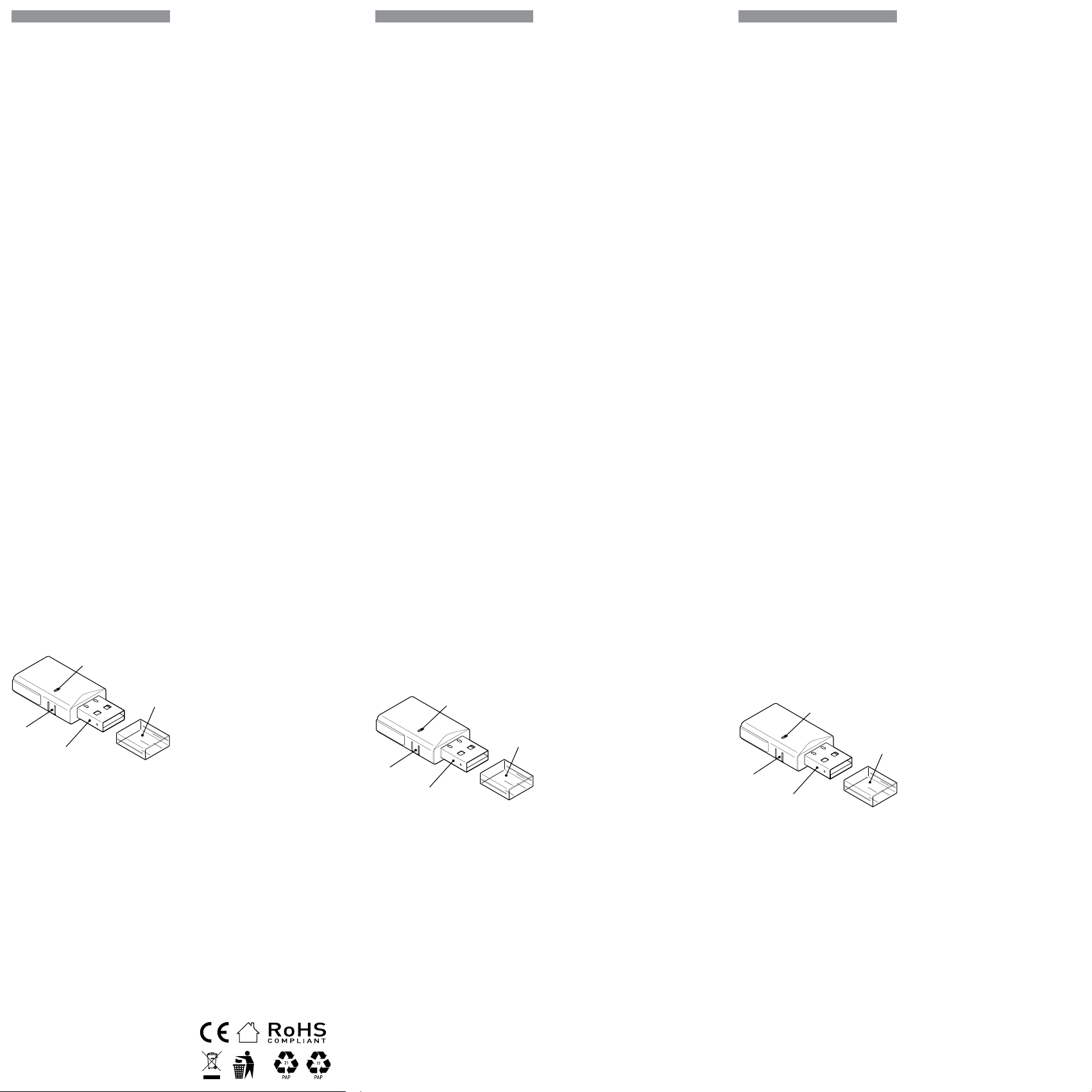
A
B
C
D
Imagen 1
Leyenda
• A: Indicador LED
• B: Botón de reinicio
• C: Enchufe USB A
• D: Tapa protectora
Instrucciones de instalación
⚠¡ATENCIÓN! No abra el dispositivo. No contie-
ne ninguna pieza que pueda ser mantenida por el
usuario. Por razones de seguridad y licencia, no se
permite el cambio y/o modicación no autoriza
-
dos del dispositivo.
⚠¡ATENCIÓN! Conecte el aparato sólo de la ma
-
nera indicada en estas instrucciones. Cualquier
otro método puede causar daños y/o lesiones.
⚠¡ATENCIÓN! ¡No use el dispositivo si muestra
signos de daño! ¡No intente reparar o reparar el
dispositivo usted mismo!
⚠¡ATENCIÓN! No instale el aparato en un lugar
donde pueda mojarse.
Retire la tapa protectora y conecte el aparato a un
puerto USB A estándar.
El LED se iluminará en azul, indicando que el apa
-
rato está encendido y en modo punto de acceso
(AP).
Uso de la aplicación móvil
Shelly Smart Control
Si decide utilizar el Dispositivo con la aplicación
móvil Shelly Smart Control y el servicio Shelly
Cloud, las instrucciones para conectar el Dispo-
sitivo a la nube y controlarlo a través de la App
Shelly se encuentran en la “Guía de la App”. La
PT
GUIA DO UTILIZADOR E DE
SEGURANÇA
ShellyBLU Gateway
Gateway inteligente de IoT de BLE
a Wi-Fi
Leia antes de utilizar
Este documento contém importante informação
técnica e de segurança relativa ao dispositivo,
sua utilização segura e instalação.
⚠
ATENÇÃO! Antes de iniciar a instalação, por
favor leia atentamente e na íntegra a documen-
tação incluída. O incumprimento dos proce-
dimentos recomendados poderão dar origem
a avarias, perigo à sua vida ou violação da lei.
A Shelly Europe Ltd. não se responsabiliza por
quaisquer perdas ou danos em caso de uma in-
correta instalação ou incorreta utilização deste
dispositivo.
Apresentação do Produto
Shelly® è una linea di dispositivi innovativi ges-
titi da microprocessori che permettono il con-
trollo remoto degli elettrodomestici attraverso
un telefono cellulare, un tablet, un PC o un siste
-
ma domotico. I dispositivi Shelly® sono in grado
di funzionare autonomamente in una rete Wi-Fi
locale o possono anche essere gestiti attraverso
servizi di automazione domestica cloud. Shelly
Cloud è un servizio di questo tipo a cui si può
accedere utilizzando un’applicazione mobile
Android o iOS o con qualsiasi browser internet
su https://control.shelly.cloud/. I dispositivi
Shelly® sono accessibili, controllati e monitorati
a distanza da qualsiasi luogo in cui l’utente ab
-
bia una connettività Internet, purché i dispositivi
siano collegati a un router Wi-Fi e a Internet. I
dispositivi Shelly® hanno un’interfaccia web
incorporata accessibile a http://192.168.33.1
nella rete Wi Fi, creata dal dispositivo in modalità
Access Point, o all’indirizzo URL del dispositivo
nella rete Wi-Fi a cui è connesso. L’interfaccia
web incorporata può essere utilizzata per moni-
torare e controllare il dispositivo, così come per
regolare le sue impostazioni.
Os dispositivos Shelly® podem comunicar dire-
tamente com outros dispositivos Wi-Fi através
do protocolo HTTP. Uma App é fornecida por
Shelly Europe Ltd.. Para mais informação, por
favor visite:
https://shelly-api-docs.shelly.cloud/
#shelly-family-overview.
Os dispositivos Shelly® são distribuidos com
rmware instalado em fábrica. Se forem ne-
cessárias atualizações ao rmware de forma
a manter os dispositivos em conformidade,
incluindo atualizações de segurança, Shelly
Europe Ltd. fornecerá as atualizações gratuita-
mente através do Interface Web embutido ou
da Aplicação Móvel Shelly, onde a informação
sobre a versão de rmware atual se encontra
acessível. A escolha em instalar ou não insta-
lar as atualizações de rmware do Dispositivo
é responsabilidade única do utilizador. Shelly
Europe Ltd. não se responsabiliza por qualquer
falha na conformidade do Dispositivo causada
pela não instalação das atualizações disponí-
veis em tempo útil, por parte do Utilizador.
O ShellyBLU Gateway (o dispositivo) é um ga-
teway inteligente de IoT de BLE a Wi-Fi num
dongle USB A.
A
B
C
D
Fig. 1
Legenda
• A: Indicador LED
• B: Botão de reinicialização
• C: Plugue do USB-A
• D: Tampa protetora
Instruções de Instalação
⚠
ATENÇÃO! Não abra o dispositivo. Ele não
contém nenhuma peça que possa ser reparada
pelo usuário. Por motivos de segurança e licen-
ça, não é permitida a alteração e/ou modica-
ção não autorizada do dispositivo.
⚠
ATENÇÃO! Conecte o Dispositivo apenas da
forma ilustrada nestas instruções. Qualquer ou-
tra forma poderá causar danos e/ou acidentes.
⚠
ATENÇÃO! Não use o dispositivo se ele apre-
sentar sinais de danos! Não tente consertar ou
fazer a manutenção do dispositivo por conta
própria!
⚠
ATENÇÃO! Não instale o dispositivo num
local que possa car molhado.
Remova a tampa protetora e conecte o disposi-
tivo a uma porta USB A padrão.
O LED acenderá em azul, indicando que o dispo-
sitivo está ligado e no modo Access Point (AP).
Utilizar a aplicação móvel
Shelly Smart Control
Se você optar por usar o dispositivo com o apli-
FR
NOTICE D’UTILISATION ET
CONSIGNES DE SÉCURITÉ
ShellyBLU Gateway
Passerelle IoT BLE vers Wi-Fi
À lire avant utilisation
Ce document contient des informations tech-
niques et des consignes de sécurité impor-
tantes concernant le dispositif, son utilisation
et son installation.
⚠
ATTENTION ! Avant de commencer l’instal-
lation, veuillez lire attentivement et entièrement
cette notice d’utilisation. Le non-respect des
procédures recommandées peut entraîner un
dysfonctionnement, représenter un danger ou
être une violation de la loi. Shelly Europe Ltd.
n’est pas responsable des pertes ou des dom-
mages causés lors d’une installation ou utilisa-
tion inadéquate de ce dispositif.
Présentation du produit
Shelly® est une gamme de dispositifs inno-
vants gérés par microprocesseur, qui per-
mettent de contrôler à distance les appareils
électriques par le biais d’un téléphone portable,
d’une tablette, d’un PC ou d’un système domo-
tique. Les dispositifs Shelly® peuvent fonc-
tionner de manière autonome connectés au
Wi-Fi ou ils peuvent également être exploités
par des services domotiques depuis le Cloud.
Shelly Cloud est un service qui peut être utili-
sé depuis l’application Android ou iOS, ou via
n’importe quel navigateur Internet sur https://
control.shelly.cloud/. Les dispositifs Shelly®
peuvent être utilisés et contrôlés à distance
depuis n’importe quel endroit où l’utilisateur
dispose d’une connexion Internet, à condition
que les dispositifs soient connectés au Wi-Fi
et à l’Internet. Les dispositifs Shelly® ont une
interface Web intégrée accessible à l’adresse
suivante http://192.168.33.1 au sein du réseau
Wi-Fi, créée par le dispositif en mode point
d’accès sans l ou à l’adresse URL du dispo-
sitif sur le réseau Wi-Fi auquel il est connecté.
L’interface Web intégrée peut être utilisée pour
surveiller et contrôler le dispositif ainsi que
pour ajuster ses paramètres.
Les dispositifs Shelly® peuvent communiquer
directement avec d’autres dispositifs connec-
tés en Wi-Fi par le biais du protocole HTTP. Une
API est fournie par Shelly Europe Ltd.. Pour
plus d’informations, veuillez visiter
https://shelly-api-docs.shelly.cloud/
#shelly-family-overview.
Les dispositifs Shelly® sont livrés avec un mi-
crologiciel (rmware) pré-installé. Si des mises
à jour du sont nécessaires pour maintenir les
dispositifs conformes ainsi que mettre à jour
les consignes de sécurité, Shelly Europe Ltd.
les fournira gratuitement depuis l’interface
Web intégrée au dispositif ou depuis l’applica-
tion Shelly, où les informations sur la version
actuelle du micrologiciel sont disponibles. Le
choix d’installer ou non les mises à jour du
micrologiciel du dispositif relève de la seule
responsabilité de l’utilisateur. Shelly Europe
Ltd. n’est aucunement responsable de tout
manque de la conformité du dispositif causé
par le fait que l’utilisateur n’a pas installé les
mises à jour fournies en temps voulu.
Shelly BLU Gateway (le Dispositif) est une pas-
serelle IoT BLE vers Wi-Fi dans une clé USB A.
A
B
C
D
Image 1
Légende
• A : Indicateur LED
• B : Bouton de réinitialisation
• C: Prise USB A
• D: Capuchon de protection
Instructions d’installation
⚠
ATTENTION ! Ne pas ouvrir le dispositif. Il ne
contient aucune pièce pouvant être entretenue
par l’utilisateur. Pour des raisons de sécurité et
de licence, il est interdit de modier le dispositif
sans autorisation.
⚠
ATTENTION ! Suivez les instructions indi-
quées pour connecter le Dispositif. Toute autre
méthode pourrait engendrer des dommages et/
ou des blessures.
⚠
ATTENTION ! Ne pas utiliser le dispositif
s’il présente des signes de détérioration ! N’es-
sayez pas d’entretenir ou de réparer le Dispositif
vous-même !
⚠
ATTENTION ! N’installez pas le Dispositif
dans un endroit susceptible d’être exposé à
l’humidité.
Retirez le capuchon de protection et branchez
le Dispositif sur un port USB A standard.
Le voyant doit être bleu, indiquant que le Dis-
positif est alimenté et qu’il est en mode point
d’accès (AP).
aplicación móvil Shelly y el servicio Shelly Cloud
no son condiciones para el buen funcionamiento
del Dispositivo. Este dispositivo puede utilizarse
con otros servicios y aplicaciones de domótica.
⚠¡ATENCIÓN! No permita que los niños jueguen
con los botones/interruptores conectados al apa-
rato. Mantenga los dispositivos que permiten el
control remoto de Shelly (teléfonos móviles, table-
tas, ordenadores) fuera del alcance de los niños.
Sigue la guía de tu dispositivo Shelly BLE sobre
cómo incluirlo en la aplicación móvil Shelly Smart
Control y el servicio en la nube.
Usuarios avanzados
Si desea utilizar el aparato localmente, conéc-
tese a su AP (SSID: ShellyBluGw-xxxxxxxxxxxx)
utilizando un dispositivo con Wi-Fi y escriba
http://192.168.33.1 en su navegador para acce-
der a la interfaz web integrada del aparato.
Haga clic en el símbolo Wi-Fi de la parte superior
para acceder a la conguración Wi-Fi del dispo-
sitivo.
Conecte el dispositivo a una red Wi-Fi local. Se
recomienda congurar una dirección IP estática.
Consulte la guía de la interfaz web del dispositivo
para obtener una descripción detallada en
https://shelly.link/blugw_wig
Haz clic en el símbolo de Bluetooth situado en la
parte superior para acceder a la conguración de
Bluetooth del dispositivo.
Activa la puerta de enlace Bluetooth.
Ahora, mediante scripts, puedes detectar dispo-
sitivos BLE que cumplan el protocolo BT Home,
leer su transmisión y, en función de los datos re-
cibidos, controlar otros dispositivos inteligentes
conectados a la misma red.
Indicación LED
• El indicador de luz azul se encenderá si está
en modo AP.
• El indicador de luz roja se encenderá si está en
modo STA y no está conectado a una red Wi-Fi.
• El indicador de luz amarilla se encenderá si
está en modo STA y está conectado a una red
Wi-Fi. no conectado a Shelly Cloud o Shelly
Cloud desactivado.
• El indicador de luz verde se encenderá si está
en modo STA y está conectado a una red Wi-Fi
y a Shelly Cloud.
• El indicador luminoso estará parpadeando en
rojo/azul si la actualización OTA está en curso.
Botón de reinicio
• Manténgalo pulsado durante 5 segundos para
el modo AP.
• Manténgalo pulsado durante 10 segundos
para restablecer los valores de fábrica.
Especicaciones
• Dimensiones (LxAxA): 45x20x8 mm /
1.77x0.79x0.21 in
• Temperatura ambiente: -20 °C a 40 °C /
-5 °F a 105 °F
• Humedad 30 % a 70 % HR
• Alimentación: 5 VCC (desde puerto USB tipo A)
• Consumo eléctrico: < 1 W
• Banda de radiofrecuencia: 2400 - 2495 MHz
• Potencia máxima de radiofrecuencia: <20 dBm
• Protocolo Wi-Fi: 802.11 b/g/n
• Alcance operativo de Wi-Fi (dependiendo de
las condiciones locales):
- hasta 50 m / 160 ft en exteriores
- hasta 30 m / 100 ft en interiores
• Protocolo Bluetooth: 4.2
• Alcance operativo de Bluetooth (dependiendo
de las condiciones locales):
- hasta 30 m / 100 ft en exteriores
- hasta 10 m / 33 ft en interiores
• CPU: ESP32
• Flash: 4 MB
• Horarios: 20
• Webhooks (acciones URL): 20 con 5 URLs por
hook
• Scripting: SÍ
• MQTT: SÍ
Declaración de conformidad
Shelly Europe Ltd. (antiguo EOOD de Allterco Ro-
botics) declara por medio de la presente que el
equipo de radio tipo ShellyBLU Gateway 1 cum
-
ple con las directivas 2014/53/UE, 2014/35/UE,
2014/30/UE, 2011/65/UE. El texto completo de la
declaración de conformidad de la UE está dispo
-
nible en la siguiente dirección web
https://shelly.link/blugw_DoC
Fabricante: Shelly Europe Ltd.
Dirección: 103 Cherni vrah Blvd., 1407 Soa,
Bulgarien
Tel: +359 2 988 7435
Correo electrónico: support@shelly.cloud
Sitio web ocial: https://www.shelly.com
Los cambios en la información de contacto son
publicados por el fabricante en el sitio web o
-
cial.
Todos los derechos de las marcas Shelly®, y
otros derechos de propiedad intelectual aso-
ciados a este dispositivo pertenecen a Shelly
Europe Ltd.
cativo móvel Shelly Smart Control e o serviço
de nuvem, as instruções sobre como conectar
o dispositivo à nuvem e controlá-lo por meio
do aplicativo Shelly Smart Control podem ser
encontradas no guia do aplicativo móvel. O
aplicativo móvel Shelly e o serviço Shelly Cloud
não são condições para que o Dispositivo fun-
cione corretamente. Este dispositivo pode ser
usado de forma independente ou com várias
outras plataformas e protocolos de automação
residencial.
⚠
ATENÇÃO! Não permita que crianças brin-
quem com os botões/comutadores conectados
ao Dispositivo. Mantenha os Dispositivos de
controlo remoto do Shelly (telemóveis, tablets,
PCs) fora do alcance das crianças.
Siga o guia do seu dispositivo Shelly BLE sobre
como incluí-lo no aplicativo móvel Shelly Smart
Control e no serviço de nuvem.
Usuários avançados
Se quiser usar o dispositivo localmente, conec-
te-se ao AP (SSID: ShellyBluGw-xxxx) usando
um dispositivo habilitado para Wi-Fi e digite
http://192.168.33.1 no navegador para aces-
sar a interface da Web integrada do dispositivo.
Clique no ícone de Wi-Fi na parte superior para
acessar as congurações de Wi-Fi do dispositivo.
Conecte o dispositivo a uma rede Wi-Fi local.
Recomendamos a conguração de um endere-
ço IP estático.
Para obter uma descrição detalhada, consulte
a ajuda da interface da Web do dispositivo em
https://shelly.link/blugw_wig
Clique no ícone Bluetooth na parte superior
para acessar as congurações de Bluetooth do
seu dispositivo.
Ative o gateway Bluetooth.
Agora, usando scripts, você pode detectar dis-
positivos BLE compatíveis com o protocolo BT
Home, ler sua transmissão e, com base nos
dados recebidos, controlar outros dispositivos
inteligentes conectados à mesma rede.
Indicação LED
• Indicador de luz Azul ligado se estiver em
modo AP.
• Indicador de luz Vermelha ligado se estiver
em modo STA e não conectado a uma rede
Wi-Fi.
• Indicador de luz Amarela ligado se estiver
em modo STA e conectado a uma rede Wi-
-Fi. Não conectado à Shelly Cloud ou Shelly
Cloud desativada.
• Indicador de luz Verde ligado se estiver em
modo STA, conectado a uma rede Wi-Fi e à
Shelly Cloud.
• O indicador luminoso estará intermitente en-
tre Vermelho/Azul se uma atualização OTA
estiver em progresso.
Botão de reinicialização
• Pressione durante 5 segundos para modo AP.
• Pressione durante 10 segundos para con-
guração de fábrica.
Especicações
• Dimensões (CxLxA): 45x20x8 mm /
1.77x0.79x0.21 in
• Temperatura ambiente: -20 °C a 40 °C /
-5 °F a 105 °F
• Umidade 30% a 70% RH
• Fonte de alimentação: 5 VCC (da porta USB
tipo A)
• Consumo elétrico: < 1 W
• Banda de radiofrequências: 2400 - 2495 MHz
• Potência máxima de radiofrequências:
<20 dBm
• Protocolo Wi-Fi: 802.11 b/g/n
• Alcance de operação de Wi-Fi (dependendo
das condições locais):
- até 50 m / 160 ft no exterior
- até 30 m / 100 ft no interior
• Protocolo Bluetooth: 4.2
• Alcance de operação de Bluetooth (depen-
dendo das condições locais):
- até 30 m / 100 ft no exterior
- até 10 m / 33 ft no interior
• CPU: ESP32
• Flash: 4 MB
• Agendamentos: 20
• Webhooks (ações URL): 20 com 5 URLs por
cada “hook”
• Scripting: Sim
• MQTT: Sim
Declaração de conformidade
A Shelly Europe Ltd. (ex-Allterco Robotics
EOOD) declara por este meio que o equipa-
mento rádio tipo ShellyBLU Gateway opera
conforme a Diretriz 2014/53/EU, 2014/35/EU,
2014/30/EU, 2011/65/EU. O texto completo da
declaração da UE sobre a conformidade está
disponível no seguinte endereço de internet
https://shelly.link/blugw_DoC
Fabricante: Shelly Europe Ltd.
Endereço: 103 Cherni vrah Blvd., 1407 Soa,
Bulgária
Tel.: +359 2 988 7435
E-mail: support@shelly.cloud
Site ocial: https://www.shelly.com
Alterações nos endereços de contato são pu-
blicados pelo Fabricante no website ocial.
Todos os direitos sobre a marca registada
Shelly® e outros direitos de propriedade inte-
lectual associados a este Dispositivo perten-
cem a Shelly Europe Ltd.
Utilisation de l’application
Shelly Smart Control
Si vous choisissez d’utiliser le Dispositif avec l’ap-
plication Shelly Smart Control et le service Shelly
Cloud, les instructions pour connecter le Dispositif
au Cloud et le contrôler depuis l’application Shelly
se trouvent dans le guide de l’application mobile.
L’application Shelly et le service Shelly Cloud ne
sont pas indispensables au bon fonctionnement
du Dispositif. Ce Dispositif peut être utilisé avec
d’autres services et applications domotiques.
⚠
ATTENTION ! Ne laissez pas les enfants jouer
avec les boutons/interrupteurs connectés au Dis-
positif. Gardez les dispositifs permettant de contrô-
ler Shelly à distance (téléphone portable, tablette,
ordinateur), hors de portée des enfants.
Suivez le guide d’installtion de votre dispositif
Shelly BLE pour savoir comment l’intégrer dans
l’application Shelly Smart Control et le service
Cloud.
Utilisateurs expérimentés
Si vous souhaitez utiliser le dispositif localement,
connectez-vous à son AP (SSID : ShellyBlu
-
Gw-xxxxxxxx) à l’aide d’un appareil compatible
Wi-Fi et tapez http://192.168.33.1 dans votre na-
vigateur pour accéder à l’interface Web intégrée
du dispositif.
Cliquez sur l’icône Wi-Fi en haut pour accéder aux
paramètres Wi-Fi du dispositif.
Connectez le dispositif au réseau Wi-Fi local. Nous
recommandons de dénir une adresse IP statique.
Pour une description détaillée, consultez le guide
de l’interface Web du dispositif à l’adresse sui-
vante
https://shelly.link/blugw_wig
Cliquez sur l’icône Bluetooth en haut pour accéder
aux paramètres Bluetooth du dispositif.
Activez la passerelle Bluetooth.
Désormais, à l’aide de scripts, vous pouvez détec-
ter les dispositifs BLE conformes au protocole BT
Home, lire leur transmission et, sur la base des
données reçues, contrôler d’autres dispositifs in-
telligents connectés au même réseau.
Indication par LED
• Le voyant bleu s’allume en mode AP.
• Le voyant rouge s’allume si l’appareil est en
mode STA et n’est pas connecté à un réseau
Wi-Fi.
• Le voyant jaune s’allume si l’appareil est en
mode STA et connecté à un réseau Wi-Fi. Non
connecté à Shelly Cloud ou Shelly Cloud dé-
sactivé.
• Le voyant lumineux vert sera allumé si en mode
STA et connecté à un réseau Wi-Fi et au Shelly
Cloud.
• L’indicateur lumineux clignotera en rouge/bleu
si la mise à jour OTA est en cours.
Bouton de réinitialisation
• Appuyez et maintenez enfoncé pendant 5 se-
condes pour le mode AP.
• Appuyez et maintenez enfoncé pendant 10 se-
condes pour réinitialiser les paramètres d’usine.
Caractéristiques techniques
• Dimensions (LxLxH) : 45x20x8 mm /
1.77x0.79x0.21 in
• Température ambiante : -20 °C à 40 °C /
-5 °F à 105 °F
• Humidité : 30 % à 70 %
• Alimentation électrique : 5 V DC (à partir du port
USB de type A)
• Consommation électrique : < 1 W
• Bande de radiofréquences : 2400-2495 MHz
• Puissance de radiofréquence maximale : < 20
dBm
• Norme Wi-Fi : 802.11 b/g/n
• Portée du Wi-Fi (en fonction des collectivités
locales) :
- jusqu’à 50 m / 164 ft à l’extérieur
- jusqu’à 30 m / 98 ft à l’intérieur
• Norme Bluetooth : 4.2
• Portée du Bluetooth (en fonction des collectivi
-
tés locales) :
- jusqu’à 30 m / 98 ft à l’extérieur
- jusqu’à 10 m / 33 ft à l’intérieur
• CPU : ESP32
• Flash : 4 MB
• Programmations : 20
• Webhooks (actions URL) : 20 avec 5 URLs par
hook
• Script : Oui
• MQTT : Oui
Déclaration de conformité
Par la présente, Shelly Europe Ltd. (anciennement
Allterco Robotics EOOD) déclare que l’équipement
radio de type ShellyBLU Gateway est conforme à la
directive 2014/53/UE, 2014/35/UE, 2014/30/UE,
2011/65/UE. Le texte complet de la déclaration
de conformité de l’UE est disponible à l’adresse
internet suivante
https://shelly.link/blugw_DoC
Fabricant : Shelly Europe Ltd.
Adresse : 103, Boulevard “Cherni vrah”, 1407 Soa,
Bulgarie
Tél : +359 2 988 7435
Email : support@shelly.cloud
Site ociel : https://www.shelly.com
Les modications des coordonnées, faites par le
fabricant, sont publiées sur le site ociel.
Tous les droits de la marque Shelly® et autres
droits de propriété intellectuelle associés à ce Dis-
positif appartiennent à Shelly Europe Ltd.
33/2023