English
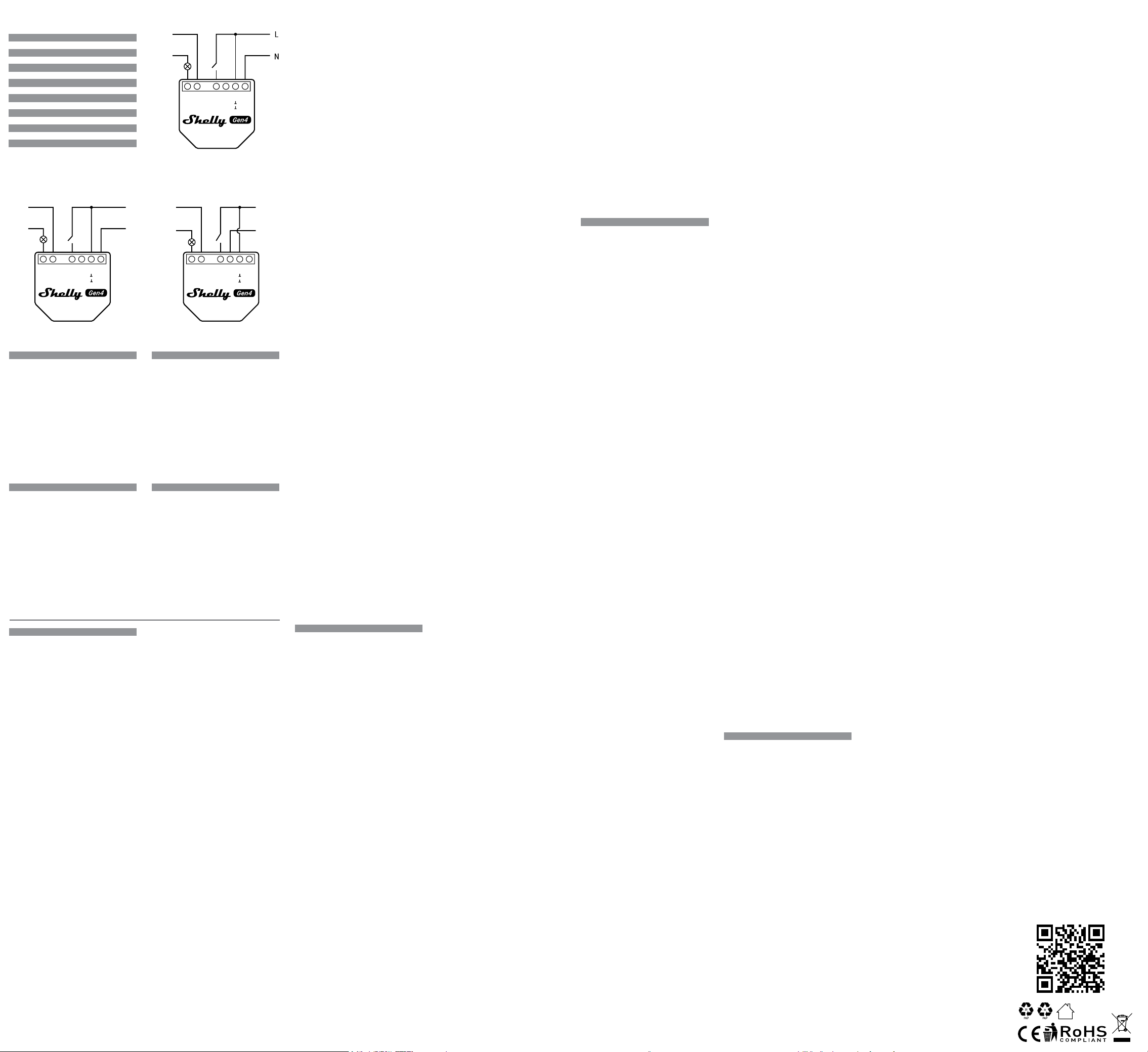
Wiring diagram
Fig. 1. 110-240 V~ power supply
Fig. 2. 24-48 V⎓ power supply
Fig. 3. 12 V⎓ stabilized power supply
Legend
Device terminals
• O: Load circuit output terminal
• I: Load circuit input terminal
• SW: Switch input terminal (controlling O)
• +12V: 12 V⎓ positive terminal
• L: Live terminal (110-240 V~)
• N: Neutral terminal
• +: 24-48 V⎓ positive terminal
• Ʇ: 12/24-48V⎓ ground terminal
Wires
• L: Live wire (110-240 V~)
• N: Neutral wire
• +: 12/24-48V ⎓ positive wire
• GND: 12/24-48V⎓ ground wire
Deutsch
Anschlussplan
Abb. 1. 110-240 V~ Spannungsversorgung
Abb. 2. 24-48 V⎓ Spannungsversorgung
Abb. 3. Stabilisierte 12 V⎓ Spannungsversorgung
Legende
Geräteanschlüsse
• O: Ausgangsklemme des Lastkreises
• I: Eingangsklemme des Lastkreises
• SW: Eingangsklemme des Schalters (Steuerung O)
• +12V: 12 V⎓ Positiver Anschluss
• L: Klemme für Phasenleiter (110-240 V~)
• N: Klemme für Neutralleiter
• +: 24-48 V⎓ Positiver Anschluss
• Ʇ: 12/24-48V ⎓ Erdungsklemme
Kabel
• L: Phasenleiterkabel (110-240 V~)
• N: Neutralleiterkabel
• +: 12/24-48 V⎓ Positives Kabel
• GND: 12/24-48V ⎓ Erdungskabel (Masse)
Italiano
Schema elettrico
Fig. 1. Alimentazione 110-240 V~
Fig. 2. Alimentazione 24-48 V⎓
Fig. 3. Alimentazione stabilizzata a 12 V⎓
Leggenda
Terminali del dispositivo
• O: Terminale di uscita del carico
• I: Terminale di ingresso del carico
• SW: Terminale d’ingresso dell’interruttore (controllo O)
• +12V: Terminale positivo 12V⎓
• L: Terminale di Fase (110-240 V~)
• N: Terminale di neutro
• +: Terminale positivo 24-48V⎓
• Ʇ: 12/24-48V⎓ terminale di terra
Cavi
• L: Cavo di Fase (110-240 V~)
• N: Cavo neutro
• +: Cavo positivo 12/24-48V⎓
• GND: Cavo di terra 12/24-48V⎓
Español
Esquema eléctrico
Fig. 1. Alimentación 110-240 V~
Fig. 2. Fuente de alimentación de 24-48 V⎓
Fig. 3. Fuente de alimentación estabilizada de 12 V⎓
Leyenda
Terminales del dispositivo
• O: Terminal de salida del circuito de carga
• I: Terminal de entrada del circuito de carga
• SW: Terminal de entrada del interruptor (control O)
• +12V: Terminal positivo 12V⎓
• L: Terminal de fase (110-240 V~)
• N: Terminal neutro
• +: 24-48 V⎓ positive terminal
• Ʇ: 12/24-48V⎓ terminal de tierra
Cables
• L: Cable de fase (110-240 V~)
• N: Cable neutro
• +: Cable positivo 12/24-48V⎓
• GND: Cable de tierra 12/24-48V⎓
English
Deutsch
Italiano
Español
Português
Français
Polski
Nederlands
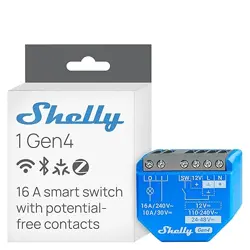
Shelly 1 Gen4
English
User and safety guide
Shelly 1 Gen4
Smart switch with potential-free contacts
Referred to in this document as “the Device”
Safety information
For safe and proper use, read this guide, and any other doc-
uments accompanying this product. Keep them for future
reference. Failure to follow the installation procedures can
lead to malfunction, danger to health and life, violation of law,
and/or refusal of legal and commercial guarantees (if any).
Shelly Europe Ltd. is not responsible for any loss or damage
in case of incorrect installation or improper operation of this
device due to failure to follow the user and safety instruc-
tions in this guide.
⚠This sign indicates safety information.
ⓘThis sign indicates an important note.
⚠WARNING! Risk of electric shock. Installation of the Device
to the power grid must be performed carefully by a qualied
electrician.
⚠WARNING! Before installing the Device, turn the circuit
breakers off. Use a suitable test device to make sure there is no
voltage on the wires you want to connect. When you are sure
that there is no voltage, proceed to the installation.
⚠WARNING! Before making any changes to the connections,
ensure there is no voltage present at the Device terminals.
⚠CAUTION! Connect the Device only to a power grid and ap-
pliances that comply with all applicable regulations. A short cir-
cuit in the power grid or any appliance connected to the Device
can cause re, property damage, and electric shock.
⚠CAUTION! The Device may be connected to and control only
electric circuits and appliances that comply with the applicable
standards and safety norms.
⚠CAUTION! Do not connect the Device to appliances that
exceed the specied maximum electric load.
⚠CAUTION! Connect the Device only in the way shown in
these instructions. Any other method could cause damage
and/or injury.
⚠CAUTION! The Device and the appliances connected to it,
must be secured by a cable protection switch in accordance
with EN60898-1 (tripping characteristic B or C, max. 16 A rated
current, min. 6kA interrupting rating, energy limiting class 3).
⚠CAUTION! Do not use the Device if it shows any sign of
damage or defect.
⚠CAUTION! Do not attempt to repair the Device yourself.
⚠CAUTION! The Device is intended only for indoor use.
⚠CAUTION! Keep the Device away from dirt and moisture.
⚠CAUTION! Do not allow children to play with the buttons/
switches connected to the Device. Keep the devices (mobile
phones, tablets, PCs) for remote control of Shelly away from
children.
Product description
Shelly 1 Gen4 is a Matter-compatible smart switch with po-
tential-free contacts. Equipped with a multi-protocol wireless
MCU, it supports Zigbee and Bluetooth connectivity for a
secure connection. The Device operates on both, AC and DC
power. Its small form factor allows retrotting into standard
electrical wall boxes, behind power sockets, light switches, or
other places with limited space.
The Device has an embedded web interface to monitor, con-
trol, and adjust its settings. The web interface is accessible
at http://192.168.33.1 when connected directly to the Device
access point or at its IP address when accessed from the
same network.
The Device can access and interact with other smart devices
or automation systems if they are in the same network infra
-
structure. Shelly Europe Ltd. provides APIs for the devices,
their integration, and cloud control. For more information, visit
https://shelly-api-docs.shelly.cloud.
ⓘThe Device comes with factory-installed rmware. To keep
it updated and secure, Shelly Europe Ltd. provides the latest
rmware updates free of charge. Access the updates through
either the embedded web interface or the Shelly Smart Control
mobile application. Installation of rmware updates is the us-
er’s responsibility. Shelly Europe Ltd. shall not be liable for any
lack of conformity of the Device caused by the failure of the
user to install the available updates in a timely manner.
Installation instructions
ⓘTo connect the Device, we recommend using solid sin-
gle-core wires or stranded wires with ferrules. The wires should
have insulation with increased heat resistance, not less than
PVC T105°C (221°F).
ⓘDo not use buttons or switches with built-in LED or neon
glow lamps.
ⓘWhen connecting wires to the Device terminals, consider the
specied conductor cross section and stripped length. Do not
connect multiple wires into a single terminal.
ⓘFor security reasons, after you successfully connect the De-
vice to the local Wi-Fi network, we recommend that you disable
or password-protect the Device AP (Access Point).
ⓘTo enable the access point and the Bluetooth connection
of the Device, press and hold the Reset/control button for 5
seconds.
ⓘTo perform a factory reset of the Device, press and hold the
Reset/control button for 10 seconds.
Connect the load circuit to the I and O terminals of the Device.
If you are using 110-240 V~ power supply (Fig. 1):
1. Connect the Live wire to the L terminal and the Neutral wire
to the N terminal.
2. Connect the switch to the SW terminal of the Device and
the Live wire.
If you are using 24-48 V⎓ power supply (Fig. 2):
ⓘThe voltage on the I and O terminals of the Device should
not exceed 30 V⎓.
1. Connect the DC+ wire to the + terminal and the GND wire
to the Ʇ terminal.
2. Connect the switch to the SW terminal and the GND wire.
If you are using stabilized 12V⎓ power supply (Fig. 3):
Complete the previous two steps. Instead of connecting the
12V+ to the + terminal, connect it to the 12V terminal.
Adding Zigbee Device
• To switch the Device from Matter rmware (default) to
Zigbee,press 5 times the Reset button. The Device stays
in pairing mode for 2 minutes, and you can nd it in your
home automation platformthrough the Zigbee Hub. If you
cannot nd the Device,press the Reset button3 times.
• To remove the Device, go to its page and delete it from
your home automation platform.
ⓘIn Zigbee mode, the AP of the Device is not available by
default. To enable it, the you should hold the Reset button for
5 seconds.
Setting up the Device via Matter
ⓘBefore you start, make sure you have:
• 2.4 GHz Wi-Fi network
• A Matter-compatible hub connected to the Internet
• A mobile device with Bluetooth enabled and a Matter-com
-
patible app installed
1. Enable the access point of the Device by pressing and hold-
ing the Reset/control button for 5 seconds.
2. Scan the Matter QR code inside the box.
3. Follow the instructions that appear on your screen to com
-
OI SW 12VL
+
N
110-240 V~
max. 240 V~
max. 30 V
⎓
24-48 V
⎓
GND
+
max. 240 V~
max. 30 V
⎓
OI SW 12VL N
+
OI SW 12VL N
+
12V+
GND
12 V
⎓
max. 240 V~
max. 30 V
⎓
plete the process.
ⓘKeep the QR code for future reference. If you reset the de-
vice, you will need that code again.
Specications
Physical
• Size (HxWxD): 37x42x16 mm / 1.46x1.65x0.63 in
• Weight: 26 g / 0.92 oz
• Screw terminals max torque: 0.4 Nm / 3.5 lbin
• Conductor cross section:0.2 to 2.5 mm² / 24 to 14 AWG
(solid, stranded, and bootlace ferrules)
• Conductor stripped length: 6 to 7 mm / 0.24 to 0.28 in
• Mounting: Wall console / In-wall box
• Shell material: Plastic
• Shell color: Blue
Environmental
• Ambient working temperature: -20°C to 40°C / -5°F
to 105°F
• Humidity: 30% to 70% RH
• Max. altitude: 2000 m / 6562 ft
Electrical
• Power supply:
- 110-240 V~
- 24-48 V⎓
- 12 V⎓
• Power consumption: < 1.2 W
Output circuits ratings
• Max. switching voltage:
- 240 V~
- 30 V⎓
• Max. switching current:
- 16 A (240 V~)
- 10 A (30 V⎓)
Sensors, meters
• Internal-temperature sensor: Yes
Radio
Wi-Fi
• Protocol: 802.11 b/g/n
• RF band: 2401-2483 МHz
• Max. RF power: < 20 dBm
• Range: Up to 50 m / 164 ft outdoors, up to 30 m / 98 ft
indoors (depending on local conditions)
Bluetooth
• Protocol: 4.2
• RF band: 2400 - 2483.5 MHz
• Max. RF power: <4 dBm
• Range: Up to 30 m / 98 ft outdoors, up to 10 m / 33 ft
indoors (depending on local conditions)
Zigbee
• Protocol: 802.15.4
• RF band: 2400 to 2483.5 MHz
• Max. RF power: < 20 dBm
• Range: Up to 100 m / 328 ft indoors and 300 meters / 984
ft outdoors (depends on local conditions)
Microcontroller unit
• CPU: ESP-Shelly-C68F
• Flash: 8 MB
Firmware capabilities
• Schedules: 20
• Webhooks (URL actions): 20 with 5 URLs per hook
• Wi-Fi range extender: Yes
• BLE Gateway: Yes
• Scripting: Yes
• MQTT: Yes
• Encryption: Yes
Shelly Cloud inclusion
The Device can be monitored, controlled, and set up through
our Shelly Cloud home automation service. You can use the
service through either our Android, iOS, or Harmony OS mobile
application or through any internet browser at https://control.
shelly.cloud/.
If you choose to use the Device with the application and Shelly
Cloud service, you can nd instructions on how to connect the
Device to the Cloud and control it from the Shelly app in the
application guide: https://shelly.link/app-guide.
The Shelly mobile application and Shelly Cloud service are not
conditions for the Device to function properly. This Device can
be used standalone or with various other home automation
platforms.
Troubleshooting
In case you encounter problems with the installation or opera-
tion of the Device, check its knowledge base page:
https://shelly.link/1_Gen4
Declaration of Conformity
Hereby, Shelly Europe Ltd. declares that the radio equipment
type Shelly 1 Gen4 is in compliance with Directive 2014/53/
EU, 2014/35/EU, 2014/30/EU, 2011/65/EU. The full text of
the EU declaration of conformity is available at the following
internet address:
https://shelly.link/1_Gen4_DoC
Manufacturer: Shelly Europe Ltd.
Address: 51 Cherni Vrah Blvd., bldg. 3, . 2-3, Soa 1407,
Bulgaria
Tel.: +359 2 988 7435
E-mail: support@shelly.cloud
Ocial website: https://www.shelly.com
Changes in contact information are published by the Manu-
facturer on the ocial website.
All rights to the trademark Shelly® and other intellectual rights
associated with this Device belong to Shelly Europe Ltd.
Deutsch
Benutzer- und Sicherheitsanleitung
Shelly 1 Gen4
Smarter Schalter mit potentialfreien Kontakten
In diesem Dokument als “das Gerät” bezeichnet
Sicherheitsinformationen
Lesen Sie diese Anleitung und alle anderen Dokumente, die
diesem Produkt beiliegen, um es sicher und ordnungsgemäß
zu verwenden. Bewahren Sie sie zum späteren Nachschla
-
gen auf. Die Nichtbeachtung der Installationsanweisungen
kann zu Fehlfunktionen, Gefahren für Gesundheit und Leben,
Gesetzesverstößen und/oder zur Verweigerung gesetzli-
cher und kommerzieller Garantien (falls vorhanden) führen.
Shelly Europe Ltd. haftet nicht für Verluste oder Schäden,
die durch eine fehlerhafte Installation oder einen unsach-
gemäßen Betrieb des Geräts aufgrund der Nichtbeachtung
der Benutzer- und Sicherheitshinweise in dieser Anleitung
entstehen.
⚠Dieses Zeichen weist auf Sicherheitshinweise hin.
ⓘDieses Zeichen weist auf einen wichtigen Hinweis hin.
⚠WARNUNG! Gefahr eines Stromschlags. Die Installation des
Geräts an das Stromnetz muss sorgfältig von einer qualizier
-
ten Elektrofachkraft durchgeführt werden.
⚠WARNUNG! Schalten Sie vor der Installation des Geräts die
Stromkreisunterbrecher aus. Verwenden Sie ein geeignetes
Prüfgerät, um sicherzustellen, dass an den anzuschließenden
Drähten keine Spannung vorhanden ist. Wenn Sie sicher sind,
dass keine Spannung vorhanden ist, fahren Sie mit der Instal
-
lation fort.
⚠WARNUNG! Bevor Sie Änderungen an den Anschlüssen vor-
nehmen, stellen Sie sicher, dass an den Geräteklemmen keine
Spannung anliegt.
⚠ACHTUNG! Schließen Sie das Gerät nur an ein Stromnetz
und Geräte an, die allen geltenden Vorschriften entsprechen.
Ein Kurzschluss im Stromnetz oder in einem an das Gerät
angeschlossenen Gerät kann zu Bränden, Sachschäden und
Stromschlägen führen.
⚠ACHTUNG! Das Gerät darf nur an Stromkreise und Geräte
angeschlossen und gesteuert werden, die den geltenden Nor
-
men und Sicherheitsnormen entsprechen.
⚠ACHTUNG! Schließen Sie das Gerät nicht an Geräte an,
die die angegebene maximale elektrische Belastung über
-
schreiten.
⚠ACHTUNG! Schließen Sie das Gerät nur auf die in dieser An-
leitung beschriebene Weise an. Jede andere Methode kann zu
Schäden und/oder Verletzungen führen.
⚠ACHTUNG! Das Gerät und die daran angeschlossenen
Geräte müssen durch einen Leitungsschutzschalter nach
EN60898-1 abgesichert sein (Auslösecharakteristik B oder C,
max. 16 A Nennstrom, min. 6 kA Ausschaltvermögen, Energie-
begrenzungsklasse 3).
⚠ACHTUNG! Verwenden Sie das Gerät nicht, wenn es Anzei-
chen von Beschädigungen oder Defekten aufweist.
⚠ACHTUNG! Versuchen Sie nicht, das Gerät selbst zu repa-
rieren.
⚠ACHTUNG! Das Gerät ist nur für die Verwendung in Innen-
räumen vorgesehen.
⚠ACHTUNG! Halten Sie das Gerät von Schmutz und Feuch-
tigkeit fern.
⚠ACHTUNG! Erlauben Sie Kindern nicht, mit den an das Gerät
angeschlossenen Tasten/Schaltern zu spielen. Halten Sie die
Geräte (Mobiltelefone, Tablets, PCs) zur Fernsteuerung des
Shelly von Kindern fern.
Produktbeschreibung
Shelly 1 Gen4 ist ein Matter-kompatibler smarter Schalter mit
potentialfreien Kontakten. Ausgestattet mit einer drahtlosen
Multi-Protokoll-MCU, unterstützt er Zigbee- und Bluetooth-
Konnektivität für eine sichere Verbindung. Das Gerät funk
-
tioniert sowohl mit AC-Wechselstrom als auch mit DC-Gleich-
strom. Sein kleiner Formfaktor ermöglicht den nachträglichen
Einbau in Standard-Elektrodosen, hinter Steckdosen, Licht-
schaltern oder anderen Orten mit begrenztem Platzangebot.
Das Gerät verfügt über eine integrierte Webschnittstelle zur
Überwachung, Steuerung und Anpassung seiner Einstellun-
gen. Die Webschnittstelle ist unter http://192.168.33.1 zu-
gänglich, wenn sie direkt mit dem Zugangspunkt des Geräts
verbunden ist, oder unter seiner IP-Adresse, wenn es mit dem-
selben Netzwerk verbunden ist.
Das Gerät kann auf andere intelligente Geräte oder Automati-
sierungssysteme zugreifen und mit ihnen interagieren, wenn
sie sich in derselben Netzwerkinfrastruktur benden. Shelly
Europe Ltd. bietet APIs für die Geräte, ihre Integration und
die Cloud-Steuerung. Für weitere Informationen besuchen Sie
https://shelly-api-docs.shelly.cloud.
ⓘDas Gerät wird mit einer werkseitig installierten Firmware
geliefert. Um es auf dem neuesten Stand und sicher zu hal-
ten, stellt Shelly Europe Ltd. die neuesten Firmware-Updates
kostenlos zur Verfügung. Sie können auf die Updates entwe-
der über die eingebettete Weboberäche oder über die Shelly
Smart Control Mobilanwendung zugreifen, wo Sie Details über
die neueste Firmware-Version nden können. Die Entschei-
dung, die Firmware-Updates zu installieren oder nicht, liegt in
der alleinigen Verantwortung des Benutzers. Shelly Europe Ltd.
haftet nicht für Konformitätsmängel des Geräts, die darauf zu-
rückzuführen sind, dass der Benutzer die verfügbaren Updates
nicht rechtzeitig installiert hat.
Installationsanleitung
ⓘFür den Anschluss des Geräts empfehlen wir die Ver-
wendung von einadrigen Volldrähten oder Litzendrähte mit
Aderendhülsen. Die Drähte sollten eine Isolierung mit erhöhter
Wärmebeständigkeit haben, mindestens PVC T105°C (221°F).
ⓘVerwenden Sie keine Tasten oder Schalter mit eingebauten
LED- oder Neonglühlampen.
ⓘBerücksichtigen Sie beim Anschließen von Drähten an die
Geräteklemmen den angegebenen Leiterquerschnitt und die
Abisolierlänge. Schließen Sie nicht mehrere Drähte an eine
einzige Klemme an.
ⓘNachdem Sie das Gerät erfolgreich mit dem lokalen Wi-Fi-
Netzwerk verbunden haben, empfehlen wir Ihnen aus Sicher
-
heitsgründen, den Geräte-AP (Access Point) zu deaktivieren
oder mit einem Passwort zu schützen.
ⓘUm den Zugangspunkt und die Bluetooth-Verbindung des
Geräts zu aktivieren, halten Sie die Steuertaste 5 Sekunden
lang gedrückt.
ⓘUm das Gerät auf die Werkseinstellungen zurückzusetzen,
halten Sie die Steuertaste 10 Sekunden lang gedrückt.
Schließen Sie den Lastkreis an die I- und O-Anschlüsse des
Geräts an.
Wenn Sie eine 110–240 V~ Spannungsversorgung verwen-
den (Abb. 1):
1. Verbinden Sie das Phasenleiterkabel mit der L-Klemme und
das Neutralleiterkabel mit der N-Klemme.
2. Verbinden Sie den Schalter mit dem SW-Anschluss des
Geräts und dem Phasenleiterkabel.
Wenn Sie eine 24-48 V⎓ Spannungsversorgung verwenden
(Abb. 2):
ⓘDie Spannung an den I- und O-Anschlüssen des Geräts sollte
30 V⎓ nicht überschreiten.
1. Verbinden Sie das DC+ -Kabel mit der +-Klemme und den
GND-Kabel mit der Ʇ-Klemme.
2. Verbinden Sie den Schalter mit der SW-Klemme und dem
GND-Kabel.
Wenn Sie eine stabilisierte 12⎓ Gleichpannungsversorgung
verwenden (Abb. 3):
Führen Sie die beiden vorherigen Schritte aus. Schließen
Sie die 12V+ nicht an die + Klemme, sondern an die 12V+
Klemme an.
Hinzufügen eines Zigbee-Geräts
• Um das Gerät von der Matter-Firmware (Standard) auf
Zigbee umzustellen, drücken Sie 5 Mal die Reset-Taste.
Das Gerät bleibt 2 Minuten lang im Pairing-Modus, und Sie
können es in Ihrer Heimautomatisierungsplattform über
den Zigbee-Hub nden. Wenn Sie das Gerät nicht nden
können, drücken Sie 3 Mal die Reset-Taste.
• Um das Gerät zu entfernen, gehen Sie auf seine Seite und
löschen Sie es aus Ihrer Heimautomatisierungsplattform.
ⓘIm Zigbee-Modus ist der AP des Geräts standardmäßig
nicht verfügbar. Um ihn zu aktivieren, müssen Sie die Reset-
Taste 5 Sekunden lang gedrückt halten.
Einrichten des Geräts über Matter
ⓘBevor Sie beginnen, stellen Sie sicher, dass Sie über Folgen-
des verfügen:
• 2,4 GHz Wi-Fi-Netzwerk
• Einen Matter-kompatiblen Hub, der mit dem Internet
verbunden ist
• Ein mobiles Gerät mit aktiviertem Bluetooth und installier-
ter Matter-kompatibler App
1. Aktivieren Sie den Zugangspunkt des Geräts, indem Sie
die Reset-/Steuertaste 5 Sekunden lang gedrückt halten.
2. Scannen Sie den Matter-QR-Code im Inneren der Box.
3. Befolgen Sie die Anweisungen, die auf dem Bildschirm er-
scheinen, um den Vorgang abzuschließen.
ⓘBewahren Sie den QR-Code für spätere Zwecke auf. Wenn
Sie das Gerät zurücksetzen, benötigen Sie diesen Code erneut.
Spezikation
Physisch
• Abmessungen (HxBxT): 37x42x16 mm / 1.46x1.65x0.63
in
• Gewicht: 26 g / 0.92 oz
• Schraubklemmen max Drehmoment: 0.4 Nm / 3.5 lbin
• Querschnitt des Leiters: 0.2 bis 2.5 mm² / 24 bis 14 AWG
(Voll-, Litzen- und Aderendhülsen)
• Abisolierlänge des Leiters: 6 bis 7 mm / 0.24 bis 0.28 in
• Montage: Unterputzdose
• Gehäusematerial: Kunststoff
• Gehäusefarbe: Blau
Umwelt
• Arbeitstemperatur: -20°C bis 40°C / -5°F bis 105°F
• Luftfeuchtigkeit: 30% bis 70% RH
• Max. Höhe ü.M.: 2000 m / 6562 ft
Elektrisch
• Stromversorgung:
- 110-240 V~
- 24-48 V⎓
- 12 V⎓
• Leistungsaufnahme: < 1.2 W
Nennwerte der Ausgangskreise
• Max. Schaltspannung:
- 240 V~
- 30 V⎓
• Max. Schaltstrom:
- 16 A (240 V~)
- 10 A (30 V⎓)
Sensoren, Messgeräte
• Interner Temperatursensor: Ja
Radio
WLAN
• Protokoll: 802.11 b/g/n
• HF-Band: 2401-2483 МHz
• Max. HF-Leistung: < 20 dBm
• Reichweite: Bis zu 50 m / 164 ft im Freien, bis zu 30
m / 98 ft in Gebäuden (abhängig von den baulichen
Gegebenheiten)
Bluetooth
• Protokoll: 4.2
• HF-Band: 2400 - 2483.5 MHz
• Max. HF-Leistung: <4 dBm
• Reichweite: Up to 30 m / 98 ft outdoors, up to 10 m / 33 ft
indoors (depending on local conditions)
Zigbee
• Protokoll: 802.15.4
• HF-Band: 2400 - 2483.5 MHz
• Max. HF-Leistung: <20 dBm
• Reichweite: Bis zu 100 m / 328 ft in Innenräumen, bis
zu 300 m / 984 ft im Freien (abhängig von den örtlichen
Gegebenheiten)
Mikrocontroller-Einheit
• CPU: ESP-Shelly-C68F
• Flash: 8 MB
Firmware-Funktionen
• Zeitpläne: 20
• WebHooks (URL-Aktionen): 20 mit 5 URLs pro Hook
• Wi-Fi Range Extender: Ja
• BLE Gateway: Ja
• Skripting: Ja
• MQTT: Ja
• Verschlüsselung: Ja
Shelly Cloud-Einbindung
Das Gerät kann über unseren Shelly Cloud Hausautomati-
sierungsdienst überwacht, gesteuert und eingerichtet wer-
den. Sie können den Dienst entweder über unsere Android-,
iOS- oder Harmony OS-Mobilanwendung oder über einen
beliebigen Internetbrowser unter https://control.shelly.cloud/
nutzen.
Wenn Sie sich dafür entscheiden, das Gerät mit der Anwen-
dung und dem Shelly Cloud-Dienst zu verwenden, nden Sie
Anweisungen zur Verbindung des Geräts mit der Cloud und
zu seiner Steuerung über die Shelly-App im Anwendungs-
handbuch: https://shelly.link/app-guide.
Die Shelly App und der Shelly Cloud Service sind keine Vor-
aussetzung für die ordnungsgemäße Funktion des Geräts.
Dieses Gerät kann eigenständig oder mit verschiedenen an-
deren Hausautomatisierungsplattformen verwendet werden.
Störungsbeseitigung
Sollten Sie Probleme mit der Installation oder dem Betrieb des
Geräts haben, sehen Sie auf der entsprechenden Wissens
-
datenbank-Seite nach:
https://shelly.link/1_Gen4
Konformitätserklärung
Hiermit erklärt Shelly Europe Ltd., dass die Funkanlage
Typ Shelly 1 Gen4 der Richtlinie 2014/53/EU, 2014/35/EU,
2014/30/EU, 2011/65/EU entspricht. Den vollständigen Text
der EU-Konformitätserklärung nden Sie unter folgender
Internetadresse:
https://shelly.link/1_Gen4_DoC
Hersteller: Shelly Europe Ltd.
Addresse: Cherni Vrah Blvd. 51, Gebäude 3, Etagen 2-3, Soa
1407, Bulgarien
Tel.: +359 2 988 7435
E-mail: support@shelly.cloud
Ozielle Website: https://www.shelly.com
Änderungen der Kontaktdaten werden vom Hersteller auf des-
sen oziellen Website veröffentlicht.
Alle Rechte an der Marke Shelly® und anderen geistigen
Eigentumsrechten im Zusammenhang mit diesem Gerät ge-
hören Shelly Europe Ltd.
Italiano
Guida all’uso e alla sicurezza
Shelly 1 Gen4
Interruttore intelligente con contatti a potenziale
zero
Nel presente documento viene indicato come “il Dispositivo”
Informazioni sulla sicurezza
Per un uso sicuro e corretto, leggere questa guida e tutti gli
altri documenti che accompagnano il prodotto. Conserva-
teli per future consultazioni. La mancata osservanza delle
procedure di installazione può causare malfunzionamenti,
pericoli per la salute e la vita, violazione della legge e/o ri-
uto delle garanzie legali e commerciali (se presenti). Shelly
Europe Ltd. non è responsabile di eventuali perdite o danni in
caso di installazione errata o di funzionamento improprio del
dispositivo a causa della mancata osservanza delle istruzio-
ni d’uso e di sicurezza contenute in questa guida.
⚠Questo cartello indica le informazioni sulla sicurezza.
ⓘQuesto segno indica una nota importante.
⚠AVVERTENZA! Rischio di scosse elettriche. L’installazione
del Dispositivo alla rete elettrica deve essere eseguita con cura
da un elettricista qualicato.
⚠AVVERTENZA! Disattivare l’interruttore generale dell’im-
pianto prima di procedere con l’installazione. Utilizzare un
tester adeguato per vericare l’assenza di tensione sui li da
collegare. Una volta accertata l’assenza di tensione, procedere
all’installazione.
⚠AVVERTENZA! Prima di apportare qualsiasi modica ai
collegamenti, accertarsi che non vi sia tensione sui terminali
del Dispositivo.
⚠ATTENZIONE! Collegare il Dispositivo solo a una rete
elettrica e a dispositivi conformi a tutte le normative vigenti.
Un cortocircuito nella rete elettrica o in qualsiasi apparecchio
collegato al Dispositivo può causare incendi, danni materiali e
scosse elettriche.
⚠ATTENZIONE! Il Dispositivo può essere collegato e control-
lare solo circuiti e apparecchi elettrici conformi agli standard e
alle norme di sicurezza applicabili.
⚠ATTENZIONE! Non collegare il Dispositivo ad apparecchi
che superano il carico elettrico massimo specicato.
⚠ATTENZIONE! Collegare il Dispositivo solo nel modo
indicato in queste istruzioni. Qualsiasi altro metodo potrebbe
causare danni e/o lesioni.
⚠ATTENZIONE! Il Dispositivo e gli apparecchi ad esso col-
legati devono essere protetti da un interruttore di protezione
dei cavi conforme alla norma EN60898-1 (caratteristica di
intervento B o C, corrente nominale massima di 16 A, potere di
interruzione minimo di 6 kA, classe di energia 3).
⚠ATTENZIONE! Non utilizzare il Dispositivo se presenta
segni di danni o difetti.
⚠ATTENZIONE! Non tentare di riparare il Dispositivo da soli.
⚠ATTENZIONE! Il Dispositivo è destinato esclusivamente
all’uso interno.
⚠ATTENZIONE! Tenere il Dispositivo lontano da sporco e
umidità.
⚠ATTENZIONE! Non permettere ai bambini di giocare con i
pulsanti/interruttori collegati al Dispositivo. Tenere i dispositivi
(telefoni cellulari, tablet, PC) per il controllo remoto di Shelly
lontano dai bambini.
Descrizione del prodotto
Shelly 1 Gen4 è un interruttore intelligente compatibile con
Matter con contatti a potenziale zero. Dotato di una MCU
wireless multiprotocollo, supporta la connettività Zigbee e
Bluetooth per una connessione sicura. Il dispositivo funziona
con alimentazione sia CA che CC. Le sue dimensioni ridotte
ne consentono l’installazione in scatole elettriche a muro
standard, dietro prese di corrente, interruttori della luce o in
altri luoghi con spazio limitato.
Il Dispositivo dispone di un’interfaccia web integrata per mo-
nitorare, controllare e regolare le impostazioni. L’interfaccia
web è accessibile all’indirizzo http://192.168.33.1 quando si
è collegati direttamente al punto di accesso del dispositivo o
al suo indirizzo IP quando si è collegati alla stessa rete.
Il Dispositivo può accedere e interagire con altri dispositivi
intelligenti o sistemi di automazione se si trovano nella stes-
sa infrastruttura di rete. Shelly Europe Ltd. fornisce API per
i dispositivi, la loro integrazione e il controllo via cloud. Per
ulteriori informazioni, visitare il sito https://shelly-api-docs.
shelly.cloud.
ⓘIl Dispositivo viene fornito con un rmware installato in fab-
brica. Per mantenerlo aggiornato e sicuro, Shelly Europe Ltd.
fornisce gratuitamente gli ultimi aggiornamenti del rmware.
È possibile accedere agli aggiornamenti tramite l’interfaccia
web incorporata o l’applicazione mobile Shelly Smart Control,
dove si possono trovare informazioni sull’ultima versione del
rmware. La scelta di installare o meno gli aggiornamenti del
rmware è di esclusiva responsabilità dell’utente. Shelly Euro-
pe Ltd. non sarà responsabile di eventuali difetti di conformità
del Dispositivo causati dalla mancata installazione tempestiva
degli aggiornamenti disponibili da parte dell’utente.
Istruzioni per l’installazione
ⓘPer collegare il Dispositivo, si consiglia di utilizzare li uni-
polari solidi o li a trefoli con puntali. I li devono avere un iso-
lamento con una maggiore resistenza al calore, non inferiore a
PVC T105°C (221°F).
ⓘNon utilizzare pulsanti o interruttori con lampade a LED o
al neon incorporate.
ⓘQuando si collegano i cavi ai terminali del Dispositivo, tenere
conto della sezione del conduttore e della lunghezza spelata
specicate. Non collegare più li a un singolo terminale.
ⓘPer motivi di sicurezza, dopo aver collegato il Dispositivo
alla rete Wi-Fi locale, si consiglia di disattivare o proteggere con
password l’AP (Access Point) del Dispositivo.
ⓘPer attivare il punto di accesso e la connessione Bluetooth
del Dispositivo, tenere premuto il tasto di reset per 5 secondi.
ⓘPer eseguire un reset di fabbrica del Dispositivo, tenere
premuto il pulsante di reset per 10 secondi.
Collegare il circuito di carico ai terminali I e O del Dispositivo.
Se si utilizza un’alimentazione da 110-240 V~ (Fig. 1):
1. Collegare il cavo sotto tensione al terminale L e il cavo
neutro al terminale N.
2. Collegare l’interruttore al terminale SW del Dispositivo e al
cavo sotto tensione.
Se si utilizza un’alimentazione da 24-48V⎓ (Fig. 2):
ⓘLa tensione sui terminali I e O del Dispositivo non deve
superare i 30V⎓.
1. Collegare il cavo CC+ al terminale + e il cavo GND al termi
-
nale Ʇ.
2. Collegare l’interruttore al terminale SW e al cavo GND.
Se si utilizza un’alimentazione stabilizzata a 12V⎓ (Fig. 3):
Completare le due fasi precedenti. Invece di collegare il 12V+
al terminale +, collegarlo al terminale 12V.
Aggiunta di un Dispositivo Zigbee
• Per passare il dispositivo dal rmware Matter (predenito)
a Zigbee, premere 5 volte il pulsante Reset. Il dispositivo
rimane in modalità di accoppiamento per 2 minuti ed è
possibile trovarlo nella piattaforma domotica attraverso
l’hub Zigbee. Se non si riesce a trovare il dispositivo,
premere 3 volte il pulsante Reset.
• Per rimuovere il dispositivo, accedere alla sua pagina ed
eliminarlo dalla piattaforma domotica.
ⓘIn modalità Zigbee, l’AP del dispositivo non è disponibile per
impostazione predenita. Per abilitarlo, è necessario tenere
premuto il pulsante Reset per 5 secondi.
Impostazione del Dispositivo tramite Matter
ⓘPrima di iniziare, assicurarsi di disporre di:
• Rete Wi-Fi a 2,4 GHz
• Un hub compatibile con Matter collegato a Internet
• Un dispositivo mobile con Bluetooth abilitato e un’applica-
zione Matter compatibile installata
1. Abilitare il punto di accesso del dispositivo tenendo premu-
to il pulsante di reset/controllo per 5 secondi.
2. Scansionare il codice QR di Matter all’interno della confe-
zione.
3. Seguire le istruzioni visualizzate sullo schermo per com-
pletare la procedura.
ⓘConservare il codice QR per riferimenti futuri. Se si ripristina
il dispositivo, il codice sarà nuovamente necessario.
Speciche tecniche
Fisico
• Dimensioni (HxLxP): 37x42x16 mm / 1.46x1.65x0.63 in
• Peso: 26 g / 0.92 oz
• Coppia massima morsetti a vite: 0.4 Nm / 3.5 lbin
• Sezione del conduttore: Da 0.2 a 2.5 mm² / da 24 a 14
AWG (puntali solidi, a trefoli e bootlace)
• Conductor stripped length: Da 6 a 7 mm / Da 0.24 a
0.28 in
• Montaggio: Scatola da incasso
• Materiale del guscio: Plastica
• Colore della conchiglia: Blu
Ambiente
• Temperatura di lavoro: -20°C a 40°C / -5°F a 105°F
• Umidità: 30% a 70% RH
• Altitudine massima: 2000 m / 6562 ft
Elettrico
• Alimentazione:
- 110-240 V~
- 24-48 V⎓
- 12 V⎓
• Consumo di energia: < 1.2 W
Valori nominali dei circuiti di uscita
• Tensione di commutazione massima:
- 240 V~
- 30 V⎓
• Corrente di commutazione massima:
- 16 A (240 V~)
- 10 A (30 V⎓)
Sensori, misuratori
• Sensore di temperatura interno: Sì
Protocollo di comunicazione radio
Wi-Fi
• Protocollo: 802.11 b/g/n
• Banda RF: 2401-2483 МHz
• Max. Potenza RF: < 20 dBm
• Portata: Fino a 50 m / 164 ft all’aperto, no a 30 m / 98 ft
al chiuso (a seconda della struttura locale)
Bluetooth
• Protocollo: 4.2
• Banda RF: 2400 - 2483.5 MHz
• Max. Potenza RF: <4 dBm
• Portata: Fino a 30 / 98 ft all’aperto, no a 10 m / 33 ft al
chiuso (a seconda della struttura locale)
Zigbee
• Protocollo: 802.15.4
• Banda RF: 2400 - 2483.5 MHz
• Max. Potenza RF: <20 dBm
• Portata: Fino a 100 m / 328 ft all’interno, no a 300 m /
984 ft all’aperto (a seconda delle condizioni locali)
Unità a microcontrollore
• CPU: ESP-Shelly-C68F
• Flash: 8 MB
Funzionalità del rmware
• Pianicazioni: 20
• Webhook (azioni URL): 20 con 5 URL per hook
• Estensore di portata Wi-Fi: Sì
• BLE Gateway: Sì
• Scripting: Sì
• MQTT: Sì
• Cifratura: Sì
Shelly Cloud Inclusione
Il Dispositivo può essere monitorato, controllato e impostato
attraverso il nostro servizio di automazione domestica Shelly
Cloud. È possibile utilizzare il servizio tramite la nostra appli-
cazione mobile per Android, iOS o Harmony OS o tramite un
qualsiasi browser Internet all’indirizzo https://control.shelly.
cloud/.
Se si sceglie di utilizzare il dispositivo con l’applicazione e il
servizio Shelly Cloud, è possibile trovare le istruzioni su come
collegare il dispositivo al Cloud e controllarlo dall’applicazio-
ne Shelly nella guida dell’applicazione: https://shelly.link/
app-guide.
L’applicazione mobile Shelly e il servizio Shelly Cloud non
sono condizioni per il corretto funzionamento del Dispositivo.
Questo Dispositivo può essere utilizzato da solo o con diverse
altre piattaforme di automazione domestica.
Risoluzione dei problemi
In caso di problemi con l’installazione o il funzionamento del
Dispositivo, consultare la pagina della Knowledge Base:
https://shelly.link/1_Gen4
Dichiarazione di Conformità
Con la presente, Shelly Europe Ltd. dichiara che il tipo di ap-
parecchiatura radio Shelly 1 Gen4 è conforme alla Direttiva
2014/53/UE, 2014/35/UE, 2014/30/UE, 2011/65/UE. Il testo
completo della dichiarazione di conformità UE è disponibile al
seguente indirizzo internet:
https://shelly.link/1_Gen4_DoC
Produttore: Shelly Europe Ltd.
Indirizzo: 51 Cherni Vrah Blvd., edicio 3, piani 2-3, Soa 1407,
Bulgaria
Tel.: +359 2 988 7435
E-mail: support@shelly.cloud
Sito uciale: https://www.shelly.com
Le modiche alle informazioni di contatto sono pubblicate dal
produttore sul sito web uciale.
Tutti i diritti sul marchio Shelly® e gli altri diritti intellettuali
associati a questo dispositivo appartengono a Shelly Europe
Ltd.
Español
Manual de uso y seguridad
Shelly 1 Gen4
Interruptor inteligente con contactos libres de
potencial
Denominado en este documento “el Dispositivo”
Información de seguridad
Para un uso seguro y adecuado, lea este manual y cualquier
otro documento que acompañe a este producto. Consérve
-
los para futuras consultas. El incumplimiento de los proce-
dimientos de instalación puede provocar un funcionamiento
incorrecto, peligro para la salud y la vida, violación de la
ley y/o denegación de garantías legales y comerciales (si
las hubiera). Shelly Europe Ltd. no se hace responsable de
ninguna pérdida o daño en caso de instalación incorrecta o
funcionamiento inadecuado de este aparato por no seguir
las instrucciones de uso y seguridad de este manual.
⚠Esta señal indica información de seguridad.
ⓘEste signo indica una nota importante.
⚠¡ADVERTENCIA! Riesgo de descarga eléctrica. La instala-
ción del Dispositivo a la red eléctrica debe ser realizada cuida-
dosamente por un electricista cualicado.
⚠¡ADVERTENCIA! Antes de instalar el Dispositivo, desconec-
te los disyuntores. Utilice un dispositivo de prueba adecuado
para asegurarse de que no haya tensión en los cables que
desea conectar. Cuando esté seguro de que no haya tensión,
proceda a la instalación.
⚠¡ADVERTENCIA! Antes de realizar cualquier cambio en las
conexiones, asegúrese de que no haya tensión en los termina
-
les del Dispositivo.
⚠¡ATENCIÓN! Conecte el Dispositivo únicamente a una red
eléctrica y a aparatos que cumplan todas las normas aplica
-
bles. Un cortocircuito en la red eléctrica o en cualquier aparato
conectado al Dispositivo puede provocar incendios, daños
materiales y descargas eléctricas.
⚠¡ATENCIÓN! El Dispositivo sólo puede conectarse y contro-
lar circuitos eléctricos y aparatos que cumplan las normas y
reglas de seguridad correspondientes.
⚠¡ATENCIÓN! No conecte el Dispositivo a aparatos que supe-
ren la carga eléctrica máxima especicada.
⚠¡ATENCIÓN! Conecte el Dispositivo sólo del modo indicado
en estas instrucciones. Cualquier otro método podría causar
daños y/o lesiones.
⚠¡ATENCIÓN! El Dispositivo y los aparatos conectados a él
deben estar protegidos por un interruptor de protección de
cables conforme a la norma EN60898-1 (característica de
disparo B o C, máx. 16 A de corriente nominal, mín. 6 kA de
capacidad de interrupción, clase de limitación de energía 3).
⚠¡ATENCIÓN! No utilice el Dispositivo si presenta algún signo
de daño o defecto.
⚠¡ATENCIÓN! No intente reparar el Dispositivo usted mismo.
⚠¡ATENCIÓN! El Dispositivo está destinado únicamente para
uso en interiores.
⚠¡ATENCIÓN! Mantenga el Dispositivo alejado de la suciedad
y la humedad.
⚠¡ATENCIÓN! No permita que los niños jueguen con los
botones/interruptores conectados al Dispositivo. Mantenga
los dispositivos (teléfonos móviles, tabletas, PC) de control
remoto de Shelly fuera del alcance de los niños.
Descripción del producto
Shelly 1 Gen4 es un interruptor inteligente compatible con
Matter con contactos libres de potencial. Equipado con una
MCU inalámbrica multiprotocolo, admite conectividad Zigbee
y Bluetooth para una conexión segura. Funciona tanto con
corriente alterna como con corriente continua. Su pequeño
tamaño permite instalarlo en cajas eléctricas de pared están-
dar, detrás de tomas de corriente, interruptores de luz u otros
lugares con espacio limitado.
El Dispositivo dispone de una interfaz web integrada para su-
pervisar, controlar y ajustar su conguración. La interfaz web
es accesible en http://192.168.33.1 cuando se conecta direc-
tamente al punto de acceso del dispositivo o en su dirección
IP cuando se conecta a la misma red.
El Dispositivo puede acceder e interactuar con otros disposi-
tivos inteligentes o sistemas de automatización si se encuen-
tran en la misma infraestructura de red. Shelly Europe Ltd.
proporciona API para los dispositivos, su integración y control
en la nube. Para más información, visite https://shelly-api-
docs.shelly.cloud.
ⓘEl Dispositivo viene con rmware de fábrica. Para mante-
nerlo actualizado y seguro, Shelly Europe Ltd. proporcionará
las últimas actualizaciones de rmware de forma gratuita.
Podrá acceder a las actualizaciones a través de la interfaz web
integrada o de la aplicación móvil Shelly Smart Control, donde
encontrará información detallada sobre la última versión del
rmware. La elección de instalar o no las actualizaciones del
rmware es responsabilidad exclusiva del usuario. Shelly Euro
-
pe Ltd. no será responsable de ninguna falta de conformidad
del dispositivo causada por el hecho de que el usuario no ins-
tale las actualizaciones disponibles en el momento oportuno.
Instrucciones de instalación
ⓘPara conectar el Dispositivo, se recomienda utilizar cables
rígidos de un solo núcleo o cables trenzados con casquillos.
Los cables deberán tener un aislamiento con mayor resistencia
al calor, no inferior a PVC T105°C (221°F).
ⓘNo utilice pulsadores o interruptores con lámparas LED o de
neón incandescentes incorporadas.
ⓘCuando conecte cables a los bornes del Dispositivo, tenga
en cuenta la sección transversal del conductor especicada
y la longitud pelada. No conecte varios cables a un mismo
borne.
ⓘPor razones de seguridad, después de conectar con éxito
el Dispositivo a la red Wi-Fi local, le recomendamos que des
-
active o proteja con contraseña el AP (punto de acceso) del
Dispositivo.
ⓘPara activar el punto de acceso y la conexión Bluetooth del
Dispositivo, mantenga pulsado el botón de control durante 5
segundos.
ⓘPara realizar un restablecimiento de fábrica del Dispositivo,
mantenga pulsado el botón de control durante 10 segundos.
Conecte el circuito de carga a los terminales I y O del Dispo
-
sitivo.
Si utiliza una fuente de alimentación de 110-240 V~ (Fig. 1):
1. Conecte el cable de fase al terminal L y el cable neutro al
terminal N.
2. Conecte el interruptor al terminal SW del Dispositivo y al
cable de fase.
Si utiliza una fuente de alimentación de 24-48V⎓ (Fig. 2):
ⓘLa tensión en los terminales I y O del Dispositivo no debe
superar los 30V⎓.
1. Conecte el cable DC+ al terminal + y el cable GND al termi
-
nal Ʇ.
2. Conecte el interruptor al terminal SW y el cable GND.
Si utiliza una fuente de alimentación estabilizada de 12V⎓
(Fig. 3):
Complete los dos pasos anteriores. En lugar de conectar el
12V+ al terminal +, conéctelo al terminal 12V.
Añadir Dispositivo Zigbee
• Para cambiar el Dispositivo del rmware Matter (por
defecto) a Zigbee, pulse 5 veces el botón Reset. El
Dispositivo permanecerá en modo de emparejamiento
durante 2 minutos, y podrás encontrarlo en tu plataforma
domótica a través del Zigbee Hub. Si no encuentra el
Dispositivo, pulse 3 veces el botón Reset.
• Para eliminar el Dispositivo, vaya a su página y elimínelo
de su plataforma domótica.
ⓘEn el modo Zigbee, el AP del Dispositivo no está disponible
por defecto. Para activarlo, mantenga pulsado el botón Reset
durante 5 segundos.
Conguración del Dispositivo a través de Matter
ⓘAntes de empezar, asegúrese de que dispone de:
• Una red Wi-Fi de 2,4 GHz
• Un concentrador compatible con Matter conectado a
Internet
• Un dispositivo móvil con Bluetooth activado y una app
compatible con Matter instalada
1. Habilite el punto de acceso del Dispositivo manteniendo
pulsado el botón de reinicio/control durante 5 segundos.
2. Escanee el código QR de Matter que se encuentra en el
interior de la caja.
3. Sigue las instrucciones que aparecen en su pantalla para
completar el proceso.
ⓘConserve el código QR para futuras consultas. Si restablece
el dispositivo, volverá a necesitar ese código.
Especicaciones
Físico
• Dimensiones (Alto x Ancho x Profundidad): 37x42x16 mm
/ 1.46x1.65x0.63 in
• Peso: 26 g / 0.92 oz
• Par máximo de los terminales de tornillo: 0.4 Nm / 3.5 lbin
• Sección transversal del conductor: 0.2 a 2.5 mm² / 24 a
14 AWG (casquillos macizos, trenzados y de cordón)
• Longitud pelada del conductor: 6 a 7 mm / 0.24 a 0.28 in
• Montaje: Caja empotrada
• Material de la cubierta: Plástico
• Color de la carcasa: Azul
Ambiental
• Temperatura de funcionamiento: -20°C a 40°C
• Humedad: 30% a 70% RH
• Altitud máxima: 2000 m / 6562 ft
Eléctrico
• Alimentación:
- 110-240 V~
- 24-48 V⎓
- 12 V⎓
• Consumo de energí a: < 1.2 W
Valores nominales de los circuitos de salida
• Tensión de conmutación máx:
- 240 V~
- 30 V⎓
• Corriente de conmutación máx:
- 16 A (240 V~)
- 10 A (30 V⎓)
Sensores, contadores
• Sensor de temperatura interno: Sí
Radio
Wi-Fi
• Protocolo: 802.11 b/g/n
• Banda RF: 2401-2483 МHz
• Max. Potencia RF: < 20 dBm
• Alcance: Hasta 50 m / 164 ft en exteriores, hasta 30 m /
98 ft en interiores (dependiendo de la construcción local)
Bluetooth
• Protocolo: 4.2
• Banda RF: 2400 - 2483.5 MHz
• Max. Potencia RF: <4 dBm
• Alcance: Hasta 30 m / 98 ft en exteriores, hasta 10 m / 33
ft en interiores (dependiendo de la construcción local)
Zigbee
• Protocolo: 802.15.4
• Banda RF: 2400 - 2483.5 MHz
• Max. Potencia RF: <20 dBm
• Alcance: Hasta 100 m / 328 ft en interiores, hasta 300 m
/ 984 ft en exteriores (dependiendo de las condiciones
locales)
Unidad de microcontrolador
• CPU: ESP-Shelly-C68F
• Flash: 8 MB
Capacidades del rmware
• Horarios: 20
• Webhooks (acciones URL): 20 con 5 URLs por hook
• Extensor de alcance Wi-Fi: Sí
• BLE Gateway: Sí
• Scripting: Sí
• MQTT: Sí
• Cifrado: Sí
Inclusión de Shelly Cloud
El Dispositivo se puede supervisar, controlar y congurar a
través de nuestro servicio de domótica Shelly Cloud. Puede
utilizar el servicio a través de nuestra aplicación móvil An
-
droid, iOS o Harmony OS o a través de cualquier navegador
de Internet en https://control.shelly.cloud/.
Si decide utilizar el Dispositivo con la aplicación y el servicio
Shelly Cloud, encontrará instrucciones sobre cómo conectar
el Dispositivo a la nube y controlarlo desde la aplicación She
-
lly en la guía de la aplicación: https://shelly.link/app-guide.
La aplicación Shelly y el servicio Shelly Cloud no son nece
-
sarios para que el dispositivo funcione correctamente. Este
dispositivo puede utilizarse de forma independiente o con
otras plataformas domóticas.
Resolución de problemas
Si tiene problemas con la instalación o el funcionamiento del
Dispositivo, consulte la página de la base de conocimientos:
https://shelly.link/1_Gen4
Declaración de Conformidad
Por medio de la presente, Shelly Europe Ltd. declara que el
equipo de radio tipo Shelly 1 Gen4 cumple con las directivas
2014/53/UE, 2014/35/UE, 2014/30/UE, 2011/65/UE. El texto
completo de la declaración de conformidad de la UE está dis-
ponible en la siguiente dirección web:
https://shelly.link/1_Gen4_DoC
Fabricante: Shelly Europe Ltd.
Dirección: Boulevard Cherni Vrah 51, edicio 3, plantas 2-3,
Sofía 1407, Bulgaria
Tel: +359 2 988 7435
E-mail: support@shelly.cloud
Sitio web ocial: https://www.shelly.com
El fabricante publicará los cambios en la información de con-
tacto en su sitio web ocial.
Todos los derechos sobre la marca comercial Shelly® y otros
derechos intelectuales asociados a este dispositivo pertene-
cen a Shelly Europe Ltd.
B2502
For UP PSTI Act Statement of Compliance scan
the QR code
Português
Esquema elétrico
Fig. 1. Fonte de alimentação 110-240 V~
Fig. 2. Fonte de alimentação 24-48 V⎓
Fig. 3. Fonte de alimentação estabilizada de 12 V⎓
Legenda
Terminais do dispositivo
• O: Terminal de saída de circuito em carga
• I: Terminal de entrada do circuito de carga
• SW: Terminal de entrada de comutador (controlo O)
• +12V: Terminal positivo 12V⎓
• L: Terminal ativo (110-240 V~)
• N: Terminal de Neutro
• +: Terminal positivo 24-48V⎓
• Ʇ: Terminal de terra 12/24-48V⎓
Cables
• L: Cabo ativo (110-240 V~)
• N: Cabo Neutro
• +: Cabo positivo 12/24-48V⎓
• GND: Cabo de terra 12/24-48V⎓
Français
Schéma de câblage
Image 1 : Alimentation 110-240 V~
Image 2 : Alimentation 24-48 V⎓
Image 3 : Alimentation stabilisée 12 V⎓
Légende
Bornes du dispositif
• O: Borne de sortie du circuit de charge
• I: Borne d’entrée du circuit de charge
• SW: Borne d’entrée de l’interrupteur/du commutateur
(controlo O)
• +12V: Borne positive 12 VDC
• L: Borne pour la Phase (110-240 V~)
• N: Borne pour le Neutre
• +: Borne positive 24-48 V⎓
• Ʇ: Borne de terre 12/24-48 V⎓
Fils
• L: Fil Phase (110-240 V~)
• N: Fil Neutre
• +: Fil positif 12/24-48 V⎓
• GND: Fil de terre 12/24-48 V⎓
Polski
Schemat połączeń
Rys. 1. Zasilanie 110-240 V~
Rys. 2. Zasilanie 24-48 V⎓
Rys. 3. Zasilacz stabilizowany 12 V⎓
Legenda
Zaciski urządzenia
• O: Zacisk wyjściowy obwodu obciążenia
• I: Zacisk wejściowy obwodu obciążenia
• SW: Zacisk wejściowy przełącznika (sterowanie O)
• +12V: 12 V⎓ zacisk dodatni
• L: Zacisk pod napięciem (110-240 V~)
• N: Zacisk neutralny
• +: 24-48 V⎓ zacisk dodatni
• Ʇ: 12/24-48V⎓ zacisk uziemienia
Przewody
• L: Przewód pod napięciem (110-240 V~)
• N: Przewód neutralny
• +: 12/24-48 V ⎓ przewód dodatni
• GND: przewód uziemiający 12/24-48 V⎓
Nederlands
Bedradingsschema
Fig. 1. 110-240 V~ voeding
Fig. 2. 24-48 V⎓ voeding
Fig. 3. 12 V⎓ gestabiliseerde voeding
Legenda
Apparaataansluitingen
• O: Uitgangsklem belastingscircuit
• I: Ingangsklem belastingscircuit
• SW: Ingangsklem voor schakelaar (besturing O)
• +12V: 12 V⎓ positieve klem
• L: Voedingsklem (110-240 V~)
• N: Neutrale aansluiting
• +: 24-48 V⎓ positieve terminal
• Ʇ: 12/24-48V⎓ aardklem
Draden
• L: stroomdraad (110-240 V~)
• N: Neutrale draad
• +: 12/24-48V ⎓ positieve draad
• GND: 12/24-48V⎓ aardedraad
English
Deutsch
Italiano
Español
Português
Français
Polski
Nederlands
Shelly 1 Gen4
Português
Manual do utilizador e de segurança
Shelly 1 Gen4
Interruptor inteligente com contactos sem
potencial
Referido neste documento como “o Dispositivo”
Informações de segurança
Para uma utilização segura e correcta, leia este manual
e quaisquer outros documentos que acompanhem este
produto. Guarde-os para referência futura. O não cumpri-
mento dos procedimentos de instalação pode levar a mau
funcionamento, perigo para a saúde e a vida, violação da lei
e/ou recusa de garantias legais e comerciais (se existirem).
A Shelly Europe Ltd. não se responsabiliza por quaisquer
perdas ou danos em caso de instalação incorrecta ou fun-
cionamento inadequado deste dispositivo devido ao não
cumprimento das instruções de utilização e segurança
contidas neste guia.
⚠Este sinal indica informações de segurança.
ⓘEste sinal indica uma nota importante.
⚠ATENÇÃO! Risco de choque elétrico. A instalação do Dis-
positivo na rede eléctrica deve ser efectuada cuidadosamente
por um eletricista qualicado.
⚠ATENÇÃO! Antes de instalar o Dispositivo, desligue os
disjuntores. Utilize um Dispositivo de teste adequado para se
certicar de que não existe tensão nos cabos que pretende
ligar. Quando tiver a certeza de que não há tensão, prossiga
com a instalação.
⚠ATENÇÃO! Antes de efetuar quaisquer alterações às liga-
ções, certique-se de que não existe qualquer tensão presente
nos terminais do Dispositivo.
⚠CUIDADO! Ligue o Dispositivo apenas a uma rede eléctrica
e a aparelhos que estejam em conformidade com todos os
regulamentos aplicáveis. Um curto-circuito na rede eléctrica
ou em qualquer aparelho ligado ao Dispositivo pode provocar
incêndios, danos materiais e choques eléctricos.
⚠CUIDADO! O Dispositivo só pode ser ligado e comandar
circuitos eléctricos e aparelhos que estejam em conformidade
com as normas e regras de segurança aplicáveis.
⚠CUIDADO! Não ligue o Dispositivo a aparelhos que exce-
dam a carga eléctrica máxima especicada.
⚠CUIDADO! Ligar o Dispositivo apenas da forma indicada
nestas instruções. Qualquer outro método pode causar danos
e/ou ferimentos.
⚠CUIDADO! O Dispositivo e os aparelhos a ele ligados devem
ser protegidos por um interrutor de proteção de cabos em con-
formidade com a norma EN60898-1 (caraterística de disparo B
ou C, máx. 16 A de corrente nominal, mín. 6 kA de capacidade
de interrupção, classe de limitação de energia 3).
⚠CUIDADO! Não utilizar o Dispositivo se este apresentar
qualquer sinal de dano ou defeito.
⚠CUIDADO! Não tente reparar o Dispositivo por si próprio.
⚠CUIDADO! O Dispositivo destina-se apenas a ser utilizado
em interiores.
⚠CUIDADO! Manter o Dispositivo afastado de sujidade e
humidade.
⚠CUIDADO! Não permita que as crianças brinquem com
os botões/interruptores ligados ao Dispositivo. Mantenha os
dispositivos (telemóveis, tablets, PCs) para controlo remoto do
Shelly afastados das crianças.
Descrição do produto
Shelly 1 Gen4 é um interrutor inteligente compatível com
Matter com contactos sem potencial. Equipado com um
MCU sem os multiprotocolo, suporta conetividade Zigbee
e Bluetooth para uma ligação segura. O dispositivo funciona
com alimentação CA e CC. O seu formato pequeno permite a
instalação posterior em caixas de parede eléctricas padrão,
atrás de tomadas de corrente, interruptores de luz ou outros
locais com espaço limitado.
O Dispositivo tem uma interface Web incorporada para moni
-
torizar, controlar e ajustar as suas denições. A interface Web
está acessível em http://192.168.33.1 quando ligado direta-
mente ao ponto de acesso do Dispositivo ou no seu endereço
IP quando ligado à mesma rede.
O Dispositivo pode aceder e interagir com outros dispositi-
vos inteligentes ou sistemas de automação se estiverem na
mesma infraestrutura de rede. A Shelly Europe Ltd. fornece
APIs para os dispositivos, a sua integração e o controlo na
nuvem. Para mais informações, visite https://shelly-api-docs.
shelly.cloud.
ⓘO Dispositivo vem com rmware instalado de fábrica. Para
o manter atualizado e seguro, a Shelly Europe Ltd. fornece gra-
tuitamente as últimas actualizações de rmware. Pode aceder
às actualizações através da interface web incorporada ou da
aplicação móvel Shelly Smart Control, onde pode encontrar
detalhes sobre a versão mais recente do rmware. A escolha
de instalar ou não as actualizações de rmware é da exclusiva
responsabilidade do utilizador. A Shelly Europe Ltd. não será
responsável por qualquer falta de conformidade do Dispositivo
causada pela falha do utilizador em instalar as actualizações
disponíveis de forma atempada.
Instruções de instalação
ⓘPara ligar o Dispositivo, recomendamos a utilização de os
sólidos de núcleo único ou os entrançados com virolas. Os
os devem ter um isolamento com maior resistência ao calor,
não inferior a PVC T105°C (221°F).
ⓘNão utilizar botões ou interruptores com lâmpadas LED ou
de néon incorporadas.
ⓘAo ligar os os aos terminais do Dispositivo, tenha em con-
sideração a secção transversal do condutor especicada e o
comprimento da tira. Não ligue vários os a um único terminal.
ⓘPor motivos de segurança, depois de ligar com êxito o
Dispositivo à rede Wi-Fi local, recomendamos que desactive
ou proteja com palavra-passe o AP (Ponto de acesso) do
Dispositivo.
ⓘPara ativar o ponto de acesso e a ligação Bluetooth do
Dispositivo, prima sem soltar o botão Controlo durante 5 se-
gundos.
ⓘPara efetuar uma reposição de fábrica do Dispositivo, prima
sem soltar o botão Controlo durante 10 segundos.
Ligar o circuito de carga aos terminais I e O do Dispositivo.
Se estiver a utilizar uma fonte de alimentação de 110-240
V~ (Fig. 1):
1. Ligue o cabo ativo ao terminal L e o cabo neutro ao termi-
nal N.
2. Ligar o interrutor ao terminal SW do Dispositivo e ao cabo
ativo.
Se estiver a utilizar uma fonte de alimentação de 24-48V⎓
(Fig. 2):
ⓘA tensão nos terminais I e O do Dispositivo não deve ex-
ceder 30V⎓.
1. Ligue o cabo DC+ ao terminal + e o cabo GND ao terminal
Ʇ.
2. Ligar o interrutor ao terminal SW e ao cabo GND.
Se estiver a utilizar uma fonte de alimentação estabilizada
de 12V⎓ (Fig. 3):
Complete os dois passos anteriores. Em vez de ligar o 12V+
ao terminal +, ligue-o ao terminal 12V.
Adicionar Dispositivo Zigbee
• Para mudar o Dispositivo do rmware Matter (prede-
nição) para Zigbee, prima 5 vezes o botão Reset. O
Dispositivo permanece no modo de emparelhamento
OI SW 12VL
+
N
110-240 V~
max. 240 V~
max. 30 V
⎓
24-48 V
⎓
GND
+
max. 240 V~
max. 30 V
⎓
OI SW 12VL N
+
OI SW 12VL N
+
12V+
GND
12 V
⎓
max. 240 V~
max. 30 V
⎓
durante 2 minutos e pode encontrá-lo na sua plataforma
de domótica através do Hub Zigbee. Se não conseguir
encontrar o Dispositivo, prima o botão Reset 3 vezes.
• Para remover o Dispositivo, aceda à sua página e elimine-
-o da sua plataforma de domótica.
ⓘNo modo Zigbee, o AP do dispositivo não está disponível
por defeito. Para o ativar, deve manter premido o botão Reset
durante 5 segundos.
Congurar o Dispositivo via Matter
ⓘAntes de começar, certique-se de que tem:
• Uma rede Wi-Fi de 2,4 GHz
• Um hub compatível com o Matter ligado à Internet
• Um dispositivo móvel com Bluetooth ativado e uma
aplicação compatível com o Matter instalada
1. Active o ponto de acesso do Dispositivo premindo e man-
tendo premido o botão de reinicialização/controlo durante
5 segundos.
2. Digitalize o código QR da Matéria dentro da caixa.
3. Siga as instruções que aparecem no ecrã para concluir o
processo.
ⓘGuarde o código QR para referência futura. Se reiniciar o
dispositivo, precisará novamente desse código.
Especicações
Físico
• Tamanho (AxLxP): 37x42x16 mm / 1.46x1.65x0.63 in
• Peso: 26 g / 0.92 oz
• Tensão máxima de aperto nos terminais: 0.4 Nm / 3.5 lbin
• Secção transversal do condutor: 0.2 a 2.5 mm² / 24 a 14
AWG (ferrolhos maciços, entrançados e bootlace)
• Secção transversal do condutor: 6 a 7 mm / 0.24 a 0.28 in
• Montagem: Caixa de encastrar
• Material da casca: Plástico
• Cor da casca: Azul
Ambiental
• Temperatura de funcionamento: -20°C a 40°C / -5°F
a 105°F
• Umidade: 30% a 70% RH
• Altitude máxima: 2000 m / 6562 ft
Elétrico
• Fonte de alimentação:
- 110-240 V~
- 24-48 V⎓
- 12 V⎓
• Consumo de energia: < 1.2 W
Classicações dos circuitos de saída
• Tensão máxima de comutação:
- 240 V~
- 30 V⎓
• Corrente máxima de comutação:
- 16 A (240 V~)
- 10 A (30 V⎓)
Sensores, contadores
• Sensor de temperatura interna: Sim
Rádio
Wi-Fi
• Protocolo: 802.11 b/g/n
• Banda RF: 2401-2483 МHz
• Máx. Potência de RF: < 20 dBm
• Alcance: Até 50 m / 164 ft no exterior, até 30 m / 98 ft no
interior (dependendo da construção local)
Bluetooth
• Protocolo: 4.2
• Banda RF: 2400 - 2483.5 MHz
• Máx. Potência de RF: <4 dBm
• Alcance: Até 30 m / 98 ft no exterior, até 10 m / 33 ft no
interior (dependendo da construção local)
Zigbee
• Protocolo: 802.15.4
• Banda RF: 2400 - 2483.5 MHz
• Máx. Potência de RF: <20 dBm
• Alcance: Até 100 m / 328 ft no interior, até 300 m / 984 ft
no exterior (dependendo das condições locais)
Unidade de microcontrolador
• CPU: ESP-Shelly-C68F
• Flash: 8 MB
Funzionalità del rmware
• Horários: 20
• Webhooks (acções URL): 20 com 5 URLs por hook
• Extensor de alcance Wi-Fi: Sim
• BLE Gateway: Sim
• Scripting: Sim
• MQTT: Sim
• Encriptação: Sim
Shelly Cloud Inclusão
O Dispositivo pode ser monitorizado, controlado e congura-
do através do nosso serviço de automação residencial Shelly
Cloud. Pode utilizar o serviço através da nossa aplicação
móvel Android, iOS ou Harmony OS ou através de qualquer
navegador de Internet em https://control.shelly.cloud/ .
Se optar por utilizar o Dispositivo com a aplicação e o serviço
Shelly Cloud, pode encontrar instruções sobre como ligar o
Dispositivo à Cloud e controlá-lo a partir da aplicação Shelly
no guia da aplicação: https://shelly.link/app-guide.
O aplicativo móvel Shelly e o serviço Shelly Cloud não são
condições para que o Dispositivo funcione corretamente.
Este Dispositivo pode ser usado de forma autónoma ou com
várias outras plataformas de domótica.
Resolução de problemas
Se tiver problemas com a instalação ou o funcionamento
do Dispositivo, consulte a sua página da base de dados de
conhecimento:
https://shelly.link/1_Gen4
Declaração de Conformidade
A Shelly Europe Ltd. declara por este meio que o equipamento
rádio tipo Shelly 1 Gen4 opera conforme a Diretriz 2014/53/
EU, 2014/35/EU, 2014/30/EU, 2011/65/EU. O texto completo
da declaração da UE sobre a conformidade está disponível no
seguinte endereço de internet:
https://shelly.link/1_Gen4_DoC
Fabricante: Shelly Europe Ltd.
Endereço: 51 Cherni Vrah Blvd., edifício 3, pisos 2-3, Sóa
1407, Bulgária
Tel: +359 2 988 7435
E-mail: support@shelly.cloud
Site ocial: https://www.shelly.com
As alterações nas informações de contacto são publicadas
pelo fabricante no sítio Web ocial.
Todos os direitos sobre a marca registada Shelly® e outros
direitos intelectuais associados a este Dispositivo pertencem
à Shelly Europe Ltd.
Français
Notice d’utilisation et consignes de
sécurité
Shelly 1 Gen4
Interrupteur/commutateur intelligent avec
contacts sans potentiel
Désigné dans ce document par le terme “le Dispositif”
Informations de sécurité
Pour une utilisation sûre et appropriée, lisez cette notice
et tout autre document accompagnant ce produit. Conser-
vez-les pour pouvoir vous y référer ultérieurement. Le
non-respect des procédures d’installation peut entraîner
un dysfonctionnement, danger pour votre santé et vie, une
violation de la loi et/ou le refus des garanties légales et
commerciales (le cas échéant). Shelly Europe Ltd. n’est
pas responsable de toute perte ou de tout dommage en cas
d’installation incorrecte ou de fonctionnement incorrect de
ce dispositif en raison du non-respect des instructions d’uti-
lisation et de sécurité contenues dans ce guide.
⚠Ce symbole indique une information de sécurité.
ⓘCe symbole indique une note importante.
⚠AVERTISSEMENT ! Risque d’électrocution. L’installation du
Dispositif sur le réseau électrique doit être effectuée avec soin
par un électricien qualié.
⚠AVERTISSEMENT ! Avant d’installer le Dispositif, mettez les
disjoncteurs hors tension. Utilisez un appareil de test approprié
pour vous assurer qu’il n’y ait pas de tension sur les ls que
vous voulez brancher. Lorsque vous êtes sûrs qu’il n’y a pas de
tension, procédez à l’installation.
⚠AVERTISSEMENT ! Avant de modier les branchements, as-
surez-vous qu’il n’y ait pas de tension aux bornes du Dispositif.
⚠ATTENTION ! Ne raccordez le Dispositif qu’à un réseau
électrique et à des appareils conformes à toutes les réglemen-
tations en vigueur. Un court-circuit dans le réseau électrique ou
tout appareil connecté au Dispositif peut engendrer un incen-
die, choc électrique et des dommages matériels.
⚠ATTENTION ! Le Dispositif ne peut être raccordé et contrô-
ler que des circuits électriques et des appareils conformes aux
normes et aux règles de sécurité en vigueur.
⚠ATTENTION ! Ne pas brancher le Dispositif à des appareils
qui dépassent la charge électrique maximale indiquée.
⚠ATTENTION ! Branchez le Dispositif uniquement de la ma-
nière indiquée dans cette notice. Toute autre méthode pourrait
entraîner des dommages et/ou des blessures.
⚠ATTENTION ! Le Dispositif et les appareils qui y sont rac-
cordés doivent être protégés par un interrupteur de protection
de câbles conforme à la norme EN60898-1 (caractéristique de
déclenchement B ou C, 16 A de courant nominal max., 6 kA
de pouvoir de coupure min., classe de limitation d’énergie 3).
⚠ATTENTION ! N’utilisez pas le Dispositif s’il présente des
signes de détérioration ou de défaut.
⚠ATTENTION ! N’essayez pas de réparer le Dispositif vous-
même.
⚠ATTENTION ! Le Dispositif est conçu uniquement pour une
utilisation à l’intérieur.
⚠ATTENTION ! Conservez le Dispositif à l’abri de la saleté et
de l’humidité.
⚠ATTENTION ! Ne laissez pas les enfants jouer avec les bou-
tons/interrupteurs branchés au Dispositif. Gardez les appareils
(téléphones portables, tablettes, PC) permettant de contrôler le
dispositif Shelly à distance hors de portée des enfants.
Présentation du produit
Shelly 1 Gen4 est un interrupteur intelligent compatible Matter
avec des contacts sans potentiel. Équipé d’un MCU sans l
multi-protocole, il prend en charge les connexions Zigbee et
Bluetooth pour une connexion sécurisée, il prend en charge
la connectivité Zigbee et Bluetooth pour une connexion sécu-
risée. Le Dispositif fonctionne aussi bien en courant alternatif
qu’en courant continu. Sa petite taille permet de l’installer
dans des boîtes d’encastrement, derrière des prises de cou-
rant, des interrupteurs ou dans d’autres endroits où l’espace
est limité.
Le Dispositif est doté d’une interface web intégrée qui permet
de le surveiller, de le contrôler et d’en régler les paramètres.
L’interface web est accessible à l’adresse http://192.168.33.1
lorsqu’il est connecté directement au point d’accès de l’ap-
pareil ou à son adresse IP lorsqu’il est connecté au même
réseau.
Le Dispositif peut accéder à d’autres dispositifs connectés
ou systèmes d’automatisation et interagir avec eux s’ils se
trouvent dans la même infrastructure réseau. Shelly Europe
Ltd. fournit des API pour les dispositifs, leur intégration et le
contrôle dans le Cloud. Pour plus d’informations, rendez-vous
à l’adresse suivante https://shelly-api-docs.shelly.cloud.
ⓘLe Dispositif est livré avec un micrologiciel installé en usine.
Pour le maintenir à jour et le sécuriser, Shelly Europe Ltd. four-
nit gratuitement les dernières mises à jour de celui-ci. Vous
pouvez accéder aux mises à jour via l’interface web intégrée
ou l’application mobile Shelly Smart Control, où vous trouverez
des détails sur la dernière version du micrologiciel. Le choix
d’installer ou non les mises à jour du micrologiciel relève de la
seule responsabilité de l’utilisateur. Shelly Europe Ltd. n’est pas
responsable de tout défaut de conformité du Dispositif causé
par le fait que l’utilisateur n’a pas installé les mises à jour dis
-
ponibles en temps voulu.
Instructions d’installation
ⓘPour brancher le Dispositif, nous recommandons d’utiliser
des ls unipolaires solides ou des ls torsadés avec des em
-
bouts. Les ls doivent avoir une isolation avec une meilleure
résistance à la chaleur, pas moins que le PVC T105 °C (221 °F).
ⓘN’utilisez pas de boutons ou d’interrupteurs avec des
lampes LED ou néon intégrées.
ⓘLors du branchement des ls aux bornes du Dispositif, tenez
compte de la section du conducteur et de la longueur dénudée
spéciées. Ne pas brancher plusieurs ls à une seule borne.
ⓘPour des raisons de sécurité, après avoir connecté le Dis-
positif au réseau Wi-Fi local, nous vous recommandons de
désactiver ou de protéger par mot de passe le point d’accès
(AP) du Dispositif.
ⓘPour activer le point d’accès (AP) et la connexion Bluetooth
du Dispositif, appuyez sur le bouton de commande et mainte-
nez-le pendant 5 secondes.
ⓘPour effectuer une réinitialisation aux paramètres d’usine
du Dispositif, appuyez sur le bouton de commande et mainte
-
nez-le pendant 10 secondes.
Branchez le circuit de charge aux bornes I et O du Dispositif.
Si vous utilisez une alimentation 110-240 V~ (Image 1)
1. Branchez le l Phase à la borne L et le Neutre à la borne N.
2. Branchez l’interrupteur à la borne SW du Dispositif et au l
Phase.
Si vous utilisez une alimentation 24-48 V⎓ (Image 2) :
ⓘLa tension sur les bornes I et O du Dispositif ne doit pas
dépasser 30 V⎓.
1. Branchez le l DC (CC)+ à la borne + et le l GND à la borne
Ʇ.
2. Branchez l’interrupteur à la borne SW et au l GND.
Si vous utilisez une alimentation stabilisée de 12 V⎓ (image
3) :
Effectuez les deux étapes précédentes. Au lieu de brancher le
12V+ à la borne +, branchez-le à la borne 12 V.
Ajout d’un Dispositif Zigbee
• Pour passer le Dispositif du micrologiciel Matter (par
défaut) à Zigbee, appuyez 5 fois sur le bouton de réinitia-
lisation. Le Dispositif reste en mode appairage pendant
2 minutes et vous pouvez le trouver sur votre plateforme
domotique via le Hub Zigbee. Si vous ne trouvez pas le
Dispositif, appuyez 3 fois sur le bouton de réinitialisation.
• Pour supprimer le Dispositif, allez sur sa page et suppri
-
mez-le de votre plateforme domotique.
ⓘEn mode Zigbee, l’AP de le Dispositif n’est pas disponible
par défaut. Pour l’activer, vous devez maintenir le bouton Reset
enfoncé pendant 5 secondes.
Conguration du Dispositif via Matter
ⓘAvant de commencer, assurez-vous que vous disposez
• d’un réseau Wi-Fi 2,4 GHz
• d’un hub compatible avec Matter connecté à l’Internet
• d’un dispositif mobile avec Bluetooth activé et une applica-
tion compatible avec Matter installée
1. Activez le point d’accès du Dispositif en appuyant sur le
bouton de réinitialisation/contrôle et en le maintenant pen-
dant 5 secondes.
2. Scannez le code QR Matter qui se trouve à l’intérieur de la
boîte.
3. Suivez les instructions qui s’achent à l’écran pour termi-
ner la procédure.
ⓘConservez le code QR pour vous y reporter ultérieurement.
Si vous réinitialisez le dispositif, vous aurez à nouveau besoin
de ce code.
Caractéristiques techniques
Physiques
• Dimensions (LxPxH) : 37x42x16 mm / 1.46x1.65x0.63in
• Poids : 26 g / 0.92 oz
• Serrage max. du domino électrique : 0.4 Nm / 3.5 lbin
• Diamètre de câble : 0.2 à 2.5 mm² / 24 à 14 AWG
(embouts pleins, torsadés et à lacets)
• Longueur du conducteur dénudé : 6 à 7 mm / 0.24 à
0.28 in
• Montage : Boîte d’encastrement
• Matériau du boîtier : Plastique
• Couleur du boîtier : Bleu
Environnementales
• Température de fonctionnement : -20 °C à 40 °C / -5
°F à 105 °F
• Humidité : 30 % à 70 %
• Altitude max. : 2000 m / 6562 ft
Électriques
• Alimentation électrique :
- 110-240 V~
- 24-48 V⎓
- 12 V⎓
• Consommation électrique : < 1.2 W
Caractéristiques des circuits de sortie
• Tension de commutation max. :
- 240 V~
- 30 V⎓
• Courant de commutation max. :
- 16 A (240 V ~)
- 10 A (30 V⎓)
Capteurs, compteurs
Capteur de température interne : Oui
Protocole de communication radio
Wi-Fi
• Protocole: 802.11 b/g/n
• Bande RF : 2401-2483 МHz
• Puissance RF max. : < 20 dBm
• Portée : Jusqu’à 50 m / 164 ft à l’extérieur, jusqu’à 30 m /
98 ft à l’intérieur (en fonction des collectivités locales)
Bluetooth
• Protocole: 4.2
• Bande RF : 2400 - 2483.5 MHz
• Puissance RF max. : <4 dBm
• Portée : Jusqu’à 30 m / 98 ft à l’extérieur, jusqu’à 10 m /
33 ft à l’intérieur (en fonction des collectivités locales)
Zigbee
• Protocole: 802.15.4
• Bande RF: 2400 - 2483.5 MHz
• Puissance RF max: <20 dBm
• Portée :Jusqu’à 100 m / 328 ft à l’intérieur, jusqu’à 300 m
/ 984 ft à l’extérieur (en fonction des collectivités locales)
Unité du microcontrôleur
• CPU: ESP-Shelly-C68F
• Flash : 8 MB
Capacités du micrologiciel
• Programmations : 20
• Webhooks (actions URL) : 20 avec 5 URL par crochet Web
• Répéteur Wi-Fi : Oui
• BLE Gateway: Oui
• Scripts : Oui
• MQTT : Oui
• Cryptage: Oui
Intégration de Shelly Cloud
Le Dispositif peut être surveillé, contrôlé et conguré par le
biais de notre service domotique Shelly Cloud. Vous pouvez
utiliser ce service depuis notre application Android, iOS ou
Harmony OS ou bien depuis n’importe quel navigateur Inter-
net à l’adresse https://control.shelly.cloud/.
Si vous choisissez d’utiliser le Dispositif avec l’application et
le service Shelly Cloud, vous trouverez des instructions sur la
manière de connecter le dispositif au Cloud et de le contrôler
à partir de l’application Shelly dans le guide de l’application à
l’adresse suivante https://shelly.link/app-guide.
L’application Shelly et le service Shelly Cloud ne sont pas indis
-
pensables au bon fonctionnement du Dispositif. Ce Dispositif
peut être utilisé de manière autonome ou avec d’autres plate
-
formes domotiques.
Résolution des problèmes
Si vous rencontrez des problèmes avec l’installation ou
le fonctionnement de ce Dispositif, consultez la Base de
connaissances :
https://shelly.link/1_Gen4
Déclaration de Conformité
Par la présente, Shelly Europe Ltd. déclare que l’équipement
radio de type Shelly 1 Gen4 est conforme à la directive
2014/53/UE, 2014/35/UE, 2014/30/UE, 2011/65/UE. Le texte
intégral de la déclaration de conformité de l’UE est disponible
à l’adresse Internet suivante :
https://shelly.link/1_Gen4_DoC
Fabricant : Shelly Europe Ltd.
Adresse : 51 Boulevard Cherni Vrah, bâtiment 3, étages 2-3,
Soa 1407, Bulgarie
Tél. : +359 2 988 7435
E-mail: support@shelly.cloud
Site Internet ociel : https://www.shelly.com
Les changements des coordonnées sont publiés par le fabri-
cant sur le site Internet ociel.
Tous les droits de la marque Shelly® et les autres droits
intellectuels associés à ce Dispositif appartiennent à Shelly
Europe Ltd.
Polski
Instrukcja obsługi i bezpieczeństwa
Shelly 1 Gen4
Inteligentny przełącznik ze stykami
bezpotencjałowymi
Zwane w niniejszym dokumencie “Urządzeniem”
Informacje dotyczące bezpieczeństwa
Aby zapewnić bezpieczne i prawidłowe użytkowanie, na-
leży przeczytać niniejszą instrukcję oraz wszelkie inne
dokumenty dołączone do tego produktu. Należy zachować
je na przyszłość. Nieprzestrzeganie procedur instalacji
może prowadzić do nieprawidłowego działania, zagrożenia
zdrowia i życia, naruszenia prawa i/lub odmowy gwarancji
prawnych i handlowych (jeśli takie istnieją). Shelly Europe
Ltd. nie ponosi odpowiedzialności za jakiekolwiek straty
lub szkody w przypadku nieprawidłowej instalacji lub nie
-
właściwego działania tego urządzenia z powodu nieprze-
strzegania instrukcji obsługi i bezpieczeństwa zawartych w
niniejszej instrukcji.
⚠Ten znak wskazuje informacje dotyczące bezpieczeństwa.
ⓘTen znak oznacza ważną informację.
⚠OSTRZEŻENIE! Ryzyko porażenia prądem elektrycznym.
Instalacja urządzenia w sieci elektrycznej musi zostać wyko-
nana przez wykwalikowanego elektryka.
⚠OSTRZEŻENIE! Przed instalacją urządzenia należy wy-
łączyć wyłączniki automatyczne. Użyj odpowiedniego urzą-
dzenia testowego, aby upewnić się, że na przewodach, które
chcesz podłączyć, nie ma napięcia. Po upewnieniu się, że nie
ma napięcia, należy przystąpić do instalacji.
⚠OSTRZEŻENIE! Przed dokonaniem jakichkolwiek zmian w
połączeniach należy upewnić się, że na zaciskach urządzenia
nie ma napięcia.
⚠UWAGA! Urządzenie należy podłączać wyłącznie do sieci
elektrycznej i urządzeń zgodnych z obowiązującymi przepisa-
mi. Zwarcie w sieci elektrycznej lub jakimkolwiek urządzeniu
podłączonym do urządzenia może spowodować pożar, uszko-
dzenie mienia i porażenie prądem elektrycznym.
⚠UWAGA! Urządzenie może być podłączane i sterowane
wyłącznie przez obwody elektryczne i urządzenia zgodne z
obowiązującymi standardami i normami bezpieczeństwa.
⚠UWAGA! Nie należy podłączać urządzenia do odbiorni-
ków przekraczających określone maksymalne obciążenie
elektryczne.
⚠UWAGA! Urządzenie należy podłączać wyłącznie w spo-
sób przedstawiony w niniejszej instrukcji. Każda inna metoda
może spowodować uszkodzenie i/lub obrażenia ciała.
⚠UWAGA! Urządzenie i podłączone do niego urządzenia
muszą być zabezpieczone wyłącznikiem kablowym zgodnym
z normą EN60898-1 (charakterystyka wyzwalania B lub C, prąd
znamionowy maks. 16 A prądu znamionowego, min. 6 kA prą-
du przerywanego, klasa ograniczenia energii 3).
⚠UWAGA! Nie należy używać urządzenia, jeśli wykazuje ono
jakiekolwiek oznaki uszkodzenia lub wady.
⚠UWAGA! Nie należy podejmować prób samodzielnej na-
prawy urządzenia.
⚠UWAGA! Urządzenie jest przeznaczone wyłącznie do użyt-
ku w pomieszczeniach.
⚠UWAGA! Urządzenie należy przechowywać z dala od zanie-
czyszczeń i wilgoci.
⚠UWAGA! Nie pozwalaj dzieciom bawić się przyciskami/
przełącznikami podłączonymi do urządzenia. Urządzenia (te-
lefony komórkowe, tablety, komputery PC) służące do zdalne-
go sterowania Shelly należy trzymać z dala od dzieci.
Opis produktu
Shelly 1 Gen4 to inteligentny przełącznik kompatybilny z Mat-
ter z bezpotencjałowymi stykami. Wyposażony w wielopro-
tokołowy bezprzewodowy MCU, obsługuje łączność Zigbee
i Bluetooth w celu zapewnienia bezpiecznego połączenia.
Urządzenie działa zarówno na zasilaniu AC, jak i DC. Jego
niewielka obudowa umożliwia montaż w standardowych
elektrycznych puszkach ściennych, za gniazdkami elektrycz-
nymi, włącznikami światła lub w innych miejscach o ograni-
czonej przestrzeni.
Urządzenie ma wbudowany interfejs sieciowy do monitoro
-
wania, sterowania i dostosowywania jego ustawień. Interfejs
sieciowy jest dostępny pod adresem http://192.168.33.1 w
przypadku bezpośredniego połączenia z punktem dostępu
urządzenia lub pod adresem IP w przypadku dostępu z tej
samej sieci.
Urządzenie może uzyskiwać dostęp i wchodzić w interakcje z
innymi inteligentnymi urządzeniami lub systemami automa
-
tyki, jeśli znajdują się one w tej samej infrastrukturze siecio-
wej. Shelly Europe Ltd. zapewnia interfejsy API dla urządzeń,
ich integrację i kontrolę w chmurze. Więcej informacji można
znaleźć na stronie https://shelly-api-docs.shelly.cloud.
ⓘUrządzenie jest dostarczane z fabrycznie zainstalowanym
oprogramowaniem sprzętowym. Aby zapewnić jego aktualiza-
cję i bezpieczeństwo, Shelly Europe Ltd. zapewnia najnowsze
aktualizacje oprogramowania układowego bezpłatnie. Dostęp
do aktualizacji można uzyskać za pośrednictwem wbudowa-
nego interfejsu internetowego lub aplikacji mobilnej Shelly
Smart Control. Za instalację aktualizacji oprogramowania
odpowiada użytkownik. Shelly Europe Ltd. nie ponosi odpo
-
wiedzialności za brak zgodności urządzenia spowodowany
brakiem zainstalowania przez użytkownika dostępnych aktu
-
alizacji w odpowiednim czasie.
Instrukcje instalacji
ⓘDo podłączenia urządzenia zaleca się stosowanie prze-
wodów jednożyłowych lub linkowych z tulejkami. Przewody
powinny mieć izolację o podwyższonej odporności termicznej,
nie mniejszej niż PVC T105°C (221°F).
ⓘNie używaj przycisków lub przełączników z wbudowanymi
diodami LED lub neonowymi lampami jarzeniowymi.
ⓘPodczas podłączania przewodów do zacisków urządzenia
należy wziąć pod uwagę określony przekrój przewodu i dłu-
gość odizolowanego przewodu. Nie należy podłączać wielu
przewodów do jednego zacisku.
ⓘZe względów bezpieczeństwa po pomyślnym podłączeniu
urządzenia do lokalnej sieci Wi-Fi zalecamy wyłączenie lub za-
bezpieczenie hasłem punktu dostępowego urządzenia (AP).
ⓘAby włączyć punkt dostępu i połączenie Bluetooth urządze-
nia, naciśnij i przytrzymaj przycisk resetowania/sterowania
przez 5 sekund.
ⓘAby przywrócić ustawienia fabryczne urządzenia, naciśnij
i przytrzymaj przez 10 sekund przycisk resetowania/stero-
wania.
Podłącz obwód obciążenia do zacisków I i O urządzenia.
W przypadku korzystania z zasilania 110-240 V~ (rys. 1):
1. Podłącz przewód pod napięciem do zacisku L, a przewód
neutralny do zacisku N.
2. Podłącz przełącznik do zacisku SW urządzenia i przewodu
pod napięciem.
Jeśli używany jest zasilacz 24-48 V⎓ (rys. 2):
ⓘNapięcie na zaciskach I i O urządzenia nie powinno prze-
kraczać 30 V⎓.
1. Podłącz przewód DC+ do zacisku +, a przewód GND do
zacisku Ʇ.
2. Podłącz przełącznik do zacisku SW i przewodu GND.
Jeśli używasz stabilizowanego zasilania 12V⎓ (rys. 3):
Wykonaj poprzednie dwa kroki. Zamiast podłączać 12V+ do
zacisku +, podłącz go do zacisku 12V.
Dodawanie urządzenia Zigbee
• Aby przełączyć urządzenie z rmware Matter (domyślne-
go) na Zigbee, naciśnij 5 razy przycisk Reset. Urządzenie
pozostanie w trybie parowania przez 2 minuty i można
je znaleźć na platformie automatyki domowej za pośred
-
nictwem koncentratora Zigbee. Jeśli nie możesz znaleźć
urządzenia, naciśnij przycisk Reset 3 razy.
• Aby usunąć urządzenie, przejdź do jego strony i usuń je z
platformy automatyki domowej.
ⓘW trybie Zigbee punkt dostępowy urządzenia nie jest do-
myślnie dostępny. Aby go włączyć, należy przytrzymać przy-
cisk Reset przez 5 sekund.
Konguracja urządzenia za pomocą aplikacji
Matter
ⓘPrzed rozpoczęciem upewnij się, że posiadasz:
• Sieć Wi-Fi 2,4 GHz
• Koncentrator kompatybilny z Matter podłączony do
Internetu
• Urządzenie mobilne z włączoną funkcją Bluetooth i
zainstalowaną aplikacją kompatybilną z Matter
1. Włącz punkt dostępu urządzenia, naciskając i przytrzy-
mując przycisk resetowania/sterowania przez 5 sekund.
2. Zeskanuj kod QR Matter znajdujący się wewnątrz pudełka.
3. Postępuj zgodnie z instrukcjami wyświetlanymi na ekranie,
aby zakończyć proces.
ⓘZachowaj kod QR do wykorzystania w przyszłości. Jeśli
zresetujesz urządzenie, będziesz potrzebować tego kodu
ponownie.
Specykacje
Fizyczny
• Rozmiar (wys. x szer. x gł.): 37x42x16 mm /
1.46x1.65x0.63 in
• Waga: 26 g / 0.92 oz
• Maksymalny moment obrotowy zacisków śrubowych:
0,4 Nm / 3,5 lbin
• Przekrój przewodu: od 0,2 do 2,5 mm² / od 24 do 14 AWG
(przewody pełne, skręcone i tulejki zaciskowe)
• Długość odizolowanego przewodu: 6 do 7 mm / 0,24
do 0,28 cala
• Montaż: Konsola ścienna / puszka naścienna
• Materiał obudowy: Tworzywo sztuczne
• Kolor powłoki: Niebieski
Środowisko
• Temperatura robocza otoczenia: -20°C do 40°C / -5°F
do 105°F
• Wilgotność: od 30% do 70% wilgotności względnej
• Maksymalna wysokość: 2000 m / 6562 ft
Elektryczny
• Zasilanie:
- 110-240 V~
- 24-48 V⎓
- 12 V⎓
• Pobór mocy: < 1.2 W
Wartości znamionowe obwodów wyjściowych
• Maks. napięcie przełączania:
- 240 V~
- 30 V⎓
• Maks. prąd przełączania:
- 16 A (240 V~)
- 10 A (30 V⎓)
Czujniki, mierniki
• Wewnętrzny czujnik temperatury:Tak
Radio
Wi-Fi
• Protokół: 802.11 b/g/n
• Pasmo RF: 2401-2483 MHz
• Maks. Moc RF: < 20 dBm
• Zasięg: Do 50 m / 164 ft na zewnątrz, do 30 m / 98 ft w
pomieszczeniach (w zależności od warunków lokalnych)
Bluetooth
• Protokół: 4.2
• Pasmo RF: 2400 - 2483,5 MHz
• Maks. Moc RF: <4 dBm
• Zasięg: Do 30 m / 98 stóp na zewnątrz, do 10 m / 33
stóp w pomieszczeniach (w zależności od warunków
lokalnych)
Zigbee
• Protokół: 802.15.4
• Pasma RF: od 2400 do 2483,5 MHz
• Maks. Moc RF: < 20 dBm
• Zasięg: Do 100 m / 328 stóp w pomieszczeniach i
300 metrów / 984 stóp na zewnątrz (w zależności od
warunków lokalnych)
Jednostka mikrokontrolera
• CPU: ESP-Shelly-C68F
• Flash: 8 MB
Możliwości oprogramowania układowego
• Harmonogramy: 20
• Webhooki (akcje URL): 20 z 5 adresami URL na hak
• Wzmacniacz zasięgu Wi-Fi: Tak
• Bramka BLE: Tak
• Obsługa skryptów: Tak
• MQTT: Tak
• Szyfrowanie: Tak
Włączenie Shelly Cloud
Urządzenie można monitorować, kontrolować i konguro-
wać za pośrednictwem naszej usługi automatyki domowej
Shelly Cloud. Z usługi można korzystać za pośrednictwem
naszej aplikacji mobilnej na system Android, iOS lub Harmo-
ny OS lub za pośrednictwem dowolnej przeglądarki interneto-
wej pod adresem https://control.shelly.cloud/.
Jeśli zdecydujesz się używać urządzenia z aplikacją i usługą
Shelly Cloud, możesz znaleźć instrukcje dotyczące podłącza-
nia urządzenia do chmury i sterowania nim z aplikacji Shelly
w przewodniku po aplikacji: https://shelly.link/app-guide.
Aplikacja mobilna Shelly i usługa Shelly Cloud nie są wa-
runkiem prawidłowego działania urządzenia. To urządzenie
może być używane samodzielnie lub z różnymi innymi plat-
formami automatyki domowej.
Rozwiązywanie problemów
W przypadku napotkania problemów z instalacją lub działa-
niem urządzenia, należy sprawdzić jego stronę bazy wiedzy:
https://shelly.link/1_Gen4
Deklaracja zgodności
Niniejszym Shelly Europe Ltd. oświadcza, że typ urządzenia
radiowego Shelly 1 Gen4 jest zgodny z dyrektywą 2014/53/
UE, 2014/35/UE, 2014/30/UE, 2011/65/UE. Pełny tekst
deklaracji zgodności UE jest dostępny pod następującym
adresem internetowym:
https://shelly.link/1_Gen4_DoC
Producent: Shelly Europe Ltd.
Adres: 51 Cherni Vrah Blvd., bldg. 3, . 2-3, Soa 1407, Buł-
garia
Tel: +359 2 988 7435
E-mail: support@shelly.cloud
Ocjalna strona: https://www.shelly.com
Zmiany danych kontaktowych są publikowane przez Produ-
centa na ocjalnej stronie internetowej.
Wszelkie prawa do znaku towarowego Shelly® i inne prawa
intelektualne związane z tym urządzeniem należą do Shelly
Europe Ltd.
Nederlands
Gebruikers- en veiligheidsgids
Shelly 1 Gen4
Slimme schakelaar met potentiaalvrije
contacten
In dit document “het Apparaat” genoemd.
Veiligheidsinformatie
Lees voor veilig en juist gebruik deze handleiding en alle
andere documenten die bij dit product worden geleverd.
Bewaar ze voor toekomstig gebruik. Het niet volgen van
de installatieprocedures kan leiden tot storingen, gevaar
voor gezondheid en leven, overtreding van de wet en/of
weigering van wettelijke en commerciële garanties (indien
van toepassing). Shelly Europe Ltd. is niet verantwoorde-
lijk voor verlies of schade in geval van onjuiste installatie
of onjuist gebruik van dit apparaat als gevolg van het niet
opvolgen van de gebruikers- en veiligheidsinstructies in
deze handleiding.
⚠Dit bord geeft veiligheidsinformatie aan.
ⓘDit teken geeft een belangrijke opmerking aan.
⚠WAARSCHUWING! Risico op elektrische schokken. De
installatie van het Apparaat op het elektriciteitsnet moet zorg-
vuldig worden uitgevoerd door een gekwaliceerde elektricien.
⚠WAARSCHUWING! Schakel de stroomonderbrekers uit
voordat u het apparaat installeert. Gebruik een geschikt
testapparaat om te controleren of er geen spanning staat op
de draden die u wilt aansluiten. Ga verder met de installatie als
u zeker weet dat er geen spanning staat.
⚠WAARSCHUWING! Controleer voordat u wijzigingen aan-
brengt aan de aansluitingen of er geen spanning aanwezig is
op de aansluitingen van het apparaat.
⚠LET OP! Sluit het Apparaat alleen aan op een elektriciteit-
snet en apparaten die voldoen aan alle geldende voorschrif-
ten. Kortsluiting in het elektriciteitsnet of een apparaat dat is
aangesloten op het Apparaat kan brand, materiële schade en
elektrische schokken veroorzaken.
⚠LET OP! Het Apparaat mag alleen worden aangesloten op
en worden bestuurd door elektrische circuits en apparaten die
voldoen aan de geldende normen en veiligheidsnormen.
⚠LET OP! Sluit het apparaat niet aan op apparaten die de op-
gegeven maximale elektrische belasting overschrijden.
⚠LET OP! Sluit het apparaat alleen aan op de manier die in
deze instructies wordt aangegeven. Elke andere methode kan
schade en/of letsel veroorzaken.
⚠LET OP! Het apparaat en de daarop aangesloten apparaten
moeten worden beveiligd door een kabelbeveiligingsschake-
laar conform EN60898-1 (uitschakelkarakteristiek B of C, max.
16 A nominale stroom, min. 6 kA onderbrekingsvermogen,
energiebeperkende klasse 3).
⚠LET OP! Gebruik het apparaat niet als het tekenen van scha-
de of defecten vertoont.
⚠LET OP! Probeer het apparaat niet zelf te repareren.
⚠LET OP! Het apparaat is alleen bedoeld voor gebruik bin-
nenshuis.
⚠LET OP! Houd het apparaat uit de buurt van vuil en vocht.
⚠LET OP! Laat kinderen niet spelen met de knoppen/schake-
laars die zijn aangesloten op het apparaat. Houd de apparaten
(mobiele telefoons, tablets, pc’s) voor afstandsbediening van
Shelly uit de buurt van kinderen.
Productbeschrijving
Shelly 1 Gen4 is een Matter-compatibele slimme schakelaar
met potentiaalvrije contacten. Uitgerust met een multi-pro
-
tocol draadloze MCU, ondersteunt het Zigbee en Bluetooth
connectiviteit voor een veilige verbinding. Het apparaat werkt
zowel op AC- als DC-stroom. De kleine vormfactor maakt
montage achteraf mogelijk in standaard inbouwdozen, ach
-
ter stopcontacten, lichtschakelaars of andere plaatsen met
beperkte ruimte.
Het Apparaat heeft een ingebouwde webinterface om de
instellingen te bewaken, te controleren en aan te passen. De
webinterface is toegankelijk via http://192.168.33.1 als het
rechtstreeks is aangesloten op het toegangspunt van het
Apparaat of via het IP-adres als het toegankelijk is vanuit
hetzelfde netwerk.
Het Device heeft toegang tot en kan communiceren met
andere slimme apparaten of automatiseringssystemen als
deze zich in dezelfde netwerkinfrastructuur bevinden. Shelly
Europe Ltd. biedt API’s voor de apparaten, hun integratie en
cloudbesturing. Ga voor meer informatie naar https://shelly-
api-docs.shelly.cloud.
ⓘHet apparaat wordt geleverd met in de fabriek geïnstalleer-
de rmware. Om de rmware up-to-date en veilig te houden,
biedt Shelly Europe Ltd. de nieuwste rmware-updates gratis
aan. Krijg toegang tot de updates via de ingebouwde webinter-
face of de Shelly Smart Control mobiele applicatie. Installatie
van rmware-updates is de verantwoordelijkheid van de ge
-
bruiker. Shelly Europe Ltd. is niet aansprakelijk voor een gebrek
aan conformiteit van het Apparaat als gevolg van het niet tijdig
installeren van de beschikbare updates door de gebruiker.
Installatie-instructies
ⓘOm het Apparaat aan te sluiten, raden we aan massieve ee-
naderige draden of geslagen draden met adereindhulzen te ge-
bruiken. De draden moeten isolatie hebben met een verhoogde
hittebestendigheid, niet minder dan PVC T105°C (221°F).
ⓘGebruik geen knoppen of schakelaars met ingebouwde
LED- of neonlampen.
ⓘHoud bij het aansluiten van draden op de aansluitklemmen
van het apparaat rekening met de opgegeven draaddoorsne
-
de en gestripte lengte. Sluit niet meerdere draden aan op één
klem.
ⓘNadat u het Apparaat met succes hebt aangesloten op het
lokale Wi-Fi-netwerk, raden we u om veiligheidsredenen aan
om het AP (Access Point) van het Apparaat uit te schakelen
of met een wachtwoord te beveiligen.
ⓘOm het toegangspunt en de Bluetooth-verbinding van het
Apparaat in te schakelen, houdt u de Reset-/besturingstoets
5 seconden ingedrukt.
ⓘOm een fabrieksreset van het Apparaat uit te voeren, houdt
u de Reset-/bedieningsknop 10 seconden ingedrukt.
Sluit het belastingscircuit aan op de I- en O-aansluitingen van
het Apparaat.
Als je een 110-240 V~ voeding gebruikt (Fig. 1):
1. Sluit de stroomdraad aan op de L-klem en de neutrale
draad op de N-klem.
2. Sluit de schakelaar aan op de SW-aansluiting van het appa
-
raat en de stroomdraad.
Als u een voeding van 24-48 V⎓ gebruikt (g. 2):
ⓘDe spanning op de I- en O-polen van het apparaat mag niet
hoger zijn dan 30 V⎓.
1. Sluit de DC+ draad aan op de + aansluiting en de GND
draad op de Ʇ aansluiting.
2. Sluit de schakelaar aan op de SW-aansluiting en de GND-
draad.
Als u een gestabiliseerde 12V⎓-voeding gebruikt (g. 3):
Voltooi de vorige twee stappen. In plaats van de 12V+ aan
te sluiten op de + aansluiting, sluit je deze aan op de 12V
aansluiting.
Zigbee-apparaat toevoegen
• Om het apparaat om te schakelen van Matter rmware
(standaard) naar Zigbee, druk je 5 keer op de Reset-knop.
Het Apparaat blijft 2 minuten in de koppelmodus en je
kunt het Apparaat terugvinden in je domoticaplatform via
de Zigbee Hub. Als je het apparaat niet kunt vinden, druk
dan 3 keer op de Reset-knop.
• Om het Apparaat te verwijderen, ga je naar de pagina en
verwijder je het uit je domoticaplatform.
ⓘIn de Zigbee-modus is het AP van het apparaat standaard
niet beschikbaar. Om het in te schakelen moet je de Re
-
set-knop 5 seconden ingedrukt houden.
Het apparaat instellen via Matter
ⓘVoordat je begint, moet je ervoor zorgen dat je:
• 2,4 GHz Wi-Fi-netwerk
• Een Matter-compatibele hub aangesloten op het internet
• Een mobiel apparaat waarop Bluetooth is ingeschakeld en
een Matter-compatibele app is geïnstalleerd
1. Schakel het toegangspunt van het Apparaat in door de
Reset-/besturingstoets 5 seconden ingedrukt te houden.
2. Scan de Matter QR-code in de doos.
3. Volg de instructies die op het scherm verschijnen om het
proces te voltooien.
ⓘBewaar de QR code voor toekomstig gebruik. Als je het
apparaat reset, heb je die code weer nodig.
Specicaties
Fysiek
• Afmetingen (HxBxD): 37x42x16 mm / 1,46x1,65x0,63 in
• Gewicht: 26 g
• Schroefaansluitingen max. koppel: 0,4 Nm / 3,5 lbin
• Geleider doorsnede: 0,2 tot 2,5 mm² / 24 tot 14 AWG
(massief, geslagen en gevlochten adereindhulzen)
• Gestripte lengte geleider: 6 tot 7 mm / 0,24 tot 0,28 in
• Montage: Wandconsole / Inbouwdoos
• Materiaal buitenkant: Kunststof
• Kleur buitenkant: Blauw
Milieu
• Omgevingstemperatuur: -20°C tot 40°C / -5°F tot 105°F
• Vochtigheid: 30% tot 70% RH
• Max. hoogte: 2000 m / 6562 ft
Elektrisch
• Stroomvoorziening:
- 110-240 V~
- 24-48 V⎓
- 12 V⎓
• Stroomverbruik: < 1.2 W
Uitgangscircuits
• Max. schakelspanning:
- 240 V~
- 30 V⎓
• Max. schakelstroom:
- 16 A (240 V~)
- 10 A (30 V⎓)
Sensoren, meters
• Interne-temperatuursensor:Ja
Radio
Wi-Fi
• Protocol: 802.11 b/g/n
• RF-band: 2401-2483 МHz
• Max. RF-vermogen: < 20 dBm
• Bereik: Tot 50 m / 164 ft buiten, tot 30 m / 98 ft binnen
(afhankelijk van plaatselijke omstandigheden)
Bluetooth
• Protocol: 4.2
• RF-band: 2400 - 2483,5 MHz
• Max. RF-vermogen: <4 dBm
• Bereik: Tot 30 m buiten, tot 10 m binnen (afhankelijk van
plaatselijke omstandigheden)
Zigbee
• Protocol: 802.15.4
• RF-banden: 2400 tot 2483,5 MHz
• Max. RF-vermogen: < 20 dBm
• Bereik: Tot 100 m binnenshuis en 300 meter buitenshuis
(afhankelijk van plaatselijke omstandigheden)
Microcontroller
• CPU: ESP-Shelly-C68F
• Flash: 8 MB
Firmwaremogelijkheden
• Roosters: 20
• Webhooks (URL-acties): 20 met 5 URL’s per hook
• Bereikvergroter voor Wi-Fi: Ja
• BLE-gateway: Ja
• Scripting: Ja
• MQTT: Ja
• Encryptie: Ja
Shelly Wolk opname
Het Apparaat kan worden gemonitord, bestuurd en ingesteld
via onze Shelly Cloud domoticadienst. Je kunt de service
gebruiken via onze mobiele applicatie voor Android, iOS of
Harmony OS of via elke internetbrowser op https://control.
shelly.cloud/.
Als u ervoor kiest om het Apparaat te gebruiken met de appli-
catie en de Shelly Cloud service, vindt u instructies over hoe u
het Apparaat kunt verbinden met de Cloud en kunt bedienen
vanaf de Shelly app in de applicatiegids: https://shelly.link/
app-guide.
De Shelly mobiele applicatie en Shelly Cloud service zijn geen
voorwaarden om het Apparaat goed te laten functioneren. Dit
Apparaat kan standalone worden gebruikt of in combinatie
met verschillende andere domotica-platforms.
Problemen oplossen
Als je problemen ondervindt met de installatie of werking van
het Apparaat, raadpleeg dan de kennisbankpagina:
https://shelly.link/1_Gen4
Conformiteitsverklaring
Hierbij verklaart Shelly Europe Ltd. dat de radioapparatuur
van het type Shelly 1 Gen4 in overeenstemming is met Richt-
lijn 2014/53/EU, 2014/35/EU, 2014/30/EU, 2011/65/EU. De
volledige tekst van de EU-conformiteitsverklaring is beschik-
baar op het volgende internetadres:
https://shelly.link/1_Gen4_DoC
Fabrikant: Shelly Europe Ltd.
Adres: 51 Cherni Vrah Blvd., gebouw 3, . 2-3, Soa 1407,
Bulgarije
Tel: +359 2 988 7435
E-mail: support@shelly.cloud
Ociële website: https://www.shelly.com
Veranderingen in contactgegevens worden door de fabrikant
op de ociële website gepubliceerd.
Alle rechten op het handelsmerk Shelly® en andere intellec-
tuele rechten in verband met dit apparaat behoren toe aan
Shelly Europe Ltd.
B2502
OU À DÉPOSER
EN MAGASIN
OU À DÉPOSER
EN DÉCHÈTERIE
FR