Artboard: A4
Screen: 72 x 90 mm
DCENT X User Manual
Set up your future in about 5 minutes.
Getting Started
Before using DCENT X for the first time, complete the initial
setup. After setting a biometric PIN, create the recovery
mnemonic used for backup and restore.
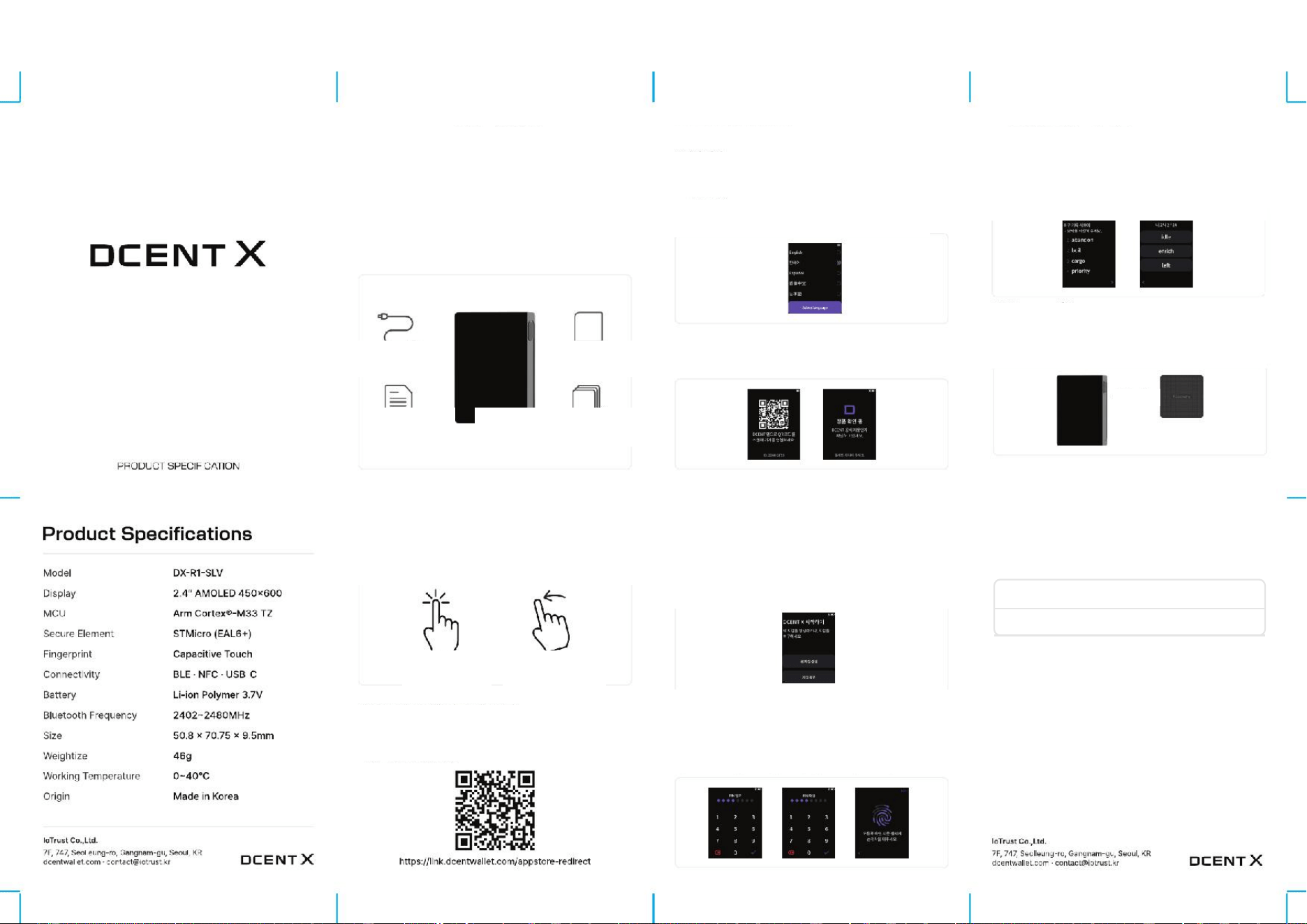
Package Contents
USB-C Cable User Manual
Product
Specifications
Device Recovery Sheet
How to Use the Folder
DCENT X has a 2.4-inch AMOLED touch display. You can operate it
with screen touch and left/right swipe gestures.
Screen touch Left/right swipe
Download the DCENT Mobile App
Scan the QR code below to install the DCENT mobile app and connect
DCENT X. After connection, you can check balances and use all
supported features.
Setting Up DCENT X
1. Power On
Press and hold the power button for at least 2 seconds to turn on
DCENT X. Registering a fingerprint and at least two numbers starts
the guided setup.
2. Select Language
When DCENT X turns on, select the language to use.
3. Connect App - Authenticity Check
Scan the QR on the DCENT X screen, connect to the DCENT app
via Bluetooth, and start the authenticity check.
4. Create New Wallet - Restore Wallet
After authenticity verification, create a new wallet on DCENT X or
restore an existing wallet.
If you already have a wallet, mnemonic (recovery phrase), or
R3covery Card, use Wallet Restore.
5. PIN - Fingerprint Registration
Enter a 4-8 digit number to register a PIN. Enter the same number again
to complete PIN registration.
Touch the fingerprint sensor while changing the angle and position of
your finger. DCENT X registers the fingerprint automatically.
6. Display Mnemonic (Recovery Phrase) - Verification
1) When creating a new wallet, the mnemonic appears only once. Write
down all words shown on the screen in order on the recovery sheet.
2) Select all provided words in sequence, then verify by choosing the
correct words shown on the wallet.
7. R3covery Card
The R3covery Card backs up DCENT X using NFC.
When creating a new wallet, touch the card to the back of the device to
back up automatically.
During wallet recovery, you can restore quickly without entering the
mnemonic.
Back tap
8. Product Warranty
Free warranty for 1 year from the purchase date. Write the purchase date
and keep this manual.
Purchase date: Year Month DayFree warranty: 1 year
Purchaser:
This product is covered by a free one-year warranty from the purchase date.
If it fails during normal use, present this warranty certificate for service. For
details, visit the DCENT website.
9. Precautions
The manufacturer is not liable for damage caused by consumer
carelessness or negligence. Please take care not to lose the device.

10. Regulatory Compliance / FCC Compliance Statement
This section provides regulatory notices and RF exposure information for the DCENT X user manual.
FCC Notice
This equipment has been tested and found to comply with the limits for a Class B digital
device, pursuant to part 15 of the FCC Rules. These limits are designed to provide
reasonable protection against harmful interference in a residential installation. This
equipment generates, uses and can radiate radio frequency energy and, if not installed
and used in accordance with the instructions, may cause harmful interference to radio
communications. However, there is no guarantee that interference will not occur in a
particular installation. If this equipment does cause harmful interference to radio or
television reception, which can be determined by turning the equipment off and on, the
user is encouraged to try to correct the interference by one or more of the following
measures:
• Reorient or relocate the receiving antenna.
• Increase the separation between the equipment and receiver.
• Connect the equipment into an outlet on a circuit different from that to which the
receiver
is connected.
• Consult the dealer or an experienced radio/TV technician for help.
NOTE: THE GRANTEE IS NOT RESPONSIBLE FOR ANY CHANGES OR MODIFICATIONS NOT
EXPRESSLY APPROVED BY THE PARTY RESPONSIBLE FOR COMPLIANCE. SUCH
MODIFICATIONS COULD VOID THE USER'S AUTHORITY TO OPERATE THE EQUIPMENT.
This device complies with part 15 of the FCC Rules. Operation is subject to the following
two conditions: (1) this device may not cause harmful interference, and (2) this device
must accept any interference, including interference that may cause undesired operation
of the device.
The user manual for an intentional or unintentional radiator shall caution the user that
changes or modifications not expressly approved by the party responsible for compliance
could void the user's authority to operate the equipment.
RF Radiation Exposure Statement:
This equipment complies with FCC radiation exposure limits set forth for an uncontrolled
environment and meets the FCC radio frequency (RF) Exposure Guidelines as this
equipment has very low levels of RF energy. This transmitter must not be co-located or
operating in conjunction with any other antenna or transmitter.
IoTrust Co.,Ltd.
7F, 747, Seolleung-ro, Gangnam-gu, Seoul, KR
dcentwallet.com - [email protected]
DCENT X

