Flyte
3
2
Flyte
a
Flyte
Flyte
Flyte
2
Flyte
Flyte
Double
Disconnect paired
devices
Indicator
or
turns off
Indicator
or
turns off
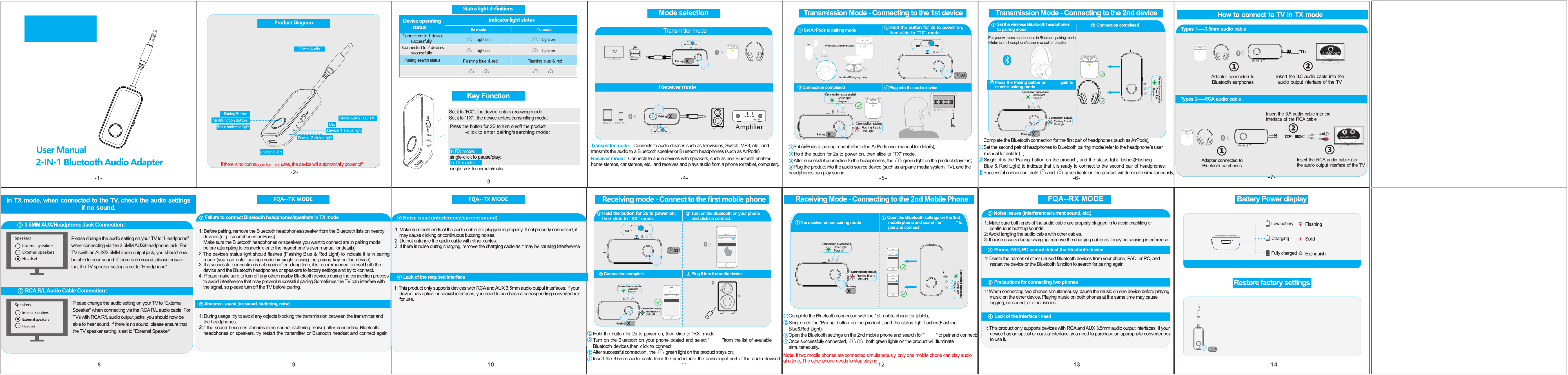
Power off state: Long press the button for 8S to clear all paired devices;
Triple-click FMB to disconnect paired devices;
*Double-click the pairing button to enter pairing search mode when the device is powered on*
8
When the device is powered off, long press the button
for 8 seconds to clear all records of paired devices.
Note: Do not release the button during the 8-second
long press; the indicator light will light up twice and then turn off.
Double-click for pairing mode.
Double-click for pairing mode.
2
2
Notice:Some devices may have compatibility issues; please try another device.
Double-click the button to enter pairing and searching mode ;
(red and blue lights flash alternately)
Double-click the button to enter pairing and searching mode ;
(red and blue lights flash alternately)
2
2
Notice:Some devices may have compatibility issues; please try another device.
FCC Statement
This equipment has been tested and found to comply with the
limits for a Class B digital device, pursuant to part 15 of the
FCC Rules. These limits are designed to provide reasonable
protecon against harmful interference in a residenal
installaon. This equipment generates, uses and can radiate
radio frequency energy and, if not installed and used in
accordance with the instrucons, may cause harmful
interference to radio communicaons. However, there is no
guarantee that interference will not occur in a parcular
installaon. If this equipment does cause harmful
interference to radio or television recepon, which can be
determined by turning the equipment off and on, the user
is encouraged to try to correct the interference by one or
more of the following measures:
•R eorient or relocate the receiving antenna.
•I ncrease the separaon between the equipment and receiver.
•C onnect the equipment into an outlet on a circuit different
from that to which the receiver is connected.
•C onsult the dealer or an experienced radio/TV technician for
help.
Cauon: Any changes or modificaons to this device not
explicitly approved by manufacturer could void your authority
to operate this equipment.
This device complies with part 15 of the FCC Rules. Operaon
is subject to the following two condions:
(1) This device may not cause harmful interference, and
(2) this device must accept any interference received,
including interference that may cause undesired operaon.
RF Exposure Informaon
This equipment complies with FCC radiaon exposure
limits set forth for an uncontrolled environment.