SKU:200368
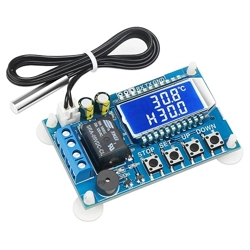
Product name: digital temperature controller
Model: XY-T01
Power supply: DC6.0~30V
Temperature control range: -50℃ ~110℃
Temperature control precision: 0.1℃
Measuring input: NTC10K/B3950
Refresh rate: 0.5 second
Output type: relay output 10A
Probe type: waterproof probe, L: 0.5m
Dimension: 68*42*15mm
Product Function:
1. Heating code: “H”
When the detected temperature ≤ set temperature - hysteresis temperature,
the relay is switched on and the heating device starts to work.
+
-
DC 6.0~30V
Power
supply
Relay
output
①
11
②
③
④
⑤
⑥
⑦
⑧
⑨
⑩
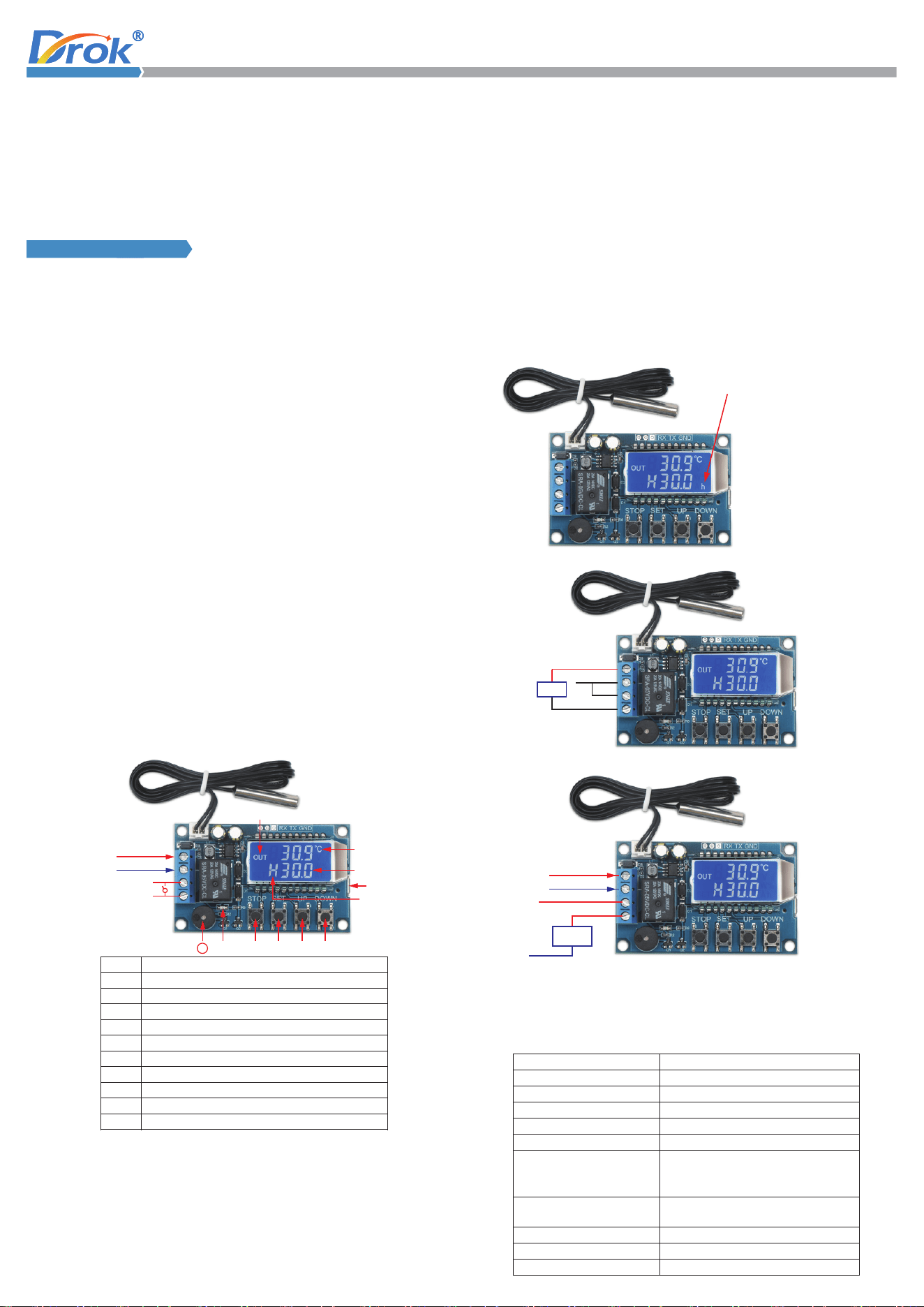
Relay closure indication
Detected temperature
Set temperature
Can be powered by micro USB 5.0V
Current mode (Heating: H, Cooling: C)
DOWN button
UP button
SET button
Emergency stop button
Relay closure indicator light
High temperature alarm
1
2
3
4
5
6
7
8
9
10
11
Alarm temperature / delay starting setting / temperature correction:
Way to turn on the high-temperature alarm function (OFF by default):
After setting the delay starting OPH,
the interface will display “h”.
+
-
6.0V ~30V
DC 6.0~30V Wiring Method
Load
+
-
DC 6.0~ 30V
Load
Line
AC 220V
Neutral
Serial Interface control (microcontroller TTL communication)
Communication standard: 9600bps
Data position: 8
Stop bit: 1
Check digit: none
Flow control: none
Serial Interface Command
Description
Start temperature report
Stop temperature report
Read setting parameters
Relay enable function will be on
Relay enable function will be off
Desired temperature setting
-50 ~ -01
00.0~99.9
100~110
Hysteresis temperature setting
(00.0~30.0)
Alarm temperature (-50.0 ~ 110.0)
Delay starting time (0 ~ 9999)
start
stop
read
ON
OFF
S:XXX
B:XX.X
OFE:XX.X
ALA:XX.X
OPH:XXXX
Temperature correction (-10.0 ~ 10.0)
Working mode / setting temperature / hysteresis temperature setting:
AC 220V Wiring Method
2. Cooling code: “C”
When the detected temperature ≥ set temperature + hysteresis temperature,
the relay is switched on and the cooling device starts to work.
3. Real-time temperature reporting
If the real-time temperature reporting function is turned on, the product will
4. Par am e te r r e mo t e r ea d in g a n d s et t in g
Par ame ter s s uc h a s s t ar t in g t e mp e ra t ur e , s to p pi ng tem per atu re, and
tem per atu re c or r ec t io n c a n b e s et by UART.
5. High-temperature alarm and emergency stop ALA: sou
nd-light alarm
When the actual temperature ≥ alarm temperature, the system turns on the
6. Delay starting OPH: 0~9999 minutes
When a normal heating or cooling operation is completed, the system starts
7. Temperature correction function OFE: -10.0~10.0℃
If the system worked for a long time, there may be deviations. Can use correct
function at this time, actual temperature = measured temperature + calibration
value.
8. Relay Enable (default ON):
If the relay enable is turned off, the relay remains off.
9. Restore factory se
tting
Hold press STOP and SET buttons at the same time for more than 3 seconds
to restore the factory settings.
When the detected temperature ≥ set temperature, the relay is turned off
and the heating device stops working.
When the detected temperature ≤ set temperature, the relay is turned off
and the cooling device stops working.
detect the temperature at intervals of 1 second, and transmit to the terminal
through UART for data collection.
sound-light alarm and turns off the relay. At this time, press any key
to stop
the sound-light.
timing T. Only when T ≥ OPH can the system perform the next round of heating
or cooling.
1. In the running interface, short press the “SET” button to enter the quick
setting interface.
2. After entering the quick setting interface, switch the parameter to be set
(working mode/setting temperature/ hysteresis temperature) by short
pressing the “SET” button.
3. Use the “UP” “DOWN” button to change the parameter.
4. Hold press “SET” button for m
ore than 3 seconds or have no any button
operation f or 6 s econ ds, it wil l save the parameters an d exit the quick
setting int erfa ce automatically.
1. In the running interface, hold press the “SET” button for more than 3 seconds,
enter the parameter setting interface.
2. After entering the parameter setting interface, switch the parameter to be
set (alarm temperature/delay starting setting/temperature correction) by
short pressing the “SET” button.
3. Use the “UP” “DOWN” button to change the para
meter.
4. Hold press “SET” button for more than 3 seconds or have no any button
operation for 6 seconds, it will save the parameters and exit the parameter
setting interface automatically.
Enter the parameter setting interface, switch to the alarm parameter ALA
interface, turn on or turn off the high-temperature alarm function by short
pressing the “STOP” button.
If the high-temperature function is off, ALA displays “----“ as a reminder.
Way to turn on the delay start
ing function (OFF by default):
Enter the parameter setting interface, switch to the alarm parameter OPH
interface, turn on or turn off the high-temperature alarm function by short
pressing the “STOP” button.
If the high-temperature function is off, OPH displays “----“ as a reminder.