HS12
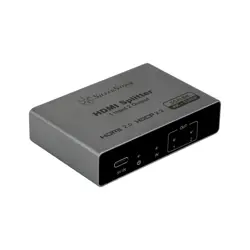
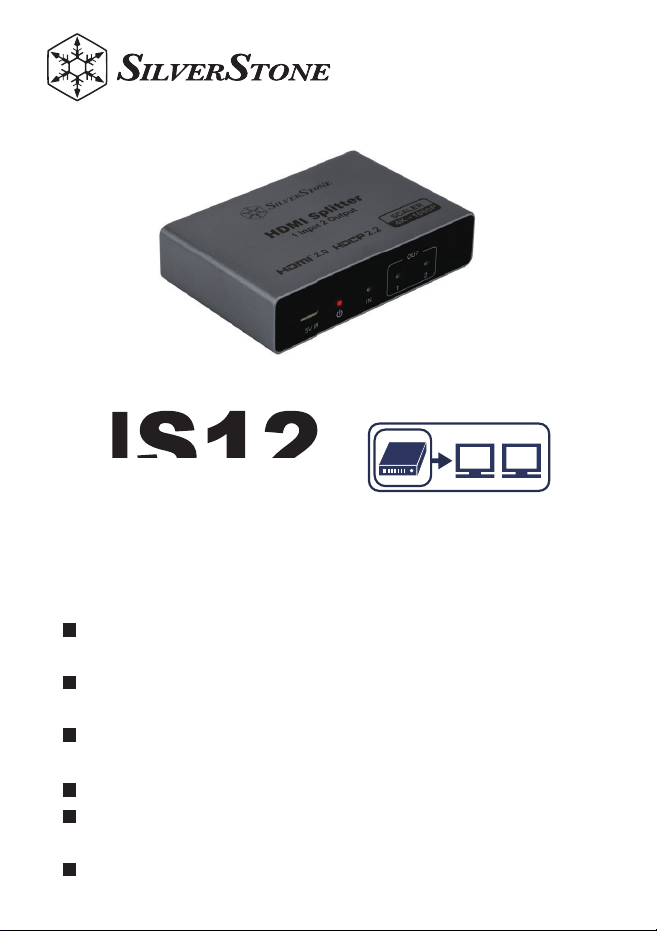
4K HDMI2.0 Splitter 1 in 2 Out
HDMI LA certified, supports HDCP 2.2 for lossless 4K
streaming output
Equipped with a stable IC design, tested for uninter-
rupted 48-hour continuous playback
Built-in power management chip provides short-circuit
and overheat protection
USB Type-C power input for easier installation
Supports up to 4K/60Hz resolution with downscaling
function, enabling simultaneous 4K and 1080p output
Gold-plated connectors for enhanced oxidation
resistance and durability
MANUAL
TV

1.Product Introduction
1. Produktbeschreibung
1. Introducción del producto
1. Product Introduction
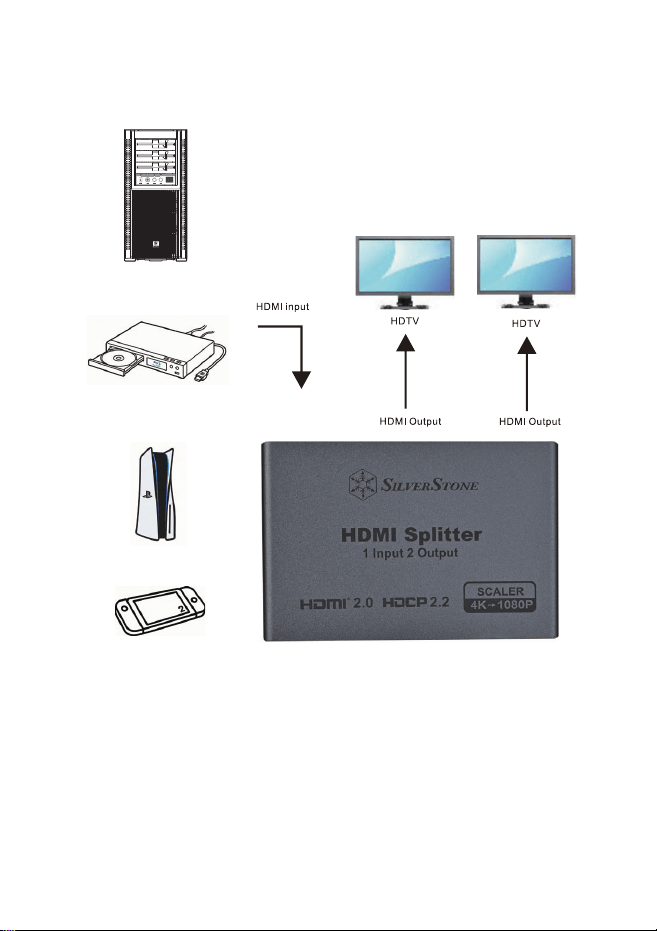
This product is a high-performance HDMI splitter with one HDMI input and two HDMI outputs.It distributes HDMI
video and audio signals from a source device (such as a Blu-ray player, computer,or game console) to multiple
display devices (such as HDTVs or projectors) simultaneously,without signal loss. It is suitable for home theater
systems, display setups, conference rooms,and multi-screen applications.
1. Introduction du produit
1. Introduzione del prodotto
1
Dieses Produkt ist ein leistungsstarker HDMI-Splitter mit einem HDMI-Eingang und zwei HDMI-Ausgängen. Es
verteilt HDMI-Video- und Audiosignale von einer Quelle (z. B. Blu-ray-Player, Computer oder Spielekonsole)
gleichzeitig an mehrere Anzeigegeräte (z. B. HDTVs oder Projektoren) ohne Signalverlust. Ideal für Heimkinos,
Ausstellungen, Konferenzräume und Multi-Screen-Anwendungen.
Ce produit est un répartiteur HDMI haute performance avec une entrée HDMI et deux sorties HDMI. Il distribue
simultanément les signaux vidéo et audio HDMI provenant d’un appareil source (lecteur Blu-ray, ordinateur ou
console de jeu) vers plusieurs écrans (téléviseurs HDTV ou projecteurs) sans perte de signal. Idéal pour les
systèmes home cinéma, les salles de conférence et les installations multi-écrans.
Questo prodotto è uno splitter HDMI ad alte prestazioni con un ingresso HDMI e due uscite HDMI. Distribuisce
segnali video e audio HDMI da una sorgente (lettore Blu-ray, computer o console di gioco) a più dispositivi di
visualizzazione (TV HDTV o proiettori) contemporaneamente, senza perdita di segnale. Ideale per sistemi
home theater, sale conferenze e applicazioni multi-schermo.
Este producto es un divisor HDMI de alto rendimiento con una entrada HDMI y dos salidas HDMI. Distribuye
señales de video y audio HDMI desde un dispositivo fuente (como un reproductor Blu-ray, computadora o
consola de juegos) a múltiples pantallas (como televisores HDTV o proyectores) simultáneamente, sin pérdida
de señal. Ideal para sistemas de cine en casa, salas de conferencias y configuraciones de pantallas múltiples.
本產品為高效能 HDMI 分配器,具備 1 組 HDMI 輸入與 2 組 HDMI 輸出,可將影像
與音訊訊號由來源裝置(如藍光播放機、電腦或遊戲機)同時分配至多個顯示設備(如
HDTV 或投影機),且不會造成訊號損失。適用於家庭劇院、展示系統、會議室及多螢
幕顯示應用。
1. Введение в продукт
洢禎暒儢
一、產品簡介
ϔǃѻકㅔҟ
1.製品紹介
1. แนะนำผลิตภัณฑ์
ผลิตภัณฑ์นี้เป็น HDMI Splitter ประสิทธิภาพสูง มาพร้อม HDMI อินพุต 1 ช่อง และ HDMI เอาต์พุต 4 ช่อง
สามารถกระจายสัญญาณวิดีโอและเสียง HDMI จากแหล่งสัญญาณ (เช่น เครื่องเล่น Blu-ray, คอมพิวเตอร์,
เครื่องเล่นเกม) ไปยังอุปกรณ์แสดงผลหลายเครื่อง (เช่น HDTV, โปรเจกเตอร์) ได้พร้อมกันโดยไม่สูญเสียคุณภาพ
เหมาะสำหรับโฮมเธียเตอร์ ระบบแสดงผล ห้องประชุม และการใช้งานแบบหลายจอภาพ
ไทย
2
本产品是一款高性能 HDMI 分配器,拥有 1 个 HDMI 输入和 2 个 HDMI 输出,可将
来自源设备(如蓝光播放器、电脑或游戏机)的 HDMI 视频和音频信号同时分配到多个
显示设备(如 HDTV 或投影仪),且无信号损失。适用于家庭影院系统、展示设备、会
议室和多屏应用。
本製品は、1つのHDMI入力と2つのHDMI出力を備えた高性能HDMI分配器です。ブルーレイプレ
ーヤー、コンピューター、ゲーム機などのソース機器からHDTVやプロジェクターなどの複数のディ
スプレイへ同時にHDMI映像・音声信号を分配し、信号劣化がありません。ホームシアター、会議室
、マルチスクリーン環境に最適です。
決洢禎汆儢汞͵;ͺ沋崫刂儢汞͵;ͺ犢崫汊滆毖穞垚処昷垫͵;ͺ把愶匶沋城埪挚差崎決
稒崎決檺珺秮瘶冒沊瑞暚姷櫖昢喞欮͵;ͺ欇旇愕欪娚欪柦笾庂櫲峲娚枪稒崎決͵΅·
稊嵢洣瘶姷櫖壟柢櫖洊暧穞彶柦笾暖柪決櫌枻城埪筎柢檺瘶箒汞柪彆矶枪畲庶筞凃櫖
洇穯穯城埪
Это высокопроизводительный HDMI-сплиттер с одним HDMI-входом и двумя HDMI-выходами. Он
распределяет видео- и аудиосигналы HDMI от источника (например, Blu-ray-плеера, компьютера или
игровой консоли) на несколько дисплеев (например, HDTV или проекторы) одновременно, без потери
сигнала. Подходит для домашних кинотеатров, конференц-залов и систем с несколькими экранами.
2. Product Diagram
Produktdiagramm\
1.DC 5V-Stromanschluss
2. Power-LED
3.HDMI-Ausgangsanzeige 2
4.HDMI-Ausgangsanzeige 1
5.HDMI-Eingangsanzeige
6.HDMI-Eingangsport
7.HDMI-Ausgangsport 1
8.HDMI-Ausgangsport 2
Diagrama del producto
1.Entrada de alimentación DC 5V
2.Indicador de encendido
3.Indicador de salida HDMI 2
4.Indicador de salida HDMI 1
5.Indicador de entrada HDMI
6.Puerto de entrada HDMI
7.Puerto de salida HDMI 1
8.Puerto de salida HDMI 2
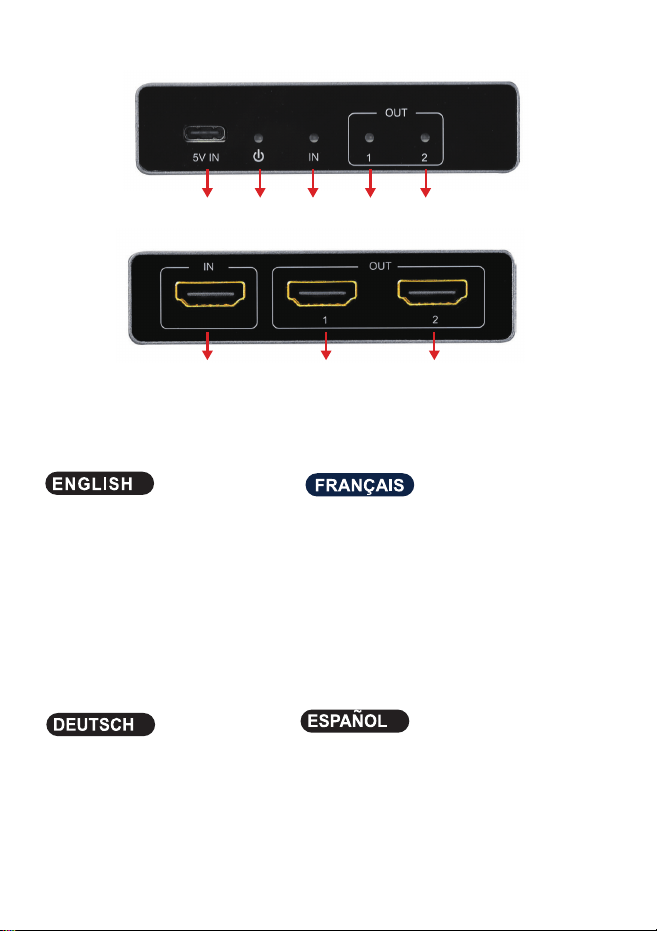
Product Diagram
1.DC/5V
2.Power indicator
3.HDMI Output indicator 2
4.HDMI Output indicator 1
5.HDMI input indicator
6.HDMI Input port
7.HDMI Output potr 1
8.HDMI Output light 2
Schéma du produit
1.Entrée d’alimentation DC 5V
2.Témoin d’alimentation
3.Indicateur de sortie HDMI 2
4.Indicateur de sortie HDMI 1
5.Indicateur d’entrée HDMI
6.Port d’entrée HDMI
7.Port de sortie HDMI 1
8.Port de sortie HDMI 2
3
1
2
6
7
8
3
4
5
Описание панели
1.Вход питания DC 5V
2.Индикатор питания
3.Индикатор HDMI выхода 2
4.Индикатор HDMI выхода 1
5.Индикатор HDMI входа
6.HDMI вход
7.HDMI выход 1
8.HDMI выход 2
洢禎砮嘖昪律
͵ʹ·洊毖沋崫
洊毖祢柢姷
͵;ͺ犢崫祢柢姷
͵;ͺ犢崫祢柢姷
͵;ͺ沋崫祢柢姷
͵;ͺ沋崫磲瞾
͵;ͺ犢崫磲瞾
͵;ͺ犢崫磲瞾
產品面板說明
1.DC/5V 電源輸入
2.電源指示燈
3.HDMI 輸出指示燈 2
4.HDMI 輸出指示燈 1
5.HDMI 輸入指示燈
6.HDMI 輸入埠
7.HDMI 輸出埠 1
8.HDMI 輸出埠 2
ѻક䴶ᵓ䇈ᯢ
'&9⬉⑤䕧ܹ
⬉⑤ᣛ⼎♃
+'0,䕧ߎᣛ⼎♃
+'0,䕧ߎᣛ⼎♃
+'0,䕧ܹᣛ⼎♃
+'0,䕧ܹッষ
+'0,䕧ߎッষ
+'0,䕧ߎッষ
製品パネル説明
1.DC5V電源入力
2.電源インジケーター
3.HDMI出力インジケーター2
4.HDMI出力インジケーター1
5.HDMI入力インジケーター
6.HDMI入力ポート
7.HDMI出力ポート1
8.HDMI出力ポート2
Diagramma del prodotto
1.Ingresso di alimentazione DC 5V
2.Indicatore di alimentazione
3.Indicatore di uscita HDMI 2
4.Indicatore di uscita HDMI 1
5.Indicatore di ingresso HDMI
6.Porta di ingresso HDMI
7.Porta di uscita HDMI 1
8.Porta di uscita HDMI 2
แผงผลิตภัณฑ์
1.พอร์ตจ่ายไฟ DC 5V
2.ไฟแสดงสถานะพลังงาน
3.ไฟแสดงสถานะเอาต์พุต HDMI 2
4.ไฟแสดงสถานะเอาต์พุต HDMI 1
5.ไฟแสดงสถานะอินพุต HDMI
6.พอร์ตอินพุต HDMI
7.พอร์ตเอาต์พุต HDMI 1
8.พอร์ตเอาต์พุต HDMI 2
ไทย
4
3.Connection diagram
PS5
player
DVD / BD
PC
5
6
4. Package Contents
Lieferumfang
•HDMI-Splitter ×1
•Type-C-Stromkabel ×1
Contenido del paquete
•Divisor HDMI ×1
•Cable de alimentación Type-C ×1
Package Contents
•HDMI Splitter ×1
•Type-C Power Cable ×1
Комплект поставки
•HDMI-сплиттер ×1
•Кабель питания Type-C ×1
磲沫喺殯恂
ח͵;ͺ把愶匶ϧ
ח΅ΪΡΖʹ洊毖理決挚ϧ
包裝內容
•HDMI 分配器 ×1
•Type-C電源線 ×1
ࣙ㺙ݙᆍ
•+'0,ߚ䜡఼h
•7\SH&⬉⑤㒓h
パッケージ内容
•HDMIスプリッター×1
•Type-C電源ケーブル×1
Contenu de l’emballage
•Répartiteur HDMI ×1
•Câble d’alimentation Type-C ×1
Contenuto della confezione
•HDMI Splitter ×1
•Cavo di alimentazione Type-C ×1
อุปกรณ์ภายในกล่อง
•HDMI Splitter ×1
•สายไฟ Type-C ×1
ไทย

5. NOTE
Hinweise
•Stellen Sie sicher, dass die HDMI-Stecker vollständig eingesteckt sind und vermeiden Sie Druck oder Belastung
der Kabel.
•Halten Sie mindestens 2,5 cm (1 Zoll) Freiraum um das Gerät für ausreichende Belüftung.
•Installieren Sie das Gerät nicht in feuchten Umgebungen oder in der Nähe von Wasser.
•Platzieren Sie das Gerät auf einer stabilen und ebenen Oberfläche.
Precauciones
•Asegúrese de que los conectores HDMI estén completamente insertados y evite que los cables se
doblen o se pisen.
•Mantenga al menos 2,5 cm (1 pulgada) de espacio alrededor del dispositivo para su ventilación.
•No instale el dispositivo en lugares húmedos ni cerca de agua.
•Coloque el dispositivo en una superficie estable y plana.
Notes
•Ensure HDMI cables are fully inserted into the ports and avoid pressure or stepping on the cables.
•Maintain at least 2.5 cm (1 inch) of space around the device for proper heat dissipation.
•Do not install the device in humid environments or near water sources.
•Place the device on a stable and flat surface.
Remarques
•Assurez-vous que les câbles HDMI soient bien insérés dans les ports et évitez qu’ils soient
comprimés ou piétinés.
•Laissez au moins 2,5 cm (1 pouce) d’espace autour de l’appareil pour une bonne dissipation
thermique.
•N’installez pas l’appareil dans un environnement humide ou près d’une source d’eau.
•Placez l’appareil sur une surface plane et stable.
7
Примечания
•Убедитесь, что HDMI-кабели полностью вставлены в разъёмы, избегайте давления или
повреждения кабелей.
•Оставьте не менее 2,5 см (1 дюйм) пространства вокруг устройства для вентиляции.
•Не устанавливайте устройство во влажных местах или рядом с водой.
•Размещайте устройство на устойчивой и ровной поверхности.
渂汞斲穳
ח͵;ͺ理決挚決磲瞾櫖歊洊粎呈笆沎垚滆筛汾穞処理決挚決園庲其喞愥粎滆橐壊嵣穞柳柢欪
ח斲殯柢洢禎渂懆櫖牢暒ΔΞ汾獞汞击儊汊筛懺穞櫲愢櫺汊愯滆穞柳柢欪
ח枻匶儆廔汆凹決喞恂儆匂熞櫖昪獞穞滆廎柳柢欪
ח橎洛洇決処磏磏穢祢彺櫖昪獞穞柳柢欪
注意事項
•HDMIケーブルのプラグを確実に差し込み、ケーブルが圧迫または踏まれないようご注意ください。
•使用時は本体周囲に少なくとも2.5cm(1インチ)の空間を確保し、放熱を妨げないでください。
•湿気の多い場所や水回りに設置しないでください。
•安定した平らな場所に設置してください。
Note
•Assicurarsi che i cavi HDMI siano inseriti completamente nelle porte ed evitare pressioni o
piegamenti dei cavi.
•Mantenere almeno 2,5 cm (1 pollice) di spazio intorno al dispositivo per una corretta dissipazione
del calore.
•Non installare il dispositivo in ambienti umidi o vicino a fonti d’acqua.
•Posizionare il dispositivo su una superficie stabile e piana.
ข้อควรระวัง
•ตรวจสอบให้แน่ใจว่าสาย HDMI เสียบเข้าพอร์ตอย่างแน่นหนา หลีกเลี่ยงการกดทับหรือเหยียบสาย
•เว้นระยะอย่างน้อย 2.5 ซม. (1 นิ้ว) รอบอุปกรณ์เพื่อการระบายความร้อนที่ดี
•ห้ามติดตั้งอุปกรณ์ในที่ชื้นหรือใกล้น้ำ
•วางอุปกรณ์บนพื้นผิวที่มั่นคงและเรียบ
ไทย
8

注意事項
•請確保 HDMI 線材插頭完全插入端口,避免線材受壓或踩踏
•使用時請保持設備四周至少 2.5 公分(1 吋)空間,以利散熱
•請勿將設備安裝於潮濕或靠近水源之處
•請將設備放置於穩固且平坦的表面上
݁ǃ⊼ᛣџ乍
•䇋⹂ֱ+'0,㒓ᴤᦦ༈ᅠܼᦦܹッষˈ䙓ܡ㒓ᴤফ䏽䏣
•Փ⫼ᯊ䇋ֱᣕ䆒ಯ㟇ᇥ݀ߚ˄㣅ᇌ˅ぎ䯈ˈҹ߽ᬷ⛁
•䇋࣓ᇚ䆒ᅝ㺙Ѣ╂䴴䖥∈⑤П໘
•䇋ᇚ䆒ᬒ㕂Ѣ〇Ϩᑇഺⱘ㸼䴶Ϟ
9
10
᳝↦᳝ᆇ⠽䋼ܗ㋴ঞ݊࣪ᄺ䞣㸼
ᴀ㸼Ḑձ6-7ⱘ㾘ᅮ㓪ࠊDŽ
ƻ㸼⼎䆹᳝ᆇ⠽䋼䆹䚼ӊ᠔᳝ഛ䋼ᴤ᭭Ёⱘ䞣ഛ*%7㾘ᅮⱘ䰤䞣㽕∖ҹϟDŽ
ü㸼⼎䆹᳝ᆇ⠽䋼㟇ᇥ䆹䚼ӊⱘᶤϔഛ䋼ᴤ᭭Ёⱘ䞣䍙ߎ*%7㾘ᅮⱘ䰤䞣㽕∖DŽϨ䁆䰤⫼⠽䊾⚎ᥦ䰸䷙Ⳃ
䕙ࡽᴤᰃᣛՓ⫼ѻકϞⱘ⍖᭭ˈ⍺⒥㛖ǃ⛞ᴤ᭭ǃⴔࠖㄝˈҹঞϢѻકࣙ㺙ˈЎᮑᎹᴤ᭭Փ⫼ⱘ㉬㛊ᏺǃᆚᇕᴤ᭭ǃⴔࠖㄝ
䚼ӊৡ⿄䖍ѻક
∲
(Hg)
䬝
(Cd)
݁Ӌ䫀
(Cr(VI))
⒈㘨㣃
(PBB)
⒈Ѡ㣃䝮
(PBDE)
䪙
(Pb)
ƻƻƻƻƻƻ
ƻƻƻƻƻƻ
ƻƻƻƻƻƻ
ƻƻƻƻƻƻ
ƻƻƻƻƻƻ
ѻકড়Ḑ䆕
Ẕ偠˖Ẕ
⫳ѻ᮹ᳳ˖㾕ѻકᴵⷕ
ᴎ䞥ሲ
⬉ᄤ
㶎ϱ
䞥ሲষ
ࣙᴤ
For North America ([email protected])
SilverStone Technology in North America may repair or replace defective product with refurbished product that is not new but has been functionally tested.
Replacement product will be warranted for remainder of the warranty period or thirty days, whichever is longer. All products should be sent
back to the place of purchase if it is within 30 days of purchase, after 30 days, customers need to initiate RMA procedure with SilverStone Technology
in USA by first downloading the “USA RMA form for end-users” form from the below link and follow its instructions.
http://silverstonetek.com/contactus.php
For Australia only ([email protected])
Our goods come with guarantees that cannot be excluded under the Australian Consumer Law.
You are entitled to a replacement or refund for a major failure and for compensation for any other reasonably foreseeable loss or damage.
You are also entitled to have the goods repaired or replaced if the goods fail to be of acceptable quality and the failure does not amount to a major failure.
Please refer to above “Warranty terms & conditions” for further warranty details.
SilverStone Technology Co., Ltd. 12F No. 168 Jiankang Rd., Zhonghe Dist., New Taipei City 235 Taiwan R.O.C. + 886-2-8228-1238
(standard international call charges apply)
For Europe ([email protected])
For China ([email protected])
For all other regions ([email protected])
Additional info & contacts
This product has a limited 1 year warranty in North America and Australia.
For information on warranty periods in other regions, please contact your reseller or SilverStone authorized distributor.
ᴀѻક㞾䌁фП᮹䍋ˈѢЁഄ˄ϡࣙ▇䮼ˈ佭␃⡍߿㸠ᬓ˅ѿ᳝ϔᑈ᳝䰤䋷ӏֱ˄䚼ߚѻકЎѠᑈˈϝᑈѨᑈ˅DŽ
䆺㒚ֱᑈ䰤䇋খ✻ᅬᮍ㔥キ
https://silverstonetek.com.cn/
݀ᏗПѻકൟোЎձDŽ
Warranty Information
Warranty terms & conditions
1. Product component defects or damages resulted from defective production is covered under warranty.
Defects or damages with the following conditions will be fixed or replaced under SilverStone Technology’s jurisdiction.
a) Usage in accordance with instructions provided in this manual, with no misuse, overuse, or other inappropriate actions.
b) Damage not caused by natural disaster (thunder, fire, earthquake, flood, salt, wind, insect, animals, etc…)
c) Product is not disassembled, modified, or fixed. Components not disassembled or replaced.
d) Warranty mark/stickers are not removed or broken.
Loss or damages resulted from conditions other than ones listed above are not covered under warranty.
2. Under warranty, SilverStone Technology’s maximum liability is limited to the current market value for the product (depreciated
value, excluding
shipping, handling, and other fees). SilverStone Technology is not responsible for other damages or loss associated with the use
of product.
3. Under warranty, SilverStone Technology is obligated to repair or replace its defective products. Under no circumstances will
SilverStone
Technology be liable for damages in connection with the sale, purchase, or use including but not limited to loss of data, loss of
business, loss of
profits, loss of use of the product or incidental or consequential damage whether or not foreseeable and whether or not based on
breach of warranty,
contract or negligence, even if SilverStone Technology has been advised of the possibility of such damages.
4. Warranty covers only the original purchaser through authorized SilverStone distributors and resellers and is not transferable to a
second hand
purchaser.
5. You must provide sales receipt or invoice with clear indication of purchase date to determine warranty eligibility.
6. If a problem develops during the warranty period, please contact your retailer/reseller/SilverStone authorized distributors or
SilverStone
http://www.silverstonetek.com.
Please note that: (i) You must provide proof of original purchase of the product by a dated itemized receipt; (ii) You shall bear the
cost of shipping
(or otherwise transporting) the product to SilverStone authorized distributors. SilverStone authorized distributors will bear the cost
of shipping
(or otherwise transporting) the product back to you after completing the warranty service; (iii) Before you send the product, you
must be issued a
Return Merchandise Authorization (“RMA”) number from SilverStone. Updated warranty information will be posted on
SilverStone’s official website.
Please visit http://www.silverstonetek.com for the latest updates.