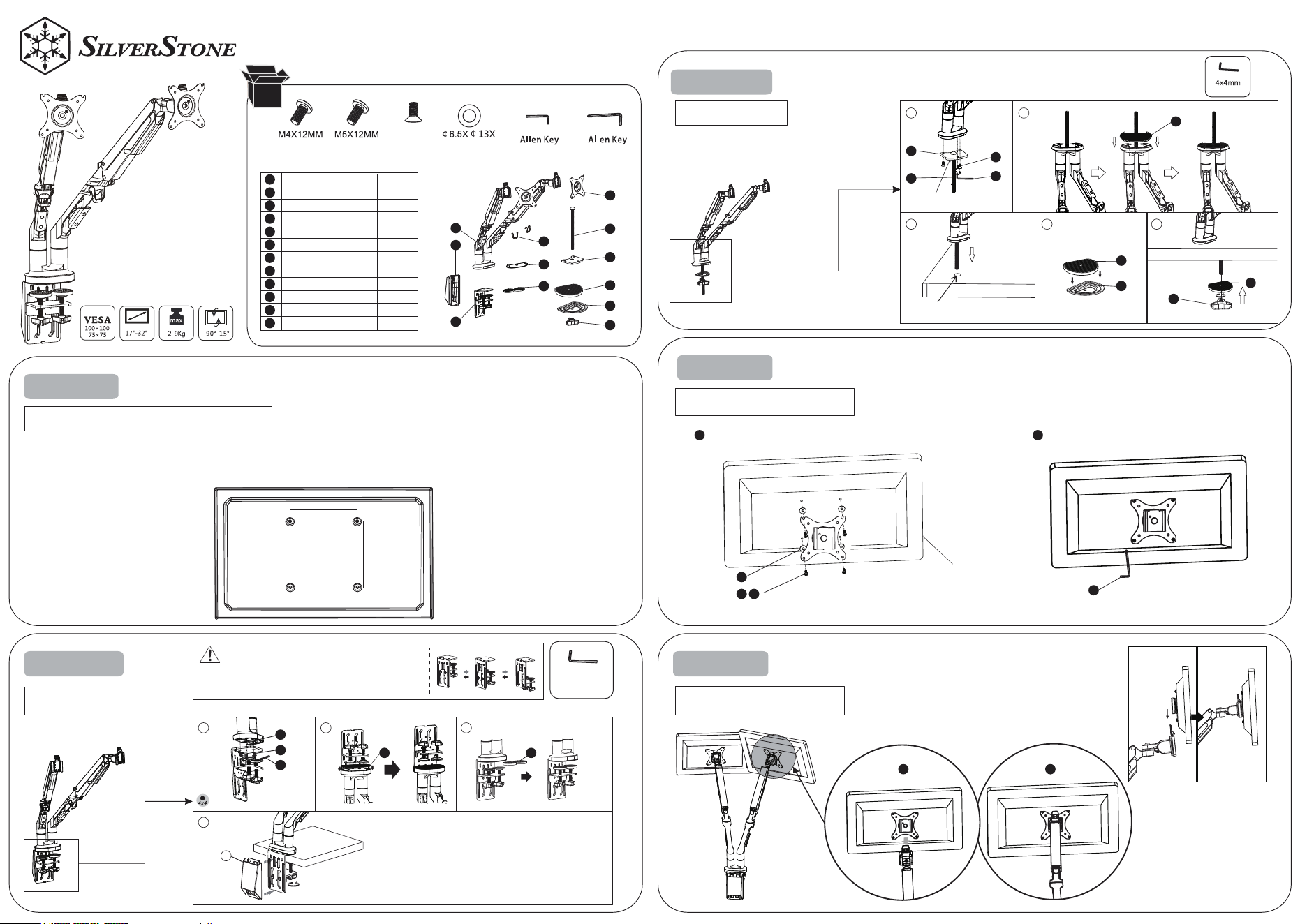
STEP 1
STEP 2-A
STEP 2-B
Option2:Grommet
Connect the plate and moniter
The Preparation Before Monitor Installation
75mm x 75mm,
100mm x 100mm
1. Make sure there are VESA holes 100x100mm or 75 x 75mm in the monitor. If not, the mount installed.
2. Remove the original fixed base of monitor. Be careful not to scratch the screen.
Install the monitor to the arm
Tighten
For desk thickness:20-100mm
4 x 4mm
Select proper available hole
according to thickness of desk
Option 1:
Notice:Keep the
counterbore side down
For desk thickness:25-100mm
Tighten
Available hole size:8.5-70mm
Use the allen key (F) to thighten the screw
Tighten
Monitor
Use washer if needed
Hang the monitor on the plate
from top to bottom and ensure
it be tightened
STEP 3
STEP 4
A(8
Support arm
Base Mounting Plate
Protection pad
Protection pad
Plastic cable cover
Perforated plate
Long screw
Protection pad
Knob nut
Pressure plate
Mount Plate
Clip
1PC
1PC
2PC
1PC
1PC
1PC
1PC
1PC
1PC
1PC
2PC
2PC
PCS) B(8PCS) C(3PCS) D(16PCS)
E(1PC) F(1PC)
4x4mm
5x5mm
M6x12
2
MM
ARM21
Gas Spring Swing
Dual Monitor Mount
1
2
3
4
5
6
7
8
9
10
11
12
1
3 4 5
2
7
6
1 1
F
D
A
1 2
B
8
8
10
9
E
C
4
1
2
3
4
7
6
8
9
12
11
10
5
34
1
1
4
5
2 3
C
E
STEP 5
CAUTION
This product contains small items that could be a choking hazard if swallowed.Keep these items away from young children.
Make Sure these instructions are read and completely understood before attempting installation.If you are unsure of any part of this installation,please contact a professional
installer for assistance.
The desk or mounting surface must be capable of supporting the combined weight of the mount and the display,otherwise the structure must be reinforced.
Safety gear and proper tools must be used.A minimum of two people are required for this installation.Failure to use safety gear can result in property damage,serious injury or
death.
please check joint parts every two months,making sure the screws are loosened or not.
This product was designed to be installed on desk.Before installing, make sure the mount will support the combined load of the equipment and
hardware.Never exceed the maximum load capacity 12 KG, or else it may result in product failure or personal injury.
Note:this product is intended for indoor use only.Use of this product outdoors could lead to product failure or personal injury.
Warning:
obsolete products can be sent back to the manufacturer or handed over to professional institutions.
To ensure the sealing performance of the gas spring, it is suggested to have complete adjustment to the upper arm (with spring) one time or several times every month.
This product contains high pressure gas spring parts, please do not put it into fire, high temperature, or disassemble it, which will lead to unexpectable
personal injury. The
Warranty Information
This product has a limited 1 year warranty in North America and Australia.
For information on warranty periods in other regions, please contact your reseller or SilverStone authorized distributor.
https://silverstonetek.com.cn/
1. Product component defects or damages resulted from defective production is covered under warranty.
Defects or damages with the following conditions will be fixed or replaced under SilverStone Technology’s jurisdiction.
a) Usage in accordance with instructions provided in this manual, with no misuse, overuse, or other inappropriate actions.
b) Damage not caused by natural disaster (thunder, fire, earthquake, flood, salt, wind, insect, animals, etc…)
c) Product is not disassembled, modified, or fixed. Components not disassembled or replaced.
d) Warranty mark/stickers are not removed or broken.
Loss or damages resulted from conditions other than ones listed above are not covered under warranty.
2. Under warranty, SilverStone Technology’s maximum liability is limited to the current market value for the product (depreciated value, excluding
shipping, handling, and other fees). SilverStone Technology is not responsible for other damages or loss associated with the use of product.
3. Under warranty, SilverStone Technology is obligated to repair or replace its defective products. Under no circumstances will SilverStone
Technology be liable for damages in connection with the sale, purchase, or use including but not limited to loss of data, loss of business, loss of
profits, loss of use of the product or incidental or consequential damage whether or not foreseeable and whether or not based on breach of warranty,
contract or negligence, even if SilverStone Technology has been advised of the possibility of such damages.
4. Warranty covers only the original purchaser through authorized SilverStone distributors and resellers and is not transferable to a second hand
purchaser.
5. You must provide sales receipt or invoice with clear indication of purchase date to determine warranty eligibility.
6. If a problem develops during the warranty period, please contact your retailer/reseller/SilverStone authorized distributors or SilverStone
http://www.silverstonetek.com.
Please note that: (i) You must provide proof of original purchase of the product by a dated itemized receipt; (ii) You shall bear the cost of shipping
(or otherwise transporting) the product to SilverStone authorized distributors. SilverStone authorized distributors will bear the cost of shipping
(or otherwise transporting) the product back to you after completing the warranty service; (iii) Before you send the product, you must be issued a
Return Merchandise Authorization (“RMA”) number from SilverStone. Updated warranty information will be posted on SilverStone’s official website.
Please visit http://www.silverstonetek.com for the latest updates.
Warranty terms & conditions
Additional info & contacts
For North America ([email protected])
SilverStone Technology in North America may repair or replace defective product with refurbished product that is not new but has been functionally tested.
Replacement product will be warranted for remainder of the warranty period or thirty days, whichever is longer. All products should be sent
back to the place of purchase if it is within 30 days of purchase, after 30 days, customers need to initiate RMA procedure with SilverStone Technology
in USA by first downloading the “USA RMA form for end-users” form from the below link and follow its instructions.
http://silverstonetek.com/contactus.php
For Australia only ([email protected])
Our goods come with guarantees that cannot be excluded under the Australian Consumer Law.
You are entitled to a replacement or refund for a major failure and for compensation for any other reasonably foreseeable loss or damage.
You are also entitled to have the goods repaired or replaced if the goods fail to be of acceptable quality and the failure does not amount to a major failure.
Please refer to above “Warranty terms & conditions” for further warranty details.
SilverStone Technology Co., Ltd. 12F No. 168 Jiankang Rd., Zhonghe Dist., New Taipei City 235 Taiwan + 886-2-8228-1238
(standard international call charges apply)
For Europe ([email protected])
For China ([email protected])
For all other regions ([email protected])
G11236710
Please refer to SilverStone website for latest specifications updates.
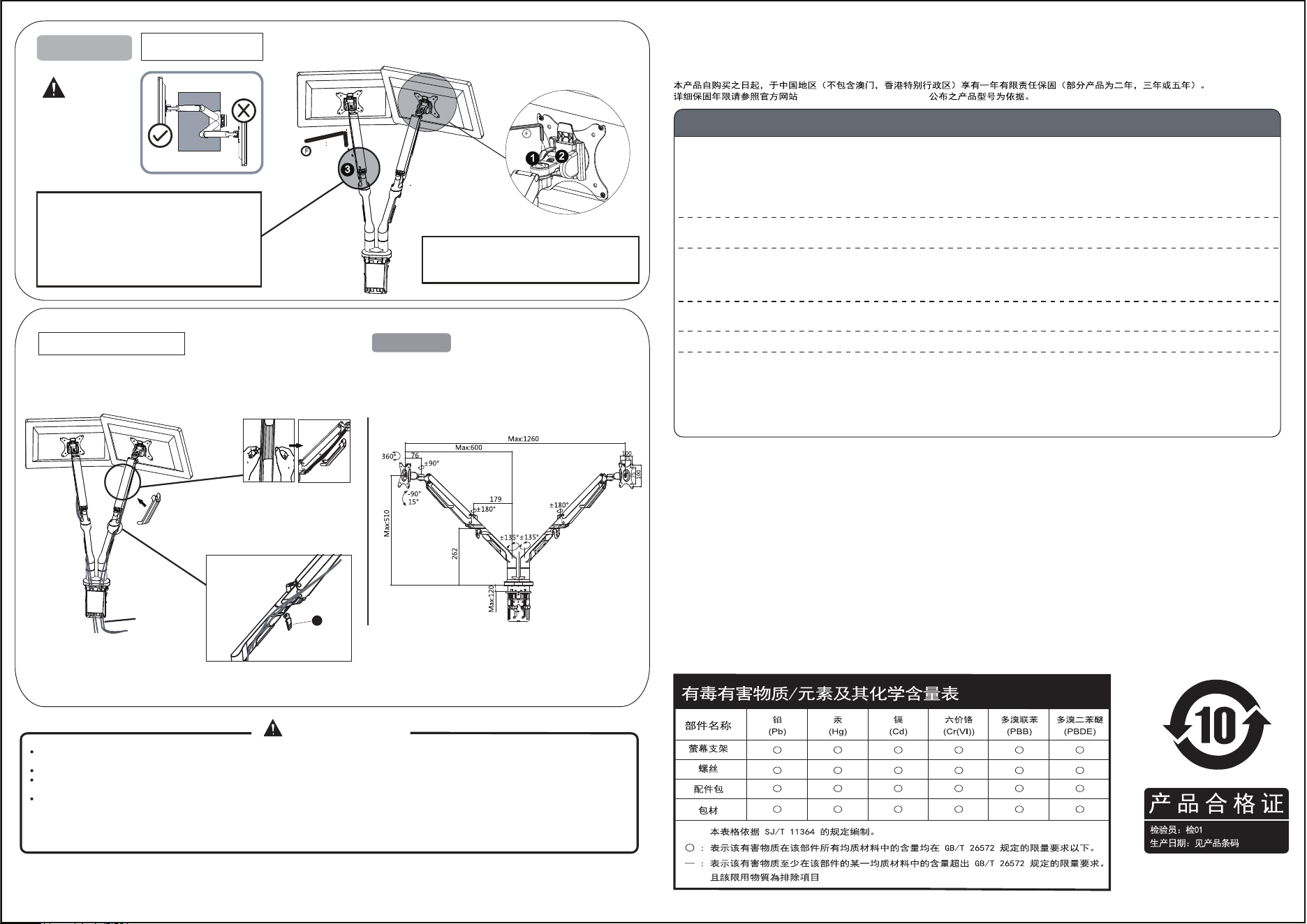
Adjust the monitor
Using cord management
Specification
take off cable
management
put cable management
back to cover the cables
Cable
take off cable management
and put cable management
back to cover cables once
finishing the management
Usually, loading capacity of arm will be 5-7Kg
Please adjust monitor arm once monitor is
installed. If monitor can not stop in any position
you required, kindly adjust the scew in “-”
direction when the monitor up and “+” direction
when it down, which can make arm stop in any
position.
Caution:
Please do not turn the
monitor to the back to
ensure the safe of
possession and body
To adjust the swivel function by 5x5 allen key (F)
on position 1 To adjust the tilt function by 5x5 allen
key (F) on position 2
12