Do not use any abrasive powder to clean the
cabinet.Wipe it with a soft cloth moistened
with a mild soap and water solution.
Must escape from burning and impact.
Do not leave the unit in a location near heat
sources,or in a place subject to direct sunlight
,excessive dust or mechanical shock.
If the sound becomes low or distorted,replace
all the batteries with new. Do not use old and
new batteries together.
If the set is not used for a long time ,remove
all the batteries to prevent to possible battery
leakage
PRECAUTIONS
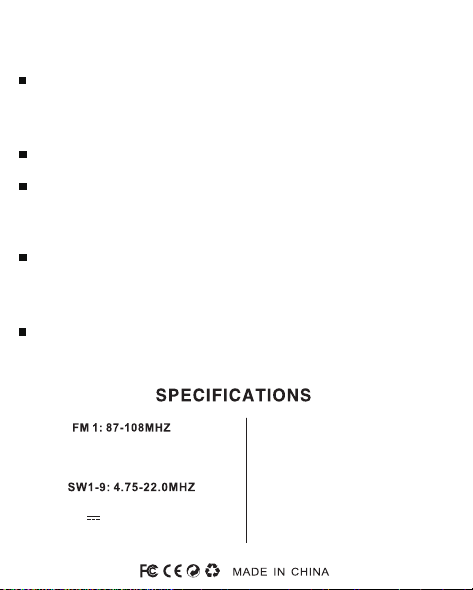
DC IN: 5V/300mA
DC : 3V (UM3 AA 1.5V X2 )
Skype: radiwow
TikTok: XHDATAradio
YouTube: Xhdata Radio
Facebook: Xhdata Radios
Web: www.xhdata.com.cn
WhatsApp:+86 18025193267
E-mail: [email protected]
FM 2: 64-87MHZ
AM : 522-1620KHZ
D-219
FM1-2/AM/SW1-9
11 BANDS WORLD RECEIVER
Operating Manual
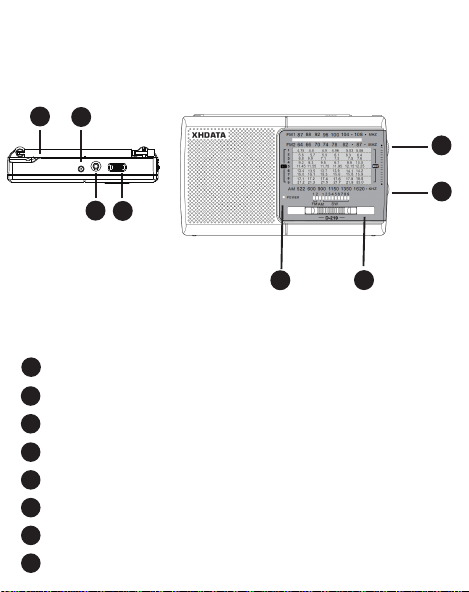
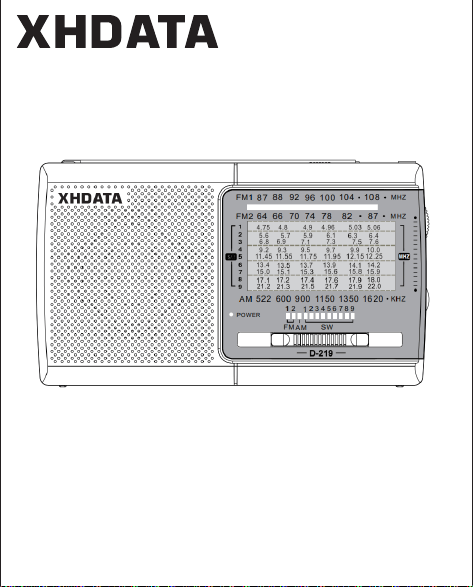
FUNCTION OF KEYS
1
2
3
4
5
6
7
1
8
Antenna
Dc jack (5V)
Earphone jack
Power on/off
Tuning knob
Volume button
Band selector(FM/AM/SW1-9)
Power ligh
2
3
4
5
6
7
8
t
3.LISTEN TO AM/SW1-
1.POWER ON/OFF .VOLUME
9
4.ANTENNA
Select the desired band(AM/SW1-9) by using the
band selector switch(7).
Turn the radio on by switch the power on/off switch
(4).
Use the volume knob(6)to adjust the volume.
2.LISTEN TO FM
Select the FM band by using the band selector
switch(7).
Use the tuning knob(5),tune the radio to the
desired frequency.
Turn the tuning knob(5) to the desired frequency.
For AW,the receiver uses the internal antenna for
the AM band.
Rotate the reveiver for best reception.
For FM/SW,fully extend the antenna (1) and rotate
it for the best reception.
USING THE RADIO