Model: EPCD-2003
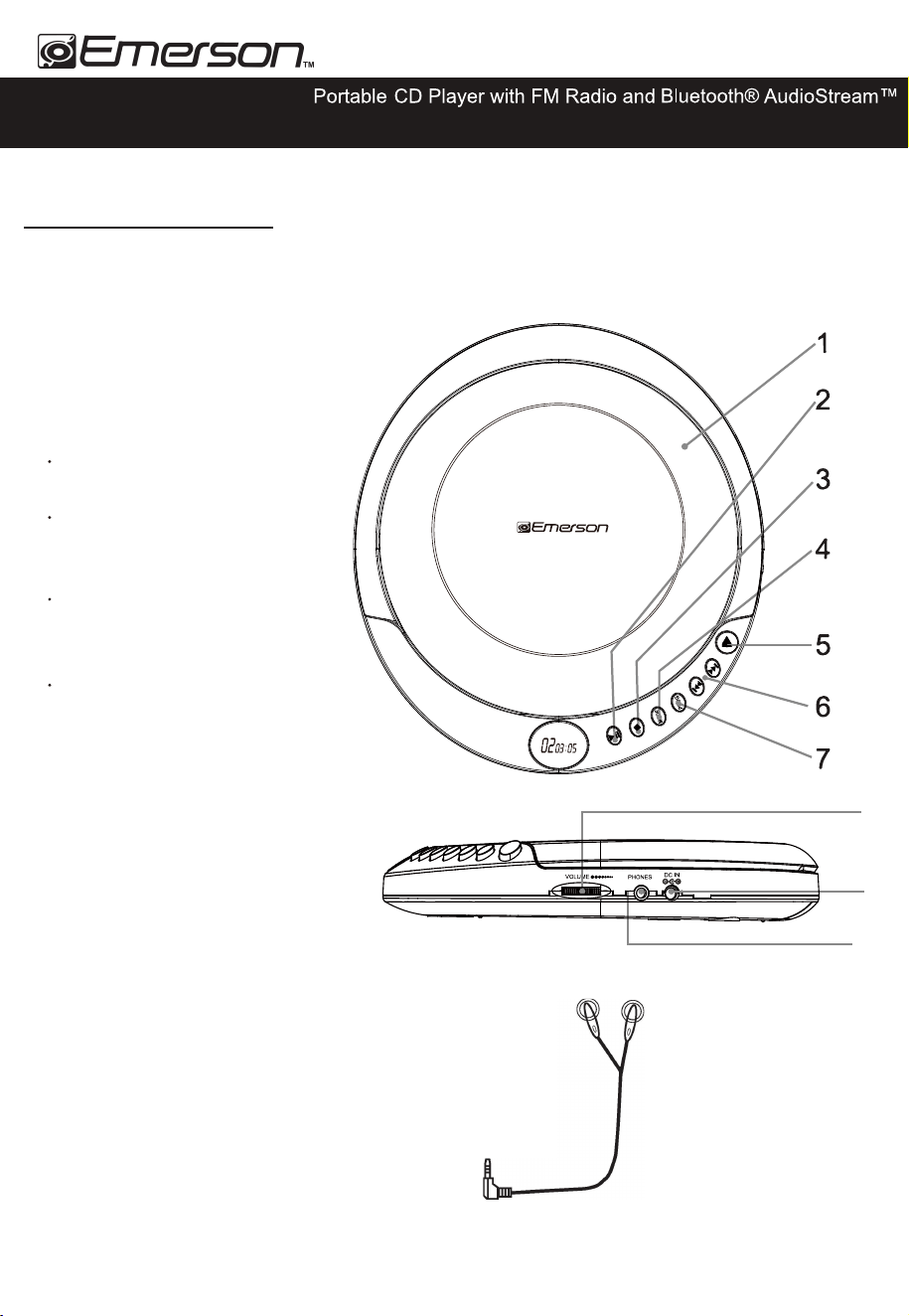
FEATURES AND CONTROLS
1 CD DOOR
2
Press to play or pause
a loaded CD.
3 STOP/BT
4 MODE
Press to repeat a single track or an
en�re CD, play tracks in a random
order, or play the CD in intro mode.
5 OPEN
Press to open the CD DOOR.
6 SKIP/SEARCH
Press to skip between tracks on
a loaded
CD.
Press
and hold to
search
an individual
track
on a loaded CD.
7 PROG
Press to program a loaded CD
to play
tracks in order.
8 VOLUME
Turn to adjust the volume.
9 POWER INPUT
10 STEREO
EARPHONE JACK
Earphones
-1 -
8
9
10
PLAY/PAUSE
USB
USER GUIDE
a specified
Press to stop a CD during play. In stop
mode.
Press for 2 seconds to ac�vate
AudioStream™ (Bluetooth® out) mode.
Turning on the device, press and
hold the MODE bu�on for the FM
radio func�on then press and hold
again to switch to CD mode.
Please read carefully before use and keep for future reference.
Press the "PLAY/PAUSE"
bu�on to power on, p ress and hold
"PLAY/PAUSE" bu�on for 2 seconds
to power off.
STOP/BT
-2 -
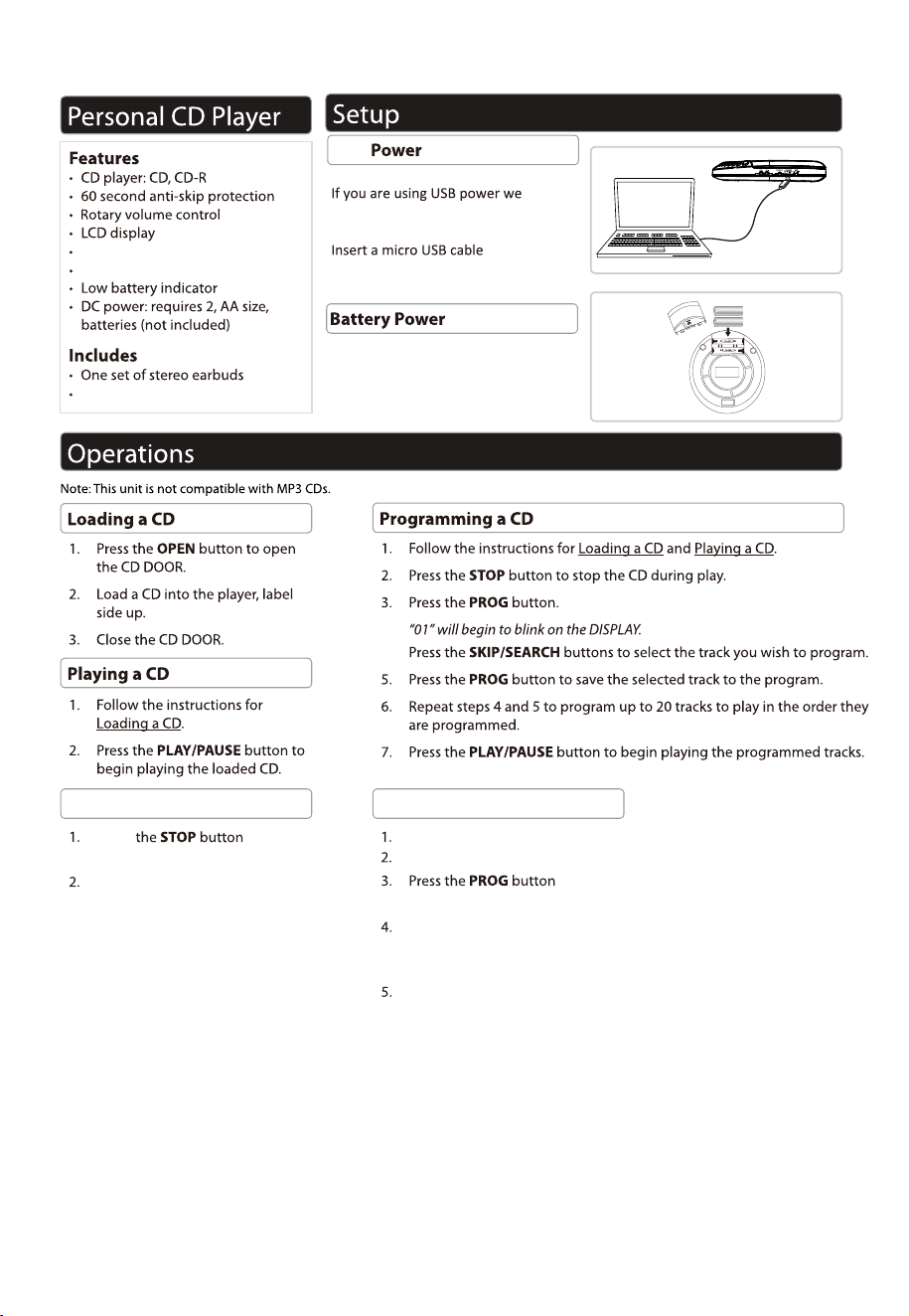
USB power supply
recommend that your remove any
ba�eries first.
into the USB port on the device and
use a suitable USB power supply.
Ba�eries power supply
Requires 2,AA size,ba�eries(not
included).Please remove any ba�eries
from the unit if unit will not be used for
a period of �me.
USB
FM Radio
AudioStream™ (Bluetooth® out)
One set of DC line
Press for 2 seconds
to ac
�vate bluetooth out mode.
Press and hold the MODE bu�on for the FM radio func�on.
Press the PROG bu
�on to save the selected storage area,
a total of 30 units can be stored.
Press the PLAY bu
�on to switch to scan mode.
“BT” will to blink on the DISPLAY,
When the “BT” is on, it is connected.
Connect via bluetooth Programming FM radio
“PROG” will begin to blink.
to memory radio console posi
�on,
a�er 5 seconds, it will be automa
�cally confirmed.
Press the SKIP/SEARCH bu
�on to select the posi�on of the
storage area, press the bu�on again to confirm and save.

FCC NOTICE
Any Changes o
r modifications not expressly approved by the party
responsible
for compliance could void the user's authority to operate the equipment. This
device complies with part 15 of the FCC Rules. Operation is subject to the
following two conditions: (1) This device may not cause harmful interference,
and (2) This device must accept any interference received, including
interference that may cause undesired operation.
FCC Radiation Exposure Statement:
This equipment complies with FCC radiation exposure limits for an uncontrolled environment. This equipment should be installed and
operated with a minimum distance of 20cm between the radiator& your body. Note: This equipment has been tested and found to comply
with the limits for a Class B digital device, pursuant to part 15 of the FCC Rules. These limits are designed to protect reasonably against
harmful interference in a residential installation. This equipment generates, uses, and can radiate radio frequency energy and, if not
installed and used in accordance with the instructions, may cause harmful inteerence to radio communica-tions. However, there is no
guarantee that interference will not occur in a particular installation. If this equipment does cause harmful inteerence to radio or television
reception, which can be determined by turning the equipment o and on, the user is encouraged to try to correct the inteerence by one or
more of the following measures:
- R
eorient or relocate the rec
eiving antenna.
- Increase the separation between the equipment and receiver.
- Connect the equipment to an outlet on a circuit dierent from that to which the receiver is connected.
- Consult the dealer or an experienced radio technician for help.
SUPPORT
If you have problems with your d
evice, please consult the instructions in this manual. Please also visit
us on the web at www.emersonaudio.com to get up to the minute news, ales, and documentation r
your device. For additional assistance, please contact Emerson Technical suppo.
EMERSON Technical Support
2320 East 49th Street
Vernon, CA 90058
Tel: (866) 411-6292
Email: suppo@emersonaudio.com
Made in China
-3-
To ensure safe and lasting enjoyment of your unit, please follow these guidelines:
Protect from Moisture: Avoid exposing the unit to liquids, rain, or humid environments. Gentle
Cleaning Only: Use a soft, dry cloth to clean the unit case. Avoid abrasive cleaners that could
damage the finish.
Handle with Care: Refrain from dropping, disassembling, deforming, modifying, or inserting objects
into the unit.
Professional Service Only: Do not attempt to repair, modify, or disassemble the unit yourself. There
are no user-serviceable components inside, and tampering may void the warranty.
Prevent Scratches: Keep the unit away from sharp objects to avoid scratches and potential
damage.
Turn it Off When Needed: Follow all signage that requires turning off electronic devices in
designated areas.
Temperature Matters: Avoid exposing the unit to extreme hot or cold temperatures.
Direct Sunlight Warning: Keep the unit out of direct sunlight.
S
A
FET
Y
INFOR
MA
TION