R
User Manual
Manual de usuario
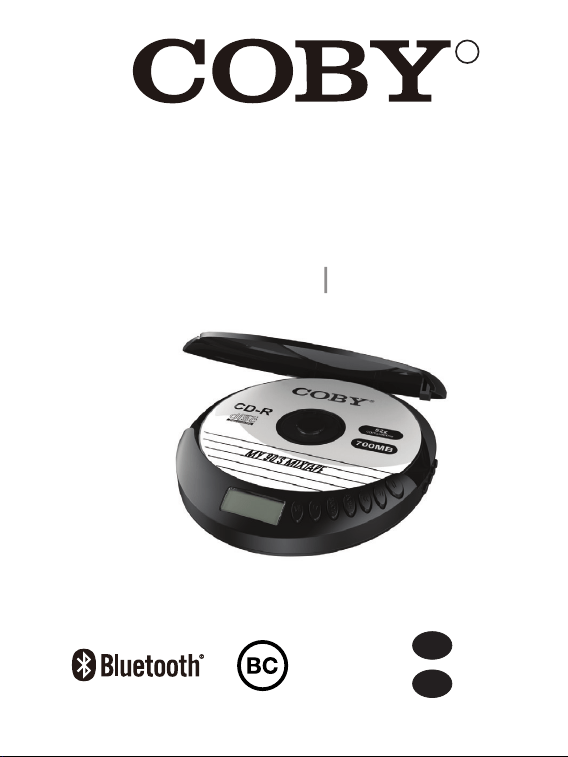
Wireless Anti-Skip CD Player
Reproductor de CD inalámbrico antideslizante
CD201
EN
...
01
10
...
ES
?
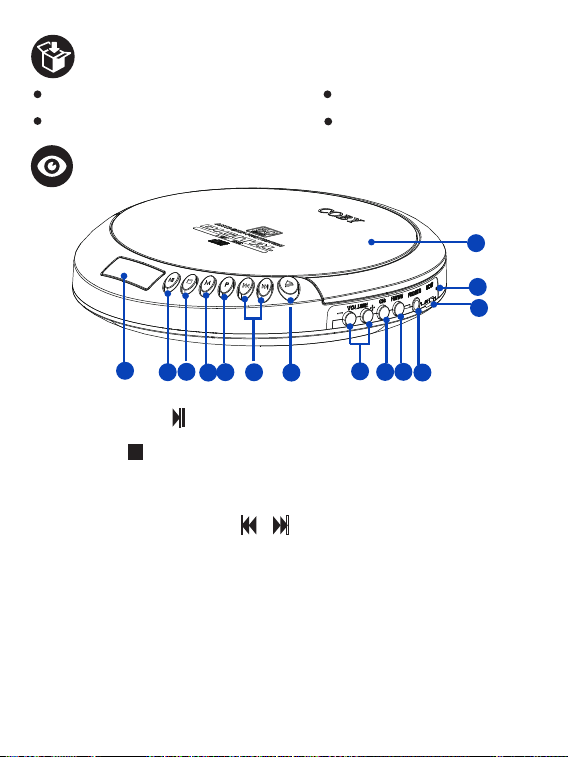
Overview
1
2
3
4
5
6
7
14
8
9
10
12
13
11
EN 1
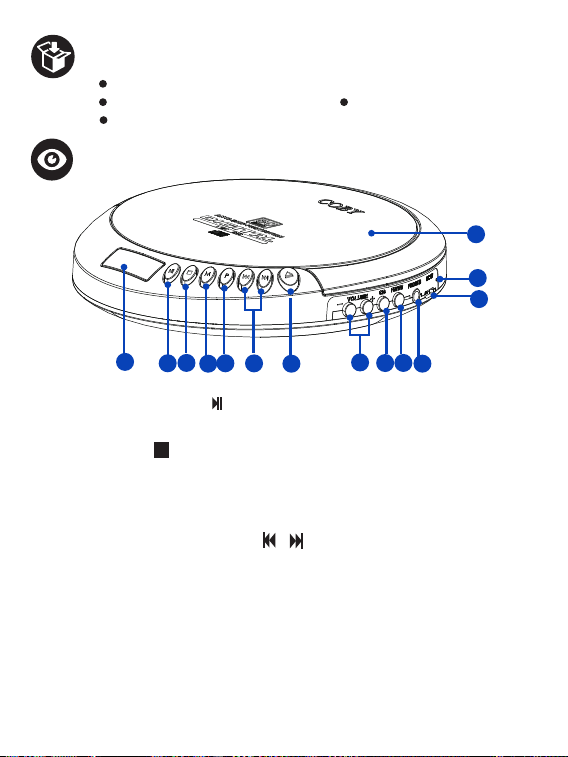
1. LCD Display - Displays the status of the CD player.
2. Play/Pause button - In power o mode, press to turn on the CD player.
In CD mode, press to play or pause the playback.
3. Stop button - In CD mode, press to stop the playback; press again to turn
o the CD player. In FM radio mode, press to turn the FM Radio o.
4. Mode button - Press to set the CD playback mode.
5. Program button - Press to program a loaded CD to play tracks in a specified order.
6. Previous/ Next Track button / - Press to skip to the previous or next
track / preset radio station.
7. Open button - Press to open the CD door.
8. Volume -/+ Button - Press to increase or decrease the volume level.
9. CD button - Press to enter the CD playback mode.
10. FM/BT button - Press to enter FM radio mode; press and hold to enter
Bluetooth Audio-Out mode.
11. Earphone jack - Connect your earphone or headphone to listen to CD
music or FM radio.
12. Micro USB Charging port
13. Charging LED indicator
14. CD door
1 X CD201 Wireless Anti-Skip CD Player 1 X Micro USB Charging Cable
1 X Wired Earphone 1 X User Manual
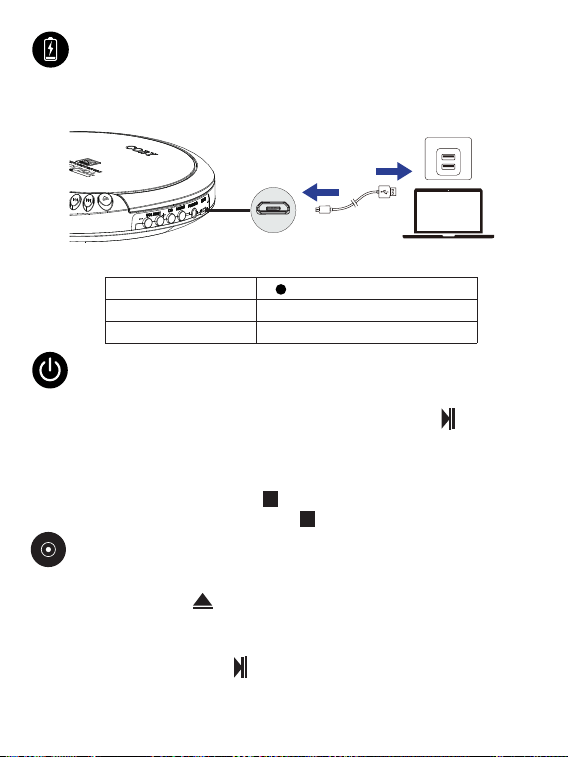
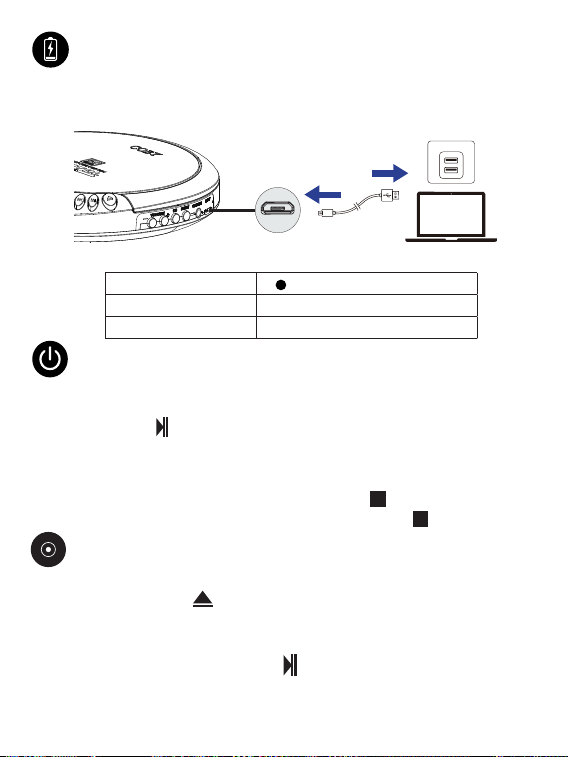
Connect the supplied Micro USB Charging Cable to a USB power source and the
Micro USB charging port of the CD player.
Turning on/o
Turning the CD player on
After fully charging the CD player, press the Play/Pause button to turn on
the CD player, and it will automatically default to CD playback mode.
Turning the CD player o
To turn the CD player o:
In CD mode, press the Stop button twice.
In FM Radio mode, press the Stop button once.
Micro USB cable
USB power source
Micro USB
Charging port
EN 2
Charging
Steady red
Charging LED indication
O
Charging
Fully charged
Charging Time
4 Hours
Loading a CD
1. Press the Open button to open the CD door.
2. Place a disc on the disc tray with the label side up.
3. Press the CD door to close it.
4. Press the Play/Pause button to turn the CD player on, then the CD player
will automatically enter CD mode and load the CD, and the “CD” appears and
the track format flashes on the display screen.
Playing CD
Playing a CD
1. Follow the instructions for loading a CD and connect the included earphone
to the earphone jack of the CD player.
2. Wait a few seconds until both the CD’s track number and elapsed time
appear on the display screen.
Programming a CD
1. In CD playback mode, press the Stop button to stop the CD playback.
2. Press the Program button P. “00” begins to blink on the display screen.
3. Press the Previous/Next Track button to select the track you wish to program.
4. Press the Program button P to save the selected track for programming.
Repeat step3 and step4 to program up to 20 tracks to play in the order they
are programmed.
5. Press the Play/Pause button to start the playback for the programmed
tracks.
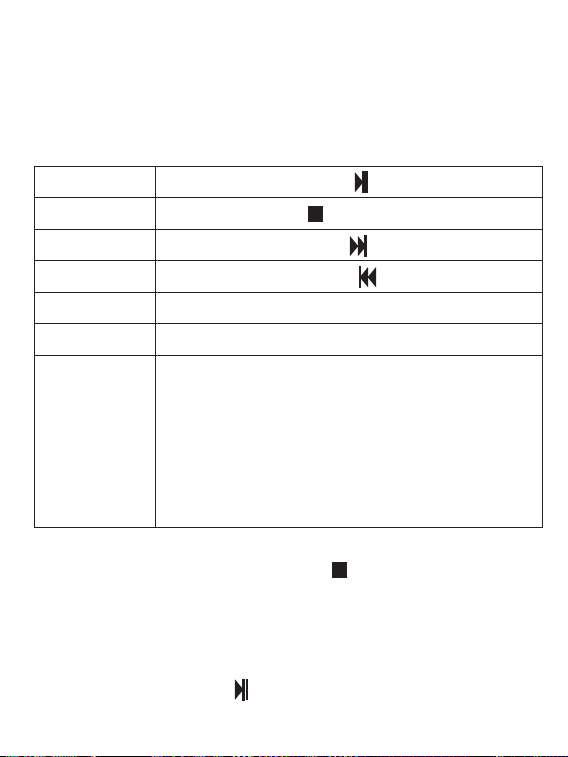
Playback Control
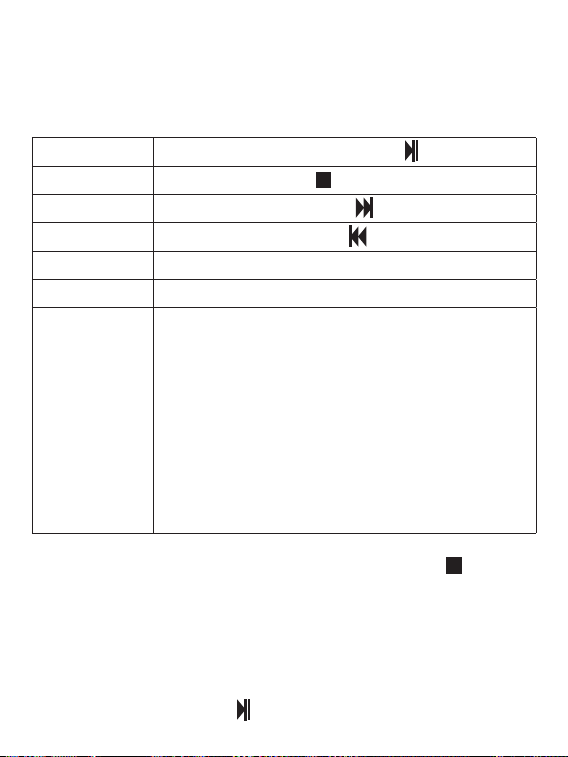
Press the Volume + button.
Press the Play/Pause button .
Press the Stop button .
Press the Next Track button .
Press the Previous Track button .
Press the Volume - button.
Volume down
Set the playback
mode
Press the Mode button M to set your desired playback mode.
The playback mode indicator will appear on the display screen.
REP: Repeat mode for playing a single track repeatedly.
ALL REP: All Repeat mode for repeating an entire CD.
RAND: Random mode for shuing the track playback order.
INTRO: Intro mode for previewing the first ten seconds of
each track in intro mode.
Note: To set Intro playback mode, press the Mode button
M, then press the Previous or Next track button.
Volume up
Play/Pause
Stop
Next track
Previous track
EN 3

Listening to the preset radio stations
1. In FM Radio mode, press the Previous/Next Track button to tune to your
desired preset radio station.
2. Press the Volume +/- button to adjust the broadcast volume level.
Notes:
1. You can try to position the headphone cable for better reception.
2. In FM Radio mode, you can press the CD button to switch to CD playback
mode.
Searching and presetting radio stations automatically
Before Listening to FM Radio, connect your headphone to the CD player.
1. Select FM Radio mode: Press the FM/BT button to enter FM Radio mode,
then the FM indicator and Radio frequency appear on the display screen.
2. Press and hold the Play/Pause button for 2 seconds to automatically search
for the radio stations with strong reception. Then all available radio stations will be
stored by the preset channel number in order, and the first preset radio station will
broadcast automatically.
EN 4
Step1. In CD playback mode, press and hold the FM/BT button until
the “BE”
flashes on the display screen, indicating it enters Bluetooth Out mode.
Step2. Turn on your device (like a Bluetooth speaker) and select Bluetooth
mode in your device’s setting, then the CD Player will automatically be paired
with your device. If it is successfully connected,
the “BE” stop flashing on the
display screen.
And the music will be output to your device for playback.
Step3. Music will be playable on your Bluetooth speaker and controlled like CD
playback mode through the buttons on the CD player.
Bluetooth Audio-Out Mode
Output music to external devices via Bluetooth
?
Listening to FM Radio
Specifications
I
Model NO./Name CD201/ Wireless Anti-Skip CD Player
Power Input 5V / 1A
Charging Time 4 Hours
Playtime Up to 6 hours
Battery Capacity 3.7V, 1500 mAh
Power Consumption 1.52 W( Max.)
Frequency Response 90Hz-20kHz
FM Frequency Range 87.5-108.0Mhz
Signal-to-noise ratio 42 dB
Dimension 1.97 ×1.57 × 1.18” (50 × 40 x 30 mm)
Weight 8.36 oz (237 g)
Note: Specifications are subject to change without notice.
Safety stament
Safety Precautions
1. Avoid dropping.
2. Do not disassemble this device.
3. Do not expose this device to rain or moisture or submerge it in water.
4.
Ideal temperatures are 0°C to 35°C.
Avoid extreme temperatures.
5. Keep the device away from excessive heat, such as sunshine, fire, or the like.
6. Do not use the device outdoors during thunderstorms.
7. Use original or certified cables.
8. Do not use any corrosive cleaner/oil to clean.
9. Keep out of reach of children. It contains small parts which may be a choking hazard.
10. Observe local laws and regulations while using the device.
11. To prevent damage to your device’s parts or internal circuits, do not use it in
dusty, smoky, damp, or dirty environments.
EN 5

12. Do not use, store or transport the device where flammables or explosives
are stored. Using your device in these environments increases the risk of
explosion or fire.
FCC Statement
FCC ID: 2AMSOSTW002
This device complies with Part 15 of the FCC Rules. Operation is subject to the
following two conditions:
(1) this device may not cause harmful interference, and (2) this device must
accept any interference received, including interference that may cause undesired
operation.
Warning: Changes or modifications not expressly approved by the party respon-
sible for compliance could void the user’s authority to operate the equipment.
Note: This equipment has been tested and found to comply with the limits for
a Class B digital device, pursuant to Part 15 of the FCC Rules. These limits are
designed to provide reasonable protection against harmful interference in a
residential installation.
This equipment generates, uses and can radiate radio frequency energy and, if
not installed and used in accordance with the instructions, may cause harmful
interference to radio communications. However, there is no guarantee that
interference will not occur in a particular installation. If this equipment does
cause harmful interference to radio or television reception, which can be de-
termined by turning the equipment o and on, the user is encouraged to try to
correct the interference by one or more of the following measures: (1) Reorient
or relocate the receiving antenna. (2) Increase the separation betw
een the
equipment and receiver. (3) Connect the equipment into an outlet on a circuit
dierent from that to which the receiver is connected. (4) Consult the dealer
or an experienced radio / TV technician for help.
FCC Radiation Exposure Statement:
The device has been evaluated to meet general RF exposure requirement.
The device can be used in portable exposure condition without restriction.
Disclaimer
All information, design and specifications contained in this manual were correct
at the time of this publication. As the product goes under continuous upgrades
and changes, however, the final device may have slight dierences. The con-
tents of this manual are subject to change without prior notice, and Coby will
not be liable for any errors contained herein or for incidental or consequential
damages in connection with the furnishing performance or use of this manual.
EN 6

COBY COPYRIGHT 2024 ALL RIGHTS RESERVED. COBY IS A REGISTERED
TRADEMARK OF CBY HOLDINGS, LLC. MANUFACTURED BY SUMMIT
ELECTRONICS LLC. USED UNDER LICENSE. CBY HOLDINGS, LLC DOES NOT
MANUFACTURE THIS PRODUCT OR PROVIDE ANY MANUFACTURER’S
WARRANTY OR SUPPORT. THE BLUETOOTH
®
WORD MARK AND LOGOS
ARE REGISTERED TRADEMARKS OWNED BY THE BLUETOOTH SIG, INC.
AND ANY USE OF SUCH MARKS BY SUMMIT ELECTRONICS LLC IS UNDER
LICENSE. OTHER TRADEMARKS AND TRADE NAMES ARE PROPERTY OF
THEIR RESPECTIVE OWNERS.
WARNING: CANCER AND REPRODUCTIVE HARM - WWW. P65WARN-
INGS.CA.GOV.
©
SUMMIT ELECTRONICS LLC One Year Limited Warranty
WARRANTY SUMMIT ELECTRONICS LLC LIMITED WARRANTY (“Warranty”)
- For product Categories Listed in Chart Below (as applicable, “Product”) Before
returning your Product for service under this Warranty, please (i) read the
instruction manual carefully. If you are still having trouble with your Product,
please contact Technical Support at [email protected].
Warning: Some Products may contain components that are small enough to be
swallowed. Please keep out of reach of children.
Subject to the terms and conditions herein, SUMMIT ELECTRONICS LLC (here-
inafter called “SUMMIT ELECTRONICS LLC”) warrants to the original purchaser
of the Product (“Customer”) that for the applicable Warranty Period listed
below, the Product will be free from defects in material or workmanship under
normal, non-commercial use (“Defects”).
Warranty Period encompasses, as listed below, separate “Coverage Periods” for
Parts and Labor, each Coverage Period for one year, to begin from the original
date of Customer purchase. If Customer returns a defective Product (or any
component thereof) during the applicable Warranty Period, SUMMITELEC-
TRONICSLLC will, at its option, during the specified Coverage Periods for Parts
and Labor (as applicable) either: (i) repair the Product (or, as applicable, any
component thereof) or (ii) replace the Product (or, as applicable, any component
thereof) with a new or refurbished Product (or, as applicable, any component
thereof), in either case free of charge to Customer for Parts and/ or Labor (as
applicable) during the specified Coverage Period only, and excluding applicable
shipping charges (noted below), for which the Customer is responsible. The
foregoing states the Customer’s exclusive remedy and SUMMIT ELECTRONICS
LLC’s sole liability for breach of the limited warranty contained herein.
EN 7

This Warranty specifically excludes any Product (or, as applicable, any compo-
nent thereof) that has been subject to or Defects resulting from: (a) any ne-
glect or misuse by a Customer, an accident, improper application, violation of
operating instructions for the product, any other Customer-induced damage, or
the alteration or removal of any product serial number: (b) any modification or
repair to Product (or, as applicable, any component thereof) by any party other
than SUMMIT ELECTRONICS LLC or a party authorized in writing by SUMMIT
ELECTRONICS LLC; (c) any damage to Product (or, as applicable, any component
thereof) due to power surges, incorrect electrical voltage, misconnection 17 to
any device, or malfunction of any device used with the Product (or, as applicable,
any component thereof); (d) cosmetic damage to the Product (or, as applicable,
any component thereof) caused by normal wear and tear; (e) shipping damage
that occurs while the Product is in transit; (f) damage caused by heat sources,
sunlight, electromagnetic conditions, or other climatic conditions; or (g) any acts
of God. Product is sold to Customer for personal, non-commercial use only. Prod-
uct is not warranted for Customer’s commercial or rental use.
In addition, Product is not warranted against failure, and should not be used by
Customer for any application where (i) there is a risk that any data stored on Prod-
uct will be breached or otherwise compromised, or (ii) the data stored on Product
is relied upon for medical or lifesaving applications. SUMMIT ELECTRONICS LLC
disclaims any Warranty for any of the foregoing uses to the fullest extent per-
mitted by law. Customer assumes any and all risks associated with such uses
of Product and agrees to indemnify SUMMIT ELECTRONICS LLC for any dam-
ages claimed against SUMMIT ELECTRONICS LLC for such uses. EXCEPT FOR
EXPRESS WARRANTIES STATED ABOVE AND TO THE MAXIMUM EXTENT-
PERMITTED BYLAW, THE PRODUCTS ARE PROVIDED “AS IS”, AND SUMMIT
ELECTRONICS LLC DISCLAIMS ALLOTHER WARRANTIES, INCLUDING WITH-
OUT LIMITATION ANY IMPLIED WARRANTY(I) OF ERCHANTABILITY, (II) OF
FITNESS FOR APARTICULAR PURPOSE, OR (III) OF NON-INFRINGEMENT
OF THIRD-PARTY RIGHTS. TO THE MAXIMUM EXTENT PERMITTED BY AP-
PLICABLE LAW, IN NO EVENT WILL SUMMIT ELECTRO- NICS LLC BE LIABLE
TO CUSTOMER OR ANY THIRD PARTY FOR ANY INDIRECT, SPECIAL, INCI-
DENTAL, CONSEQUENTIAL, EXEMPLARY OR PUNITIVE DAMAGES, INCLUD-
ING, WITHOUT LIMITATION, ANY LOST PROFITS OR REVENUES, LOSS OR
INACCURACY OF ANY DATA OR COST OF SUBSTITUTE GOODS, REGARD-
LESS OF THE THEORY OF LIABILITY (INCLUDING NEGLIGENCE) AND EVEN
IF SUMMIT ELECTRONICS LLC HAS BEEN ADVISED OF THE POSSIBILITY OF
SUCH DAMAGES, SUMMIT ELECTRONICS LLC’S AGGREGATE LIABILITY TO
EN 8

CUSTOMER FOR ACTUAL DIRECT DAMAGES FOR ANY CAUSE WHATSOEV-
ER SHALL BE LIMITED TO THE CUMULATIVE PRODUCT FEES PAID BY THAT
CUSTOMER FOR THE PRODUCT CAUSING THE DAMAGES, IF ANY. This War-
ranty gives Customer specifics rights, and Customer may also have other rights
that vary from jurisdiction to jurisdiction. To obtain Warranty service, Customer
must email SUMMIT ELECTRONICS LLC Technical Support prior to making a
Product return. Customer must include with Product return the following items
(failure to enclose any of these items may result in a delay in the processing of
your Warranty claim): (i) a dated sales receipt that indicates the place of pur-
chase, model number of Product, and amount paid; (ii) a detailed description
of Customer’s problem with Product; (iii) Customer’s full name, phone number,
and return address, and; (iv) a money order made out to SUMMIT ELECTRON-
ICS LLC Electronics Corporation to cover return shipping charges to US destina-
tions only, for the applicable dollar amount shown for the Product in the table
above. SUMMIT ELECTRONICS LLC will not make return shipments to a P.O. Box.
For shipping to international addresses, actual freight will be charged to Cus-
tomer. Return your Product freight-prepaid in its original packaging, or packaging
that aords an equal measure of protection. Please allow 4 to 6 weeks for the
processing of your claim (6 to 8 weeks from November to February).
You must email SUMMIT ELECTRONICS LLC Technical Support prior to making a
return. Please ask if you are unsure of which category your product falls under.
*US destinations only.
PRODUCT CATEGORY
SHIPPING* (USD)
Adapters, Converters, Chargers, Headphones, Microphones,
Cellular Accessories
$7.99
Alarm Clocks, Portable CD Players, Radios, Corded
Telephones, MP3 Players, Digital Photo Frames (screen size less than 5”)
$7.99
Portable Stereo Systems, Speaker Systems, Cordless Telephones, Home
DVD Players
$14.99
Home Theater DVD Systems, Portable DVD Players, Portable Media
Players, Digital Photo Frames (screen sizes 5” to 11”)
$14.99
EN 9
?
Visión general
1. Pantalla LCD: muestra el estado del reproductor de CD.
2. Botón Reproducir/Pausar : en el modo de apagado, presiónelo para
encender el reproductor de CD.
En modo CD, presione para reproducir o pausar la reproducción.
3. Botón de parada : en el modo de CD, presiónelo para detener la reproduc-
ción; púlselo de nuevo para apagar el reproductor de CD. En el modo de radio
FM, presione para apagar la radio FM.
4. Botón de modo: presiónelo para establecer el modo de reproducción de CD.
5. Botón de programa: presiónelo para programar un CD cargado para que
reproduzca las pistas en un orden específico.
6. Botón de pista anterior/siguiente / : presione para saltar a la pista
anterior o siguiente / estación de radio preestablecida.
7. Botón Abrir: presiónelo para abrir la puerta del CD.
8. Botón de volumen -/+: presione para aumentar o disminuir el nivel de volumen.
9. Botón CD: presiónelo para ingresar al modo de reproducción de CD.
10. Botón FM/BT: presione para ingresar al modo de radio FM; mantenga
presionado para ingresar
Modo de salida de audio Bluetooth.
11. Toma de auriculares: conecte sus auriculares o audífonos para escuchar
música en CD o radio FM.
12. Puerto de carga micro USB
13. Indicador LED de carga
14. Puerta de CD
1
2
3
4
5
6
7
14
8
9
10
12
13
11
ES 10
1 reproductor de CD inalámbrico antideslizante CD201
1 cable de carga micro USB 1 auricular con cable
1 manual de usuario
Conecte el cable de carga Micro USB suministrado a una fuente de alimentación
USB y al puerto de carga Micro USB del reproductor de CD.
Encender/Apagar
Encender el reproductor de CD
Después de cargar completamente el reproductor de CD, presione el botón
Reproducir/Pausar para encender el reproductor de CD y automáticamente
pasará al modo de reproducción de CD.
Apagar el reproductor de CD
Para apagar el reproductor de CD:
En el modo de CD, presione el botón Detener dos veces.
En el modo de radio FM, presione el botón Detener una vez.
Cable micro USB
Fuente de ali-
mentación USB
Puerto de carga
micro USB
ES 11
Cargando
Rojo fijo
Indicación LED de carga
Apagado
Cargando
Completamente
Tiempo de carga
4 horas
Cargando un CD
1. Presione el botón Abrir para abrir la puerta del CD.
2. Coloque un disco en la bandeja de discos con el lado de la etiqueta hacia arriba.
3. Presione la puerta del CD para cerrarla.
4. Presione el botón Reproducir/Pausar para encender el reproductor de CD,
luego el reproductor de CD ingresará automáticamente al modo de CD y car-
gará el CD, y aparecerá “CD” y el formato de la pista parpadeará en la pantalla.
Reproducción de discos
Reproducción de un CD
1. Siga las instrucciones para cargar un CD y conecte el auricular incluido al
conector para auriculares del reproductor de CD.
2. Espere unos segundos hasta que aparezcan en la pantalla el número de
pista del CD y el tiempo transcurrido.
Programando un CD
1. En el modo de reproducción de CD, presione el botón Detener para
detener la reproducción del CD.
2. Presione el botón de programa P. “00” comienza a parpadear en la pantalla
de visualización.
3. Pulse el botón Pista anterior/siguiente para seleccionar la pista que desea programar.
4. Presione el botón de programa P para guardar la pista seleccionada para la
programación.
Repita los pasos 3 y 4 para programar hasta 20 pistas para que se reproduz-
can en el orden en que fueron programadas.
5. Presione el botón Play/Pause para iniciar la reproducción de las pistas
programadas.
Control de reproducción
ES 12
Presiona el botón Volumen +.
Presione el botón Reproducir/Pausar .
Pulse el botón Detener .
Pulse el botón Pista siguiente .
Pulse el botón Pista anterior .
Presiona el botón Volumen -.
Bajar volumen
Establecer
el modo de
reproducción
Presione el botón Modo M para configurar el modo de
reproducción deseado.
El indicador del modo de reproducción aparecerá en la
pantalla de visualización.
REP: modo de repetición para reproducir una sola pista
repetidamente.
ALL REP: modo All Repeat para repetir un CD completo.
RAND: modo aleatorio para cambiar el orden de reproduc-
ción de las pistas.
INTRO: modo de introducción para obtener una vista previa de los
primeros diez segundos de cada pista en el modo de introducción.
Nota: para establecer el modo de reproducción de intro-
ducción, presione el botón de modo M y, a continuación,
presione el botón de pista anterior o siguiente.
Sube el volumen
Reproducir pausar
Deténgase
Siguiente pista
Pista anterior
Escuchar las estaciones de radio preestablecidas
1. En el modo de radio FM, presione el botón Pista anterior/siguiente para
sintonizar la estación de radio preestablecida deseada.
2. Presione el botón Volumen +/- para ajustar el nivel de volumen de la trans-
misión.
Notas:
1. Puede intentar colocar el cable de los auriculares para una mejor recepción.
2. En el modo de radio FM, puede presionar el botón CD para cambiar al modo
de reproducción de CD.
Búsqueda y presintonización automática de emisoras de radio
Antes de escuchar la radio FM, conecte sus auriculares al reproductor de CD.
1. Seleccione el modo de radio FM: presione el botón FM/BT para ingresar al modo de
radio FM, luego el indicador de FM y la frecuencia de radio aparecerán en la pantalla.
2. Mantenga presionado el botón Reproducir/Pausar durante 2 segundos para
buscar automáticamente las estaciones de radio con recepción fuerte. Luego,
todas las estaciones de radio disponibles se almacenarán por el número de canal
preestablecido en orden, y la primera estación de radio preestablecida se trans-
mitirá automáticamente.
ES 13
Paso 1. En el modo de reproducción de CD, mantenga presionado el botón FM/
BT hasta que “BE” parpadee en la pantalla, lo que indica que ingresa al modo
de salida de Bluetooth.
Paso 2. Encienda su dispositivo (como un altavoz Bluetooth) y seleccione el
modo Bluetooth en la configuración de su dispositivo, luego el reproductor
de CD se emparejará automáticamente con su dispositivo. Si se conecta con
éxito, el “BE” deja de parpadear en la pantalla de visualización. Y la música se
enviará a su dispositivo para su reproducción.
Paso 3. La música se podrá reproducir en su altavoz Bluetooth y se controlará como
el modo de reproducción de CD a través de los botones del reproductor de CD.
Modo de salida de audio Bluetooth
Salida de música a dispositivos externos a través de Bluetooth
?
Escuchar radio FM
Especificaciones
I
N.° de modelo/Nombre
CD201/ Reproductor de CD inalámbrico antisaltos
Entrada de alimentación 5V / 1A
Tiempo de carga 4 horas
Tiempo de juego hasta 6 horas
Capacidad de la batería 3,7 V, 1500 mAh
El consumo de energía 1,52 W (máx.)
Respuesta frecuente 90Hz-20kHz
Rango de frecuencia FM 87,5-108,0 MHz
Relación señal-ruido 42dB
Dimensión 1,97 × 1,57 × 1,18” (50 × 40 × 30 mm)
Peso 237 gramos (8,36 onzas)
Nota: Las especificaciones están sujetas a cambios sin previo aviso.
Declaración de seguridad
Precauciones de seguridad
1. Evitar caídas.
2. No desmonte este dispositivo.
3. No exponga este dispositivo a la lluvia o la humedad ni lo sumerja en agua.
4. Las temperaturas ideales son de 0 °C a 35 °C. Evite las temperaturas extremas.
5. Mantenga el dispositivo alejado del calor excesivo, como la luz solar, el fuego
o similares.
6. No utilice el dispositivo al aire libre durante tormentas eléctricas.
7. Utilice cables originales o certificados.
8. No use ningún limpiador/aceite corrosivo para limpiar.
9. Manténgase fuera del alcance de los niños. Contiene piezas pequeñas que
pueden suponer un peligro de asfixia.
10. Observe las leyes y regulaciones locales mientras usa el dispositivo.
11. Para evitar daños a las partes o circuitos internos de su dispositivo, no lo use
en ambientes polvorientos, con humo, húmedos o sucios.
ES 14

12. No utilice, almacene ni transporte el dispositivo donde se almacenan produc-
tos inflamables o explosivos. El uso de su dispositivo en estos entornos aumenta
el riesgo de explosión o incendio.
Declaración de la FCC
ID de la FCC: 2AMSOSTW002
Este dispositivo cumple con la Parte 15 de las Normas de la FCC. La operación
está sujeta a las siguientes dos condiciones:
(1) este dispositivo no puede causar interferencia dañina y (2) este dispositivo
debe aceptar cualquier interferencia recibida, incluida la interferencia que pueda
causar un funcionamiento no deseado.
Advertencia: Los cambios o modificaciones no aprobados expresamente por la
parte responsable del cumplimiento podrían anular la autoridad del usuario para
operar el equipo.
Nota: Este equipo ha sido probado y se encontró que cumple con los límites
para un dispositivo digital Clase B, de conformidad con la Parte 15 de las Reglas
de la FCC. Estos límites están diseñados para brindar una protección razonable
contra interferencias dañinas en una instalación residencial.
Este equipo genera, usa y puede irradiar energía de radiofrecuencia y, si no se
instala y usa de acuerdo con las instrucciones, puede causar interferencias dañi-
nas en las comunicaciones por radio. Sin embargo, no hay garantía de que no se
produzcan interferencias en una instalación en particular. Si este equipo causa
interferencias dañinas en la recepción de radio o televisión, lo que se puede
determinar apagando y encendiendo el equipo, se recomienda al usuario que
intente corregir la interferencia mediante una o más de las siguientes medidas:
(1) Reorientar o reubicar la antena receptora. (2) Aumentar la separación entre
el equipo y el receptor. (3) Conecte el equipo a un tomacorriente en un circuito
diferente al que está conectado el receptor. (4) Consulte al distribuidor oa un
técnico experimentado en radio/TV para obtener ayuda.
Declaración de exposición a la radiación de la FCC:
El dispositivo ha sido evaluado para cumplir con los requisitos generales de
exposición a RF.
El dispositivo se puede utilizar en condiciones de exposición portátil sin restricciones.
Descargo de responsabilidad
Toda la información, el diseño y las especificaciones contenidas en este manual
eran correctos en el momento de esta publicación. Sin embargo, dado que el
producto se somete a actualizaciones y cambios continuos, el dispositivo final
puede tener ligeras diferencias. El contenido de este manual está sujeto a cam-
bios sin previo aviso, y Coby no será responsable de los errores contenidos en
este documento ni de los daños incidentales o consecuentes en relación con el
funcionamiento del equipamiento o el uso de este manual.
ES 15

COBY COPYRIGHT 2024 TODOS LOS DERECHOS RESERVADOS. COBY
ES UNA MARCA REGISTRADA DE CBY HOLDINGS, LLC. FABRICADO POR
SUMMIT ELECTRONICS LLC. USADO BAJO LICENCIA. CBY HOLDINGS, LLC
NO FABRICA ESTE PRODUCTO NI PROPORCIONA NINGUNA GARANTÍA O
SOPORTE DEL FABRICANTE. LA MARCA Y LOS LOGOTIPOS DE BLUETOOTH®
SON MARCAS COMERCIALES REGISTRADAS PROPIEDAD DE BLUETOOTH
SIG, INC. Y CUALQUIER USO DE DICHAS MARCAS POR PARTE DE SUMMIT
ELECTRONICS LLC SE REALIZA BAJO LICENCIA. OTRAS MARCAS Y NOM-
BRES COMERCIALES SON PROPIEDAD DE SUS RESPECTIVOS DUEÑOS.
ADVERTENCIA: CÁNCER Y DAÑOS REPRODUCTIVOS - WWW. P65AD-
VERTENCIAS.CA.GOV.
©
SUMMIT ELECTRONICS LLC Garantía limitada de un año
GARANTÍA GARANTÍA LIMITADA DE SUMMIT ELECTRONICS LLC (“Ga-
rantía”): para las categorías de productos enumeradas en el cuadro a continu-
ación (según corresponda, “Producto”) Antes de devolver su Producto para re-
cibir servicio bajo esta Garantía, (i) lea atentamente el manual de instrucciones.
Si aún tiene problemas con su Producto, comuníquese con el Soporte técnico en
support@cobyaudio.com.
Advertencia: Algunos Productos pueden contener componentes lo suficientemente
pequeños como para tragarlos. Por favor, manténgalo fuera del alcance de los niños.
Sujeto a los términos y condiciones del presente, SUMMIT ELECTRONICS LLC
(en lo sucesivo, “SUMMIT ELECTRONICS LLC”) garantiza al comprador original
del Producto (“Cliente”) que durante el Período de garantía aplicable que se
indica a continuación, el Producto estará libre de defectos en material o mano de
obra bajo un uso normal, no comercial (“Defectos”).
El Período de garantía abarca, como se indica a continuación, “Períodos de cober-
tura” separados para piezas y mano de obra, cada Período de cobertura por un
año, a partir de la fecha original de compra del Cliente. Si el Cliente devuelve un
Producto defectuoso (o cualquier componente del mismo) durante el Período de
garantía aplicable, SUMMITELECTRONICSLLC, a su elección, durante los Perío-
dos de cobertura especificados para piezas y mano de obra (según corresponda):
(i) reparará el Producto (o, según corresponda, cualquier componente del mis-
mo) o (ii ) reemplazar el Producto (o, según corresponda, cualquier componente
del mismo) con un Producto nuevo o reacondicionado (o, según corresponda,
cualquier componente del mismo), en cualquier caso sin cargo para el Cliente por
Piezas y/o Mano de obra (según corresponda) durante el Período de Cobertura
especificado solamente, y excluyendo los cargos de envío aplicables (indicados
a continuación), por los cuales el Cliente es responsable. Lo anterior establece el
recurso exclusivo del Cliente y la única responsabilidad de SUMMIT ELECTRON-
ICS LLC por el incumplimiento de la garantía limitada aquí contenida.
ES 16

Esta Garantía excluye específicamente cualquier Producto (o, según corre-
sponda, cualquier componente del mismo) que haya estado sujeto o Defectos
que resulten de: (a) cualquier negligencia o mal uso por parte de un Cliente,
un accidente, aplicación incorrecta, violación de las instrucciones de funciona-
miento del producto , cualquier otro daño inducido por el Cliente, o la alteración
o eliminación de cualquier número de serie del producto: (b) cualquier modifi-
cación o reparación del Producto (o, según corresponda, cualquier componente
del mismo) por cualquier parte que no sea SUMMIT ELECTRONICS LLC o una
parte autorizada por escrito por SUMMIT ELECTRONICS LLC; (c) cualquier daño
al Producto (o, según corresponda, cualquier componente del mismo) debido a
subidas de tensión, voltaje eléctrico incorrecto, mala conexión 17 a cualquier dis-
positivo o mal funcionamiento de cualquier dispositivo utilizado con el Producto
(o, según corresponda, cualquier componente del mismo). ); (d) daño cosmético
al Producto (o, según corresponda, a cualquier componente del mismo) causado
por el desgaste normal; (e) daños de envío que ocurran mientras el Producto
está en tránsito; (f) daños causados por fuentes de calor, luz solar, condiciones
electromagnéticas u otras condiciones climáticas; o (g) cualquier acto de Dios.
El producto se vende al Cliente únicamente para uso personal y no comercial.
El producto no está garantizado para el uso comercial o de alquiler del Cliente.
Además, el Producto no está garantizado contra fallas y el Cliente no debe uti-
lizarlo para ninguna aplicación en la que (i) exista el riesgo de que los datos
almacenados en el Producto se violen o se vean comprometidos, o (ii) los datos
almacenados en el Producto se utiliza para aplicaciones médicas o de salva-
mento. SUMMIT ELECTRONICS LLC renuncia a cualquier garantía por cualqui-
era de los usos anteriores en la máxima medida permitida por la ley. El Cliente
asume todos y cada uno de los riesgos asociados con dichos usos del Producto
y acepta indemnizar a SUMMIT ELECTRONICS LLC por cualquier daño reclama-
do contra SUMMIT ELECTRONICS LLC por tales usos. A EXCEPCIÓN DE LAS
GARANTÍAS EXPRESAS ESTABLECIDAS ANTERIORMENTE Y EN LA MEDIDA
MÁXIMA PERMITIDA POR LA LEY, LOS PRODUCTOS SE PROPORCIONAN
“TAL CUAL”, Y SUMMIT ELECTRONICS LLC RENUNCIA A TODAS LAS DEMÁS
GARANTÍAS, INCLUYENDO SIN LIMITACIÓN CUALQUIER GARANTÍA IM-
PLÍCITA (I) DE COMERCIABILIDAD, (II) DE IDONEIDAD PARA UN PROPÓSI-
TO PARTICULAR , O (III) DE NO INFRACCIÓN DE DERECHOS DE TERCEROS.
EN LA MEDIDA MÁXIMA PERMITIDA POR LA LEY APLICABLE, EN NINGÚN
CASO SUMMIT ELECTRONICS LLC SERÁ RESPONSABLE ANTE EL CLIENTE
O CUALQUIER TERCERO POR CUALQUIER DAÑO INDIRECTO, ESPECIAL, IN-
CIDENTAL, CONSECUENCIAL, EJEMPLAR O PUNITIVO, INCLUYENDO, SIN
LIMITACIÓN, CUALQUIER PÉRDIDA DE BENEFICIOS O INGRESOS, PÉRDIDA
O INEXACTITUD DE CUALQUIER DATO O COSTO DE BIENES SUSTITUTOS,
INDEPENDIENTEMENTE DE LA TEORÍA DE LA RESPONSABILIDAD (INCLUI-
DA LA NEGLIGENCIA) E INCLUSO SI SUMMIT ELECTRONICS LLC HA SIDO
ADVERTIDO DE LA POSIBILIDAD DE DICHOS DAÑOS, LA RESPONSABILIDAD
TOTAL DE SUMMIT ELECTRONICS LLC HACIA EL CLIENTE POR DAÑOS DIRECTOS
ES 17

REALES LOS DAÑOS POR CUALQUIER CAUSA SE LIMITARÁN A LAS TARIFAS
ACUMULATIVAS DEL PRODUCTO PAGADAS POR EL CLIENTE POR EL PRO-
DUCTO QUE CAUSA LOS DAÑOS, SI LAS HAY. Esta Garantía otorga al Cliente
derechos específicos, y el Cliente también puede tener otros derechos que varían
de una jurisdicción a otra. Para obtener el servicio de Garantía, el Cliente debe
enviar un correo electrónico a Soporte Técnico de SUMMIT ELECTRONICS LLC
antes de realizar una devolución del Producto. El Cliente debe incluir con la devo-
lución del Producto los siguientes elementos (si no se adjunta alguno de estos el-
ementos, puede producirse una demora en el procesamiento de su reclamación
de Garantía): (i) un recibo de compra fechado que indique el lugar de compra, el
número de modelo del Producto, y cantidad pagada; (ii) una descripción detal-
lada del problema del Cliente con el Producto; (iii) Nombre completo del cliente,
número de teléfono,
y dirección del remitente, y; (iv) un giro postal a nombre de SUMMIT ELEC-
TRONICS LLC Electronics Corporation para cubrir los gastos de envío de devo-
lución únicamente a destinos de EE. UU., por el monto en dólares aplicable que
se muestra para el Producto en la tabla anterior. SUMMIT ELECTRONICS LLC
no realizará envíos de devolución a un P.O. Caja. Para envíos a direcciones in-
ternacionales, el flete real se cobrará al Cliente. Devuelva su Producto con flete
prepago en su embalaje original o en un embalaje que ofrezca la misma medida
de protección. Espere de 4 a 6 semanas para el procesamiento de su reclamo (6
a 8 semanas de noviembre a febrero).
ES 18
Debe enviar un correo electrónico a Soporte técnico de SUMMIT
ELECTRONICS LLC antes de realizar una devolución. Pregunte si no está
seguro de a qué categoría pertenece su producto.
*Solo destinos de EE. UU.
CATEGORIA DE PRODUCTO ENVÍO* (USD)
Adaptadores, Convertidores, Cargadores, Auriculares, Micró-
fonos, Accesorios Celulares
$7.99
Despertadores, reproductores de CD portátiles, radios,
teléfonos con cable, reproductores de MP3, marcos de fotos
digitales (tamaño de pantalla inferior a 5”)
$7.99
Sistemas estéreo portátiles, sistemas de altavoces, teléfonos
inalámbricos, reproductores de DVD domésticos
$14.99
Sistemas de DVD de cine en casa, reproductores de DVD
portátiles, reproductores multimedia portátiles, marcos de
fotos digitales (tamaños de pantalla de 5” a 11”)
$14.99

Customer Service
Servicio al Cliente
To get the best after-sales service, access the
Contact webpage from the link:
https://summitcegroup.com/pages/contact.
And you can also email us at support@cobyaudio.
com for return information and customer support!
Para obtener el mejor servicio postventa acceda a
la página de Contacto desde el enlace:
https://summitcegroup.com/pages/contact.
¡Y también puede enviarnos un correo electrónico
a support@cobyaudio.com para obtener infor-
mación sobre devoluciones y atención al cliente!
For more information, please visit:
Para mayor información por favor visite:
https://summitcegroup.com