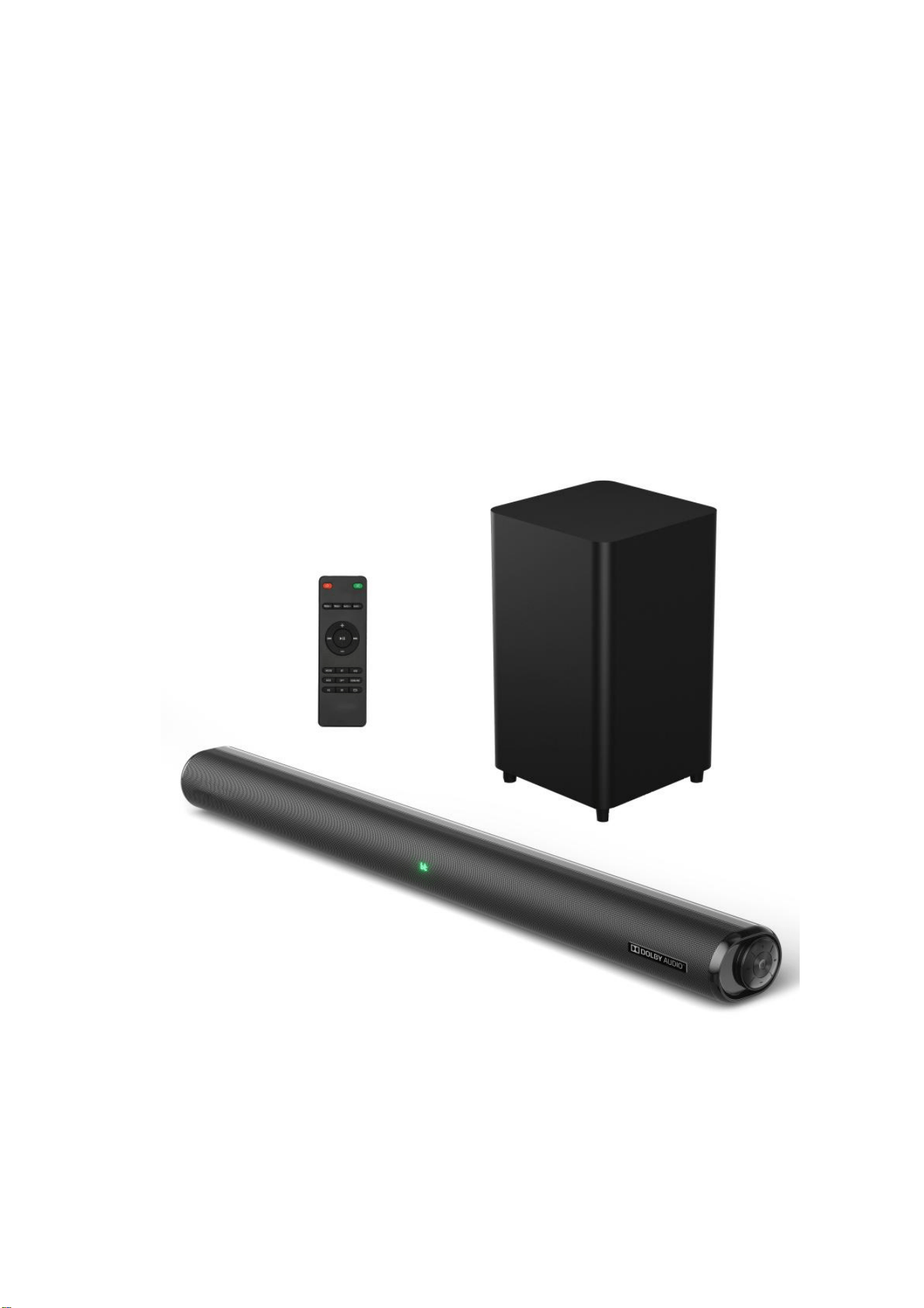
2.1CHANNELDOLBYDIGITALSOUNDBAR
+WIRELESSSUBWOOFER
Model:HD-009DB-M2
UserManual

AcompactyetpowerfulBluetoothSoundBarwithsleeklooksandexcellentaudio
response.7built-inspeakersforDOLBYDIGITALsoundeffect,provideclarityacrossa
broadfrequencyrange,withcrisphighsanddeepbass.AnintegralUSBportenables
playbackofmediafilesdirectlyfromcompatiblemedia,withfurtherflexibleinput
optionsincludingAux,Optical,Coaxial,HDMI(ARC)andBluetooth.Aconvenientand
cost-effectiveTVaudioupgradethatdoesn’tcompromiseonperformance.
• 7speakersforcrisp,clearsoundwithdeepbass
• DOLBYDIGITALcompatible
• WirelesssubwooferwithTWSconnection
• Built-in2.1channelwith3EQpresets
• Versatileinputoptionstosupportarangeofdevices
• USBportformediaplayback
• Remotecontrolandaudioconnectioncableincluded
MattersNeedAttention
1.Don’tputthisproductunderhightemperaturewetenvironmentanditwillbeworse
whenitisintherainorcrashstrongly.
2.Toreducetheriskorelectronicshockorfire,donotremovethecabinetcoversimply
contactaserviceprofessional.
3.Inthecaseoccurrenceofmalfunction,donotattempttorepairtheunitonyour
own.Contactacertifiedserviceprofessionalforaproperdiagnosisandrepair.

4.Iffragmentsorliquidsfallintodevicebox,pleasecutoffthepower.Anditcanbe
usedonlyafterprofessionalstaffchecksit.
5.Don’tinstalltheunitinornearaplacewhereitmaycomeincontactwithrain,
moistureorotherliquids.
TechnicalSpecificationsandFeatures
Audiooutput:200WRMS
Speakerdrivers:2.25"fullrangespeakers25W*4+31*45mmtweeter15W*2+
8.0"/100Wwirelesssubwoofer*1
Frequency:50Hz~18KHz
SNR:>=80dB
Bluetoothversion:5.3
Bluetoothrange:Upto10m
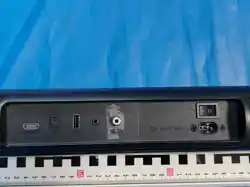
Connections:USB,AUXin,Optical,Coaxial,HDMI(ARC),ACIN
Powersupply:AC100-240V
Dimensions:Soundbarsize-850x92x69mm
Subwoofersize-240x240x420mm
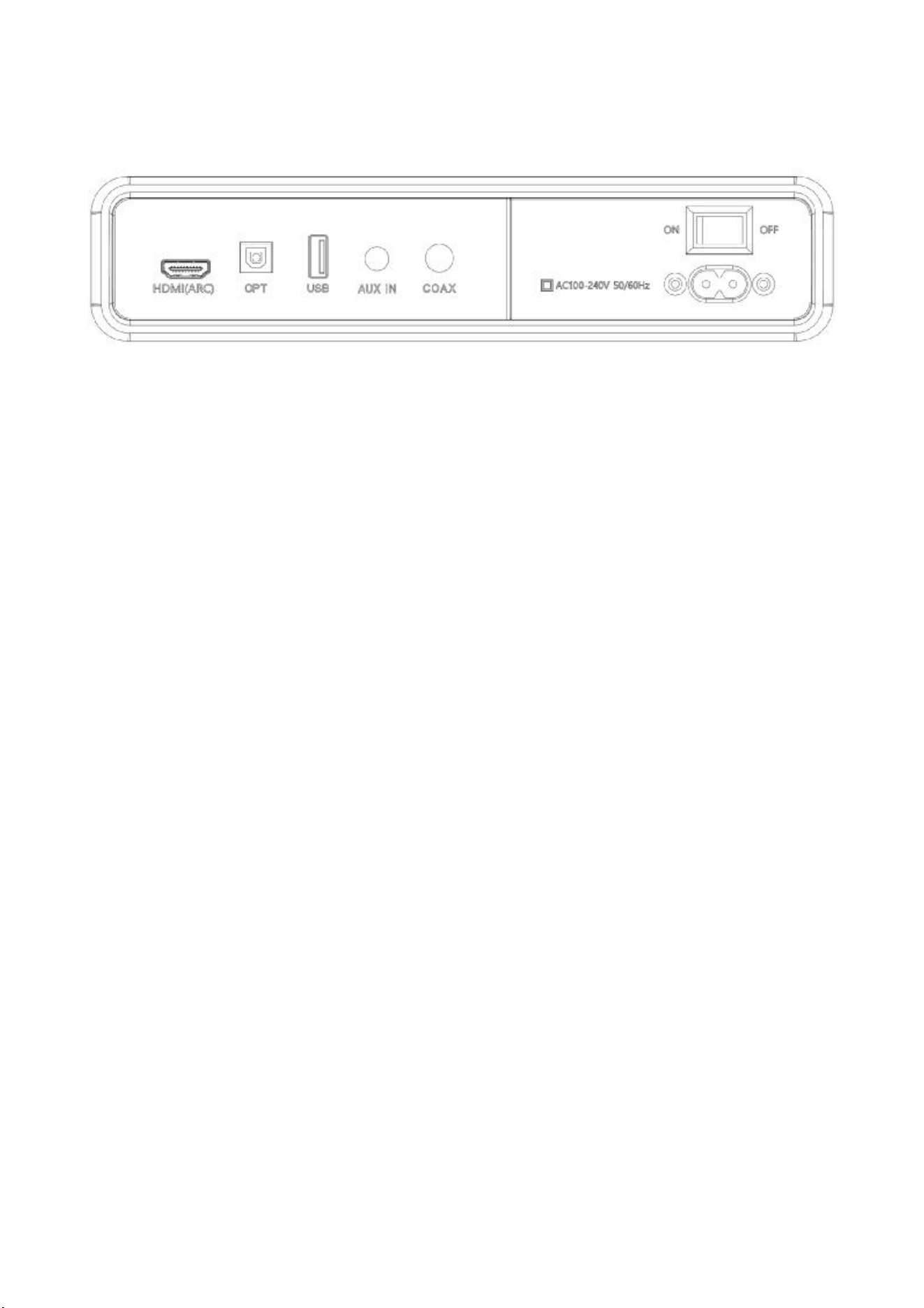
Connections
1.HDMI(ARC): UsetoconnectcompatibledevicesTVusingaHDMIcable(not
provided).
2.OPTICALIN:Usetoconnectcompatibledevicesusinganopticalcable(notprovided).
3.USBIN: Usetoconnectaflashdrivefordirectmediaplayback(FAT32format,999
filesMaxand64GBmax).
4.AUXIN: Usetoconnectcompatibledevicesusingthe3.5mm – 3.5mmstereojack
cable(provided).
5.COAXIALIN:Usetoconnectcompatibledevicesusingacoaxialcable(notprovided).
6.ACIN: UsetoconnecttheACpowersupply.
7.ON/OFF: Usetoturnonorturnoffthedevice.
LEDdisplay
1.bt: Bluetoothmode
2.OPT: Opticalmode
3.COA: Coaxialmode
4.ARC: HDMIARCmode
5.USB: USBmediamode
6.AUX: Auxiliaryinputmode
7.RedLED: Standbymode
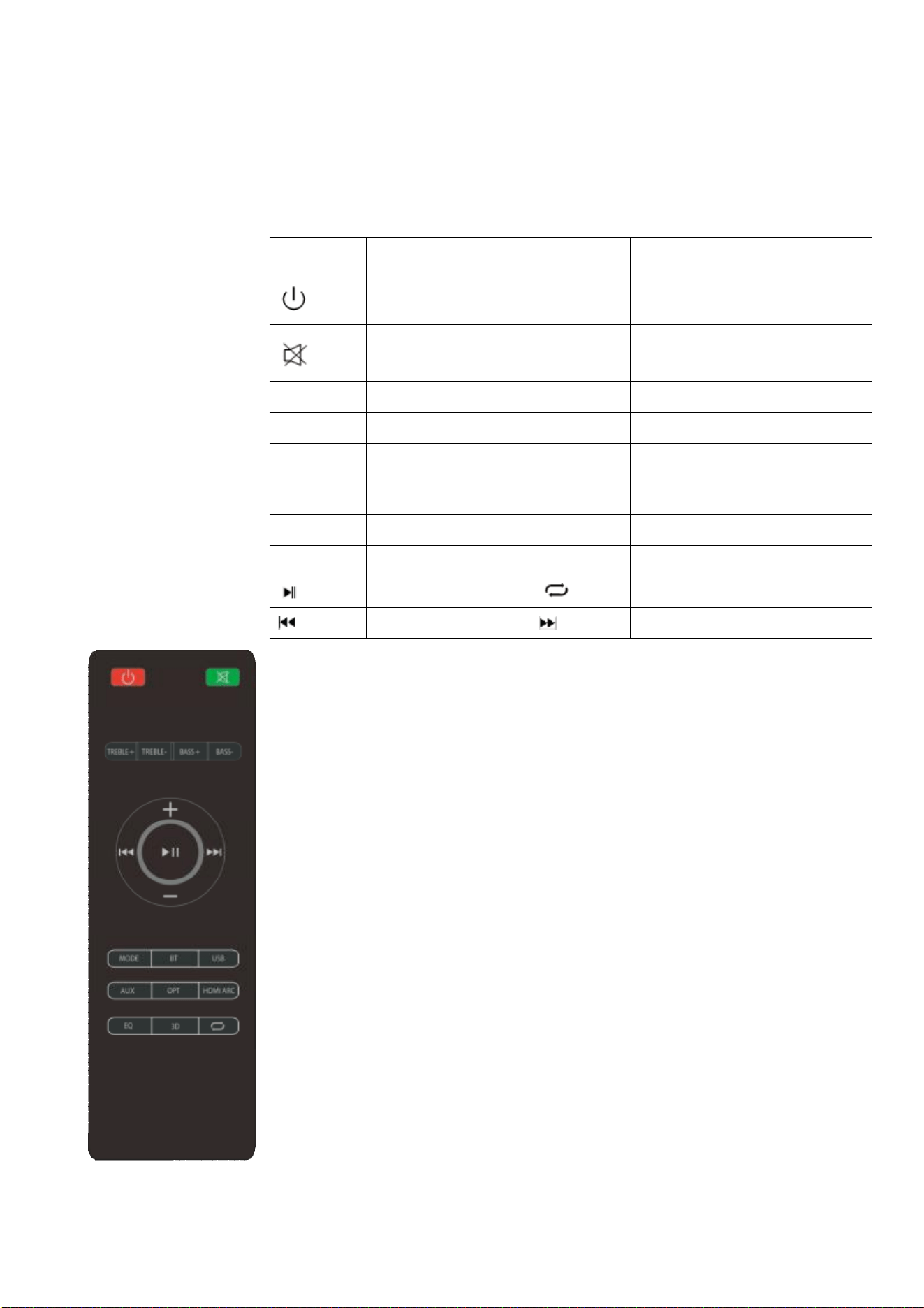
RemoteControl&FunctionKeys
Button Function Button Function
Poweron/off MODE
ShiftingbetweenBT/USB/AUX/
OPTICAL/COAXIAL/HDMI(ARC)
Muteorrecoverthe
volume
BT
ShiftingintoBTMode,InBTmode,
holdtoenterpairingmode
TREBLE+ IncreasetheTreble USB ShiftingintoUSBMode
TREBLE- DecreasetheTreble AUX ShiftingintoAUXMode
BASS+ IncreasetheBass OPT ShiftingintoOpticalinMode
BASS- DecreasetheBass HDMI(ARC) ShiftingintoHDMI(ARC)Mode
VOL+ Volumeturningup EQ ShiftingtodifferentEQ
VOL- Volumeturningdown 3D 3DSurroundon/off
Pause/Play USBRepeatmodes
Previoustrack Nexttrack
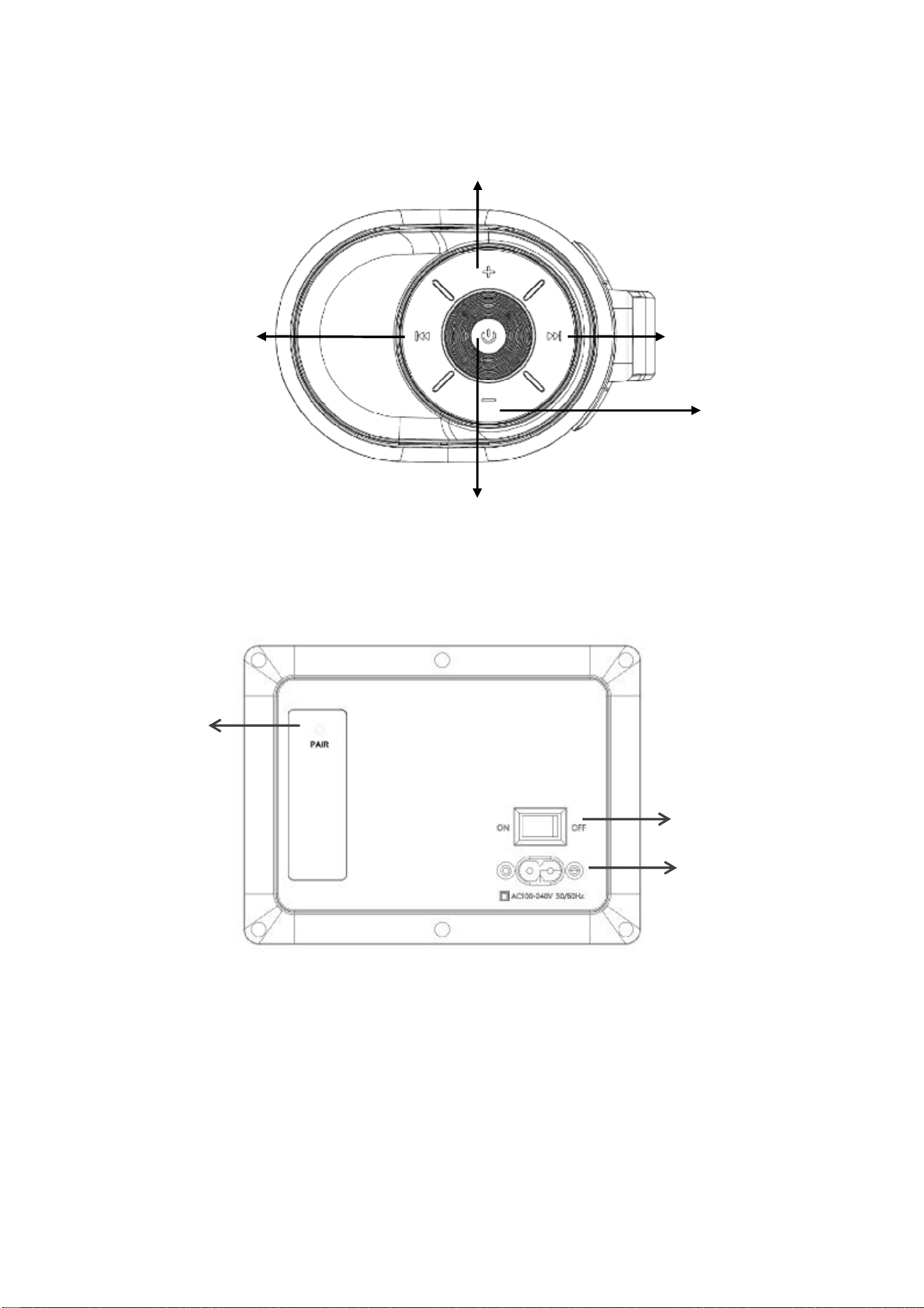
SoundBarControlPanel
SubwooferControlPanel
SubwooferandSoundBarconnection
WhengetthesetsofHMT200DLY,powerontheSoundbarandsubwoofer,theywill
beconnectedautomaticallyafterfewseconds.
Note: Ifconnectionfailed,pleasefollowingbelowstepstoconnectbymanual.
1,PowerontheSoundbarandsubwoofer,thelightonsubwooferwillflashing
Indicator
Power
switch
AC
IN
ShortpressforNexttrack/
LongpressforPlay/Pause
ShortPressforPoweronandModeswitching
LongPressforPoweroff
Volumeturningdown
ShortpressforPrevioustrack/
LongpressforPlay/Pause
Volumeturningup

continuously,andswitchtheSoundbartoBTmode.Payattentionto:Atthisstage,
holdBTkeytoenterpairingmodeandmakesuredonotconnectanydevices(suchas
mobilephone,tablet)tothesoundbar.
2,Then,Holdingtheplay/pausebuttononremotecontrolmorethan3seconds,the
displaywillshowed"pair",then,thesubwooferandsoundbarwillbeconnectedfew
secondslaterandthelightstayon.
3,Aftertheneverytimetorestartthesoundbaritwillreconnectautomaticallyin
whatevermode.
UsingDOLBYDIGITAL
1,EnsuretheconnecteddeviceandthecontentsupportsDolbyDigital.
2,SettheaudioformatontheconnecteddeviceTVtoeither “Bitstream”, “Auto”,or
“Bypass” toskiptheencodingprocess,Thisallowsthesoundbartoreceivethenon-
decodedaudiosignal.
Noted:DolbyDigitalisavailableinHDMIARC,OPTICALandCOAXIALmodes.
InputFunctions
• Poweron/off: PressthePoweron/offbuttonontheremotecontrolorsoundbar
controlpaneltoturntheunitonandoff.
REMARK: Whenunitisidlefor3minutes,thedisplaywillbeautoturnoff.
• HDMI(ARC): ConnectaHDMIARCcompatibledeviceTVtotheHDMI(ARC)porton

thesoundbarusingaHDMIcable.SelectARCmodeeitherbypressingtheMODE
buttononyourremotecontrolorrepeatedlypressingtheMODEbuttononthe
soundbarcontrolpaneluntilARCisdisplayedontheLEDdisplay.EnsureHDMIARCis
selectedastheTV’saudiooutput,thenadjustthevolumeofsoundbarusingthe
VolumeupandVolumedownbuttonsontheremotecontrolorsoundbarcontrol
panel.
• AUXin: Connectacompatibledeviceusingthe3.5mm – 3.5mmstereojackcable.
SelectAUXmodeeitherbypressingtheAUXbuttononyourremotecontrolor
repeatedlypressingtheMODEbuttononthesoundbarcontrolpaneluntilAUXis
displayedontheLEDdisplay.Ensuretheconnecteddeviceisproducinganaudiosignal,
thenadjustthevolumeofsoundbarusingtheVolumeupandVolumedownbuttons
ontheremotecontrolorsoundbarcontrolpanel.
• Opticalin:ConnectacompatibledevicetotheOPTICALinputonthesoundbar
usingadigitalopticalcable(notsupplied).SelectOPTmodeeitherbypressingthe
OPTbuttononyourremotecontrolorrepeatedlypressingtheMODEbuttononthe
soundbarcontrolpaneluntilOPTisdisplayedontheLEDdisplay.EnsureOpticalSPDIF
isselectedastheTV’saudiooutput,thenadjustthevolumeofthesoundbarusingthe
VolumeupandVolumedownbuttonsontheremotecontrolorsoundbarcontrol
panel.
• Coaxialin:ConnectacompatibledevicetotheCOAXIALinputonthesoundbar
usingadigitalcoaxialcable(notsupplied).SelectCOAXmodebyrepeatedlypressing
theMODEbuttononthesoundbarcontrolpaneluntilCOAisdisplayedontheLED

display.EnsureCoaxialisselectedastheTV’saudiooutput,thenadjustthevolumeof
thesoundbarusingtheVolumeupandVolumedownbuttonsontheremotecontrol
orsoundbarcontrolpanel.
• Bluetooth: ShortpresstheBTbuttonontheremotecontrolorrepeatedlypressing
theMODEbuttononthesoundbarcontrolpaneluntilbtisshownontheLEDdisplay.
TheLEDdisplaywillflashtoindicatethatthesoundbarisinBluetoothpairingmode.
Ensurethatthedeviceyouwishtoconnectisalsoinpairingmodeandsearchfor
“HMT200DLY” initsdevicelist.Whenthetwodevicesarepaired,theLEDdisplayon
thesoundbarwillstopflashingandremainconstant.(Thesoundbarwillnow
automaticallyre-pairwiththisdevicewheneveritiswithinrangeandhasBluetooth
turnedon.)Oncepaired,theremotecontrolcanbeusedtoplay,pauseandnavigate
betweentracksoncompatibleiOSandAndroiddevices.
Note: HoldtheBTbuttonontheremotecontroltodisconnectthebluetooth
connectionbetweenthephoneandthesoundbar;shortpressisshiftingtoBTmode.
• USBmediamode: ThesoundbariscompatiblewithUSBflashdrivesofupto64GB
insizeandcanplayaudiofilesdirectly.SimplyinsertacompatibledriveintotheUSB
portonthebackofthesoundbarandtheunitwillautomaticallyswitchtoUSBmode
andplaythefirstcompatibletrack.Themediacontrolsontheremotecontrolcanbe
usedtoplay,pauseandnavigatebetweentracksontheflashdrive,andtheLEDdisplay
willindicatethecurrenttracktime.
USBrepeatmode(alsoaccessedviatheremotecontrol)enablessingletrackrepeat
(ONE),alltrackrepeat(ALL)

Themediaplayeralsohasamemoryfunctionthatwillrecallandcontinuefromthe
last-playedpointwhenaUSBflashdrivethathaspreviouslybeenusedwiththe
soundbarisreinserted.
• Equalizermodes: Thesoundbarhasthreeequalizerdefaultsettingswhichtailored
todifferentmusicstyle.PresstheEQbuttonontheremotecontroltochooseamong
EQ1(Musicmode),EQ2(Moviemode),EQ3(Newsmode).
• Wallmounting: Thesoundbarhastwokeyholeslotsonthebacktoenablewall
mounting,usingthefixingsprovided.(Note:distanceoftwokeyholeis700mm)
FCCStatement
ThisequipmenthasbeentestedandfoundtocomplywiththelimitsforaClassB
digitaldevice,pursuanttoPart15oftheFCCRules.Anychangesormodificationsnot
expresslyapprovedbythepartyresponsibleforcompliancecouldvoidtheuser's
authoritytooperatetheequipment.Theselimitsaredesignedtoprovidereasonable
protectionagainstharmfulinterferenceinaresidentialinstallation.Thisequipment
generates,usesandcanradiateradiofrequencyenergyand,ifnotinstalledandused
inaccordancewiththeinstructions,maycause
harmfulinterferencetoradiocommunications.However,thereisnoguaranteethat
interferencewillnotoccurinaparticularinstallation.lfthisequipmentdoescause
harmfulinterferencetoradioortelevisionreception,whichcanbedeterminedby
turningtheequipmentoffandon,theuserisencouragedtotrytocorrectthe
interferencebyoneormoreofthefollowingmeasures:

-Reorientorrelocatethereceivingantenna.
Increasetheseparationbetweentheequipmentandreceiver.
-Connecttheequipmentintoanoutletonacircuitdifferentfromthattowhich
thereceiverisconnected.
-Consultthedealeroranexperiencedradio/TVtechnicianforhelp.
RadiationExposureStatement
ThisdevicecomplieswithFCCradiationexposurelimitssetforthforan
uncontrolledenvironmentanditalsocomplieswithPart15oftheFCCRFRules.T
hisequipmentshouldbeinstalledandoperatedwithaminimumdistance20cmb
etweenthedeviceandyourbody.
Thisdevicecomplieswithpart15oftheFCCRules.Operationissubjecttothe
followingtwoconditions:(1)Thisdevicemaynotcauseharmfulinterference,and(2)
thisdevicemustacceptanyinterferencereceived,includinginterferencethatmay
causeundesiredoperation.
Changesormodificationsnotexpresslyapprovedbythepartyresponsiblefor
compliancecouldvoidtheuser’sauthoritytooperatetheequipment.