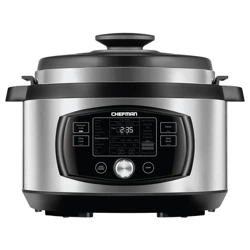
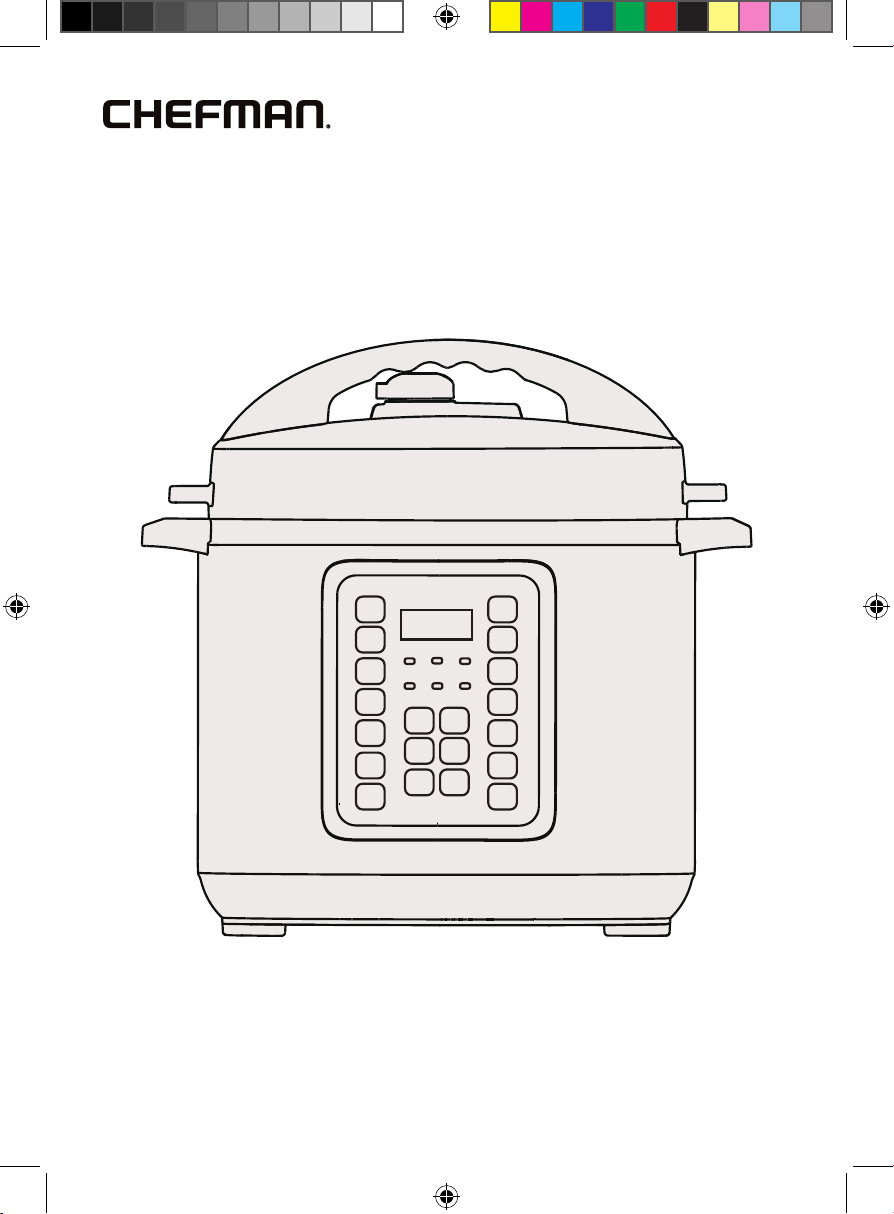
Touchscreen
6-Quart
Multicooker
RJ40-6-V3
RJ40-6-V3_UG_FINAL_OTP_070324.indd 1RJ40-6-V3_UG_FINAL_OTP_070324.indd 1 7/3/24 12:08 PM7/3/24 12:08 PM
2
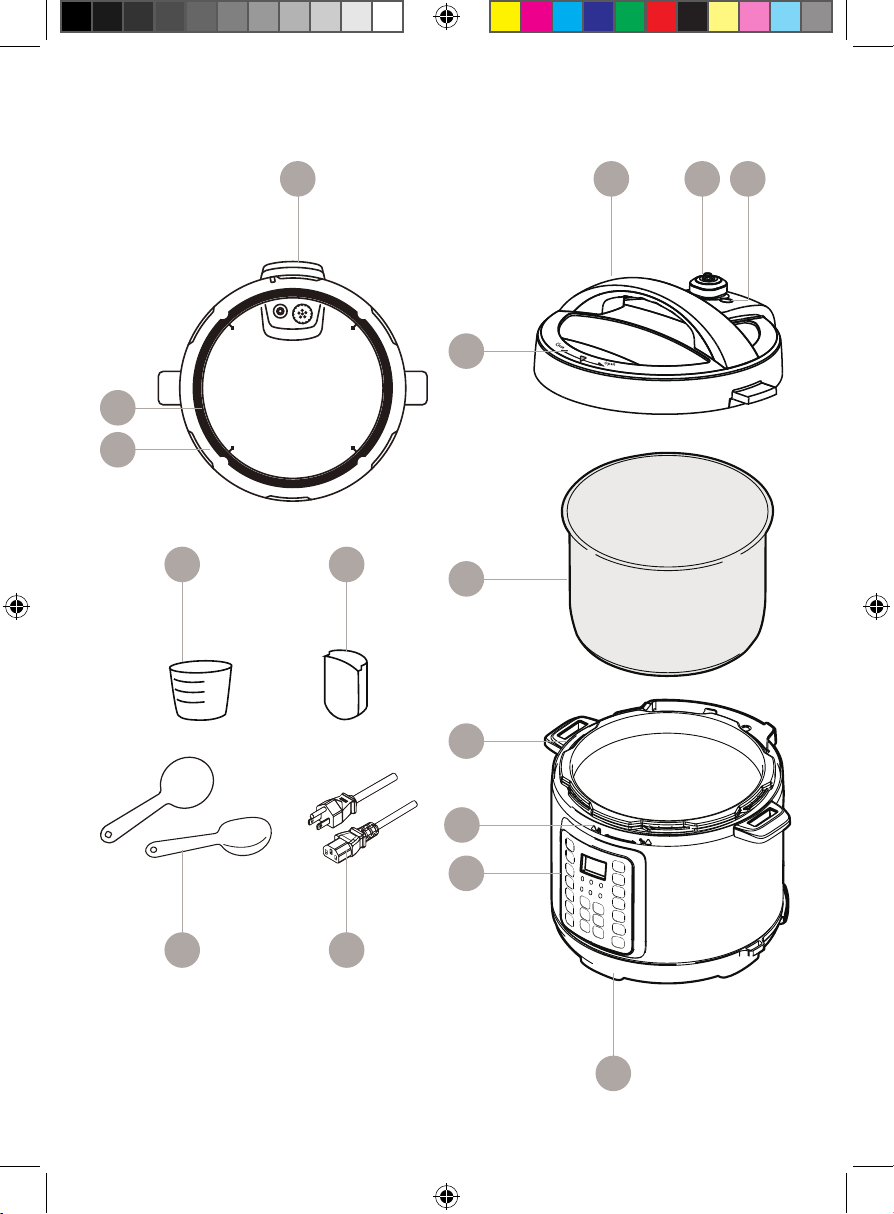
Get to Know Your Multicooker
1. Lid
2. Lid position marking (Open/Closed)
3. Lid handle
4. Pressure regulator knob
5. Floating valve button
6. Gasket
7. Gasket holder
8. Stainless-steel inner pot
9. Pressure cooker handles
10. Lid lock and unlock marking (Lock/Unlock)
11. Control panel
12. Base (with heating components)
13. 3-prong grounding-type plug
14. Spoon rack (not pictured)
15. Spoon
16. Measuring cup
17. Condensation cup
READ ALL INSTRUCTIONS BEFORE USE
For your safety and continued enjoyment of this product,
always read the instruction manual before using.
RJ40-6-V3_UG_FINAL_OTP_070324.indd 2RJ40-6-V3_UG_FINAL_OTP_070324.indd 2 7/3/24 12:08 PM7/3/24 12:08 PM
3
Get to Know Your Multicooker
3
12
15
16
13
17
2
8
9
10
11
6
7
1 4 5
RJ40-6-V3_UG_FINAL_OTP_070324.indd 3RJ40-6-V3_UG_FINAL_OTP_070324.indd 3 7/3/24 12:08 PM7/3/24 12:08 PM
4
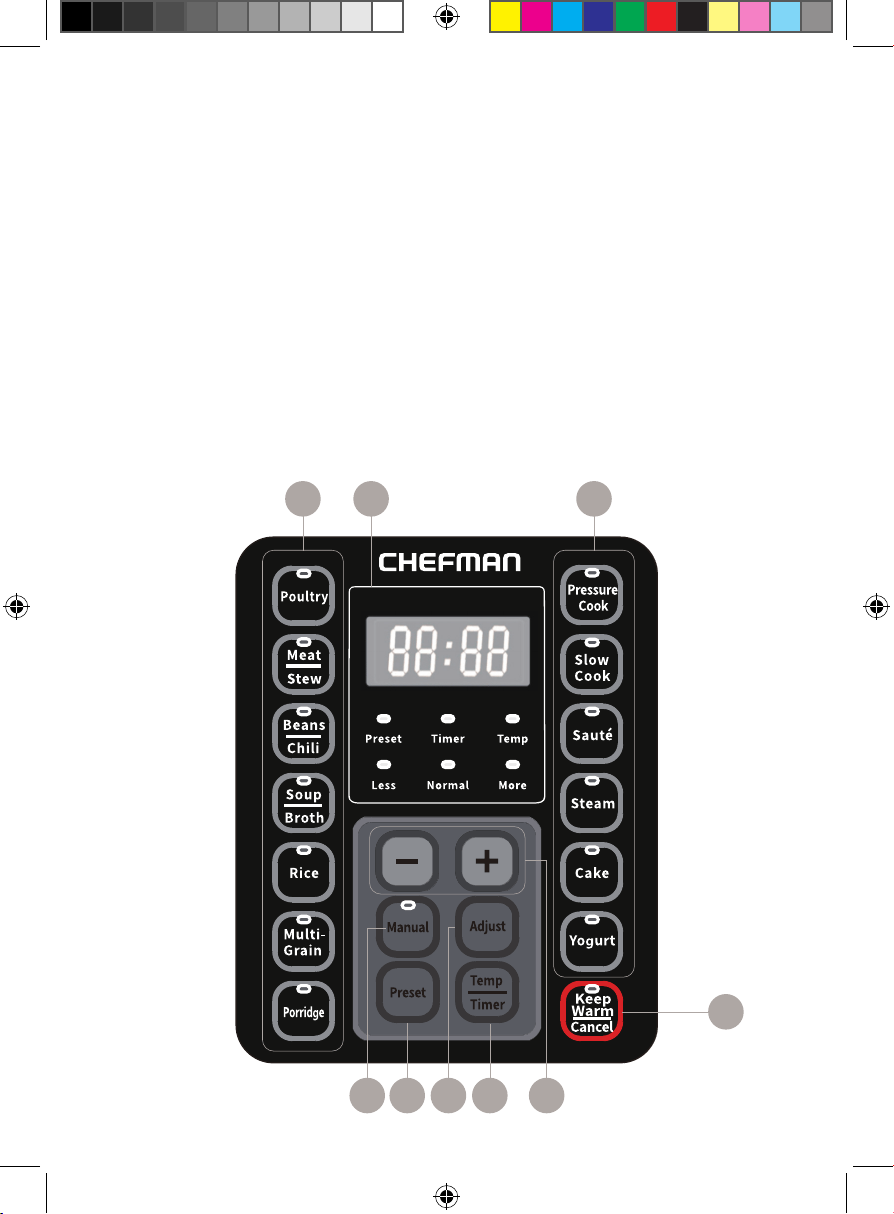
Control Panel
1. Temperature/Time display
2. Cook function buttons
(Poultry, Meat/Stew, Beans/Chili, Soup/Broth, Rice, Multi-Grain, Porridge,
Pressure Cook, Slow Cook, Sauté, Steam, Cake, Yogurt)
3. Keep Warm/Cancel button - turn off Keep Warm mode or cancel cooking
4. +/- Temperature/Time adjustment buttons
5. Temp/Timer button - toggle between temperature and time settings
6. Adjust button - adjust mode of a cooking function
(toggle between Less, Normal and More settings)
7. Preset button - press to delay cooking start
8. Manual button – manually set cooking time for Pressure Cook
12 2
3
468 7 5
RJ40-6-V3_UG_FINAL_OTP_070324.indd 4RJ40-6-V3_UG_FINAL_OTP_070324.indd 4 7/3/24 12:08 PM7/3/24 12:08 PM
5
SAFETY INSTRUCTIONS &
IMPORTANT SAFEGUARDS
When using electrical appliances, basic safety precautions should always be
followed, including:
1. Read all instructions.
2. Do NOT touch hot surfaces. Use handles or knobs.
3. To protect against electrical shock, do not immerse cord, plugs, or unit
body in water or other liquid.
4. Close supervision is necessary when any appliance is used by or near
children.
5. Unplug from outlet when not in use and before cleaning. Allow to cool
before putting on or taking off parts.
6. Do NOT operate any appliance with a damaged cord or plug or after the
appliance malfunctions or has been damaged in any manner. Contact
Chefman Customer Support for examination, repair, or adjustment.
7. The use of accessory attachments not recommended by Chefman may
cause injuries.
8. Do NOT use outdoors.
9. Do NOT let cord hang over edge of table or counter or touch hot surfaces.
10. Do NOT place on or near a hot gas or electric burner, or in a heated oven.
11. Extreme caution must be used when moving an appliance containing hot
oil or other hot liquids.
12. Always attach plug to appliance rst, then plug cord into the wall outlet.
To disconnect, turn any control to OFF, then remove plug from wall outlet.
13. Do NOT use appliance for other than intended use.
SAVE THESE INSTRUCTIONS
FOR HOUSEHOLD USE ONLY
RJ40-6-V3_UG_FINAL_OTP_070324.indd 5RJ40-6-V3_UG_FINAL_OTP_070324.indd 5 7/3/24 12:08 PM7/3/24 12:08 PM
6
SAFETY INSTRUCTIONS &
IMPORTANT SAFEGUARDS
WARNING: Improper use of the grounding plug can result in electric shock.
Grounding Instructions
This appliance must be grounded. In the event of an electrical short circuit,
grounding reduces the risk of electric shock by providing an escape wire for the
electric current. To protect against electrical shock, this appliance is equipped
with a cord having a 3-prong grounding-type plug for insertion into a proper
grounding-type electrical outlet. Do NOT alter the plug for use in a 2-prong
outlet. If the plug will not t into an outlet, have a proper outlet installed by a
qualied electrician.
Do NOT alter the plug for use in a 2-prong outlet. If the plug will not t into an
outlet, have a proper outlet installed by a qualied electrician.
Short Cord Instructions
A short power-supply cord is provided to reduce the hazards of entanglement
or tripping over a longer cord.
WARNING: Do NOT use an extension cord with this product. Serious burns may
result from the slow cooker being pulled off a countertop. Do NOT allow the
cord to hang over the edge of the counter where it may be grabbed by children
or become entangled with the user.
RJ40-6-V3_UG_FINAL_OTP_070324.indd 6RJ40-6-V3_UG_FINAL_OTP_070324.indd 6 7/3/24 12:08 PM7/3/24 12:08 PM
7
California Proposition 65:
(Applicable for California Residents only)
WARNING: Cancer and Reproductive Harm
www.P65Warnings.ca.gov
Do not place the appliance on a
stovetop or any other heatable surface,
even if stovetop is not on.
Doing so is a re hazard.
SAFETY INSTRUCTIONS &
IMPORTANT SAFEGUARDS
Power Cord Safety Tips
1. Never pull or yank on the cord or the appliance.
2. To insert the plug, grasp it rmly and guide it into the outlet.
3. To disconnect the appliance, grasp the plug and remove it from the outlet.
4. Never use the product if the power cord shows signs of abrasion or
excessive wear. Contact Chefman® Customer Support for additional
guidance and support.
5. Never wrap the cord tightly around the appliance, as this could place
undue stress on the cord where it enters the appliance and cause it to
fray and break.
DO NOT OPERATE THE APPLIANCE IF THE POWER CORD SHOWS ANY DAMAGE
OR IF THE APPLIANCE WORKS INTERMITTENTLY OR STOPS WORKING ENTIRELY.
RJ40-6-V3_UG_FINAL_OTP_070324.indd 7RJ40-6-V3_UG_FINAL_OTP_070324.indd 7 7/3/24 12:08 PM7/3/24 12:08 PM
8
Before First Use
1. Remove all packing materials from the inside and outside of the
multicooker. Be sure to check that all parts and accessories are
included before tossing out any packaging.
2. Gently wipe down the exterior with a damp cloth or paper towel.
Never immerse the multicooker, its base, cord or plug in water or
any other liquid.
3. Wash all removable parts, except for the power cord and plug, with a
sponge and warm, soapy water. Do not use abrasive cleaning agents or
scouring pads. The gasket, rice spoon, condensation cup, measuring cup
and cooking pot are top-rack dishwasher safe. Dry all parts thoroughly.
4. To install the condensation cup, align the top of the cup at the rear of the
cooker with guides and slide it in.
RJ40-6-V3_UG_FINAL_OTP_070324.indd 8RJ40-6-V3_UG_FINAL_OTP_070324.indd 8 7/3/24 12:08 PM7/3/24 12:08 PM
9
Quick Start:
How to Use the Multicooker
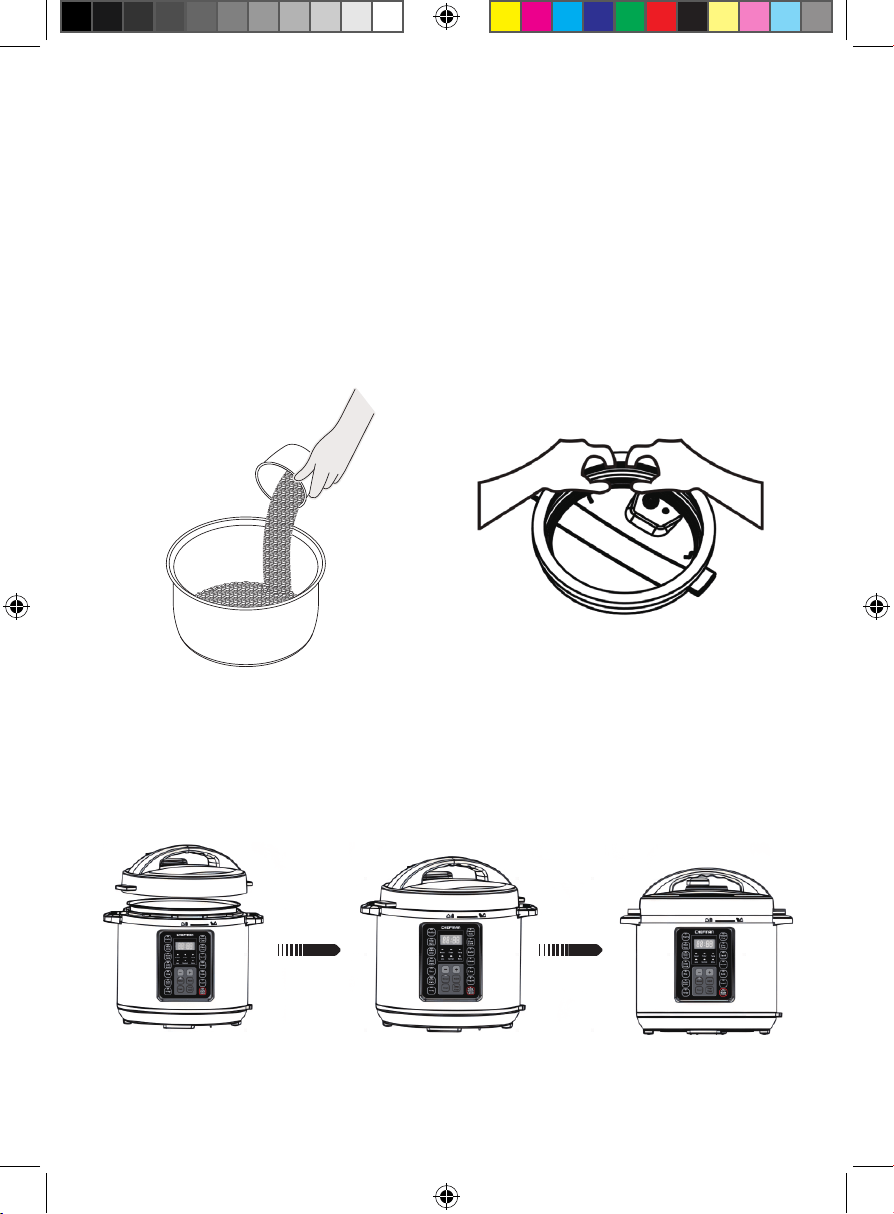
1. Add food (including any water)
to the inner pot, then set the
pot in the multicooker. Plug the
power cord into the port on the
unit, and the other end into a wall
outlet. Be sure the condensation
cup is installed on the side of the
unit.
2. Turn the lid upside-down and
place the gasket onto the gasket
holder, positioned between the
holder and the inner edge of
the lid. Push the gasket into the
holder while rotating the lid. It is
fully secured when all parts of
the gasket sit ush against the
inside of the gasket holder.
3. Place the lid on the multicooker, lining up the arrow on the top of the lid
with the arrow next to the unlock symbol. Use the lid handle to turn the lid
clockwise, lining up the arrow next to the lock symbol; this will lock the lid.
NOTE: If using the Sauté function, do not put the lid on the unit.
RJ40-6-V3_UG_FINAL_OTP_070324.indd 9RJ40-6-V3_UG_FINAL_OTP_070324.indd 9 7/3/24 12:08 PM7/3/24 12:08 PM
10
Quick Start: How to Use the Multicooker
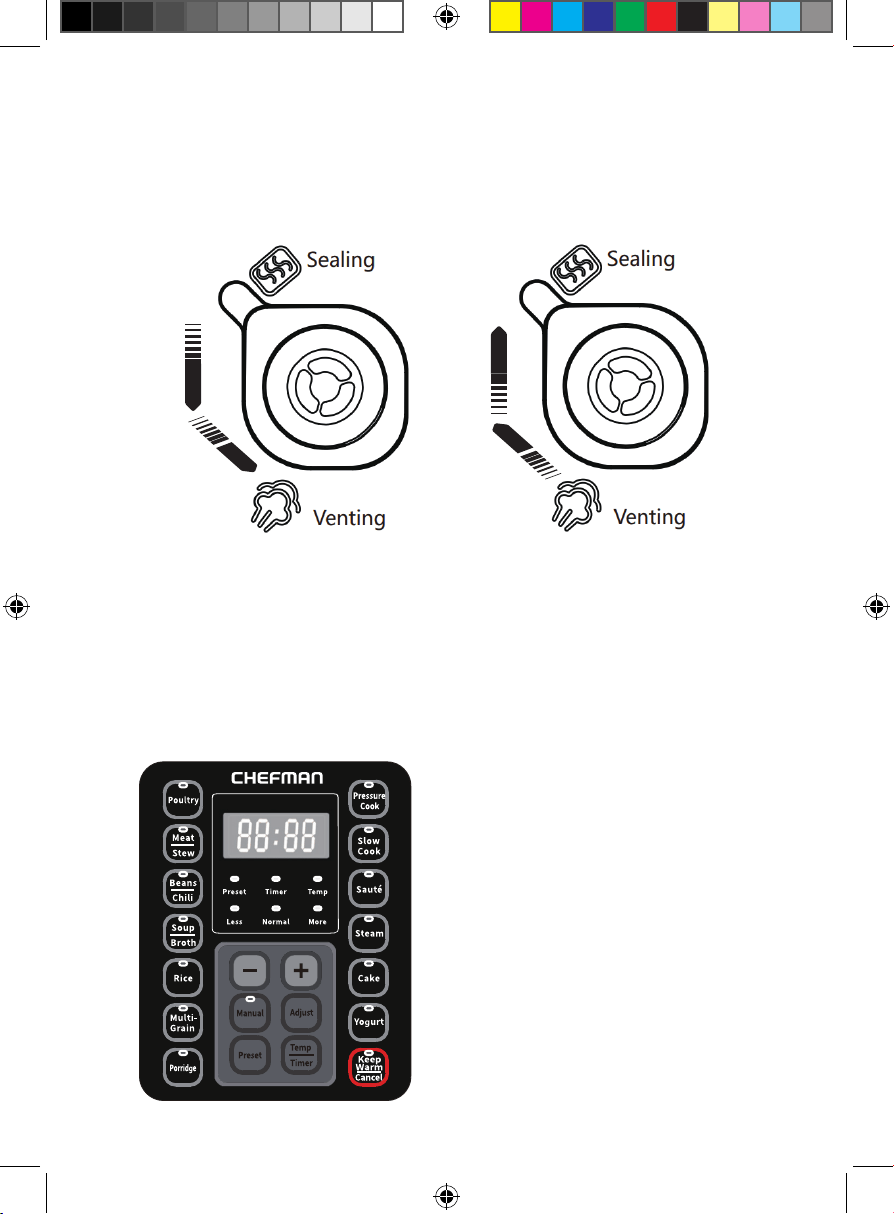
5. Press the button for your chosen cook function. The default cooking time
will display on the control panel; if you wish to adjust it use the + and
– buttons or the Adjust button (see individual function descriptions for
more details). If you’re using the Sauté function, you can also adjust the
temperature; see Sauté description, p. 12, for more details.
If using a pressure function, the oating valve button will pop up once
the unit reaches pressure.
4. Turn the pressure regulator knob. Make sure that the pressure regulator
knob is pointing to the correct setting. If using Steam, Slow Cook, or
Yogurt, the knob should be set to Venting. All other functions (except
Sauté) use pressure, so they should be set to Sealing. (Sauté does not
use the lid at all).
RJ40-6-V3_UG_FINAL_OTP_070324.indd 10RJ40-6-V3_UG_FINAL_OTP_070324.indd 10 7/3/24 12:08 PM7/3/24 12:08 PM
11
Quick Start: How to Use the Multicooker
6. When the cooking cycle nishes, unit will beep. If a pressure-cooking
function was used, you can quickly release the pressure by switching
the pressure regulator valve from Sealing to Venting. WARNING: Steam
is extremely HOT! Keep hands and arms away from the steam vent
while pressure is releasing. Alternatively, you can use the natural release
method, by letting the unit gradually cool down until the oating pressure
valve button drops. Natural release is best for liquid or high-starch foods,
such as porridge, soup, and rice.
7. Be sure to wait to open the lid until the oating pressure valve button
drops again, indicating that pressure has been safely released. NOTE: If
the pressure has released but the oat valve is stuck due to food debris or
stickiness, you can push it down with a chopstick or the handle of a spoon.
Use the lid handle to turn the lid counterclockwise and lift up to remove.
RJ40-6-V3_UG_FINAL_OTP_070324.indd 11RJ40-6-V3_UG_FINAL_OTP_070324.indd 11 7/3/24 12:08 PM7/3/24 12:08 PM
12
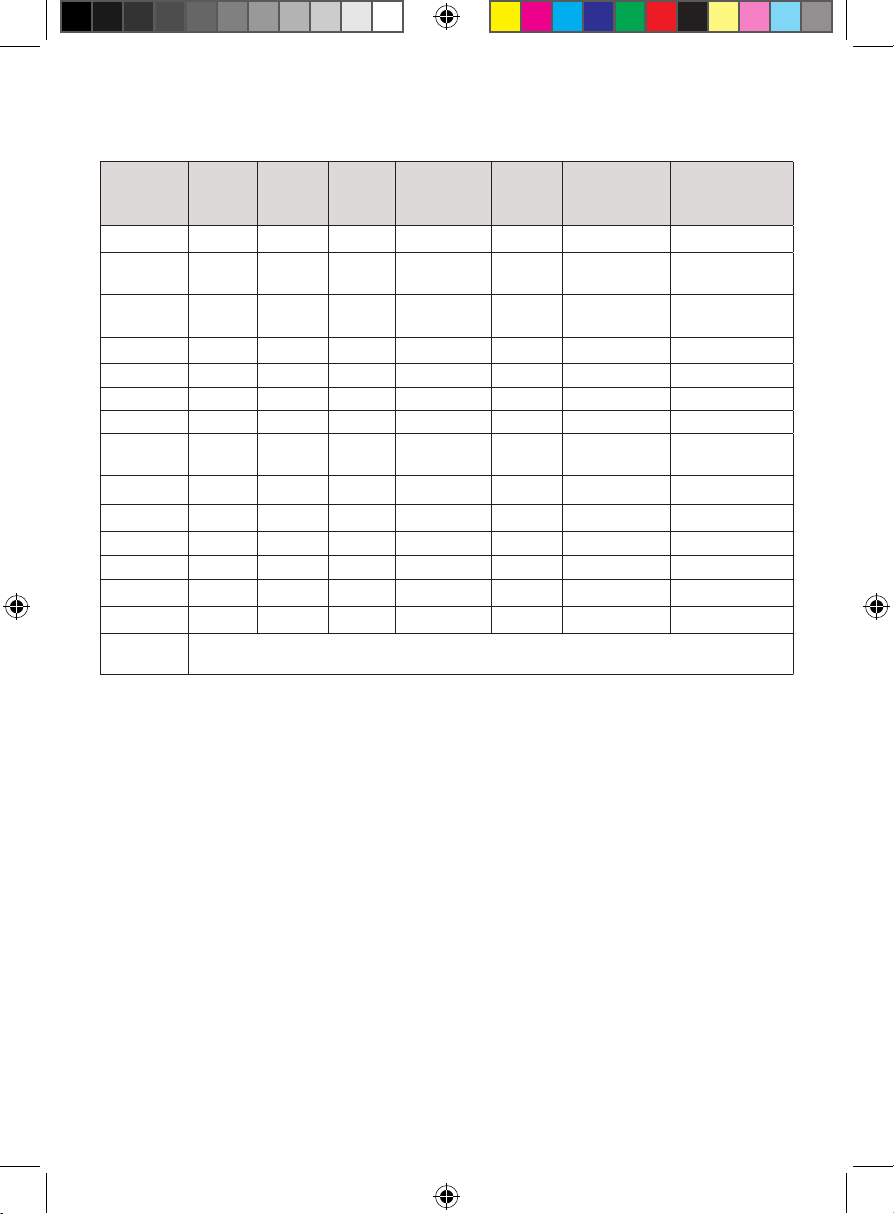
Function Guide
Function Less Normal More
Adjustable
Cooking
Time
Default
Preset
Time
Adjustable
Preset
Time
Keep Warm
Function
after Cooking
Poultry 5 min 15 min 30 min 0-240 min 5 min 1 min-24h Yes
Meat/
Stew
20 min 35 min 45 min 0-240 min 5 min 1 min-24h Yes
Bean/
Chili
25 min 30 min 40 min 0-240 min 5 min 1 min-24h Yes
Soup 20 min 30 min 50 min 0-240 min 5 min 1 min-24h Yes
Rice n/a 12 min n/a n/a 5 min 1 min-24h Yes
Multigrain 20 min 40 min 60 min 0-240 min 5 min 1 min-24h Yes
Porridge 5 min 20 min 30 min 0-240 min 5 min 1 min-24h Yes
Pressure
Cook
20 min 35 min 45 min 0-240 min 5 min 1 min-24h Yes
Slow Cook 4h 8h 12h 4h-12h 5 min 1min-24h Yes
Sauté n/a 30 min n/a 1-60 min n/a n/a No
Steam 3 min 10 min 15 min 0-240 min 5 min 1min-24h Yes
Cake 25 min 30 min 40 min n/a n/a n/a Yes
Yogurt Boil 8h 24h 30 min-24h n/a n/a No
Manual n/a 38 min n/a 30-119 min 5 min 1 min-24h Yes
Keep
Warm
Default setting time 12h, temperature about 60°C~80°C.
Sauté - Default temperature setting will be approximately 130°C
(adjustable 125°C–185°C)
RJ40-6-V3_UG_FINAL_OTP_070324.indd 12RJ40-6-V3_UG_FINAL_OTP_070324.indd 12 7/3/24 12:08 PM7/3/24 12:08 PM
13
Keep It Clean
1. Unplug the cord from the wall and then the unit. Wash the inner pot,
measuring cup, spoon, and condensation cup with mild detergent and
water. Dry thoroughly before reassembling.
2. Remove the gasket from the lid and wash with warm, soapy water.
Inspect the gasket after each use for any tears or damage. A damaged
gasket will not seal properly; if the gasket is damaged, contact Chefman
Customer Support.
3. The pressure regulator knob, and valve on the underside of the lid, must
be free of food debris. To remove and clean them, grasp the knob and pull
up. Wash in warm, soapy water and dry thoroughly before re-installing.
4. The main unit should be wiped down with a damp cloth. Never immerse
the unit in water or other liquid.
RJ40-6-V3_UG_FINAL_OTP_070324.indd 13RJ40-6-V3_UG_FINAL_OTP_070324.indd 13 7/3/24 12:08 PM7/3/24 12:08 PM
1414
Having Trouble?
Problem Likely Cause Solution
Display shows “Lid” The lid is not closed or in the right
position.
Follow step 3 on p. 9 for
proper lid closure instructions.
Display shows “Err1” Temperature sensor fault Contact Chefman
Customer Support.
Display shows “Err2” Temperature sensor fault Contact Chefman
Customer Support.
Display shows “Err5” Pressure sensor failure Contact Chefman
Customer Support.
Difcult to close
the lid
Gasket is not properly installed. Follow step 2 on p. 9 for gasket
installation instructions.
Lid leaks 1. Gasket is not properly installed
or not installed at all.
2. Gasket is damaged.
3. There is foreign matter on the
gasket.
1. Gasket is not properly
installed.
2. Contact Chefman
Customer Support.
3. Clean the gasket.
RJ40-6-V3_UG_FINAL_OTP_070324.indd 14RJ40-6-V3_UG_FINAL_OTP_070324.indd 14 7/3/24 12:08 PM7/3/24 12:08 PM
15
Notes
RJ40-6-V3_UG_FINAL_OTP_070324.indd 15RJ40-6-V3_UG_FINAL_OTP_070324.indd 15 7/3/24 12:08 PM7/3/24 12:08 PM
16
Terms & Conditions
Limited Warranty
RJ Brands, LLC d/b/a Chefman® offers a limited 1-year Warranty (the “Warranty”)
available on sales through authorized distributors and retailers only. Please
note that this Warranty becomes valid from the date of initial retail purchase
and that the Warranty is non-transferable and applies only to the
original purchaser.
This Warranty is void without proof of purchase within the United States and
Canada. Please be aware that this Warranty supersedes all other warranties
and constitutes the entire agreement between the consumer and Chefman®.
Any changes to the Terms and Conditions of this Warranty must be in writing,
signed by a representative of Chefman®. No other party has the right or ability
to alter or change the Terms and Conditions of this Warranty.
We may ask you to please submit, via email, photos and/or video of the issue
you are experiencing. This is to help us better assess the matter and possibly
offer a quick x. Photos and/or video may also be required to determine
Warranty eligibility.
We encourage you to register your product. Registering can make the Warranty
process easier and can keep you informed of any updates or recalls on
your product. To register, follow the directions on the Chefman® Warranty
Registration page in the Chefman® User Guide. Please retain your proof of
purchase even after registering. In the event that you do not have proof of
your purchase date, we may declare your Warranty void or we may, at our sole
discretion, apply the date of manufacture as the purchase date for purposes of
this Warranty.
RJ40-6-V3_UG_FINAL_OTP_070324.indd 16RJ40-6-V3_UG_FINAL_OTP_070324.indd 16 7/3/24 12:08 PM7/3/24 12:08 PM
17
Terms & Conditions
What the Warranty Covers
• Manufacturer Defects - Chefman® products are warranted against defects
in material and workmanship, under normal household use, for a period of
1 year from the date of purchase when used in accordance with the
directions listed in the Chefman® User Guide. If your product does not work
as it should, please contact Customer Support at [email protected] so
that we may assist you.
This Warranty Does Not Cover
• Misuse
Damage that occurs from neglectful or improper use of products, including,
but not limited to, damage that occurs as a result of usage with incompatible
voltage, regardless of whether the product was used with a converter or
adapter. See Safety Instructions in the Chefman® User Guide for information
on proper use of product;
• Poor Maintenance
General lack of proper care. We encourage you to take care of your
Chefman® products so that you may continue to enjoy them. Please see
KeepIt Clean directions in this Chefman® User Guide for information on
proper maintenance;
• Commercial Use
Damage that occurs from commercial use;
• Normal Wear and Tear
Damage or degradation expected to occur due to normal use over time;
• Altered Products
Damage that occurs from alterations or modications by any entity other
than Chefman® such as the removal of the rating label afxed to the
product;
• Catastrophic Events
Damage that occurs from re, oods, or natural disasters; or
• Loss of Interest
Claims of loss of interest or enjoyment.
RJ40-6-V3_UG_FINAL_OTP_070324.indd 17RJ40-6-V3_UG_FINAL_OTP_070324.indd 17 7/3/24 12:08 PM7/3/24 12:08 PM
18
Terms & Conditions
For product information, please visit us at Chefman.com.
EXCEPT WHERE SUCH LIABILITY IS REQUIRED BY LAW, THIS WARRANTY DOES NOT
COVER, AND CHEFMAN® SHALL NOT BE LIABLE FOR, INCIDENTAL, INDIRECT, SPECIAL,
OR CONSEQUENTIAL DAMAGES, INCLUDING WITHOUT LIMITATION, DAMAGE TO, OR
LOSS OF USE OF THE PRODUCT, OR LOST SALES OR PROFITS OR DELAY OR FAILURE TO
PERFORM THIS WARRANTY OBLIGATION. THE REMEDIES PROVIDED HEREIN ARE THE
EXCLUSIVE REMEDIES UNDER THIS WARRANTY, WHETHER BASED ON CONTRACT,
TORT OR OTHERWISE.
RJ40-6-V3_UG_FINAL_OTP_070324.indd 18RJ40-6-V3_UG_FINAL_OTP_070324.indd 18 7/3/24 12:08 PM7/3/24 12:08 PM
19
How do I register my product?
All you need to do is ll out a simple Chefman® registration form.
You can easily access the form in one of the two ways listed below:
• Visit Chefman.com/register.
• Scan the QR code to the right to access site.
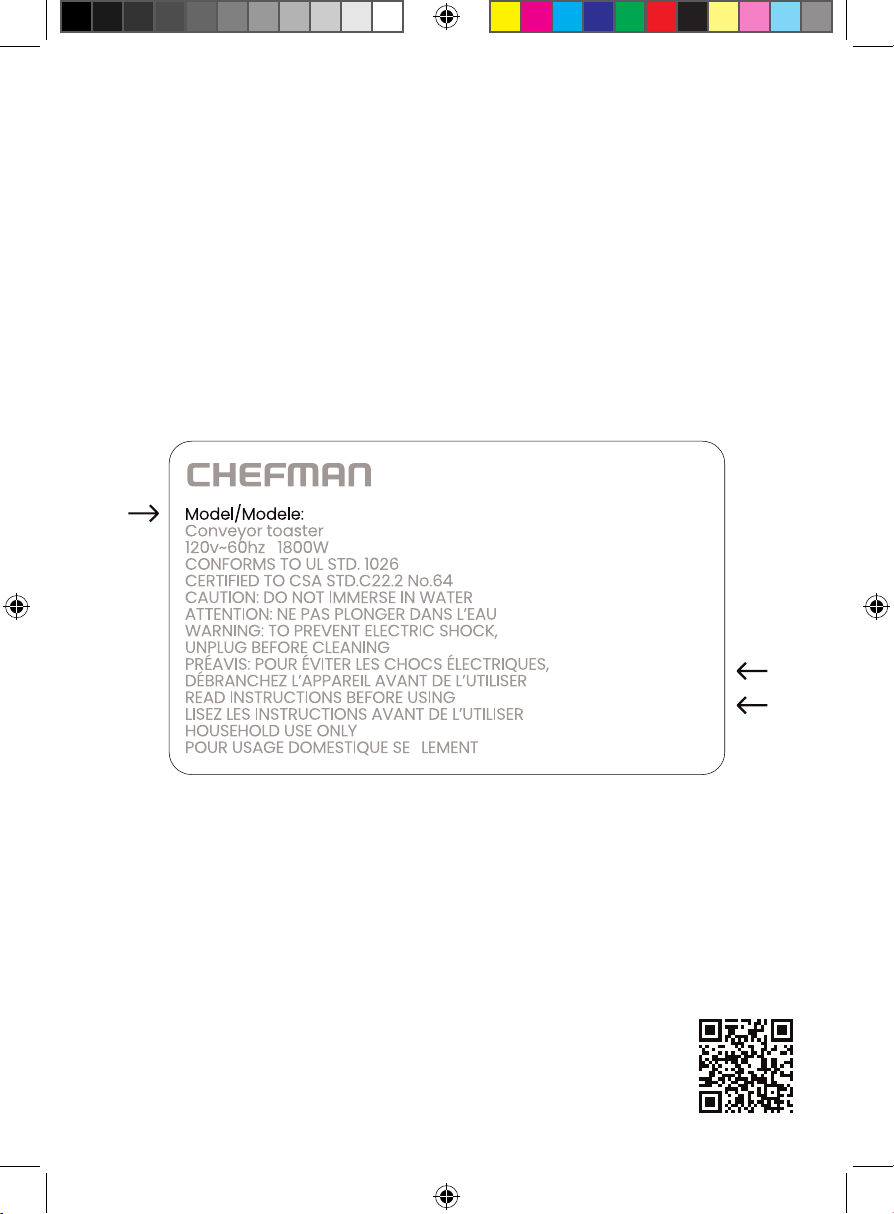
NOTE: Label depicted here is an example.
Please see label on your product for actual model/date code/access code.
Warranty Registration
What do I need to register my product?
• Contact Information
• Model Number (see example below)
• Proof of Purchase (online conrmation, receipt, gift receipt)
• Date Code (see example below)
• Access Code (see example below)
Date Code:
0000
Access Code:
Xxxxxxxx
Made in China/Fabrique en Chine
AC Only/ AC Seulement
XXXXX
RJ40-6-V3_UG_FINAL_OTP_070324.indd 19RJ40-6-V3_UG_FINAL_OTP_070324.indd 19 7/3/24 12:08 PM7/3/24 12:08 PM
RJ406V3UG070324
Touchscreen
6-Quart Multicooker
Chefman® is a registered trademark of RJ Brands, LLC.
RJ40-6-V3_UG_FINAL_OTP_070324.indd 20RJ40-6-V3_UG_FINAL_OTP_070324.indd 20 7/3/24 12:08 PM7/3/24 12:08 PM