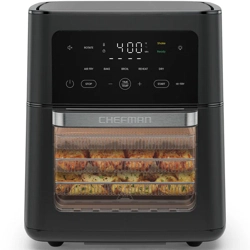
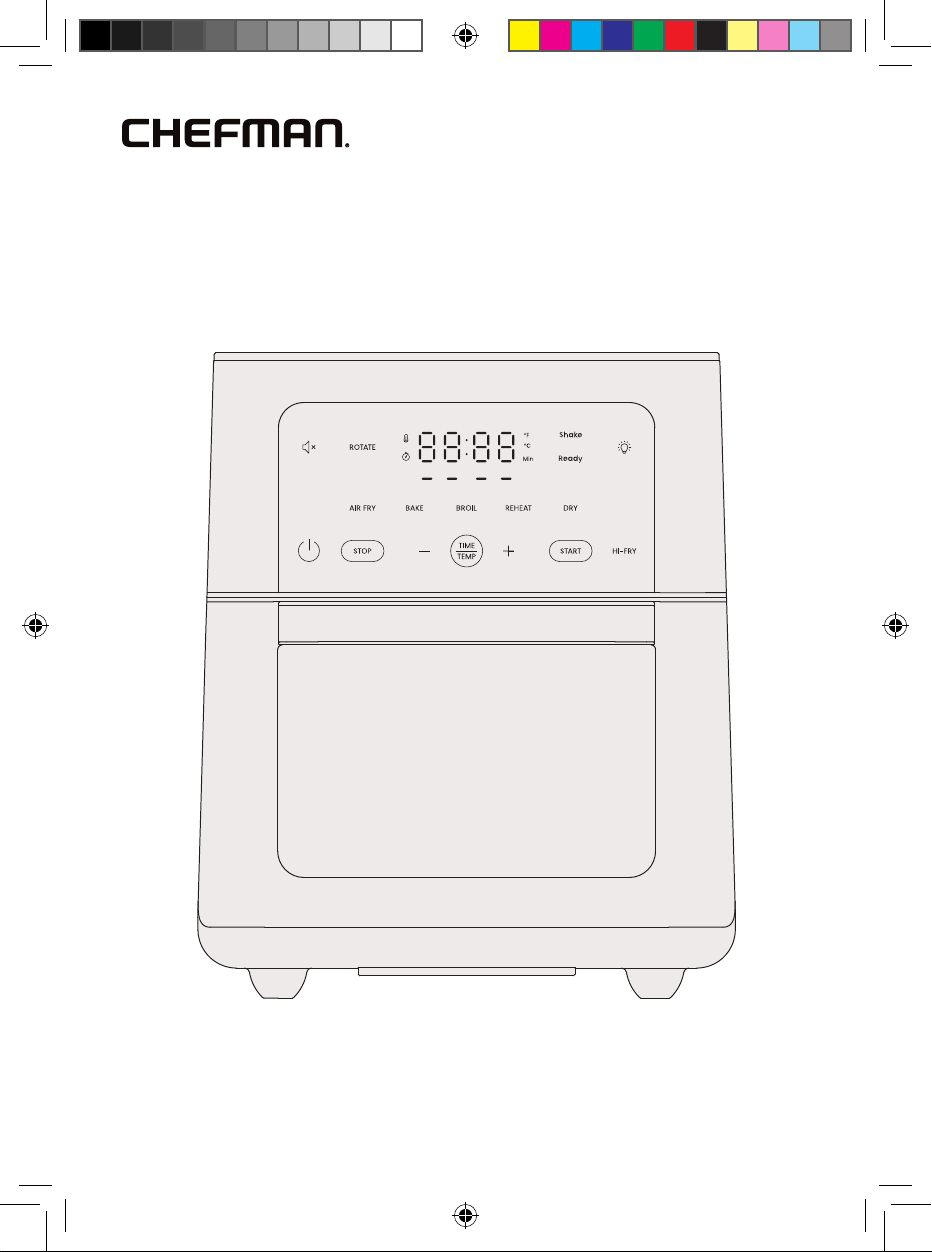
13-Quart
Multifunctional
Air Fryer+
RJ38-RDO-13P
COVER DRAWING
RJ38-RDO-13P_UG_LIVE_091525.indd 1RJ38-RDO-13P_UG_LIVE_091525.indd 1 9/15/25 10:48 AM9/15/25 10:48 AM
2
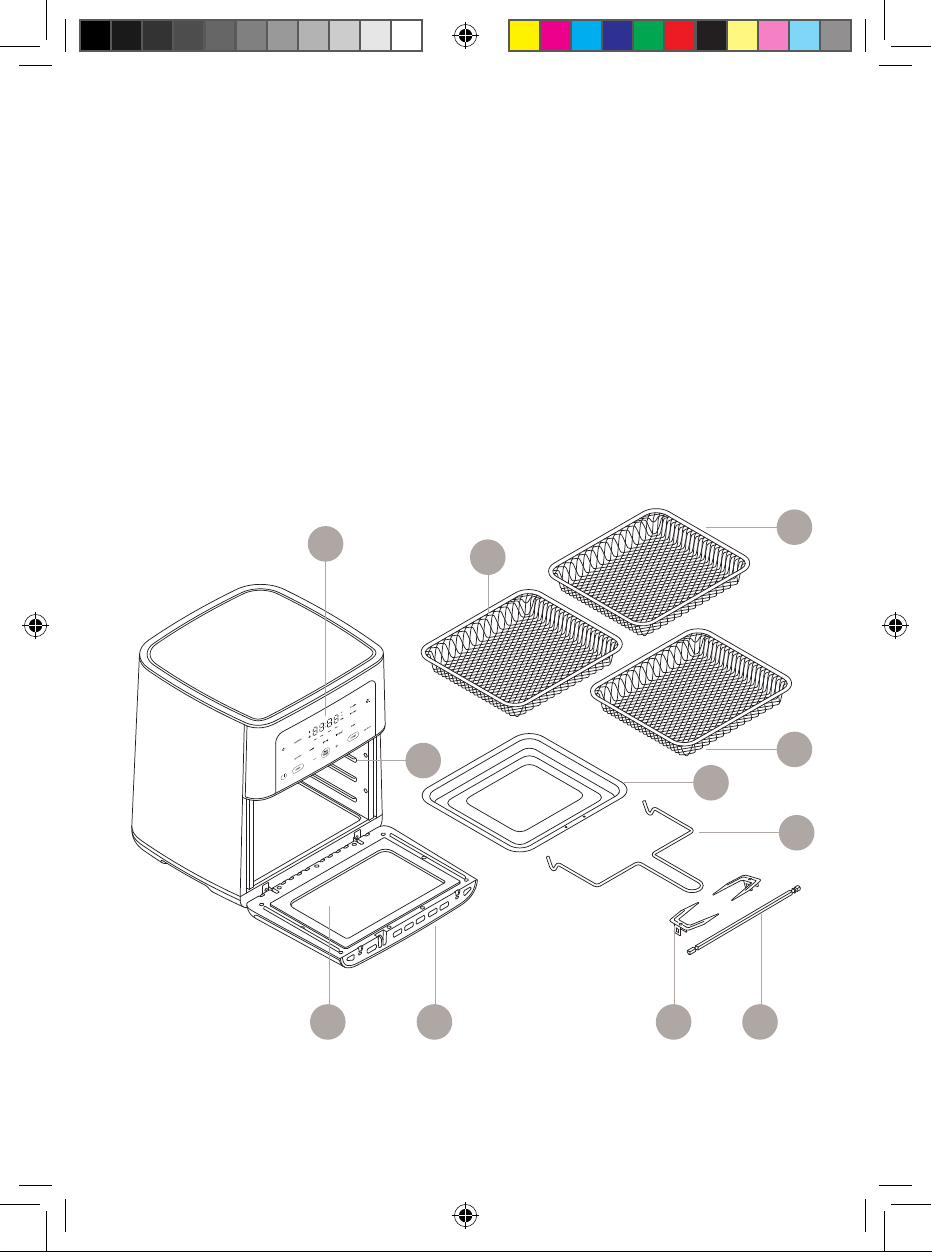
FEATURES DRAWING
Get to Know Your Air Fryer
1. Capacitive Touch Control Panel
2. Wire Cooking Racks (3)
3. Drip Tray | Baking Pan
4. Rotisserie Fetch Tool
5. Rotisserie Spit
6. Spit Forks and Screws
(2 of each)
7. Oven Door Cool-Touch Handle
8. Oven Door with Viewing Window
9. Rack Holders
10. Integrated Power Cord Storage
(on back, not shown)
2
2
4
1
2
5678
3
9
RJ38-RDO-13P_UG_LIVE_091525.indd 2RJ38-RDO-13P_UG_LIVE_091525.indd 2 9/15/25 10:48 AM9/15/25 10:48 AM
3
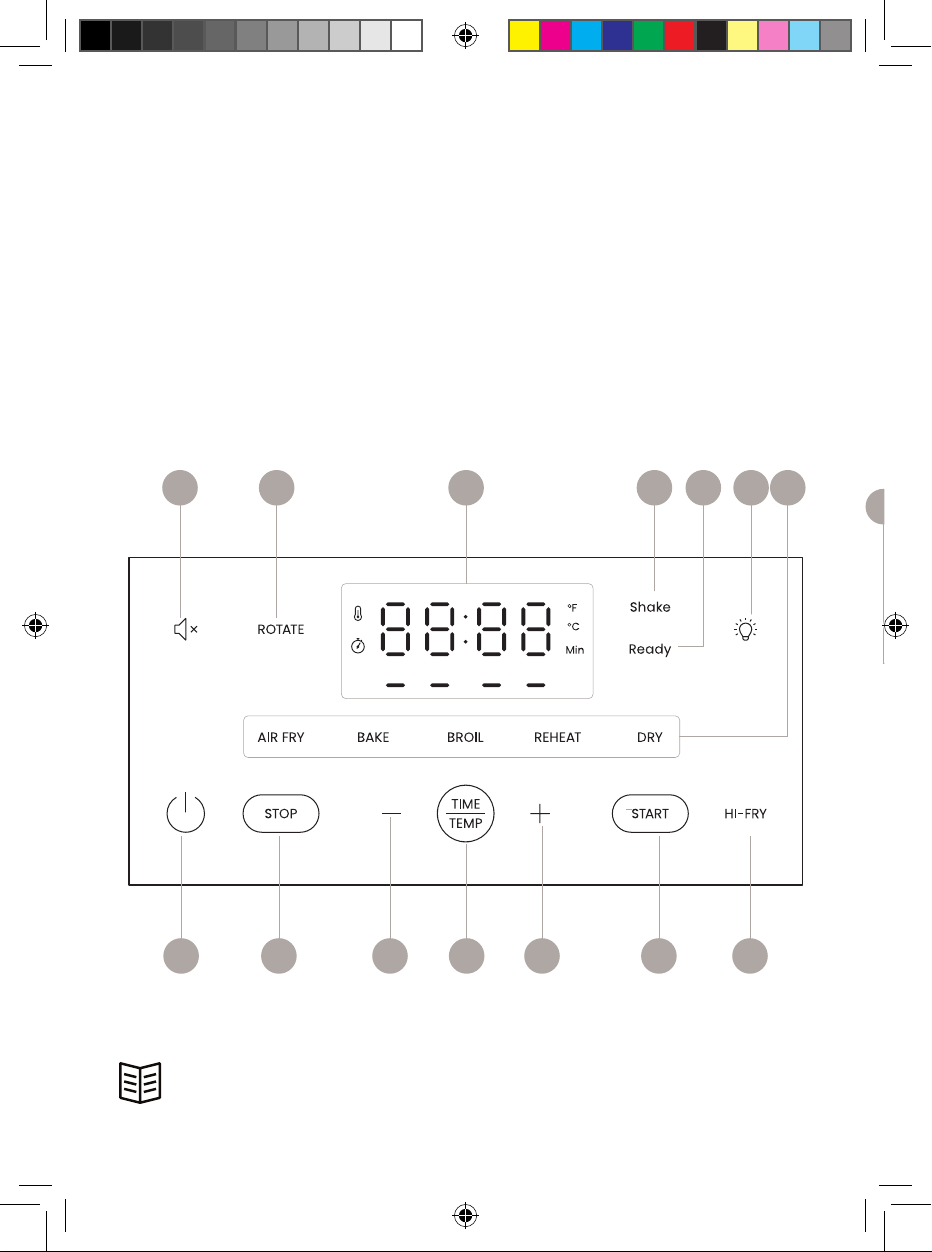
Control Panel
A. Sound Button
B. ROTATE Button
C. Temp | Time Display
D. Shake Indicator Light
E. Ready Indicator Light
F. Oven Light Button
G. Cook Function Buttons
H. HI-FRY Button
I. START Button
J. TIME | TEMP selector Button
K. Time | Temp + and - Buttons
L. STOP Button
M. Power Button
READ ALL INSTRUCTIONS BEFORE USE
For your safety and continued enjoyment of this product,
always read the instruction manual before using.
CONTROL PANEL
D F GA B C
M L K J K I H
C
E
RJ38-RDO-13P_UG_LIVE_091525.indd 3RJ38-RDO-13P_UG_LIVE_091525.indd 3 9/15/25 10:48 AM9/15/25 10:48 AM
44
SAFETY INSTRUCTIONS &
IMPORTANT SAFEGUARDS
WARNING: When using electrical appliances, basic safety precautions should
always be followed, including:
1. Read all instructions.
2. Do not touch hot surfaces. Use handles or knobs.
3. To protect against electrical shock, do not immerse cord or plug in
water or other liquid.
4. Close supervision is necessary when any appliance is used by or
near children.
5. Unplug from outlet when not in use and before cleaning. Allow to cool
before putting on or taking off parts.
6. Do not operate any appliance with a damaged cord or plug or after
the appliance malfunctions or has been damaged in any manner. If
this should occur, contact Chefman Customer Support for examination,
repair, or adjustment.
7. The use of accessory attachments not recommended by Chefman may
cause injuries.
8. Do not use outdoors.
9. Do not let cord hang over edge of table or counter, or touch hot surfaces.
10. Do not place on or near a hot gas or electric burner, or in a heated oven.
11. Extreme caution must be used when moving an appliance containing hot
oil or other hot liquids.
12. Always attach plug to appliance first, then plug cord into the wall outlet.
13. To disconnect, turn any control to off, then remove plug from wall outlet.
14. Do not use appliance for other than intended use.
15. When using this appliance, provide adequate ventilation above and on
all sides for air circulation. Do not allow this appliance to touch curtains,
wall coverings, clothing, dish towels or other flammable materials during
use. Do not cover air fryer, and ensure air vents, located on the back of the
fryer, are not covered.
RJ38-RDO-13P_UG_LIVE_091525.indd 4RJ38-RDO-13P_UG_LIVE_091525.indd 4 9/15/25 10:48 AM9/15/25 10:48 AM
55
SAFETY INSTRUCTIONS &
IMPORTANT SAFEGUARDS
16. This appliance generates heat during use. Proper precautions must
be taken to prevent the risk of burns, fire, or other damage to persons
or property. Keep hands clear of the immediate area surrounding the
air fryer during operation and use grips and handles on the appliance
when operating. Do not put hands or other body parts inside the air fryer
housing while in use or hot.
17. Use caution when opening the air fryer. The inside of the unit and its
contents are very hot. Use tongs or protective gloves to remove food
from trays.
18. Do not move the air fryer while it is in use and/or full of food.
19. Always unplug the air fryer after use.
20. Never place the air fryer in the dishwasher. This product housing cannot
be immersed in water and is not dishwasher safe.
21. The housing of the air fryer can be wiped down between uses with a
nonabrasive cleaner.
22. Store air fryer in a cool, dry place.
23. Never wrap the cord tightly around the appliance during use or storage;
this may cause the wire to fray and break.
SAVE THESE INSTRUCTIONS
FOR HOUSEHOLD USE ONLY
RJ38-RDO-13P_UG_LIVE_091525.indd 5RJ38-RDO-13P_UG_LIVE_091525.indd 5 9/15/25 10:48 AM9/15/25 10:48 AM
6
SAFETY INSTRUCTIONS &
IMPORTANT SAFEGUARDS
WARNING: This appliance has a polarized plug (one blade is wider than the
other). To reduce the risk of electric shock, this plug is intended to fit into a
polarized outlet only one way. If the plug does not fit fully into the outlet, reverse
the plug. If it still does not fit, contact a qualified electrician. Do not attempt to
modify the plug in any way.
Short Cord Instructions
A short power-supply cord is provided to reduce the hazards resulting from
entanglement or tripping over a longer cord. Longer detachable power-supply
cords or extension cords are available and may be used if care is exercised in
their use. If a longer detachable power-supply extension cord is used:
1. The marked electrical rating of the extension cord should be at least as
great as the electrical rating of the appliance.
2. The longer cord should be arranged so that it will not drape over
the countertop or tabletop where it can be pulled on by children or
tripped over.
RJ38-RDO-13P_UG_LIVE_091525.indd 6RJ38-RDO-13P_UG_LIVE_091525.indd 6 9/15/25 10:48 AM9/15/25 10:48 AM
7
SAFETY INSTRUCTIONS &
IMPORTANT SAFEGUARDS
Power Cord Safety Tips
1. Never pull or yank on the cord or the appliance.
2. To insert the plug, grasp it firmly and guide it into the outlet.
3. To disconnect the appliance, grasp the plug and remove it from the outlet.
4. Never use the product if the power cord shows signs of abrasion or
excessive wear. Contact Chefman Customer Support for additional
guidance and support.
5. Never wrap the cord tightly around the appliance, as this could place
undue stress on the cord where it enters the appliance and cause it to
fray and break
DO NOT OPERATE THE APPLIANCE IF THE POWER CORD SHOWS ANY DAMAGE
OR IF THE APPLIANCE WORKS INTERMITTENTLY OR STOPS WORKING ENTIRELY.
California Proposition 65:
(Applicable for California Residents only)
WARNING: Cancer and Reproductive Harm
www.P65Warnings.ca.gov
Do not place the appliance on a
stovetop or any other heatable surface,
even if stovetop is not on.
Doing so is a fire hazard.
RJ38-RDO-13P_UG_LIVE_091525.indd 7RJ38-RDO-13P_UG_LIVE_091525.indd 7 9/15/25 10:48 AM9/15/25 10:48 AM
8
Before First Use
1. Remove all packaging materials. Check to ensure that all parts and
accessories are accounted for.
2. Read and remove any stickers on the air fryer except for the rating label,
which should remain on the unit.
3. Wipe down the interior and exterior with a damp cloth. Wash the
accessories with warm, soapy water; rinse and dry thoroughly.
4. Place the unit on a flat, heat-resistant surface positioned at least 2 inches
away from the wall or any other objects. CAUTION: Never place the unit on
a stovetop, even if the stove is off, as that creates a fire risk.
RJ38-RDO-13P_UG_LIVE_091525.indd 8RJ38-RDO-13P_UG_LIVE_091525.indd 8 9/15/25 10:48 AM9/15/25 10:48 AM
9
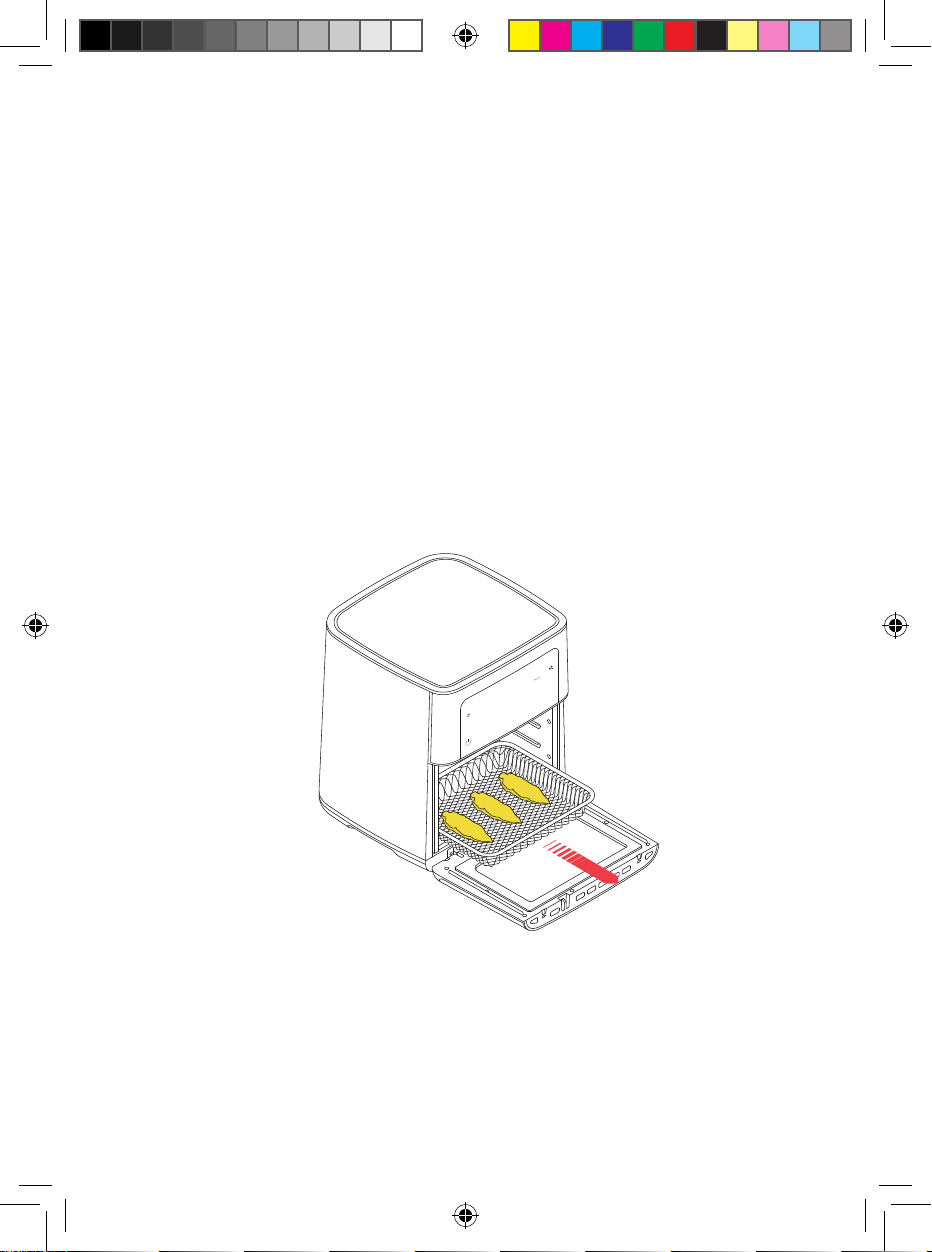
3. Slide the food into the air fryer and close the door.
Step 2
Step 1
Quick Start:
How to Cook in the Air Fryer+
The Air Fryer+ offers fi ve different cook functions (AIR FRY, BAKE, BROIL,
REHEAT, and DRY), plus a rotisserie option (see p. 13). The air fryer requires no
preheating and cooks faster than a traditional oven, which means you can
enjoy your favorite hot foods in mere minutes. NOTE: On fi rst use, the unit may
emit a slight odor, which is normal and will dissipate with use.
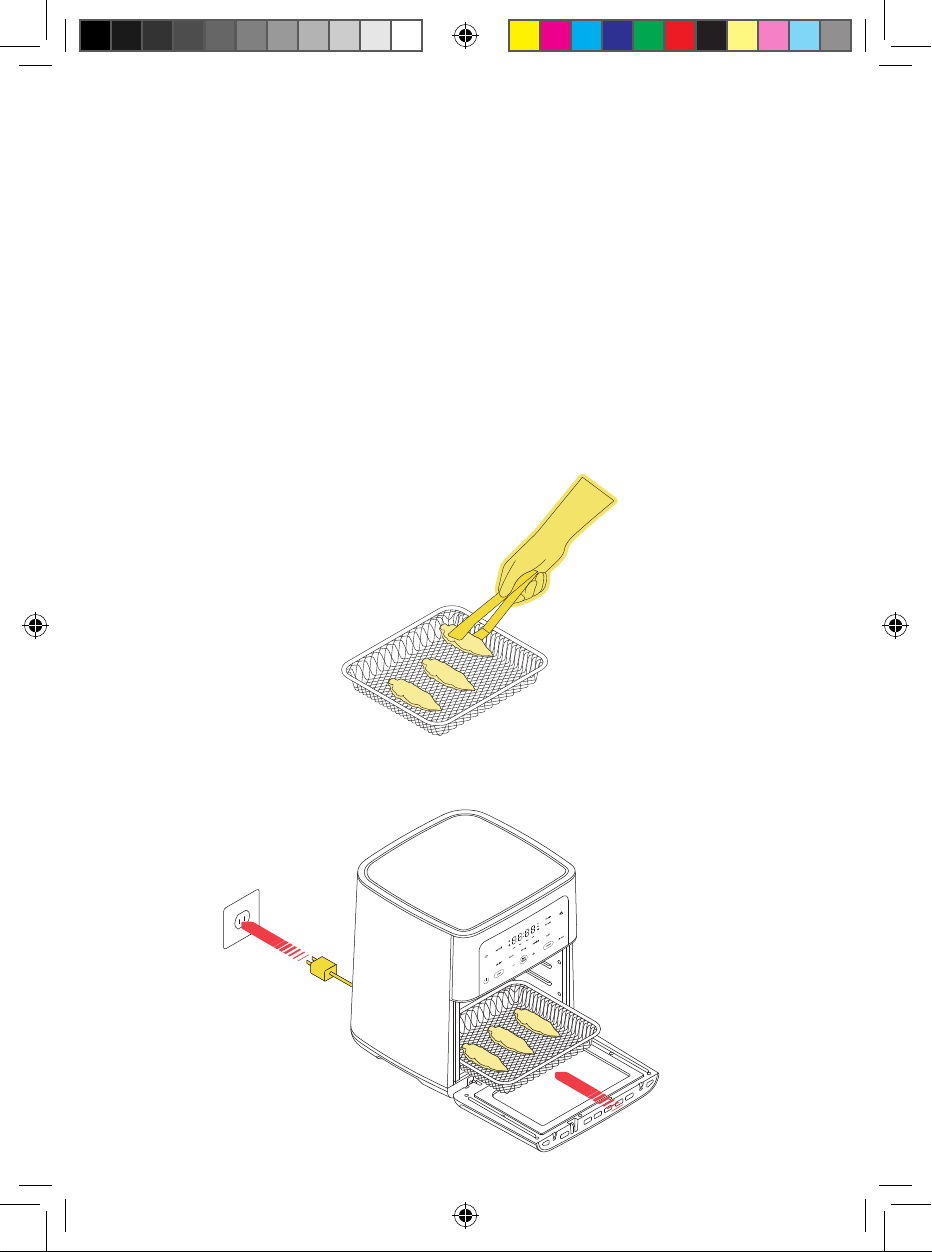
1. Place the unit on a hard, fl at surface away from all sources of heat
and plug it in. Press the Power button to turn the unit on.
2. Place the food on the rack(s), baking pan, or rotisserie spit (see p. 13).
If not using the pan, position it on the fl oor of the unit as a drip tray
for easy cleanup.
RJ38-RDO-13P_UG_LIVE_091525.indd 9RJ38-RDO-13P_UG_LIVE_091525.indd 9 9/15/25 10:48 AM9/15/25 10:48 AM
10
Quick Start: How to Cook in the Air Fryer+
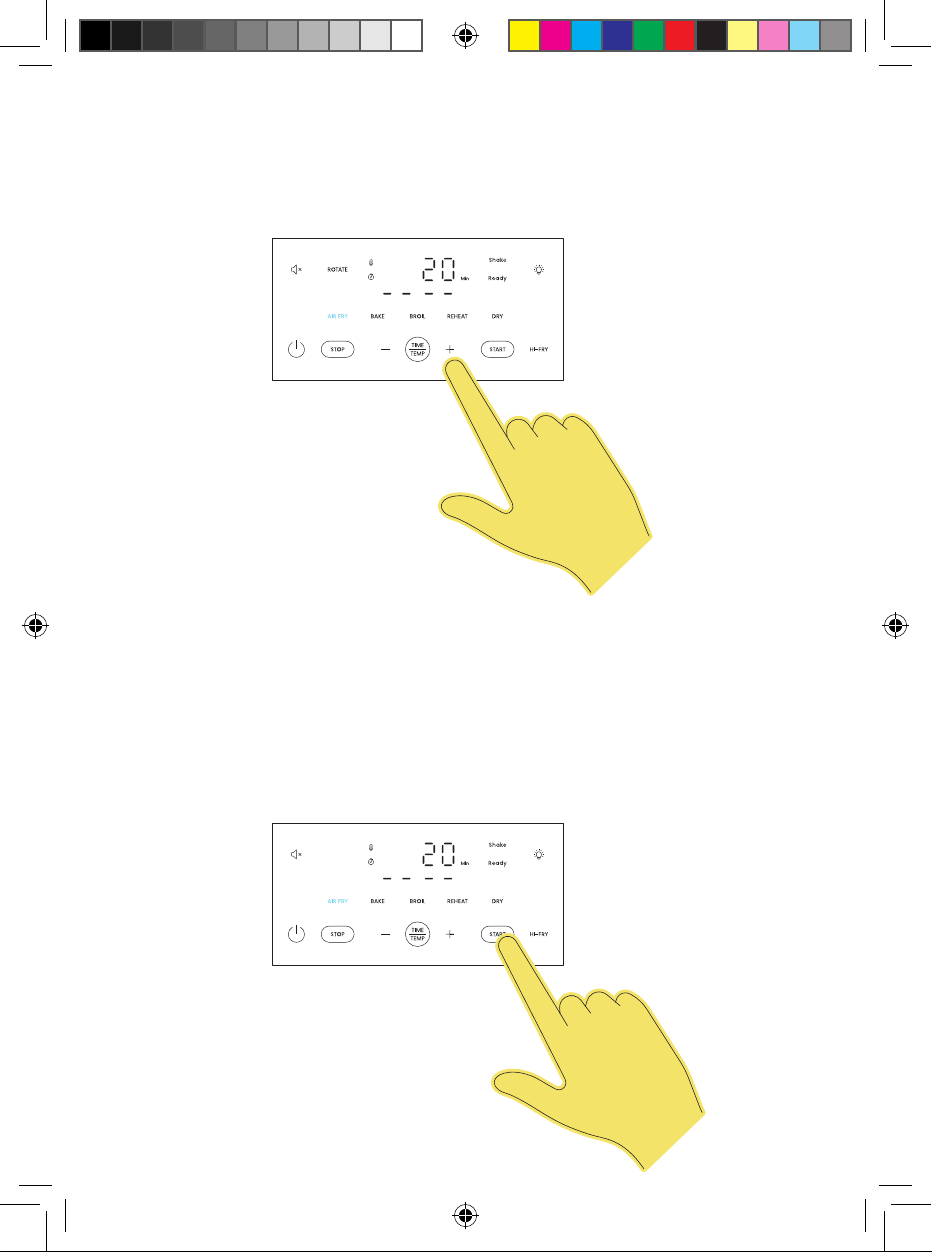
4. Press the cook function button of your choice (AIR FRY, BAKE, BROIL,
REHEAT, or DRY). See chart on p. 12 for details on the different functions.
5. Set the desired temperature and time by pressing the + and – buttons
on the display (Use the TIME | TEMP button to toggle between the two).
6. If cooking with the rotisserie spit (see p. 13), make sure the ROTATE button
is selected (it should be lit blue). Otherwise, make sure it is inactive (lit
in white). The rotate function may be turned off or on at any time during
cooking by pressing the button. NOTE: The ROTATE button is not available
for BROIL, REHEAT, or DRY.
7. Press the START button to begin cooking and the timer will start
counting down.
Step 4
Step 3
RJ38-RDO-13P_UG_LIVE_091525.indd 10RJ38-RDO-13P_UG_LIVE_091525.indd 10 9/15/25 10:48 AM9/15/25 10:48 AM
11
Quick Start: How to Cook in the Air Fryer+
Step 4
8. If you’d like to check on foods during cooking, press the oven light button
on the display and look through the window on the door. You can also
open the door to check; the cooking timer will pause when the door is
opened and resume when the door is closed. To stop cooking before the
timer ends, press STOP.
9. If using the AIR FRY cook function (and not using the ROTATE feature),
the Shake indicator light will begin blinking halfway through the cooking
cycle as a reminder to flip food. Open the oven door, carefully flip food
with tongs if needed, and close the door to resume. If your food does not
need to be shaken or flipped, simply ignore the alert and it will turn off
after 60 seconds.
10. Cook until the timer ends. The Ready indicator light will illuminate and
cooking will stop.
11. Using oven mitts, carefully remove the rack(s) and pan. If using the spit,
use the fetch tool in one hand and an oven mitt in the other to remove
(see p. 14 for more detailed directions).
12. Check food for doneness and serve. NOTE: If not powered off, the unit will
automatically go into sleep mode after 20 minutes of no activity. To wake
the unit up, press the Power button.
RJ38-RDO-13P_UG_LIVE_091525.indd 11RJ38-RDO-13P_UG_LIVE_091525.indd 11 9/15/25 10:48 AM9/15/25 10:48 AM
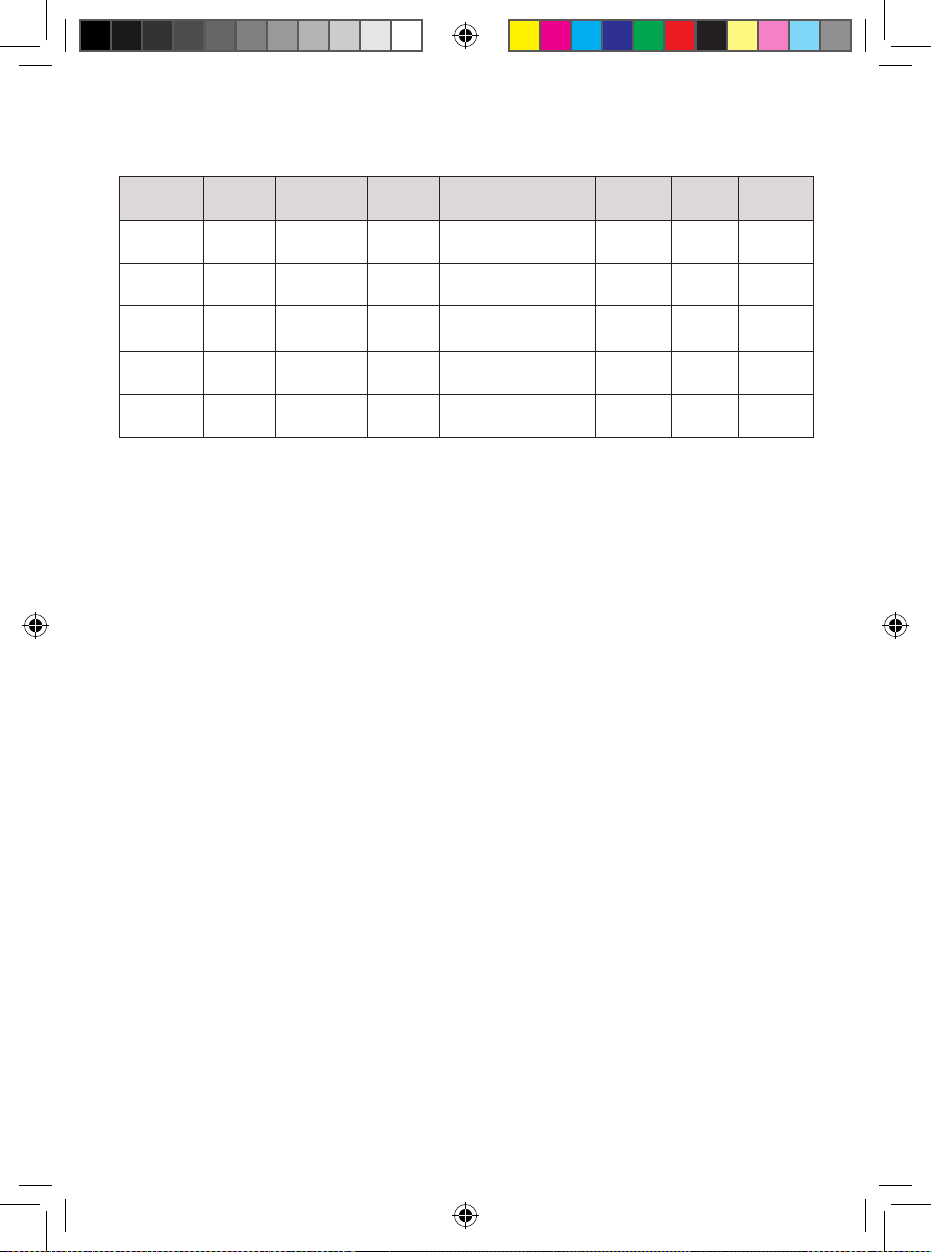
12
Cooking Functions at a Glance
Function
Default
Time
Time
Range
Default
Temp
Temp Range
Rotate
Option?
Shake
Alert?*
Hi-Fry
Option?
AIR FRY 15 min. 1-60 min. 400˚F
(205°C)
200˚F-400˚F
(95°C-205°C)
Yes Yes Yes
BAKE 15 min. 1-60 min. 350˚F
(175°C)
200˚F-400˚F
(95°C-205°C)
Yes Yes No
BROIL 10 min. 1-30 min. 350˚F
(175°C)
350˚F-400˚F
(175°C-205°C)
No No No
REHEAT 5 min. 1-60 min. 375˚F
(190°C)
200˚F-400˚F
(95°C-205°C)
No No No
DRY 6 hours 0.5-24
hours
165˚F
(75°C)
90˚F-200˚F
(30°C-95°C)
No No No
*Shake alert comes on only for cycles 6 minutes or longer when ROTATE is not activated.
SPECIAL FUNCTIONS
ROTATE
The ROTATE button should be used when cooking with the rotisserie spit. When
selected, it will continuously rotate food 360˚ for perfect, even cooking. If not
using the spit, make sure the button is deselected. The ROTATE button is not
available for BROIL, REHEAT, or DRY.
HI-FRY
Hi-Fry is a special function available only for AIR FRY. The HI-FRY button
becomes illuminated during the last 2 minutes of the cooking cycle (on cycles
6 minutes or longer). When pressed, it will temporarily raise the temperature to
450˚F/235˚C for 2 minutes to give foods a little additional browning.
FAHRENHEIT/CELSIUS TOGGLE
To switch the oven display between ˚F and ˚C, press and hold the + | - button
pair for 3 seconds.
RJ38-RDO-13P_UG_LIVE_091525.indd 12RJ38-RDO-13P_UG_LIVE_091525.indd 12 9/15/25 10:48 AM9/15/25 10:48 AM
13
How to Use the Rotisserie Spit
(Max: 4 lb)
Using the spit with the rotate feature is perfect for roasting a whole chicken to
even, crisp perfection and for slowly cooking whole, boneless pieces of meat,
such as beef or pork tenderloins. You can also experiment with roasting a
small cauliflower head or a peeled pineapple. NOTE: The rotate function is not
available for BROIL, REHEAT, or DRY.
Place the baking pan on the floor of the unit.
If using the spit to cook a whole chicken, be sure the giblets are removed.
Season the chicken as desired and truss tightly. (Be sure the chicken will fit
in the oven with room to rotate; a 3 to 3½ lb chicken works well.) Run the spit
through the bird lengthwise, starting at the cavity in the back. Carefully slide
the spit forks onto each end of the shaft, sinking them deep into the breast
meat at one end and the thigh meat at the other end. Lock the forks in place
with screws, leaving at least 1 inch of free space on both ends of the rod. The
chicken should be secure and should not be able to slide around on the spit.
Alternatively, if using the spit to cook a piece of meat, carefully push the spit
lengthwise through the center of the meat. Carefully slide the spit forks onto
each end of the shaft, inserting the prongs deeply into the meat. Lock the
forks in place with screws, leaving at least 1 inch of free space on both ends
of the rod. The meat should be secure and should not be able to slide around
on the spit.
Guide the spit into the rotisserie rack position by placing the left shaft into the
rotisserie gear located on the left interior wall. Once in place, lift the right shaft
and lay it on the rotisserie holder located on the right interior wall. Be sure the
meat or chicken can rotate freely in the air fryer.
Close the door and proceed with cooking following the directions on p. 10,
beginning with Step 4 and choosing the AIR FRY or BAKE cook function.
CAUTION: The spit will get hot during cooking. Use the fetch tool and oven
mitts and handle with care to avoid injury (see p. 14 for more detailed
directions on the fetch tool).
RJ38-RDO-13P_UG_LIVE_091525.indd 13RJ38-RDO-13P_UG_LIVE_091525.indd 13 9/15/25 10:48 AM9/15/25 10:48 AM
14
How to Use the Rotisserie Spit (Max: 4 lb)
How to Use the Fetch Tool
The fetch tool is handy for removing the hot spit from the air fryer.
Hold the fetch tool by its handle with one hand. Have a potholder in (or an
oven mitt on) the other hand.
Guide the fetch tool into the unit, positioning the prongs below the shafts of
the rotisserie spit.
Use the tool to lift the right side of the spit from the rotisserie holder. Once it’s
free, lift the left side.
Carefully guide the hot spit and food from the air fryer and transfer to a heat-
resistant surface.
RJ38-RDO-13P_UG_LIVE_091525.indd 14RJ38-RDO-13P_UG_LIVE_091525.indd 14 9/15/25 10:48 AM9/15/25 10:48 AM
15
Cooking Tips
• When air frying, oil foods lightly for a crisp exterior. Some foods, especially
if fresh, benefit from being tossed with a little oil in a separate bowl before
frying. However, high-fat foods, like a well-marbled steak, or prepared
foods usually require no additional oil.
• Avoid wet batters. Loose batters, such as those used for deep frying, do
not work in air fryers, as the batter simply slides off. Adapt such recipes
to give foods a thicker coating, preferably including breadcrumbs to help
the coating adhere.
• Use medium-high to high heat for air frying. Most foods air fry best
between 375°F (190°C) and 400°F (205°C). For gentler cooking and
reheating, use a lower temperature to avoid overcooking.
• Don’t overcrowd the racks or pan. Too much food, especially if tightly
packed, can inhibit browning and crisping. A better bet: cook food
in batches.
• If using multiple wire racks, carefully switch rack positions halfway
through the cooking cycle to ensure even cooking. For dehydrating,
switch rack positions from top to bottom periodically.
• Check foods on the earlier side of the cooking time; you can always put
the food back in to continue cooking.
• Because food sizes can vary, do not rely exclusively on recipe timing when
cooking food. Check food for doneness against current safety guidelines
before serving.
RJ38-RDO-13P_UG_LIVE_091525.indd 15RJ38-RDO-13P_UG_LIVE_091525.indd 15 9/15/25 10:48 AM9/15/25 10:48 AM
16
Having Trouble?
Why is there white smoke coming from my unit?
White smoke can be a sign that there’s too much fat in the fryer. Avoid cooking
very fatty foods, such as sausages, in the air fryer, and be sure that the
accessories and interior of the air fryer are clean before cooking.
Why has my food cooked unevenly?
Two culprits are likely: overcrowding and not switching rack positions. Evenly
distribute foods on the rack(s) and pan. Flipping foods midway through
cooking also helps. If using multiple racks, try switching rack positions at least
once during cooking.
Why isn’t my food crisp?
Though you can air fry with no added oil, coating foods very lightly with oil
(usually just teaspoon per batch for most recipes) helps guarantee crisp
results. Preheating the air fryer also helps.
RJ38-RDO-13P_UG_LIVE_091525.indd 16RJ38-RDO-13P_UG_LIVE_091525.indd 16 9/15/25 10:48 AM9/15/25 10:48 AM
17
Keep It Clean
The air fryer is easy to clean and should be cleaned after each use. Follow the
directions below.
1. Unplug the unit, unplug the probe (if used), and let the unit cool
completely before cleaning.
2. Wipe down the exterior and interior of the unit with a clean, damp cloth
and dry thoroughly. Do not put the unit in the dishwasher or submerge it
in water or any other liquid.
3. Using a sponge, soft cloth, or nylon pad, wash the glass on the door
with dish soap and warm water, and dry thoroughly. Do not use a spray
glass cleaner.
4. Wash all accessories with warm, soapy water; rinse, and dry well. All
accessories are top-rack dishwasher safe.
5. Do not use abrasive cleansers, which can damage the finishes.
RJ38-RDO-13P_UG_LIVE_091525.indd 17RJ38-RDO-13P_UG_LIVE_091525.indd 17 9/15/25 10:48 AM9/15/25 10:48 AM
1818
Notes
RJ38-RDO-13P_UG_LIVE_091525.indd 18RJ38-RDO-13P_UG_LIVE_091525.indd 18 9/15/25 10:48 AM9/15/25 10:48 AM
19
Notes
RJ38-RDO-13P_UG_LIVE_091525.indd 19RJ38-RDO-13P_UG_LIVE_091525.indd 19 9/15/25 10:48 AM9/15/25 10:48 AM
20
Terms & Conditions
Limited Warranty
RJ Brands, LLC d/b/a Chefman® offers a limited 1-year Warranty (the “Warranty”)
available on sales through authorized distributors and retailers only. Please
note that this Warranty becomes valid from the date of initial retail purchase
and that the Warranty is nontransferable and applies only to the
original purchaser.
This Warranty is void without proof of purchase within the United States and
Canada. Please be aware that this Warranty supersedes all other warranties
and constitutes the entire agreement between the consumer and Chefman®.
Any changes to the Terms and Conditions of this Warranty must be in writing,
signed by a representative of Chefman®. No other party has the right or ability
to alter or change the Terms and Conditions of this Warranty.
We may ask you to please submit, via email, photos and/or video of the issue
you are experiencing. This is to help us better assess the matter and possibly
offer a quick fix. Photos and/or video may also be required to determine
Warranty eligibility.
We encourage you to register your product. Registering can make the Warranty
process easier and can keep you informed of any updates or recalls on
your product. To register, follow the directions on the Chefman® Warranty
Registration page in the Chefman® User Guide. Please retain your proof of
purchase even after registering. In the event that you do not have proof of
your purchase date, we may declare your Warranty void or we may, at our sole
discretion, apply the date of manufacture as the purchase date for purposes of
this Warranty.
RJ38-RDO-13P_UG_LIVE_091525.indd 20RJ38-RDO-13P_UG_LIVE_091525.indd 20 9/15/25 10:48 AM9/15/25 10:48 AM
21
Terms & Conditions
What the Warranty Covers
• Manufacturer Defects
Chefman® products are warranted against defects in material and
workmanship, under normal household use, for a period of 1 year from the
date of purchase when used in accordance with the directions listed in the
Chefman® User Guide. If your product does not work as it should, please
contact Customer Support at support@chefman.com so that we may
assist you.
This Warranty Does Not Cover
• Misuse
Damage that occurs from neglectful or improper use of products, including,
but not limited to, damage that occurs as a result of usage with incompatible
voltage, regardless of whether the product was used with a converter or
adapter. See Safety Instructions in the Chefman® User Guide for information
on proper use of product;
• Poor Maintenance
General lack of proper care. We encourage you to take care of your
Chefman® products so that you may continue to enjoy them. Please see
Keep It Clean directions in this Chefman® User Guide for information on
proper maintenance;
• Commercial Use
Damage that occurs from commercial use;
• Normal Wear and Tear
Damage or degradation expected to occur due to normal use over time;
• Altered Products
Damage that occurs from alterations or modifications by any entity
other than Chefman® such as the removal of the rating label affixed to
the product;
• Catastrophic Events
Damage that occurs from fire, floods, or natural disasters; or
• Loss of Interest
Claims of loss of interest or enjoyment.
RJ38-RDO-13P_UG_LIVE_091525.indd 21RJ38-RDO-13P_UG_LIVE_091525.indd 21 9/15/25 10:48 AM9/15/25 10:48 AM
22
Terms & Conditions
For product information, please visit us at Chefman.com.
EXCEPT WHERE SUCH LIABILITY IS REQUIRED BY LAW, THIS WARRANTY DOES NOT
COVER, AND CHEFMAN® SHALL NOT BE LIABLE FOR, INCIDENTAL, INDIRECT, SPECIAL,
OR CONSEQUENTIAL DAMAGES, INCLUDING WITHOUT LIMITATION, DAMAGE TO, OR
LOSS OF USE OF THE PRODUCT, OR LOST SALES OR PROFITS OR DELAY OR FAILURE TO
PERFORM THIS WARRANTY OBLIGATION. THE REMEDIES PROVIDED HEREIN ARE THE
EXCLUSIVE REMEDIES UNDER THIS WARRANTY, WHETHER BASED ON CONTRACT,
TORT OR OTHERWISE.
RJ38-RDO-13P_UG_LIVE_091525.indd 22RJ38-RDO-13P_UG_LIVE_091525.indd 22 9/15/25 10:48 AM9/15/25 10:48 AM
23
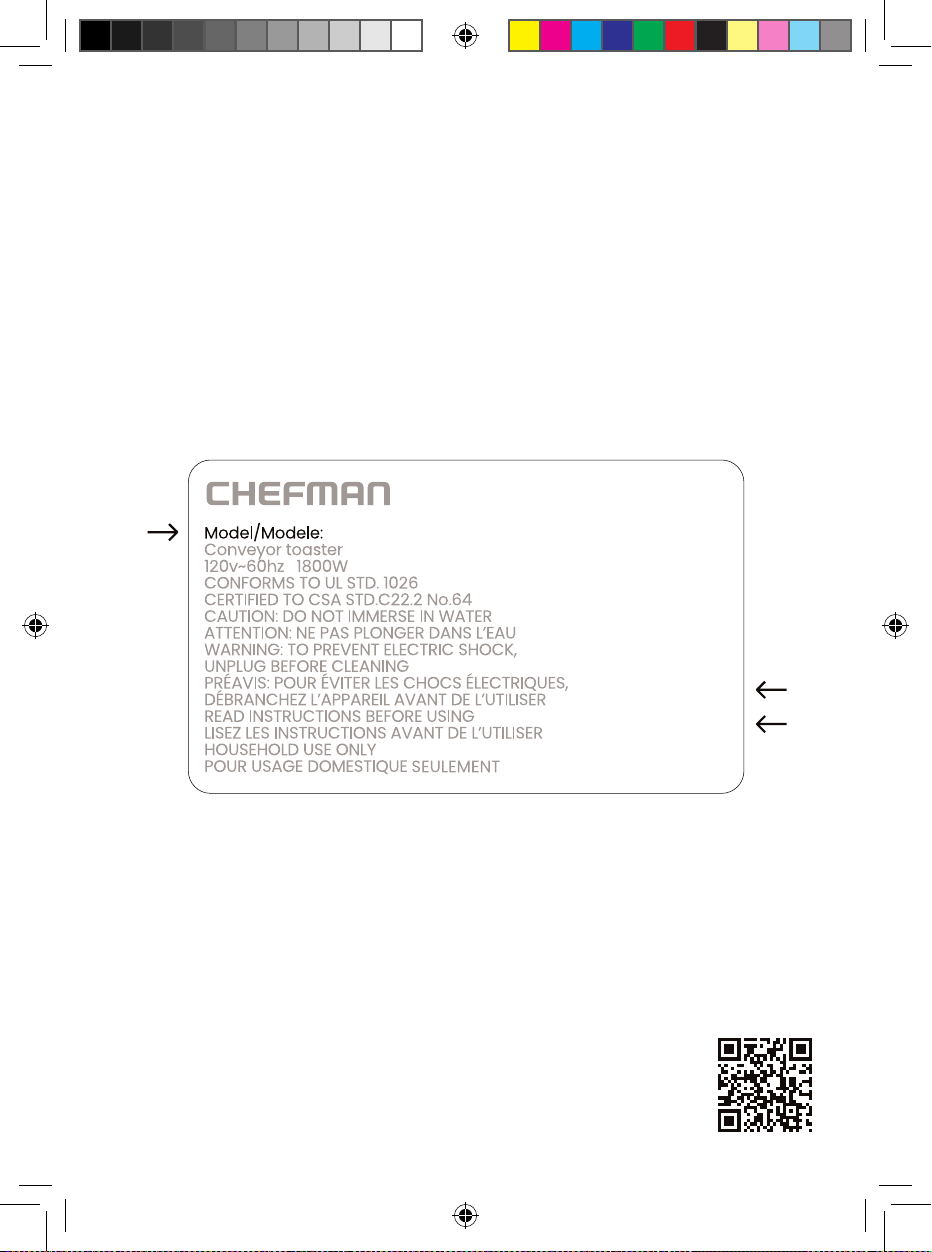
How do I register my product?
All you need to do is fill out a simple Chefman® registration form.
You can easily access the form in one of the two ways listed below:
• Visit Chefman.com/register.
• Scan the QR code to the right to access site.
NOTE: Label depicted here is an example.
Please see label on your product for actual model/date code/access code.
Warranty Registration
What do I need to register my product?
• Contact Information
• Model Number (see example below)
• Proof of Purchase (online confirmation, receipt, gift receipt)
• Date Code (see example below)
• Access Code (see example below)
Date Code:
0000
Access Code:
Xxxxxxxx
XXXXX
RJ38-RDO-13P_UG_LIVE_091525.indd 23RJ38-RDO-13P_UG_LIVE_091525.indd 23 9/15/25 10:48 AM9/15/25 10:48 AM
RJ38RDO13PUG091525
13-Quart
Multifunctional Air Fryer+
Chefman® is a registered trademark of RJ Brands, LLC.
RJ38-RDO-13P_UG_LIVE_091525.indd 24RJ38-RDO-13P_UG_LIVE_091525.indd 24 9/15/25 10:48 AM9/15/25 10:48 AM