User manual
Multi-function Emergency Radio
With LCD Screen
CONTENTS:
RADIO OPERATION
WEATHER ALERT
SOS ALARM
READING LAMP
FLASHLIGHT
3 POWER METHODS
BATTERY PROTECTION
POWER THE DEVICE
EARHONE JACK
CARE AND MAINTENANCE
SPECIFICATION
WARRANTY
PACKING LIST
-1- -2- -3-
RADIO OPERATION
WEATHER ALERT
B HAND CRANK POWER
PACKING LIST
WARRANTY
SPECIFICATION
CARE AND MAINTENANCE
EARPHONE JACK
POWER THE DEVICE
SOS ALARM
FLASHLIGHT
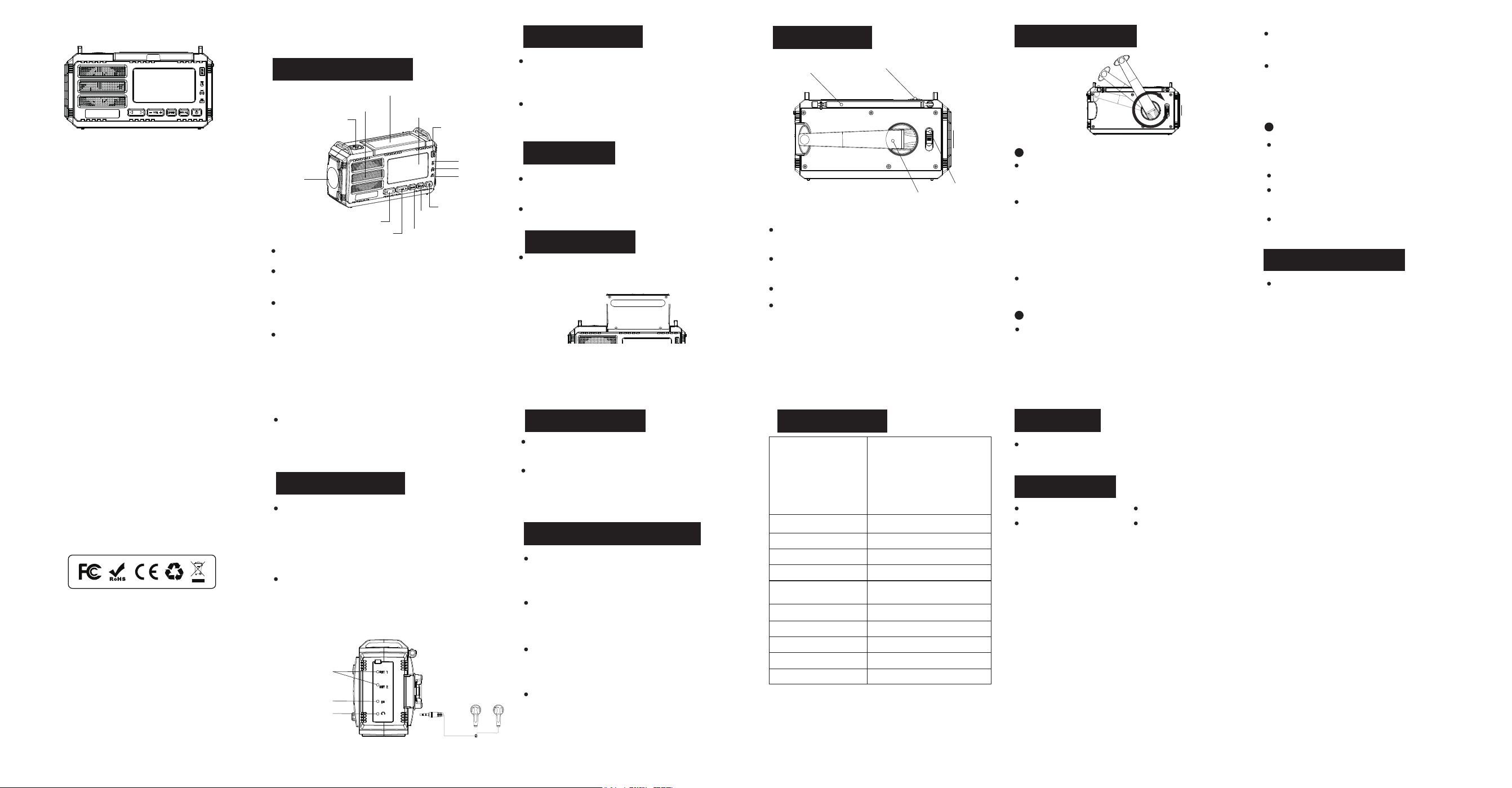
Antenna
Hand crank handle
The radio can also be charged by turning the handle
at the back of the device.
The device has a full 12-month warranty against manu-
facturing defects from the date of purchase.
Insert the 3.5mm Earphone jack to listen to the radio
to enjoy your leisure time.
The charging indicator light will light red when the
handle is being turned.
Connect the USB device to the USB/USB-C output port of
the unit via USB/USB-C cable to power the USB device.
When the device is used as a power bank (discharge),
the power indicator lights will diminish.
Use C-to-C cable when charging for the unit by USB-C.
(C-to-C cable not supplied)
This feature is suggested to use in emergency, do not
use it as a normal power bank.
Radio x 1
USB-C Cable x 1
Frequency range
Dimensions
Weight
Power consumption
Working voltage
Power source
Waterproof level
Power input
LED flashlight
Power of flashlight
Power of reading lamp
175x80x98mm
570g
7w
2.4~4.2V
10000mAh / 3.7V
IPX3
USB-C 5V 2A
200LM(Max)
2W
1.2W
Long press the SOS button for 3s to activate the loud
siren and the flashing far beam
Press the SOS button again to turn it off.
-7- -8- -9- -10-
For the first use or when the unit idles over 60 days,
please hand crank for 1 minutes to activate the internal
battery.
The device shall not be exposed to dripping or
splashing,and objects filled with liquids should no tbe
placed on the device.
Please do not over discharge the unit, so as not to
reduce the internal battery life, or even damage the
battery.
Avoid flashlight light directly into the eyes, or it will hurt
the eyes.
User Manual x 1
Gift box x 1
Made in China
Power switch
Flashlight button
Output ports
Input port/Output ports
Earphone jack
3 POWER METHODS
BATTERY PROTECTION
READING LAMP
-4-
A USB CHARGING
The waterproof cover on the side of this product has 2
USB output ports , a USB input port and a earphone jack.
Connect the supplied USB-C cable to the USB Input port
on the unit's right side to charge the built-in lithium
battery. Meanwhile, the red charging indicator light will
light up.
Please have the radio charged at least once every
three months.
Turn on the radio by pressing the power button, press
it again to turn it off.
Press the left or right buttons to navigate between
radio stations.Adjust the volume by pressing the
volume buttons.
The green LED will light up when the radio has found a
stable reception/channel.Extend the antenna and
adjust the direction to get better signal.
The blue LED will light up when the batteries are being
used
Note: Please turn on the power switch(on the back side) to
"ON" before using each function.
When the radio is on, press “WX AL” button to switch to
weather alert mode. Once receives bad weather infor-
mation, "ALERT" will flash on the screen and the
device will alarm.
Press button “WX AL” or “BAND” to exit weather alert
mode.
-5-
Rotate the rocker clockwise or counterclockwise,
and keep it at a constant speed of 130 rpm for 1
minute, which can be used for far beam or dipped
beam for 10 minutes or radio work for 5-6 minutes.
-6-
C SOLAR POWER
Place the unit in clear sunlight to let it charge as
efficiently as possible.
The charging indicator will turn red when charging.
The charging effect depends on the intensity of the
sunlight. Stronger sunlight give better effect.
It is mostly used for maintaining the battery, to
prolong the battery life.
This emergency radio is designed with a feature of
shutdown in low voltage. To protect the chip, the
power supply will be cut off to protect the battery from
damage when there is an overload or a short circuit in
this unit.
It will cut of the power source when the voltage is
lower than 2.7V and protects the battery from being
over-disacharged and damaged.
If you press the SOS button at this time, you will hear
the SOS alarm in the earphone. It will return to the
radio function when you turn off the SOS function.
Open the solar panel, the reading lamp lights up, and
close the solar panel it will light off.
The first press on the flashlight button, the far beam
lights up.
The second press on the flashlight button, the dipped
beam lights up.
The third press with both far and dipped beam light up.
The forth press with both light off.
FM 87~108MHz
AM 520~1710KHz
WB/ALERT:
1: 162.400 MHz 2: 162.425 MHz
3: 162.450 MHz 4: 162.475 MHz
5: 162.500 MHz 6: 162.525 MHz
7: 162.550 MHz
Flashlight Button
Flashlight
Power ON/OFF
Alert
Power on Indicator
Tuning
Band Selector
VOL +/-
Speaker
SOS Alarm
LCD
Display
Solar Panel
Charging Indicator
Signal Indicator