Product User Manual
Dear user:
shalom !
Thank you for choosing this product.
Before using this product, please take the time to read its features and instructions to help
you understand it easily.
The Company shall not be liable for any loss or damage to personal data resulting from
software/hardware malfunctions, product repairs, battery replacements, or other unforeseen
circumstances, nor shall it be held responsible for any indirect losses arising therefrom.
Furthermore, the Company cannot control potential misinterpretations of this manual by users,
and therefore shall not be liable for incidental losses during manual usage or third-party
claims related to the product. The functional information in this manual shall be subject to
the actual product specifications ordered, and no prior notice will be given for any changes
to such information. The Company reserves the right to interpret this manual, warranty
certificates, and related materials in a final manner.
This manual may contain errors or omissions. We welcome your feedback and suggestions. If you
encounter any issues while using this product, please contact the distributor promptly. Thank
you for your support and cooperation!
uThis product meets the IP67 waterproof rating, allowing operation in humid, rainy, or shallow
water environments. However, ensure all rubber stoppers are securely sealed to prevent water
ingress or moisture exposure, which may cause malfunctions or complete damage in severe cases.
uTo ensure stable performance, avoid prolonged exposure to extreme temperature and humidity, and
do not leave the product in direct sunlight or other heat sources for extended periods.
uDo not use conductive objects to touch the POGO PIN contact point on the products base to
prevent short circuits that could damage the main unit.
uDo not damage the speaker or microphone waterproof film, as this may reduce or eliminate the
products waterproofing.
uWhen the scanning module is in operation, do not direct the red laser of the scanning module at
human or animal eyes to avoid injury.
uDo not use adapters not included with this product, as they may cause malfunctions or even
damage the device.
uIf this product is not used for a long time, turn off the power and download the data to
another storage device.
uIf the product malfunctions, contact the authorized dealer immediately. Do not attempt to
disassemble or repair it yourself. Any unauthorized disassembly during the warranty period will
void the warranty coverage.
01-Safety Tips
main engine adapter
power lineHand/wrist band
List
02-Packaging List
name
Hardcover Lightweight version
10.1 inches 8 inches 10.1 inches 8 inches
main engine √ √ √ √
adapter √ √ √ √
power line √ √ √ √
wrist strap √ √ √ √
instructions √ √ √ √
certificate √ √ √ √
warranty card √ √ √ √
This packin g list is for reference only. The actual product specifications may vary
depending o n your configuration cho ice.
03-Product Switch
5-card slot usage
As this product is designed with IP68 waterproof rating, the TF/SIM card slot is positioned
relatively deep, requiring a tool for proper insertion and removal. When inserting the card,
hold it with tweezers and gently push it into the slot in the correct direction. To remove the
card, insert the tool into the slots gap, apply gentle pressure to the card until it pops out.
Be careful not to overexert force to avoid damaging the slot or the card. After removing the
card, securely seal the slot with the rubber stopper to complete the process.
The small h ead is
facing inwa rd.
TF block
Chip down
TF calorific
Insert
correctly
SIM calorific
Insert correctly
The gap is
facing outw ard.
SIM block
Chip facing up
TF Card and
SIM and so on
slot
differentiation
The top is: TF card slo t
Below is: S IM card slot
screen
dorsal
scale
Component Name
toxic and harmful substances or elements
lead
(
Pd
)
mercury
( Hg)
cadmium
( Cd)
hexavalent
chromium (Cr6+)
Polychlorinated Biphenyls (PBB)
polybrominated diphenyl ethers
(PBDE)
main shell
○ ○ ○ ○ ○ ○
motherboard
○ ○ ○ ○ ○ ○
memory bank
○ ○ ○ ○ ○ ○
memorizer
○ ○ ○ ○ ○ ○
display screen
○ ○ ○ ○ ○ ○
touch screen
○ ○ ○ ○ ○ ○
WIFI module
○ ○ ○ ○ ○ ○
WIFI antenna
○ ○ ○ ○ ○ ○
radiator
○ ○ ○ ○ ○ ○
adapter
○ ○ ○ ○ ○ ○
Label/Plaque
○ ○ ○ ○ ○ ○
In accordance with the "Measures for the Control of Pollution from Electronic Information
Products" issued by the Chinese government, to reduce environmental pollution and protect
human health, the following information is provided regarding potential toxic and harmful
substances contained in the products:
The content of the toxic and harmful substance in all homogeneous materials of the component is
below the limit specified in GB/T 26572-2011.
It indicates that the content of the toxic and harmful substance in a certain homogeneous
material of the component exceeds the limit specified in GB/T 26572-2011.
×
○
temperature
Operating temperature: -5°C to 45°C Storage temperature: -20°C to 55°C
humidity Relative humidity 95% (non-condensing state)
attestation
IP67 certified
ROHS certified
Certified by UN38.3+MSDS
test
report
Complies with GB/T 9254.1-2021 "Electromagnetic Compatibility for Information
Technology Equipment, Multimedia Equipment and Receivers-Part 1: Emission
Requirements"
Complies with GB 17625.1-2012 Electromagnetic Compatibility Limitation: Harmonic
Current Emission Limits (Equipment Phase Input Current ≤ 16A) and meets the
requirements of GB9254 standard.
Compliant. GB 4943.1-2022 "Audio-Visual, Information Technology and Communication
Technology Equipment-Part 1: Safety Requirements"
6-Reliability
7-China Electronic Information Product Pollution Control
Requirements
Product startup:
Hold the POWER button for about 3 seconds. When the blue light turns on, release the button.
After a few seconds, the product will display the startup screen and then enter the operating
system interface.
Wake from sleep:
After the system enters sleep mode, press the POWER button for 1 second until the blue light
turns on, then release.
After 2-4 seconds, the screen lights up and the operating system interface appears.
Normal shutdown:
To shut down Windows, select the shutdown command in the Start menu. For Android, press and hold
the POWER button for 1-3 seconds. The system will then display the shutdown interface. Select
the shutdown option to complete the process.
Force shutdown:
Long-press the POWER key for about 10 seconds to shut down the system. Do not use this
frequently, as it may cause operating system issues.
system assemble :
If the operating system of this product needs to be reinstalled, download the Windows image file
or Android firmware corresponding to the product version. Otherwise, the product cannot be
installed or drivers cannot be loaded.
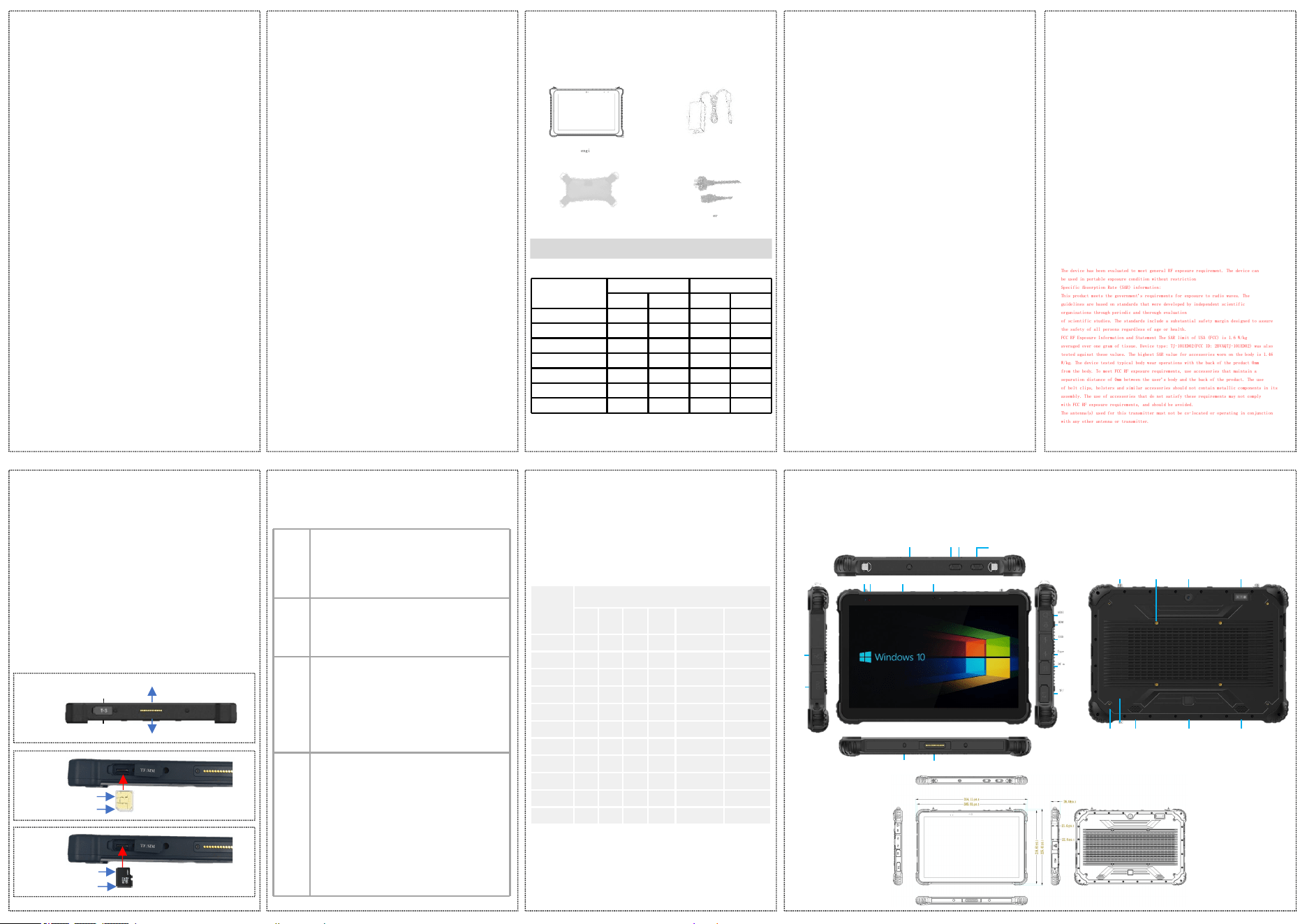
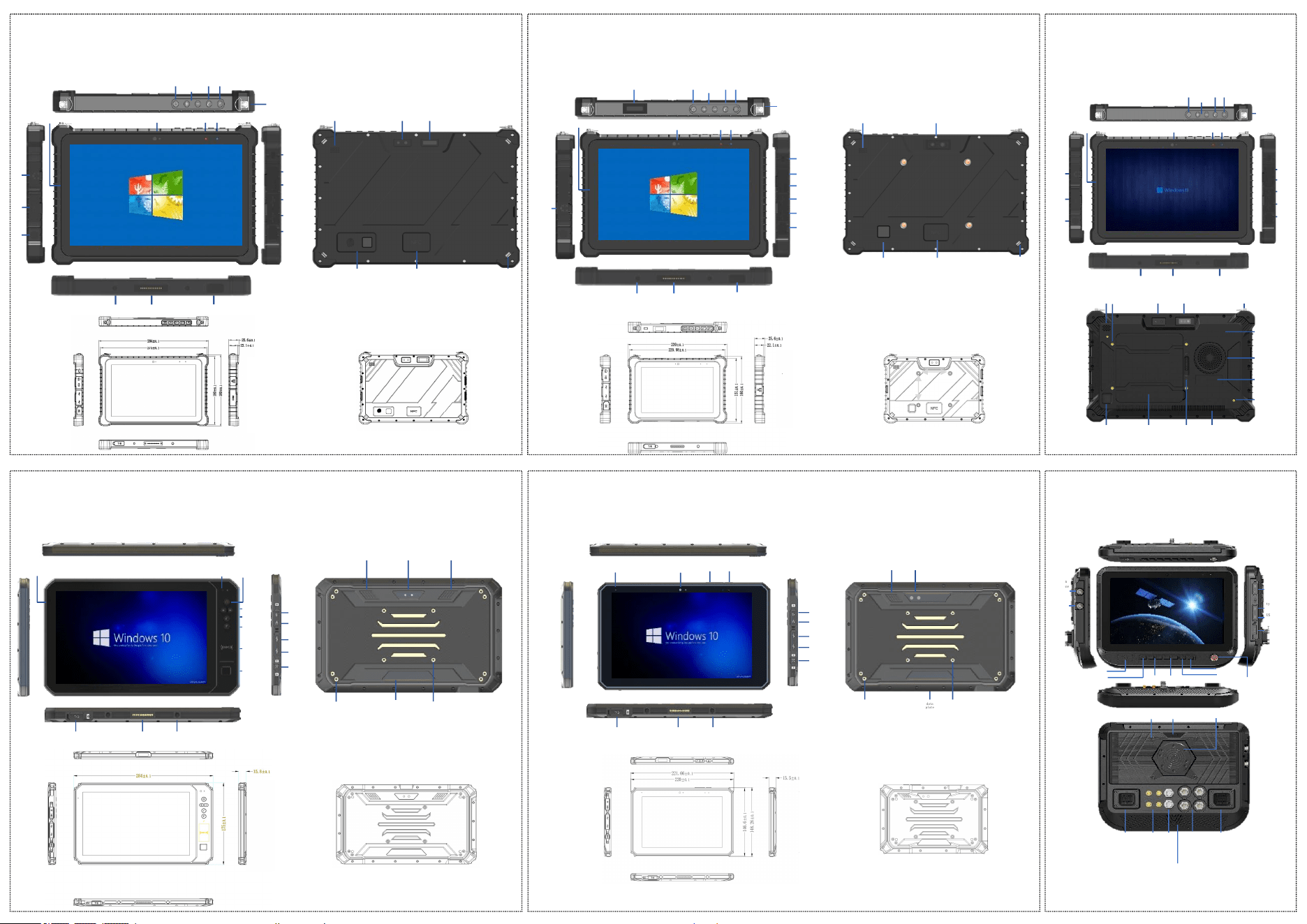
Hardcover 12.6-inch---Function and Size Diagram
(The image is for reference only due to varying product and configuration
choices.)
NFC
camera Scan code module
artifice
Holed
Handheld/Backstrap Screw
Left hornRight horn
Fingerprint
module
VESA
HDMI
USB
Type-C
DC mouth
COM
RJ45
POGOPIN
TF/SIM
mains switch
volume +/-
Custom Key
Scan QR code
AUDIO
Power light
Charging
light
camera
charging base positioning hole
microphone
Battery life:
For testing at ambient temperatures between 10°C and 45°C, with the device set to 50%
brightness and volume, and playing a local standard-definition video, the test duration is as
follows (for reference only):
4-Product Batter
Warning:
Changes or modifications to this unit not expressly approved by the party responsible for
compliance could void the user’s authority to operate the equipment.
NOTE:
This device complies with part 15 of the FCC Rules. Operation is subject to the following two
conditions: (1) This device may not cause harmful interference, and (2) this device must
accept any interference received, including interference that may cause undesired operation.
FCC Statement:
This equipment has been tested and found to comply with the limits for a Class B digital
device, pursuant to part 15 of the FCC Rules. These limits are designed to provide reasonable
protection against harmful interference in a residential installation. This equipment
generates, uses and can radiate radio frequency energy and, if not installed and used in
accordance with the instructions, may cause harmful interference to radio communications.
However, there is no guarantee that interference will not occur in a particular installation.
If this equipment does cause harmful interference to radio or television reception, which can
be determined by turning the equipment off and on, the user is encouraged to try to correct
the interference by one or more of the following measures:
—Reorient or relocate the receiving antenna.
—Increase the separation between the equipment and receiver.
—Connect the equipment into an outlet on a circuit different from that to which the receiver
is connected.
—Consult the dealer or an experienced radio/TV technician for help.
The device has been evaluated to meet general RF exposure requirement. The device can
be used in portable exposure condition without restriction
Specific Absorption Rate (SAR) information:
This product meets the government's requirements for exposure to radio waves. The
guidelines are based on standards that were developed by independent scientific
organizations through periodic and thorough evaluation
of scientific studies. The standards include a substantial safety margin designed to assure
the safety of all persons regardless of age or health.
FCC RF Exposure Information and Statement The SAR limit of USA (FCC) is 1.6 W/kg
averaged over one gram of tissue. Device type: TJ-101ED02(FCC ID: 2BVAQTJ-101ED02) was also
tested against these values. The highest SAR value for accessories worn on the body is 1.46
W/kg. The device tested typical body wear operations with the back of the product 0mm
from the body. To meet FCC RF exposure requirements, use accessories that maintain a
separation distance of 0mm between the user's body and the back of the product. The use
of belt clips, holsters and similar accessories should not contain metallic components in its
assembly. The use of accessories that do not satisfy these requirements may not comply
with FCC RF exposure requirements, and should be avoided.
The antenna(s) used for this transmitter must not be co-located or operating in conjunction
with any other antenna or transmitter.
y
75mm
75mm
Safety lock
cameraloudspeaker
loops and
whorls on a
finger
NFC
Wrist strap with a
hook
RJ45
camera Power light
AUDIO
HDMI
USB
Type-C
DC mouth
POGOPIN
TF/SIM card slot
mains switch
volume
+/-
user-defined
keyboard
shortcuts
code scanner
Charging light
base locating post
Handbag/Backpack Hook
microphone
camera
VESA
loudspeaker loudspeaker
Wristband mounting
hole
data
plate
mains switc h
volume +/-
NFC
Custom Key
loops and
whorls on
a finger
keyboard
shortcuts
Audio
HDMI
USB
Type-C
DC mouth
camera
POGOPINTF/SIM card slot
microphone
charging base positioning hole
data
plate
camera
VESA
loudspeaker
Wristband mounting
hole
Audio
HDMI
USB
Type-C
DC_IN
POGOPINTF/SIM card slot
charging base positioning
hole
mains switch
cameramicrophone
volume +-
(The image is for reference only due to varying product and configuration
choices.)
camera code scannerloudspeaker
Fingerprint lock
NFC
Wrist strap with a
hook
COM
Safety lock
AUDIO
HDMI- mini
USB
Type-C
DC_IN
aviatio
n
joggle
RJ
45
POGOPIN
TF/SIM card slot
mains switch
volume
+/-
user-defined
keyboard
shortcuts
Multi-functional base positioning
hole
camera
Power light
Charging
light
microphone
Handbag strap/Back strap hook
(The image is for reference only due to varying product and configuration
choices.)
(The image is for reference only due to varying product and configuration
choices.)
(The image is for reference only due to varying product and configuration
choices.)
loops and
whorls on a
finger
NFC region
camera
code scanner
loudspeaker
Handheld strap with quick-
release screw
VESA
Fan air intake
Fan outlet
data
plate
Wristband screw
hole
Battery cover lockbattery cover
air
interface
HDMI
USB
Type-C
DC_IN
COM
RJ45
POGOPIN TF/SIM card slot
mains switch volume
+/-
user-defined
keyboard
shortcuts
Multi-functional base positioning
hole
camera
Power light
Charging lightmicrophone
Handheld/Backstrap Hook
AUDIO
spherical stent screw
hole
VESA camera
Dechi Interface-1
CAN *2
USB *1
GPIO *1
RS232 *1
RS485 *1
DC-IN *1
DC-OUT *1
AHD
joggle
suona
Dechi Interface-2
USB *1
RJ45 *1
GPIO *2
RS232 *1
Audio-IN *1
Audio-OUT*1
TNC
antenna
SMA
antenna
aviation
Interface
1
HDMI
USB3.0
TF/SIM
type-c
NFC
DC switch
volume +- luminanc
e +-
Custom 1
emergency stop
switch
Custom 2
aviation
Interface 2
Hardcover 10.1-inch---Function and Size Diagram Hardcover 8-inch---Function and Size Diagram Edge Computing Edition 10.1-inch---Function and Size Diagram
Lightweight 10.1-inch Model-Function and Size Diagram Lightweight 8-inch---Function and Size Diagram 10.1-inch Car Version---Function and Size Diagram
(The image is for reference only due to varying product and configuration
choices.)
(The image is for reference only due to varying product and configuration
choices.)