OWNER’S MANUAL
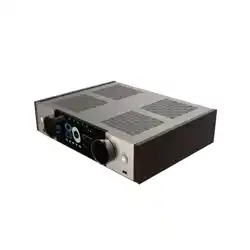
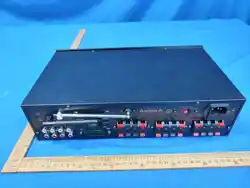
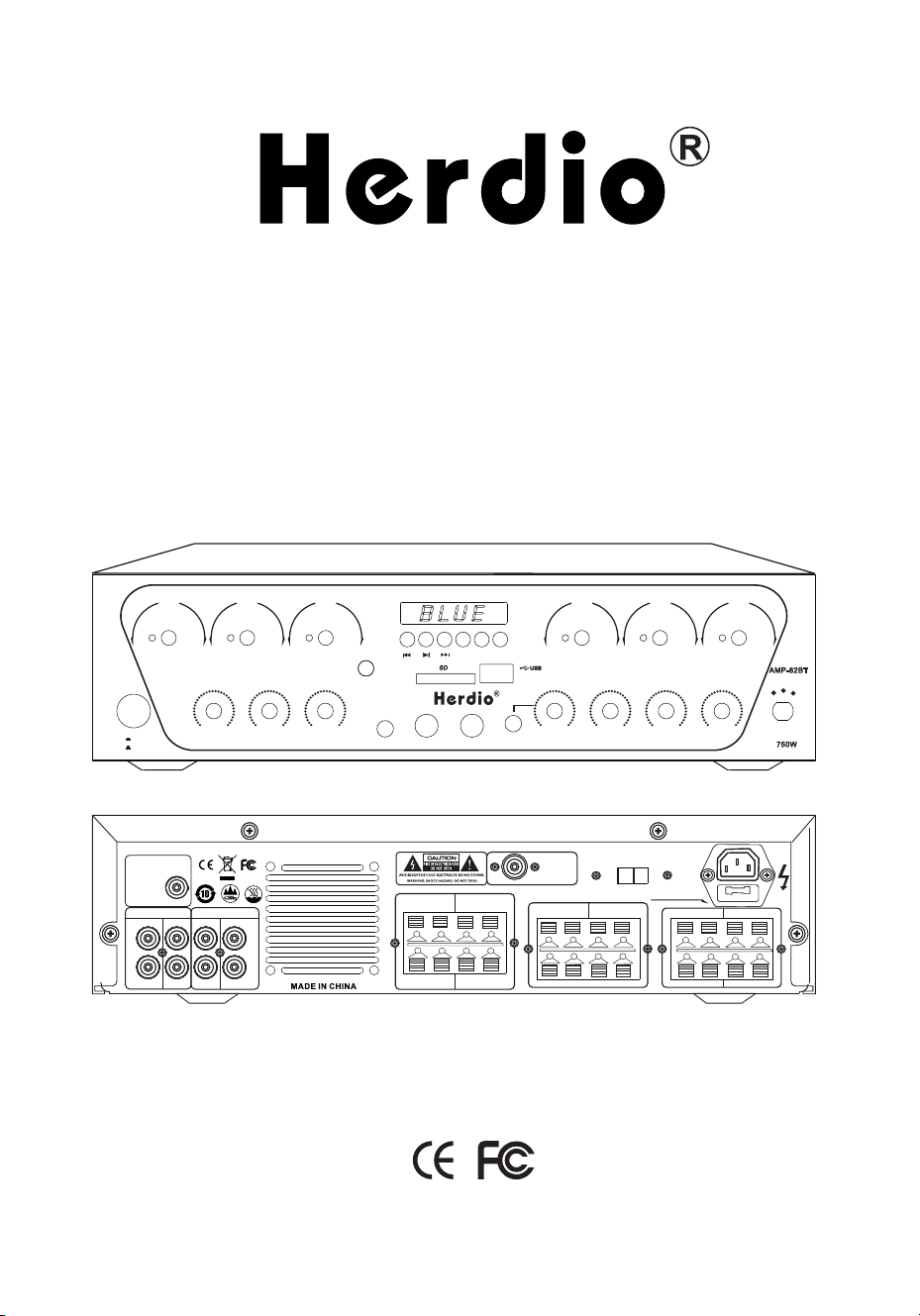
Audio Power Amplifier
- AMP-62BT -
CHANNEL A CHANNEL B CHANNEL C CHANNEL D CHANNEL E CHANNEL F
COMPACT AUDIO SOURCE AM PL IF IE R
VOL + VOL - MOD E
AUX-IN
MIC1 MIC2
SD
POWER
NO
OFF
-
+
ECHO MIC2 V OL MIC1 VO L
-
+
-
+
-
+
-
+
-
+
-
+
TREBL E
BASS MUSIC
AUX 1
AUX 2
BT/ FM
750W
AMP-62BT
USB /SD
TALK -O VER
HEADPHON E
FM AN T
SPEAK ER-F SPEAK ER-E
+
-
+
-
RCHAN NE LCHAN NE
RCHAN NE LCHAN NE
SPEAK ER-D SPEAK ER-C
+
-
+
-
RCHAN NE LCHAN NE
SPEAK ER-B SPEAK ER-A
+
-
+
-
FUSE: T 5A/25 0V
VOLTACE
AC110V-220V 50/60Hz
L
R
L
R
AUDIO I NPUT
AUX1 AUX2
OUTPU T
REC
SUBWOOFE R
BT AN T
AUX1 AUX2
REC
SUBWOOFE R
220 V
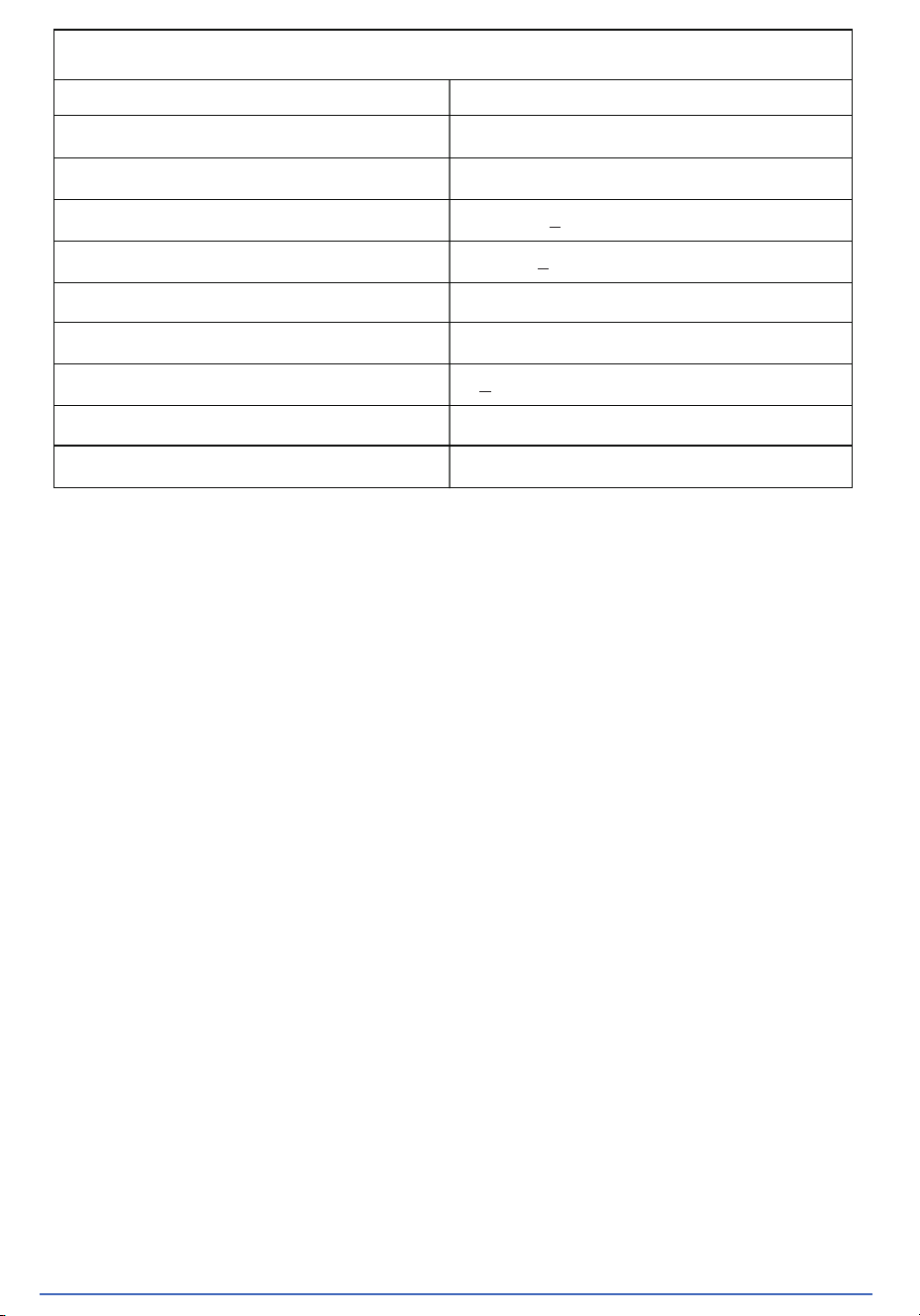
SPECIFICATIONS
8 Ohm Rated Power:
25WX6CH
40WX6CH
20HZ-20KHz
240mV + 40mV
< 0.5%
> 80dB (A weight)
+ 8dB(2dB)
5.3 version
4-16Ω
4 Ohm Rated Power:
Frequency Response Range:
Music Input Sensitivity:
Microphone Input Sensitivity:
Total Harmonic Distortion:
S/N:
Bass and Treble Control:
Speaker:
Bluetooth Version:
Changes or modifications not expressly approved by the party responsible for compliance could void the user's authority to operate
the equipment. This device complies with Part 15 of the FCC Rules. Operation is subject to the following two conditions:
(1) This device may not cause harmful interference.
(2) This device must accept any interference received, including interference that may cause undesired operation.
Note: This equipment has been tested and found to comply with the limits for a Class B digital device, pursuant to Part 15 of the FCC
Rules. These limits are designed to provide reasonable protection against harmful interference in a residential installation.This
equipment generates, uses, and can radiate radio frequency energy, and if not installed and used in accordance with the instructions,-
may cause harmful interference to radio communications. However, there is no guarantee that interference will not occur in a particular
installation. If this equipment does cause harmful interference to radio or television reception, which can be determined by turning the
equipment off and on, the user is encouraged to try to correct the interference by one or more of the following measures:
- Reorient or relocate the receiving antenna.
- Increase the separation between the equipment and receiver.
- Connect the equipment into an outlet on a circuit different from that to which the receiver is connected.
- Consult the dealer or an experienced radio/TV technician for help.
This equipment complies with FCC radiation exposure limits set forth for an uncontrolled environment. This equipment should be
installed and operated with a minimum distance of 20cm between the radiator and your body.This transmitter must not be co-located or
operating in conjunction with any other antenna or transmitter.
FCC REQUIREMENT
www.Herdiotech.com
40mV + 10mV
Before operating this device. please read this safety and operation instruction.
PACKING LIST DIAGRAM
PRECAUTIONS BEFORE USE
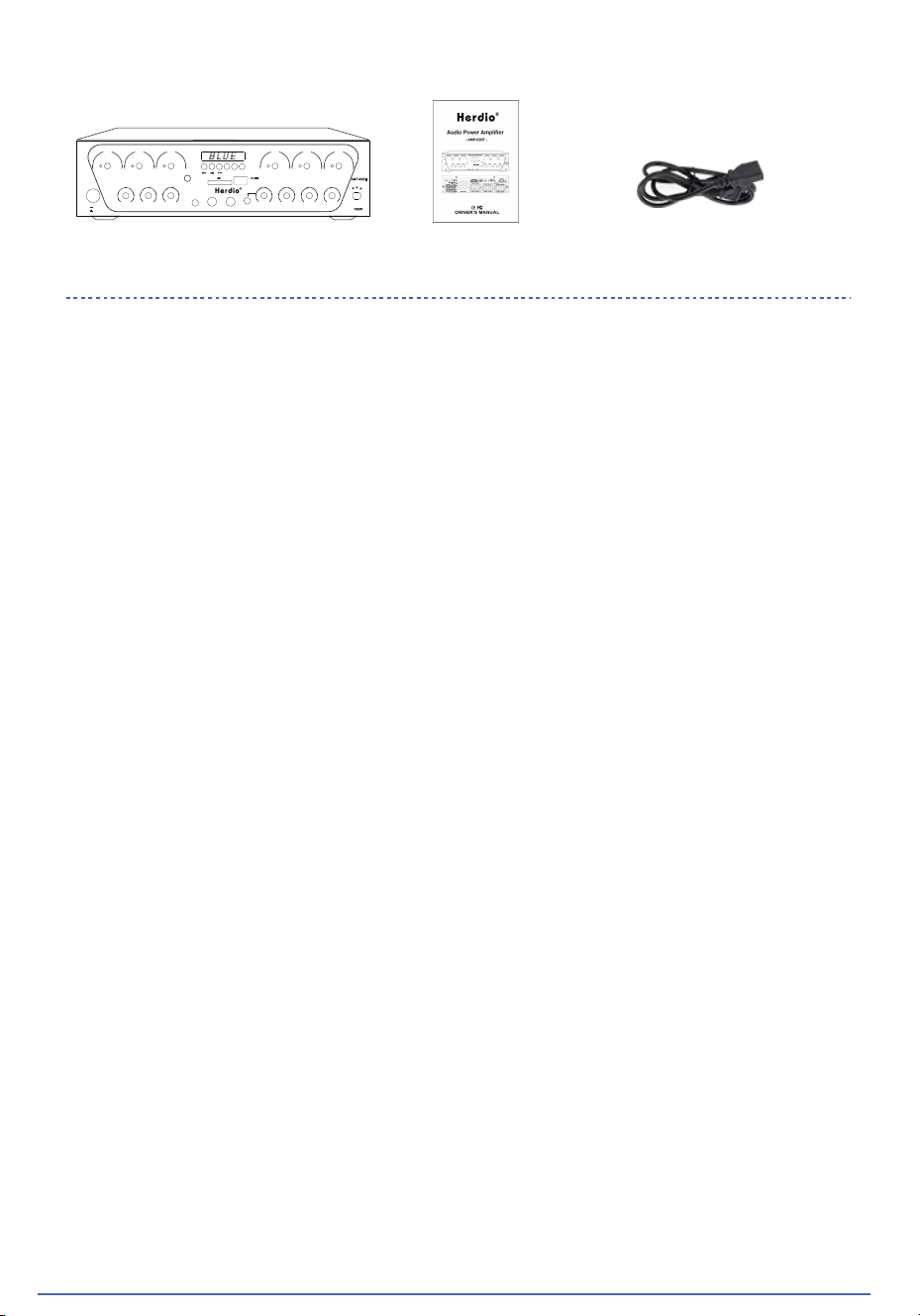
Manual * 1Audio Power Amplifier * 1 Power Cable * 1
www.Herdiotech.com
CHAN NEL A CHAN NEL B CHA NNEL C CHAN NEL D CHA NNEL E CHANN EL F
COMPA CT AUDIO S OURCE AM PLIFI ER
VOL+ VOL- M ODE
AUX-I N
MIC1 M IC2
SD
POWER
NO
OFF
-
+
ECHO MI C2 VOL MIC1 VO L
-
+
-
+
-
+
-
+
-
+
-
+
TREBL E
BASS MUSIC
AUX1
AUX2
BT/FM
750W
AMP- 62BT
USB/SD
TALK-O VER
HEADP HONE
(1) Power source: before you use this machine, please check if its voltage is
consistent with grid voltage and power frequency to make sure this machine
works under normal condition.
(2) Power cord: power cord should be routed so that they are not likely to be
walked on or priced upon or against them. paying particular attention to cord
and plug sockets. outlet and the point where they exit from the unit. don't pull
the power cord.
(3) V
entilation: the device should be situated in location with proper ventilation
don't put CD or table cloth on the device that may block the ventilation opening.
please keep the device at least 10CM away from wall .the device should not be
placed on a bed, sofa, rug, or similar surface that may also block the ventilation
opening.
(4) Water and moisture: the device should not be used near water example: near a
bathtub , washbowl, kitchen sink, laundry tub, in a wet basement, near a
swimming pooletc .the device shall not be exposed to dripping or splashing and
no objects filled with liquids ,such as vases ,shall be placed on the device.
(5) Heat: the device should be situated away from heat source such as radiators,
heat registers, stoves, or other devices including amplifiers that produce heat.
(6) Debris and liquid entry: debris and /or liquid should not be allowed to enter the
enclosure through opening. especially metal object that may cause eclectic
shock. avoid children playing with device.
(7) Disassemble: high voltage inside, only qualified personnel is allowed to handle
the device. the company is not responsible for any damage caused by improper
disassembing of modification of this device.
(8) Cleaning: don't use voltage cleanser such as alcohol, thinner, gasoline or
volatile oilclean the device, a clean and dry cloth will do.
DANGER WARNING
www.Herdiotech.com
(9) Abnormal smell in case that abnormal smell or smoke comes out from the
device, please turn off the device and disconnect it from wall outlet, and contact
local dealer or service centre for service.
(10)Non-use periods:
A:turn off the device and disconnect from wall outlet to avoid fire.
B:cover or pack the device to avoid water or debris from entering the device.
Special remind:
Please pull the power plug out from the power socket when the workers leaving
or nousing !
Features
This device is suitable for Karaoke bar, dance hall, assembly hall, broadcast,
electrical teaching or home audio project.
A. Adopts famous audio power transistor
B. Adopts professional low magnetic-leakage transformer
C. Adopts professional digital echo IC, and stereo effect microphone circuit.
D. With MP3 music player system.
!
If the machine suddenly emits smoke or other abnormal phenomena, please
quickly unplug the power plug to avoid causing a fire, and contact the local dealer
or call our company's hotline for repair.
If the interior of the machine is exposed to rain or moisture, please place the machine
in a ventilated area or dry it in sunlight. Do not plug in the power or bake the machineat
high temperatures! Otherwise, it is easy to burn orcause the components inside the
machine to deteriorate.
If foreign objects fall inside the machine, please immediately cut o the power, lift and
flip the machine or shake it a few times. If the foreign objects still do not come out,
please contact your local dealer for handling. Do not open the machine cover without
authorization to avoid the risk of electric shock.
The power cord should not be squeezed, pulled, bent, knotted, suspended with heavy
objects, or stepped on by people toprevent damage to the insulation layer of the power
cord,which may cause electric shock.
This device should be installed out of reach of children to avoid electric shock hazards.
To prevent foreign objects and liquids from falling into themachine, it is strictly
prohibited to place items(such as cosmetics, potions, insecticides, etc.)on the cover
of this machine.
Due to the heat generated during operation of this machine, flammable and explosive
materials should not be placed around the machine to prevent fire and explosion. At
the same time, a safe distance should be maintained around the machine to avoid a
ecting its heat dissipation and shortening its lifespan or burning down the machine.
This machine is not in use for a long time. Please unplug the power plug to prevent
lightning strikes from burning this machine.
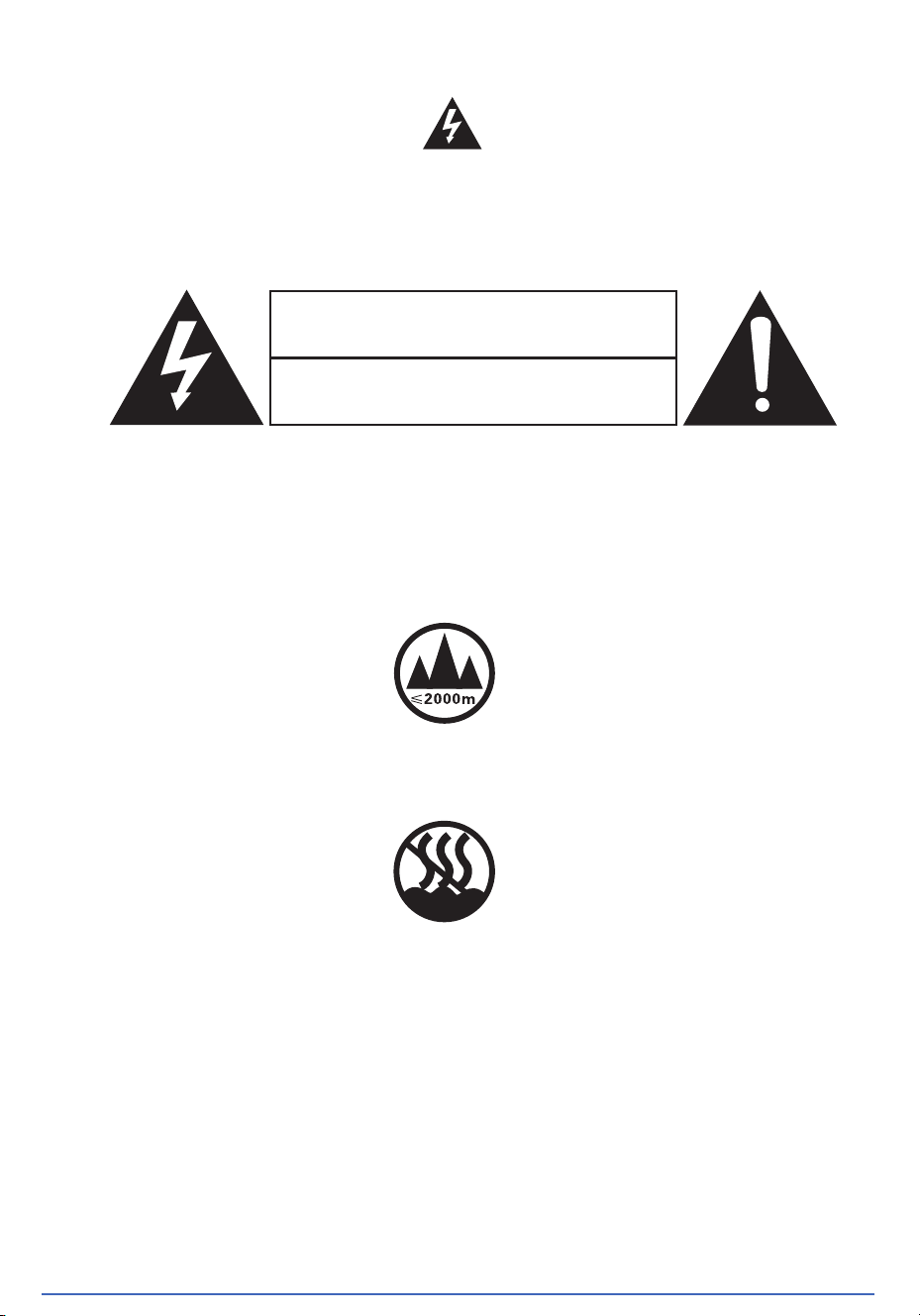
SAFETY SYMBOL PROMPT
www.Herdiotech.com
To avoid electric shock, please do not open the top cover! The components in
it cannot be repaired by the user themselves, and should be repaired by
qualified maintenance personnel.
This product is only suitable for use below an altitude of 2000 meters. There may
be safety hazards when used above an altitude of 2000 meters.
This product is only suitable for use under non tropical conditions, and there may
be safety hazards when used under tropical conditions.
danger
This flag reminds users
With "dangerous voltage”
w
warning
arning
Do not open the chassis to avoid
electric shock
AUX sound source equipment (DVD/CD playback sound source, etc.)
(You can also connect the following audio devices)
Notebook
Computer
Deskto
pcomputer
Smart TV
Mobile Phone
/Tablet
Projector Other
Power supply socket
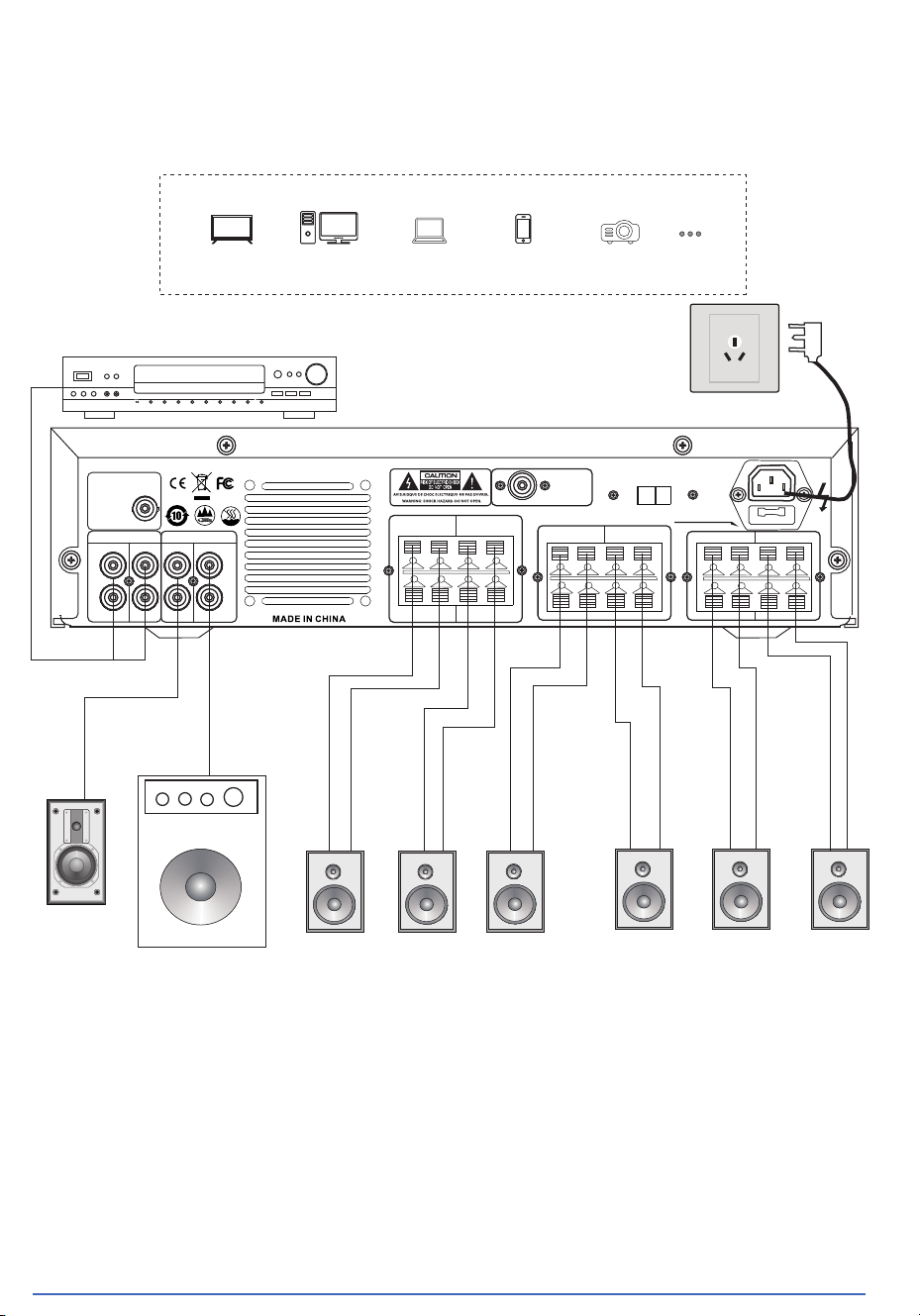
SYSTEM CONNECTION DIAGRAM
REMINDER
www.Herdiotech.com
1, The "positive" and" negative" terminals of the speaker should correspond to
thepositive" and "negative" of the speaker and cannot be reversed, otherwise it
willa ectthe ect of music and singing.
2. The speaker terminal should be tightened without any looseness, otherwise it may
cause heating or other faults due to poor contact.
FM ANT
SPEAKER -F SPEAKER -E
+
-
+
-
RCHANNE
LCHANNE
RCHANNE LCHANNE
SPEAKER -D SPEAKER -C
+
-
+
-
RCHANNE
LCHANNE
SPEAKER -B SPEAKER -A
+
-
+
-
FUSE: T5A /2 50V
VOLTACE
AC110 V-220V 50/60 Hz
L
R
L
R
AUDIO INP UT
AUX1 A UX 2
OUTPUT
REC
SUBWO OFE R
BT ANT
AUX1
AUX2
REC
SUBWO OFE R
220V
Active subwoofer
ive Speaker
SPEAKER-F SPEAKER-E SPEAKER-D SPEAKER-C SPEAKER-B SPEAKER-A
+
-
-
+
+
-
+
-
+
-
-
+
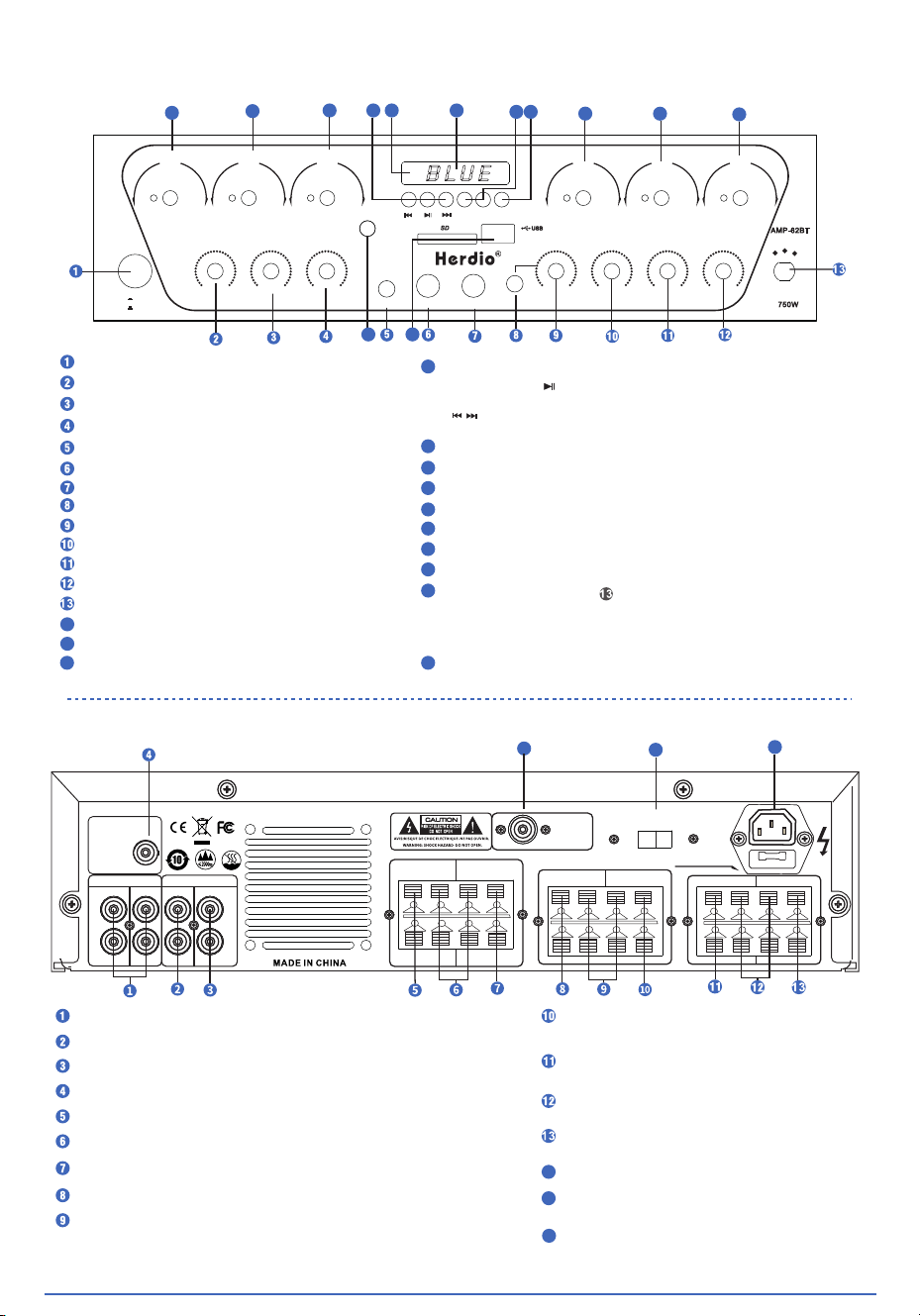
INTROUCTION TO PANEL FUNCTIONS
INTROUCTION TO REAR PANEL FUNCTIONS
www.Herdiotech.com
Power switch
Audio input left and right AV terminals
14
15
14
15
CHANNEL A CHANNEL B CHANNEL C CHANNEL D CHANNEL E CHANNEL F
COMPACT AUDIO SOURCE AM PL IF IE R
VOL + VOL - MOD E
AUX-IN
MIC1 MIC2
SD
POWER
NO
OFF
-
+
ECHO MIC2 V OL MIC1 VO L
-
+
-
+
-
+
-
+
-
+
-
+
TREBL E
BASS MUSIC
AUX 1
AUX 2
BT/ FM
750W
AMP-62BT
USB /SD
TALK -O VER
HEADPHON E
14
15
16
17 18 19
20 21
22
23
24
25
26
FM ANT
SPEAKER -F SPEAKER -E
+
-
+
-
RCHANNE LCHANNE
RCHANNE LCHANNE
SPEAKER -D SPEAKER -C
+
-
+
-
RCHANNE LCHANNE
SPEAKER -B SPEAKER -A
+
-
+
-
FUSE: T5A /2 50V
VOLTACE
AC110 V-220V 50/60 Hz
L
R
L
R
AUDIO INP UT
AUX1 A UX 2
OUTPUT
REC
SUBWO OFER
BT ANT
AUX1 A UX 2
REC
SUBWO OFER
220V
16
Reverb volume adjustment knob
Microphone 2 volume adjustment
Microphone 1 volume adjustment
Microphone priority switch
Microphone 1 input port
Microphone 2 input port
Headphone jack
Headphone volume adjustment
Music volume and treble adjustment
Bass volume adjustment
Music volume adjustment
Audio input selection
14
Main channel A volume adjustment
15
Main channel B volume adjustment
16
Main channel C volume adjustment
17
Mp3 and Bluetooth playback mode selection button
18
Remote control receiving window
USB playback display and function display window
19
20
USB/SD/FM/AUX, Bluetooth, volume buttons
21
USB/SD/FM/AUX/ Bluetooth,selection buttons
22
Main channel D volume adjustment
23
Main channel E volume adjustment
24
Main channel F volume adjustment
25
First, pull through " " to BT/FM/USB/SD,
Press the MODE button when the display shows AUX,
Plug the dedicated plug with audio source into the
AUX-IN port at this time.
26
USB and SD card input ports
Audio output left and right AV terminals
Bass output port
Bluetooth antenna
Main channel "F" horn positive output terminal clip
Main channel "E/F" speaker negative output terminal clip
Main channel "E" horn positive output terminal clip
Main channel "D" horn positive output terminal clip
Main channel "C/D" speaker negative output terminal clip
Main channel "C" horn positive output
terminal clip
Main channel "B" horn positive output
terminal clip
Main channel "A/B" speaker negative
output terminal clip
Main channel "A
" horn positive output
terminal clip
FM antenna
110V/220V input AC power conversion
switch
16
50Hz/60Hz AC power input terminal
In FM mode
Press and hold the pause/play button
“ ”
to automatically search for FM radio stations.
“ ”
Previous song and next song are the channel
up and down keys.
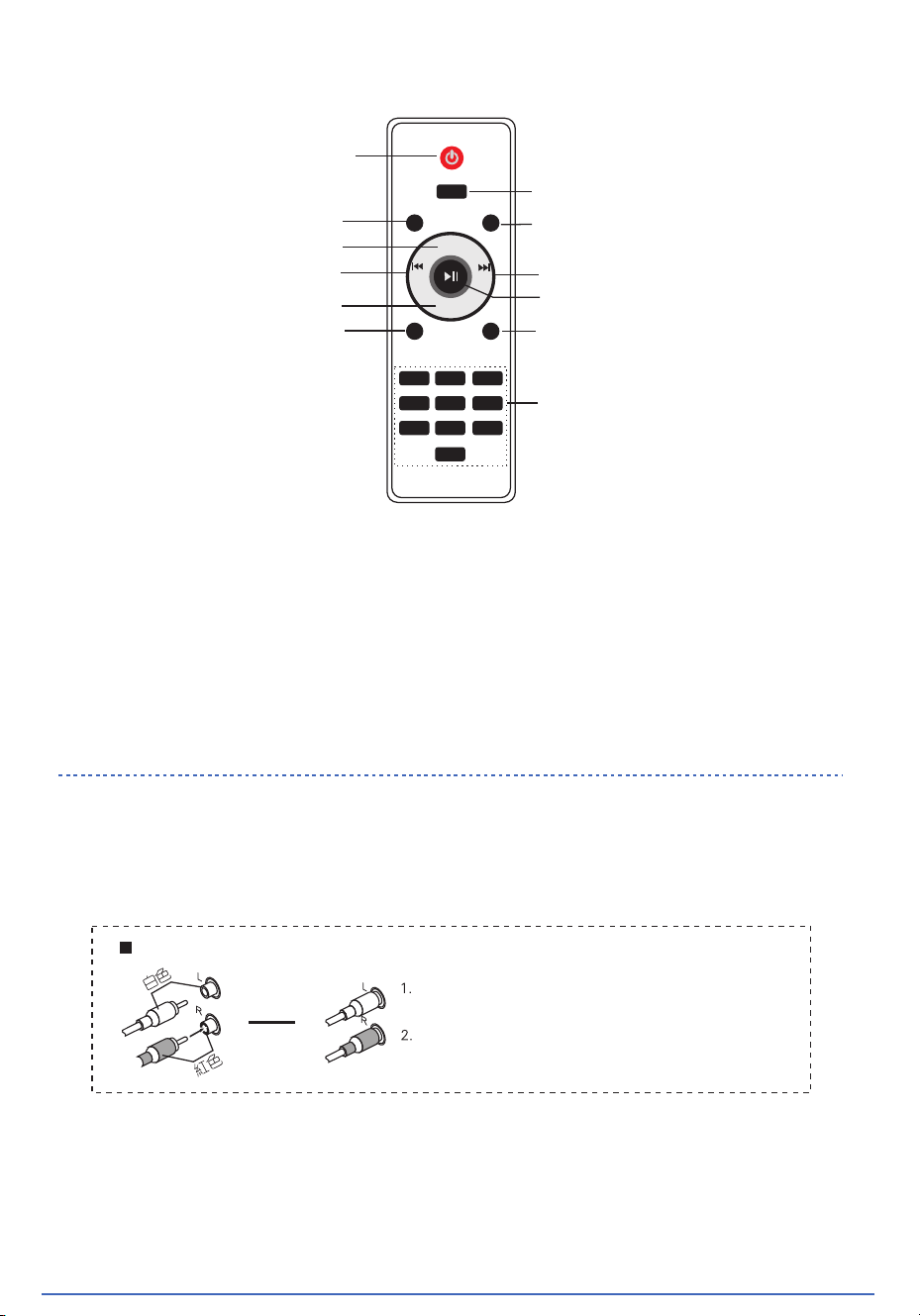
INTROUCTION TO REMOTE CONTROL FUNCTIONS
CONNECTION BETWENN SPEAKER CABLIE
AND SIGNAL CABLE
www.Herdiotech.com
Matters needing attention:
1:Under normal circumstances, the remote control should be located on the front panel remote control receiving
windowApproximately 6 meters in front and used within a 30 meter range.
2:When operating the remote control, align it with the front panel of the amplifierRemote control reception window.
3:There should be no obstacles between the remote control and the amplifier.
4:If the remote control is in a position that directly receives strong light irradiation,The remote control may fail. In th
case, please replace the amplifierMove th
e machine away to avoid direct exposure.
5:Avoid mixing old and new batteries and regularly check the remote controlIs the battery leaking liquid.
6:This remote control can only be equipped with 2 AAA No. 7 batteries. Please pay attention to the battery lifeThe
polarity of the pool should be consistent with the polarity marked on the remote control.
Music input signal AV socket wiring diagram
When connecting the audio input and output sockets,
please use RCA type plugs and do not use other types
of plugs.
When wiring, plug white to the left (L) and red to the right (R).
Power switch/standby button
Mute function key
Sound field mode function key
Main volume plus function key
Stop key
Previous function key
Main volume down function key
Number selection song key
Sound input selection function key
Play/pause function key
Next function key
MODE
STO P MUT E
VOL+
VOL-
CH- CH+
RPT EQ
1 2 3
4 5 6
7 8 9
0
Single or repeat all button

BLUETOOTH CONNECTION INSTRUCTIONS
MAINTENANCE TIPS
www.Herdiotech.com
All Herdio speaker products have 1 year Limited Warranty against defects in materials and workmanship.
Proof of purchase must accompany all claims. During the warranty period Herdio will replace any defective
part and correct any defect in workmanship without charge for either parts or labor. The Technical Support
Center at HERDIO is Available from Monday to Friday, Excluding Holidays. If you have any questions feel
free to send your messages to our below mailbox: [email protected]
WARRANTY
(1) Switch this unit to teeth first, The display is displayed as “BLUE”,
Indicates the input as a Bluetooth state .
(2)
The local display screen shows "BLUE" as Bluetooth on, otherwise
(3)
it is
Then turn on the Bluetooth function on the phone, scan and search
for devices. When “BLUETOOTH “ Bluetooth name appears on the phone,
click on connect and pair, click confirm, it indicates successful
pairing. At the same time, the speaker will emit a beep, and the music
on the phone can be played through the local device.
work environment
When the machine is working, ensure a good ventilation environment, and the top surfac
of the machine should be more than 15 centimeters away from obstacles, and more than 5
centimeters to the left and right.
The machine should be placed away from strong magnets and vibrations to prevent
contamination of the sound source.
clean
When cleaning, remember to turn o the power supply and unplug the power plug. Do not u
cleaning liquid or spray. Only use a wet rag to clean.
repair
If there is a malfunction, significant changes in performance, or human damage to the
components of this machine, please turno th e power first, unplug the power plug, and
contact our local repair service center or dealer. Do not open the machine cover for repai
on your own.