Operation manual of Magic Lantern APP
Afte, the softw, 「e Is Installed and downloaded successfully,cllck apk to lnstall.Afte, the
installation is complete,the following style of p,og,am icon will appea『 on the desktop
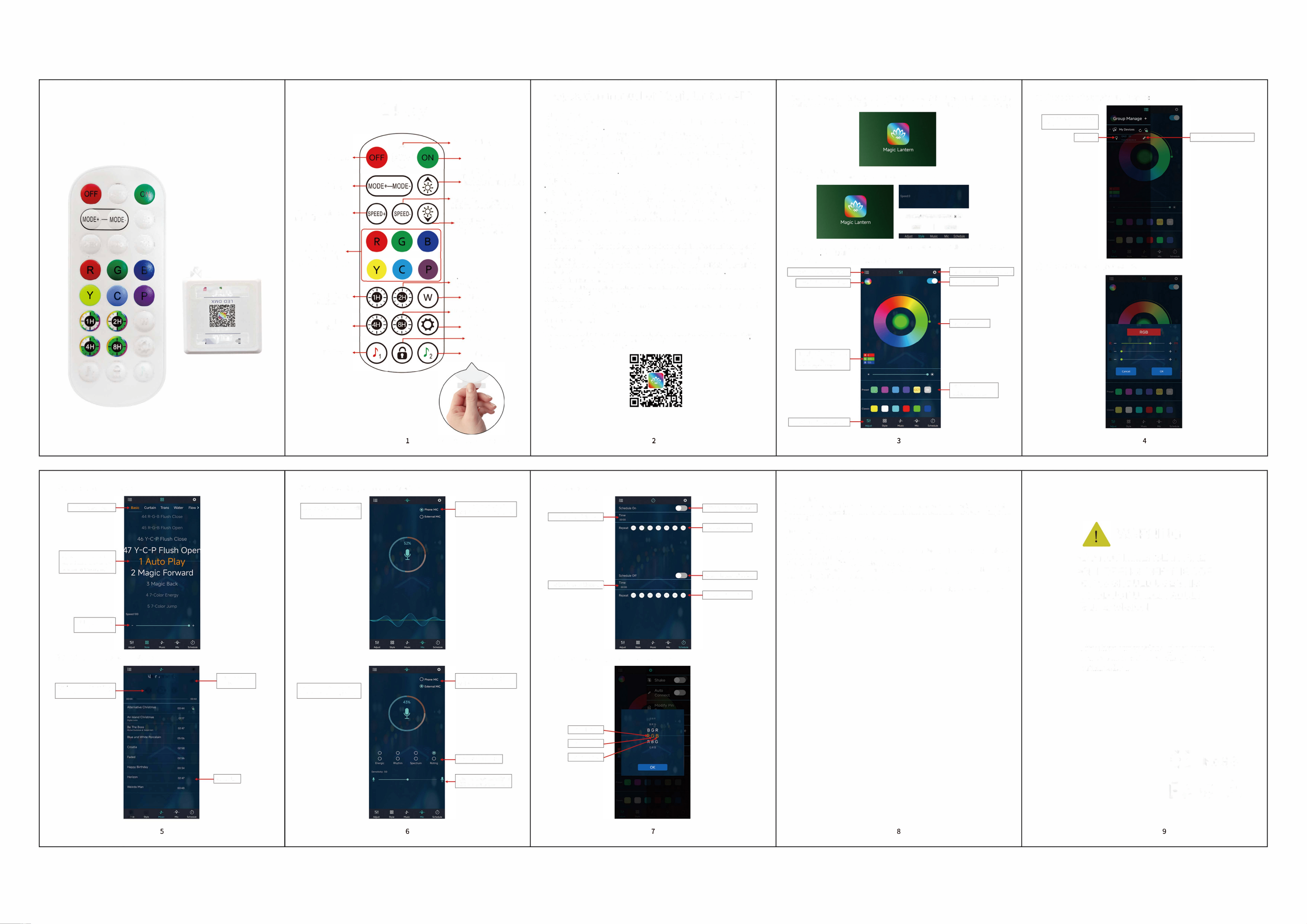
Remote Control
Instruction Manual
8
令
88®
Y
0
@
@@@
.
尸:,�想
'
配
,
哑
CCD C.M>
恤,三品血·•
Off light
Pattern+
pattern-
Speed+
Turn to the limit and
flash white light prompt
Static single color
shortcut button
Press to display
the corresponding color
r;med 1 hours
off 1;ghts
r;med 4 hou『S
off l;ghts
Rhythm 1
24Key
8
Automatic loop
ON light
Bdghtness+
Tum to the llmlt and
flash white light pmmpt
Speed-
Tum to the llmlt and
什ash white light pmmpt
B,lghtness-
Tum to the Tlmlt and
flash white light pmmpt
Timed 2 hours
off l;ghts
wh;te
r;med 8 hours
off l;ghts
Set up
Lock the remote
1
Rhythm 2
Pull out the insulator to use
1.1 Oveiew
The Magic Lantern is a mobile app that controls the LED lamp belt through apple or
Android mobile phone
Through the mobile app,you can easily and quickly control the color.brightness and
color temperature of the LED light belt.You can also set various flashing modes, and
make the LED light belt move with the music rhythmJust keep the LED light band
powered on, turn on the mobile phone Magic Lotus lamp app intelligent control
software.connect one or more LED light band controllers through Bluetooth, so as
to realize various settings and control of multiple LED light bands. Operation is very
simple.easy to learn and use
1.2 Features
Adjust color LED strips with 60,000 colors to change color and brightness and ad丿ust
monochrome LED stips to change brightness and color temperature
, Play mobile music or turn on a sound playback deviceyou can let the light change th,
color and brightness with the rhythm of music.the music rhythm beautiful
Inside multiple setting mode for color change and control LED strips without mobile
Long distance control with omni-directional antenna,and many-to-many group
control mode
Quick and easy automatic connection
1.3 Performance
Magic Lantern APP has good ease of use and compatibility.The actual testing and
verification of hundreds of mobile phones is compatible with the current market
Most smartphones.APPis small and convenientit consumes less system resources,
so the requirements of the mobile configuration are low.Control delay is small,the
operation feel good.light control is smooth with people's visual sense
2.0perating Environm�nt
This APP program requ,res phones of system above Andriod 4.3 and iOS 8.0 Mob仆e
phone configuration is not hmited
3. Jnstuctions
Note And「oid version and iOS version download and use the same method, here in
the Android version as an example.
3.
1 APP Download
, Scan the QR code
iOS and Android systems can download the"Magic Lantern"APP by scanning the
QR code.Open the browser or other tools with"Scan QRcode"function scan the'
Magic Lantern" QR code as below
3.2 App Operation
(1) Click on the Magic lantern APP icon.enter the APP page:
Chck to show the lamp l"t
Sw,tc,1"e colo, wh氏l
Display theRGB .. lce
Click ,o maooal
adicstmeot., 切
Cll<k to ,hlh the lotea<e
一一一·御臧血"" "
`肥髯.
"'�
(2)A仕er entering the APP interface, if Bluetooth is not enabled,"Allow Magic Lante
to Bluetooth'" Click[Allow)
(3) Switch to color and brightness intertace
(
4) Click to show the lamp list,view lamp list
Bl,etooth'"'o rnaaect
altec�acch focde,ic5
lamp llst Starns of d�ice moo红tioo
CIiek 10 display selllog• 如
Lamp ,�l<h b,1100
Adj,st the colo,
Cl,cksq"a代 ,co ,to
adj"st thernlM
(5)
Click to RGB manual adjustment view:
2
3
4
(6)Sw;tch to the mode ;nterface
(8) sw;tch to the m;crophone rhythm ;nterlace
(9) sw;tch to the t;m;ng ;nterfacec
Pattemda,,;r,c,t,oo
Slid,
"P acd dowc to
adj,st the mode aode,
thernrr,ct cat勾O
S1,de adj,stmeot
s
(7)
sw;tch to the musk rhythm ;nterface
Mosl, 巾ythm th,oogh c,11
phooe mlaophooe
Switch phooe m叮ophooe
aod e,temal m盯ophooe
Set th,1;m,ofLight-Oa
Set the 1;m, of Ught�Off:
(10) sw;tch to the mod;fy p;n sequence ;nte什ace:
。
飞,·aci,e(
已
Pce,,o,s 沁og,Paose/Play
,
Ne.t soog
.
8 0 0
Sw,tch playback
me
Set Red llght
SetG,.,, light
父tdiff可'"'巾ythm
Sot
Bl,o hght
Mos;,ust
M"'i<巾ythm th,o,gh the
mic,ophooe o八 the p,od,<t
Swlt<h phooe m叮ophooe
aod•�•mal ml<tophooe
Chaoge the 父osltl"ty of
MIC to m,t<h the ,o""d
nm;og L;ght- bcttoo
Set the llghtlag cyde
r.m;og ught-off b,noo
Set thehght-off cycle
Our Mission
We are devoted to offer customers better user e,periences with smart and connected
technology. We trust the power of users, work hand in hand with our users to improve
the quality of life
Customer Service
30-day money-back gua「antee for any reason
For 30 days after the date of purchase, return your undamaged product and receive a
full
refund for ANY reason
12-month war「anty fmquality-『elated issues
For 12 months after the date of purchase.We take care of all quality-related issues with
a REPLACEMENT OR FULL REFUND
Please contact us in time if you have any questions. And you will receive a response
within
24 hours.
We will gladly assist you!
FCC Warning
This device complies with part 15 of the FCC Rules. Operation is subject to the
following two conditions:
(1)This device may not cause harmful interference, and
(2)this device must accept any interference received, including interference that may
cause undesired operation.
Any Changes or modifications not expressly approved by the party responsible for
compliance could void the user's authority to operate the equipment.
Note: This equipment has been tested and found to comply with the limits for a Class B
digital device, pursuant to part 15 of the FCC Rules. These limits are designed to
provide reasonable protection against harmful interference in a residential installation.
This equipment generates uses and can radiate radio frequency energy and, if not
installed and used in accordance with the instructions, may cause harmful interference
to radio communications.
H
owever, there is no guarantee that interference will not
occur in a particular installation. If this equipment does cause harmful interference to
radio or television reception, which can be determined by turning the equipment off
and on, the user is encouraged to try to correct the interference by one or more of the
following measures:
-Reorient or relocate the receiving antenna.
-Increase the separation between the equipment and receiver.
-Connect the equipment into an outlet on a circuit different from that to which the
receiver is connected.
-Consult the dealer or an experienced radio/T
V
technician for help
*
RF warning for Mobile device:
This equipment complies with FCC radiation exposure limits set forth for an
uncontrolled environment. This equipment should be installed and operated with
minimum distance 20cm between the radiator
&
your body.
WARNING
•DO NOT IMMERSE IN FIRE
•CHILDRENUNDER THE AGE
OF 16 SHOULD USE THIS
PRODUCT UNDER ADULT
SUPERVISION
"'
.
9
心
-
If you have any questions, please contact
our customerserv,ce, we will reply you
within 24 hours
CE
RoHS
氏 0 互
5
6
7
8
9

