52k077SMTY
Email:[email protected]
Email:[email protected]
www.sofucorfan.com
Please scan the below QR code to get
the video for easy installation.
KBS-52K077
H
Installation
Video
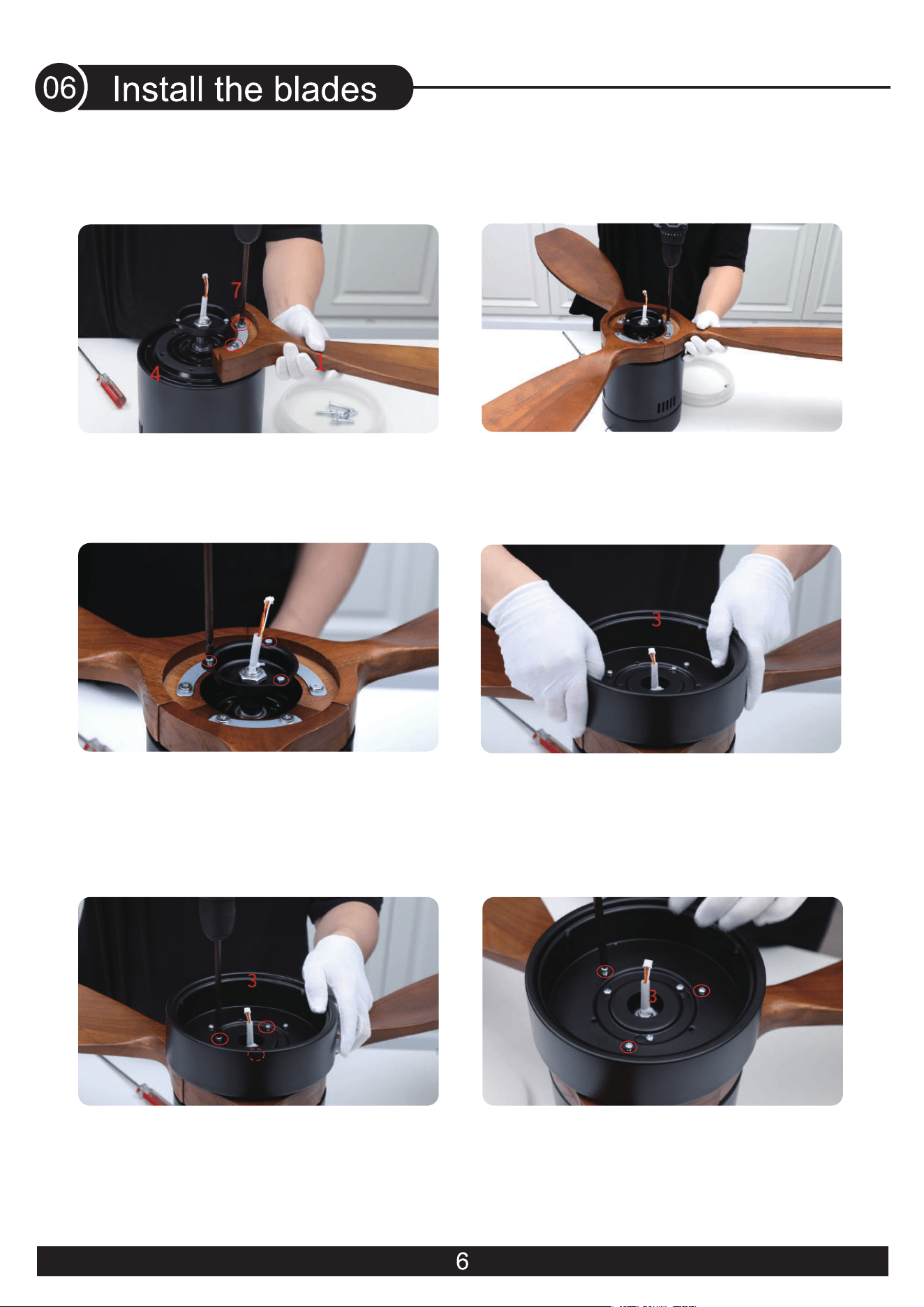
4. Put on the lamp panel and feed the wire
plugs through the center hole
6. Loosen and remove the 3 brass light kit
screws pre-locked on the lamp panel
(They will be needed later)
5. Tighten the 3 silver lamp panel screws
3. Loosen and remove the 3 silver screws
pre-locked on the motor
(They will be needed later)
1. Place the blade gasket onto the blade,
align it with the screw hole, and tighten
the screw
2. Repeat install the remaining blades,
and tighten all the blade screws
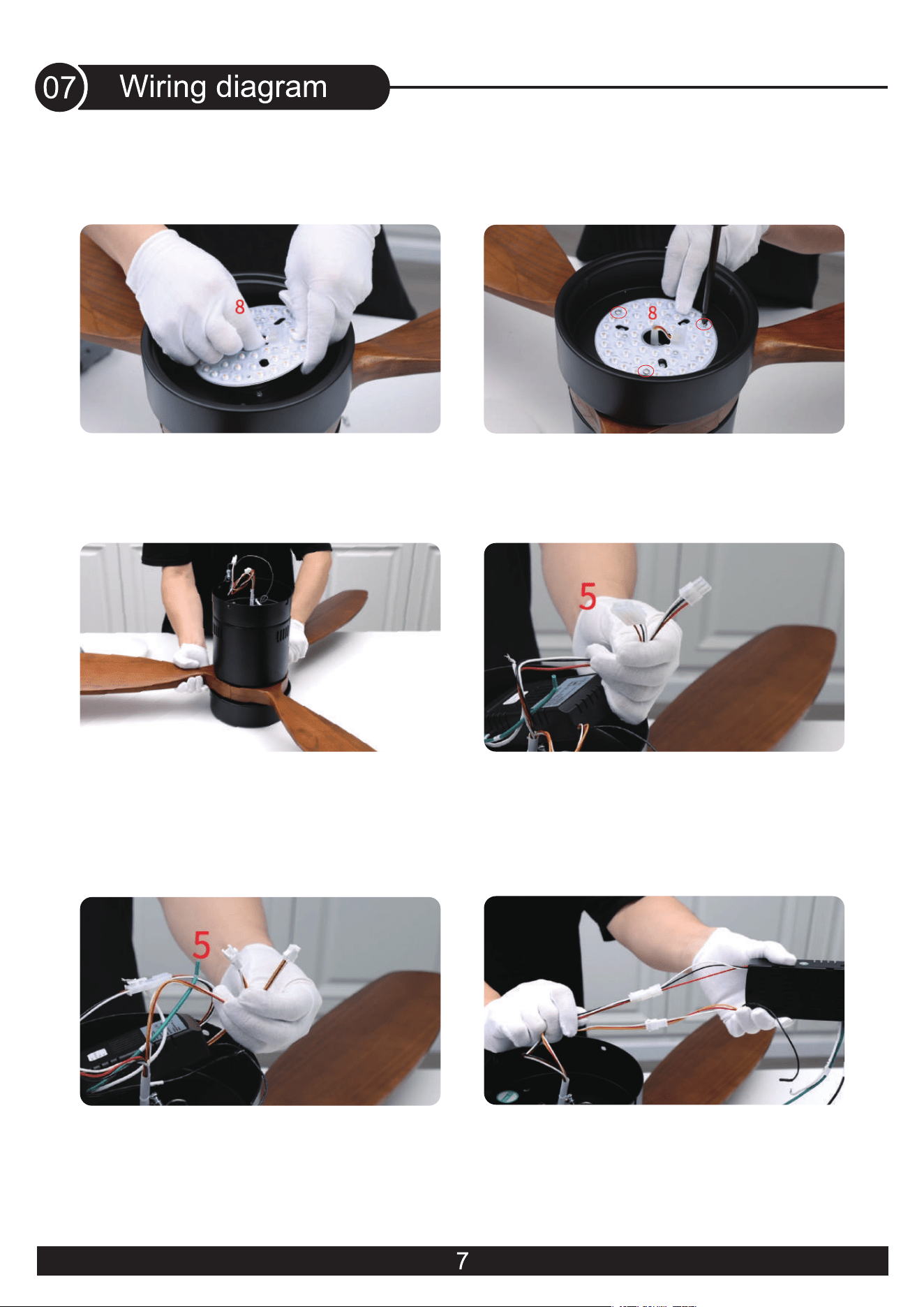
11. Connect the wire from the ceiling fan
to the receiver(Red,Yellow and White wires)
12. All wires are connected
8. Align the screw holes and tighten the
3 brass light kit screws
9.
Turn the fan over
7. Connect the light source with the wires
from the motor
10. Connect the wire from the ceiling fan
to the receiver(Red,White and Black wires)
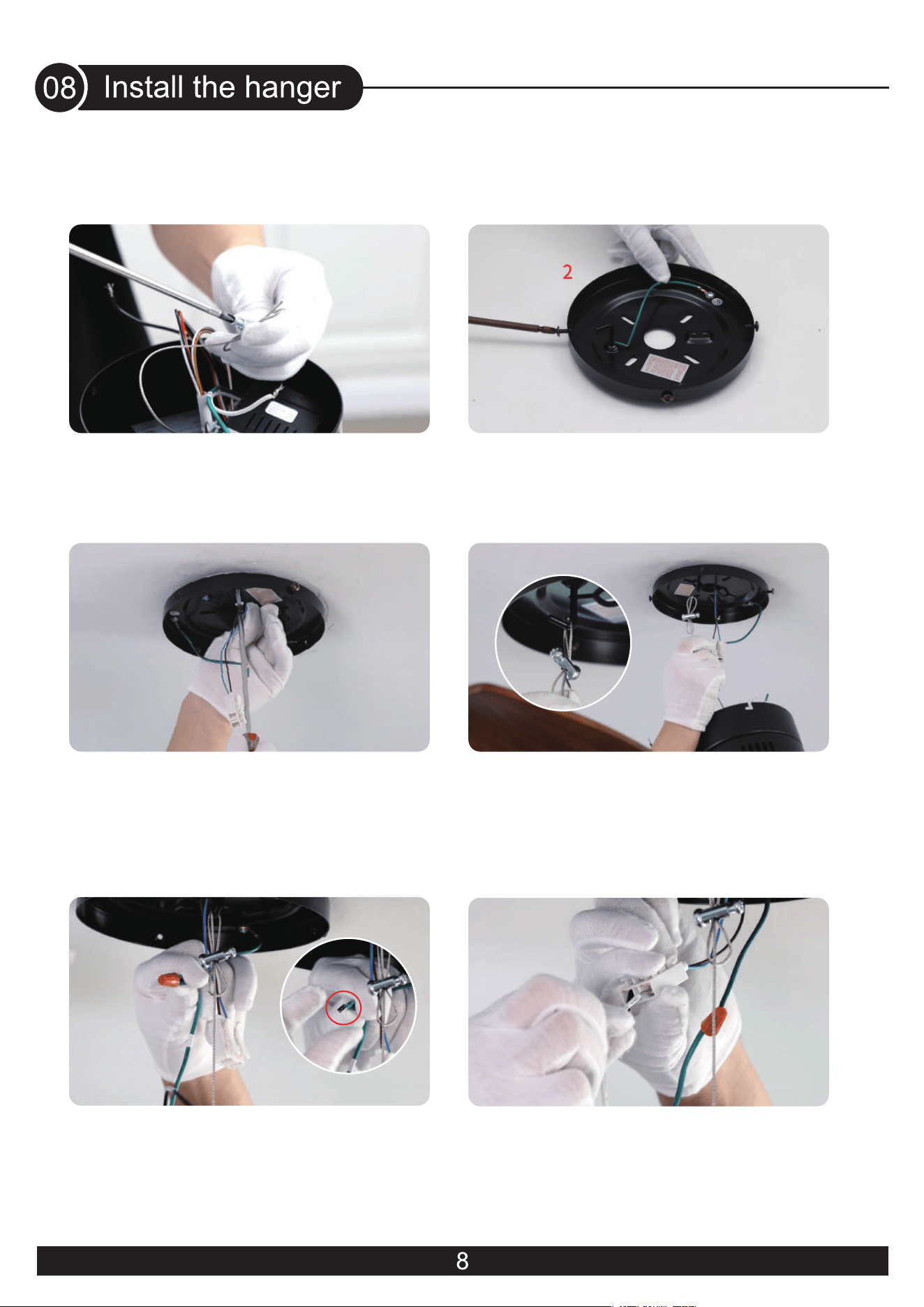
13. Tighten the screw
14. Loosen and remove the 4 screws on
the mounting bracket
(Do not remove them all)
16. Hook the wire into the hook of the
mounting bracket.Tighten the rope
18.
Connect the fan live wire (black) to
your house live wire; Connect the fan neutral
wire (white) to your house neutral wire
17. Use wire connecting nuts to connect
the ground wires(Green)
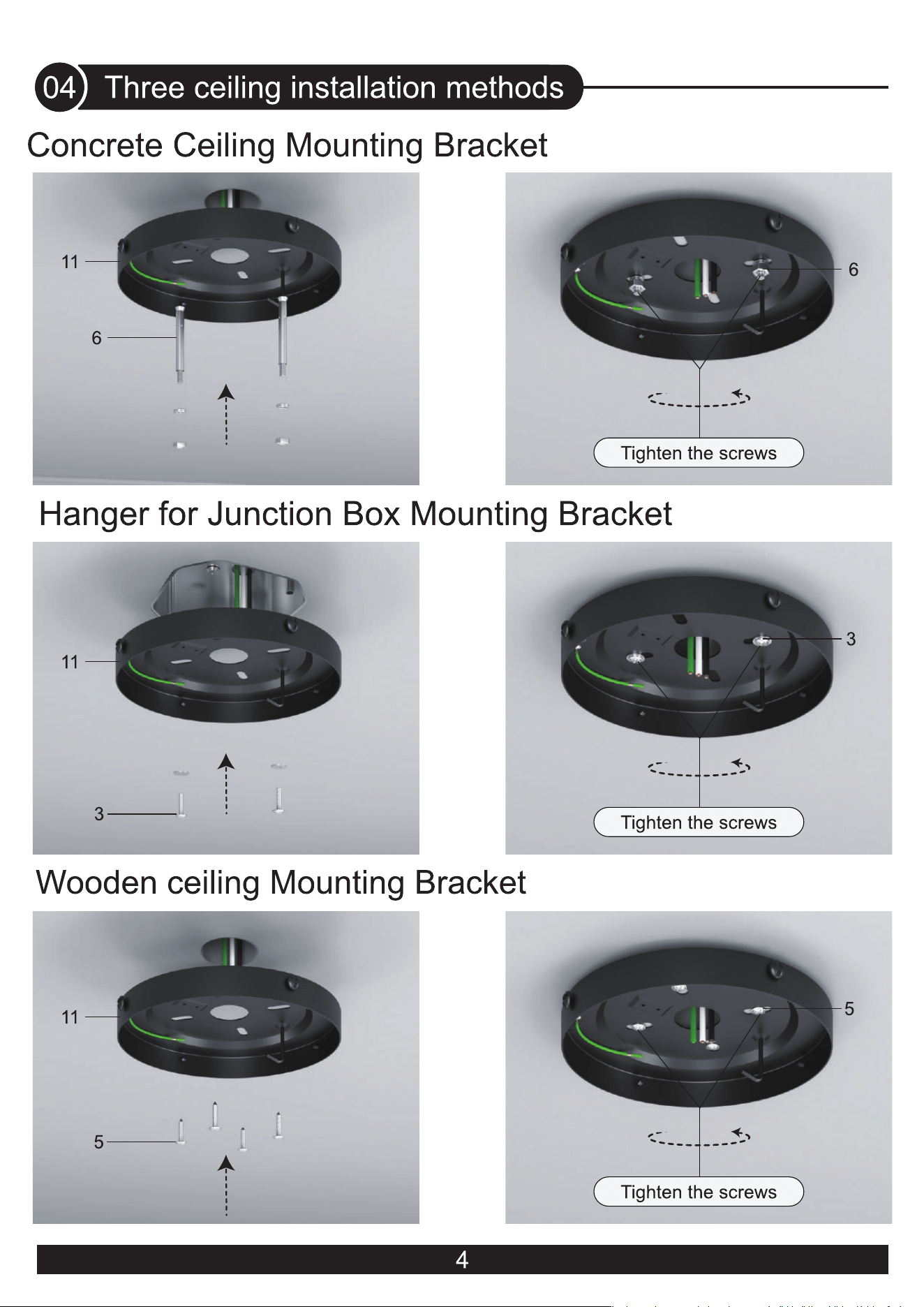
15. Place the mounting bracket on the
wood ceiling and tighten the screws
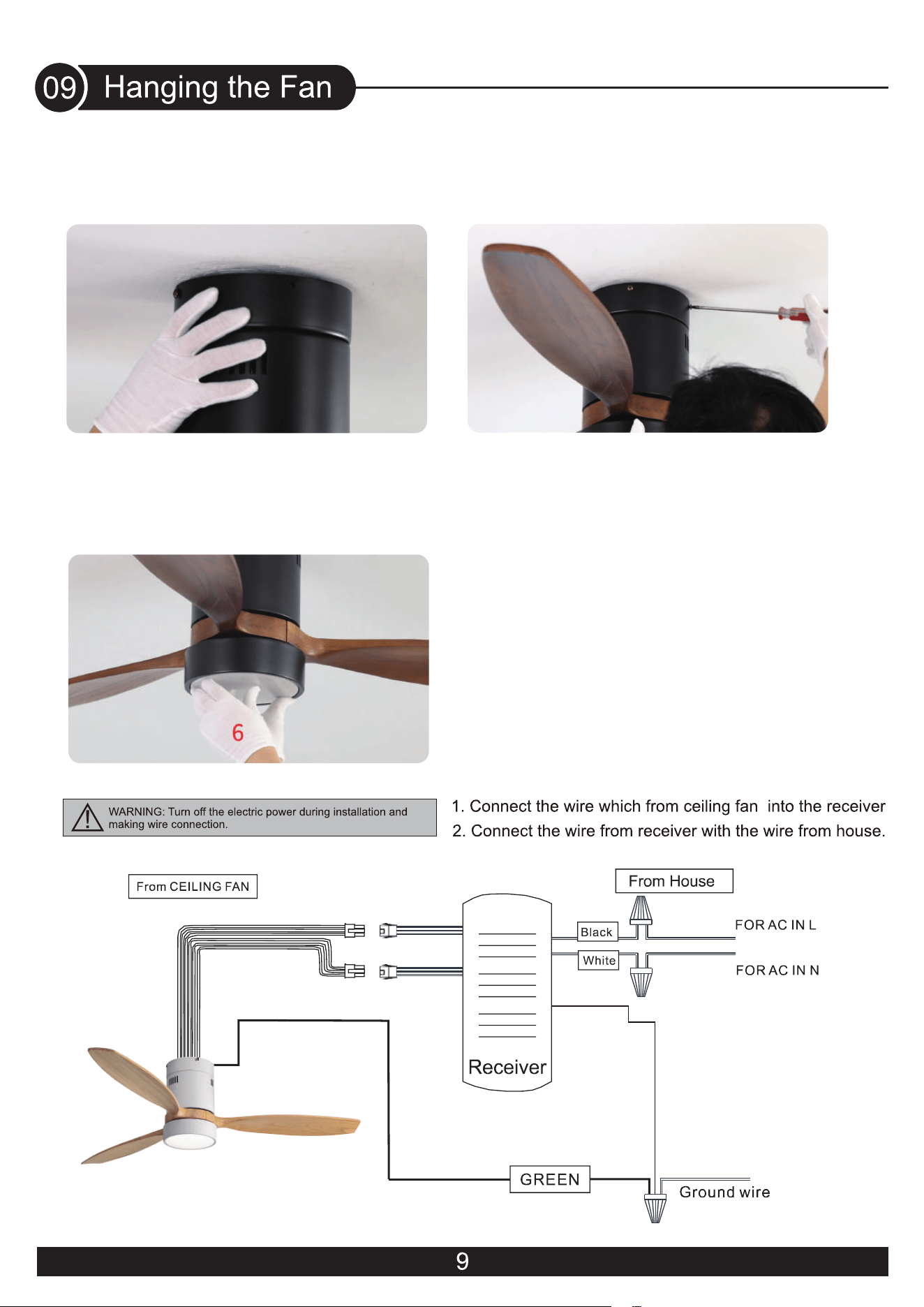
20. Tighten the screws
21. Install the lamp shade and rotate it to lock
19. Attach housing onto mounting bracket,
aligning the keyhole slots on the housing
with the screws on mounting bracket and
twist clockwise till tight.
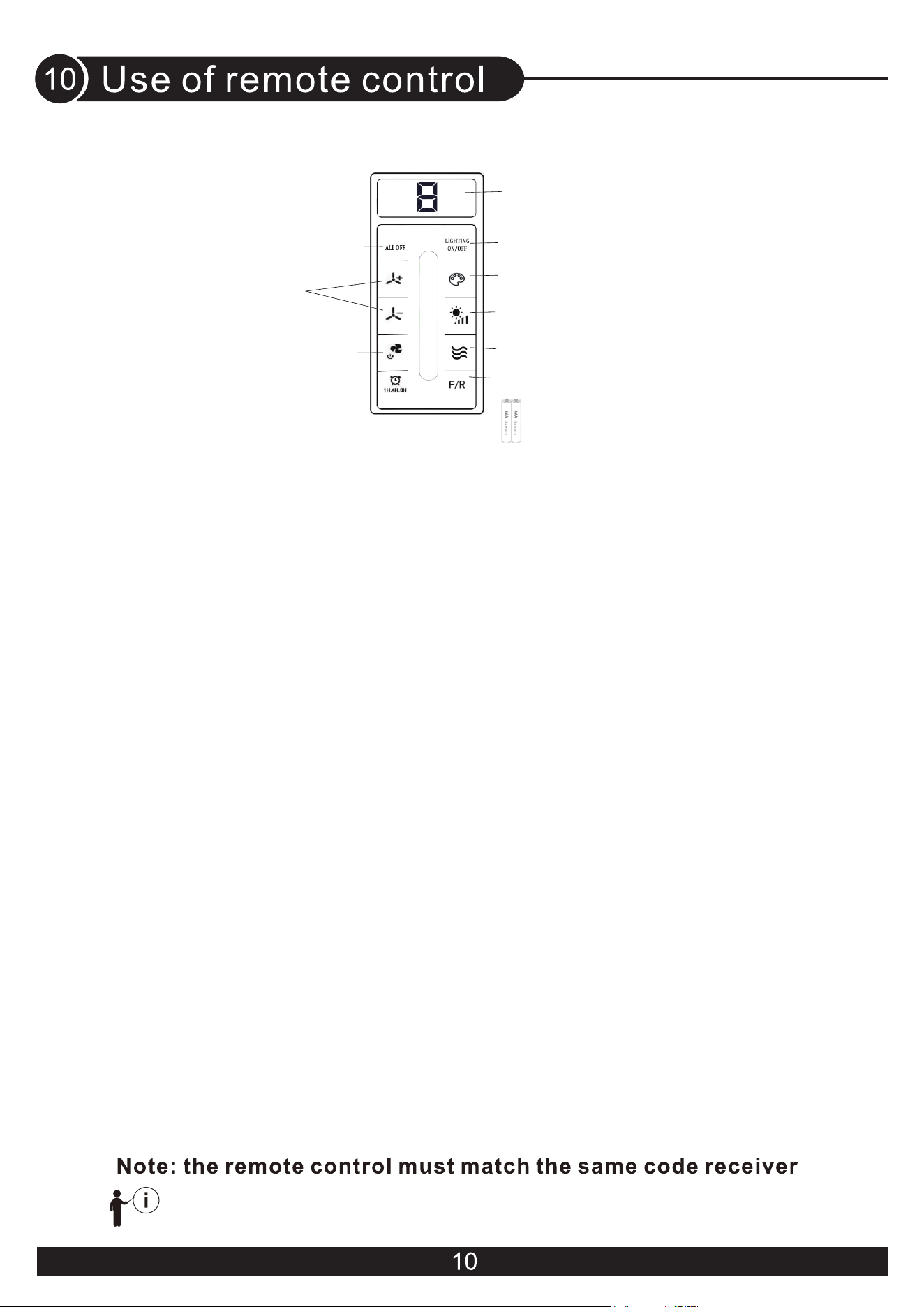
USER MANUAL FOR REMOTE CONTROL TRANSMITTER
!
(1) Turn OFF the Fan and Light
-Press the key to trun OFF the Fan and Light together.
-Tuya Wi-Fi pairing: Press and hold the key for 4 seconds, you can hear three long beep
sounds, then you can do Tuya Wi-Fi pairing. Please refer to the product manual for the
distribution method.
(2) Fan speed
-Press the key 1-6 to start the fan.
-When the fan in natural wind mode, press the key to cancel natural wind mode.
(3) Fan OFF / Remote control pairing
- Turn OFF the fan.
- Remote control pairing : when AC power on, press and hold the key for 3-5 seconds,
buzzer wrings three times(if buzzer sound enable), then �inish the remote control pairing.
Notice:
The remote controller only needs to be paired once. After the paired product, the controller
will have memory. The products have been paired before leaving the factory. When the
remote control is damaged or lost, it is necessary to implement remote control pairing
before using a new remote control.
(4) Timing control of the Fan and Light
- Press the key to set up the timer at 1hour ,4 hours or 8 hours to set up fan and
lamp timer. At the end of the timing, the fan and lamp will be automatically turned off.
- When the timing function is in effect, you can operate all the functions of the ceiling fan,
and then press any timing button to recalculate the timing time.
- Timer setting cancellation : When timing function is working, press key(1) or (3)to cancel
the timing function.
(5) Turn ON/OFF the Light
(6)Color temperature Switch of the light
Press the key to change LED light color : white-yellow-warm (circulate).
(7) Light dimming
When the light is on, press and hold the key, the light gradually brightened - gradually
dimmed(circulate).
(8) Natural wind
Press the key, the fan speed automatic change between 1 to 6 speed.
(9) Direction of the fan
Press the key to change direction of the fan.
(10) AAA battery * 2
- Please install 2 pieces of AAA batteries before use.
- Please remove the battery when it is not used for a long time.
(11) Fan speed and Timing time indicator
The indicator light will light up when press any key of the remote control.
(1) Turn OFF the Fan and Light
Tuya Wi-Fi pairing
(6) Color temperature switch of the light
(4) Timing control of the Fan & Light
(11) Fan speed / Timing time indicator
(3) Fan OFF /
Remote control pairing
(5) Turn ON/OFF the light
(7) Light dimming
(2) Fan speed
(8) Natural wind
(9) Direction of the fan
(10) AAA battery *2
When the reversible button is pressed, the fan slowly slows
down to a stop and then begins to reverse.
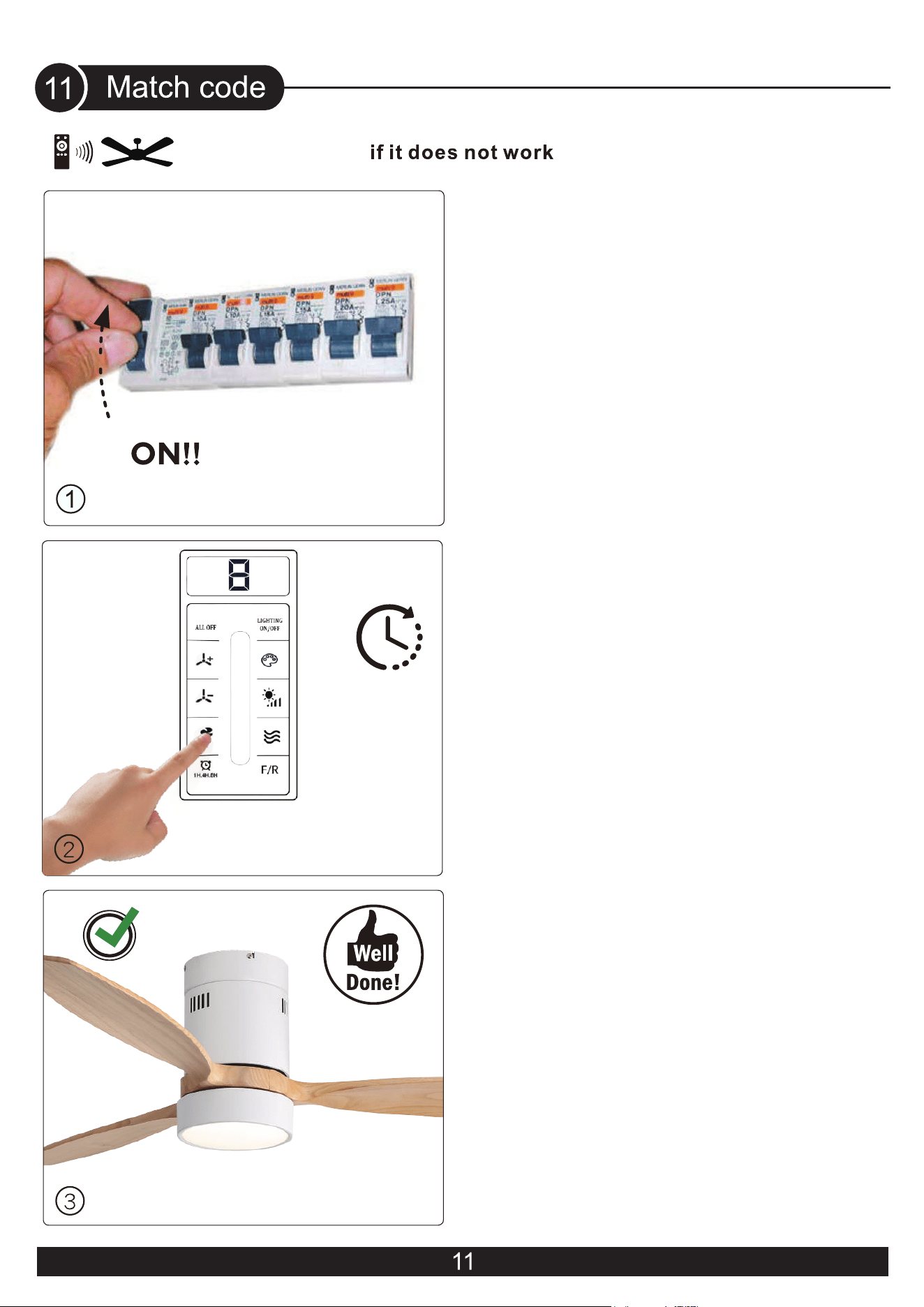
1.Turn on the main switch.
3. The receiver Can remember the
last codes status.
Remote control code matching
successful, the receiver will emit a
buzzing sound.
2. Remote control pairing : when AC
power on, press and hold the key for
3-5 seconds, buzzer wrings three times
(if buzzer sound enable), then finish
the remote control pairing.
3s
KBS-52K077
H
Installation
Video
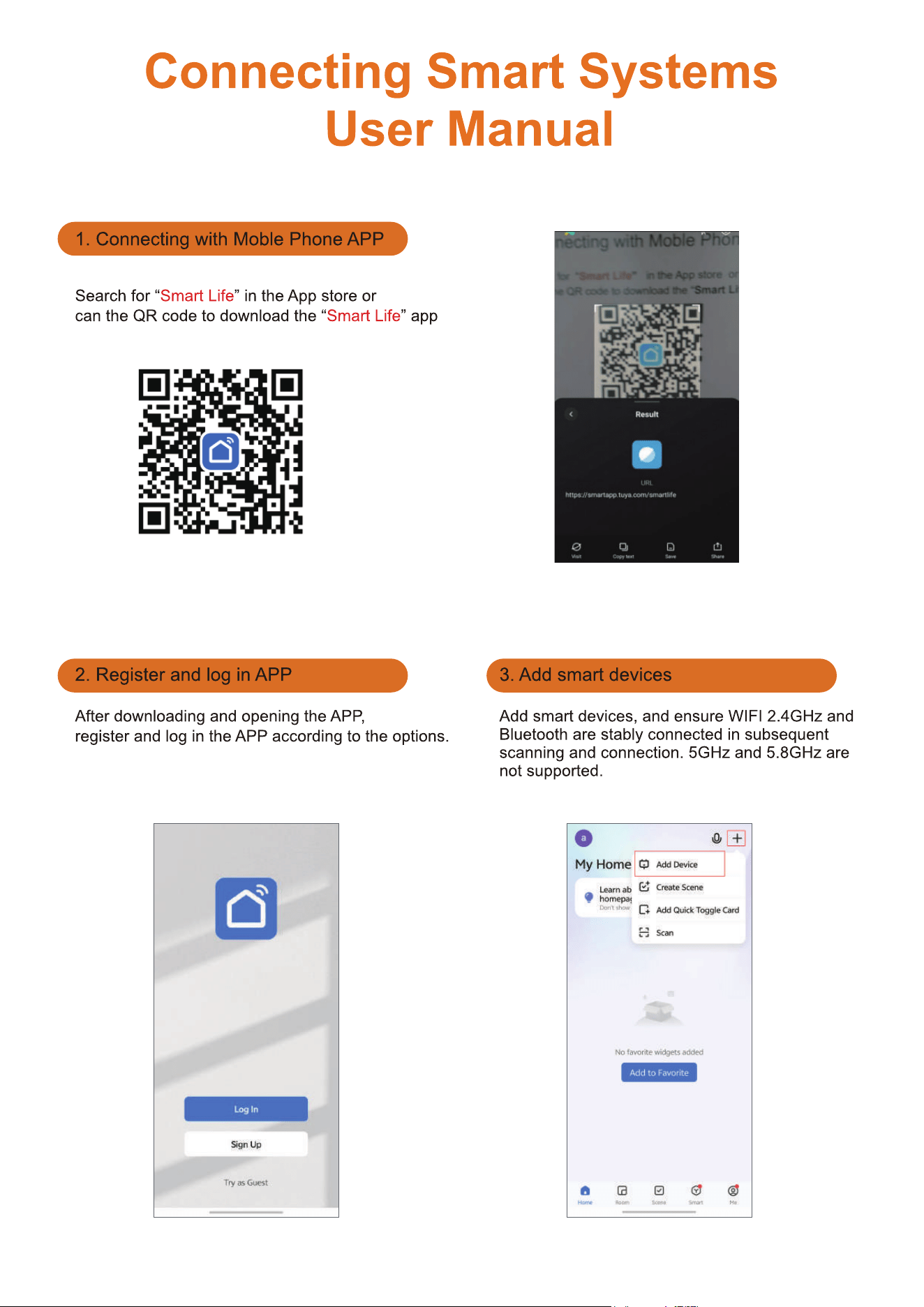
14
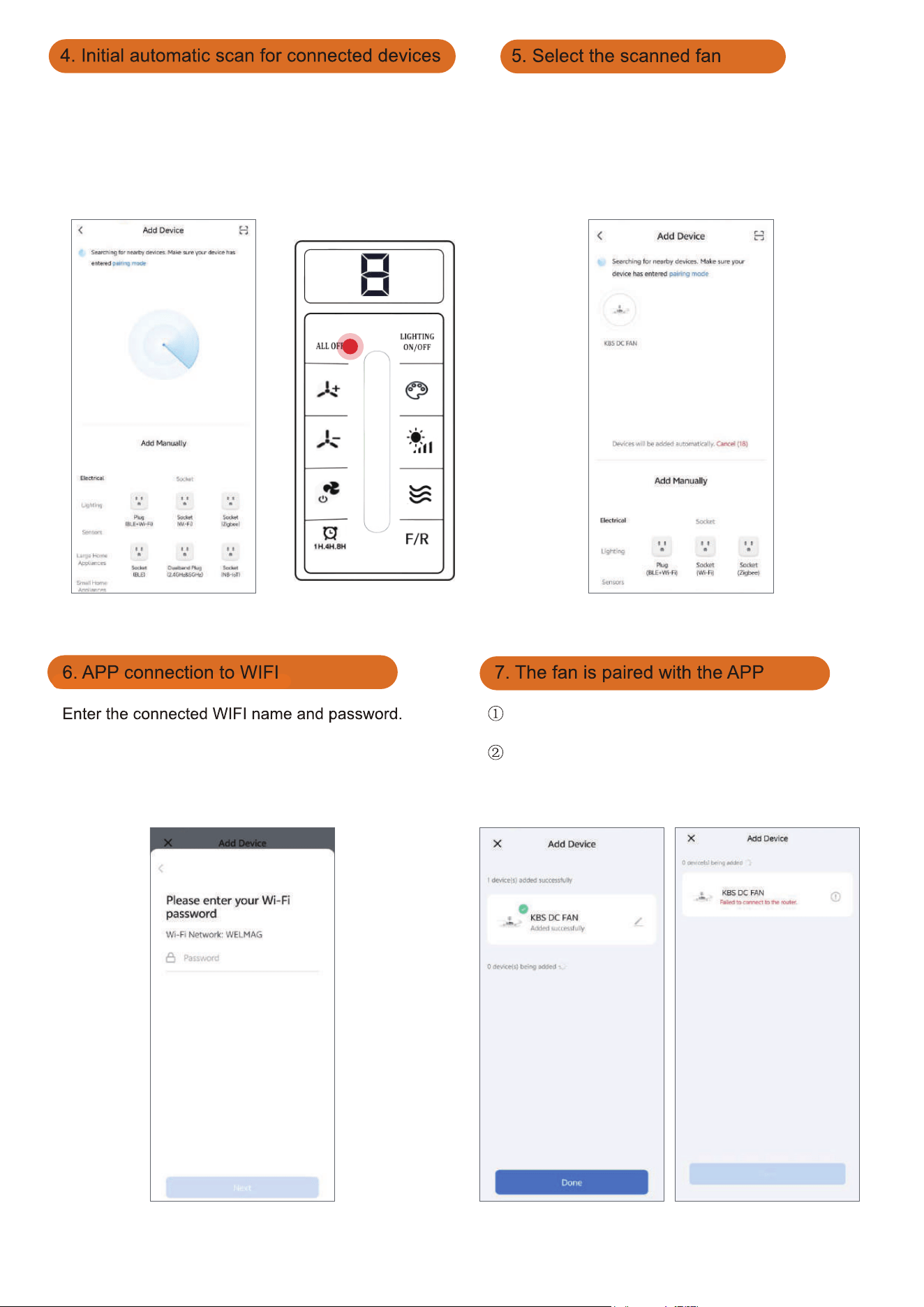
15
If the fan has been operating for more than 3 minutes, you
will be unable to search for devices. At this point, you need
to reset your fan. Turn off the fan's main power and turn it
back on. Within 30 seconds, press and hold the "ALL OFF"
button on the remote control for 5 seconds. If the reset is
successful, the buzzer will sound three long beeps, then
you can add devices again.
Tap the corresponding icon to connect.
After the pairing is completed, you can customize
the fan's name
If pairing fails, please check wether the Wifi network
and password are correct. If connection fails after
multiple attempts, try connecting the fan manually as
shown in Step 8 below.
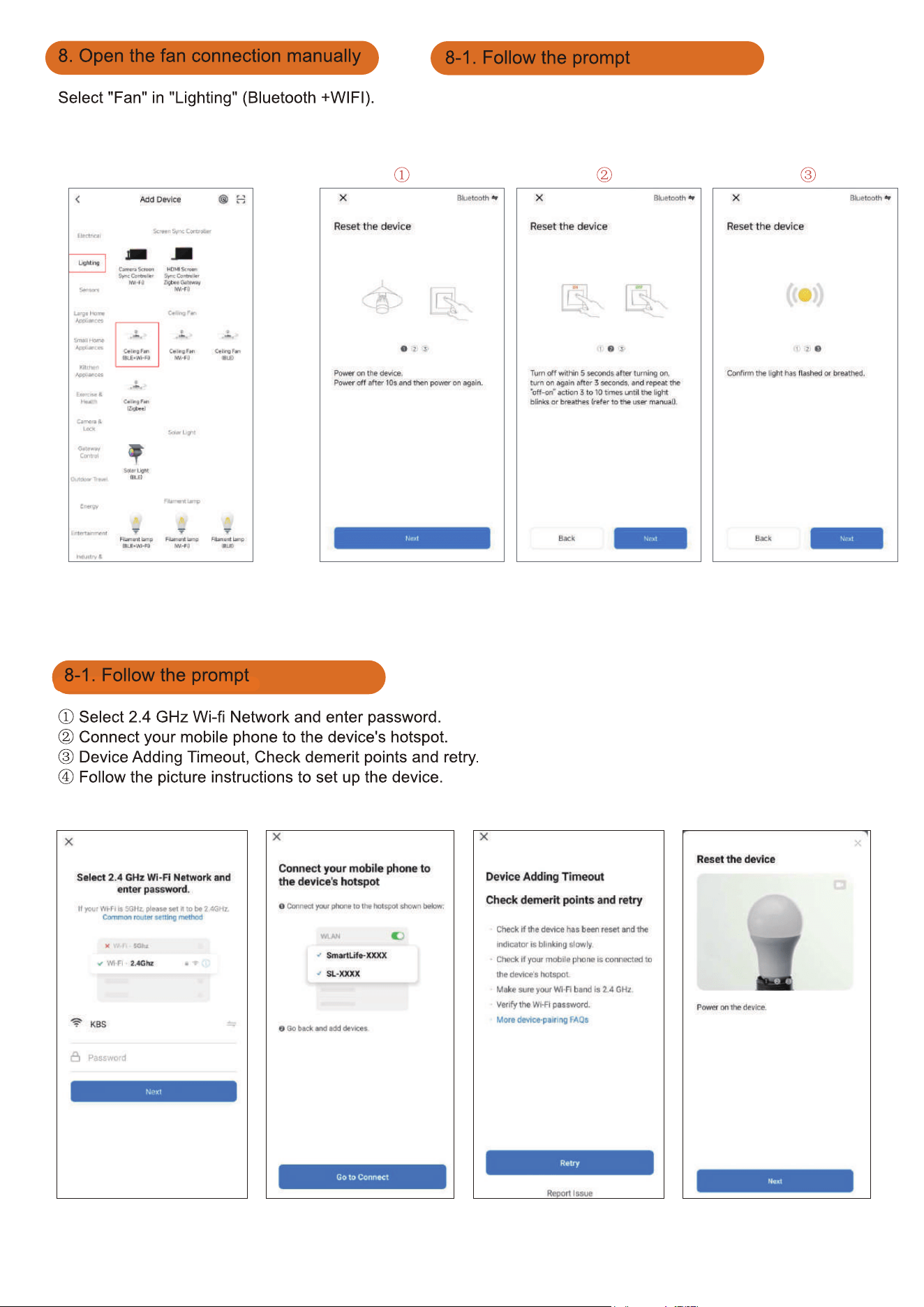
16
After performing Steps ① and ②, once hear three
consecutive beeps from the buzzer, tap "Next" in Step ③ to
proceed to the network pairing procedure.
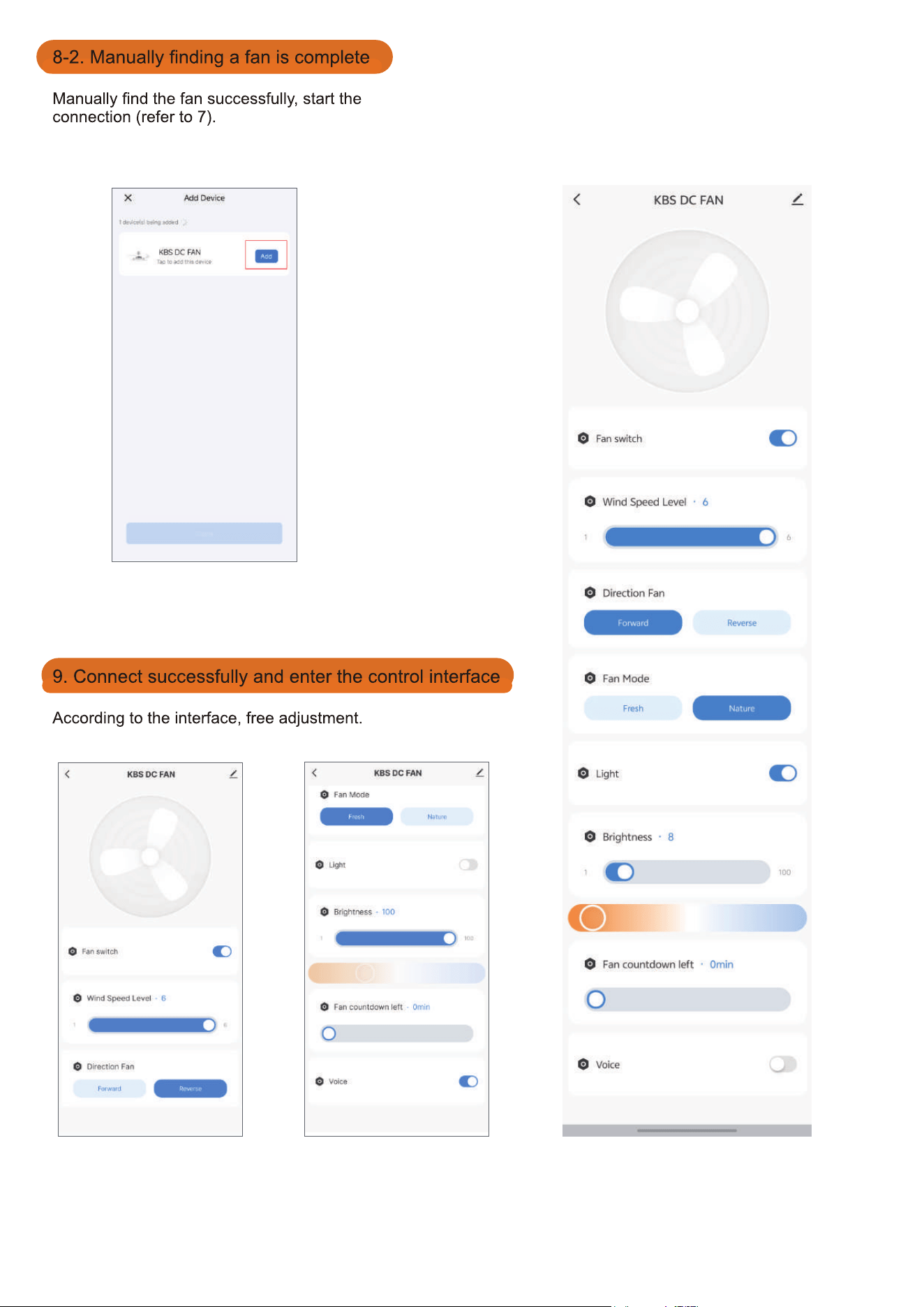
17
18
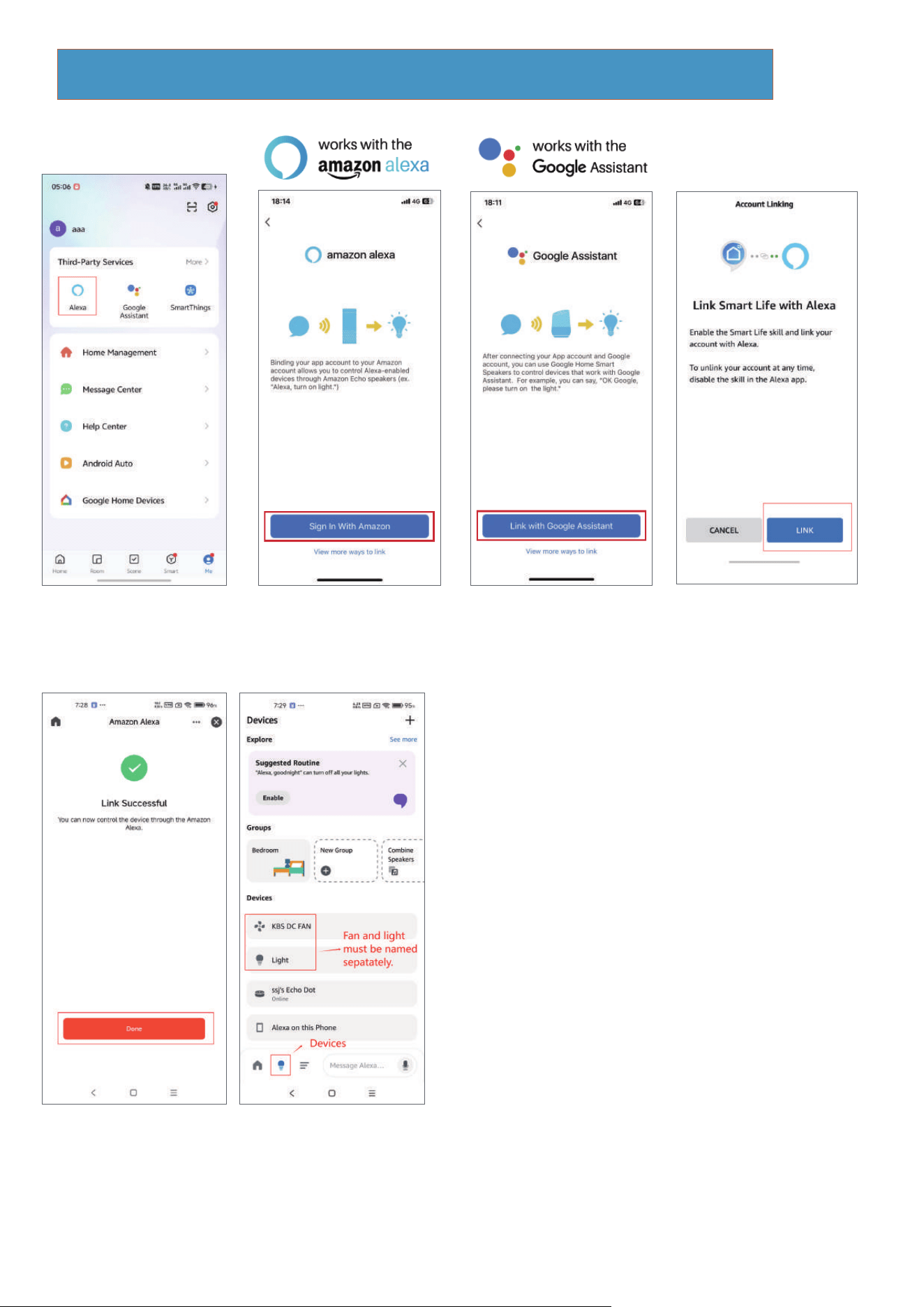
Link skill to the Amazon Echo or Google Assistant
In the App, change the name of the device to an easily identifiable name such
as bedroom light, bedroom fan.
Make sure your Amazon Echo device is powered on and connecting to your
home Wi-Finetwork.
Common commands
△
KBS DC Fan: <DEVICE NAME>
●
Alexa, tum on/off <DEVICE NAME>.
Alexa, what is the <DEVICE NAME> speed?
Alexa, set the <DEVICE NAME> speed to1/2/3/4/5/6.
Alexa, setthe bedroom <DEVICE NAME> speed to max.
Alexa, turn up/decrease the bedroom <DEVICE NAME> speed.
Alexa, set the <DEVICE NAME> to foward/reverse.
Alexa,set the mode on the <DEVICE NAME> to fresh/nature.
Alexa,set the countdown on the <DEVICE NAME> to
cancel/1 hour/2 hour/4 hour/8 hour.
●
●
●
●
●
●
●
△
Light: <device name>
●
Alexa, tum on/off <device name>.
Alexa, set the <device name> to fifty percent.
Alexa, make the <device name> warm white/white/cool white.
Alexa, brighten/dim <device name>.
Alexa, turn on/off response.
●
●
●
●
Note: "Alexa, turn on/off voice" – Controls the buzzer switch.
This function only applies to the buzzer sound for Tuya and Alexa
control; the remote handle is silent by default.
19
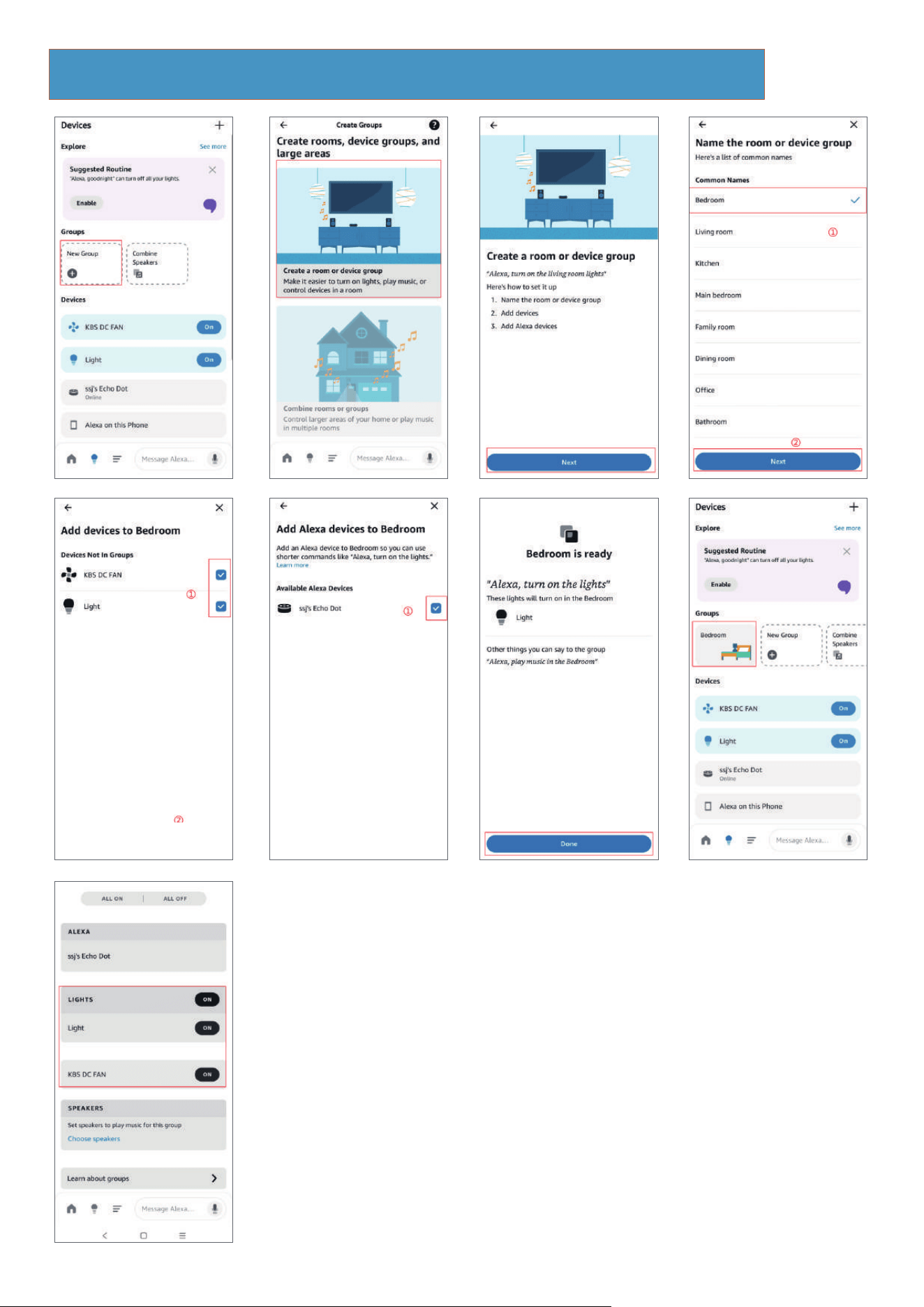
Steps for adding to Alexa as "bedroom"
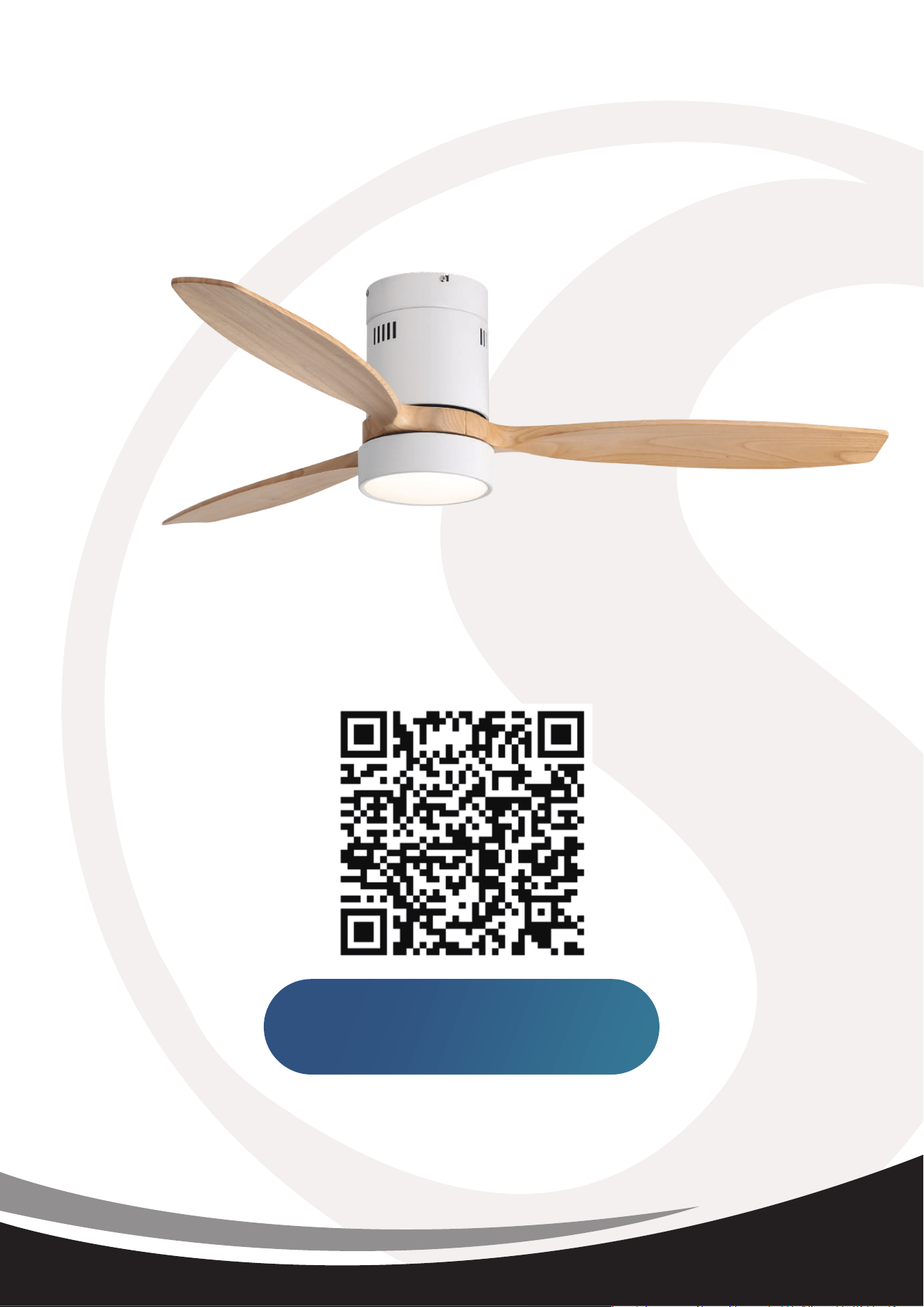
Register for Extended
2 Years Warranty+2 Year Warranty
Within the First 7 days
Scan QR code with your phone