
ATTENTIONS......................................................................................................................1
DIRECTIONS FOR USE.....................................................................................................2-3
OPERATION GUIDES........................................................................................................4-5
REMOTE CONTROLLER......................................................................................................6
SPECIFICATION .................................................................................................................7
PACKING LISTING...............................................................................................................7
FQA....................................................................................................................................8
Dear users:
Matters needing attention
Thanks for your purchasing.Please read the directions carefully before using and follow the
correct instructions.
To ensure safety, please read carefully and follow the following safety instructions
1.The equipment is up to The China Compulsory Certification.
2.The equipment should be used in a dry environment.
3.Do not place a fire source near the equipment.
4.Do not use near water source to avoid corrosion of products and accessories.
5.Do not open or disassemble or repair the battery module by yourself.There will be a risk of
explosion if the battery is not replaced properly.Do not put the battery into water, fire or any
overheated environment.
6.When taking an airplane, please follow the relevant regulations and regulations of the airline
company to turn off this product before the airplane takes off to avoid any hidden danger.
7.The charging cable cannot be squeezed, pulled, bent, knotted, or suspended from heavy
objects in order to avoid damage to the insulation layer of it and cause electric shock.
:
:
Dear Customer:
Thank you for your great support on us!
We appreciate every purchase, value your complete satisfaction and
strive to offer a high quality product and service. If you have any
dissatisfaction with our products, don' t worry, we have your covered.
We offer phone support from 9:00 AM to 6:00 PM, if you
have any questions please call: 1-757-943-7037

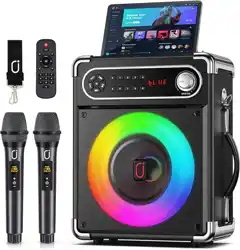
Take the machine out of the package and install the shoulder strap on the both side of the
machine.Tie the machine around your waist or over your shoulder through a strap,then adjust the
strap to a suitable position,you can carry your machine out easily.
1.Turn on bluetooth on your mobile device.
2.Press “Mode” key and switch the speaker to BT mode.
3.Select “JYX-S55” from available devices.(If JYX-S55 is unavailable,please switch back to
Bluetooth mode and try again )
Plug the 3.5mm audio cable into the AUX IN jack,the speaker will play the audio from input device
automatically.
When insert USB or TF card into speaker,the speaker will play the audio from USB/TF card
automatically.
1.Pull out the antenna on the top of speaker.
2.Press “Mode” key to switch to radio station.
3.Long press “Play/Pause” key to search and save more available stations automatically.
4.The station searching completed when it no longer switch automatically.
5.Press “Next” or “Previous” to select your own station.
Bluetooth Connection
AUX- IN
USB and TF Input
FM Radio
Directions For Use
REC
TWS Function
1.Plug in a TF card or flash card
2.Long press “REC” to start recording,short press to end recording.
3.Short press “REC” to play the recording audio.
To use this feature,two JYX-S55 systems are required.By connecting two stereo systems,you can
enjoy the True Wireless Stereo via bluetooth.
Turn on the two JYX-S55 and turn them both into bluetooth mode.Two machines will flash “BLUE”
on screen. Then short press the “TWS” button of either of the two machines(Only need to press
one button),the TWS function will be activated by then(Screens both stop flash).Long press TWS
button to inactivate TWS function.
If the text description is difficult to understand, please contact customer service team to send a
video tutorial: [email protected]
Directions For Use
MASTER
01234
56789
M
POWER
TF card
AUX IN
MIC 2
MIC 1 LED
5V 1A
USB
MIC VOL.
ECHO
BASS
TREBLE
1256437
8
9101112
1314151617181920
21
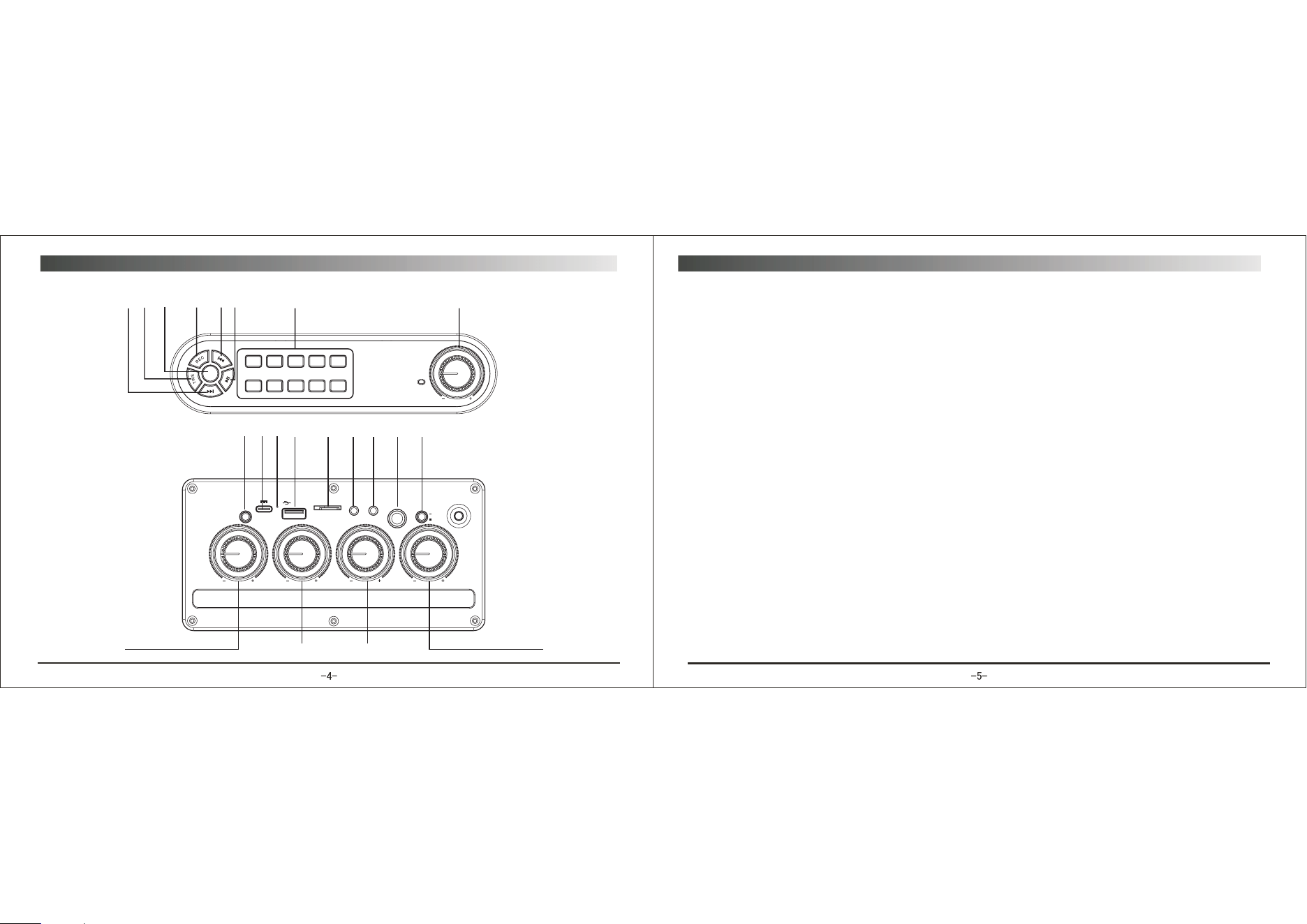
1.Number Key: Press to choose the song(Only work for USB/TF/FM mode)
2.Master: Main volume control knob
3.Play/Pause: Short press to play/pause; In radio mode,long press for automatic radio station
search; In bluetooth mode,long press for TWS(only valid for the same model)
4.Previous: Short press to switch to the last program; long press to fast backward.
5.REC: Long press to record audio,during this process, short press to stop recording.When there is
a recording file in the storage device,short press is to play the recording file.(The recording function
is only available when a storage device is pluged in)
6.Mode: short press to switch between bluetooth,flash card,TF card and FM radio.When bluetooth
has already connected,long press to eliminate the original voice.
7.TWS: Short press for TWS connection,long press for disconnection(Under Bluetooth mode)
8.Next: Short press to switch to the next program; long press to fast forward.
9.MIC VOL: Adjust microphone volume
10.Reverb: Adjust reverb.
11.Bass: Adjust bass sound.
12.Treble: Adjust treble sound
13.LED: Press to turn on/off the LED light.
14.Dynamic Microphone jack(6.35mm)
15.Condenser Microphone jack(3.55mm)
16.AUX IN Jack
17.TF Card Port
18.USB Port
19.Sound Receiving Hole
20.5V Charging Port
21.Power
Operation Guide
ON
OFF
Mode
Karaoke
Loop
Rec
Play
Rec
Vol +
Vol -
8
9
10
11
12
1
2
3
4
5
6
7
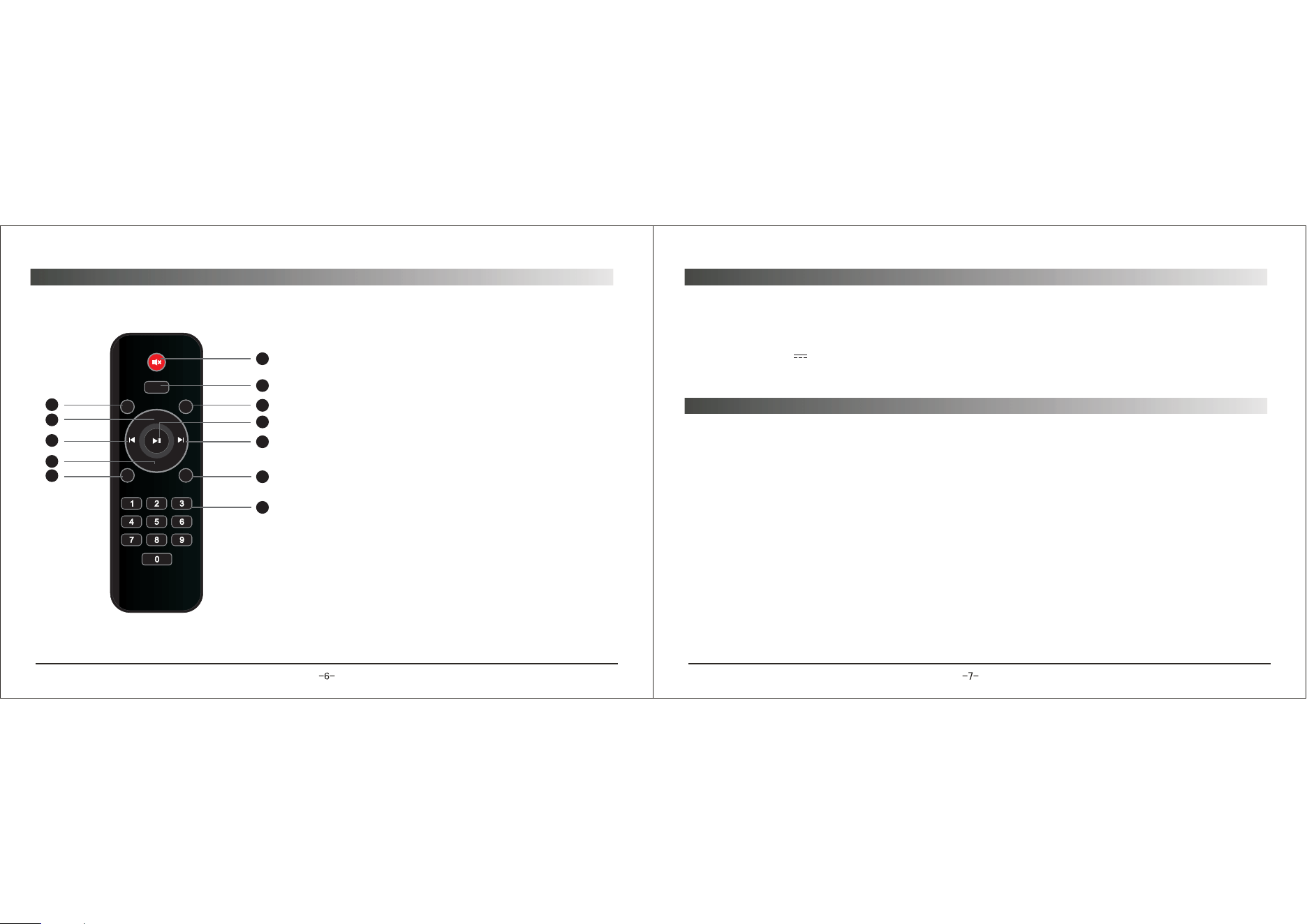
1.Silent
2.Mode:Press to switch the system between USB,TF
card,FM Radio,AUX IN and Bluetooth mode.
3.Karaoke:Press to eliminate the original voice.Press
again to restore the original voice.
4.Play/Pause: Short press to play/pause(USB/TF card
mode); Short press to silent ON,long press is for
searching radio stations(FM radio mode).
5.Next: Short press to switch to the next program; long
press to fast forward.
6.REC:short press for recording;Short press to stop
and play the recording during the record process.(The
USB flash dish or TF card needed during recording)
7.Number Key: Press to choose the song(Only work
for USB/TF/FM mode)
8.Loop:Press to switch between single cycle and all
cycle
9.Vol+
10.PREV.
11.Vol-
12.REC Play:Press to play recording file.
Remote controller
Model NO: JYX-S55
Bluetooth: 5.0
Output Power: 10W
Input Voltage: 5V 1A
Speaker: 5.25 inch bass + 2 inch treble
Specification:
Packing list:
Speaker.........................................................................................................................1PC
Microphone....................................................................................................................2PC
Strap.............................................................................................................................1PC
USB cable......................................................................................................................1PC
Controller.......................................................................................................................1PC
Manual...........................................................................................................................1PC
AUX cable......................................................................................................................1PC

Q:The system can not start up.
Q:The system provides no sound.
Q:The Bluetooth connection is not available.
Q:Unable to connect two system with TWS feature.
A:Charging the built-in battery;
Check if the adapter is connected securely.
A:Check if the system is power on.
Adjust the volume.
A:Move your device closer to the system.
Check to see if the Bluetooth is engaged.
A:Make sure the two systems are within one meter of each other.
Please feel free to contact JYX customer service team if you have any question of the speaker.
After-sales service email address: [email protected]. We will reply you within 24 hours.
Your satisfaction is our ultimate pursuit!
FAQ

