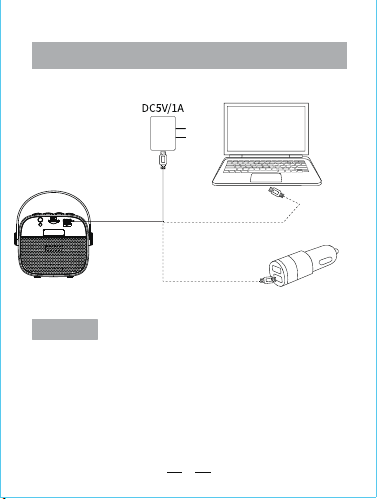
Computer USB charging
On-board USB charging
• Output power: 5W
• Frequency range: 90Hz-18KHz
• Input signal: 42DB
• Battery: high-performance
• Charging voltage: DC5V
• Power supply mode: DC charging
Charging connection diagram
Specifications
Operation manual
Handling of common issues
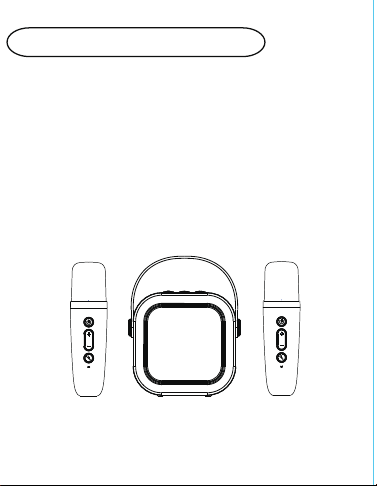
handhled audio microphone
Key features
• It adopts a high-reduction
• 3.7V high performance battery
• Strong sound penetration and
• Super MP3 audio decoding technology
• Full digital audio processing, clear
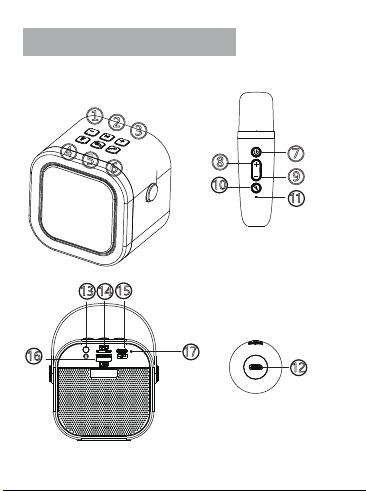
Function introduction
3
4
5
2
⑦
①
②
③
④
⑤
⑥
⑧
⑨
10
11
12
13
14
15
16
17
13.Headphone jack.
14.TF card slot, insert files with MP3 audio class automatically
15.Audio Type-C 5V charging interface.
12.Microphone Type-C 5V charging port.
17.Audio indicator, blue light flashing in unconnected state,
16.USB socket, insert files with MP3 audio class automatically
4. hort press toggle LED lighting effect, long press for 2 S
seconds to turn off LED lighting effect.
3.Short press the volume once, and long press one song.
9.Short press the microphone volume down, double-
10.Short press to cancel the original sound on/off, long
6.Short press to turn on/off the original sound.
1.Short press once to decrease the volume and long press
the previous song.
2.Manually switch playback mode, Bluetooth/TF card /U
disk, etc.
5.Long press for three seconds to power on/off, short
press play/pause, double-click to turn on/off couplets.
7.on and on, and short press once to mute the micro
phone.on and on, and short press once to mute the
microphone.
8.Short press Microphone Volume Plus, double-click
Reverb Plus.
click the reverb to decrease.
press to switch the magic sound.
11.Microphone indicator, blue light flashing in unconnected
state, blue light is always on when connected successfully,
red light is on when charging, and red light is off after full
charge.
switch to TF mode.
switch to USB mode.
blue light is always on when connected successfully, red
light is on when charging, and red light is off after full
charge.
large-capacity lithium battery
and built-in battery
electroacoustic system
wide coverage
sound quality, high sensitivity
1.If the indicator does not light up after turning on, please
check whether the speaker power is sufficient,or connect
the speaker to the 5V/1A power supply for charging, the
charging time is about 3-4 hours.
5.If Bluetooth playback is interrupted, it may be because
the Bluetooth distance is too far, or there is an obstacle
between the mobile phone and the amplifier,which affe-
cts the transmission of the signal, please approach the
connected mobile phone and avoid the obstacle.
3.If the speaker does not have reverb, it may be that the
4.If there is noise in the microphone, it may be due to am-
reverb switch is off, please turn on the reverb switch.
bient noise, signal interference, microphone too close to
the speaker, etc., please re-adjust the direction of the mic-
rophone.
2.There is no sound from the microphone, it may be that
the power is not turned on, the mode is incorrect, or
the volume is not adjustedPlease adjust the microphone
volume.
6.If Bluetooth cannot be connected, it may be because the
distance is too far, there are obstacles, or it is connected
by other mobile phones, please approach the phone to
avoid obstacles and disconnect the phone.
7.If it cannot be charged, check whether the charger is nor-
mal, and whether the red indicator light of the charging
port is lit when the speaker is charging.
Tips
This product is sold without a power adapter, if the power adapter
is used for power supply, it should be purchased to use a power
adapter that has obtained CCC certification and meets the requi-
rements of the standard. Batteries must not be exposed to condi-
tions such as sunlight, fire or similar overheating, and should only
be replaced with the same type of battery if there is a risk of explo-
sion if the battery is not replaced properly.
Computer USB charging
On-board USB charging
• Output power: 5W
• Frequency range: 90Hz-18KHz
• Input signal: 42DB
• Battery: high-performance
• Charging voltage: DC5V
• Power supply mode: DC charging
Charging connection diagram
Specifications
Operation manual
Handling of common issues
handhled audio microphone
Key features
• It adopts a high-reduction
• 3.7V high performance battery
• Strong sound penetration and
• Super MP3 audio decoding technology
• Full digital audio processing, clear
Function introduction
3
4
5
2
⑦
①
②
③
④
⑤
⑥
⑧
⑨
10
11
12
13
14
15
16
17
13.Headphone jack.
14.TF card slot, insert files with MP3 audio class automatically
15.Audio Type-C 5V charging interface.
12.Microphone Type-C 5V charging port.
17.Audio indicator, blue light flashing in unconnected state,
16.USB socket, insert files with MP3 audio class automatically
4. hort press toggle LED lighting effect, long press for 2 S
seconds to turn off LED lighting effect.
3.Short press the volume once, and long press one song.
9.Short press the microphone volume down, double-
10.Short press to cancel the original sound on/off, long
6.Short press to turn on/off the original sound.
1.Short press once to decrease the volume and long press
the previous song.
2.Manually switch playback mode, Bluetooth/TF card /U
disk, etc.
5.Long press for three seconds to power on/off, short
press play/pause, double-click to turn on/off couplets.
7.on and on, and short press once to mute the micro
phone.on and on, and short press once to mute the
microphone.
8.Short press Microphone Volume Plus, double-click
Reverb Plus.
click the reverb to decrease.
press to switch the magic sound.
11.Microphone indicator, blue light flashing in unconnected
state, blue light is always on when connected successfully,
red light is on when charging, and red light is off after full
charge.
switch to TF mode.
switch to USB mode.
blue light is always on when connected successfully, red
light is on when charging, and red light is off after full
charge.
large-capacity lithium battery
and built-in battery
electroacoustic system
wide coverage
sound quality, high sensitivity
1.If the indicator does not light up after turning on, please
check whether the speaker power is sufficient,or connect
the speaker to the 5V/1A power supply for charging, the
charging time is about 3-4 hours.
5.If Bluetooth playback is interrupted, it may be because
the Bluetooth distance is too far, or there is an obstacle
between the mobile phone and the amplifier,which affe-
cts the transmission of the signal, please approach the
connected mobile phone and avoid the obstacle.
3.If the speaker does not have reverb, it may be that the
4.If there is noise in the microphone, it may be due to am-
reverb switch is off, please turn on the reverb switch.
bient noise, signal interference, microphone too close to
the speaker, etc., please re-adjust the direction of the mic-
rophone.
2.There is no sound from the microphone, it may be that
the power is not turned on, the mode is incorrect, or
the volume is not adjustedPlease adjust the microphone
volume.
6.If Bluetooth cannot be connected, it may be because the
distance is too far, there are obstacles, or it is connected
by other mobile phones, please approach the phone to
avoid obstacles and disconnect the phone.
7.If it cannot be charged, check whether the charger is nor-
mal, and whether the red indicator light of the charging
port is lit when the speaker is charging.
Tips
This product is sold without a power adapter, if the power adapter
is used for power supply, it should be purchased to use a power
adapter that has obtained CCC certification and meets the requi-
rements of the standard. Batteries must not be exposed to condi-
tions such as sunlight, fire or similar overheating, and should only
be replaced with the same type of battery if there is a risk of explo-
sion if the battery is not replaced properly.

Computer USB charging
On-board USB charging
• Output power: 5W
• Frequency range: 90Hz-18KHz
• Input signal: 42DB
• Battery: high-performance
• Charging voltage: DC5V
• Power supply mode: DC charging
Charging connection diagram
Specifications
Operation manual
Handling of common issues
handhled audio microphone
Key features
• It adopts a high-reduction
• 3.7V high performance battery
• Strong sound penetration and
• Super MP3 audio decoding technology
• Full digital audio processing, clear
Function introduction
3
4
5
2
⑦
①
②
③
④
⑤
⑥
⑧
⑨
10
11
12
13
14
15
16
17
13.Headphone jack.
14.TF card slot, insert files with MP3 audio class automatically
15.Audio Type-C 5V charging interface.
12.Microphone Type-C 5V charging port.
17.Audio indicator, blue light flashing in unconnected state,
16.USB socket, insert files with MP3 audio class automatically
4. hort press toggle LED lighting effect, long press for 2 S
seconds to turn off LED lighting effect.
3.Short press the volume once, and long press one song.
9.Short press the microphone volume down, double-
10.Short press to cancel the original sound on/off, long
6.Short press to turn on/off the original sound.
1.Short press once to decrease the volume and long press
the previous song.
2.Manually switch playback mode, Bluetooth/TF card /U
disk, etc.
5.Long press for three seconds to power on/off, short
press play/pause, double-click to turn on/off couplets.
7.on and on, and short press once to mute the micro
phone.on and on, and short press once to mute the
microphone.
8.Short press Microphone Volume Plus, double-click
Reverb Plus.
click the reverb to decrease.
press to switch the magic sound.
11.Microphone indicator, blue light flashing in unconnected
state, blue light is always on when connected successfully,
red light is on when charging, and red light is off after full
charge.
switch to TF mode.
switch to USB mode.
blue light is always on when connected successfully, red
light is on when charging, and red light is off after full
charge.
large-capacity lithium battery
and built-in battery
electroacoustic system
wide coverage
sound quality, high sensitivity
1.If the indicator does not light up after turning on, please
check whether the speaker power is sufficient,or connect
the speaker to the 5V/1A power supply for charging, the
charging time is about 3-4 hours.
5.If Bluetooth playback is interrupted, it may be because
the Bluetooth distance is too far, or there is an obstacle
between the mobile phone and the amplifier,which affe-
cts the transmission of the signal, please approach the
connected mobile phone and avoid the obstacle.
3.If the speaker does not have reverb, it may be that the
4.If there is noise in the microphone, it may be due to am-
reverb switch is off, please turn on the reverb switch.
bient noise, signal interference, microphone too close to
the speaker, etc., please re-adjust the direction of the mic-
rophone.
2.There is no sound from the microphone, it may be that
the power is not turned on, the mode is incorrect, or
the volume is not adjustedPlease adjust the microphone
volume.
6.If Bluetooth cannot be connected, it may be because the
distance is too far, there are obstacles, or it is connected
by other mobile phones, please approach the phone to
avoid obstacles and disconnect the phone.
7.If it cannot be charged, check whether the charger is nor-
mal, and whether the red indicator light of the charging
port is lit when the speaker is charging.
Tips
This product is sold without a power adapter, if the power adapter
is used for power supply, it should be purchased to use a power
adapter that has obtained CCC certification and meets the requi-
rements of the standard. Batteries must not be exposed to condi-
tions such as sunlight, fire or similar overheating, and should only
be replaced with the same type of battery if there is a risk of explo-
sion if the battery is not replaced properly.

Computer USB charging
On-board USB charging
• Output power: 5W
• Frequency range: 90Hz-18KHz
• Input signal: 42DB
• Battery: high-performance
• Charging voltage: DC5V
• Power supply mode: DC charging
Charging connection diagram
Specifications
Operation manual
Handling of common issues
handhled audio microphone
Key features
• It adopts a high-reduction
• 3.7V high performance battery
• Strong sound penetration and
• Super MP3 audio decoding technology
• Full digital audio processing, clear
Function introduction
3
4
5
2
⑦
①
②
③
④
⑤
⑥
⑧
⑨
10
11
12
13
14
15
16
17
13.Headphone jack.
14.TF card slot, insert files with MP3 audio class automatically
15.Audio Type-C 5V charging interface.
12.Microphone Type-C 5V charging port.
17.Audio indicator, blue light flashing in unconnected state,
16.USB socket, insert files with MP3 audio class automatically
4. hort press toggle LED lighting effect, long press for 2 S
seconds to turn off LED lighting effect.
3.Short press the volume once, and long press one song.
9.Short press the microphone volume down, double-
10.Short press to cancel the original sound on/off, long
6.Short press to turn on/off the original sound.
1.Short press once to decrease the volume and long press
the previous song.
2.Manually switch playback mode, Bluetooth/TF card /U
disk, etc.
5.Long press for three seconds to power on/off, short
press play/pause, double-click to turn on/off couplets.
7.on and on, and short press once to mute the micro
phone.on and on, and short press once to mute the
microphone.
8.Short press Microphone Volume Plus, double-click
Reverb Plus.
click the reverb to decrease.
press to switch the magic sound.
11.Microphone indicator, blue light flashing in unconnected
state, blue light is always on when connected successfully,
red light is on when charging, and red light is off after full
charge.
switch to TF mode.
switch to USB mode.
blue light is always on when connected successfully, red
light is on when charging, and red light is off after full
charge.
large-capacity lithium battery
and built-in battery
electroacoustic system
wide coverage
sound quality, high sensitivity
1.If the indicator does not light up after turning on, please
check whether the speaker power is sufficient,or connect
the speaker to the 5V/1A power supply for charging, the
charging time is about 3-4 hours.
5.If Bluetooth playback is interrupted, it may be because
the Bluetooth distance is too far, or there is an obstacle
between the mobile phone and the amplifier,which affe-
cts the transmission of the signal, please approach the
connected mobile phone and avoid the obstacle.
3.If the speaker does not have reverb, it may be that the
4.If there is noise in the microphone, it may be due to am-
reverb switch is off, please turn on the reverb switch.
bient noise, signal interference, microphone too close to
the speaker, etc., please re-adjust the direction of the mic-
rophone.
2.There is no sound from the microphone, it may be that
the power is not turned on, the mode is incorrect, or
the volume is not adjustedPlease adjust the microphone
volume.
6.If Bluetooth cannot be connected, it may be because the
distance is too far, there are obstacles, or it is connected
by other mobile phones, please approach the phone to
avoid obstacles and disconnect the phone.
7.If it cannot be charged, check whether the charger is nor-
mal, and whether the red indicator light of the charging
port is lit when the speaker is charging.
Tips
This product is sold without a power adapter, if the power adapter
is used for power supply, it should be purchased to use a power
adapter that has obtained CCC certification and meets the requi-
rements of the standard. Batteries must not be exposed to condi-
tions such as sunlight, fire or similar overheating, and should only
be replaced with the same type of battery if there is a risk of explo-
sion if the battery is not replaced properly.
Computer USB charging
On-board USB charging
• Output power: 5W
• Frequency range: 90Hz-18KHz
• Input signal: 42DB
• Battery: high-performance
• Charging voltage: DC5V
• Power supply mode: DC charging
Charging connection diagram
Specifications
Operation manual
Handling of common issues
handhled audio microphone
Key features
• It adopts a high-reduction
• 3.7V high performance battery
• Strong sound penetration and
• Super MP3 audio decoding technology
• Full digital audio processing, clear
Function introduction
3
4
5
2
⑦
①
②
③
④
⑤
⑥
⑧
⑨
10
11
12
13
14
15
16
17
13.Headphone jack.
14.TF card slot, insert files with MP3 audio class automatically
15.Audio Type-C 5V charging interface.
12.Microphone Type-C 5V charging port.
17.Audio indicator, blue light flashing in unconnected state,
16.USB socket, insert files with MP3 audio class automatically
4. hort press toggle LED lighting effect, long press for 2 S
seconds to turn off LED lighting effect.
3.Short press the volume once, and long press one song.
9.Short press the microphone volume down, double-
10.Short press to cancel the original sound on/off, long
6.Short press to turn on/off the original sound.
1.Short press once to decrease the volume and long press
the previous song.
2.Manually switch playback mode, Bluetooth/TF card /U
disk, etc.
5.Long press for three seconds to power on/off, short
press play/pause, double-click to turn on/off couplets.
7.on and on, and short press once to mute the micro
phone.on and on, and short press once to mute the
microphone.
8.Short press Microphone Volume Plus, double-click
Reverb Plus.
click the reverb to decrease.
press to switch the magic sound.
11.Microphone indicator, blue light flashing in unconnected
state, blue light is always on when connected successfully,
red light is on when charging, and red light is off after full
charge.
switch to TF mode.
switch to USB mode.
blue light is always on when connected successfully, red
light is on when charging, and red light is off after full
charge.
large-capacity lithium battery
and built-in battery
electroacoustic system
wide coverage
sound quality, high sensitivity
1.If the indicator does not light up after turning on, please
check whether the speaker power is sufficient,or connect
the speaker to the 5V/1A power supply for charging, the
charging time is about 3-4 hours.
5.If Bluetooth playback is interrupted, it may be because
the Bluetooth distance is too far, or there is an obstacle
between the mobile phone and the amplifier,which affe-
cts the transmission of the signal, please approach the
connected mobile phone and avoid the obstacle.
3.If the speaker does not have reverb, it may be that the
4.If there is noise in the microphone, it may be due to am-
reverb switch is off, please turn on the reverb switch.
bient noise, signal interference, microphone too close to
the speaker, etc., please re-adjust the direction of the mic-
rophone.
2.There is no sound from the microphone, it may be that
the power is not turned on, the mode is incorrect, or
the volume is not adjustedPlease adjust the microphone
volume.
6.If Bluetooth cannot be connected, it may be because the
distance is too far, there are obstacles, or it is connected
by other mobile phones, please approach the phone to
avoid obstacles and disconnect the phone.
7.If it cannot be charged, check whether the charger is nor-
mal, and whether the red indicator light of the charging
port is lit when the speaker is charging.
Tips
This product is sold without a power adapter, if the power adapter
is used for power supply, it should be purchased to use a power
adapter that has obtained CCC certification and meets the requi-
rements of the standard. Batteries must not be exposed to condi-
tions such as sunlight, fire or similar overheating, and should only
be replaced with the same type of battery if there is a risk of explo-
sion if the battery is not replaced properly.

Computer USB charging
On-board USB charging
• Output power: 5W
• Frequency range: 90Hz-18KHz
• Input signal: 42DB
• Battery: high-performance
• Charging voltage: DC5V
• Power supply mode: DC charging
Charging connection diagram
Specifications
Operation manual
Handling of common issues
handhled audio microphone
Key features
• It adopts a high-reduction
• 3.7V high performance battery
• Strong sound penetration and
• Super MP3 audio decoding technology
• Full digital audio processing, clear
Function introduction
3
4
5
2
⑦
①
②
③
④
⑤
⑥
⑧
⑨
10
11
12
13
14
15
16
17
13.Headphone jack.
14.TF card slot, insert files with MP3 audio class automatically
15.Audio Type-C 5V charging interface.
12.Microphone Type-C 5V charging port.
17.Audio indicator, blue light flashing in unconnected state,
16.USB socket, insert files with MP3 audio class automatically
4. hort press toggle LED lighting effect, long press for 2 S
seconds to turn off LED lighting effect.
3.Short press the volume once, and long press one song.
9.Short press the microphone volume down, double-
10.Short press to cancel the original sound on/off, long
6.Short press to turn on/off the original sound.
1.Short press once to decrease the volume and long press
the previous song.
2.Manually switch playback mode, Bluetooth/TF card /U
disk, etc.
5.Long press for three seconds to power on/off, short
press play/pause, double-click to turn on/off couplets.
7.on and on, and short press once to mute the micro
phone.on and on, and short press once to mute the
microphone.
8.Short press Microphone Volume Plus, double-click
Reverb Plus.
click the reverb to decrease.
press to switch the magic sound.
11.Microphone indicator, blue light flashing in unconnected
state, blue light is always on when connected successfully,
red light is on when charging, and red light is off after full
charge.
switch to TF mode.
switch to USB mode.
blue light is always on when connected successfully, red
light is on when charging, and red light is off after full
charge.
large-capacity lithium battery
and built-in battery
electroacoustic system
wide coverage
sound quality, high sensitivity
1.If the indicator does not light up after turning on, please
check whether the speaker power is sufficient,or connect
the speaker to the 5V/1A power supply for charging, the
charging time is about 3-4 hours.
5.If Bluetooth playback is interrupted, it may be because
the Bluetooth distance is too far, or there is an obstacle
between the mobile phone and the amplifier,which affe-
cts the transmission of the signal, please approach the
connected mobile phone and avoid the obstacle.
3.If the speaker does not have reverb, it may be that the
4.If there is noise in the microphone, it may be due to am-
reverb switch is off, please turn on the reverb switch.
bient noise, signal interference, microphone too close to
the speaker, etc., please re-adjust the direction of the mic-
rophone.
2.There is no sound from the microphone, it may be that
the power is not turned on, the mode is incorrect, or
the volume is not adjustedPlease adjust the microphone
volume.
6.If Bluetooth cannot be connected, it may be because the
distance is too far, there are obstacles, or it is connected
by other mobile phones, please approach the phone to
avoid obstacles and disconnect the phone.
7.If it cannot be charged, check whether the charger is nor-
mal, and whether the red indicator light of the charging
port is lit when the speaker is charging.
Tips
This product is sold without a power adapter, if the power adapter
is used for power supply, it should be purchased to use a power
adapter that has obtained CCC certification and meets the requi-
rements of the standard. Batteries must not be exposed to condi-
tions such as sunlight, fire or similar overheating, and should only
be replaced with the same type of battery if there is a risk of explo-
sion if the battery is not replaced properly.