Safety Information
Specifications
Package List
Wall Mounted
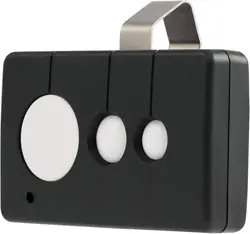
Remote Control
V20230217
• ONLY permit children to use this device under close
and constant supervision.
• DO NOT pair any button of this device with more
than one gate opener circuit board.
• ONLY use this remote control when the gate can be
clearly seen and there are no obstructions to its path
of travel.
• Cease use IMMEDIATELY if any irregularity occurs
during use. Recalibrate, repair, or replace problematic
parts before further use.
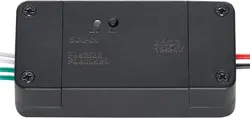
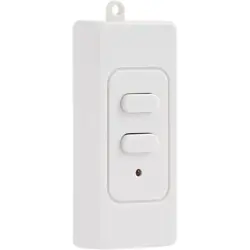
1 × Wall-Mount Remote Control
4 × Screws
2 × Wall Plugs
Installation
1. Remove the cover of the remote. Insert a CR2302
battery (not included) and replace the cover.
2. Choose a suitable location for the remote control unit,
make sure it’s within (98 ft.) 30 m of the gate opener.
You can either measure and mark the position for the
mounting screw and drill a pilot hole or apply M3 glue
(not included) to the back of the unit and attach it to
your preferred location.
3. If you will be using screws to attach the remote control
unit to the wall, insert a wall plug into the prepared hole.
4. Place the remote control unit on top of the wall plug,
aligning the ring on top of the unit with the plug. Secure
the remote by screwing one of the provided screws
through the ring and into the wall plug.
Pairing
For most CO-Z gate openers:
1. Access the gate opener circuit board.
2. Press the button labeled AN on the board.
3. Press any unpaired button on this remote control
twice.
4. The light labeled LEARN should flash to indicate
the button pairing was successful.
To pair additional buttons, repeat the process above.
Never pair a single button to more than one device at the
same time.
For use with other gate openers, see their separate man-
uals for details on remote pairing.
Contact Us
Operation
Normally, the buttons cycle through the four commands
OPEN→STOP→CLOSE→STOP.
1. Press once to begin opening the gate.
2. Press a second time to stop the gate.
3. Press a third time to close the gate.
4. Press a fourth time to stop the gate.
At a gate’s magnetic limits, STOP commands will be
skipped. Instead, a closed gate will begin opening
immediately. An open gate will begin closing.
On some models, the fourth button may activate its
pedestrian mode, which only partially opens the gate to
allow foot traffic.
Resetting
For most CO-Z gate openers:
1. Access the gate opener circuit board.
2. Hold the button labeled AN.
3. The light labeled LEARN should come on and
then go out to indicate that all paired buttons
have been deleted from memory.
When using other gate openers, see their separate
manuals for details on resetting system memory.
Dimensions
Battery Type
Signal Freq.
Signal Range
Net Weight
3.9×1.5×0.8 in. 10×3.8×2 cm
1 × CR2032 Lithium
433.92 MHz
98 ft. 30 m
1.3 oz. 36 g
Thank you for choosing our products! If you have any questions or comments, contact us
at contact@b2csupportpro.com and we'll resolve your issue ASAP!
For a .pdf copy of the latest version of these instructions, use the appropriate app on your
smartphone to scan the QR code to the right.
AGO-WK00-0Z Rev. 17 Feb. 2023
Warning!