Quick Start Guide
Quality, Design and Innovation
home.liebherr.com/fridge-manuals
Inhalt
1 Gerät auf einen Blick............................................. 3
1.1 Geräte- und Ausstattungsübersicht......................... 3
1.2 SmartDevice.................................................................. 3
1.3 Einsatzbereich des Geräts.......................................... 3
1.4 Konformität................................................................... 3
2 Allgemeine Sicherheitshinweise.......................... 4
3 Funktionsweise des Touch & Swipe-Displays...... 5
3.1 Navigation und Symbolerklärung.............................. 5
3.2 Menüs............................................................................. 6
3.3 Ruhemodus................................................................... 6
4 Inbetriebnahme..................................................... 6
4.1 Gerät einschalten (Erstinbetriebnahme).................. 6
5 Lagerung................................................................ 7
5.1 Hinweise zur Lagerung................................................ 7
6 Bedienung.............................................................. 7
6.1 Bedien- und Anzeigeelemente................................... 7
6.1.1 Statusanzeige..............................................................7
6.3 Gerätefunktionen......................................................... 7
WLAN............................................................................7
Temperatur..................................................................8
SabbathMode............................................................. 8
6.4 Meldungen.................................................................... 9
7 Ausstattung........................................................... 9
8 Wartung................................................................. 9
8.1 Auszugssysteme zerlegen / montieren................... 9
8.2 Gerät abtauen............................................................... 9
8.3 Gerät reinigen............................................................... 9
9 Kundenhilfe........................................................... 9
9.1 Technische Daten......................................................... 9
9.2 Technische Störung..................................................... 9
10 Außer Betrieb setzen............................................. 10
11 Entsorgung............................................................ 10
Der Hersteller arbeitet ständig an der Weiterentwick‐
lung aller Typen und Modelle. Bitte haben Sie deshalb
Verständnis dafür, dass wir uns Änderungen in Form,
Ausstattung und Technik vorbehalten müssen.
Symbol
Erklärung
Anleitung lesen
Um alle Vorteile Ihres neuen Gerätes kennen‐
zulernen, lesen Sie bitte die Hinweise in dieser
Anweisung aufmerksam durch.
Symbol Erklärung
Zusätzliche Informationen im Internet*
Die digitale Anleitung mit ergänzenden Infor‐
mationen finden Sie im Internet über den
QR-Code auf der Vorderseite der Anleitung
oder über Eingabe der Servicenummer unter
home.liebherr.com/fridge-manuals.*
Die Servicenummer finden Sie auf dem Typen‐
schild:*
Fig.Beispielhafte Darstellung*
Gerät prüfen
Prüfen Sie alle Teile auf Transportschäden.
Wenden Sie sich bei Beanstandungen an den
Händler oder Kundendienst.
Abweichungen
Die Anleitung ist für mehrere Modelle gültig,
Abweichungen sind möglich. Abschnitte, die
nur auf bestimmte Geräte zutreffen, sind mit
einem Sternchen (*) gekennzeichnet.
Handlungsanweisungen und Handlungsergeb‐
nisse
Handlungsanweisungen sind mit einem
gekennzeichnet.
Handlungsergebnisse sind mit einem
gekennzeichnet.
Videos
Videos zu den Geräten sind auf dem YouTube-
Kanal der Liebherr-Hausgeräte verfügbar.
Diese Gebrauchsanweisung gilt für:
SUFNc
375i
SUFNd 365i
Hinweis
Wenn Ihr Gerät ein N in der Gerätebezeichnung enthält,
dann handelt es sich um ein NoFrost-Gerät.
2 * Je nach Modell und Ausstattung
1 Gerät auf einen Blick
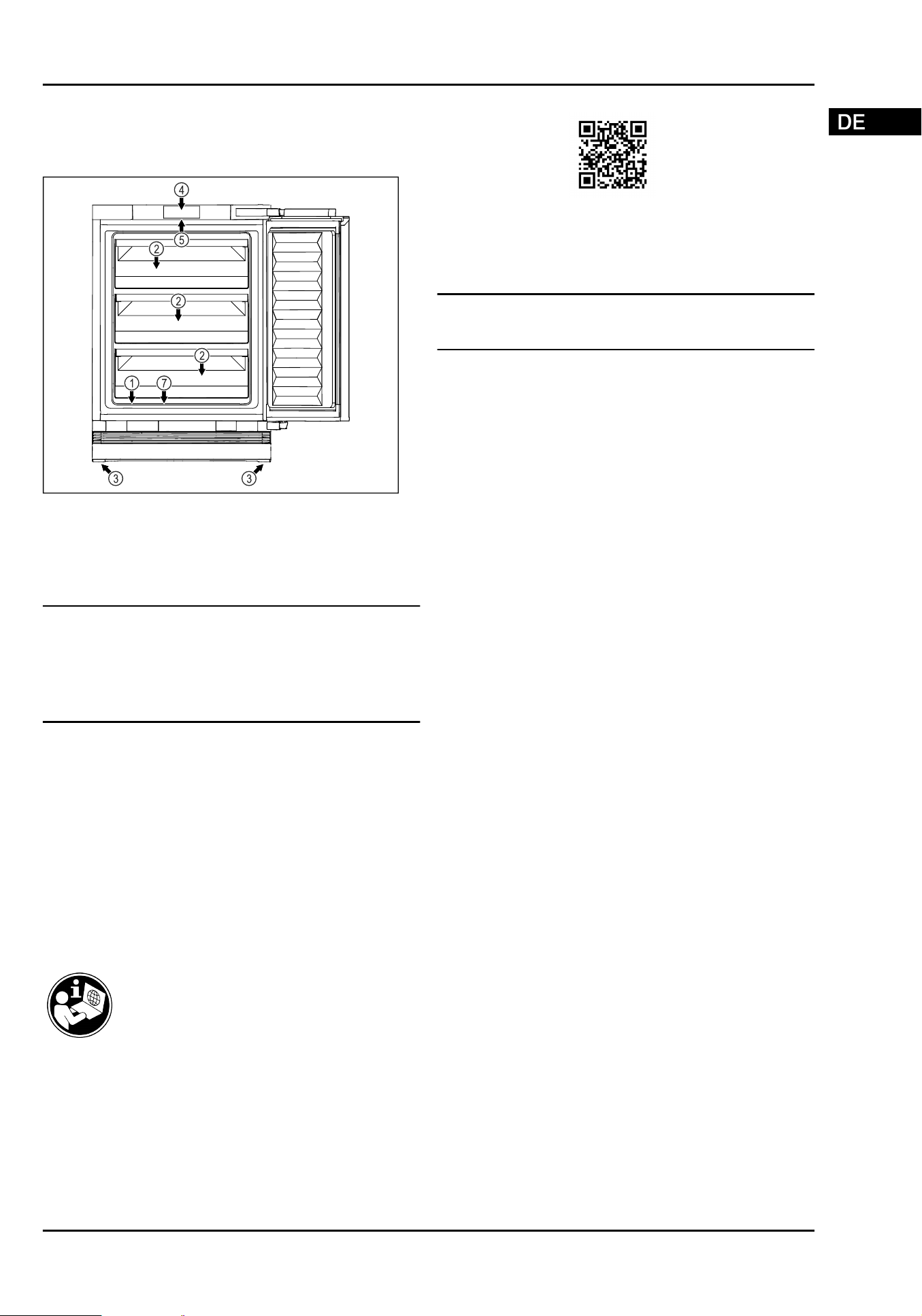
1.1 Geräte- und Ausstattungsübersicht
Fig. 1 Beispielhafte Darstellung Vorderseite
Ausstattung
(1)
Typenschild (4) Bedienelemente und
Temperaturanzeige
(2) Schubfach (5) Innenbeleuchtung*
(3) Stellfüße (7) Tauwasserablauf
Hinweis
u
Ablagen, Schubfächer oder Körbe sind im Auslieferungs‐
zustand für eine optimale Energieeffizienz angeordnet.
Veränderungen der Anordnung innerhalb der gegebenen
Einschubmöglichkeiten von z.B. Ablagen im Kühlteil,
haben jedoch keine Auswirkung auf den Energiever‐
brauch.
1.2 SmartDevice
SmartDevice ist die Vernetzungslösung für Ihr Gefriergerät.
Wenn Ihr Gerät SmartDevice-fähig oder dafür vorbereitet
ist, können Sie Ihr Gerät schnell und einfach in Ihr WLAN
einbinden. Mit der SmartDevice-App können Sie Ihr Gerät
von einem mobilen Endgerät aus bedienen. In der SmartDe‐
vice-App stehen Ihnen zusätzliche Funktionen und Einstel‐
lungsmöglichkeiten zur Verfügung.
SmartDevice-
fähiges Gerät:
Ihr Gerät ist SmartDevice-fähig. Um
Ihr Gerät mit dem WLAN verbinden zu
können, müssen Sie die SmartDevice-
App herunterladen.
Weitere Informati‐
onen zu SmartDe‐
vice:
smartdevice.liebherr.com
SmartDevice-App
herunterladen:
Nach der Installation und Konfigura‐
tion der SmartDevice-App können Sie
Ihr Gerät mithilfe der SmartDevice-
App und der Gerätefunktion WLAN
(sieheWLAN) in Ihr WLAN einbinden.
Hinweis
In den folgenden Ländern ist die SmartDevice-Funktion
nicht verfügbar: Russland, Weißrussland, Kasachstan.*
1.3 Einsatzbereich des Geräts
Bestimmungsgemäße Verwendung
Das Gerät eignet sich ausschließlich zum
Kühlen von Lebensmitteln im häuslichen oder
haushaltsähnlichen Umfeld. Hierzu zählt z.B.
die Nutzung*
-
in Personalküchen, Frühstückspensionen,*
-
durch Gäste in Landhäusern, Hotels, Motels
und anderen Unterkünften,*
-
beim Catering und ähnlichem Service im
Großhandel.*
Das Gerät eignet sich zum integrierten Unter‐
tischeinbau.
Alle anderen Anwendungsarten sind unzu‐
lässig.
Vorhersehbare Fehlanwendung
Folgende Anwendungen sind ausdrücklich
verboten:
-
Lagerung und Kühlung von Medika‐
menten, Blutplasma, Laborpräparaten oder
ähnlichen der Medizinprodukterichtlinie
2007/47/EG zu Grunde liegenden Stoffe
und Produkte*
-
Einsatz in explosionsgefährdeten Bereichen
Eine missbräuchliche Verwendung des
Gerätes kann zu Schädigungen an der einge‐
lagerten Ware oder deren Verderb führen.
1.4 Konformität
Der Kältemittelkreislauf ist auf Dichtheit geprüft. Das Gerät
entspricht im Einbauzustand den einschlägigen Sicherheits‐
bestimmungen sowie entsprechenden Richtlinien.
Für EU-Markt:*
Das Gerät entspricht der Richtlinie
2014/53/EU.*
Für GB-Markt:* Das Gerät entspricht der Radio Equipment
Regulations 2017 SI 2017 No. 1206.*
Der vollständige Text der EU-Konformitätserklärung
ist unter der folgenden Internetadresse verfügbar:
www.Liebherr.com*
Gerät auf einen Blick
* Je nach Modell und Ausstattung 3

2 Allgemeine Sicherheitshinweise
Bewahren Sie diese Anleitung sorgfältig auf
und reichen Sie diese gegebenenfalls an den
Nachbesitzer weiter.*
Um das Gerät ordnungsgemäß und sicher zu
verwenden, lesen Sie diese Gebrauchsanwei‐
sung vor der Benutzung sorgfältig. Befolgen
Sie stets die darin enthaltenen Anweisungen,
Sicherheitshinweise und Warnhinweise. Sie
sind wichtig, damit Sie das Gerät sicher
und einwandfrei installieren und betreiben
können.
Gefahren für den Benutzer:
-
Dieses Gerät kann von Kindern sowie
von Personen mit verringerten physischen,
sensorischen oder mentalen Fähigkeiten
oder Mangel an Erfahrung und Wissen
benutzt werden, wenn sie beaufsichtigt
oder bezüglich des sicheren Gebrauchs
des Gerätes unterwiesen wurden und die
daraus resultierenden Gefahren verstehen.
Kinder dürfen nicht mit dem Gerät spielen.
Reinigung und Benutzer-Wartung dürfen
nicht von Kindern ohne Beaufsichtigung
durchgeführt werden. Kinder von 3-8 Jahre
dürfen das Gerät be- und entladen. Kinder
unter 3 Jahren sind vom Gerät fernzu‐
halten, falls diese nicht permanent beauf‐
sichtigt werden.
-
Die Steckdose muss leicht zugänglich sein,
damit das Gerät im Notfall schnell vom
Strom getrennt werden kann. Sie muss
außerhalb des Geräterückseitenbereichs
liegen.
-
Wenn das Gerät vom Netz getrennt wird,
immer am Stecker anfassen. Nicht am
Kabel ziehen.
-
Im Fehlerfall Netzstecker ziehen oder
Sicherung ausschalten.
-
Die Netzanschlussleitung nicht beschä‐
digen. Gerät nicht mit defekter Netzan‐
schlussleitung betreiben.
-
Sollte das Netzkabel beschädigt sein, muss
es durch ein spezielles Kabel oder eine
spezielle Baugruppe ersetzt werden, das
bzw. die beim Hersteller oder bei seinem
Kundendienst erhältlich ist.*
-
Reparaturen und Eingriffe am Gerät nur
vom Kundendienst oder anderem dafür
ausgebildeten Fachpersonal ausführen
lassen.
-
Das Gerät nur nach den Angaben der
Anweisung einbauen, anschließen und
entsorgen.
-
Das Gerät nur in eingebautem Zustand
betreiben.
-
Spezielle Lichtquellen, wie z. B. LEDs am
Gerät, dienen der Beleuchtung des Geräte‐
inneren und sind nicht als Raumbeleuch‐
tung geeignet.*
Brandgefahr:
-
Dieses Gerät enthält ein umweltfreundli‐
ches, aber brennbares Kältemittel. Ausge‐
tretenes Kältemittel kann sich entzünden.
Dieses Gerät darf nur durch autorisierte
Kundendienstmitarbeiter gewartet werden,
da ansonsten Gefahren drohen. In Queens‐
land MUSS der autorisierte Servicemitar‐
beiter zwingend über eine Arbeitsgenehmi‐
gung für Gasarbeiten mit kohlenwassers‐
toffbasierten Kältemitteln verfügen, um
Wartungs- oder Reparaturarbeiten durchzu‐
führen, bei denen die Gasanlage geöffnet
oder befüllt wird. *
-
Das enthaltene Kältemittel (Angaben auf
dem Typenschild) ist umweltfreundlich,
aber brennbar. Entweichendes Kältemittel
kann sich entzünden.
•
Rohrleitungen des Kältekreislaufs nicht
beschädigen.
•
Im Geräteinnenraum nicht mit Zünd‐
quellen hantieren.
•
Im Geräteinnenraum keine elektrischen
Geräte benutzen (z. B. Dampfreinigungs‐
geräte, Heizgeräte, Eiscremebereiter
usw.).
•
Wenn Kältemittel entweicht: Offenes
Feuer oder Zündquellen in der Nähe
der Austrittstelle beseitigen. Raum gut
lüften. Kundendienst benachrichtigen.
-
Keine explosiven Stoffe oder Sprühdosen
mit brennbaren Treibmitteln, wie z. B.
Butan, Propan, Pentan usw. im Gerät
lagern. Entsprechende Sprühdosen sind
erkennbar an der aufgedruckten Inhalts‐
angabe oder einem Flammensymbol. Even‐
tuell austretende Gase können sich durch
elektrische Bauteile entzünden.
-
Brennende Kerzen, Lampen und andere
Gegenstände mit offenen Flammen vom
Gerät fernhalten, damit diese das Gerät
nicht in Brand setzen.
-
WARNUNG: Belüftungsöffnungen im Gerä‐
tegehäuse oder im Einbaugehäuse nicht
verschließen.*
-
WARNUNG: Zum Beschleunigen des Abtau‐
vorgangs keine anderen mechanischen
Hilfsmittel oder sonstigen Mittel als die
vom Hersteller empfohlenen benutzen.*
Allgemeine Sicherheitshinweise
4 * Je nach Modell und Ausstattung
-
WARNUNG: Kältemittelkreislauf nicht
beschädigen.*
-
Alkoholische Getränke oder sonstige
Alkohol enthaltende Gebinde nur dicht
verschlossen lagern. Eventuell austre‐
tender Alkohol kann sich durch elektrische
Bauteile entzünden.
Absturz- und Umkippgefahr:
-
Sockel, Schubfächer, Türen usw. nicht als
Trittbrett oder zum Aufstützen missbrau‐
chen. Dies gilt insbesondere für Kinder.
Gefahr einer Lebensmittelvergiftung:
-
Überlagerte Lebensmittel nicht verzehren.
Gefahr von Erfrierungen, Taubheitsgefühlen
und Schmerzen:
-
Dauernden Hautkontakt mit kalten Oberflä‐
chen oder Kühl-/Gefriergut vermeiden oder
Schutzmaßnahmen ergreifen, z. B. Hand‐
schuhe verwenden.
-
Eiscreme, Wassereis oder Eiswürfel nicht
sofort und nicht zu kalt verzehren.*
Verletzungs- und Beschädigungsgefahr:
-
Heißer Dampf kann zu Verletzungen führen.
Zum Abtauen keine elektrischen Heiz- oder
Dampfreinigungsgeräte, offenen Flammen
oder Abtausprays verwenden.
-
Eis nicht mit scharfen Gegenständen
entfernen.
Quetschgefahr:
-
Beim Öffnen und Schließen der Tür nicht in
das Scharnier greifen. Finger können einge‐
klemmt werden.
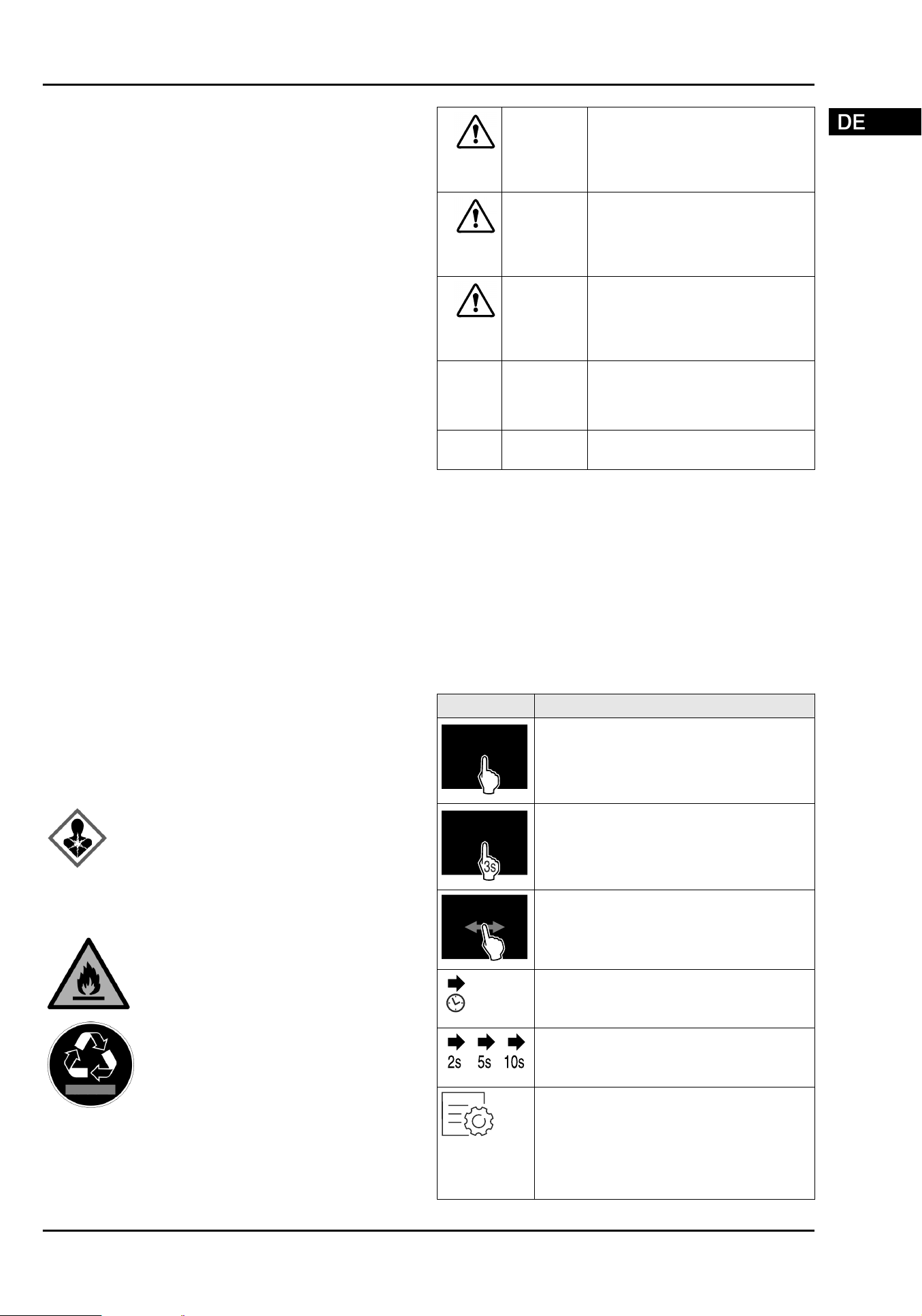
Symbole am Gerät:
Das Symbol kann sich auf dem Kompressor
befinden. Es bezieht sich auf das Öl
im Kompressor und weist auf folgende
Gefahr hin: Kann bei Verschlucken und
Eindringen in die Atemwege tödlich sein.
Dieser Hinweis ist nur für das Recycling
bedeutsam. Im Normalbetrieb besteht keine
Gefahr.
Das Symbol befindet sich am Verdichter
und kennzeichnet die Gefahr vor feuerge‐
fährlichen Stoffen. Den Aufkleber nicht
entfernen.
Dieser oder ein ähnlicher Aufkleber kann
sich auf der Rückseite des Gerätes
befinden. Er verweist darauf, dass sich
in der Tür und/oder im Gehäuse Vaku‐
umisolierpaneele (VIP) oder Perlitpaneele
befinden. Dieser Hinweis ist nur für das
Recycling bedeutsam. Den Aufkleber nicht
entfernen.
Beachten Sie die Warnhinweise und die
weiteren spezifischen Hinweise in den
anderen Kapiteln:
GEFAHR
kennzeichnet eine unmittelbar
gefährliche Situation, die Tod oder
schwere Körperverletzungen zur
Folge haben wird, wenn sie nicht
vermieden wird.
WARNUNG kennzeichnet eine gefährliche
Situation, die Tod oder schwere
Körperverletzung zur Folge haben
könnte, wenn sie nicht vermieden
wird.
VORSICHT kennzeichnet eine gefährliche
Situation, die leichte oder mitt‐
lere Körperverletzungen zur Folge
haben könnte, wenn sie nicht
vermieden wird.
ACHTUNG kennzeichnet eine gefährliche
Situation, die Sachschäden zur
Folge haben könnte, wenn sie
nicht vermieden wird.
Hinweis kennzeichnet nützliche Hinweise
und Tipps.
3 Funktionsweise des
Touch & Swipe-Displays
Sie bedienen Ihr Gerät mit dem Touch & Swipe-Display. Mit
dem Touch & Swipe-Display (im Weiteren Display genannt)
wählen Sie Gerätefunktionen durch Tippen oder Wischen
aus. Wenn Sie 10 Sekunden lang keine Aktion am Display
durchführen, springt die Anzeige entweder zum übergeord‐
neten Menü oder direkt zur Statusanzeige zurück.
3.1 Navigation und Symbolerklärung
Symbol
Beschreibung
Display kurz berühren:
Funktion aktivieren/deaktivieren.
Auswahl bestätigen.
Untermenü öffnen.
Display mit einer angegebenen Zeitan‐
gabe (z. B. 3 Sekunden) lang berühren:
Funktion oder Wert aktivieren/deakti‐
vieren.
Nach rechts oder links wischen:
Im Menü navigieren.
Pfeil mit Uhr:
Es dauert mehr als 10 Sekunden, bis die
nachfolgende Anzeige im Display erscheint.
Pfeil mit Zeitangabe:
Es dauert die angegebene Zeit, bis die
nachfolgende Anzeige im Display erscheint.
Symbol "Einstellungsmenü öffnen":
Zum Einstellungsmenü navigieren und
Einstellungsmenü öffnen.
Wenn notwendig: Im Einstellungsmenü zur
gewünschten Funktion navigieren.
(siehe 3.2.1 Einstellungsmenü öffnen)
Funktionsweise des Touch & Swipe-Displays
* Je nach Modell und Ausstattung 5
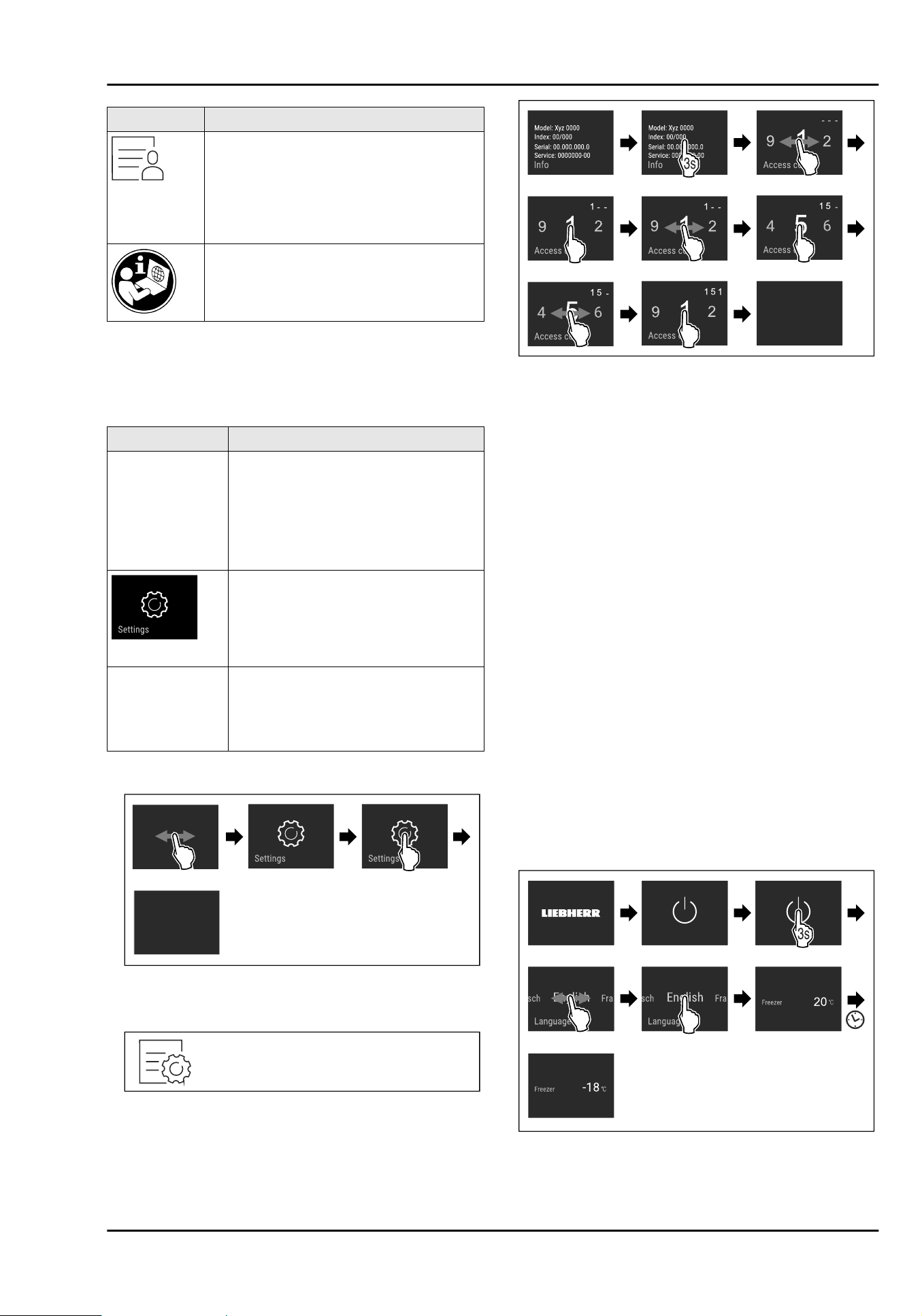
Symbol Beschreibung
Symbol "Erweitertes Menü" öffnen:
Zum Erweiterten Menü navigieren und
erweitertes Menü öffnen.
Wenn notwendig: Im Erweiterten Menü zur
gewünschten Funktion navigieren.
(siehe 3.2.2 Erweitertes Menü öffnen)
Weitere Informationen finden Sie in der
ausführlichen Anleitung im Internet.
Anmerkung: Abbildungen des Displays werden mit englischen
Begriffen dargestellt.
3.2 Menüs
Die Gerätefunktionen sind auf verschiedene Menüs verteilt:
Menü
Beschreibung
Hauptmenü Wenn Sie das Gerät einschalten, dann
befinden Sie sich automatisch im
Hauptmenü.
Von hier aus navigieren Sie zu den
wichtigsten Gerätefunktionen, zum
Einstellungsmenü und zum Erweiterten
Menü.
Einstellungsmenü
Das Einstellungsmenü enthält weitere
Gerätefunktionen zum Einstellen Ihres
Geräts.
Erweitertes Menü Das Erweiterte Menü enthält spezielle
Gerätefunktionen zum Einstellen Ihres
Geräts. Der Zugang zum Erweiterten
Menü ist durch den Zahlencode 1 5 1
geschützt.
3.2.1 Einstellungsmenü öffnen
Fig. 2 Beispielhafte Darstellung
3.2.2 Erweitertes Menü öffnen
Fig.3
Fig. 4 Beispielhafte Darstellung, Zugang mit Zahlencode
151
3.3 Ruhemodus
Wenn Sie das Display 1 Minute nicht berühren, dann wech‐
selt das Display in den Ruhemodus. Im Ruhemodus ist die
Anzeigehelligkeit gedimmt.
3.3.1 Ruhemodus beenden
u
Display kurz mit dem Finger berühren.
w
Ruhemodus ist beendet.
4 Inbetriebnahme
4.1 Gerät einschalten (Erstinbetrieb‐
nahme)
Sicherstellen, dass folgende Voraussetzungen erfüllt sind:
q
Alle Klebestreifen, Klebe- und Schutzfolien sowie Trans‐
portsicherungen im und am Gerät sind entfernt.
q
Alle Werbeeinleger aus den Schubfächern sind
entnommen.
q
Funktionsweise des Touch & Swipe-Displays ist bekannt.
(siehe3 Funktionsweise des Touch & Swipe-Displays)
Gerät über das Touch & Swipe-Display einschalten:
u
Wenn das Display im Ruhemodus ist: Display kurz
berühren.
u
Handlungsschritte nach Abbildung durchführen.
Fig. 5 Beispielhafte Darstellung
w
Statusanzeige erscheint.
w
Gerät kühlt auf die werksseitig eingestellte Zieltempe‐
ratur.
Inbetriebnahme
6 * Je nach Modell und Ausstattung
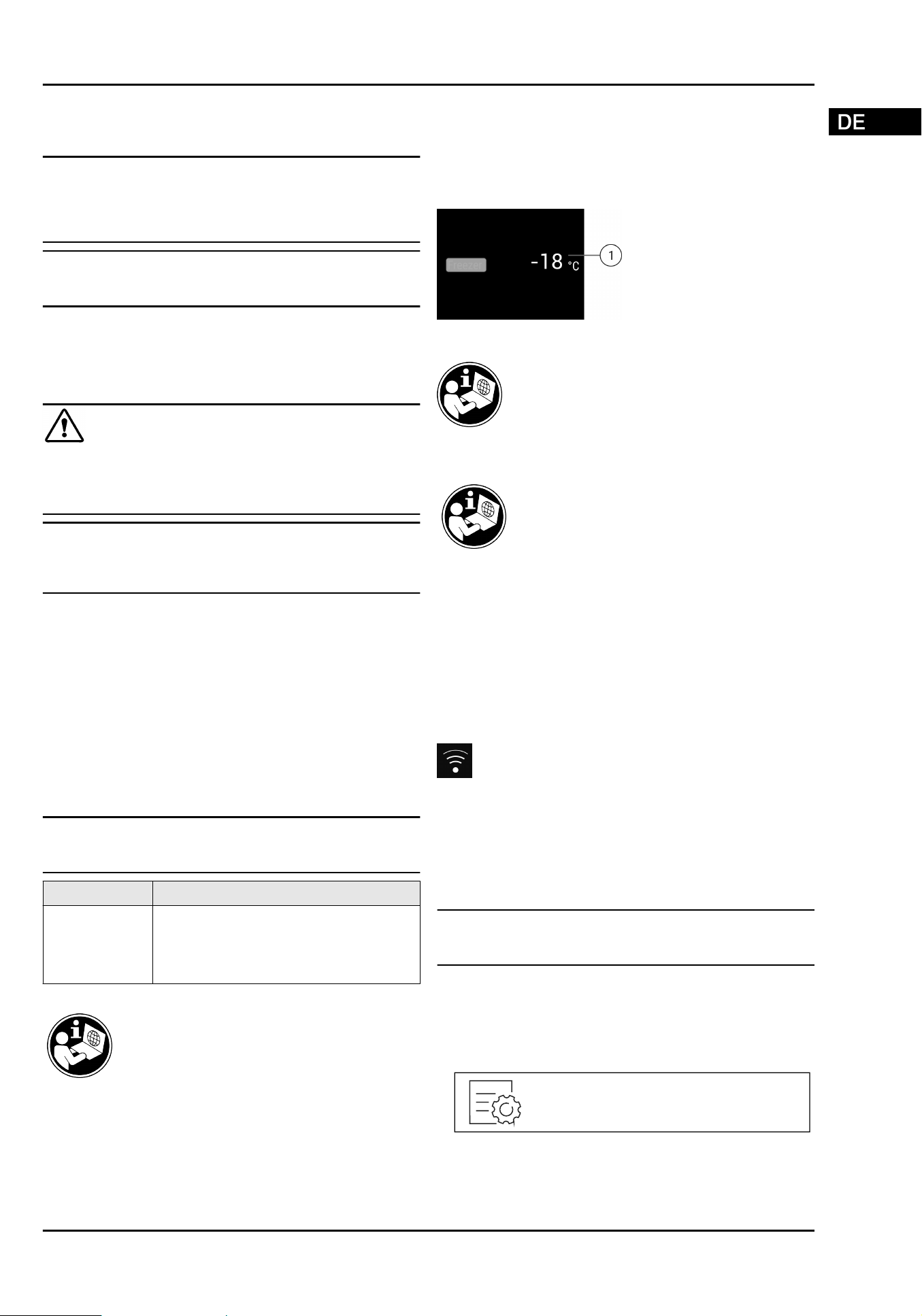
Weitere Informationen:
-
SmartDevice in Betrieb nehmen. (siehe 1.2 SmartDevice)
und (sieheWLAN)
Hinweis
Der Hersteller empfiehlt:
u
Gefriergut bei -18°C oder kälter einlegen.
u
Hinweise zur Lagerung beachten. (siehe 5.1 Hinweise zur
Lagerung)
Hinweis
Sie erhalten Zubehör im Liebherr-Hausgeräte-Shop unter
home.liebherr.com/shop/de/deu/zubehor.html.*
5 Lagerung
5.1 Hinweise zur Lagerung
WARNUNG
Brandgefahr
u
Verwenden Sie keine elektrischen Geräte im Lebensmit‐
telbereich des Gerätes, sofern sie nicht vom Hersteller
empfohlen sind.
Hinweis
Der Energieverbrauch steigt und die Kühlleistung verringert
sich, wenn die Belüftung nicht ausreicht.
u
Luftschlitze immer freihalten.
Folgende Vorgaben zur Lagerung beachten:
-
Lebensmittel gut verpacken.
-
Rohes Fleisch oder rohen Fisch in sauberen, geschlos‐
senen Behältern verpacken. So verhindern Sie, dass
Fleisch oder Fisch andere Lebensmittel berühren oder auf
diese tropfen.
-
Flüssigkeiten in geschlossenen Behältern aufbewahren.
-
Lebensmittel mit Abstand lagern, damit die Luft gut
zirkulieren kann.
-
Lebensmittel entsprechend den Angaben auf der Verpa‐
ckung lagern.
-
Immer das auf der Verpackung angegebene Mindesthalt‐
barkeitsdatum beachten.
Hinweis
Das Nichtbefolgen dieser Vorgaben kann zum Verderb von
Lebensmitteln führen.
Temperaturzone Lebensmittel
Gefrierraum Tiefkühlkost und Gefriergut für mehrere
Monate lagern.
Eiswürfel herstellen.
Frische Lebensmittel einfrieren.
Übersicht zur Lagerung
Weiterführende Informationen zur Lagerung
finden Sie in der Gebrauchsanweisung.
6 Bedienung
6.1 Bedien- und Anzeigeelemente
6.1.1 Statusanzeige
Fig. 6 Statusanzeige zeigt Ist-Temperatur.
(1)
Temperaturanzeige
6.3 Gerätefunktionen
Eine Übersicht über alle Gerätefunktionen
und deren Beschreibungen finden Sie in der
ausführlichen Anleitung im Internet.
Die Gerätefunktionen sind werksseitig so eingestellt, dass
Ihr Gerät voll funktionsfähig ist.
Bevor Sie die Gerätefunktionen verändern, aktivieren oder
deaktivieren, stellen Sie sicher, dass folgende Voraussetz‐
ungen erfüllt sind:
q
Sie haben die Beschreibungen zur Funktionsweise des
Displays gelesen und verstanden. (siehe 3 Funktions‐
weise des Touch & Swipe-Displays)
q
Sie haben sich mit den Bedien- und Anzeigeelementen
Ihres Geräts vertraut gemacht.
WLAN
Mit dieser Funktion verbinden Sie Ihr Gerät mit dem WLAN.
Sie können es dann über die SmartDevice-App auf einem
mobilen Endgerät bedienen. Mit dieser Funktion können
Sie die WLAN-Verbindung auch wieder trennen oder zurück‐
setzen.
Weitere Informationen zu SmartDevice: (siehe 1.2 SmartDe‐
vice)
Hinweis
In den folgenden Ländern ist die SmartDevice-Funktion
nicht verfügbar: Russland, Weißrussland, Kasachstan.
WLAN-Verbindung zum ersten Mal herstellen
Sicherstellen, dass folgende Voraussetzungen erfüllt sind:
q
SmartDevice-App ist installiert (siehe
apps.home.liebherr.com).
q
Registrierung in der SmartDevice-App ist abgeschlossen.
Fig.7
Lagerung
* Je nach Modell und Ausstattung 7
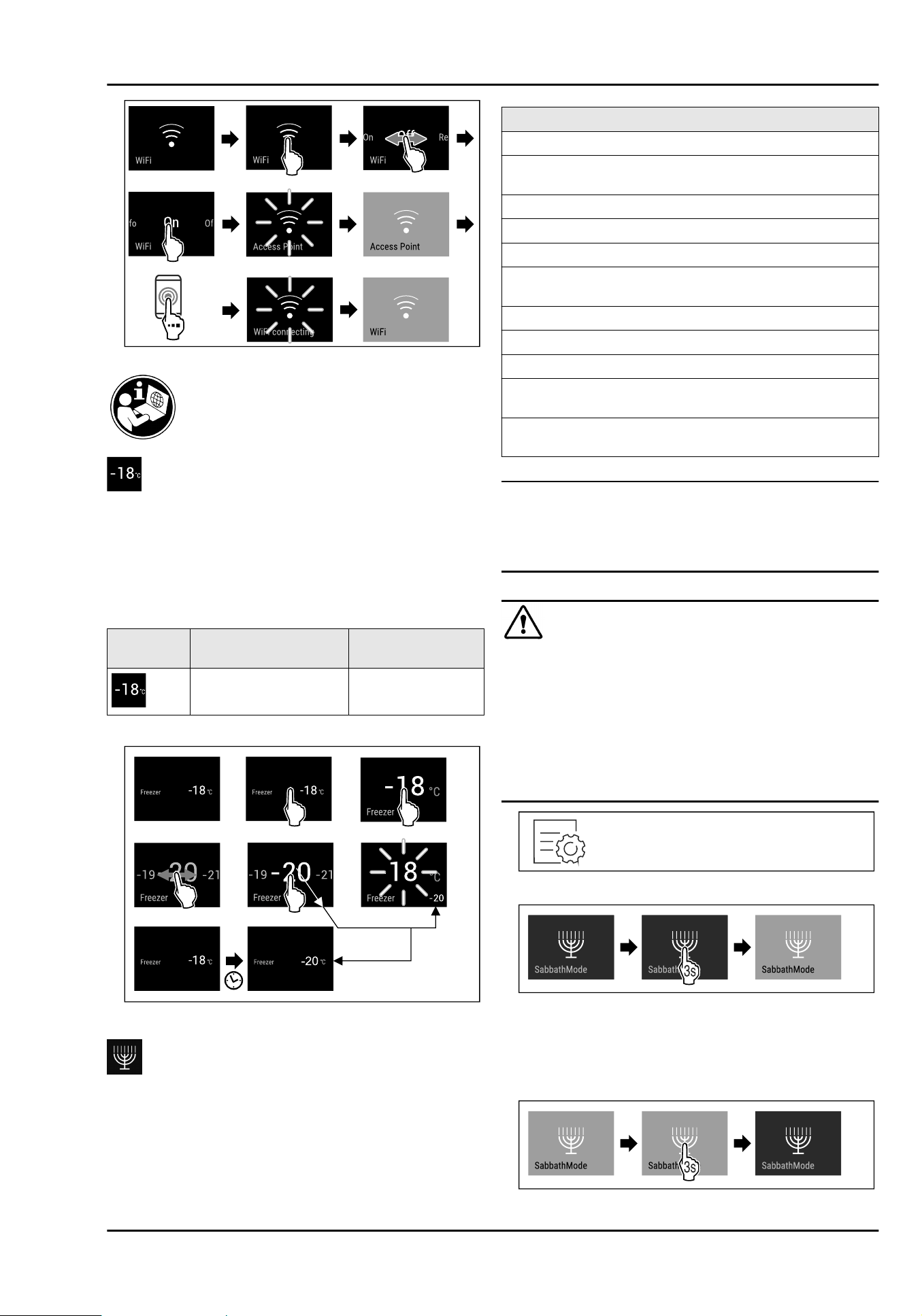
Fig.8
Temperatur
Mit dieser Funktion stellen Sie die Temperatur ein.
Die Temperatur ist abhängig von den folgenden Faktoren:
-
Häufigkeit des Türöffnens
-
Dauer des Türöffnens
-
Raumtemperatur des Aufstellorts
-
Art, Temperatur und Menge der Lebensmittel
Gefrierraum
Werkseitig eingestellte
Temperatur
Empfohlene Einstel‐
lung
-18°C -18°C
Temperatur einstellen
Fig. 9 Beispielhafte Darstellung
SabbathMode
Mit dieser Funktion aktivieren oder deaktivieren Sie den
SabbathMode. Wenn Sie diese Funktion aktivieren, werden
einige elektronische Funktionen abgeschaltet. Dadurch
erfüllt Ihr Gerät die religiösen Anforderungen an jüdischen
Feiertagen wie z. B. an Sabbat und entspricht der STAR-K
Kosher-Zertifizierung.
Gerätezustand bei aktivem SabbathMode
Die Statusanzeige zeigt dauerhaft SabbathMode.
Alle Funktionen im Display außer die Funktion
SabbathMode deaktivieren sind gesperrt.
Aktive Funktionen bleiben aktiv.
Das Display bleibt hell, wenn Sie die Tür schließen.
Die Innenbeleuchtung ist deaktiviert.
Erinnerungen werden nicht ausgeführt. Das eingestellte
Zeitintervall wird angehalten.
Erinnerungen und Warnungen werden nicht angezeigt.
Es gibt keinen Türalarm.
Es gibt keinen Temperaturalarm.
Der Abtauzyklus arbeitet nur zur vorgegebenen Zeit ohne
Berücksichtigung des Gerätegebrauchs.
Nach einem Stromausfall kehrt das Gerät in den
SabbathMode zurück.
Gerätezustand
Hinweis
Dieses Gerät hat die Zertifizierung des Instituts „Institute
for Science and Halacha“. (www.machonhalacha.co.il)
Eine Liste über die STAR-K zertifizierten Geräte finden Sie
unter www.star-k.org/appliances.
SabbathMode aktivieren
WARNUNG
Vergiftungsgefahr durch verdorbene Lebensmittel!
Wenn Sie SabbathMode aktiviert haben und es tritt ein
Stromausfall auf, erscheint keine Meldung in der Status‐
anzeige über den Stromausfall. Wenn der Stromausfall
beendet ist, arbeitet das Gerät im SabbathMode weiter.
Durch den Stromausfall können Lebensmittel verderben und
ihr Verzehr zu einer Lebensmittelvergiftung führen.
Nach einem Stromausfall:
u
Lebensmittel, die gefroren waren und aufgetaut sind,
nicht verzehren.
Fig. 10
Fig.11
SabbathMode deaktivieren
Der SabbathMode wird nach 80 Stunden automatisch deak‐
tiviert. Sie können den SabbathMode jedoch auch jederzeit
manuell deaktivieren:
Fig.12
Bedienung
8 * Je nach Modell und Ausstattung
6.4 Meldungen
7 Ausstattung
8 Wartung
8.1 Auszugssysteme
zerlegen / montieren
8.1.1 Hinweise zum Zerlegen
Sie können einige Auszugssysteme zur Reinigung zerlegen.
Ihr Gerät kann unterschiedliche Auszugssysteme enthalten.
Die folgenden Auszugssysteme sind zerlegbar oder nicht
zerlegbar:
Auszugssystem
zerlegbar/
nicht zerlegbar
Schubfach geführt auf Behälterrippe zerlegbar
8.2 Gerät abtauen
8.3 Gerät reinigen
ACHTUNG
Unsachgemäße Reinigung!
Beschädigungen am Gerät.
u
Ausschließlich weiche Putztücher und ph-neutrale
Allzweckreiniger verwenden.
u
Keine scheuernden oder kratzenden Schwämme oder
Stahlwolle verwenden.
u
Keine scharfen, scheuernden, sand-, chlorid- oder säure‐
haltigen Putzmittel verwenden.
9 Kundenhilfe
9.1 Technische Daten
Für Geräte mit WLAN-Verbindung:
Frequenzangabe
Frequenzband 2,4GHz
Maximal abge‐
strahlte Leistung
< 100 mW
Verwendungs‐
zweck der Funkein‐
richtung
Einbindung in das örtliche WLAN-
Netzwerk zur Datenkommunikation
9.2 Technische Störung
Folgende Störungen können Sie selbst beheben.
9.2.1 Gerätefunktion
Fehler
Ursache Beseitigung
Das Gerät arbeitet
nicht.
→ Das Gerät ist nicht eingeschaltet.
u
Gerät einschalten.
→ Der Netzstecker steckt nicht richtig
in der Steckdose.
u
Netzstecker kontrollieren.
→ Die Sicherung der Steckdose ist
nicht in Ordnung.
u
Sicherung kontrollieren.
→ Die Kaltgerätebuchse steckt nicht
richtig im Gerät.
u
Kaltgerätebuchse kontrollieren.
9.2.2 Ausstattung
Fehler Ursache Beseitigung
Die Innenbeleuch‐
tung leuchtet
nicht.
→ Das Gerät ist nicht eingeschaltet.
u
Gerät einschalten.
→ Die Tür war länger als 15 Minuten
offen.
u
Innenbeleuchtung schaltet sich bei geöffneter Tür nach
ungefähr 15 Minuten. automatisch aus.
Ausstattung
* Je nach Modell und Ausstattung 9
Fehler Ursache Beseitigung
→ Die LED-Beleuchtung ist defekt
oder die Abdeckung ist beschädigt.
u
An den Kundenservice wenden.
10 Außer Betrieb setzen
11 Entsorgung
Außer Betrieb setzen
10 * Je nach Modell und Ausstattung
Contents
1 Appliance at a glance............................................ 12
1.1 Overview of the appliance and equipment.............. 12
1.2 SmartDevice.................................................................. 12
1.3 Appliance range of use............................................... 12
1.4 Conformity..................................................................... 12
2 General safety instructions.................................. 13
3 Functionality of the Touch&Swipe display......... 14
3.1 Navigation and symbol explanation......................... 14
3.2 Menus............................................................................. 14
3.3 Sleep mode................................................................... 15
4 Putting into operation........................................... 15
4.1 Switching on appliance (first use)............................ 15
5 Storage.................................................................. 15
5.1 Information regarding storage................................... 15
6 Controls................................................................. 16
6.1 Controls and displays.................................................. 16
6.1.1 Status display............................................................16
6.3 Appliance functions..................................................... 16
WiFi.............................................................................16
Temperature..............................................................16
SabbathMode............................................................17
6.4 Messages...................................................................... 17
7 Features................................................................. 17
8 Maintenance.......................................................... 17
8.1 Disassembling / assembling pull-out systems...... 17
8.2 Defrosting the appliance............................................ 18
8.3 Cleaning the appliance............................................... 18
9 Customer help....................................................... 18
9.1 Technical specifications............................................. 18
9.2 Technical fault.............................................................. 18
10 Shutting down....................................................... 18
11 Disposal................................................................. 18
The manufacturer is continually working on the further
development of all types and models. Please be aware that
we reserve the right to make changes to the shape, equip‐
ment and technology.
Symbol
Explanation
Read instructions
Please read the information in these instruc‐
tions carefully to understand all of the benefits
of your new appliance.
Symbol Explanation
Additional information on the Internet*
The digital manual with additional information
can be found via the QR code on the front of
the manual or by entering the service number
at home.liebherr.com/fridge-manuals.*
The service number can be found on the serial
tag:*
Fig.Example illustration*
Check appliance
Check all parts for transport damage. If you
have any complaints, please contact your
agent or customer service.
Differences
These instructions apply to a range of models,
so differences are possible. Sections that
apply to certain models only are marked with
an asterisk (*).
Instructions and results
Instructions are marked with a .
Results are marked with a .
Videos
Videos about the appliances are available on
the YouTube channels of Liebherr-Hausgeräte.
These operating instructions apply to:
SUFNc
375i
SUFNd 365i
Note
If your appliance has an N in its appliance designation, it is
a NoFrost appliance.
* Depending on model and options 11
1 Appliance at a glance
1.1 Overview of the appliance and
equipment
Fig. 1 Example illustration, front end
Equipment
(1)
Type plate (4) Controls and tempera‐
ture display
(2) Drawer (5) Interior lighting*
(3) Adjustable feet (7) Defrost water drain
Note
u
Shelves, drawers and baskets are arranged for optimum
energy efficiency when the appliance is delivered.
Changing how the shelves, for example, are inserted in
the fridge compartment does not have any impact on
energy consumption.
1.2 SmartDevice
SmartDevice is the networking solution for your freezer.
If your appliance SmartDevice-enabled or compatible, you
can quickly and easily connect your appliance to your
WiFi. With the SmartDevice app, you can operate your appli‐
ance from a mobile device. Additional functions and setting
options are available in the SmartDevice SmartDevice app.
SmartDevice-
enabled appliance:
Your appliance is capable of being a
SmartDevice. To be able to connect
your device to WiFi, you need to
download the SmartDevice app.
More information
about SmartDe‐
vice:
smartdevice.liebherr.com
Downloading the
SmartDevice app:
After installing and configuring the
SmartDevice, you can connect your
appliance to the WiFi using the
SmartDevice app and the WiFi appli‐
ance function (seeWiFi) .
Note
The SmartDevice function is not available in the following
countries: Russia, Belarus, Kazakhstan.*
1.3 Appliance range of use
Intended use
The appliance is only suitable for cooling
food products in a domestic or household-
like environment. This includes, for example,
use:*
-
in staff kitchens, bed and breakfast estab‐
lishments,*
-
by guests in country houses, hotels, motels
and other accommodation,*
-
for catering and similar services in the
wholesale trade.*
The appliance is suitable for integrated
under-counter installation.
All other types of use are not permitted.
Foreseeable misuse
The following applications are expressly
forbidden:
-
Storing and refrigerating medicines, blood
plasma, laboratory preparations or similar
substances and products based on the
Medical Device Directive 2007/47/EC*
-
Use in areas at risk of explosions
Misusing the appliance may lead to damage
to the goods stored or they may spoil.
1.4 Conformity
The refrigerant circuit has been tested for leaks. When
installed, the appliance complies with the applicable safety
regulations and with the corresponding directives.
For the EU
market:*
The appliance complies with directive
2014/53/EU.*
For the GB
market:*
The appliance complies with Radio
Equipment Regulations 2017 SI 2017
No. 1206.*
The full text of the EU Declaration of Conformity is available
on the following website: www.Liebherr.com*
Appliance at a glance
12 * Depending on model and options

2 General safety instructions
Please keep these instructions in a safe
place and pass them on to any subsequent
owners.*
Read these operating instructions carefully
before use to ensure safe and correct use of
the appliance. Follow the instructions, safety
instructions and warning messages included
at all times. They are important for ensuring
you can operate and install the appliance
safely and without any problems.
Danger for the user:
-
This device can be used by children and
people with impaired physical, sensory or
mental abilities or with a lack of experi‐
ence and knowledge provided that they are
supervised or have received instruction in
the safe use of this device, and about the
resulting hazards.
Children must not play with this appliance.
Cleaning and user maintenance work must
not be carried out by children without adult
supervision. Children aged between 3 and
8 are allowed to load and unload the appli‐
ance. Children below the age of 3 must be
kept away from the appliance unless they
are under continuous adult supervision.
-
The socket must be easily accessible so
that the appliance can be disconnected
quickly from the electricity in an emer‐
gency. It must not be located in the area
behind the appliance.
-
When disconnecting the appliance from the
supply, always take hold of the plug. Do not
pull the cable.
-
In the event of a fault pull out the mains
plug or deactivate the fuse.
-
Do not damage the mains power cable. Do
not operate the appliance with a defective
mains power cable.
-
If the supply cord is damaged, it must be
replaced by a special cord or assembly
available from the manufacturer or its
service agent.*
-
Only customer service or other specially
trained staff may repair or perform other
operations on the appliance.
-
Only install, connect and dispose of the
appliance according to the instructions.
-
Only use the appliance when is installed.
-
Special lights, such as LED lights on the
appliance, are used to illuminate the inte‐
rior of the appliance and are not suitable
for room lighting.*
Fire hazard:
-
This appliance contains a refrigerant
which is environmentally friendly, but flam‐
mable. Leaking refrigerant may ignite. It
is hazardous for anyone other than an
Authorised Service Person to service this
appliance. In Queensland, the authorised
Service Person MUST hold a Gas Work
Authorisation for hydrocarbon refrigerants,
to carry out Servicing or repairs where the
gas system is being opened or charged.*
-
The coolant used (information on the model
plate) is ecofriendly but also flammable.
Any leaking coolant may ignite.
•
Do not damage the refrigerant circuit
pipes.
•
Do not handle ignition sources inside the
appliance.
•
Do not use electrical appliances inside
the appliance (e.g. steam cleaners,
heaters, ice cream makers, etc.).
•
If the refrigerant leaks: remove any naked
flames or ignition sources from the
vicinity of the leakage point. Properly air
the room. Inform customer services.
-
Do not store explosives or sprays using
combustible propellants such as butane,
propane, pentane, etc. in the appliance. To
identify these spray cans, look for the list
of contents printed on the can, or a flame
symbol. Gases possibly escaping may ignite
due to electrical components.
-
Keep burning candles, lamps and other
items with naked flames away from the
appliance so that they do not set the appli‐
ance on fire.
-
WARNING: Keep ventilation openings, in
the appliance enclosure or in the built-in
structure, clear of obstruction.*
-
WARNING: Do not use mechanical devices
or other means to accelerate the defrosting
process, other than those recommended by
the manufacturer.*
-
WARNING: Do not damage the refrigerant
circuit.*
-
Please be sure to store alcoholic drinks
or other packaging containing alcohol in
tightly closed containers. Any alcohol that
leaks out may be ignited by electrical
components.
Danger of tipping and falling:
-
Do not misuse the plinth, drawers, doors
etc. as a step or for support. This applies
particularly to children.
General safety instructions
* Depending on model and options 13
Danger of food poisoning:
-
Do not consume food which has been
stored too long.
Danger of frostbite, numbness and pain:
-
Avoid prolonged skin contact with cold
surfaces or refrigerated/frozen goods or
take protective measures, e.g wear gloves.
-
Do not consume ice cream, water ice or
ice cubes immediately and do not consume
them too cold.*
Danger of injury and damage:
-
Hot steam can lead to injury. Do not use
electrical heating or steam cleaning equip‐
ment, open flames or defrosting sprays to
defrost.
-
Do not use sharp implements to remove the
ice.
Risk of crushing:
-
Do not hold the hinge when opening and
closing the door. Fingers may get caught.
Symbols on the appliance:
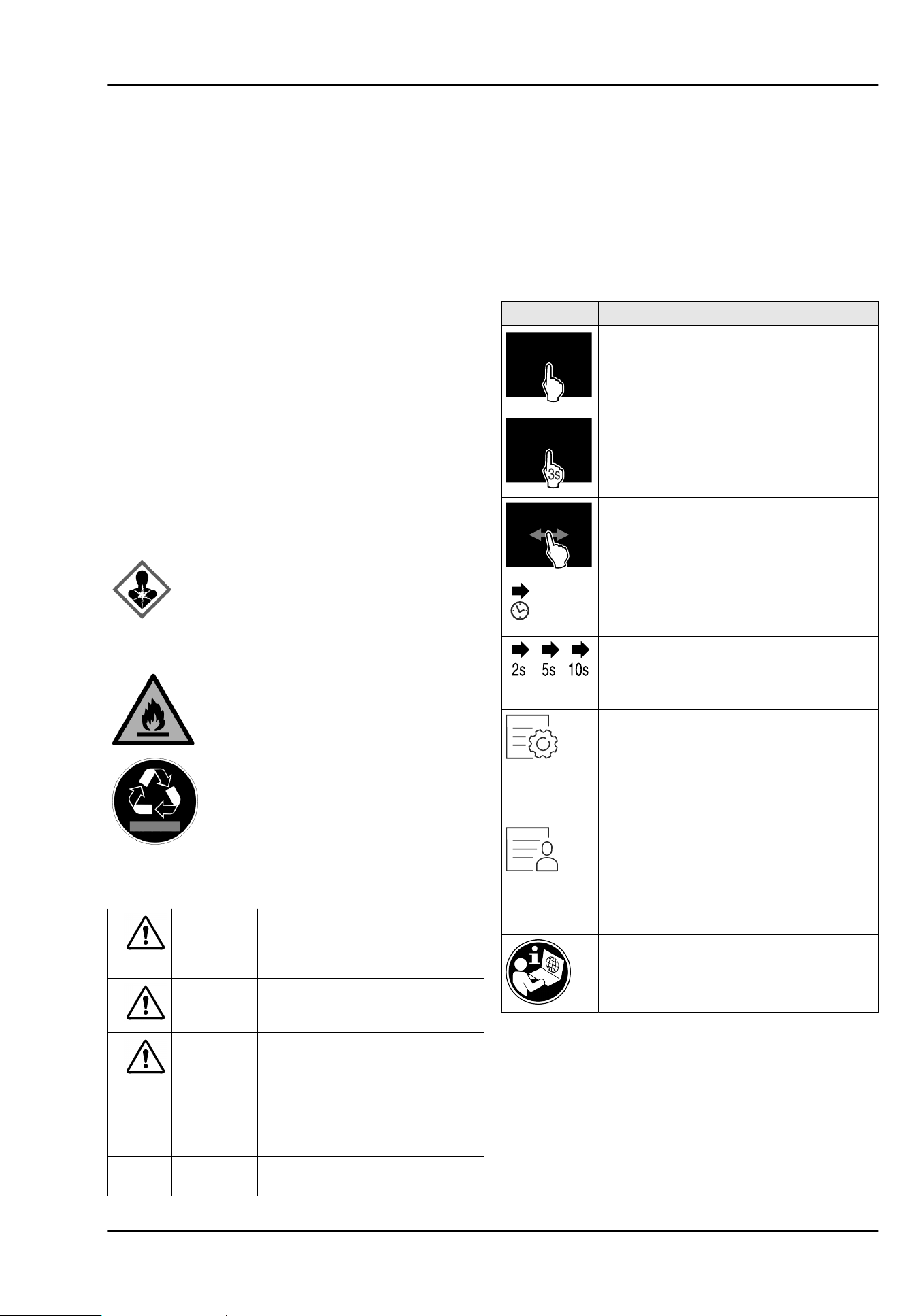
This symbol may be located on the
compressor. It relates to the oil in the
compressor and makes reference to the
risk that: Swallowing or inhaling can be
fatal. This advice is only relevant to recy‐
cling. There is no danger in normal opera‐
tion.
This symbol is located on the compressor
and indicates the danger of flammable
materials. Do not remove the sticker.
This or a similar sticker may be located
on the rear of the appliance. This sticker
indicates that there are vacuum insulation
panels (VIP) or perlite panels in the door
and/or housing. This advice is only relevant
to recycling. Do not remove the sticker.
Please note the warning messages and other
specific advice in the other chapters:
DANGER
indicates an immediately
hazardous situation which will
lead to death or serious injuries if
it is not avoided.
WARNING indicates a hazardous situation
which may lead to death or serious
injuries if it is not avoided.
CAUTION indicates a hazardous situation
which may lead to minor or
moderate injuries if it is not
avoided.
NOTICE indicates a hazardous situation
which may lead to damage to
property if it is not avoided.
Note indicates useful instructions and
tips.
3 Functionality of the
Touch&Swipe display
You operate your appliance using the Touch & Swipe display.
You select appliance functions in the Touch & Swipe display
(hereafter referred to as display) by tapping them. If you
do not perform any action on the display for 10 seconds,
the display either jumps back to the higher-level menu or
directly to the status display.
3.1 Navigation and symbol explanation
Symbol Description
Briefly touch the display:
Activates/deactivates function.
Confirms selection.
Opens submenu.
Touch the display for a specified time (e.g.
3seconds):
Activates/deactivates function or value.
Swipe left or right:
Navigate in the menu.
Arrow with clock:
It takes more than 10 seconds for the
following message to appear in the display.
Arrow with a time indication:
It takes the specified amount of time
until the following message appears in the
display.
“Open Settings menu” symbol:
Navigates to the Settings menu and opens
the settings menu.
If necessary: Navigate to the desired func‐
tion in the Settings menu.
(see 3.2.1 Opening the Settings menu)
“Open Advanced menu” symbol:
Navigates to the Advanced menu and
opens the advanced menu.
If necessary: Navigate to the desired func‐
tion in the Advanced menu.
(see 3.2.2 Opening the expanded menu)
For further information, see the detailed
instructions on the internet.
Note: Illustrations of the display are shown in the English
version.
3.2 Menus
The appliance functions are distributed over various menus:
Functionality of the Touch&Swipe display
14 * Depending on model and options
Menu Description
Main menu When you switch the appliance on, you
are automatically in the main menu.
From here you can navigate to the most
important appliance functions, to the
Settings menu and to the Advanced
menu.
Settings menu
The Settings menu contains additional
appliance functions for setting up your
appliance.
Advanced menu The advanced menu contains special
appliance functions for setting up your
appliance. Access to the Advanced menu
is protected by the numerical code 151.
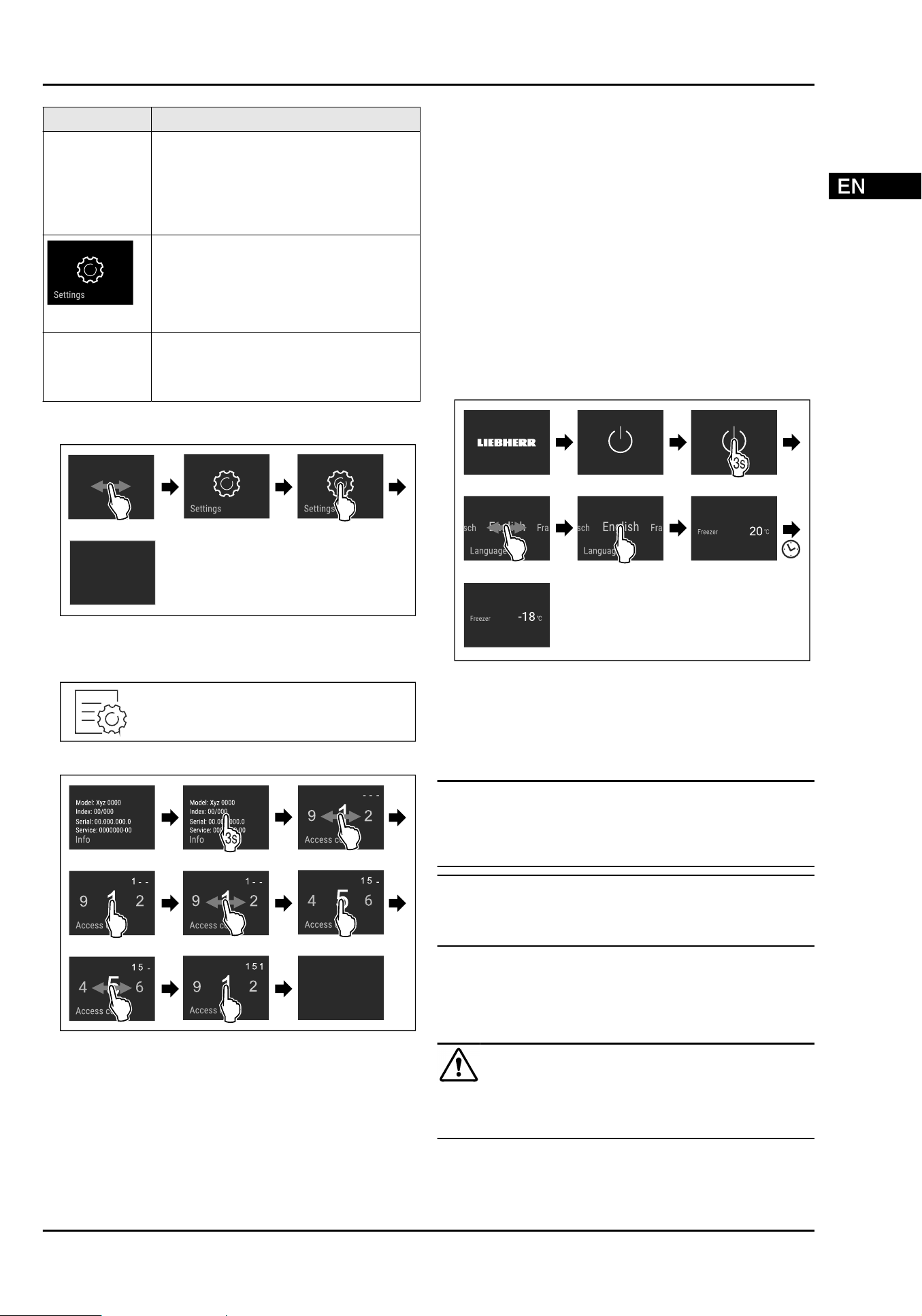
3.2.1 Opening the Settings menu
Fig. 2 Example illustration
3.2.2 Opening the expanded menu
Fig.3
Fig. 4 Example illustration, access with numerical code 151
3.3 Sleep mode
If you do not touch the display for 1 minute, the display
switches to sleep mode. In sleep mode, the display bright‐
ness is dimmed.
3.3.1 Ending sleep mode
u
Touch the display briefly with your finger.
w
Sleep mode is ended.
4 Putting into operation
4.1 Switching on appliance (first use)
Make sure that the following requirements are fulfilled:
q
All adhesive strips, adhesive and protective films and
transport locks are removed from inside and on the appli‐
ance.
q
All marketing leaflets are removed from the drawers.
q
You are familiar with the functionality of the
Touch & Swipe display. (see 3 Functionality of the
Touch&Swipe display)
Switch on the appliance using the Touch&Swipe display:
u
If the display is in sleep mode: Briefly touch the display.
u
Carry out action steps according to the illustration.
Fig. 5 Example illustration
w
Status display appears.
w
The appliance cools to the temperature set at the factory.
More information:
-
Start the SmartDevice for the first time. (see 1.2 Smart‐
Device) and (seeWiFi)
Note
The manufacturer recommends:
u
Store frozen foods at -18°C or colder.
u
Observe the notes on storing food. (see 5.1 Information
regarding storage)
Note
Accessories can be purchased from the Liebherr-
Hausgeräte store at home.liebherr.com/shop/de/deu/
zubehor.html.*
5 Storage
5.1 Information regarding storage
WARNING
Risk of fire
u
Do not use any electrical appliances in the food area of
the appliance unless recommended by the manufacturer.
Putting into operation
* Depending on model and options 15
Note
The energy consumption increases and the cooling power
goes down if ventilation is not sufficient.
u
Always keep air slots clear.
Observe the following specifications for storage:
-
Package food properly.
-
Package raw meat or fish in clean, closed containers.
This will prevent meat or fish from touching or dripping
onto other food.
-
Keep liquids in closed containers.
-
Leave space between goods to ensure good air circula‐
tion.
-
Store food according to the instructions on the pack‐
aging.
-
Always observe the best-before date indicated on the
packaging.
Note
Failure to follow these guidelines can lead to foodstuffs
spoiling.
Temperature zone Food
Freezer compart‐
ment
Store deep-frozen food and frozen
food for several months.
Make ice cubes.
Freeze fresh food.
Overview of storing items
Further information on storage can be found in
the operating instructions.
6 Controls
6.1 Controls and displays
6.1.1 Status display
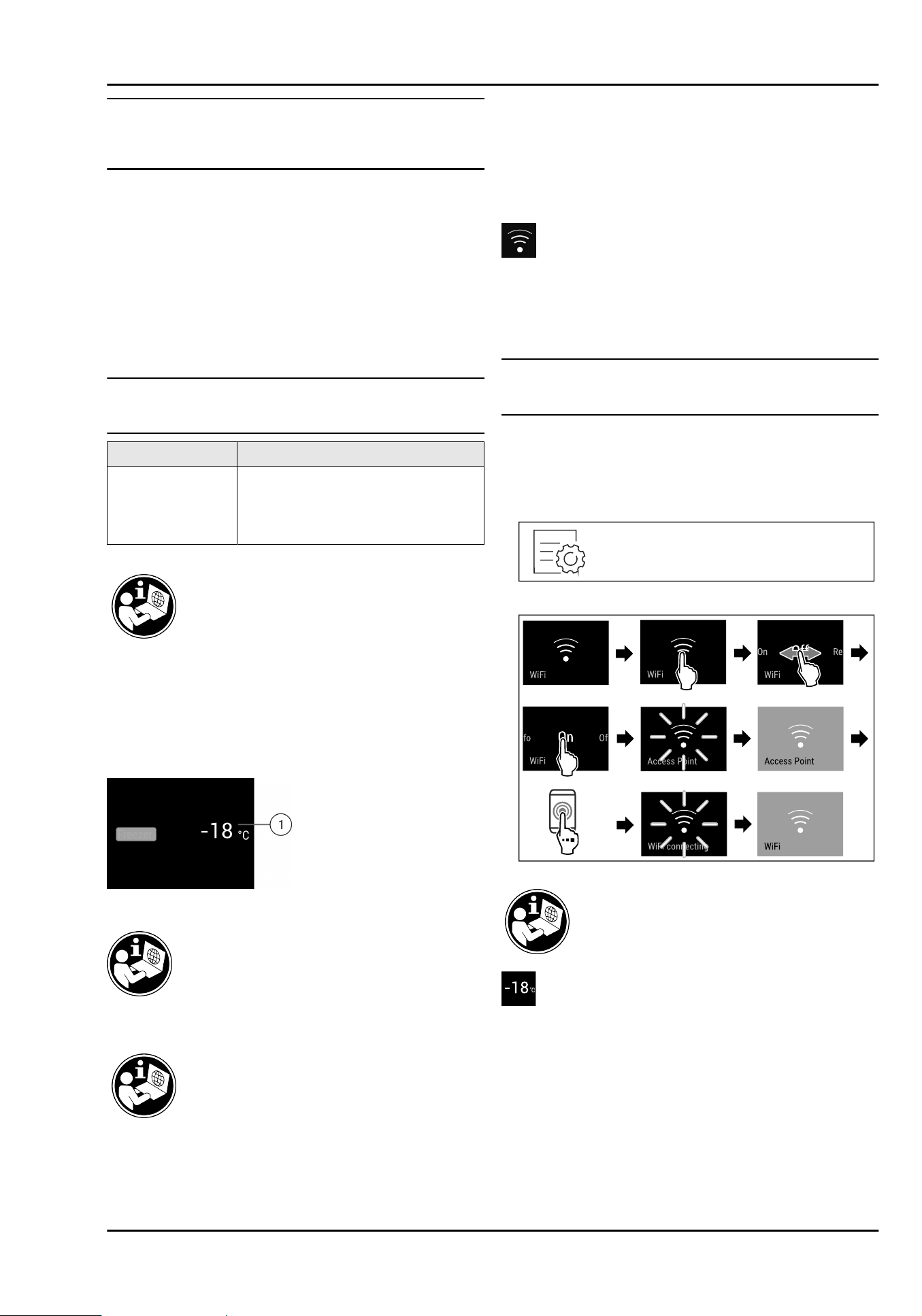
Fig. 6 The status display shows the actual temperature.
(1)
Temperature display
6.3 Appliance functions
An overview of all appliance functions and
their descriptions can be found in the detailed
instructions on the Internet.
The appliance functions are set at the factory so that your
appliance is fully functional.
Before you alter, activate or deactivate the device functions,
make sure that the following requirements are met:
q
You have read and understood the descriptions of
how the display works. (see 3 Functionality of the
Touch&Swipe display)
q
You have familiarised yourself with the operating and
display elements of your appliance.
WiFi
Use this function to connect your appliance to WiFi. You can
then operate it via the SmartDevice app on a mobile device.
You can also use this function to disconnect or reset the
WiFi connection.
More information on the SmartDevice: (see1.2 SmartDevice)
Note
The SmartDevice function is not available in the following
countries: Russia, Belarus, Kazakhstan.
Establishing the WiFi connection for the first time
Make sure that the following requirements are fulfilled:
q
You have installed the SmartDevice app (see
apps.home.liebherr.com).
q
Registration in the SmartDevice app is completed.
Fig.7
Fig.8
Temperature
Use this function to set the temperature.
The temperature depends on the following factors:
-
Frequency of door opening
-
Duration of door opening
-
Room temperature of the installation site
-
Type, temperature and quantity of food
Controls
16 * Depending on model and options
Freezer compart‐
ment
Factory-set
temperature
Recommended
setting
-18°C -18°C
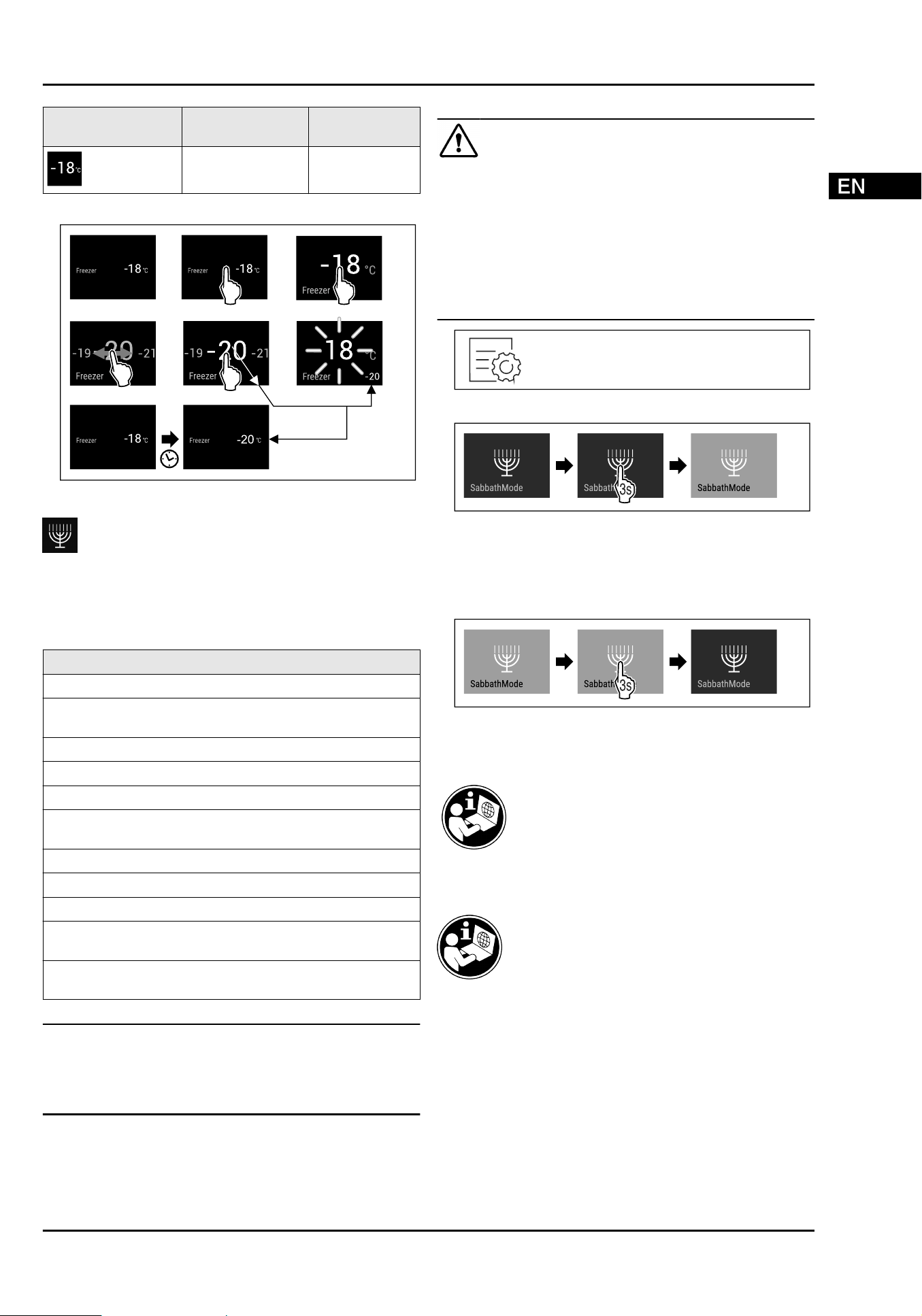
Setting the temperature
Fig. 9 Example illustration
SabbathMode
You can use this function to activate or deactivate
SabbathMode. If you activate this function, some electronic
functions are switched off. As a result, your device meets
the religious requirements for Jewish holidays such as
Sabbath and complies with STAR-K Kosher certification.
Device status when SabbathMode is active
The status display shows SabbathMode permanently.
All functions on the display are locked except for the
Deactivate SabbathMode function.
Active functions remain active.
The display remains bright when you close the door.
The interior lighting is deactivated.
Reminders are not implemented. The set time interval
stops.
Reminders and warnings are not displayed.
There is no door alarm.
There is no temperature alarm.
The defrosting cycle operates only for the specified time,
without considering the appliance consumption.
After a power failure, the appliance returns to
SabbathMode.
Device status
Note
This appliance has certification from the “Institute for
Science and Halacha”. (www.machonhalacha.co.il)
You can find a list of STAR-K-certified appliances at
www.star-k.org/appliances.
Activating SabbathMode
WARNING
Danger of food poisoning from spoiled food!
If you have SabbathMode activated and a power failure
occurs, no message appears in the status display about the
power failure. Once the power is restored, the appliance
continues to operate in SabbathMode. The power failure
may mean that food spoils and the consumption of this food
could lead to food poisoning.
After a power failure:
u
Do not consume food that was frozen and has thawed
out.
Fig. 10
Fig.11
Deactivating SabbathMode
The SabbathMode is automatically deactivated after
80 hours. However, you can also deactivate SabbathMode
manually at any time:
Fig.12
6.4 Messages
7 Features
8 Maintenance
8.1 Disassembling / assembling pull-
out systems
8.1.1 Notes on disassembly
You can disassemble some of the pull-out systems for
cleaning. Your appliance can contain a variety of pull-out
systems.
Features
* Depending on model and options 17
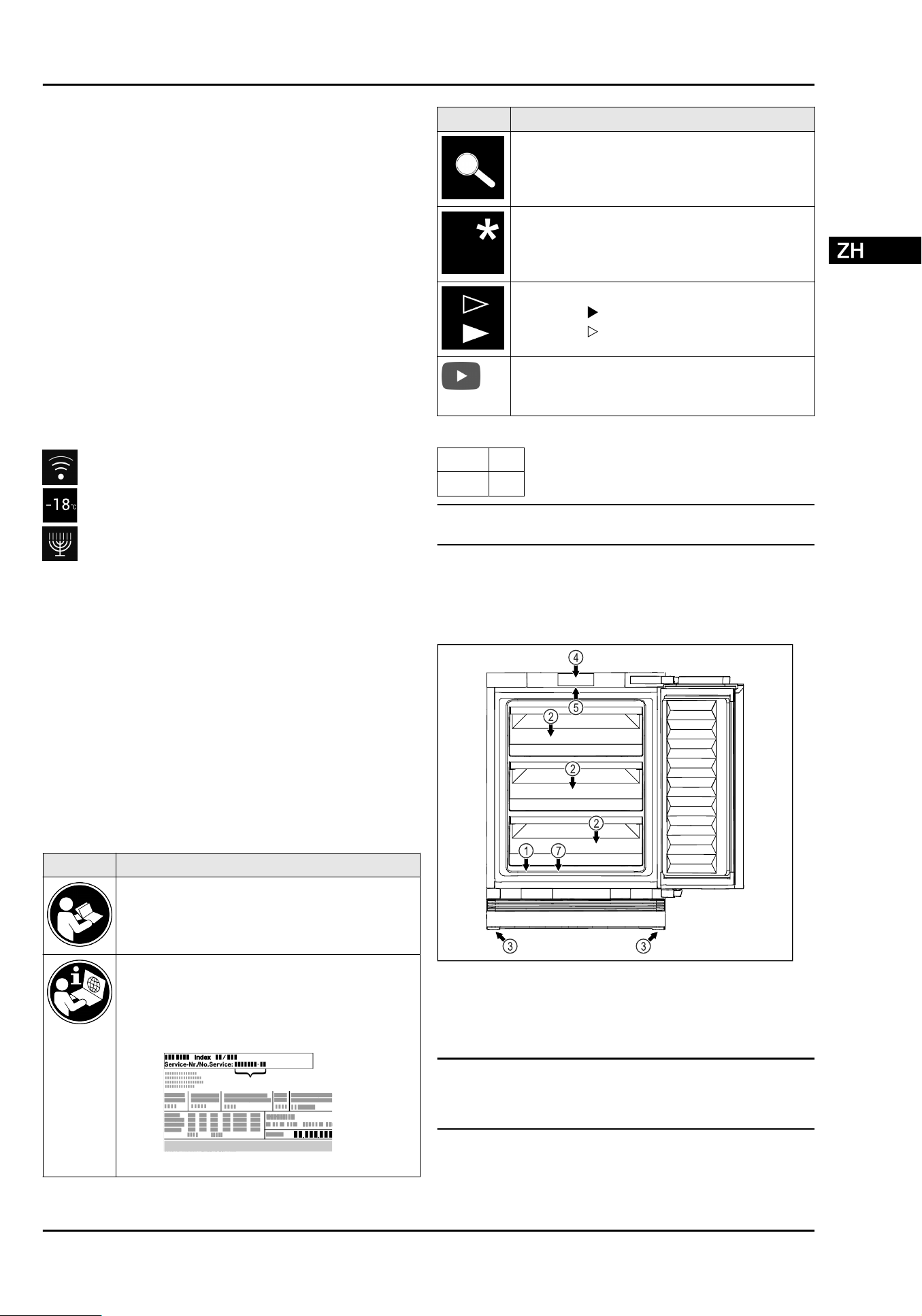
The following pull-out systems can be disassembled or
cannot be disassembled:
Pull-out system can be disassembled/
cannot be disassembled
Drawer guided on container rib can be disassembled
8.2 Defrosting the appliance
8.3 Cleaning the appliance
NOTICE
Improper cleaning!
Damage to the appliance.
u
Only use soft cleaning cloths and ph-neutral all-purpose
cleaners.
u
Do not uses abrasive sponges or steel wool which may
cause scratches.
u
Do not use any sharp or abrasive cleaning agents, nor
any that contain sand, chloride or acid.
9 Customer help
9.1 Technical specifications
For appliances with a WiFi connection:
Frequency specification
Frequency band 2.4GHz
Maximum radiated
power
< 100 mW
Purpose of the
wireless equipment
Integration in the local WiFi network
for data communication
9.2 Technical fault
You can fix the following faults yourself.
9.2.1 Appliance function
Defect
Cause Remedy
The appliance is
not working.
→ The appliance is not switched on.
u
Switch the appliance on.
→ The power plug is not properly
plugged into the socket.
u
Check the power plug.
→ There is something wrong with the
power outlet fuse.
u
Check the fuse.
→ The IEC socket is not plugged into
the appliance correctly.
u
Check the IEC socket.
9.2.2 Features
Defect Cause Remedy
The internal light
does not come on.
→ The appliance is not switched on.
u
Switch the appliance on.
→ The door was open for longer than
15 minutes.
u
Interior lighting switches off automatically after
about 15 minutes when the door is open.
→ The LED interior light is faulty or
the lid is damaged.
u
Contact Customer Service.
10 Shutting down 11 Disposal
Customer help
18 * Depending on model and options
内容
1 设备一览................................................................. 19
1.1 冰箱和装备一览............................................................. 19
1.2 SmartDevice.................................................................. 19
1.3 设备的使用范围............................................................. 20
1.4 一致性............................................................................. 20
2 一般安全提示.......................................................... 20
3 Touch&Swipe 显示屏工作原理.............................. 21
3.1 导航和符号说明............................................................. 21
3.2 菜单................................................................................. 21
3.3 睡眠模式......................................................................... 22
4 投入使用................................................................. 22
4.1 开启冰箱(首次调试)................................................. 22
5 存放........................................................................ 22
5.1 存放提示......................................................................... 22
6 操作........................................................................ 23
6.1 操作和显示元件............................................................. 23
6.1.1 状态显示器................................................................. 23
6.3 冰箱功能......................................................................... 23
WLAN......................................................................... 23
温度............................................................................ 23
SabbathMode........................................................... 24
6.4 消息................................................................................. 24
7 装备........................................................................ 24
8 维护........................................................................ 24
8.1 拆卸 /安装拉出系统..................................................... 24
8.2 给冰箱除冰..................................................................... 24
8.3 清洁冰箱......................................................................... 24
9 客户帮助................................................................. 24
9.1 技术数据......................................................................... 24
9.2 技术故障......................................................................... 25
10 停机........................................................................ 25
11 废弃处理................................................................. 25
12 产品中有害物质的名称及含量................................. 26
制造商不断致力于各型号和品牌的进一步开发。所以请您理
解,我们必须保留在样式、装备和技术上进行修改的权利。
符号
说明
阅读说明书
为了了解您的新冰箱的所有优点,请仔细阅读本
说明书中的提示。
线上的补充信息*
您 可 通 过扫描说明书封面上的二维码或在
home.liebherr.com/fridge-manuals 输 入 服务
代号在线查看带有附加信息的电子说明书。*
服务代号请参阅铭牌:*
Fig.例图*
符号 说明
检查冰箱
检查所有部件是否有运输损坏。如有投诉,请您
联系经销商或客户服务部。
偏差
本说明书适用于多个型号,可能存在偏差。仅适
用于特定冰箱的段落用星号 (*) 标注。
操作说明和操作结果
操作说明用 标注。
操作结果用 标注。
视频
在 Liebherr-Hausgeräte 的 YouTube 频道上有冰
箱视频可供使用。
本使用说明书适用于:
SUFNc
375i
SUFNd 365i
提示
如果您冰箱的设备名称中含有 N,代表它是 NoFrost 冰箱。
1 设备一览
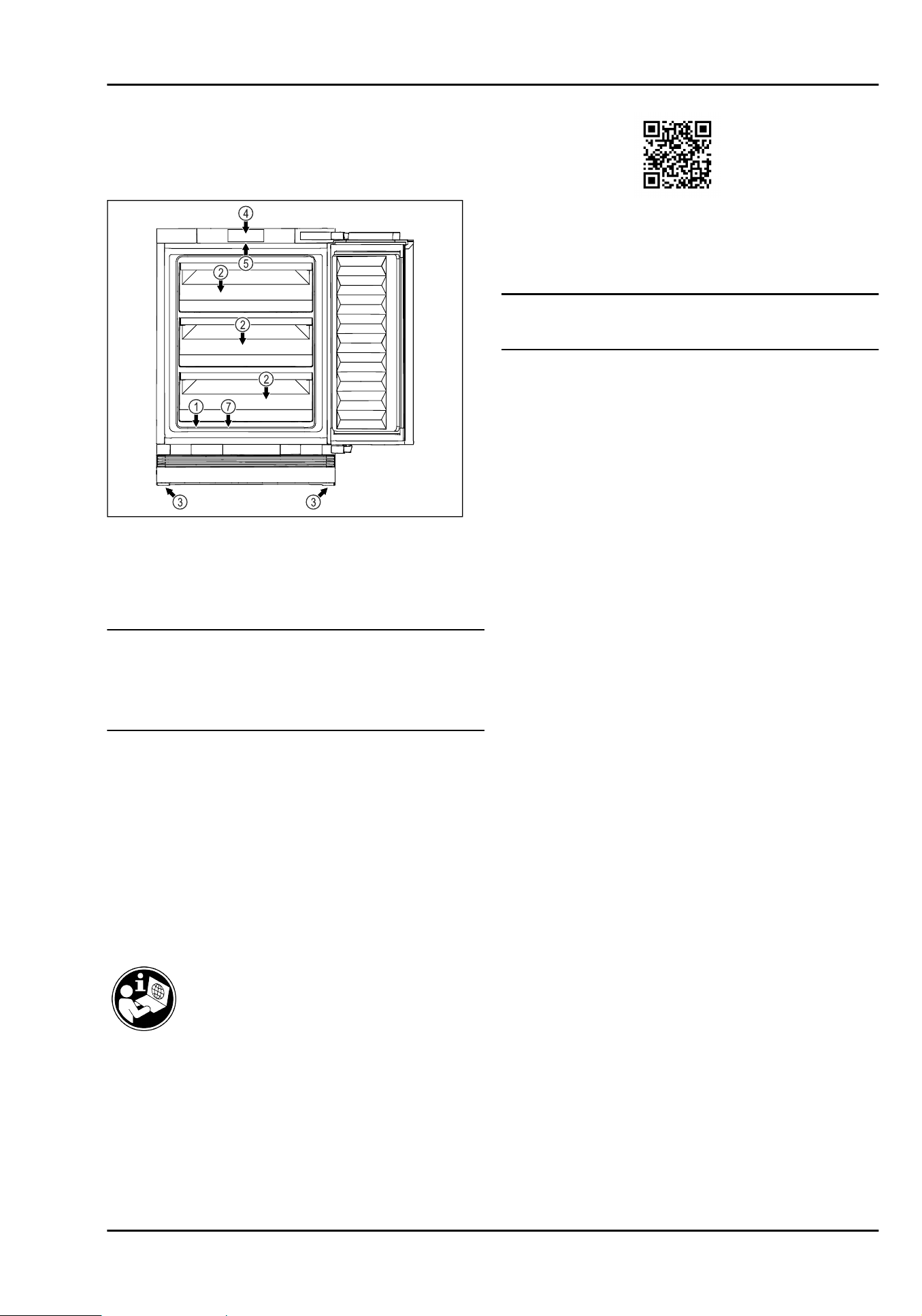
1.1 冰箱和装备一览
Fig.1
正面例图
装备
(1)
铭牌 (4) 操作元件和温度显示器
(2) 抽屉 (5) 内部照明装置*
(3) 垫脚 (7) 融化水出口
提示
u
交货时排列存放架、抽屉或篮筐的方式有助于最大限度地提
高能源效率。更改给定的嵌入方案内的布置,例如冷藏区中
的搁板,对能源消耗没有影响。
1.2 SmartDevice
SmartDevice 是您冷冻设备的联网解决方案。
设备一览
* 按冰箱型号配置 19
如果您的设备支持 SmartDevice 或已为此做好准备,则可以将
其快速、简单地接入到您的 WLAN 中。借助 SmartDevice 应用
程 序 , 可 以 从 一 个 移 动式终端设备上操作您的设备。 在
SmartDevice 应用程序中为您提供了额外的功能和设置选项。
支 持 SmartDevice
的设备:
您的冰箱支持 SmartDevice。为了将您
的设备与 WLAN 相连,您必须下载
SmartDevice 应用程序。
更 多 有 关
SmartDevice 的 信
息:
smartdevice.liebherr.com
下载 SmartDevice
应用程序:
在安装并配置 SmartDevice 应用程序之
后,您可以借助 SmartDevice 应用程序
和设备功能 WLAN (参见WLAN) 将设备
接入到您的 WLAN 中。
提示
在以下国家无法提供 SmartDevice 功能:俄罗斯、白俄罗斯、
哈萨克斯坦。*
1.3 设备的使用范围
规定使用
设备仅适合在家庭或类似于家庭的环境中用于食
品的冷却。包括在下列情况中的使用*
-
在私人餐厅,早餐店中;*
-
在别墅、宾馆、旅店和其他宿营地中供客人使
用;*
-
在承办酒席时,和类似的批发服务。*
设备适用于集成下装。
不允许其他的使用方式。
可预见误用
严禁下列应用:
-
存放和冷却药品、血浆、实验室药物或符合医
学产品准则 2007/47/EG 的物质和制品*
-
应用在具有爆炸危险的区域
违规使用该设备可能导致存放的物品损坏或腐
烂。
1.4 一致性
检查制冷剂循环是否密封。冰箱在安装状态下符合相关的安全
规定以及相应的准则。
针对
欧盟市场:* 冰箱符合准则 2014/53/EU。*
针对 GB 市场:* 冰箱符合 Radio Equipment Regulations
2017 SI 2017 No. 1206。*
欧 盟符合性声明的全 文 可 从 以 下 网 址获得:
www.Liebherr.com*
2
一般安全提示
小心保管本使用说明,如有必要转交给下一个用
户。*
请在使用前认真阅读使用说明,以便按规定、安
全使用冰箱。始终遵循其中包含的指示、安全提
示和警告提示。这对于安全、无故障安装和运行
冰箱至关重要。
对使用者的危险:
-
儿童和有生理、心理或精神障碍,或者缺乏使
用经验和相关知识的人,只有当有专人监管或
指导他们安全使用冰箱,并获悉由此可能引起
的危险时,方可操作此冰箱。
儿童不得玩耍冰箱。儿童不得在无人监管的情
况下清洁和维护冰箱。3-8 岁的儿童可以为冰
箱装货和卸货。在无人持续监管的情况下,小
于 3岁的儿童必须远离冰箱。
-
插座必须能够轻松接触到,以便能在紧急情况
下快速将冰箱与电流断开。插座必须位于冰箱
背部范围之外。
-
将设备与电源断开时,始终抓住插头。不要拉
电缆。
-
出现故障时拔出电源插头或者关闭保险装置。
-
不要损坏电源连接线。不要使用损坏的电源连
接线运行设备。
-
如果电源线损坏,则必须更换成从制造商或其
客户服务人员处购买的专用电缆或专用组件。
*
-
冰箱的修理和干预只能由客户服务人员或其他
接受过培训的专业人员完成。
-
只能按使用说明的规定安装、连接以及清理设
备。
-
只能操作安装完成的设备。
-
特殊光源,例如冰箱上的 LED,用于冰箱内部
照明,而不适合用于室内照明。*
火灾危险:
-
此冰箱含有环保、但易燃的制冷剂。流出的制
冷剂可能自燃。只允许经过授权的客户服务人
员维护此冰箱,否则会面临危险。 在
Queensland(昆士兰州),经过授权的服务
人员必须持有碳氢制冷剂气体工作许可证,才
能进行打开或填充气体设备的维护或修理工
作。*
-
所含有的制冷剂(铭牌上说明)是环保的,但
易燃。漏出的制冷剂可能自燃。
•
不要损坏制冷回路的管道。
•
不要在设备内使用火源。
•
在设备内部不能使用电气设备(例如:蒸汽
清洁设备、加热器、冰激淋机等等)。
•
如果制冷剂泄漏:清除泄漏位置附近的明火
或火源。使室内通风良好。通知客户服务部
门。
-
请勿将易爆物品或装有可燃发酵剂的喷雾器,
如丁烷、丙烷、戊烷等存放于设备内。根据印
制的内容或火焰标志来识别出相应的喷雾器。
一般安全提示
20 * 按冰箱型号配置
可能溢出的气体会由于导致电气部件引起燃
烧。
-
让燃烧的蜡烛、灯和其他有明火的物品远离设
备,以避免设备着火。
-
警告:不得关闭冰箱外壳或安装外壳中的通风
孔。*
-
警告:请勿使用非制造商推荐的任何其他机械
辅助工具或其他方式来加速除霜过程。*
-
警告:请勿损坏制冷剂循环。*
-
酒精饮料或其它装有酒精的容器只能密封存
放。可能溢出的酒精会由于电气部件引起燃
烧。
坠落和翻倒危险:
-
不可将基座、抽屉、拉门等当作踏板使用或用
作支撑。尤其是孩子必须遵守这一规定。
食物中毒的危险:
-
不要吃喝存放过久的食品。
冻伤、麻木和疼痛的危险:
-
避免皮肤长时间与冰冷的表面或冷藏/冰冻品
接触或者采取保护措施,例如使用手套。
-
请勿立即食用和食用过冷的冰激淋、沙冰或者
冰块。*
受伤和损坏危险:
-
热蒸汽会造成损坏。不要使用电气加热或蒸汽
清洁设备,明火或除冰喷射装置进行除冰。
-
不要用尖利的物品除冰。
压伤危险:
-
在打开和关闭门时不得将手伸入铰链。手指可
能挤伤。
设备上的符号:
符号位于压缩机上。该符号涉及压缩机中的油
品并指明下列危险:油品被吞入或吸入呼吸道
可能存在致命危险。该提示仅适用于回收利用
过程。在正常运行过程中不存在任何危险。
此标识位于压缩机上,并用于标记可燃危险材
料的危险。不要取下贴纸。
此贴纸或类似贴纸可能位于冰箱的背面。此类
贴纸表明门和/或壳体中存在真空隔热板 (VIP)
或珍珠岩板。该提示仅适用于回收利用过程。
不要取下贴纸。
请遵守警告提示和其他章节中的其他特别提示:
危险
指出如果不加避免,将导致死亡或严
重身体伤害的直接危险情况。
警告 指出如果不加避免,可能导致死亡或
严重身体伤害的危险情况。
小心 指出如果不加避免,可能导致轻微或
中度身体伤害的危险情况。
注意 指出如果不加避免,可能导致物质损
失的危险情况。
提示 指出有用的说明和技巧。
3 Touch&Swipe 显示屏工作原理
您 可 以 使用 Touch & Swipe 显示屏操作冰箱。使用
Touch & Swipe 显示屏(以下简称显示屏),您可通过点击或
滑动选择设备功能。如果在 10 秒内未在显示屏上执行任何操
作,显示屏会跳至上一级菜单或直接跳回到状态显示。
3.1 导航和符号说明
符号
说明
短时触摸显示屏:
激活/禁用功能。
确认选择。
打开子菜单。
长时触摸显示屏达指定时间(如 3 秒):
激活/禁用功能或值。
向右或向左滑动:
在菜单中导航。
带时钟的箭头:
超过 10 秒后,显示屏上会出现以下显示。
带时间说明的箭头:
指定时间过后,显示屏上会出现以下显示。
“打开设置菜单”符号:
导航至设置菜单并打开设置菜单。
如有必要:在设置菜单中导航至所需功能。
(参见 3.2.1打开设置菜单)
打开“高级菜单”符号:
导航至高级菜单并打开高级菜单。
如有必要:在高级菜单中导航至所需功能。
(参见 3.2.2打开高级菜单)
更多信息请查阅互联网中的详细说明书。
注意:显示屏的图像带有英文术语显示。
3.2 菜单
设备功能分为不同菜单:
菜单
说明
主菜单 如果开启冰箱,会自动进入主菜单。
从这里导航至最重要的冰箱功能、设置菜单和
高级菜单。
Touch&Swipe 显示屏工作原理
* 按冰箱型号配置 21
菜单 说明
设置菜单
设置菜单包含更多用于设置冰箱的冰箱功能。
高级菜单 高级菜单包含用于设置冰箱的特殊冰箱功能。
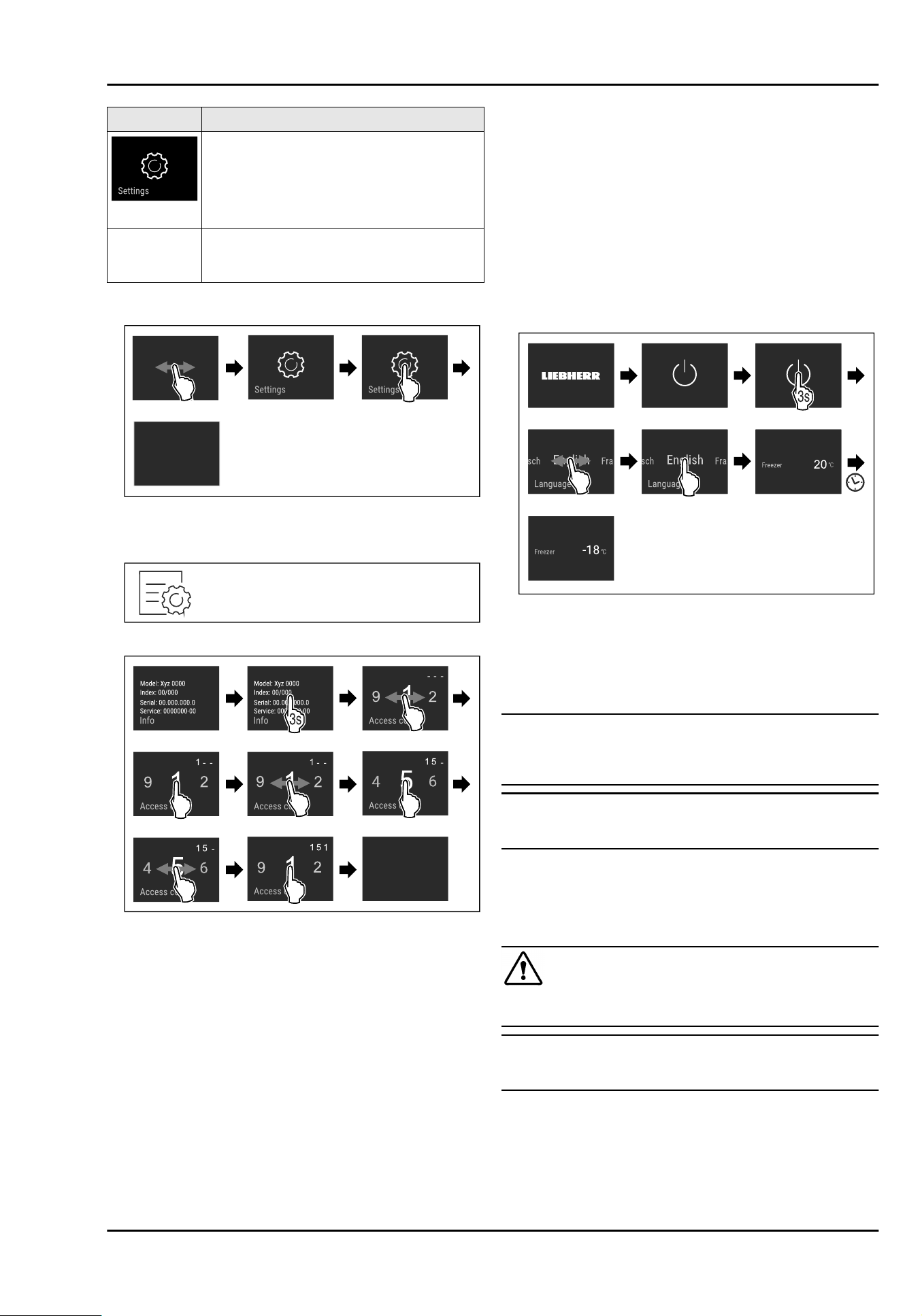
通过数字代码 1 5 1 保护高级菜单的访问入
口。
3.2.1 打开设置菜单
Fig.2
例图
3.2.2 打开高级菜单
Fig.3
Fig.4
例图,使用数字代码
151
访问
3.3 睡眠模式
如果 1 分钟不触摸显示屏,显示屏将切换到睡眠模式。在睡眠
模式下,显示屏亮度变暗。
3.3.1 结束睡眠模式
u
用手指短时触摸显示屏。
w
睡眠模式已结束。
4
投入使用
4.1 开启冰箱(首次调试)
确保已满足下列前提条件:
q
已移除冰箱内部和冰箱上的所有透明胶带、粘合薄膜和保护
膜以及运输保险装置。
q
已从抽屉中取出所有广告插页。
q
已 了 解 Touch & Swipe 显示屏工作原理 。 ( 参
见3 Touch&Swipe 显示屏工作原理)
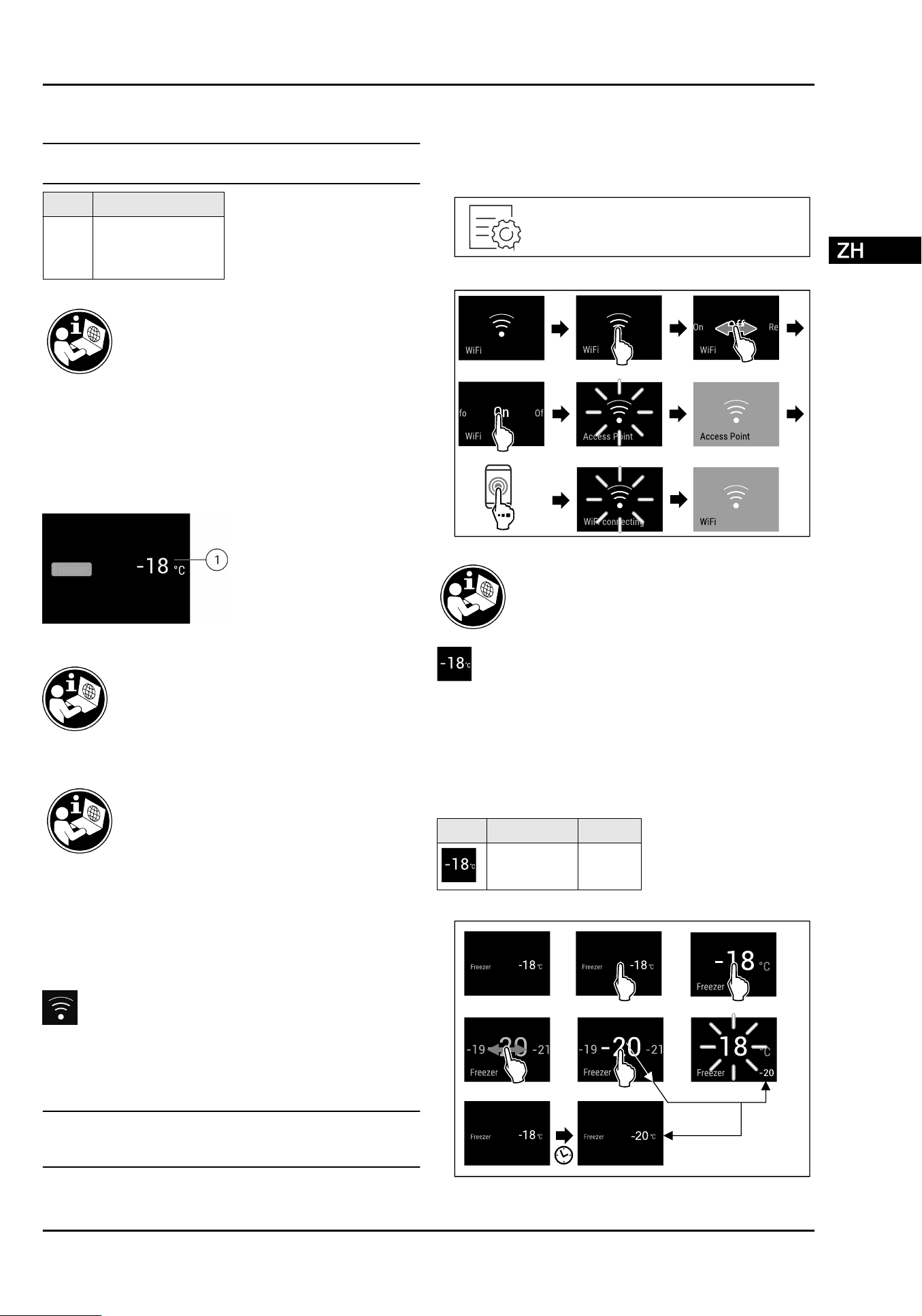
通过 Touch&Swipe 显示屏开启冰箱:
u
如果显示屏处于睡眠模式:短时触摸显示屏。
u
按图执行操作步骤。
Fig.5
例图
w
显示状态显示。
w
冰箱冷却至出厂设置的目标温度。
更多信息:
-
启 用 SmartDevice 。 ( 参 见 1.2 SmartDevice) 和 ( 参
见WLAN)
提示
制造商建议:
u
将冷冻品放置在 -18°C 或更冷的温度下。
u
注意存放提示。 (参见 5.1存放提示)
提示
您 可 以 通 过 Liebherr-Hausgeräte 网 店 购买附件,网址为
home.liebherr.com/shop/de/deu/zubehor.html。*
5 存放
5.1 存放提示
警
告
火灾危险
u
制造商不建议在设备的食品区使用电子装置。
提示
如果通风不充分,能耗升高,制冷功率减小。
u
保持通风口始终畅通。
注意以下存放规定:
-
妥善包装食品。
-
用干净、密闭的容器包装生肉或生鱼。这样可以防止肉或鱼
接触或滴落到其他食品上。
-
将液体保存在密闭容器中。
-
食品存放应保持一定距离,保证空气能良好循环。
投入使用
22 * 按冰箱型号配置
-
按照包装上的说明存放食品。
-
始终注意包装上的保质期。
提示
不遵守这些准则会导致食品变质。
温度区 食品
冷冻室 存放冷冻品几个月。
制作冰块。
冷冻新鲜食品。
存放概览
更多存放信息请参阅使用说明书。
6 操作
6.1 操作和显示元件
6.1.1 状态显示器
Fig.6
状态显示器显示实际温度。
(1)
温度显示器
6.3 冰箱功能
所有冰箱功能一览及其说明请参见互联网上的详
细说明。
冰箱功能在出厂时已设定为确保冰箱功能齐全。
在更改、激活或禁用冰箱功能前,请确保已满足下列前提条
件:
q
您 已阅读并理解 关 于显示屏工作原理的说明。 (参
见3 Touch&Swipe 显示屏工作原理)
q
您已熟悉冰箱的操作和显示元件。
WLAN
利用该功能将您的设备与 WLAN 相连。之后,您可以在一台移
动式终端设备上通过 SmartDevice 应用程序进行操作。您也可
以利用该功能重新断开或重置 WLAN 连接。
更多有关 SmartDevice 的信息: (参见1.2 SmartDevice)
提示
在以下国家无法提供 SmartDevice 功能:俄罗斯、白俄罗斯、
哈萨克斯坦。
初次建立 WLAN 连接
确保满足下列条件:
q
已 安 装 SmartDevice 应用程序(参见
apps.home.liebherr.com)。
q
SmartDevice 应用程序中的注册已完成。
Fig.7
Fig.8
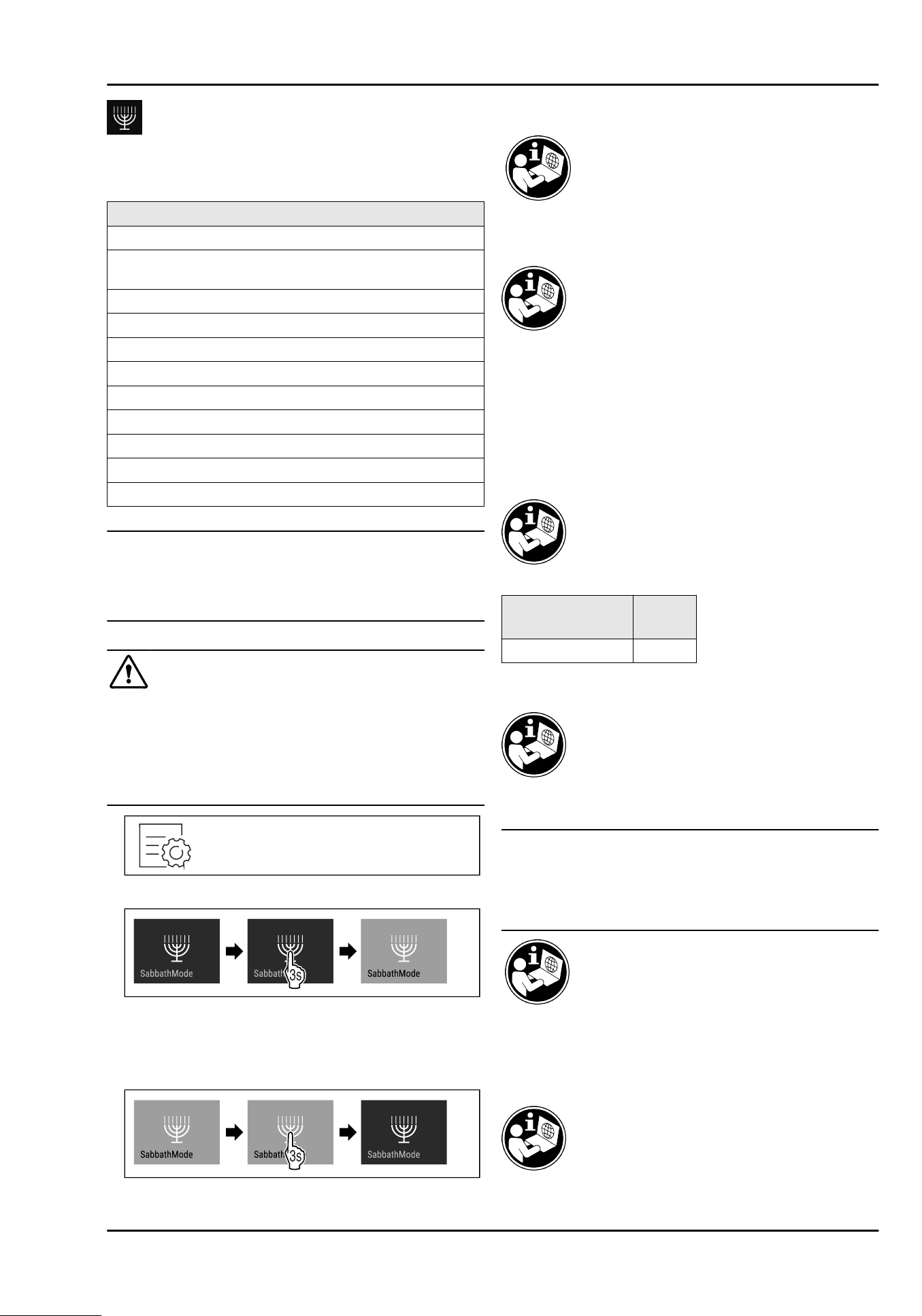
温度
利用该功能设置温度。
温度取决于下列因素:
-
开门的频率
-
开门的持续时间
-
安装地点的室温
-
食物的类型、温度和数量
冷冻室
出厂设定温度 推荐设置
-18°C -18°C
温度设置
Fig.9
例图
操作
* 按冰箱型号配置 23
SabbathMode
利用该功能激活或停用 SabbathMode。当您激活该功能时,某
些电子功能会被关闭。由此使您的设备满足犹太节日的某些要
求,例如安息日,并符合 STAR-K Kosher 认证。
已激活 SabbathMode 时的设备状态
状态显示器持续显示 SabbathMode。
除了功能“停用 SabbathMode”以外,显示屏中的所有功能均
已被锁定。
已激活的功能保持激活。
关门时,显示屏保持亮着。
内部照明装置已禁用。
未执行提醒。设置的时间间隔将暂停。
不显示提醒和警告。
没有门开警报。
没有温度警报。
除霜循环仅在指定时间工作,不考虑冰箱的使用。
停电结束后,冰箱将自动切回至 SabbathMode 模式。
冰箱状态
提示
此冰箱经过“Institute for Science and Halacha ” 认证。
(www.machonhalacha.co.il)
通过 STAR-K 认证的设备的列表,请访问 www.star-k.org/
appliances。
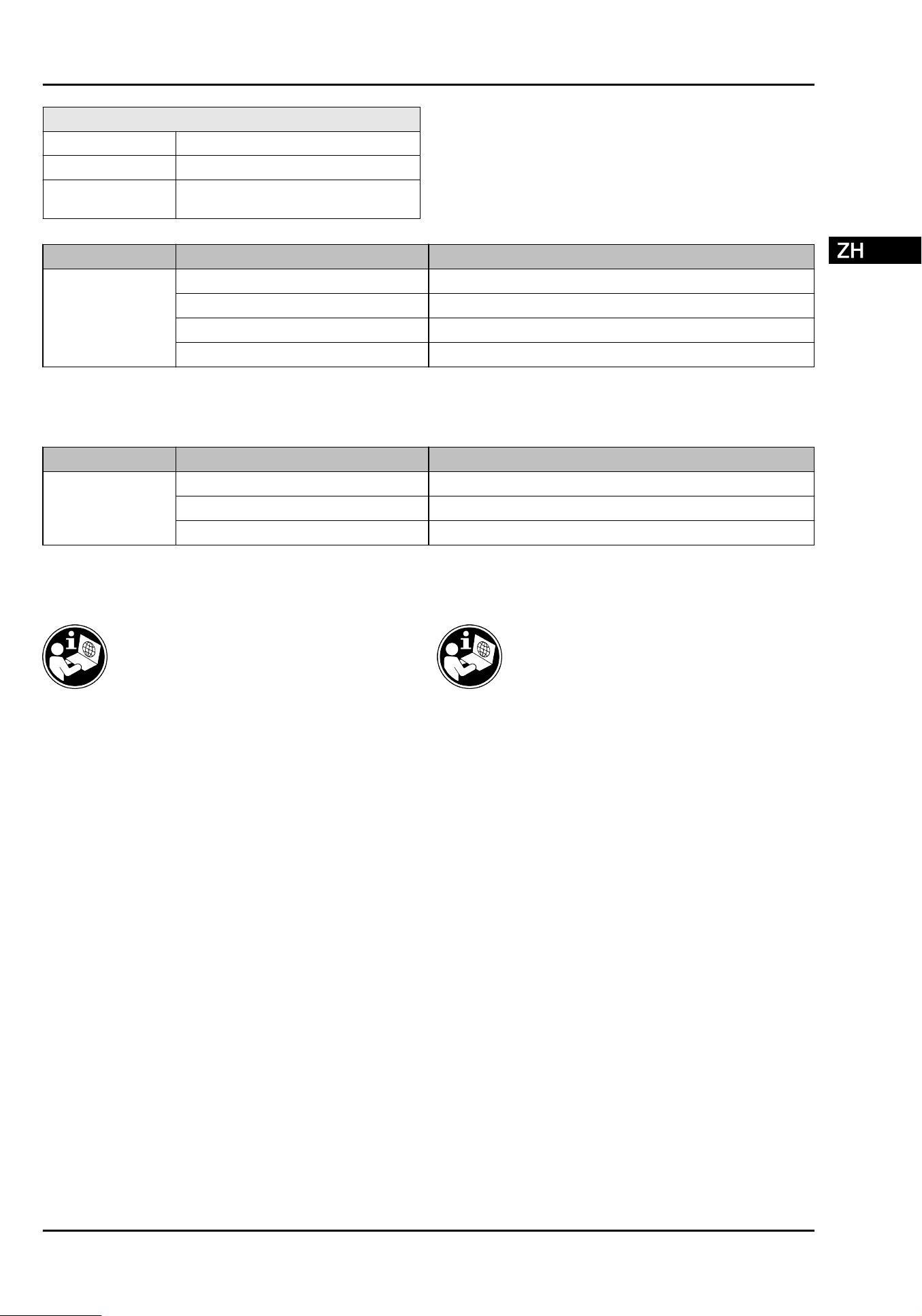
激活 SabbathMode
警告
腐烂的食物会造成中毒危险!
如果在激活 SabbathMode 之后发生停电,在状态显示器中不
会出现有关停电的消息。停电结束后,设备在 SabbathMode
下继续工作。停电后,食物可能腐烂,食用后会导致食物中
毒。
停电后:
u
请勿食用冷冻又解冻的食物。
Fig. 10
Fig.11
停用 SabbathMode
SabbathMode 将在 80 个小时后被自动禁用。但您也可以随时
手动禁用 SabbathMode:
Fig.12
6.4
消息
7 装备
8 维护
8.1 拆卸 /安装拉出系统
8.1.1 拆卸提示
您可以拆卸拉出系统进行清洁。您的冰箱可能包含不同的拉出
系统。
下列拉出系统可拆卸或不可拆卸:
拉出系统
可拆卸/
不可拆卸
使用容器肋梁的抽屉 可拆卸
8.2 给冰箱除冰
8.3 清洁冰箱
注意
清洁不当!
损坏冰箱。
u
仅可使用柔软的抹布和 pH 为中性的通用清洁剂。
u
不要使用磨擦大或硬的海绵状金属或钢丝绒。
u
请勿使用锋利的、磨擦性的、含砂、氯或酸的擦亮剂。
9 客户帮助
9.1 技术数据
对于配备 WLAN 连接的设备:
装备
24 * 按冰箱型号配置
频率数据
频带 2.4GHz
最大辐射功率 < 100 mW
无线电设备的用途 连接至本地 WLAN 网络中进行数据通
信
9.2 技术故障
下列故障您可以自己排除。
9.2.1 冰箱功能
故障 原因 排除
设备不工作。
→ 设备没有接通。
u
接通设备电源。
→ 电源插头没有正确插入插座。
u
检查电源插头。
→ 插座的保险装置不正常。
u
检查保险装置。
→ 冰箱插座没有正确插入冰箱。
u
检查冰箱插座。
9.2.2 装备
故障 原因 排除
内部照明不亮。
→ 设备没有接通。
u
接通设备电源。
→ 门打开时间超过 15分钟。
u
内部照明在门打开时,在大约 15分钟后自动关闭。
→ LED 照明损坏或盖板损坏。
u
联系客户服务部门。
10 停机 11 废弃处理
停机
* 按冰箱型号配置 25
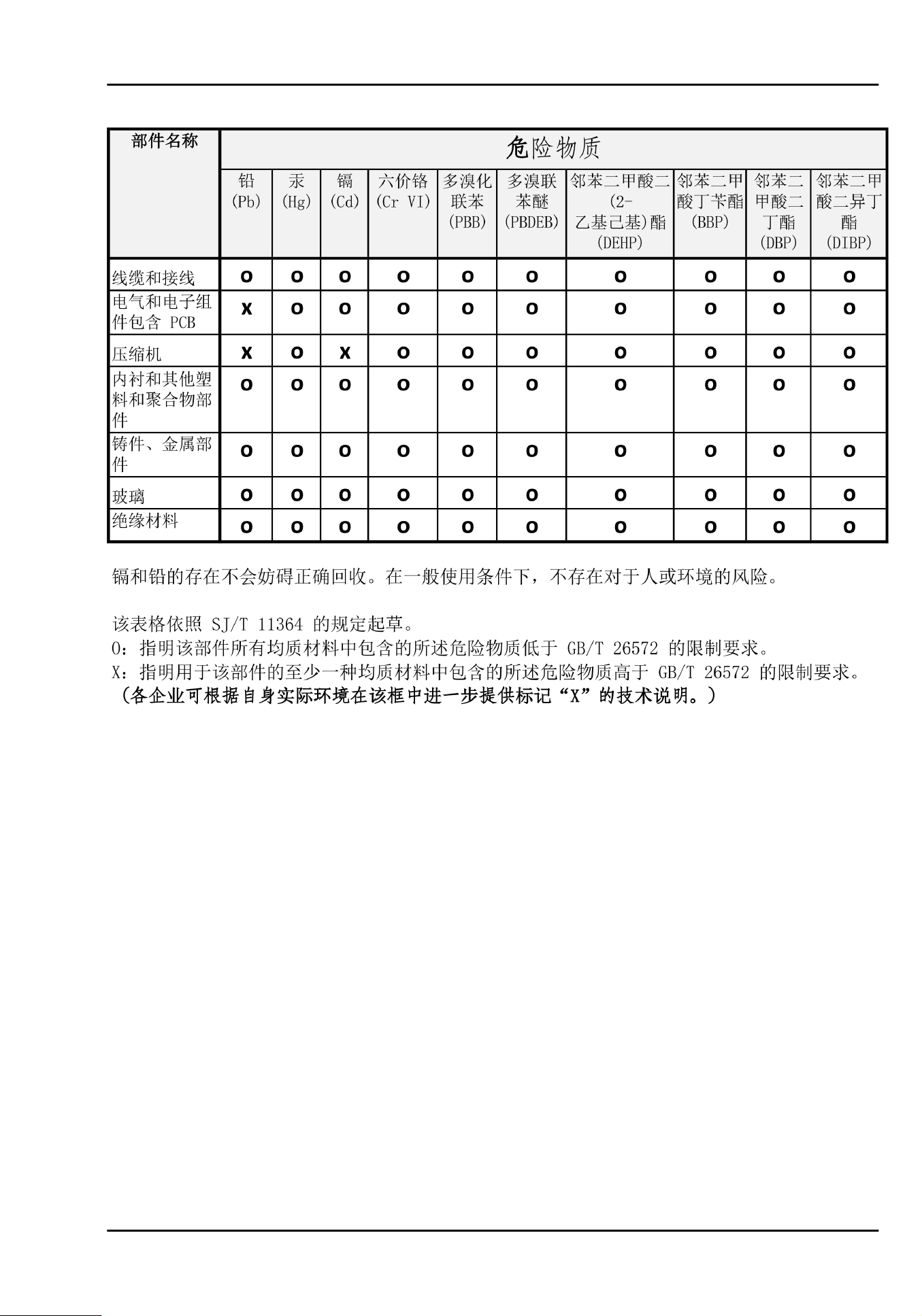
12 产品中有害物质的名称及含量
产品中有害物质的名称及含量
26 * 按冰箱型号配置
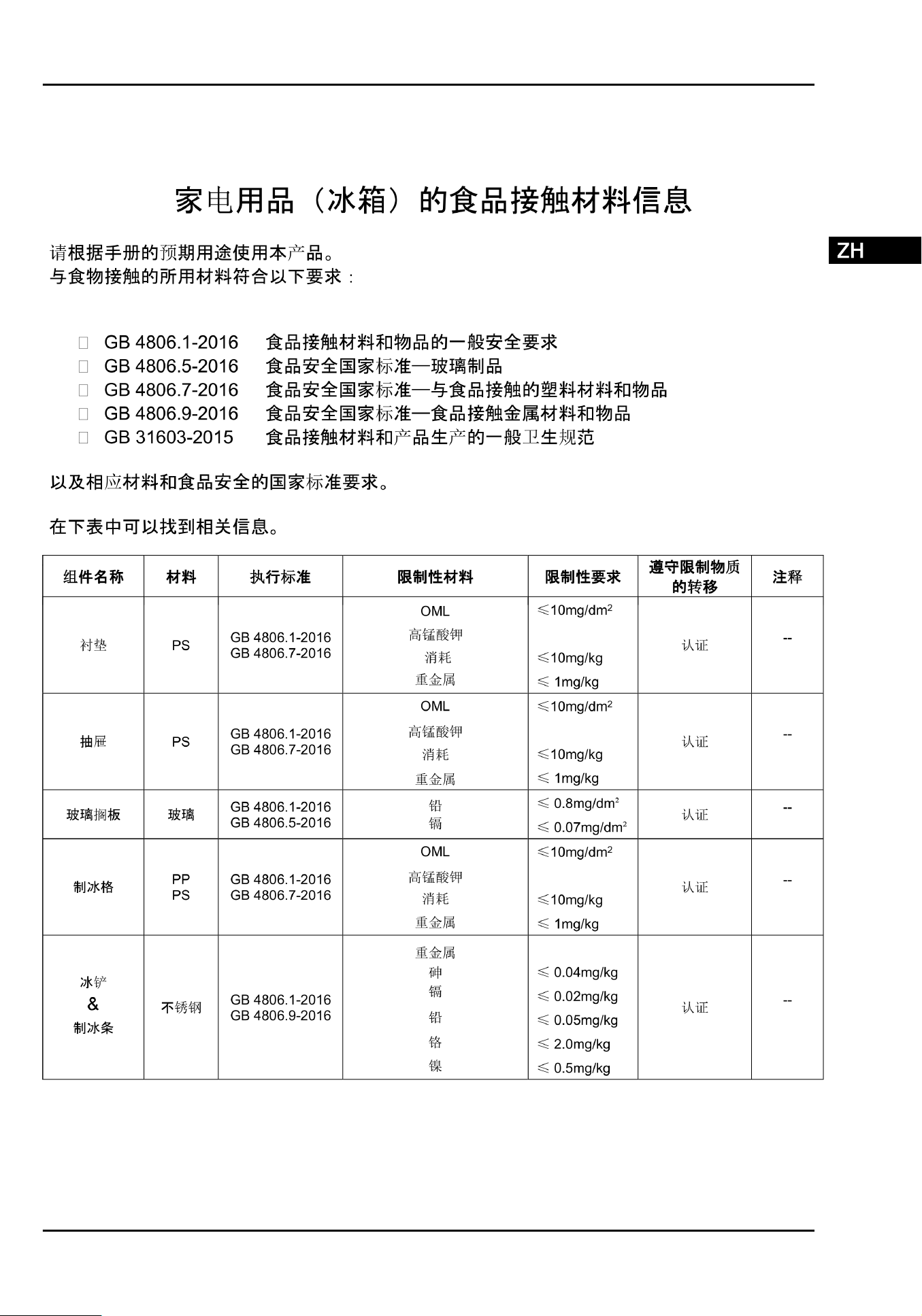
产品中有害物质的名称及含量
* 按冰箱型号配置 27
home.liebherr.com/fridge-manuals
Unterbau-Gefrierschrank
Die ausführliche Gebrauchsanweisung finden Sie online.
base unit freezer
The detailed User Guide is available online.
底部安装冷冻柜
您可以在线找到详细的使用说明。
20240821
7083747-00
Liebherr-Hausgeräte GmbH
Memminger Straße 77-79
88416Ochsenhausen
Deutschland
