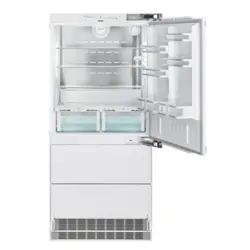
Installation
Instructions
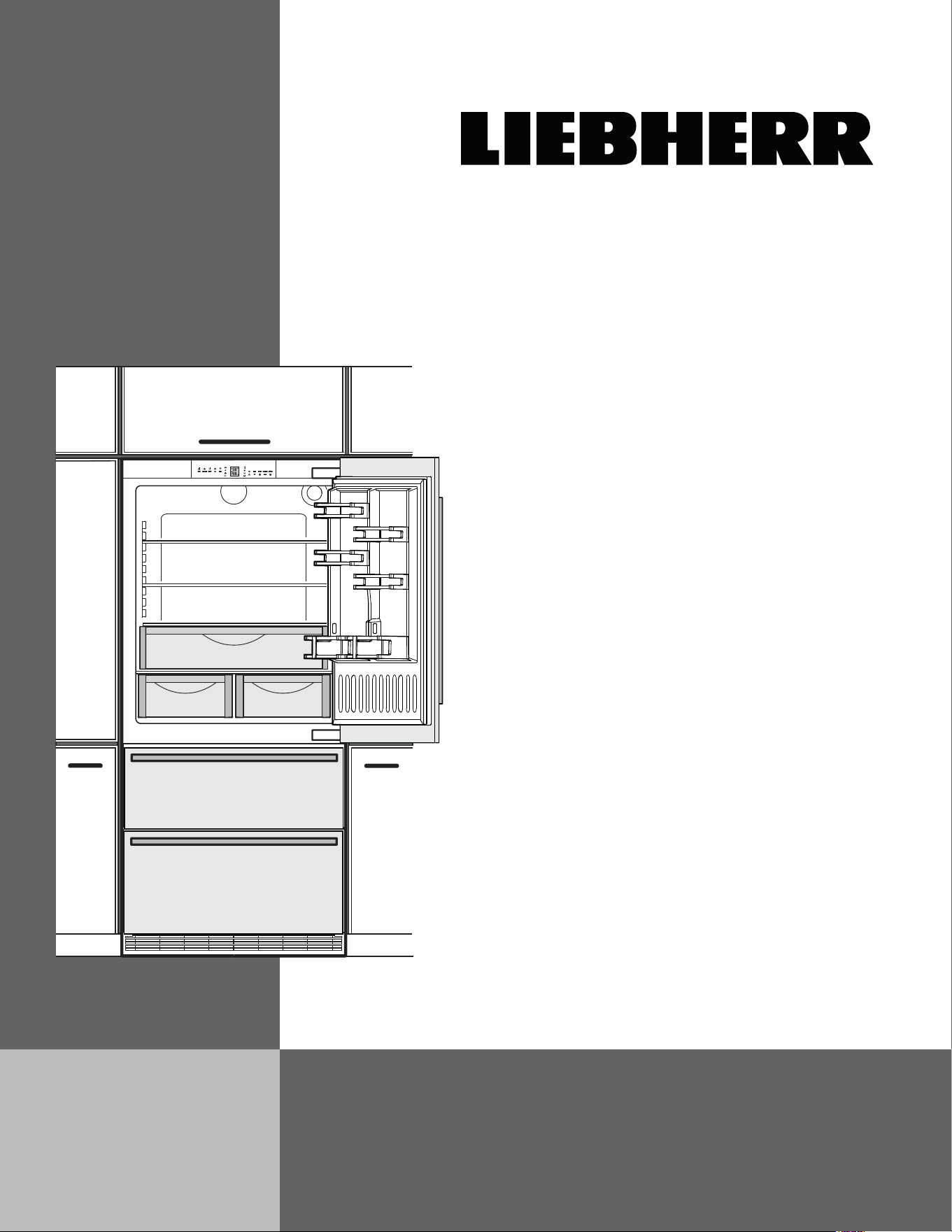
For Fully Integrated NoFrost
Combined Refrigerator-Freezers
HC 2090 / 2091
HCB 2090 / 2091
7082 989-00
2
Important
Contents Page
Please Read and Follow these Instructions ................... 2
Note to the Installer ......................................................... 2
Important Safety Information ..........................................3
R600a Refrigerant...........................................................4
Disposal of Old Appliance ..............................................4
Disposal of Packaging Material ......................................4
Electrical Safety ..............................................................5
Blocking for Safety .......................................................... 5
Unit Dimensions .............................................................. 6
Door Swing Clearance ....................................................6
Unit Venting ..................................................................... 6
Cabinet Opening Dimensions .........................................7
Panel Dimensions - Inset Installation Style ....................8
Panel Dimensions - Frameless Installation Style ...........9
Mounting the Anti Tipping Device on Concrete Floors 10
Mounting the Anti Tipping Device on Wooden Floors .. 10
Mounting the Anti Tipping Device in Cabinets deeper
than 24" ......................................................................... 11
Cover Strips .................................................................. 11
Water Connection Requirements ................................. 12
Water Connection Adapter ........................................... 12
Connection to the Water Supply ................................... 13
Leveling the Appliance .................................................. 14
Fastening the Appliance in the Recess ........................ 14
Adjusting the refrigerator door ...................................... 14
Adjusting the front of the drawer ...................................15
Before Mounting the Door Panels ................................ 15
Mounting the Attachment Brackets onto the Door Panels ....16
Mounting the Refrigerator Door Panel .......................... 17
Mounting the Freezer Drawer Panels ...........................19
Mounting the Ventilation Grille ...................................... 19
Please Read and Follow these
Instructions
These instructions contain Danger, Warning, and
Caution notes.
This information is important for safe and efficient instal-
lation and operation.
Always read and comply with all Danger, Warning, and
Caution notes!
DANGER!
Danger indicates a hazard which will cause
serious injury or death if precautions are
not followed.
WARNING!
Warning indicates a potentially hazardous
situation which, if not avoided, could result
in death or serious injury.
CAUTION!
Caution indicates a potentially hazardous
situation which, if not avoided, may result
in minor or moderate injury.
IMPORTANT
This indicates information that is especially relevant
to a problem-free installation and operation.
Note to the Installer
It is very important to follow the instructions in the manu-
al to ensure proper installation and operation of the unit.
Before installing the unit, be sure to thoroughly read and
understand all of the information in this manual.
WARNING!
Electrocution hazard.
Do not connect to the electrical outlet
before the installation is completed.
IMPORTANT
All types and models are subject to continuous
improvement. The manufacturer reserves the right
to make modifications to the shape, equipment, and
technology.

3
Safety
Important Safety Information
• WARNING: Keep ventilation openings, in the
appliance enclosure or in the built-in structure,
clear of obstruction.
• WARNING: Do not use mechanical devices
or other means to accelerate the defrosting
process, other than those recommended by
the manufacturer.
• WARNING: Do not damage the refrigerant cir-
cuit.
• WARNING: The power cord must not be dam-
aged while installing the appliance.
• WARNING: Multi-sockets or distributor strips
and other electronic devices (such as halo-
gen transformers) must not be positioned and
operated at the rear of appliances.
• WARNING: Danger of injury through electric
shock! There are live parts under the cover.
Only have the interior LED light replaced or
repaired by customer service staff or trained
personnel.
• WARNING: Risk of injury from the LED lamp.
The light intensity of the LED light complies
with risk group RG 2. If the cover is defective,
do not look directly at the light through optical
lenses from close distance. This may damage
your eyes.
• WARNING: This appliance must be secured
as described in the Use and Care Manual
(Installation Instructions) to rule out any poten-
tial risks due to its instability.
• WARNING: Do not use electrical appliances
inside the food storage compartments of the
appliance, unless they are of the type recom-
mended by the manufacturer.
• Any repairs and work on the appliance should
only be performed by the customer service
department. Unauthorized work may be dan-
gerous to the user. The power source cable
should only be changed or replaced by the
customer service department. Component
parts and power cords shall be replaced with
like components performed by factory autho-
rized service personnel only.
• Do not stand on the toe kick, drawers or doors
or use them to support anything else.
• This appliance is not intended for use by per-
sons (including children) with reduced physi-
cal, sensory or mental capabilities or lack of
experience and knowledge unless they have
been given initial supervision or instruction
concerning use of the appliance by a person
responsible for their safety. Children should
be supervised to ensure that they do not play
with the appliance.
• Do not store explosive substances such as
aerosol cans with a flammable propellant in
this appliance.
• To prevent injury and damage to property,
the appliance should only be installed by 4
people.
• Check the appliance for signs of damage after
unpacking. Contact the supplier if it is dam-
aged. Do not connect the appliance to the
mains power supply.
• Avoid prolonged skin contact with cold surfac-
es (e.g., chilled/frozen products). If necessary,
take safety action (e.g., gloves).
• Do not consume food which has been stored
for too long; it could cause food poisoning.
4
Safety
R600a Refrigerant
WARNING!
The refrigerant R600a contained within the
appliance is environmentally friendly, but
flammable. Leaking refrigerant can ignite.
Disposal of Packaging Material
WARNING!
Keep packaging materials away from
children. Polythene sheets and bags can
cause suffocation!
If possible, please recycle packaging material at a recy-
cling facility.
Disposal of Old Appliance
WARNING!
Risk of child entrapment.
Child entrapment and suffocation are not problems of
the past.
Junked or abandoned refrigerators are still dangerous –
even if they will sit for “just a few days.”
If you are getting rid of your old refrigerator, please follow
these instructions to help prevent accidents.
Before you discard old appliances:
• Take off the doors.
• Leave the shelves in place so that children
may not easily climb inside.
• Cut off the power cord from the discarded
appliance. Discard separately from the
appliance.
• Be sure to follow your local requirements for
disposal of appliances.
Contact the trash collection agency in your
area for additional information.
• Any repairs and work on the appliance should
only be performed by the customer service
department or other trained personnel. The
same applies to changing the power cord.
• Only perform repair and other work on the
appliance when the plug has visibly been dis-
connected.
• Only install, connect, and dispose of the
appliance as described in this Use and Care
Manual.
• In the event of a fault, pull out the plug or
switch off the fuse.
• When disconnecting the appliance from the
power source, pull it out by the plug, never
pull on the cable.
• If you have a lockable appliance, do not keep
the key near the appliance or within reach of
children.
• The appliance is designed for use in enclosed
rooms. Do not operate the appliance outdoors
or in areas where there is moisture or splash-
ing water.
• Do not use the interior LED light to light the
room. The interior LED light is only designed
to illuminate the interior of the appliance.
• Do not allow naked flames or ignition sources
to enter the appliance.
• Alcoholic drinks or other vessels containing
alcohol should be sealed tightly for storage.
5
Safety
Blocking for Safety
WARNING!
To avoid a hazard due to instability of the
appliance, it must be fixed in accordance
with the instructions.
Electrical Safety
Connect this appliance to a 15 amp or 20 amp, 110-
120 VAC circuit which is grounded and protected by a
circuit breaker or fuse.
We recommend using a dedicated circuit for this appli-
ance to prevent circuit overload and the chance of inter-
ruption to the appliance.
This appliance is equipped with a three-prong (ground-
ing) polarized plug for your protection against possible
shock hazards.
Where a two-prong wall receptacle is encountered, con-
tact a qualified electrician and have it replaced with a
properly grounded three-prong receptacle in accordance
with all local codes and ordinances.
WARNING!
Electrocution hazard.
Electrical grounding required.
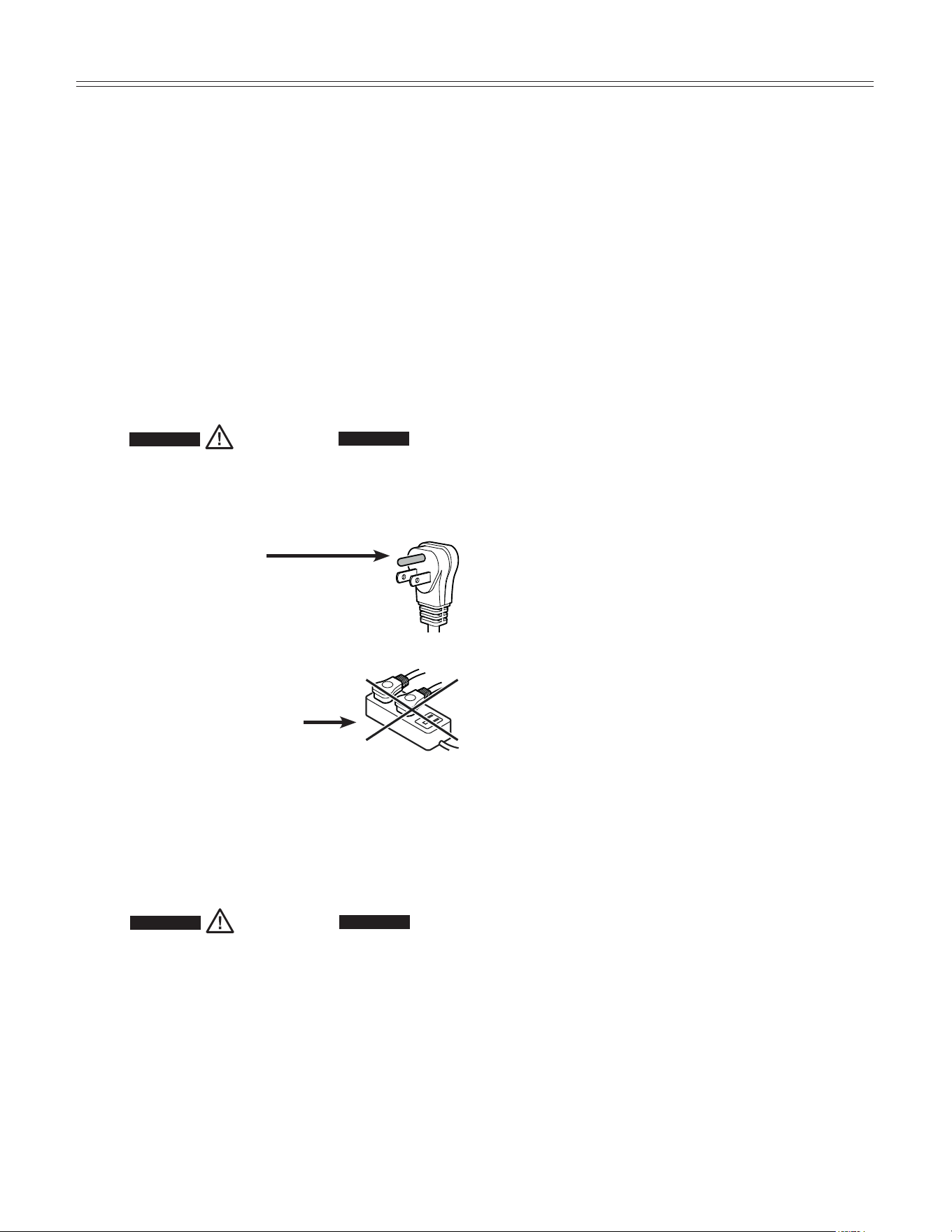
•
Do not remove the round grounding
prong from the plug.
•
Do not use extension cords or
ungrounded (two prong) adapters.
• Do not use a power cord that is
frayed or damaged.
•
Do not use a power strip.
Failure to follow these instructions may
result in fire, electric shock or death.
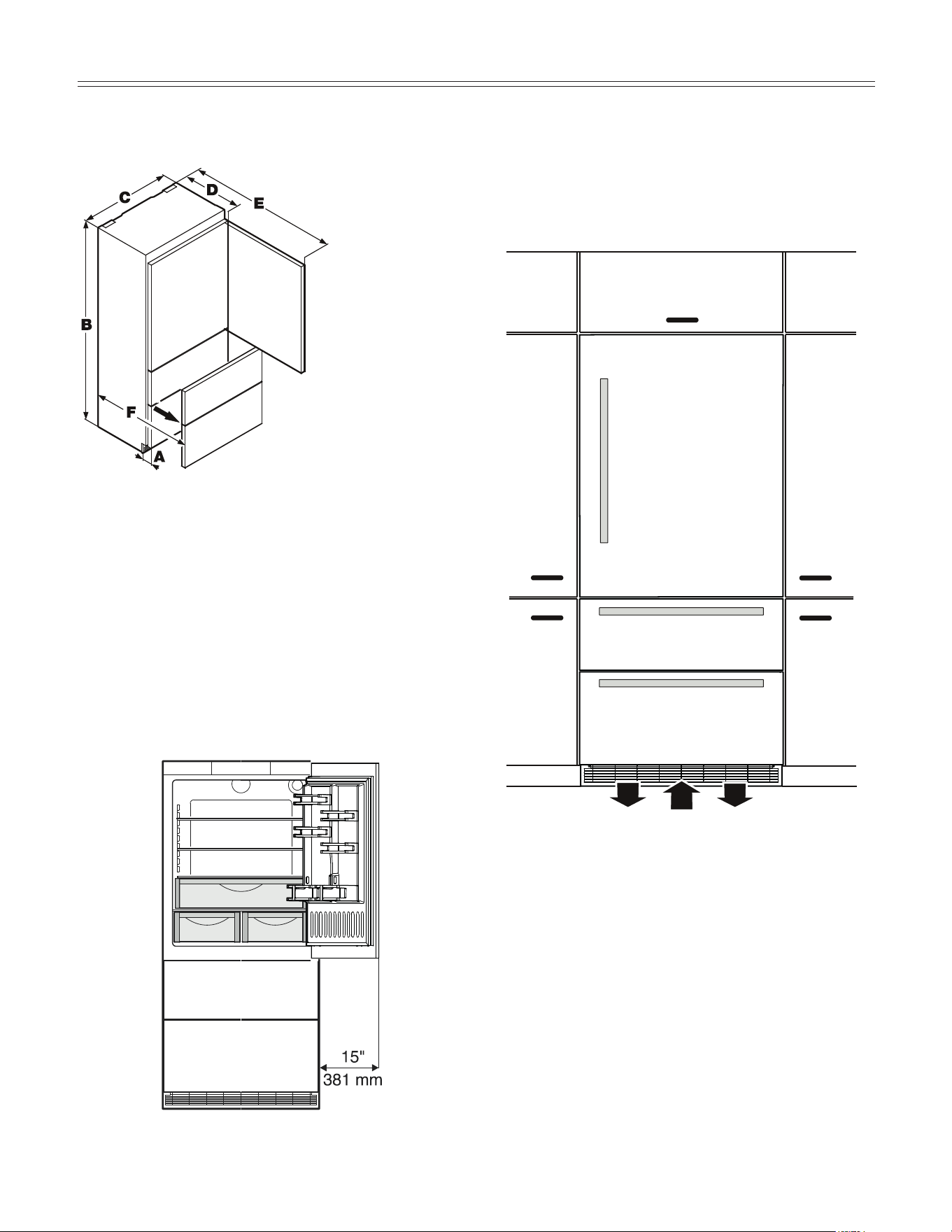
Unit Dimensions - Figure 1
Unit Venting - Figure 3
HC 2080/2081 appliances do not require any ventilation
openings in the cabinet. The required airflow is directed
through the toe kick area.
It is important to use the provided cover grille for the ven-
tilation opening. This opening must not be covered with a
cabinet base.
Figure 3
Door Swing Clearance - Figure 2
Please allow for door swing clearance at locations next
to a wall.
The illustrated measurement is without mounted front
panels. Be sure to add your panel thickness and handle
depth to this measurement in order to avoid interfer-
ences.
A = 3" (76 mm)
B = 79-13/16" (2027 mm)
C = 35-13/16" (910 mm)
D = 24" (610 mm)
E = 61-1/4" (1556 mm)
F = 37-1/8" (943 mm)
Figure 2
Figure 1
6
plannIng InformatIon
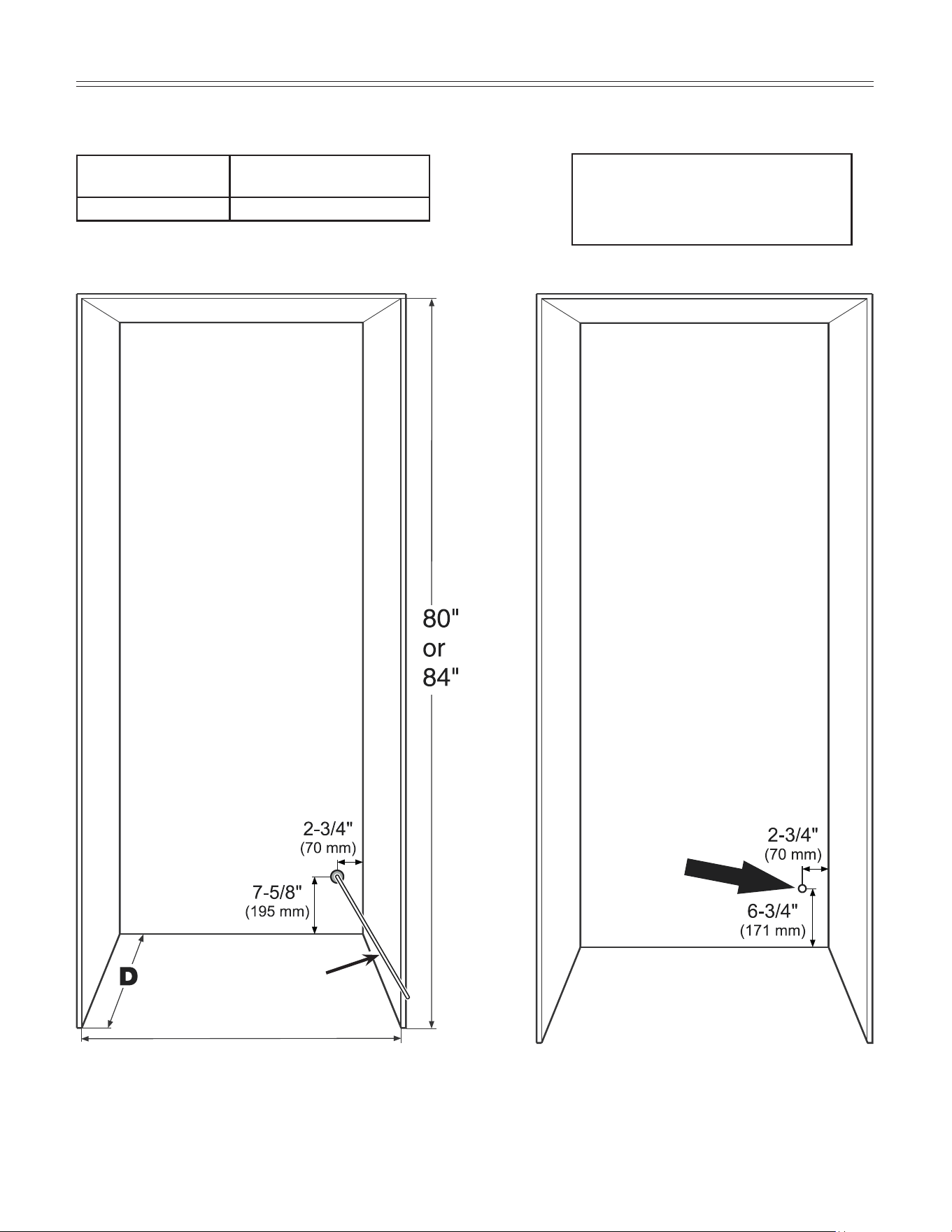
Cabinet Opening Dimensions - Figure 4
Figure 4
IMPORTANT
For 24" cabinets, the water line
opening must be in the location
as shown.
With cabinets deeper than
24", there is room to t the
pipe behind the appliance
and the wall so there are no
requirements for the water line
lead out position.
The free length of the water sup-
ply line must be at least 31-1/2"
(800 mm) when the tube comes
out of the prescribed opening.
Do not install the shut-o valve
behind the appliance.
Inset cabinet
Depth D
Frameless/faceframe cabinet
Depth D
24" + panel thickness 24"
Water supply line
For appliance with panel to be flush,
adjacent cabinetry depth must equal
appliance depth (24") plus panel
thickness (5/8" - 3/4").
36" Single
72" Side by Side
This is where the power cord
extends from the back of the
appliance.
Free length of the power cord =
90 inch (2280 mm)
Be sure to take these speci-
fications into consideration
when choosing the location of
the electrical outlet.
IMPORTANT
The electrical outlet must
not be situated behind the
appliance and must be
easily accessible.
7
plannIng InformatIon
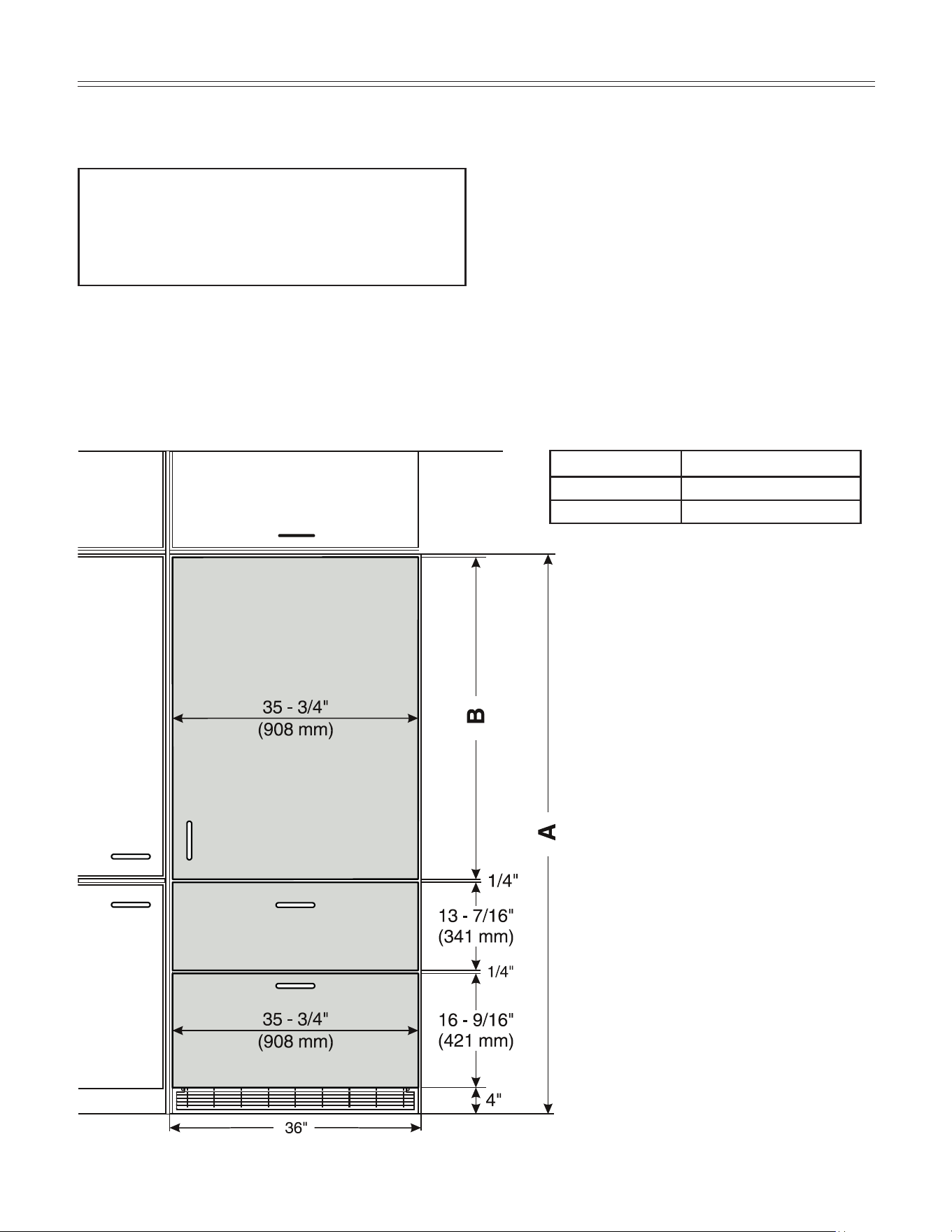
Panel Dimensions - Inset Installation Style - Figure 5
Figure 5
The panels should be at least 5/8 inch (16 mm) thick to
allow the connecting rails to be fastened to them.
IMPORTANT
The maximum panel thickness is 3/4" (19 mm).
The door panel weight must not exceed 60 lb (27 kg).
Cabinet opening A Refrigerator door panel B
80" (2032 mm) 45-1/4" (1150 mm)
84" (2134 mm) 49-1/4" (1251 mm)
You can order stainless steel panels for inset installation style.
Refrigerator door panel 80"- article number 9900 333-00
Refrigerator door panel 84"- article number 9900 331-00
Freezer drawer panels - article number 9900 323-00
Appliance and panels sit fully within the opening and
are flush with what could be its own box, between two
pantry cabinets or decorative columns, etc. This is the
most common installation scenario.
8
plannIng InformatIon
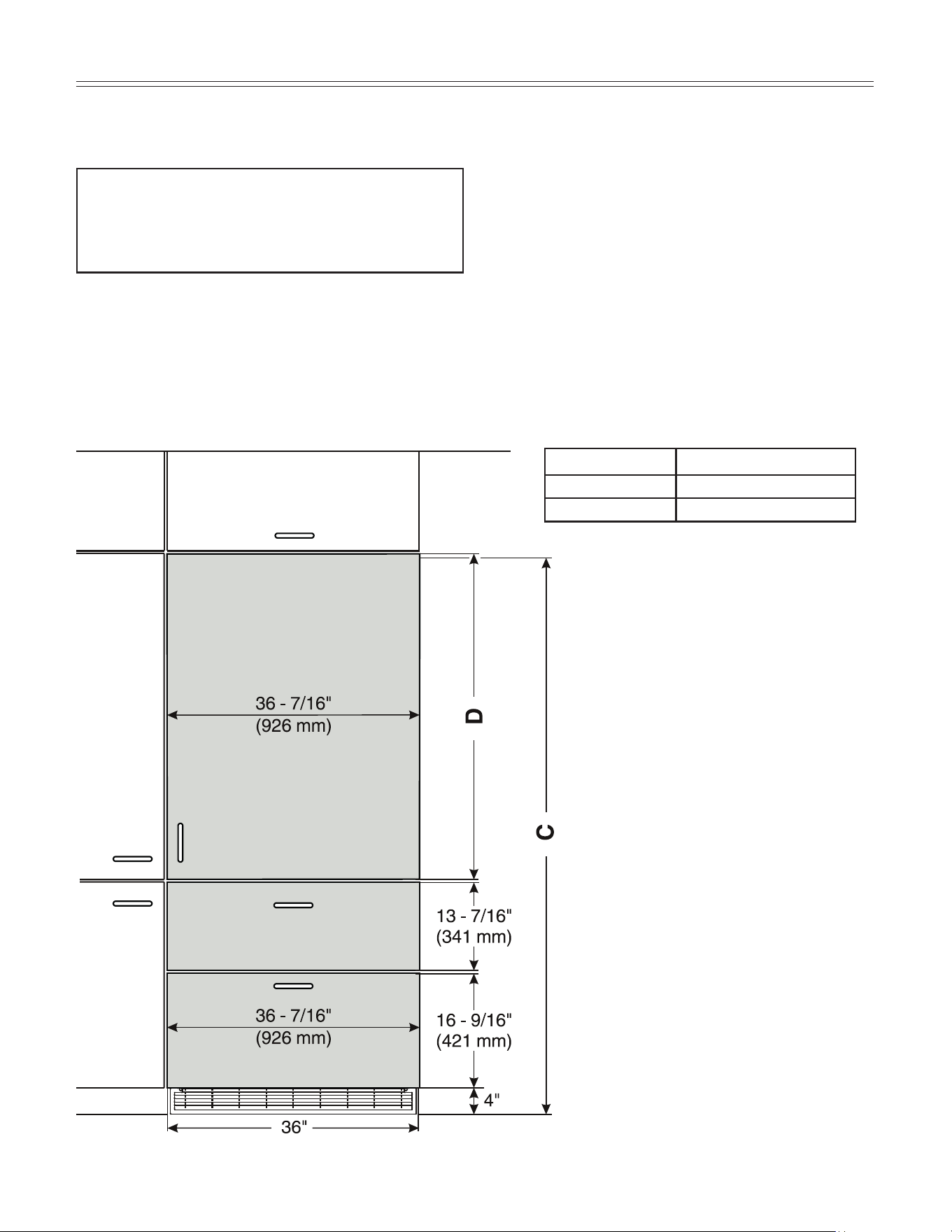
Panel Dimensions - Frameless Installation Style - Figure 6
The gap between panels with frameless installation style
is 1/4" (6 mm). The panels should be at least 5/8 inch (16
mm) thick to allow the connecting rails to be fastened to
them.
Figure 6
IMPORTANT
The maximum panel thickness is 3/4" (19 mm).
The door panel weight must not exceed 60 lb (27 kg).
Cabinet opening C Refrigerator door panel D
80" (2032 mm) 45-3/4" (1162 mm)
84" (2134 mm) 49-3/4" (1264 mm)
With this installation style, these wider appliance
panels partially overlay the shared side gables of
adjacent cabinetry so as to mimic the look of a frame-
less style cabinet.
9
plannIng InformatIon
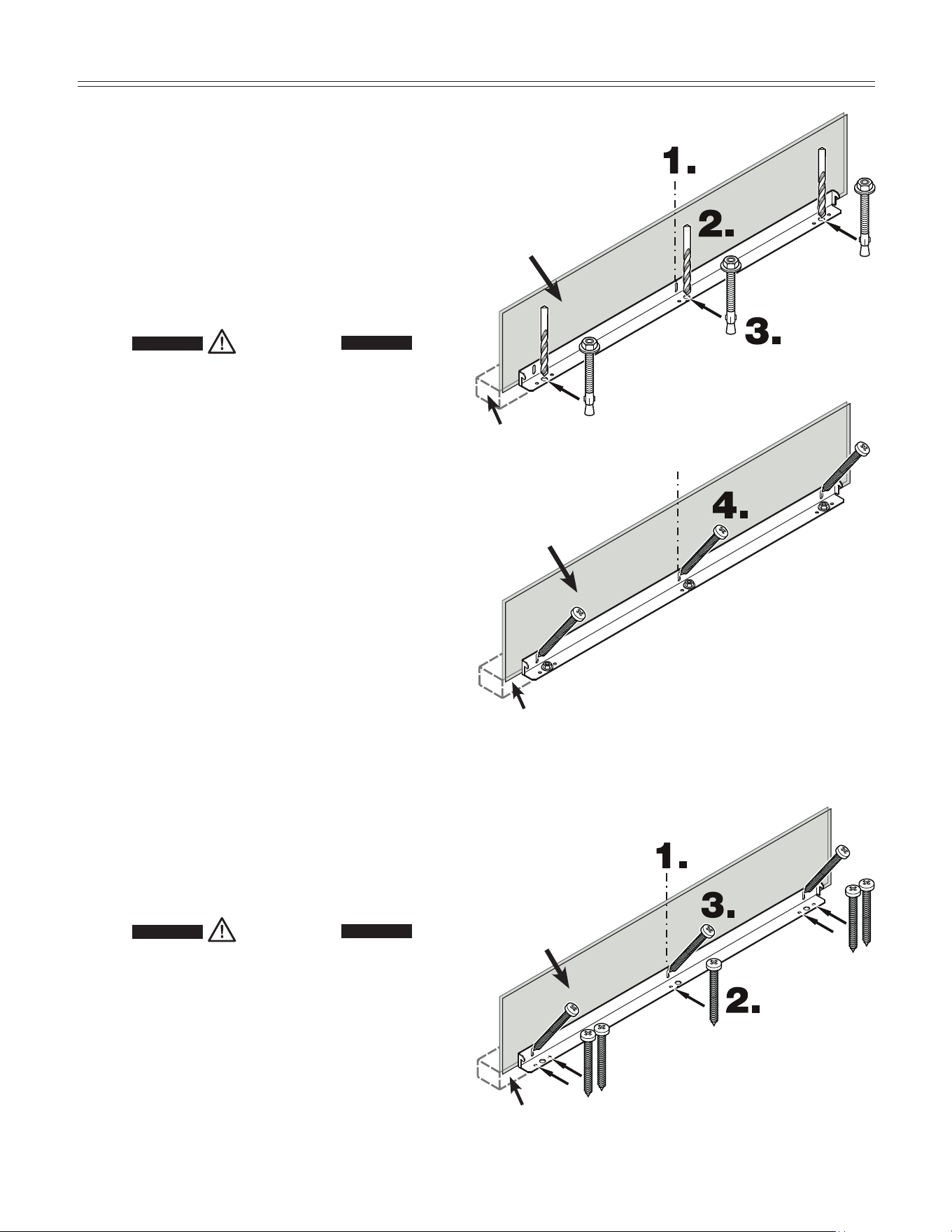
Figure 8
Wall plate
Wall
Secure the appliance in place so it does not tip forward
when the fully stocked door is opened.
The anti tipping
bracket is provided with the appliance.
1. Mark the center line of the appliance on the back wall.
Align the anti tipping bracket center to this line.
WARNING!
Be sure that there is no plumbing or
electrical wiring located in this area which
screws or drills could damage.
2. Drill a 3/8" diameter hole in any position as shown in
Figure 5 using a carbide drill bit.
The depth of the holes must exceed the overall length
of the anchors provided.
Clean the holes after drilling.
3. Attach washer and screw on hex nut to the end of each
anchor.
Drive in all 3 anchors.
Align the bracket center to the center line on the back
wall again.
Fasten the anchors by turning the hex nut.
4. Fasten bracket with 3 screws (1/4" x 2-1/8") into the
wall plate (Figure 8).
Mounting the Anti Tipping Device on
Wooden Floors
- Figure 9
1. Mark the center line of the appliance on the back wall.
Align the anti tipping bracket center to this line.
WARNING!
Be sure that there is no plumbing or
electrical wiring located in this area which
screws or drills could damage.
2. Fasten bracket to the wooden floor using 5 screws
(1/4" x 2-1/8"). Drill pilot holes if necessary.
3. Fasten bracket with 3 screws (1/4" x 2-1/8") into the
wall plate.
Figure 9
Wall plate
Wall
Mounting the Anti Tipping Device on
Concrete Floors - Figure 7 - 8
Figure 7
Wall plate
Wall
10
BlockIng for Safety
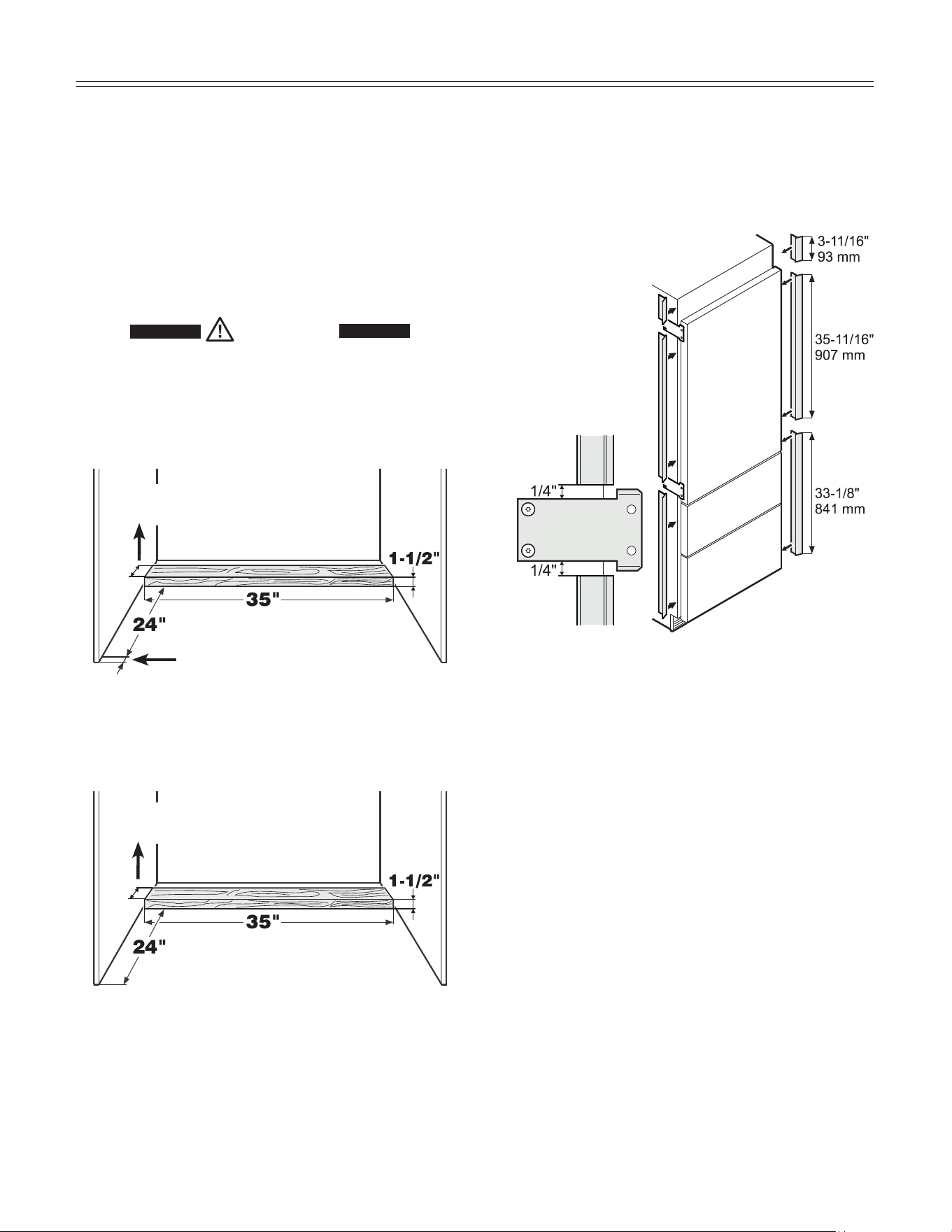
Mounting the Anti Tipping Device in
Cabinets deeper than 24" - Figure 10 - 11
To ensure the compressor mounting plate reaches the
anti tipping bracket in cabinets deeper than 24", a wood-
en spacer must be mounted between the appliance back
and the wall. The anti tipping bracket will be fastened to
the floor downwards and to the spacer backwards.
WARNING!
Be sure the wooden spacer is fastened
securely to the floor.
Figure 10
Measuring for mounting the wooden spacer on
frameless kitchen cabinets - Figure 11
Figure 11
Panel thickness
Depth of spacer depending on clear-
ance between appliance and wall
Depth of spacer depending on clear-
ance between appliance and wall
Measuring for mounting the wooden spacer on
inset kitchen cabinets - Figure 10
IMPORTANT
If the floor slopes down sideways, the anti-tipping
bracket must be fitted horizontally. Lay down spacers
in the appropriate positions.
Cover Strips - Figure 12
Apply cover strips above, between and below the secur-
ing plates on the side walls of the appliance.
Cut the cover strips to the length shown in Figure 12.
Fit the adhesive cover strips leaving
a gap of 1/4" to each secur-
ing plate. This ensures
problem-free fitting of
the covers.
Figure 12
11
BlockIng for Safety
Safety Instructions and Warnings
• Do not install the water connection while the com-
bined refrigerator-freezer is connected to an electrical
outlet.
• The connection to the water supply may only be made
by a trained and licensed plumber.
• All equipment and devices used to supply the water
to the appliance must comply with the current regula-
tions for your geographical area.
WARNING!
Connect to potable water supply only.
Water Connection Requirements
• The water supply pressure requirements are different
based on whether or not the supplied Liebherr water
filter is installed.
With the filter installed, the pressure must be in the
range of 40-90 psi (2.8-6.2 bar).
Without the filter installed, the acceptable pressure
range is 22-87 psi (1.5-6 bar).
Failure to meet these requirements will likely result
in ice maker malfunction and possibly cause a water
leakage that can damage flooring and surrounding
furniture.
• A shut-off valve, must be installed between the hose
line and the main water supply so the water supply
can be stopped if necessary.
IMPORTANT
Do not install the shut-off valve behind the appliance.
The connection to the valve connector can be done with
or without the angle connector, as required.
Braided style ice maker hoses can be connected directly
to the threaded ends.
For connection with 1/4" OD copper lines, use the union
nut with compression ring.
IMPORTANT
Make sure that the connection is fitted with
a seal and is tight.
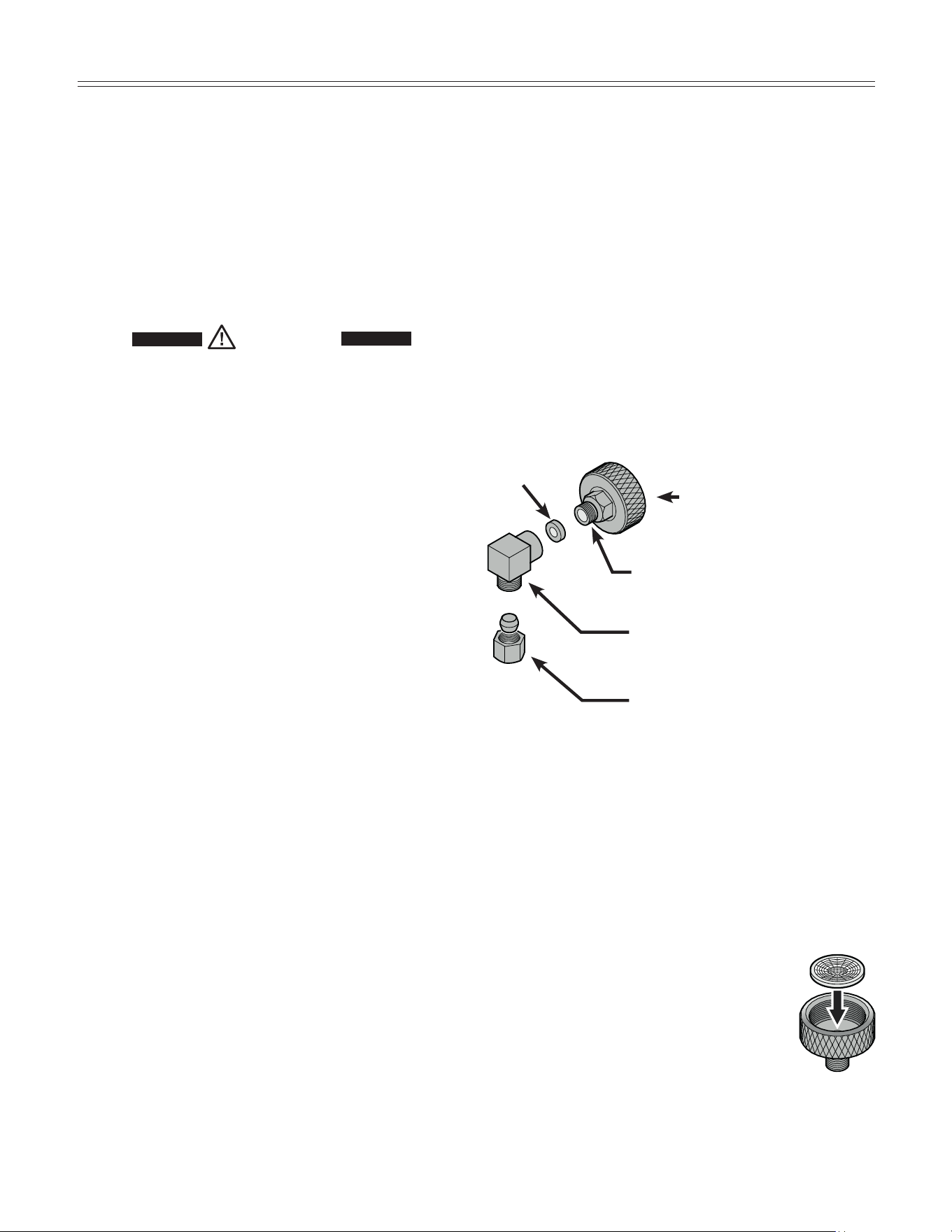
• Insert the water strainer supplied into the
valve connector (Figure 14).
Water Connection Adapter - Figure 13
IMPORTANT
Only use the supplied adapter for connection to the
solenoid valve. The solenoid valve has a metric R3/4
male connector. Any attempt to use other adapters
for connection could damage the thread on the
solenoid valve.
The supplied adapter enables different connection
options for different kinds of water lines. A water line is
not supplied with the appliance.
Valve connector (union nut
for connection to the sole-
noid valve)
Connects to 1/4" compression end
Seal
Angle connector
Connects to 1/4" compression end
Union nut with compression ring for
use with 1/4" OD copper lines
Figure 13
Figure 14
IMPORTANT
Do not use any old or already premounted water
supply lines.
12
Icemaker
13
Icemaker
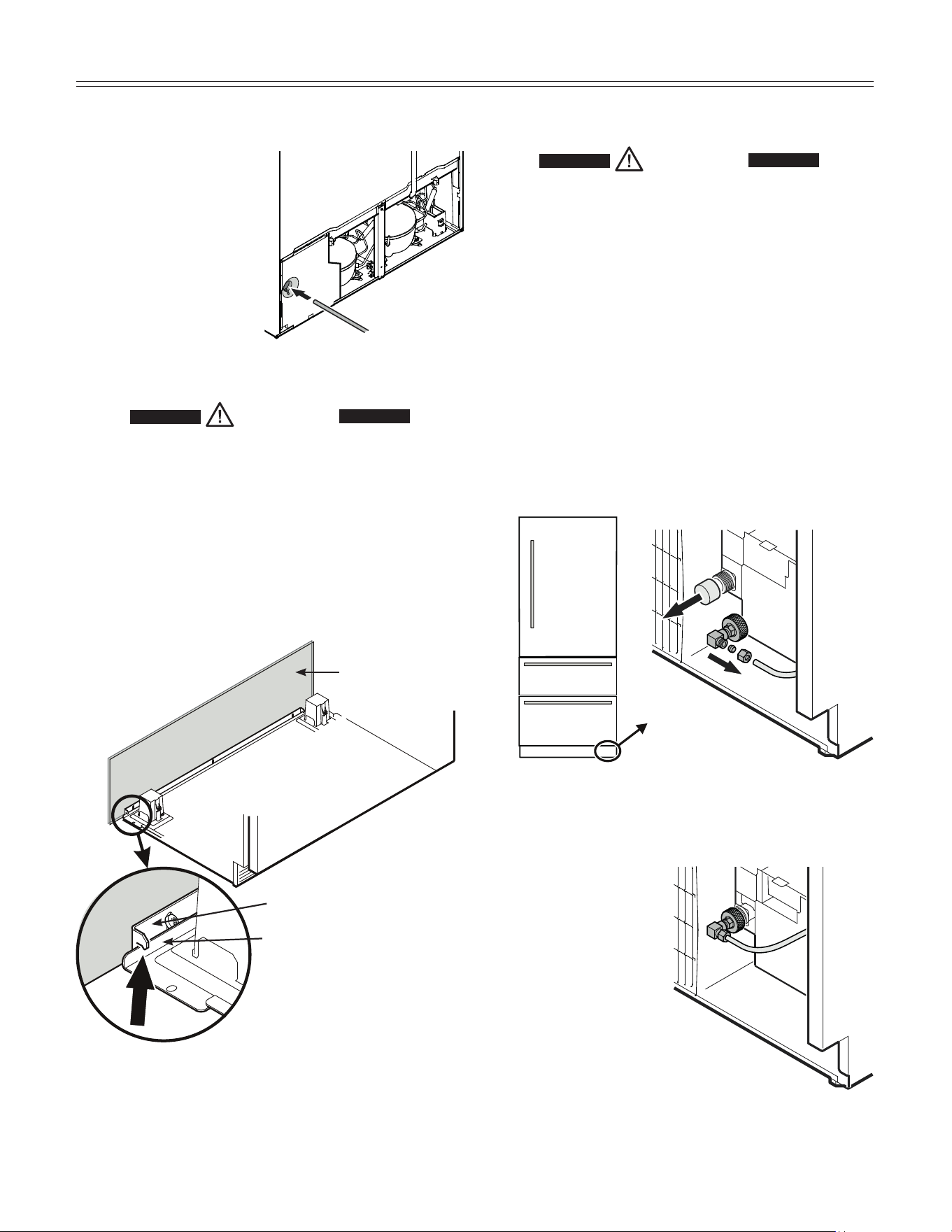
Figure 17
Figure 18
9. Open the shut-off valve
for the water supply and
check the entire water system
for leaks.
Connection to the Water Supply
1. Move the appliance
towards the final posi-
tion and leave enough
space to work behind.
2. Insert the water sup-
ply line into its inten-
ded opening at the
back of the appliance
(Figure 15).
3. Move the power supply
line to the area of the
electrical outlet.
Figure 16
Anti tipping bracket
Compressor mounting
plate
Wall
Appliance
4. Push the appliance slowly to the back wall until the
compressor mounting plate makes contact with the
anti-tipping bracket (Figure 16).
WARNING!
Do not connect to the electrical outlet
before the installation is completed and
the water line is connected to the solenoid
valve.
8. Screw the adapter
onto the solenoid
valve (Figure 18).
5. Remove the cover from the solenoid valve (Figure 17).
6. Connect the water line to the adapter in the respec-
tive configuration, depending on the type of water line
used. Figure 18 shows the configuration with a copper
line as an example.
7. Bleed the air from the water line by opening the water
supply temporarily.
Figure 15
WARNING!
To prevent the appliance from tipping
forward the compressor mounting plate
must have contact with the anti tipping
bracket (Figure 16).
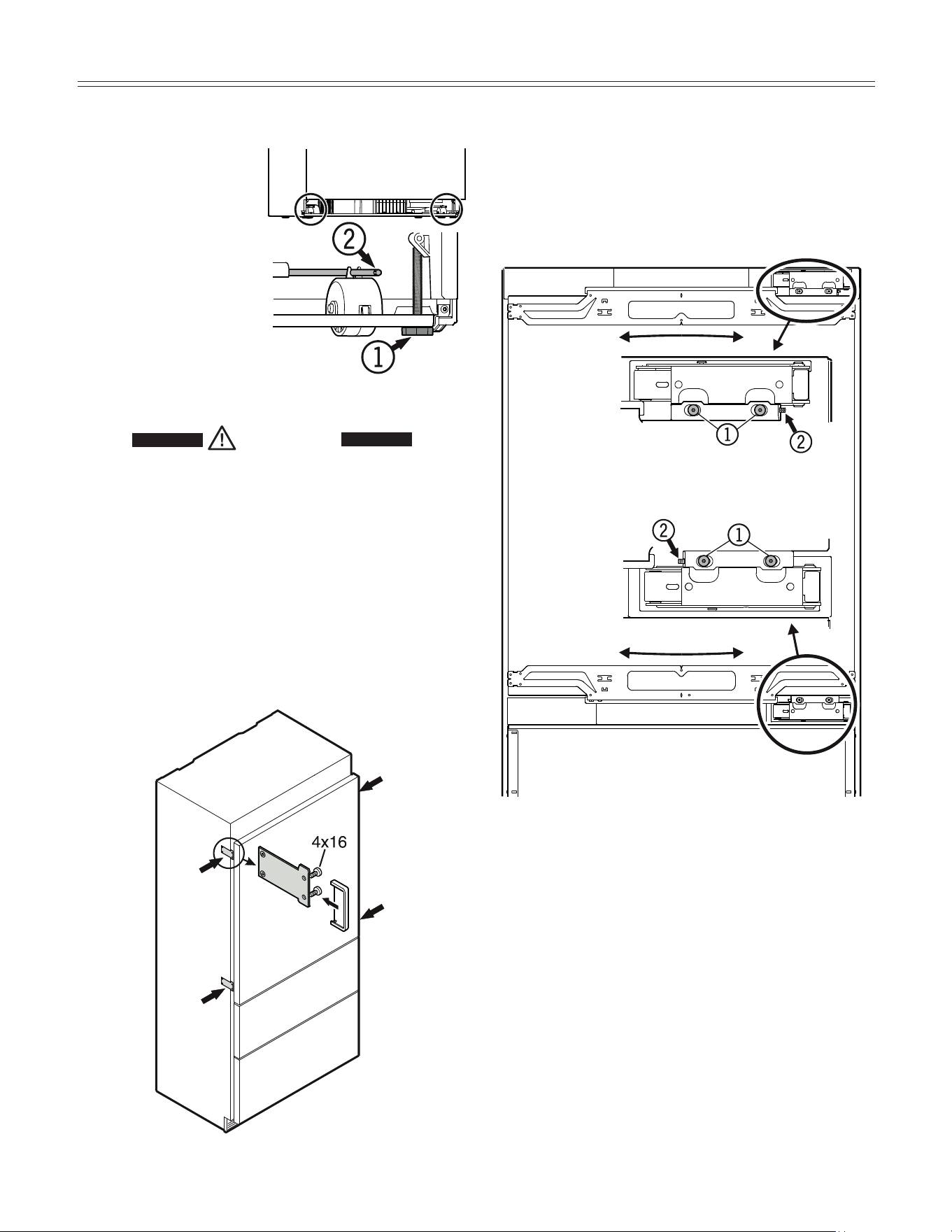
Fastening the Appliance in the
Recess - Figure 20
Fasten the appliance in the recess through the pre-
mounted supports at left and right on the appliance
housing using screws 4 x 16 mm. Then click the covers
supplied into place.
Leveling the Appliance - Figure 19
1. Adjust the height of the
appliance at the front
by twisting the leveling
feet
(1)
(A/F 27).
Use the open-ended
spanner provided.
2. Adjust the height of the
appliance at the rear
by turning the adjusting
bolts
(2)
.
3. Rotate leveling feet
(1)
until firmly in place
against the floor.
WARNING!
To prevent the appliance from tipping
forward the leveling feet (1) (Figure 19)
must have contact with the floor.
Figure 20
Figure 19
Adjusting the refrigerator door
- Figure
21
The lateral tilt of the refrigerator door can be adjusted if
required. Undo screws
(1)
. Adjust the lateral tilt using the
grub screw
(2)
(Allen key A/F 2.5).
Figure 21
14
InStallatIon
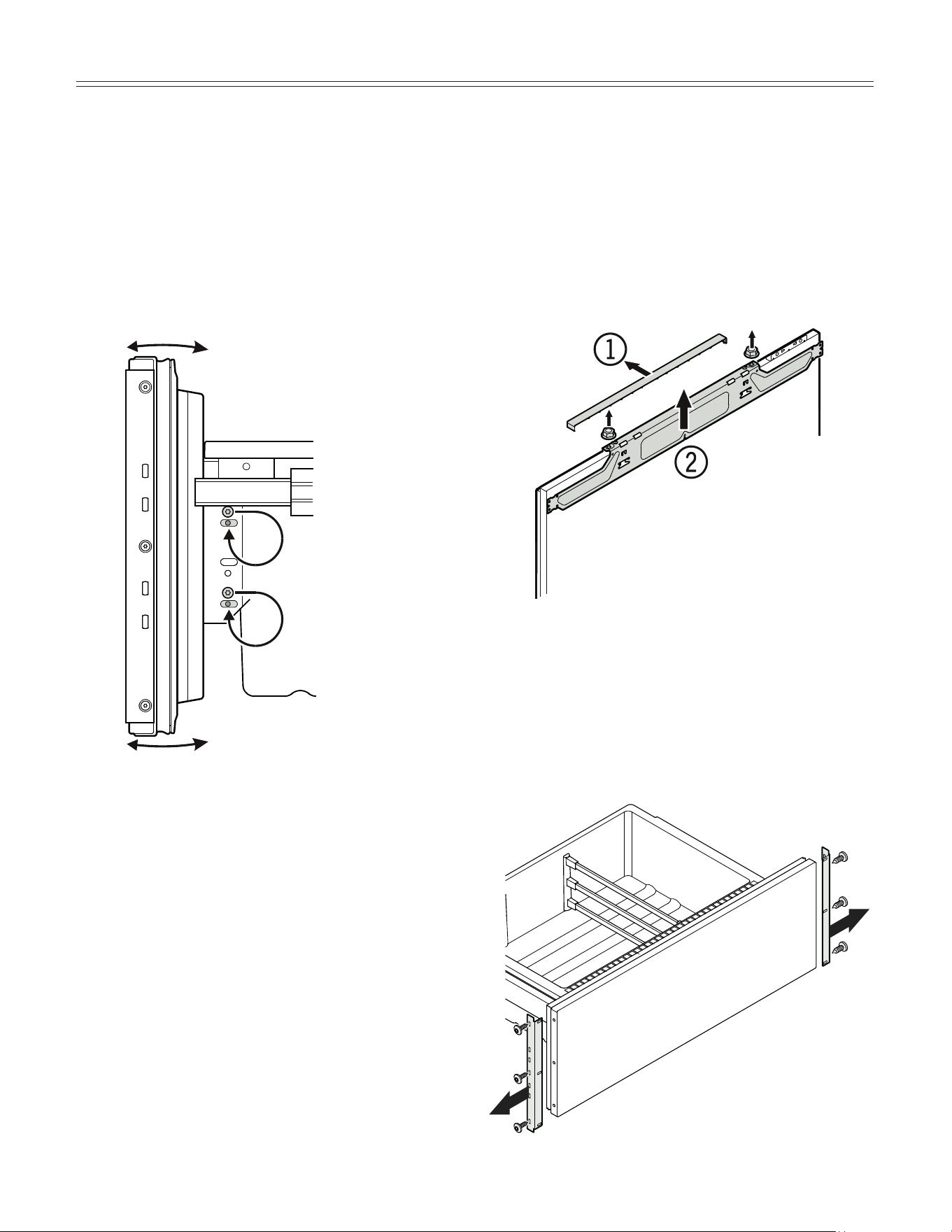
Before Mounting the Door Panels -
Figure 23
Remove cover
(1)
and unscrew the upper and lower
attachment bracket
(2)
of the refrigerator door. These
brackets will be mounted onto the refrigerator door
panel.
IMPORTANT
The nuts are needed to fit the premounted
panel onto the refrigerator door.
Figure 23
Figure 24
Unscrew the attachment brackets of both freezer draw-
ers. These brackets will be mounted onto the freezer
drawer panels (
Figure 24).
IMPORTANT
The screws are needed to fit the
premounted panels onto the freezer
drawers.
Adjusting the front of the drawer
-
Figure 22
If required, the front of the freezer drawers can be adjust-
ed.
Transfer the screws shown in the illustration (on the left
and right sides of the freezer drawer) individually to the
long slots below.
Tighten the screws in the front of the drawer once it is in
the right position.
Side view of the freezer drawer
pulled out
Figure 22
15
InStallatIon
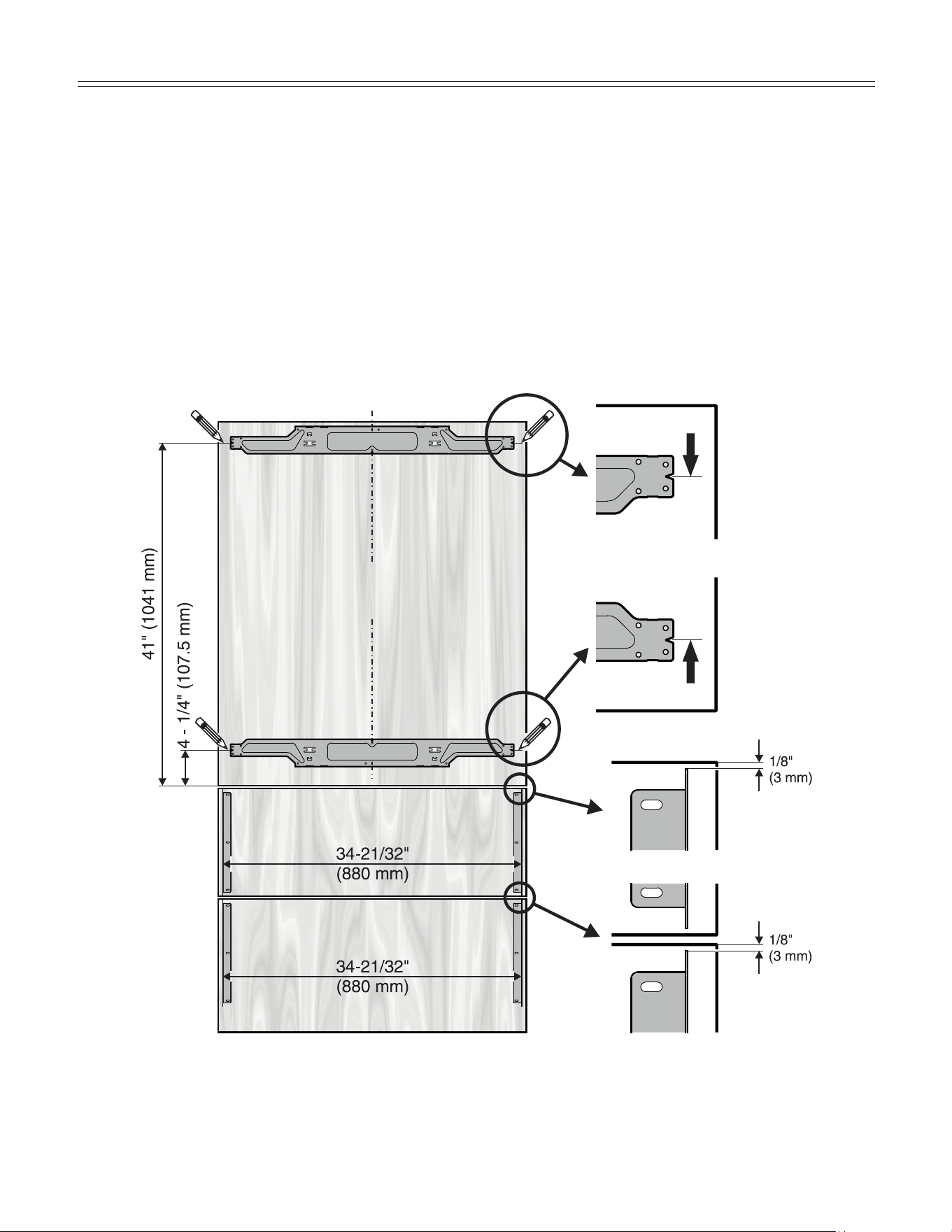
Mounting the Attachment Brackets onto the Door Panels - Figure 25
Mark a line with a distance of 41" and 4-1/4" from the bottom of the refrigerator door panel
.
Align one of the dismounted brackets of the refrigerator door to the line on the refrigerator door panel as shown in
Figure 25 a.
Fasten the bracket with any hole wherever possible using a minimum of 6 screws 4 x 16 mm.
Align the second bracket of the refrigerator door to the bottom line on the refrigerator door panel as shown in
Figure 25 b.
Fasten the bracket with any hole wherever possible using a minimum of 6 screws 4 x 16 mm.
Fasten the brackets provided onto the freezer drawer panels using three screws (4 x 16 mm) for each bracket consid-
ering the measurement in
Figure 25 c
.
Figure 25
Figure 25 a
Refrigerator door panel
Freezer drawer panel
Freezer drawer panel
Figure 25 b
Figure 25 c
16
InStallatIon
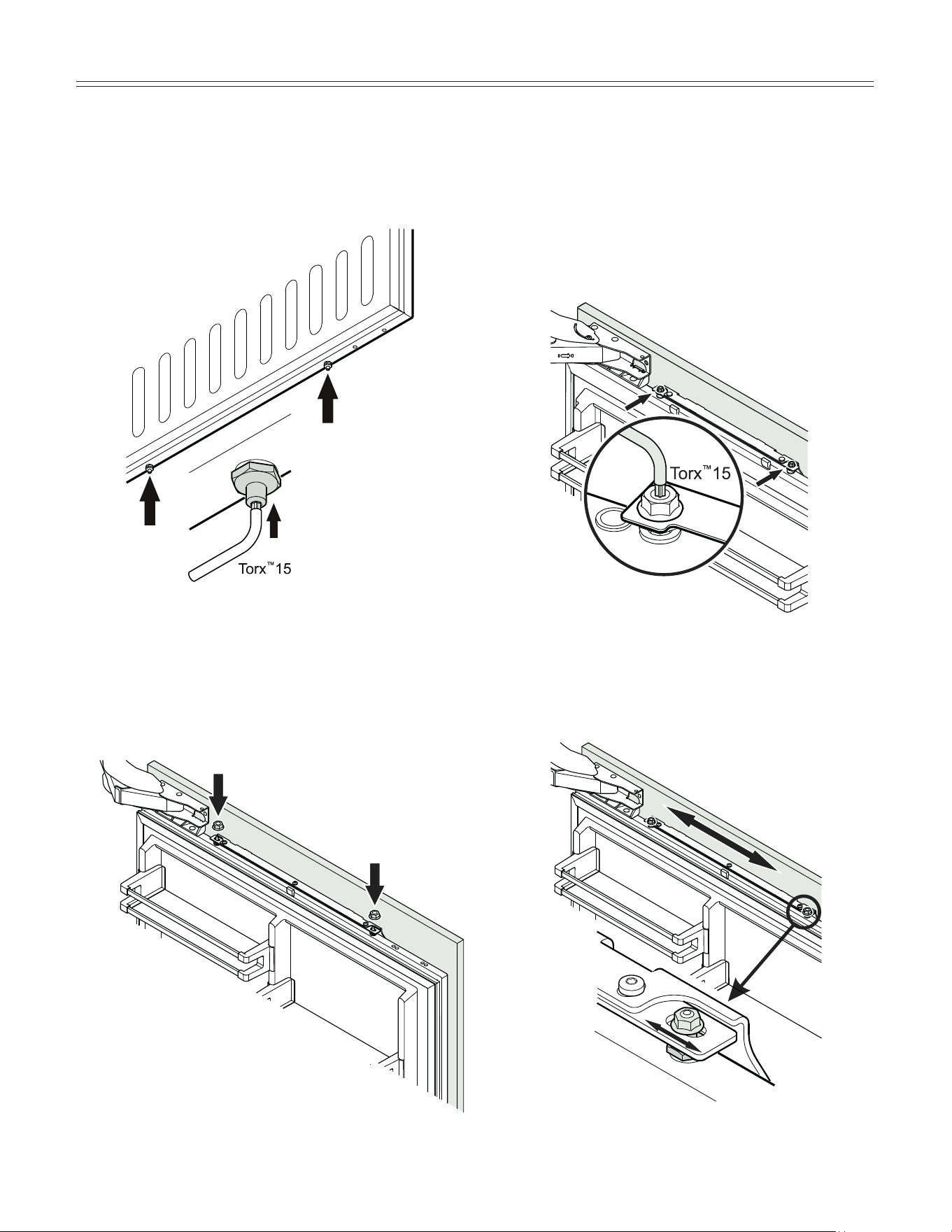
2. Open the refrigerator door and hang the panel on the
top adjusting bolts (Figure 27).
3. Screw on the hex nuts to the adjusting bolts and finger
tighten temporarily (Figure 27).
Figure 26
Figure 28
4. Close the door and check the height of the panel.
5. Align the panel in its vertical position if necessary.
Loosen the hex nuts and turn the adusting bolts
(Figure 28).
Mounting the Refrigerator Door Panel
Figure 27
1. Turn in the adjusting bolts on the bottom of the refrig-
erator door as far as possible (Figure 26).
Figure 29
6. Align the panel horizontally (with the long holes in the
attachment bracket) (Figure 29).
7. Tighten the hex nuts.
17
InStallatIon
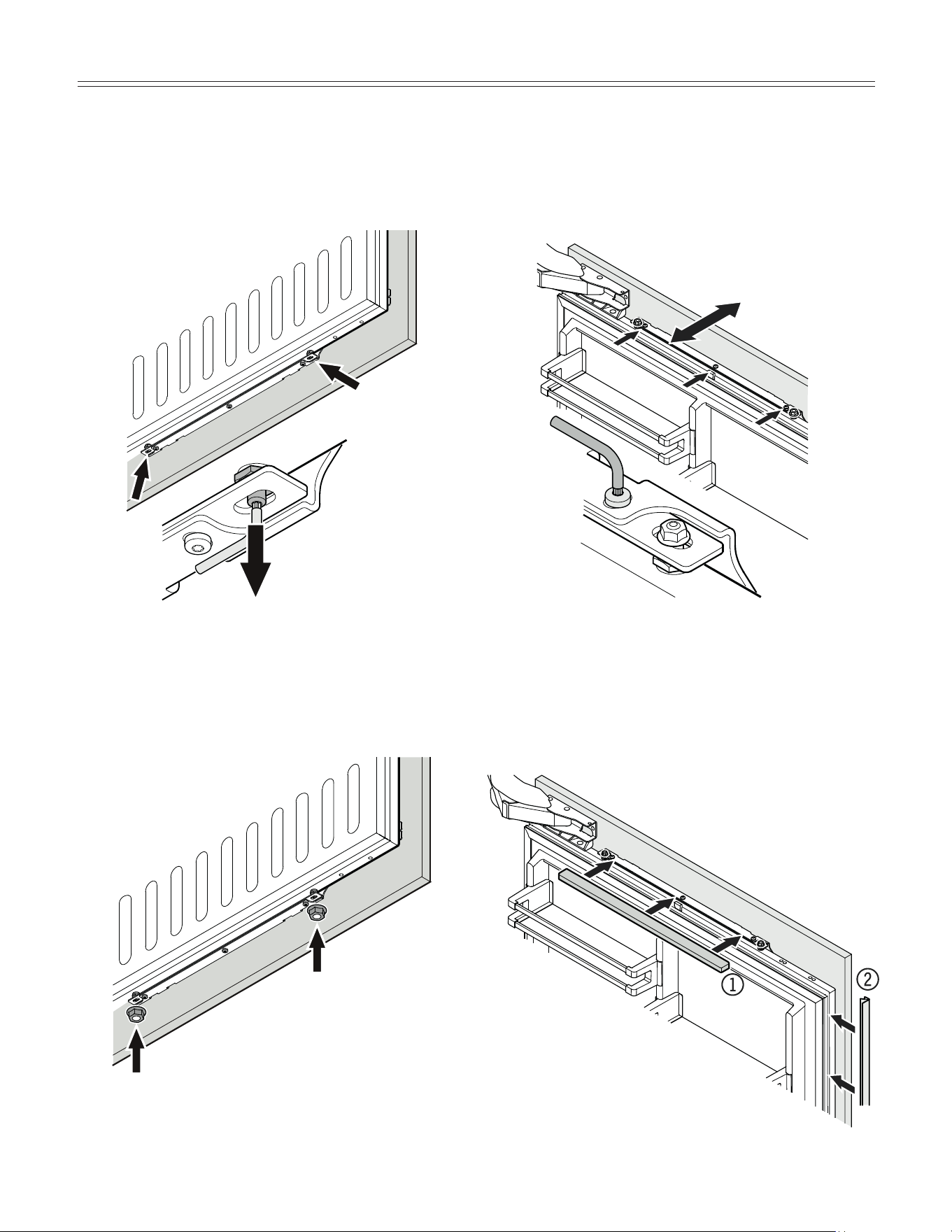
Figure 33
8. Turn the adjusting bolts (bottom refrigerator door)
until they make contact with the attachment bracket
(Figure 30).
Figure 30
Figure 31
9. Screw on the hex nuts and tighten (Figure 31).
10. Loosen the three screws on the top of the attachment
bracket, align the panel as shown in Figure 32 and
tighten the screws. This can also be done with the
lower attachment bracket.
Figure 32
11. Click cover (1) into place.
Insert the cover strip provided (2) between refrigera-
tor door and panel (Figure 33).
18
InStallatIon
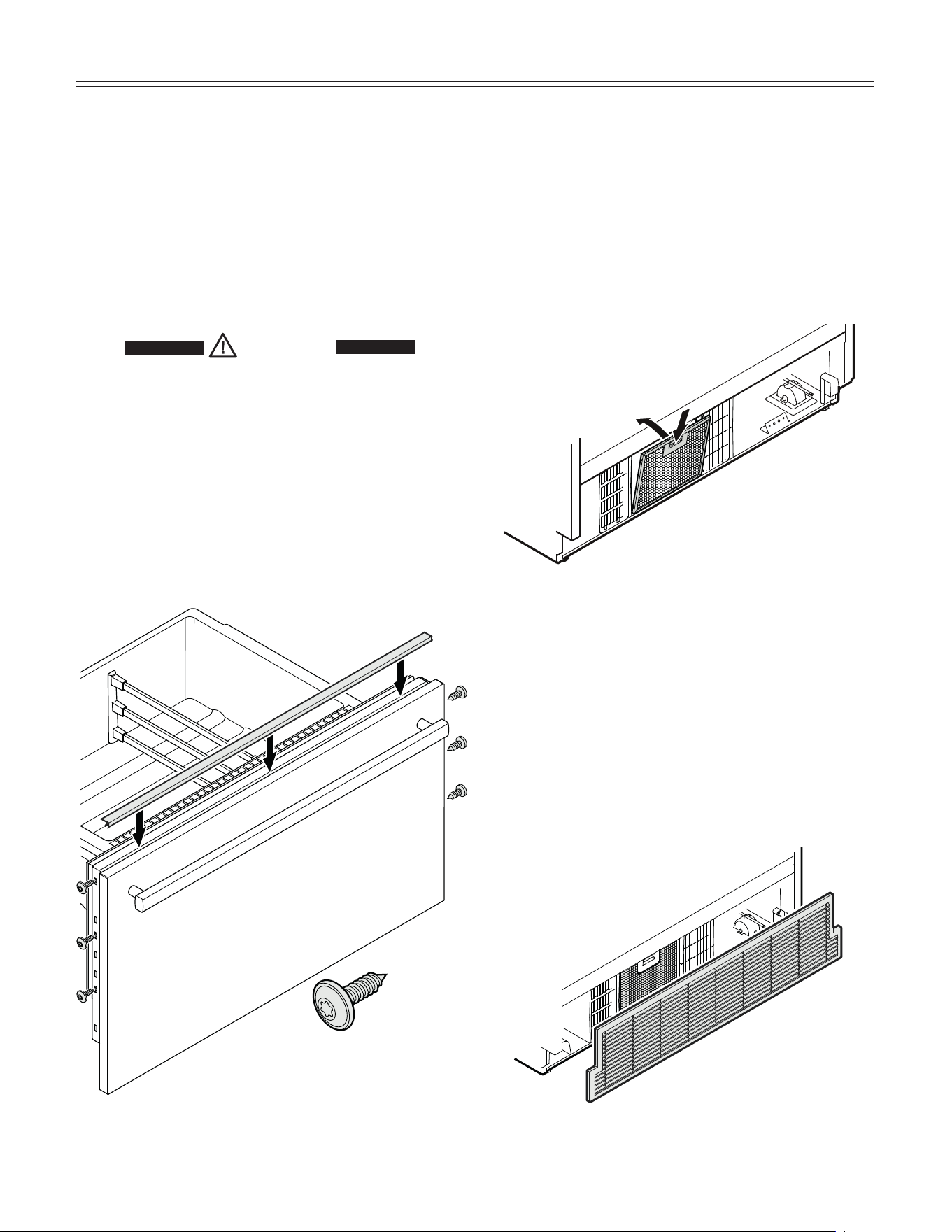
Mounting the Ventilation Grille - Figure
35, 36
1. Pull out the bottom freezer drawer.
2. Remove the blue protection film from the dust filter
provided and insert the filter into its opening in the toe
kick area as shown in
Figure 35. Engage the filter at
the bottom, press down the button and click into place.
3. Mount the ventilation grille as shown in Figure 36.
IMPORTANT
Only use the ventilation grille provided with the
appliance. This grille is required for proper operation
of the appliance.
The ventilation opening must not be covered with a
cabinet base.
Failure to use the supplied grille can result in product
failure and will void the warranty.
Figure 35
Figure 36
Mounting the Freezer Drawer Panels -
Figure 34
1. Pull out the upper freezer drawer and screw on the
panel with three screws at left and right hand side
using the screws as shown in Figure 34.
2. Close the drawer and check the position to the sur-
rounding cabinet panels. Align the panel in vertical
direction by loosening the screws left and right. Finally
tighten the screws.
CAUTION!
Do not overtighten. Do not use a power
driver.
3. Pull out the lower freezer drawer and fasten the lower
panel in the same way.
4. Finally cover the gap between the drawer and the
panel of both freezer drawers with the strips provided.
Remove the foil from the adhesive surface of the strip
and stick on the top of the appliance drawer making
sure the flexible gasket is fully inserted in the gap.
3.5 x 13 mm screw
Figure 34
19
InStallatIon
For Service in the U.S.
Liebherr Service Center
Toll Free: 1-866-LIEBHER or 1-866-543-2437
Email: Service-appliances.us@liebherr.com
PlusOne Solutions, Inc.
3501 Quadrangle Blvd, Suite 120
Orlando, FL 32817
For Service in Canada
Liebherr Service Center
Toll Free: 1-888-LIEBHER or 1-888-543-2437
www.euro-parts.ca
EURO-PARTS CANADA
39822 Belgrave Road
Belgrave, Ontario, N0G 1E0
Phone: (519) 357-3320
Fax: (519) 357-1326
*708298900*
www.liebherr-appliances.com