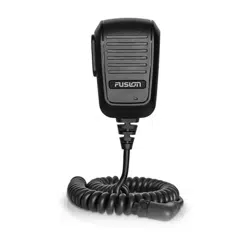

HANDHELD MICROPHONE
INSTALLATION INSTRUCTIONS
Important Safety Information
WARNING
Failure to follow these warnings and cautions could result in personal injury, damage to the vessel, or poor
product performance.
See the Important Safety and Product Information guide in the stereo box for product warnings and other
important information.
This device must be installed according to these instructions.
Disconnect the vessel's power supply before beginning to install this product.
CAUTION
To avoid possible personal injury, always wear safety goggles, ear protection, and a dust mask when drilling,
cutting, or sanding.
NOTICE
When drilling or cutting, always check what is on the opposite side of the surface to avoid damaging the vessel.
You must read all installation instructions before beginning the installation. If you experience difficulty during
the installation, contact Fusion
®
Product Support.
Tools Needed
• Pencil
• Drill
• 16mm (
5
/
8
in.) drill bit
• 2.5mm (
3
/
32
in.) drill bit
• 16mm (
5
/
8
in.) socket or wrench
• Phillips screwdriver
• Marine sealant (optional)
GUID-1CD23792-2CC2-4768-B1BD-D1E11B6C23D8 v2November 2022
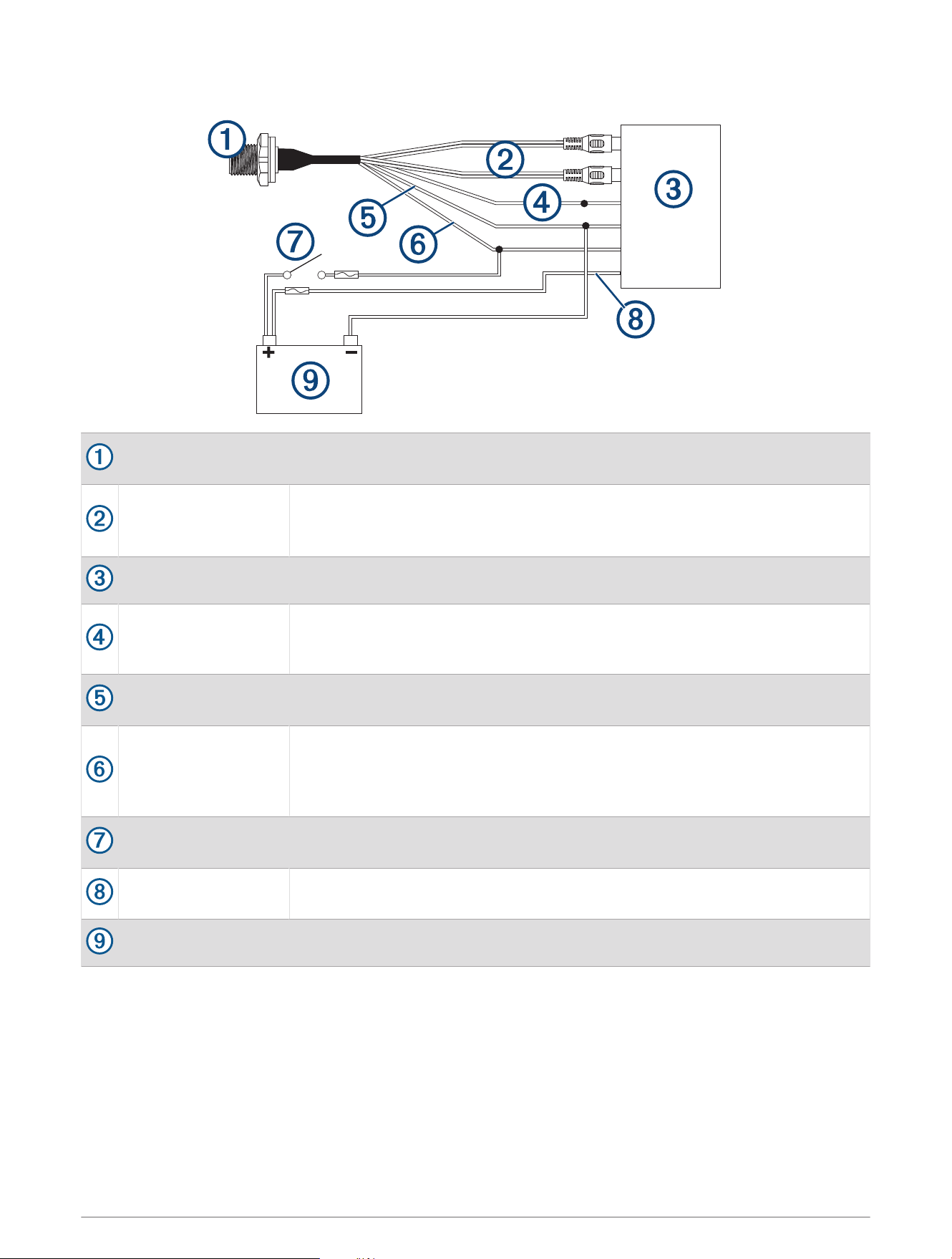
Connection Diagram
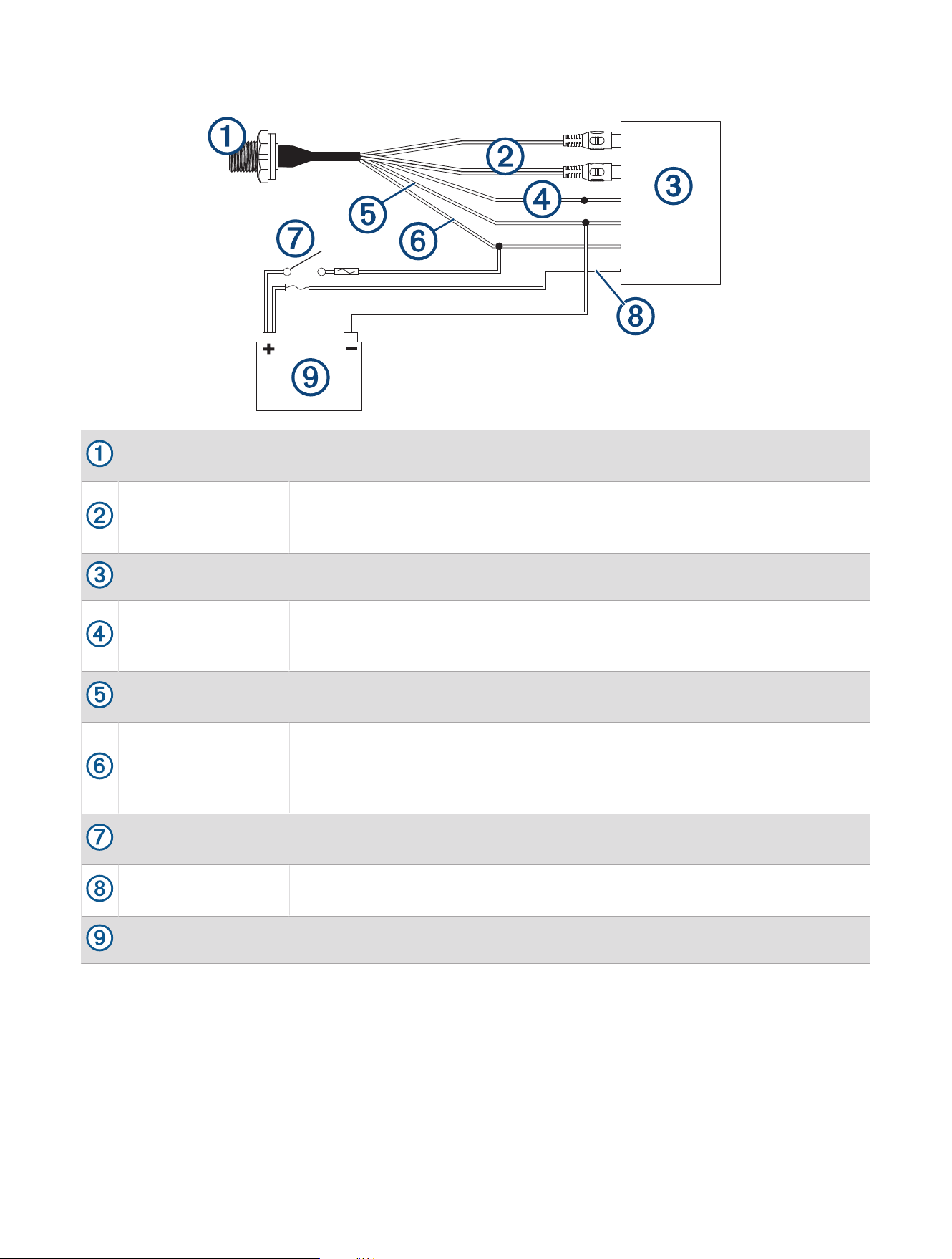
Microphone connector
You can securely mount the microphone connector in an accessible location
(Installing the Connector Mount, page4).
RCA connectors
You must connect these to the AUX IN connector on the stereo wiring harness.
If the stereo has more than one AUX IN connector, you must connect to the
AUX1 connector.
Compatible stereo
TELEMUTE
You must connect the bare wire from the microphone cable to the TELEMUTE
wire on the stereo wiring harness if you want the microphone to change the
source when activated(Operating the Handheld Microphone, page7).
Negative (-) power
connection
For the best results, you should connect the negative (-) wire from the micro
phone to the same negative (-) terminal as the stereo.
Positive (+) ignition
power connection
You should connect the positive (+) wire from the handheld microphone to the
ignition wire from the stereo to avoid draining the battery.
You must route the combined positive (+) and ignition wires through a 3A fuse
before connecting to the ignition or manual switch.
Ignition or manual
switch
The ignition or manual switch turns on the stereo and microphone.
Stereo power positive
connection
You should not connect the positive (+) wire from the microphone to the
constant power cable from the stereo to avoid draining the battery.
Power source
2

Specifications
Microphone dimensions (H×W×D) 88 ×60× 34mm (3
1
/
2
×2
3
/
8
× 1
11
/
32
in.)
Power and audio cable length 60cm (23
5
/
8
in.)
Frequency response From 100Hz to 4kHz
Microphone weight 250g (8.75oz)
Output (max.) 1Vrms
THD+N (Vo = 1Vrms, 1kHz) Less than 0.1%Vrms
Gain +18 ±0.5dB
Load impedance (min.) 10k Ohm
Operating voltage From 10.5 to 32Vdc
Current (at 14.4Vdc) 0.005A
Fuse (not included) 3A
Water rating IEC 60529 IPX7
1
1
For more information, go to garmin.com/waterrating.
3
Installing the Connector Mount
Before drilling a hole to mount the connector, you should verify that the microphone cable is long enough to
reach the back of the stereo and the connector mounting location.
You can use the included hardware to mount the connector on the end of the microphone cable onto the
dashboard or other mounting surface.
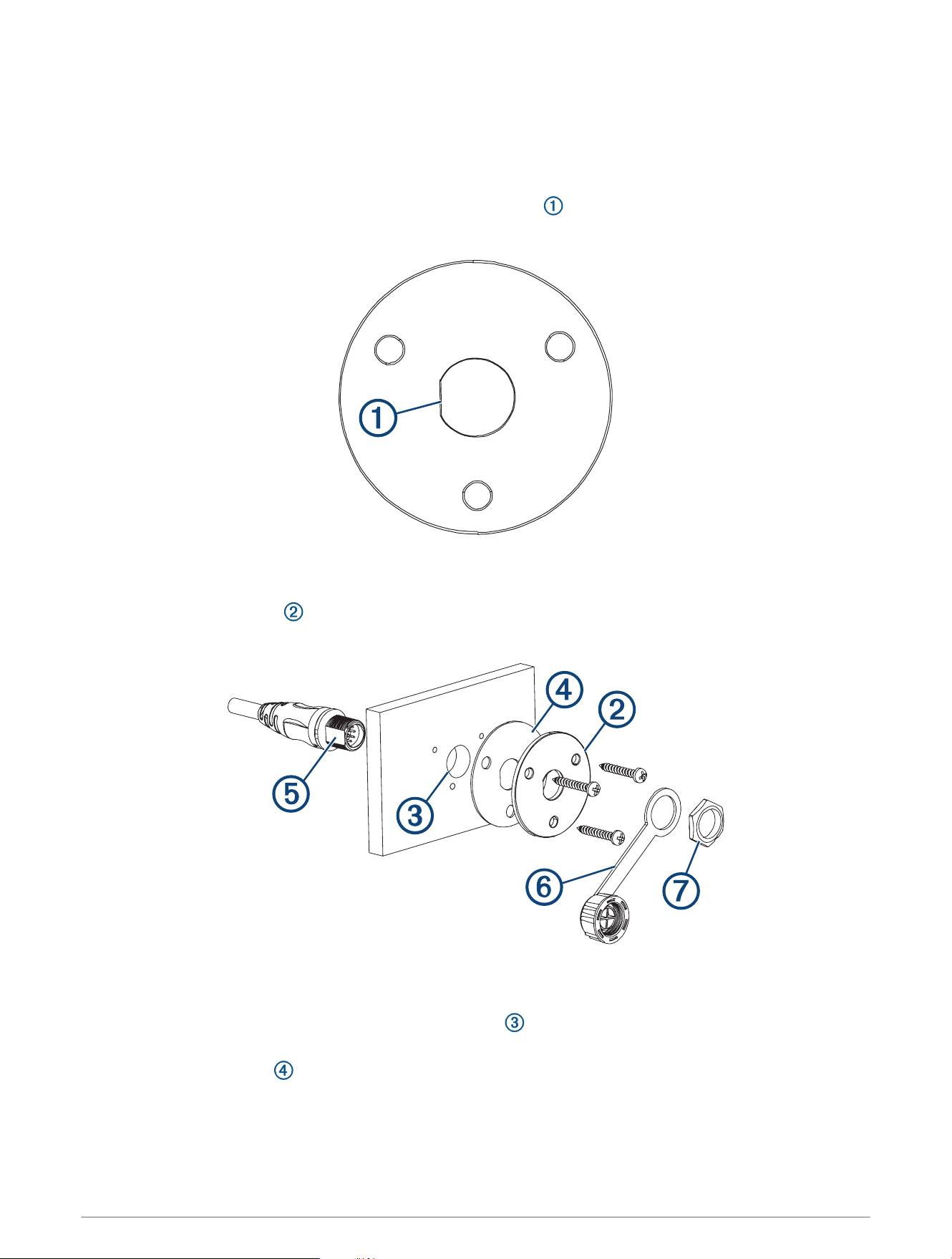
1 Orient the mounting plate with the flat edge of the central hole pointing to the left, and place it on the
surface where you plan to mount the connector.
If you orient the plate with the flat surface pointing to any direction other than the left, the microphone cable
will not point downward when you connect it.
2 Using the mounting plate as a template, trace the cable hole in the center of the mounting plate, and mark
the screw locations.
3 Set the mounting plate aside.
Do not drill through the mounting plate.
4 Using a 16mm (
5
/
8
in.) drill bit, drill the center cable hole in the mounting surface.
5 Using a 2.5mm (
3
/
32
in.) drill bit, drill the pilot holes.
6 Place the rubber gasket between the mounting plate and the mounting surface.
7 Using the included screws, attach the mounting plate and gasket to the mounting surface.
8 Route the microphone cable to the back of the stereo and to the connector mount.
4
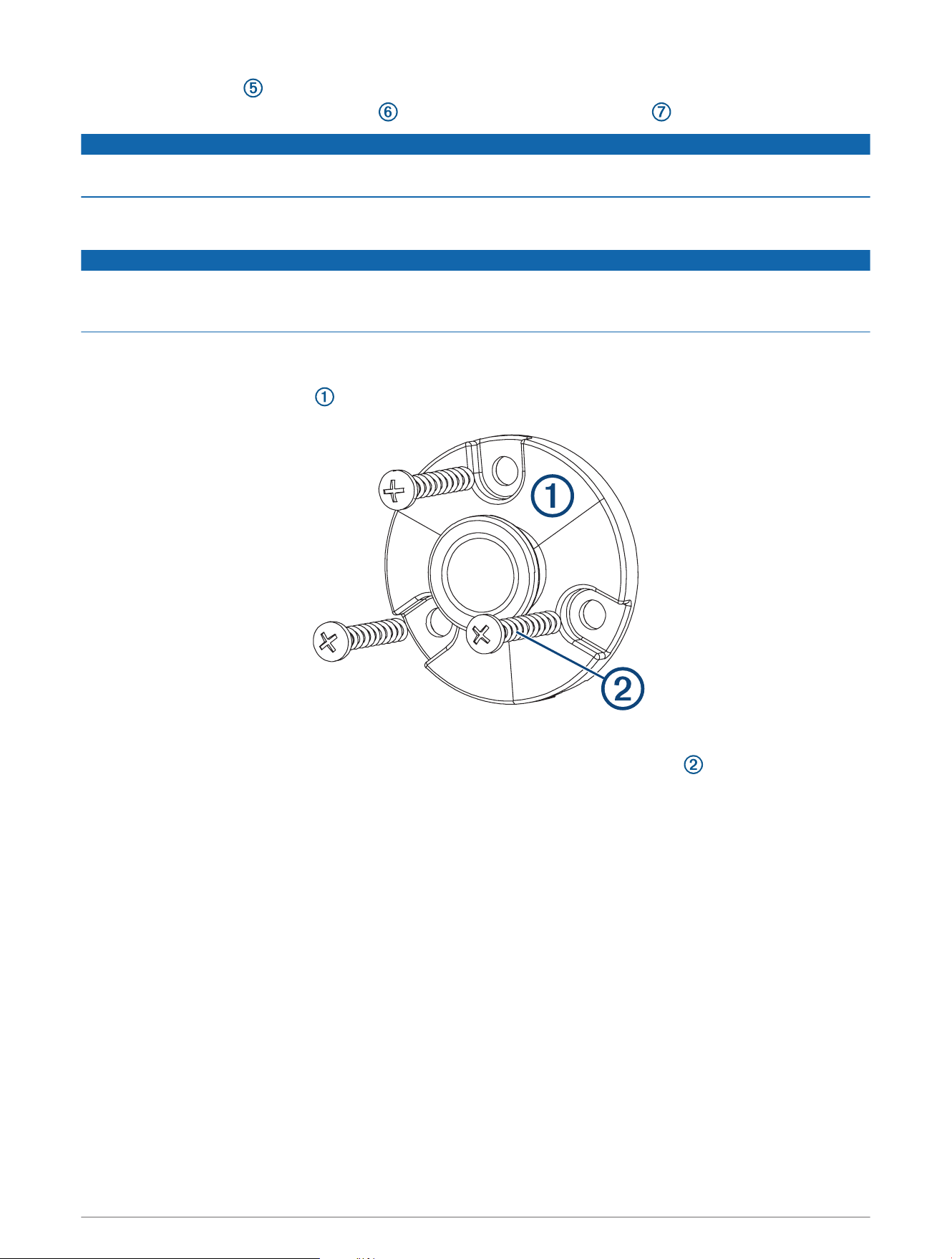
9 Feed the connector through the back of the mounting surface.
10 Secure the connector and weather cap to the mounting plate using the nut .
NOTICE
If you disconnect the microphone from the connector, you should secure the weather cap to avoid corrosion on
the connector contacts.
Mounting the Microphone Hanger
NOTICE
If you are mounting the bracket on fiberglass with screws, it is recommended to use a countersink bit to drill a
clearance counterbore through only the top gel-coat layer. This will help to avoid cracking in the gel-coat layer
when the screws are tightened.
You can mount the microphone hanger in a convenient location near the radio.
1 Select a mounting location for the microphone within reach of the microphone cable.
2 Using the microphone hanger as a template, mark the pilot holes.
3 Drill the mounting holes using a 3mm (
1
/
8
in.) drill bit.
4 Secure the microphone hanger to the mounting surface using the included screws .
5
Connection Diagram
Microphone connector
You can securely mount the microphone connector in an accessible location
(Installing the Connector Mount, page4).
RCA connectors
You must connect these to the AUX IN connector on the stereo wiring harness.
If the stereo has more than one AUX IN connector, you must connect to the
AUX1 connector.
Compatible stereo
TELEMUTE
You must connect the bare wire from the microphone cable to the TELEMUTE
wire on the stereo wiring harness if you want the microphone to change the
source when activated(Operating the Handheld Microphone, page7).
Negative (-) power
connection
For the best results, you should connect the negative (-) wire from the micro
phone to the same negative (-) terminal as the stereo.
Positive (+) ignition
power connection
You should connect the positive (+) wire from the handheld microphone to the
ignition wire from the stereo to avoid draining the battery.
You must route the combined positive (+) and ignition wires through a 3A fuse
before connecting to the ignition or manual switch.
Ignition or manual
switch
The ignition or manual switch turns on the stereo and microphone.
Stereo power positive
connection
You should not connect the positive (+) wire from the microphone to the
constant power cable from the stereo to avoid draining the battery.
Power source
6

Operating the Handheld Microphone
You must configure the stereo before you can operate the handheld microphone (Configuring the Fusion Stereo
for the Handheld Microphone, page7).
You can use the handheld microphone from any source on the stereo. If the source is set to anything other than
AUX1 when you hold the microphone button, the source switches to AUX1 automatically, and switches back to
the original source after you release the button.
NOTE: You should stand behind the speakers that will be broadcasting from the microphone. If you are standing
in front of the speakers, the microphone will pick up the broadcast and cause feedback.
1 Select any source on the stereo.
NOTE: If you set the stereo to the AUX1 source, there is no sound until you hold the microphone button and
speak.
2 Hold the button on the side of the microphone and speak into it.
NOTE: If the stereo is playing music from a source, you should wait about 2 seconds before speaking to
avoid cutting off the beginning of your announcement.
3 After you have finished speaking, release the button.
If the stereo was playing music from a source before you held the button, the stereo switches back to that
source automatically.
Configuring the Fusion Stereo for the Handheld Microphone
1 On the stereo, select > SETTINGS > TELEMUTE.
2 Select AUX1 to fill the check box.
The stereo will now change to the AUX1 source when you hold the button on the side of the handheld
microphone.
3 Select > SETTINGS > SOURCE > AUX1.
4 Select PARTYBUS ENABLED to clear the checkbox.
When you clear the checkbox, the AUX1 source is no longer available for streaming over the Fusion
PartyBus
™
network. It is recommended to disable network streaming for the microphone source to avoid
feedback caused by the slight delay present when streaming.
Adjusting the Gain of the Handheld Microphone
If the volume of the microphone broadcast is too loud or too quiet in relation to the other sources on the stereo,
you can adjust the gain level for the AUX1 source.
1 On the stereo, change the source to AUX1.
2 Adjust the gain to raise or lower the microphone volume in 1db steps.
A positive (+) gain setting increases the microphone volume, and a negative (-) gain setting decreases the
microphone volume.
7

Specifications
Microphone dimensions (H×W×D) 88 ×60× 34mm (3
1
/
2
×2
3
/
8
× 1
11
/
32
in.)
Power and audio cable length 60cm (23
5
/
8
in.)
Frequency response From 100Hz to 4kHz
Microphone weight 250g (8.75oz)
Output (max.) 1Vrms
THD+N (Vo = 1Vrms, 1kHz) Less than 0.1%Vrms
Gain +18 ±0.5dB
Load impedance (min.) 10k Ohm
Operating voltage From 10.5 to 32Vdc
Current (at 14.4Vdc) 0.005A
Fuse (not included) 3A
Water rating IEC 60529 IPX7
2
© 2020 Garmin Ltd. or its subsidiaries
Garmin
®
, the Garmin logo, Fusion
®
, and the Fusion logo, are trademarks of Garmin Ltd. or its subsidiaries, registered in the USA and other countries. These trademarks
may not be used without the express permission of Garmin.
M/N: A13014
2
For more information, go to garmin.com/waterrating.
© 2020 Garmin Ltd. or its subsidiaries
support.garmin.com