*Images may dier from your actual product.
©2024 TP-Link 7106511535 REV1.1.0
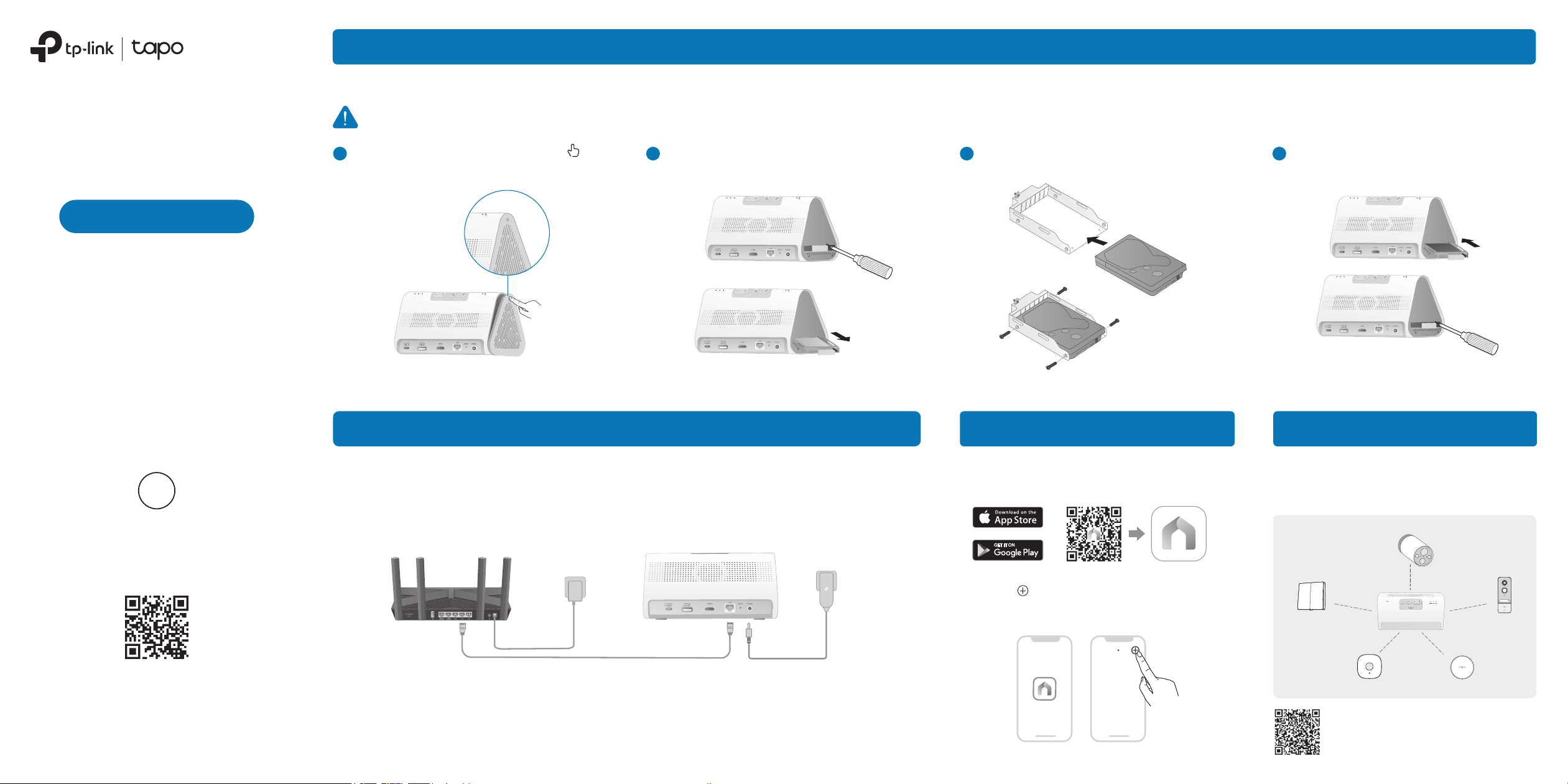
Install an extra HDD/SSD drive (2.5“) to expand local storage.
Quick Start Guide
01/ Install Your Hard Drive to Expand Local Storage
Connect the HomeBase to your router or switch using the Ethernet cable provided, and then connect the
HomeBase to a power outlet using the provided power adapter.
02/ Hardware Connection
Push down the cover to remove it. The sign
shows the place where you should press.
Option 1: Wired Connection (Ethernet)
Connect the HomeBase to a power outlet. Then refer to the Set Up the HomeBase section to connect your
HomeBase to a 5GHz Wi-Fi network.
Option 2: Wireless Connection
Note: Initialize the hard drive in the Tapo app.
1. Get the Tapo app from the App Store or Google
Play.
2. Tap the button in the app. Select
Hubs/HomeBase and then your model. Follow
app instructions to complete setup.
OR
03/ Set Up the HomeBase Build Your Smart Home
Build your smart home ecosystem by adding
smart sensors, buttons, switches, cameras or
doorbells to the Homebase.
Smart sensors
Doorbells
Cameras
Light switches
(Sub-1G)
Smart buttons
Compatibility:
Check compatible accessories at
https://www.tp-link.com/tapo-h500/product-list/
1. Back up all the data on your hard drive before installation as Tapo may need to format your hard drive.
2. The HomeBase must be powered o when you install or remove a hard drive.
LAN Port
My Home
1
Loosen the screw and pull out the hard drive
bracket.
2
Put in your hard drive and secure it with the
provided screws.
3
Insert the bracket back into the HomeBase.
Secure it with the screw. Then replace the
cover.
4
Smart HomeBase
?
Need some help?
Visit https://www.tapo.com/support/
for technical support, the user guide, FAQs,
warranty & more
• Do not use damaged charger or USB cable to charge the device.
• Do not attempt to disassemble, repair, or modify the device. If you need
service, please contact us.
• Do not use any other chargers than those recommended.
• Do not use the device where wireless devices are not allowed.
• Adapter shall be easily accessible.
• Use only power supplies which are provided by manufacturer and in the
original packing of this product. If you have any questions, please don't
hesitate to contact us.
• Keep the device away from water, re, humidity or hot environments.
• Do not place near automatically controlled devices such as re alarms.
Radio waves emitted from this product may cause such devices to
malfunction resulting in an accident.
• Observe restrictions on using wireless products in fuel depots, chemical
plants or when blasting operations are in progress.
• Never put metal objects inside the product. If a metal object enters the
product turn o the circuit breaker and contact an authorised electrician.
• This product is not intended to be used when providing medical care.
Consult the manufacturer of any personal medical devices, such as
pacemakers or hearing aids to determine if they are adequality shielded
from external RF (radio frequency) energy.
• Do not use this product in health care facilities. Hospitals or health care
facilities may be using equipment that could be sensitive to external RF
energy.
• When you leave the product unused for a long time unplug the product
from the power outlet.
• This product may interfere with other electronic products such as TV,
radios, personal computers, phones or other wireless devices.
Operating Temperature: 0 °C ~ 40°C (32°F ~ 104°F)
Please read and follow the above safety information when operating the
device. We cannot guarantee that no accidents or damage will occur due to
improper use of the device. Please use this product with care and operate
at your own risk.
The terms HDMI, HDMI High-Denition Multimedia Interface, HDMI trade
dress and the HDMI Logos are trademarks or registered trademarks of
HDMI Licensing Administrator, Inc.
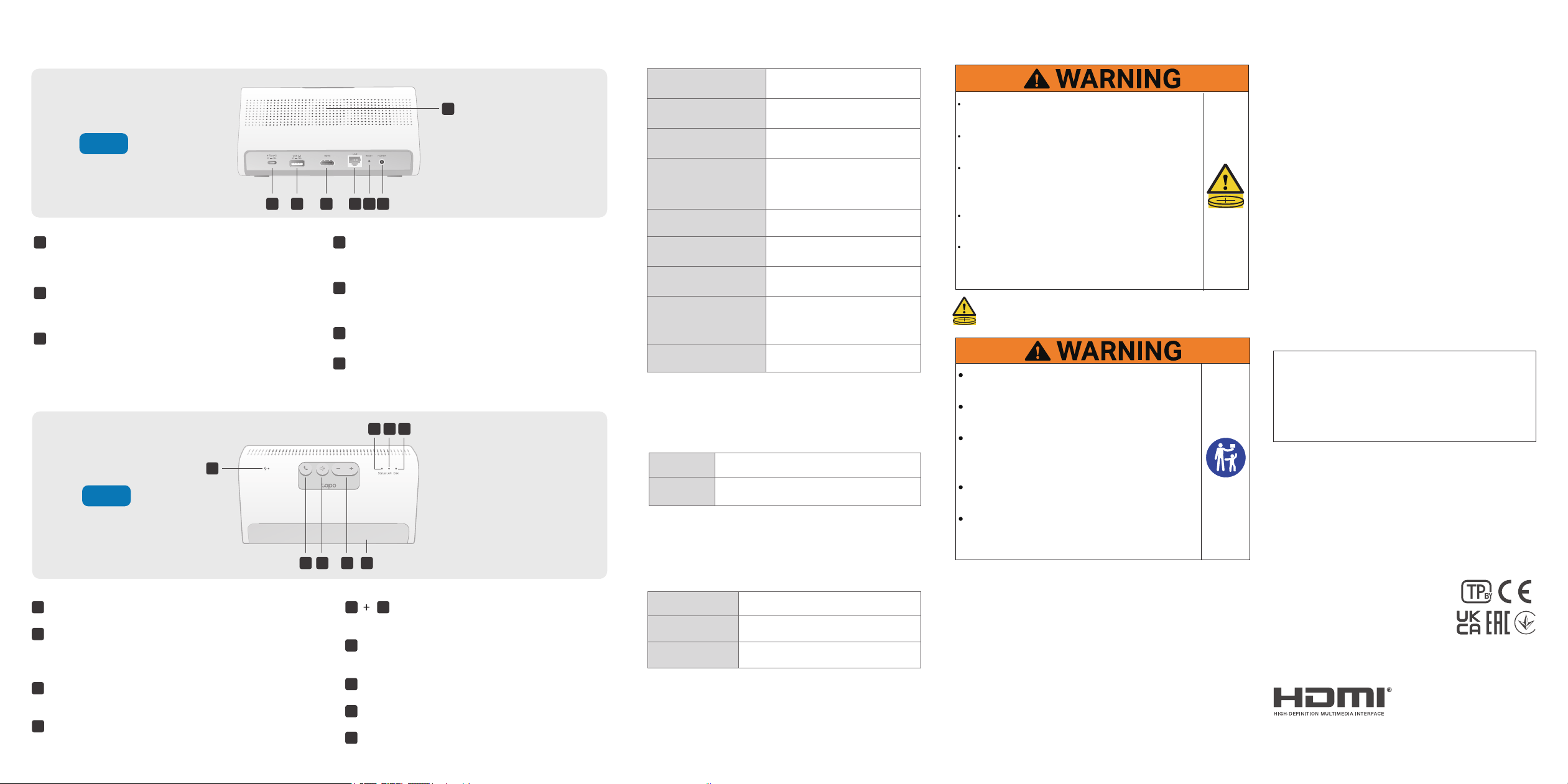
Status LED Indications
Safety Information
Blinking red and green
Blinking red quickly
Solid red
Blinking green quickly
O
Starting up
Connecting to Wi-Fi
HomeBase resetting
HomeBase updating
Pairing
HomeBase powered o
Blinking red slowly
Blinking amber slowly
Ready for setup
Blinking green slowly
Connected to Wi-Fi (Wireless)
Connected to router (Ethernet)
Solid green Connected to the cloud
Disconnected from router
Ethernet network working properly
LAN LED Indications
On
O Ethernet cable not connected
TP-Link hereby declares that the device is in compliance with the essential
requirements and other relevant provisions of directives 2014/53/EU,
2009/125/EC, 2011/65/EU and (EU) 2015/863.
The original EU declaration of conformity may be found at
https://www.tapo.com/en/support/ce/
TP-Link hereby declares that the device is in compliance with the essential
requirements and other relevant provisions of the Radio Equipment
Regulations 2017.
The original UK declaration of conformity may be found at
https://www.tapo.com/support/ukca/
For EU/UK Region:
Operating Frequency / Nominal Operating Frequency / Max Output Power:
2400MHz~2483.5MHz / 20dBm
5150 MHz -5250 MHz / 23dBm
5250 MHz~5350 MHz / 23dBm
5470 MHz~5725 MHz / 23dBm
863~865MHz / 863.35MHz / 25mW (e.r.p)
863~865MHz / 864.35MHz / 25mW (e.r.p)
868~868.6MHz / 868.35MHz / 25mW (e.r.p)
CAUTION!
Avoid replacement of a battery with an incorrect type that can defeat a
safeguard. Avoid disposal of a battery into re or a hot oven, or
mechanically crushing or cutting of a battery, that can result in an
explosion. Do not leave a battery in an extremely high temperature
surrounding environment that can result in an explosion or the leakage of
ammable liquid or gas. Do not leave a battery subjected to extremely
low air pressure that may result in an explosion or the leakage of
ammable liquid or gas.
a) Remove and immediately recycle or dispose of used batteries according to local
regulations and keep away from children. Do NOT dispose of batteries in household
trash or incinerate.
b) Even used batteries may cause severe injury or death.
c) Call a local poison control center for treatment information.
d) This product includes button/coin cell batteries of type CR1220.
e) The nominal voltage of the button/coin cell batteries is 3.0 V.
f) Non-rechargeable batteries are not to be recharged.
g) Do not force discharge, recharge, disassemble, heat above 70℃/158℉ or
incinerate. Doing so may result in injury due to venting, leakage or explosion resulting
in chemical burns.
This product contains non-replaceable button/coin cell batteries. In order to avoid
unnecessary danger, please do not attempt to remove and replace the button/coin
cell batteries.
Disk LED Indications
Solid green
Hard drive working properly
Solid red Hard drive malfunction
No hard drive connectedO
Overview
Front
Back
1
Type-C Port
5V/1.5A type-C port for charging your devices (e.g.,
battery-powered cameras). This port cannot transfer any data.
2
USB 2.0 Port
5V/0.5A USB port for exporting data to another device.
3
HDMI Port
Output port for high-denition audio and video signals. You can
connect it to a TV or monitor to project camera videos.
Connect to a router or a switch using an Ethernet cable.
4
LAN Port
5
RESET
Press and hold for 10 seconds to restore factory default settings.
7
Speaker
6
Power Port
13
Status LED
12
Pad Holder
Easily place your pad here.
14
LAN LED
15
Disk LED
9
Answer/SYNC Button
10
Decline/Mute Button
Decline the video call, or silence the alarm.
11
Volume Button
Volume up or down.
Press once: Answer the video call.
Press and hold for 3 seconds: Enter pairing mode.
8
Microphone
Switch to the previous or next channel when using HDMI output.
9 11
9
8
10 11 12
13 14
15
1 2 3 5 64
7
INGESTION HAZARD: This product
contains a button cell or coin battery.
DEATH or serious injury can occur if
ingested.
A swallowed button cell or coin battery
can cause Internal Chemical Burns in
as little as 2 hours.
KEEP new and used batteries OUT OF
REACH of CHILDREN
Seek immediate medical attention if a
battery is suspected to be swallowed or
inserted inside any part of the body.
Warning!
This product contains a button cell or coin battery. Avoid ingestion
hazard. Death or serious injury can occur if ingested.
INGESTION HAZARD: This product
contains a button cell or coin battery.
DEATH or serious injury can occur if
ingested.
A swallowed button cell or coin battery
can cause Internal Chemical Burns in
as little as 2 hours.
KEEP new and used batteries OUT OF
REACH of CHILDREN
Seek immediate medical attention if a
battery is suspected to be swallowed
or inserted inside any part of the body.