Item No.: 2984AUS
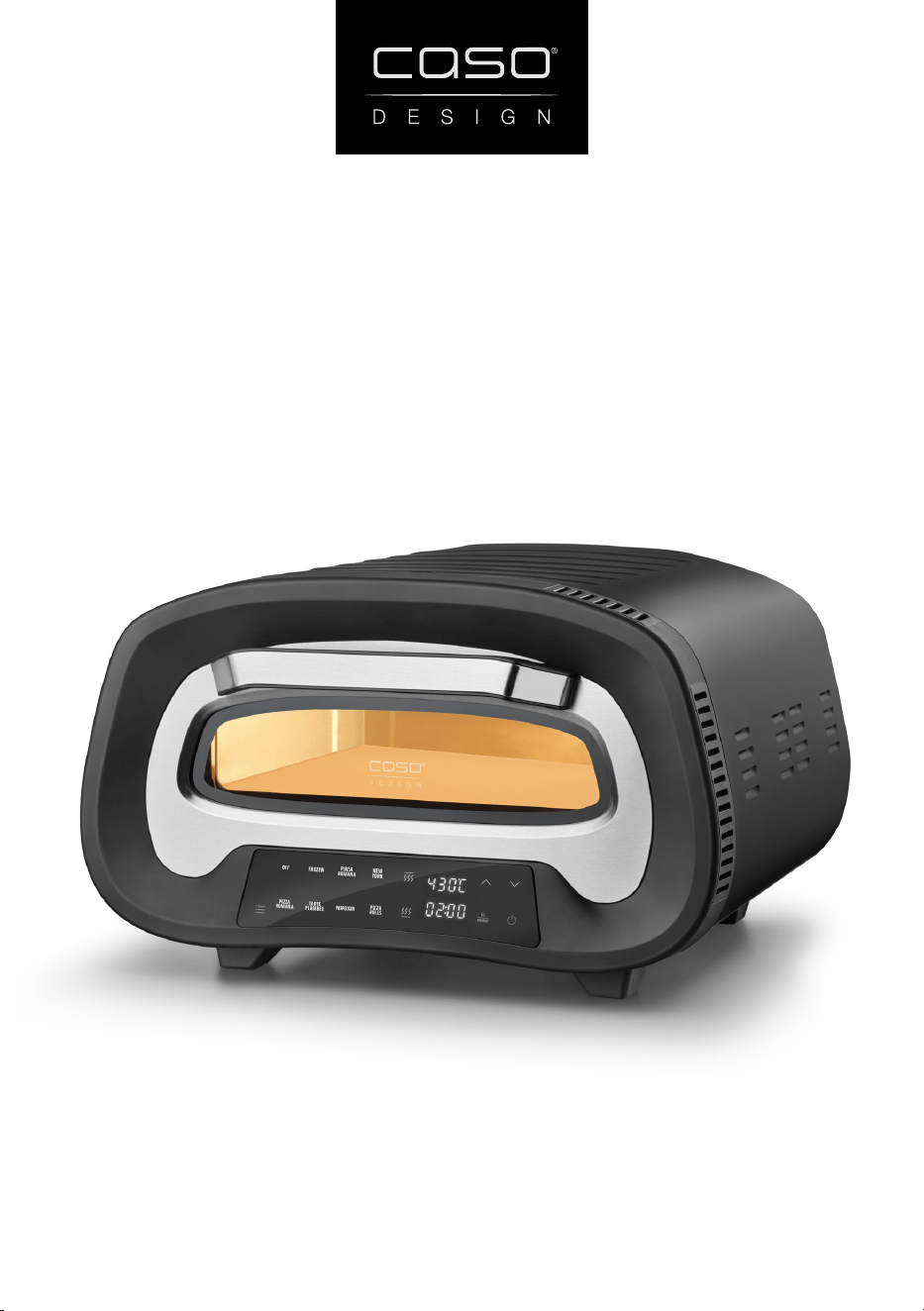
Electric pizza oven PizzaChef 430°
Instruction Manual
2
CASO PizzaChef 430°
Congratulations on your purchase of a Caso Design® Electric pizza oven, imported by
Pro-Line Australia.
Please read through this notice and the instruction manual carefully before using
or installing the product and ensure that both are kept in a safe place for future
reference.
The system must be properly installed and located in accordance with the instruc-
tions before it is used.
During the setup of this product if you have any questions/ comments/
issues DO NOT RETURN TO STORE. FOR SERVICE AND TECHNICAL ADVICE VISIT
www.prolineaustralia.com.au/contact
Electrical Requirements:
Australia/ New Zealand 220 - 240 V~; 50 - 60 Hz
Due to manufacturing alterations product may vary slightly from
that pictured.
System Specications
CASO PizzaChef 430°
Item Number
2984AUS
External measurements (W x H x D) 460 mm x 295 mm x 495 mm
Product Weight
11.6 kg
Electrical data
220 - 240 V~; 50 - 60 Hz
Power Consumption
2200 W
Pro-Line Australia
PO Box 4187
Norwood South LPO
South Australia 5067
Email: info@prolineaustralia.com.au
Web:www.prolineaustralia.com.au
3
CASO PizzaChef 430°
EN Safety
Warning notices
The following warning notices are used in the Operating Manual concerned here.
DANGER
A warning notice of this level of danger indicates a potentially dangerous situation.
If the dangerous situation is not avoided, this can lead to death or serious injuries.
f Observe the instructions in this warning notice in order to avoid the danger of death
or serious personal injuries.
WARNING
A warning notice of this level of danger indicates a possible dangerous situation.
If the dangerous situation is not avoided, this can lead to serious injuries.
f Observe the instructions in this warning notice in order to avoid the personal injuries.
ATTENTION
A warning notice of this level of danger indicates a possible dangerous situation.
If the dangerous situation is not avoided, this can lead to slight or moderate
injuries.
f Observe the instructions in this warning notice in order to avoid the personal injuries.
WARNING
Danger due to unintended use! Dangers can emanate from the device if it is used for an
unintended use and/or a dierent kind of use.
f Use the device exclusively for its intended use.
f Observe the procedural methods described in this Operating Manual.
Claims of all kinds due to damages resulting from unintended uses are excluded. The User
bears the sole risk.

4
CASO PizzaChef 430°
General Safety information
PLEASE NOTE
Please observe the following general safety notices with regard to the safe handling of
the device.
f Use the appliance only as described in the user’s guide to avoid
possible injury from misuse.
f Children must not use this appliance. Keep the appliance and its power supply away
from children.
f This appliance is not intended for use by persons (including children)with reduced
physical, sensory and metal capabilities, or lack of
experience and knowledge, unless they have been given supervision
or instruction concerning use of the appliance by a person
responsible for their safety.
f Only customer service departments authorized by the manufac-
turermay carry out repairs on the device, as otherwise the guarantee entitlements
will be null and void in the event of any subsequent damages. Improperly performed
repairs can cause considerable
dangers for the user.
f Do not operate the appliance unattended.
f Do not use the appliance:
• if the appliance itself or parts are damaged,
• if the power cord or plug is damaged,
• if the appliance has been dropped.
f Always unwind the power cord completely before use. When doing so, ensure the
power cord is not damaged by sharp edges or hot objects.
f Pull the plug out of the socket:
• when you are not using the appliance,
• after each use,
• before cleaning the appliance or putting it away,
• if there is an obvious malfunction during operation,
• during a thunderstorm.
f Do not operate the unit with an external timer or a separate remote-control system.
f Do not make any modi cations to the appliance or the power cord. Only have repairs
carried out by a specialist workshop, as appliances that have not been repaired
properly endanger the user. Please also observe the enclosed warranty conditions.
f Only use the device with original accessories.
f Place the appliance on a stable, level surface. Ensure su cient distance between the
appliance and strong heat sources such as hotplates, heating pipes, etc.
f Do not clean the appliance with hard, scratchy or abrasive cleaning agents such as
steel wool or similar.
f Defective components must always be replaced with original replacement parts. Only
such parts will guarantee that the safety requirements are fullled.

5
CASO PizzaChef 430°
Danger of burns
WARNING
The device, the device door and the pizza stone become very hot. Please note the
following safety instructions to protect yourself and others from burns:
f Do not touch the hot surface, the pizza stone or the pizza oven door (apart from the
handle) when the device is in operation.
f Let the device and the pizza stone cool down before you remove the pizza stone from
the oven.
f Do not place any objects or ammable materials on the device’s surface.
f Do not cover any ventilation slots and make sure to leave 5 cm of space around the
sides and 10 cm above the device.
f Do not cover the device until it has cooled down completely.
f Always use the pizza paddle to place pizzas in the device.
f Use gloves to protect your hands.
f WARNING: Charcoal or similar fuels cannot be used in this device.
f Do not allow metallic objects or food items to touch the heating element.
Dangers due to electrical power
DANGER
Mortal danger due to electrical power! Mortal danger exists when coming into contact
with live wires or subassemblies! Observe the following safety notices to avoid dangers due
to electrical power:
f If the power cord of this appliance is damaged, it must be replaced by the
manufacturer or its customer service or a similarly qualied person in order to avoid
hazards.
f Do not touch the appliance or the mains plug with wet hands.
f Do not immerse the cord or appliance in water or other liquids to prevent an electric
shock.

6
EN
CASO PizzaChef 430°
Table of contents - Operation
1 General ...........................................................................................................................7
1.1 Information on this manual .....................................................................................................7
1.2 Limitation of liability ................................................................................................................7
1.3 Copyright protection ................................................................................................................7
1.4 Delivery scope ............................................................................................................................8
1.5 Unpacking ................................................................................................................................... 8
2 Design and Function .....................................................................................................8
2.1 Overview .....................................................................................................................................9
2.2 Control Panel ........................................................................................................................... 10
2.3 Assembly .................................................................................................................................. 10
2.3.1 Assembly of the pizza paddle ..............................................................................................................10
2.4 Automatic programs .............................................................................................................. 10
2.5 Rating plate ............................................................................................................................. 11
3 Operation and Handling .............................................................................................11
3.1 Before rst use ........................................................................................................................ 11
3.2 Operation ................................................................................................................................. 12
3.3 Memory function .................................................................................................................... 13
3.4 Tips for preparation ............................................................................................................... 13
4 Cleaning and Maintenance .........................................................................................14
4.1 Safety information ................................................................................................................. 14
4.2 Device ....................................................................................................................................... 14
4.3 Pizza stone ............................................................................................................................... 15
4.4 Pizza paddle ............................................................................................................................ 15
5 Troubleshooting ..........................................................................................................15
5.1 Safety notices .......................................................................................................................... 15
5.2 Troubleshooting table ........................................................................................................... 15
6 Disposal of the Old Device ..........................................................................................16
6.1 Disposal of the packaging .................................................................................................... 16
7 Guarantee ....................................................................................................................16

7
EN
CASO PizzaChef 430°
1 General
Please read the information contained herein so that you can become familiar with your
device quickly and take advantage of the full scope of its functions. Your appliance will serve
you for many years if you handle it and care for it properly. We wish you a lot of pleasure in
using it!
1.1 Information on this manual
These operating instructions are a component of the electric pizza oven CASO PizzaChef
430° (referred to hereafter as the Device) and provide you with important information for the
initial commissioning, safety, intended use and care of the device. The Operating Instructions
must be available at all times at the device. This Operating Manual must be read and applied
by every person who is instructed to work with the device:
• Commissioning,
• Operation,
• Troubleshooting and/or
• Cleaning
Keep the Operating Manual in a safe place and pass it on to the subsequent owner
along with the device.
1.2 Limitation of liability
All the technical information, data and notices with regard to the installation, operation and
care are completely up-to-date at the time of printing and are compiled to the best of our
knowledge and belief, taking our past experience and ndings into consideration.
No claims can be derived from the information provided, the illustrations or descriptions in
this manual. The manufacturer does not assume any liability for damages arising as a result
of the following:
• Non-observance of the manual
• Uses for non-intended purposes
• Improper repairs
• Technical alterations, modications of the device
• Use of unauthorized spare parts
Modications of the device are not recommended and are not covered by the guarantee. All
translations are carried out to the best of our knowledge. We do not assume any liability for
translation errors, not even if the translation was carried out by us or on our instructions. The
original German text remains solely binding.
1.3 Copyright protection
This document is copyright protected. CASO GmbH reserves all the rights, including those
for photomechanical reproduction, duplication and distribution using special processes
(e.g. data processing, data carriers, data networks), even partially. Subject to content and
technical changes.

8
EN
CASO PizzaChef 430°
1.4 Delivery scope
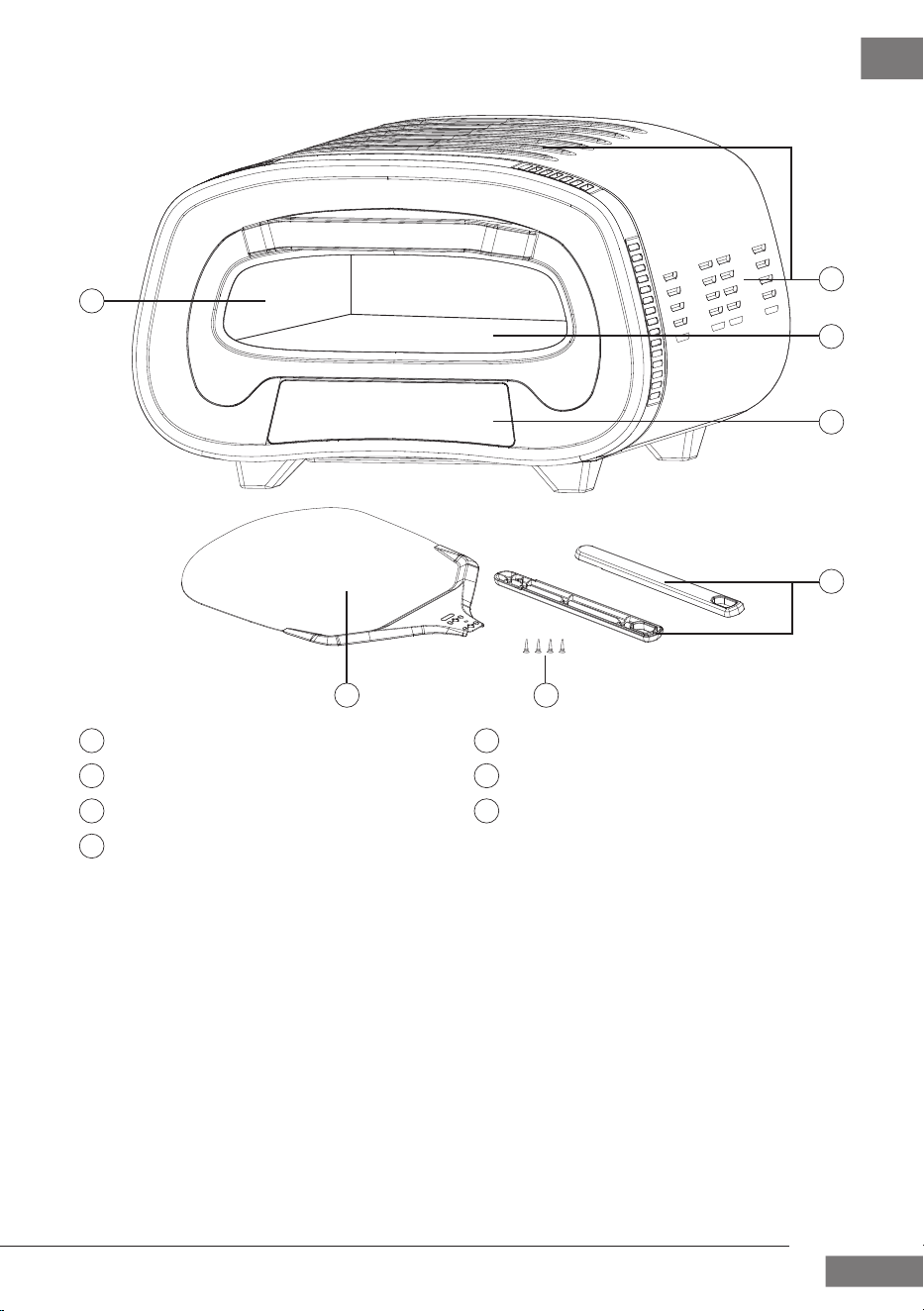
As a rule, the articles are delivered with the following components:
• CASO PizzaChef 430°
• Operation Manual
• Pizza paddle:
1x paddle
1x plastic handle
4x screws
1.5 Unpacking
To unpack the device, proceed as follows: Remove the device out of the carton and
remove the packaging material. Remove the protective lm from the device and
accessories.
PLEASE NOTE
f If possible, keep the original packaging for the duration of the guarantee period in the
event a return is necessary.
2 Design and Function
This chapter provides you with important information of the design and function of the
device.
9
EN
CASO PizzaChef 430°
2.1 Overview
Pizza oven door with handle
Ventilation slots
Cordierite pizza stone
Control panel
Pizza slide handle
Screws
Pizza slide sliding surface
1 5
3
4
7
2 6
1
4
3
6
5
7
2
10
EN
CASO PizzaChef 430°
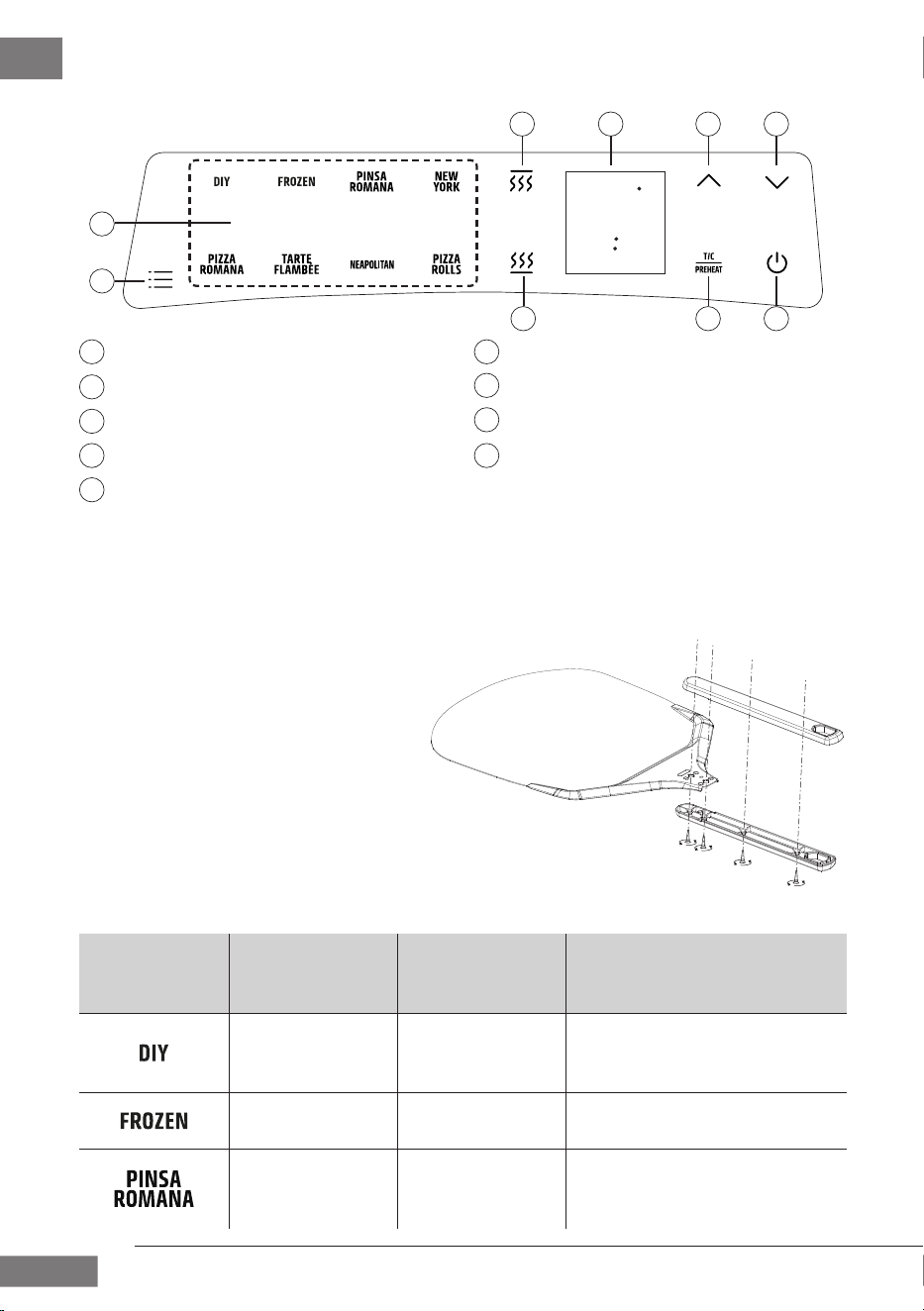
2.2 Control Panel
2.3 Assembly
2.3.1 Assembly of the pizza paddle
1. Insert the sliding surface
between the two sides of the
plastic handle.
2. Screw the plastic handle tight
using the four screws (see
illustration).
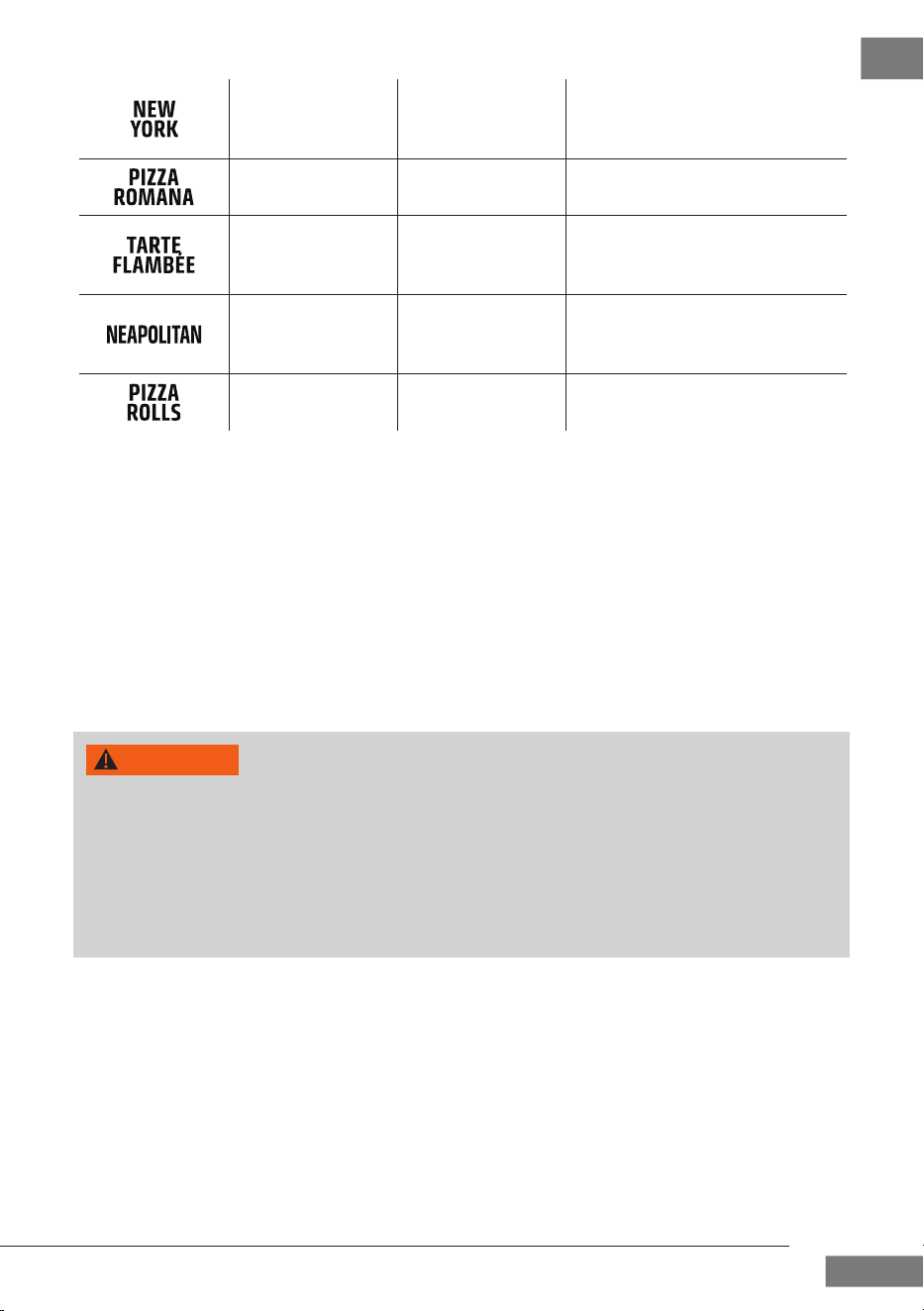
2.4 Automatic programs
Program
Temp. in °C
preset
(range)*
Time in min.
preset
(range)*
430
(80-430)
2
(1 - 60)
(Personal programme) Set the
programme according to your
own preferences
245
(80-430)
9
(1 - 20)
Frozen pizza or frozen tarte
ambée
340
(80-430)
3
(1 - 30)
Sourdough, often topped
after baking, savoury or sweet
topping
4
4
3
3
0
0
C
C
0
0
6
6
0
0
0
0
8 9 10 11
121314
15
16
Top heat
Indication of temperature/time
Increase time/temperature
Decrease time/temperature
On/O button + Start/Stop button
Preheat/time/temperature selection
Bottom heat
Select automatic programmes
Automatic programme overview
8
9
10
13
14
15
11
12
16
11
EN
CASO PizzaChef 430°
330
(80-430)
2
(1 - 10)
High, uy edge, lots of
topping, sauce up to the
edge, crispy base
430
(80-430)
3
(1 - 60)
crispy, thin dough, low edge
270
(80-430)
5
(1 - 20)
Tarte ambée with a very
thin base, savoury or sweet
topping
430
(200-430)
2
(1 - 10)
(Classic pizza baked in a
wood-red oven) soft, thin
base, uy edge
430
(80-430)
2
(1 - 60)
Pizza rolls or pizza buns, unl-
led or lled with toppings
*in 1 minute steps / *in 5 °C steps
2.5 Rating plate
The rating plate with the connection and performance data is located on the back of the
device.
3 Operation and Handling
This chapter provides you with important information and notes on the operation and basic
settings of the appliance.
WARNING
f Do not leave the device unsupervised during operation.
f WARNING! The device’s surfaces can become hot during use. Make sure not to touch
the housing or the pizza stone until they have cooled down completely. Only touch
the pizza oven door handle, not the door itself.
f The stone is impact sensitive and may break if dropped.
f If you want to transport the device, take the pizza stone out of the oven and pack it
separately to avoid breakage.
3.1 Before rst use
The device must be operated empty for approximately 10 minutes to remove any
possible protective substances from the heating elements. Make sure that the location where
you are using the oven is well-ventilated, as the oven may give o smoke. This smoke is
normal.
1. Check that you have removed all the packaging.
2. Place the oven on a at, dry, heat-resistant surface.
3. Completely unwind the power cord and insert the plug into an earthed power socket.
4. Use a damp cloth to wipe the pizza stone.
5. Dry the pizza stone thoroughly and put it into the device.
12
EN
CASO PizzaChef 430°
6. Close the device.
7. An audible signal will sound and the control panel will light up once. The appliance is in
standby mode and the
button ashes.
8. Start the appliance by pressing the button. Press the button to switch between
time and temperature settings. Use the
and buttons to set 430 °C and conrm
the entry by pressing the
button. The appliance automatically preheats and
conrms when the set temperature has been reached with an audible signal.
9. Let the device run at full power for approx. 10 minutes.
10. The device is now ready for use.
3.2 Operation
WARNING
f Only use the device when the pizza stone is in it!
f Remove all packaging from frozen pizzas and other food items before you put them in
the pizza oven.
f The pizza stone cannot withstand extreme temperature uctuations. Allow frozen
food to thaw slightly before you put it on the hot stone.
f Do not cover food with aluminium foil before you put it in the oven. Do not use baking
paper, non-stick pans or silicone moulds.
f Do not put aluminium foil or plastic containers on the hot surfaces.
f The stone gets very hot during use and stays hot for a long time after use. Do NOT use
water to cool down the stone.
f Smoke is produced, especially when you open the pizza oven door. Use the oven in a
well-ventilated area.
f When removing the pizza, make sure you hold the pizza peel straight so that you do
not touch the heating elements with the pizza.
f Only use the heat-resistant pizza slide in the appliance. The sliding surface may be hot
after cooking.
1. Proceed as described in the “Before rst use” section.
2. Start the appliance by pressing the button.
3. Select one of the 8 automatic programmes by tapping the button.
4. The programme symbol lights up and the pre-set temperature and time appear on the
display.
5. You can adjust both the temperature and the time individually.
6. Select the - button to then change the time using the or button.
7. Select the - button again to adjust the temperature using the or button.
8. Press the -button to start the process.
9. Prepare your pizza.
10. As soon as the appliance has reached the desired temperature (preheating time is
usually 15-20 minutes), the appliance beeps 5 times and the temperature display
ashes.
11. Sprinkle the paddle with a small amount of pizzaour to prevent dough from
sticking to the paddle and the stone. Use the pizza paddle to put pizzas on the pizza
stone inside the oven.
13
EN
CASO PizzaChef 430°
12. Close the pizza oven door.
13. Dierent types of dough will require dierent temperatures and preparation times.
When rst using the oven, we recommend that you start with a small pizza without too
many toppings.
14. If you have set a time, press the button again after preheating to conrm the
countdown.
15. Watch the pizza while it is in the oven. The baking time will be around 2-4 minutes.
16. Turn the pizza if necessary to ensure that it is evenly baked.
17. Use the pizza paddle to remove the pizza from the device.
18. Prepare additional pizzas if applicable.
19. Adjust the temperature of the appliance if necessary.
20. When the time has elapsed, an acoustic signal will sound and the appliance will
automatically switch to standby mode or switch o the appliance by pressing and
holding the
button, and leave it open to cool down completely. The fan will c
ontinue to run for a moment.
PLEASE NOTE
f If you have started a programme, you can change the time and temperature at any
time using the corresponding buttons.
f When the “
” programme is set, you can switch the top and bottom heat on and o
by pressing the
button and the button.
f If you keep the
or the button pressed, the value increases/decreases faster.
3.3 Memory function
The device has a memory function. As soon as you have customised an automatic
programme to your preferences, the appliance stores these settings.
Even after unplugging and re-plugging the power cable, the appliance will display your
customised settings.
You can reset the automatic programmes to the factory settings:
1. Switch the appliance to standby mode.
2. Press the button for about 3 seconds. The appliance conrms that the automatic
programmes have been reset with an audible signal.
3.4 Tips for preparation
• The higher the water content in the dough, the softer and airier the dough will be. The
right our is important for absorbing a high water content in the dough.
• Use pizza ours with the type 00; these are a bit coarser and contain more protein.
• Knead the dough thoroughly so that it becomes elastic and does not tear.
• When kneading with a food processor (low speed for about 10 minutes), pay attention
to the temperature of the dough. It must not get too warm, so that the yeast does not
work too early.
• Portion the dough into smaller pieces and allow them to rise for a sucient length of
time (approx. 12-24 hours).

14
EN
CASO PizzaChef 430°
• To get a uy dough, do not use a rolling pin to spread the dough, as this will cause
you to push the air that has formed over time out of the dough. Instead, place the
dough on a oured work surface and press the dough at with your ngers.
Recommended settings for pizzas with a little and a lot of topping
Temp.
(°C)
Time
(min.)
Note
Pizza with no/few toppings
(e.g. a plain margaritha)
400 ca. 2
The high temperature ensures that the
dough is baked quickly.
Pizza with lots of toppings
(e.g. Capricciosa)
350 4-5
Due to the toppings, the pizza takes a little
longer and should not be baked at too high
a temperature so that the toppings do not
burn.
4 Cleaning and Maintenance
This chapter provides you with important notices with regard to cleaning and maintaining
the device. Please observe the notices to prevent damages due to cleaning the device
incorrectly and to ensure trouble-free operation.
4.1 Safety information
ATTENTION
Please observe the safety instructions, before cleaning your device:
f Unplug the device when not in use and before any cleaning.
f Never immerse the device, cord or plug in water or other liquids and do not place in
the dishwasher.
f Do not use iron brush, abradant, kitchen cleaner, or sharp cleaning tool for cleaning.
f Clean the device after use as soon as it has cooled down. Extended waiting
unnecessarily complicates cleaning and can make it impossible in extreme cases.
Excessive accumulations of dirt can even damage the device under certain
circumstances.
4.2 Device
Wipe the outside of the device and the oven door with a damp cloth.

15
EN
CASO PizzaChef 430°
4.3 Pizza stone
PLEASE NOTE
f The pizza stone will change colour after it has been used. This is normal and cannot be
prevented.
f Do not soak the stone in water; do not use cleaning agents and do not put it in a
dishwasher.
f It is essential that the stone is completely dry before you use it again.
Remove the pizza stone from the oven to clean it. Handle the stone carefully. Wipe the pizza
stone with a soft, damp cloth after every use. If the stone is very discoloured, you can clean it
by mixing a bicarbonate of soda and water paste and applying it to the stone with a sponge.
Following this, wipe the stone with a clean, damp cloth.
4.4 Pizza paddle
Use warm soapy water and a soft sponge to clean the paddle surface, then dry it
thoroughly.
5 Troubleshooting
This chapter provides you with important notices with regard to operating the device.
Observe the following notices to avoid dangers and damages:
5.1 Safety notices
ATTENTION
f Repairs of electrical appliances must be carried out by qualied person who are
trained by the manufacturer.
f Repairs performed by untrained persons may result in considerable hazards for the
user and damage the machine.
5.2 Troubleshooting table
The table below will help you to locate and solve small problems.
Problem Solution
The device can-
not be turned on.
Check if the plug has been properly inserted into the power socket.
Smoke is coming
out of the device.
The extremely high temperatures may cause smoke to develop. Use
the oven in a well-ventilated location.
16
EN
CASO PizzaChef 430°
PLEASE NOTE
f If you cannot solve the problem by carrying out the steps described above, our
Customer Service will help you free of charge.
f Clean the device before you send it to customer service.
6 Disposal of the Old Device
Old electric and electronic devices frequently still contain valuable materials. However, they
also contain damaging substances, which were necessary for their functionality and safety. If
these were put in the non-recyclable waste or were handled incorrectly, they could be
detrimental to human health and the environment. Therefore, do not put your old device
into the non-recyclable waste under any circumstances.
PLEASE NOTE
f Utilise the collection point, established in your town, to return and recycle old electric
and electronic devices. If necessary, contact your local council, refuse collection
service or your dealer for information.
f Ensure that your old device is stored safely away from children until it is taken away.
6.1 Disposal of the packaging
The packaging protects the device against damages during transit. The packaging
materials are selected in accordance with environmentally compatible and
recycling-related points of view and can therefore be recycled. Returning the
packaging back to the material loop saves raw materials and reduces the
quantities of accumulated waste. Check with your local council for proper disposal
and recycling procedures.
7 Guarantee
Your Pro-Line Australia 24-month Repair or Replacement Warranty
Pro-Line warrants this appliance to the rst purchaser and subject to the stated conditions:
This warranty only applies to appliances purchased and used in Australia or New Zealand
and covers any defects in material or workmanship in the manufactured product within the
rst 24 months, from the date of purchase.
To make a warranty claim you must visit Pro-line Australia online at www.prolineaustralia.
com.au/warrantyclaim
If a product is found to be faulty there is a 90 day return policy from the date of purchase.
Products returned to store MUST be accompanied by a valid proof of purchase.
For warranty claims outside of 90 days from date of purchase, product will be repaired or
replaced at our discretion. Repair or replacement costs of the product will be covered under
warranty by Pro-line.

17
CASO PizzaChef 430°
Goods presented for repair may be replaced by refurbished goods of the same type rather
than being repaired. Refurbished parts may be used to repair the goods. The benets given
to you by this warranty are in addition to other rights and remedies of the consumer law in
relation to the goods or services to which this warranty relates.
Our goods come with guarantees that cannot be excluded under the Australian Consumer
Law. You are entitled to a replacement or refund for a major failure and compensation for
any other reasonably foreseeable loss or damage. You are also entitled to have the goods
repaired or replaced if goods fail to be of acceptable quality and the failure does not amount
to a major failure.
Conditions of this Warranty:
1. This product has been fully installed in accordance with the user manual installation
instructions.
2. The warranty extends only to repairing or replacing any component that proves to be
defective in material or workmanship.
3. The warranty does not cover defects occasioned by misuse, alterations, accidents, or
used for other than the intended purpose.
4. The warranty does not cover damage to the product caused by accident, re, oods,
power surges or black outs.
5. Proof of purchase is required for warranty claims. Please keep purchase receipt in a safe
place.

18
EN
CASO PizzaChef 430°

19
EN
CASO PizzaChef 430°

Pro-Line Australia
PO Box 4187
Norwood South LPO
South Australia 5067
Email: info@prolineaustralia.com.au
Web:www.prolineaustralia.com.au