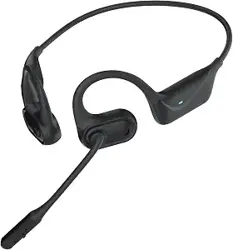
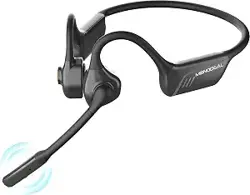
Mono Bluetooth Headset
M115
User Manual
Catalog 1. Product Overview
1. Product Overview----------------------------------------------- 02
2. Basic Operation------------------------------------------------- 03
3. Bluetooth Pairing and Connection-------------------------- 04
4. LED Indicator-----------------------------------------------------05
5. Charging-----------------------------------------------------------05
6. Product Specification-------------------------------------------06
7. Attentions and Q & A-------------------------------------------07
Mute Button
Mute LED
Volume+
Multi-Function
Button (MFB)
Type-C Charge Port
Switch
Volume-
Mono Bluetooth Headset
M115
User Manual
Packing list:
A. Bluetooth Headset M115 x 1
B. Type-C charge cable x 1
C. User manual x 1
2. Basic Operation
3. Bluetooth Pairing and Connection
4. LED Indicator
Button Function Operation Instruction
Power On In off status,toggle the switch to “ON” to power on.
In on status,toggle the switch to “OFF” to power off.Power Off
When a call incoming, short press to answer.Answer a call
Short press when play music.Play / Pause
Call coming during call, short press the MFB to
answer the new call and hang up the current cal.
Call coming during the call, double press the MFB
to answer the new call and keep the current call,
Call coming during the call, long press the MFB
for 1 second to reject the new call..
When you are on a three-party call, double press
the MFB to switch audio between the current call
and the keep call,
Three-way
calling
function
When during a call, short press to hang up.Hang up a call
In connected standby/playing music mode, double
press MFB to dial the last call.
Redial A Call
In connected standby/playing music mode, long
press MFB for 1 second then release.
Voice Dialing
When a call incoming, long press for 1 second to
reject a call.
Reject a call
MFB
Volume Up
Volume +
Volume -
Mute
Button
Next Song
Volume Down
Previous Song
Microphone
mute
Short press.
Short press.
Long press for 1 second.
Long press for 1 second.
When during a call, short press button to mute,
press again to cancel.
Combina-
tion
Button
Clear
Matching
Records
In on status(it cannot be cleared during a call),
press the "MFB" and "Volume-" for 5 seconds.
A. In off status, toggle the switch to ”ON” to power on, with LED
Blue & Red flash alternately.
B. Search and click to connect ”M115” on your phone Bluetooth
lists, the phone shows connected, now you can play music from
phone to headphone.
C. You can press MFB / Volume+ / Volume- / Microphone Mute
Button on the Bluetooth headset to control the answer/hang up
a call and play/pause of the music, next and previous song,
volume up and down, microphone mute and so on.
2
connection
pairing
Search and connect
M115
Search and click to connect “ M115” on
your phone Bluetooth lists.
In off status,toggle the switch to ”ON” to
power on, with LED Blue & Red alternately
flash.
Mode LED Indicator
Power on
Power off
Pairing mode
Connected standby mode
Playing Music
Talking
Delete pairing record
Charging
Full charged
Low battery
Blue LED flash 2 times
Red LED flash 2 times
Red & Blue LED flash alternately
Blue LED flash once every 10 seconds
Blue LED flash once every 10 seconds
Blue LED flash once every 10 seconds
Blue and Red LED is on for 1 second at the same time
Solid Red LED
Solid Blue LED
Red LED flash
5. Charging
Please charge the M115 at once when the Red LED flashes.
Charging time is about 2 hours. Solid Blue LED when full charged.
Charge Connections
Please connect to the M115 charging port through the Type-C end
of Type-C charging cable, USB end to the charger(can be used as
car charger, travel charger, computer USB, etc.).
Charging with Charger
Type-C Charging Cable
Charging with PC
*Note:Please charge the M115 at least one time every 2 months
when don’t use it.
6. Product Specification
7. Attentions and Q & A
Bluetooth Version
Bluetooth Chipset
Operation Range
Bluetooth Protocols
CODEC Code
Battery Capacity
Charging Time
Music Time
Talking Time
Stand-by Time
Headset Net Weight
Headset Dimension
Bluetooth V5.2
QCC3040
10 meters
HSP, HFP, AVRCP, A2DP
SBC AAC aptX aptX-HD aptX -Adaptive
300mAh/3.7V
About 2 hours
About 40 hours(70% Volume)
About 30 hours(70% Volume)
About 300 hours
About 101.6g
178*168*68mm
* The above data are all from SKY WING laboratory, and the actual
use time, environment and music will be different.
A. How to reconnect and operation when failed to reconnect?
When M115 connected with your mobile phone successfully at the
first time, it will search and reconnect the paired device
automatically when power on, If failed, you need to pair M115 again.
B. How to delete paired records?
In state-on mode(no talking), long press the MFB and Volume -
Button for 5 seconds to clear the pairing record. The indicator Blue
and Red LED is on for 1 second at the same time that means the
pairing record has been cleared, and M115 will not connect the
connected device. When there are various connection problem,
try clearing the pairing record firstly.
C. What’s the password for pairing?
Some connection devices require password for pairing, please try
0000 or 8888 or 1111 or 1234.
D. What devices could charge for the headphone?
Any car charger, power bank, PC etc which meet DC 3.7V,
charging current more than 300mA could be charge for M115.
-01- -02- -03-
-04-
-06--05- -07-