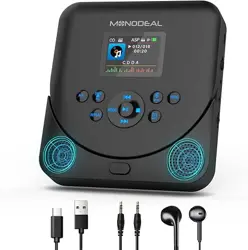
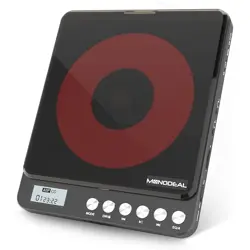
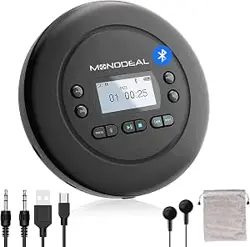
MODEL:MD-602


/FM


If you just want to repeat the specific part of a track, when the player is played that part, please press the A-B
button one time, the display show “A ON”, then when it plays to the end of that part, press the A-B button once
again, the display show “Ab ON” .After that, the player will only repeat that specific part.
NOTE: If you want to stop repeating that part, just press the A-B button once again, the display show “Ab OFF”,
it will play in an order.
Press stop(■) button firstly press the PROG/FM button to enter the programming

Turn on your Bluetooth headphone/speaker and make sure that the Bluetooth is turned on.
Select “ BT Search ” option, then press the PLAY button, the cd player will start searching nearby Bluetooth
devices.
Press the PLAY button to select the name of your device that needs to connect to.
After paired successfully, press the BLUETOOTH button to return to the play interface.

please follow the below steps to use FM transmitter to connecting the car radio device :
1. When playing CD discs,press play/pause( ) button firstly press PROG/FM button, FM transmitter frequency
will show up on the display. Press it again, the frequency will change. Choose one frequency you prefer.
[ Six FM transmitter frequency are optional : 78.1, 79.3, 87.5, 88.5, 93.6, 103, 107.1, OFF]
2. Turn on the car radio device and adjust the frequency to the same frequency you choose on CD player.
3. You can listen the CD by the car radio device now.
How to use FM transmitter
00:30
FM
FM 78.1 MHZ

MD-602


Typ-C-Ladekabel
Gegenstand
1
2
3
4
5
6
7
8
9
Gegenstand
10
11
12
13
14
15
16
17
18
Funktion
Anzeigebildschirm
MODUS
Zurück / Zurückspulen
Stoppen
EQ / Equalizer
Abspielen / Pause
PROG/FM
Weiter / Schneller Vorlauf
Funktion
A-B Wiederholen
DC Eingang 5V
Lade-LED
Einschalten / Ausschalten
Kopfhöreranschluss 1/2
Lautstärke Konb
OFFEN
TF-KARTE
Tastensperre
Bluetooth


Halten Sie die Modustaste 2 Sekunden lang gedrückt, um in den TF-Kartenmodus zu wechseln


Wenn Sie nur einen bestimmten Teil eines Titels wiederholen möchten, wenn der Player diesen Teil abspielt, drücken Sie bitte
einmal die AB-Taste, das Display zeigt "A ON" an AB-Taste noch einmal, das Display zeigt "Ab ON". Danach wiederholt der
Spieler nur diesen bestimmten Teil.HINWEIS: Wenn Sie die Wiederholung dieses Teils beenden möchten, drücken Sie einfach
erneut die A-B-Taste, das Display zeigt "Ab OFF" an, es wird in einer Reihenfolge abgespielt.
Klicken sie zuerst die & stopps(■)
PROG/FM-Taste

Wie verbinde ich Bluetooth-Geräte?
1. Schalten Sie Ihren Bluetooth-Kopfhörer/-Lautsprecher ein und stellen Sie sicher, dass Bluetooth eingeschaltet ist.
2. Drücken Sie die Bluetooth-Taste des Players. Wenn Bluetooth ausgeschaltet ist, müssen Sie die Wiedergabetaste
drücken, um Bluetooth einzuschalten.
3. Wählen Sie die Option "BT
Search" und drücken Sie dann die Wiedergabetaste. Der CD-Player beginnt mit der
Suche nach Bluetooth-Geräten in der Nähe.
4. Drücken Sie die Wiedergabetaste, um den Namen Ihres Geräts auszuwählen, mit dem eine V
erbindung hergestellt
werden soll.
5. Drücken Sie nach erfolgreicher Kopplung die Bluetooth-T
aste, um zur Wiedergabeoberäche zurückzukehren.

00:30
FM
FM 78.1 MHZ
So verwenden Sie den FM-Sender
Bitte befolgen Sie die folgenden Schritte, um den FM-Transmitter zum Anschließen des Autoradiogeräts zu verwenden:
1. Drücken Sie beim Abspielen von CDs Drücken sie zuerst die abschalt-taste ( )die Taste PROG/FM. Die Frequenz des
FM-Senders wird auf dem Display angezeigt. Drücken Sie sie erneut, die Frequenz ändert sich. Wählen Sie eine von Ihnen
bevorzugte Frequenz. [ Sechs FM-Senderfrequenzen sind optional: 78,1, 79,3, 87,5, 88,5, 93,6, 103, 107,1, AUS]
2. Schalten Sie das Autoradio ein und stellen Sie die Frequenz auf die gleiche Frequenz ein, die Sie am CD-Player gewählt haben.
3. Sie können die CD jetzt über das Autoradio hören.