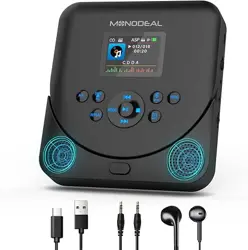
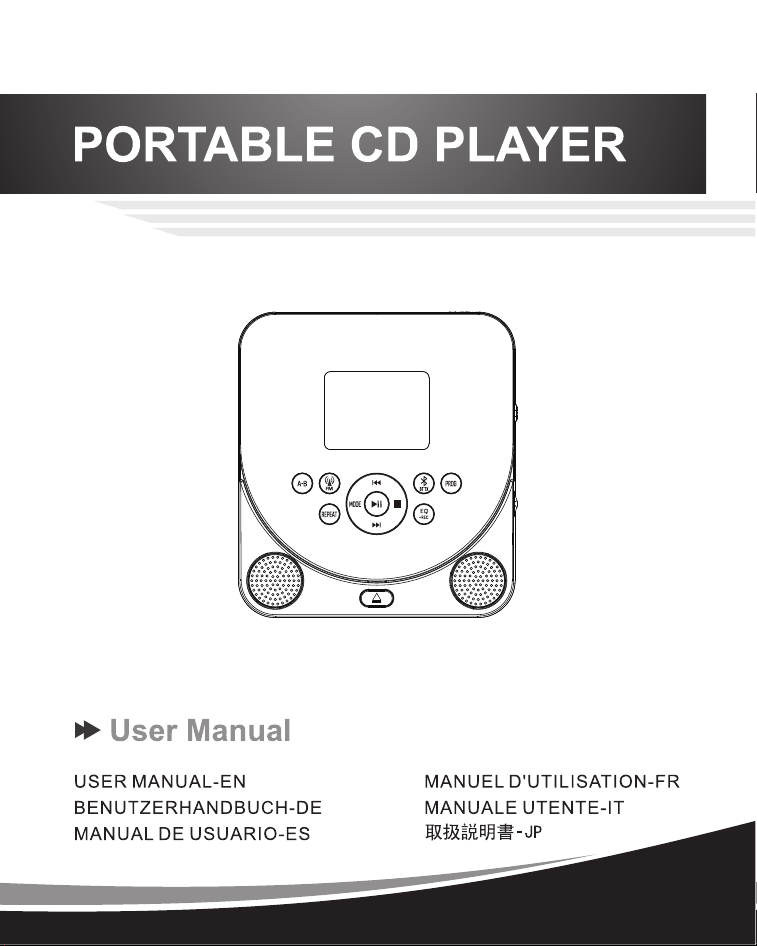
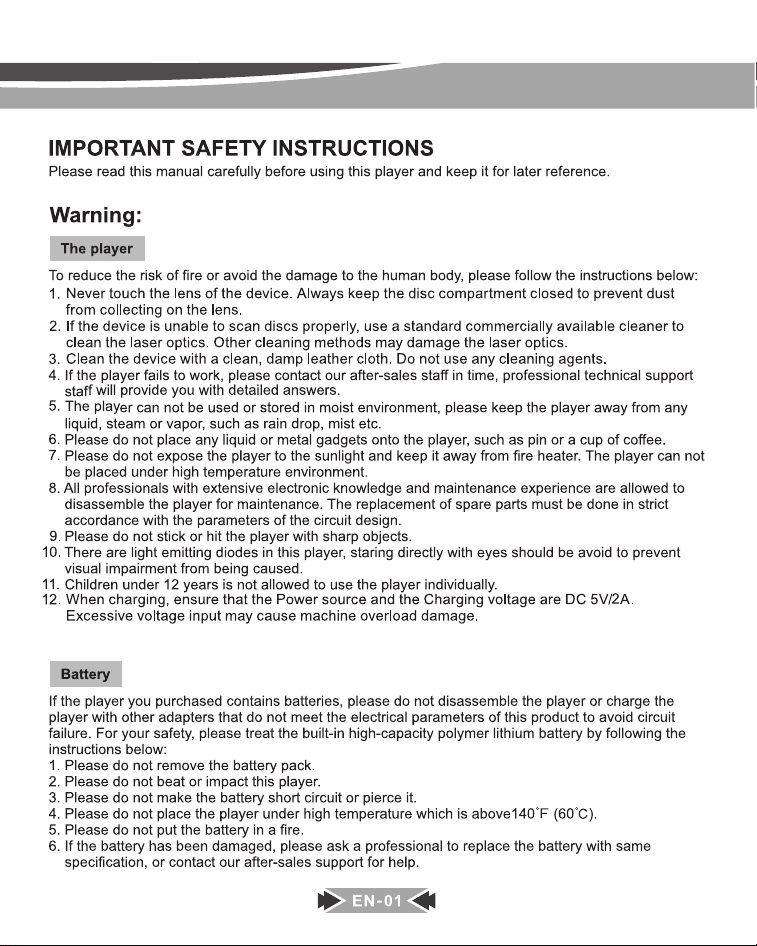
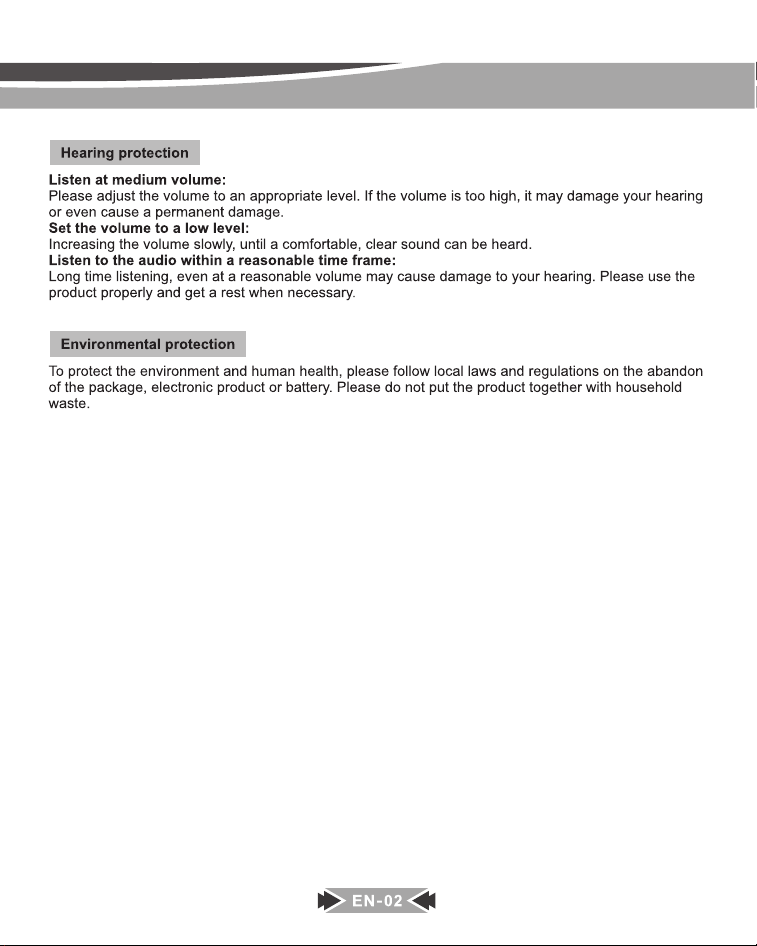
MODEL:MD-707
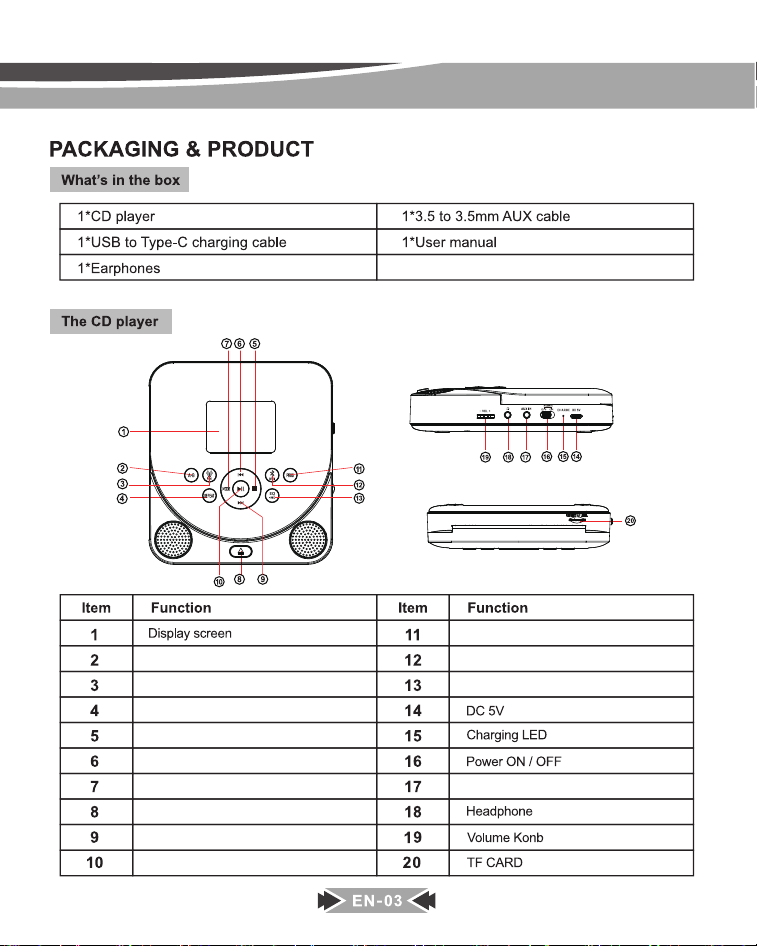
A-B
FM transmitter
REPEAT
STOP
Previous/Rewind
AUX IN
PROG
Bluetooth transmitter
EQ/REC.
MODE
OPEN
Next/Fast forward
Play/Pause
REPEAT
REPEAT
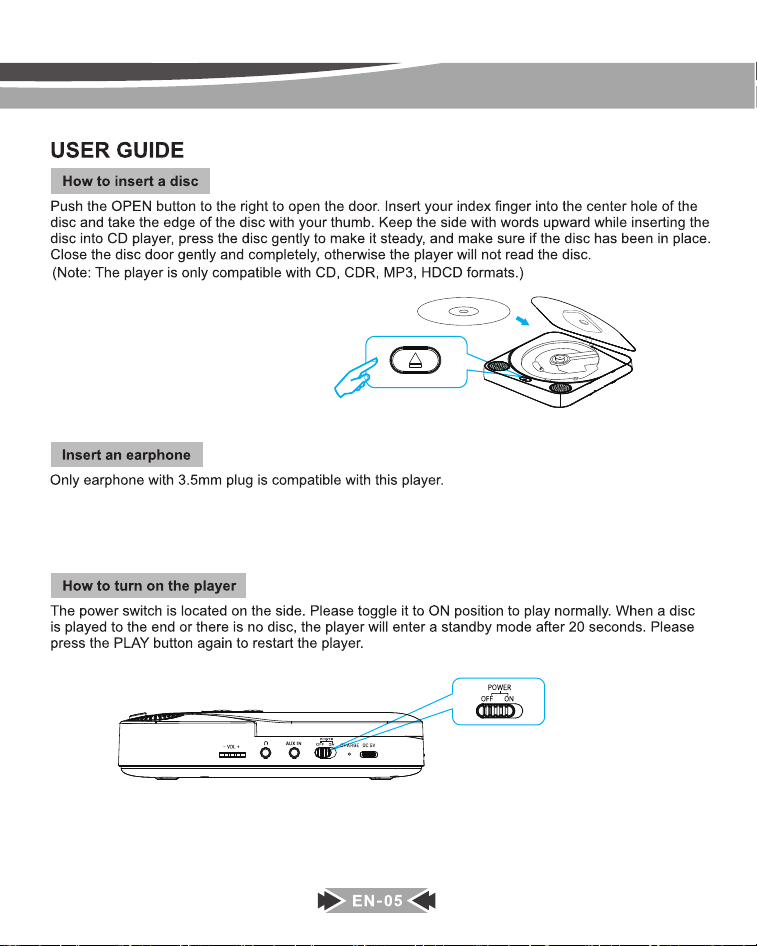
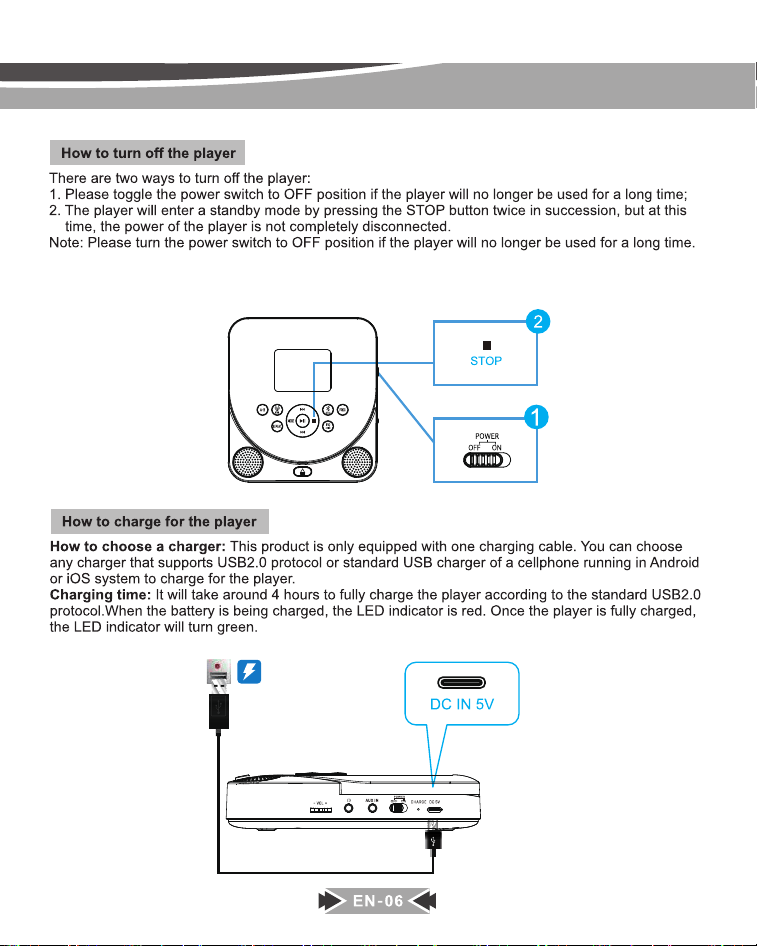
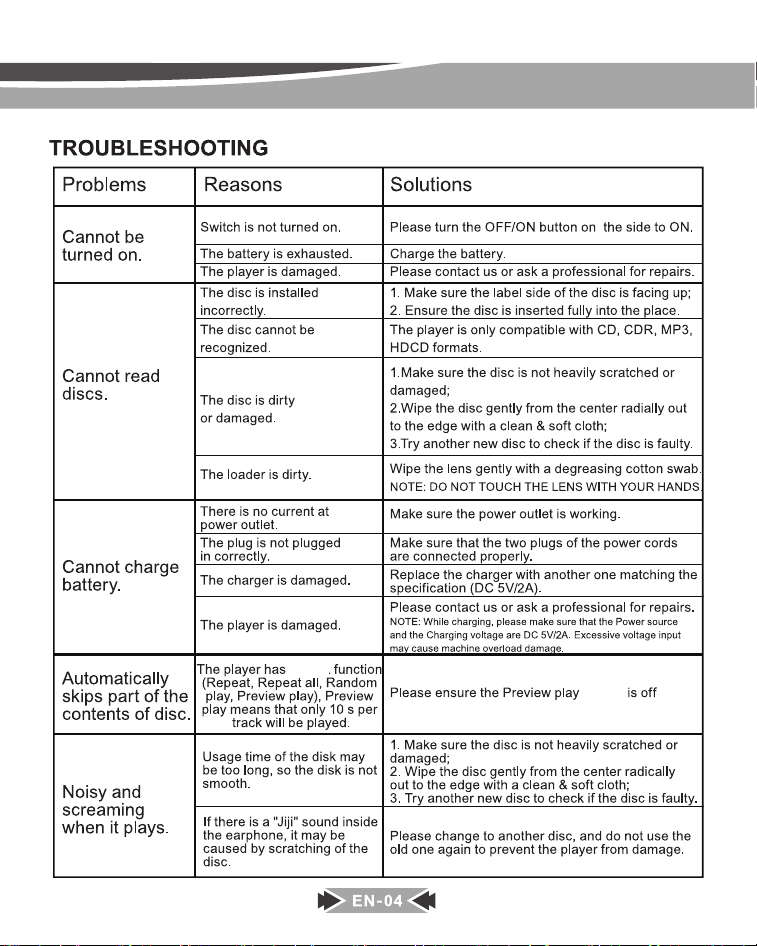
After the unit power off ( toggle the power switch to OFF position or make it enter a standby mode by press STOP
button twice), when you turn it on and play disc again, it will play from the point where you stopped last time.
When you play the disc, if you press STOP button once, and press PLAY button, it will play from the beginning.
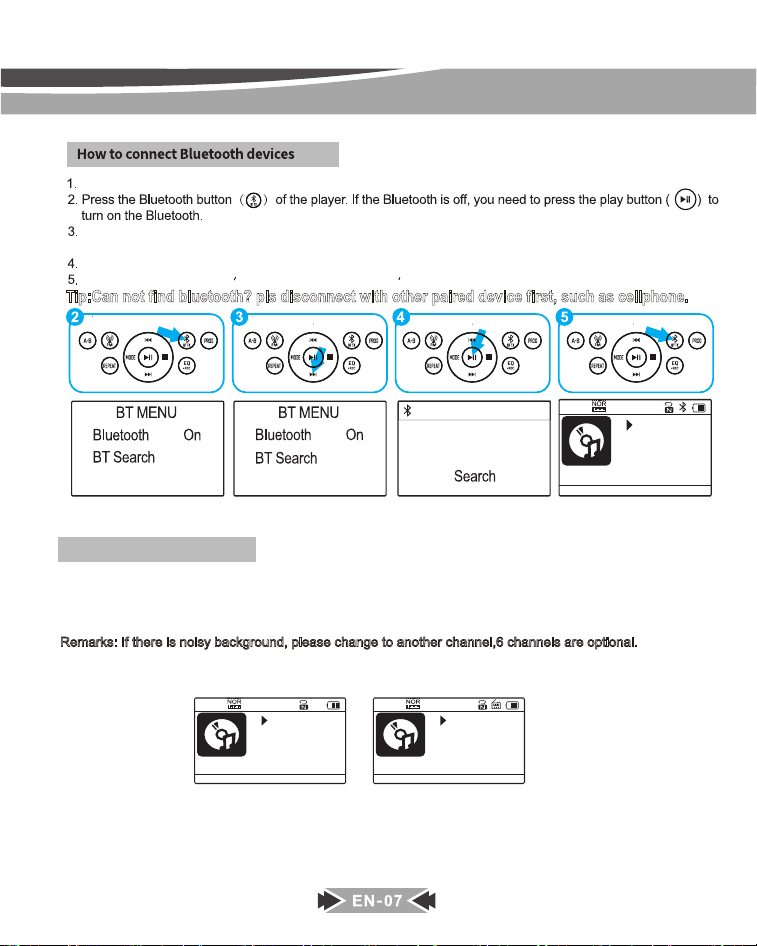
Turn on your Bluetooth headphone/speaker and make sure that the Bluetooth is turned on.
Select “ BT Search ” option, then press the PLAY button, the cd player will start searching nearby Bluetooth
devices.
Press the PLAY button to select the name of your device that needs to connect to.
After paired successfully, press the BT TX button to return to the play interface.
Tip:Can not find bluetooth? pls disconnect with other paired device first, such as cellphone.
1. JBL Flip Essentia
014/160
03:22
MP3 ASP
114.mp3
019/160
04:14
MP3 ASP
203.mp3
FM OFF
020/160
00:00
MP3 ASP
203.mp3
FM 79.30MHZ
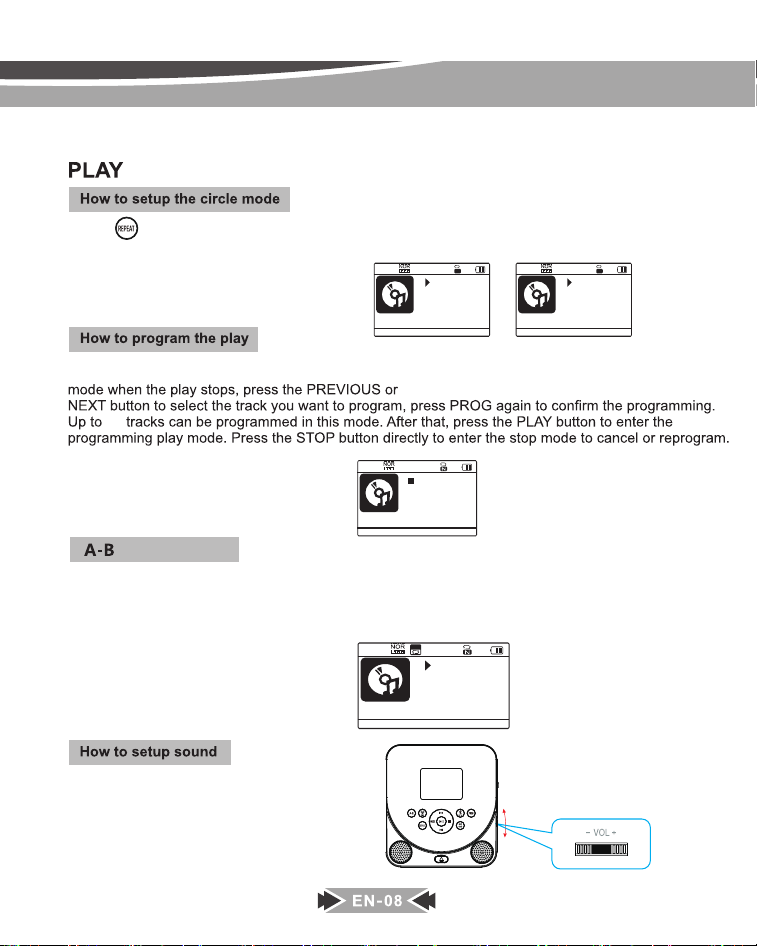
Please follow the below steps to use FM transmitter to connecting the car radio device :
1. When playing CD discs,press CD/FM button, FM transmitter frequency will show up on the display.
Press it again, the frequency will change. Choose one frequency you prefer.
[ Six FM transmitter frequencies are optional: 79.3, 87.5, 88.5, 93.6, 101.9, 107.1, OFF]
Remarks: If there is noisy background, please change to another channel,6 channels are optional.
2. Turn on the car radio device and adjust the frequency to the same frequency you choose on CD player.
3. You can listen the CD by the car radio device now.
How to use FM transmitter
A-B
Press to change the playback mode between: 1(repeat1)/ A (repeat All)/ R(shuffle) /I (intro preview) /
N (normal mode). In TF card modek MP3/TF,you also have the additional mode: F (reapeat folder).
3UHVVVWRSŶEXWWRQILUVWO\SUHVVWKH352*EXWWRQWRHQWHUWKH programming
004 P02/32
MP3 ASP
Program
030/160
03:07
MP3 ASP
214.mp3
1
030/160
00:07
MP3 ASP
214.mp3
REP ALL
A
32
If you just want to repeat the specific part of a track, when the player is played that part, please press the
button one time, the display show “A -”, then when it plays to the end of that part, press the A-B button once
again, the display show “A-B” .After that, the player will only repeat that specific part.
NOTE: If you want to stop repeating that part, just press the A-B button once again, A-B will disappear on the
display it will play in an orde.
030/160
00:24
MP3 ASP
214.mp3
A-B
The volume knob is located on the side of the player.
Rotate it to the left or right to decrease or increase
the volume.Please listen to music at an appropriate
volume to protect your ears.
How to adjust volume
EN-09
When playing TF card, long press [ ] button for about 3 second and it wil display the songs list on TF card.
DELETING FUNCTION (FROM TF CARD)
PROG
Presss [ ] button it will display whether you want to delete or not.
唀軧
䧭鿪꣥㸌♧
䧭鿪꣥㸌N
霹侔㽠侔靲
㼭낃끹NQ
:FT
%FMFUFUIJTMF
/0
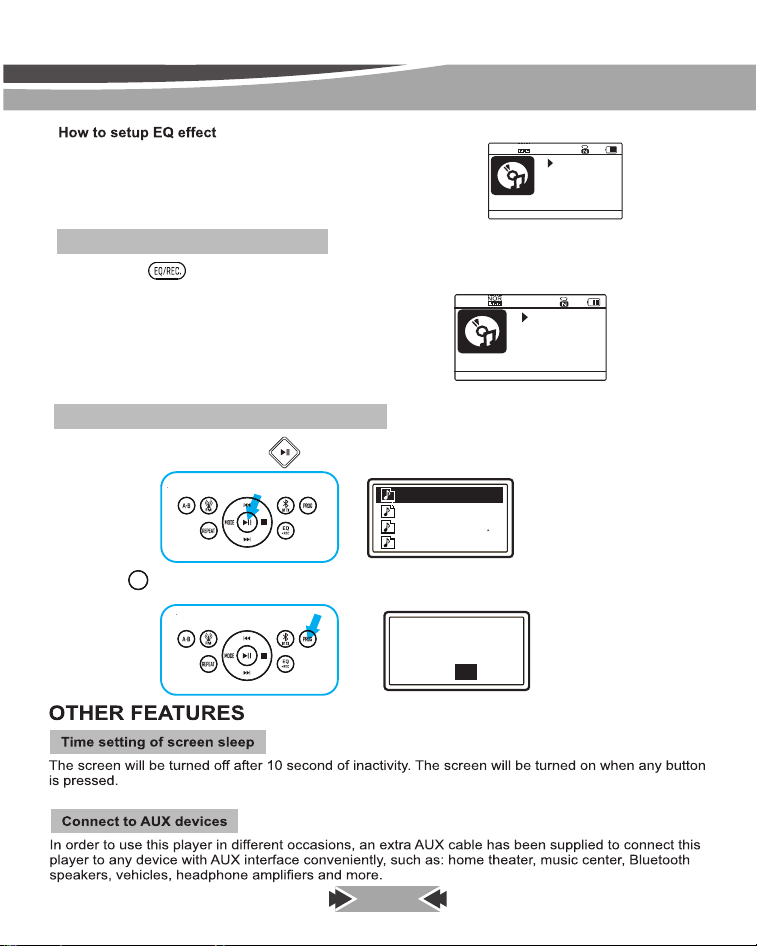
Press the EQ/REC. button to changes the different sound effects.
There are a total of 7 sound effects: NOR ,BBS,
POP, ROC, JAZZ, CLAS.
COU(COUNTRY)
RECORDING FUNCTION(TO TF)
Press and hold to start the recording function, press and hold the button again to complete the recording.
Note: If no TF card is installed, it will prompt “ No device ”).
0003/160
00:04
MP3
103.mp3
Recording...
REC
POP
001/160
00:14
MP3 ASP
101.mp3
EN-10
Press MODE button and it will display playing mode menu.
After enter into BT RX mode, open your cellphone bluetooth and search MD-707, pair and connect it ,
then you can listen the songs on the cellphone through this CD player.
(Note : Bluetooth name of this CD player : MD-707)
you can press [ ] / [ ] button to change the playing mode (CD/BT RX/TF card/AUX IN/System)
How to play CD/TF card etc
How to use Bluetooth receiver
After enter into AUX IN mode, you can use the AUX cable to connect it
to any device with AUX output or Earphone interface, such as cellphone,
DVD player, vehicles etc.
How to use AUX IN
MODE
CD
BT RX
TF
BT
赢䄄ꜵ梾
䙐搬⛓ꢂ
AUX IN
TF
MODEL:MD-707
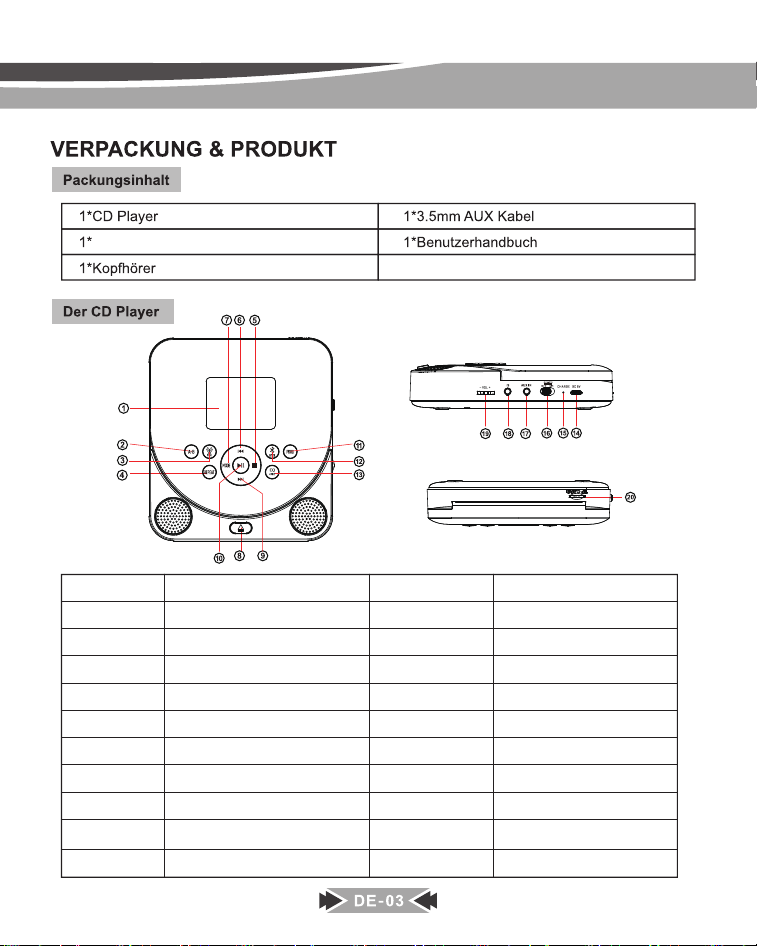
Typ-C-Ladekabel
Gegenstand
1
2
3
4
5
6
7
8
9
Gegenstand
11
12
13
14
15
16
17
18
19
Funktion
Anzeigebildschirm
MODUS
FM Transmitter
Zurück / Zurückspulen
Stoppen
EQ / REC.
Abspielen / Pause
PROG
Repeat
Weiter / Schneller Vorlauf
Funktion
A-B Wiederholen
DC Eingang 5V
Lade-LED
AUX IN
Einschalten /
Ausschalten
Kopfhöreranschluss
Lautstärke Konb
OFFEN
TF-KARTE10 20
Bluetooth Transmitter
2
2
REPEAT
REPEAT
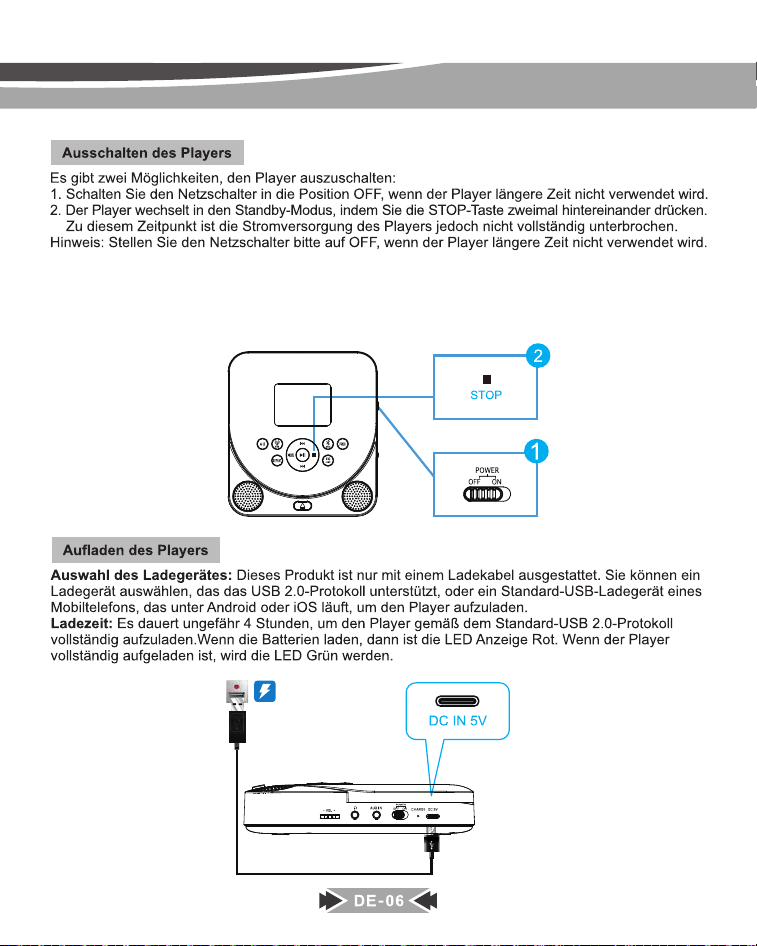
Nach dem Ausschalten des Geräts (stellen Sie den Netzschalter auf „OFF“ oder versetzen Sie es in den Standby-
Modus, indem Sie die STOP-Taste zweimal drücken), wenn Sie es einschalten und die Disc erneut abspielen,
beginnt die Wiedergabe an der Stelle, an der Sie das letzte Mal angehalten haben.
Wenn Sie die Disc abspielen, drücken Sie einmal die STOP-Taste und dann die PLAY-Taste, um die Wiedergabe
von Anfang an zu starten.
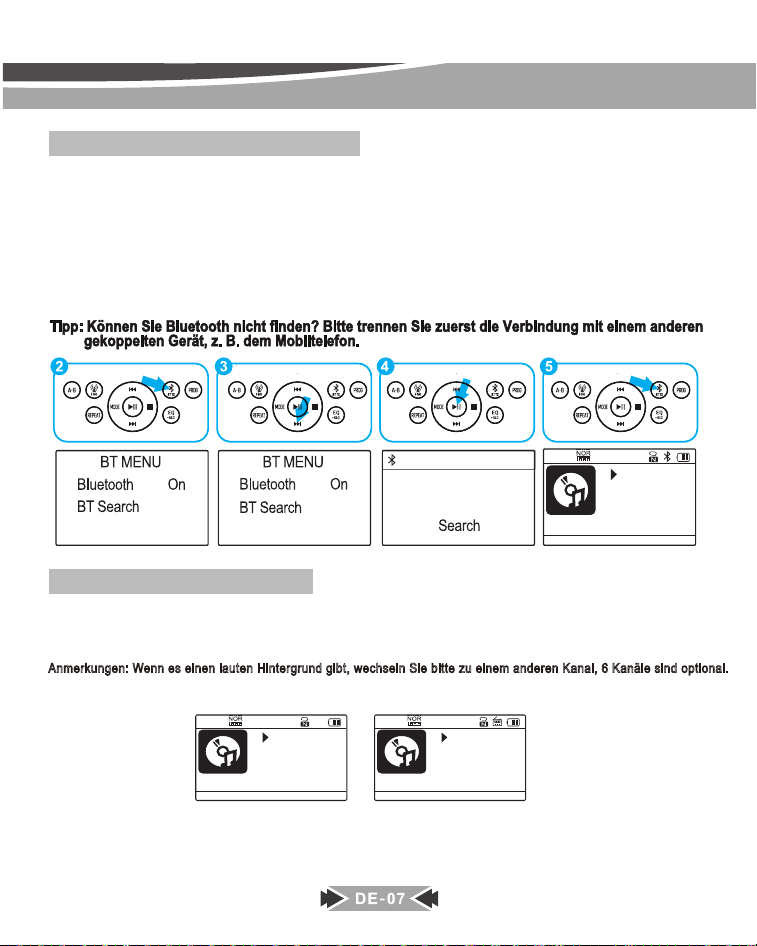
Wie verbinde ich Bluetooth-Geräte?
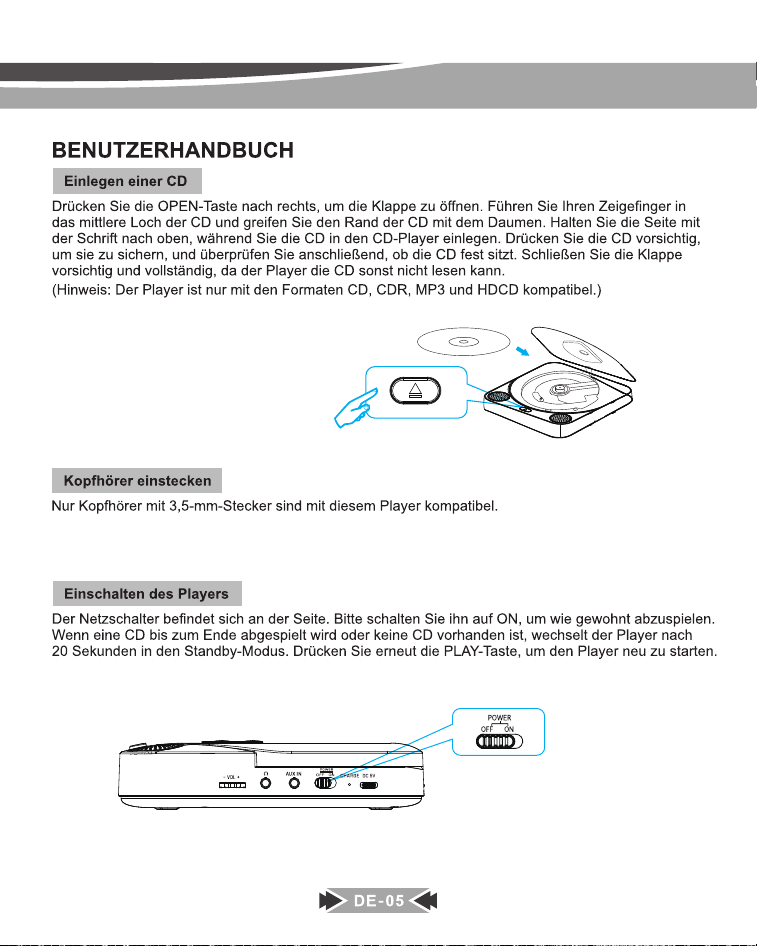
1. Schalten Sie Ihren Bluetooth-Kopfhörer/-Lautsprecher ein und stellen Sie sicher, dass Bluetooth eingeschaltet ist.
2. Drücken Sie die Bluetooth-Taste des Players. Wenn Bluetooth ausgeschaltet ist, müssen Sie die Wiedergabetaste
drücken, um Bluetooth einzuschalten.
3. Wählen Sie die Option "BT Search" und drücken Sie dann die Wiedergabetaste. Der CD-Player beginnt mit der
Suche nach Bluetooth-Geräten in der Nähe.
4. Drücken Sie die Wiedergabetaste, um den Namen Ihres Geräts auszuwählen, mit dem eine Verbindung hergestellt
werden soll.
5. Drücken Sie nach erfolgreicher Kopplung die BT TX-Taste, um zur Wiedergabeoberfläche zurückzukehren.
1. JBL Flip Essentia
014/160
03:22
MP3 ASP
114.mp3
019/160
04:14
MP3 ASP
203.mp3
FM OFF
020/160
00:00
MP3 ASP
203.mp3
FM 79.30MHZ
So verwenden Sie den FM-Sender
Bitte befolgen Sie die folgenden Schritte, um den FM-Transmitter zum Anschließen des Autoradiogeräts zu verwenden:
1. Drücken Sie beim Abspielen von CDs Drücken sie zuerst die Taste CD/FM. Die Frequenz des
FM-Senders wird auf dem Display angezeigt. Drücken Sie sie erneut, die Frequenz ändert sich. Wählen Sie eine von Ihnen
bevorzugte Frequenz. [ Sechs FM-Senderfrequenzen sind optional: 79,3, 87,5, 88,5, 93,6, 101,9, 107,1, AUS]
Anmerkungen: Wenn es einen lauten Hintergrund gibt, wechseln Sie bitte zu einem anderen Kanal, 6 Kanäle sind optional.
2. Schalten Sie das Autoradio ein und stellen Sie die Frequenz auf die gleiche Frequenz ein, die Sie am CD-Player gewählt haben.
3. Sie können die CD jetzt über das Autoradio hören.
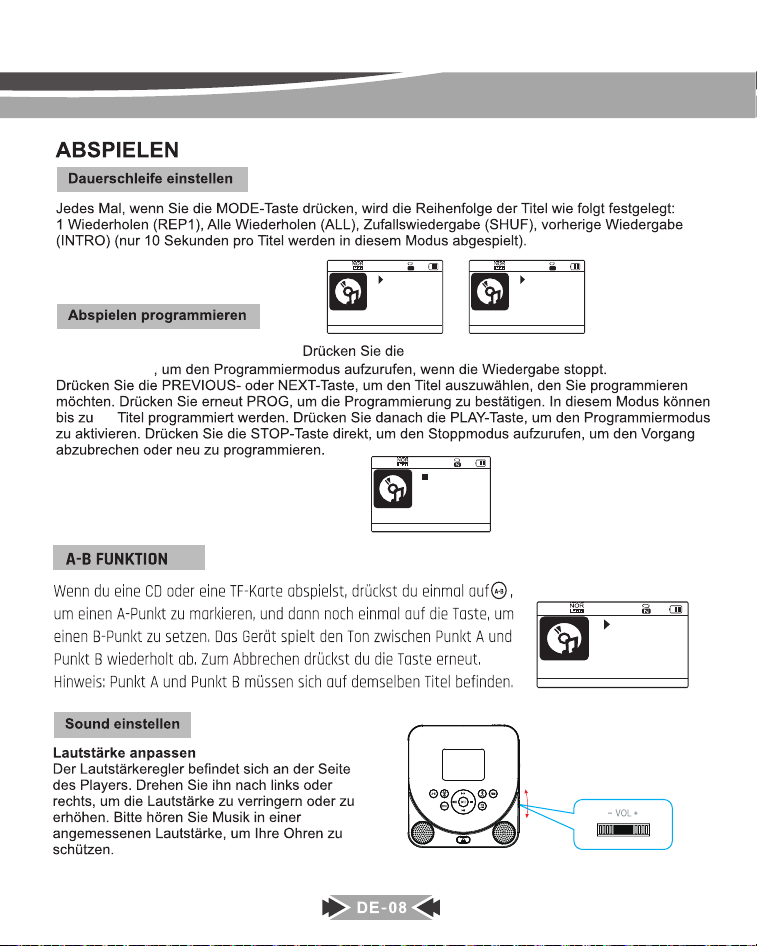
030/160
00:24
MP3 ASP
214.mp3
004 P02/32
MP3 ASP
Program
.OLFNHQVLH]XHUVWGLHVWRSSVŶ
PROG -Taste
030/160
03:07
MP3 ASP
214.mp3
1
030/160
00:07
MP3 ASP
214.mp3
REP ALL
A
32
DE-09
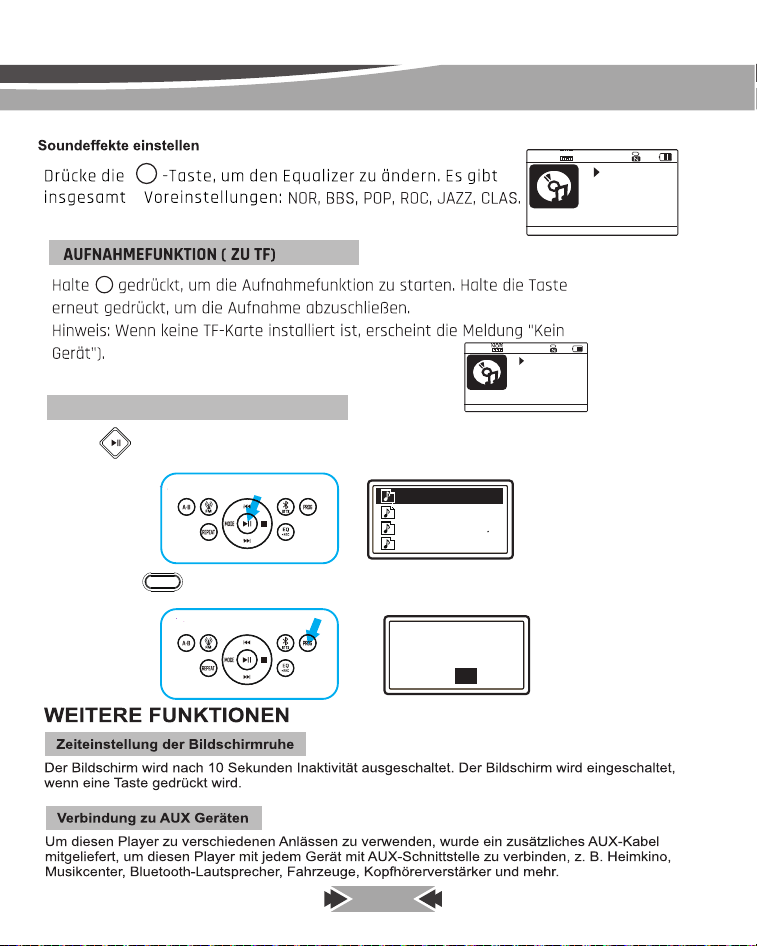
Mit der [ ] -karte vollständige angaben geben sie eine liste Von texten auf, die in dem text enthalten sind.
Funktion löschen (aus der karte)
PROG
Halten Sie die [ ]-Taste ob Sie löschen möchten oder nicht.
唀軧
䧭鿪꣥㸌♧
䧭鿪꣥㸌N
霹侔㽠侔靲
㼭낃끹NQ
:FT
%FMFUFUIJTMF
/0
EQ/
REC.
EQ/
REC.
0003/160
00:04
MP3
103.mp3
Recording...
REC
POP
001/160
00:14
MP3 ASP
101.mp3
COU(COUNTRY)
7
DE-10
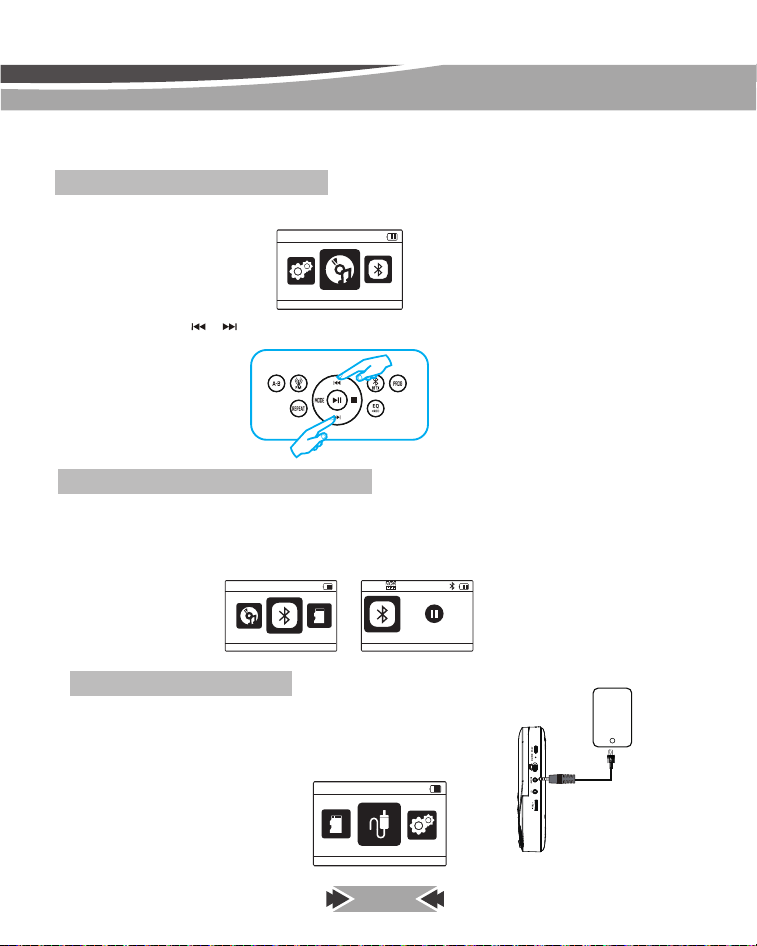
Drücken Sie die MODE-Taste und es wird das Wiedergabemodus-Menü angezeigt.
Nachdem Sie in den BT RX-Modus gewechselt sind, öffnen Sie die Bluetooth-Funktion Ihres Mobiltelefons
und suchen Sie nach MD-707, koppeln und verbinden Sie es, dann können Sie die Songs auf dem
Mobiltelefon über diesen CD-Player anhören.
(Hinweis: Bluetooth-Name dieses CD-Players: MD-707)
Sie können die Taste [ ]/[ ] drücken, um den Wiedergabemodus zu ändern (CD/BT RX/TF-Karte/
AUX IN/System).
So spielen Sie CDs/TF-Karten usw. ab
So verwenden Sie den Bluetooth-Empfänger
Nach dem Aufrufen des AUX-IN-Modus können Sie das AUX-Kabel verwenden,
um es an jedes Gerät mit AUX-Ausgang oder Kopfhörerschnittstelle
anzuschließen, z. B. Mobiltelefon, DVD-Player, Fahrzeuge usw.
So verwenden Sie AUX IN
MODUS
CD
BT RX
TF
BT
赢䄄ꜵ梾
䙐搬⛓ꢂ
AUX IN
TF
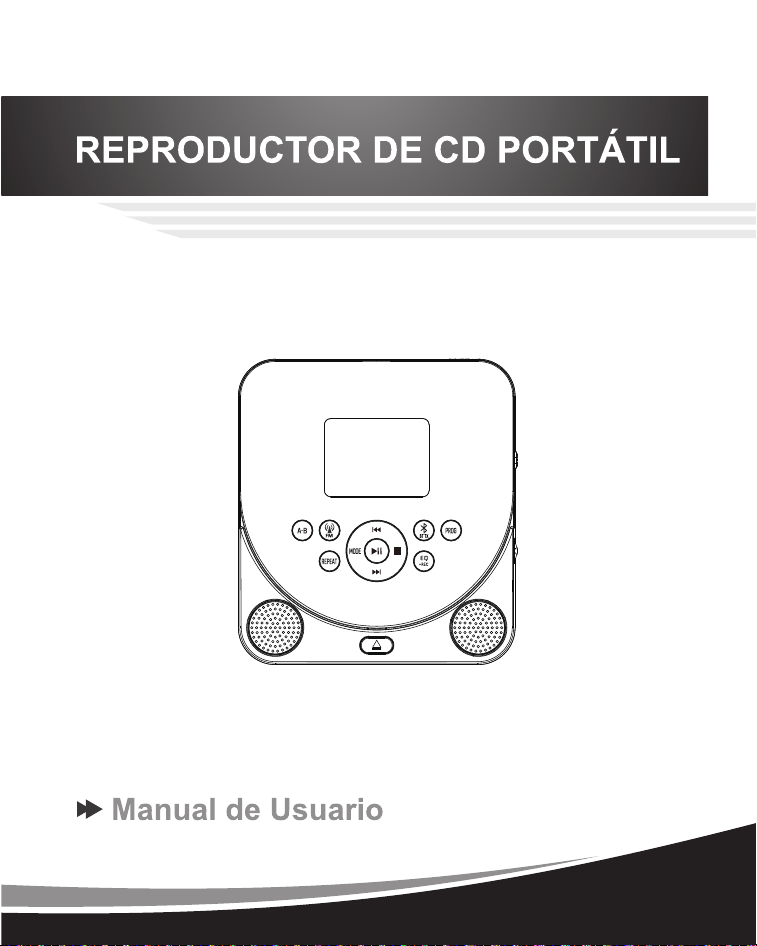
MODEL:MD-707
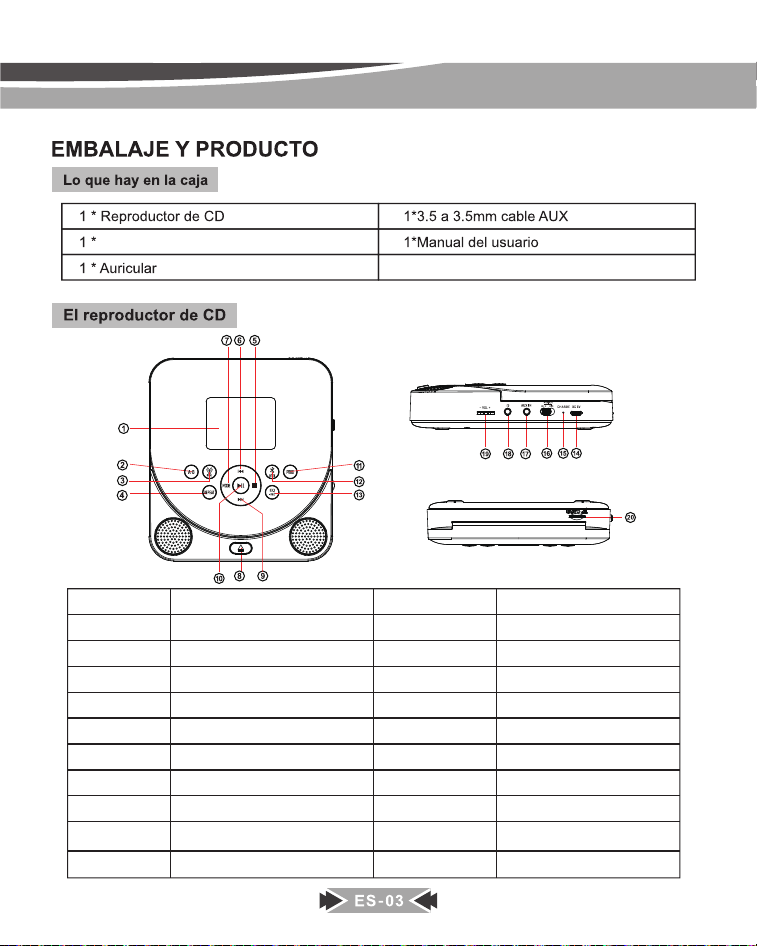
Cable tipo C
ltem
1
2
3
4
5
6
7
8
9
10
ltem
11
12
13
14
15
16
17
18
19
20
Función
Pantalla de visualización
Bluetooth
Transmitter
FM
Transmitter
MODO
Repeat
Anterior / Rebobinar
Detener
EQ / REC.
Reproducir / Pausar
PROG
Siguiente / Avance rápido
Función
Repetición A-B
DC en 5V
Cargador LED
Encendido / apagado
AUX IN
Puerto de auriculares
Volumen Konb
ABIERTO
TARJETA TF
REPEAT
repeat
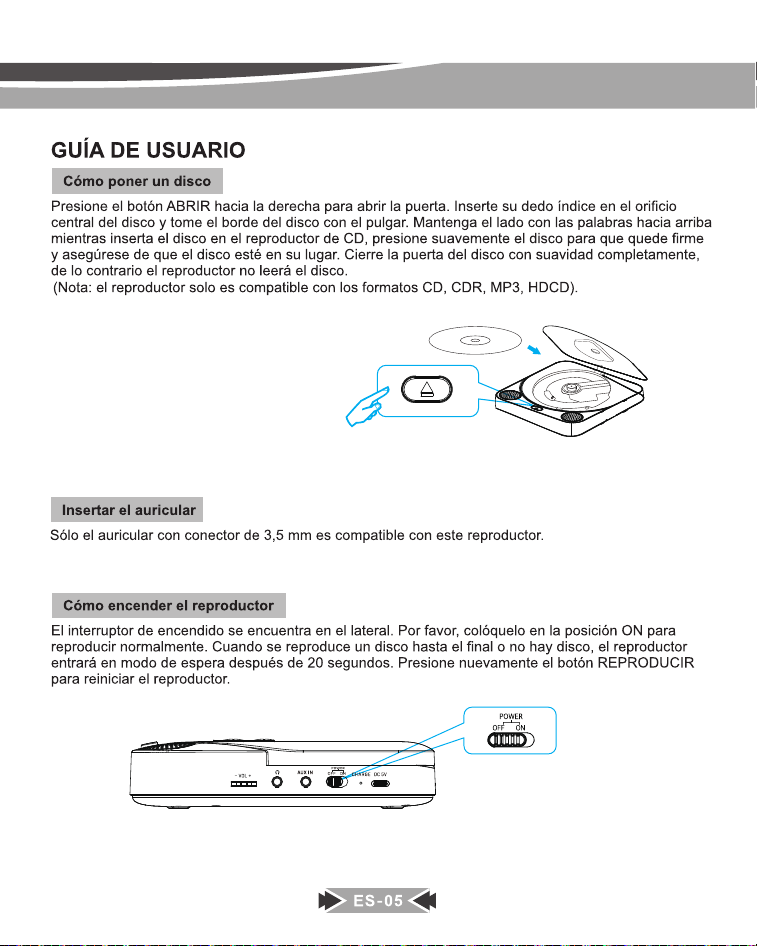
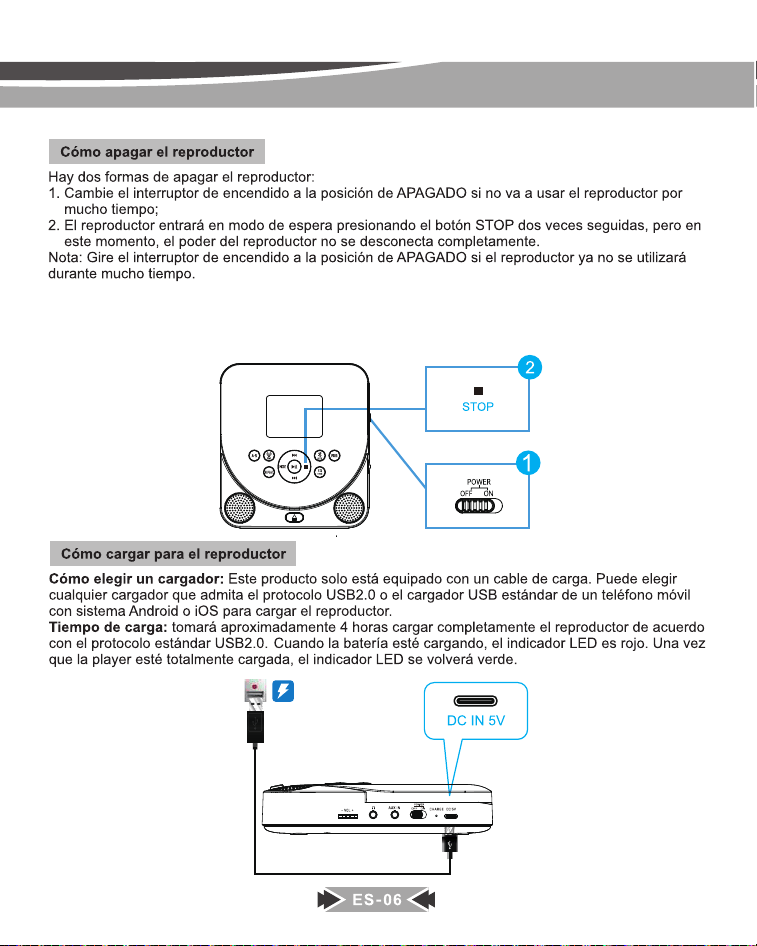
Después de apagar la unidad (cambie el interruptor de encendido a la posición APAGADO o haga que entre en
modo de espera presionando el botón STOP dos veces), cuando la encienda y reproduzca el disco nuevamente,
lo reproducirá desde el punto donde lo detuvo la última vez.
Cuando reproduce el disco, si presiona el botón STOP una vez y presiona el botón PLAY, se reproducirá desde el principio.
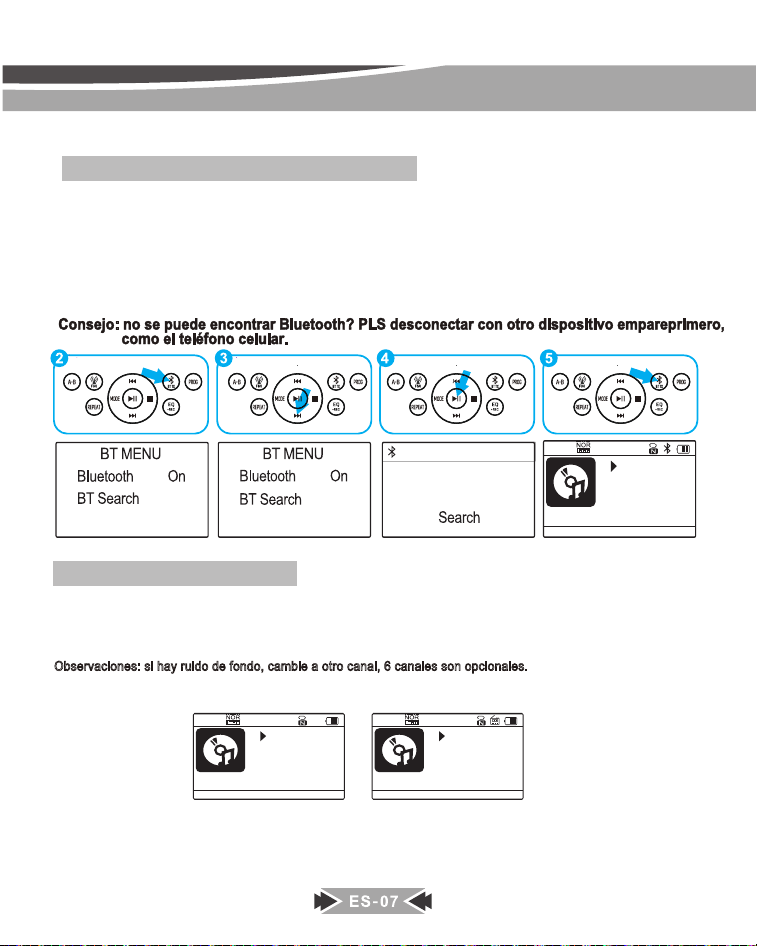
¿Cómo conectar dispositivos Bluetooth?
1. Encienda sus auriculares / altavoz Bluetooth y asegúrese de que Bluetooth esté encendido.
2. Presione el botón BT TX del reproductor, si el Bluetooth está apagado, debe presionar el botón de reproducción
para encender el Bluetooth.
3. Seleccione la opción "Búsqueda BT", luego presione el botón de reproducción, el reproductor de CD comenzará
a buscar dispositivos Bluetooth cercanos.
4. Presione el botón de reproducción para seleccionar el nombre de su dispositivo al que debe conectarse.
5. Una vez emparejado correctamente, presione el botón BT TX para volver a la interfaz de reproducción.
1. JBL Flip Essentia
014/160
03:22
MP3 ASP
114.mp3
019/160
04:14
MP3 ASP
203.mp3
FM OFF
020/160
00:00
MP3 ASP
203.mp3
FM 79.30MHZ
Comment utiliser l'émetteur FM
Veuillez suivre les étapes ci-dessous pour utiliser l'émetteur FM pour connecter l'autoradio :
1. Lors de la lecture de disques CD, Presione bouton CD/FM, la fréquencede l'émetteur FM s'affichera à l'écran.
Appuyez à nouveau, la fréquence changera. Choisissez une fréquence que vous préférez.
[ Seis frecuencias de transmisor FM son opcionales : 79.3, 87.5, 88.5, 93.6, 101.9, 107.1, OFF]
Observaciones: si hay ruido de fondo, cambie a otro canal, 6 canales son opcionales.
2. Allumez l'autoradio et réglez la fréquence sur la même fréquence que vous choisissez sur le lecteur CD.
3. Vous pouvez maintenant écouter le CD avec l'autoradio.
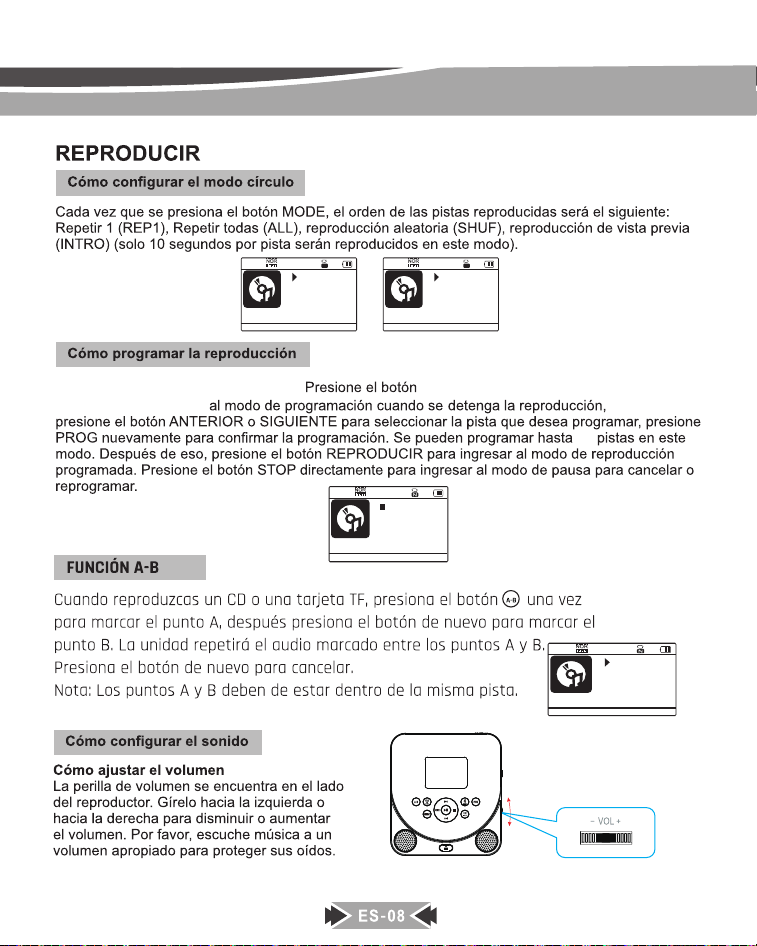
3UHVLRQHHOERWyQVWRSŶSULPHUR
PROG para ingresar
030/160
00:24
MP3 ASP
214.mp3
004 P02/32
MP3 ASP
Program
030/160
03:07
MP3 ASP
214.mp3
1
030/160
00:07
MP3 ASP
214.mp3
REP ALL
A
32
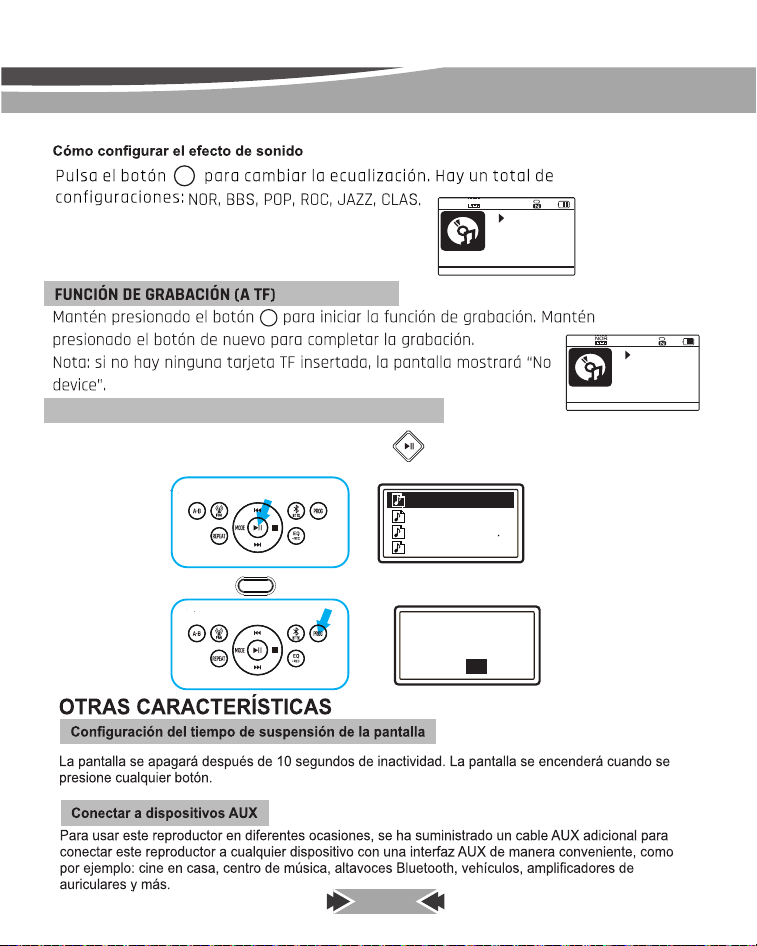
Al reproducir la tarjeta TF, mantenga presionado el botón [ ] durante aproximadamente 3 segundos y se
mostrará la lista de canciones en la tarjeta TF.
FUNCIÓN DE BORRADO (DESDE LA TARJETA TF)
PROG
Mantenga presionado el botón [ ] durante y se mostrará si desea eliminar o no.
ES-09
唀軧
䧭鿪꣥㸌♧
䧭鿪꣥㸌N
霹侔㽠侔靲
㼭낃끹NQ
:FT
%FMFUFUIJTMF
/0
COU(COUNTRY)
7
EQ/
REC.
EQ/
REC.
0003/160
00:04
MP3
103.mp3
Recording...
REC
POP
001/160
00:14
MP3 ASP
101.mp3
ES-10
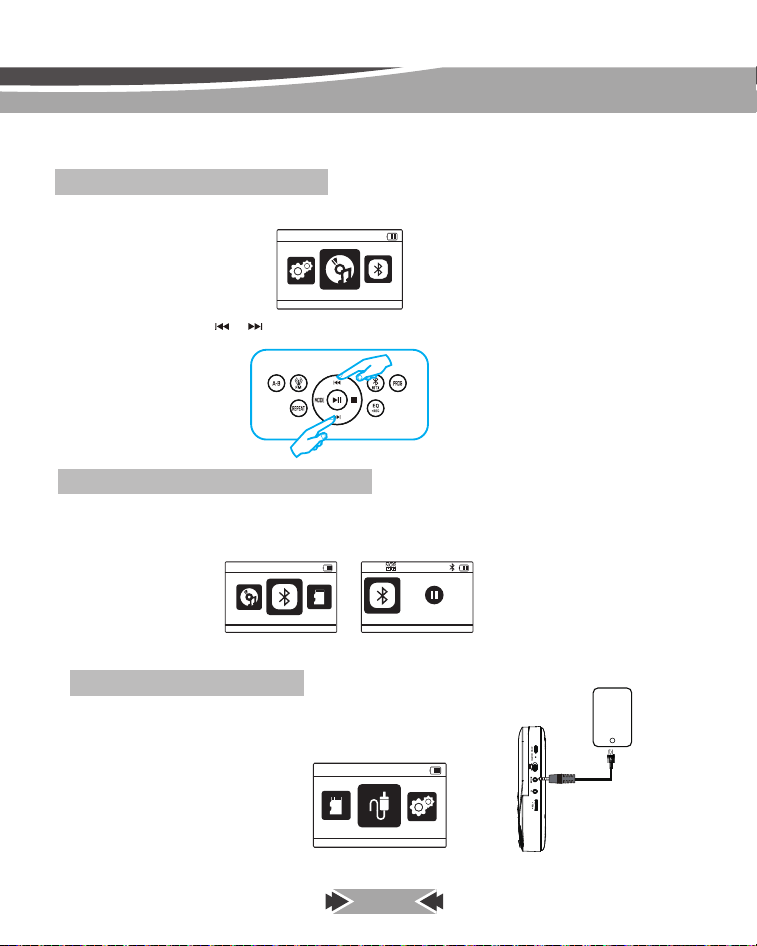
Presione el botón MODE y mostrará el menú del modo de reproducción.
espués de ingresar al modo BT RX, abra el bluetooth de su teléfono celular y busque MD-707, vincúlelo y
conéctelo, luego podrá escuchar las canciones en el teléfono celular a través de este reproductor de CD.
(Nota: nombre Bluetooth de este reproductor de CD: MD-707)
puede presionar el botón [ ]/ [ ] para cambiar el modo de reproducción (CD/BT RX/tarjeta
TF/AUX IN/Sistema).
Cómo reproducir CD/tarjeta TF, etc.
Cómo utilizar el receptor Bluetooth
Después de ingresar al modo AUX IN, puede usar el cable AUX para conectarlo
a cualquier dispositivo con salida AUX o interfaz de auriculares,
como teléfonos celulares, reproductores de DVD, vehículos, etc.
Cómo utilizar la entrada auxiliar
MODO
CD
BT RX
TF
BT
赢䄄ꜵ梾
䙐搬⛓ꢂ
AUX IN
TF