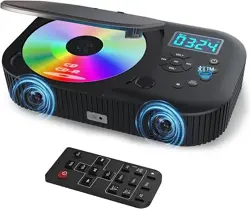
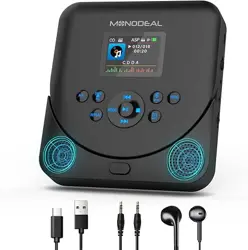
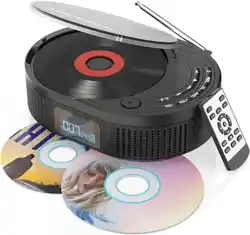
WALL-MOUNTABLE CD PLAYER
Model: HCD-12
Please read this manual carefully before using
and keep it for future reference.

:
1
Model HCD-12
Frequency response 20-22KHz
Power output of earphone 16mW+16mW/16-32Ohm
Impedance of earphone 32Ohm/16mW
Compatible Disc CD/CDR/HDCD/MP3/WMA
Bluetooth Bluetooth Speaker, Version: 4.2
HIFi Speaker Support EQ funotion 3Wx2
USB Support MAX 32G/ FAT 32 Format
Battery Rechargeable battery 3.7V 2000mAh , Support about 3 hours
Power source Micro USB 2.0 Standard
Power consumption about 10W
Dimensions (L*W*H) 165x165x45mm
Weight 502.4g
Installation Instanctious
Product Features
Accessories
1. Fix the wall-mounted plate on the wall with 4 srews(included in package).
2.Hang the CD player on the wall-mounted plate.
USB to micro
USB charging cable
VOL+VOL-
REPEAT
MODE
PROGA-B 10+
EQ

USB IN
AUX IN
POWER
OFF ON
DC IN 5V
2
Buttons Instruction
Remote Control
1.Status display
2.Remote control light sensor
3.Light charging LED
4.VOL-
5.Mode
6.Previous
7.VOL+
8.Next
9.Pause/Play
10.Stop
11.DC IN 5V
12.Power ON/OFF switch
(Push the cable)
13.AUX IN
14.USB IN
15.Earphone
16.CD cover Open button
Item Function
1 Standby
2 PROG
3 A-B
4 Mute
5 Number 10+
6 Previous
7 Pause/Play
8 Fast Rewind
Item Function
9 Next
10 Fast Forward
11 MODE
12 VOLUME -
13 VOLUME +
14 Repeat
15 Stop
16 EQ
VOL+VOL-
REPEAT
MODE
PROGA-B 10+
EQ
1
2
3
6
7
8
9
11
13
12
4
5
14
10
16
15

3
Button Operation
1. STANDBY
When the power on, turn the unit on/off.
2. Number Pad (10+)
Press this button to enter the 10+ songs suchas 10,20,30,etc.
3. PLAY/PAUSE
Press PAUSE button to pause playback;Press it again to continue playing from
where it was paused.
4. STOP
Press STOP button to stop playback.
Press PLAY Button to play from the beginning.
5. MUTE
Press to mutes the audio output on the player.
6. VOL+/VOL-
Press to increase or decrease the volume output.
7. MODE
Press to change the playing mode.
8. PROGRAM
PROGRAM button apply for CD/USB/AUX/Bluetooth/FM Radio/MP3/WMA/HD-CD
this function allow you randomly assign 20 songs(max) and play them in order.
9. AUX IN
Connect it with the AUX output device(such as DVD player, CD player or Mobile
phone etc) via AUX cable.

4
2. How to charge for the player
Basic Operation
USB IN
AUX IN
POWER
OFF ON
DC IN 5V
Each time the REPEAT button on there mote control is pressed, the order of the tracks played
will be as follws:Repeat1(REP1),Repeat all(ALL), random play(SHUF).
CD
01:25
REP1
CD
P02
Set A Ab ON Ab OFF
CD
POP
4. How to program the play
5.. How to setup EQ effect
6. A-B Repeat
20
Press the EQ button to changes the different sound effects. There are a total of 5 sound effects:
BBS, POP, JAZZ, ROCK, and CLASSIC,FLAT.
A.the power switch is located on the side. Please toggle it to ON position to play normally.
B.the power switch is located on the side. Please toggle it to OFF position to turn it off.
1. How to turn on/turn off the player
3.How to setup the circle mode
Connect the supplied USB charging cable with the power adapter, then plug it into a power source
to charge the player. OR Connect the supplied USB Charging cable to a computer/desktop/car
charger/power bank to charge it.
Charging Time: It will take about 4 hours for a full charge. When charging, the charging indicator
on the player will be RED; Once the player is fully charged, the indicator will turn to GREEN.
NOTE: When the player is in low battery, the LCD screen will be flashing. Please charge it.

5
1. Press the “MODE” button to switch to Bluetooth mode, the “bt” will shown on
the LED display, then the unit will be ready to pair other Bluetooth devices
such as mobile phone, pads etc.
2. Activate the Bluetooth in your mobile phone and it will automatically search
nearby Bluetooth device to pair.
3. Choonse the name " HCD-12 " device in your mobile phone Bluetooth device
list to pair.
4. Your mobile phone will be paired/connected to the CD player in a few seconds.
5. Playing music on your mobile phone and the audio will be transmitted to the
CD player speaker through bluetooth.
1. Plug in a U-dick to the CD player USB port.
2. Press the “MODE” button to switch to USB mode.
3. the CD player will read and play the music in the U-disk automatically.
Note:
1. supports a maximum 32GB USB flash drive, which must be FAT32 format.
2. If can't read the U-dick, please check the format and capacity. If not FAT32
format, please format it to FAT32.
Note:
This Player doesn't compatible with Bluetooth headsets, Blutooth speakers and
Car's Bluetooth.
Bluetooth Mode Instructions
USB Mode Instructions
FM Mode Instructions
1. press the "MODE" button to switch to FM radio mode.
2. press the " " or " "button to skip the frequency, the channels will be
automatically stored when seaching channnels.

6
Warning
1. Never play a cracked DVD or CD, that would damage the laser.
2. Please remove the protection card from the laser before using it.
Troubleshooting
Power Switch is not turned on.
Charge the player.
Please contact us at any time if you meet any inquires while using this CD player.
Our Customer Service Email: [email protected]