5240 Willis Rd.
Theodore, AL 36582 USA
Toll Free: 1 (855) 223-2665
Tel: 1 (805) 933-9970
coolboss.com/coolee
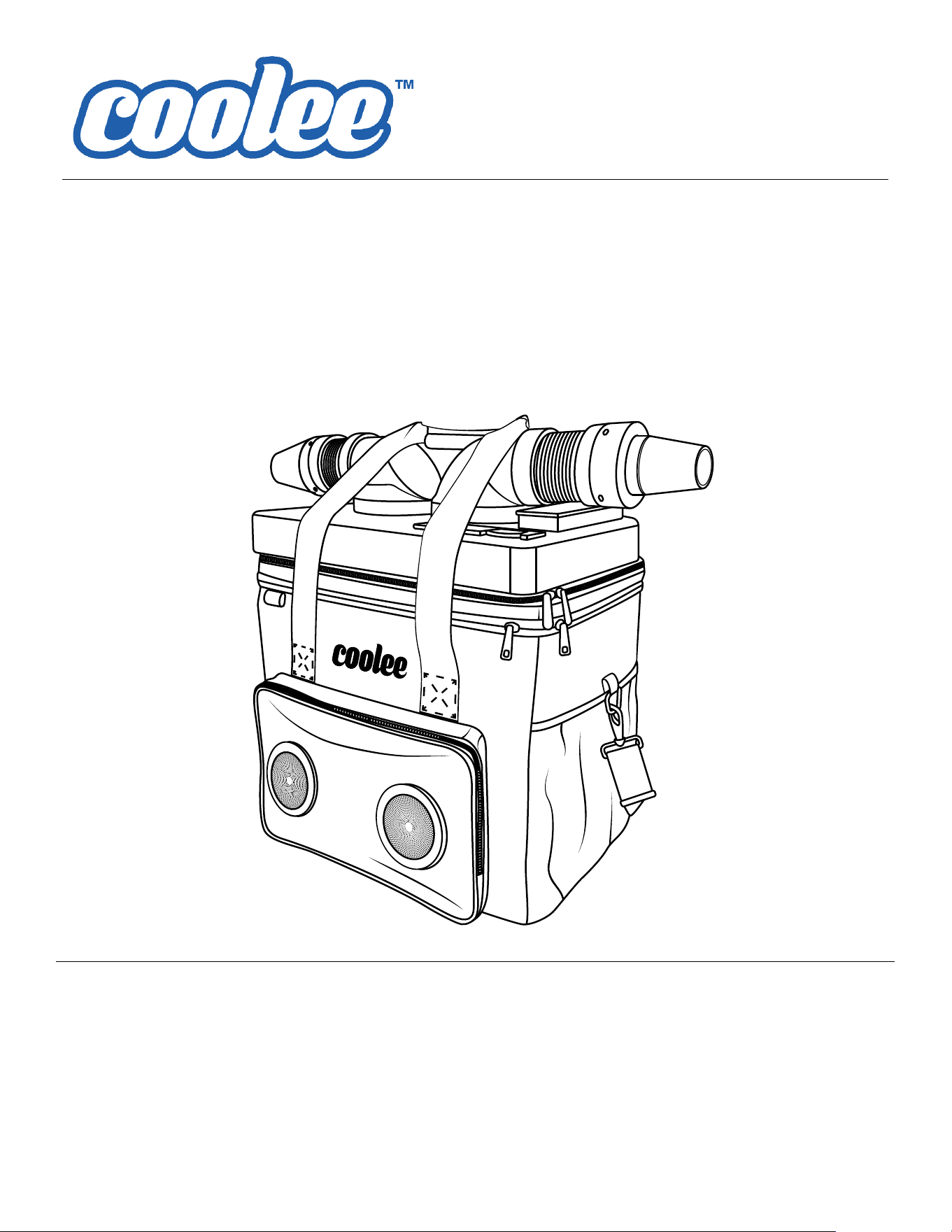
3-in-1 Air Cooler, Ice Chest & Bluetooth Speaker
User Guide
User Guide P/N 5900294 — Revision B2 — November 2023
MODEL: CL-240
⚠
Important
Read the entire contents of this manual before using this product. Make sure all other
operators also read this manual. Keep the manual near the product for future reference.
By proceeding with operation, you agree that you fully understand the contents of this
manual.

User Guide. Coolee
TM
by Cool Boss CL-240, User Guide, P/N 5900294, Revision B2, November 2023.
Copyright. ©2023 Coolee
TM
by Cool Boss. All rights reserved. No part of this manual may be reproduced, adapted,
translated, or transmitted by any means, electronic or mechanical, for any purpose or in any form, without prior written
permission of BendPak Inc.
Trademarks. Coolee by Cool Boss, the Coolee logo, and BendPak are trademarks of BendPak Inc. All other company,
product, and service names are used for identification only. All trademarks and registered trademarks mentioned in this
manual are the property of their respective owners.
Limitations. Every effort has been made to ensure complete and accurate instructions are included in this manual.
However, product updates, revisions, and/or changes may have occurred since this manual was published. BendPak
reserves the right to change any information in this manual without incurring any obligation for equipment previously or
subsequently sold. BendPak is not responsible for typographical errors in this manual.
Warranty. The Coolee warranty is more than a commitment to you: it is also a commitment to the value of your new
product. Visit coolboss.com/support/warranty for complete warranty information.
Safety. Your new product was designed and manufactured with safety in mind. Your safety also depends on proper
training and thoughtful operation. Do not set up, operate, maintain, or repair your Coolee without reading and
understanding this manual and the labels on the unit.
Owner Responsibility. In order to maintain your product properly and to ensure operator safety, it is the
responsibility of the product owner to read and follow these instructions:
• Follow all setup, operation, and maintenance instructions.
• Read and follow all safety instructions. Keep them readily available for operators.
• Do not operate the product until you are certain that all parts are in place and operating correctly.
• Carefully inspect the product on a regular basis and perform all maintenance as required.
• Service and maintain the unit only with approved replacement parts.
• Keep all instructions permanently with the product and make sure all labels are clean and visible.
• Keep this manual accessible so that anyone who uses or services the unit can read it.
Assistance with your Coolee is available from your dealer, by calling Cool Boss at (855) 223-2665, or by emailing
support@coolboss.com. You may also contact Cool Boss for parts replacement (please have the serial number and
model number of your unit available).
Unit Information. Enter the Model Number, and Date
of Purchase from the label on your unit. This information is
required for part or warranty issues.
Model:
Date of Purchase:
Introduction
The Coolee is a multi-purpose, portable cooler designed to keep you and your refreshments cool, while also
providing access to music through your Bluetooth
®
enabled smart device and the Coolee Bluetooth
®
speakers.
Simply fill your Coolee with ice cubes, or reusable Cold Packs and a little water, apply power, and enjoy the soothing
breeze. Inside the Coolee you can place as many as 12 soda cans (12 oz. / 335 ml) to be ready with a frosty chill.
The Coolee CL-240 blasts cold air with dual high-speed fans and multi-directional air flow nozzles to provide
refreshing ice-chilled air for maximum relief.
The CL-240’s temperature management system offers two air cooling options; ambient that uses the chilled air inside
the cooler for instant relief, or recirculating water cooling that utilizes a micro-size water pump paired with a heatsink
radiator for maximum cooling performance. A shielded impeller pump delivers boosted efficiency at low noise levels.
CL-240 Air Cooler, Ice Chest & Bluetooth Speaker 3 P/N 5900294— Rev. B2 — November 2023
Quick Start Guide
Basic Start-Up on the CL-240 Portable Air Cooler, Ice Chest & Bluetooth Speaker.
1. Ensure the battery is installed.
2. Charge the Coolee with the provided cables 12VDC or 110VAC.
3. Fill the Coolee inner compartment with 2-3 inches of water and then fill with ice.
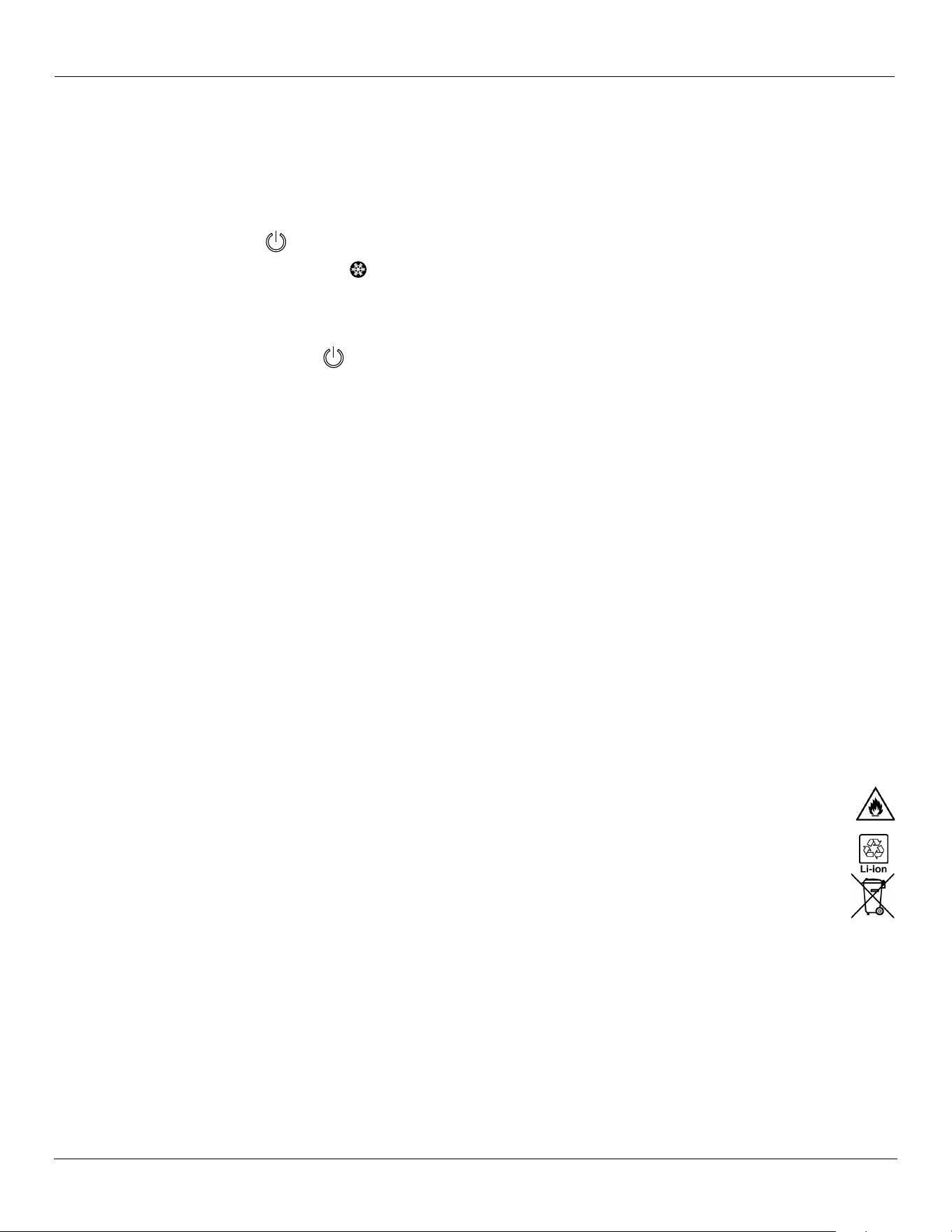
4. Touch the Power Button for 2-3 seconds.
5. Start the water pump by touching the Ice icon.
6. Touch Fan A or Fan B to start the fans. Touch once for low speed and twice for high speed.
7. Push the Bluetooth button to connect a smart device (connect to CL-240).
8. Push and hold the Power Button to shut down the CL-240.
Safety Information
Warning Symbols
⚠ DANGER Calls attention to an immediate hazard or practice that will result in death or personal injury.
⚠ WARNING Calls attention to a hazard or practice that could result in death or personal injury.
⚠ CAUTION Calls attention to a hazard or unsafe practice that could result in injury or property damage.
Read this manual carefully before using. Do not set up or operate the product until you are familiar with all operating
instructions and warnings. Do not allow anyone else to operate the product until they are also familiar with all operating instructions and
warnings.
⚠ WARNING California Proposition 65 This product can expose you to chemicals including styrene and vinyl
chloride which are on a list of over 900 chemicals identified by the State of California to cause birth
defects or reproductive harm. ALWAYS use this product in accordance with Coolee instructions. For
more information go to www.P65Warnings.ca.gov.
⚠ WARNING Lithium-ion Batteries are hazardous, dispose of at hazardous waste collection facilities only.
⚠ DANGER Lithium-ion batteries are sensitive and may explode, burn, or cause a fire if misused or
mishandled. When disposed of improperly, lithium-ion batteries may short, causing them to
become hot, burst, or ignite. Do not short, disassemble, drill into, deform, or heat batteries. Do
not throw batteries into fire.
• Make no modifications to the CL-240. This voids the warranty; injury or property damage may occur.
• The product should only be operated by authorized personnel. Children should not be allowed to operate the
Coolee by Cool Boss™. Make sure all operators read and understand the Warning labels and the Operation
Manual. Keep the manual available at all times.
• Make a visual inspection of the product before using it. Check for damaged or missing parts. Do not use the
product, if you find problems with the unit. Instead, remove it from service, then contact your dealer,
call Cool Boss at (855) 223-2665, or email Cool Boss at support@coolboss.com.
Liability Information- BendPak Inc. assumes no liability for damages resulting from:
• Use of the equipment for purposes other than those described in this manual.
• Modifications to the equipment without prior, written permission from BendPak Inc.
• Damage to the equipment from external influences.
CL-240 Air Cooler, Ice Chest & Bluetooth Speaker 4 P/N 5900294— Rev. B2 — November 2023
Specifications
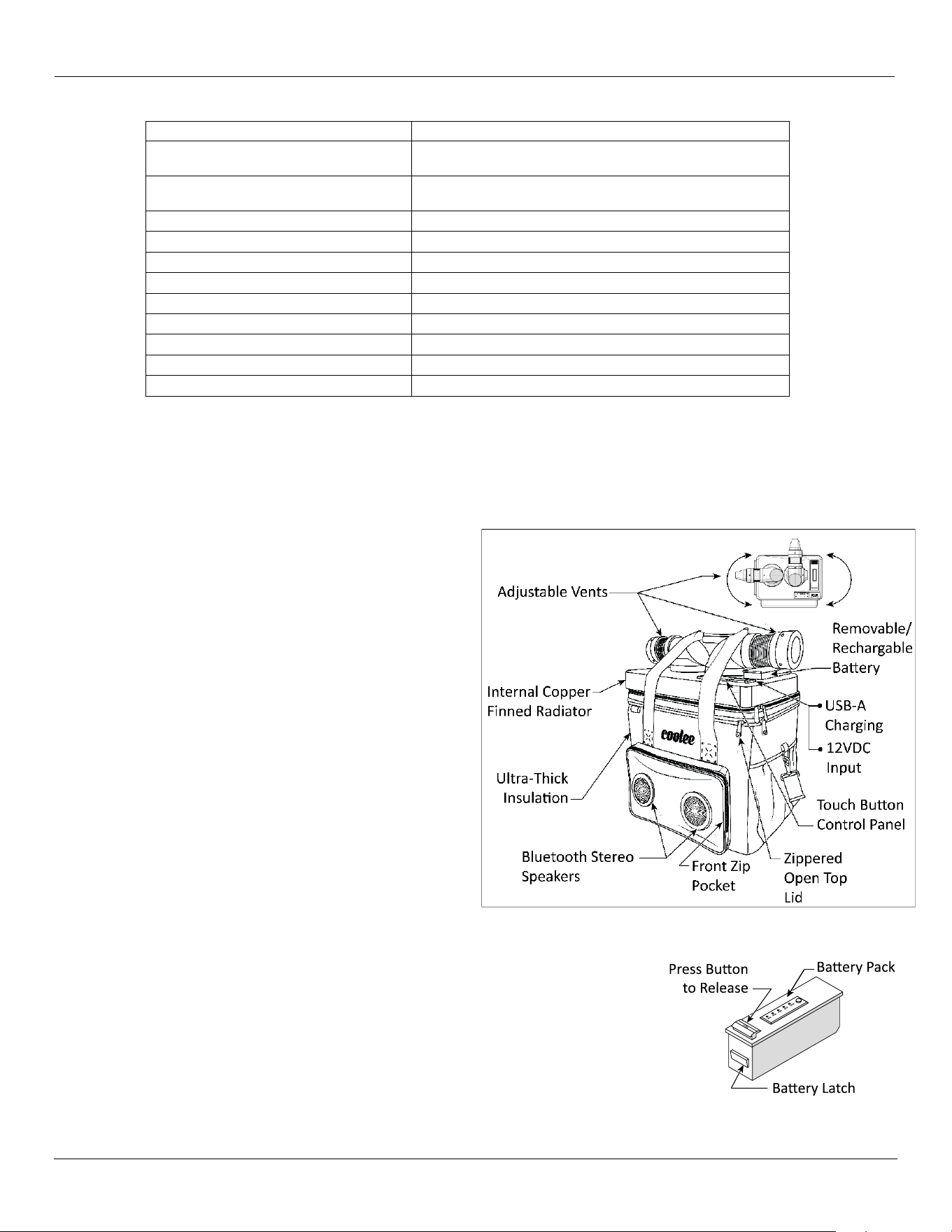
Components
• Adjustable Vents
Center point swing operation allows you to optimally direct a comfortable cool blast.
• Internal Copper Finned Radiator
High-quality radiator construction helps drop the
temperature.
• Ultra-Thick Insulation
Rugged thick insulation efficiently stores the cool
inside.
• Bluetooth Stereo Speakers (Weather
Resistant)
Coolee’s built in Bluetooth Stereo Speakers operate
by simply pairing with your smart device.
• Front Zip Pocket
Store small items inside the Zip Pocket.
• Zippered Lid
Open the top lid to add ice and water, add drinks, or
retrieve cold beverages.
• Touch Panel Controls
Activate all functions by simply touching the control
panel.
• USB-A Charging Port, - 12VDC
USB-A Port for charging your devices and the 12VDC plug charges the Coolee’s battery.
• Removable / Rechargeable Battery
Easy-to-charge battery pack; just remove and insert into the docking station, or
leave the battery installed and connect to the power adapter for charging.
Model CL-240
Coolee
Approx. Interior Dimensions
9 in. (H) x 12 in. (W) x 7 in. (D)
228.6 mm (H) x 304.8 mm (W) x 177.8 mm (D)
Approx. Exterior Dimensions
18.5 in. (H) x 13 in. (W) x 12 in. (D)
470 mm (H) x 330.2 mm (W) x 305 mm (D)
Nominal Input Charge Voltage
12VDC (110VAC to12 VDC, charging adapter included)
Lithium Battery Pack
Super Polymer Li-ion 10,400 mAh, 10.8V, 110 WH
USB-A (Charging Only)
Provides up to 10,000 mAh
Time to recharge
Up to 5 Hours from zero charge
Charge Temperature
+40˚F to 122˚F / +4˚C to 50˚C
Net Weight with Battery Pack
15.5 lbs. / 7.05 kg
Approximate Total Interior Volume
14 Quarts / 13.2 Liters
Operating Temperature
+32°F to +131°F / 0°C to +55°C
Storage Temperature
+14°F to +104°F / -10°C to +55°C
CL-240 Air Cooler, Ice Chest & Bluetooth Speaker 5 P/N 5900294— Rev. B2 — November 2023
Setup
Charging the Battery
⚠ WARNING Plug 110VAC charging cords into a properly grounded electrical receptacle only.
For reliability, a durable injection molded battery case protects the lithium-ion battery cells and the electronics from moisture and harsh
environments. The Coolee super-polymer rechargeable 10,000mAh lithium-ion battery lasts up to 4 hours (100 percent). The battery pack
may be recharged via a freestanding Docking Station, or while the Battery Pack remains installed in the CL-240. For Docking Station
recharging, the Coolee incorporates a quick-release battery system that allows removal from the Coolee.
Charging the Battery in the Docking Station:
1. To remove the battery pack from the Coolee, push down on the “Press” button to release the latch.
2. While depressing the Button, grip the battery’s top panel at the outer edges, and gently pull upward on the battery pack to
remove.
3. Next, insert the Battery Pack (with contacts facing down) vertically into the Docking Station.
4. Choose to power the docking station with either the 110VAC power adapter, or the 12VDC power cord.
5. Connect either the 110VAC power adapter; or the12VDC power cord, to the Docking Station’s 12VDC Port.
6. Plug in the opposite end of 110VAC power adapter into a properly grounded wall outlet, or the12VDC power cord to a 12VDC
vehicle socket.
7. Charging begins automatically. Remove once a 100 percent charge is achieved.
Charging the Battery in the Coolee:
1. Raise the rubber cover on the Coolee to access the 12VDC Input Port.
2. Choose to charge with either the 110VAC power adapter, or the 12VDC power cord.
3. Connect the 110VAC power adapter, or the12VDC power cord to the Coolee’s 12VDC Input Port.
4. Plug in the opposite end of 110VAC power adapter into a properly grounded wall outlet, or the the12VDC power cord to a 12VDC
car socket.
5. Charging begins automatically. Remove once adequate or 100 percent charge is achieved.
Note: The battery level indicator displays in 20, 40, 60, 80, and 100 percent increments. Simply Press and Hold
on the rechargeable battery pack to note the battery level.
⚠ CAUTION The Battery Pack should ALWAYS remain in the Coolee while operating on the 110VAC power
adapter or the 12VDC power cord operation
Install Adjustable Vents and Nozzles
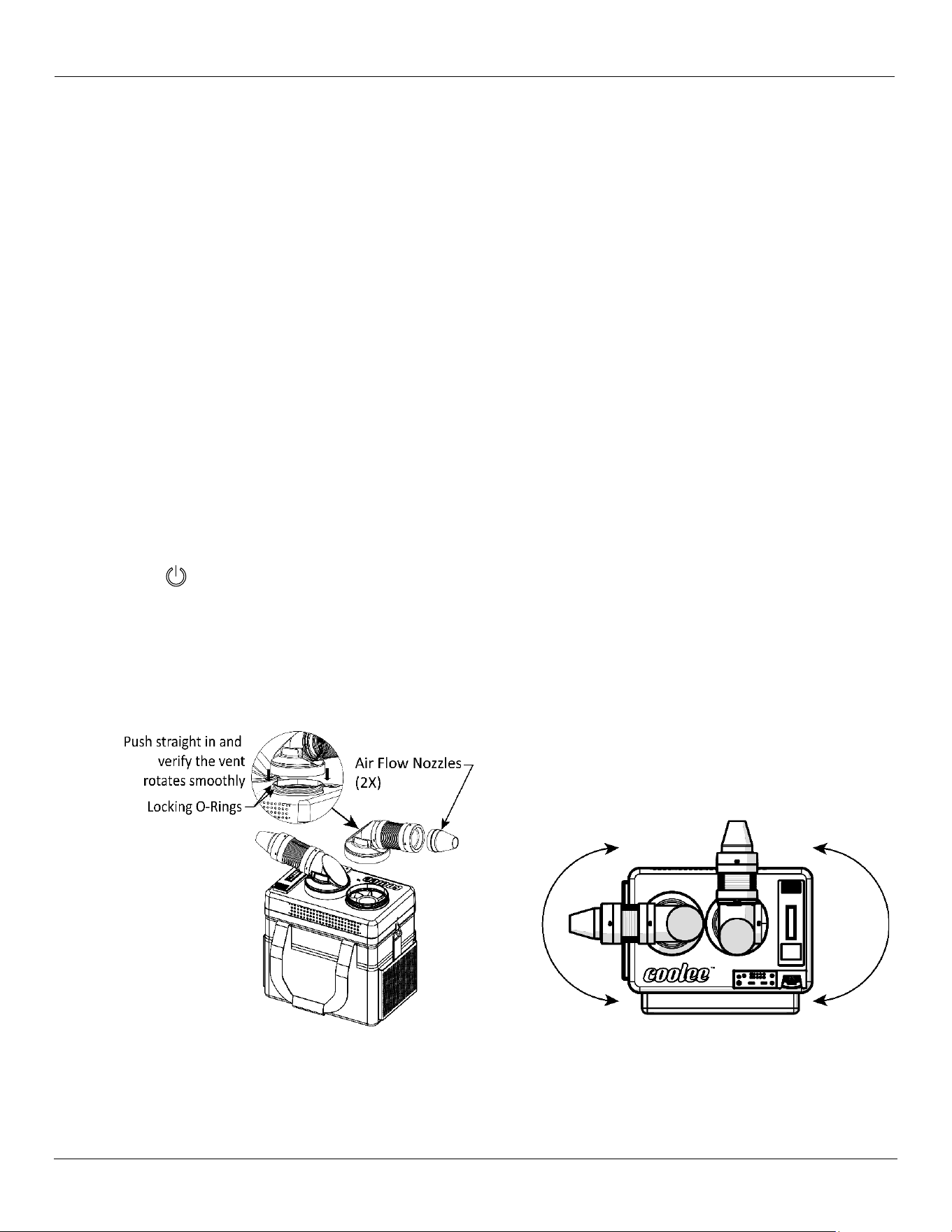
Both adjustable vents secure onto the Coolee with locking O-rings (shown). Push straight on and verify that the vents rotate smoothly. Air
nozzles install by lightly twisting each on / off. Adjustable Vent assemblies feature stay-put ducting and allow maximum directional control
and air flow.
Operation
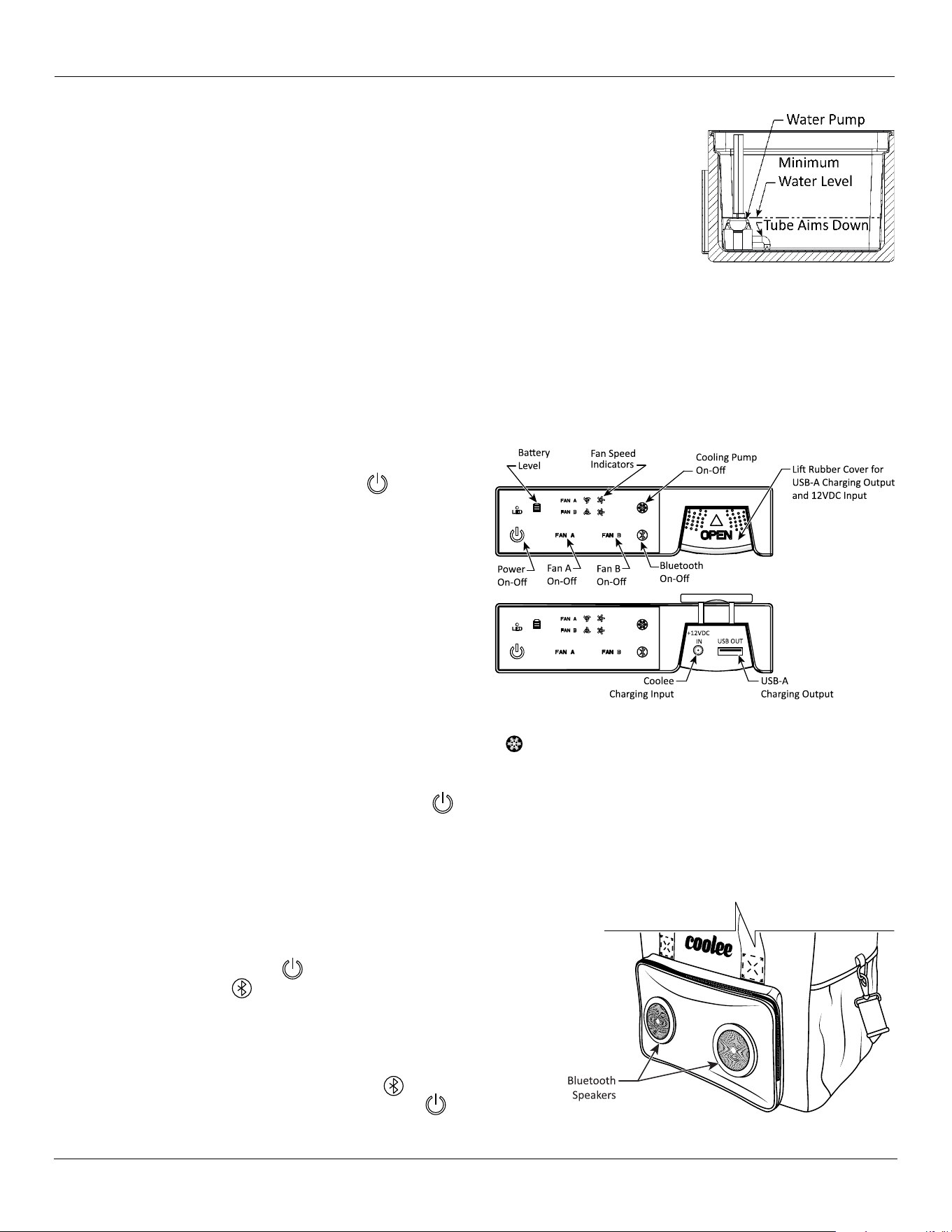
Operating the Coolee is easily accomplished from the Touch Control Panel which operates three on-off functions: fan speeds, cooling
pump, and Bluetooth. Power may be supplied to the Coolee through either the 110VAC Power Adapter or the 12VDC power cord. A fully
charged Coolee can supply 10,000 mAh of electrical power to charge portable devices through the USB-A port.
CL-240 Air Cooler, Ice Chest & Bluetooth Speaker 6 P/N 5900294— Rev. B2 — November 2023
Chilling Drinks
Your Coolee can hold up to 12 beverage cans inside its compartment. Once added, simply fill the inner
compartment with ice cubes, or reusable cooling packs and water, making sure to add enough water to
cover the water pump.
⚠ CAUTION The Water Pump MUST be covered with water during any operation.
Water lubricates, feeds, and cools the pump. Running the pump dry will
damage the pump.
Portable Air Cooler
Your Coolee can provide a continuous blast of cool air. Just use the touch button controls on the top panel to begin producing streams of
air flow. Each of the Coolee’s dual 46 CFM (Cubic Feet Per Minute) fans deliver cold air up to 35°F / 19°C below the ambient temperature,
providing maximum relief instantly. The proprietary cooling system features two cooling fans with separate controls and variable speeds.
Dual-zone climate control allows users to set up to 3 air flow settings. A single ambient air fan (FAN A) pulls chilled air from inside the cooler
and blows through one of the vents. A second fan (FAN B) uses recirculating cold water and a miniature radiator that blows the cool air out
through the second vent. For super cooling, fans may be operated simultaneously.
To use the Cooler:
1. Install a fully charged battery.
2. Press and hold the Power On-Off button for 3 seconds
to apply power to the Coolee.
3. To operate Fan “A” and adjust the fan speed, press Fan
“A” button once for low and twice for high speed (Fan
levels will display on the control panel). To shut down Fan
A, press and hold the Fan “A” button.
4. To operate Fan “B” and adjust the fan speed, press Fan
“B” button once for low and twice for high speed (Fan
levels will display on the control panel). To shut down Fan
B, press and hold the Fan “B” button.
5. Selecting a low Fan Speed will provide the maximum Coolee running time.
6. To engage the Cooling Pump, press the Cooling Pump On-Off button for approximately 3 seconds.
7. To access the USB-A Output or 12VDC Input ports, lift the rubber cover and plug in the appropriate power cord.
8. To shut down Power to the Coolee, press and hold for 3 seconds.
Bluetooth Operation
The Coolee includes a Bluetooth
®
v5.0 receiver that will stream audio files from your Bluetooth enabled smart device and delivers precision
sound with up to 8 hours of playing time (depending on fan use and battery charge level). An insulated Bluetooth speaker enclosure is both
water resistant and tuned to provide the best sound at every volume level.
Engage Bluetooth listening as outlined below.
To operate the Bluetooth, follow these simple steps:
1. Apply power to the Coolee.
2. Start the Bluetooth Press and hold 3 seconds.
3. Coolee will audibly announce “Bluetooth Enabled.”
4. Go to “Bluetooth Settings” on your Smart Device, select CL-240.
5. The Coolee will chime, “Bluetooth Connected.”
6. Select your streaming platform and play.
7. Adjust the Coolee volume on your smart device.
8. To shut down the Bluetooth, press and hold for 3 seconds.
9. To shut down Power to the Coolee, press and hold for 3 seconds.
CL-240 Air Cooler, Ice Chest & Bluetooth Speaker 7 P/N 5900294— Rev. B2 — November 2023
Parts
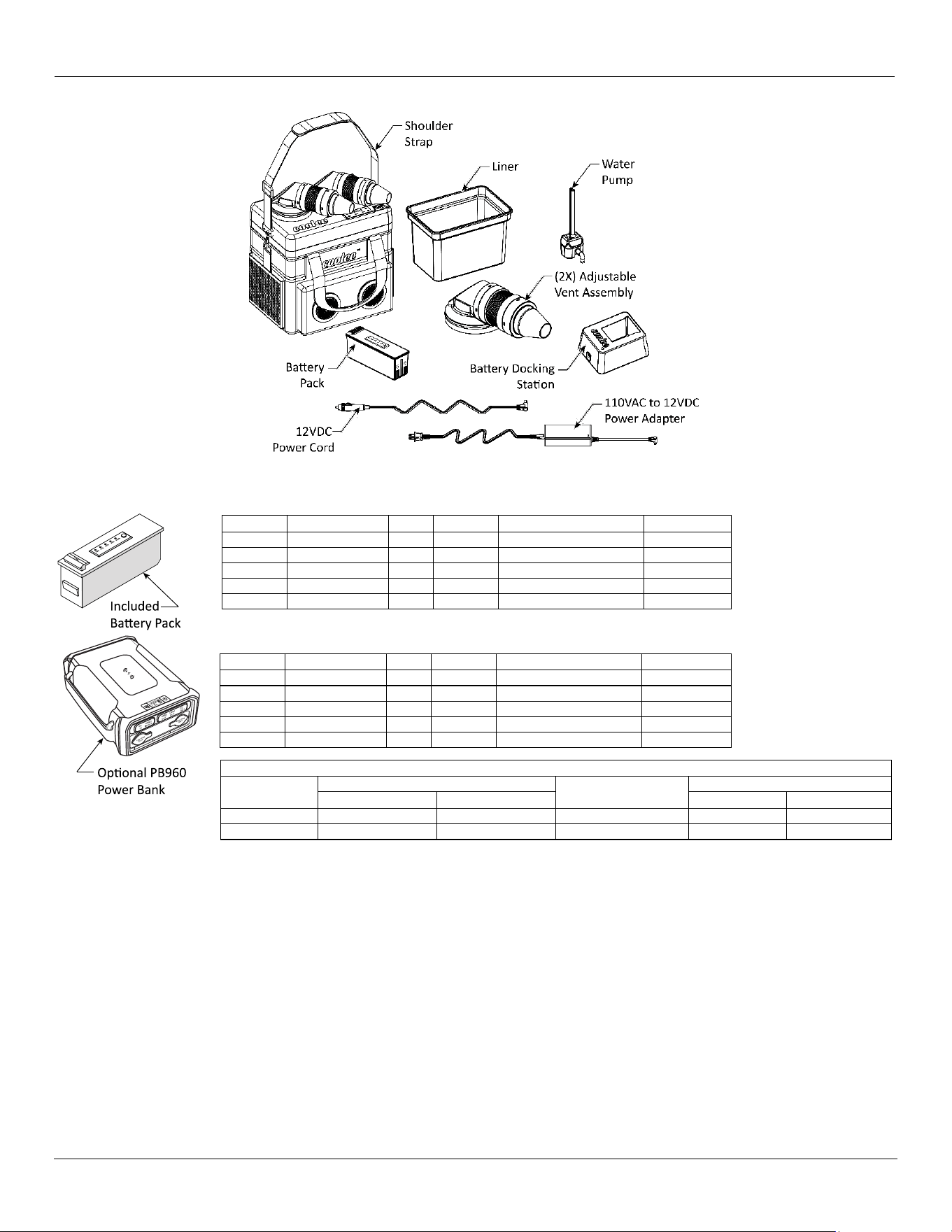
CL-240 (GREY-BLUE Color) Parts:
SKU#
Description
Qty.
SKU#
Description
Qty.
5150019
Coolee
1
5326313
Battery Pack
1
5328557
Liner
1
5328568
Adjustable Vent Assy
2
5328565
Shoulder Strap
1
5328577
Water Pump
1
5326318
Battery Charger
1
5326319
12VDC Power Cord
1
-
-
-
5326314
110VAC Power Adapter
1
CL-240 (CAMOUFLAGE Color) Parts:
SKU#
Description
Qty.
SKU#
Description
Qty.
5150033
Coolee
1
5326320
Battery Pack
1
5328558
Liner
1
5328582
Adjustable Vent Assy
2
5328578
Shoulder Strap
1
5328579
Water Pump
1
5326318
Battery Charger
1
5326319
12VDC Power Cord
1
-
-
-
5326314
110VAC Power Adapter
1
Easy Cleaning
To clean the Coolee, simply unzip all compartments, turn off power, remove battery pack, and remove all items from inside. Wipe with a
medium-size cloth, dampened in warm water and mild soap. After wringing out the lightly soaped towel, wipe the inside and outside of the
Coolee clean with a fresh damp cloth towel (without soap). Then leave all sections open, unzipped, and allow to air dry.
Storage
During periods of non-use, it is best to store the Coolee away from harsh elements. Before storing, make sure to remove personal items
and clean the Coolee as outlined in Easy Cleaning above. It is also advisable to remove the battery pack and fully recharge it before storing.
Keep the removed battery pack separate from the Coolee and placed where it is away from children. Storage temperature for all Coolee
items range from +14˚F to 104˚F / -10˚C to +40˚C. Extended storage inside a vehicle’s trunk or other vehicle compartment is not
recommended.
⚠ WARNING Do not operate the Coolee if you find maintenance issues. Remove it from service. Assistance is
available by calling Cool Boss at (855) 223-2665, or via email at
support@coolboss.com.
Typical Run Times with Battery Charge at 100 percent
Included
Battery
RUNNING TIME (HOURS)
Optional PB960
Power Bank
RUNNING TIME (HOURS)
SINGLE FAN
BOTH FANS
SINGLE FAN
BOTH FANS
Low Speed
5.2
2.6
Low Speed
15
7.5
High Speed
4.6
2.3
Med. Speed
12.5
6.25