Instruction Manual
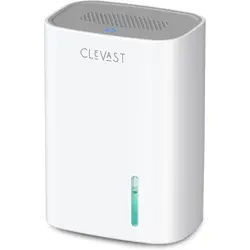
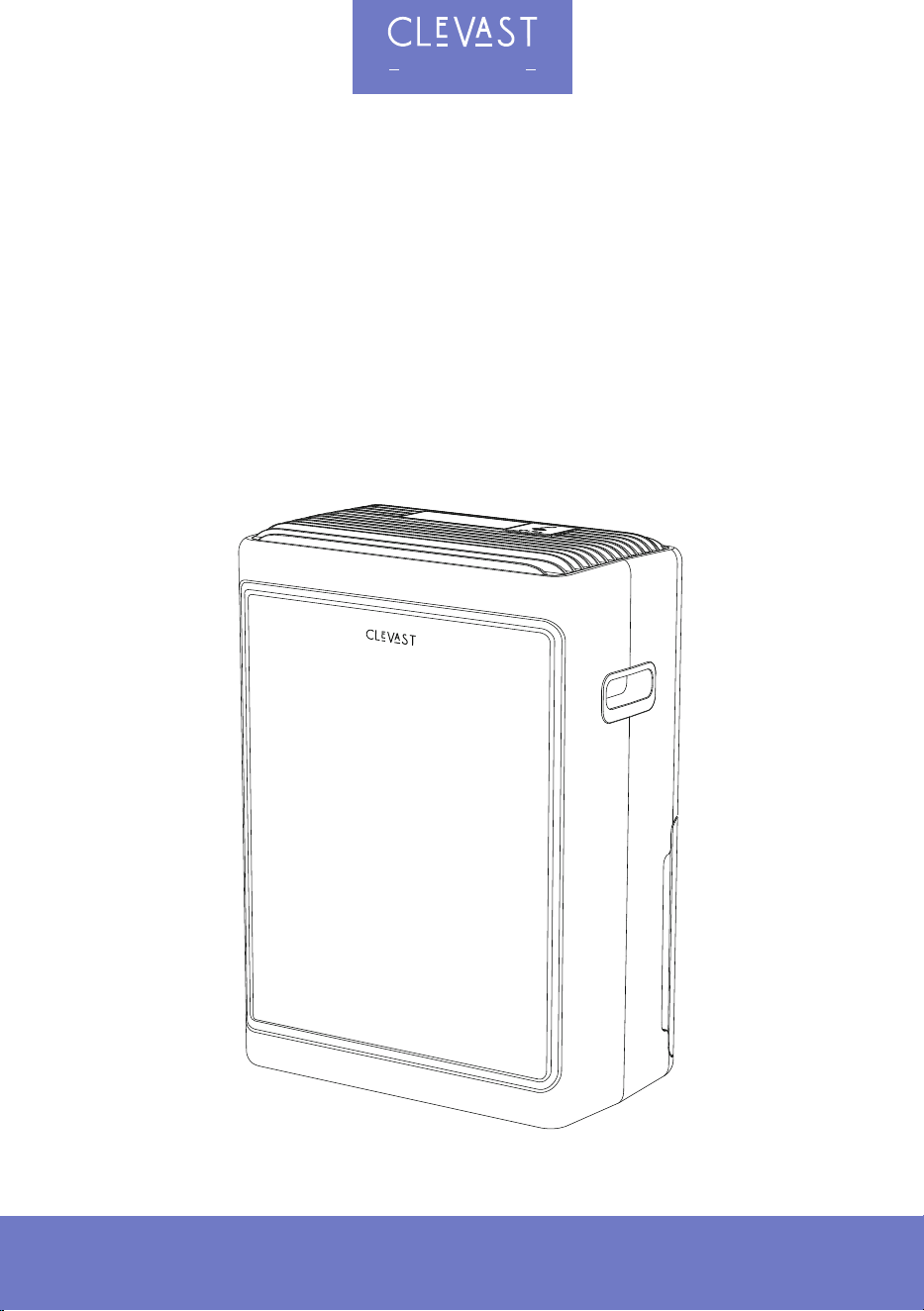
Smart Compressor Dehumidifier
Model No.: DH07G1
Read this manual thoroughly before using and save it for future reference
Touch smart life
Scannen Sie den QR-Code, um die Anleitung in weiteren Sprachen anzusehen.
Scansiona il codice QR per visualizzare il manuale in altre lingue.
Scannez le QR code pour consulter le manuel dans d'autres langues.
Escanee el código QR para consultar el manual en otros idiomas.
Отсканируйте QR-код, чтобы просмотреть инструкцию на других языках.
QRコードをスキャンして、他の言語の取扱説明書をご覧ください。

TABLE OF CONTENTS
IMPORTANT SAFETY INSTRUCTIONS........................................................................................02
GETTING STARTED ....................................................................................................................04
BEFORE FIRST USE....................................................................................................................05
TECHNICAL SPECIFICATIONS ...................................................................................................07
OPERATING INSTRUCTIONS .....................................................................................................08
DRAINING THE WATER ..............................................................................................................10
CARE & MAINTENANCE..............................................................................................................12
TROUBLESHOOTING.................................................................................................................15
WARRANTY & CUSTOMER SUPPORT......................................................................................... 18
WI-FI SETUP................................................................................................................................19
*R290 REFRIGERANT WARNINGS
WARNING: FOR APPLIANCES USING R290 REFRIGERANT
1. DANGER ‒ Risk of fire or explosion. Flammable refrigerant used. To be repaired only by
trained service personnel. Do not puncture refrigerant tubing.
2. CAUTION ‒ Risk of fire or explosion. Flammable refrigerant used. Consult the repair
manual/owner's guide before attempting to service this product. All safety precautions
must be followed.
3. CAUTION ‒ Risk of fire or explosion. Dispose of properly in accordance with federal or local
regulations.
4. CAUTION ‒ Risk of fire or explosion due to puncture of refrigerant tubing. Follow handling
instructions carefully.
5. WARNING ‒ Do not use means to accelerate the defrosting process or to clean, other than
those recommended by the manufacturer.
6. WARNING ‒ The appliance shall be stored in a room without continuously operating ignition
sources (for example: open flames, an operating gas appliance, or an operating electric
heater).
7. WARNING ‒ Do not pierce or burn. Be aware that refrigerants may not contain an odor.
8. WARNING ‒ Compliance with national gas regulations shall be observed. Keep ventilation
openings clear of obstruction.
01
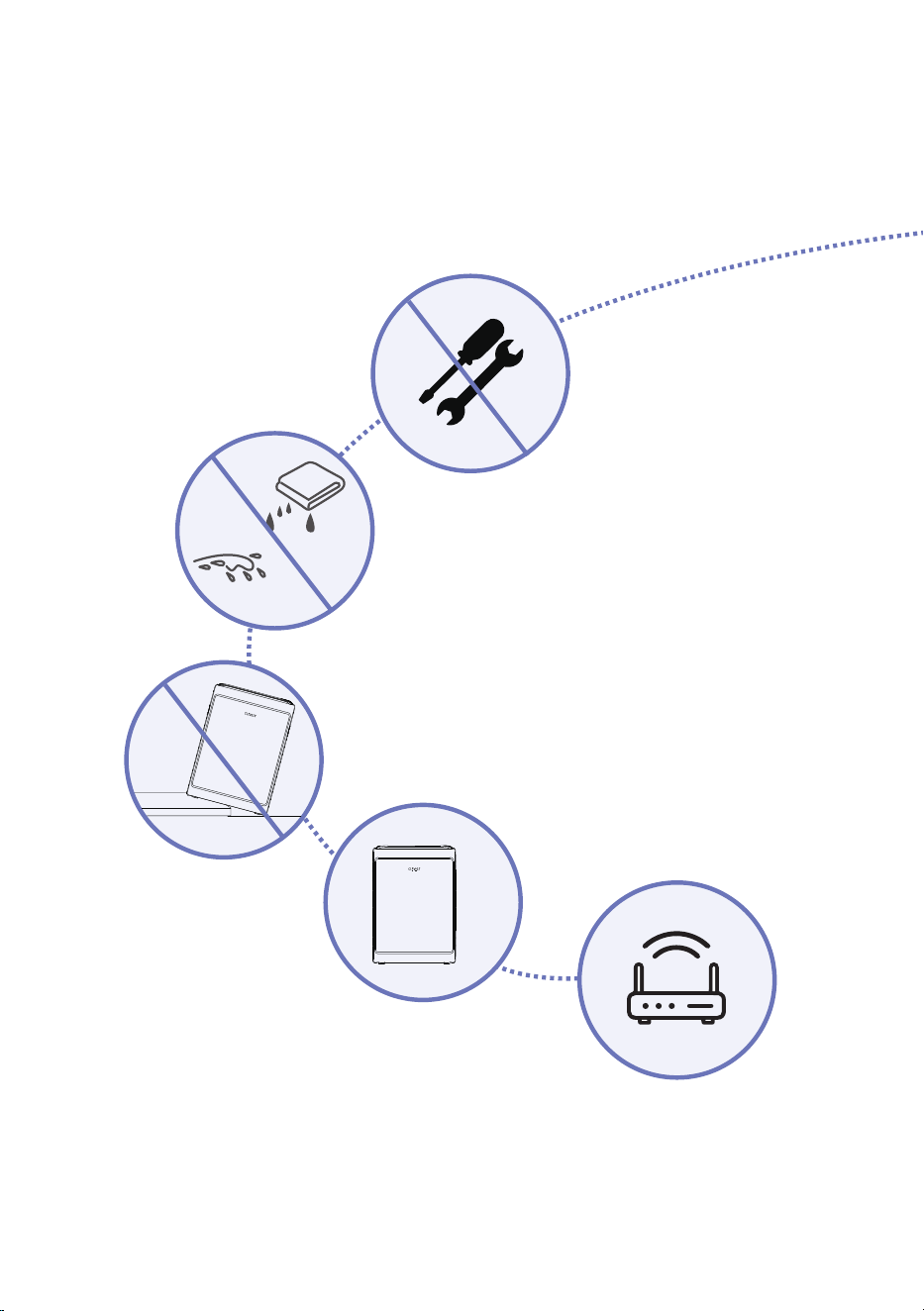
1. The compressor contains refrigerant.
To ensure optimal dehumidification,
please keep the unit upright and let it
sit for at least 24 hours before plugging
it in for the first time.
This unit supports 2.4 GHz Wi-Fi networks only.
5 GHz Wi-Fi networks are not supported. Before
connecting the unit to the app, make sure your
mobile device is connected to a 2.4 GHz Wi-Fi
network.
2. Place the dehumidifier on a flat, level floor.
Uneven surfaces can affect performance, and an
unstable surface may cause the unit to tip over
and break.
3. For absolute safety during cleaning,
always unplug the unit from the wall
outlet. Do not use a dripping wet
cloth to wipe the exterior, and never
splash or pour water directly onto the
unit.
4. No internal cleaning is required!
Do not take the unit apart to
clean the inside. Never attempt
to replace the power cord,
disassemble, modify, or repair
the appliance yourself.
IMPORTANT SAFETY INSTRUCTIONS
THANK YOU FOR CHOOSING THE CLEVAST BRAND.
FOR YOUR SAFETY AND TO PREVENT PRODUCT DAMAGE OR FIRE RISK,
PLEASE READ THESE PRECAUTIONS CAREFULLY BEFORE USE.
24H
02
2.4G
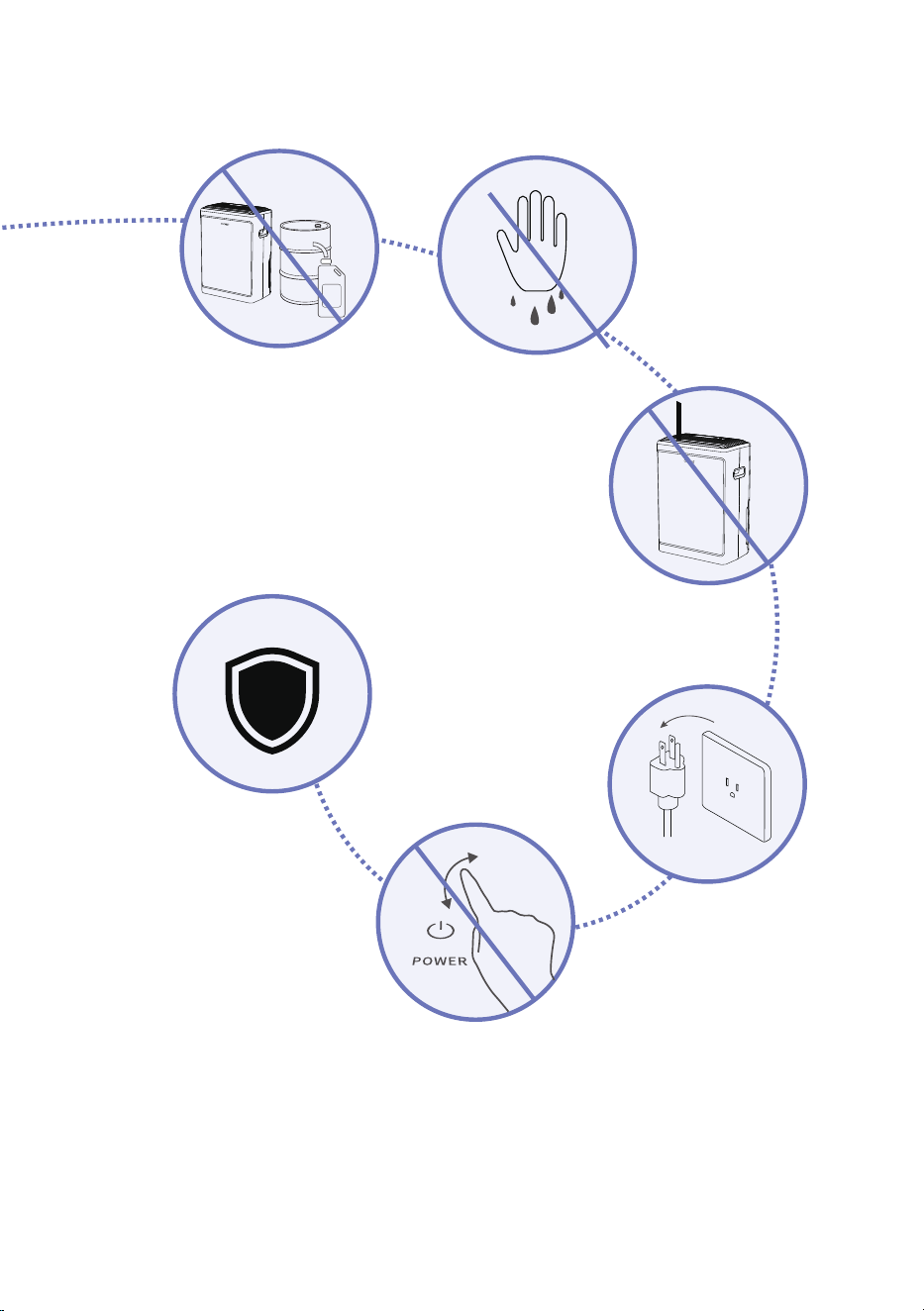
5. Do not store flammable or
explosive gases in the area
where the dehumidifier is
being used. Keep the unit
away from heat sources, as
this can cause the product to
deform or even create a fire
hazard.
7. Never insert foreign objects
into the air vents, as this can
damage internal components.
6. Do not operate the
unit with wet hands,
as this may cause
the touch panel to
become unresponsive
or malfunction.
8. Unplug the dehumidifier
from the wall outlet if it
will not be used for an
extended period of time.
9. Do not rapidly turn the
unit on and off within a
short period of time.
10. The compressor features
a smart auto-protection
mechanism and will not
run continuously. It is
completely normal if you
do not hear the compressor
running at all times.
03
GETTING STARTED
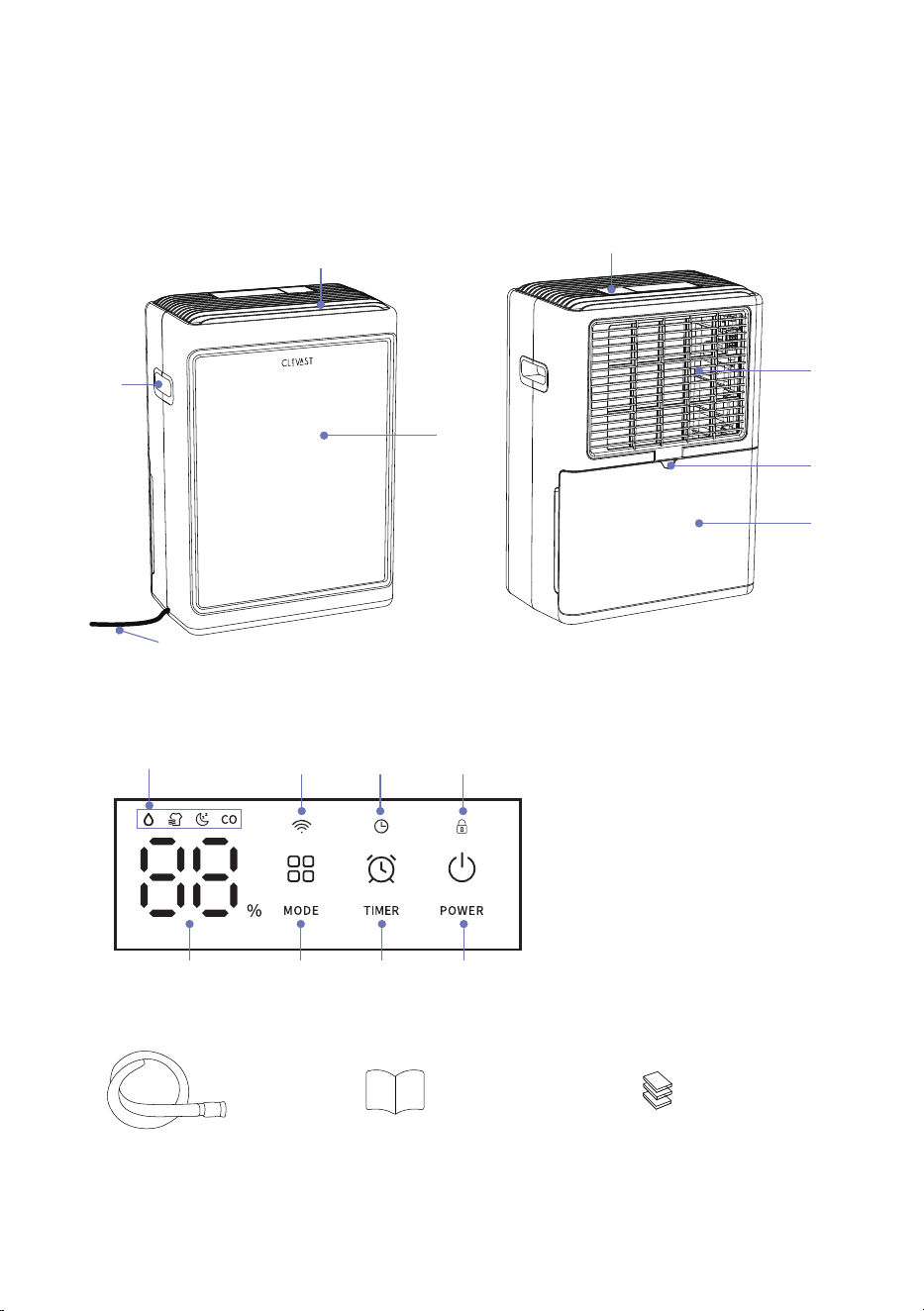
1) PARTS & CONTROL PANEL
1
6
3
4
7
5
2
1. Main Unit
2. Carry Handle
1. Mode Icon
2. Display Screen
3. Mode Button
4. WiFi Icon
5. Timer Indicator
6. Timer Button
7. Child Lock Indicator
8. Power Button
3. Air Inlet & Filter
4. Water Tank
5. Power Cord
6. Air Outlet
7. Aroma Box
8. Drain Port
3 6 8
54 7
1
2
04
8
Included Accessories:
Drain Hose User Manual Cotton pads x 3
(1 pre-installed in the aroma tray)

BEFORE FIRST USE
IMPORTANT NOTES
When using this dehumidifier in a basement or storage room, ensure there is adequate air
circulation; otherwise, the dehumidification effect will be minimal or non-existent.
The unit contains a compressor. If it has been tilted or transported over long distances, let it
sit upright for at least 24 hours before plugging it in and turning it on.
For best results, let the unit run continuously for 24 hours during its first use.
This unit is designed to operate in temperatures between 45°F and 95°F (7°C - 35°C).
The operating voltage range is 120V. The dehumidifier may not function properly if the
actual voltage falls outside this range.
After turning the unit off, wait at least 3 minutes before turning it back on to allow the
compressor to reset.
Do not plug the unit into a power strip or share the electrical outlet with other high-power
appliances.
Place the unit near a readily accessible wall outlet.
Plug the unit into a properly grounded electrical outlet.
Ensure the water tank is properly installed, or the unit will not turn on.
WHERE TO USE YOUR DEHUMIDIFIER
This is an indoor home appliance. Do not use outdoors.
Place the unit on a flat, solid floor to keep it level when the water tank is full and prevent
spilling.
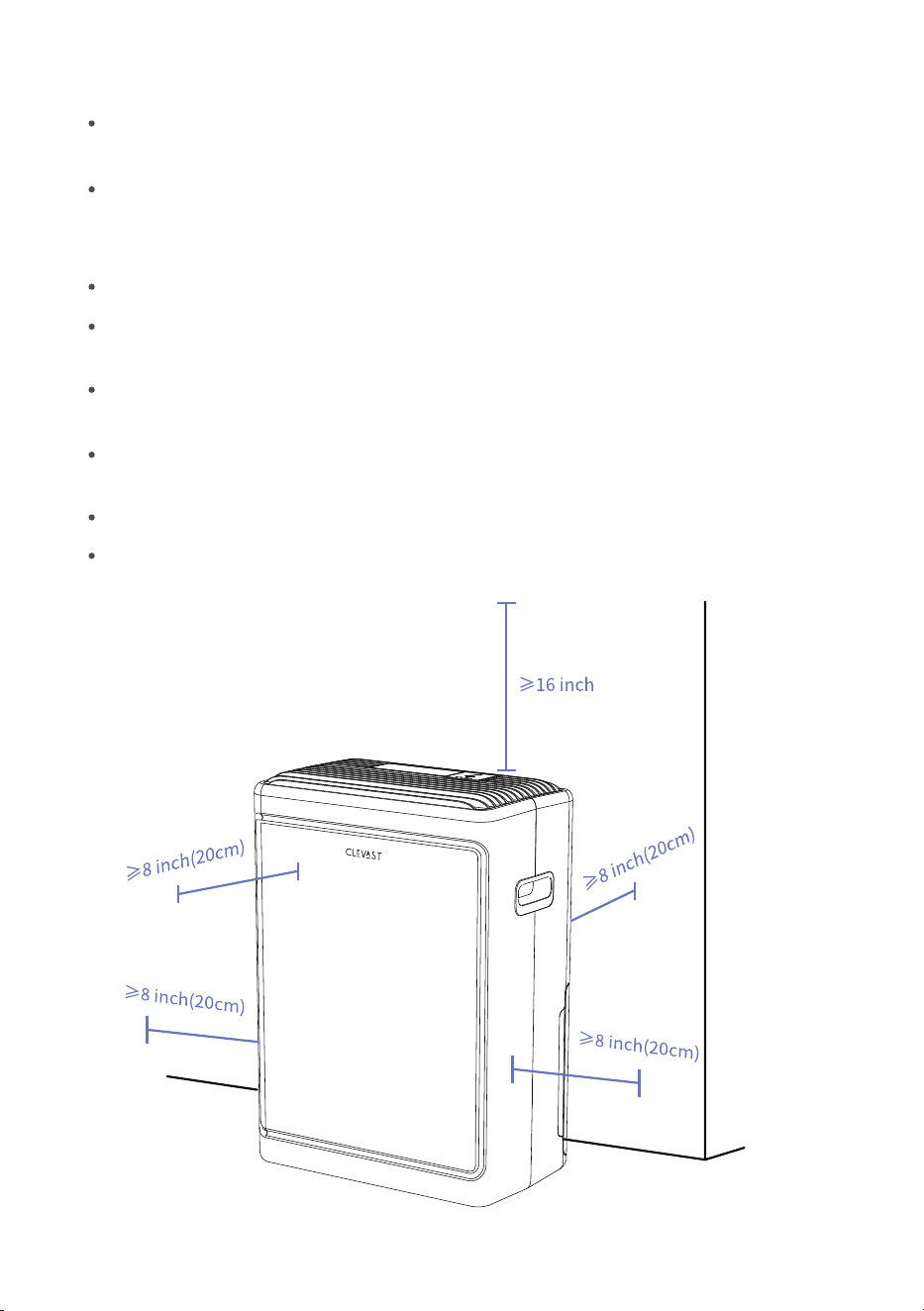
To ensure proper airflow, leave at least 8 inches (20 cm) of clearance around the unit and at
least 16 inches (40 cm) of clearance above the air outlet.
Do not use the unit in environments below 45°F (7°C). Low temperatures will cause frost to
build up on the evaporator coils, which reduces performance and may damage the unit.
Do not place the unit near a clothes dryer, heater, radiator, or other heat sources.
Use this unit to protect books and other valuables from moisture damage.
Use this unit in basements to prevent dampness from damaging your stored belongings.
For maximum efficiency, use the unit in an enclosed room.
05
Close all doors, windows, and other outside openings to the room when using the
dehumidifier.
See the diagram below for proper placement.
(40cm)
06
WI-FI CONNECTION
This unit supports 2.4 GHz Wi-Fi networks only. 5 GHz Wi-Fi networks are not supported.
Before connecting the unit to the app, make sure your mobile device is connected to a 2.4
GHz Wi-Fi network.
Keep the dehumidifier, mobile device, and Wi-Fi router within a stable signal range during
the connection process.
If your router combines 2.4 GHz and 5 GHz networks under the same Wi-Fi name, ensure
that your mobile device is connected to the 2.4 GHz network before setup.
Follow the instructions in the app to complete the Wi-Fi connection process.
If connection fails, check the Wi-Fi signal, confirm that the correct 2.4 GHz network is
selected, and repeat the setup process.
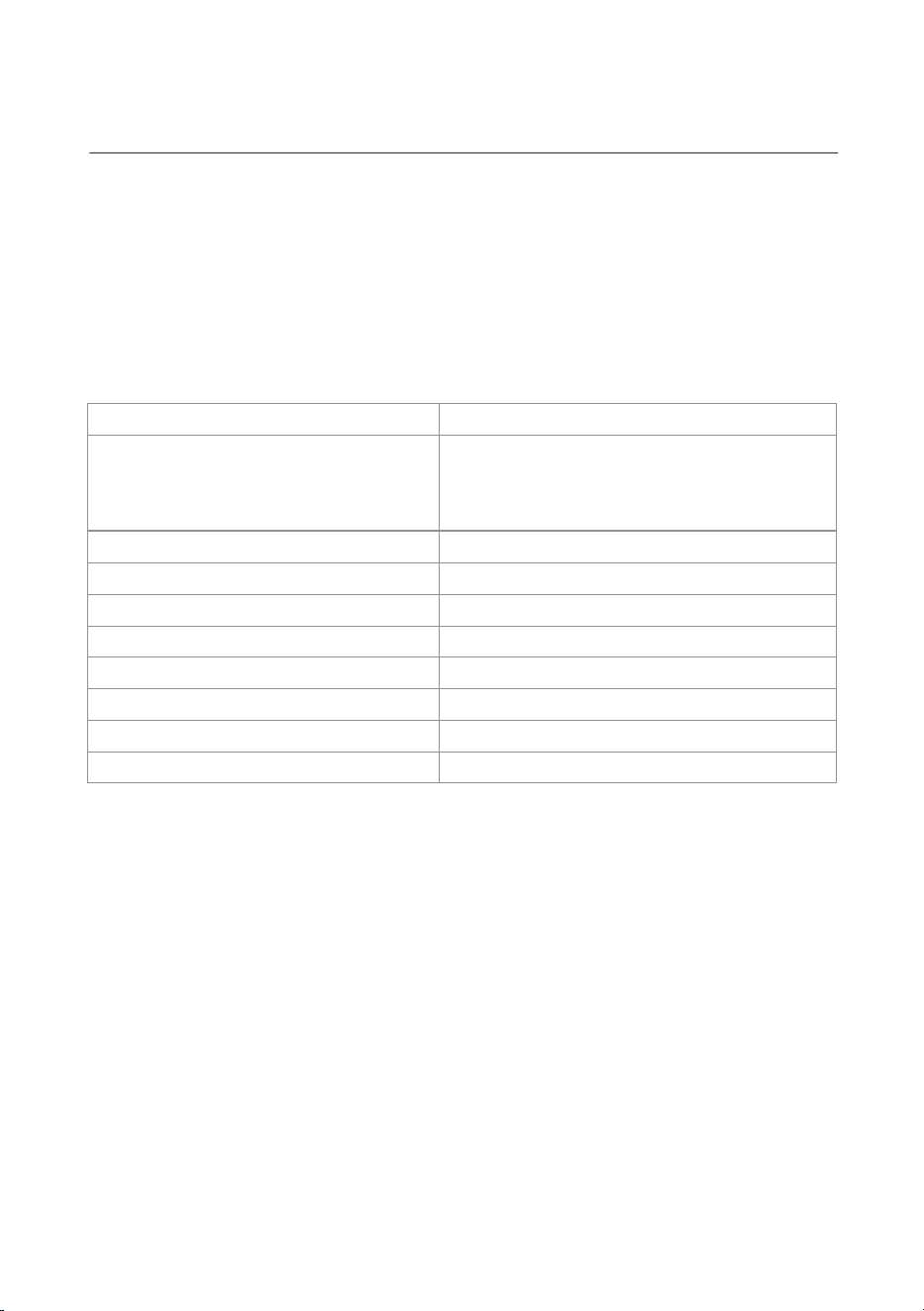
TECHNICAL SPECIFICATIONS
1. The dehumidification capacity is measured at a room temperature of 86°F (30°C) with 80%
relative humidity (RH). Actual performance will vary depending on room conditions.
2. Specifications are subject to change without notice due to ongoing product improvements.
Please refer to the rating label on your product for the most accurate specifications.
3. The operating temperature range is 45°F - 95°F (7°C - 35°C). The unit may stop functioning if
the room temperature falls outside this range.
Model No.:
Dehumidification Capacity:
Wi-Fi Connectivity:
Refrigerant:
Operating Temperature:
Rated Power:
Power Supply:
Noise Level:
Water Tank Capacity:
Power Cord Length:
DH07G1
65°F, 60%RH 9.5 Pints/Day (4.49L)
80°F, 60%RH 14 Pints/Day (6.6L)
86°F, 80%RH 25 Pints/Day (11.8L)
95°F, 80%RH 27 Pints/Day (12.8L)
2.4 GHz Wi-Fi Only
R290 (38 g)
45°F - 95°F (7°C - 35°C)
260 W
120 V ~ 60 Hz
<45 dB
0.58 Gallon
4.9 ft (1.5 m)
07
OPERATING INSTRUCTIONS
OPERATION
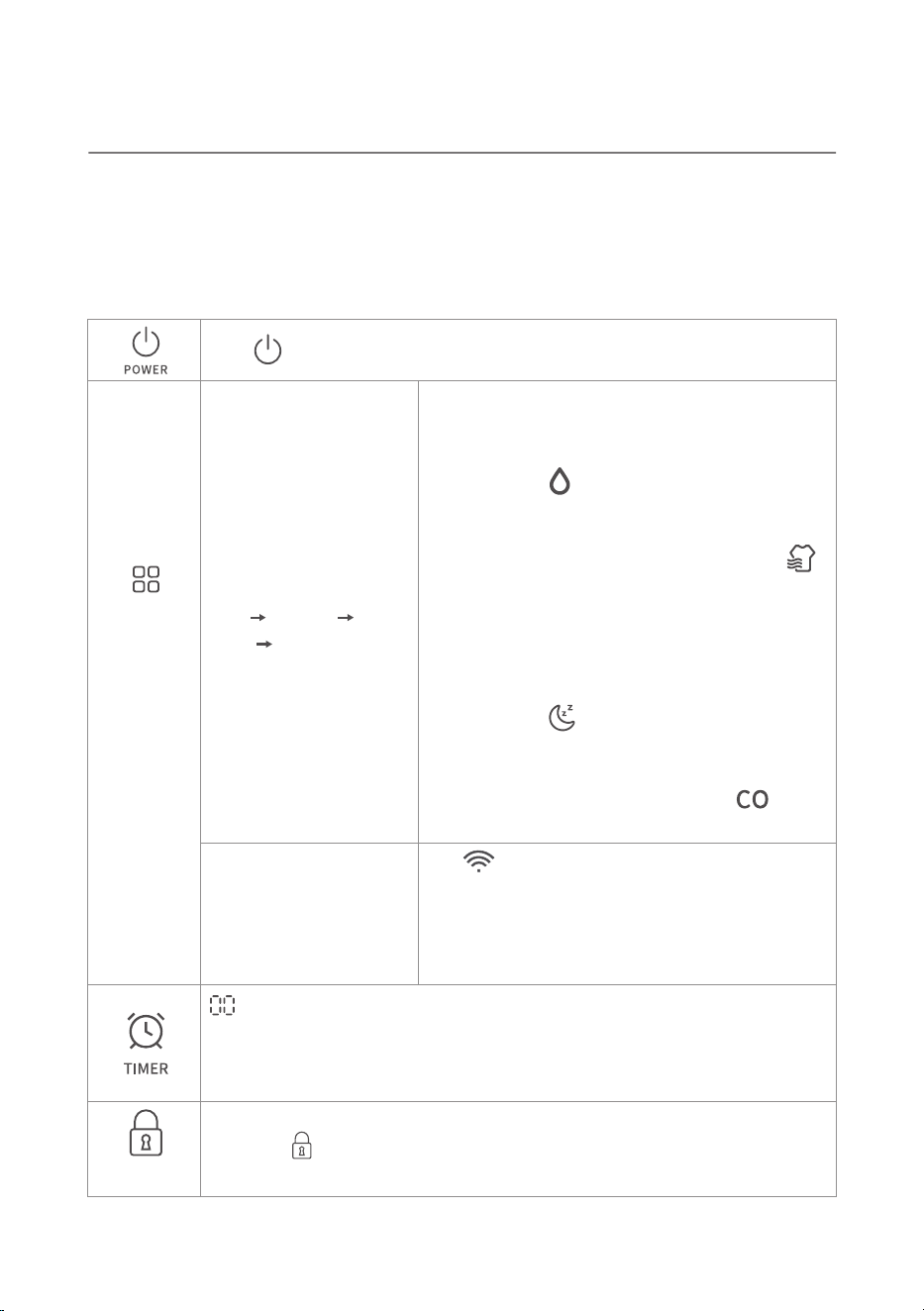
Powering On: When you plug in the unit for the first time, the display screen will pulse and a
beep will sound. If the power goes out while the unit is running, it will automatically resume its
previous settings once power is restored.
Mode
Selection
Press once to turn the unit on or off.
Press and hold the
button for 3 seconds to
enter Wi-Fi pairing mode.
The will flash rapidly.
If the connection times out or fails, the Wi-Fi
indicator will flash slowly.
When the Wi-Fi connection is successful, the Wi-Fi
indicator will remain steadily lit.
indicates the timer is off. Short-press to increase the timer in
increments. Long-press to scroll through the timer settings quickly; it will
automatically stop at "00" to help you easily turn off the timer. To set a
new time, press the button again.
Press the Mode button
to cycle through:
Auto Laundry
Sleep Continuous.
1. Auto: The unit will maintain a comfortable
humidity level between 48-55%. The fan speed
adjusts automatically. The screen will display
"L1" and the will light up.
2. Laundry: The unit will maintain a target
humidity level of 40% and run at maximum fan
speed. The screen will display "L2" and the
will light up.
3. Sleep: The unit will maintain a comfortable
humidity level between 52-60%. The fan will
run at the lowest speed, and the display
brightness will dim. The screen will display
"L3" and the will light up.
4. Continuous: The unit will run continuously at
high fan speed without a target humidity limit.
The screen will display "CO" and the will
light up.
08
Child Lock
While the unit is on, press and hold the Power button to activate the Child
Lock. The will light up, and the control panel buttons will become
unresponsive. Press and hold the Power button again to turn off the Child Lock.
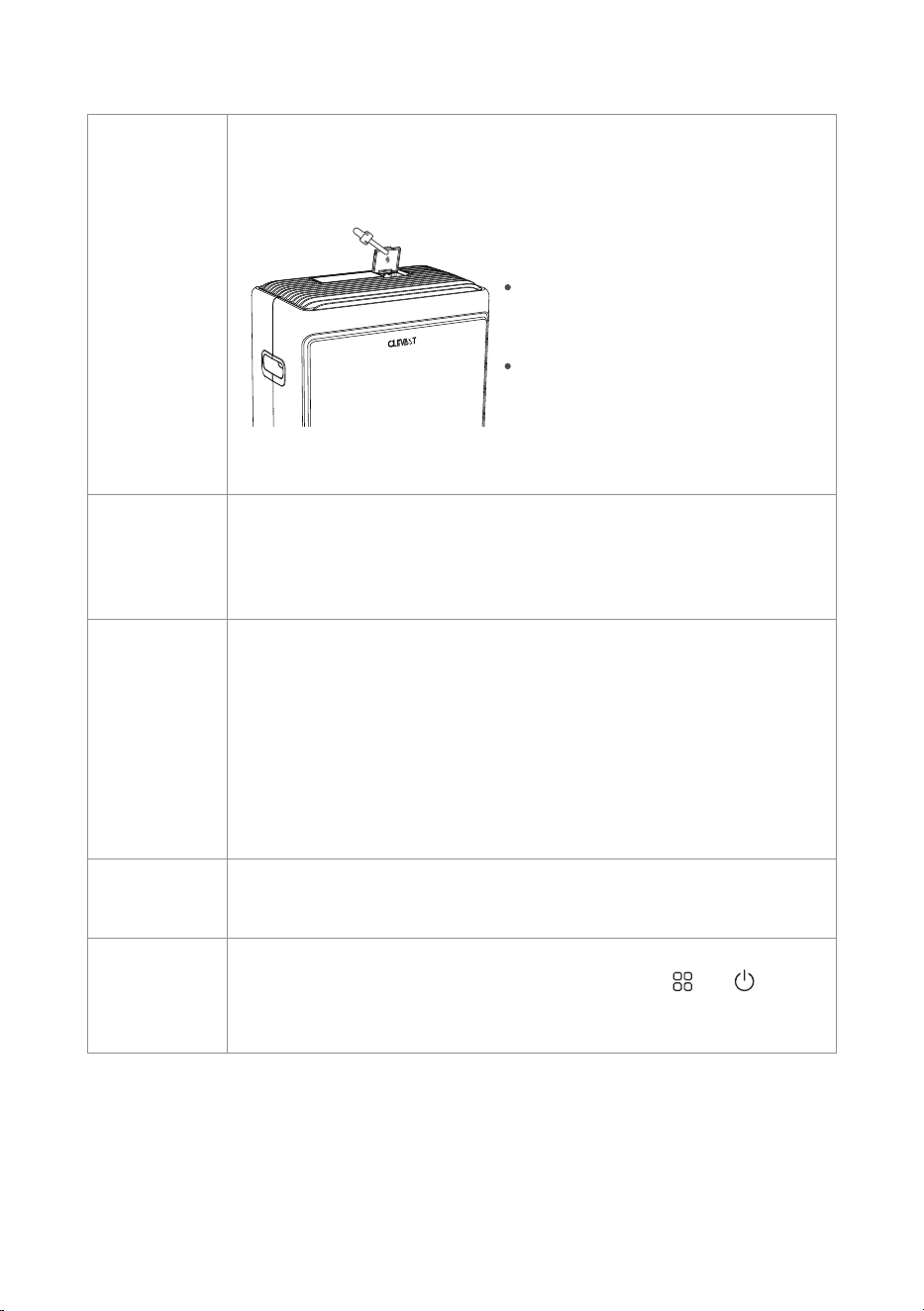
Turn off the unit, open the aroma cover, and insert a cotton pad. Add 1 to
2 drops of your favorite essential oil, close the cover, and turn the unit back
on.
Notes:
Aromatherapy
Feature
Auto-Shutoff
(Water Full
Protection)
Your new dehumidifier includes 3
cotton pads (one is already
pre-installed in the aroma tray).
You may add more drops of
essential oil for a stronger scent,
but do not overfill or allow the oil
to spill over the edges of the pad.
When the water tank is full, removed, or not installed correctly, the screen
will display "FL" (Full). Please empty the water tank or reinstall it properly.
During this time, the control panel will be unresponsive and the unit will
beep twice to alert you.
Power Outage
Memory
Auto Defrost
While running, the dehumidifier will automatically enter defrost mode
when necessary to prevent frost buildup and ensure proper operation.
If the unit loses power unexpectedly while running, it will automatically
restart with its previous settings once power is restored. However, the
compressor features a 3-minute built-in protection delay and will not start
until 3 minutes have passed.
1. Child Lock: If the Child Lock was active before the power outage, it will
remain active after restarting.
2. Timer: If the timer was set before the power outage, the unit will resume
and complete the remaining time.
09
When you need to reset the device or encounter abnormal issues, you can
try performing a factory reset by pressing and holding and
simultaneously for 10 seconds. If the device displays garbled characters,
performing a factory reset may also help resolve the issue.
Factory Reset
DRAINING THE WATER
WHEN USING THE WATER TANK
1. When the water tank becomes full during operation, the unit will beep five times and the
display will flash "FL" (Full). If you press any button other than the Power button at this time,
the unit will be unresponsive and will beep twice to remind you that it is disabled.
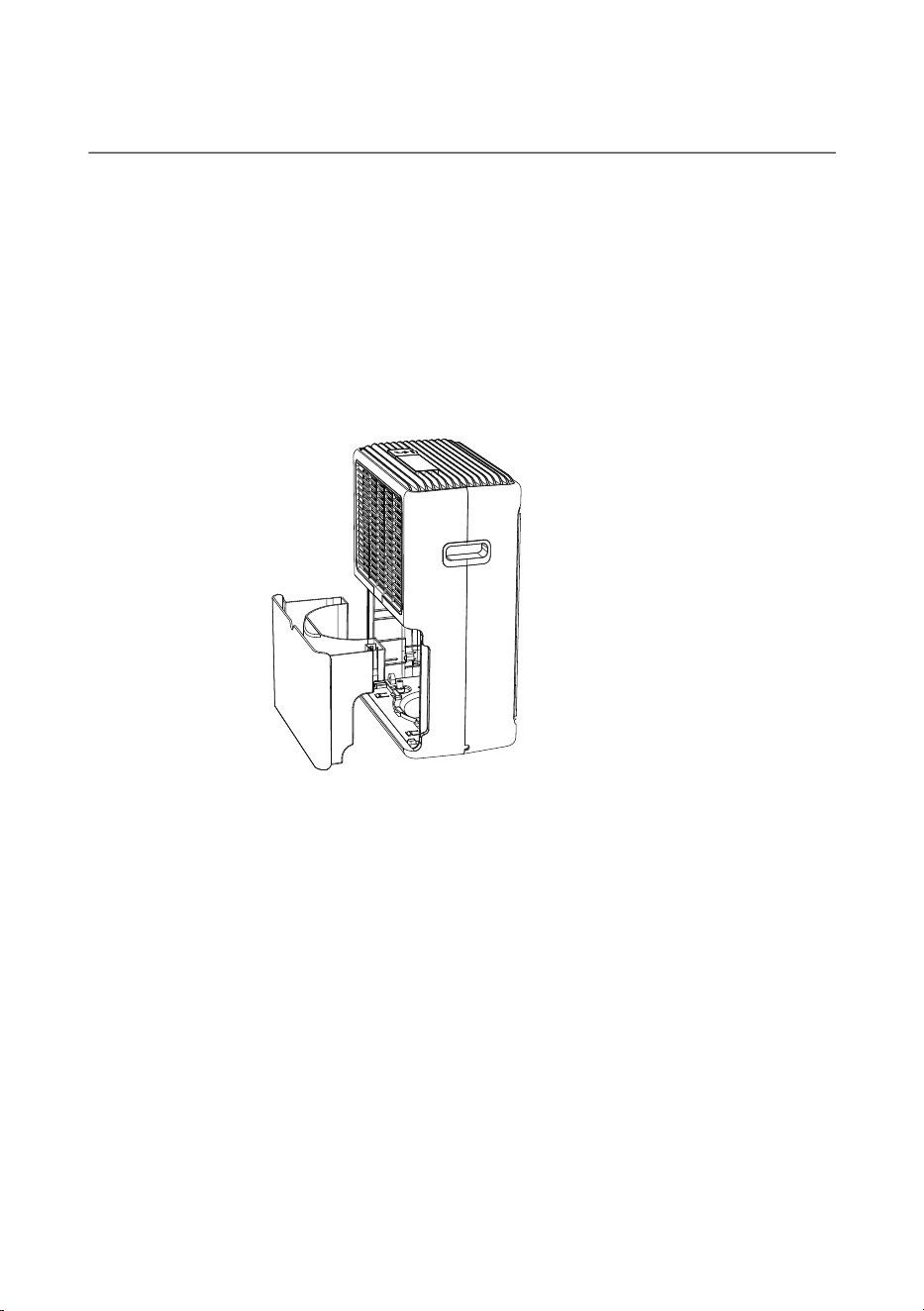
2. Carefully slide out the water tank. Grip the handles on both sides and pull it straight out
horizontally to avoid spilling water. Once fully removed, hold the tank securely in a comfortable
position to prevent dropping it.
3. After emptying the water, slide the tank back into place. The dehumidifier will then resume
normal operation.
Helpful Tips:
1. The collected water is not safe for consumption. Do not drink it.
2. Empty the water tank promptly when full to prevent stagnant water and unpleasant odors.
10
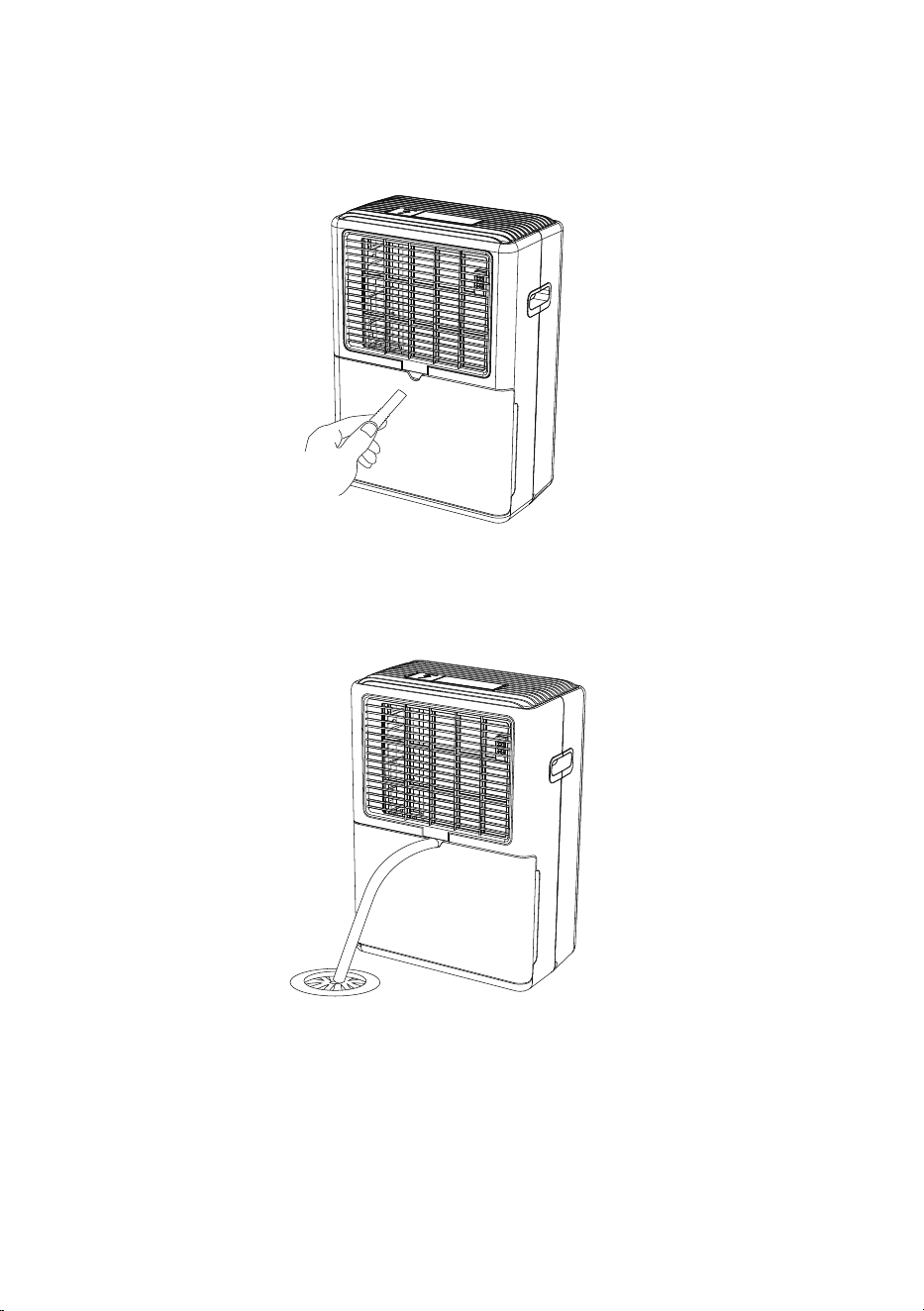
WHEN USING CONTINUOUS DRAINAGE
1. Take out the drain hose and insert it through the drain port at the back of the unit.
2. Direct the other end of the hose into a floor drain (or another water collection container).
The dehumidifier will now drain automatically.
Helpful Tips:
1. Ensure the end of the drain hose is directed into a drain and positioned lower than the
dehumidifier to allow water to flow smoothly via gravity.
2. Make sure the drain hose is not kinked or bent, as this will block the water flow.
11
CARE & MAINTENANCE
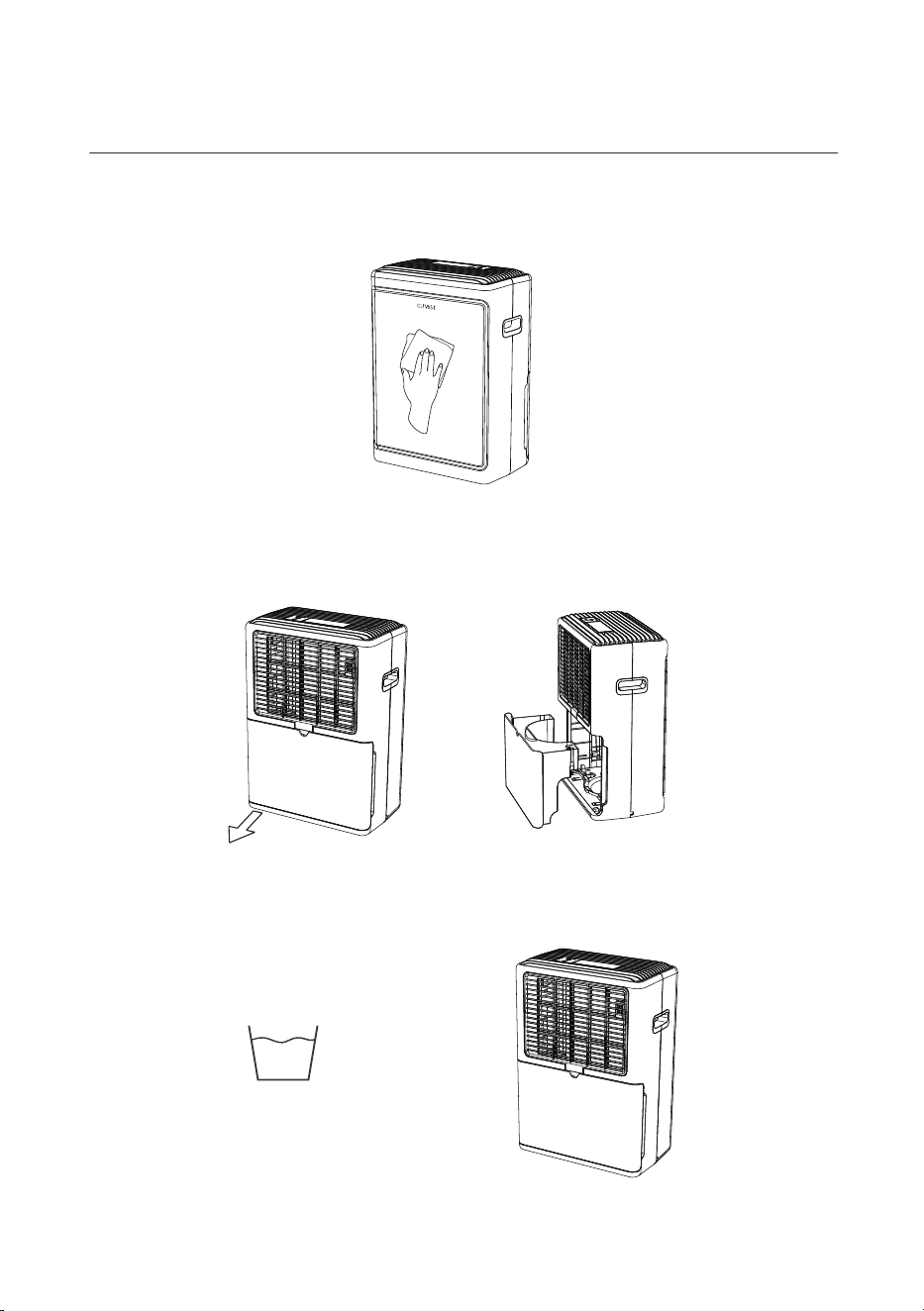
CLEANING THE MAIN UNIT:
Dampen a soft cleaning cloth, wring it out completely, and gently wipe the exterior of the unit.
CLEANING THE WATER TANK:
1. Remove the water tank -> Grip the handles on both sides and pull straight out horizontally.
2. Clean the water tank and let it air dry -> Reinstall the tank.
12
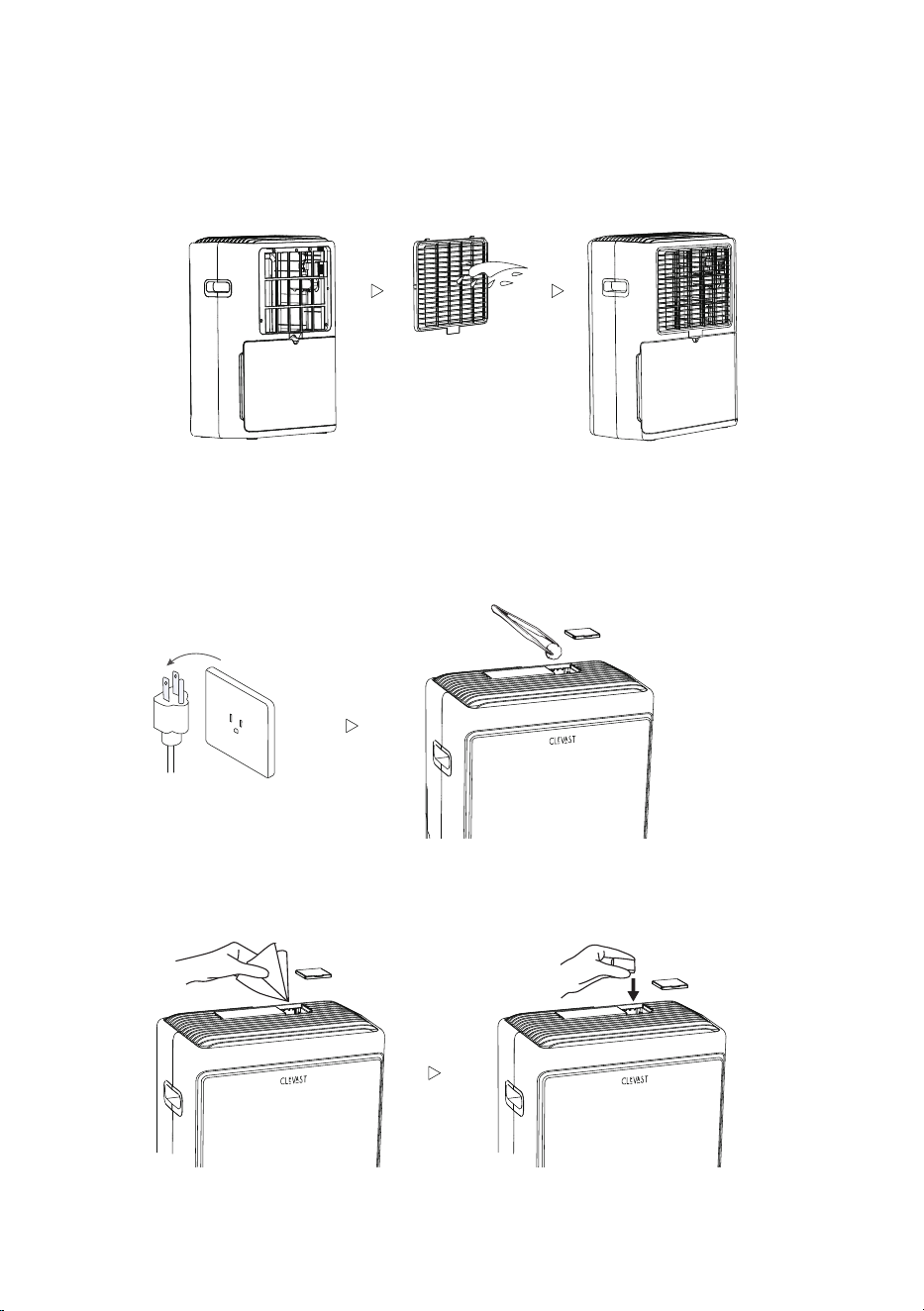
CLEANING THE FILTER:
1. Remove the filter by pulling it from the bottom latch.
2. Clean the filter and let it air dry -> Reinstall the filter.
CLEANING THE AROMA TRAY:
1. Unplug the unit and remove the cotton pad from the tray. Wipe the inside of the tray using a
cotton ball dipped in rubbing alcohol (or a damp cloth with mild dish soap).
2. Wipe the inside with a dry paper towel to ensure it is completely dry before putting the
cotton pad back in.
13

HELPFUL TIP:
A dirty dust filter will reduce dehumidification performance. Clean the filter once every two
months to keep your unit running at peak efficiency.
FOR LONG-TERM STORAGE:
1. Turn off the unit and let it sit for 24 hours (to allow all internal moisture to drain).
2. Clean the main unit, water tank, and filter.
3. Ensure the inside of the water tank is completely dry before storing the power cord inside it.
4. Cover the dehumidifier with a dust bag or cover.
5. Store the unit upright in a dry, well-ventilated area.
6. Make sure the aroma tray is completely clean, with no leftover essential oil or used cotton
pads inside.
BRINGING THE UNIT OUT OF STORAGE:
1. Remove the dust cover.
2. Clean the main unit, water tank, and filter.
3. Check the power plug for rust or damage before plugging it into a wall outlet.
4. Clean the aroma tray and insert a fresh cotton pad.
14
15
TROUBLESHOOTING
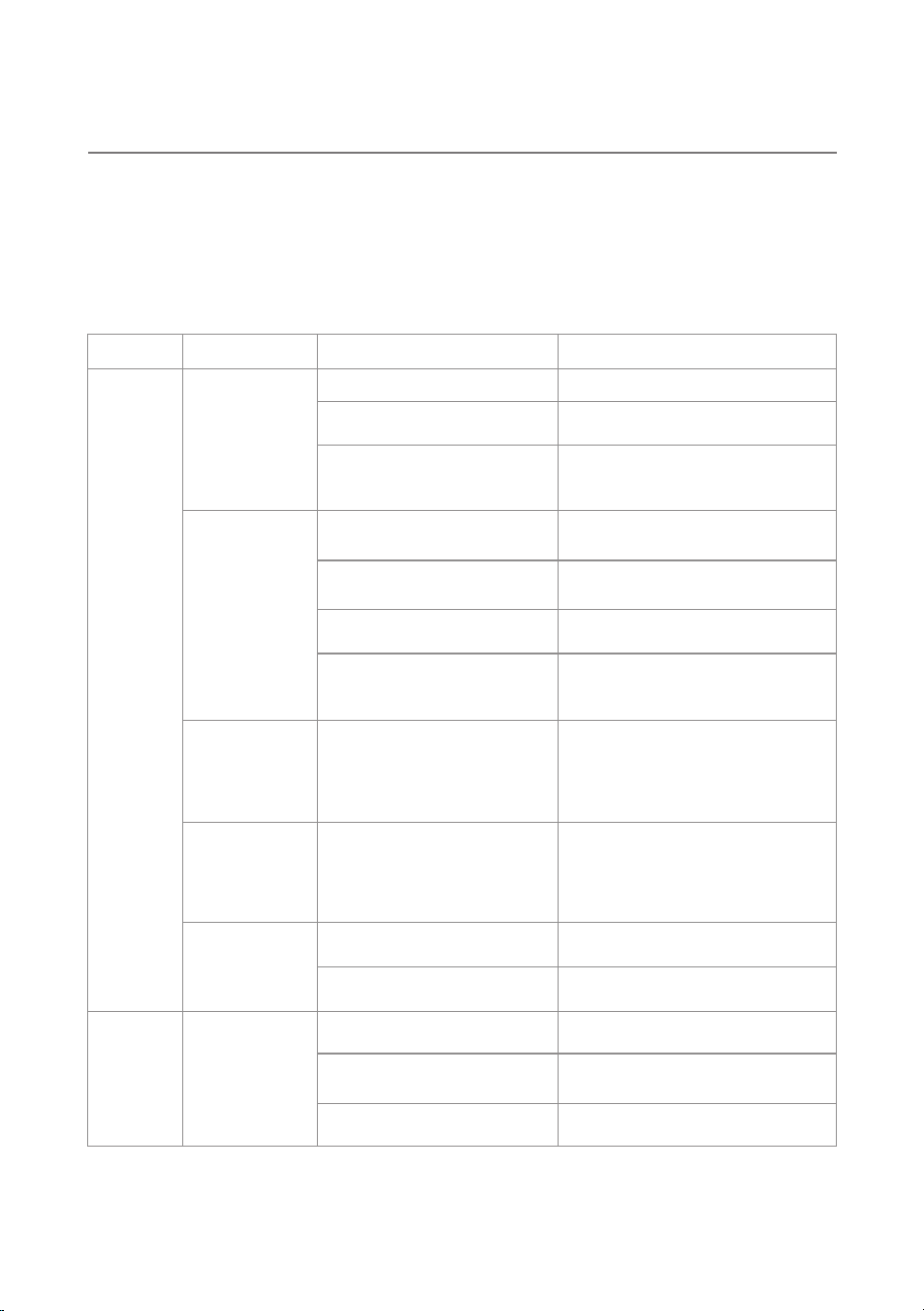
If you encounter any of the following issues while using your dehumidifier, don't worry—many
common problems can be easily resolved at home. Please refer to the guide below for quick
solutions. If the issue persists or you suspect the unit is malfunctioning, please contact
Customer Support for further assistance.
Category
Problem
Possible Cause Solution
Operation
The dehumidifier
will not run.
• Power outage.
• The power is turned off.
• The water tank is full or not
installed correctly (Screen
displays "FL").
• The air inlet or outlet is blocked.
• The unit has not run long
enough.
• Doors or windows are open.
• The room temperature is below
45°F (7°C) or above 95°F (35°C).
• The compressor has a built-in
3-minute protection delay.
• A power outage occurred. After
power is restored, the unit
resumes the remaining
countdown time.
• The unit will continue to run until
the remaining countdown finishes.
• Remove the blockage and ensure
proper clearance around the unit.
• Allow more time for the unit to
remove moisture.
• Close all doors and windows to
the room.
• This is normal. The compressor
will not operate outside this
temperature range.
• Wait 3 minutes for the compressor
to automatically start.
• Wait for power to be restored.
• Press the Power button to turn on
the unit.
• Empty the water tank and reinstall
it properly.
Poor
dehumidification
performance.
The compressor
does not start
immediately after
turning the unit
back on.
The timer was
set for 3 hours,
but the unit is
still running
after 3 hours.
The control panel
is unresponsive.
• Your hands are wet.
• The Child Lock is active.
• Dry your hands before touching the
buttons.
• Press and hold the Power button
to turn off the Child Lock.
Noise
• The air filter is clogged.
• The dehumidifier is not placed
securely.
• The floor is uneven.
• Clean the air filter.
• Place the unit securely on a flat,
level surface.
• Move the dehumidifier to a flat,
level floor.
The unit makes
unusual or loud
noises.

16
Water
Leakage
Frost
• The drain hose connection is
loose.
• The drain hose or system is
blocked.
• Securely attach the drain hose.
• Remove the blockage or unkink
the drain hose.
Water is leaking
from the unit.
• Frost is forming on the internal
coils or exterior.
• This is normal. The unit's
Auto-Defrost feature will melt the
frost automatically.
Frost is building up
on the unit.
Vibration
Wi-Fi
• The compressor shifts slightly
when the unit is turning on or
off.
• The unit is not connected to a
2.4 GHz Wi-Fi network.
• The Wi-Fi password is incorrect.
• The pairing process has timed
out.
• The unit is not in Wi-Fi pairing
mode.
• The Wi-Fi signal is weak.
• The unit, mobile device, or
router is too far apart.
• The Wi-Fi connection was
unsuccessful or disconnected.
• The router or network
connection is unavailable.
• The mobile device is not
connected to the Internet.
• The unit has lost its Wi-Fi
connection.
• Ensure your mobile device is
connected to a 2.4 GHz Wi-Fi
network. 5 GHz Wi-Fi networks are
not supported.
• Check that the Wi-Fi password is
correct.
• Press and hold the mode button
for 3 seconds to re-enter pairing
mode, then try again.
• Press and hold the mode button
for 3 seconds. Confirm that the
Wi-Fi indicator flashes rapidly.
• Move the unit, mobile device, and
router closer together.
• Make sure the Wi-Fi signal is stable.
• Check that the router is powered
on and connected to the Internet.
• Repeat the Wi-Fi pairing process.
• When pairing is successful, the
Wi-Fi indicator will remain steadily
lit.
• Check the Internet connection on
your mobile device and router.
• Confirm that the Wi-Fi indicator
remains steadily lit.
• Reconnect the unit to Wi-Fi if
necessary.
• This is normal operation.The dehumidifier
vibrates slightly.
The Wi-Fi indicator
flashes slowly and
pairing fails.
The unit cannot be
found in the app.
The Wi-Fi indicator
does not remain
steadily lit after
pairing.
The app cannot
control the unit.
WARNING
· Plug in the power plug properly. Otherwise, it may cause electric shock or fire due to excess
heat generation.
· Do not modify the power cord length or share the outlet with other appliances. It may cause
electric shock or fire due to overheating.
· Always ensure effective grounding. Incorrect grounding may cause electric shock.
· Unplug the unit if strange sounds, smells, or smoke come from it. A damaged product may
cause fire and electric shock.
· Ventilate the room before operating the unit if there is a gas leak from other appliances.

17
· Do not operate or stop the unit by inserting or pulling out the power plug. It may cause
electric shock.
· Do not allow water to enter electrical parts. It may cause failure or electric shock.
· Do not use the power outlet if it is loose or damaged. It may cause fire and electric shock.
· Do not use or keep the power cord close to heating appliances or heat sources, such as
fireplaces. It may cause fire and electric shock.
· Do not disassemble or modify the unit. It may cause failure and electric shock.
· Do not damage or use an unspecified power cord. It may cause fire and electric shock.
· If the power cord is damaged, it must be replaced by the manufacturer, an authorized service
center, or a similarly qualified person to avoid electrical risk.
· Do not use the unit near flammable gas or combustibles, such as gasoline, benzene, thinner,
etc. It may cause fire.
· Before cleaning, turn off the power and unplug the unit.
· Ensure that the dehumidifier is securely and correctly installed according to the installation
instructions in this manual.
· Do not operate with wet hands. It may cause electric shock.
· Do not open the unit during operation. It may cause electric shock.
· Do not use an extension cord or an adaptor plug. Do not remove any prongs from the power
cord.
· Ensure that the dehumidifier is properly grounded. The power cord is equipped with a
three-prong grounding plug for protection against shock hazards.
· The dehumidifier must be used in a properly grounded wall receptacle. If the receptacle is
not adequately grounded or protected by a time-delay fuse or circuit breaker, have a
qualified electrician install the proper receptacle.
· Ensure that the electrical service is adequate for the model selected. Refer to the serial plate
located on the side of the cabinet and behind the grille.
· Do not drink the water from the bucket.
· Do not use the unit in small spaces or place it in a sink or shower. Lack of ventilation can
cause overheating and fire.

18
WARRANTY & CUSTOMER SUPPORT
We provide a 1-year limited warranty starting from the date of purchase. During this period, any
defects caused by faulty materials or workmanship will be repaired or replaced free of charge.
Warranty Exclusions:
Damage caused by misuse, accidents, or unauthorized repairs
Normal wear and tear
Minor defects that do not affect the product's function or value
Consumable parts or accessories (e.g., filters, cotton pads, etc.)
The warranty becomes void if non-original parts are used or repairs are carried out by
unauthorized personnel. To make a warranty claim or for any product-related questions, please
contact us at support@clevast.com or visit our website at www.clevast.com. Our customer
service team is committed to providing prompt and satisfactory support.
FCC WARNING
This device complies with part 15 of the FCC rules. Operation is subject to the following two
conditions:
(1) this device may not cause harmful interference, and
(2) this device must accept any inte rference received, including interference that may cause
undesired operation.
Changes or modifications not expressly approved by the party responsible for compliance
could void the user's authority to operate the equipment.
NOTE: This equipment has been tested and found to comply with the limits for a Class B
digital device, pursuant to part 15 of the FCC Rules. These limits are designed to provide
reasonable protection against harmful interference in a residential installation. This equip-
ment generates uses and can radiate radio frequency energy and, if not installed and used in
accordance with the instructions, may cause harmful interference to radio communications.
However, there is no guarantee that interference will not occur in a particular installation. If
this equipment does cause harmful interferenceto radio or television reception, which can be
determined by turning the equipment off and on, the user is encouraged to try to correct the
interference by one or more of the following measures:
• Reorient or relocate the receiving antenna.
• Increase the separation between the equipment and receiver.
• Connect the equipment into an outlet on a circuit different from that to which the receiver
is connected.
• Consult the dealer or an experienced radio/TV technician for help.
Radiation Exposure Statement
This equipment complies with FCC radiation exposure limits set forth for an uncontrolled
environment. This equipment should be installed and operated with minimum distance 20cm
between the radiator and your body.

19
WI-FI SETUP
Clevast App
Wi-Fi Connection Voice Assistant Connection
App Control
Before You Start
· Download and install the Clevast App by scanning the QR code or searching for "Clevast" in
the Apple App Store or Google Play Store.
· Make sure your mobile device is connected to a 2.4 GHz Wi-Fi network. This unit does not
support 5 GHz Wi-Fi networks.
· Turn on Bluetooth and allow the permissions requested by the Clevast App. These
permissions are required for device discovery and Wi-Fi setup.
· Keep the dehumidifier, mobile device, and Wi-Fi router close together during setup.
Connect the Dehumidifier to Wi-Fi
1. Plug in and turn on the dehumidifier.
2. Open the Clevast App, then sign in or create an account.
3. Tap "Add Device" or the "+" icon in the app.
4. Press and hold the mode button on the dehumidifier for 3 seconds to enter Wi-Fi pairing
mode. The Wi-Fi indicator will flash rapidly.
5. Follow the instructions in the app to select your 2.4 GHz Wi-Fi network and enter the Wi-Fi
password.
6. Wait for the connection process to finish.
When the Wi-Fi indicator remains steadily lit, the dehumidifier has been successfully
connected.
Wi-Fi Indicator Status
· Flashing rapidly: The unit is in Wi-Fi pairing mode.
· Flashing slowly: The connection has timed out or pairing has failed.
· Steadily lit: The unit is connected to Wi-Fi successfully.

20
If Pairing Fails
· Confirm that your mobile device is connected to a 2.4 GHz Wi-Fi network.
· Check that the Wi-Fi password is correct.
· Ensure that the Wi-Fi signal is stable and that the unit is close to the router.
· Press and hold the Wi-Fi button for 3 seconds to enter pairing mode again, then repeat the
setup process in the app.
21
NOTES
Ver: 261102
Scan to Follow Us
@CLEVAST
WWW.CLEVAST.COM