Instruction Manual
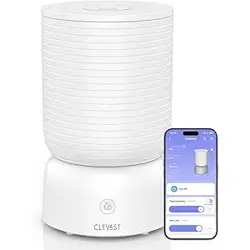
Smart Humidifier
Model No.: CL-HD02
Read this manual thoroughly before using and save it for future reference
Touch smart life

01
TABLE OF CONTENTS
Chapter 1 ‒ Important Safeguards
1.1 General Safety
1.2 Power Cord & Plug Safety
1.3 Leak Prevention
1.4 Health & Hygiene Warning
1.5 Anti-Dry Burn Protection
Chapter 2 ‒ Getting to Know Your Smart Humidifier
2.1 Product Features
2.2 Product Diagram
2.3 Control Panel
2.4 Package Inclusion
2.5 Specifications
Chapter 3 ‒ Before First Use
3.1 Initial Setup Instructions
Chapter 4 ‒ Operating Instructions
4.1 Fill the Water
4.2 Download The Clevast App
4.3 Wi-Fi Connection
4.4 Voice Assistant Connection
4.5 APP Control
Chapter 5 ‒ Care & Maintenance
Chapter 6 ‒ Troubleshooting
Chapter 7 ‒ Compliance Information
7.1 FCC Compliance
7.2 Class B Digital Device Notice
7.3 FCC Radiation Exposure Statement
Chapter 8 ‒ Warranty & Customer Support
8.1 Warranty
8.2 Customer Support
........................................................................................
..............................................................................................................
.............................................................................................
............................................................................................................
...........................................................................................
..............................................................................................
02
02
02
02
02
02
03
03
03
04
04
05
06
06
07
07
08
08
09
09
10
11
12
12
12
12
13
13
13
..........................................................
..........................................................................................................
..........................................................................................................
................................................................................................................
.........................................................................................................
...............................................................................................................
...................................................................................................
..............................................................................................
.......................................................................................
.................................................................................................................
..........................................................................................
..........................................................................................................
..........................................................................................
...................................................................................................................
............................................................................................
..................................................................................................
....................................................................................
............................................................................................................
........................................................................................
.............................................................................
.........................................................................
........................................................................................................................
........................................................................................................
01

1.1 General Safety
Chapter 1 ‒ Important Safeguards
02
1. Read this manual thoroughly before using the product.
2. Operate the device only as instructed.
3. This appliance is intended for indoor, household use only.
4. Always unplug the unit when not in use for an extended period.
5. Do not attempt to disassemble, modify, or repair the unit yourself.
6. Discontinue use immediately if the product is damaged or malfunctioning.
Contact Customer Support for assistance.
1.2 Power Cord & Plug Safety
1. Always unplug the unit before cleaning or refilling.
2. Never immerse the base, power cord, or plug in water or any other liquid.
3. If the power cord is damaged, it must be replaced by the manufacturer or qualified
service personnel.
4. Use only genuine Clevast replacement parts to ensure safety and compatibility.
1.3 Leak Prevention
1. Do not add essential oils, chemicals, or water treatment agents into the tank or
base.
2. Essential oils should be used exclusively with the provided aroma pad in the
aroma box.
3. Avoid overfilling the tank. Ensure it is properly aligned on the base to prevent
leakage.
1.4 Health & Hygiene Warning
1. Clean the tank and internal surfaces every 3 days to prevent bacterial growth.
2. Do not leave stagnant water in the tank during periods of non-use.
3. Allow all parts to dry completely before storage or reuse.
1.5 Anti-Dry Burn Protection
1. The device is equipped with a safety shutdown mechanism. If the float or sensor
malfunctions, the unit will emit 3 beeps and power off.
2. Inspect the float area and remove any blockage.
3. Restart the device after the issue is resolved.
03
2.1 Product Features
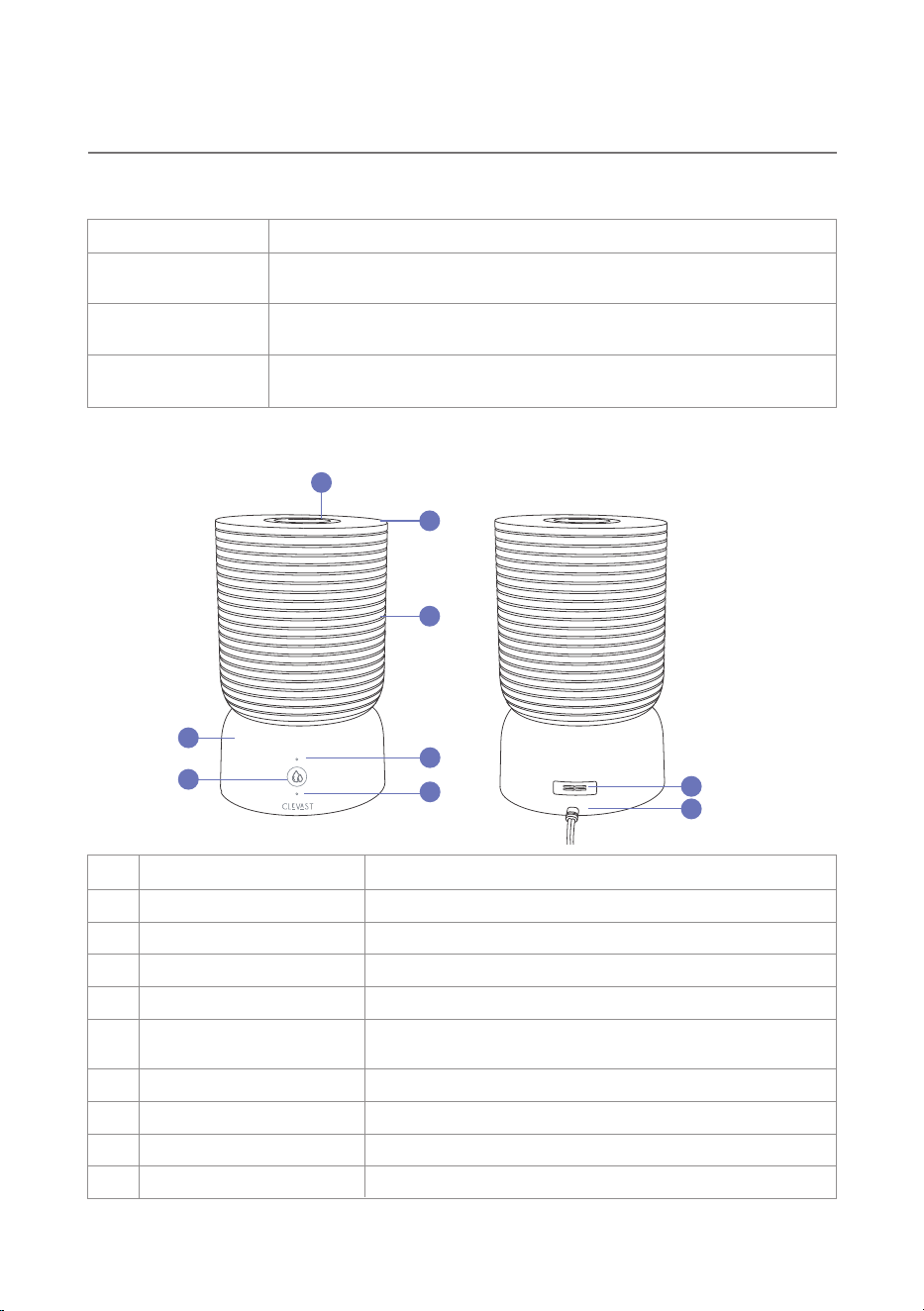
2.2 Product Diagram
Chapter 2 ‒ Getting to Know Your Smart Humidifier
Top-Fill Design
Smart Control
Refilling is simple and spill-free. Just remove the top cover—no
need to lift or disassemble the unit.
Feature Description
Connect via the Clevast App to remotely control mist levels, monitor
humidity, and schedule operation. Only supports 2.4GHz Wi-Fi.
Independent
Aroma Box
Keeps essential oils separated from the main tank, preserving
performance and minimizing cleaning.
1
2
3
4
5
6
7
8
9
1 Fog Outlet
Water Tank Cover
Water Tank
Base
Power / Mist / Wi-Fi Button
Wi-Fi Indicator
Mist Level Indicator
Aroma Box
Power Cord
2
3
4
5
6
7
8
9
Dispenses mist into the air, 360° Rotatable
No. Component Function
Removable top cover for convenient refilling
Holds water for humidification (up to 4L capacity)
Houses the mist generator and electronic components
One-touch control for mist level, power
Long press 5s for Wi-Fi pairing
Displays connection status using colored LED behavior
Displays current mist intensity: Green (low), Orange(High)
Dedicated slot for essential oil pad
Connects the unit to a standard power outlet
04
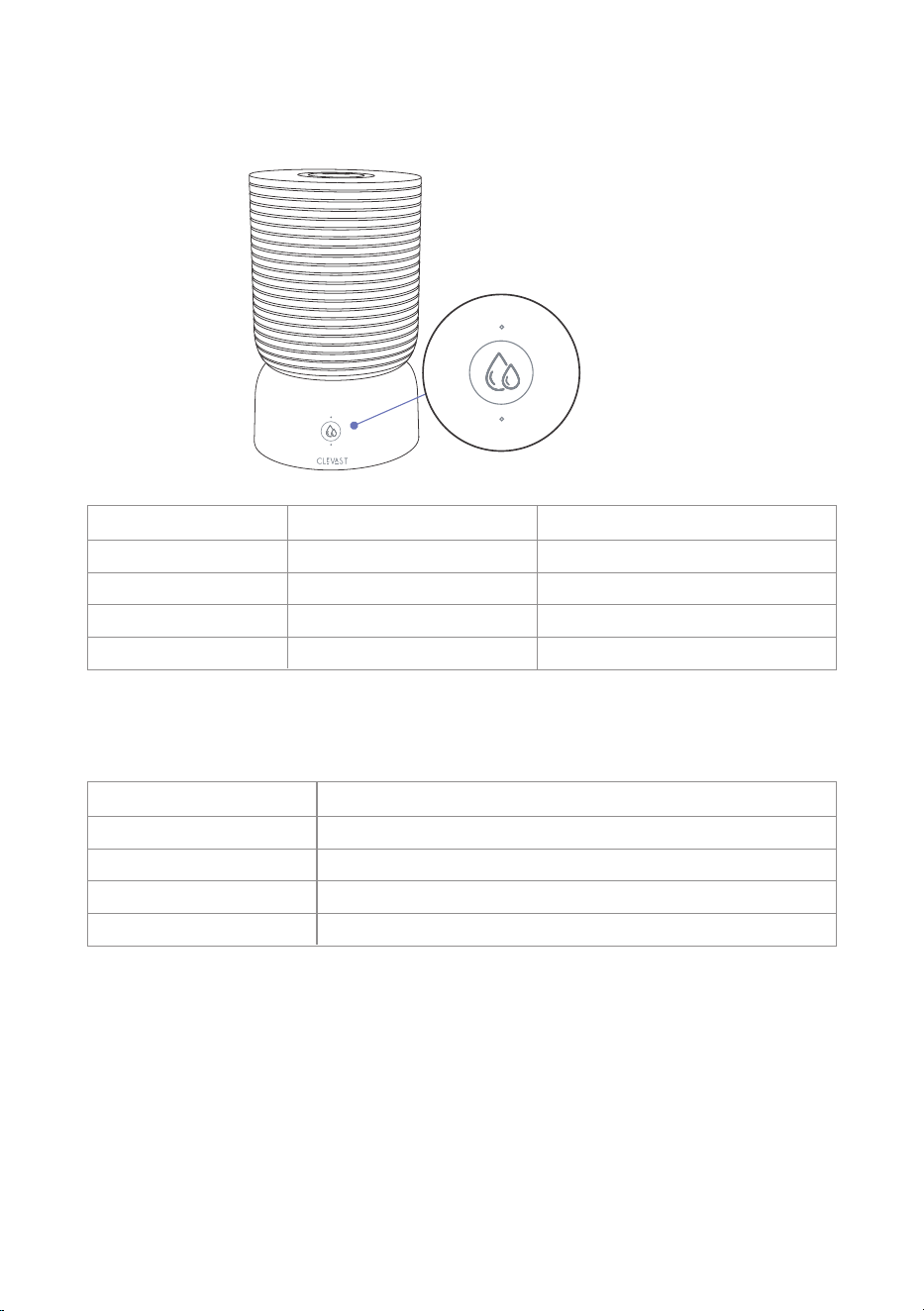
2.3 Control Button
1st press Activates low mist mode
Switches to High mist mode
Power OFF
Enter Wi-Fi Pairing mode
2nd press
3rd press
Long press (5 seconds)
Wi-Fi Indicator Reference
Green light
User Action Function Indicator
Orange light
No light
Blue Wi-Fi indicator flashing rapidly
Fast blue blinking In pairing mode
Not yet connected
Connected successfully
Connection complete, device in standby
Slow blue blinking
Solid blue (15s)
Light off
LED Behavior Status
OFF → LOW → HIGH → OFF
Cycles through modes sequentially:
2.4 Package Inclusion
1 x Smart Humidifier 2 x Aroma Pads 1 x Small Cleaning Brush
1 x Warranty Card 1 x Share Card
2.5 Specifications
05
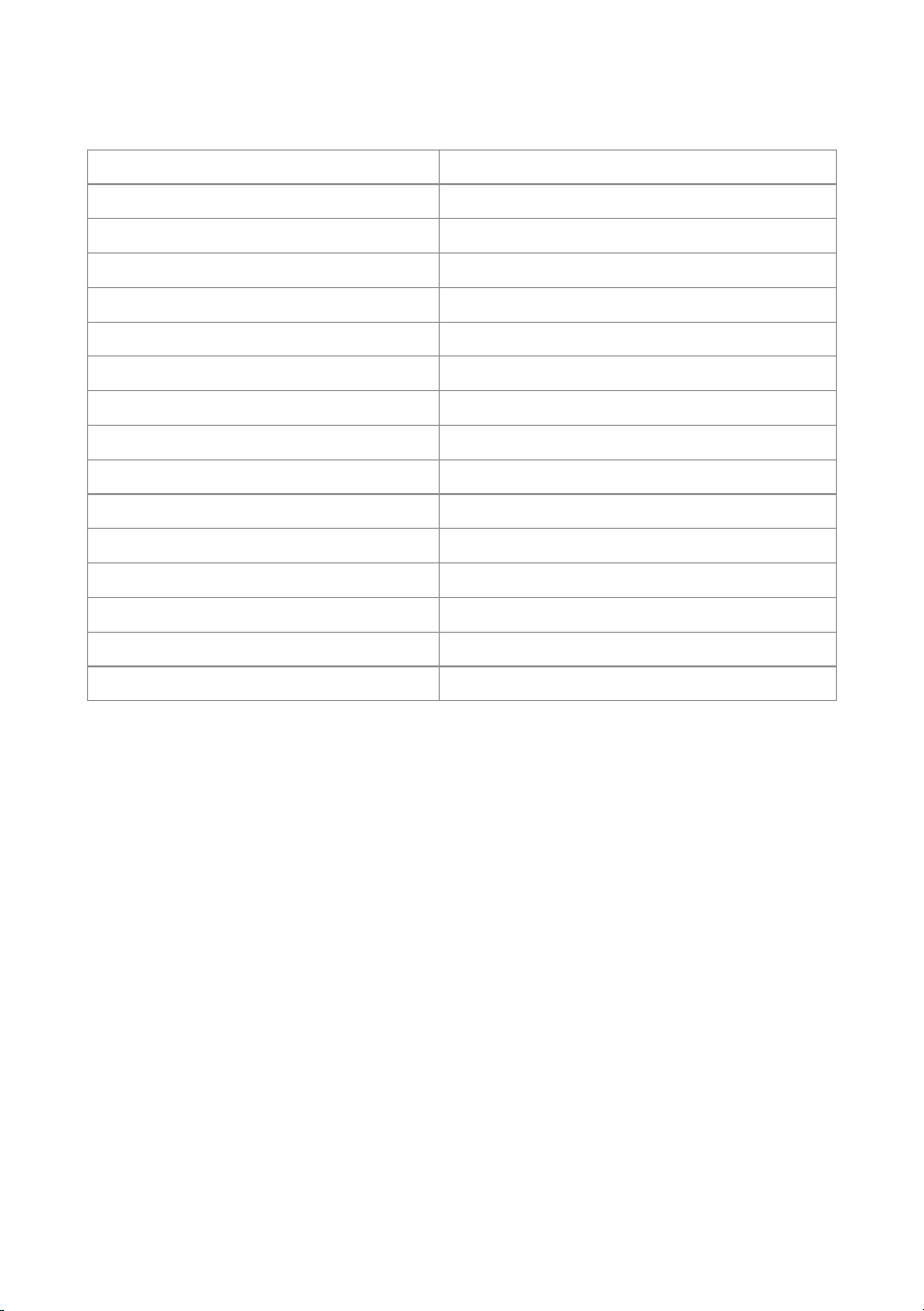
Model No.
Tank Capacity
CL-HD02
Item Details
Product Weight 2.44 lb / 1.11 kg
Rated Power High: 23W ±10% / Low: 16W ±10%
Humidification Output
Noise Level
Standby Power Consumption
Recommended Coverage Area
Power Cord Length
High: 240 ml/h / Low: 125 ml/h
≤28 dB
<1W
Up to 398 sq.ft / 37 m²
65 in / 165 cm
Mist Height
≥23.62 in / 60 cm
Recommended Operating Temperature 41℉-104℉ / 5℃-40℃
Recommended Operating Humidity
20% RH‒80% RH
-4℉-158℉ / -20℃-70℃
Transport Temperature Range
Certifications FCC, ETL, PSE, CE
4L
Product Dimensions φ7.05 x 11.82 in / 17.9 x 30 cm
06
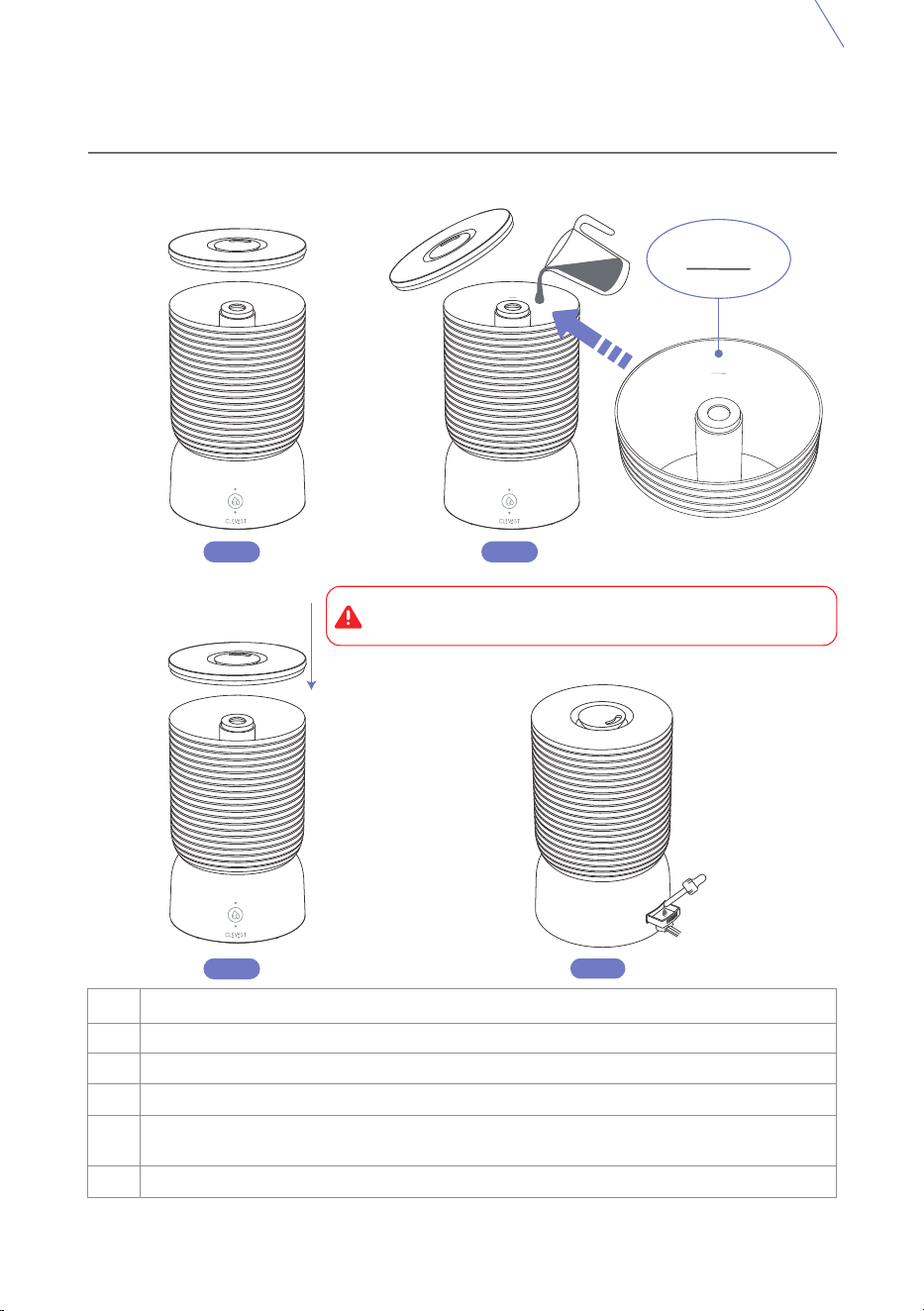
3.1 Initial Setup Instructions
Chapter 3 ‒ Before First Use
1
2
Remove all packaging materials, including protective inserts from inside the tank
and base.
Step Instruction
Detach the water tank from the base. Remove all visible tape, especially on the
float mechanism.
3
4
5
6
7
Rinse the tank, top cover, and aroma box with clean, room-temperature water.
Place the humidifier on a firm, level, and water-resistant surface.
Maintain at least 30 cm (12 inches) of space around the device.
Position the mist outlet so it does not directly face furniture, curtains, or electronics.
Do not plug in the humidifier until it is fully assembled and filled with water.
Note: It is recommended to rinse all parts before first use to eliminate any manufacturing residue.
07
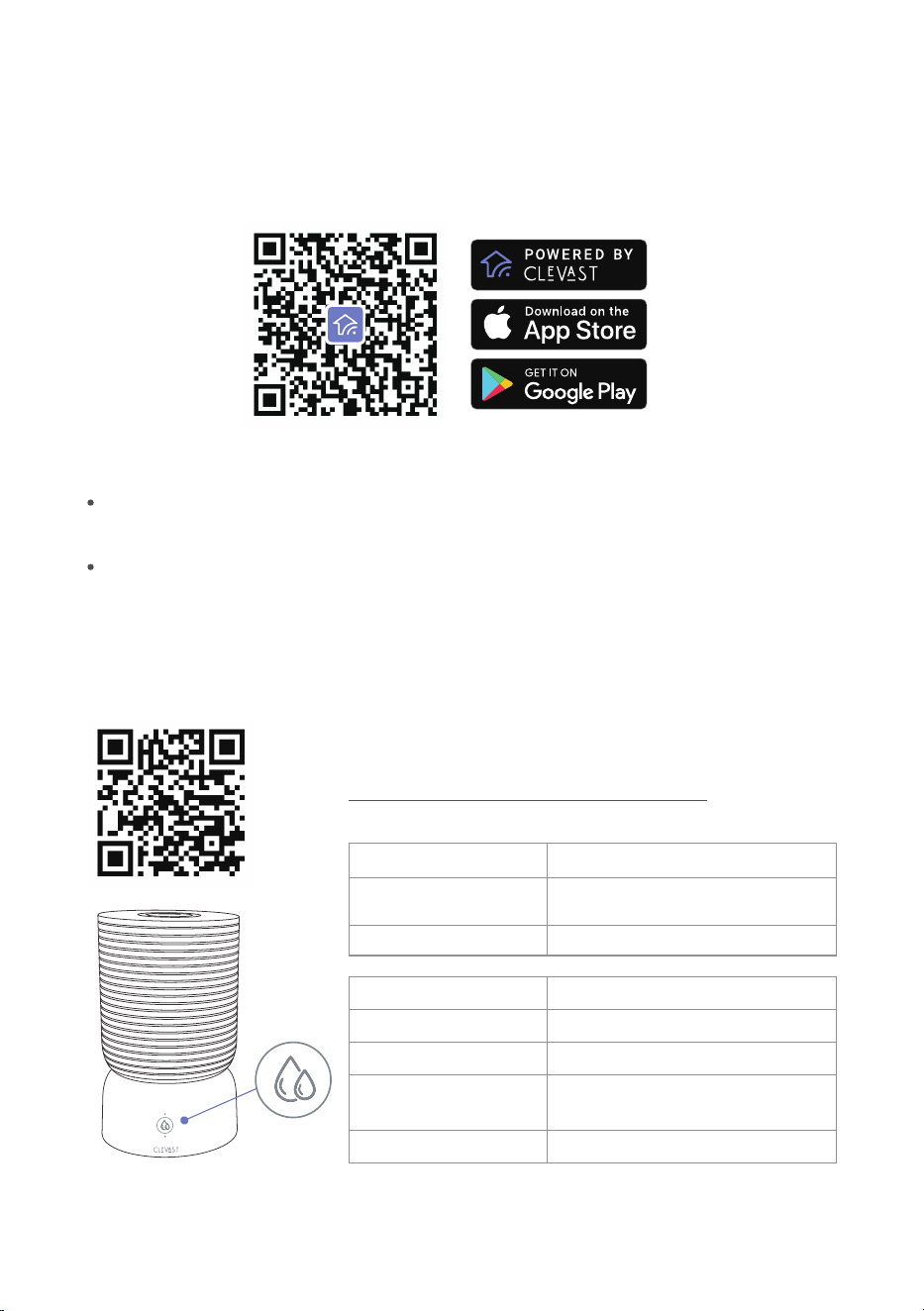
4.1 Fill the Water
Chapter 4 ‒ Operating Instructions
Step 2Step 1
Step 3
1
Step Instruction
Remove the top cover to access the tank.
2
3
4
5
Pour water directly into the tank while it remains on the base.
Add 2-3 drops of your favorite essential oil to the aroma pad.
Do not add essential oils, fragrances, or other liquids into the tank or base.
Reattach the top cover securely
Connect to power
Step 4
1. Do not fill being exceeding the tank's max water line!
2. Recommend using purified or distilled water!
Max Water Line
MAX
MAX
MAX
08
4.3 Wi-Fi Connection
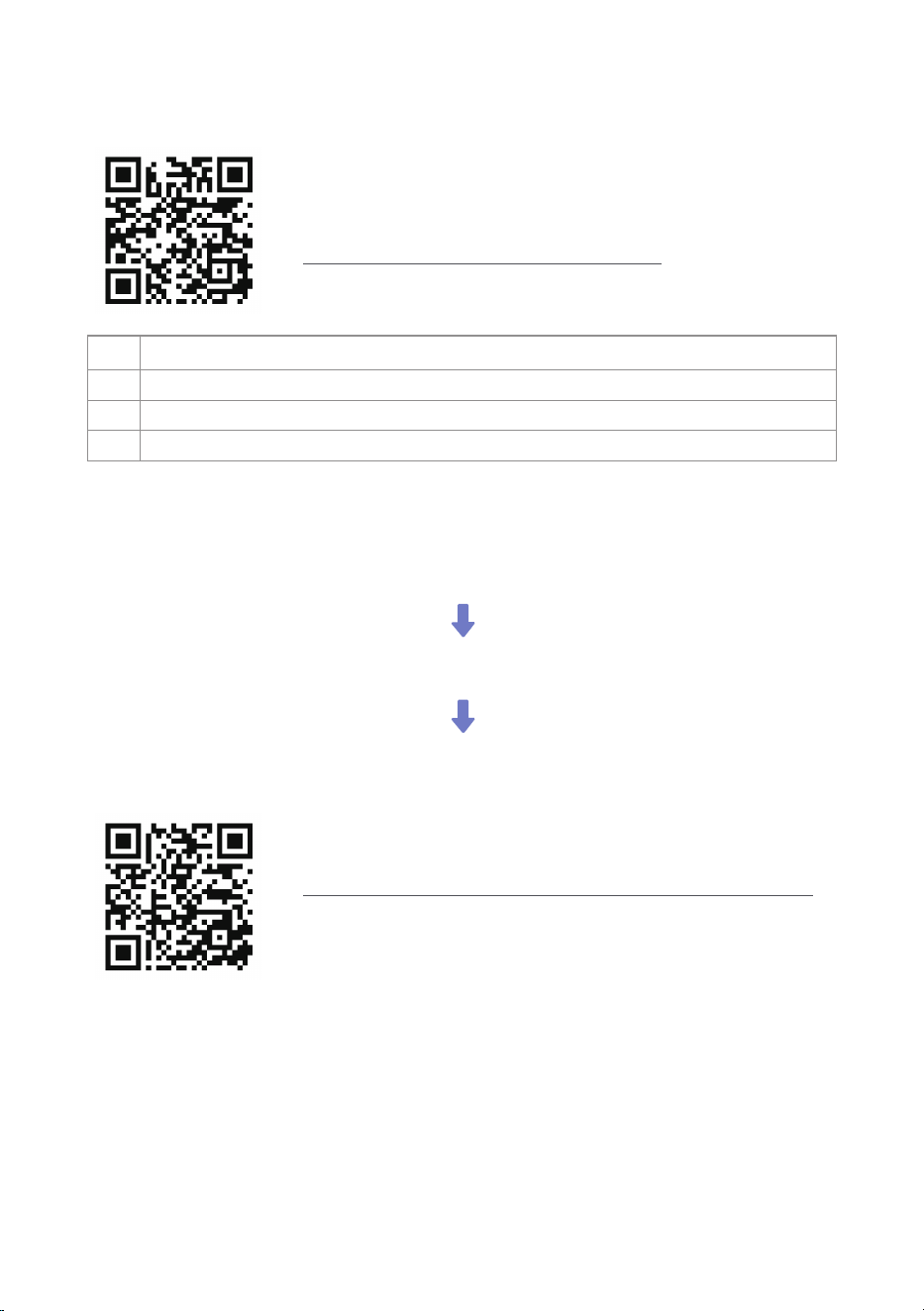
4.2 Download the Clevast App
Tips: The device will automatically exit pairing mode if no connection is made within 10 minutes.
Long press (5 seconds) Activate Wi-Fi pairing mode
Enable Bluetooth on
your phone
Pair your phone with the device
Action
Function
Fast blue blinking Active pairing mode
Slow blue blinking Not connected
Solid blue (auto off)
Successfully connected
(turns off after 5 mins)
No light Standby (connected)
Wi-Fi Indicator
Status
To download the Clevast App, please scan the QR code or search for "Clevast" in Apple App
Store® (iOS) or Google Play Store(Android).
NOTE:
Clevast App
Please scan and watch the instructional video
Enable permissions when prompted during first-time use. These permissions enable core
app functionality and do not collect personal data.
Clevast App is being continually updated and App features will be expanded.
09
Please scan and watch the instructional video
or follow the step-by-step instructions below:
Watch the instructional video for Clevast App operation guidance
4.5 APP Control
4.4 Voice Assistant Connection
All systems ready
Scan now to master app controls
1
2
Open the Clevast App and navigate to Third-Party Services.
Step Instruction
Choose your preferred voice assistant (Alexa or Google Assistant).
3 Follow the setup instructions to link your device for voice control.

10
5GHz networks are not supported.
Additional Notes:
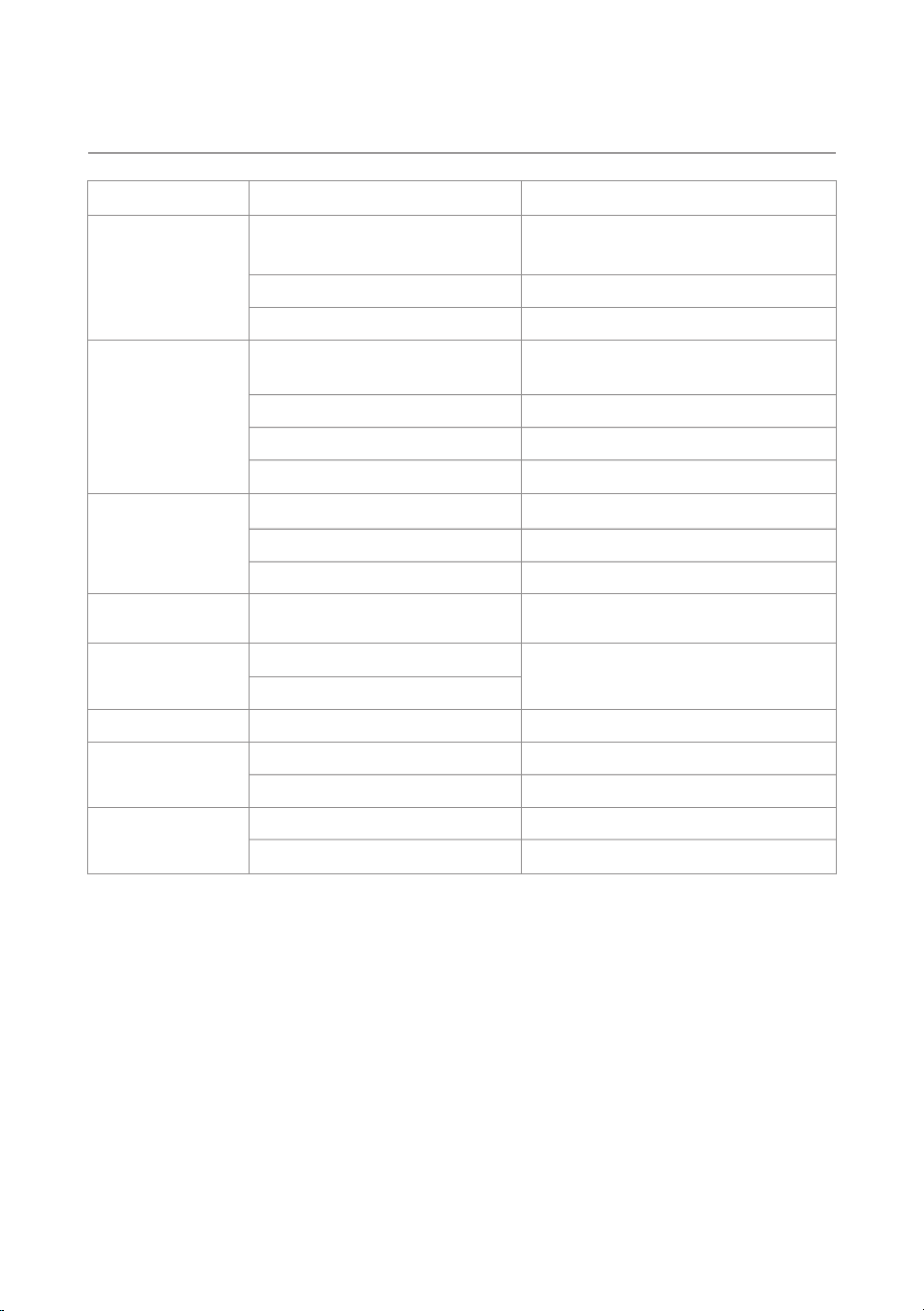
Chapter 5 ‒ Care & Maintenance
Cleaning the Humidifier
Descaling the Humidifier
Once a week or
before storage
Every 1‒2 weeks
Cleaning the Aroma Pad As needed (e.g., oil change)
Storing the Humidifier
Before extended periods
of non-use
Maintenance Task
Recommended Frequency Key Steps
1. Unplug the unit.
2. Empty tank and base.
3. Rinse with clean water.
4. Wipe with soft cloth.
5. Air dry fully.
1. Fill with 24 oz white vinegar.
2. Let sit 15‒20 mins.
3. Empty and wipe.
4. Rinse thoroughly.
5. Dry all parts.
1. Remove aroma box.
2. Rinse pad under warm water.
3. Dry with soft cloth.
4. Reinsert.
1. Clean and dry all parts.
2. Leave no water in tank/base.
3. Store in dry, ventilated area.
4. Keep parts loosely assembled.
Avoid using detergent or chemical cleaners.
Never operate the unit with vinegar inside the tank.
Replace aroma pad periodically if discolored or ineffective.
11
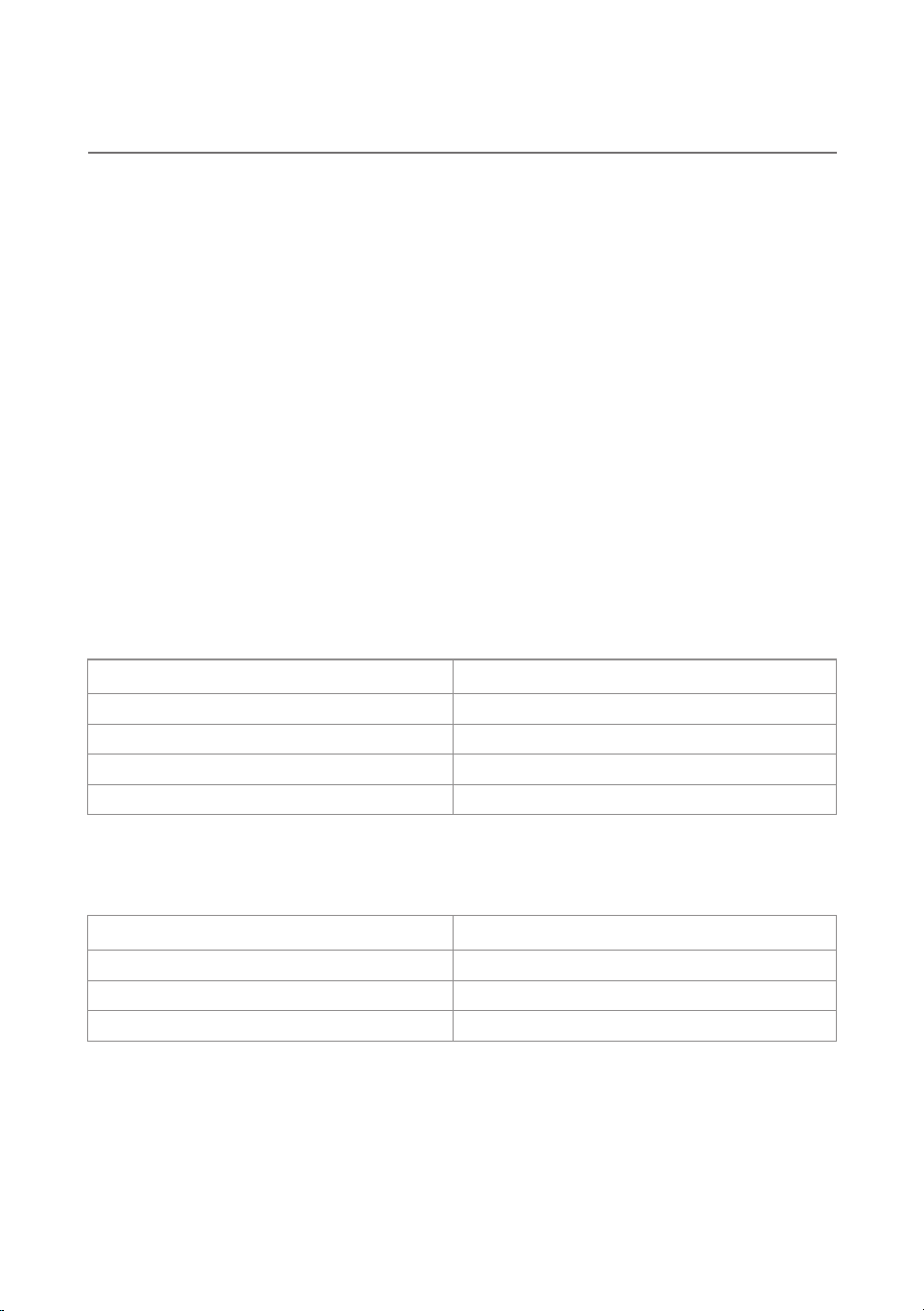
Chapter 6 ‒ Troubleshooting
Device does
not power on
Low or no
mist output
1. Excess water in the base.
2. Empty tank
3. Blocked nozzle
4. Mineral buildup
Water leakage
1. Tank misaligned
2. Silicone ring damaged
3. Overfilled tank
Reseat the tank.
Check the sealing ring.
Avoid overfilling.
Red light is
blinking
1. No water in the tank
Problem
Possible Cause Solution
Ensure the power cord is plugged
in securely.
Check the outlet.
Press the power button again.
Empty the water in the Base,
then restart the humidifier.
Refill with water.
Clean the nozzle and tank.
Use distilled water.
Refill the tank within 40 seconds.
If not, the unit will auto shut off.
Moldy smell
or odor
1. Water left in tank for too long
2. Infrequent cleaning
Clean the tank regularly.
Always use fresh water.
White dust buildup 1. Use of hard tap water Switch to purified or distilled water.
Loud or
unusual noise
1. Uneven placement
2. Float mechanism stuck
Place the device on a flat surface.
Inspect and adjust the float.
No scent from
aroma pad
1. Pad is dry or saturated
2. Essential oil not added
Replace if the pad is old or discolored.
Add oil to the pad.
1. Power cord not connected
properly
2. Faulty outlet
3. Button not pressed
12
7.1 FCC Compliance
Chapter 7 ‒ Compliance Information
1. This device may not cause harmful interference.
2. This device must accept any interference received, including interference that may
cause undesired operation.
This device complies with Part 15 of the FCC Rules. Operation is subject to the following two
conditions:
7.2 Class B Digital Device Notice
This equipment has been tested and found to comply with the limits for a Class B digital
device, pursuant to Part 15 of the FCC Rules.
These limits are designed to provide reasonable protection against harmful interference in a
residential installation.
This device complies with FCC radiation exposure limits for use in an uncontrolled
environment.
7.3 FCC Radiation Exposure Statement
Any changes or modifications not expressly approved by the party responsible for compliance
may void the user's authority to operate this device.
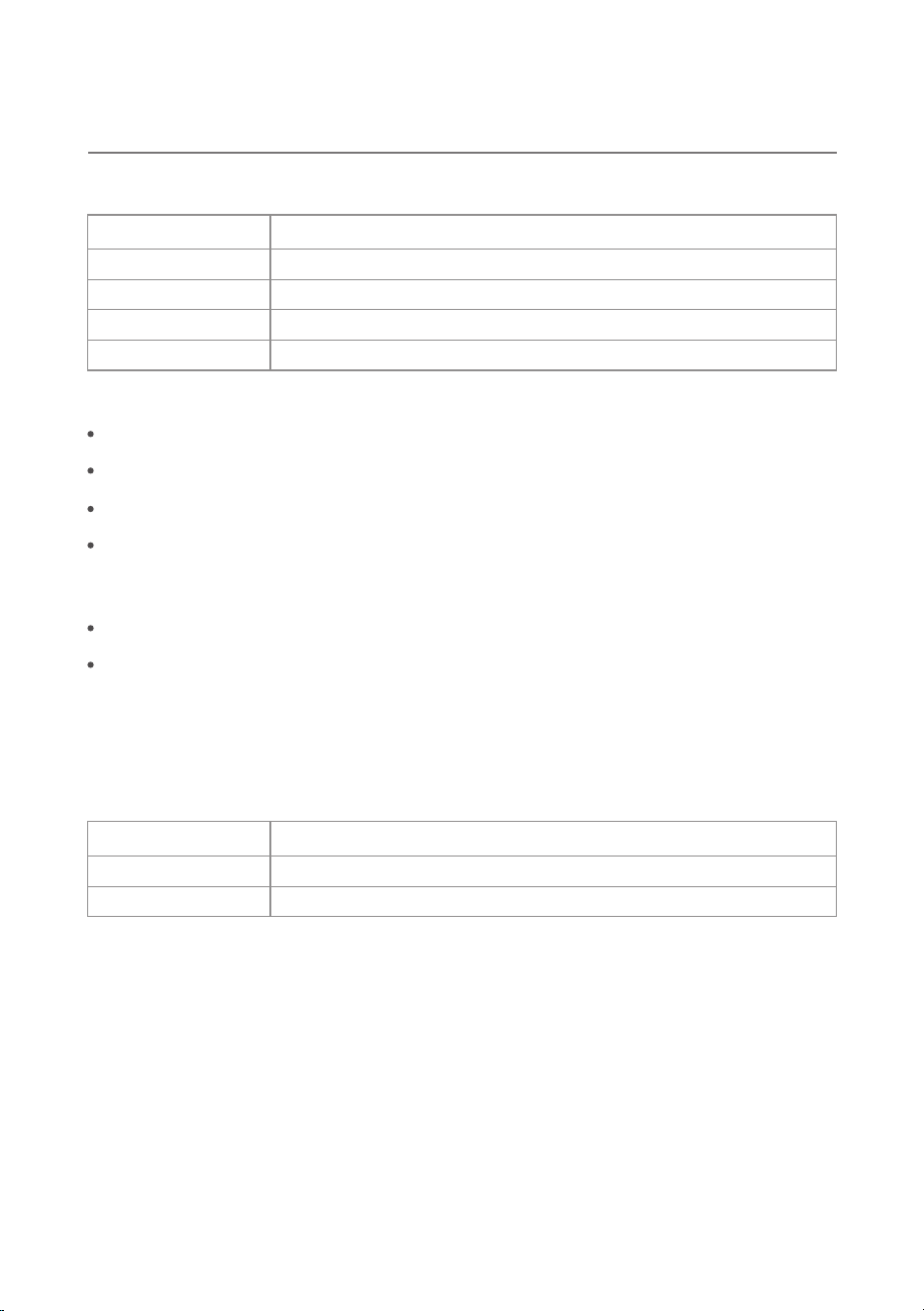
Notice:
Reorient or relocate the receiving antenna
Increase the distance between devices
Improve signal reception
Recommendation Purpose
Reduce potential interference
Plug into a separate power circuit
Contact a qualified technician
Avoid line noise from shared electronics
For persistent issues requiring assistance
Minimum distance from the body
Use with other antennas/transmitters
7.87 in / 20 cm
Requirement Specification
Not permitted
Frequency & region settings Factory preset and not user-adjustable
13
8.1 Warranty
Chapter 8 ‒ Warranty & Customer Support
Warranty Type
Coverage Duration
Limited warranty for residential use
Item Details
1 year from the date of original purchase
Coverage Scope
Claim Requirements
Defects in materials or workmanship under normal household use
Contact Clevast Support with valid proof of purchase
8.2 Customer Support
Email
Website
support@clevast.com
Contact Method Details
www.clevast.com
Not Covered:
Damage caused by misuse, abuse, accidents, or unauthorized modifications
Normal wear and tear
Cosmetic damage that does not affect performance
Use of non-original or incompatible accessories or replacement parts
Warranty will be voided if:
The product is serviced by unauthorized personnel
The product is modified or assembled with unapproved components
To help us assist you faster, please include the following:
1. Product model number
2. Date and place of purchase
3. Description of the issue or malfunction
Our support team is committed to providing prompt and effective assistance.

14
Ver: 250429