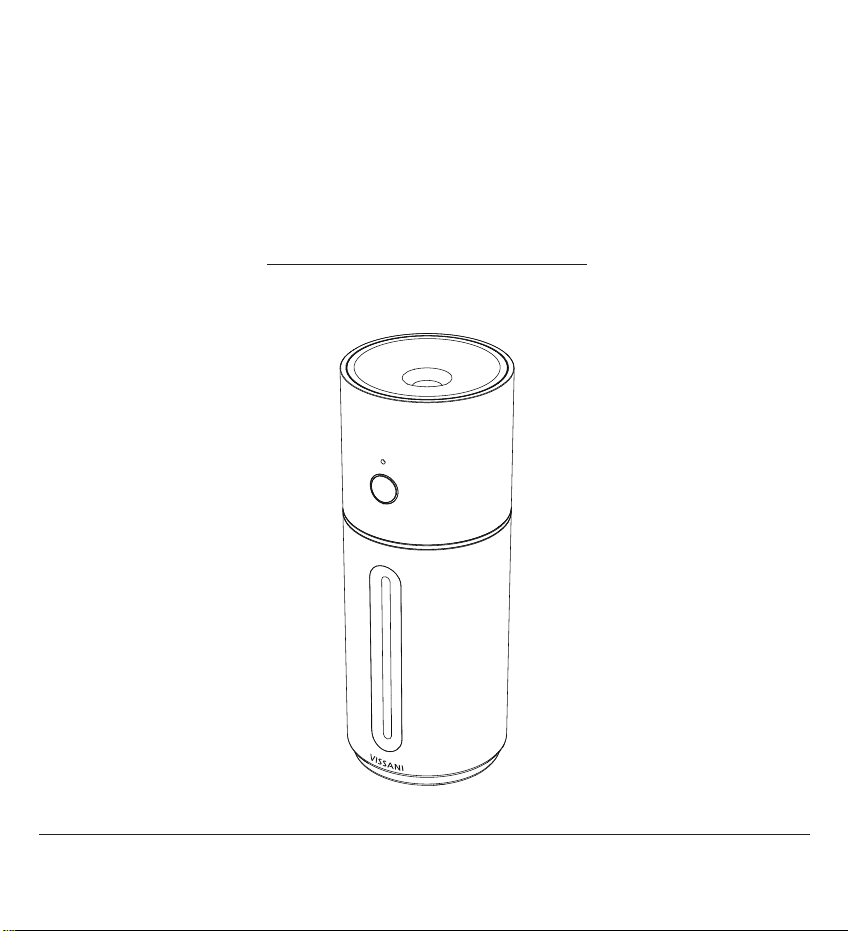
Item #1013900000
Model #VK-8306A
HUMIDIFIER
USER AND CARE GUIDE
SPECIFICATIONS
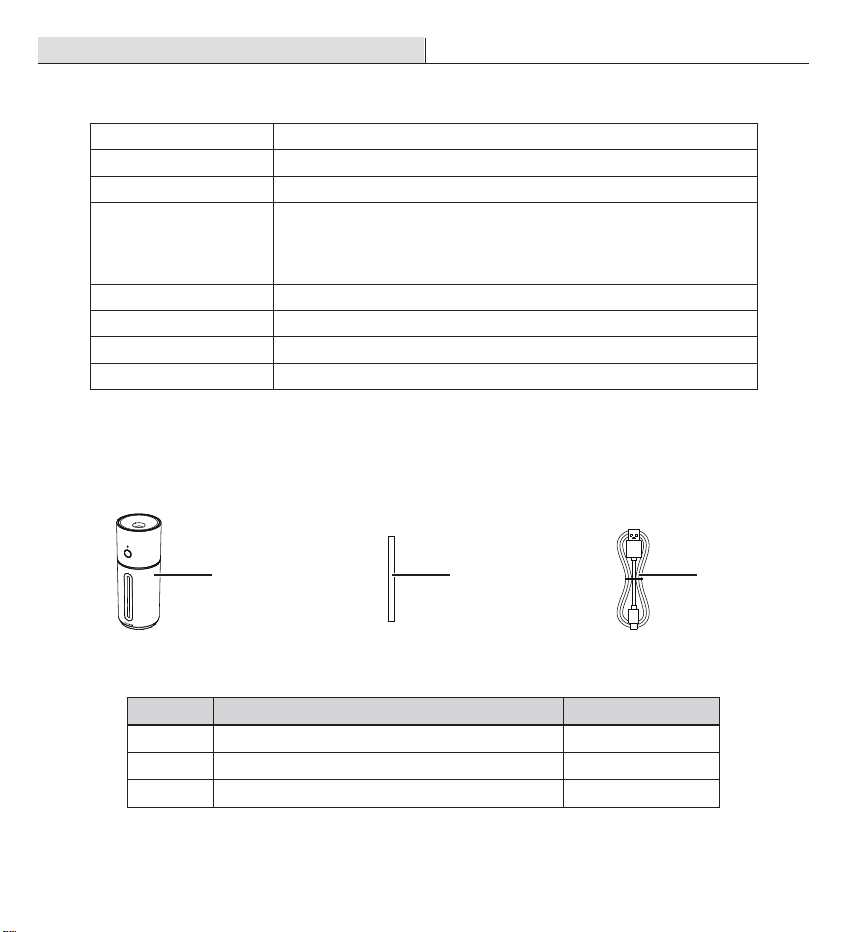
PACKAGE CONTENTS
Item Quantity
Humidier
Wick
USB-C Cable
A
B
C
1
4
1
Part
Pre-Installation
Power Supply
Battery capacity
Water Tank Capacity
Max Runtime
Noise Level
COVERAGE
Dimensions
Weight
5V 2A max
2000mAh (7.4Wh, 3.7V), charging time: 2-3hrs
10.15oz/300mL
Up to 10 hours on low mist setting
Note: The humidier may run for a longer or shorter time depending
on the environmental temperature and humidity.
≤28dB
150 ft²/14㎡
2.75in W x 2.75in D x 7.16in H/ 6.99cm AN x 6.99cm PR x 18.19cm AL
0.478 lbs/0.217kg
BA C
Warranty
WHAT IS COVERED
This product is warranted for one year from the date of purchase (12 months, 365 days). The warranty is limited
to defects in the materials of the product and manufacturing defects.
WHAT IS NOT COVERED
This product has exceeded the "12-month warranty".
Failure to provide valid purchase receipts; or altered valid purchase receipts without authorization; or the
model and serial numbers of the product in receipt do not match the actual product.
The label or serial number of the product is damaged or has been tampered, or the identity of this product
cannot be proved effectively.
Unexpected factors, improper use or other human factors (including water ingress, moisture, fall down, user
operation errors, transportation, bumps, etc.) caused a defect or damage; failure or damage caused by
natural disasters and force majeure and so on (such as earthquakes, res, etc.)
Disassembled, retted or repaired by user or an unauthorized third party.
Not following the instructions in this manual, or damage caused by not using the original parts of the
product.
The purchaser has clearly been informed that the product is a disposed product, or samples that serve as
commercial listings, or products that have been subjected to performance overload tests.
Wear of any part, or damage to plastics and other accessories.
All air freight and transportation costs are not covered by the warranty and must be borne by the customer.
In any case, the company or its authorized distributors will not grant any guarantee on time if it is beyond the
control, or any special or indirect damage occurs, the company or its authorized distributors will not be
responsible for it.
In addition to the above-mentioned clear warranty provisions, the company is not required to assume other
forms of warranty responsibilities.
Contact the Customer Service Team at 1-855-VISSANI (1-855-847-7264) or visit www.homedepot.com.
□
□
□
□
□
□
□
□
□
□
□
□
O
P
Pre-Installation (continued)
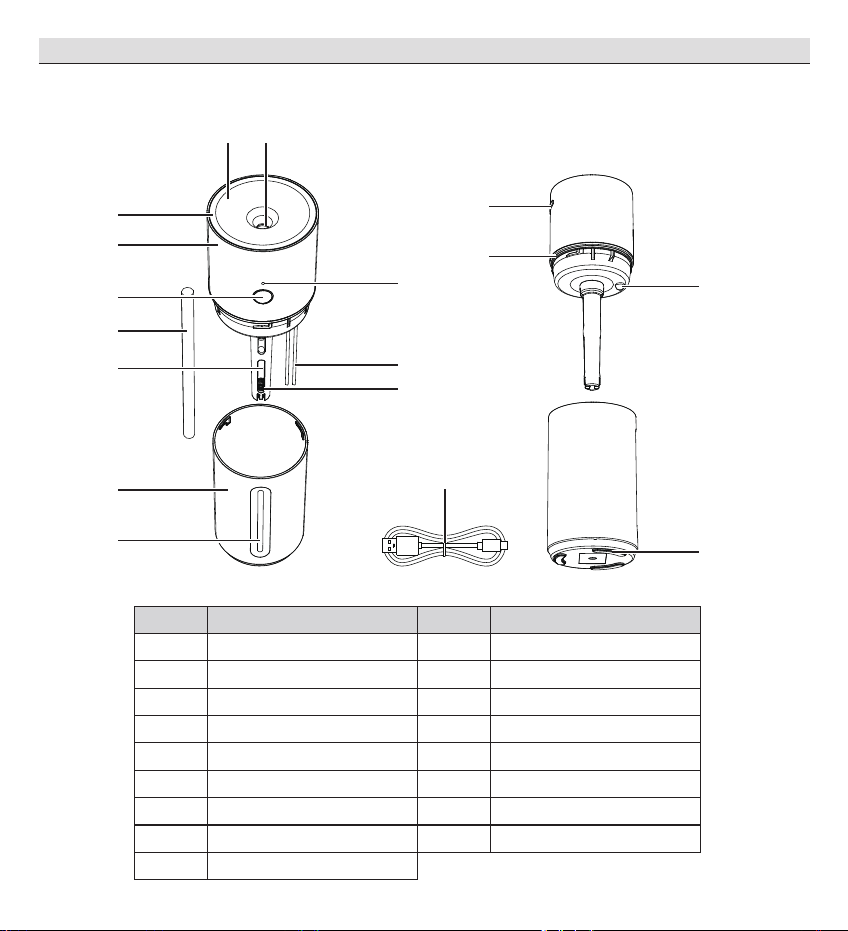
PARTS DESCRIPTION
A
B
C
D
E
F
G
H
I
J
K
L
M
N
O
P
Q
Mist Nozzle
Top Cover
Accent Light
Humidier Top
Indicator
Control Button
Wick
Wick Bracket
Probe
Spring
Water Tank
Water Level Window
USB-C Connector
Sealing Ring
Water Tank Light
Anti-Slip Gasket
USB-C Cable
Part Item Part Item
C
D
E
F
AB
G
J
K
H
I
L
M
N
Q
Safety Information
Troubleshooting
Only use the humidier as described in this manual.
Place the humidier and USB-C Cable properly so that it will not be knocked over.
Do not place humidier near to large pieces of furniture or in high-trafc areas.
Turn off humidier if do not use it. And disconnect from power by removing the USB-C Cable from the outlet.
Do not use the humidier in wet environments.
Keep the humidier away from children.
Always unplug your humidier from the power outlet before cleaning your humidier or detaching the humidier
top from water tank.
Always make sure to place the humidier on a at area before operation.
Only ll the water tank with clean water. Never ll the water tank with any other liquids.
Do not place the humidier near to heat source, such as stovetops, ovens or radiators.
Do not use other items as replacement parts for this product.
Do not cover the mist nozzle while the humidier is working, otherwise it may damage the humidier.
Do not immerse the humidier top, power cord or plug in water.
If the humidier is damaged or is not functioning properly, stop using it and contact Customer Service
immediately.
This humidier should not to be used by persons (including children) with reduced physical, sensory or mental
capacities or lack of experience and knowledge, unless they have been given supervision or instruction
concerning the use of the appliance by a person responsible for the safety.
The product shall be charged by class 2 power unit only.
READ AND SAVE THESE INSTRUCTIONS
This product has an internal, non-replaceable lithium battery. This battery is not user-serviceable. Please
dispose in accordance with local, state, province, and country regulations.
Do not grab the USB-C Cable with wet hands. Keep the USB-C Cable away from liquids.
BATTERY & CHARGING CORD
Problem
Possible Cause Solution
No power
Unit is not plugged in
Unit is not charged
Plug unit in
Charge unit per the Operation section
No mist
Water puddling
Low water level
Wick needs soaking
Wick needs replacing
Wick missing
Mist nozzle needs cleaning
Fill tank with water
Remove and soak wick for 5 minutes; reinstall wick
Replace wick per the Replacing the wick instructions
Install a new wick
Follow the Cleaning the mist nozzle instructions in the
Cleaning & Care
Spring missing Insert spring at bottom of wick bracket.
Operation
12 in/
30 cm
12 in/
30 cm
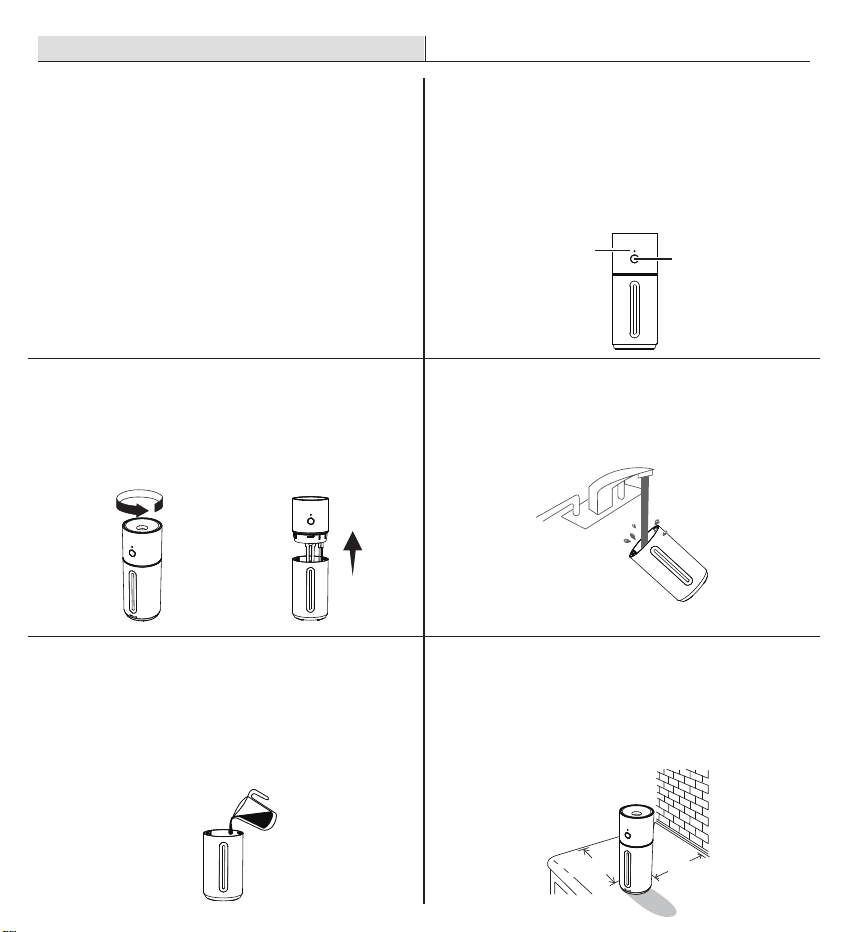
When the humidier is on, the indicator (A) is
steady on green light. When the humidier is
off, the indicator (A) is off.
When the battery is low, the indicator (A) is
blinking red light.
When charging, the indicator (A) is blinking
green light. When the battery is full, the
indicator (A) is steady on green light.
When the humidier is low water, the indicator
(A) is steady on red light.
1
Function
□
□
□
□
□
□
Tap to turn the humidier on / low mist level /
high mist level / off.
Press power button (B) for 2s to turn the accent
light and water tank light on/off.
2
Power Button
Recommend using puried or distilled water.
Do not ll with hot water.
5
Fill the tank.
□
Choose a hard,at surface for the humidier at
least 12 inches /30 cm away from any
walls.The surface must be water-resistant.
6
Choose a flat location
□
Rotate the top of humidier anticlockwise and
remove from the water tank.
3
To open
□
4
Clean the water tank before
first use.
A
B
Care & Maintenance
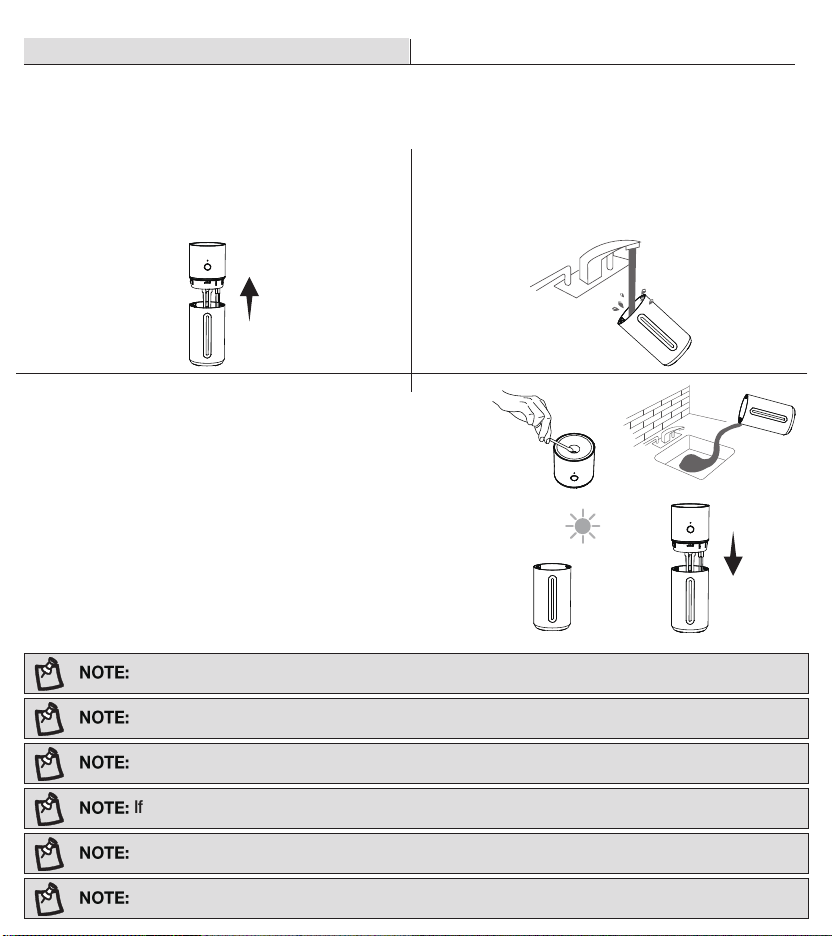
CLEANING
Cleaning on a water-resistant surface, such as a kitchen counter.
Change the water in 3 days to avoid bacteria growth.
Use a tissue or cloth to clean the mist nozzle regularly.
If not using the humidier for 3 days or longer, remove water, clean and dry.
Never immerse the top of humidier in water or liquid. Do not place any part of the humidier in
dishwasher.
Do not use detergents or additives to clean the humidier.
Please clean water tank and mist nozzle every 3 days before storing it.
Fill the tank with 1/3 of a cup/ 70 mL of distilled white
vinegar,.
Assemble the humidier top on the tank,and swish the
vinegar around the tank,soak for 15-20 minutes.
Rinse all parts until any vinegar smell is completely gone.
Clean the mist nozzle with a 50/50 mix of white vinegar and
water by a cotton swab. Wipe off with a wet cotton swab.
Dry all parts with a cloth.Make sure all parts are completely
Dry before reassembling or storing.
3
To descale the humidifier
□
□
□
□
□
Unplug the humidier, remove the humidier
top and wick bracket from the water tank.
1
Turning off
□
Rinse the water tank,then pour out any water
from the tank .
□
2
Clean the water tank
Operation (continued)
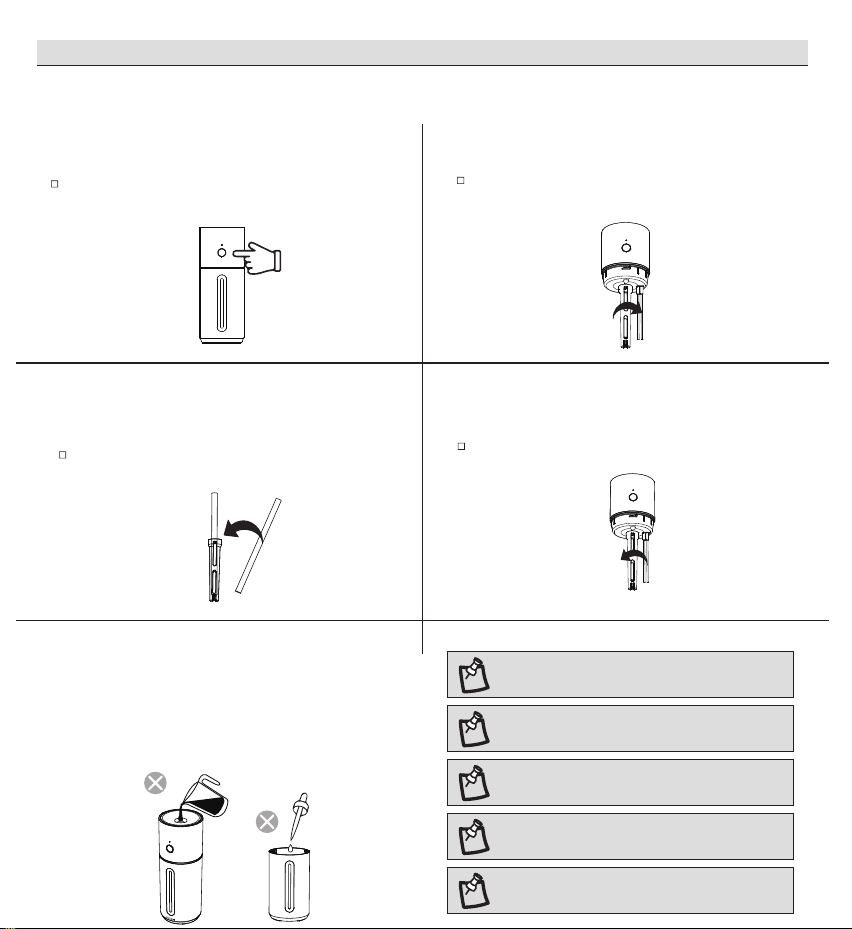
NOTE: We recommend using puried or
distilled water to ll the tank.
NOTE: Do not ll past the tank's max
waterline.
NOTE: Do not add water directly through
mist nozzle.
NOTE: Do not add essential oils into the
water tank.
NOTE: Do not use water treatment liquids
in this humidlier.
CHANGING THE WICK
2
Take off the wick bracket
Rotate the wick bracket anticlockwise, take off
the wick bracket.
4
Put it back
Place the wick brackect and rotate it clockwise.
3
Change a new wick
Remove the wick from the lter bracket, change
a new wick.
1
1
Turning off
Turn off the humidier,remove the humidier
top from the tank.
Do not add essential oils or pour water at the mist
nozzle.If there is standing water in the mist nozzle,
please dry it with a clean tissue or cloth.
DO NOT ADD FOREIGN OBJECTS
□
Information to the user:
Information on the following matters shall be provided to the user in the instruction manual or
on the packaging if an instruction manual is not
provided for any type of ISM equipment:
(a) The interference potential of the device or system.
(b) Maintenance of the system.
(c) Simple measures that can be taken by the user to correct interference.
(d) Manufacturers of RF lighting devices must provide an advisory statement , either on the
product packaging or with other user documentation , similar to the following: This product
may cause interference to radio equipment and should not be installed near maritime safety
communications equipment or other critical navigation or communication equipment operating
between 0. 45-30MHz. Variations of this language are permitted provided all the points of the
statement are addressed and may be presented in any legible font or text style.
FCC SUPPLIER'S DECLARATION OF CONFORMITY
This device complies with part 18 of the FCC Rules.
VK-8306A
VISSANI
FCC CFR Title 47 part 18 Subpart B
The following responsible party designated in FCC §2.909 is responsible for this declaration:
Humidifier
Product information
Product Name:
Model No.:
Trade Mark:
Applicable standards:
Company Name:
Address:
Telephone Number:
HOME DEPOT
2455 PACES FERRY ROAD ATLANTA, GA 30339
1 -855-VISSANI (1-855-847-7264)
Questions, problems, missing parts? Before returning to the store,
call Vissani Customer Service
9 a.m. – 7 p.m., EST, Monday-Friday, 9 a.m. – 6 p.m., EST, Saturday
1-855-VISSANI (1-855-847-7264)
HOMEDEPOT.COM
Retain this manual for future use.
Troubleshooting (continued)
Problem
Possible Cause Solution
Water puddling or
no mist
Spring missing
Peculiar odor
Unit is new
Order replacement spring if lost
Remove the tank and let it air out in a cool, dry place
for 12 hours.
Dirty tank or old tank water Empty the old water, clean the tank, and ll with clean
water
Item #1013900000
Model #VK-8306A
HUMIDIFIER
USER AND CARE GUIDE
SPECIFICATIONS
PACKAGE CONTENTS
Item Quantity
Humidier
Wick
USB-C Cable
A
B
C
1
4
1
Part
Pre-Installation
Power Supply
Battery capacity
Water Tank Capacity
Max Runtime
Noise Level
COVERAGE
Dimensions
Weight
5V 2A max
2000mAh (7.4Wh, 3.7V), charging time: 2-3hrs
10.15oz/300mL
Up to 10 hours on low mist setting
Note: The humidier may run for a longer or shorter time depending
on the environmental temperature and humidity.
≤28dB
150 ft²/14㎡
2.75in W x 2.75in D x 7.16in H/ 6.99cm AN x 6.99cm PR x 18.19cm AL
0.478 lbs/0.217kg
BA C
Warranty
WHAT IS COVERED
This product is warranted for one year from the date of purchase (12 months, 365 days). The warranty is limited
to defects in the materials of the product and manufacturing defects.
WHAT IS NOT COVERED
This product has exceeded the "12-month warranty".
Failure to provide valid purchase receipts; or altered valid purchase receipts without authorization; or the
model and serial numbers of the product in receipt do not match the actual product.
The label or serial number of the product is damaged or has been tampered, or the identity of this product
cannot be proved effectively.
Unexpected factors, improper use or other human factors (including water ingress, moisture, fall down, user
operation errors, transportation, bumps, etc.) caused a defect or damage; failure or damage caused by
natural disasters and force majeure and so on (such as earthquakes, res, etc.)
Disassembled, retted or repaired by user or an unauthorized third party.
Not following the instructions in this manual, or damage caused by not using the original parts of the
product.
The purchaser has clearly been informed that the product is a disposed product, or samples that serve as
commercial listings, or products that have been subjected to performance overload tests.
Wear of any part, or damage to plastics and other accessories.
All air freight and transportation costs are not covered by the warranty and must be borne by the customer.
In any case, the company or its authorized distributors will not grant any guarantee on time if it is beyond the
control, or any special or indirect damage occurs, the company or its authorized distributors will not be
responsible for it.
In addition to the above-mentioned clear warranty provisions, the company is not required to assume other
forms of warranty responsibilities.
Contact the Customer Service Team at 1-855-VISSANI (1-855-847-7264) or visit www.homedepot.com.
□
□
□
□
□
□
□
□
□
□
□
□
O
P
Pre-Installation (continued)
PARTS DESCRIPTION
A
B
C
D
E
F
G
H
I
J
K
L
M
N
O
P
Q
Mist Nozzle
Top Cover
Accent Light
Humidier Top
Indicator
Control Button
Wick
Wick Bracket
Probe
Spring
Water Tank
Water Level Window
USB-C Connector
Sealing Ring
Water Tank Light
Anti-Slip Gasket
USB-C Cable
Part Item Part Item
C
D
E
F
AB
G
J
K
H
I
L
M
N
Q
Safety Information
Troubleshooting
Only use the humidier as described in this manual.
Place the humidier and USB-C Cable properly so that it will not be knocked over.
Do not place humidier near to large pieces of furniture or in high-trafc areas.
Turn off humidier if do not use it. And disconnect from power by removing the USB-C Cable from the outlet.
Do not use the humidier in wet environments.
Keep the humidier away from children.
Always unplug your humidier from the power outlet before cleaning your humidier or detaching the humidier
top from water tank.
Always make sure to place the humidier on a at area before operation.
Only ll the water tank with clean water. Never ll the water tank with any other liquids.
Do not place the humidier near to heat source, such as stovetops, ovens or radiators.
Do not use other items as replacement parts for this product.
Do not cover the mist nozzle while the humidier is working, otherwise it may damage the humidier.
Do not immerse the humidier top, power cord or plug in water.
If the humidier is damaged or is not functioning properly, stop using it and contact Customer Service
immediately.
This humidier should not to be used by persons (including children) with reduced physical, sensory or mental
capacities or lack of experience and knowledge, unless they have been given supervision or instruction
concerning the use of the appliance by a person responsible for the safety.
The product shall be charged by class 2 power unit only.
READ AND SAVE THESE INSTRUCTIONS
This product has an internal, non-replaceable lithium battery. This battery is not user-serviceable. Please
dispose in accordance with local, state, province, and country regulations.
Do not grab the USB-C Cable with wet hands. Keep the USB-C Cable away from liquids.
BATTERY & CHARGING CORD
Problem
Possible Cause Solution
No power
Unit is not plugged in
Unit is not charged
Plug unit in
Charge unit per the Operation section
No mist
Water puddling
Low water level
Wick needs soaking
Wick needs replacing
Wick missing
Mist nozzle needs cleaning
Fill tank with water
Remove and soak wick for 5 minutes; reinstall wick
Replace wick per the Replacing the wick instructions
Install a new wick
Follow the Cleaning the mist nozzle instructions in the
Cleaning & Care
Spring missing Insert spring at bottom of wick bracket.
Operation
12 in/
30 cm
12 in/
30 cm
When the humidier is on, the indicator (A) is
steady on green light. When the humidier is
off, the indicator (A) is off.
When the battery is low, the indicator (A) is
blinking red light.
When charging, the indicator (A) is blinking
green light. When the battery is full, the
indicator (A) is steady on green light.
When the humidier is low water, the indicator
(A) is steady on red light.
1
Function
□
□
□
□
□
□
Tap to turn the humidier on / low mist level /
high mist level / off.
Press power button (B) for 2s to turn the accent
light and water tank light on/off.
2
Power Button
Recommend using puried or distilled water.
Do not ll with hot water.
5
Fill the tank.
□
Choose a hard,at surface for the humidier at
least 12 inches /30 cm away from any
walls.The surface must be water-resistant.
6
Choose a flat location
□
Rotate the top of humidier anticlockwise and
remove from the water tank.
3
To open
□
4
Clean the water tank before
first use.
A
B
Care & Maintenance
CLEANING
Cleaning on a water-resistant surface, such as a kitchen counter.
Change the water in 3 days to avoid bacteria growth.
Use a tissue or cloth to clean the mist nozzle regularly.
If not using the humidier for 3 days or longer, remove water, clean and dry.
Never immerse the top of humidier in water or liquid. Do not place any part of the humidier in
dishwasher.
Do not use detergents or additives to clean the humidier.
Please clean water tank and mist nozzle every 3 days before storing it.
Fill the tank with 1/3 of a cup/ 70 mL of distilled white
vinegar,.
Assemble the humidier top on the tank,and swish the
vinegar around the tank,soak for 15-20 minutes.
Rinse all parts until any vinegar smell is completely gone.
Clean the mist nozzle with a 50/50 mix of white vinegar and
water by a cotton swab. Wipe off with a wet cotton swab.
Dry all parts with a cloth.Make sure all parts are completely
Dry before reassembling or storing.
3
To descale the humidifier
□
□
□
□
□
Unplug the humidier, remove the humidier
top and wick bracket from the water tank.
1
Turning off
□
Rinse the water tank,then pour out any water
from the tank .
□
2
Clean the water tank
Operation (continued)
NOTE: We recommend using puried or
distilled water to ll the tank.
NOTE: Do not ll past the tank's max
waterline.
NOTE: Do not add water directly through
mist nozzle.
NOTE: Do not add essential oils into the
water tank.
NOTE: Do not use water treatment liquids
in this humidlier.
CHANGING THE WICK
2
Take off the wick bracket
Rotate the wick bracket anticlockwise, take off
the wick bracket.
4
Put it back
Place the wick brackect and rotate it clockwise.
3
Change a new wick
Remove the wick from the lter bracket, change
a new wick.
1
1
Turning off
Turn off the humidier,remove the humidier
top from the tank.
Do not add essential oils or pour water at the mist
nozzle.If there is standing water in the mist nozzle,
please dry it with a clean tissue or cloth.
DO NOT ADD FOREIGN OBJECTS
□
Information to the user:
Information on the following matters shall be provided to the user in the instruction manual or
on the packaging if an instruction manual is not
provided for any type of ISM equipment:
(a) The interference potential of the device or system.
(b) Maintenance of the system.
(c) Simple measures that can be taken by the user to correct interference.
(d) Manufacturers of RF lighting devices must provide an advisory statement , either on the
product packaging or with other user documentation , similar to the following: This product
may cause interference to radio equipment and should not be installed near maritime safety
communications equipment or other critical navigation or communication equipment operating
between 0. 45-30MHz. Variations of this language are permitted provided all the points of the
statement are addressed and may be presented in any legible font or text style.
FCC SUPPLIER'S DECLARATION OF CONFORMITY
This device complies with part 18 of the FCC Rules.
VK-8306A
VISSANI
FCC CFR Title 47 part 18 Subpart B
The following responsible party designated in FCC §2.909 is responsible for this declaration:
Humidifier
Product information
Product Name:
Model No.:
Trade Mark:
Applicable standards:
Company Name:
Address:
Telephone Number:
HOME DEPOT
2455 PACES FERRY ROAD ATLANTA, GA 30339
1 -855-VISSANI (1-855-847-7264)
Questions, problems, missing parts? Before returning to the store,
call Vissani Customer Service
9 a.m. – 7 p.m., EST, Monday-Friday, 9 a.m. – 6 p.m., EST, Saturday
1-855-VISSANI (1-855-847-7264)
HOMEDEPOT.COM
Retain this manual for future use.
Troubleshooting (continued)
Problem
Possible Cause Solution
Water puddling or
no mist
Spring missing
Peculiar odor
Unit is new
Order replacement spring if lost
Remove the tank and let it air out in a cool, dry place
for 12 hours.
Dirty tank or old tank water Empty the old water, clean the tank, and ll with clean
water
Item #1013900000
Model #VK-8306A
HUMIDIFIER
USER AND CARE GUIDE
SPECIFICATIONS
PACKAGE CONTENTS
Item Quantity
Humidier
Wick
USB-C Cable
A
B
C
1
4
1
Part
Pre-Installation
Power Supply
Battery capacity
Water Tank Capacity
Max Runtime
Noise Level
COVERAGE
Dimensions
Weight
5V 2A max
2000mAh (7.4Wh, 3.7V), charging time: 2-3hrs
10.15oz/300mL
Up to 10 hours on low mist setting
Note: The humidier may run for a longer or shorter time depending
on the environmental temperature and humidity.
≤28dB
150 ft²/14㎡
2.75in W x 2.75in D x 7.16in H/ 6.99cm AN x 6.99cm PR x 18.19cm AL
0.478 lbs/0.217kg
BA C
Warranty
WHAT IS COVERED
This product is warranted for one year from the date of purchase (12 months, 365 days). The warranty is limited
to defects in the materials of the product and manufacturing defects.
WHAT IS NOT COVERED
This product has exceeded the "12-month warranty".
Failure to provide valid purchase receipts; or altered valid purchase receipts without authorization; or the
model and serial numbers of the product in receipt do not match the actual product.
The label or serial number of the product is damaged or has been tampered, or the identity of this product
cannot be proved effectively.
Unexpected factors, improper use or other human factors (including water ingress, moisture, fall down, user
operation errors, transportation, bumps, etc.) caused a defect or damage; failure or damage caused by
natural disasters and force majeure and so on (such as earthquakes, res, etc.)
Disassembled, retted or repaired by user or an unauthorized third party.
Not following the instructions in this manual, or damage caused by not using the original parts of the
product.
The purchaser has clearly been informed that the product is a disposed product, or samples that serve as
commercial listings, or products that have been subjected to performance overload tests.
Wear of any part, or damage to plastics and other accessories.
All air freight and transportation costs are not covered by the warranty and must be borne by the customer.
In any case, the company or its authorized distributors will not grant any guarantee on time if it is beyond the
control, or any special or indirect damage occurs, the company or its authorized distributors will not be
responsible for it.
In addition to the above-mentioned clear warranty provisions, the company is not required to assume other
forms of warranty responsibilities.
Contact the Customer Service Team at 1-855-VISSANI (1-855-847-7264) or visit www.homedepot.com.
□
□
□
□
□
□
□
□
□
□
□
□
O
P
Pre-Installation (continued)
PARTS DESCRIPTION
A
B
C
D
E
F
G
H
I
J
K
L
M
N
O
P
Q
Mist Nozzle
Top Cover
Accent Light
Humidier Top
Indicator
Control Button
Wick
Wick Bracket
Probe
Spring
Water Tank
Water Level Window
USB-C Connector
Sealing Ring
Water Tank Light
Anti-Slip Gasket
USB-C Cable
Part Item Part Item
C
D
E
F
AB
G
J
K
H
I
L
M
N
Q
Safety Information
Troubleshooting
Only use the humidier as described in this manual.
Place the humidier and USB-C Cable properly so that it will not be knocked over.
Do not place humidier near to large pieces of furniture or in high-trafc areas.
Turn off humidier if do not use it. And disconnect from power by removing the USB-C Cable from the outlet.
Do not use the humidier in wet environments.
Keep the humidier away from children.
Always unplug your humidier from the power outlet before cleaning your humidier or detaching the humidier
top from water tank.
Always make sure to place the humidier on a at area before operation.
Only ll the water tank with clean water. Never ll the water tank with any other liquids.
Do not place the humidier near to heat source, such as stovetops, ovens or radiators.
Do not use other items as replacement parts for this product.
Do not cover the mist nozzle while the humidier is working, otherwise it may damage the humidier.
Do not immerse the humidier top, power cord or plug in water.
If the humidier is damaged or is not functioning properly, stop using it and contact Customer Service
immediately.
This humidier should not to be used by persons (including children) with reduced physical, sensory or mental
capacities or lack of experience and knowledge, unless they have been given supervision or instruction
concerning the use of the appliance by a person responsible for the safety.
The product shall be charged by class 2 power unit only.
READ AND SAVE THESE INSTRUCTIONS
This product has an internal, non-replaceable lithium battery. This battery is not user-serviceable. Please
dispose in accordance with local, state, province, and country regulations.
Do not grab the USB-C Cable with wet hands. Keep the USB-C Cable away from liquids.
BATTERY & CHARGING CORD
Problem
Possible Cause Solution
No power
Unit is not plugged in
Unit is not charged
Plug unit in
Charge unit per the Operation section
No mist
Water puddling
Low water level
Wick needs soaking
Wick needs replacing
Wick missing
Mist nozzle needs cleaning
Fill tank with water
Remove and soak wick for 5 minutes; reinstall wick
Replace wick per the Replacing the wick instructions
Install a new wick
Follow the Cleaning the mist nozzle instructions in the
Cleaning & Care
Spring missing Insert spring at bottom of wick bracket.
Operation
12 in/
30 cm
12 in/
30 cm
When the humidier is on, the indicator (A) is
steady on green light. When the humidier is
off, the indicator (A) is off.
When the battery is low, the indicator (A) is
blinking red light.
When charging, the indicator (A) is blinking
green light. When the battery is full, the
indicator (A) is steady on green light.
When the humidier is low water, the indicator
(A) is steady on red light.
1
Function
□
□
□
□
□
□
Tap to turn the humidier on / low mist level /
high mist level / off.
Press power button (B) for 2s to turn the accent
light and water tank light on/off.
2
Power Button
Recommend using puried or distilled water.
Do not ll with hot water.
5
Fill the tank.
□
Choose a hard,at surface for the humidier at
least 12 inches /30 cm away from any
walls.The surface must be water-resistant.
6
Choose a flat location
□
Rotate the top of humidier anticlockwise and
remove from the water tank.
3
To open
□
4
Clean the water tank before
first use.
A
B
Care & Maintenance
CLEANING
Cleaning on a water-resistant surface, such as a kitchen counter.
Change the water in 3 days to avoid bacteria growth.
Use a tissue or cloth to clean the mist nozzle regularly.
If not using the humidier for 3 days or longer, remove water, clean and dry.
Never immerse the top of humidier in water or liquid. Do not place any part of the humidier in
dishwasher.
Do not use detergents or additives to clean the humidier.
Please clean water tank and mist nozzle every 3 days before storing it.
Fill the tank with 1/3 of a cup/ 70 mL of distilled white
vinegar,.
Assemble the humidier top on the tank,and swish the
vinegar around the tank,soak for 15-20 minutes.
Rinse all parts until any vinegar smell is completely gone.
Clean the mist nozzle with a 50/50 mix of white vinegar and
water by a cotton swab. Wipe off with a wet cotton swab.
Dry all parts with a cloth.Make sure all parts are completely
Dry before reassembling or storing.
3
To descale the humidifier
□
□
□
□
□
Unplug the humidier, remove the humidier
top and wick bracket from the water tank.
1
Turning off
□
Rinse the water tank,then pour out any water
from the tank .
□
2
Clean the water tank
Operation (continued)
NOTE: We recommend using puried or
distilled water to ll the tank.
NOTE: Do not ll past the tank's max
waterline.
NOTE: Do not add water directly through
mist nozzle.
NOTE: Do not add essential oils into the
water tank.
NOTE: Do not use water treatment liquids
in this humidlier.
CHANGING THE WICK
2
Take off the wick bracket
Rotate the wick bracket anticlockwise, take off
the wick bracket.
4
Put it back
Place the wick brackect and rotate it clockwise.
3
Change a new wick
Remove the wick from the lter bracket, change
a new wick.
1
1
Turning off
Turn off the humidier,remove the humidier
top from the tank.
Do not add essential oils or pour water at the mist
nozzle.If there is standing water in the mist nozzle,
please dry it with a clean tissue or cloth.
DO NOT ADD FOREIGN OBJECTS
□
Information to the user:
Information on the following matters shall be provided to the user in the instruction manual or
on the packaging if an instruction manual is not
provided for any type of ISM equipment:
(a) The interference potential of the device or system.
(b) Maintenance of the system.
(c) Simple measures that can be taken by the user to correct interference.
(d) Manufacturers of RF lighting devices must provide an advisory statement , either on the
product packaging or with other user documentation , similar to the following: This product
may cause interference to radio equipment and should not be installed near maritime safety
communications equipment or other critical navigation or communication equipment operating
between 0. 45-30MHz. Variations of this language are permitted provided all the points of the
statement are addressed and may be presented in any legible font or text style.
FCC SUPPLIER'S DECLARATION OF CONFORMITY
This device complies with part 18 of the FCC Rules.
VK-8306A
VISSANI
FCC CFR Title 47 part 18 Subpart B
The following responsible party designated in FCC §2.909 is responsible for this declaration:
Humidifier
Product information
Product Name:
Model No.:
Trade Mark:
Applicable standards:
Company Name:
Address:
Telephone Number:
HOME DEPOT
2455 PACES FERRY ROAD ATLANTA, GA 30339
1 -855-VISSANI (1-855-847-7264)
Questions, problems, missing parts? Before returning to the store,
call Vissani Customer Service
9 a.m. – 7 p.m., EST, Monday-Friday, 9 a.m. – 6 p.m., EST, Saturday
1-855-VISSANI (1-855-847-7264)
HOMEDEPOT.COM
Retain this manual for future use.
Troubleshooting (continued)
Problem
Possible Cause Solution
Water puddling or
no mist
Spring missing
Peculiar odor
Unit is new
Order replacement spring if lost
Remove the tank and let it air out in a cool, dry place
for 12 hours.
Dirty tank or old tank water Empty the old water, clean the tank, and ll with clean
water
Item #1013900000
Model #VK-8306A
HUMIDIFIER
USER AND CARE GUIDE
SPECIFICATIONS
PACKAGE CONTENTS
Item Quantity
Humidier
Wick
USB-C Cable
A
B
C
1
4
1
Part
Pre-Installation
Power Supply
Battery capacity
Water Tank Capacity
Max Runtime
Noise Level
COVERAGE
Dimensions
Weight
5V 2A max
2000mAh (7.4Wh, 3.7V), charging time: 2-3hrs
10.15oz/300mL
Up to 10 hours on low mist setting
Note: The humidier may run for a longer or shorter time depending
on the environmental temperature and humidity.
≤28dB
150 ft²/14㎡
2.75in W x 2.75in D x 7.16in H/ 6.99cm AN x 6.99cm PR x 18.19cm AL
0.478 lbs/0.217kg
BA C
Warranty
WHAT IS COVERED
This product is warranted for one year from the date of purchase (12 months, 365 days). The warranty is limited
to defects in the materials of the product and manufacturing defects.
WHAT IS NOT COVERED
This product has exceeded the "12-month warranty".
Failure to provide valid purchase receipts; or altered valid purchase receipts without authorization; or the
model and serial numbers of the product in receipt do not match the actual product.
The label or serial number of the product is damaged or has been tampered, or the identity of this product
cannot be proved effectively.
Unexpected factors, improper use or other human factors (including water ingress, moisture, fall down, user
operation errors, transportation, bumps, etc.) caused a defect or damage; failure or damage caused by
natural disasters and force majeure and so on (such as earthquakes, res, etc.)
Disassembled, retted or repaired by user or an unauthorized third party.
Not following the instructions in this manual, or damage caused by not using the original parts of the
product.
The purchaser has clearly been informed that the product is a disposed product, or samples that serve as
commercial listings, or products that have been subjected to performance overload tests.
Wear of any part, or damage to plastics and other accessories.
All air freight and transportation costs are not covered by the warranty and must be borne by the customer.
In any case, the company or its authorized distributors will not grant any guarantee on time if it is beyond the
control, or any special or indirect damage occurs, the company or its authorized distributors will not be
responsible for it.
In addition to the above-mentioned clear warranty provisions, the company is not required to assume other
forms of warranty responsibilities.
Contact the Customer Service Team at 1-855-VISSANI (1-855-847-7264) or visit www.homedepot.com.
□
□
□
□
□
□
□
□
□
□
□
□
O
P
Pre-Installation (continued)
PARTS DESCRIPTION
A
B
C
D
E
F
G
H
I
J
K
L
M
N
O
P
Q
Mist Nozzle
Top Cover
Accent Light
Humidier Top
Indicator
Control Button
Wick
Wick Bracket
Probe
Spring
Water Tank
Water Level Window
USB-C Connector
Sealing Ring
Water Tank Light
Anti-Slip Gasket
USB-C Cable
Part Item Part Item
C
D
E
F
AB
G
J
K
H
I
L
M
N
Q
Safety Information
Troubleshooting
Only use the humidier as described in this manual.
Place the humidier and USB-C Cable properly so that it will not be knocked over.
Do not place humidier near to large pieces of furniture or in high-trafc areas.
Turn off humidier if do not use it. And disconnect from power by removing the USB-C Cable from the outlet.
Do not use the humidier in wet environments.
Keep the humidier away from children.
Always unplug your humidier from the power outlet before cleaning your humidier or detaching the humidier
top from water tank.
Always make sure to place the humidier on a at area before operation.
Only ll the water tank with clean water. Never ll the water tank with any other liquids.
Do not place the humidier near to heat source, such as stovetops, ovens or radiators.
Do not use other items as replacement parts for this product.
Do not cover the mist nozzle while the humidier is working, otherwise it may damage the humidier.
Do not immerse the humidier top, power cord or plug in water.
If the humidier is damaged or is not functioning properly, stop using it and contact Customer Service
immediately.
This humidier should not to be used by persons (including children) with reduced physical, sensory or mental
capacities or lack of experience and knowledge, unless they have been given supervision or instruction
concerning the use of the appliance by a person responsible for the safety.
The product shall be charged by class 2 power unit only.
READ AND SAVE THESE INSTRUCTIONS
This product has an internal, non-replaceable lithium battery. This battery is not user-serviceable. Please
dispose in accordance with local, state, province, and country regulations.
Do not grab the USB-C Cable with wet hands. Keep the USB-C Cable away from liquids.
BATTERY & CHARGING CORD
Problem
Possible Cause Solution
No power
Unit is not plugged in
Unit is not charged
Plug unit in
Charge unit per the Operation section
No mist
Water puddling
Low water level
Wick needs soaking
Wick needs replacing
Wick missing
Mist nozzle needs cleaning
Fill tank with water
Remove and soak wick for 5 minutes; reinstall wick
Replace wick per the Replacing the wick instructions
Install a new wick
Follow the Cleaning the mist nozzle instructions in the
Cleaning & Care
Spring missing Insert spring at bottom of wick bracket.
Operation
12 in/
30 cm
12 in/
30 cm
When the humidier is on, the indicator (A) is
steady on green light. When the humidier is
off, the indicator (A) is off.
When the battery is low, the indicator (A) is
blinking red light.
When charging, the indicator (A) is blinking
green light. When the battery is full, the
indicator (A) is steady on green light.
When the humidier is low water, the indicator
(A) is steady on red light.
1
Function
□
□
□
□
□
□
Tap to turn the humidier on / low mist level /
high mist level / off.
Press power button (B) for 2s to turn the accent
light and water tank light on/off.
2
Power Button
Recommend using puried or distilled water.
Do not ll with hot water.
5
Fill the tank.
□
Choose a hard,at surface for the humidier at
least 12 inches /30 cm away from any
walls.The surface must be water-resistant.
6
Choose a flat location
□
Rotate the top of humidier anticlockwise and
remove from the water tank.
3
To open
□
4
Clean the water tank before
first use.
A
B
Care & Maintenance
CLEANING
Cleaning on a water-resistant surface, such as a kitchen counter.
Change the water in 3 days to avoid bacteria growth.
Use a tissue or cloth to clean the mist nozzle regularly.
If not using the humidier for 3 days or longer, remove water, clean and dry.
Never immerse the top of humidier in water or liquid. Do not place any part of the humidier in
dishwasher.
Do not use detergents or additives to clean the humidier.
Please clean water tank and mist nozzle every 3 days before storing it.
Fill the tank with 1/3 of a cup/ 70 mL of distilled white
vinegar,.
Assemble the humidier top on the tank,and swish the
vinegar around the tank,soak for 15-20 minutes.
Rinse all parts until any vinegar smell is completely gone.
Clean the mist nozzle with a 50/50 mix of white vinegar and
water by a cotton swab. Wipe off with a wet cotton swab.
Dry all parts with a cloth.Make sure all parts are completely
Dry before reassembling or storing.
3
To descale the humidifier
□
□
□
□
□
Unplug the humidier, remove the humidier
top and wick bracket from the water tank.
1
Turning off
□
Rinse the water tank,then pour out any water
from the tank .
□
2
Clean the water tank
Operation (continued)
NOTE: We recommend using puried or
distilled water to ll the tank.
NOTE: Do not ll past the tank's max
waterline.
NOTE: Do not add water directly through
mist nozzle.
NOTE: Do not add essential oils into the
water tank.
NOTE: Do not use water treatment liquids
in this humidlier.
CHANGING THE WICK
2
Take off the wick bracket
Rotate the wick bracket anticlockwise, take off
the wick bracket.
4
Put it back
Place the wick brackect and rotate it clockwise.
3
Change a new wick
Remove the wick from the lter bracket, change
a new wick.
1
1
Turning off
Turn off the humidier,remove the humidier
top from the tank.
Do not add essential oils or pour water at the mist
nozzle.If there is standing water in the mist nozzle,
please dry it with a clean tissue or cloth.
DO NOT ADD FOREIGN OBJECTS
□
Information to the user:
Information on the following matters shall be provided to the user in the instruction manual or
on the packaging if an instruction manual is not
provided for any type of ISM equipment:
(a) The interference potential of the device or system.
(b) Maintenance of the system.
(c) Simple measures that can be taken by the user to correct interference.
(d) Manufacturers of RF lighting devices must provide an advisory statement , either on the
product packaging or with other user documentation , similar to the following: This product
may cause interference to radio equipment and should not be installed near maritime safety
communications equipment or other critical navigation or communication equipment operating
between 0. 45-30MHz. Variations of this language are permitted provided all the points of the
statement are addressed and may be presented in any legible font or text style.
FCC SUPPLIER'S DECLARATION OF CONFORMITY
This device complies with part 18 of the FCC Rules.
VK-8306A
VISSANI
FCC CFR Title 47 part 18 Subpart B
The following responsible party designated in FCC §2.909 is responsible for this declaration:
Humidifier
Product information
Product Name:
Model No.:
Trade Mark:
Applicable standards:
Company Name:
Address:
Telephone Number:
HOME DEPOT
2455 PACES FERRY ROAD ATLANTA, GA 30339
1 -855-VISSANI (1-855-847-7264)
Questions, problems, missing parts? Before returning to the store,
call Vissani Customer Service
9 a.m. – 7 p.m., EST, Monday-Friday, 9 a.m. – 6 p.m., EST, Saturday
1-855-VISSANI (1-855-847-7264)
HOMEDEPOT.COM
Retain this manual for future use.
Troubleshooting (continued)
Problem
Possible Cause Solution
Water puddling or
no mist
Spring missing
Peculiar odor
Unit is new
Order replacement spring if lost
Remove the tank and let it air out in a cool, dry place
for 12 hours.
Dirty tank or old tank water Empty the old water, clean the tank, and ll with clean
water
Item #1013900000
Model #VK-8306A
HUMIDIFIER
USER AND CARE GUIDE
SPECIFICATIONS
PACKAGE CONTENTS
Item Quantity
Humidier
Wick
USB-C Cable
A
B
C
1
4
1
Part
Pre-Installation
Power Supply
Battery capacity
Water Tank Capacity
Max Runtime
Noise Level
COVERAGE
Dimensions
Weight
5V 2A max
2000mAh (7.4Wh, 3.7V), charging time: 2-3hrs
10.15oz/300mL
Up to 10 hours on low mist setting
Note: The humidier may run for a longer or shorter time depending
on the environmental temperature and humidity.
≤28dB
150 ft²/14㎡
2.75in W x 2.75in D x 7.16in H/ 6.99cm AN x 6.99cm PR x 18.19cm AL
0.478 lbs/0.217kg
BA C
Warranty
WHAT IS COVERED
This product is warranted for one year from the date of purchase (12 months, 365 days). The warranty is limited
to defects in the materials of the product and manufacturing defects.
WHAT IS NOT COVERED
This product has exceeded the "12-month warranty".
Failure to provide valid purchase receipts; or altered valid purchase receipts without authorization; or the
model and serial numbers of the product in receipt do not match the actual product.
The label or serial number of the product is damaged or has been tampered, or the identity of this product
cannot be proved effectively.
Unexpected factors, improper use or other human factors (including water ingress, moisture, fall down, user
operation errors, transportation, bumps, etc.) caused a defect or damage; failure or damage caused by
natural disasters and force majeure and so on (such as earthquakes, res, etc.)
Disassembled, retted or repaired by user or an unauthorized third party.
Not following the instructions in this manual, or damage caused by not using the original parts of the
product.
The purchaser has clearly been informed that the product is a disposed product, or samples that serve as
commercial listings, or products that have been subjected to performance overload tests.
Wear of any part, or damage to plastics and other accessories.
All air freight and transportation costs are not covered by the warranty and must be borne by the customer.
In any case, the company or its authorized distributors will not grant any guarantee on time if it is beyond the
control, or any special or indirect damage occurs, the company or its authorized distributors will not be
responsible for it.
In addition to the above-mentioned clear warranty provisions, the company is not required to assume other
forms of warranty responsibilities.
Contact the Customer Service Team at 1-855-VISSANI (1-855-847-7264) or visit www.homedepot.com.
□
□
□
□
□
□
□
□
□
□
□
□
O
P
Pre-Installation (continued)
PARTS DESCRIPTION
A
B
C
D
E
F
G
H
I
J
K
L
M
N
O
P
Q
Mist Nozzle
Top Cover
Accent Light
Humidier Top
Indicator
Control Button
Wick
Wick Bracket
Probe
Spring
Water Tank
Water Level Window
USB-C Connector
Sealing Ring
Water Tank Light
Anti-Slip Gasket
USB-C Cable
Part Item Part Item
C
D
E
F
AB
G
J
K
H
I
L
M
N
Q
Safety Information
Troubleshooting
Only use the humidier as described in this manual.
Place the humidier and USB-C Cable properly so that it will not be knocked over.
Do not place humidier near to large pieces of furniture or in high-trafc areas.
Turn off humidier if do not use it. And disconnect from power by removing the USB-C Cable from the outlet.
Do not use the humidier in wet environments.
Keep the humidier away from children.
Always unplug your humidier from the power outlet before cleaning your humidier or detaching the humidier
top from water tank.
Always make sure to place the humidier on a at area before operation.
Only ll the water tank with clean water. Never ll the water tank with any other liquids.
Do not place the humidier near to heat source, such as stovetops, ovens or radiators.
Do not use other items as replacement parts for this product.
Do not cover the mist nozzle while the humidier is working, otherwise it may damage the humidier.
Do not immerse the humidier top, power cord or plug in water.
If the humidier is damaged or is not functioning properly, stop using it and contact Customer Service
immediately.
This humidier should not to be used by persons (including children) with reduced physical, sensory or mental
capacities or lack of experience and knowledge, unless they have been given supervision or instruction
concerning the use of the appliance by a person responsible for the safety.
The product shall be charged by class 2 power unit only.
READ AND SAVE THESE INSTRUCTIONS
This product has an internal, non-replaceable lithium battery. This battery is not user-serviceable. Please
dispose in accordance with local, state, province, and country regulations.
Do not grab the USB-C Cable with wet hands. Keep the USB-C Cable away from liquids.
BATTERY & CHARGING CORD
Problem
Possible Cause Solution
No power
Unit is not plugged in
Unit is not charged
Plug unit in
Charge unit per the Operation section
No mist
Water puddling
Low water level
Wick needs soaking
Wick needs replacing
Wick missing
Mist nozzle needs cleaning
Fill tank with water
Remove and soak wick for 5 minutes; reinstall wick
Replace wick per the Replacing the wick instructions
Install a new wick
Follow the Cleaning the mist nozzle instructions in the
Cleaning & Care
Spring missing Insert spring at bottom of wick bracket.
Operation
12 in/
30 cm
12 in/
30 cm
When the humidier is on, the indicator (A) is
steady on green light. When the humidier is
off, the indicator (A) is off.
When the battery is low, the indicator (A) is
blinking red light.
When charging, the indicator (A) is blinking
green light. When the battery is full, the
indicator (A) is steady on green light.
When the humidier is low water, the indicator
(A) is steady on red light.
1
Function
□
□
□
□
□
□
Tap to turn the humidier on / low mist level /
high mist level / off.
Press power button (B) for 2s to turn the accent
light and water tank light on/off.
2
Power Button
Recommend using puried or distilled water.
Do not ll with hot water.
5
Fill the tank.
□
Choose a hard,at surface for the humidier at
least 12 inches /30 cm away from any
walls.The surface must be water-resistant.
6
Choose a flat location
□
Rotate the top of humidier anticlockwise and
remove from the water tank.
3
To open
□
4
Clean the water tank before
first use.
A
B
Care & Maintenance
CLEANING
Cleaning on a water-resistant surface, such as a kitchen counter.
Change the water in 3 days to avoid bacteria growth.
Use a tissue or cloth to clean the mist nozzle regularly.
If not using the humidier for 3 days or longer, remove water, clean and dry.
Never immerse the top of humidier in water or liquid. Do not place any part of the humidier in
dishwasher.
Do not use detergents or additives to clean the humidier.
Please clean water tank and mist nozzle every 3 days before storing it.
Fill the tank with 1/3 of a cup/ 70 mL of distilled white
vinegar,.
Assemble the humidier top on the tank,and swish the
vinegar around the tank,soak for 15-20 minutes.
Rinse all parts until any vinegar smell is completely gone.
Clean the mist nozzle with a 50/50 mix of white vinegar and
water by a cotton swab. Wipe off with a wet cotton swab.
Dry all parts with a cloth.Make sure all parts are completely
Dry before reassembling or storing.
3
To descale the humidifier
□
□
□
□
□
Unplug the humidier, remove the humidier
top and wick bracket from the water tank.
1
Turning off
□
Rinse the water tank,then pour out any water
from the tank .
□
2
Clean the water tank
Operation (continued)
NOTE: We recommend using puried or
distilled water to ll the tank.
NOTE: Do not ll past the tank's max
waterline.
NOTE: Do not add water directly through
mist nozzle.
NOTE: Do not add essential oils into the
water tank.
NOTE: Do not use water treatment liquids
in this humidlier.
CHANGING THE WICK
2
Take off the wick bracket
Rotate the wick bracket anticlockwise, take off
the wick bracket.
4
Put it back
Place the wick brackect and rotate it clockwise.
3
Change a new wick
Remove the wick from the lter bracket, change
a new wick.
1
1
Turning off
Turn off the humidier,remove the humidier
top from the tank.
Do not add essential oils or pour water at the mist
nozzle.If there is standing water in the mist nozzle,
please dry it with a clean tissue or cloth.
DO NOT ADD FOREIGN OBJECTS
□
Information to the user:
Information on the following matters shall be provided to the user in the instruction manual or
on the packaging if an instruction manual is not
provided for any type of ISM equipment:
(a) The interference potential of the device or system.
(b) Maintenance of the system.
(c) Simple measures that can be taken by the user to correct interference.
(d) Manufacturers of RF lighting devices must provide an advisory statement , either on the
product packaging or with other user documentation , similar to the following: This product
may cause interference to radio equipment and should not be installed near maritime safety
communications equipment or other critical navigation or communication equipment operating
between 0. 45-30MHz. Variations of this language are permitted provided all the points of the
statement are addressed and may be presented in any legible font or text style.
FCC SUPPLIER'S DECLARATION OF CONFORMITY
This device complies with part 18 of the FCC Rules.
VK-8306A
VISSANI
FCC CFR Title 47 part 18 Subpart B
The following responsible party designated in FCC §2.909 is responsible for this declaration:
Humidifier
Product information
Product Name:
Model No.:
Trade Mark:
Applicable standards:
Company Name:
Address:
Telephone Number:
HOME DEPOT
2455 PACES FERRY ROAD ATLANTA, GA 30339
1 -855-VISSANI (1-855-847-7264)
Questions, problems, missing parts? Before returning to the store,
call Vissani Customer Service
9 a.m. – 7 p.m., EST, Monday-Friday, 9 a.m. – 6 p.m., EST, Saturday
1-855-VISSANI (1-855-847-7264)
HOMEDEPOT.COM
Retain this manual for future use.
Troubleshooting (continued)
Problem
Possible Cause Solution
Water puddling or
no mist
Spring missing
Peculiar odor
Unit is new
Order replacement spring if lost
Remove the tank and let it air out in a cool, dry place
for 12 hours.
Dirty tank or old tank water Empty the old water, clean the tank, and ll with clean
water
Item #1013900000
Model #VK-8306A
HUMIDIFIER
USER AND CARE GUIDE
SPECIFICATIONS
PACKAGE CONTENTS
Item Quantity
Humidier
Wick
USB-C Cable
A
B
C
1
4
1
Part
Pre-Installation
Power Supply
Battery capacity
Water Tank Capacity
Max Runtime
Noise Level
COVERAGE
Dimensions
Weight
5V 2A max
2000mAh (7.4Wh, 3.7V), charging time: 2-3hrs
10.15oz/300mL
Up to 10 hours on low mist setting
Note: The humidier may run for a longer or shorter time depending
on the environmental temperature and humidity.
≤28dB
150 ft²/14㎡
2.75in W x 2.75in D x 7.16in H/ 6.99cm AN x 6.99cm PR x 18.19cm AL
0.478 lbs/0.217kg
BA C
Warranty
WHAT IS COVERED
This product is warranted for one year from the date of purchase (12 months, 365 days). The warranty is limited
to defects in the materials of the product and manufacturing defects.
WHAT IS NOT COVERED
This product has exceeded the "12-month warranty".
Failure to provide valid purchase receipts; or altered valid purchase receipts without authorization; or the
model and serial numbers of the product in receipt do not match the actual product.
The label or serial number of the product is damaged or has been tampered, or the identity of this product
cannot be proved effectively.
Unexpected factors, improper use or other human factors (including water ingress, moisture, fall down, user
operation errors, transportation, bumps, etc.) caused a defect or damage; failure or damage caused by
natural disasters and force majeure and so on (such as earthquakes, res, etc.)
Disassembled, retted or repaired by user or an unauthorized third party.
Not following the instructions in this manual, or damage caused by not using the original parts of the
product.
The purchaser has clearly been informed that the product is a disposed product, or samples that serve as
commercial listings, or products that have been subjected to performance overload tests.
Wear of any part, or damage to plastics and other accessories.
All air freight and transportation costs are not covered by the warranty and must be borne by the customer.
In any case, the company or its authorized distributors will not grant any guarantee on time if it is beyond the
control, or any special or indirect damage occurs, the company or its authorized distributors will not be
responsible for it.
In addition to the above-mentioned clear warranty provisions, the company is not required to assume other
forms of warranty responsibilities.
Contact the Customer Service Team at 1-855-VISSANI (1-855-847-7264) or visit www.homedepot.com.
□
□
□
□
□
□
□
□
□
□
□
□
O
P
Pre-Installation (continued)
PARTS DESCRIPTION
A
B
C
D
E
F
G
H
I
J
K
L
M
N
O
P
Q
Mist Nozzle
Top Cover
Accent Light
Humidier Top
Indicator
Control Button
Wick
Wick Bracket
Probe
Spring
Water Tank
Water Level Window
USB-C Connector
Sealing Ring
Water Tank Light
Anti-Slip Gasket
USB-C Cable
Part Item Part Item
C
D
E
F
AB
G
J
K
H
I
L
M
N
Q
Safety Information
Troubleshooting
Only use the humidier as described in this manual.
Place the humidier and USB-C Cable properly so that it will not be knocked over.
Do not place humidier near to large pieces of furniture or in high-trafc areas.
Turn off humidier if do not use it. And disconnect from power by removing the USB-C Cable from the outlet.
Do not use the humidier in wet environments.
Keep the humidier away from children.
Always unplug your humidier from the power outlet before cleaning your humidier or detaching the humidier
top from water tank.
Always make sure to place the humidier on a at area before operation.
Only ll the water tank with clean water. Never ll the water tank with any other liquids.
Do not place the humidier near to heat source, such as stovetops, ovens or radiators.
Do not use other items as replacement parts for this product.
Do not cover the mist nozzle while the humidier is working, otherwise it may damage the humidier.
Do not immerse the humidier top, power cord or plug in water.
If the humidier is damaged or is not functioning properly, stop using it and contact Customer Service
immediately.
This humidier should not to be used by persons (including children) with reduced physical, sensory or mental
capacities or lack of experience and knowledge, unless they have been given supervision or instruction
concerning the use of the appliance by a person responsible for the safety.
The product shall be charged by class 2 power unit only.
READ AND SAVE THESE INSTRUCTIONS
This product has an internal, non-replaceable lithium battery. This battery is not user-serviceable. Please
dispose in accordance with local, state, province, and country regulations.
Do not grab the USB-C Cable with wet hands. Keep the USB-C Cable away from liquids.
BATTERY & CHARGING CORD
Problem
Possible Cause Solution
No power
Unit is not plugged in
Unit is not charged
Plug unit in
Charge unit per the Operation section
No mist
Water puddling
Low water level
Wick needs soaking
Wick needs replacing
Wick missing
Mist nozzle needs cleaning
Fill tank with water
Remove and soak wick for 5 minutes; reinstall wick
Replace wick per the Replacing the wick instructions
Install a new wick
Follow the Cleaning the mist nozzle instructions in the
Cleaning & Care
Spring missing Insert spring at bottom of wick bracket.
Operation
12 in/
30 cm
12 in/
30 cm
When the humidier is on, the indicator (A) is
steady on green light. When the humidier is
off, the indicator (A) is off.
When the battery is low, the indicator (A) is
blinking red light.
When charging, the indicator (A) is blinking
green light. When the battery is full, the
indicator (A) is steady on green light.
When the humidier is low water, the indicator
(A) is steady on red light.
1
Function
□
□
□
□
□
□
Tap to turn the humidier on / low mist level /
high mist level / off.
Press power button (B) for 2s to turn the accent
light and water tank light on/off.
2
Power Button
Recommend using puried or distilled water.
Do not ll with hot water.
5
Fill the tank.
□
Choose a hard,at surface for the humidier at
least 12 inches /30 cm away from any
walls.The surface must be water-resistant.
6
Choose a flat location
□
Rotate the top of humidier anticlockwise and
remove from the water tank.
3
To open
□
4
Clean the water tank before
first use.
A
B
Care & Maintenance
CLEANING
Cleaning on a water-resistant surface, such as a kitchen counter.
Change the water in 3 days to avoid bacteria growth.
Use a tissue or cloth to clean the mist nozzle regularly.
If not using the humidier for 3 days or longer, remove water, clean and dry.
Never immerse the top of humidier in water or liquid. Do not place any part of the humidier in
dishwasher.
Do not use detergents or additives to clean the humidier.
Please clean water tank and mist nozzle every 3 days before storing it.
Fill the tank with 1/3 of a cup/ 70 mL of distilled white
vinegar,.
Assemble the humidier top on the tank,and swish the
vinegar around the tank,soak for 15-20 minutes.
Rinse all parts until any vinegar smell is completely gone.
Clean the mist nozzle with a 50/50 mix of white vinegar and
water by a cotton swab. Wipe off with a wet cotton swab.
Dry all parts with a cloth.Make sure all parts are completely
Dry before reassembling or storing.
3
To descale the humidifier
□
□
□
□
□
Unplug the humidier, remove the humidier
top and wick bracket from the water tank.
1
Turning off
□
Rinse the water tank,then pour out any water
from the tank .
□
2
Clean the water tank
Operation (continued)
NOTE: We recommend using puried or
distilled water to ll the tank.
NOTE: Do not ll past the tank's max
waterline.
NOTE: Do not add water directly through
mist nozzle.
NOTE: Do not add essential oils into the
water tank.
NOTE: Do not use water treatment liquids
in this humidlier.
CHANGING THE WICK
2
Take off the wick bracket
Rotate the wick bracket anticlockwise, take off
the wick bracket.
4
Put it back
Place the wick brackect and rotate it clockwise.
3
Change a new wick
Remove the wick from the lter bracket, change
a new wick.
1
1
Turning off
Turn off the humidier,remove the humidier
top from the tank.
Do not add essential oils or pour water at the mist
nozzle.If there is standing water in the mist nozzle,
please dry it with a clean tissue or cloth.
DO NOT ADD FOREIGN OBJECTS
□
Information to the user:
Information on the following matters shall be provided to the user in the instruction manual or
on the packaging if an instruction manual is not
provided for any type of ISM equipment:
(a) The interference potential of the device or system.
(b) Maintenance of the system.
(c) Simple measures that can be taken by the user to correct interference.
(d) Manufacturers of RF lighting devices must provide an advisory statement , either on the
product packaging or with other user documentation , similar to the following: This product
may cause interference to radio equipment and should not be installed near maritime safety
communications equipment or other critical navigation or communication equipment operating
between 0. 45-30MHz. Variations of this language are permitted provided all the points of the
statement are addressed and may be presented in any legible font or text style.
FCC SUPPLIER'S DECLARATION OF CONFORMITY
This device complies with part 18 of the FCC Rules.
VK-8306A
VISSANI
FCC CFR Title 47 part 18 Subpart B
The following responsible party designated in FCC §2.909 is responsible for this declaration:
Humidifier
Product information
Product Name:
Model No.:
Trade Mark:
Applicable standards:
Company Name:
Address:
Telephone Number:
HOME DEPOT
2455 PACES FERRY ROAD ATLANTA, GA 30339
1 -855-VISSANI (1-855-847-7264)
Questions, problems, missing parts? Before returning to the store,
call Vissani Customer Service
9 a.m. – 7 p.m., EST, Monday-Friday, 9 a.m. – 6 p.m., EST, Saturday
1-855-VISSANI (1-855-847-7264)
HOMEDEPOT.COM
Retain this manual for future use.
Troubleshooting (continued)
Problem
Possible Cause Solution
Water puddling or
no mist
Spring missing
Peculiar odor
Unit is new
Order replacement spring if lost
Remove the tank and let it air out in a cool, dry place
for 12 hours.
Dirty tank or old tank water Empty the old water, clean the tank, and ll with clean
water
Item #1013900000
Model #VK-8306A
HUMIDIFIER
USER AND CARE GUIDE
SPECIFICATIONS
PACKAGE CONTENTS
Item Quantity
Humidier
Wick
USB-C Cable
A
B
C
1
4
1
Part
Pre-Installation
Power Supply
Battery capacity
Water Tank Capacity
Max Runtime
Noise Level
COVERAGE
Dimensions
Weight
5V 2A max
2000mAh (7.4Wh, 3.7V), charging time: 2-3hrs
10.15oz/300mL
Up to 10 hours on low mist setting
Note: The humidier may run for a longer or shorter time depending
on the environmental temperature and humidity.
≤28dB
150 ft²/14㎡
2.75in W x 2.75in D x 7.16in H/ 6.99cm AN x 6.99cm PR x 18.19cm AL
0.478 lbs/0.217kg
BA C
Warranty
WHAT IS COVERED
This product is warranted for one year from the date of purchase (12 months, 365 days). The warranty is limited
to defects in the materials of the product and manufacturing defects.
WHAT IS NOT COVERED
This product has exceeded the "12-month warranty".
Failure to provide valid purchase receipts; or altered valid purchase receipts without authorization; or the
model and serial numbers of the product in receipt do not match the actual product.
The label or serial number of the product is damaged or has been tampered, or the identity of this product
cannot be proved effectively.
Unexpected factors, improper use or other human factors (including water ingress, moisture, fall down, user
operation errors, transportation, bumps, etc.) caused a defect or damage; failure or damage caused by
natural disasters and force majeure and so on (such as earthquakes, res, etc.)
Disassembled, retted or repaired by user or an unauthorized third party.
Not following the instructions in this manual, or damage caused by not using the original parts of the
product.
The purchaser has clearly been informed that the product is a disposed product, or samples that serve as
commercial listings, or products that have been subjected to performance overload tests.
Wear of any part, or damage to plastics and other accessories.
All air freight and transportation costs are not covered by the warranty and must be borne by the customer.
In any case, the company or its authorized distributors will not grant any guarantee on time if it is beyond the
control, or any special or indirect damage occurs, the company or its authorized distributors will not be
responsible for it.
In addition to the above-mentioned clear warranty provisions, the company is not required to assume other
forms of warranty responsibilities.
Contact the Customer Service Team at 1-855-VISSANI (1-855-847-7264) or visit www.homedepot.com.
□
□
□
□
□
□
□
□
□
□
□
□
O
P
Pre-Installation (continued)
PARTS DESCRIPTION
A
B
C
D
E
F
G
H
I
J
K
L
M
N
O
P
Q
Mist Nozzle
Top Cover
Accent Light
Humidier Top
Indicator
Control Button
Wick
Wick Bracket
Probe
Spring
Water Tank
Water Level Window
USB-C Connector
Sealing Ring
Water Tank Light
Anti-Slip Gasket
USB-C Cable
Part Item Part Item
C
D
E
F
AB
G
J
K
H
I
L
M
N
Q
Safety Information
Troubleshooting
Only use the humidier as described in this manual.
Place the humidier and USB-C Cable properly so that it will not be knocked over.
Do not place humidier near to large pieces of furniture or in high-trafc areas.
Turn off humidier if do not use it. And disconnect from power by removing the USB-C Cable from the outlet.
Do not use the humidier in wet environments.
Keep the humidier away from children.
Always unplug your humidier from the power outlet before cleaning your humidier or detaching the humidier
top from water tank.
Always make sure to place the humidier on a at area before operation.
Only ll the water tank with clean water. Never ll the water tank with any other liquids.
Do not place the humidier near to heat source, such as stovetops, ovens or radiators.
Do not use other items as replacement parts for this product.
Do not cover the mist nozzle while the humidier is working, otherwise it may damage the humidier.
Do not immerse the humidier top, power cord or plug in water.
If the humidier is damaged or is not functioning properly, stop using it and contact Customer Service
immediately.
This humidier should not to be used by persons (including children) with reduced physical, sensory or mental
capacities or lack of experience and knowledge, unless they have been given supervision or instruction
concerning the use of the appliance by a person responsible for the safety.
The product shall be charged by class 2 power unit only.
READ AND SAVE THESE INSTRUCTIONS
This product has an internal, non-replaceable lithium battery. This battery is not user-serviceable. Please
dispose in accordance with local, state, province, and country regulations.
Do not grab the USB-C Cable with wet hands. Keep the USB-C Cable away from liquids.
BATTERY & CHARGING CORD
Problem
Possible Cause Solution
No power
Unit is not plugged in
Unit is not charged
Plug unit in
Charge unit per the Operation section
No mist
Water puddling
Low water level
Wick needs soaking
Wick needs replacing
Wick missing
Mist nozzle needs cleaning
Fill tank with water
Remove and soak wick for 5 minutes; reinstall wick
Replace wick per the Replacing the wick instructions
Install a new wick
Follow the Cleaning the mist nozzle instructions in the
Cleaning & Care
Spring missing Insert spring at bottom of wick bracket.
Operation
12 in/
30 cm
12 in/
30 cm
When the humidier is on, the indicator (A) is
steady on green light. When the humidier is
off, the indicator (A) is off.
When the battery is low, the indicator (A) is
blinking red light.
When charging, the indicator (A) is blinking
green light. When the battery is full, the
indicator (A) is steady on green light.
When the humidier is low water, the indicator
(A) is steady on red light.
1
Function
□
□
□
□
□
□
Tap to turn the humidier on / low mist level /
high mist level / off.
Press power button (B) for 2s to turn the accent
light and water tank light on/off.
2
Power Button
Recommend using puried or distilled water.
Do not ll with hot water.
5
Fill the tank.
□
Choose a hard,at surface for the humidier at
least 12 inches /30 cm away from any
walls.The surface must be water-resistant.
6
Choose a flat location
□
Rotate the top of humidier anticlockwise and
remove from the water tank.
3
To open
□
4
Clean the water tank before
first use.
A
B
Care & Maintenance
CLEANING
Cleaning on a water-resistant surface, such as a kitchen counter.
Change the water in 3 days to avoid bacteria growth.
Use a tissue or cloth to clean the mist nozzle regularly.
If not using the humidier for 3 days or longer, remove water, clean and dry.
Never immerse the top of humidier in water or liquid. Do not place any part of the humidier in
dishwasher.
Do not use detergents or additives to clean the humidier.
Please clean water tank and mist nozzle every 3 days before storing it.
Fill the tank with 1/3 of a cup/ 70 mL of distilled white
vinegar,.
Assemble the humidier top on the tank,and swish the
vinegar around the tank,soak for 15-20 minutes.
Rinse all parts until any vinegar smell is completely gone.
Clean the mist nozzle with a 50/50 mix of white vinegar and
water by a cotton swab. Wipe off with a wet cotton swab.
Dry all parts with a cloth.Make sure all parts are completely
Dry before reassembling or storing.
3
To descale the humidifier
□
□
□
□
□
Unplug the humidier, remove the humidier
top and wick bracket from the water tank.
1
Turning off
□
Rinse the water tank,then pour out any water
from the tank .
□
2
Clean the water tank
Operation (continued)
NOTE: We recommend using puried or
distilled water to ll the tank.
NOTE: Do not ll past the tank's max
waterline.
NOTE: Do not add water directly through
mist nozzle.
NOTE: Do not add essential oils into the
water tank.
NOTE: Do not use water treatment liquids
in this humidlier.
CHANGING THE WICK
2
Take off the wick bracket
Rotate the wick bracket anticlockwise, take off
the wick bracket.
4
Put it back
Place the wick brackect and rotate it clockwise.
3
Change a new wick
Remove the wick from the lter bracket, change
a new wick.
1
1
Turning off
Turn off the humidier,remove the humidier
top from the tank.
Do not add essential oils or pour water at the mist
nozzle.If there is standing water in the mist nozzle,
please dry it with a clean tissue or cloth.
DO NOT ADD FOREIGN OBJECTS
□
Information to the user:
Information on the following matters shall be provided to the user in the instruction manual or
on the packaging if an instruction manual is not
provided for any type of ISM equipment:
(a) The interference potential of the device or system.
(b) Maintenance of the system.
(c) Simple measures that can be taken by the user to correct interference.
(d) Manufacturers of RF lighting devices must provide an advisory statement , either on the
product packaging or with other user documentation , similar to the following: This product
may cause interference to radio equipment and should not be installed near maritime safety
communications equipment or other critical navigation or communication equipment operating
between 0. 45-30MHz. Variations of this language are permitted provided all the points of the
statement are addressed and may be presented in any legible font or text style.
FCC SUPPLIER'S DECLARATION OF CONFORMITY
This device complies with part 18 of the FCC Rules.
VK-8306A
VISSANI
FCC CFR Title 47 part 18 Subpart B
The following responsible party designated in FCC §2.909 is responsible for this declaration:
Humidifier
Product information
Product Name:
Model No.:
Trade Mark:
Applicable standards:
Company Name:
Address:
Telephone Number:
HOME DEPOT
2455 PACES FERRY ROAD ATLANTA, GA 30339
1 -855-VISSANI (1-855-847-7264)
Questions, problems, missing parts? Before returning to the store,
call Vissani Customer Service
9 a.m. – 7 p.m., EST, Monday-Friday, 9 a.m. – 6 p.m., EST, Saturday
1-855-VISSANI (1-855-847-7264)
HOMEDEPOT.COM
Retain this manual for future use.
Troubleshooting (continued)
Problem
Possible Cause Solution
Water puddling or
no mist
Spring missing
Peculiar odor
Unit is new
Order replacement spring if lost
Remove the tank and let it air out in a cool, dry place
for 12 hours.
Dirty tank or old tank water Empty the old water, clean the tank, and ll with clean
water
Item #1013900000
Model #VK-8306A
HUMIDIFIER
USER AND CARE GUIDE
SPECIFICATIONS
PACKAGE CONTENTS
Item Quantity
Humidier
Wick
USB-C Cable
A
B
C
1
4
1
Part
Pre-Installation
Power Supply
Battery capacity
Water Tank Capacity
Max Runtime
Noise Level
COVERAGE
Dimensions
Weight
5V 2A max
2000mAh (7.4Wh, 3.7V), charging time: 2-3hrs
10.15oz/300mL
Up to 10 hours on low mist setting
Note: The humidier may run for a longer or shorter time depending
on the environmental temperature and humidity.
≤28dB
150 ft²/14㎡
2.75in W x 2.75in D x 7.16in H/ 6.99cm AN x 6.99cm PR x 18.19cm AL
0.478 lbs/0.217kg
BA C
Warranty
WHAT IS COVERED
This product is warranted for one year from the date of purchase (12 months, 365 days). The warranty is limited
to defects in the materials of the product and manufacturing defects.
WHAT IS NOT COVERED
This product has exceeded the "12-month warranty".
Failure to provide valid purchase receipts; or altered valid purchase receipts without authorization; or the
model and serial numbers of the product in receipt do not match the actual product.
The label or serial number of the product is damaged or has been tampered, or the identity of this product
cannot be proved effectively.
Unexpected factors, improper use or other human factors (including water ingress, moisture, fall down, user
operation errors, transportation, bumps, etc.) caused a defect or damage; failure or damage caused by
natural disasters and force majeure and so on (such as earthquakes, res, etc.)
Disassembled, retted or repaired by user or an unauthorized third party.
Not following the instructions in this manual, or damage caused by not using the original parts of the
product.
The purchaser has clearly been informed that the product is a disposed product, or samples that serve as
commercial listings, or products that have been subjected to performance overload tests.
Wear of any part, or damage to plastics and other accessories.
All air freight and transportation costs are not covered by the warranty and must be borne by the customer.
In any case, the company or its authorized distributors will not grant any guarantee on time if it is beyond the
control, or any special or indirect damage occurs, the company or its authorized distributors will not be
responsible for it.
In addition to the above-mentioned clear warranty provisions, the company is not required to assume other
forms of warranty responsibilities.
Contact the Customer Service Team at 1-855-VISSANI (1-855-847-7264) or visit www.homedepot.com.
□
□
□
□
□
□
□
□
□
□
□
□
O
P
Pre-Installation (continued)
PARTS DESCRIPTION
A
B
C
D
E
F
G
H
I
J
K
L
M
N
O
P
Q
Mist Nozzle
Top Cover
Accent Light
Humidier Top
Indicator
Control Button
Wick
Wick Bracket
Probe
Spring
Water Tank
Water Level Window
USB-C Connector
Sealing Ring
Water Tank Light
Anti-Slip Gasket
USB-C Cable
Part Item Part Item
C
D
E
F
AB
G
J
K
H
I
L
M
N
Q
Safety Information
Troubleshooting
Only use the humidier as described in this manual.
Place the humidier and USB-C Cable properly so that it will not be knocked over.
Do not place humidier near to large pieces of furniture or in high-trafc areas.
Turn off humidier if do not use it. And disconnect from power by removing the USB-C Cable from the outlet.
Do not use the humidier in wet environments.
Keep the humidier away from children.
Always unplug your humidier from the power outlet before cleaning your humidier or detaching the humidier
top from water tank.
Always make sure to place the humidier on a at area before operation.
Only ll the water tank with clean water. Never ll the water tank with any other liquids.
Do not place the humidier near to heat source, such as stovetops, ovens or radiators.
Do not use other items as replacement parts for this product.
Do not cover the mist nozzle while the humidier is working, otherwise it may damage the humidier.
Do not immerse the humidier top, power cord or plug in water.
If the humidier is damaged or is not functioning properly, stop using it and contact Customer Service
immediately.
This humidier should not to be used by persons (including children) with reduced physical, sensory or mental
capacities or lack of experience and knowledge, unless they have been given supervision or instruction
concerning the use of the appliance by a person responsible for the safety.
The product shall be charged by class 2 power unit only.
READ AND SAVE THESE INSTRUCTIONS
This product has an internal, non-replaceable lithium battery. This battery is not user-serviceable. Please
dispose in accordance with local, state, province, and country regulations.
Do not grab the USB-C Cable with wet hands. Keep the USB-C Cable away from liquids.
BATTERY & CHARGING CORD
Problem
Possible Cause Solution
No power
Unit is not plugged in
Unit is not charged
Plug unit in
Charge unit per the Operation section
No mist
Water puddling
Low water level
Wick needs soaking
Wick needs replacing
Wick missing
Mist nozzle needs cleaning
Fill tank with water
Remove and soak wick for 5 minutes; reinstall wick
Replace wick per the Replacing the wick instructions
Install a new wick
Follow the Cleaning the mist nozzle instructions in the
Cleaning & Care
Spring missing Insert spring at bottom of wick bracket.
Operation
12 in/
30 cm
12 in/
30 cm
When the humidier is on, the indicator (A) is
steady on green light. When the humidier is
off, the indicator (A) is off.
When the battery is low, the indicator (A) is
blinking red light.
When charging, the indicator (A) is blinking
green light. When the battery is full, the
indicator (A) is steady on green light.
When the humidier is low water, the indicator
(A) is steady on red light.
1
Function
□
□
□
□
□
□
Tap to turn the humidier on / low mist level /
high mist level / off.
Press power button (B) for 2s to turn the accent
light and water tank light on/off.
2
Power Button
Recommend using puried or distilled water.
Do not ll with hot water.
5
Fill the tank.
□
Choose a hard,at surface for the humidier at
least 12 inches /30 cm away from any
walls.The surface must be water-resistant.
6
Choose a flat location
□
Rotate the top of humidier anticlockwise and
remove from the water tank.
3
To open
□
4
Clean the water tank before
first use.
A
B
Care & Maintenance
CLEANING
Cleaning on a water-resistant surface, such as a kitchen counter.
Change the water in 3 days to avoid bacteria growth.
Use a tissue or cloth to clean the mist nozzle regularly.
If not using the humidier for 3 days or longer, remove water, clean and dry.
Never immerse the top of humidier in water or liquid. Do not place any part of the humidier in
dishwasher.
Do not use detergents or additives to clean the humidier.
Please clean water tank and mist nozzle every 3 days before storing it.
Fill the tank with 1/3 of a cup/ 70 mL of distilled white
vinegar,.
Assemble the humidier top on the tank,and swish the
vinegar around the tank,soak for 15-20 minutes.
Rinse all parts until any vinegar smell is completely gone.
Clean the mist nozzle with a 50/50 mix of white vinegar and
water by a cotton swab. Wipe off with a wet cotton swab.
Dry all parts with a cloth.Make sure all parts are completely
Dry before reassembling or storing.
3
To descale the humidifier
□
□
□
□
□
Unplug the humidier, remove the humidier
top and wick bracket from the water tank.
1
Turning off
□
Rinse the water tank,then pour out any water
from the tank .
□
2
Clean the water tank
Operation (continued)
NOTE: We recommend using puried or
distilled water to ll the tank.
NOTE: Do not ll past the tank's max
waterline.
NOTE: Do not add water directly through
mist nozzle.
NOTE: Do not add essential oils into the
water tank.
NOTE: Do not use water treatment liquids
in this humidlier.
CHANGING THE WICK
2
Take off the wick bracket
Rotate the wick bracket anticlockwise, take off
the wick bracket.
4
Put it back
Place the wick brackect and rotate it clockwise.
3
Change a new wick
Remove the wick from the lter bracket, change
a new wick.
1
1
Turning off
Turn off the humidier,remove the humidier
top from the tank.
Do not add essential oils or pour water at the mist
nozzle.If there is standing water in the mist nozzle,
please dry it with a clean tissue or cloth.
DO NOT ADD FOREIGN OBJECTS
□
Information to the user:
Information on the following matters shall be provided to the user in the instruction manual or
on the packaging if an instruction manual is not
provided for any type of ISM equipment:
(a) The interference potential of the device or system.
(b) Maintenance of the system.
(c) Simple measures that can be taken by the user to correct interference.
(d) Manufacturers of RF lighting devices must provide an advisory statement , either on the
product packaging or with other user documentation , similar to the following: This product
may cause interference to radio equipment and should not be installed near maritime safety
communications equipment or other critical navigation or communication equipment operating
between 0. 45-30MHz. Variations of this language are permitted provided all the points of the
statement are addressed and may be presented in any legible font or text style.
FCC SUPPLIER'S DECLARATION OF CONFORMITY
This device complies with part 18 of the FCC Rules.
VK-8306A
VISSANI
FCC CFR Title 47 part 18 Subpart B
The following responsible party designated in FCC §2.909 is responsible for this declaration:
Humidifier
Product information
Product Name:
Model No.:
Trade Mark:
Applicable standards:
Company Name:
Address:
Telephone Number:
HOME DEPOT
2455 PACES FERRY ROAD ATLANTA, GA 30339
1 -855-VISSANI (1-855-847-7264)
Questions, problems, missing parts? Before returning to the store,
call Vissani Customer Service
9 a.m. – 7 p.m., EST, Monday-Friday, 9 a.m. – 6 p.m., EST, Saturday
1-855-VISSANI (1-855-847-7264)
HOMEDEPOT.COM
Retain this manual for future use.
Troubleshooting (continued)
Problem
Possible Cause Solution
Water puddling or
no mist
Spring missing
Peculiar odor
Unit is new
Order replacement spring if lost
Remove the tank and let it air out in a cool, dry place
for 12 hours.
Dirty tank or old tank water Empty the old water, clean the tank, and ll with clean
water

Item #1013900000
Model #VK-8306A
HUMIDIFIER
USER AND CARE GUIDE
SPECIFICATIONS
PACKAGE CONTENTS
Item Quantity
Humidier
Wick
USB-C Cable
A
B
C
1
4
1
Part
Pre-Installation
Power Supply
Battery capacity
Water Tank Capacity
Max Runtime
Noise Level
COVERAGE
Dimensions
Weight
5V 2A max
2000mAh (7.4Wh, 3.7V), charging time: 2-3hrs
10.15oz/300mL
Up to 10 hours on low mist setting
Note: The humidier may run for a longer or shorter time depending
on the environmental temperature and humidity.
≤28dB
150 ft²/14㎡
2.75in W x 2.75in D x 7.16in H/ 6.99cm AN x 6.99cm PR x 18.19cm AL
0.478 lbs/0.217kg
BA C
Warranty
WHAT IS COVERED
This product is warranted for one year from the date of purchase (12 months, 365 days). The warranty is limited
to defects in the materials of the product and manufacturing defects.
WHAT IS NOT COVERED
This product has exceeded the "12-month warranty".
Failure to provide valid purchase receipts; or altered valid purchase receipts without authorization; or the
model and serial numbers of the product in receipt do not match the actual product.
The label or serial number of the product is damaged or has been tampered, or the identity of this product
cannot be proved effectively.
Unexpected factors, improper use or other human factors (including water ingress, moisture, fall down, user
operation errors, transportation, bumps, etc.) caused a defect or damage; failure or damage caused by
natural disasters and force majeure and so on (such as earthquakes, res, etc.)
Disassembled, retted or repaired by user or an unauthorized third party.
Not following the instructions in this manual, or damage caused by not using the original parts of the
product.
The purchaser has clearly been informed that the product is a disposed product, or samples that serve as
commercial listings, or products that have been subjected to performance overload tests.
Wear of any part, or damage to plastics and other accessories.
All air freight and transportation costs are not covered by the warranty and must be borne by the customer.
In any case, the company or its authorized distributors will not grant any guarantee on time if it is beyond the
control, or any special or indirect damage occurs, the company or its authorized distributors will not be
responsible for it.
In addition to the above-mentioned clear warranty provisions, the company is not required to assume other
forms of warranty responsibilities.
Contact the Customer Service Team at 1-855-VISSANI (1-855-847-7264) or visit www.homedepot.com.
□
□
□
□
□
□
□
□
□
□
□
□
O
P
Pre-Installation (continued)
PARTS DESCRIPTION
A
B
C
D
E
F
G
H
I
J
K
L
M
N
O
P
Q
Mist Nozzle
Top Cover
Accent Light
Humidier Top
Indicator
Control Button
Wick
Wick Bracket
Probe
Spring
Water Tank
Water Level Window
USB-C Connector
Sealing Ring
Water Tank Light
Anti-Slip Gasket
USB-C Cable
Part Item Part Item
C
D
E
F
AB
G
J
K
H
I
L
M
N
Q
Safety Information
Troubleshooting
Only use the humidier as described in this manual.
Place the humidier and USB-C Cable properly so that it will not be knocked over.
Do not place humidier near to large pieces of furniture or in high-trafc areas.
Turn off humidier if do not use it. And disconnect from power by removing the USB-C Cable from the outlet.
Do not use the humidier in wet environments.
Keep the humidier away from children.
Always unplug your humidier from the power outlet before cleaning your humidier or detaching the humidier
top from water tank.
Always make sure to place the humidier on a at area before operation.
Only ll the water tank with clean water. Never ll the water tank with any other liquids.
Do not place the humidier near to heat source, such as stovetops, ovens or radiators.
Do not use other items as replacement parts for this product.
Do not cover the mist nozzle while the humidier is working, otherwise it may damage the humidier.
Do not immerse the humidier top, power cord or plug in water.
If the humidier is damaged or is not functioning properly, stop using it and contact Customer Service
immediately.
This humidier should not to be used by persons (including children) with reduced physical, sensory or mental
capacities or lack of experience and knowledge, unless they have been given supervision or instruction
concerning the use of the appliance by a person responsible for the safety.
The product shall be charged by class 2 power unit only.
READ AND SAVE THESE INSTRUCTIONS
This product has an internal, non-replaceable lithium battery. This battery is not user-serviceable. Please
dispose in accordance with local, state, province, and country regulations.
Do not grab the USB-C Cable with wet hands. Keep the USB-C Cable away from liquids.
BATTERY & CHARGING CORD
Problem
Possible Cause Solution
No power
Unit is not plugged in
Unit is not charged
Plug unit in
Charge unit per the Operation section
No mist
Water puddling
Low water level
Wick needs soaking
Wick needs replacing
Wick missing
Mist nozzle needs cleaning
Fill tank with water
Remove and soak wick for 5 minutes; reinstall wick
Replace wick per the Replacing the wick instructions
Install a new wick
Follow the Cleaning the mist nozzle instructions in the
Cleaning & Care
Spring missing Insert spring at bottom of wick bracket.
Operation
12 in/
30 cm
12 in/
30 cm
When the humidier is on, the indicator (A) is
steady on green light. When the humidier is
off, the indicator (A) is off.
When the battery is low, the indicator (A) is
blinking red light.
When charging, the indicator (A) is blinking
green light. When the battery is full, the
indicator (A) is steady on green light.
When the humidier is low water, the indicator
(A) is steady on red light.
1
Function
□
□
□
□
□
□
Tap to turn the humidier on / low mist level /
high mist level / off.
Press power button (B) for 2s to turn the accent
light and water tank light on/off.
2
Power Button
Recommend using puried or distilled water.
Do not ll with hot water.
5
Fill the tank.
□
Choose a hard,at surface for the humidier at
least 12 inches /30 cm away from any
walls.The surface must be water-resistant.
6
Choose a flat location
□
Rotate the top of humidier anticlockwise and
remove from the water tank.
3
To open
□
4
Clean the water tank before
first use.
A
B
Care & Maintenance
CLEANING
Cleaning on a water-resistant surface, such as a kitchen counter.
Change the water in 3 days to avoid bacteria growth.
Use a tissue or cloth to clean the mist nozzle regularly.
If not using the humidier for 3 days or longer, remove water, clean and dry.
Never immerse the top of humidier in water or liquid. Do not place any part of the humidier in
dishwasher.
Do not use detergents or additives to clean the humidier.
Please clean water tank and mist nozzle every 3 days before storing it.
Fill the tank with 1/3 of a cup/ 70 mL of distilled white
vinegar,.
Assemble the humidier top on the tank,and swish the
vinegar around the tank,soak for 15-20 minutes.
Rinse all parts until any vinegar smell is completely gone.
Clean the mist nozzle with a 50/50 mix of white vinegar and
water by a cotton swab. Wipe off with a wet cotton swab.
Dry all parts with a cloth.Make sure all parts are completely
Dry before reassembling or storing.
3
To descale the humidifier
□
□
□
□
□
Unplug the humidier, remove the humidier
top and wick bracket from the water tank.
1
Turning off
□
Rinse the water tank,then pour out any water
from the tank .
□
2
Clean the water tank
Operation (continued)
NOTE: We recommend using puried or
distilled water to ll the tank.
NOTE: Do not ll past the tank's max
waterline.
NOTE: Do not add water directly through
mist nozzle.
NOTE: Do not add essential oils into the
water tank.
NOTE: Do not use water treatment liquids
in this humidlier.
CHANGING THE WICK
2
Take off the wick bracket
Rotate the wick bracket anticlockwise, take off
the wick bracket.
4
Put it back
Place the wick brackect and rotate it clockwise.
3
Change a new wick
Remove the wick from the lter bracket, change
a new wick.
1
1
Turning off
Turn off the humidier,remove the humidier
top from the tank.
Do not add essential oils or pour water at the mist
nozzle.If there is standing water in the mist nozzle,
please dry it with a clean tissue or cloth.
DO NOT ADD FOREIGN OBJECTS
□
Information to the user:
Information on the following matters shall be provided to the user in the instruction manual or
on the packaging if an instruction manual is not
provided for any type of ISM equipment:
(a) The interference potential of the device or system.
(b) Maintenance of the system.
(c) Simple measures that can be taken by the user to correct interference.
(d) Manufacturers of RF lighting devices must provide an advisory statement , either on the
product packaging or with other user documentation , similar to the following: This product
may cause interference to radio equipment and should not be installed near maritime safety
communications equipment or other critical navigation or communication equipment operating
between 0. 45-30MHz. Variations of this language are permitted provided all the points of the
statement are addressed and may be presented in any legible font or text style.
FCC SUPPLIER'S DECLARATION OF CONFORMITY
This device complies with part 18 of the FCC Rules.
VK-8306A
VISSANI
FCC CFR Title 47 part 18 Subpart B
The following responsible party designated in FCC §2.909 is responsible for this declaration:
Humidifier
Product information
Product Name:
Model No.:
Trade Mark:
Applicable standards:
Company Name:
Address:
Telephone Number:
HOME DEPOT
2455 PACES FERRY ROAD ATLANTA, GA 30339
1 -855-VISSANI (1-855-847-7264)
Questions, problems, missing parts? Before returning to the store,
call Vissani Customer Service
9 a.m. – 7 p.m., EST, Monday-Friday, 9 a.m. – 6 p.m., EST, Saturday
1-855-VISSANI (1-855-847-7264)
HOMEDEPOT.COM
Retain this manual for future use.
Troubleshooting (continued)
Problem
Possible Cause Solution
Water puddling or
no mist
Spring missing
Peculiar odor
Unit is new
Order replacement spring if lost
Remove the tank and let it air out in a cool, dry place
for 12 hours.
Dirty tank or old tank water Empty the old water, clean the tank, and ll with clean
water

Item #1013900000
Model #VK-8306A
HUMIDIFIER
USER AND CARE GUIDE
SPECIFICATIONS
PACKAGE CONTENTS
Item Quantity
Humidier
Wick
USB-C Cable
A
B
C
1
4
1
Part
Pre-Installation
Power Supply
Battery capacity
Water Tank Capacity
Max Runtime
Noise Level
COVERAGE
Dimensions
Weight
5V 2A max
2000mAh (7.4Wh, 3.7V), charging time: 2-3hrs
10.15oz/300mL
Up to 10 hours on low mist setting
Note: The humidier may run for a longer or shorter time depending
on the environmental temperature and humidity.
≤28dB
150 ft²/14㎡
2.75in W x 2.75in D x 7.16in H/ 6.99cm AN x 6.99cm PR x 18.19cm AL
0.478 lbs/0.217kg
BA C
Warranty
WHAT IS COVERED
This product is warranted for one year from the date of purchase (12 months, 365 days). The warranty is limited
to defects in the materials of the product and manufacturing defects.
WHAT IS NOT COVERED
This product has exceeded the "12-month warranty".
Failure to provide valid purchase receipts; or altered valid purchase receipts without authorization; or the
model and serial numbers of the product in receipt do not match the actual product.
The label or serial number of the product is damaged or has been tampered, or the identity of this product
cannot be proved effectively.
Unexpected factors, improper use or other human factors (including water ingress, moisture, fall down, user
operation errors, transportation, bumps, etc.) caused a defect or damage; failure or damage caused by
natural disasters and force majeure and so on (such as earthquakes, res, etc.)
Disassembled, retted or repaired by user or an unauthorized third party.
Not following the instructions in this manual, or damage caused by not using the original parts of the
product.
The purchaser has clearly been informed that the product is a disposed product, or samples that serve as
commercial listings, or products that have been subjected to performance overload tests.
Wear of any part, or damage to plastics and other accessories.
All air freight and transportation costs are not covered by the warranty and must be borne by the customer.
In any case, the company or its authorized distributors will not grant any guarantee on time if it is beyond the
control, or any special or indirect damage occurs, the company or its authorized distributors will not be
responsible for it.
In addition to the above-mentioned clear warranty provisions, the company is not required to assume other
forms of warranty responsibilities.
Contact the Customer Service Team at 1-855-VISSANI (1-855-847-7264) or visit www.homedepot.com.
□
□
□
□
□
□
□
□
□
□
□
□
O
P
Pre-Installation (continued)
PARTS DESCRIPTION
A
B
C
D
E
F
G
H
I
J
K
L
M
N
O
P
Q
Mist Nozzle
Top Cover
Accent Light
Humidier Top
Indicator
Control Button
Wick
Wick Bracket
Probe
Spring
Water Tank
Water Level Window
USB-C Connector
Sealing Ring
Water Tank Light
Anti-Slip Gasket
USB-C Cable
Part Item Part Item
C
D
E
F
AB
G
J
K
H
I
L
M
N
Q
Safety Information
Troubleshooting
Only use the humidier as described in this manual.
Place the humidier and USB-C Cable properly so that it will not be knocked over.
Do not place humidier near to large pieces of furniture or in high-trafc areas.
Turn off humidier if do not use it. And disconnect from power by removing the USB-C Cable from the outlet.
Do not use the humidier in wet environments.
Keep the humidier away from children.
Always unplug your humidier from the power outlet before cleaning your humidier or detaching the humidier
top from water tank.
Always make sure to place the humidier on a at area before operation.
Only ll the water tank with clean water. Never ll the water tank with any other liquids.
Do not place the humidier near to heat source, such as stovetops, ovens or radiators.
Do not use other items as replacement parts for this product.
Do not cover the mist nozzle while the humidier is working, otherwise it may damage the humidier.
Do not immerse the humidier top, power cord or plug in water.
If the humidier is damaged or is not functioning properly, stop using it and contact Customer Service
immediately.
This humidier should not to be used by persons (including children) with reduced physical, sensory or mental
capacities or lack of experience and knowledge, unless they have been given supervision or instruction
concerning the use of the appliance by a person responsible for the safety.
The product shall be charged by class 2 power unit only.
READ AND SAVE THESE INSTRUCTIONS
This product has an internal, non-replaceable lithium battery. This battery is not user-serviceable. Please
dispose in accordance with local, state, province, and country regulations.
Do not grab the USB-C Cable with wet hands. Keep the USB-C Cable away from liquids.
BATTERY & CHARGING CORD
Problem
Possible Cause Solution
No power
Unit is not plugged in
Unit is not charged
Plug unit in
Charge unit per the Operation section
No mist
Water puddling
Low water level
Wick needs soaking
Wick needs replacing
Wick missing
Mist nozzle needs cleaning
Fill tank with water
Remove and soak wick for 5 minutes; reinstall wick
Replace wick per the Replacing the wick instructions
Install a new wick
Follow the Cleaning the mist nozzle instructions in the
Cleaning & Care
Spring missing Insert spring at bottom of wick bracket.
Operation
12 in/
30 cm
12 in/
30 cm
When the humidier is on, the indicator (A) is
steady on green light. When the humidier is
off, the indicator (A) is off.
When the battery is low, the indicator (A) is
blinking red light.
When charging, the indicator (A) is blinking
green light. When the battery is full, the
indicator (A) is steady on green light.
When the humidier is low water, the indicator
(A) is steady on red light.
1
Function
□
□
□
□
□
□
Tap to turn the humidier on / low mist level /
high mist level / off.
Press power button (B) for 2s to turn the accent
light and water tank light on/off.
2
Power Button
Recommend using puried or distilled water.
Do not ll with hot water.
5
Fill the tank.
□
Choose a hard,at surface for the humidier at
least 12 inches /30 cm away from any
walls.The surface must be water-resistant.
6
Choose a flat location
□
Rotate the top of humidier anticlockwise and
remove from the water tank.
3
To open
□
4
Clean the water tank before
first use.
A
B
Care & Maintenance
CLEANING
Cleaning on a water-resistant surface, such as a kitchen counter.
Change the water in 3 days to avoid bacteria growth.
Use a tissue or cloth to clean the mist nozzle regularly.
If not using the humidier for 3 days or longer, remove water, clean and dry.
Never immerse the top of humidier in water or liquid. Do not place any part of the humidier in
dishwasher.
Do not use detergents or additives to clean the humidier.
Please clean water tank and mist nozzle every 3 days before storing it.
Fill the tank with 1/3 of a cup/ 70 mL of distilled white
vinegar,.
Assemble the humidier top on the tank,and swish the
vinegar around the tank,soak for 15-20 minutes.
Rinse all parts until any vinegar smell is completely gone.
Clean the mist nozzle with a 50/50 mix of white vinegar and
water by a cotton swab. Wipe off with a wet cotton swab.
Dry all parts with a cloth.Make sure all parts are completely
Dry before reassembling or storing.
3
To descale the humidifier
□
□
□
□
□
Unplug the humidier, remove the humidier
top and wick bracket from the water tank.
1
Turning off
□
Rinse the water tank,then pour out any water
from the tank .
□
2
Clean the water tank
Operation (continued)
NOTE: We recommend using puried or
distilled water to ll the tank.
NOTE: Do not ll past the tank's max
waterline.
NOTE: Do not add water directly through
mist nozzle.
NOTE: Do not add essential oils into the
water tank.
NOTE: Do not use water treatment liquids
in this humidlier.
CHANGING THE WICK
2
Take off the wick bracket
Rotate the wick bracket anticlockwise, take off
the wick bracket.
4
Put it back
Place the wick brackect and rotate it clockwise.
3
Change a new wick
Remove the wick from the lter bracket, change
a new wick.
1
1
Turning off
Turn off the humidier,remove the humidier
top from the tank.
Do not add essential oils or pour water at the mist
nozzle.If there is standing water in the mist nozzle,
please dry it with a clean tissue or cloth.
DO NOT ADD FOREIGN OBJECTS
□
Information to the user:
Information on the following matters shall be provided to the user in the instruction manual or
on the packaging if an instruction manual is not
provided for any type of ISM equipment:
(a) The interference potential of the device or system.
(b) Maintenance of the system.
(c) Simple measures that can be taken by the user to correct interference.
(d) Manufacturers of RF lighting devices must provide an advisory statement , either on the
product packaging or with other user documentation , similar to the following: This product
may cause interference to radio equipment and should not be installed near maritime safety
communications equipment or other critical navigation or communication equipment operating
between 0. 45-30MHz. Variations of this language are permitted provided all the points of the
statement are addressed and may be presented in any legible font or text style.
FCC SUPPLIER'S DECLARATION OF CONFORMITY
This device complies with part 18 of the FCC Rules.
VK-8306A
VISSANI
FCC CFR Title 47 part 18 Subpart B
The following responsible party designated in FCC §2.909 is responsible for this declaration:
Humidifier
Product information
Product Name:
Model No.:
Trade Mark:
Applicable standards:
Company Name:
Address:
Telephone Number:
HOME DEPOT
2455 PACES FERRY ROAD ATLANTA, GA 30339
1 -855-VISSANI (1-855-847-7264)
Questions, problems, missing parts? Before returning to the store,
call Vissani Customer Service
9 a.m. – 7 p.m., EST, Monday-Friday, 9 a.m. – 6 p.m., EST, Saturday
1-855-VISSANI (1-855-847-7264)
HOMEDEPOT.COM
Retain this manual for future use.
Troubleshooting (continued)
Problem
Possible Cause Solution
Water puddling or
no mist
Spring missing
Peculiar odor
Unit is new
Order replacement spring if lost
Remove the tank and let it air out in a cool, dry place
for 12 hours.
Dirty tank or old tank water Empty the old water, clean the tank, and ll with clean
water