名称 MS-M30 说明书
10开20页 风折琴
100g铜版纸
单色印刷
工艺
80mmx80mm
尺寸
材质
印刷
快速使用指南-User Manual
MISHUAI
咪帅-MISHUAI MS-M30
1
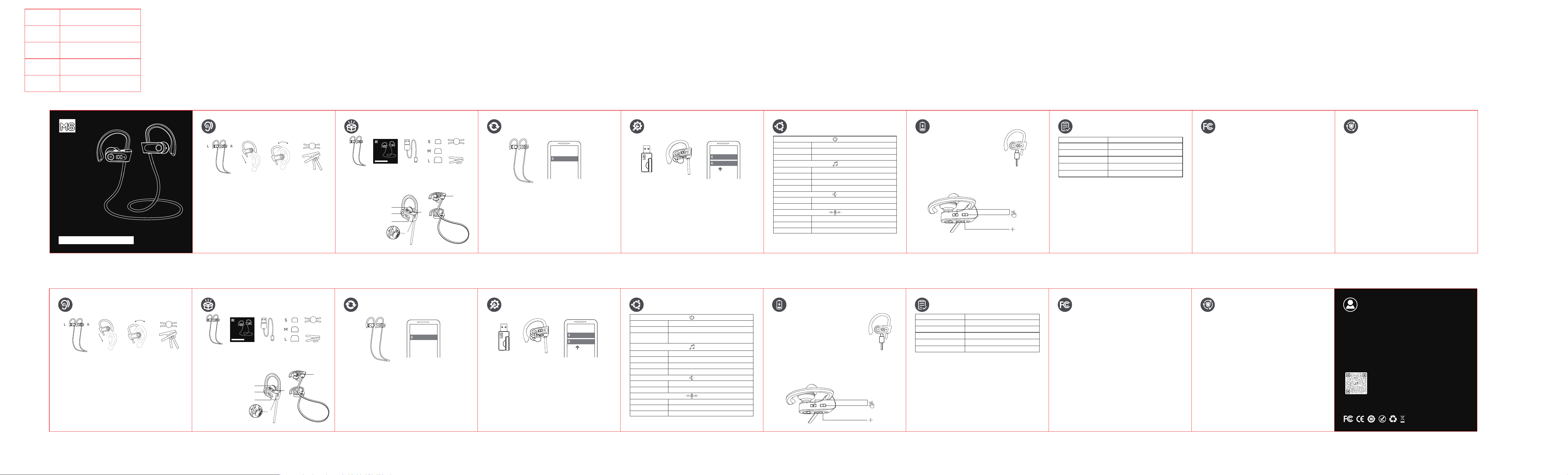
1.取出耳机(右手拿右侧,左手拿左侧)。
2.将耳机线绕在脖子上,并从顶部挂到耳朵上。
3.选择合适的耳罩,并调整耳机角度,以获得更好的舒适度和音质体验。
4.线扣可缩短线长,夹子可帮助将线固定在衣物上。
5.当单侧佩戴耳机时,请先戴右耳,因为通话麦克风孔位于右侧。
6.灰尘、耳垢或其他杂物会积聚在耳塞中。为保持最佳音质,请定期用
棉签轻轻清洁耳塞。
1.长按多功能按钮2秒以开机。
2.耳机自动配对,语音提示将提示“配对中”。
3.在手机上从蓝牙列表中选择“MISHUAI MS-M30”进行连接,连接成功后
语音提示会说“蓝牙已连接”。
注意:如果耳机未与任何设备配对,将在3分钟后自动关机。
注意:中等大小的耳塞位于耳机上。
“+”按钮
“-”按钮
多功能按钮(右)
麦克风
充电指示灯
Type-C充电口
5
客服支持
终身技术支持
我们的保修是对购买本产品的消费者所享受合法权利的补充。
Customer Support
Lifetime technical support
Our warranty is a supplement to the legal rights enjoyed by
consumers who purchase this product.
扫码下载咪帅APP
Download APP
FCC ID: 2A58W-M30
2 3
包装清单 开机与配对
产品概述
建议您在使用前确保产品已充满电。
佩戴
按键控制
注:更多个性化设置咪帅APP打开。
快速使用指南-User Manual
MISHUAI
咪帅-MISHUAI MS-M30
①
②
③
④
耳机*1 说明书*1
线扣*1
夹子*1充电线*1 耳塞*1
④
⑥
①
①
②
②
③
③
④
⑤
⑤
⑥
MISHUAI MS-M30
MISHUAI MS-M30
MISHUAI MS-M30 LEA
开机
关机
长按多功能按钮2秒
单击多功能按钮(耳机已开机但未处于通话状态)
单击“-”按钮
单击“+”按钮
双击多功能按钮
长按-/+键1.5秒
双击多功能按钮
长按多功能键1.5秒
长按多功能按钮5秒
电量显示
音量减小
音量增加
播放/暂停
上一曲/下一曲
接听/结束电话通话
拒接电话
长按多功能按钮1秒激活语音助手
四击多功能按钮游戏模式
三击多功能按钮切换3EQ模式
4
操作指示
9
7
头戴式设备已开启或已连接。同时三击“+”和“-”按钮。头戴式设备的
显示屏快速闪烁当前电量5次,然后熄灭。重置操作成功完成。
充电中:显示屏显示对应电量闪烁。
充满电:显示屏100%,耳机充满电长亮10秒灭灯。
警告:任何未经制造商明确批准的对该设备的更改或修改,均可能导致
您失去操作该设备的权限。
该设备符合FCC规则的第15部分。其运行需满足以下两个条件:
(1)该设备不得造成有害干扰。
(2)该设备必须接受接收到的任何干扰,包括可能引起非预期操作的
干扰。
该设备已通过评估,符合一般射频暴露要求,可在便携式暴露条件下
无限制使用。
·重新调整或移动接收天线。
·增加设备与接收器之间的距离。
·将设备连接到与接收器所接电路不同的电源插座。
·咨询经销商或有经验的无线电/电视技术人员以获得帮助。
6
耳机重置
该设备已经经过测试,符合FCC规则第15部分规定的B类数字设备的
限制要求。
这些限制旨在提供合理保护,防止在住宅安装环境中受到有害干扰。
该设备会生成、使用并可能辐射射频能量,如果未按使用说明进行
安装和使用,可能会对无线电通信造成有害干扰。
然而,无法保证特定安装环境中不会发生干扰。如果该设备确实对
无线电或电视接收造成有害干扰(可以通过关闭和开启设备来检测到
这种干扰),鼓励用户尝试通过以下一种或多种措施来纠正这种干扰:
FCC警告
充电前请彻底擦干USB-C充电口。使用提供的
USB-C充电线将充电盒连接至电源。
充电与重置
参数/FCC
8
FCC
保养与维修
·带锂电池的产品若长时间不使用,请至少确保每三个月充一次电。
·保持产品干燥,勿放在潮湿的地方,以免影响产品内部电路。
·勿将产品放置在太阳晒射或者温度高的地方。高温会缩短电子部件
的使用寿命、损坏电池、使某些塑料部件变形。
·勿将产品放在过冷的地方,以免损坏内部电路板。
·勿试图拆开产品,如果非专业人员,可能会损坏产品。
·不要跌落、强烈振动、用硬体撞击产品,以免会损坏内部电路。
·勿使用烈性化学制品、清洁剂清洁耳机。
·不要用尖体在产品表面上乱划,以免损坏外壳和影响外观。
三击
x5
型号
MISHUAI MS-M30
蓝牙版本
6.0
配置文件
HFP/HSP/AVRCP/A2DP
传输距离
最高可达15米/49英尺
频率范围
20HZ-20KHZ
充电时间
1.5小时
1
1.Take out the headphone (right side in right hand, left side in left hand).
2.Put the head phone cable around your head on your neck, and hang
the headphone from top to your ears.
3.Choose the right earmuffs and adjust the angle of the headphones
for a better comfort and sound quality experience.
4.The line buckle can shorten the the line, and the clip can help to
clamp the line on your clothes.
5. When wearing headphones on one side, please wear the right ear
first, because the call microphone hole is on the right.
6.Dust, earwax or other debris will accumulate in the earplugs. In order
to maintain the best sound quality, please gently clean the earplugs
with a cotton swab regularly.
1. Hold the Multi-function button for 2s to turn on.
2. The earphones pair automatically, a voice prompt will say
"Pairing in progress".
3. On your phone, select "MISHUAI MS-M30" from the Bluetooth list
to connect. After a successful connection, a voice prompt say
"Bluetooth connected".
Note:Headphones will turn off automatically after 3 min utes if they
have not been paired with any device.
Note:The medium ear caps are on the earphones
“+”Button
“-”Button
Multi-function Button(R)
Microphone
Charging Indicator
Type-C Charging Port
52 3
Packing List Power on and pairing
Preduct Overview
It is recommended that you make sure the
product is fullycharged before using it.
Wear
CONTROL
Note: More personalized settings are available on the Mi Shuai app.
①
②
③
④
Headphones*1 User Manual*1
Line Buckle*1
Clip*1Charging Cable*1
Ear Caps*1
④
⑥
①
①
②
②
③
③
④
⑤
⑤
⑥
Power on
Power off
Press Multi-function Button for 2 seconds
Click Multi-function Button for (The headphones are
turned on but not in a call state)
Click -
Click +
Double Click Multi-function Button
Press -/+ for 1.5 seconds
double Click Multi-function Button
Press Multi-function Button for 1.5 seconds
Press Multi-function Button for 5 seconds
Battery level display
Volume -
Volume +
Play/Pause
Previous/Next
Answer/End a phone call
Reject a phone call
Press Multi-function Button for 1 secondsActivate Voice Assistant
four-click Multi-function ButtonGame Mode
Triple-click the multi-function button to switch3EQ Mode
9
7
The headset is powered on or connected. Simultaneously press the
"+" and "-" buttons three times. The display of the head-mounted device
flashes the current battery level 5 times rapidly and then turns off. The
reset is successful.
Charging: The display screen shows the
corresponding battery level flashing.
Fully charged: The display screen is 100%, the
headphones are fully charged and keep on for 10
seconds before turning off the lights.
Caution:Any changes or modifications to this device not explicitly
approved by manufacturer couldvoid your authority to operate this
equipment.
This device complies with part 15 ofthe FCC Rules. Operation is subject
to the following two conditions:
(1) This device may not cause harmful interference, and
(2) this device must accept anyinterference received, including
interference that may cause undesired operation.
The device has been evaluated to meet general RF exposure
requirement, The device can be usedin portable exposure condition
without restriction.
·Reorient or relocate the receiving antenna
·Increase the separation between the equipment and receiver.
·Connect the equipment into an outlet on a circuit different from that to
which the receiver is connected.
·Consult the dealer or an experienced radio/TV technician for help.
6
RESET
This equipment has been tested and found to comply with the limits for
a Class B digital device,pursuant to part 15 of the FCC Rules. These limits
are designed to provide reasonable protectionagainst harmful interference
in a residential installation. This equipment generates, uses and canradiate
radio frequency energy and, if not installed and used in accordance with
the instructions.may cause harmful interference to radio communications.
However, there is no guarantee thatinterference will not occur in a
particular installation. lfthis equipment does cause harmfulinterference to
radio or television reception, which can be determined by turning the
equipment offand on, the user is encouraged to try to correct the
interference by one or more of the followingmeasures:
FCC Warning:
Fully dry off the USB-C charging port before
charging.Connect the charging case to a power
supply by usingthe provided USB-C charging cable.
Charging and resetting
Parameter/FCC
8
FCC
Maintenance and Repair
·If products with lithium batteries are not used for a long time, please
ensure that they are charged at least once every three months.
·Keep the product dry and do not place it in damp places to avoid
affecting the internal circuit of the product.
·Do not place the product in places with direct sunlight or high
temperatures. High temperatures can shorten the lifespan of
electronic components, damage batteries, and cause deformation
of certain plastic parts.
·Do not place the product in excessively cold areas to avoid damaging
the internal circuit board.
·Do not attempt to disassemble the product as it may be damaged
by non professionals.
·Do not drop, vibrate strongly, or hit the product with hardware to
avoid damaging the internal circuit.
·Do not use strong chemicals or cleaning agents to clean headphones.
·Do not scratch the surface of the product with a pointed body to
avoid damaging the shell and affecting the appearance.
triple-click
x5
Model
MISHUAI MS-M30
Bluetooth
6.0
Profile
HFP/HSP/AVRCP/A2DP
Range
Up to 15 meters/49 feet
Frequency Range
20HZ-20KHZ
Charging time 1.5 Hours
快速使用指南-User Manual
MISHUAI
咪帅-MISHUAI MS-M30
MISHUAI MS-M30
1、2.4G模式:双击多功能按钮开启蓝牙模式或者2.4G模式。
2、LC3低延时模式:蓝牙模式下会有两个蓝牙名“MISHUAI MS-M30和
MISHUAI MS-M30 LEA”,有LC3协议的手机可以连接
MISHUAI MS-M30 LEA体验低延迟,没有LC3协议的手机连上是无作用的。
(LC3协议)双击
MISHUAI MS-M30
MISHUAI MS-M30 LEA
4
Operation Instructions:
1、2.4G Mode:Double-click the multi-function button to activate Bluetooth mode
or 2.4G mode.
2、LC3 Low-Latency Mode: In Bluetooth mode, two Bluetooth names will be
available: MISHUAI MS-M30 and MISHUAI MS-M30 LEA. Phones supporting the
LC3 protocol can connect to MISHUAI MS-M30 LEA for low-latency experience;
Phones without the LC3 codec not function when connect.
(LC3 Protocol)Double-click