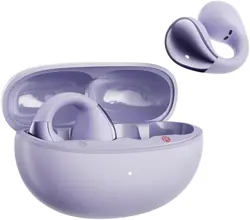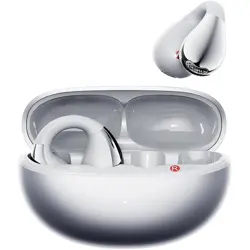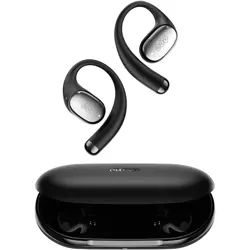
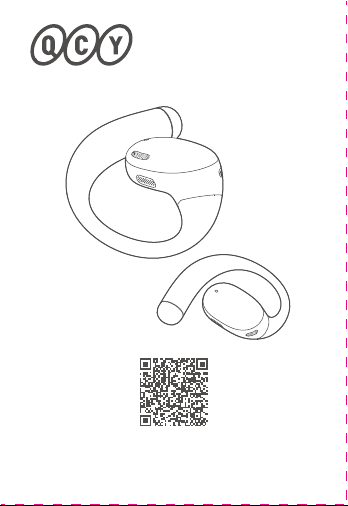
QCY Crossky R70
User Guide
Note: The images in this manual are for reference only and
may vary from the actual product. Please refer to the actual
product for accuracy.
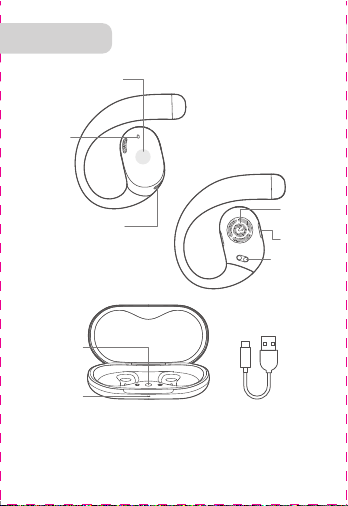
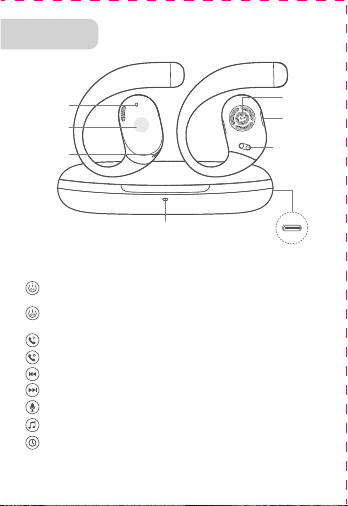
Charging Case
Button Control
Charging Case
Indicator LED
Overview
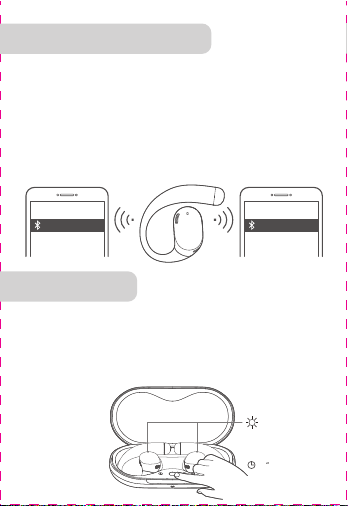
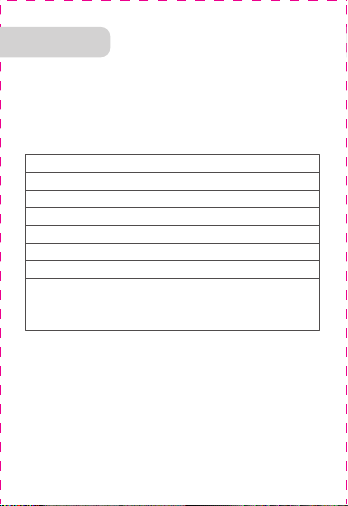
Bluetooth Pairing
Factory Reset
Controls
Initial Pairing:
Steps for Multi-Device Connection:
Multi-Device Connection
Clearing Pairing Records (Use in case of connection issues)
Charging: Red light stays on
Fully Charged: White light stays on
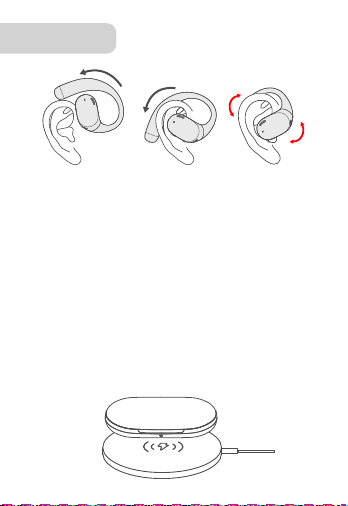
Wireless Charging Available
Charging Case Charging
Charging: Red light stays on while charging.
Fully Charged: White light flashes for 30 seconds.
Earbuds Charging
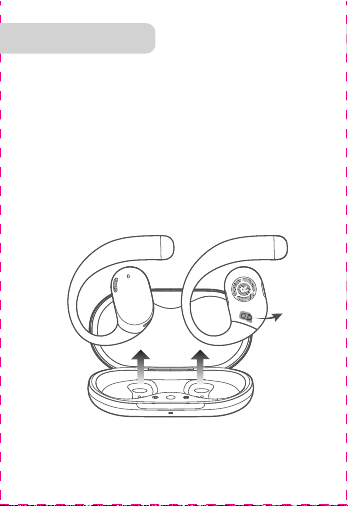
Peel Off
the
Protective
Film
Download the QCY app to experience custom touch
functions, EQ settings, firmware updates, and explore more.
Please use your mobile browser to scan the QR code and
download the QCY app.
1. Power on the earbuds to initiate pairing. After connecting to
Device A, turn off Bluetooth on Device A. The earbuds will enter
pairing mode again.
2. Enable Bluetooth on Device B and select "QCY Crossky R70"
for pairing.
3. On Device A, turn on Bluetooth and click the paired earbuds'
name to finish multi-device connection.
1. Hold the earbuds above your ears.
2. Rotate the ear hooks downward along the auricle of the ear
to achieve proper positioning.
* Incorrect wearing may affect sound quality and hearing.
Type-C Cable
Charging Case
Indicator LED
LED
Microphone
Touch Area
Charging
Contactors
Sound
Outlet
Bass Port
Power On: Open the charging case to turn on automatically,
or tap and hold the earbud for 1.5 seconds.
Power Off: Place the earbuds in the charging case and
close the lid.
Answer/End Call: Double-tap the earbud.
Reject Call: Tap and hold the earbud for 1.5 seconds.
Previous Track: Tap and hold the left earbud for 1.5 seconds.
Next Track: Tap and hold the right earbud for 1.5 seconds.
Voice Assistant: Triple-tap the left earbud.
Play/Pause: Double-tap the earbud.
Activate Low Latency Mode: Triple-tap the right earbud.
Open-ear Headphones
Manufacturer: Dongguan Hele Electronics Co., Ltd.
Address: Room 101, Block 1, No.38, Daojiao Daohou Road,
Daojiao Town, Dongguan City, Guangdong Province, China.
Warranty
Comments:
Model Number:
Date of Purchasing:
User's Name:
User's Phone:
User's Address:
Shop's Name:
Shop's Address:
FCC Statement
Safety Precautions
This marking indicates that this product should
not be disposed of with other household wastes
throughout the EU. To prevent possible harm to
the environment or human health from
uncontrolled waste disposal, recycle it
responsibly to promote the sustainable reuse of
material resources. To return your used device,
please use the return and collection systems or
contact the retailer where the product was
purchased. They can take this product for
environmentally safe recycling.
Notice:
1. Please carefully read and retain this user manual before
using the product.
2. If the product is not used for an extended period (more than
2 weeks), please recharge it.
3. You must choose a charger produced by a legitimate
manufacturer and certified by the national safety authority.
4. If your phone cannot detect the Bluetooth earbuds, either
re-enter pairing mode or perform a factory reset on the
Bluetooth earbuds. If there is a phone program error, close
and reopen Bluetooth on the phone or restart the phone.
5. Do not disassemble or modify the battery, insert foreign
objects, expose it to high temperatures, or immerse it in water
or other liquids to prevent battery leakage, overheating,
ignition, or explosion. Battery replacement should only be
done by the manufacturer.
6. Do not drop, crush, or puncture the battery. Prevent
external pressure that may lead to internal short circuits and
overheating.
7. Do not dismantle or modify the earbuds for any reason, as
it may result in fire, electronic breakdown, or permanent
damage to the product.
8. Do not expose the product to extremely low or high
temperatures (below 0°C or above 45°C).
9. Do not the product indicator light near the eyes of children
or animals.
10. Do not use the product during thunderstorms, as it may
cause abnormal operation and increase the risk of electric
shock.
11. Do not use oil or other volatile liquids to clean the product.
12. Do not use this device for long periods of time
and at high volume, as there is a risk of hearing
damage。
Your QCY product purchase is covered by a one-year limited
manufacturer warranty from the date of delivery. Please
ensure you retain your purchase receipt. If any defects occur
due to quality issues within the warranty period, kindly bring
both the warranty card and the purchase receipt to the
authorized dealer for complimentary replacement services.
The manufacturer's warranty is void under the following
circumstances but not limited to:
• Improper or inadequate maintenance or modification.
• Accident, misuse, abuse, contamination, or other external
causes.
• The use of unspecified adapters and accessories.
• Malfunctions or damages resulting from natural disasters,
earthquakes, lightning, abnormal voltage, or environmental
factors.
• Damages that occur as a result of one's failure to follow the
instructions.
Wireless frequency: 2.402~2.480GHz
RF power of transmission: <4dBm
This equipment has been tested and found to comply with the
limits for a Class B digital device, pursuant to Part 15 of the
FCC Rules. These limits are designed to provide reasonable
protection against harmful interference in a residential installation.
This equipment generates uses and can radiate radio frequency
energy and, if not installed and used in accordance with the
instructions, may cause harmful interference to radio communications.
However, there is no guarantee that interference will not occur in
a particular installation. If this equipment does cause harmful
interference to radio or television reception, which can be
determined by turning the equipment off and on, the user is
encouraged to try to correct the interference by one or more of
the following measures:
--Reorient or relocate the receiving antenna.
--Increase the separation between the equipment and receiver.
--Connect the equipment into an outlet on a circuit different
from that to which the receiver is connected.
--Consult the dealer or an experienced radio/TV technician for
help.
This device complies with part 15 of the FCC Rules. Operation is
subject to the following two conditions:
(1)This device may not cause harmful interference, and
2) this device must accept any interference received, including
interference that may cause undesired operation.
Changes or modifications not expressly approved by the party
responsible for compliance could void the user's authority to
operate the equipment.
The power delivered by the charger must be
between min 2 Watts required by the radio
equipment, and max 5 Watts in order to
achieve the maximum charging speed.
2-5
W
FCC ID:
RDR-BH24CT02AL
RDR-BH24CT02AR
222-251735
222-251776
1.Take both earbuds out and remove the insulating film from
each, return the earbuds to the charging case and close the lid.
2. Take the earbuds out again, the earbuds will power on
automatically.
3. Refresh the Bluetooth device list on your phone and
select "QCY Crossky R70" to connect.
①②③
QCY Crossky R70QCY Crossky R70
10
5
×
Touch Area
LED
Microphone
Sound
Outlet
Bass Port
Charging
Contactors
Charging CaseType-C Cable
With the earbuds in the charging case and the lid open, press
and hold the case button for 10 seconds until the earbuds'
white LED flashes 5 times.
* Resetting the earbuds will clear the list of paired devices and
reset all settings.
(This feature is turned off by default. To activate it, please enable the option within the app.)
QCY Crossky R70
User Guide
Note: The images in this manual are for reference only and
may vary from the actual product. Please refer to the actual
product for accuracy.
Charging Case
Button Control
Charging Case
Indicator LED
Overview
Bluetooth Pairing
Factory Reset
Controls
Initial Pairing:
Steps for Multi-Device Connection:
Multi-Device Connection
Clearing Pairing Records (Use in case of connection issues)
Charging: Red light stays on
Fully Charged: White light stays on
Wireless Charging Available
Charging Case Charging
Charging: Red light stays on while charging.
Fully Charged: White light flashes for 30 seconds.
Earbuds Charging
Peel Off
the
Protective
Film
Download the QCY app to experience custom touch
functions, EQ settings, firmware updates, and explore more.
Please use your mobile browser to scan the QR code and
download the QCY app.
1. Power on the earbuds to initiate pairing. After connecting to
Device A, turn off Bluetooth on Device A. The earbuds will enter
pairing mode again.
2. Enable Bluetooth on Device B and select "QCY Crossky R70"
for pairing.
3. On Device A, turn on Bluetooth and click the paired earbuds'
name to finish multi-device connection.
1. Hold the earbuds above your ears.
2. Rotate the ear hooks downward along the auricle of the ear
to achieve proper positioning.
* Incorrect wearing may affect sound quality and hearing.
Type-C Cable
Charging Case
Indicator LED
LED
Microphone
Touch Area
Charging
Contactors
Sound
Outlet
Bass Port
Power On: Open the charging case to turn on automatically,
or tap and hold the earbud for 1.5 seconds.
Power Off: Place the earbuds in the charging case and
close the lid.
Answer/End Call: Double-tap the earbud.
Reject Call: Tap and hold the earbud for 1.5 seconds.
Previous Track: Tap and hold the left earbud for 1.5 seconds.
Next Track: Tap and hold the right earbud for 1.5 seconds.
Voice Assistant: Triple-tap the left earbud.
Play/Pause: Double-tap the earbud.
Activate Low Latency Mode: Triple-tap the right earbud.
Open-ear Headphones
Manufacturer: Dongguan Hele Electronics Co., Ltd.
Address: Room 101, Block 1, No.38, Daojiao Daohou Road,
Daojiao Town, Dongguan City, Guangdong Province, China.
Warranty
Comments:
Model Number:
Date of Purchasing:
User's Name:
User's Phone:
User's Address:
Shop's Name:
Shop's Address:
FCC Statement
Safety Precautions
This marking indicates that this product should
not be disposed of with other household wastes
throughout the EU. To prevent possible harm to
the environment or human health from
uncontrolled waste disposal, recycle it
responsibly to promote the sustainable reuse of
material resources. To return your used device,
please use the return and collection systems or
contact the retailer where the product was
purchased. They can take this product for
environmentally safe recycling.
Notice:
1. Please carefully read and retain this user manual before
using the product.
2. If the product is not used for an extended period (more than
2 weeks), please recharge it.
3. You must choose a charger produced by a legitimate
manufacturer and certified by the national safety authority.
4. If your phone cannot detect the Bluetooth earbuds, either
re-enter pairing mode or perform a factory reset on the
Bluetooth earbuds. If there is a phone program error, close
and reopen Bluetooth on the phone or restart the phone.
5. Do not disassemble or modify the battery, insert foreign
objects, expose it to high temperatures, or immerse it in water
or other liquids to prevent battery leakage, overheating,
ignition, or explosion. Battery replacement should only be
done by the manufacturer.
6. Do not drop, crush, or puncture the battery. Prevent
external pressure that may lead to internal short circuits and
overheating.
7. Do not dismantle or modify the earbuds for any reason, as
it may result in fire, electronic breakdown, or permanent
damage to the product.
8. Do not expose the product to extremely low or high
temperatures (below 0°C or above 45°C).
9. Do not the product indicator light near the eyes of children
or animals.
10. Do not use the product during thunderstorms, as it may
cause abnormal operation and increase the risk of electric
shock.
11. Do not use oil or other volatile liquids to clean the product.
12. Do not use this device for long periods of time
and at high volume, as there is a risk of hearing
damage。
Your QCY product purchase is covered by a one-year limited
manufacturer warranty from the date of delivery. Please
ensure you retain your purchase receipt. If any defects occur
due to quality issues within the warranty period, kindly bring
both the warranty card and the purchase receipt to the
authorized dealer for complimentary replacement services.
The manufacturer's warranty is void under the following
circumstances but not limited to:
• Improper or inadequate maintenance or modification.
• Accident, misuse, abuse, contamination, or other external
causes.
• The use of unspecified adapters and accessories.
• Malfunctions or damages resulting from natural disasters,
earthquakes, lightning, abnormal voltage, or environmental
factors.
• Damages that occur as a result of one's failure to follow the
instructions.
Wireless frequency: 2.402~2.480GHz
RF power of transmission: <4dBm
This equipment has been tested and found to comply with the
limits for a Class B digital device, pursuant to Part 15 of the
FCC Rules. These limits are designed to provide reasonable
protection against harmful interference in a residential installation.
This equipment generates uses and can radiate radio frequency
energy and, if not installed and used in accordance with the
instructions, may cause harmful interference to radio communications.
However, there is no guarantee that interference will not occur in
a particular installation. If this equipment does cause harmful
interference to radio or television reception, which can be
determined by turning the equipment off and on, the user is
encouraged to try to correct the interference by one or more of
the following measures:
--Reorient or relocate the receiving antenna.
--Increase the separation between the equipment and receiver.
--Connect the equipment into an outlet on a circuit different
from that to which the receiver is connected.
--Consult the dealer or an experienced radio/TV technician for
help.
This device complies with part 15 of the FCC Rules. Operation is
subject to the following two conditions:
(1)This device may not cause harmful interference, and
2) this device must accept any interference received, including
interference that may cause undesired operation.
Changes or modifications not expressly approved by the party
responsible for compliance could void the user's authority to
operate the equipment.
The power delivered by the charger must be
between min 2 Watts required by the radio
equipment, and max 5 Watts in order to
achieve the maximum charging speed.
2-5
W
FCC ID:
RDR-BH24CT02AL
RDR-BH24CT02AR
222-251735
222-251776
1.Take both earbuds out and remove the insulating film from
each, return the earbuds to the charging case and close the lid.
2. Take the earbuds out again, the earbuds will power on
automatically.
3. Refresh the Bluetooth device list on your phone and
select "QCY Crossky R70" to connect.
①②③
QCY Crossky R70QCY Crossky R70
10
5
×
Touch Area
LED
Microphone
Sound
Outlet
Bass Port
Charging
Contactors
Charging CaseType-C Cable
With the earbuds in the charging case and the lid open, press
and hold the case button for 10 seconds until the earbuds'
white LED flashes 5 times.
* Resetting the earbuds will clear the list of paired devices and
reset all settings.
(This feature is turned off by default. To activate it, please enable the option within the app.)
QCY Crossky R70
User Guide
Note: The images in this manual are for reference only and
may vary from the actual product. Please refer to the actual
product for accuracy.
Charging Case
Button Control
Charging Case
Indicator LED
Overview
Bluetooth Pairing
Factory Reset
Controls
Initial Pairing:
Steps for Multi-Device Connection:
Multi-Device Connection
Clearing Pairing Records (Use in case of connection issues)
Charging: Red light stays on
Fully Charged: White light stays on
Wireless Charging Available
Charging Case Charging
Charging: Red light stays on while charging.
Fully Charged: White light flashes for 30 seconds.
Earbuds Charging
Peel Off
the
Protective
Film
Download the QCY app to experience custom touch
functions, EQ settings, firmware updates, and explore more.
Please use your mobile browser to scan the QR code and
download the QCY app.
1. Power on the earbuds to initiate pairing. After connecting to
Device A, turn off Bluetooth on Device A. The earbuds will enter
pairing mode again.
2. Enable Bluetooth on Device B and select "QCY Crossky R70"
for pairing.
3. On Device A, turn on Bluetooth and click the paired earbuds'
name to finish multi-device connection.
1. Hold the earbuds above your ears.
2. Rotate the ear hooks downward along the auricle of the ear
to achieve proper positioning.
* Incorrect wearing may affect sound quality and hearing.
Type-C Cable
Charging Case
Indicator LED
LED
Microphone
Touch Area
Charging
Contactors
Sound
Outlet
Bass Port
Power On: Open the charging case to turn on automatically,
or tap and hold the earbud for 1.5 seconds.
Power Off: Place the earbuds in the charging case and
close the lid.
Answer/End Call: Double-tap the earbud.
Reject Call: Tap and hold the earbud for 1.5 seconds.
Previous Track: Tap and hold the left earbud for 1.5 seconds.
Next Track: Tap and hold the right earbud for 1.5 seconds.
Voice Assistant: Triple-tap the left earbud.
Play/Pause: Double-tap the earbud.
Activate Low Latency Mode: Triple-tap the right earbud.
Open-ear Headphones
Manufacturer: Dongguan Hele Electronics Co., Ltd.
Address: Room 101, Block 1, No.38, Daojiao Daohou Road,
Daojiao Town, Dongguan City, Guangdong Province, China.
Warranty
Comments:
Model Number:
Date of Purchasing:
User's Name:
User's Phone:
User's Address:
Shop's Name:
Shop's Address:
FCC Statement
Safety Precautions
This marking indicates that this product should
not be disposed of with other household wastes
throughout the EU. To prevent possible harm to
the environment or human health from
uncontrolled waste disposal, recycle it
responsibly to promote the sustainable reuse of
material resources. To return your used device,
please use the return and collection systems or
contact the retailer where the product was
purchased. They can take this product for
environmentally safe recycling.
Notice:
1. Please carefully read and retain this user manual before
using the product.
2. If the product is not used for an extended period (more than
2 weeks), please recharge it.
3. You must choose a charger produced by a legitimate
manufacturer and certified by the national safety authority.
4. If your phone cannot detect the Bluetooth earbuds, either
re-enter pairing mode or perform a factory reset on the
Bluetooth earbuds. If there is a phone program error, close
and reopen Bluetooth on the phone or restart the phone.
5. Do not disassemble or modify the battery, insert foreign
objects, expose it to high temperatures, or immerse it in water
or other liquids to prevent battery leakage, overheating,
ignition, or explosion. Battery replacement should only be
done by the manufacturer.
6. Do not drop, crush, or puncture the battery. Prevent
external pressure that may lead to internal short circuits and
overheating.
7. Do not dismantle or modify the earbuds for any reason, as
it may result in fire, electronic breakdown, or permanent
damage to the product.
8. Do not expose the product to extremely low or high
temperatures (below 0°C or above 45°C).
9. Do not the product indicator light near the eyes of children
or animals.
10. Do not use the product during thunderstorms, as it may
cause abnormal operation and increase the risk of electric
shock.
11. Do not use oil or other volatile liquids to clean the product.
12. Do not use this device for long periods of time
and at high volume, as there is a risk of hearing
damage。
Your QCY product purchase is covered by a one-year limited
manufacturer warranty from the date of delivery. Please
ensure you retain your purchase receipt. If any defects occur
due to quality issues within the warranty period, kindly bring
both the warranty card and the purchase receipt to the
authorized dealer for complimentary replacement services.
The manufacturer's warranty is void under the following
circumstances but not limited to:
• Improper or inadequate maintenance or modification.
• Accident, misuse, abuse, contamination, or other external
causes.
• The use of unspecified adapters and accessories.
• Malfunctions or damages resulting from natural disasters,
earthquakes, lightning, abnormal voltage, or environmental
factors.
• Damages that occur as a result of one's failure to follow the
instructions.
Wireless frequency: 2.402~2.480GHz
RF power of transmission: <4dBm
This equipment has been tested and found to comply with the
limits for a Class B digital device, pursuant to Part 15 of the
FCC Rules. These limits are designed to provide reasonable
protection against harmful interference in a residential installation.
This equipment generates uses and can radiate radio frequency
energy and, if not installed and used in accordance with the
instructions, may cause harmful interference to radio communications.
However, there is no guarantee that interference will not occur in
a particular installation. If this equipment does cause harmful
interference to radio or television reception, which can be
determined by turning the equipment off and on, the user is
encouraged to try to correct the interference by one or more of
the following measures:
--Reorient or relocate the receiving antenna.
--Increase the separation between the equipment and receiver.
--Connect the equipment into an outlet on a circuit different
from that to which the receiver is connected.
--Consult the dealer or an experienced radio/TV technician for
help.
This device complies with part 15 of the FCC Rules. Operation is
subject to the following two conditions:
(1)This device may not cause harmful interference, and
2) this device must accept any interference received, including
interference that may cause undesired operation.
Changes or modifications not expressly approved by the party
responsible for compliance could void the user's authority to
operate the equipment.
The power delivered by the charger must be
between min 2 Watts required by the radio
equipment, and max 5 Watts in order to
achieve the maximum charging speed.
2-5
W
FCC ID:
RDR-BH24CT02AL
RDR-BH24CT02AR
222-251735
222-251776
1.Take both earbuds out and remove the insulating film from
each, return the earbuds to the charging case and close the lid.
2. Take the earbuds out again, the earbuds will power on
automatically.
3. Refresh the Bluetooth device list on your phone and
select "QCY Crossky R70" to connect.
①②③
QCY Crossky R70QCY Crossky R70
10
5
×
Touch Area
LED
Microphone
Sound
Outlet
Bass Port
Charging
Contactors
Charging CaseType-C Cable
With the earbuds in the charging case and the lid open, press
and hold the case button for 10 seconds until the earbuds'
white LED flashes 5 times.
* Resetting the earbuds will clear the list of paired devices and
reset all settings.
(This feature is turned off by default. To activate it, please enable the option within the app.)
QCY Crossky R70
User Guide
Note: The images in this manual are for reference only and
may vary from the actual product. Please refer to the actual
product for accuracy.
Charging Case
Button Control
Charging Case
Indicator LED
Overview
Bluetooth Pairing
Factory Reset
Controls
Initial Pairing:
Steps for Multi-Device Connection:
Multi-Device Connection
Clearing Pairing Records (Use in case of connection issues)
Charging: Red light stays on
Fully Charged: White light stays on
Wireless Charging Available
Charging Case Charging
Charging: Red light stays on while charging.
Fully Charged: White light flashes for 30 seconds.
Earbuds Charging
Peel Off
the
Protective
Film
Download the QCY app to experience custom touch
functions, EQ settings, firmware updates, and explore more.
Please use your mobile browser to scan the QR code and
download the QCY app.
1. Power on the earbuds to initiate pairing. After connecting to
Device A, turn off Bluetooth on Device A. The earbuds will enter
pairing mode again.
2. Enable Bluetooth on Device B and select "QCY Crossky R70"
for pairing.
3. On Device A, turn on Bluetooth and click the paired earbuds'
name to finish multi-device connection.
1. Hold the earbuds above your ears.
2. Rotate the ear hooks downward along the auricle of the ear
to achieve proper positioning.
* Incorrect wearing may affect sound quality and hearing.
Type-C Cable
Charging Case
Indicator LED
LED
Microphone
Touch Area
Charging
Contactors
Sound
Outlet
Bass Port
Power On: Open the charging case to turn on automatically,
or tap and hold the earbud for 1.5 seconds.
Power Off: Place the earbuds in the charging case and
close the lid.
Answer/End Call: Double-tap the earbud.
Reject Call: Tap and hold the earbud for 1.5 seconds.
Previous Track: Tap and hold the left earbud for 1.5 seconds.
Next Track: Tap and hold the right earbud for 1.5 seconds.
Voice Assistant: Triple-tap the left earbud.
Play/Pause: Double-tap the earbud.
Activate Low Latency Mode: Triple-tap the right earbud.
Open-ear Headphones
Manufacturer: Dongguan Hele Electronics Co., Ltd.
Address: Room 101, Block 1, No.38, Daojiao Daohou Road,
Daojiao Town, Dongguan City, Guangdong Province, China.
Warranty
Comments:
Model Number:
Date of Purchasing:
User's Name:
User's Phone:
User's Address:
Shop's Name:
Shop's Address:
FCC Statement
Safety Precautions
This marking indicates that this product should
not be disposed of with other household wastes
throughout the EU. To prevent possible harm to
the environment or human health from
uncontrolled waste disposal, recycle it
responsibly to promote the sustainable reuse of
material resources. To return your used device,
please use the return and collection systems or
contact the retailer where the product was
purchased. They can take this product for
environmentally safe recycling.
Notice:
1. Please carefully read and retain this user manual before
using the product.
2. If the product is not used for an extended period (more than
2 weeks), please recharge it.
3. You must choose a charger produced by a legitimate
manufacturer and certified by the national safety authority.
4. If your phone cannot detect the Bluetooth earbuds, either
re-enter pairing mode or perform a factory reset on the
Bluetooth earbuds. If there is a phone program error, close
and reopen Bluetooth on the phone or restart the phone.
5. Do not disassemble or modify the battery, insert foreign
objects, expose it to high temperatures, or immerse it in water
or other liquids to prevent battery leakage, overheating,
ignition, or explosion. Battery replacement should only be
done by the manufacturer.
6. Do not drop, crush, or puncture the battery. Prevent
external pressure that may lead to internal short circuits and
overheating.
7. Do not dismantle or modify the earbuds for any reason, as
it may result in fire, electronic breakdown, or permanent
damage to the product.
8. Do not expose the product to extremely low or high
temperatures (below 0°C or above 45°C).
9. Do not the product indicator light near the eyes of children
or animals.
10. Do not use the product during thunderstorms, as it may
cause abnormal operation and increase the risk of electric
shock.
11. Do not use oil or other volatile liquids to clean the product.
12. Do not use this device for long periods of time
and at high volume, as there is a risk of hearing
damage。
Your QCY product purchase is covered by a one-year limited
manufacturer warranty from the date of delivery. Please
ensure you retain your purchase receipt. If any defects occur
due to quality issues within the warranty period, kindly bring
both the warranty card and the purchase receipt to the
authorized dealer for complimentary replacement services.
The manufacturer's warranty is void under the following
circumstances but not limited to:
• Improper or inadequate maintenance or modification.
• Accident, misuse, abuse, contamination, or other external
causes.
• The use of unspecified adapters and accessories.
• Malfunctions or damages resulting from natural disasters,
earthquakes, lightning, abnormal voltage, or environmental
factors.
• Damages that occur as a result of one's failure to follow the
instructions.
Wireless frequency: 2.402~2.480GHz
RF power of transmission: <4dBm
This equipment has been tested and found to comply with the
limits for a Class B digital device, pursuant to Part 15 of the
FCC Rules. These limits are designed to provide reasonable
protection against harmful interference in a residential installation.
This equipment generates uses and can radiate radio frequency
energy and, if not installed and used in accordance with the
instructions, may cause harmful interference to radio communications.
However, there is no guarantee that interference will not occur in
a particular installation. If this equipment does cause harmful
interference to radio or television reception, which can be
determined by turning the equipment off and on, the user is
encouraged to try to correct the interference by one or more of
the following measures:
--Reorient or relocate the receiving antenna.
--Increase the separation between the equipment and receiver.
--Connect the equipment into an outlet on a circuit different
from that to which the receiver is connected.
--Consult the dealer or an experienced radio/TV technician for
help.
This device complies with part 15 of the FCC Rules. Operation is
subject to the following two conditions:
(1)This device may not cause harmful interference, and
2) this device must accept any interference received, including
interference that may cause undesired operation.
Changes or modifications not expressly approved by the party
responsible for compliance could void the user's authority to
operate the equipment.
The power delivered by the charger must be
between min 2 Watts required by the radio
equipment, and max 5 Watts in order to
achieve the maximum charging speed.
2-5
W
FCC ID:
RDR-BH24CT02AL
RDR-BH24CT02AR
222-251735
222-251776
1.Take both earbuds out and remove the insulating film from
each, return the earbuds to the charging case and close the lid.
2. Take the earbuds out again, the earbuds will power on
automatically.
3. Refresh the Bluetooth device list on your phone and
select "QCY Crossky R70" to connect.
①②③
QCY Crossky R70QCY Crossky R70
10
5
×
Touch Area
LED
Microphone
Sound
Outlet
Bass Port
Charging
Contactors
Charging CaseType-C Cable
With the earbuds in the charging case and the lid open, press
and hold the case button for 10 seconds until the earbuds'
white LED flashes 5 times.
* Resetting the earbuds will clear the list of paired devices and
reset all settings.
(This feature is turned off by default. To activate it, please enable the option within the app.)
QCY Crossky R70
User Guide
Note: The images in this manual are for reference only and
may vary from the actual product. Please refer to the actual
product for accuracy.
Charging Case
Button Control
Charging Case
Indicator LED
Overview
Bluetooth Pairing
Factory Reset
Controls
Initial Pairing:
Steps for Multi-Device Connection:
Multi-Device Connection
Clearing Pairing Records (Use in case of connection issues)
Charging: Red light stays on
Fully Charged: White light stays on
Wireless Charging Available
Charging Case Charging
Charging: Red light stays on while charging.
Fully Charged: White light flashes for 30 seconds.
Earbuds Charging
Peel Off
the
Protective
Film
Download the QCY app to experience custom touch
functions, EQ settings, firmware updates, and explore more.
Please use your mobile browser to scan the QR code and
download the QCY app.
1. Power on the earbuds to initiate pairing. After connecting to
Device A, turn off Bluetooth on Device A. The earbuds will enter
pairing mode again.
2. Enable Bluetooth on Device B and select "QCY Crossky R70"
for pairing.
3. On Device A, turn on Bluetooth and click the paired earbuds'
name to finish multi-device connection.
1. Hold the earbuds above your ears.
2. Rotate the ear hooks downward along the auricle of the ear
to achieve proper positioning.
* Incorrect wearing may affect sound quality and hearing.
Type-C Cable
Charging Case
Indicator LED
LED
Microphone
Touch Area
Charging
Contactors
Sound
Outlet
Bass Port
Power On: Open the charging case to turn on automatically,
or tap and hold the earbud for 1.5 seconds.
Power Off: Place the earbuds in the charging case and
close the lid.
Answer/End Call: Double-tap the earbud.
Reject Call: Tap and hold the earbud for 1.5 seconds.
Previous Track: Tap and hold the left earbud for 1.5 seconds.
Next Track: Tap and hold the right earbud for 1.5 seconds.
Voice Assistant: Triple-tap the left earbud.
Play/Pause: Double-tap the earbud.
Activate Low Latency Mode: Triple-tap the right earbud.
Open-ear Headphones
Manufacturer: Dongguan Hele Electronics Co., Ltd.
Address: Room 101, Block 1, No.38, Daojiao Daohou Road,
Daojiao Town, Dongguan City, Guangdong Province, China.
Warranty
Comments:
Model Number:
Date of Purchasing:
User's Name:
User's Phone:
User's Address:
Shop's Name:
Shop's Address:
FCC Statement
Safety Precautions
This marking indicates that this product should
not be disposed of with other household wastes
throughout the EU. To prevent possible harm to
the environment or human health from
uncontrolled waste disposal, recycle it
responsibly to promote the sustainable reuse of
material resources. To return your used device,
please use the return and collection systems or
contact the retailer where the product was
purchased. They can take this product for
environmentally safe recycling.
Notice:
1. Please carefully read and retain this user manual before
using the product.
2. If the product is not used for an extended period (more than
2 weeks), please recharge it.
3. You must choose a charger produced by a legitimate
manufacturer and certified by the national safety authority.
4. If your phone cannot detect the Bluetooth earbuds, either
re-enter pairing mode or perform a factory reset on the
Bluetooth earbuds. If there is a phone program error, close
and reopen Bluetooth on the phone or restart the phone.
5. Do not disassemble or modify the battery, insert foreign
objects, expose it to high temperatures, or immerse it in water
or other liquids to prevent battery leakage, overheating,
ignition, or explosion. Battery replacement should only be
done by the manufacturer.
6. Do not drop, crush, or puncture the battery. Prevent
external pressure that may lead to internal short circuits and
overheating.
7. Do not dismantle or modify the earbuds for any reason, as
it may result in fire, electronic breakdown, or permanent
damage to the product.
8. Do not expose the product to extremely low or high
temperatures (below 0°C or above 45°C).
9. Do not the product indicator light near the eyes of children
or animals.
10. Do not use the product during thunderstorms, as it may
cause abnormal operation and increase the risk of electric
shock.
11. Do not use oil or other volatile liquids to clean the product.
12. Do not use this device for long periods of time
and at high volume, as there is a risk of hearing
damage。
Your QCY product purchase is covered by a one-year limited
manufacturer warranty from the date of delivery. Please
ensure you retain your purchase receipt. If any defects occur
due to quality issues within the warranty period, kindly bring
both the warranty card and the purchase receipt to the
authorized dealer for complimentary replacement services.
The manufacturer's warranty is void under the following
circumstances but not limited to:
• Improper or inadequate maintenance or modification.
• Accident, misuse, abuse, contamination, or other external
causes.
• The use of unspecified adapters and accessories.
• Malfunctions or damages resulting from natural disasters,
earthquakes, lightning, abnormal voltage, or environmental
factors.
• Damages that occur as a result of one's failure to follow the
instructions.
Wireless frequency: 2.402~2.480GHz
RF power of transmission: <4dBm
This equipment has been tested and found to comply with the
limits for a Class B digital device, pursuant to Part 15 of the
FCC Rules. These limits are designed to provide reasonable
protection against harmful interference in a residential installation.
This equipment generates uses and can radiate radio frequency
energy and, if not installed and used in accordance with the
instructions, may cause harmful interference to radio communications.
However, there is no guarantee that interference will not occur in
a particular installation. If this equipment does cause harmful
interference to radio or television reception, which can be
determined by turning the equipment off and on, the user is
encouraged to try to correct the interference by one or more of
the following measures:
--Reorient or relocate the receiving antenna.
--Increase the separation between the equipment and receiver.
--Connect the equipment into an outlet on a circuit different
from that to which the receiver is connected.
--Consult the dealer or an experienced radio/TV technician for
help.
This device complies with part 15 of the FCC Rules. Operation is
subject to the following two conditions:
(1)This device may not cause harmful interference, and
2) this device must accept any interference received, including
interference that may cause undesired operation.
Changes or modifications not expressly approved by the party
responsible for compliance could void the user's authority to
operate the equipment.
The power delivered by the charger must be
between min 2 Watts required by the radio
equipment, and max 5 Watts in order to
achieve the maximum charging speed.
2-5
W
FCC ID:
RDR-BH24CT02AL
RDR-BH24CT02AR
222-251735
222-251776
1.Take both earbuds out and remove the insulating film from
each, return the earbuds to the charging case and close the lid.
2. Take the earbuds out again, the earbuds will power on
automatically.
3. Refresh the Bluetooth device list on your phone and
select "QCY Crossky R70" to connect.
①②③
QCY Crossky R70QCY Crossky R70
10
5
×
Touch Area
LED
Microphone
Sound
Outlet
Bass Port
Charging
Contactors
Charging CaseType-C Cable
With the earbuds in the charging case and the lid open, press
and hold the case button for 10 seconds until the earbuds'
white LED flashes 5 times.
* Resetting the earbuds will clear the list of paired devices and
reset all settings.
(This feature is turned off by default. To activate it, please enable the option within the app.)
QCY Crossky R70
User Guide
Note: The images in this manual are for reference only and
may vary from the actual product. Please refer to the actual
product for accuracy.
Charging Case
Button Control
Charging Case
Indicator LED
Overview
Bluetooth Pairing
Factory Reset
Controls
Initial Pairing:
Steps for Multi-Device Connection:
Multi-Device Connection
Clearing Pairing Records (Use in case of connection issues)
Charging: Red light stays on
Fully Charged: White light stays on
Wireless Charging Available
Charging Case Charging
Charging: Red light stays on while charging.
Fully Charged: White light flashes for 30 seconds.
Earbuds Charging
Peel Off
the
Protective
Film
Download the QCY app to experience custom touch
functions, EQ settings, firmware updates, and explore more.
Please use your mobile browser to scan the QR code and
download the QCY app.
1. Power on the earbuds to initiate pairing. After connecting to
Device A, turn off Bluetooth on Device A. The earbuds will enter
pairing mode again.
2. Enable Bluetooth on Device B and select "QCY Crossky R70"
for pairing.
3. On Device A, turn on Bluetooth and click the paired earbuds'
name to finish multi-device connection.
1. Hold the earbuds above your ears.
2. Rotate the ear hooks downward along the auricle of the ear
to achieve proper positioning.
* Incorrect wearing may affect sound quality and hearing.
Type-C Cable
Charging Case
Indicator LED
LED
Microphone
Touch Area
Charging
Contactors
Sound
Outlet
Bass Port
Power On: Open the charging case to turn on automatically,
or tap and hold the earbud for 1.5 seconds.
Power Off: Place the earbuds in the charging case and
close the lid.
Answer/End Call: Double-tap the earbud.
Reject Call: Tap and hold the earbud for 1.5 seconds.
Previous Track: Tap and hold the left earbud for 1.5 seconds.
Next Track: Tap and hold the right earbud for 1.5 seconds.
Voice Assistant: Triple-tap the left earbud.
Play/Pause: Double-tap the earbud.
Activate Low Latency Mode: Triple-tap the right earbud.
Open-ear Headphones
Manufacturer: Dongguan Hele Electronics Co., Ltd.
Address: Room 101, Block 1, No.38, Daojiao Daohou Road,
Daojiao Town, Dongguan City, Guangdong Province, China.
Warranty
Comments:
Model Number:
Date of Purchasing:
User's Name:
User's Phone:
User's Address:
Shop's Name:
Shop's Address:
FCC Statement
Safety Precautions
This marking indicates that this product should
not be disposed of with other household wastes
throughout the EU. To prevent possible harm to
the environment or human health from
uncontrolled waste disposal, recycle it
responsibly to promote the sustainable reuse of
material resources. To return your used device,
please use the return and collection systems or
contact the retailer where the product was
purchased. They can take this product for
environmentally safe recycling.
Notice:
1. Please carefully read and retain this user manual before
using the product.
2. If the product is not used for an extended period (more than
2 weeks), please recharge it.
3. You must choose a charger produced by a legitimate
manufacturer and certified by the national safety authority.
4. If your phone cannot detect the Bluetooth earbuds, either
re-enter pairing mode or perform a factory reset on the
Bluetooth earbuds. If there is a phone program error, close
and reopen Bluetooth on the phone or restart the phone.
5. Do not disassemble or modify the battery, insert foreign
objects, expose it to high temperatures, or immerse it in water
or other liquids to prevent battery leakage, overheating,
ignition, or explosion. Battery replacement should only be
done by the manufacturer.
6. Do not drop, crush, or puncture the battery. Prevent
external pressure that may lead to internal short circuits and
overheating.
7. Do not dismantle or modify the earbuds for any reason, as
it may result in fire, electronic breakdown, or permanent
damage to the product.
8. Do not expose the product to extremely low or high
temperatures (below 0°C or above 45°C).
9. Do not the product indicator light near the eyes of children
or animals.
10. Do not use the product during thunderstorms, as it may
cause abnormal operation and increase the risk of electric
shock.
11. Do not use oil or other volatile liquids to clean the product.
12. Do not use this device for long periods of time
and at high volume, as there is a risk of hearing
damage。
Your QCY product purchase is covered by a one-year limited
manufacturer warranty from the date of delivery. Please
ensure you retain your purchase receipt. If any defects occur
due to quality issues within the warranty period, kindly bring
both the warranty card and the purchase receipt to the
authorized dealer for complimentary replacement services.
The manufacturer's warranty is void under the following
circumstances but not limited to:
• Improper or inadequate maintenance or modification.
• Accident, misuse, abuse, contamination, or other external
causes.
• The use of unspecified adapters and accessories.
• Malfunctions or damages resulting from natural disasters,
earthquakes, lightning, abnormal voltage, or environmental
factors.
• Damages that occur as a result of one's failure to follow the
instructions.
Wireless frequency: 2.402~2.480GHz
RF power of transmission: <4dBm
This equipment has been tested and found to comply with the
limits for a Class B digital device, pursuant to Part 15 of the
FCC Rules. These limits are designed to provide reasonable
protection against harmful interference in a residential installation.
This equipment generates uses and can radiate radio frequency
energy and, if not installed and used in accordance with the
instructions, may cause harmful interference to radio communications.
However, there is no guarantee that interference will not occur in
a particular installation. If this equipment does cause harmful
interference to radio or television reception, which can be
determined by turning the equipment off and on, the user is
encouraged to try to correct the interference by one or more of
the following measures:
--Reorient or relocate the receiving antenna.
--Increase the separation between the equipment and receiver.
--Connect the equipment into an outlet on a circuit different
from that to which the receiver is connected.
--Consult the dealer or an experienced radio/TV technician for
help.
This device complies with part 15 of the FCC Rules. Operation is
subject to the following two conditions:
(1)This device may not cause harmful interference, and
2) this device must accept any interference received, including
interference that may cause undesired operation.
Changes or modifications not expressly approved by the party
responsible for compliance could void the user's authority to
operate the equipment.
The power delivered by the charger must be
between min 2 Watts required by the radio
equipment, and max 5 Watts in order to
achieve the maximum charging speed.
2-5
W
FCC ID:
RDR-BH24CT02AL
RDR-BH24CT02AR
222-251735
222-251776
1.Take both earbuds out and remove the insulating film from
each, return the earbuds to the charging case and close the lid.
2. Take the earbuds out again, the earbuds will power on
automatically.
3. Refresh the Bluetooth device list on your phone and
select "QCY Crossky R70" to connect.
①②③
QCY Crossky R70QCY Crossky R70
10
5
×
Touch Area
LED
Microphone
Sound
Outlet
Bass Port
Charging
Contactors
Charging CaseType-C Cable
With the earbuds in the charging case and the lid open, press
and hold the case button for 10 seconds until the earbuds'
white LED flashes 5 times.
* Resetting the earbuds will clear the list of paired devices and
reset all settings.
(This feature is turned off by default. To activate it, please enable the option within the app.)
QCY Crossky R70
User Guide
Note: The images in this manual are for reference only and
may vary from the actual product. Please refer to the actual
product for accuracy.
Charging Case
Button Control
Charging Case
Indicator LED
Overview
Bluetooth Pairing
Factory Reset
Controls
Initial Pairing:
Steps for Multi-Device Connection:
Multi-Device Connection
Clearing Pairing Records (Use in case of connection issues)
Charging: Red light stays on
Fully Charged: White light stays on
Wireless Charging Available
Charging Case Charging
Charging: Red light stays on while charging.
Fully Charged: White light flashes for 30 seconds.
Earbuds Charging
Peel Off
the
Protective
Film
Download the QCY app to experience custom touch
functions, EQ settings, firmware updates, and explore more.
Please use your mobile browser to scan the QR code and
download the QCY app.
1. Power on the earbuds to initiate pairing. After connecting to
Device A, turn off Bluetooth on Device A. The earbuds will enter
pairing mode again.
2. Enable Bluetooth on Device B and select "QCY Crossky R70"
for pairing.
3. On Device A, turn on Bluetooth and click the paired earbuds'
name to finish multi-device connection.
1. Hold the earbuds above your ears.
2. Rotate the ear hooks downward along the auricle of the ear
to achieve proper positioning.
* Incorrect wearing may affect sound quality and hearing.
Type-C Cable
Charging Case
Indicator LED
LED
Microphone
Touch Area
Charging
Contactors
Sound
Outlet
Bass Port
Power On: Open the charging case to turn on automatically,
or tap and hold the earbud for 1.5 seconds.
Power Off: Place the earbuds in the charging case and
close the lid.
Answer/End Call: Double-tap the earbud.
Reject Call: Tap and hold the earbud for 1.5 seconds.
Previous Track: Tap and hold the left earbud for 1.5 seconds.
Next Track: Tap and hold the right earbud for 1.5 seconds.
Voice Assistant: Triple-tap the left earbud.
Play/Pause: Double-tap the earbud.
Activate Low Latency Mode: Triple-tap the right earbud.
Open-ear Headphones
Manufacturer: Dongguan Hele Electronics Co., Ltd.
Address: Room 101, Block 1, No.38, Daojiao Daohou Road,
Daojiao Town, Dongguan City, Guangdong Province, China.
Warranty
Comments:
Model Number:
Date of Purchasing:
User's Name:
User's Phone:
User's Address:
Shop's Name:
Shop's Address:
FCC Statement
Safety Precautions
This marking indicates that this product should
not be disposed of with other household wastes
throughout the EU. To prevent possible harm to
the environment or human health from
uncontrolled waste disposal, recycle it
responsibly to promote the sustainable reuse of
material resources. To return your used device,
please use the return and collection systems or
contact the retailer where the product was
purchased. They can take this product for
environmentally safe recycling.
Notice:
1. Please carefully read and retain this user manual before
using the product.
2. If the product is not used for an extended period (more than
2 weeks), please recharge it.
3. You must choose a charger produced by a legitimate
manufacturer and certified by the national safety authority.
4. If your phone cannot detect the Bluetooth earbuds, either
re-enter pairing mode or perform a factory reset on the
Bluetooth earbuds. If there is a phone program error, close
and reopen Bluetooth on the phone or restart the phone.
5. Do not disassemble or modify the battery, insert foreign
objects, expose it to high temperatures, or immerse it in water
or other liquids to prevent battery leakage, overheating,
ignition, or explosion. Battery replacement should only be
done by the manufacturer.
6. Do not drop, crush, or puncture the battery. Prevent
external pressure that may lead to internal short circuits and
overheating.
7. Do not dismantle or modify the earbuds for any reason, as
it may result in fire, electronic breakdown, or permanent
damage to the product.
8. Do not expose the product to extremely low or high
temperatures (below 0°C or above 45°C).
9. Do not the product indicator light near the eyes of children
or animals.
10. Do not use the product during thunderstorms, as it may
cause abnormal operation and increase the risk of electric
shock.
11. Do not use oil or other volatile liquids to clean the product.
12. Do not use this device for long periods of time
and at high volume, as there is a risk of hearing
damage。
Your QCY product purchase is covered by a one-year limited
manufacturer warranty from the date of delivery. Please
ensure you retain your purchase receipt. If any defects occur
due to quality issues within the warranty period, kindly bring
both the warranty card and the purchase receipt to the
authorized dealer for complimentary replacement services.
The manufacturer's warranty is void under the following
circumstances but not limited to:
• Improper or inadequate maintenance or modification.
• Accident, misuse, abuse, contamination, or other external
causes.
• The use of unspecified adapters and accessories.
• Malfunctions or damages resulting from natural disasters,
earthquakes, lightning, abnormal voltage, or environmental
factors.
• Damages that occur as a result of one's failure to follow the
instructions.
Wireless frequency: 2.402~2.480GHz
RF power of transmission: <4dBm
This equipment has been tested and found to comply with the
limits for a Class B digital device, pursuant to Part 15 of the
FCC Rules. These limits are designed to provide reasonable
protection against harmful interference in a residential installation.
This equipment generates uses and can radiate radio frequency
energy and, if not installed and used in accordance with the
instructions, may cause harmful interference to radio communications.
However, there is no guarantee that interference will not occur in
a particular installation. If this equipment does cause harmful
interference to radio or television reception, which can be
determined by turning the equipment off and on, the user is
encouraged to try to correct the interference by one or more of
the following measures:
--Reorient or relocate the receiving antenna.
--Increase the separation between the equipment and receiver.
--Connect the equipment into an outlet on a circuit different
from that to which the receiver is connected.
--Consult the dealer or an experienced radio/TV technician for
help.
This device complies with part 15 of the FCC Rules. Operation is
subject to the following two conditions:
(1)This device may not cause harmful interference, and
2) this device must accept any interference received, including
interference that may cause undesired operation.
Changes or modifications not expressly approved by the party
responsible for compliance could void the user's authority to
operate the equipment.
The power delivered by the charger must be
between min 2 Watts required by the radio
equipment, and max 5 Watts in order to
achieve the maximum charging speed.
2-5
W
FCC ID:
RDR-BH24CT02AL
RDR-BH24CT02AR
222-251735
222-251776
1.Take both earbuds out and remove the insulating film from
each, return the earbuds to the charging case and close the lid.
2. Take the earbuds out again, the earbuds will power on
automatically.
3. Refresh the Bluetooth device list on your phone and
select "QCY Crossky R70" to connect.
①②③
QCY Crossky R70QCY Crossky R70
10
5
×
Touch Area
LED
Microphone
Sound
Outlet
Bass Port
Charging
Contactors
Charging CaseType-C Cable
With the earbuds in the charging case and the lid open, press
and hold the case button for 10 seconds until the earbuds'
white LED flashes 5 times.
* Resetting the earbuds will clear the list of paired devices and
reset all settings.
(This feature is turned off by default. To activate it, please enable the option within the app.)
QCY Crossky R70
User Guide
Note: The images in this manual are for reference only and
may vary from the actual product. Please refer to the actual
product for accuracy.
Charging Case
Button Control
Charging Case
Indicator LED
Overview
Bluetooth Pairing
Factory Reset
Controls
Initial Pairing:
Steps for Multi-Device Connection:
Multi-Device Connection
Clearing Pairing Records (Use in case of connection issues)
Charging: Red light stays on
Fully Charged: White light stays on
Wireless Charging Available
Charging Case Charging
Charging: Red light stays on while charging.
Fully Charged: White light flashes for 30 seconds.
Earbuds Charging
Peel Off
the
Protective
Film
Download the QCY app to experience custom touch
functions, EQ settings, firmware updates, and explore more.
Please use your mobile browser to scan the QR code and
download the QCY app.
1. Power on the earbuds to initiate pairing. After connecting to
Device A, turn off Bluetooth on Device A. The earbuds will enter
pairing mode again.
2. Enable Bluetooth on Device B and select "QCY Crossky R70"
for pairing.
3. On Device A, turn on Bluetooth and click the paired earbuds'
name to finish multi-device connection.
1. Hold the earbuds above your ears.
2. Rotate the ear hooks downward along the auricle of the ear
to achieve proper positioning.
* Incorrect wearing may affect sound quality and hearing.
Type-C Cable
Charging Case
Indicator LED
LED
Microphone
Touch Area
Charging
Contactors
Sound
Outlet
Bass Port
Power On: Open the charging case to turn on automatically,
or tap and hold the earbud for 1.5 seconds.
Power Off: Place the earbuds in the charging case and
close the lid.
Answer/End Call: Double-tap the earbud.
Reject Call: Tap and hold the earbud for 1.5 seconds.
Previous Track: Tap and hold the left earbud for 1.5 seconds.
Next Track: Tap and hold the right earbud for 1.5 seconds.
Voice Assistant: Triple-tap the left earbud.
Play/Pause: Double-tap the earbud.
Activate Low Latency Mode: Triple-tap the right earbud.
Open-ear Headphones
Manufacturer: Dongguan Hele Electronics Co., Ltd.
Address: Room 101, Block 1, No.38, Daojiao Daohou Road,
Daojiao Town, Dongguan City, Guangdong Province, China.
Warranty
Comments:
Model Number:
Date of Purchasing:
User's Name:
User's Phone:
User's Address:
Shop's Name:
Shop's Address:
FCC Statement
Safety Precautions
This marking indicates that this product should
not be disposed of with other household wastes
throughout the EU. To prevent possible harm to
the environment or human health from
uncontrolled waste disposal, recycle it
responsibly to promote the sustainable reuse of
material resources. To return your used device,
please use the return and collection systems or
contact the retailer where the product was
purchased. They can take this product for
environmentally safe recycling.
Notice:
1. Please carefully read and retain this user manual before
using the product.
2. If the product is not used for an extended period (more than
2 weeks), please recharge it.
3. You must choose a charger produced by a legitimate
manufacturer and certified by the national safety authority.
4. If your phone cannot detect the Bluetooth earbuds, either
re-enter pairing mode or perform a factory reset on the
Bluetooth earbuds. If there is a phone program error, close
and reopen Bluetooth on the phone or restart the phone.
5. Do not disassemble or modify the battery, insert foreign
objects, expose it to high temperatures, or immerse it in water
or other liquids to prevent battery leakage, overheating,
ignition, or explosion. Battery replacement should only be
done by the manufacturer.
6. Do not drop, crush, or puncture the battery. Prevent
external pressure that may lead to internal short circuits and
overheating.
7. Do not dismantle or modify the earbuds for any reason, as
it may result in fire, electronic breakdown, or permanent
damage to the product.
8. Do not expose the product to extremely low or high
temperatures (below 0°C or above 45°C).
9. Do not the product indicator light near the eyes of children
or animals.
10. Do not use the product during thunderstorms, as it may
cause abnormal operation and increase the risk of electric
shock.
11. Do not use oil or other volatile liquids to clean the product.
12. Do not use this device for long periods of time
and at high volume, as there is a risk of hearing
damage。
Your QCY product purchase is covered by a one-year limited
manufacturer warranty from the date of delivery. Please
ensure you retain your purchase receipt. If any defects occur
due to quality issues within the warranty period, kindly bring
both the warranty card and the purchase receipt to the
authorized dealer for complimentary replacement services.
The manufacturer's warranty is void under the following
circumstances but not limited to:
• Improper or inadequate maintenance or modification.
• Accident, misuse, abuse, contamination, or other external
causes.
• The use of unspecified adapters and accessories.
• Malfunctions or damages resulting from natural disasters,
earthquakes, lightning, abnormal voltage, or environmental
factors.
• Damages that occur as a result of one's failure to follow the
instructions.
Wireless frequency: 2.402~2.480GHz
RF power of transmission: <4dBm
This equipment has been tested and found to comply with the
limits for a Class B digital device, pursuant to Part 15 of the
FCC Rules. These limits are designed to provide reasonable
protection against harmful interference in a residential installation.
This equipment generates uses and can radiate radio frequency
energy and, if not installed and used in accordance with the
instructions, may cause harmful interference to radio communications.
However, there is no guarantee that interference will not occur in
a particular installation. If this equipment does cause harmful
interference to radio or television reception, which can be
determined by turning the equipment off and on, the user is
encouraged to try to correct the interference by one or more of
the following measures:
--Reorient or relocate the receiving antenna.
--Increase the separation between the equipment and receiver.
--Connect the equipment into an outlet on a circuit different
from that to which the receiver is connected.
--Consult the dealer or an experienced radio/TV technician for
help.
This device complies with part 15 of the FCC Rules. Operation is
subject to the following two conditions:
(1)This device may not cause harmful interference, and
2) this device must accept any interference received, including
interference that may cause undesired operation.
Changes or modifications not expressly approved by the party
responsible for compliance could void the user's authority to
operate the equipment.
The power delivered by the charger must be
between min 2 Watts required by the radio
equipment, and max 5 Watts in order to
achieve the maximum charging speed.
2-5
W
FCC ID:
RDR-BH24CT02AL
RDR-BH24CT02AR
222-251735
222-251776
1.Take both earbuds out and remove the insulating film from
each, return the earbuds to the charging case and close the lid.
2. Take the earbuds out again, the earbuds will power on
automatically.
3. Refresh the Bluetooth device list on your phone and
select "QCY Crossky R70" to connect.
①②③
QCY Crossky R70QCY Crossky R70
10
5
×
Touch Area
LED
Microphone
Sound
Outlet
Bass Port
Charging
Contactors
Charging CaseType-C Cable
With the earbuds in the charging case and the lid open, press
and hold the case button for 10 seconds until the earbuds'
white LED flashes 5 times.
* Resetting the earbuds will clear the list of paired devices and
reset all settings.
(This feature is turned off by default. To activate it, please enable the option within the app.)
QCY Crossky R70
User Guide
Note: The images in this manual are for reference only and
may vary from the actual product. Please refer to the actual
product for accuracy.
Charging Case
Button Control
Charging Case
Indicator LED
Overview
Bluetooth Pairing
Factory Reset
Controls
Initial Pairing:
Steps for Multi-Device Connection:
Multi-Device Connection
Clearing Pairing Records (Use in case of connection issues)
Charging: Red light stays on
Fully Charged: White light stays on
Wireless Charging Available
Charging Case Charging
Charging: Red light stays on while charging.
Fully Charged: White light flashes for 30 seconds.
Earbuds Charging
Peel Off
the
Protective
Film
Download the QCY app to experience custom touch
functions, EQ settings, firmware updates, and explore more.
Please use your mobile browser to scan the QR code and
download the QCY app.
1. Power on the earbuds to initiate pairing. After connecting to
Device A, turn off Bluetooth on Device A. The earbuds will enter
pairing mode again.
2. Enable Bluetooth on Device B and select "QCY Crossky R70"
for pairing.
3. On Device A, turn on Bluetooth and click the paired earbuds'
name to finish multi-device connection.
1. Hold the earbuds above your ears.
2. Rotate the ear hooks downward along the auricle of the ear
to achieve proper positioning.
* Incorrect wearing may affect sound quality and hearing.
Type-C Cable
Charging Case
Indicator LED
LED
Microphone
Touch Area
Charging
Contactors
Sound
Outlet
Bass Port
Power On: Open the charging case to turn on automatically,
or tap and hold the earbud for 1.5 seconds.
Power Off: Place the earbuds in the charging case and
close the lid.
Answer/End Call: Double-tap the earbud.
Reject Call: Tap and hold the earbud for 1.5 seconds.
Previous Track: Tap and hold the left earbud for 1.5 seconds.
Next Track: Tap and hold the right earbud for 1.5 seconds.
Voice Assistant: Triple-tap the left earbud.
Play/Pause: Double-tap the earbud.
Activate Low Latency Mode: Triple-tap the right earbud.
Open-ear Headphones
Manufacturer: Dongguan Hele Electronics Co., Ltd.
Address: Room 101, Block 1, No.38, Daojiao Daohou Road,
Daojiao Town, Dongguan City, Guangdong Province, China.
Warranty
Comments:
Model Number:
Date of Purchasing:
User's Name:
User's Phone:
User's Address:
Shop's Name:
Shop's Address:
FCC Statement
Safety Precautions
This marking indicates that this product should
not be disposed of with other household wastes
throughout the EU. To prevent possible harm to
the environment or human health from
uncontrolled waste disposal, recycle it
responsibly to promote the sustainable reuse of
material resources. To return your used device,
please use the return and collection systems or
contact the retailer where the product was
purchased. They can take this product for
environmentally safe recycling.
Notice:
1. Please carefully read and retain this user manual before
using the product.
2. If the product is not used for an extended period (more than
2 weeks), please recharge it.
3. You must choose a charger produced by a legitimate
manufacturer and certified by the national safety authority.
4. If your phone cannot detect the Bluetooth earbuds, either
re-enter pairing mode or perform a factory reset on the
Bluetooth earbuds. If there is a phone program error, close
and reopen Bluetooth on the phone or restart the phone.
5. Do not disassemble or modify the battery, insert foreign
objects, expose it to high temperatures, or immerse it in water
or other liquids to prevent battery leakage, overheating,
ignition, or explosion. Battery replacement should only be
done by the manufacturer.
6. Do not drop, crush, or puncture the battery. Prevent
external pressure that may lead to internal short circuits and
overheating.
7. Do not dismantle or modify the earbuds for any reason, as
it may result in fire, electronic breakdown, or permanent
damage to the product.
8. Do not expose the product to extremely low or high
temperatures (below 0°C or above 45°C).
9. Do not the product indicator light near the eyes of children
or animals.
10. Do not use the product during thunderstorms, as it may
cause abnormal operation and increase the risk of electric
shock.
11. Do not use oil or other volatile liquids to clean the product.
12. Do not use this device for long periods of time
and at high volume, as there is a risk of hearing
damage。
Your QCY product purchase is covered by a one-year limited
manufacturer warranty from the date of delivery. Please
ensure you retain your purchase receipt. If any defects occur
due to quality issues within the warranty period, kindly bring
both the warranty card and the purchase receipt to the
authorized dealer for complimentary replacement services.
The manufacturer's warranty is void under the following
circumstances but not limited to:
• Improper or inadequate maintenance or modification.
• Accident, misuse, abuse, contamination, or other external
causes.
• The use of unspecified adapters and accessories.
• Malfunctions or damages resulting from natural disasters,
earthquakes, lightning, abnormal voltage, or environmental
factors.
• Damages that occur as a result of one's failure to follow the
instructions.
Wireless frequency: 2.402~2.480GHz
RF power of transmission: <4dBm
This equipment has been tested and found to comply with the
limits for a Class B digital device, pursuant to Part 15 of the
FCC Rules. These limits are designed to provide reasonable
protection against harmful interference in a residential installation.
This equipment generates uses and can radiate radio frequency
energy and, if not installed and used in accordance with the
instructions, may cause harmful interference to radio communications.
However, there is no guarantee that interference will not occur in
a particular installation. If this equipment does cause harmful
interference to radio or television reception, which can be
determined by turning the equipment off and on, the user is
encouraged to try to correct the interference by one or more of
the following measures:
--Reorient or relocate the receiving antenna.
--Increase the separation between the equipment and receiver.
--Connect the equipment into an outlet on a circuit different
from that to which the receiver is connected.
--Consult the dealer or an experienced radio/TV technician for
help.
This device complies with part 15 of the FCC Rules. Operation is
subject to the following two conditions:
(1)This device may not cause harmful interference, and
2) this device must accept any interference received, including
interference that may cause undesired operation.
Changes or modifications not expressly approved by the party
responsible for compliance could void the user's authority to
operate the equipment.
The power delivered by the charger must be
between min 2 Watts required by the radio
equipment, and max 5 Watts in order to
achieve the maximum charging speed.
2-5
W
FCC ID:
RDR-BH24CT02AL
RDR-BH24CT02AR
222-251735
222-251776
1.Take both earbuds out and remove the insulating film from
each, return the earbuds to the charging case and close the lid.
2. Take the earbuds out again, the earbuds will power on
automatically.
3. Refresh the Bluetooth device list on your phone and
select "QCY Crossky R70" to connect.
①②③
QCY Crossky R70QCY Crossky R70
10
5
×
Touch Area
LED
Microphone
Sound
Outlet
Bass Port
Charging
Contactors
Charging CaseType-C Cable
With the earbuds in the charging case and the lid open, press
and hold the case button for 10 seconds until the earbuds'
white LED flashes 5 times.
* Resetting the earbuds will clear the list of paired devices and
reset all settings.
(This feature is turned off by default. To activate it, please enable the option within the app.)
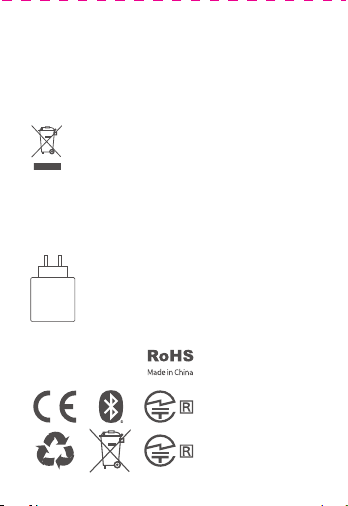
QCY Crossky R70
User Guide
Note: The images in this manual are for reference only and
may vary from the actual product. Please refer to the actual
product for accuracy.
Charging Case
Button Control
Charging Case
Indicator LED
Overview
Bluetooth Pairing
Factory Reset
Controls
Initial Pairing:
Steps for Multi-Device Connection:
Multi-Device Connection
Clearing Pairing Records (Use in case of connection issues)
Charging: Red light stays on
Fully Charged: White light stays on
Wireless Charging Available
Charging Case Charging
Charging: Red light stays on while charging.
Fully Charged: White light flashes for 30 seconds.
Earbuds Charging
Peel Off
the
Protective
Film
Download the QCY app to experience custom touch
functions, EQ settings, firmware updates, and explore more.
Please use your mobile browser to scan the QR code and
download the QCY app.
1. Power on the earbuds to initiate pairing. After connecting to
Device A, turn off Bluetooth on Device A. The earbuds will enter
pairing mode again.
2. Enable Bluetooth on Device B and select "QCY Crossky R70"
for pairing.
3. On Device A, turn on Bluetooth and click the paired earbuds'
name to finish multi-device connection.
1. Hold the earbuds above your ears.
2. Rotate the ear hooks downward along the auricle of the ear
to achieve proper positioning.
* Incorrect wearing may affect sound quality and hearing.
Type-C Cable
Charging Case
Indicator LED
LED
Microphone
Touch Area
Charging
Contactors
Sound
Outlet
Bass Port
Power On: Open the charging case to turn on automatically,
or tap and hold the earbud for 1.5 seconds.
Power Off: Place the earbuds in the charging case and
close the lid.
Answer/End Call: Double-tap the earbud.
Reject Call: Tap and hold the earbud for 1.5 seconds.
Previous Track: Tap and hold the left earbud for 1.5 seconds.
Next Track: Tap and hold the right earbud for 1.5 seconds.
Voice Assistant: Triple-tap the left earbud.
Play/Pause: Double-tap the earbud.
Activate Low Latency Mode: Triple-tap the right earbud.
Open-ear Headphones
Manufacturer: Dongguan Hele Electronics Co., Ltd.
Address: Room 101, Block 1, No.38, Daojiao Daohou Road,
Daojiao Town, Dongguan City, Guangdong Province, China.
Warranty
Comments:
Model Number:
Date of Purchasing:
User's Name:
User's Phone:
User's Address:
Shop's Name:
Shop's Address:
FCC Statement
Safety Precautions
This marking indicates that this product should
not be disposed of with other household wastes
throughout the EU. To prevent possible harm to
the environment or human health from
uncontrolled waste disposal, recycle it
responsibly to promote the sustainable reuse of
material resources. To return your used device,
please use the return and collection systems or
contact the retailer where the product was
purchased. They can take this product for
environmentally safe recycling.
Notice:
1. Please carefully read and retain this user manual before
using the product.
2. If the product is not used for an extended period (more than
2 weeks), please recharge it.
3. You must choose a charger produced by a legitimate
manufacturer and certified by the national safety authority.
4. If your phone cannot detect the Bluetooth earbuds, either
re-enter pairing mode or perform a factory reset on the
Bluetooth earbuds. If there is a phone program error, close
and reopen Bluetooth on the phone or restart the phone.
5. Do not disassemble or modify the battery, insert foreign
objects, expose it to high temperatures, or immerse it in water
or other liquids to prevent battery leakage, overheating,
ignition, or explosion. Battery replacement should only be
done by the manufacturer.
6. Do not drop, crush, or puncture the battery. Prevent
external pressure that may lead to internal short circuits and
overheating.
7. Do not dismantle or modify the earbuds for any reason, as
it may result in fire, electronic breakdown, or permanent
damage to the product.
8. Do not expose the product to extremely low or high
temperatures (below 0°C or above 45°C).
9. Do not the product indicator light near the eyes of children
or animals.
10. Do not use the product during thunderstorms, as it may
cause abnormal operation and increase the risk of electric
shock.
11. Do not use oil or other volatile liquids to clean the product.
12. Do not use this device for long periods of time
and at high volume, as there is a risk of hearing
damage。
Your QCY product purchase is covered by a one-year limited
manufacturer warranty from the date of delivery. Please
ensure you retain your purchase receipt. If any defects occur
due to quality issues within the warranty period, kindly bring
both the warranty card and the purchase receipt to the
authorized dealer for complimentary replacement services.
The manufacturer's warranty is void under the following
circumstances but not limited to:
• Improper or inadequate maintenance or modification.
• Accident, misuse, abuse, contamination, or other external
causes.
• The use of unspecified adapters and accessories.
• Malfunctions or damages resulting from natural disasters,
earthquakes, lightning, abnormal voltage, or environmental
factors.
• Damages that occur as a result of one's failure to follow the
instructions.
Wireless frequency: 2.402~2.480GHz
RF power of transmission: <4dBm
This equipment has been tested and found to comply with the
limits for a Class B digital device, pursuant to Part 15 of the
FCC Rules. These limits are designed to provide reasonable
protection against harmful interference in a residential installation.
This equipment generates uses and can radiate radio frequency
energy and, if not installed and used in accordance with the
instructions, may cause harmful interference to radio communications.
However, there is no guarantee that interference will not occur in
a particular installation. If this equipment does cause harmful
interference to radio or television reception, which can be
determined by turning the equipment off and on, the user is
encouraged to try to correct the interference by one or more of
the following measures:
--Reorient or relocate the receiving antenna.
--Increase the separation between the equipment and receiver.
--Connect the equipment into an outlet on a circuit different
from that to which the receiver is connected.
--Consult the dealer or an experienced radio/TV technician for
help.
This device complies with part 15 of the FCC Rules. Operation is
subject to the following two conditions:
(1)This device may not cause harmful interference, and
2) this device must accept any interference received, including
interference that may cause undesired operation.
Changes or modifications not expressly approved by the party
responsible for compliance could void the user's authority to
operate the equipment.
The power delivered by the charger must be
between min 2 Watts required by the radio
equipment, and max 5 Watts in order to
achieve the maximum charging speed.
2-5
W
FCC ID:
RDR-BH24CT02AL
RDR-BH24CT02AR
222-251735
222-251776
1.Take both earbuds out and remove the insulating film from
each, return the earbuds to the charging case and close the lid.
2. Take the earbuds out again, the earbuds will power on
automatically.
3. Refresh the Bluetooth device list on your phone and
select "QCY Crossky R70" to connect.
①②③
QCY Crossky R70QCY Crossky R70
10
5
×
Touch Area
LED
Microphone
Sound
Outlet
Bass Port
Charging
Contactors
Charging CaseType-C Cable
With the earbuds in the charging case and the lid open, press
and hold the case button for 10 seconds until the earbuds'
white LED flashes 5 times.
* Resetting the earbuds will clear the list of paired devices and
reset all settings.
(This feature is turned off by default. To activate it, please enable the option within the app.)