Made For Gamers
ExtremeRealm
ULTRA
Open-ear Gaming Headphones
Brief Introduction
Note:The pictures in this manual are all schematic diagrams. Due to technological and
system upgrades,the information and parameters indicated may differ from the actual
product. Please refer to the physical item for accuracy.
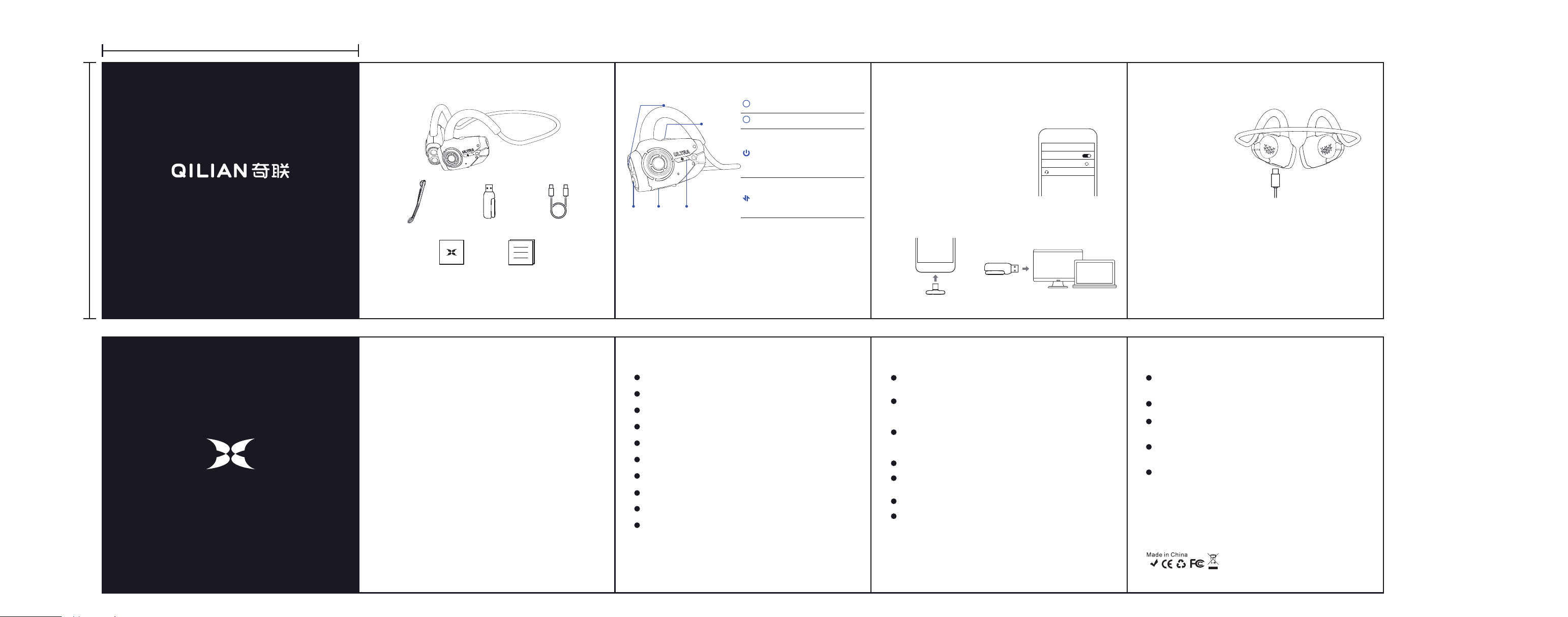
Magnetic microphone
2.4G Dongle
Charging cable
Quick Guide card Instruction manual
Button Instructions
+Button
-Button
Power button
Mode button
Type-C
charging port
Power On:When the headphones are powered off, press and hold the power
button for 3 seconds. The white LED stays on for 1 second.
Voice prompt:"Power on";
Power Off:When the headphones are powered on,press and hold the power
button for 3 seconds. The white LED stays on for 1 second.
Voice prompt:"Power off";
Power On/Off
+
+Button
Volume up Single press
Volume down Single press
Next track Press and hold for 1 second
Game/Music Mode Single press
The lighting effect remains on Triple press
Clear pairing information Press and hold for 5 seconds
Bluetooth/2.4G mode Double press
Voice assistant Press and hold for 2 seconds
Previous track Press and hold for 1 second
Power on/Power off Press and hold for 3 seconds
Pause/Play Double press
Battery level inquiry Single press
Answer/End the call Single press
Enable built-in microphone Triple press
Reject call Press and hold for 1 second
-
-Button
Power
button
Mode
button
Voice prompt: Bluetooth connected
(headphones are successfully connected
to the device)
After power on, the headphones will automatically enter pairing mode.
If not in Bluetooth mode, switch to it; the white LED will flash rapidly.
Search for "ExtremeRealm-ultra" on your device
(smartphone, tablet, etc.), and tap to connect.
Bluetooth Connection
Insert the dongle into a device and double press
the mode button to enter "dongle mode"
Insert the dongle into a device that supports Type-C Insert the dongle into a device that supports USB
2.4G Dongle Connection
Bluetooth
Bluetooth
Available equipment
ExtremeRealm-ultra
<
About Charging
Insert the Type-C charging cable; the headphones will be automatically charged.
The white LED stays on while charging
and turns off when fully charged.
Operation Instructions
Next Track:Press and hold the Volume + button for 1 second;
Volume Up: Single press the Volume + button. (This also applies during calls)
Volume Down:Single press the Volume - button. (This also applies during calls)
Previous Track: Press and hold the Volume - button for 1 second;
Pause/Play:When the music is playing, double press the power button
to pause, and double press the power button again to resume playing;
Voice Assistant / Siri:When Bluetooth is connected, press and hold
the mode button for 2 seconds to activate voice assistant mode / Siri.
Answer / End Call:
· Press the power button once to answer an incoming call
· Press the power button once to end the call(during the call)
· Press and hold the power button for 1 second to reject an incoming call.
Mute Mode (External Microphone Removed):When the external microphone
is removed during a call, the headphones automatically switch to mute mode.
Reattach the external microphone to restore normal microphone operation.
Enable Internal Microphone:With the external microphone removed, triple
press the power button to activate the internal microphone. Triple press again
to deactivate it.
2.4G Dongle Mode:After inserting the 2.4G dongle, double press the mode
button to switch to "Dongle Mode" to enter into the low-latency mode.
Game / Music Mode Switching:Single press the mode button.
Bluetooth / 2.4G Mode Switching:Double-press the mode button.
Charging:
· When charging: White LED stays on.
· Low battery: White LED flashes once every 4 seconds.
· Charging complete: LED turns off.
Battery Level Inquiry:After powering on the headphones, single press the
power button; a voice prompt will indicate the battery level.
Factory Reset:When powered on, press and hold the mode button for
5 seconds to clear Bluetooth pairing information and complete a factory reset.
Product Specifications
Bluetooth Playtime---------- about 20H
2.4G Dongle Playtime---------- about 13H
Standby Time---------- 250H
Charging Time---------- 1.5H
Bluetooth Version---------- V6.0
Speaker Impedance---------- 16Ω±15%
Microphone Sensitivity---------- -42±3db
Product Weight---------- 45±2g
Connection Distance---------- ≥12m
Charging Voltage/Current ---------- 5V/150mA
Tips: If the dongle keeps flashing, it indicates the headphones are not
paired/connected to the dongle. If you need to establish connection,you
can perform thefactory reset operation.
Important Note
The correct wearing position for the
headphones
is on your cheek, in
front of your ear;
Please listen at a moderate volume and avoid prolonged use at
high volume to prevent hearing discomfort or damage. Do not
place the speaker inside your ear;
Using headphones will affect your perception of the sounds
around you. No matter the volume level, please be more cautious
when using headphones;
Do not throw, sit on or immerse the headphones in water;
The headphones should be kept away from fire, water and
high-voltage equipment;
Do not classify them as household waste. Instead, send them to
the local designated electronic equipment recycling center.
Not suitable for children under 3 years old. Contains small parts;
*The company shall not be held responsible for any personal injury
or property damage resulting from failure to follow the above warnings.
Damage to or scratches on the product casing are not covered
under warranty;
Damage caused by force majeure;
Damage caused by human factors, including but not limited to:
crushing, water damage, shell damage, deformation;
Unauthorized repair, modification, or disassembly of the product
or its accessories;
Performance failure caused by human error.
Note: Our company reserves the right to refuse warranty service for
any of the above conditions.
Non-warranty Regulations
RoH S
80mm
80mm

FCC Caution:
This device complies with part 15 of the FCC Rules. Operation is subject to the
following two conditions: (1) This device may not cause harmful interference, and (2)
this device must accept any interference received, including interference that may
cause undesired operation.
Any Changes or modifications not expressly approved by the party responsible for
compliance could void the user's authority to operate the equipment.
Note: This equipment has been tested and found to comply with the limits for a Class
B digital device, pursuant to part 15 of the FCC Rules. These limits are designed to
provide reasonable protection against harmful interference in a residential installation.
This equipment generates uses and can radiate radio frequency energy and, if not
installed and used in accordance with the instructions, may cause harmful interference
to radio communications. However, there is no guarantee that interference will not
occur in a particular installation. If this equipment does cause harmful interference to
radio or television reception, which can be determined by turning the equipment off
and on, the user is encouraged to try to correct the interference by one or more of the
following measures:
-Reorient or relocate the receiving antenna.
-Increase the separation between the equipment and receiver.
-Connect the equipment into an outlet on a circuit different from that to which the
receiver is connected.
-Consult the dealer or an experienced radio/TV technician for help.
The device has been evaluated to meet general RF exposure requirement. The device
can be used in portable exposure condition without restriction.