Metronome mode: After entering the 4/4 beat metronome rhythm, the beat speed
can be adjusted through the tone adjustment knob Turning the pitch
counterclockwise can reduce the beat speed, while rotating it clockwise can increase
the beat speed.
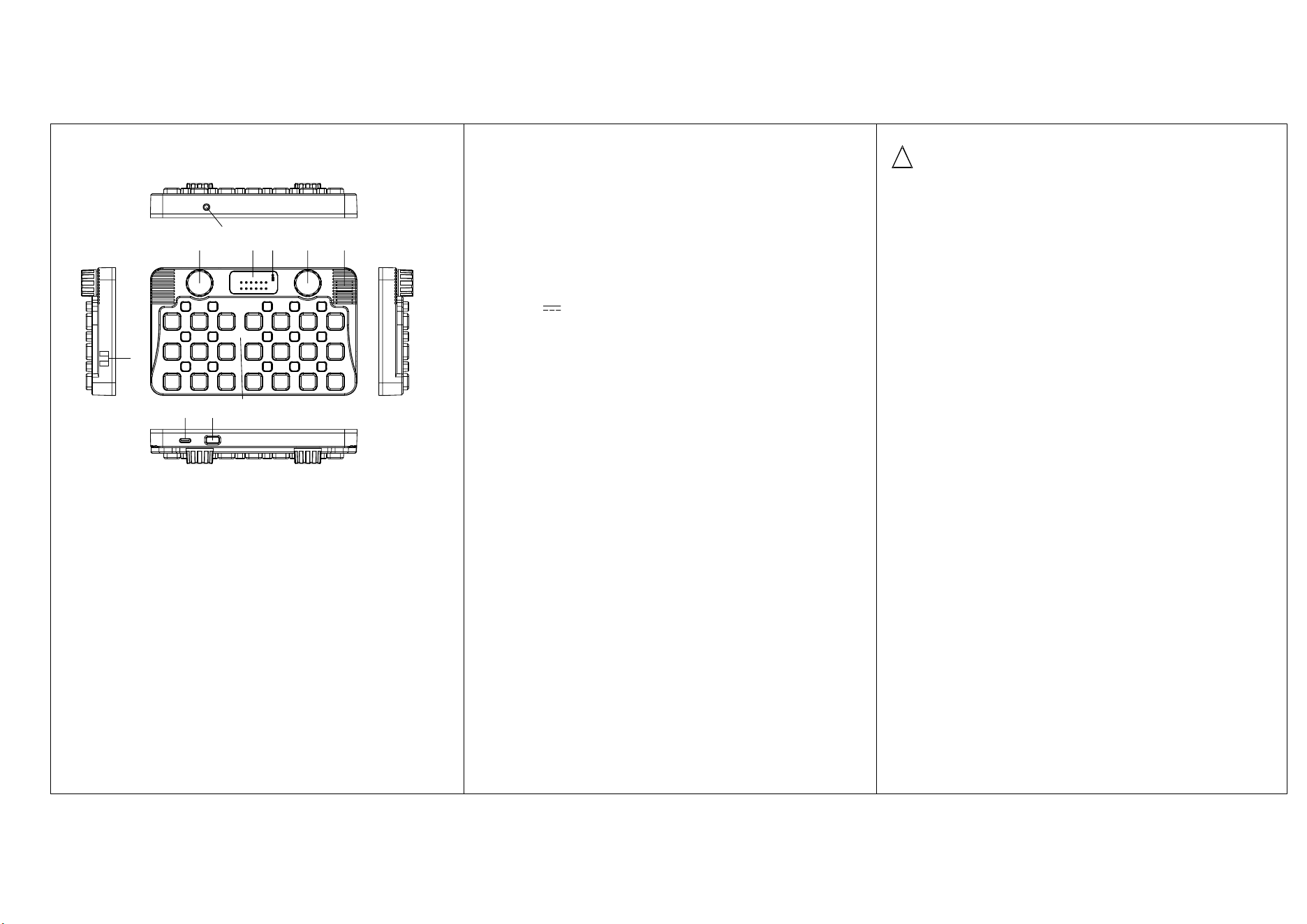
H.Speaker.
I. Hanging rope position.
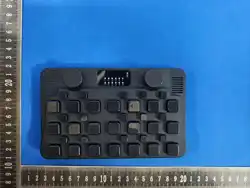
J. 36 piano key areas.
Product parameters:
Product Name: Mini Pocket Keyboard
Model:MZ-2
Wireless version:5.3
Max output power:2W
Rated input:5V 1A
Lithium battery:3.7V/1500mA
Operating Frequency Band :20Hz–20kHz
Maximum Radio-Frequency Power:+6 dBm
Function
MIDI output
This device can be used as a MIDI keyboard, with two connection methods: wired
and wireless
Wired: Use TYPE-C cable to connect the device to software that supports MIDI
devices Select the device UACDemoV1.0 and rotate it clockwise Rotate the volume
control until you hear the "MIDI mode" prompt sound,You can use this device as a
MIDI keyboard in music arranging software.
Wireless: Keep the device on and enable support for wireless MIDI in the device
The software, select MZ-2 connection, rotate the instrument/volume knob clockwise
Rotate the section until you hear the "MIDI mode" prompt sound to use.
MELODY GO supports mainstream music arrangement software on the market,
such as PoPiano, PL Studio, Logic Pro, Garage Band, Ableton, Cubase
Wireless external amplifier:
This device can be used as a wireless speaker to keep it open. You can search for
device MZ-2 on your phone or computer to play music and perform. It supports file
formats such as MP3, WAV, AAC, FLAC, OGG, WMA, etc.
Accompaniment with accompanying sound:
If external accompaniment is required, in addition to Bluetooth, this device can be
connected to storage devices such as USB drives through a USB interface to achieve
accompanying music. In the state of Bluetooth or USB connection, lightly connect
the external music and press the previous or next song to adjust the volume, long
press the previous song to increase the volume, and long press the next song to
decrease the volume.
Replace keycaps
The keycaps in the key area can be replaced by simply grasping the cap keys and
gently pulling them vertically upwards to remove them. Align the new keycaps with
the square holes and insert them to complete the replacement.
User Manual
A. Power on/off, press and hold the power button for 3 seconds to turn on or
off, or automatically turn off after 10 minutes without any operation.
B. Type-C charging port, please use a 5V1A charger to charge the machine. The
red light will turn on when charging, and the green light will turn on when fully
charged Bright.
C. 3.5mm jack, which can be used to connect speakers or internal recording. Press
and hold the instrument/volume button to rotate it To adjust the output volume.
D. Tone adjustment: Hold down and rotate counterclockwise to decrease by eight
degrees, clockwise to increase by eight degrees, with an indicator light displayed.
E. Tone indicator light. The default tone C4 is 1=C4
F. Charging indicator light, red light on when charging, green light on when fully
charged.
G. Instrument/volume knob, rotate to adjust the previous or next instrument, hold
and rotate to adjust the output volume size. Instrument order: 1. Piano, 2. Guitar,
3. Tremor, 4. Thumb, 5. Erhu, 6. Guzheng, 7.Pipa, 8. piccolo, 9. xiao, 10. suona, 11.
whistle, 12. harmonica, 13. plucked strings, 14. string instruments, 15. single
instrument Clarinet, 16. sawtooth wave, 17. square wave, 18. violin, 19. alto
saxophone, 20. accordion, 21. wind pipe Qin, 22. Zhongqin, 23. Small, 24. Hulusi,
25. Handdisk, 26. Meow sound, 27. Internet celebrity sound effects, 28.Drum set,
29.metronome, 30.MIDI mode, 31 KEYBROD,
C C D D E F
F
G G
A A B
# #
# # #
1
1
●
1
●
#1
●
#2
●
#4
●
#5
●
#6
●
#1
#1
●
#2 #4 #5 #6
#2 #4 #5 #6
2
●
3
●
4
●
5
●
6
●
7
●
2
2
●
3
3
●
4
4
●
5
5
●
6
6
●
7
7
●
● ● ● ●
D
C
E F G H
B
I
A
J
!
Warning&Precautions
This product contains small parts that pose a risk of suffocation and is not suitable
for children under 3 years old. The label and instruction manual contain important
information, please keep them as backup
1. Built in 3.7V battery, non removable and non replaceable. If damaged, please
contact service for repair.
2. Regularly check whether the wires, plugs, casing, and other components of the
charger are damaged. If any damage is found, stop using it until it is repaired
completely.
3. Toys that can be cleaned with liquid should be disconnected from the charger
before cleaning.
FCC Warning
This device complies with Part 15 of the FCC Rules. Operation is subject to the following two
conditions:
(1) This device may not cause harmful interference, and (2) this device must accept any
interference received, including interference that may cause undesired operation.
NOTE 1: This equipment has been tested and found to comply with the limits for a Class B digital
device, pursuant to part 15 of the FCC Rules. These limits are designed to provide reasonable
protection against harmful interference in a residential installation. This equipment generates, uses
and can radiate radio frequency energy and, if not installed and used in accordance with the
instructions, may cause harmful interference to radio communications. However, there is no
guarantee that interference will not occur in a particular installation. If this equipment does cause
harmful interference to radio or television reception, which can be determined by turning the
equipment off and on, the user is encouraged to try to correct the interference by one or more of the
following measures:
- Reorient or relocate the receiving antenna.
- Increase the separation between the equipment and receiver.
-Connect the equipment into an outlet on a circuit different from that to which the receiver is
connected.
-Consult the dealer or an experienced radio/TV technician for help.
NOTE 2: Any changes or modifications to this unit not expressly approved by the party responsible
for compliance could void the user's authority to operate the equipment.
The device has been evaluated to meet general RF exposure requirement. The device can be used in
portable exposure condition without restriction.