INSTALLATION GUIDE | NZ AU
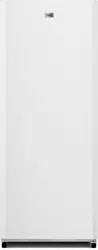
HVF275DW,
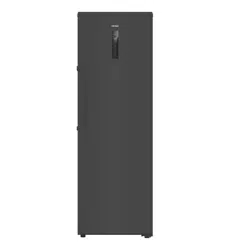
HVF275DC
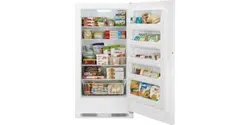
Vertical
Freezer/Refrigerator
Legend
General information and tips
Warning – Important Safety information
Environmental information
Disposal
Help protect the environment and human health. Put
the packaging in applicable containers to recycle it.
Help to recycle waste of electrical and electronic ap
pliances. Do not dispose appliances marked with this
symbol with the household waste. Return the product
to your local recycling facility or contact your municipal
Refrigerants and gases must be disposed of professionally. Ensure that the tubing of
the refrigerant circuit is not damaged before being properly disposed of. Disconnect
the door, the door catch and seals, to prevent children and pets to get closed in the ap-
pliance.
Thank you for purchasing a Haier Product.
Please read these instructions carefully before using this appliance. The instructions con-
tain important information which will help you get the best out of the appliance and ensure
safe and proper installation, use and maintenance.
Keep this manual in a convenient place so you can always refer to it for the safe and proper
use of the appliance.
If you sell the appliance, give it away, or leave it behind when you move house, make sure
you also pass this manual so that the new owner can become familiar with the appliance
and safety warnings.
1 - Safety .................................................................................................................................................4
2 - Intended Use ....................................................................................................................................8
3 - Product Description .......................................................................................................................9
4 - Control panel ................................................................................................................................. 10
5 - Use ................................................................................................................................................... 16
6 - Energy saving ................................................................................................................................ 19
7 - Equipment ..................................................................................................................................... 19
8 - Care and Cleaning ........................................................................................................................ 20
9 - Troubleshooting ........................................................................................................................... 23
5 - Installation ......................................................................................................................................11
11 - Technical Data ............................................................................................................................ 27
WARNING!
▶ Make sure there is no transport damage.
▶ Remove all packaging and keep out of children´s reach.
▶ Wait at least six hours before installing the appliance in order to
▶ Handle the appliance always with at least two persons because it
is heavy.
Installation
▶ The appliance should be placed in a well-ventilated place. Ensure
a space of at least 5 cm above and around the appliance.
▶ Do not cover air vent openings.
▶ Never place the appliance in a damp area or location where it
might be splashed with water. Clean and dry water splashes and
stains with a soft clean cloth.
▶ Do not install the appliance in direct sunlight or near heat sources
(e.g. stoves, heaters).
▶ Install and level the appliance in an area suitable for its size and use.
▶ Keep ventilation openings in the appliance or in the in-built struc-
ture clear of obstructions.
▶ Check that the power supply matches the electrical information
on the rating label. If it doesn’t, contact a qualified electrician.
▶ The appliance is operated by a 220-240 VAC/50 Hz power sup-
to start, or damage to the temperature control or compressor, or
there may be an abnormal noise when operating. In such case, an
automatic regulator shall be mounted.
▶ Use a separate earthed socket for the power supply which is ea-
sily accessible during cleaning. The appliance must be earthed.
▶ Do not use multi-plug adapters and extension cables.
▶ Ensure that the power cable is not trapped by the freezer. Do not
step on the power cable.
▶ Do not damage the refrigerant circuit.
hints!:
WARNING!
Daily use
▶ This appliance can be used by children aged from 8 years and above
▶
Keep away children under 3 years of age from the appliance unless th-
▶
Children shall not play with the appliance.
and persons with reduced physical, sensory or mental capabilities or
lack of experience and knowledge if they have been given supervision
or instruction concerning use of the appliance in a safe way and unde-
rstand the hazards involved.
ey are constantly supervised.
▶
of the app-
▶
▶
d windo-
ws and do not unplug a plug in the power cable of the freezer or any
other appliance.
with water) on top of the freezer, to avoid personal injury caused by
falling or electric shock caused by contact with water.
▶
Open and close the doors only with the handles. The gap between the
doors and between the doors and the cabinet is very narrow. Do not
. Open
or close the freezer doors only when there are no children standing w-
ithin the range of door movement.
▶
s in
the appliance or in the vicinity.
▶
Do not store medicines, bacteria or chemical agents in the appliance.
This appliance is a household appliance. It is not recommended to st-
ore materials that require strict temperatures.
▶
On refrigerating mode without a 4-star compartment: this refrigerati-
g mode
with a 4-star compartment: this freezing appliance is not suitable for
▶
Never store liquids in bottles or cans (besides high percentage spirits)
especially carbonated beverages in the freezer, as these will burst du-
ring freezing.
▶
Check the condition of food if a warming in the freezer has taken place.
▶
Do not set unnecessarily low temperature in the freezer compartme-
nt. Attention: Bottles can burst.
▶
WARNING!
Daily use
▶ Do not touch frozen goods with wet hands (wear gloves). Espe-
cially do not eat ice lollies immediately after removal from the
freezer compartment. There is the risk to freeze or the formation
of frost blisters. FIRST aid: keep immediately under running cold
water. Do not pull away!
▶ Do not touch the inside surface of the freezer when in operation,
especially with wet hands. Your hands may freeze onto the sur-
face.
▶ Unplug the appliance in the event of a power interruption or be-
fore cleaning. Allow at least 5 minutes before restarting the appli-
ance, as frequent starting may damage the compressor.
▶ Do not use electrical devices inside the food storage compart-
ments of the appliance, unless they are of the type recommend-
ed by the manufacturer.
Maintenance/cleaning
▶ Make
sure
children are supervised if they carry out cleaning and
maintenance.
▶ Disconnect the appliance from the electrical supply before un-
dertaking any routine maintenance. Allow at least 5 minutes be-
fore restarting the appliance, as frequent starting may damage
the compressor.
▶ Hold the plug, not the cable, when unplugging the appliance.
▶
sprays, electric heaters like heater, hair dryer, steam cleaners or
other sources of heat in order to avoid damage to the plastic parts.
▶ Do not use mechanical devices or other means to accelerate the
defrosting process, other than those recommended by the man-
uf
actur
er.
▶
▶ Do not use water spray or steam to clean the appliance.
▶ If the power cord is damaged, it must be replaced by the manu-
facturer or a qualified technician to avoid hazards.
▶ If the illuminating lamps are damaged, it must be replaced by the
nance provider.
WARNING!
(R600a). Make sure the refrigerant circuit is not damaged during
transportation or installation. Leaking refrigerant may cause eye
sources, thoroughly ventilate the room, do not plug or unplug the
power cords of the appliance or any other appliance. Inform the
customer service.
In case of eyes get into contact with the refrigerant, rinse immedi-
ately it under running water and call immediately the eye specialist.
Refrigerant gas information
WARNING!
▶
▶ WARNING: When positioning the appliance, ensure the supply
cord is not trapped or damaged.
▶ WARNING: Do not locate multiple portable socket-outlets or
portable power supplies at the rear of the appliance.
▶ Do not store explosive substances such as aerosol cans with a
▶ -
ful when installing, handling, serving and recycling the appliance.
▶ Please contact to the service agent to dispose the appliance be-
▶ Do not try to repair, disassemble or modify the appliance by your-
self. In case of repair please contact our customer service.
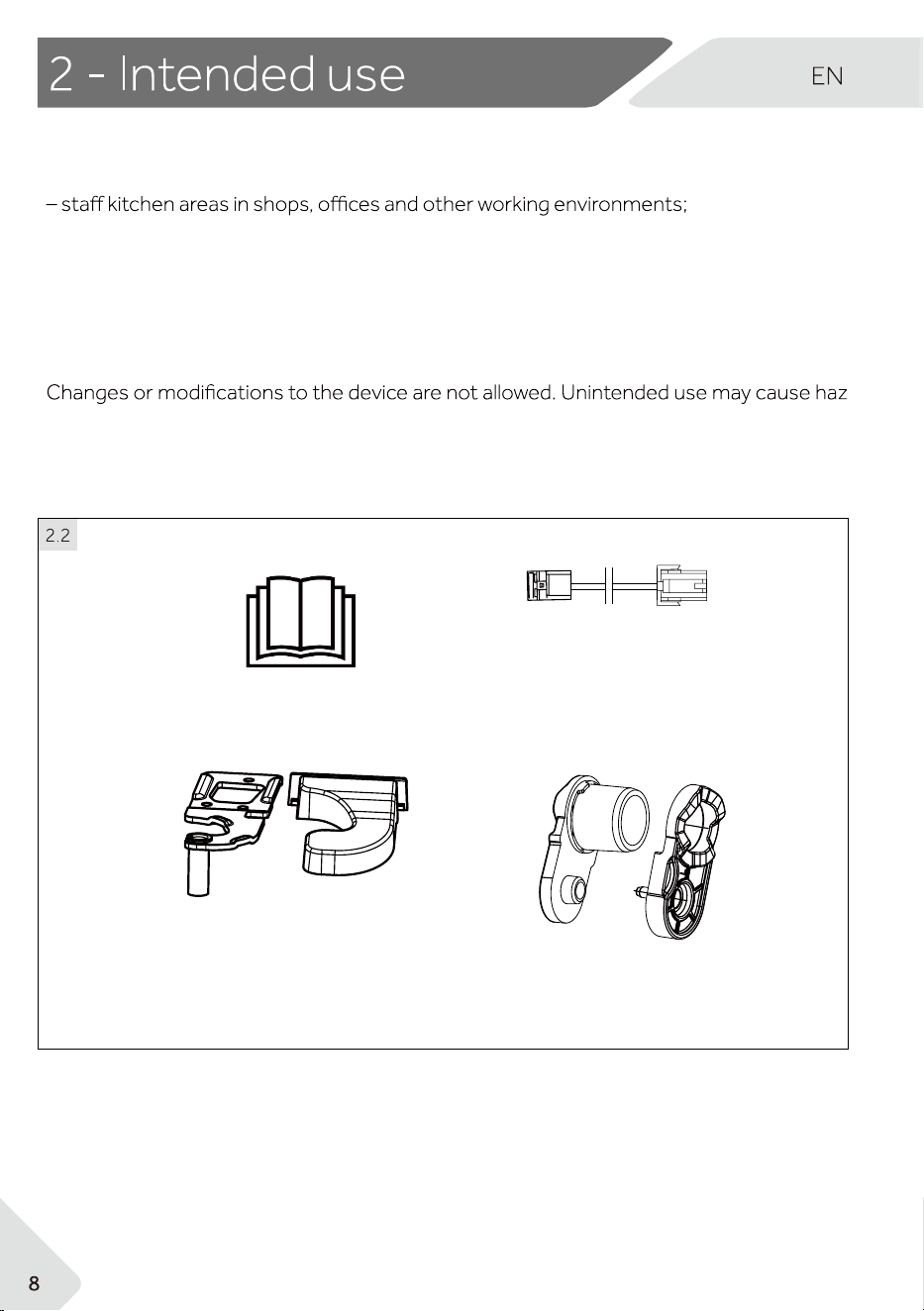
Axe covers
Upper left
hinge for door
reversibility
Upper left
hinge cover
Door extension
cord
2.1 Intended Use
This appliance is intended to be used in household and similar applications such as
– farm houses and by clients in hotels, motels and other residential type environments;
– bed and breakfast type environments;
– catering and similar non-retail applications.
This appliance is intended for freezing food. It has been designed exclusively for use in dry-
interior households. It is not intended for commercial or industrial use. On request, this
appliance can be used as a fresh food compartment.
-
ards and loss of warranty claims.
2.2 Accessories
Check the accessories and literature in accordance with this list:
User manual
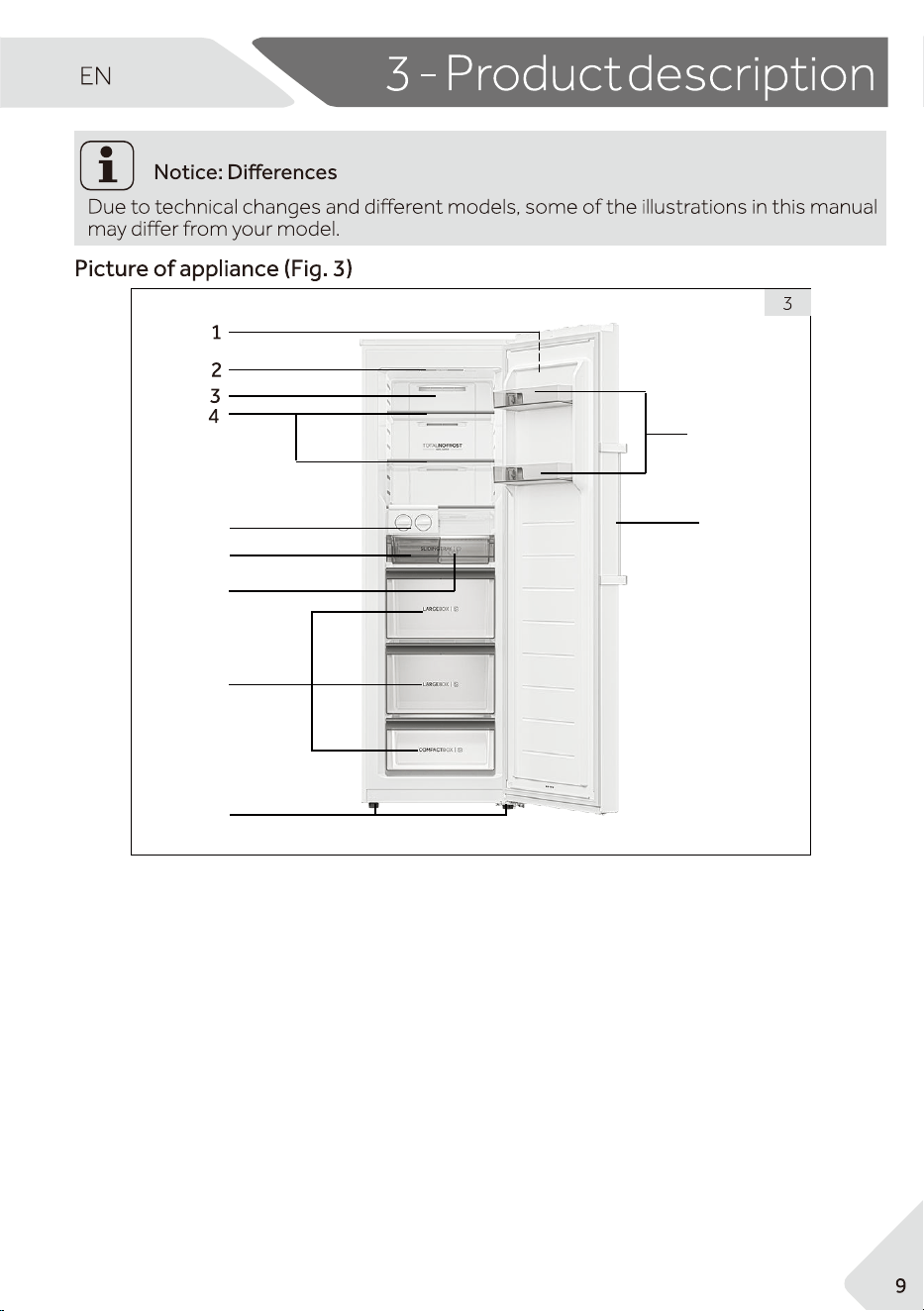
1 Control panel
2 LED light
3
4 Glass shelves
Drawers
8
Adjustable feet
9
Removable door racks
01
Door handle
Air duct
5 Ice maker assembly
11
6 Ice receiver
Sliding tray
7
5
9
8
10
11
6
7
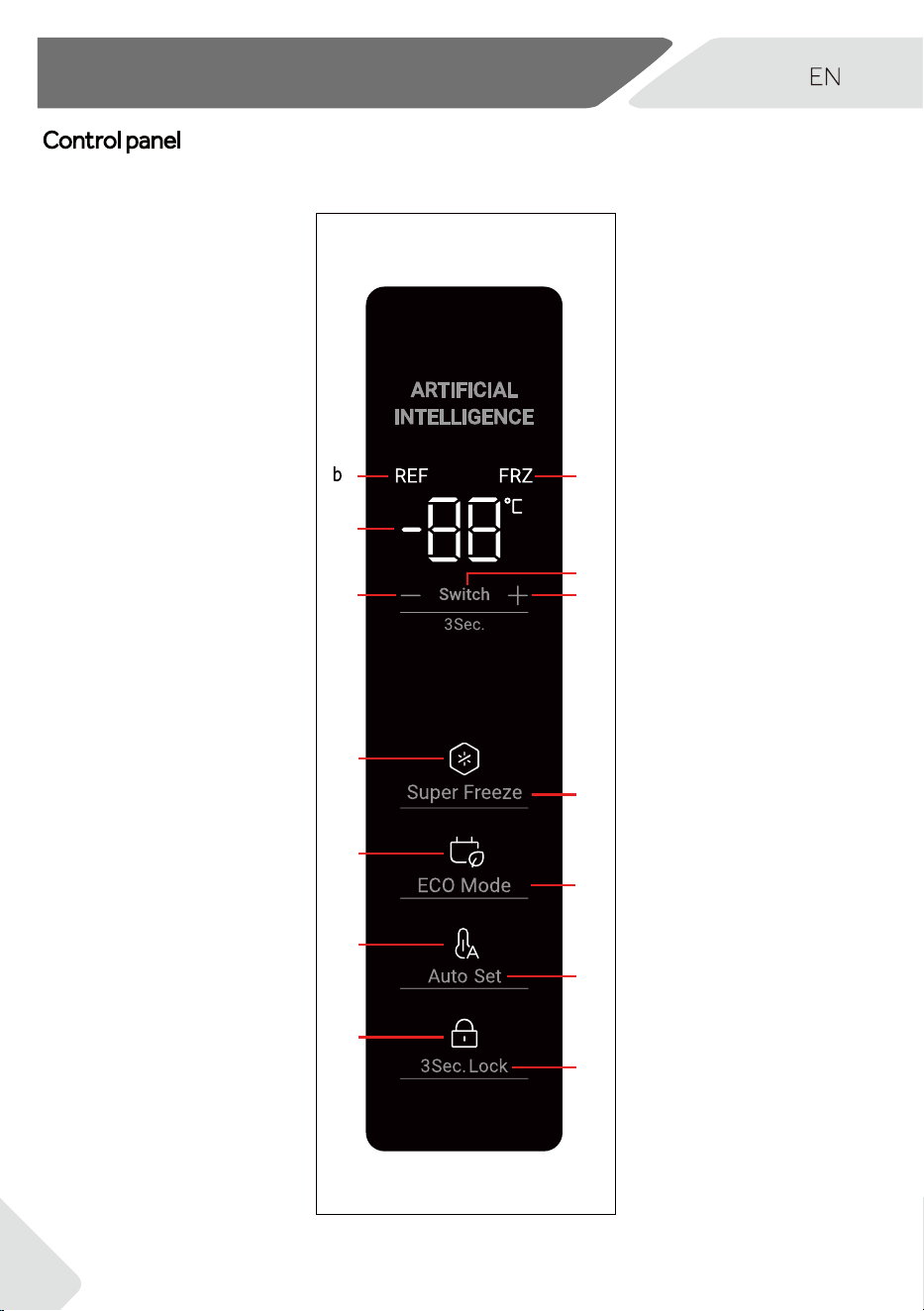
Control panel (Fig. 4)
A
- (Temperature
decrease)
B + (Temperature
increase)
C
D
E
F
C
a
D
d
B
G
g
E
e
F
f
G
3 Sec. Lock
c
A
Switch
Super Freeze
ECO Mode
Auto Set
4 - Installation
10
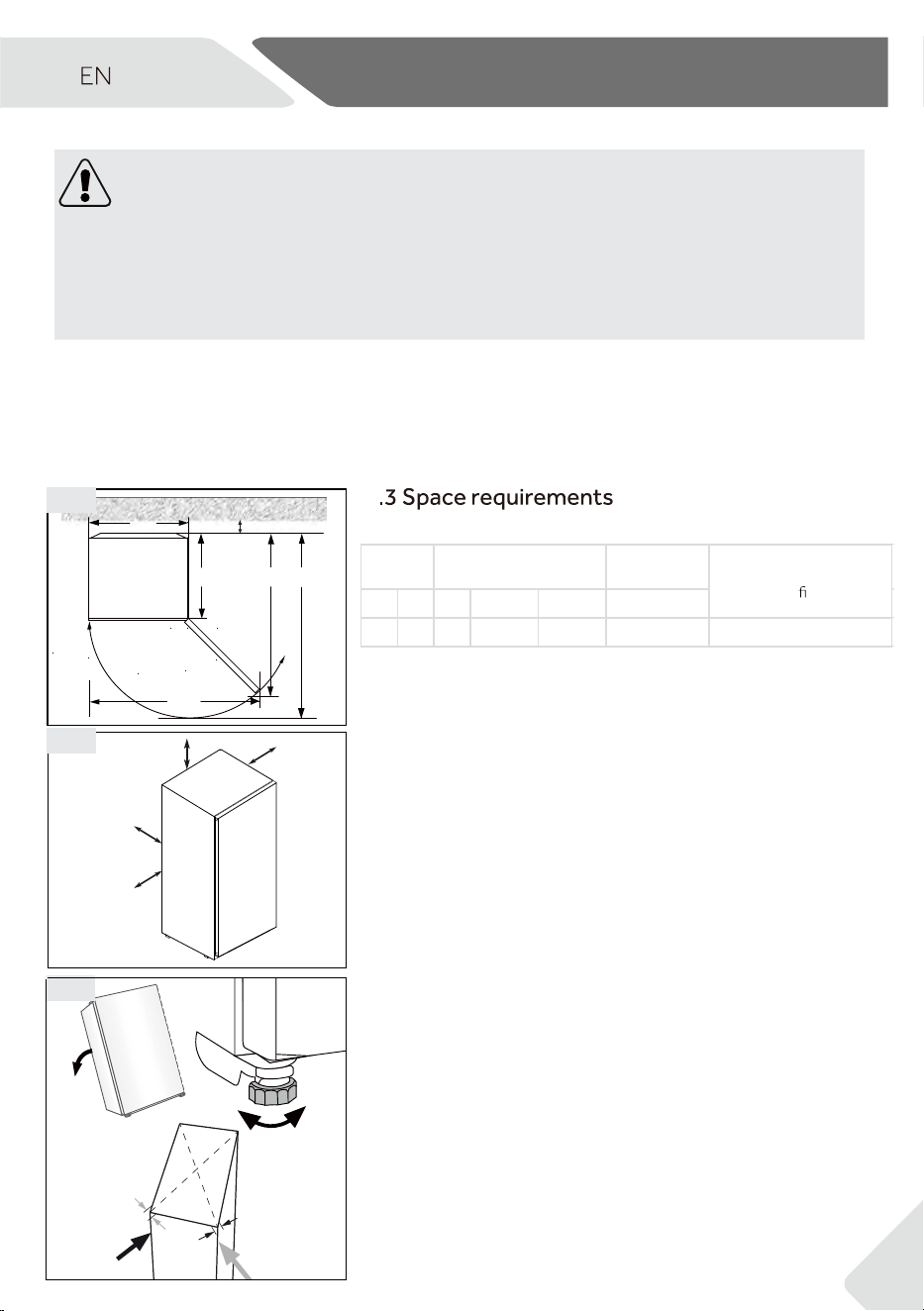
5 - Installation
11
max 45°
1.
2.
3.
5.5
Required space to open the door (Fig. 10.3):
W2
D1
D3
D2
W1
D4
5.3
10 cm
10 cm
10 cm
10 cm
5.4
5.4 Ventilaton cross-section
For safe and effective operation, ensure proper
ventilation around the appliance. Follow the recom-
mended ventilation guidelines shown in the diagrams.
5.5 Aligning the appliance
The appliance must be placed on a flat, stable surface
and properly aligned using the adjustable feet. A slight
backward tilt helps the door close more easily and
ensures the appliance remains stable. Avoid using foam
packaging or other soft materials as a base. Check stability
by gently rocking the unit diagonally.
5
5.1 Unpacking
▶
WARNING!
▶ The appliance is heavy. Always handle with at least two persons.
▶ Keep all packaging materials out of children reach and dispose them in an environ
-
mentally friendly manner.
Take the appliance out of the packaging.
▶ Remove all packaging materials.
5.2 Environmental conditions
Keep the room temperature between 10°C and 43°C. Temperatures outside this range
can affect the appliance’s performance and energy use.
Avoid placing the appliance near heat sources like ovens or other refrigerators.
This appliance is not intended to be used as a
built-in appliance.
Distance to
wall in mm
W1 W2 D1 D2 D3 D4
50306469595
Width
in mm
Depth
in mm
Model
identi
er
1153.5 1236.5
HVF275DW/HVF275DC
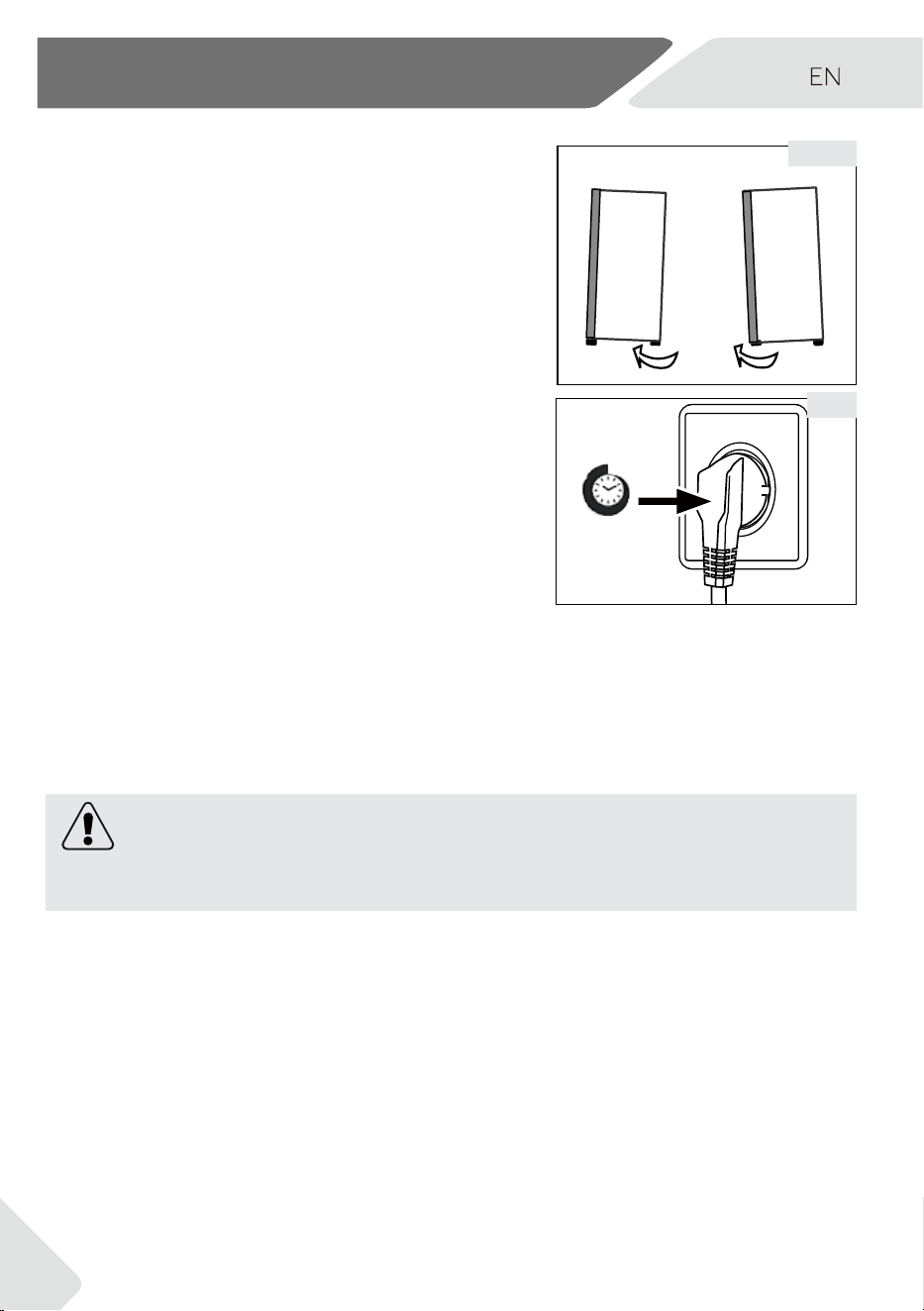
5- Installation
5.6 Using adjustable feet
If the freezer is unstable, the feet can be adjusted:
▶ Turning the feet clockwise raises the appliance.
▶ Turning the feet counterclockwise lowers it.
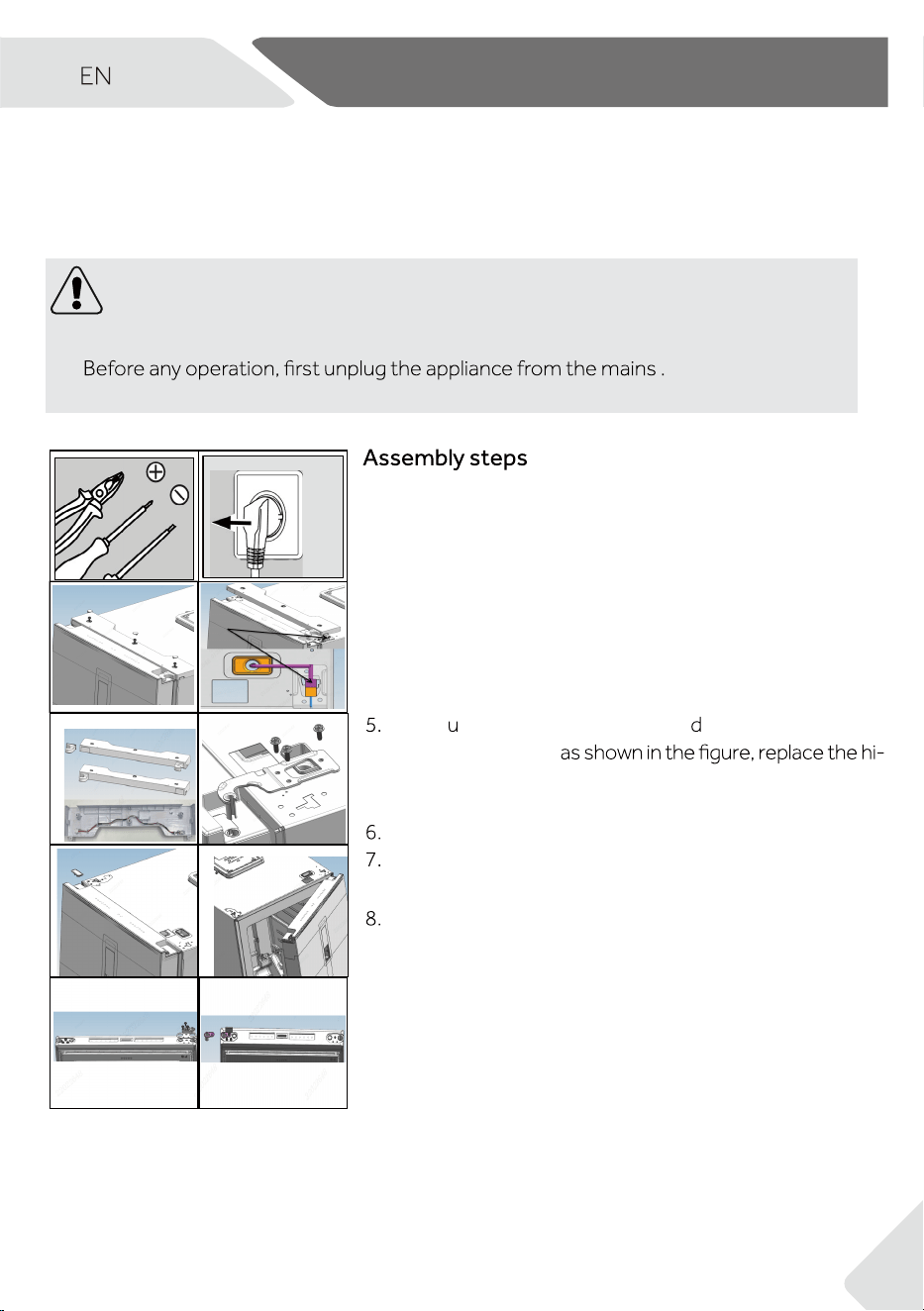
Wait at least 6 hours after transport before plugging
in the appliance to allow compressor oil to settle.
5.8 Electrical connection
Before each connection check if:
▶ Ensure the power supply, socket, and fusing match the appliance specifications.
▶ The socket must be earthed.
▶ Do not use multi-plugs or extension cords.
WARNING!
The power cord is damaged, it must be replaced by the manufacturer or an authorised
service provider.
5.6
6 h
5.7
12
5.7 Waiting time
13
5 - Installation
13
5.9
1
2
3 4
5 6
7 8
9
10
1. You will need a Phillips screwdriver and a spanner.
2. Unplug the appliance.
3. Remove the screw hole cover, bolts, and hinge cover.
4. Unplug the connection cable.
Take pper left hinge cover and oor extension cord
out of the gift bag,
nge cover and install the extension cord into the wiring
slot of the hinge cover.
Removes screws and hinge.
Remove cover on door. Remove axe cover on
door.
Open and remove the door.
9.
10. Take lifting shaft sleeve out of the gift bag.
Fix the lifting stop, Door stop, and 3 screws on the left
side of the door.
(Fig. 5.9):
Turn the door upside down, remove 3 screws on
the bottom of the door. Remove 3 screws, door
stopper and lifting shaft sleeve on the bottom of
the door.
5.9 Door Reversibility
Before connecting the appliance to power, check if the door needs to be reversed for
your installation.
WARNING!
▶ The appliance is heavy. You need two persons to carry out the door reversibility.
▶
▶ Do not tilt the appliance more than 45 ° to prevent damage of the cooling system.
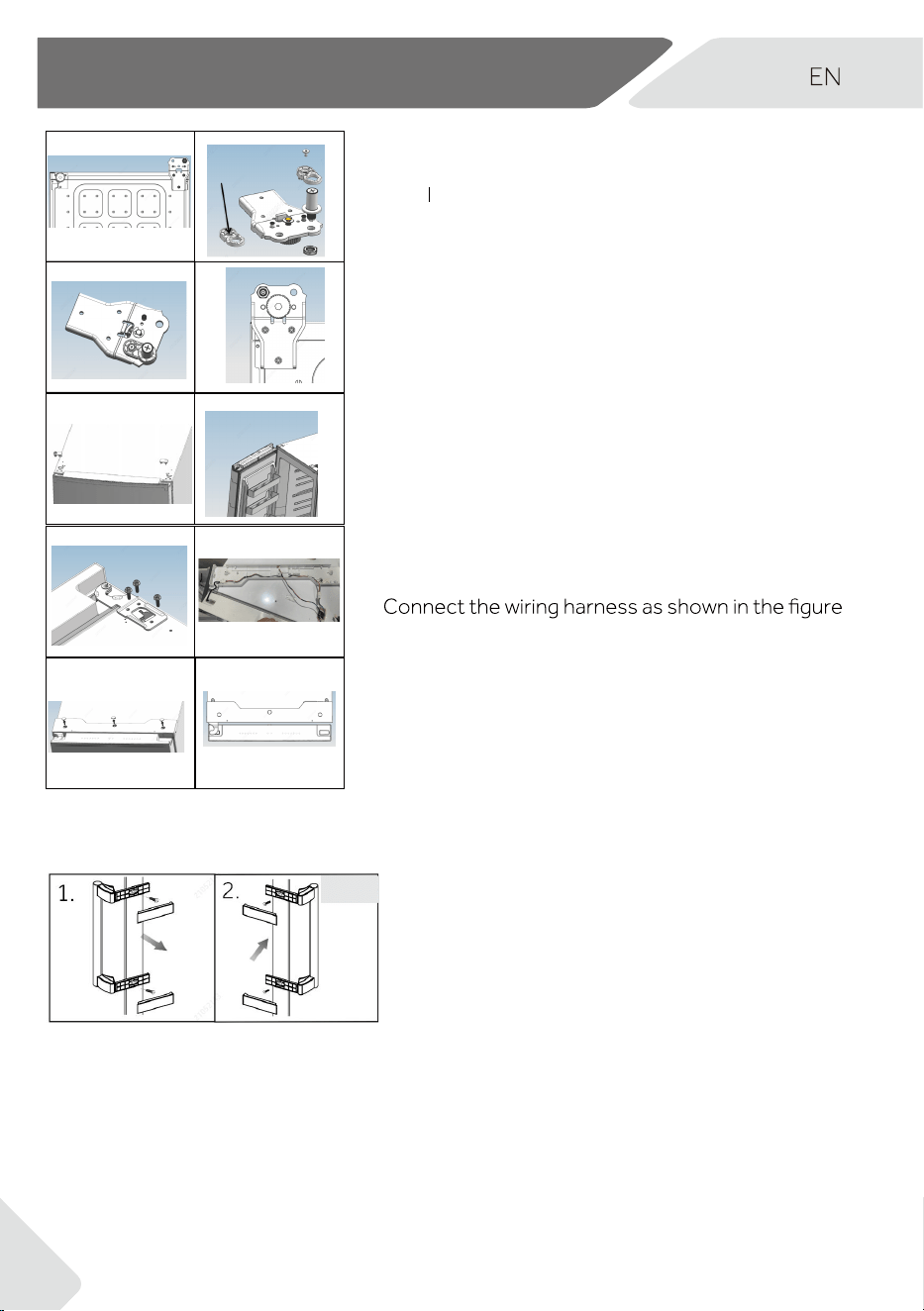
10 - Installation5 - Installation
11 12
13
14
15
16
17
18
19 20
Tile the cabinet backwards slightly, remove 3
screws and then the lower hinge.
11.
Take
ifting shaft sleeve out of the accessory bag,
Remove 2 bolts, remove the lifting shaft sleeve and
lifting shaft.
12.
13.
Install the lifting shaft sleeve and lifting shaft in the left
hole and secure 2 bolts.(Adding lubricating oil to the
shaft, if required).
Fix the hinge to the opposite position of the cabinet
with 3 screws.
14.
On opposite side of the door, pull out left side
connection cable and put it through the axe
cover from step 5, mount axe cover. Mount the
hole cover on the right side.
15.
16.
Mount the door.
Fix upper right upper hinge with 3 screws.
17.
18.
Install the assembled hinge cover in step 5,
secure the three screws and screw hole
covers
19.
(Add
lubricating oil to the upper hinge before installation)
1. Remove 2 handle covers, 4 screws and handle
assembly from left side of the door. Remove 4 hole
plugs from right side of the door.
2. Fix handle assembly with 4 screws to right side
of door and 2 handle covers. Fix 4 hole plugs to
left side of the door.
14
5.9 Handle Reversibility
5.10
Assembly steps (Fig. 5.10):
5 - Installation
15
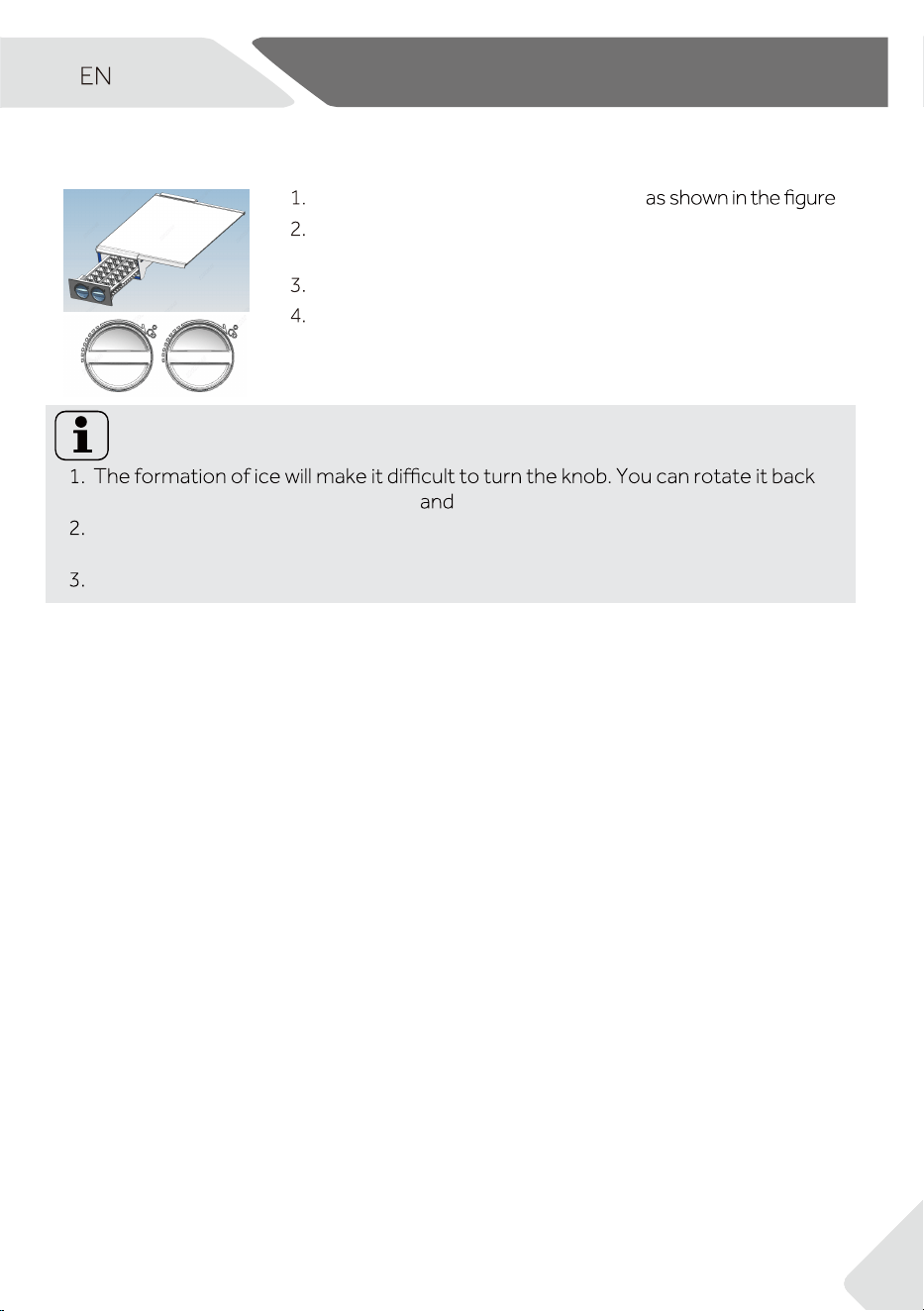
1
2
Pull out the ice maker to the position (1)
Pour fresh water into each ice tray as per the scale mark
inside the measuring cup, do not exceed the scale mark.
Push the ice maker back.
Once the water has frozen, turn the knob by hand to release
the ice blocks into the storage bin. Then, remove the drawer
to collect the ice cubes.
Notice: Ice maker can move position according to user habits
and forth several times to remove ice, avoid damage to parts.
For ice-makers not intended to be connected to the water supply.(WARNING: Fill
with potable water only)
For faster ice production, place the ice maker on either side of the freezer.
5.11 Ice Maker
16
▶ Remove all packaging materials, keep them out of childrens reach and dispose them
in an environmentally friendly manner.
▶ Clean the inside and outside of the appliance with water and a mild detergent before
putting any food in it.
▶ After the appliance has been levelled and cleaned, wait for at least 6 hours before con-
necting it to the power supply. See Section INSTALLATION.
▶ Precool the compartment for 2 hours at high settings before loading with food. To do
so, please set the temperature to lower than -20 °C.
The appliance is in operation as soon as it is connected to the power supply.
▶ The freezer temperature is automatically set to -18 °C. This is the recommended set-
ting and the ideal temperature for frozen goods. If desired, you can change the tem-
peratures manually. Please see ADJUSTING THE TEMPERATURE.
after 30 seconds. The panel lock might be active.
Notice: Presettings
▶ The appliance is preset to the recommended temperature of -18 °C. Under normal
ambient condition you don´t need to set a temperature.
▶ When the appliance is switched on after being disconnected from the main power
supply, it may take up to 12 hours for the correct temperature to be reached.
operation. The display locks automatically. It lights up automatically when touching any but-
ton or opening the door.
6.4 Display lock and unlock
Display is automatically locked after about 30 seconds without operation.
When the display is unlocked, press “
3 Sec. Lock” (G) and hold for 3 seconds, after a beep,
indicator is light, display is locked. When the display is locked, press “
-
locked.
Notice: Display lock
When display is locked, functions such as temperature setting or super freeze are di-
sabled. When above operation is attempted, indicator will blink for 3 times, to
remind that the display is locked.
Lock”
3 Sec. Lock
“3 Sec. Lock”(g)
“
3 Sec. Lock”(g)
Manual locking
6 - Use
6.1 Before first use
6.2 Switching the appliance on/off
6.3 Standby-mode of display
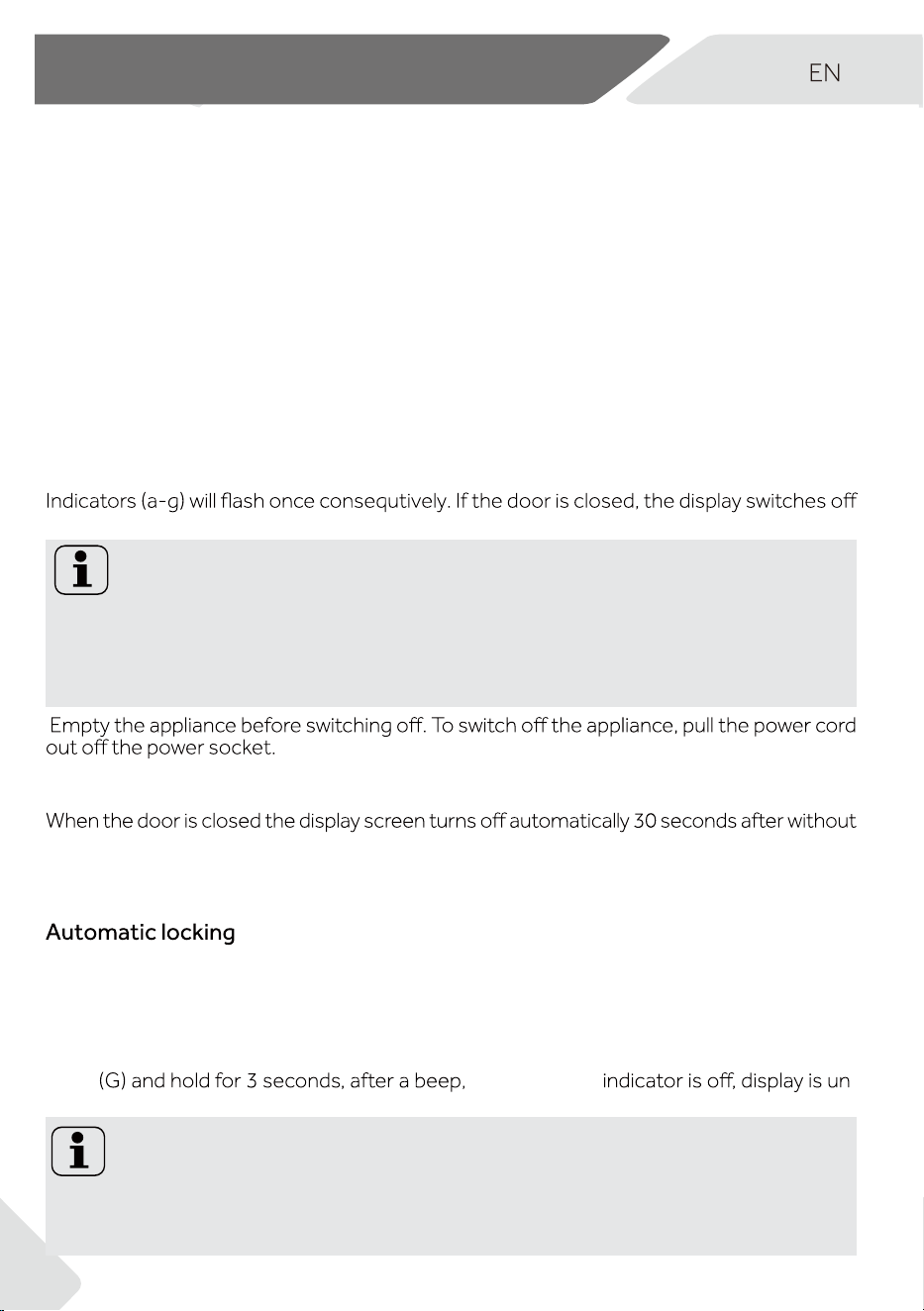
17
Super Freeze mode is optimal for preserving food nutrition, it could freeze food in less
time. Before putting lots of food inside the freezer, activate Super Freeze function to have
lower temperature, to make sure better freeze result.
If you have a large amount of food to freeze at one time, it is recommended that the func-
tion is activated 24 hours before inserting food. Function will stop automatically after 50
hours or manually. Power consumption will incr
ease when this function is on.
Notice: Super Freeze
When display is unlocked, by pressing “Switch”(C) for 3 seconds, the freezer could switch
between Freeze and Refrigerate modes. In Freeze mode the default setting is -18℃, the
etting is 4℃
rent food storage. Prior to making any mode change, please make sure to change the fo-
od inside the freezer, so that food will not be damaged because of mode change.
Freeze mode range: -16°C~-24°C;
Refrigerate mode range: 2°C~8°C;
When display is unlocked and freezer is not in Super Freeze or ECO mode, by touching “-”
this process will be accompanied by beeps. After 5 seconds from stop touching, the indi-
When display is unlocked and freezer is in Freeze mode, touching “Super Freeze mode”
(D), indicator “Super Freeze”(d) is highlighted and freezer works in Super Freeze mode. To
deactivate manually, repeat steps above and indicator “Super Freeze”(d) turns to low lig-
ht. If not deactivated manually, the mode will be deactivated automatically after 50 hours.
In Super Freeze mode, temperature could not be adjusted. if you do so, Super Freezer
indicator will blink to remind that freezer is in Super Freeze mode.
Only in Freeze mode, Super Freeze mode could be set. In Refrigerate mode, Super F-
In ECO mode, energy saving is achieved. The temperature will be set to -16 °C in Freeze
mode or 8℃ in Refrigerate mode automatically.
When display is unlocked, touching “ECO Mode”(E), indicator “ECO Mode”(e) is hight light
and freezer works in ECO mode. To deactivate manually ECO mode, repeat steps above
and indicator “ECO Mode”(e) is low light.
▶
▶
HVF275D model recommends turning on "Super Freeze" 30 hours before putting
in large amounts of food.
▶
°C, the freeze exits and returns
to the -18°C gear;
°C, the freezing will exit and return
to the original set gear
▶
6 - Use
6.5 Freeze/Refrigerate mode switch
6.6 Temperature setting
6.7 Super Freeze mode (D)
6.8 ECO mode (E)
18
Display lock is not memorized, after power back on, display is unlocked.
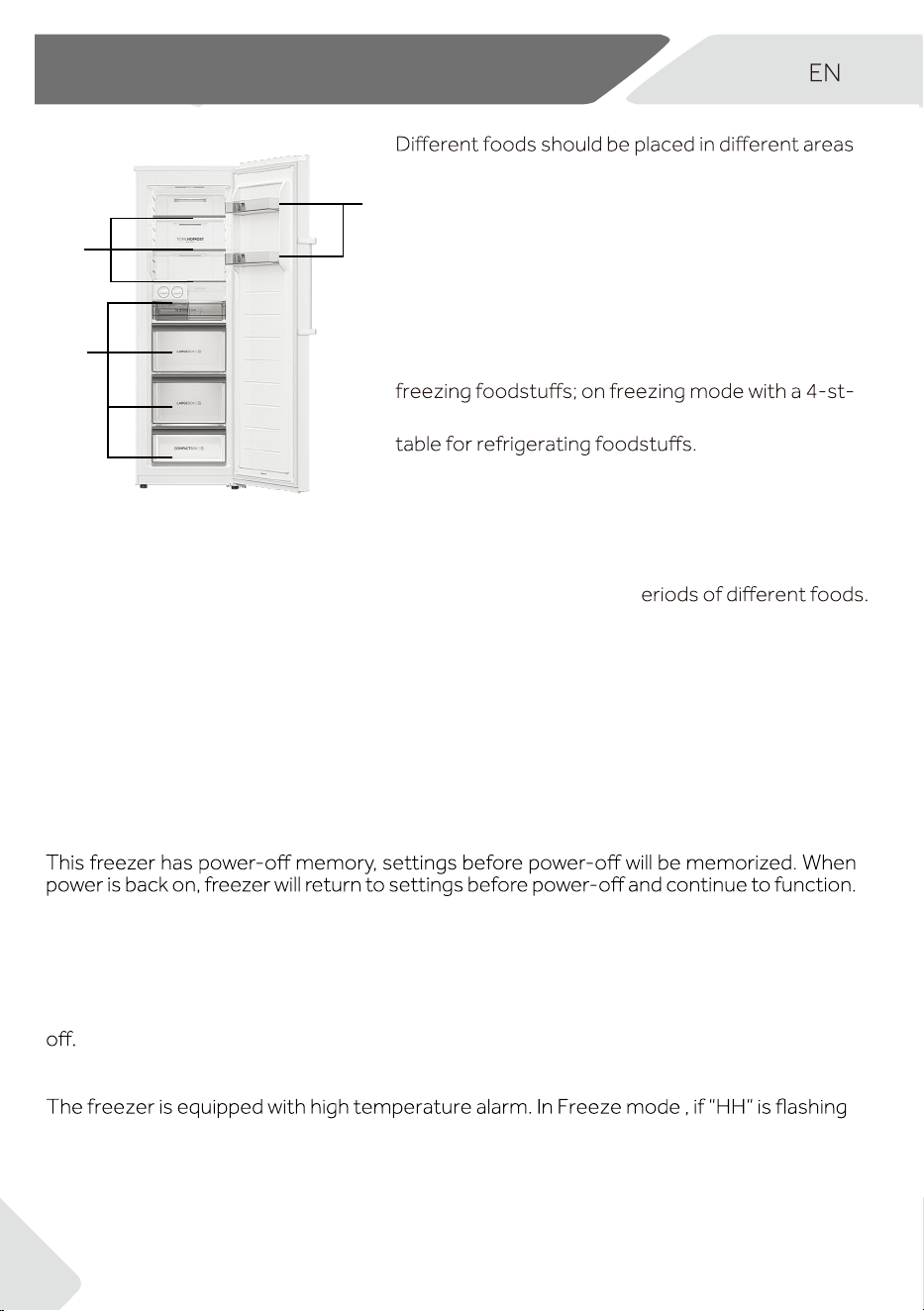
according to their properties (Fig. 6).
1 Pickled foods, canned food, fruit, vegetables,
salad, etc.
3 Eggs, canned food, spices, drinks and bottled
foods, etc.
On refrigerating mode without a 4-star compart-
ment: this refrigerating appliance is not suitable for
ar compartment this freezing appliance is not sui-
Food can be stored in the freezer at a temperature
of at least -18°C for 2 to 12 months, depending on
its properties (e.g., meat: 3-12 months, vegetables: 6-12 months).
In order to avoid expiration of storage periods, please note the freezing date, time limit a-
nd name of the food on the packaging according to the storage p
When freezer is kept open for more than 1 minute, alarm tone is sounded. The alarm to-
ne will be sounded every 30 seconds if door is kept open. The alarm will stop until door is
closed or after 7 minutes from door opening. The alarm tone stops and freezer light goes
Fig. 6
3
1
displayed on indicator (a) with alarm tone sounded, touch any button, the alarm tone st-
ops, that means temperature in the freezer is too high. Please check if freezer door is t-
ightly closed or if large amount of warm food is put inside the freezer. After a period, “HH”
will disappear. If not, and the alarm tone come back, please contact aftersales service.
In Auto Set mode, the temperature will be set to -18°C in Freeze mode or 4°C in Refrige-
rate mode automatically.
When display is unlocked, touching "Auto Set" (F), indicator "Auto Set"(f) is high light and
freezer works in Auto Set mode. To deactivate manually Auto Set mode, repeat steps
above and indicator "Auto Set" (f) is low light, the temperature will return to -18°C in Fre-
eze mode or 4°C in Refrigerate mode.
2
2 Meat products, snack foods, etc.
6 - Use
6.9 Auto Set mode (F)
6.10 Power-off memory
6.11 Door open alarm
6.12 High temperature alarm
19
1
2
1
8.1
8.2
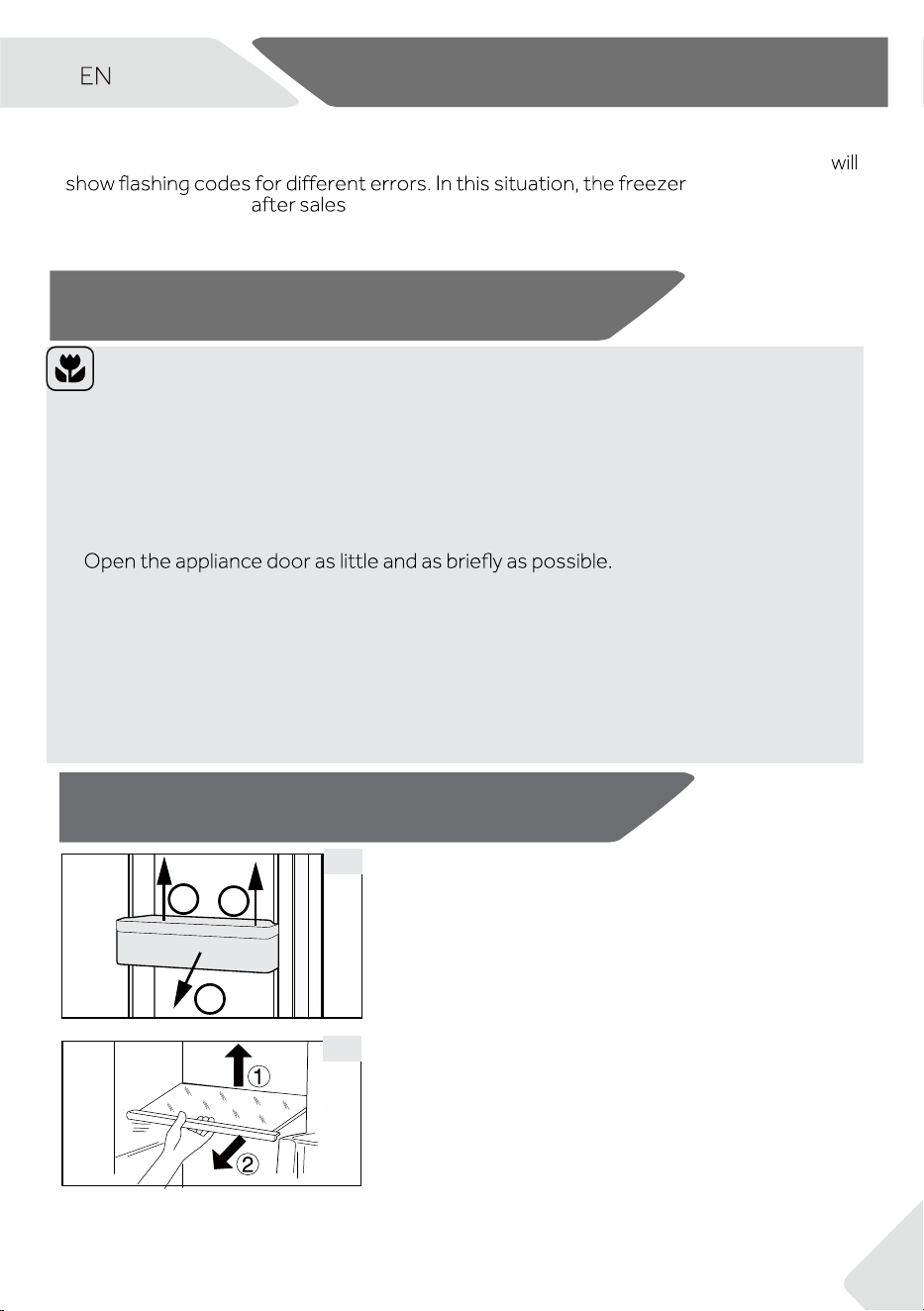
8 - Equipment
8.1 Removable door racks
To remove: Hold the rack on both sides, lift upward (1),
and pull outward (2).
To reinstall: Reverse the steps above. Slide the rack into
place and press down gently.
8.2 Glass shelves
To remove: Lift the front edge of the shelf (1) and pull
it out (2).
To reinstall: Place the shelf on the side supports and
push it all the way to the back.
Energy saving tips
▶ Make sure the appliance is properly ventilated (see INSTALLATION).
▶ Do not install the appliance in direct sunlight or near heat sources (e.g.stoves,
heaters).
▶ Avoid unnecessarily low temperatures in the appliance. Energy use increases as the
temperature is set lower.
▶ Allow warm food to cool down before placing it in the appliance.
▶
▶ Make sure the door always closes correctly and unimpaired by food position. Keep
door seals clean.
▶ Defreeze frozen food in a fridge.
▶
▶
Clean the rear of the appliance regularly. Dust increases energy consumption.
The most energy-efficient setup uses the drawers, food box, and shelves... to be
positioned in the appliance on factory-fresh condition, and food to be placed without
blocking the air outlet of the duct.
6.13 Error indication
This freezer is equipped with error indication. When an error is encountered, display
could still freeze but
user should contact
service as soon as possible for optimal control of the
freezer.
6 - Use
7- Energy saving tips
21
9.1
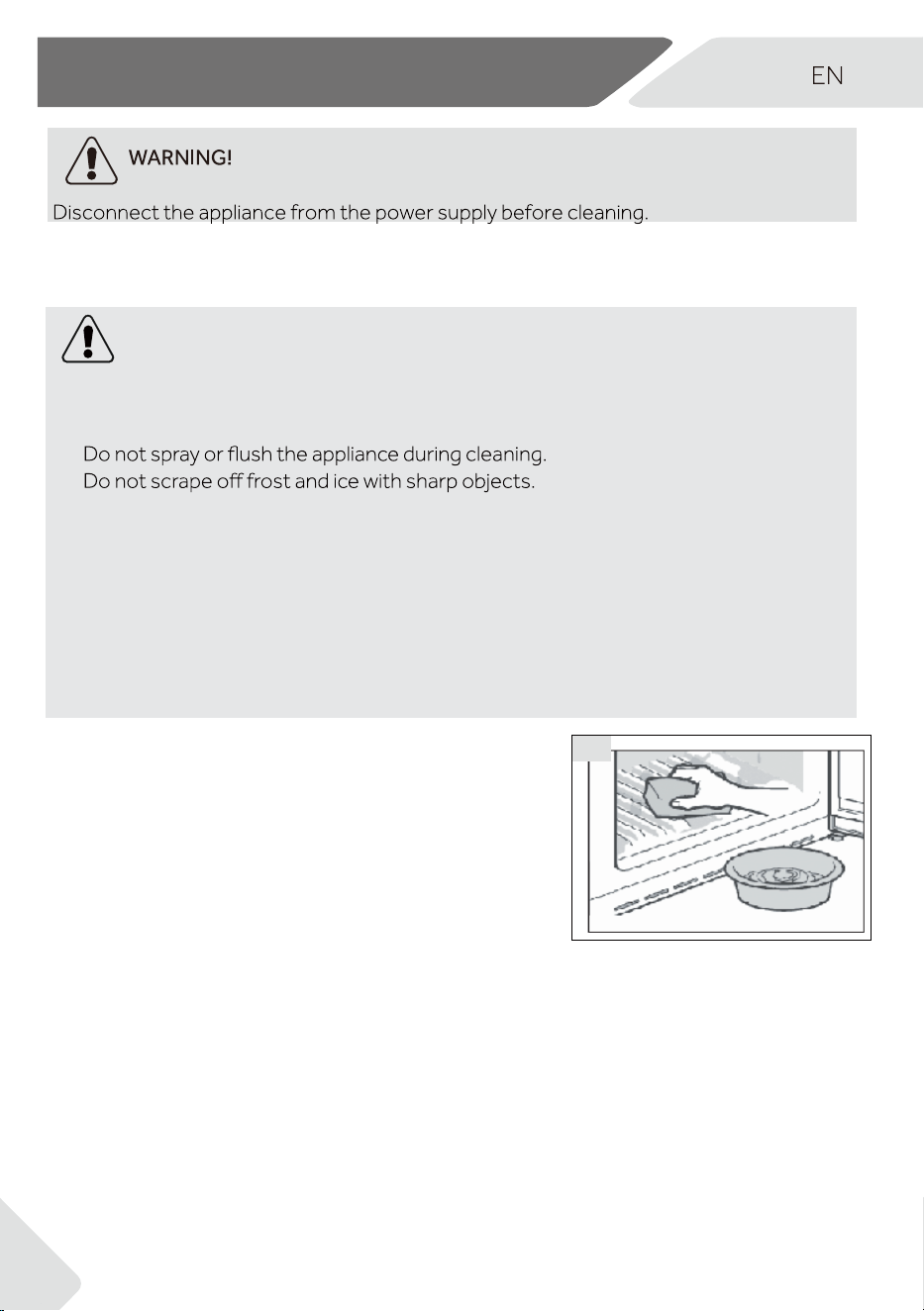
WARNING!
▶ Do not clean the appliance with hard brushes, wire brushes, detergent powder, petrol,
amyl acetate, acetone and similar organic solutions, acid or alkaline solutions. Please
clean with refrigerator-safe cleaner to avoid damage.
▶
▶
▶ Do not use sprays, electric heaters, hair dryers, steam cleaners, or any heat sources,
as they may damage plastic components.
▶ Do not clean the cold glass shelves with hot water. Sudden temperature change may
cause the glass to break .
▶ Do not touch the inside surface of the freezer storage compartment, especially with
wet hands, as your hands may freeze onto the surface.
▶ In case of heating check the condition of frozen goods.
▶ Do not try to repair the appliance by yourself. In case of repair please contact our
customer service.
9.1 General
Clean the appliance when there is little or no food inside.
▶ Always keep the door gasket clean.
▶ Clean the interior and exterior with a soft cloth or
sponge dampened with warm water and a mild
detergent (Fig. 9.1).
▶ Rinse and dry with a soft cloth.
▶ Do not clean any of the parts of the appliance in a
dishwasher.
▶ Clean accessories using warm water and a mild
detergent.
9 - Care and Cleaning
21
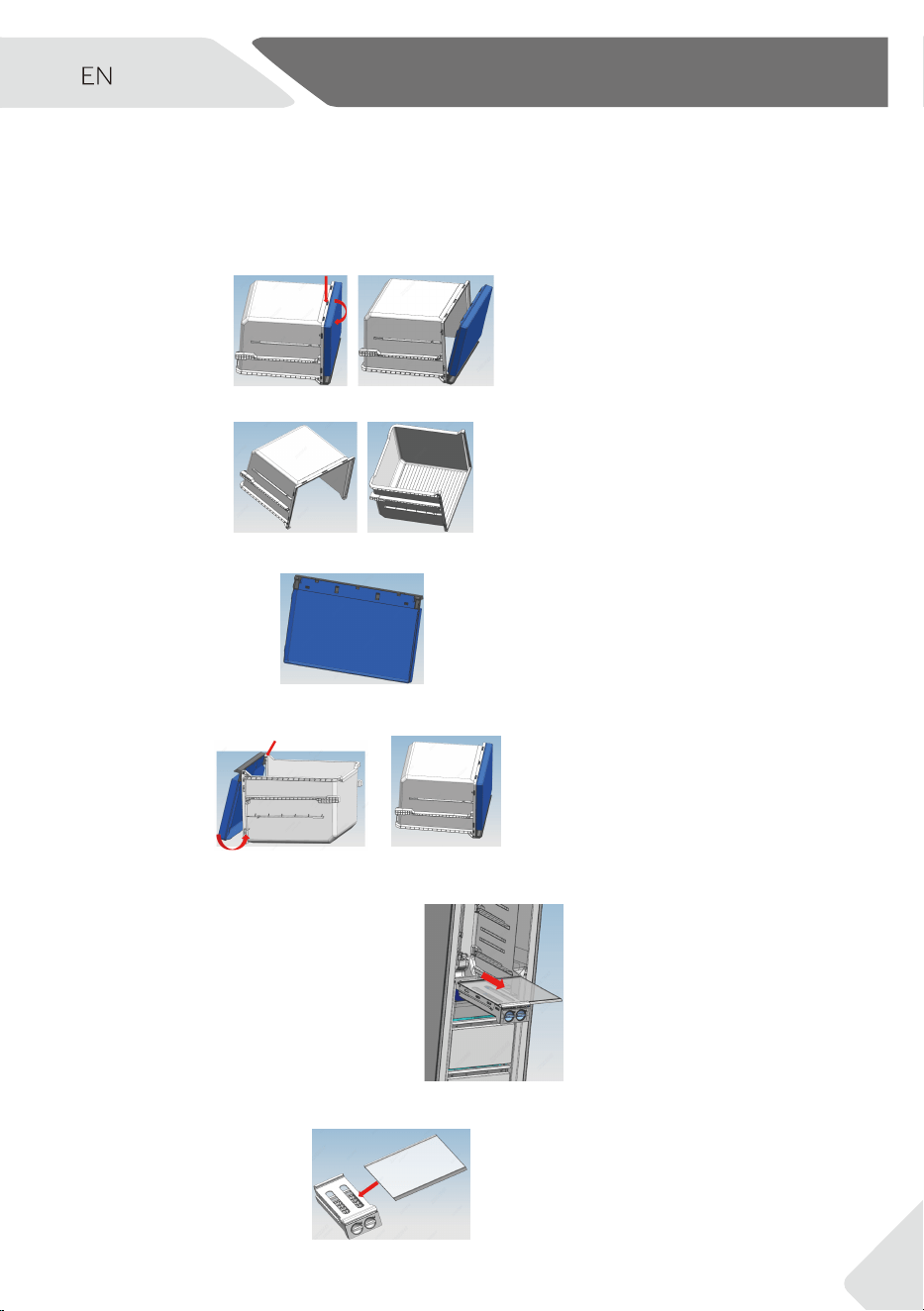
The user manual includes instructions for the using and operation of multiple models. Please
refer to the instructions for the purchased models.
Drawer cleaning steps
1.Remove the front cover of drawer:
2.Cleaning of drawer body:
3.Cleaning of drawer cover:
4.Assembly after cleaning:
Ice maker cleaning
1.Remove the ice maker and glass shelf
2.Remove the ice maker from the shelf in the left and right directions
9 - Care and Cleaning
22
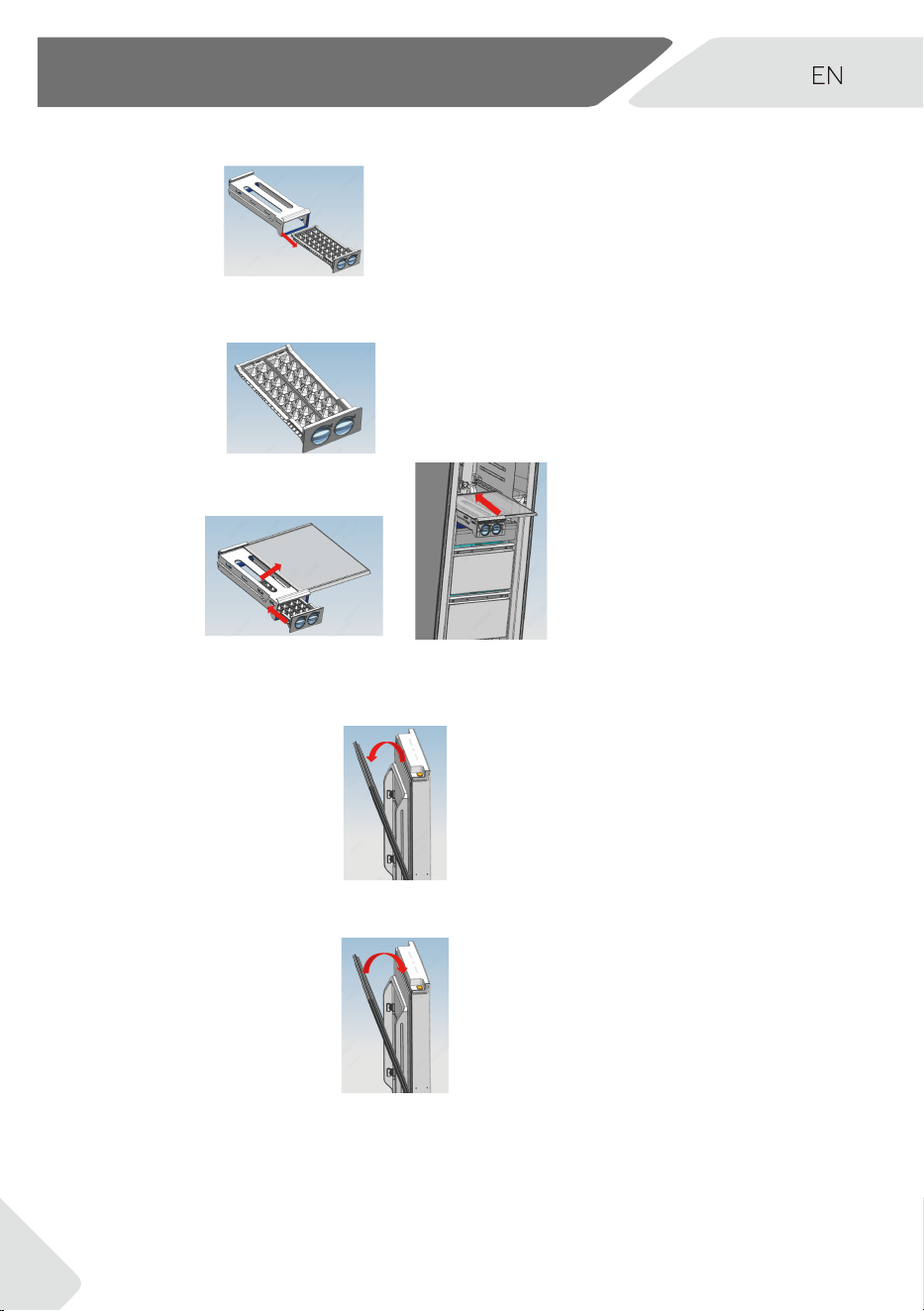
3.Pull the ice box out of the frame:
4.Cleaning of ice box:
5.Assembly after cleaning:
Door seal cleaning
1.Door seal strip remove
2.Door seal cleaning
3.Installation after cleaning
9 - Care and Cleaning
17
23
9.2 Non-use for a long period
If the appliance is not used for an extended period of time:
▶ Remove all food from the appliance.
▶ Unplug the power cord.
▶ Clean the appliance as described in the previous section.
▶ Leave the door and freezer drawers open to prevent odour build-up.
To prevent children from becoming trapped inside, remove the door completely (open
and support the door before unscrewing).
9.3 Moving the appliance
1. Remove all food and unplug the appliance.
2. Tape down shelves and other loose parts in the fridge and freezer.
3. Close the door and secure it with tape.
4. Do not tilt the freezer more than 45° to avoid damaging the refrigerating system.
5.
forcefully.
WARNING!
▶ Do not lift the appliance by its handles.
▶ Never place the appliance horizontally on the ground.
9 - Care and Cleaning
24
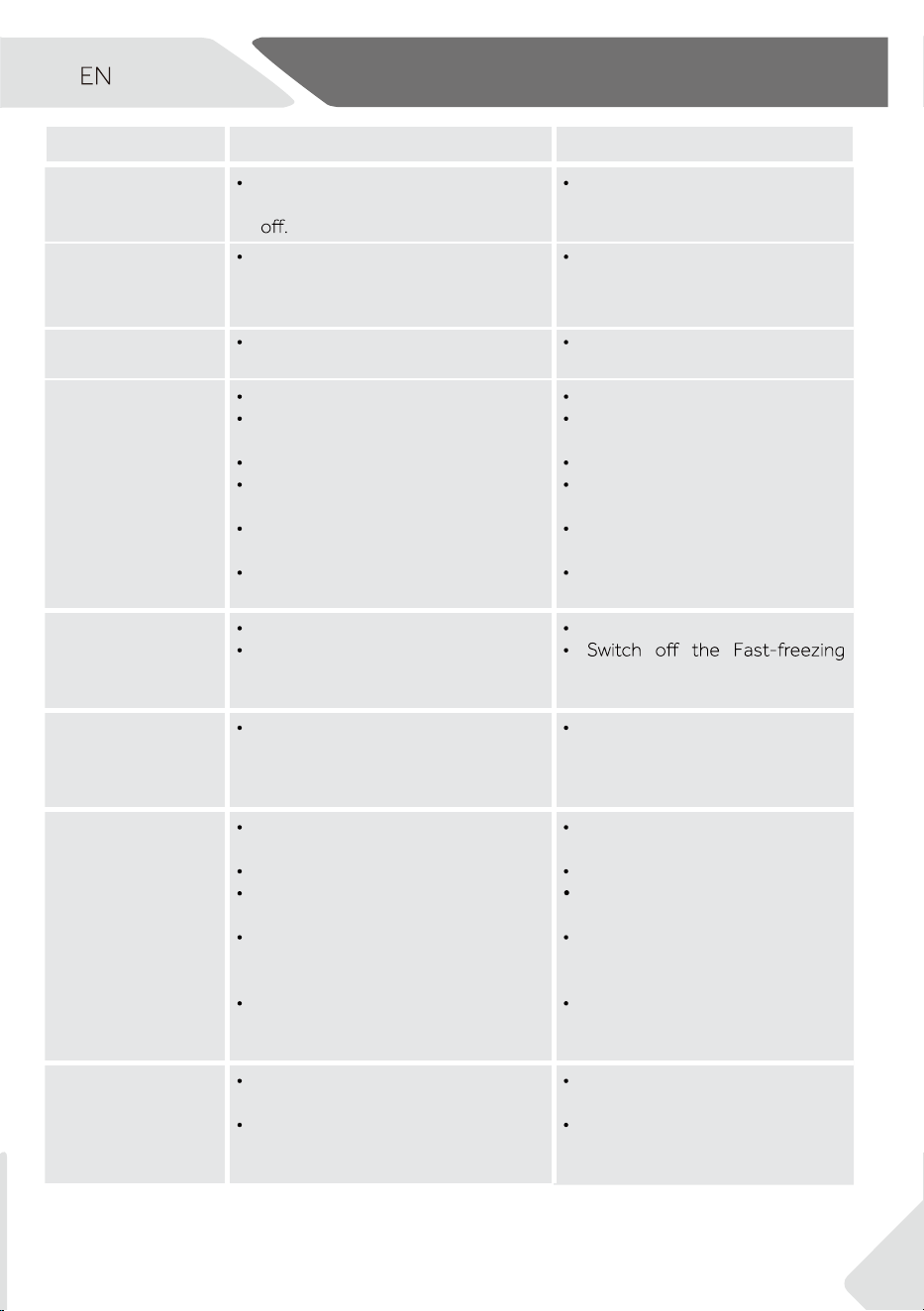
Many occuring problems could be solved by yourself without specific expertise. If a
problem occurs, please review the possible causes and follow the instructions below
before contacting customer care.
WARNING!
▶ Unplug the appliance before maintenance.
▶
improper repairs can cause considerable consequential damages.
▶ Power cords must be replaced by the manufacturer or a qualified service technician.
10.1 Troubleshooting
Problem Possible Cause Possible Solution
The compressor
does not work.
.
The appliance is not plugged in. Plug the appliance into a work-
ing power outlet.
The appliance runs
too frequently or for
too long.
.
The indoor or outdoor tempera-
ture is too high.
.
The appliance has just been swit-
ched on.
The door of the appliance is not
tightly closed.
The door is opened too often.
The temperature setting is too low.
The door gasket is dirty, worn, or
damaged.
Poor air circulation.
Ice buildup inside the appliance.
This is normal under warm
conditions.
It may take 8 to 12 hours to cool
fully.
Ensure the door is closed and
food is not blocking it.
Minimise door openings.
Adjust to a higher temperature
and allow time to stabilise. This
may take up to 24 hours.
Clean the gasket or contact
customer service to replace if
needed.
Ensure adequate ventilation.
Defrost the appliance.
Unusual noises. Appliance is not level.
Appliance is touching another
object.
The appliance stands on a wooden
Level the appliance.
Remove objects around the
appliance.
the appliance somewhere else.
.
.
.
.
.
.
.
.
.
.
.
.
.
.
.
.
.
.
.
.
.
10 - Troubleshooting
25
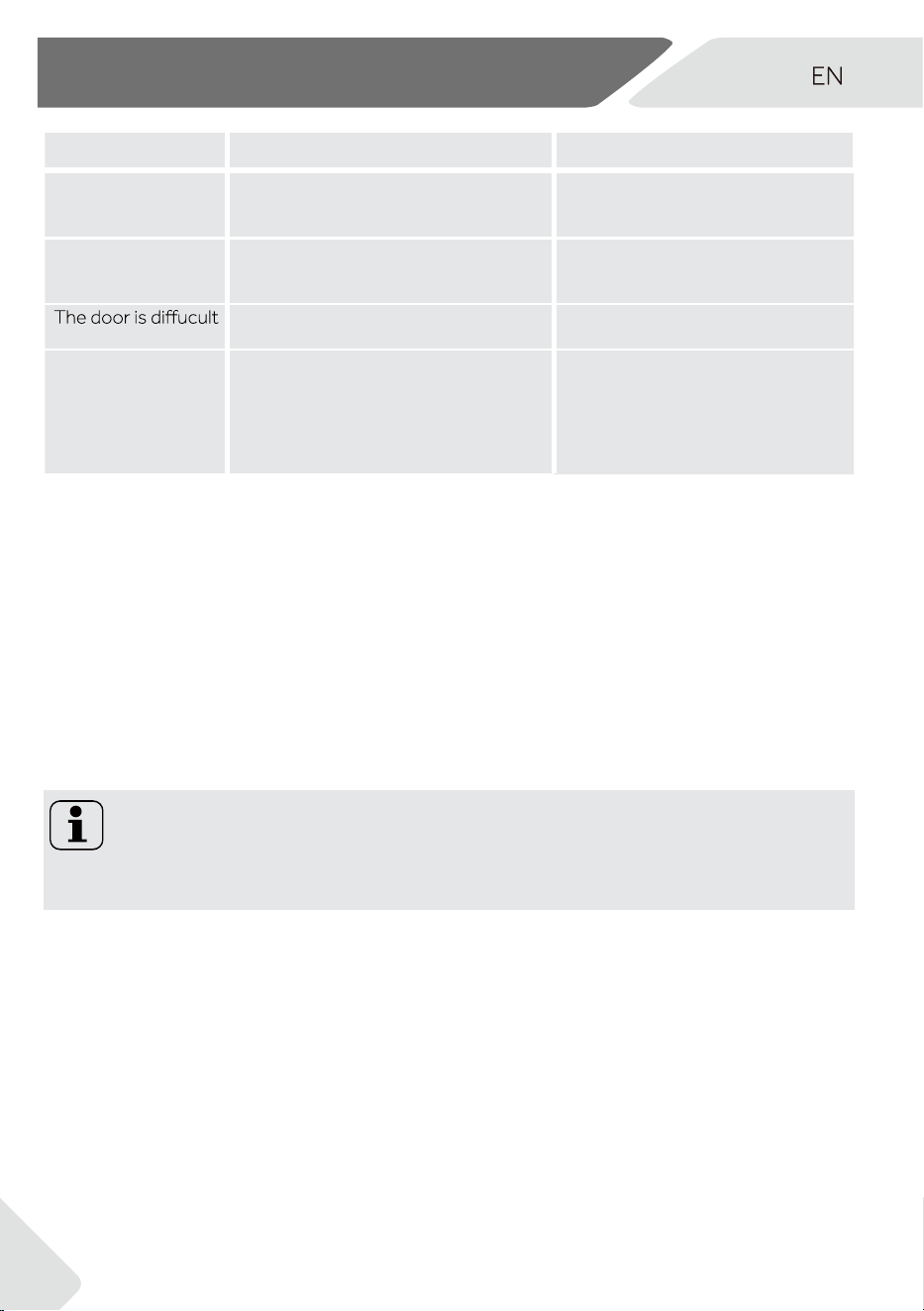
Problem Possible Cause Possible Solution
The appliance
makes a clicking
sound
This is normal. It is caused by the
refrigeration unit switching on or
-
A slight water-like
sound can be heard.
This is normal. -
The appliance makes a
motor sound
The refrigeration unit has just
turned itself on. This is normal
-
It is not cold enough
inside the appli-
ance.
The temperature is set too high.
Warm items have been placed
inside.
Too much food stored at once.
Items are packed too closely
together.
The door is not tightly closed.
The door has been opened too
frequently.
Reset the temperature.
Allow food to cool before
storing.
Store smaller quantities of food.
Leave space for air circulation.
Ensure the door seals properly
when closed.
Minimise door openings.
It is too cold
inside
the appliance.
The temperature is set too low.
The Fast-freezing function is ac-
tivated or has been running too
long.
Adjust to a higher temperature.
function.
Moisture accumu-
lates on the surface
of the appliance
.
The climate is too warm and too
damp.
This is normal. Wipe dry with a
cloth.
Strong ice and frost
in the freezer com-
partment.
Poor packaging of goods.
The door is not tightly closed.
The door has been opened too
frequently or for too long.
Door gasket is worn or dirty.
Items obstructing door closure.
Always pack the goods well.
Close the door.
Minimise door openings.
Items obstructing door closure.
Reposition the shelves, door
racks, or internal containers to
allow the door to close.
Cooling system
not working.
Power cord is unplugged.
No power.
Plug into a power outlet.
Check the outlet or contact
your electricity provider.
10 - Troubleshooting
26
noituloS elbissoPesuaC elbissoPmelborP
Sides of cabinet feel
warm.
·
·
·
·
·
·
·
·
·
This is normal. -
You hear an alarm. The door is open
The temperature inside product is
too high
Close the door or silence the
alarm manually.
to open.
Once the appliance runs, it has an
internal vacuum.
Wait a few seconds and gently
open the door.
The door can’t be
closed properly. It
always leaves a gap.
Door seal has hardened from the
cold.
Warm the gasket with a hair
dryer or warm towel, then
reshape and close the door
firmly.
10.2 Power Interruption
In the event of a power outage, the freezer will typically keep food safe for about 18
hours. To minimise food spoilage:
▶ Avoid opening the door.
▶ Do not add new food during the outage.
▶ After power is restored, the freezer will resume using the previous settings.
▶ If food has defrosted, consume it quickly or cook and refreeze it if safe to do so.
Notice: Memory function during power interruption
After restoration of power the appliance continues with the settings that were set be-
fore the power failure.
10 - Troubleshooting
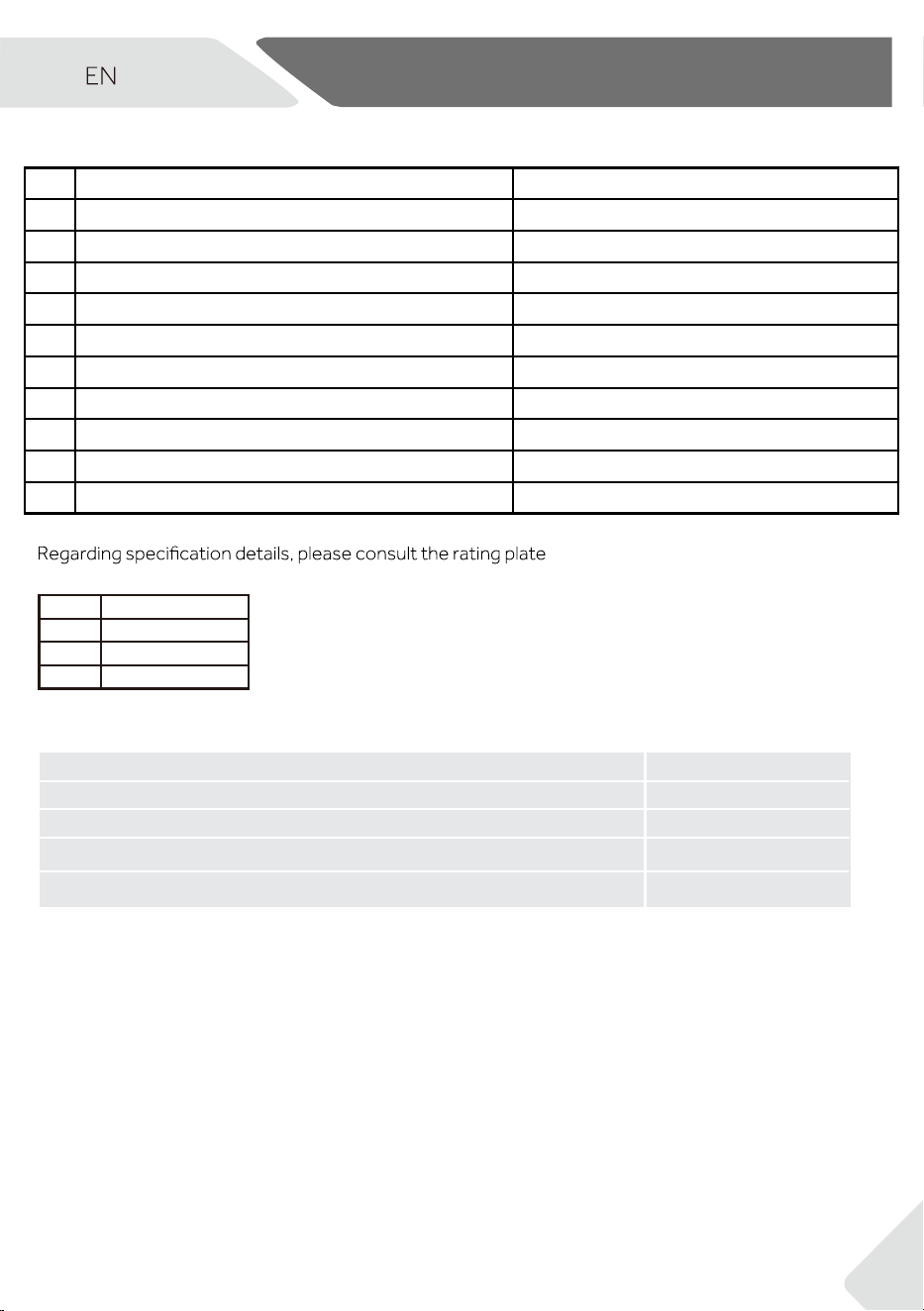
11 - Technical Data
and energy label inside the product.
This appliance is intended to be used at an ambient temperature indicated below:
Additional Technical Data
SN + 10°C~+32°C
N + 16°C~+32°C
ST + 16°C~+38°C
T + 16°C~+43°C
Voltage / Frequency
220-240V ~/ 50Hz
Rated current (A)
Coolant
Dimensions (H/W/D in cm)
1.5
R600a
177.5/60/74.2
Light power/Light voltage 1.5W/ DC 12V
27
1 Trade mark
Haier
2 Model identifier
HVF275DW/HVF275DC
3 Category of the model
Freezer/Refrigerator
4 Energy star Freezer:5.0 star/Refrigerator:6.0 star
5
Product group 7/1
6 Storage volume Cooling/Freezing(L) */***
276
7 Frostfree system
Yes
8
Climate class T
9 Protection Class
I
10
Maximum noise level (dB) 37
11
Construction type Freestanding

WWW.HAIER.COM.AU
WWW.HAIER.CO.NZ