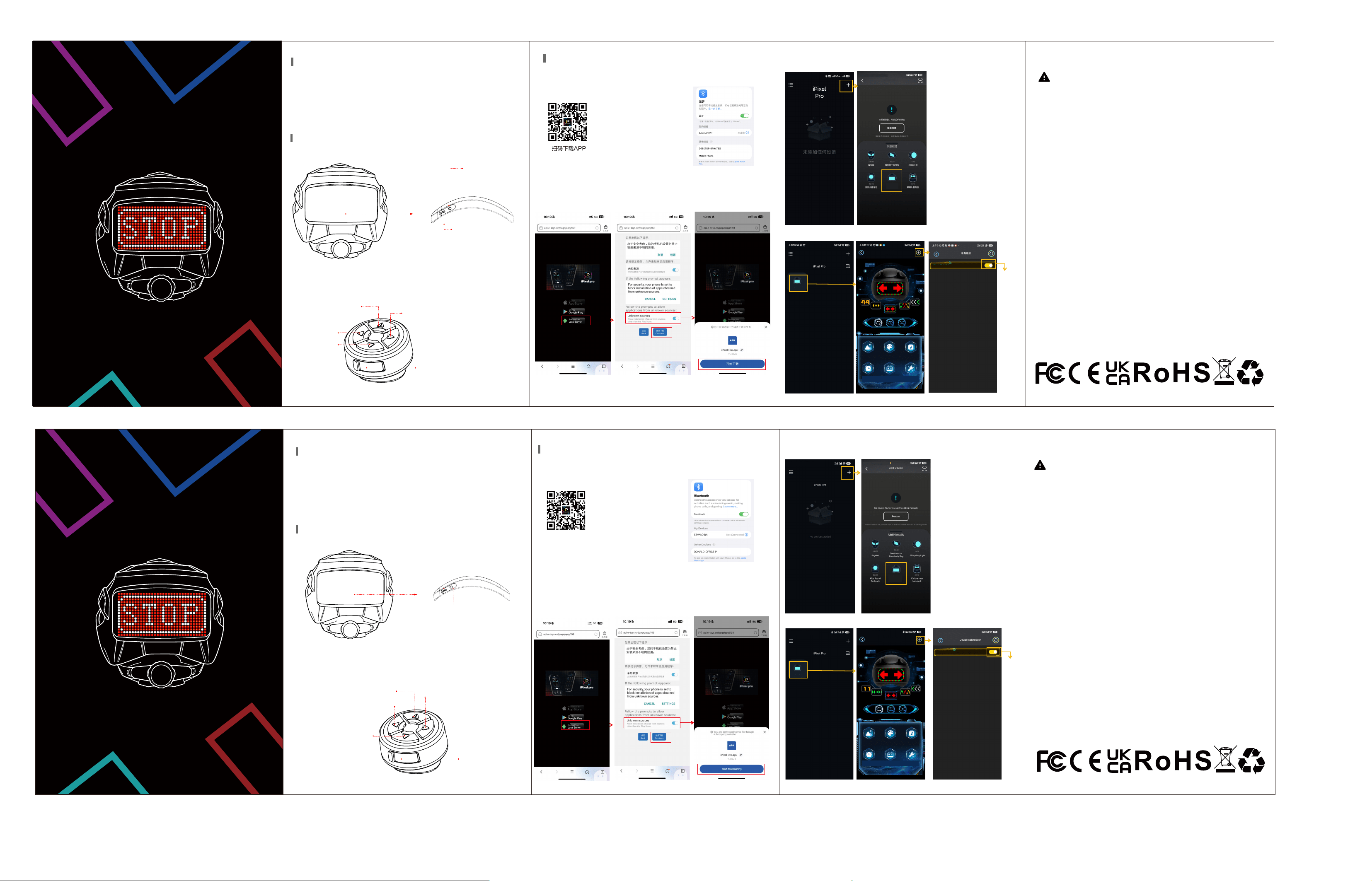
4.添加设备
5.连接蓝牙设备
LED头盔
使用说明书
注:
1:第一次打开APP,有是否允许
权限选项,请都选择允许
2:请点击“设备连接”,添加设备
3:若手机无法搜索到设备,
请检查是否打开定位!
连接
APP下载与蓝牙连接
全彩LED屏/自定义编辑
功能介绍
该产品配备了一块内置的可充电锂电池。关于电池使用的安全警示:切勿
拆解撞击、挤压或将其投入火中。若出现严重鼓胀情况,请勿继续使用。
切勿将其置于高温环境中。电池浸入水中后切勿继续使用!
联邦通信委员会警告
本设备符合美国联邦通信委员会(FCC)规则第 15 部分的要求。使用时须满足以下两个条件:
(1)本设备不得造成有害干扰;
(2)本设备必须接受所收到的任何干扰,包括可能导致其无法正常工作的干扰。
注 1:本设备已通过测试,符合美国联邦通信委员会(FCC)第 15 部分关于 B 类数字设备的
限制要求。这些限制旨在为住宅安装提供合理的防干扰保护。本设备会生成、使用并可能辐
射无线电频率能量,若未按照说明进行安装和使用,可能会对无线电通信造成有害干扰。但
无法保证在特定安装中不会发生干扰。如果本设备确实对无线电或电视接收造成有害干
扰(可通过关闭和开启设备来确定),建议用户尝试通过以下一种或多种措施来解决干扰
问题:
- 重新调整或移动接收天线的方向。
- 增大设备与接收器之间的距离。
- 将设备连接到与接收器不同电路的插座上。
- 咨询经销商或有经验的无线电/电视技术人员寻求帮助。
注 :未经负责合规的一方明确批准,对本装置所做的任何更改或修改都可能导致用户操作
设备的权限失效。
该设备已通过评估,符合一般射频辐射暴露要求。在便携式使用条件下,该设备可无限制
使用。
4. Add equipment
Product Name: LED Helmet
Product Model: HTK-001
Product Size: 275x220x160mm
Current Voltage: 5V 2A
Helmet Battery: 800mA
Remote Control Battery: 200mA
Connect
Product Parameter
Function Introduction
5. Connect to Bluetooth devices
Note:
1: When you first open the APP,
there is an option to allow
permissions. Please select
"Allow" for all.
2: Please click "Device
Connection" to add the device.
3: If your phone cannot detect
the device, please check if the
location function is enabled!
FCC Warning
This device complies with Part 15 of the FCC Rules. Operation is subject to the following
two conditions:
(1) This device may not cause harmful interference, and
(2) this device must accept any interference received, including interference that may
cause undesired operation.
NOTE 1: This equipment has been tested and found to comply with the limits for a Class
B digital device, pursuant to part 15 of the FCC Rules. These limits are designed to
provide reasonable protection against harmful interference in a residential installation.
This equipment generates, uses and can radiate radio frequency energy and, if not
installed and used in accordance with the instructions, may cause harmful interference
to radio communications. However, there is no guarantee that interference will not occur
in a particular installation. If this equipment does cause harmful interference to
radio or television reception, which can be determined by turning the equipment off and
on, the user is encouraged to try to correct the interference by one or more of the
following measures:
- Reorient or relocate the receiving antenna.
- Increase the separation between the equipment and receiver.
-Connect the equipment into an outlet on a circuit different from that to which the
receiver is connected.
-Consult the dealer or an experienced radio/TV technician for help.
NOTE 2: Any changes or modifications to this unit not expressly approved by the party
responsible for compliance could void the user's authority to operate the equipment.
The device has been evaluated to meet general RF exposure requirement. The device
can be used in portable exposure condition without restriction.
This product is equipped with a built-in rechargeable lithium battery.
Safety waming for battery usage: Do not disassemble, impact, squeeze or
throw it into fire.if there is severe bulging, do not continue to use. Do not place
it in a high-temperature environment.Do not use after the battery is immersed in water!
User Manual
F
ull-color LED screen / Customized editing
产品名称:LED头盔
产品型号:HTK-001
产品尺寸:275x220x160mm
电流电压:5V2A
头盔电池:800mA
遥控器电池:200mA
规格参数
注意
右转
左转
开关
长按3秒开关机
短按切换模式
(遥控器)
Type-c充电口
(头盔)
LED Helmet
Attention
Turn Right
Left Turn
Switch
Long press for 3 seconds
to turn on/off
Selection Model
(Remote Control)
Type-C charging port
3、如果你没有APP Store/Google Play,请点击第三方从本地服务浏览器搜索“iPixel Pro”/或
扫码下载
2.打开手机蓝牙
①
②
1.手机扫描下面二维码进行下载安装或者
进入Google Play/APP store搜索
“iPixel Pro”进行下载
①
②
Downloading the App and connecting via Bluetooth
1.Scan the QR code below to download
and install app with your mobile phone,
or enter Google Play/App Store and
search for "iPixel Pro" to download
Scan the QR code
and download the App
3. If you don't have the App Store/Google Play, please click on the third-party option
and search for "iPixel Pro" using the local service browser, or scan the QR code to download.
2.Turn on the Bluetooth
on your mobile phone.
Switch
Press and hold for 3
seconds to power on/off.
Tap briefly to switch animations.
(LED Helmet)
Type-C charging port
开关
长按3秒开关机
短按切换动画
Type-c充电口
添加设备
头盔灯
头盔灯
32x16
图库
炫彩时钟遥控器设置
DIY动感音乐
iPixel-7DA03C
32x16
头盔灯
Helmet Light
32x16
Helmet Light
iPixel-7DA03C
Picture
Library
Colorful
Clock
Remote
Control
Settings
DIY
Dynamic
Music
32x16
Helmet Light