User Manual
LED Matrix Panel
Full Color LED Screen/Custom Editing/Double-Row Display
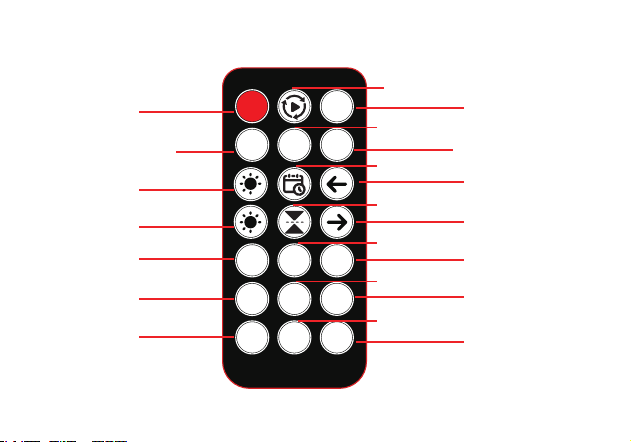
Remote Control Guidelines
2H
ON
OFF
4H 8H
21 3
4 5 6
7 8 9
+
-
Light OFF
Play in a loop
Date/Clock
Upside Down
Pre-set Program 2
Light ON
Timed 2H OFF
(Long press 3s to cancel)
Brightness +
Brightness -
Pre-set Program 1
Pre-set Program 8
Pre-set Program 5
Pre-set Program 4
Pre-set Program 7
Move text to the left
Move text to the right
Pre-set Program 3
Pre-set Program 6
Pre-set Program 9
Timed 4H OFF
(Long press 3s to cancel)
Timed 8H OFF
(Long press 3s to cancel)
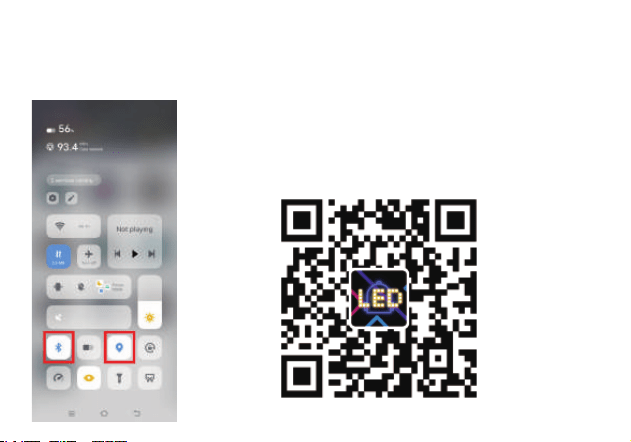
Scan the QR code and download the APP
Scan the QR code below to download and install app with
your mobile phone, or enter Google Pl ay/APP Store
and search for “iPixel Color” to download
1.Download & Install APP
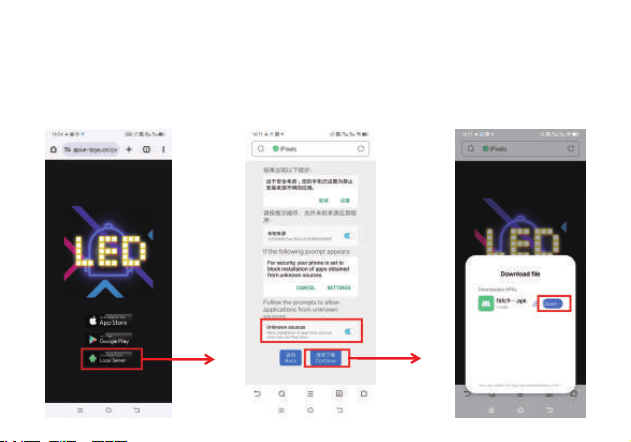
2.If you don't have APP Store/Google Play,
please click the third one to download from
Local Server
①
②
Firstly, Turn ON Bluetooth and Location
①
②
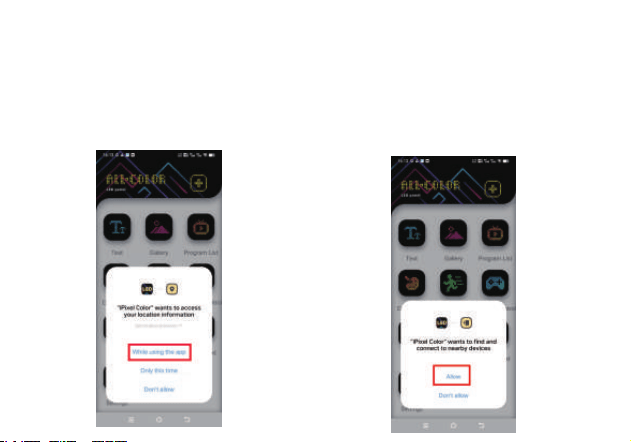
3.APP Authorization Permission
① Allow access to your
location information
② Allow to find and connect
to nearby devices
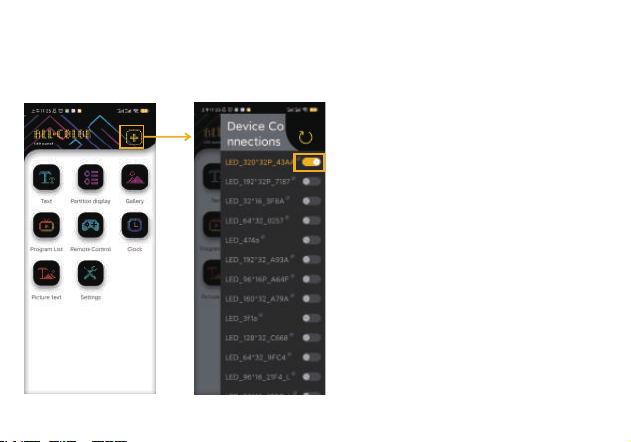
Note:
1:When you open the APP for the first time,
please Allow to all permissions
2:Please click the + sign to add a Bluetooth device
3:If Bluetooth cannot be searched
on your Android phone, please check
if you have turned on the GPS.
4.Connect The Device
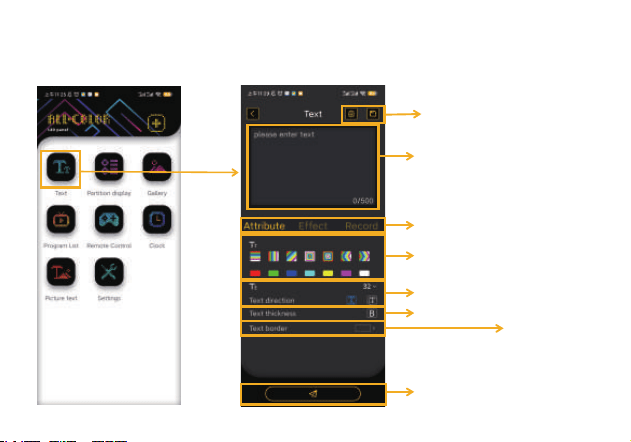
5.Text Editing
Delete/Save Record
Input Text
Font color
Text size/Text direction
Send
Set Attributes/Special Effects/
Send Records
Text thickness
Text border
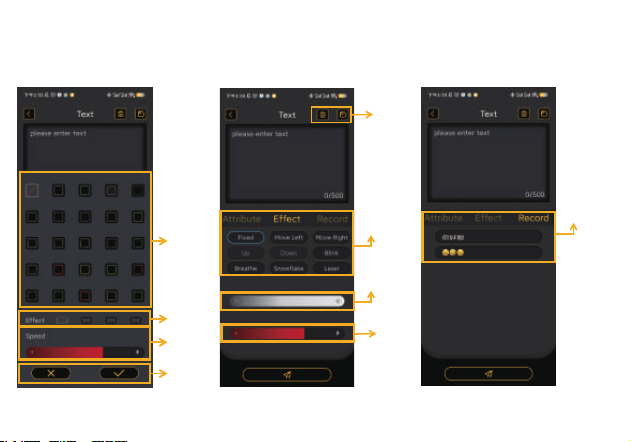
6.Text border/Special Effects/Records Kept
Dynamic
effect
Delete
Save
Brightness
Speed
save the
record
Style
Effect
Speed
Cancel
Confirm
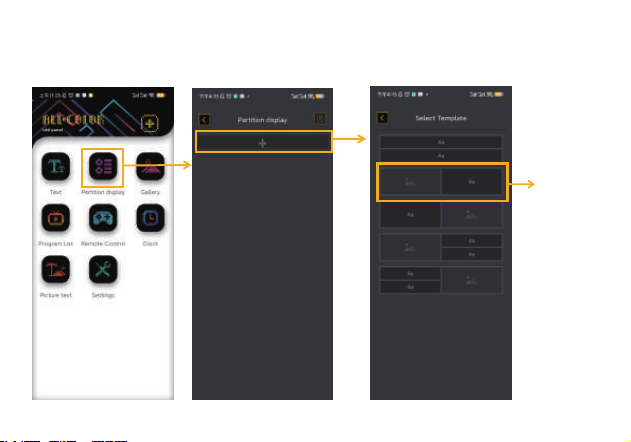
7.Partition Display
page down
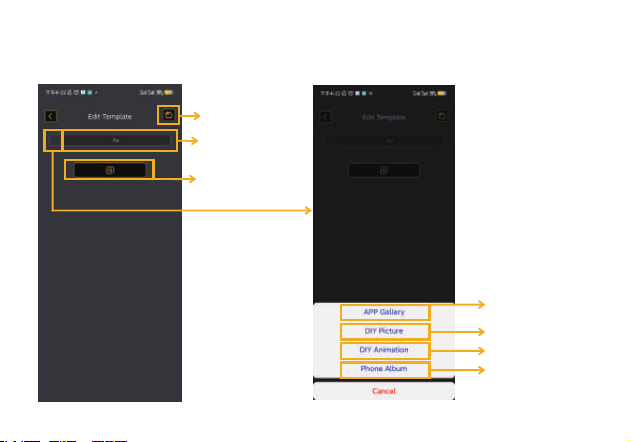
8.Partition Display
Send
Save
Skip to No.5-
Text Editingg
Jump to page 10 of the
photo gallery
page down
page down
Jump to the mobile
phone photo album
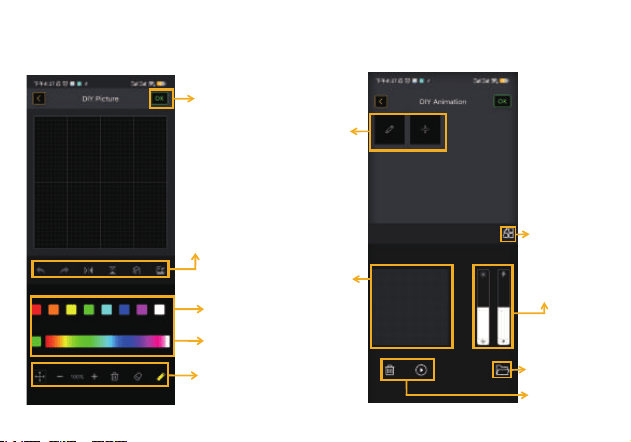
Move/Zoom Out/Zoom In
Delete/Eraser/Brush
Color Palette
Standard Color
undo/restore
Horizontal mirror/Vertical mirror
Move the layer/Insert a picture
9.Partition Display
Save
Insert Image
Delete
Preview Play
adjust the brightness
adjust the speed
Edit
Edit Frame/Insert
Preview
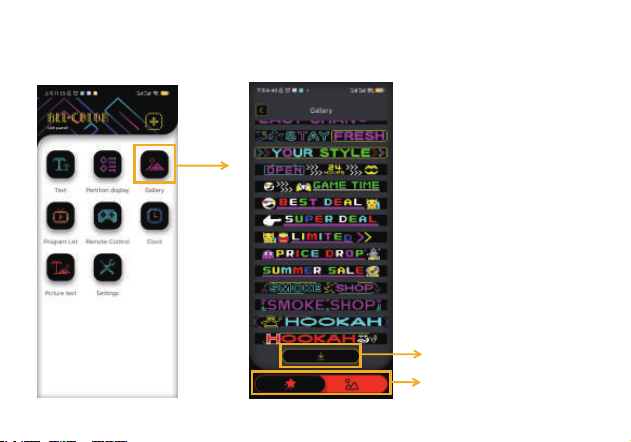
10.Gallery
Dynamic image / Static image
download materials
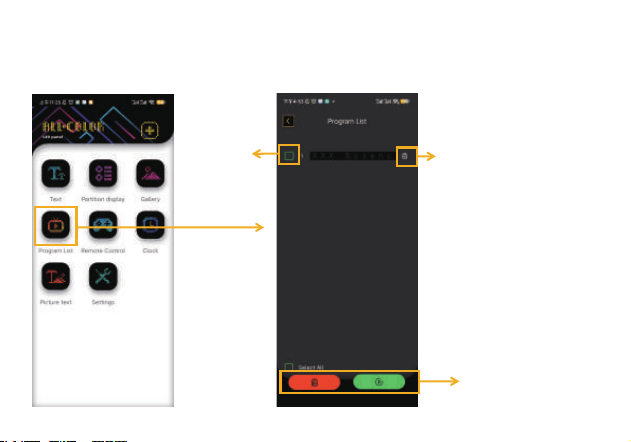
11.Program List
Delete/Play
Delete
Select
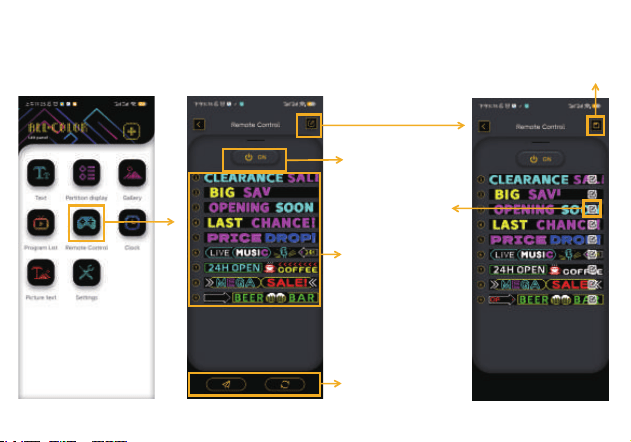
12.Remote Control
Remote Control
Power Switch
save
Preset Content
send/
restore defaults
edit the
preset content
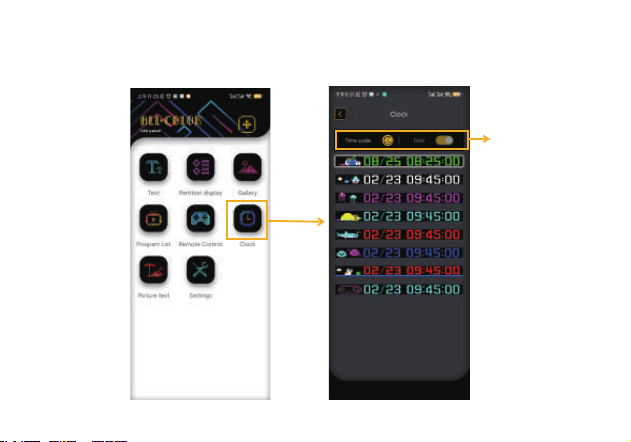
13.Clock
Time System/Date
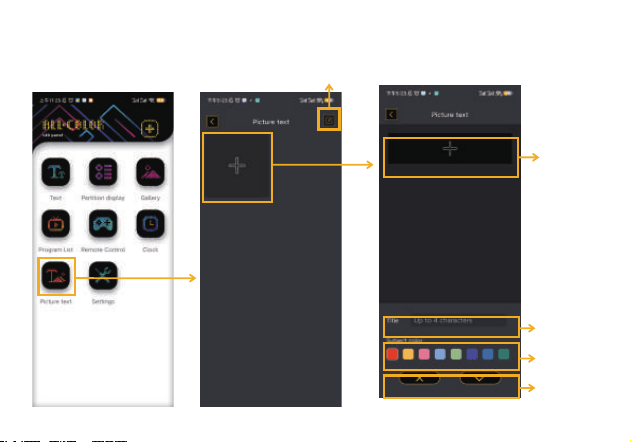
14.Text Animations
Modify/Delete Text Animations
Delete/save
Set Theme
Color
Title Name
page down
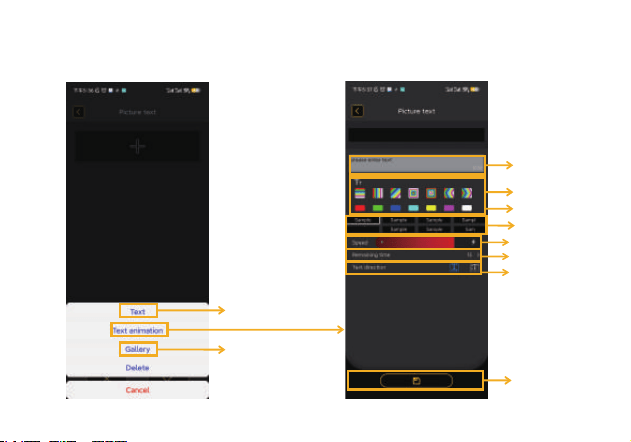
15.Text Animations
Skip to No.5-
Text Editingg
Text Color Effect
Text Color
Dynamic Effect
Adjust Speed
Dwell Time
text direction
save
kip to No.10-Galler
Enter text
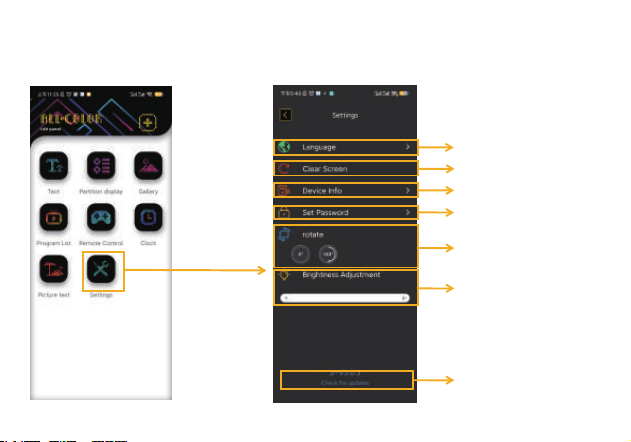
16.Settings
APP Version Number
Switch Language
Restore Factory Settings
Device Version Information
Locking Password Setting
Adjust Screen Brightness
Screen Rotation

Operation Instructions for Resetting the Device :
This method for resetting the device : applicable when the device cannot be connected after a password is set. This
process does not require the use of an app; it can be completed simply by turning the power on and off five times.
Execution of the reset operation:
Power on the device and observe its status. Once see the white light, quickly turn off the power switch. Repeat this
process five times in a row.
On → Off → On → Off → On → Off → On → Off → On → Off → On (five times in total).
Notes:
Operation frequency: Perform the on/off operation after seeing the white light. If the intervals are too long or too short,
the operation may be ineffective.
The number of consecutive power on/off cycles must be strictly no less than five. Fewer cycles may not trigger the reset.

Warning:
This device complies with Part 15 of the FCC Rules. Operation is subject to the following two conditions:
(1) This device may not cause harmful interference.
(2) This device must accept any interference received, including interference that may cause undesired operation.
Changes or modifications not expressly approved by the party responsible for compliance could void the user's
authority to operate the equipment.
NOTE: This equipment has been tested and found to comply with the limits for a Class B digital device, pursuant to
Part 15 of the FCC Rules. These limits are designed to provide reasonable protection against harmful interference in
a residential installation. This equipment generates, uses and can radiate radio frequency energy and, if not installed
and used in accordance with the instructions, may cause harmful interference to radio communications. However.
there is no guarantee that interference will not occur in a particular installation. If this equipment does cause harmful
interference to radio or television reception which can be determined by turning the equipment off and on, the user is
encouraged to try to correct the interference by one or more of the following measures:
--Reorient or relocate the receiving antenna.
-- Increase the separation between the equipment and receiver
--Connect the equipment int
o an outlet on a circuit different from that to which the receiver is connected.
--Consult the dealer or an experienced radio/TV technician for help
NOTE: This device and its antenna(s) must not be co-located or operation in conjunction with any other antenna or
transmitter
RF Exposure Statement
To maintain compliance with FCC's RF Exposure guidelines, this equipment should be
installed and operated with minimum distance of 20cm the radiator human body. This device
and its antenna(s) must not be co-located or operation in conjunction with any other antenna nr transmitter.
a) The statement "Remove and immediately recycle or dispose of used batteries according to local regulations andkeep
away from children. Do NOT dispose of batteries in household trash or incinerate."
b) The statement “Even used batteries may cause severe injury or death."
c) The statement “Call a local poison control center for treatment information."
d) A statement indicating the compatible battery type (e.g.,LR44, CR2032). (LR44, CR2032)。(LR44, CR2032)。
e)A statement indicating the nominal battery voltage. 3.7v
f) The statement “Non-rechargeable batteries are not to be recharged."g) The statement "Do not force discharge,
recharge, disassemble, heat above (manufacturer 's specified temperaturerating) or incinerate. Doing so may result in
injury due to venting, leakage or explosion resulting in chemical burns.
a) The statement "Ensure the batteries are installed correctly according to polarity (+ and -).
b) The statement "Do not mix old and new batteries, different brands or types of batteries, such as alkaline.carbon-zinc,
or rechargeable batteries.
c) The statement “Remove and immediately recycle or dispose of batteries from equipment notused for an extended
period of time according to local regulations.
d) The statement "Always completely secure the battery compartment. lf the battery compartment does not closesecurely,
stop usingthe product, remove the batteries, and keep them away from children.”