产品说明书
Ai⼝袋摄像机
使⽤产品前请仔细阅读本说明书,并妥善保管。每次使⽤前,请
仔细检查产品,若出现破损、变形,请勿使⽤。
使⽤本产品,即视为对说明书声明的全部认可和接受。对于直
接或间接因使⽤ 本产品⽽造成的滥⽤、不 利于、影响、损害、伤
害、惩罚或者其它法律后果,本公司将不承担任何责任。
⽤⼾应遵循包括但不限于本⽂提及的使⽤注意事项。在国家法
律法规范围内,本承诺解释权、修改权归本公司所有。
提⽰: 说明书中的产品、配件、⽤⼾界⾯等插图均为⽰意图,仅供
参考由于产品的更新与升级,产品实物与⽰意图可能略有差异,
请以实物为准。
使⽤须知 产品介绍
提⽰:本产品的型号、参数、安全信息显⽰在说明书中以及充 电座底部的产品、配件、⽤⼾界⾯等插图
均为⽰意图,仅供参考。由于产品的更新与升级,产品实物与⽰意图可能略有差异,请以实物为准。
下载APP
睿博⼠
扫描⼆维码,下载并安装APP。
打开APP⾸⻚在⻚⾯添加摄像机,
根据APP提⽰⽅式添加设备。
提⽰:由于AP P的升级与更新,在实际操作可能与以上描述略有差异,请按照当前AP P内指引进⾏操
作。连接时需保证⽹络畅通,且监控正常开启。
OTG功能
设备开机状态下,⻓按模式切换键5s进⼊OTG传输模式。
语⾔播报:语⾳提⽰设备已进⼊⽂件传输模式,监控功能失效;
当⽂件传输完成后,请关机后再开机使⽤,否则会出现设备⼯作
异常。
此时基于进⼊了电脑与设备连接的传输模式,电脑上可以看到
设备,类似像U盘⼀样,可以拷⻉⽂件;若想退出OTG功能, 则设
备关机后再开机。
注意事项
摔落或碰撞可能会损坏产品,导致⼯作异常
请勿在过度潮湿或可能会导致本产品进⽔的环境下使⽤本产
品,以免影响正常使⽤
使⽤本产品时,请注意防尘防沙
本产品适⽤的⼯作温度为-30℃~60℃,请勿在温度过⾼或者
过低的环境中使⽤本产品
为更好地使⽤本产品,应避免镜头正⾯及侧⾯靠近玻璃、⽩墙
等反光物体,以免造成画⾯近处亮、远处暗或者发⽩的现象
使⽤前,请确保机器的充电座接触点没有脏污、氧化等,如果
电源连接线出现损坏、破损,为了避免⽆法正常使⽤,请联系
售后服务进⾏更换。
基本参数 售后服务 产品性能故障表
⾮保修条例
未经授权的维修、误⽤、碰撞、疏忽、滥⽤、进液、事故、改动、不正
确的使⽤⾮本产品配件,或撕毁、涂改标贴、防伪标记;
已超过三包有效期;
因不可抗⼒造成的损坏;
不符合《产品性能故障表》所列性能故障的情况;
因⼈为原因导致机器、底座及其配件产⽣《产品性能故障表》所
列性能故障。
提⽰:
因运输过程中需使⽤包装箱保证产品运输安全,建议您⾃签收之
⽇起⾄少保留包装盒30天。
性能故障
通电不开机
⽆法重置
连接APP不出图像
镜头异常
⻨克⻛不⼯作或⼯作异常
扬声器不⼯作或⼯作异常
其它硬件故障导致功能⽆法使⽤
采⽤0.5T算⼒⾼性能AI主控 ,2304*1296( 3MP)⾼清图像 ,
H.265+编码,昼夜画⾯清晰细腻;
⽀持精准⼈形检测,检测精度达到99.88%,⼤幅度降低误检漏
检问题;
全天24H录像,检测到⼈形后,快⾄50ms切换为全帧率录像,
不遗漏任何细节。
采⽤ H.265+低编码技术,节省存储空间,降低⽹络带宽以及减
少4G流量消耗;
深度优化回⾳消除算法技底噪处理,语⾳对讲效果更好;
全⽹通4G⽹络,频段覆盖全,通电即可⾃动连接服务器,扫码
即可添加设备,彻底解决⽆线类摄像机产品对码难问题;
三重掉线保护机制 ,保障设备不掉线 ,⽀持故障检测功能,协
助安装⼈员快速定位故障问题;
⽀持⼀键切换⾼帧率录像⼯作模式,⼯作模式智能切换;
⽀持检测到⼈形⽬标后,及时推送消息通知;
⽀持双光灯板 ,⽀持4种夜视模式:⿊⽩夜视、全彩夜视、智能
夜视、星光夜视;
⽀持指⽰灯显⽰⼯作状态;
⽀持OTG功能,传输录像⽂件到电脑上进⾏存储剪辑分享;
3.7V电池供电,⽀持充电器及充电宝充电;
⽀持 TF 卡录像及云存储录像(需付费购买),TF 卡最⼤⽀持
256G;
APP⽀持17国语⾔(简体中⽂/繁体中⽂/英语/芬兰语/韩语/法
语/葡萄⽛语/泰语/西班⽛语/波兰语/印度尼西亚语/德语/意⼤
利语/俄语/⽇语/越南语/阿拉伯语/⼟⽿其语)。
产品名称
智能云台机
保修记录
产品名称
制造编号
经销商名称
客⼾名称
客⼾地址
客⼾电话
购买⽇期
⽇期 问题描述
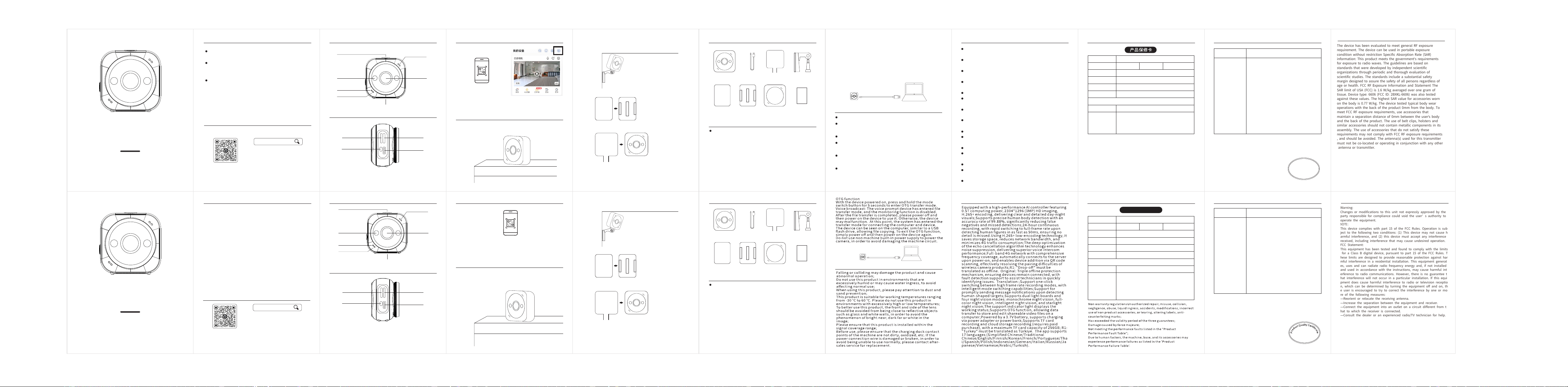
tpcy-c充电⼝
镜头
包装清单
量
合
质
格
品
证
产
PASS
⻨克⻛
拍照键/模式切换键
补光灯
充电指⽰灯
⼯作指⽰灯
喇叭
TF卡槽SIM卡槽
开机/复位键
ProductIntroduction
PackingList
lens
filllight
chargingindicatorlight
WorkIndicatorLight
microphone
Photobutton/modeswitchbutton
horn
产品使⽤
请使用输出电压
5V(MAX) ,输出 电
流2A(MAX)的 充
电器进行充电。
长按电源键可以 进行 开/关机,
连续短按两下复 位。
1.连接摄像机
设备开机听到机器联⽹成功后,⼿机打开下载好的APP,点击右上⻆+号,进⼊扫码,扫描机⾝/包装盒
上的⼆维码,AP P出现监控画⾯即绑定添加成功。
2.快速安装
本机⽀持桌⾯摆放,粘贴,磁吸,挂脖佩戴等⽅式。
(1)桌⾯摆放
(2)粘贴安装
安装⻆度建议下倾15 ~2 0左右。
3M胶贴
底座
⾸先在要安装的位置粘贴上底座
⽀架
夹套
把机器装进 夹套⾥,同时把⽀架连接上
并扭紧配套的镙丝
底座
提⽰:粘 贴安装要选择平整的墙⾯或窗⼾玻璃上,注意不要⽤⼿碰到胶,以免影响粘性,贴于被贴的物
体上,贴完后⽤⼿整体按压20秒左右,使之排出内部空⽓,以便粘牢。
夹套
Precautions
BasicParameters
after-saleservice ProductPerformanceFaultTable
Tips:
Duetotheneedtousepackagingboxesduringtransportationto
ensureproductsafety,itisrecommendedthatyoukeepthepackaging
boxesforatleast30daysfromthedateofreceipt.
Performancemalfunction
Poweronbutnotturningon
Cannotreset
Unabletogenerateimageswhenconnectingto
theapp
Cameraabnormality
Microphonenotworkingorworkingabnormally
Speakernotworkingorworkingabnormally
Otherhardwarefailuresresultintheinability
tousethefunction
productname
Intelligent
gimbalmachine
WarrantyRecord
productname
Manufacturingnumber
DealerName
CustomerName
customeraddress
customerphone
purchasingdate
Date Problemdescription
WarrantyCard
PASS
CameraX1
3MadhesiveX1
ProductUsage
1.Connectcamera
Afterthedeviceisturnedonandthemachineissuccessfullyconnectedtotheinternet,
openthedownloadedAPPonyourphone,clickonthe+signintheupperrightcorner,enter
thescancode,scantheQRcodeonthebody/packagingbox,andtheAPPwilldisplaya
monitoringscreen,indicatingsuccessfulbindingandaddition.
2.QuickInstallation
This machine supports desktop placement, pasting,
magneticattraction,neckhanging,andothermethods.
(1) Desktop placement
(2) Paste installation
The installation angle i s recommend ed
to til t do wn wards by about 15-2 0 de grees.
3M adh es iv e tape
base
Firs t, p as te the base onto the
loca ti on t o be installed
supp or t
jack et
Inst a l l the machine into the ja c k e t
and co nn ec t the bracket at the sa me t ime
And ti gh te n the matching scre ws t ightly
base
Tip:Whenpastingandinstalling,chooseaflatwallorwindowglass.Becarefulnottotouch
theadhesivewithyourhandstoavoidaffectingitsadhesion.Stickitontotheobjectbeing
pasted,andafterpasting,pressitdownwithyourhandsforabout20secondstoreleasethe
internalairandensureafirmadhesion.
jack et
ProductManual
AIPocketCamera
Pleasereadthismanualcarefullyandkeepitproperly
beforeusingtheproduct.Beforeeachuse,please
carefullyinspecttheproduct.Ifthereisanydamageor
deformation,donotuseit.
Byusingthisproduct,itisdeemedasfullrecognitionand
acceptanceofthestatementinthemanual.Thecompany
shallnotbeliableforanyabuse,harm,influence,damage,
injury,punishmentorotherlegalconsequencesdirectly
orindirectlycausedbytheuseofthisproduct.
Usersshouldfollowtheusageprecautionsmentionedin
thisarticle,includingbutnotlimitedto.Withinthescope
ofnationallawsandregulations,theinterpretationand
modificationrightsofthiscommitmentbelongtoour
company.
Reminder:Theillustrationsofproducts,accessories,user
interfaces,etc.inthemanualareonlyschematicdiagrams
forreference.Duetoproductupdatesandupgrades,there
maybeslightdifferencesbetweentheactualproductand
theschematicdiagram.Pleaserefertotheactualproduct
foraccuracy.
InstructionsforUse
DownloadtheAPP
HiEasy
ScantheQRcode,downloadandinstall
theapp.
Openthehomepageoftheappandadda
cameraonthepage,
Adddevicesaccordingtothepromptson
Tip:DuetotheupgradeandupdateoftheAPP,theremaybeslightdifferencesinactual
theapp.
operationfromtheabovedescription.PleasefollowtheinstructionsinthecurrentAPPfor
operation.Whenconnecting,itisnecessarytoensurethatthenetworkisunobstructedand
Reminder:Themodel,parameters,andsafetyinformationofthisproductaredisplayedin
themanual,aswellastheproduct,accessories,userinterface,andotherillustrationsonthe
bottomofthechargingdock,whichareallschematicdiagramsforreferenceonly.Dueto
productupdatesandupgrades,theremaybeslightdifferencesbetweentheactualproduct
andtheschematicdiagram.Pleaserefertotheactualproductforaccuracy.
TFcardslot
Tpcy-cchargingport
SIM card slot
Poweron/resetbutton
Please us e a charg er
with an out pu t voltage
of 5V ( MA X) and an
output cu rrent of 2A
(MAX) for c hargi ng .
Long press the pow er
button to t urn on/off,
Shor t press t wi ce in a
row t o reset.
使⽤说明
请根据APP说明书引导使⽤本相机。
摄像机
选择合适位置安装固定好相机,即可开始安全守护。
录像
机器需插⼊内存卡保存相机录像,可随时通过APP查看回放。
⽹络
机器需插⼊SIM流量卡才可以与⼿机进⾏连接。
电源
请勿使⽤⾮机器⾃带电源给相机供电,以免造成机器电路损坏。
摄像机X1
夹套X1
充电线X1
说明书X1
底座X1
3M胶X1
保护套X1
说 明 书
⽀架X1
JacketX1
ChargingcableX1
InstructionmanualX1
BaseX1
ProtectivecoverX1
BracketX1
InstructionsforUse
Pleasefollowtheinstructionsintheappmanualtouse
thiscamera.
monitor
Chooseasuitablelocationtoinstallandfixthecamera,
andthenstartsecurityprotection.
videorecording
Themachineneedstoinsertamemorycardtosave
camerarecordings,whichcanbeviewedandreplayedat
anytimethroughtheAPP.
network
ThemachineneedstoinsertaSIMcardwithdataplanto
connecttothephone.
powersupply
Donotusenonmachinebuilt-inpowersupplytopower
thecamera,inordertoavoiddamagingthemachine
circuit.
AOV/全录像
Instr uctionm anual
FCC Statement
Warning:
Changes or modifications to this unit not expressly approved by the
party responsible for compliance could void the user’s authority to
operate the equipment.
NOTE:
This device complies with part 15 of the FCC Rules. Operation is sub
ject to the following two conditions: (1) This device may not cause h
armful interference, and (2) this device must accept any interference
received, including interference that may cause undesired operation.
FCC Statement:
This equipment has been tested and found to comply with the limits
hese limits are designed to provide reasonable protection against har
for a Class B digital device, pursuant to part 15 of the FCC Rules. T
mful interference in a residential installation. This equipment generat
es, uses and can radiate radio frequency energy and, if not installed
and used in accordance with the instructions, may cause harmful int
erference to radio communications. However, there is no guarantee t
hat interference will not occur in a particular installation. If this equi
pment does cause harmful interference to radio or television receptio
n, which can be determined by turning the equipment off and on, th
e user is encouraged to try to correct the interference by one or mo
re of the following measures:
—Reorient or relocate the receiving antenna.
—Increase the separation between the equipment and receiver.
—Connect the equipment into an outlet on a circuit different from t
hat to which the receiver is connected.
—Consult the dealer or an experienced radio/TV technician for help.
FCC Statement
The device has been evaluated to meet general RF exposure
requirement. The device can be used in portable exposure
condition without
restriction
Specific
Absorption Rate (SAR)
information: This product meets the government's requirements
for exposure to radio waves. The guidelines are based on
standards that were developed by independent scientific
organizations through periodic and thorough evaluation of
scientific studies. The standards include a substantial safety
margin designed to assure the safety of all persons regardless of
age or health. FCC RF Exposure Information and Statement The
SAR limit of USA (FCC) is 1.6 W/kg averaged over one gram of
tissue. Device type: 6606 (FCC ID: 2BXKL-6606) was also tested
against these values. The highest SAR value for accessories worn
on the body is 0.77 W/kg. The device tested typical body wear
operations with the back of the product 0mm from the body. To
meet FCC RF exposure requirements, use accessories that
maintain a separation distance of 0mm between the user's body
and the back of the product. The use of belt clips, holsters and
similar accessories should not contain metallic components in its
assembly. The use of accessories that do not satisfy these
requirements may not comply with FCC RF exposure requirements
, and should be avoided. The antenna(s) used for this transmitter
must not be co-located or operating in conjunction with any other
antenna or transmitter.