Kzzi Z75
MECHANICAL
KEYBOARD
服务热线:400-0221-288
官网:www.kzzi.com
品牌方:珂芝(惠州)电子科技有限公司
执行标准:GB/T 14081-2010
Hot-line: 400-0221-288
Email: [email protected]
Official Website: www.kzzi.com
Brand: Kezhi(huizhou)Electronic Technology Co., Ltd
Executive standard: GB/T 14081-2010
自定义背光录制
CUSTOM BACKLIGHT RECORDING
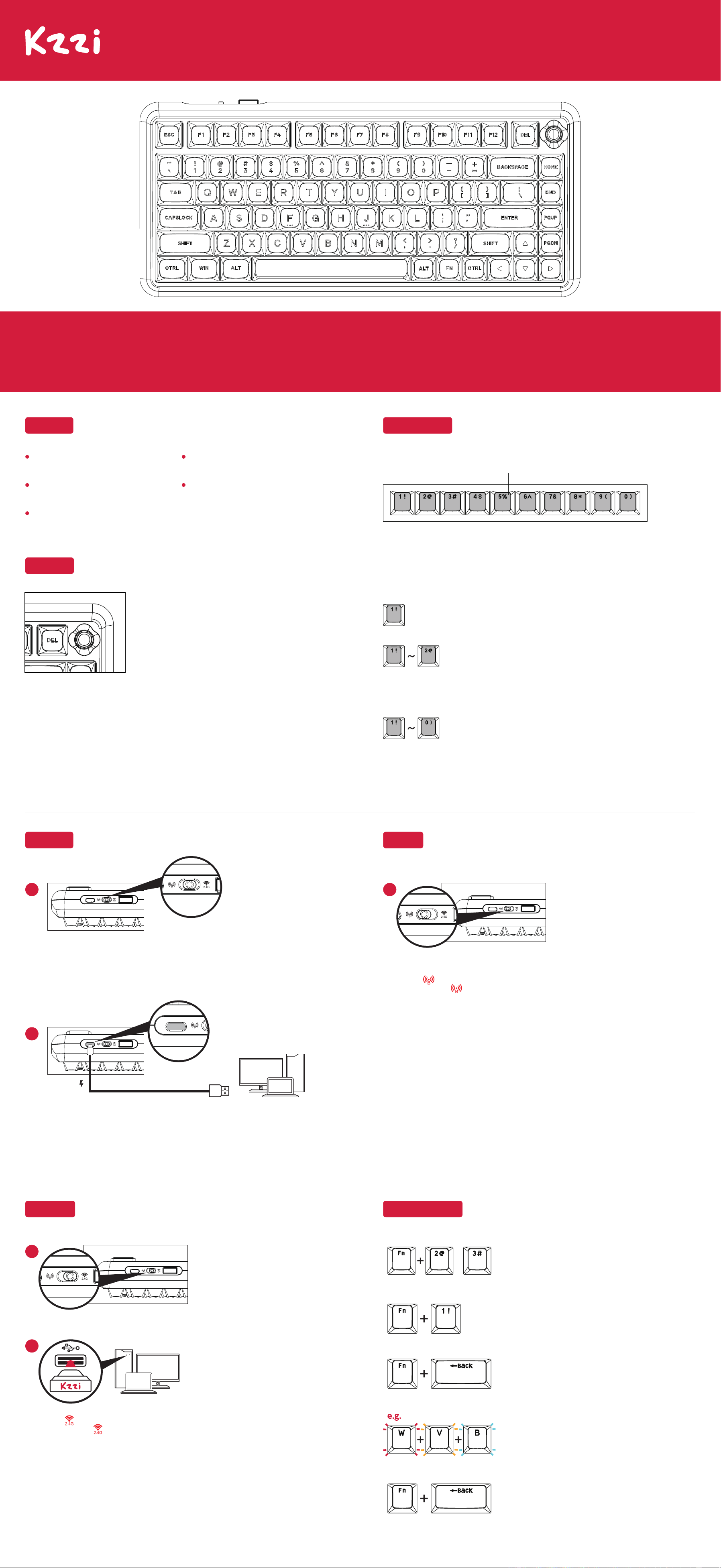
第一步:按 Fn+1! 选择一组将要自定义的背光。
Step 1:Press Fn+1! to customize backlight.
第二步:按 Fn+Back 进入背光录制模式。
Step 2: Press Fn+Back Enter backlit recording mode.
第四步:完成后,再次按 Fn+Back,将保存并退出背光录制模式。
Step 4:When done, press Fn+Back again, will save and exit backlit
recording mode.
/
Fn+2@/3# 为固定灯效,不可录制。
Fn+2@/3# Fixed light effect, not recordable.
第三步:按下想要录制背光的按键,重复此步骤,录制自己想要的背光。
Step 3:Press the keys which you want to record the backlight , and
repeat this step.
2.4G连接
2.4G CONNECTION
2
1. 开关拨到“ ”状态。
Switch to position “ ”.
3. P键慢闪烁表示键盘在回连状态。
Slow flashing P key indicates keyboard in reconnection mode.
2. 长按 Fn+P 对码,P键快闪烁时插入接收器,P键停止闪烁即对码成功。
Long press Fn+P to pair, insert the receiver when the P key rapidly flashes, and successful
pairing is indicated when the P key stops flashing.
(温馨提示:出厂时2.4G接收器已配对,无需自行再次配对;此方法只适用于2.4G无法连接的时候使用,设
置一次即可,无需每次都设置)
( Note: 2.4G receiver comes pre-paired. This method is only for troubleshooting 2.4G connection
issues. Set it up once and no further setup is required.)
1
BT连接
BT CONNECTION
1. 开关拨到“ ”状态。
Switch to position “ ”.
4. 以此类推:重复以上步骤,Fn+Q / W / E 可同时存储3组BT设备,短按Fn+Q / W / E, 即可在不同BT
设备之间切换。
Similarly, Repeat the previous steps to connect and pair each desired BT device using the Fn+Q / W / E
key combinations. Short press Fn+Q / W / E to switch between the stored devices.
3. 打开电脑/手机BT,搜索并连接设备,搜索显示的名称:Kzzi Z75(连接Windows8以上系统版本,
移动设备等)。
To connect the device, open your computer or mobile device's BT settings and search for Kzzi Z75.
Select it to establish the connection. Note that it is compatible with Windows 8 and above systems,
as well as mobile devices.
2. 长按任意一组Fn+Q / W / E / 3秒不动对码,比如Fn+Q,此时Q键持续闪烁,表示已进入配对状态,
慢闪烁表示键盘在回连状态。
To pair the keyboard, press and hold any of the key combinations of Fn+Q / W / E for 3 seconds.
take Fn+Q for example, the Q key will quickly flash to indicate pairing mode, while a slow flash
indicates reconnection mode.
(温馨提示:使用切换前,请先配对好3组BT)
(kinder reminder: Please pair the 3 BT devices before switching between them.)
1
有线模式
WIRED MODE
连接USB至设备,开关拨到中间档位为有线模式。
Connect the USB to the device, then slide the switch to the middle position for wired mode.
(建议: 使用5V 1A额定电源为键盘充电)
(Recommended: Use a 5V 1A power supply for keyboard charging).
2
1
轴体:机械轴体
Key Switches:Mechanical switches
尺寸:329(L)x145(W)x44(H)±2mm
Size:329(L)x145(W)x44(H)±2mm
版本:有线/2.4G/BT
Version:USB-C Wired/2.4G Wireless/BT
背光:RGB
Backlit:RGB
键数:82 keys
Number of Keys:82 keys
产品基础
PRODUCT BASIC INFORMATION
按 Fn+Enter 查看电池电量情况
Pressing Fn+Enter allows you to view the battery level status.Each key from "1" to "0"
represents a specific battery level range.
电池电量提示
KEYBOARD BATTERY LEVEL INDICATION AND CHECK
背光同时亮,表示此时键盘20%的电量
The "1" and "2" keys are both illuminated, indicating that the keyboard's current
battery level is at 20%.
以此类推
Similarly
背光同时亮,表示此时键盘100%的电量
When the backlighting illuminates from 1 to 0 simultaneously, it indicates that the
keyboard battery is at 100% charge.
比如:
For example:
背光同时亮,表示此时键盘10%的电量
The backlight of the "1" key is illuminated, indicating that the keyboard's current
battery level is at 10%.
键盘背光可显示当前电池电量状态(无线模式下查看)
The keyboard's lighting can display the current battery level status.(
View in wireless mode)
旋钮功能
KNOB FUNCTION
WHEN USING A KEYBOARD
1.Maintain proper posture and avoid excessive force on the keys.
2. Take regular breaks to prevent hand fatigue.
3.Clean the keyboard regularly to remove dust and dirt
4.Avoid exposing the keyboard to liquids.
5.Keep the keyboard in a suitable environment, free from extreme temperatures or humidity.
Remember these tips for a comfortable and durable keyboard experience.
FN+D切换旋钮模式
❶ 音量模式(默认)
顺时针:音量+ 逆时针:音量- 按压:静音
❷ 背光模式
顺时针:背光亮度加 逆时针:背光亮度减 按压:切换灯效
❸ 标滚轮模式
顺时针:滚轮向上 逆时针:滚轮向下 按压:滚轮中键
❹方向键模式
顺时针:方向向右 逆时针:方向向左 按压:静音
FN+D to switch knob mode
❶ Volume mode (default)
Clockwise: Volume + Counterclockwise: Volume - Press: Mute
❷ Backlight mode
Clockwise: Increase backlight brightness Counterclockwise: Decrease backlight brightness
Press: Switch lighting effect
❸ Mouse wheel mode
Clockwise: Wheel up Counterclockwise: Wheel down Press: Middle wheel button
❹ Arrow key mode
Clockwise: Direction right Counterclockwise: Direction left Press: Mute
Kzzi Z75
MECHANICAL
KEYBOARD
指示灯
INDICATORS
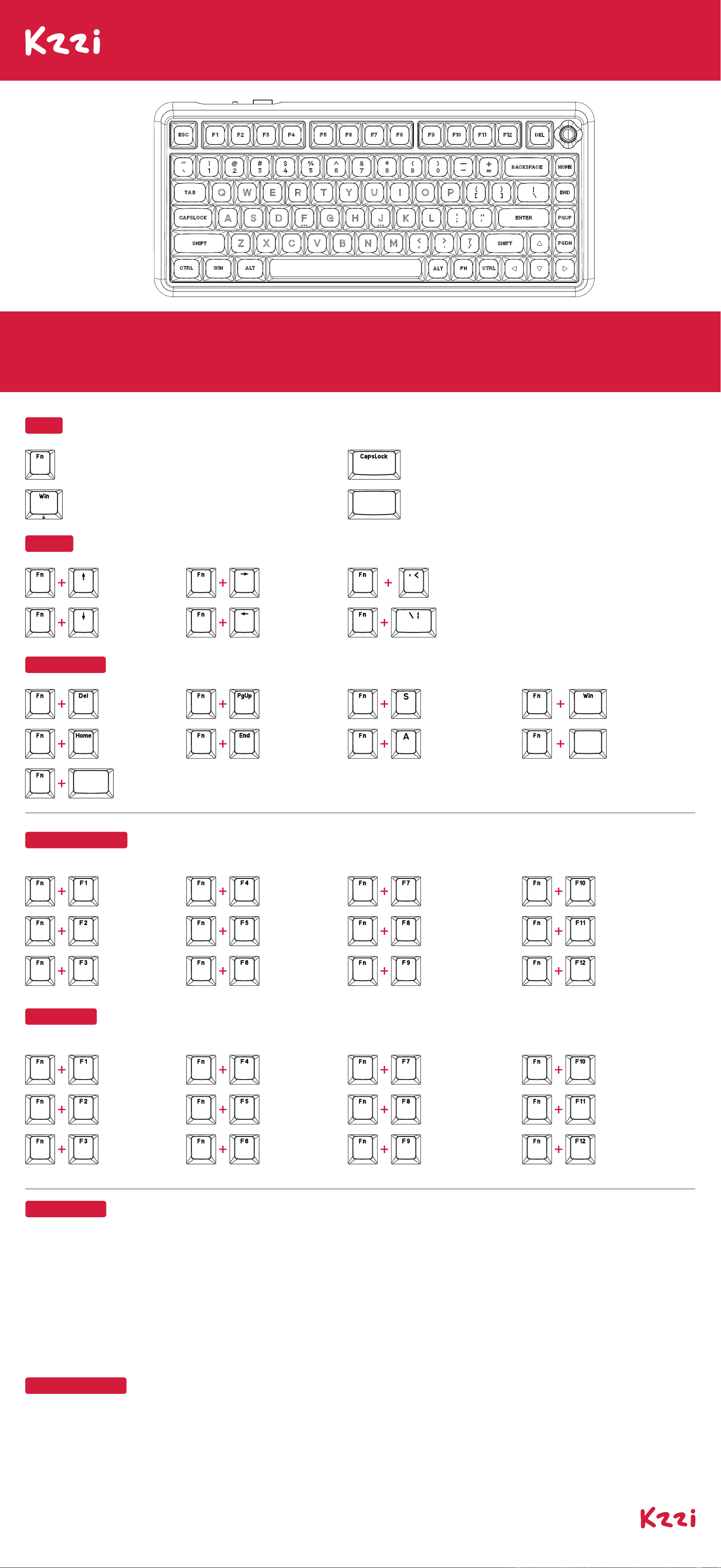
充电指示:充电时空格键绿灯闪3次,充满时空格键白灯闪5次。
Charging: The space bar flashes green three times during charging and
white five times when fully charged.
Space bar
Win Lock:打开亮白光,关闭随灯效。
Win Lock: White light when on, follows lighting effects when off.
Caps Lock:打开亮白光,关闭随灯效。
Caps Lock: White light when on, follows lighting effects when off.
低电压:Fn键闪烁红光。
Low Battery: Fn key flashes red.
MAC多媒体键
MAC MULTIMEDIA KEYS
MAC系统(Fn+S:切换到Mac系统)Mac System (Fn+S: Switch to Mac System)
键盘背光亮度 +
Keyboard Backlight
Brightness +
上一曲
Last song
播放/暂停
Play/Pause
键盘背光亮度 -
Keyboard Backlight
Brightness -
搜索
Search
屏幕亮度 +
Screen Brightness +
多屏显示
Multi-Screen Display
屏幕亮度 -
Screen Brightness -
静音
Mute
音量-
Volume -
下一曲
Next song
音量+
Volume +
WINDOWS多媒体键
WINDOWS MULTIMEDIA KEYS
Windows系统(Fn+A:切换到Windows系统)Windows System (Fn+A: Switch to Windows System)
浏览器
Browser
邮箱
Email
计算机
Computer
播放器
Player
停止
Stop
计算器
Calculator
播放/暂停
Play/Pause
下一曲
Next song
上一曲
Last song
音量-
Volume -
音量+
Volume +
静音
Mute
166-700801-002
第二组合功能键
SECONDAEY COMBINATION FUNCTION KEYS
Pause
ScrLK
切换到Windows系统
Switch to Windows system
INS
PrtSc
切换到Mac系统
Switch to Mac system
背光控制
BACKLIGHT CONTROL
背光灯效循环切换
Backlight Mode
Switching
右Shift
开启网页版驱动(Mac系统需手动开启浏览器)
Open web driver (On Mac, you
need to manually open the browser)
切换背光颜色
Switch backlight color
Space
bar
长按3秒,恢复出厂设置
Press and hold for 3 seconds
to restore factory settings
窗口锁定
Win Lock
背光亮度 +
Backlight Brightness +
背光亮度 -
Backlight Brightness -
背光速度 +
Backlight Speed +
背光速度 -
Backlight Speed -
FCC WARNING
This device complies with part 15 of the FCC Rules. Operation is subject to the following two conditions: (1) This device may not cause harmful interference, and (2) this device must accept any interference received, including
interference that may cause undesired operation.
Any changes or modifications not expressly approved by the party responsible for compliance could void the user's authority to operate the equipment.
This equipment has been tested and found to comply with the limits for a Class B digital device, pursuant to part 15 of the FCC Rules. These limits are designed to provide reasonable protection against harmful interference in
a residential installation. This equipment generates, uses and can radiate radio frequency energy and, if not installed and used in accordance with the instructions, may cause harmful interference to radio communications.
However, there is no guarantee that interference will not occur in a particular installation. If this equipment does cause harmful interference to radio or television reception, which can be determined by turning the equipment
off and on, the user is encouraged to try to correct the interference by one or more of the following measures:
—Reorient or relocate the receiving antenna.
—Increase the separation between the equipment and receiver.
—Connect the equipment into an outlet on a circuit different from that to which the receiver is connected.
—Consult the dealer or an experienced radio/TV technician for help.
FCC Radiation Exposure Statement
This equipment complies with FCC radiation exposure limits set forth for an uncontrolled environment .
This transmitter must not be co‐located or operating in conjunction with any other antenna or transmitter.
This device contains licence‐exempt transmitter(s)/receiver(s) that comply with Innovation, Science and Economic Development Canada's licence‐exempt RSS(s). Operation is
subject to the following two conditions:
(1) This device may not cause interference.
(2) This device must accept any interference, including interference that may cause undesired operation of the device.
Cet appareil contient des émetteurs/récepteurs sans licence qui sont conformes aux RSS sans licence d'Innovation, Sciences et Développement économique Canada. L'exploitation est soumise aux deux conditions suivantes:
(1) Cet appareil ne doit pas causer d'interférences.
(2) Cet appareil doit accepter toute interférence, y compris les interférences qui pourraient causer un fonctionnement indésirable de l'appareil.
ISEDC Radiation Exposure Statement:
This equipment complies with ISEDC RF radiation exposure limits set forth for an uncontrolled environment.
This transmitter must not be co‐located or operating in conjunction with any other antenna or transmitter.
Cet appareil est conforme aux limitesd’exposition de rayonnement RF ISEDC établiespour un environnement non contrôlé.
Cetémetteur ne doit pas être co‐implanté oufonctionner en onjunction avec toute autreantenne ou transmetteur.
BATTERIES
A warning that batteries (battery pack or batteries installed) shall not be exposed to excessive heat such as sunshine, fire or the light.
1) Replacement of a battery with an incorrect type that can defeat a safeguard;
2) Disposal of a battery into fire or a hot oven, or mechanically crushing or cutting of a battery, that can result in an explosion;
3) Leaving a battery in an extremely high temperature surrounding environment that can result in an explosion or the leakage of flammable liquid or gas;
4)A battery subjected to extremely low air pressure that may result in an explosion or the leakage of flammable liquid or gas.
ISED STATEMENT