1
keyboard
TK950
. Scope of product application:
The keyboard is Bluetooth 5.0 standard /2.4G standard/wired - three
working modes with associated Settings tandby connection control,
product wired and 2.4G mode can run on the computer Win2000,WindXP,
Vista, Windows 7, doing, Win10, MAC system, etc. Bluetooth mode can run on
the version with Bluetooth This mobile phone system.
2.hardware requirements:
A phone or computer with Bluetooth 5.0 standard and a USB port available
for connecting devices.
3.mode link and switch
Bluetooth Name (BT KB 3.0) (BT KB 5.0)
Short press FN+1! = Switch to Bluetooth channel 1 and press and hold the
3S code.Press FN+2@ = to switch to Bluetooth 2 channel and hold down 3S
alignment code.Short press FN+3# = to switch to Bluetooth channel 3, and
long press 3S alignment code.Short press FN+4$= to switch to 2.4G channel,
and long press 3S alignment code.Press FN+5% = to switch to wired mode.
1, the last separate indicator light, charging constant, full off,
low power flashing.
5. Product characteristics
Mechanical keyboard; Three mode connection;
Separate TYPE-C power cable and key cable;
Full bond no punch;
8. Game mode lighting setting:
FN+6= Game Mode 1 (FPS) ASDW ↑↓←→ On
FN+7= Game Mode 2 (CF) ASDW Ctrl Shift Alt Space RGQEB 1-5
Tab F1-F3 HomeEnd PgUp PgDn PrtSc Scroll lock On
FN+8= Game Mode 3 (cOD) QWERTASDFGCV 1-7 Ctrl Shift On
FN+9= Game Mode 4 (RTS)
Space 1-0 Ctrl Shift Alt On
Space to 1-6 Esc is on
6.key combination function and lighting sequence
FN+INS: Switch lighting sequence:
Steady on mode (default steady on) - "Breathing mode -" Press and off - "Go
with the flow -" drip ripple -"Streamer - "Streamer -" dot color dazzling - "-"
hair trigger - "snow without trace -" button ripples -"
Serpentine horse - "Stars -" Stream - "diagonal change -" sine wave of light.
9. List of Items:
1. A keyboard
2. One TYPE-C connection line
3. 2.4G receiver
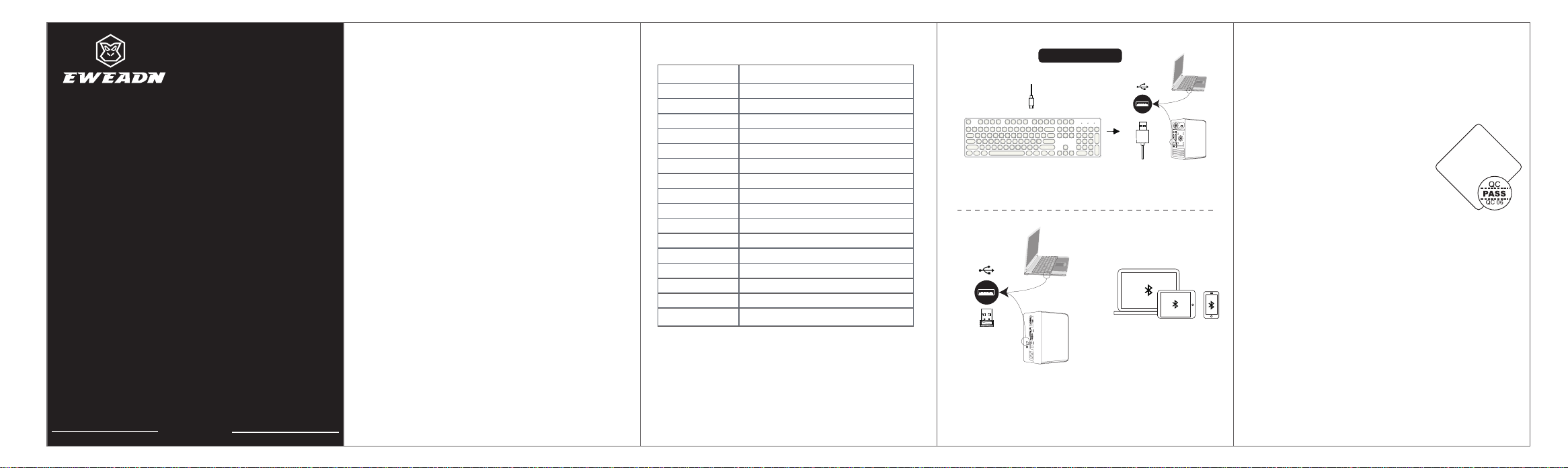
7. Link Method:
Connection diagram
Wired connection
Bluetooth connection
1.FN+5 Enable the wired mode
Connect the TPYE-C interface to the keyboard and the
USB interface to the computer.
1. Plug the receiver into
FN+4 of your computer
Turn on 2.4G mode and experience
it immediately.
1.FN+1-3 Open Bluetooth
channel, hand Machine
connection can be used.
Bluetooth Name
(BT KB 3.0)
(BT KB 5.0)
2.4G connection
key combination functionality
FN+F1
m il
FN+F2
FN+F3
multimedia pl
My computer.
ho
a
m
s
epage
ayerFN+F4
FN+F5
Play/Paus
previous so
e
ng
FN+F6
xFN+F7
FN+F8
l
tio
FN+F1 W
c
o
e
ss
t
f
F
or
n
n
g
.
n
e
e
ok
b
a
so
av
s
o
th
rites
FN+F9
0
C
N
FN+ES
nF
N+
+Wi
F
N+
↑
BrightnessF
N+
↓
F ← Lighting speed
Brightness
-
+
-
FN+→ Lighting speed +
Reset the light (hold for 3s)
Lock Win and key
Operating guide
Licensor: Yuandao Industrial (Shenzhen) Co., LTD
Room 1610, 16th Floor, Jinhao Building, No. 109, Fuyong Section, Guangshen Road,
Baoan District, Shenzhen
Manufacturer: Jiangxi JICI Technology Co., LTD
Building 3, Godfrey Industrial Park, Lvbao Avenue, Qingyuan District,
Ji 'an City, Jiangxi Province
Contact number: 0755-23089616
Website: www.eweadn.cn
0
Note: the product picture is for reference only, there may be d
Product implementation standard number: Keyboard GB/T 14
i
0
ff
8
e
1
r
-
e
2
n
0
c
1
es with the actual,
please refer to the actual prevail, please forgive me!
FN+0= Game Mode 5 (LOL full)QWER DGFBV Ctrl Alt Tab
Certificate of
conformity
Inspector:
FCC Caution:
This device complies with part 15 of the FCC Rules. Operation is subject
to the following two conditions: (1) This device may not cause harmful
interference, and (2) this device must accept any interference received,
including interference that may cause undesired operation.
Any changes or modifications not expressly approved by the party
responsible for compliance could void the user's authority to operate
the equipment.
NOTE: This equipment has been tested and found to comply with the
limits for a Class B digital device, pursuant to Part 15 of the FCC Rules.
These limits are designed to provide reasonable protection against
harmful interference in a residential installation. This equipment
generates, uses and can radiate radio frequency energy and, if not
installed and used in accordance with the instructions, may cause
harmful interference to radio communications. However, there is no
guarantee that interference will not occur in a particular installation.
If this equipment does cause harmful interference to radio or television
reception,
which can be determined by turning the equipment off and on, the user
is encouraged to try to correct the interference by one or more of the
following measures:
-- Reorient or relocate the receiving antenna.
--Increase the separation between the equipment and receiver.
--Connect the equipment into an outlet on a circuit different
from that to which the receiver is connected.
-- Consult the dealer or an experienced radio/TV technician for help.
The device has been evaluated to meet general RF exposure
requirement. The device can be used in portable exposure condition
without restriction.