
Maxedia'HD*SDI'&'DVI'Capture'cards
Version'4.x'So:ware
Product(Name:(Maxedia
Pla2orm:(Maxe dia
Project(#:(Low(latency(Capture(cards
Maxedia(HD>SDI(and(DVI(capture(cards
Maxedia'Support'Document'Rev'1.0
Page'1'''of'11
R&D'Interna<onal'NV'©'2009'
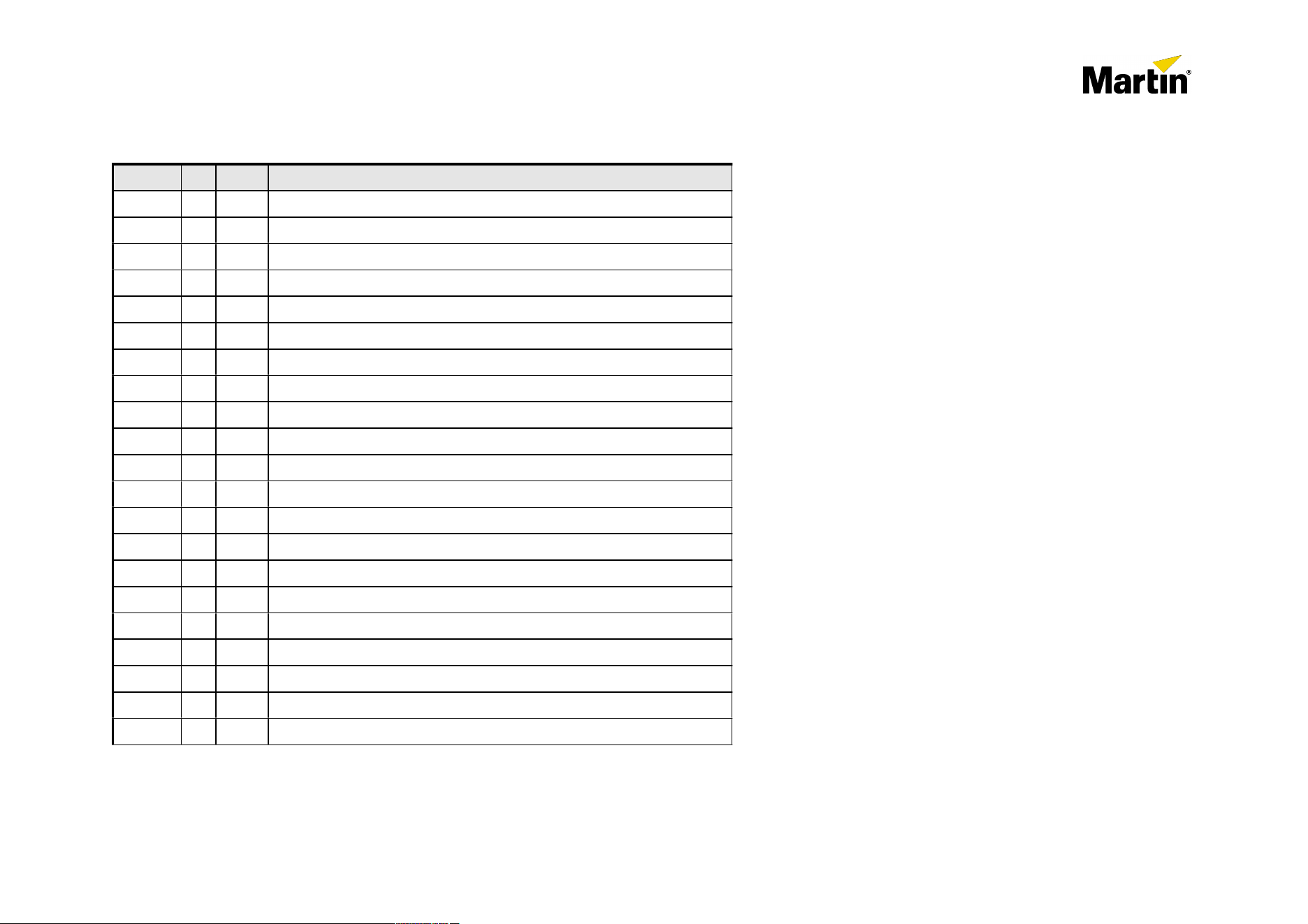
Revision(History
Init.
Date
DescripEon
1
MC
12/11
First'DraG
2
MC
16/12
Added'tables'for'all'Maxedia'Revisions
Maxedia(HD>SDI(and(DVI(capture(cards
Maxedia'Support'Document'Rev'1.0
Page'2'''of'11
R&D'Interna<onal'NV'©'2009'
Author
MC
Marc'Colemont
Trademarks(and(Patents(
•
Maxedia'is'a'registered'trademark'of'Mar<n'Professional'SA
All'other'trademarks'are'the'property'of'their'respec<ve'owners.'
Maxedia(HD>SDI(and(DVI(capture(cards
Maxedia'Support'Document'Rev'1.0
Page'3'''of'11
R&D'Interna<onal'NV'©'2009'

Table(of(Contents
.....................................................................................................................................................................Introduc*on+ 5
.......................................................................................................................................................................................Purpose)of)the)Document) 5
..........................................................................................................................................................................................................Capture)cards) 6
................................................................................................................................................................................................................Overview) 6
......................................................................................................................................................................................Dual)HD<SDI)capture)card.) 7
.............................................................................................................................................................................Dual)DVI<D/DVI<A)Capture)card:) 8
...........................................................................................................................Overview+op*ons+for+Maxedia+versions+ 9
..................................................................................................................................................................................................Maxedia)Broadcast) 9
..........................................................................................................................................................................................................Maxedia)Pro ) 10
.........................................................................................................................................................Maxedia)Compact)&)Maxedia)Compact)RM) 10
.....................................................................................................................................How+to+install+the+capture+cards+ 11
'
Maxedia(HD>SDI(and(DVI(capture(cards
Maxedia'Support'Document'Rev'1.0
Page'4'''of'11
R&D'Interna<onal'NV'©'2009'

1.IntroducEon
Maxedia'4.0'has'been'op<mized'to'take'benefit'of'the'Mar<n'Professional'Low'Latency'Capture'cards.
The'possible'inputs'cards'have'Dual'HDWSDI'or'Dual'DVI/VGA'inputs.
1.1Purpose+of+the+Document
The'purpose'of'this'document'is'to'outline'and'how'to'install'the'new'low'latency'capture'cards'for'the'Maxedia'Pro'and'Broadcast'range'Rev'C'(and'up).
Please'feel'free'to'share'your'experiences'and'feedback'to'mc@rdinterna<onal.com
Maxedia(HD>SDI(and(DVI(capture(cards
Maxedia'Support'Document'Rev'1.0
Page'5'''of'11
R&D'Interna<onal'NV'©'2009'

2.Capture(cards
2.1(Overview+
Martin Professional SA is offering professional low latency capture cards to be used in the Maxedia Pro and Broadcast range Rev C and up.
These cards and the drivers are especially written and tuned for the Maxedia hardware & software, to ensure that the incoming video sources
are displayed without dropped frames or repeated frames. All other standard capture-cards available in the market using the DirectShow driver
introduce longer frame delays (up to 4-5 frames), and frame-drops may occur frequently depending on the load of the system with 3rd party
cards .
The main advantage by using the Martin Professional Capture cards, is that the Maxedia software bypasses the DirectShow drivers and grabs
all images directly from the capture card up to 60 frames/sec depending on the connected source.
By using this technology, we ensure a maximum delay of 2 frames between capturing and outputting on the DVI/VGA port of the graphics card.
The cards are available in two flavors:
- MCC Dual HD-SDI Input card for Maxedia: P/N: 90732640
- MCC Dual DVI/VGA input card for Maxedia: P/N: 90732630
For more detailed information please read further on in this document, or the internet http://www.martin.com
IMPORTANT:
- A Maxedia Pro can have up to two cards installed simultaneously. Future Maxedia software will have support for multiple cards. A Maxedia
Broadcast can have one card installed maximum due to available PCIe slots.
- For optimum performance of the Maxedia Revision C & D hardware, it is advised to use only one HD-SDI input or maximum two SD-SDI
inputs simultaneously. When using two HD-SDI input sources on Revision C and D hardware, frame drops may occur due to hardware PCIe
bandwidth limitations.
- All Martin Professional HD-SDI and DVI/VGA Capture cards are PCIe cards.
In case the capture card needs to be installed in a Maxedia Broadcast REV D & E, or two capture cards need to be installed in a Maxedia Pro
(Rev C and up), an additional PCI Dual 1Gb LAN card needs to be ordered as well. As the standard Dual LAN card inside the Maxedia
Broadcast is a PCIe version, which needs to be removed to make space for the capture card.
Ordering part number for the Maxedia PCI Dual LAN card: P/N: 90732650
Maxedia(HD>SDI(and(DVI(capture(cards
Maxedia'Support'Document'Rev'1.0
Page'6'''of'11
R&D'Interna<onal'NV'©'2009'
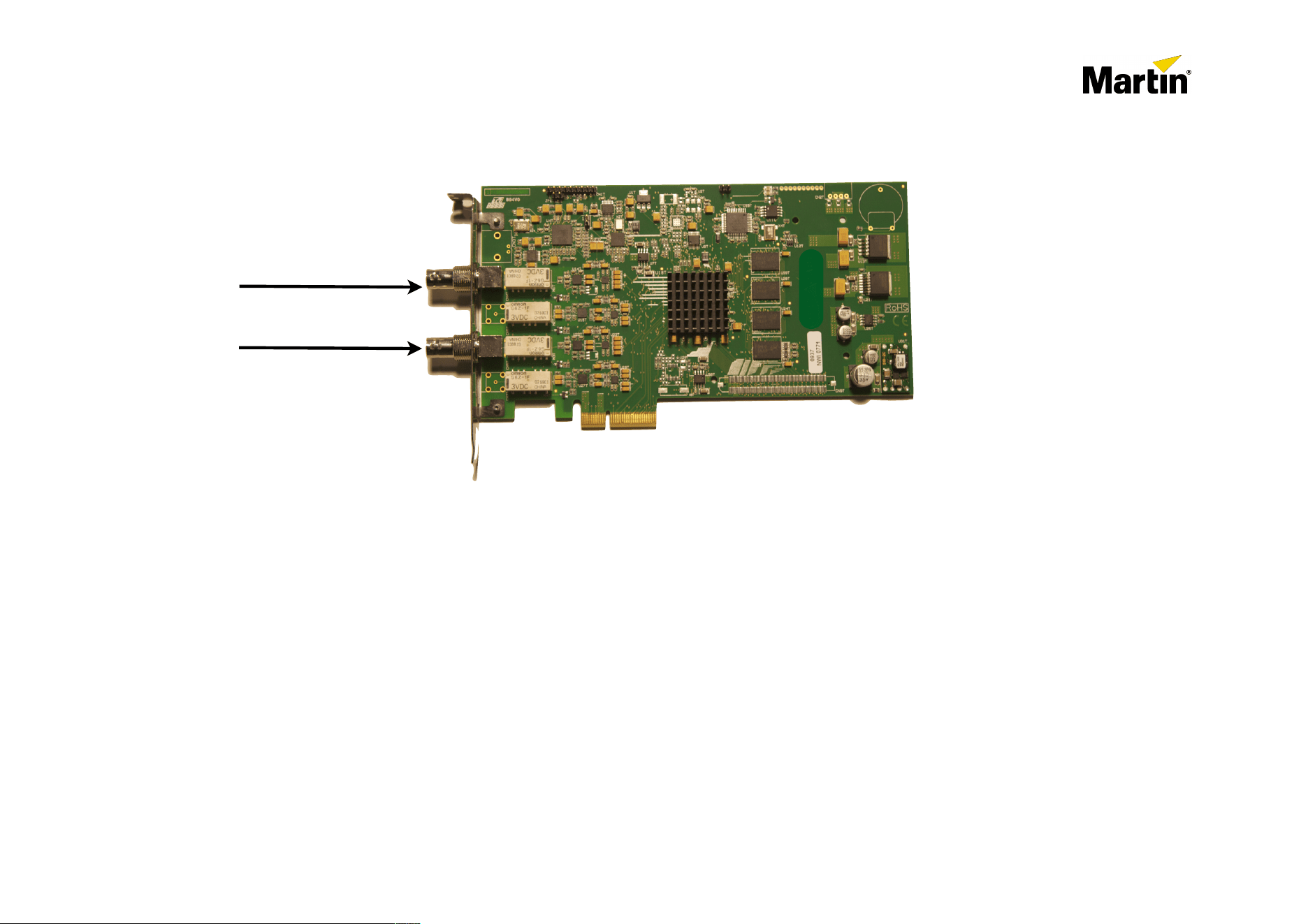
2.2(MCC(Dual(HD>SDI(capture(card.+
Features:
•
Low latency capture card for the Maxedia Pro and Broadcast range from Rev C and up.
•
SD-SDI & HD-SDI compatible (SMPTE 259M-C and SMPTE 292)
•
480i, 576i, 720P and 1080i compatible
•
25fps, 29,97fps, 30fps, 50fps, 59,94fps and 60fps
•
Every input can have a different resolution and frame rate while capturing
•
Auto detect of the input resolution at startup of the Maxedia software.
•
Uncompressed 8-bit digital video capture 4:2:2
•
Cable equalization on both inputs for 270 Mbit/s - 1.485 Gbit/s signals on BNC coaxial cable.
Ordering part number: P/N: 90732640
Maxedia(HD>SDI(and(DVI(capture(cards
Maxedia'Support'Document'Rev'1.0
Page'7'''of'11
R&D'Interna<onal'NV'©'2009'
Input A
Input B
SD/HD-SDI
SD/HD-SDI
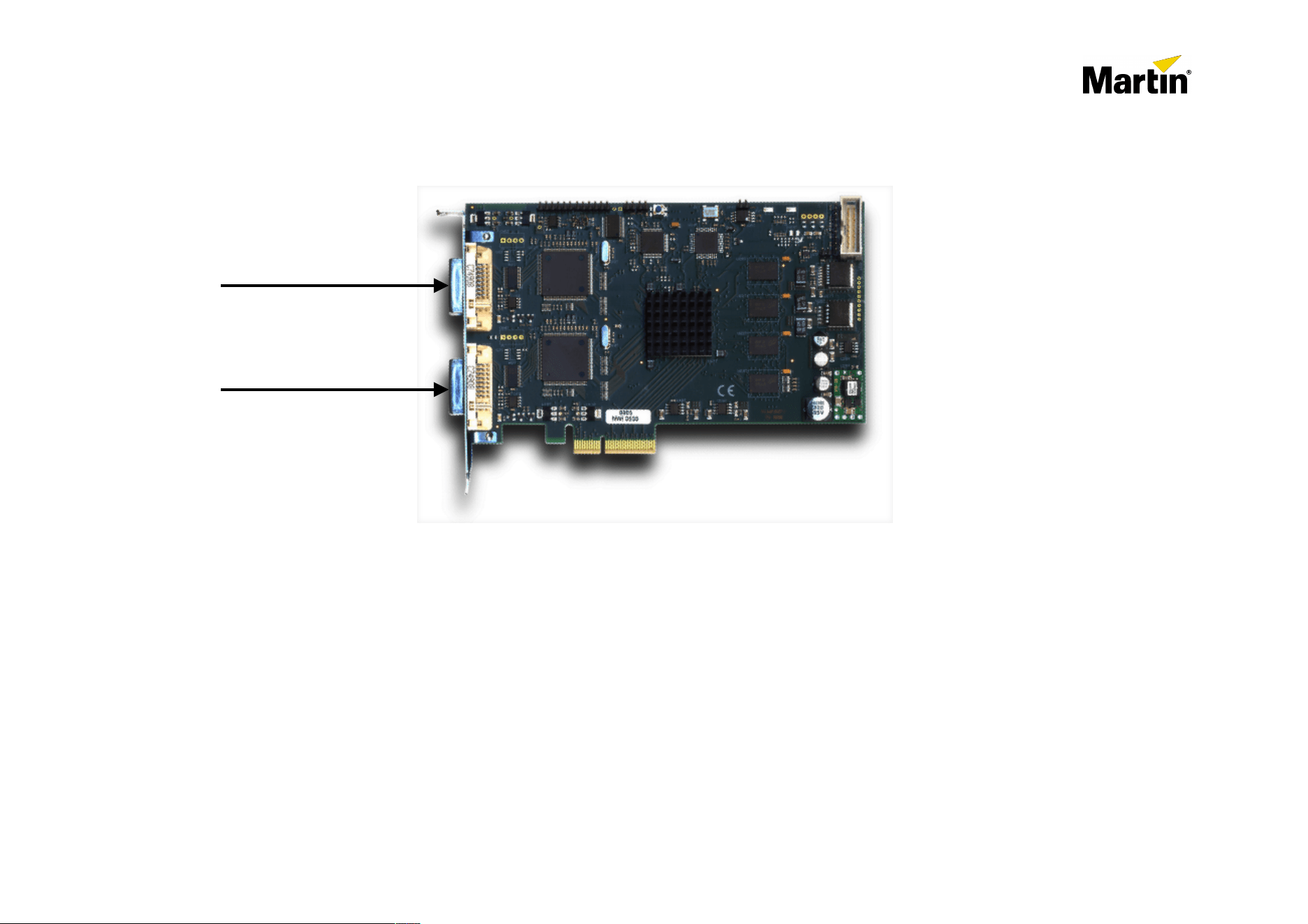
2.3(MCC(Dual+DVIAD/DVIAA+Capture+card:
Features:
•
Low latency capture card for the Maxedia Pro and Broadcast range from Rev C and up.
•
DVI-D (digital)/DVI-A (analog RGBHV) 640 x 480, up to 1920x1080 pixels
•
HDMI 480i/p, 576i/p, 720P & 1080i
•
Build-in EDID per input switchable between Analog and Digital (Maxedia software 4.x needs to run).
•
Every input can have a different resolution and frame rate while capturing
•
Adaptive equalizer for cable lengths up to 30 meters (by using quality cable).
•
DVI 1.0 and HDMI 1.3 single link compliant, No HDCP digital content protection support.
•
VGA-to-DVI & HDMI-to-DVI connections possible through standard adapters (not provided)
Ordering part number: P/N: 90732630
Maxedia(HD>SDI(and(DVI(capture(cards
Maxedia'Support'Document'Rev'1.0
Page'8'''of'11
R&D'Interna<onal'NV'©'2009'
DVI-D / DVI-A / HDMI
DVI-D / DVI-A / HDMI
Input A
Input B
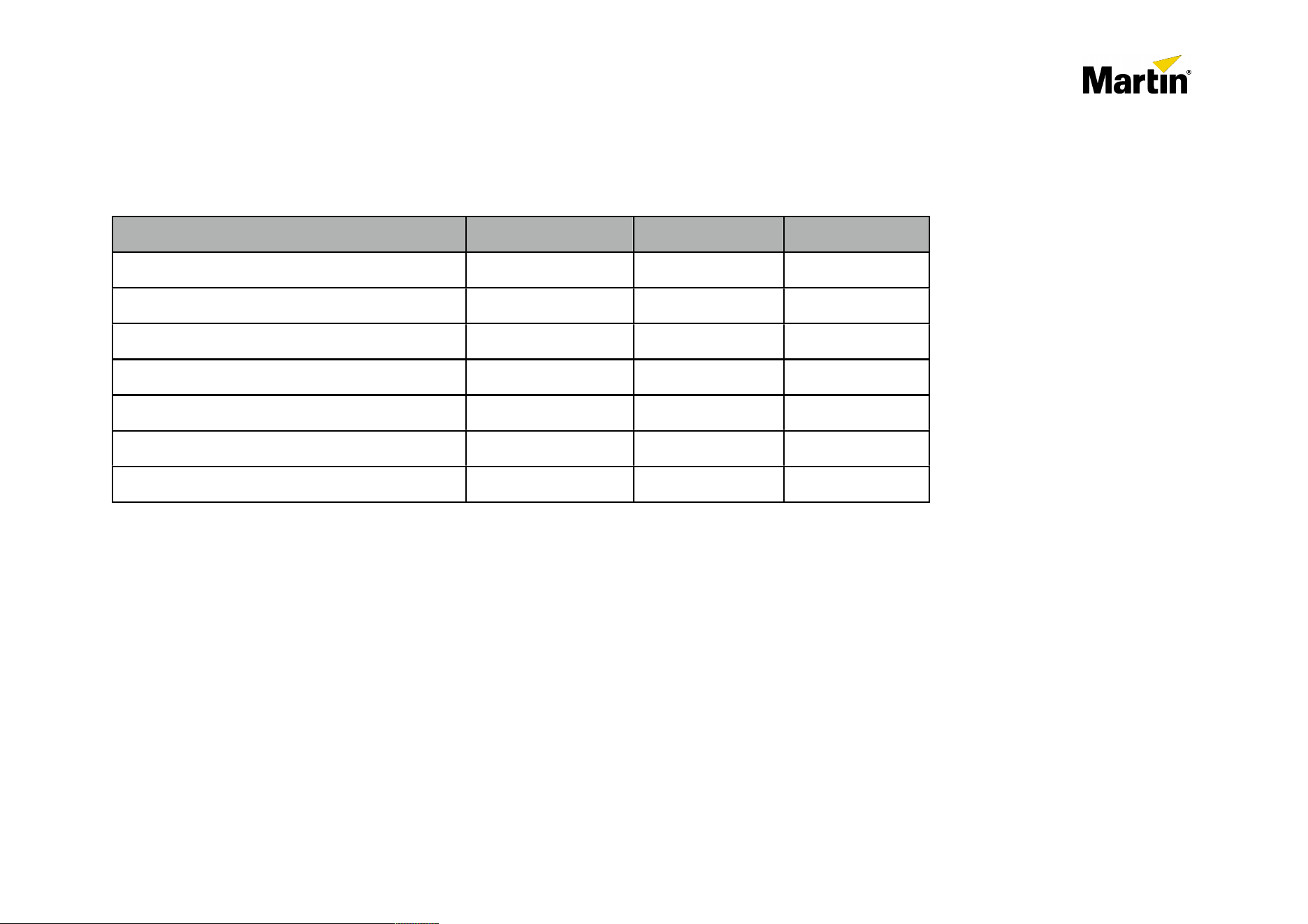
3.+Overview+op*ons+for+Maxedia+versions
3.1+Maxedia+Broadcast
Item
Rev C
Rev D
Rev E
Martin Dual HD-SDI capture card**
Yes
Yes
Yes
Martin Dual DVI capture card**
Yes
Yes
Yes
Maximum amount of cards*
1
1
1
Recommended Engine frame-rate
25 - 30fps
25 - 30fps
All
Recommended Input sources on HD-SDI card
SD (480i/p, 576i/p)
SD / 720P
SD / 720P / 1080i
Maximum recommended inputs HD-SDI card
2x SD / 1x HD
2x SD / 1x HD
2x SD / 2x HD
Maximum recommended resolution DVI card
800x600
1024x768
1920x1080
(*)'Future'soGware'will'support'mul<ple'cards.
(**)'A'PCI'Dual'LAN'card'is'needed'to'freeWup'the'PCIe'slot'to'be'able'to'fit'the'Capture'card.
Maxedia(HD>SDI(and(DVI(capture(cards
Maxedia'Support'Document'Rev'1.0
Page'9'''of'11
R&D'Interna<onal'NV'©'2009'
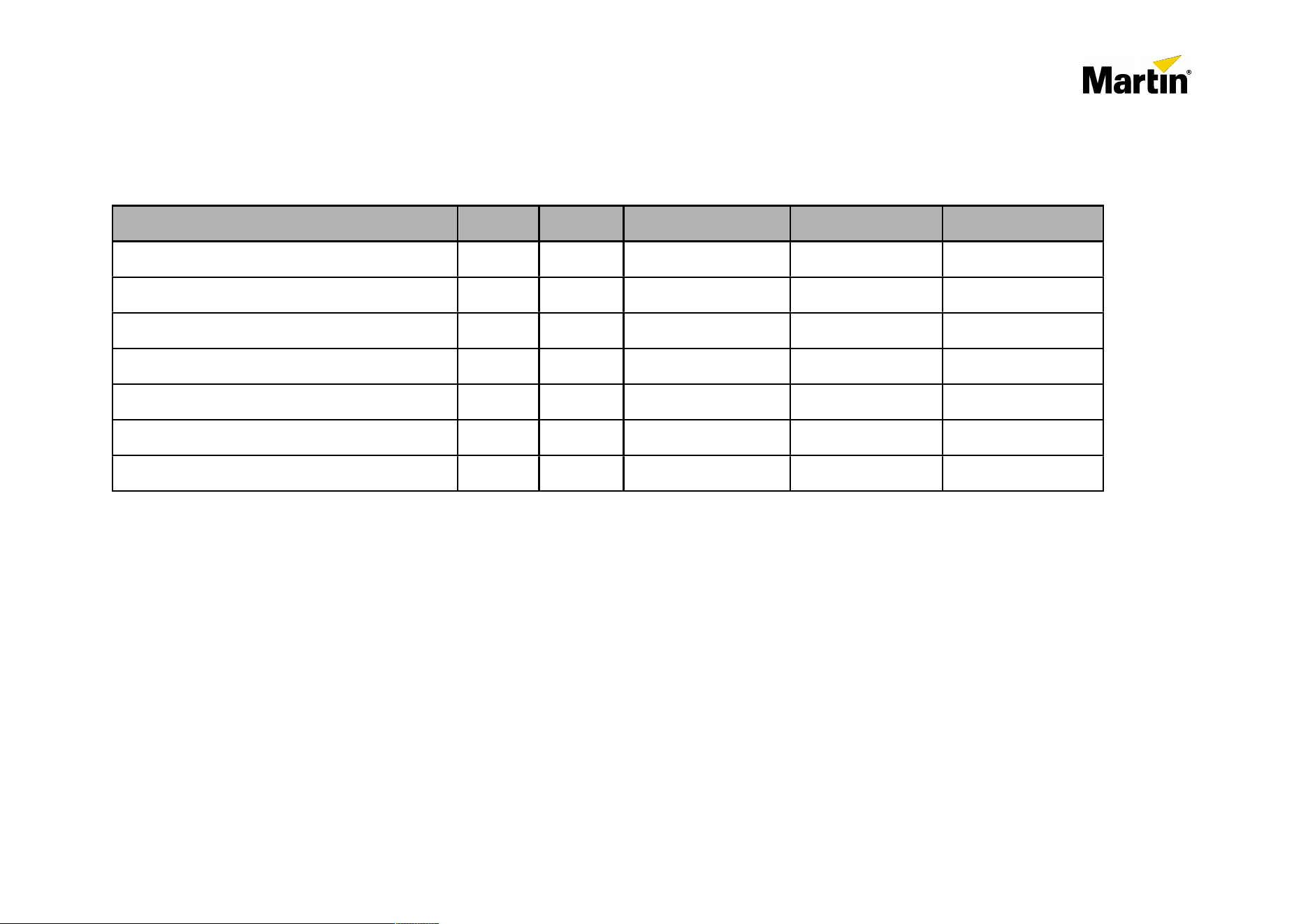
3.2+Maxedia+Pro
Item
Rev A
Rev B
Rev C
Rev D
Rev E
Martin Dual HD-SDI capture card
No
No
Yes
Yes
Yes
Martin Dual DVI capture card
No
No
Yes
Yes
Yes
Maximum amount of cards*
0
0
2
2
2
Recommended Engine frame-rate
/
/
25 - 30fps
25 - 30fps
All
Recommended Input sources on HD-SDI card
/
/
SD (480i/p, 576i/p)
SD / 720P
SD / 720P / 1080i
Maximum recommended inputs HD-SDI card
/
/
2x SD / 1x HD
2x SD / 1x HD
2x SD / 2x HD
Maximum recommended resolution DVI card
/
/
800x600
1024x768
1920x1080
(*)'Future'soGware'will'support'mul<ple'cards.
3.3+Maxedia+Compact+&+Maxedia+Compact+RM
The)Maxedia)Compact)&)Maxedia)Compact)RM)versi ons)h ave)no)PCIe)slot)available)to)be)able)to)support)the)MarPn)
Capture)cards.
Maxedia(HD>SDI(and(DVI(capture(cards
Maxedia'Support'Document'Rev'1.0
Page'10'''of'11
R&D'Interna<onal'NV'©'2009'

4.How+to+install+the+capture+cards
CAUTION!)
Please)make)sure)to)use)proper)precauPons)against)electrostaPc)discharges)by)using)anP<electrostaPc)table)mats)and)ESD)
band)wrist)straps.)If)no)such)straps)or)mats)are)availab le)on <si te)and)the)cards)need)to)be)build<in;)then)at)least)make)sure)
to)leave)the)grounding)of)the)Maxedia)connected)and)touch)the)housing)of)the)Maxedia)with)one)hand)while)removing/
adding)cards)with)the)other)hand.)
MarPn)Professional)SA)cannot)be)held)responsible)for)damaged)cards)du e)to)ESD)electrostaPc)discharges.))
•
Turn off the Maxedia and IO-Box power switch.
•
Disconnect and remove the Maxedia 19” computer from de flight-case
•
Remove the metal top-plate from the 19” housing by unscrewing the two screws on the side and the one on the back.
•
Remove all previous installed capture cards.
•
Look for a free PCIe slot. The PCIe connector on the motherboard is mostly black or blue colored. The white connectors are PCI
connectors. Possibly the PCIe Dual LAN card needs to be replaced by the PCI Dual LAN version to free-up a PCIe slot.
•
Plugin the HD-SDI or DVI capture card(s) in the empty PCIe slot(s) and make sure the cards are firmly in place and fasten with
the screw to hold each card.
•
Close the top-plate again and fasten the 3 screws again.
•
Mount the Maxedia Back in the flightcase and connect all wiring again.
•
Turn on the Maxedia and boot with the OS DVD Maxedia 4.0 (Build 105 or later). To re-install the OS which installs and cleans the
OS with all the right drivers for all removed and added cards.
•
Once the software is installed you can start using the capture inputs. Make sure to enable the card(s) in the software, and select
the right input settings through the Menu / Video / Video-In Devices.
Martin also provides a service to upgrade your system in Belgium at R&D International NV
Please take contact with the R&D Office in Belgium at [email protected]
Tel: +32 11 88 57 55
Maxedia(HD>SDI(and(DVI(capture(cards
Maxedia'Support'Document'Rev'1.0
Page'11'''of'11
R&D'Interna<onal'NV'©'2009'