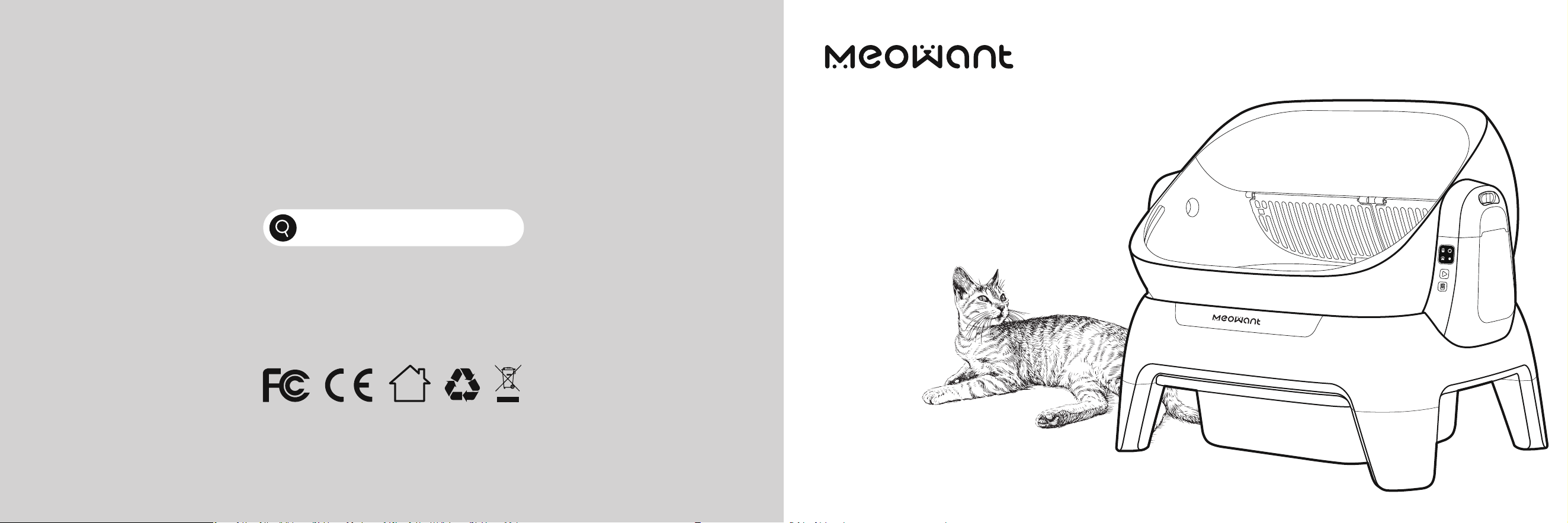
User Manual
Made in China
suppo@meowanthome.com
GET IN TOUCH?
Model: MW-SC10
MANUFACTURER
Shenzhen Guiyang Network Technology Co., Ltd
ADDRESS
1404K3, East Block, Shengtang Commercial Building,
Futian District, Shenzhen, China
Rev_1.1_EN
SELF-CLEANING
CAT LITTER
BOX

CONTENT
01 02 03
USING
CAT LITTER
BOX
04
CARE
AND
CLEANING
05
TROUBLE-
SHOOTING
GUIDE
IMPORTANT
SAFETY
INSTRUCTIONS
Safety Instructions
Specications
01-03
01
03
EXPLORING
CAT LITTER
BOX
In the Box
Control Function
LED Display
04-06
04
05
06
Setting Up
Wi-Fi Setup
Using with APP
07-12
07
11
12
13-15 16-18
IMPORTANT SAFETY INSTRUCTIONS
READ ALL INSTRUCTIONS BEFORE USE AND SAVE
FOR FUTURE REFERENCE
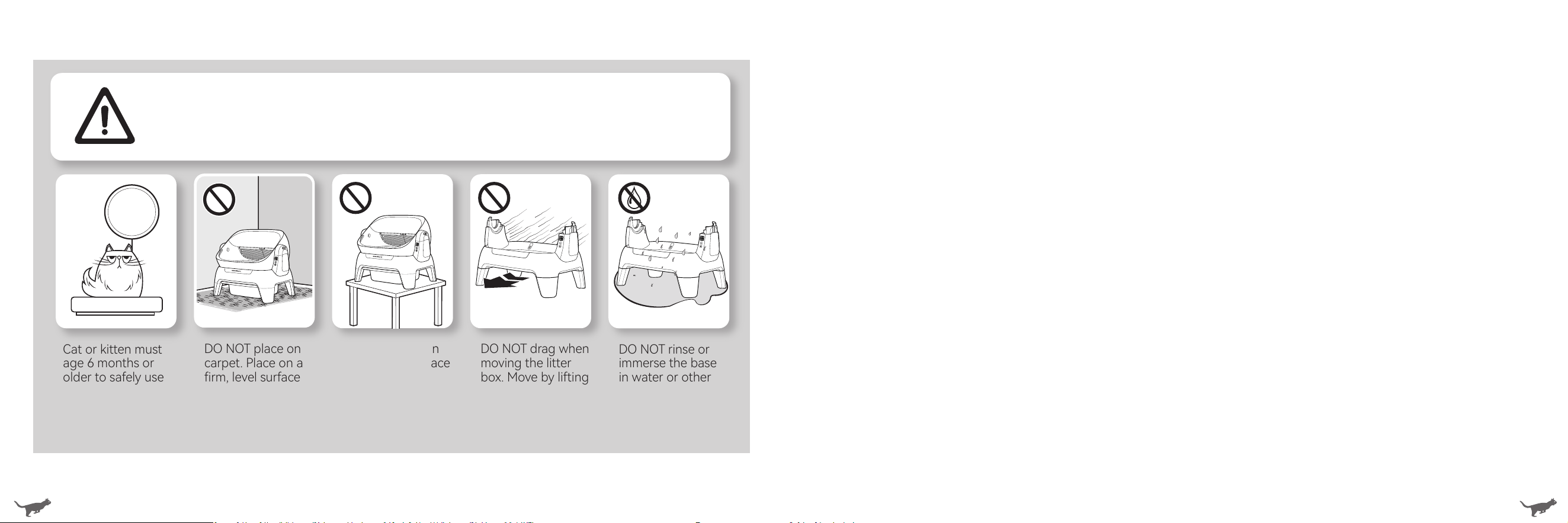
Cat or kitten must
age 6 months or
older to safely use
the litter box.
> 6
months
When using an electrical appliance, especially when children are present, basic safety precautions should always be
followed, including the following:
•This appliance is not intended for use by persons (including children) with reduced physical, senso or mental capabilities, or lack of
experience and knowledge, unless they have been given supeision or instruction concerning the use of the appliance by person
responsible for their safety.
•To reduce the risk of inju, close attention is necessa when used by or near children. Children should be supeised to ensure that
they do not play with, in or around the appliance. Keep the appliance and all accessories out of reach of children.
•Not intended for use by handicapped, incapacitated or ve old cats that might experience diculty in entering or leaving the litter box.
•DO NOT attempt to use the appliance for any other purposes. It is designed for use with cats only and is intended solely for the safe
elimination of cat waste.
•DO NOT operate the appliance if it has a damaged power cord or plug, or if it is malfunctioning or has been damaged in any manner.
•DO NOT use an external power supply other than the one provided with the appliance. Use only the provided power adapter.
•DO NOT immerse the power adapter or the base in water or other liquid or allow moisture to come into contact with these pas.
•DO NOT submerge or expose the electrical components to water or cleaning solutions.
•If the supply cord is damaged, it must be replaced by the manufacturer, its seice agent or similarly qualied persons in order to avoid
a hazard.
•Always unplug when not in use, before putting on or taking o pas and before cleaning, maintenance or seicing. To unplug, grasp
the plug, not the power cord.
INTENDED USE
ELECTRICITY SAFETY
•Always place the litter box on a rm, level suace. Avoid soft, uneven, or unstable ooring, which may aect the weighing of your cats. If
using litter mats or rugs, place in front of the unit. Do not place mats paially or completely under the unit.
•Keep indoors in a cool, d location. Reduce exposure to high temperature and humidity.
•Avoid contacting with the moving pas.
•DO NOT sit on or place anything on top of the litter box.
•DO NOT put anything in the unit other than clumping litter or litter beads and cstals that are small enough to pass through the screen
•DO NOT allow pets to chew on or swallow any pas. Cover or hide the power cord with care to prevent pets from biting.
RELATED TO USE
01 02
DO NOT place on
carpet. Place on a
rm, level suace
with a little space
around.
DO NOT place on
an elevated suace
where it can fall
and get damaged.
DO NOT drag when
moving the litter
box. Move by lifting
the base with both
hands.
DO NOT rinse or
immerse the base
in water or other
liquids.
03
04
•DO NOT allow anything to rest on the power cord. Do not plug in power adapter in an area where people or animals may walk or trip on cord.
•DO NOT attempt to disassemble, repair, modify or replace any pa of the appliance. No user seiceable pas inside. All seicing should
be peormed by qualied personnel only.
•DO NOT use accessories or attachments that are not recommended by the manufacturer.
•Dispose of all packaging materials properly. Keep away from children and pets. Keep plastic bags away from babies and small children. Do
not use in cribs, beds, carriages or play pens.
•Always wash hands thoroughly after removing the waste. Pregnant women and those with suppressed immune systems should note that a
parasite sometimes found in cat feces could cause toxoplasmosis. Exercise caution and consult with a physician before handling the litter box.
•Keep the deodorizers out of reach of children and pets to avoid accidental ingestion.
•If the litter box will not be used for an extended period, empty and clean the drum and waste drawer.
•How often you will need to replace the litter box liner depends on the number and size of your cats. We recommend to replace eve 3 to
5 days to avoid bacteria growth.
•The litter box liner is not a toy. Keep it out of the reach of babies and small children. Do not use in cribs, children's beds, prams, pushchairs
or anywhere in the vicinity of children.
FOR HOUSEHOLD USE ONLY
SAVE THESE INSTRUCTIONS
Specications
Rating
Rated Power
Wi-Fi
For Cat
Applicable Litter
EXPLORING CAT LITTER BOX
Check if all accessories are
included. Contact us via email:
suppo@meowanthome.com
if there is any pa missing or
damaged.
Other Accessories
•Litter Box Liners
•Deodorizer
•Power Adapter
•Cat Litter Mat
•User Manual
•Quick Sta Guide
In the Box
DC 12V 1A
6W
2.4GHz
Age > 6 months
All clumping cat litter (bentonite mineral, mixed and tofu cat litter)
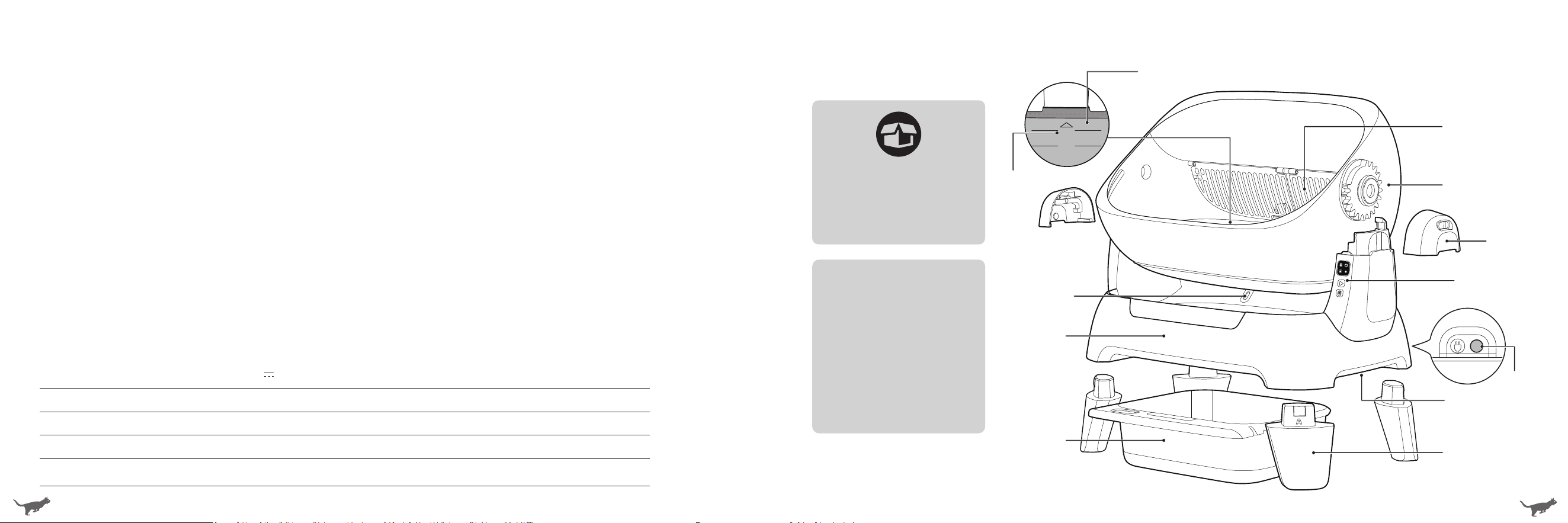
Base
Infrared Sensor
Drum
Litter Filter Screen
Side Cover
Base Handle
Waste Drawer
Suppo Legs
Control & Display
Power
Po
MAX
MIN
Removable
Fabric Pad
MAX Fill Line
05 06
Control Function
LED Display
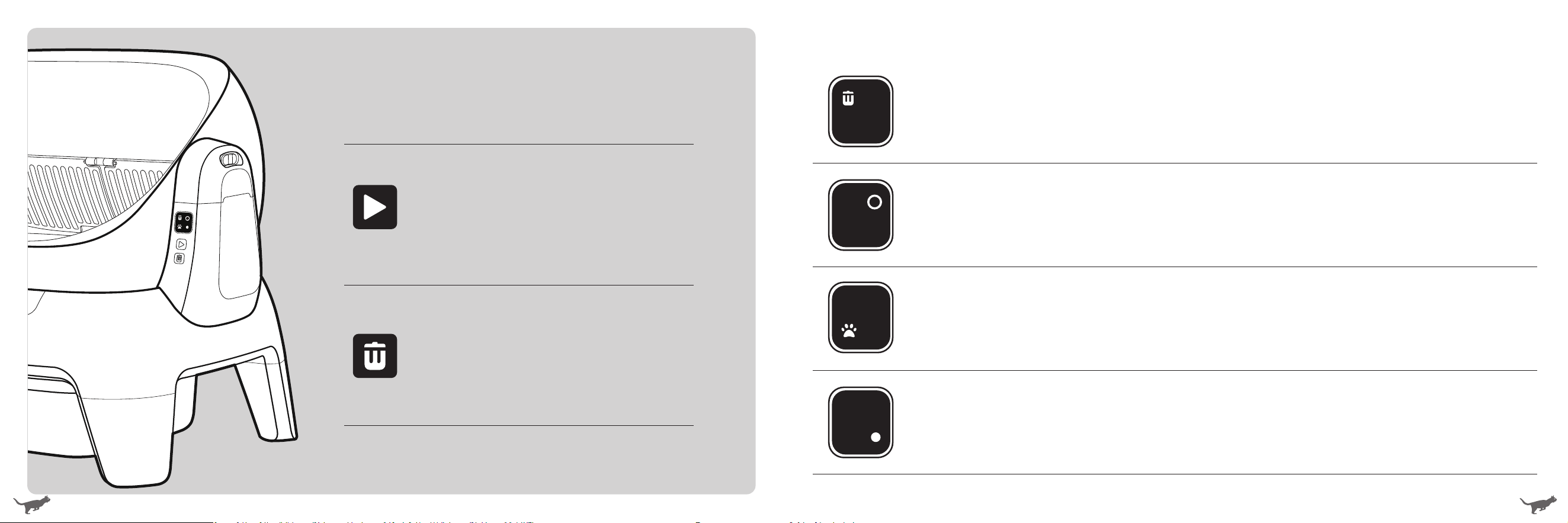
•Press once to sta cleaning the waste litter.
•If already staed, press it once again to pause.
•Hold for 3 seconds until one beep is heard to sta
emptying all litter.
•If already staed, press it once to pause.
Empty All Litter
Clean Waste Litter
•Hold for 3 seconds until one beep is heard to bring
the litter box into pairing mode (power indicator
ashing green).
Wi-Fi Setup
Solid ON White
Waste drawer full
Flashing Red
E1: Infrared sensor blocked
Solid ON White
Cat detected
Flashing Red
E3: Motor error
Solid ON White
Drum running
Flashing White
Running countdown
Flashing Orange
E2: Side cover not in place
Solid ON White
Power on
Flashing Green
Setting up Wi-Fi
Solid ON Green
Wi-Fi connected
Flashing Red
E4: Drum not in place
07
08
USING CAT LITTER BOX
Setting Up
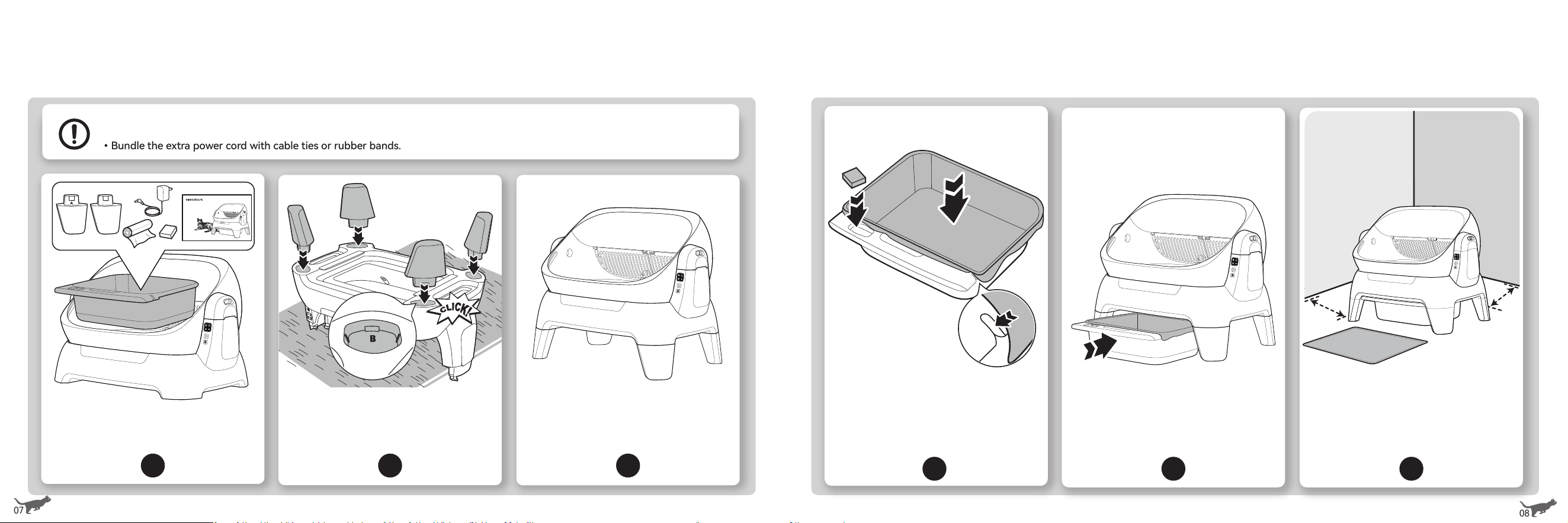
•Make sure that the side covers are properly locked in place before use.
•Make sure that the drum, suppo legs and waste drawer are properly installed in place before use.
•Bundle the extra power cord with cable ties or rubber bands.
1 2 3
Remove all packing materials. Take
the waste drawer and all accessories
out.
Turn the unit upside down on a at
suace with a mat underneath to
prevent scratches. Match the letters
and inse each suppo leg into its
corresponding hole.
Set the unit upright. Check that all
four legs are rmly attached and the
unit is stable and level.
4 5 6
Place the deodorizer in. Spread a litter
box liner evenly inside the waste
drawer. Tuck the edge securely into
the rim slots.
Slide the waste drawer in along the
rails until it is fully in place.
Locate the litter box indoors on a
rm, level suace with a minimum of
3 inches of clearance from the wall.
Place the mat in front.
* Do not place the mat paially or completely
under the litter box.
x2 x2
B
B
B
B
A
A
User Manual
Model: MW-SC10
SELF-CLEANING
CAT LITTER
BOX
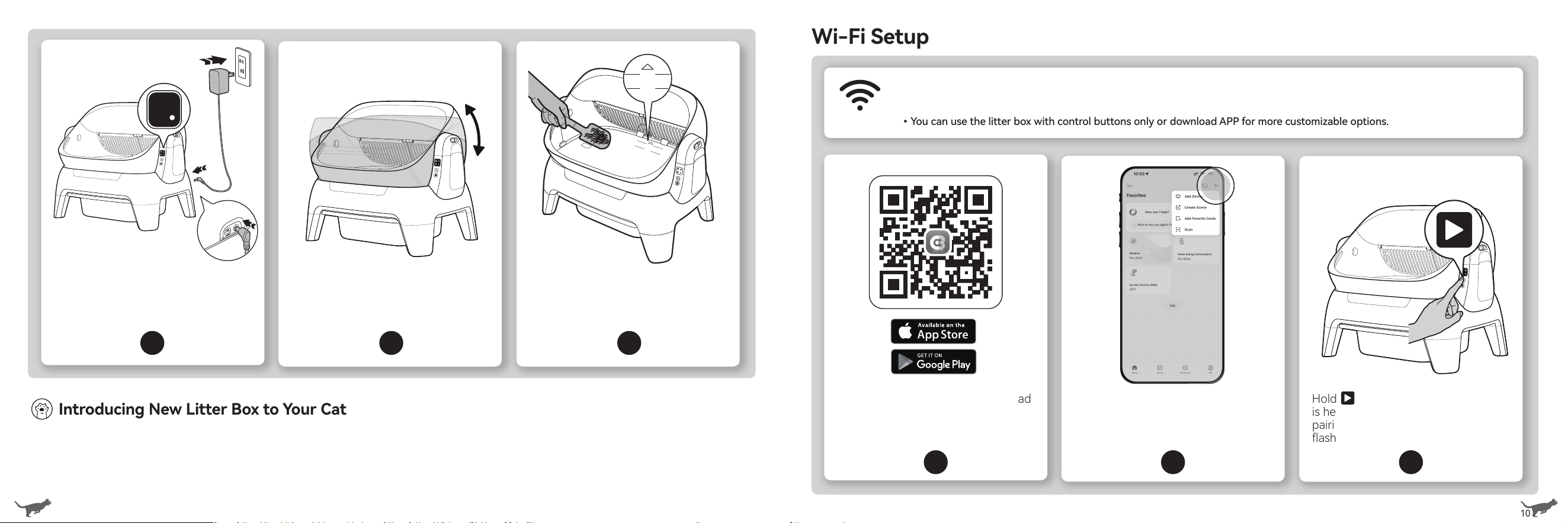
To help your cat transition to the new litter box:
•Location is Key. Place the litter box in the same location as the old one, or leave the old one nearby for a sho period of time
(at least during transition).
•Keep the Old Box. Do not throw out the old box. Put the new one in its designated spot and stop cleaning out the old one.
•Use Recognizable Scents. Add a scoop of litter from the old litter box to provide a familiar scent for your cat.
Introducing New Litter Box to Your Cat
09 10
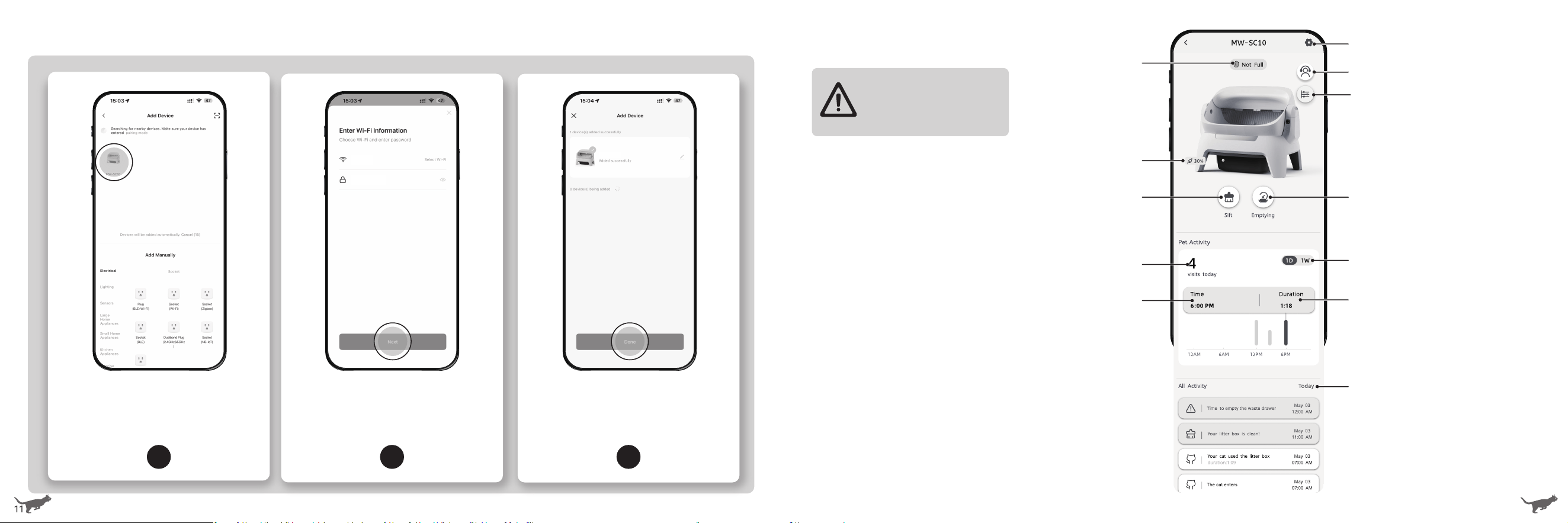
Wi-Fi Setup
•Make sure that your mobile is connected to a secure 2.4GHz network and Bluetooth is enabled. Allow access to your
Location during connection.
•Make sure that the drum is at the Home position before connecting.
•You can use the litter box with control buttons only or download APP for more customizable options.
1 3
Search or scan QR code to download
EB Sma app, then sign up as
instructed.
Hold for 3 seconds until one beep
is heard to bring the litter box into
pairing mode (power indicator
ashing green).
2.4GHz
Do not oveill.
2
Open app, tap + , then tap Add
Device.
Plug in the litter box. The power
indicator will stay solid on white when
connected to power.
The drum will rotate a full circle
automatically. Wait for it to return to
Home position, then the unit is ready
for use.
Add clumping litter between the MAX
and MIN ll line when spread at. Do
not oveill.
7 8 9
MAX
MIN
LEFT
MAX
MIN
3s
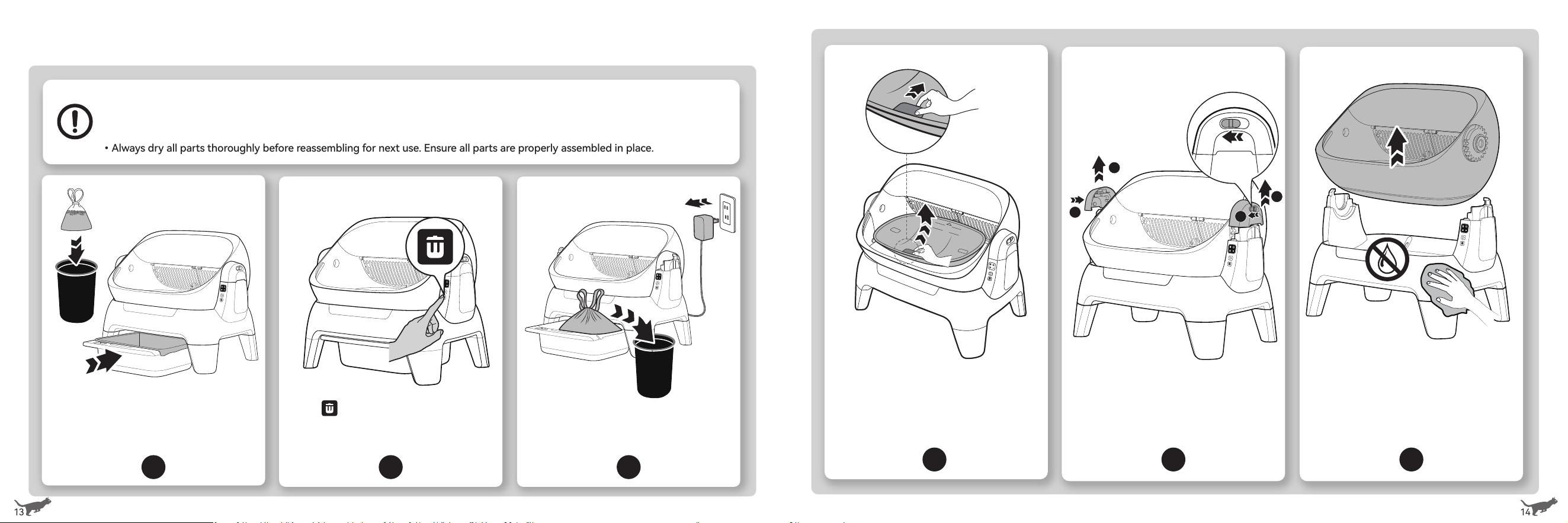
Preferences
(Settings including Auto Clean,
Scheduled Clean, Delay Time,
Child Lock, etc.)
About Device / Settings
After-Sales Seice
Toileting Times Today
Toileting Time
Deodorizer
Remaining Life
Clean Waste Litter
Waste Drawer Full
/ Not Full
Empty All Litter
Daily / Weekly
Toileting Statistics
Toileting Duration
Daily / Weekly Activity
11 12
4 5 6
Wait for auto searching, tap the
device to be added.
Select a 2.4GHz Wi-Fi and enter
password. Tap Next to continue.
Wait until it connects and the Wi-Fi
indicator turns solid on. Tap Done to
complete setup.
Using with APP
xxxxxx
xxxxxx
The app inteace is subject
to change due to software
updates. Please refer to the
actual inteace in the app.
MW-SC10
MW-SC10
13 14
CARE AND CLEANING
•To prevent litter spillage, empty the waste drawer before emptying all litter.
•Avoid using soaps, cleaners or chemicals that have strong odor or contain scents that are cat repellent, like citrus, lavender,
peppermint, etc.
•DO NOT rinse or immerse the base in water or other liquids.
•Always d all pas thoroughly before reassembling for next use. Ensure all pas are properly assembled in place.
1 2 3
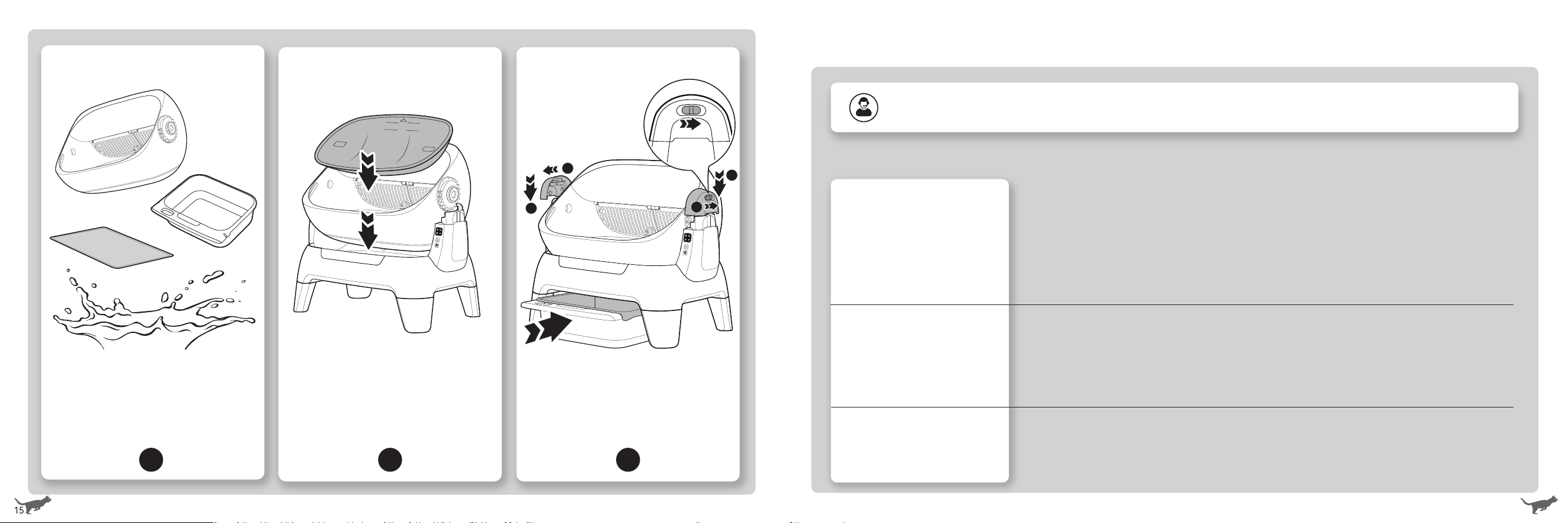
Slide the waste drawer out and dispose
of the litter. Replace with a new liner
and slide the waste drawer back.
Hold for 3 seconds until one beep
is heard to to sta emptying all litter.
Wait until the empty cycle is done.
Unplug the litter box. Slide the waste
drawer out and dispose of the litter.
* To prevent litter spillage, empty the waste drawer
before emptying all litter.
4 5 6
Pull the tab to carefully remove the
inner fabric pad.
Slide to ON position to unlock and
remove the side covers on both sides.
Hold to take out the drum. Wipe
clean the base with a soft, slightly
damp cloth or sponge. Wipe or air
d thoroughly before reassembling.
MAX
MIN
LEFT
3s
MAX
MIN
LEFT
RIGHT
MAX
MIN
LEFT
RIGHT
ON
OFF
* Do not rinse or immerse the base in water.
Opposite to the
other side
1
1
2
2
TROUBLESHOOTING GUIDE
The troubleshooting guide addresses the most common problems. If problems persist, feel free to contact the
Customer Suppo via email: suppo@meowanthome.com
Problem Solution
I cannot connect the litter
box with my mobile.
Drum does not rotate or
stops rotating during
cleaning or emptying.
•Disconnect from the power supply and remove the drum to check if there is any foreign
object stuck at the rotating shaft.
•Make sure that the drum is properly installed on the base and the side covers are locked.
Reconnect it to the power supply and t again.
•Disconnect from the power supply and remove the drum to check if the infrared sensor is
blocked by foreign object (dust, litter, etc.). Clear any blockage.
15 16
•Check and make sure that the litter box liner is spread evenly inside the waste drawer.
•Disconnect from the power supply and remove the drum to check if the infrared sensors are
blocked by foreign object.
•Use only for cats weighing at least 3.3lbs.
Drum does not stop when
cat enters.
7 8 9
Rinse clean the drum, waste drawer
and fabric pad. Wipe or air d
thoroughly before reassembling.
Attach the drum, waste drawer and
fabric pad back.
Attach the side covers back. Slide to
OFF position to lock the drum in
place.
•Make sure that your mobile is connected to a secure 2.4GHz Wi-Fi network and Bluetooth
is enabled.
•Make sure that your mobile and litter box are connected to the same Wi-Fi network.
•Make sure that you have entered a correct Wi-Fi password and the litter box is under
strong Wi-Fi signal.
•Check if a 5GHz frequency is used. T a Personal Hotspot, or change 5GHz to 2.4GHz to
connect your mobile. Consult the router supplier for detailed instruction on router
conguration.
MAX
MIN
LEFT
RIGHT
ON OFF
Opposite to the
other side
1
1
2
2
Litter box does not clean
automatically after cat
leaves.
•Scoop daily or more frequently to keep the odor at a minimum.
•Regularly clean the litter box and waste drawer.
•Regularly replace the litter. Fresh litter absorbs odors better.
•Choose odor-absorbing litter.
•Ensure proper ventilation. Place the litter box in a d, well-ventilated area where humidity is
at a minimum.
•T the included deodorizer.
•Introduce a second litter box. For multiple cats (3 cats or more), we recommend using at
least two litter box.
How to reduce unpleasant
odors from litter box?
Check if child lock is enabled on app. Tap to cancel child lock.
Buttons are not responsive.
•Choose a highly absorbent, fast-clumping litter for the litter box.
•Always keep enough litter between the MAX and MIN ll line.
•Regularly spread the litter to keep the suace even and prevent thin spots.
•Set a longer time for forming solid clumps.
•Check if any pa of the litter pad is damaged.
•For soft or loose stools, t adjusting your cat's diet or poion size. If the condition persists
beyond a day or two, seek advice from your veterinarian.
How to prevent litter
sticking?
How often you will need to add cat litter depends on the litter depth in the litter box. Ensure
you always keep enough litter between the MAX and MIN ll line.
How often should I add cat
litter?
Cat or kitten must age 6 months or older to safely use the litter box. To ensure safety for small
kittens, enable Kitten mode on app. This disables auto clean and allows manual clean.
Can the litter box be used by
all cats?
How often you will need to replace the litter box liner depends on your personal preference
and your cat's behavior. For a single cat, we recommend replacing daily in summer, and eve
2-3 days in spring/autumn. For multiple cats, we recommend replacing eve day.
How often should I replace
the litter box liner?
Yes, you can use the litter box with control button only or download APP for more customiz-
able options.
Can I use the litter box
without APP?
For new litter box liners or deodorizer, search for MeoWant litter box liners or deodorizer on
Amazon or contact our Customer Suppo via email: suppo@meowanthome.com
How to get new litter box
liners or deodorizer?
17
18
•Disconnect from the power supply and remove the drum to check if the infrared sensor is
blocked by foreign object (dust, litter, etc.). Clear any blockage.
•Check if the waste drawer is full. Clean and empty the waste drawer.
Drum stops with ashing
red.
To minimize unpleasant odors from the cat litter box,
•Check and make sure that Auto Mode is selected on app.
•Check if the cleaning delay time is set too long. It is recommended to set a 6min delay for
solid clumps.
•Check if Sleep mode is enabled on app. Litter box does not clean automatically under Sleep
mode.
•Disconnect from the power supply and then reconnect.

2019
FCC Compliance
This device complies with Pa 15 of the FCC Rules. Operation is subject to the following two conditions:
(1) this device may not cause harmful inteerence, and
(2) this device must accept any inteerence received, including inteerence that may cause undesired operation.
Warning: Changes or modications not expressly approved by the pay responsible for compliance could void the user's
authority to operate the equipment.
NOTE: This equipment has been tested and found to comply with the limits for a Class B digital device, pursuant to Pa 15 of the
FCC Rules. These limits are designed to provide reasonable protection against harmful inteerence in a residential installation. This
equipment generates uses and can radiate radio frequency energy and, if not installed and used in accordance with the instructions,
may cause harmful inteerence to radio communications. However, there is no guarantee that inteerence will not occur in a paicu-
lar installation. If this equipment does cause harmful inteerence to radio or television reception, which can be determined by turning
the equipment o and on, the user is encouraged to t to correct the inteerence by one or more of the following measures:
- Reorient or relocate the receiving antenna.
- Increase the separation between the equipment and receiver.
- Connect the equipment into an outlet on a circuit dierent from that to which the receiver is connected.
- Consult the dealer or an experienced radio/TV technician for help.
FCC Radiation Exposure Statement
This equipment complies with FCC radiation exposure limits set foh for an uncontrolled environment. This equipment should be
installed and operated with minimum distance 20cm between the radiator & your body.
IC Compliance
This device contains licence-exempt transmitter(s)/receiver(s) that comply withInnovation, Science and Economic DevelopmentCanada’s
licence-exempt RSS(s). Operation is subject to the following two conditions:
(1) This device may not cause inteerence.
(2) This device must accept any inteerence, including inteerence that may cause undesired operation of the device.
Correct Disposal of This Product (Waste Electrical & Electronic Equipment)
(Applicable in countries with separate collection systems)
This marking on the product, accessories or literature indicates that the product and its electronic accessories should not be disposed of
with other household waste at the end of their working life. To prevent possible harm to the environment or human health from uncontrolled
waste disposal, please separate these items from other types of waste and recycle them responsibly to promote the sustainable reuse of
material resources. Household users should contact either the retailer where they purchased this product, or their local government oce,
for details of where and how they can take these items for environmentally safe recycling. Business users should contact their supplier and
check the terms and conditions of the purchase contract. This product and its electronic accessories should not be mixed with other
commercial wastes for disposal.
Radio Frequency Exposure Statement for IC
The device has been evaluated to meet general RF exposure requirements. The device can be used in mobile exposure conditions. The min
separation distance is 20cm.
Déclaration d'exposition aux radiofréquences pour IC
L’appareil a été utilisé pour répondre aux exigences générales en matière d’exposition aux radiofréquences.
L’émetteur/récepteur exempt de licence contenu dans le présent appareil est conforme aux CNR d’Innovation, Sciences et Développement
économique Canada applicables aux appareils radio exempts de licence. L’exploitation est autorisée aux deux conditions suivantes :
(1) L' appareil ne doit pas produire de brouillage;
(2) L' appareil doit accepter tout brouillage radioélectrique subi, même si le brouillage est susceptible d' en compromettre le fonctionnement.