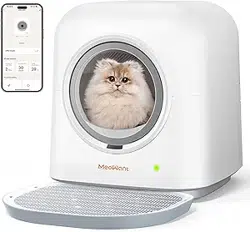
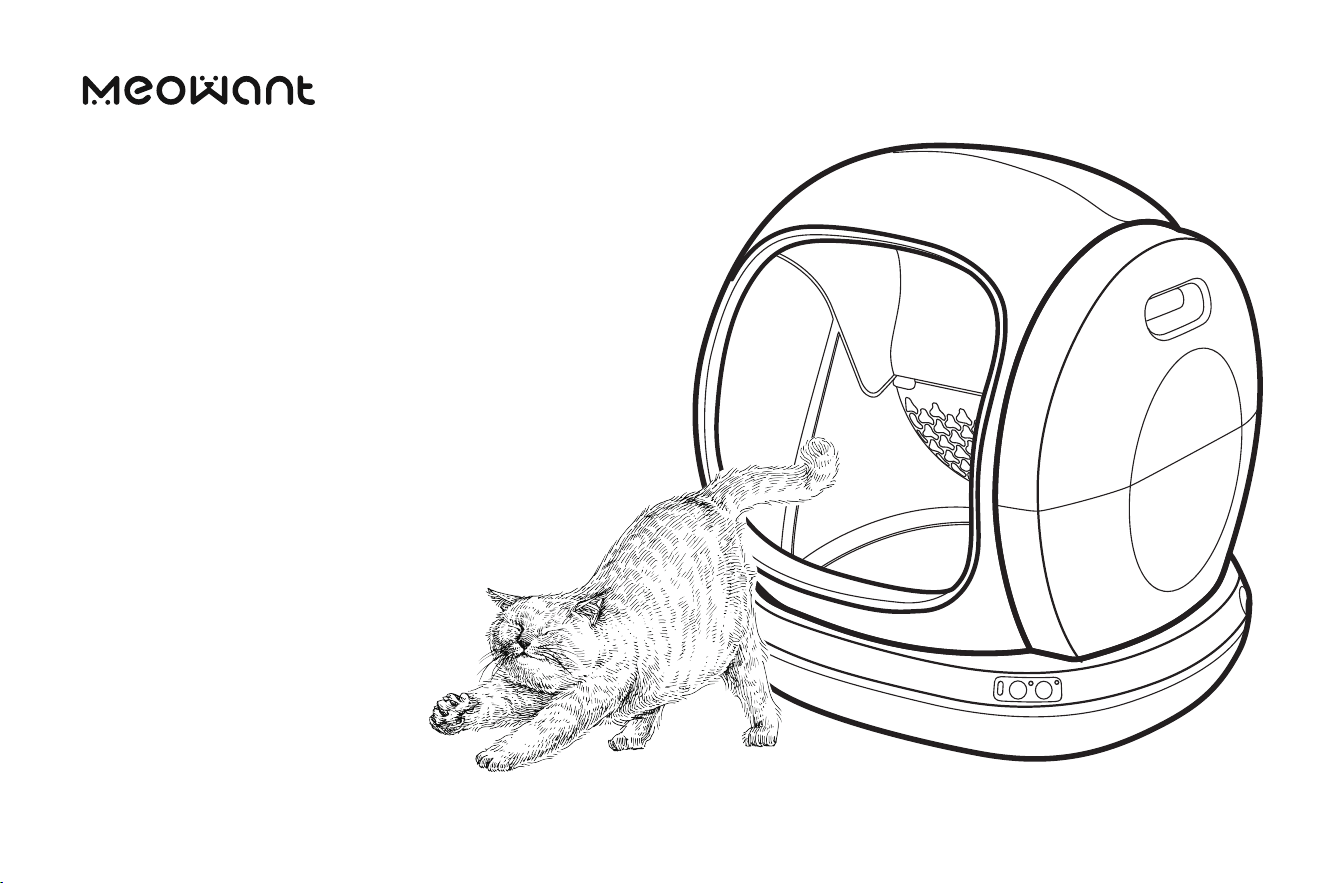
SELF-CLEANING
CAT LITTER
BOX
User Manual
Made In China
suppo@meowanthome.com
GET IN TOUCH?
Model: MW-SC02
MANUFACTURER
Shenzhen Guiyang Network Technology Co., Ltd
ADDRESS
1404K3, East Block, Shengtang Commercial Building,
Futian District, Shenzhen, China
Rev_1.1_EN
CONTENT
01 02 03
USING
CAT LITTER
BOX
04
CARE
AND
CLEANING
05
TROUBLE-
SHOOTING
GUIDE
06
WARRANTY
AND
SERVICE
IMPORTANT
SAFETY
INSTRUCTIONS
Safety Instructions
Specications
01-03
01
03
EXPLORING
CAT LITTER
BOX
In the Box
Control Functions
Status Indicators
04-06
04
05
06
Setting Up
Getting Staed
Wi-Fi Setup
07-12
07
08
10
Replacing Litter
Box Liner
Emptying and
Cleaning
13-16
13
14
17-18 19
IMPORTANT SAFETY INSTRUCTIONS
READ ALL INSTRUCTIONS BEFORE USE
AND SAVE FOR FUTURE REFERENCE
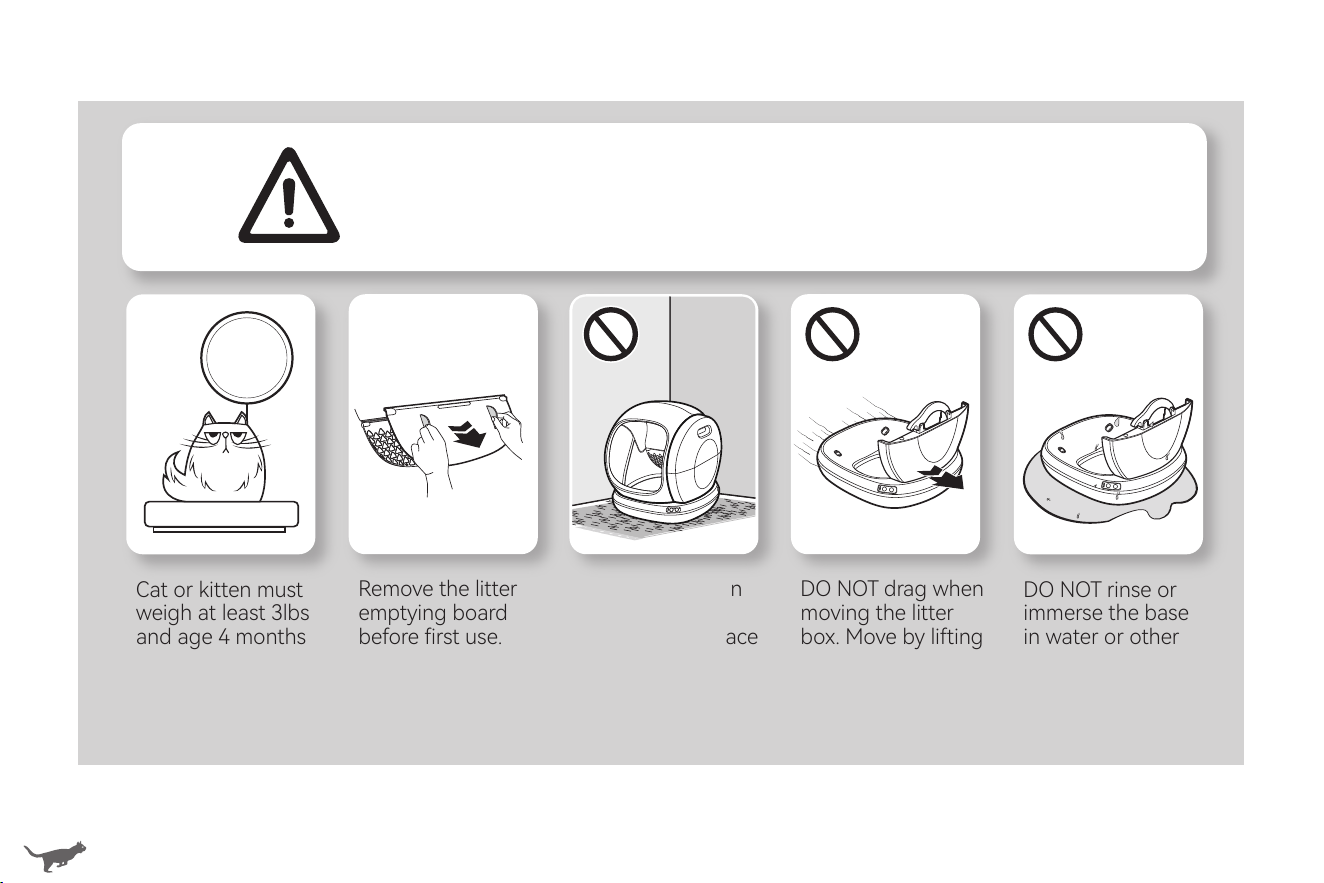
Cat or kitten must
weigh at least 3lbs
and age 4 months
or more to safely
use the litter box.
> 3 lbs.
When using an electrical appliance, especially when children are present, basic safety precautions
should always be followed, including the following:
•This appliance is not intended for use by persons (including children) with reduced physical, senso or mental capabilities, or lack
of experience and knowledge, unless they have been given supeision or instruction concerning the use of the appliance by
person responsible for their safety.
•Close attention is necessa when used by or near children. Children should be supeised to ensure that they do not play with, in
or around the appliance. Keep the appliance and all accessories out of reach of children.
•Use the appliance only for intended household purposes as described in this User Manual.
INTENDED USE
•DO NOT operate the appliance if it has a damaged power cord or plug, or if it is malfunctioning or has been damaged in any
manner.
•DO NOT use an external power supply other than the one provided with the appliance. Use only the provided power adapter.
•DO NOT immerse the power adapter or the base in water or other liquid or allow moisture to come into contact with these pas.
•If the supply cord is damaged, it must be replaced by the manufacturer, its seice agent or similarly qualied persons in order to
avoid a hazard.
•Always unplug when not in use, before putting on or taking o pas and before cleaning, maintenance or seicing.
ELECTRICITY SAFETY
•Always place the litter box on a rm, level suace. Avoid soft, uneven, or unstable ooring, which may aect the ability of the unit
to detect your cat. If using litter mats or rugs, place in front of the unit. Do not place mats paially or completely under the unit.
•Keep indoors in a cool, d location. Reduce exposure to high temperature and humidity.
•DO NOT sit on or place anything on top of the litter box.
•DO NOT put anything in the unit other than clumping litter or litter beads and cstals that are small enough to pass through the screen.
•DO NOT allow pets to chew on or swallow any pas. Cover or hide the power cord with care to prevent pets from biting.
•DO NOT open the top cover while the litter box is rotating.
•DO NOT attempt to disassemble, repair, modify or replace any pa of the appliance. No user seiceable pas inside.
All seicing should be peormed by qualied personnel only.
•Dispose of all packaging materials properly. Keep away from children and pets.
RELATED TO USE
01 02
•Always wash hands thoroughly after removing the waste. Pregnant women and those with suppressed immune systems should
note that a parasite sometimes found in cat feces could cause toxoplasmosis. Exercise cation and consult with a physician before
handling the litter box.
•Keep the deodorizers out of reach of children and pets. Avoid eating by mistake.
•How often you will need to replace the litter box liner depends on the number and size of your cats. We recommend to replace eve
3 to 5 days to avoid bacteria growth.
Remove the litter
emptying board
before rst use.
Attach and use
only when the
litter is to be
emptied.
DO NOT place on
carpet. Place on
a rm, level suace
with a little space
around.
DO NOT drag when
moving the litter
box. Move by lifting
the base with both
hands.
DO NOT rinse or
immerse the base
in water or other
liquid.

IMPORTANT SAFETY INSTRUCTIONS
READ ALL INSTRUCTIONS BEFORE USE
AND SAVE FOR FUTURE REFERENCE
Cat or kitten must
weigh at least 3lbs
and age 4 months
or more to safely
use the litter box.
> 3 lbs.
When using an electrical appliance, especially when children are present, basic safety precautions
should always be followed, including the following:
•This appliance is not intended for use by persons (including children) with reduced physical, senso or mental capabilities, or lack
of experience and knowledge, unless they have been given supeision or instruction concerning the use of the appliance by
person responsible for their safety.
•Close attention is necessa when used by or near children. Children should be supeised to ensure that they do not play with, in
or around the appliance. Keep the appliance and all accessories out of reach of children.
•Use the appliance only for intended household purposes as described in this User Manual.
INTENDED USE
•DO NOT operate the appliance if it has a damaged power cord or plug, or if it is malfunctioning or has been damaged in any
manner.
•DO NOT use an external power supply other than the one provided with the appliance. Use only the provided power adapter.
•DO NOT immerse the power adapter or the base in water or other liquid or allow moisture to come into contact with these pas.
•If the supply cord is damaged, it must be replaced by the manufacturer, its seice agent or similarly qualied persons in order to
avoid a hazard.
•Always unplug when not in use, before putting on or taking o pas and before cleaning, maintenance or seicing.
ELECTRICITY SAFETY
•Always place the litter box on a rm, level suace. Avoid soft, uneven, or unstable ooring, which may aect the ability of the unit
to detect your cat. If using litter mats or rugs, place in front of the unit. Do not place mats paially or completely under the unit.
•Keep indoors in a cool, d location. Reduce exposure to high temperature and humidity.
•DO NOT sit on or place anything on top of the litter box.
•DO NOT put anything in the unit other than clumping litter or litter beads and cstals that are small enough to pass through the screen.
•DO NOT allow pets to chew on or swallow any pas. Cover or hide the power cord with care to prevent pets from biting.
•DO NOT open the top cover while the litter box is rotating.
•DO NOT attempt to disassemble, repair, modify or replace any pa of the appliance. No user seiceable pas inside.
All seicing should be peormed by qualied personnel only.
•Dispose of all packaging materials properly. Keep away from children and pets.
RELATED TO USE
01 02
•Always wash hands thoroughly after removing the waste. Pregnant women and those with suppressed immune systems should
note that a parasite sometimes found in cat feces could cause toxoplasmosis. Exercise cation and consult with a physician before
handling the litter box.
•Keep the deodorizers out of reach of children and pets. Avoid eating by mistake.
•How often you will need to replace the litter box liner depends on the number and size of your cats. We recommend to replace eve
3 to 5 days to avoid bacteria growth.
Remove the litter
emptying board
before rst use.
Attach and use
only when the
litter is to be
emptied.
DO NOT place on
carpet. Place on
a rm, level suace
with a little space
around.
DO NOT drag when
moving the litter
box. Move by lifting
the base with both
hands.
DO NOT rinse or
immerse the base
in water or other
liquid.
•Always place the litter box on a rm, level suace. Avoid soft, uneven, or unstable ooring, which may aect the ability of the unit
to detect your cat. If using litter mats or rugs, place in front of the unit. Do not place mats paially or completely under the unit.
•Keep indoors in a cool, d location. Reduce exposure to high temperature and humidity.
•DO NOT sit on or place anything on top of the litter box.
•DO NOT put anything in the unit other than clumping litter or litter beads and cstals that are small enough to pass through the screen.
•DO NOT allow pets to chew on or swallow any pas. Cover or hide the power cord with care to prevent pets from biting.
•DO NOT open the top cover while the litter box is rotating.
•DO NOT attempt to disassemble, repair, modify or replace any pa of the appliance. No user seiceable pas inside.
All seicing should be peormed by qualied personnel only.
•Dispose of all packaging materials properly. Keep away from children and pets.
03
04
•Always wash hands thoroughly after removing the waste. Pregnant women and those with suppressed immune systems should
note that a parasite sometimes found in cat feces could cause toxoplasmosis. Exercise cation and consult with a physician before
handling the litter box.
•Keep the deodorizers out of reach of children and pets. Avoid eating by mistake.
•How often you will need to replace the litter box liner depends on the number and size of your cats. We recommend to replace eve
3 to 5 days to avoid bacteria growth.
FOR HOUSEHOLD USE ONLY
SAVE THESE INSTRUCTIONS
Specications
Input
Rated Power
For Cat
Cat Weight
Waste Bin Capacity
Toileting Space
Max Load
Applicable Litter
DC 12V 1A
12W
Weight > 3lbs / Age > 4 months
3.3-22 lbs / 1.5-10 kg
0.95 gal / 3.6 L
13.6 gal / 51.7 L
44 lbs / 20 kg
All clumping cat litter
(bentonite mineral, mixed and tofu cat litter (length < 0.59in))
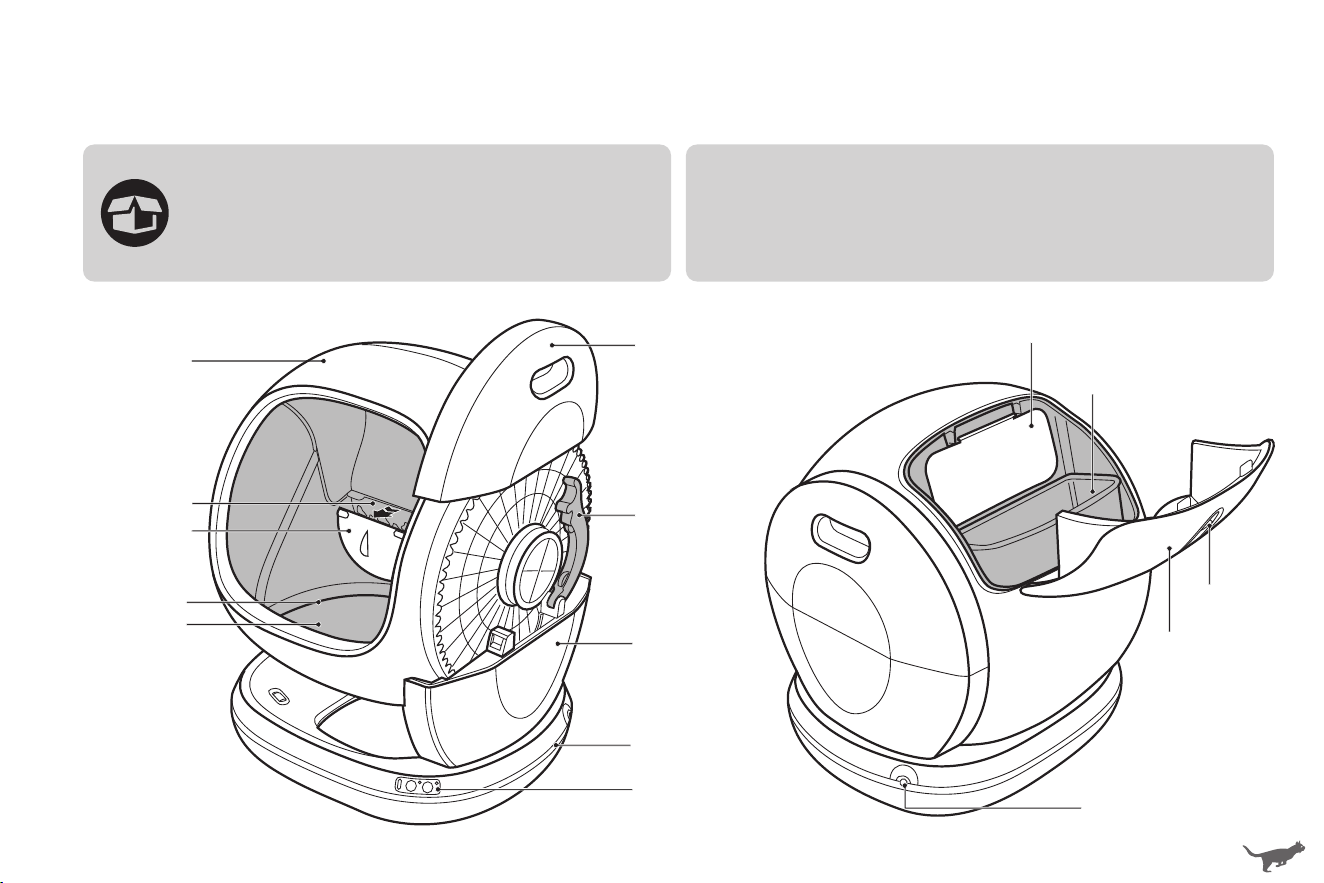
EXPLORING CAT LITTER BOX
Check if all accessories are included. Contact us
via email: suppo@meowanthome.com if there
is any pa missing or damaged.
Drum
Other Accessories
•Cat Litter Mat x 1
•Litter Box Liners (20 pack)
•Power Adapter x 1
•Deodorizers x 3
•User Manual x 1
•Quick Sta Guide x 1
Litter
Emptying Board
(Remove before rst use)
Litter Filter
MAX Fill Line
Anti-Sticking Pad
Side Cover
Rotating
Shaft Lock
Drum Suppo
Base
Control Buttons
& Indicators
Deodorization Cover
Waste Bin
Waste Bin Cover
Snap Lock
Power Po
In the Box
•Always place the litter box on a rm, level suace. Avoid soft, uneven, or unstable ooring, which may aect the ability of the unit
to detect your cat. If using litter mats or rugs, place in front of the unit. Do not place mats paially or completely under the unit.
•Keep indoors in a cool, d location. Reduce exposure to high temperature and humidity.
•DO NOT sit on or place anything on top of the litter box.
•DO NOT put anything in the unit other than clumping litter or litter beads and cstals that are small enough to pass through the screen.
•DO NOT allow pets to chew on or swallow any pas. Cover or hide the power cord with care to prevent pets from biting.
•DO NOT open the top cover while the litter box is rotating.
•DO NOT attempt to disassemble, repair, modify or replace any pa of the appliance. No user seiceable pas inside.
All seicing should be peormed by qualied personnel only.
•Dispose of all packaging materials properly. Keep away from children and pets.
03
04
•Always wash hands thoroughly after removing the waste. Pregnant women and those with suppressed immune systems should
note that a parasite sometimes found in cat feces could cause toxoplasmosis. Exercise cation and consult with a physician before
handling the litter box.
•Keep the deodorizers out of reach of children and pets. Avoid eating by mistake.
•How often you will need to replace the litter box liner depends on the number and size of your cats. We recommend to replace eve
3 to 5 days to avoid bacteria growth.
FOR HOUSEHOLD USE ONLY
SAVE THESE INSTRUCTIONS
Specications
Input
Rated Power
For Cat
Cat Weight
Waste Bin Capacity
Toileting Space
Max Load
Applicable Litter
DC 12V 1A
12W
Weight > 3lbs / Age > 4 months
3.3-22 lbs / 1.5-10 kg
0.95 gal / 3.6 L
13.6 gal / 51.7 L
44 lbs / 20 kg
All clumping cat litter
(bentonite mineral, mixed and tofu cat litter (length < 0.59in))
EXPLORING CAT LITTER BOX
Check if all accessories are included. Contact us
via email: suppo@meowanthome.com if there
is any pa missing or damaged.
Drum
Other Accessories
•Cat Litter Mat x 1
•Litter Box Liners (20 pack)
•Power Adapter x 1
•Deodorizers x 3
•User Manual x 1
•Quick Sta Guide x 1
Litter
Emptying Board
(Remove before rst use)
Litter Filter
MAX Fill Line
Anti-Sticking Pad
Side Cover
Rotating
Shaft Lock
Drum Suppo
Base
Control Buttons
& Indicators
Deodorization Cover
Waste Bin
Waste Bin Cover
Snap Lock
Power Po
In the Box
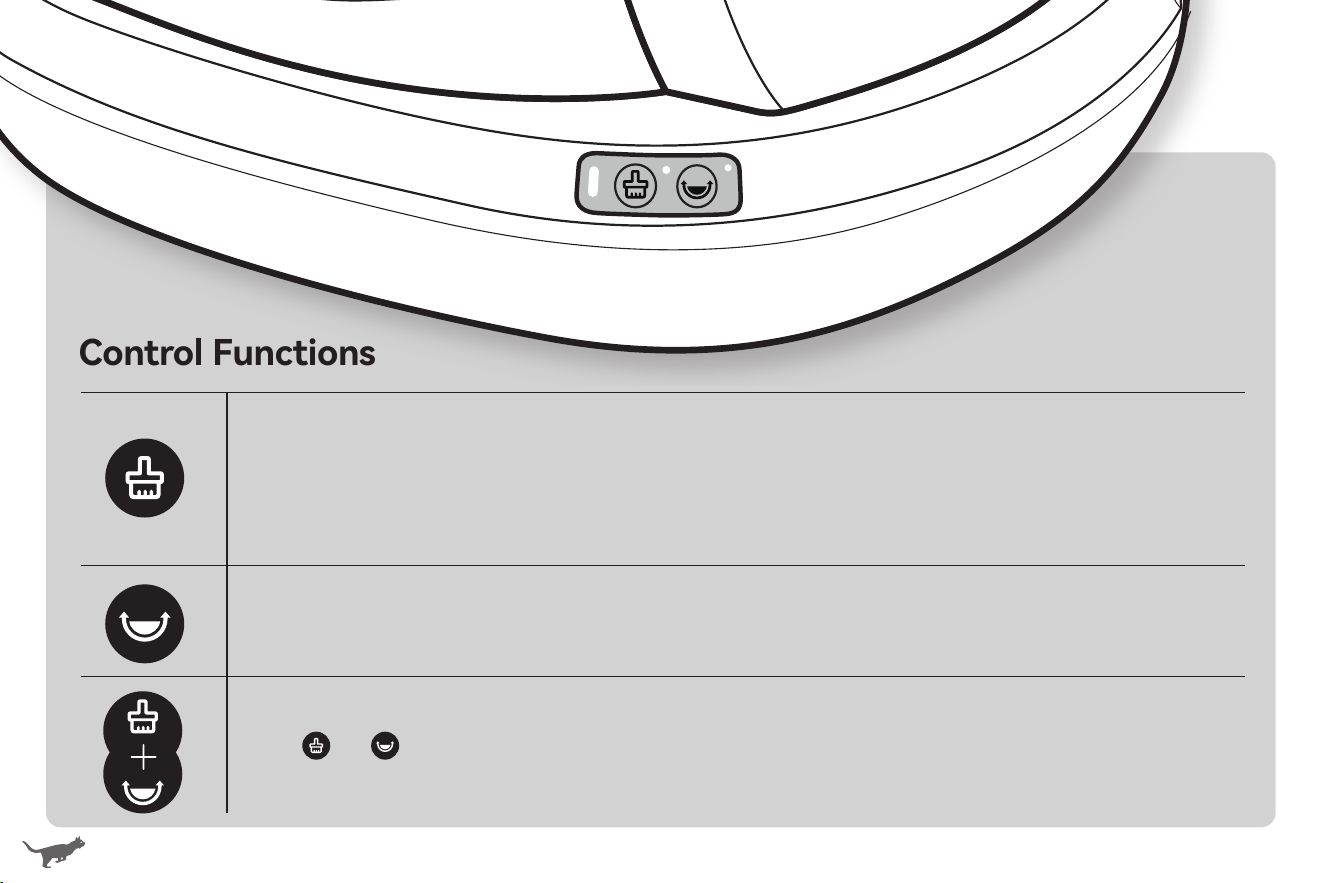
05 06
Control Functions
Clean Waste Litter
Press once to sta cleaning the waste litter. If already staed, press it once again to pause.
Empty All Litter
Attach the litter emptying board to the litter lter, then press the button once to sta emptying all litter.
If already staed, press it once again to pause. Once emptied, remove the litter emptying board.
Wi-Fi Setup
Hold for 3s to bring the litter box into paring mode (status indicator ashes blue).
Spread Litter Flat
Press once to sta spreading the litter at. If already staed, press it once again to pause.
Child Lock
Hold for 3s to turn on or cancel child lock (status indicator ashes green twice).
Restore to Facto Settings
Hold and simultaneously for 5s to restore to facto settings.
If reset successfully, you will need to pair the litter box with your mobile again.
Status Indicators
Solid Blue
Ready & connected
Flashing Blue
Setting up WiFi
Solid Blue & Button
Indicators ON
Firmware upgrading
Solid Blue & Button
Indicators Flashing
Restoring to facto settings
Solid Green
Cat / weight detected
when stationa
Flashing Green
Drum returning to
Home position
Flashing Green Twice
Child Lock on/o
Solid Red
Side cover not in place
Solid Red &
Button
Indicators
Flashing
•Drum not in place
•Motor stall
Solid Red & One
Button Indicator
Flashing
Cleaning / emptying /
spreading paused
Solid Red & One
Button Indicator ON
Cat / weight detected during
cleaning / emptying / spreading
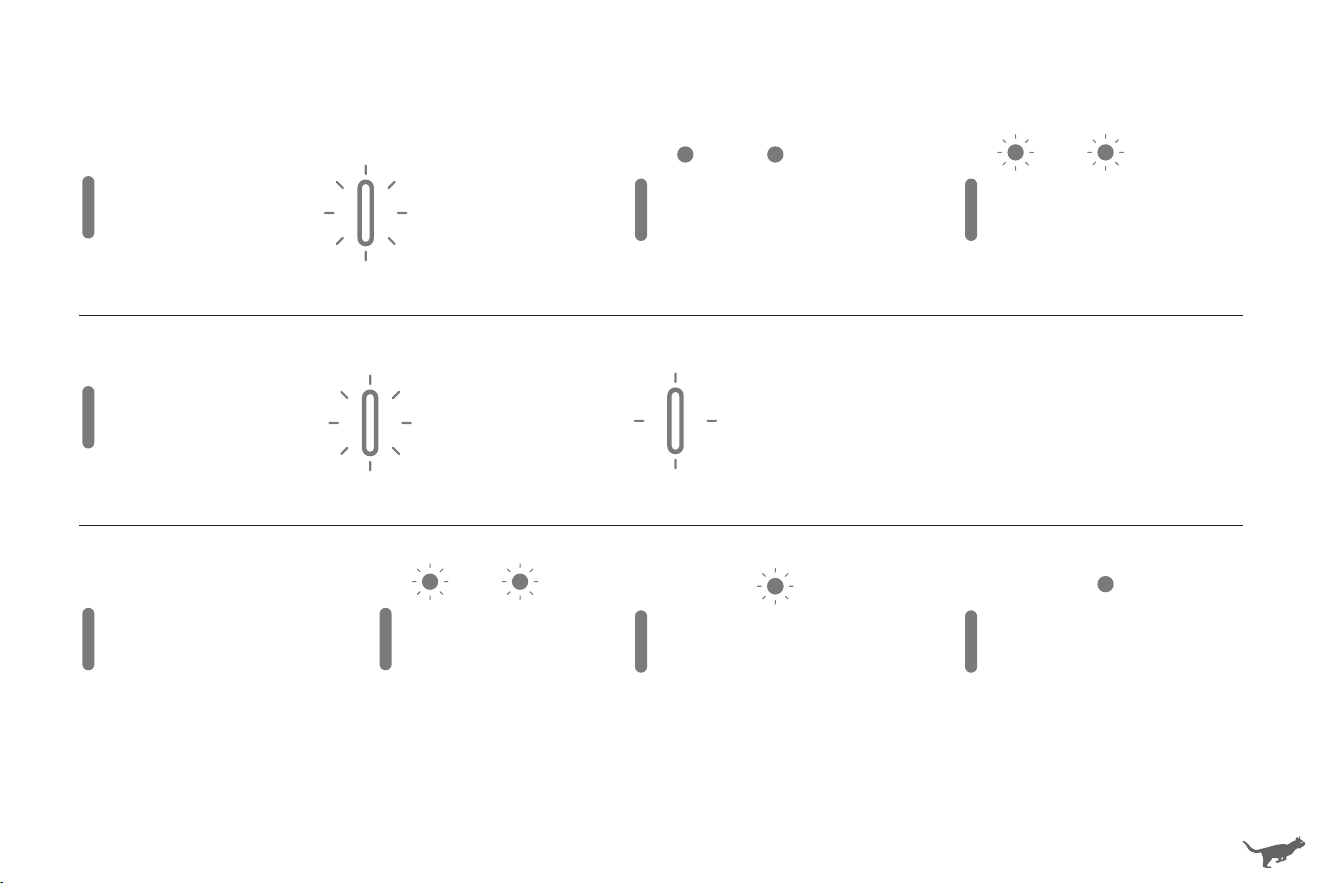
05 06
Control Functions
Clean Waste Litter
Press once to sta cleaning the waste litter. If already staed, press it once again to pause.
Empty All Litter
Attach the litter emptying board to the litter lter, then press the button once to sta emptying all litter.
If already staed, press it once again to pause. Once emptied, remove the litter emptying board.
Wi-Fi Setup
Hold for 3s to bring the litter box into paring mode (status indicator ashes blue).
Spread Litter Flat
Press once to sta spreading the litter at. If already staed, press it once again to pause.
Child Lock
Hold for 3s to turn on or cancel child lock (status indicator ashes green twice).
Restore to Facto Settings
Hold and simultaneously for 5s to restore to facto settings.
If reset successfully, you will need to pair the litter box with your mobile again.
Status Indicators
Solid Blue
Ready & connected
Flashing Blue
Setting up WiFi
Solid Blue & Button
Indicators ON
Firmware upgrading
Solid Blue & Button
Indicators Flashing
Restoring to facto settings
Solid Green
Cat / weight detected
when stationa
Flashing Green
Drum returning to
Home position
Flashing Green Twice
Child Lock on/o
Solid Red
Side cover not in place
Solid Red &
Button
Indicators
Flashing
•Drum not in place
•Motor stall
Solid Red & One
Button Indicator
Flashing
Cleaning / emptying /
spreading paused
Solid Red & One
Button Indicator ON
Cat / weight detected during
cleaning / emptying / spreading
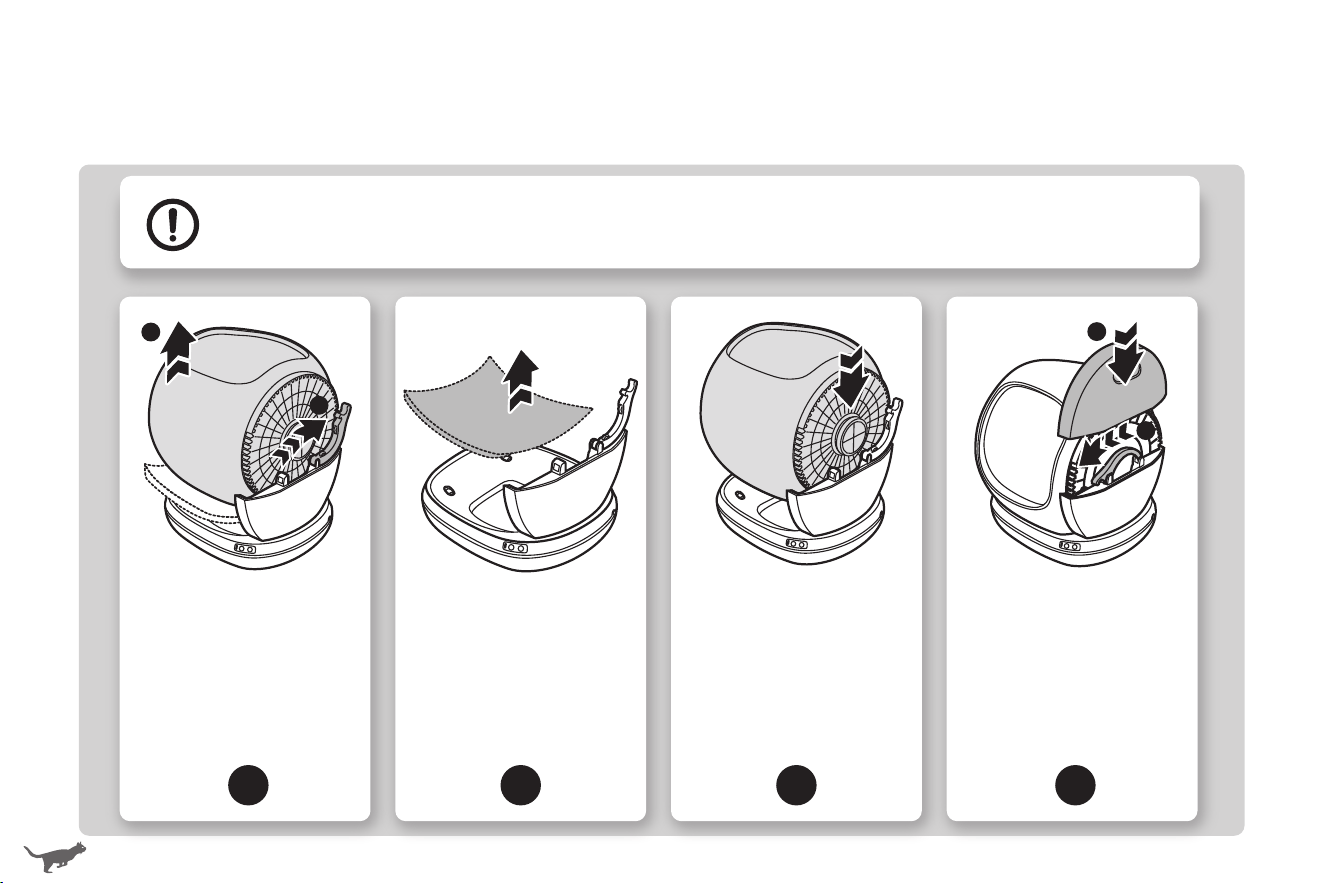
07 08
USING CAT LITTER BOX
Setting Up
•Remove all protective tapes and foam pads before use.
•Make sure that the drum is properly installed and locked onto the base before plugging into an outlet.
•Make sure that the side cover properly situates on the base suppo before use.
1
Remove all packing
materials. Unlock the
rotating shaft lock then
hold to take out the
drum.
2 3 4
Remove the protective
foam pad.
Place the drum on the
base by inseing the
rotating shaft into the
slot of the base suppo.
Make sure that the drum
properly sits on without
shaking.
Lock the rotating shaft
lock to secure the
drum. Align and inse
the side cover back into
the base suppo.
Remove the litter emptying board before rst use. Attach and use only when the litter is to be emptied.
1
Locate the litter box
indoors on a rm, level
suace with little space
around. Place the mat
in front of the litter box.
2 3 4
Remove the litter
emptying board. Attach
and use only when the
litter is to be emptied.
Pinch the snap lock to
open the waste bin
cover. Then take out the
waste bin.
Slide out the deodorizer
holder and place the
deodorizer in.
Do not touch
any walls
1
2
1
2
Getting Staed
1
2
2
1
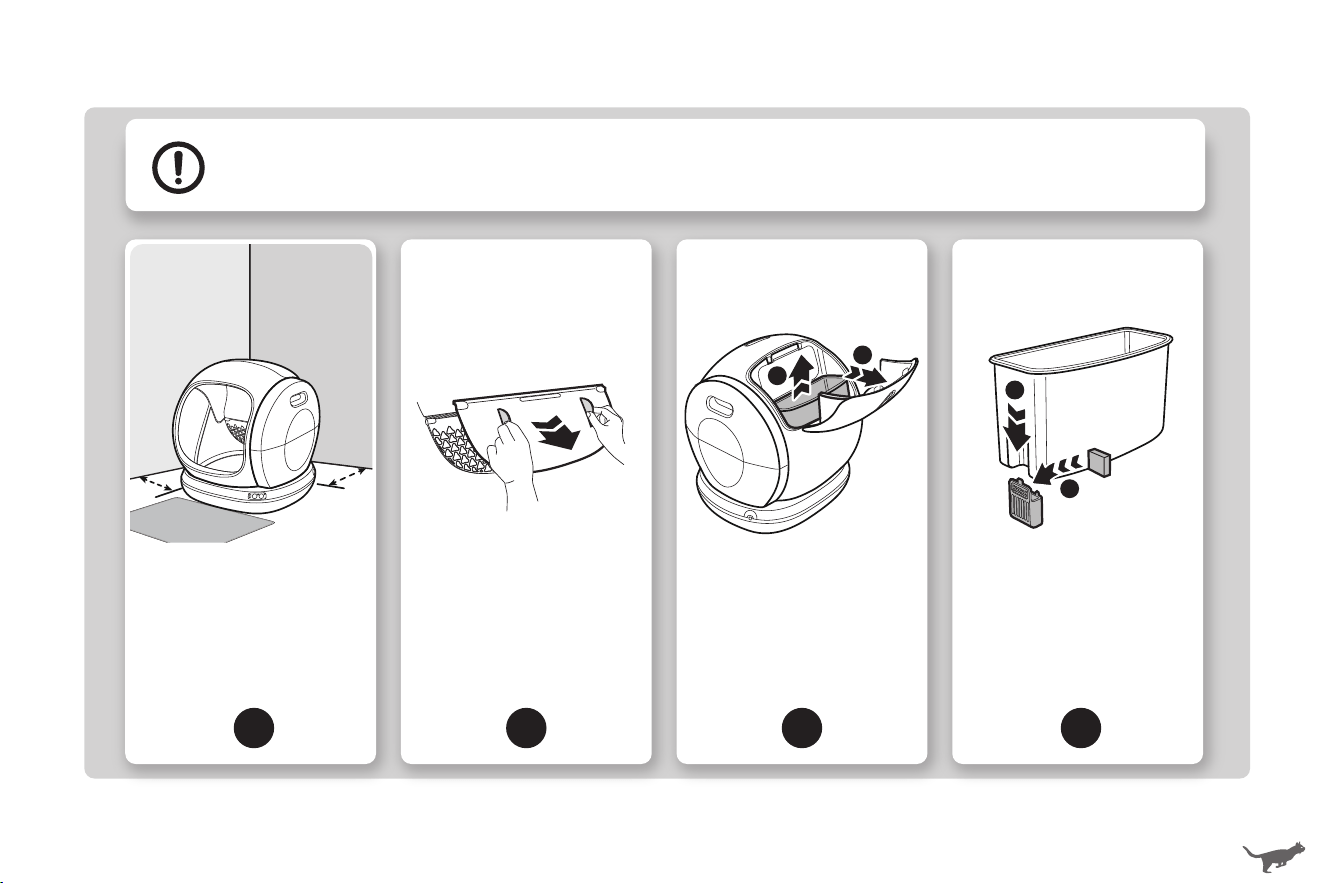
07 08
USING CAT LITTER BOX
Setting Up
•Remove all protective tapes and foam pads before use.
•Make sure that the drum is properly installed and locked onto the base before plugging into an outlet.
•Make sure that the side cover properly situates on the base suppo before use.
1
Remove all packing
materials. Unlock the
rotating shaft lock then
hold to take out the
drum.
2 3 4
Remove the protective
foam pad.
Place the drum on the
base by inseing the
rotating shaft into the
slot of the base suppo.
Make sure that the drum
properly sits on without
shaking.
Lock the rotating shaft
lock to secure the
drum. Align and inse
the side cover back into
the base suppo.
Remove the litter emptying board before rst use. Attach and use only when the litter is to be emptied.
1
Locate the litter box
indoors on a rm, level
suace with little space
around. Place the mat
in front of the litter box.
2 3 4
Remove the litter
emptying board. Attach
and use only when the
litter is to be emptied.
Pinch the snap lock to
open the waste bin
cover. Then take out the
waste bin.
Slide out the deodorizer
holder and place the
deodorizer in.
Do not touch
any walls
1
2
1
2
Getting Staed
1
2
2
1
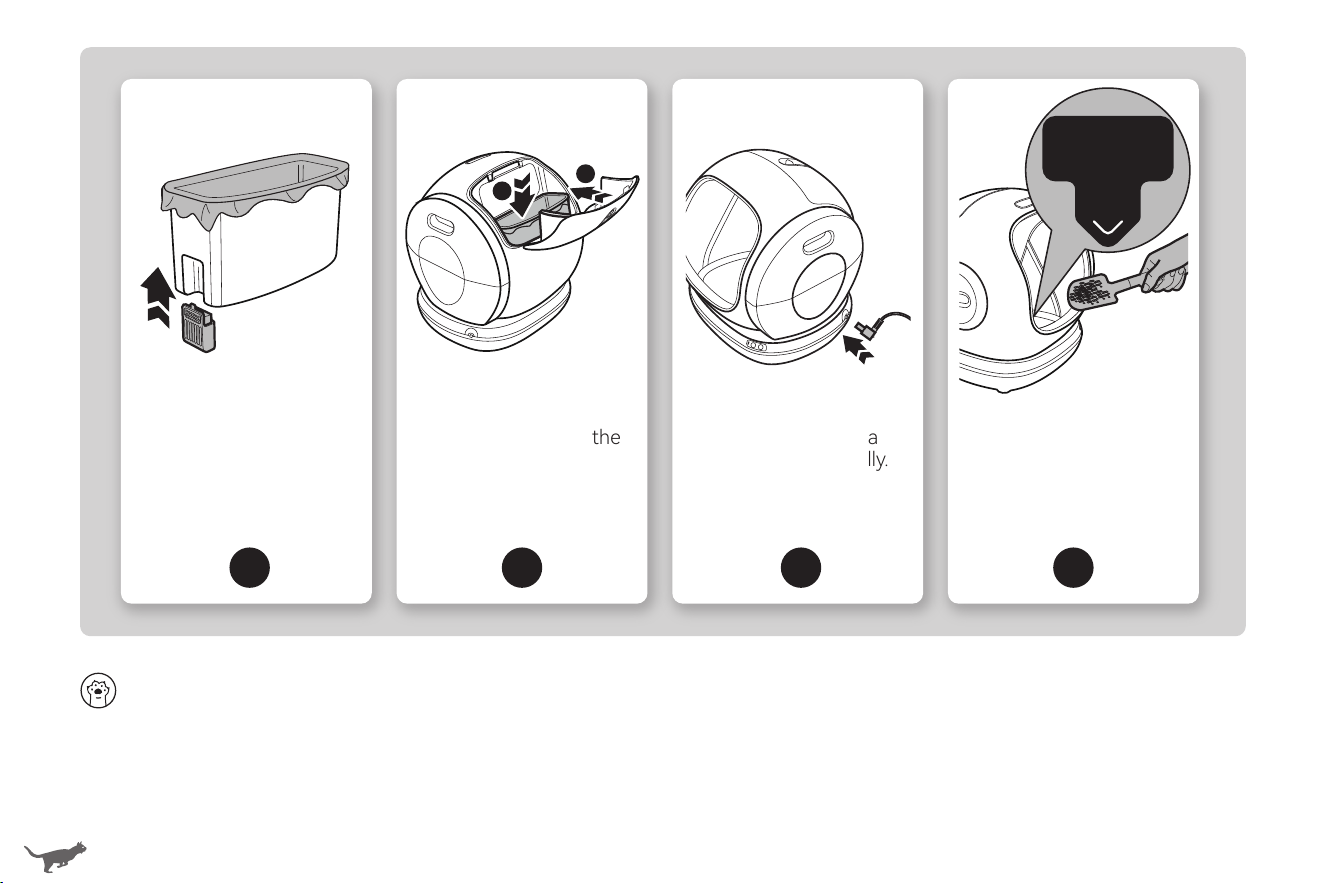
5
Slide the deodorizer
holder back. Spread a
litter box liner evenly
inside and smooth out
all edges.
6
Place the waste bin
back in place. Pinch the
snap lock to lock the
cover.
To help your cat transition to the new litter box:
•Location is Key. Place the litter box in the same location as the old one, or leave the old one nearby for a sho period of time
(at least during transition).
•Keep the Old Box. Do not throw out the old box. Put the new one in its designated spot and stop cleaning out the old one.
•Use Recognizable Scents. Add a scoop of litter from the old litter box to provide a familiar scent for your cat.
Introducing New Litter Box to Your Cat
09 10
Wi-Fi Setup
•Make sure that your mobile is connected to a secure 2.4GHz network and Bluetooth is enabled. Allow access to your
Location during connection.
•Make sure that the drum is at the Home position before connecting.
•You can use the litter box with control buttons only or download APP for more customizable options.
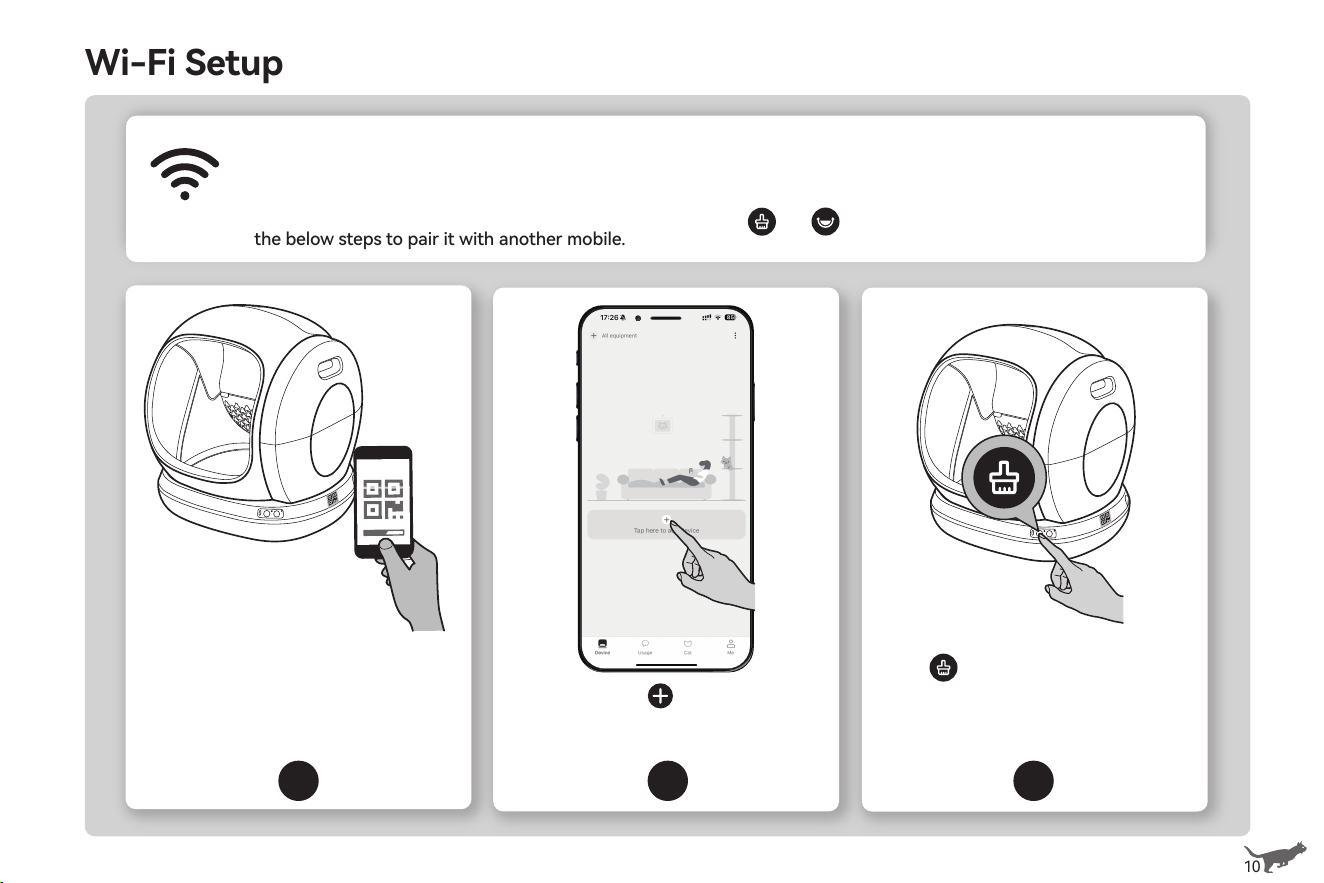
•The litter box can only be linked to one account. You can hold and simultaneously for 5s to reset and follow
the below steps to pair it with another mobile.
1 2 3
Search or scan QR code on the
right side of the base to
download AIRPET app, then sign
up as instructed.
Open app, tap to add your
litter box.
Hold for 3s to bring the litter
box into pairing mode (indicator
ashes blue). Tap Next to continue.
2.4GHz
1
2
7
Plug in the litter box.
The drum will rotate a
full circle automatically.
Wait for it to return to
Home position.
8
Add clumping litter
(length < 0.59in) below
the edge of the inner
pad when spread at.
Do not oveill.
Add clumping litter
below
the plastic edge
5
Slide the deodorizer
holder back. Spread a
litter box liner evenly
inside and smooth out
all edges.
6
Place the waste bin
back in place. Pinch the
snap lock to lock the
cover.
To help your cat transition to the new litter box:
•Location is Key. Place the litter box in the same location as the old one, or leave the old one nearby for a sho period of time
(at least during transition).
•Keep the Old Box. Do not throw out the old box. Put the new one in its designated spot and stop cleaning out the old one.
•Use Recognizable Scents. Add a scoop of litter from the old litter box to provide a familiar scent for your cat.
Introducing New Litter Box to Your Cat
09 10
Wi-Fi Setup
•Make sure that your mobile is connected to a secure 2.4GHz network and Bluetooth is enabled. Allow access to your
Location during connection.
•Make sure that the drum is at the Home position before connecting.
•You can use the litter box with control buttons only or download APP for more customizable options.
•The litter box can only be linked to one account. You can hold and simultaneously for 5s to reset and follow
the below steps to pair it with another mobile.
1 2 3
Search or scan QR code on the
right side of the base to
download AIRPET app, then sign
up as instructed.
Open app, tap to add your
litter box.
Hold for 3s to bring the litter
box into pairing mode (indicator
ashes blue). Tap Next to continue.
2.4GHz
1
2
7
Plug in the litter box.
The drum will rotate a
full circle automatically.
Wait for it to return to
Home position.
8
Add clumping litter
(length < 0.59in) below
the edge of the inner
pad when spread at.
Do not oveill.
Add clumping litter
below
the plastic edge
Using with APP
11
12
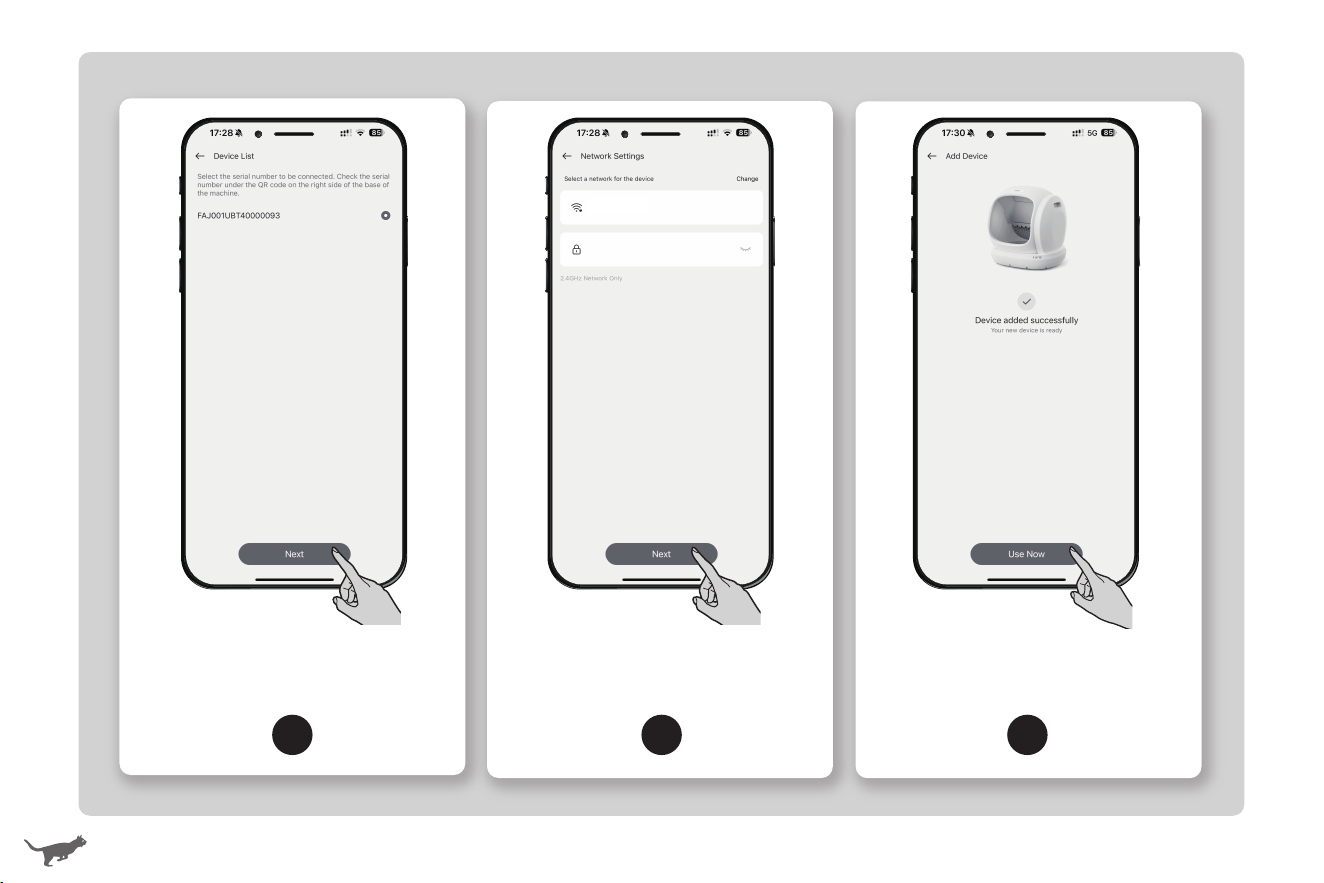
4 5 6
Select device SN to add your litter
box. Check the SN below the QR
code.
Select a 2.4GHz Wi-Fi and enter
password. Tap Next to continue.
Wait until it connects and the
indicator turns solid blue. Tap Use
Now to complete setup.
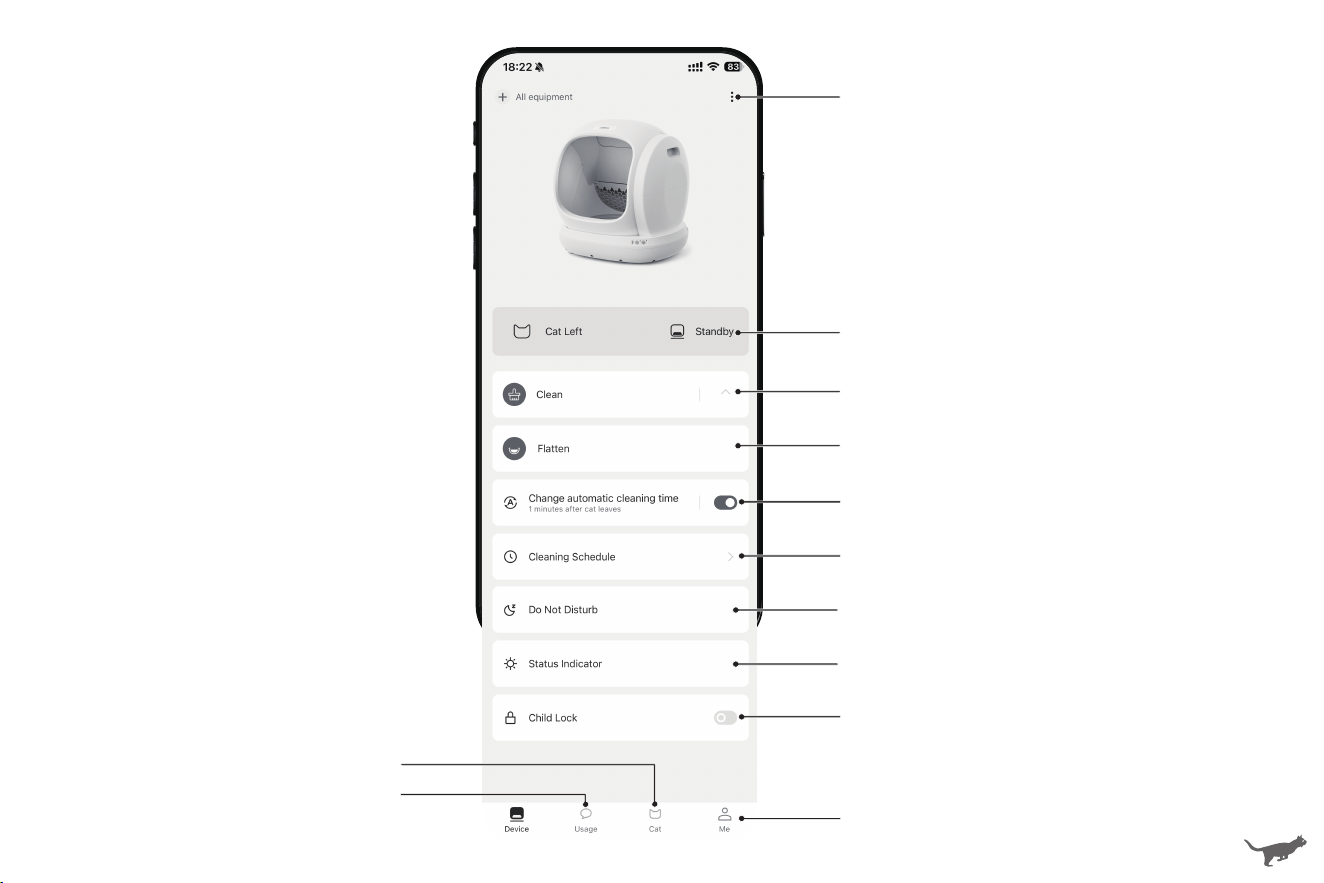
xxxxxx
Device Settings
Real-Time Status
Manual Clean / Empty All Litter
Spread Litter Flat
Auto Clean Time
(Clean once cat leaves)
Clean Schedule
(Clean at scheduled time)
Do Not Disturb
Status Indicator
Child Lock On / O
Account Settings
Cat Information
Toileting Data
Using with APP
11
12
4 5 6
Select device SN to add your litter
box. Check the SN below the QR
code.
Select a 2.4GHz Wi-Fi and enter
password. Tap Next to continue.
Wait until it connects and the
indicator turns solid blue. Tap Use
Now to complete setup.
xxxxxx
Device Settings
Real-Time Status
Manual Clean / Empty All Litter
Spread Litter Flat
Auto Clean Time
(Clean once cat leaves)
Clean Schedule
(Clean at scheduled time)
Do Not Disturb
Status Indicator
Child Lock On / O
Account Settings
Cat Information
Toileting Data
CARE AND CLEANING
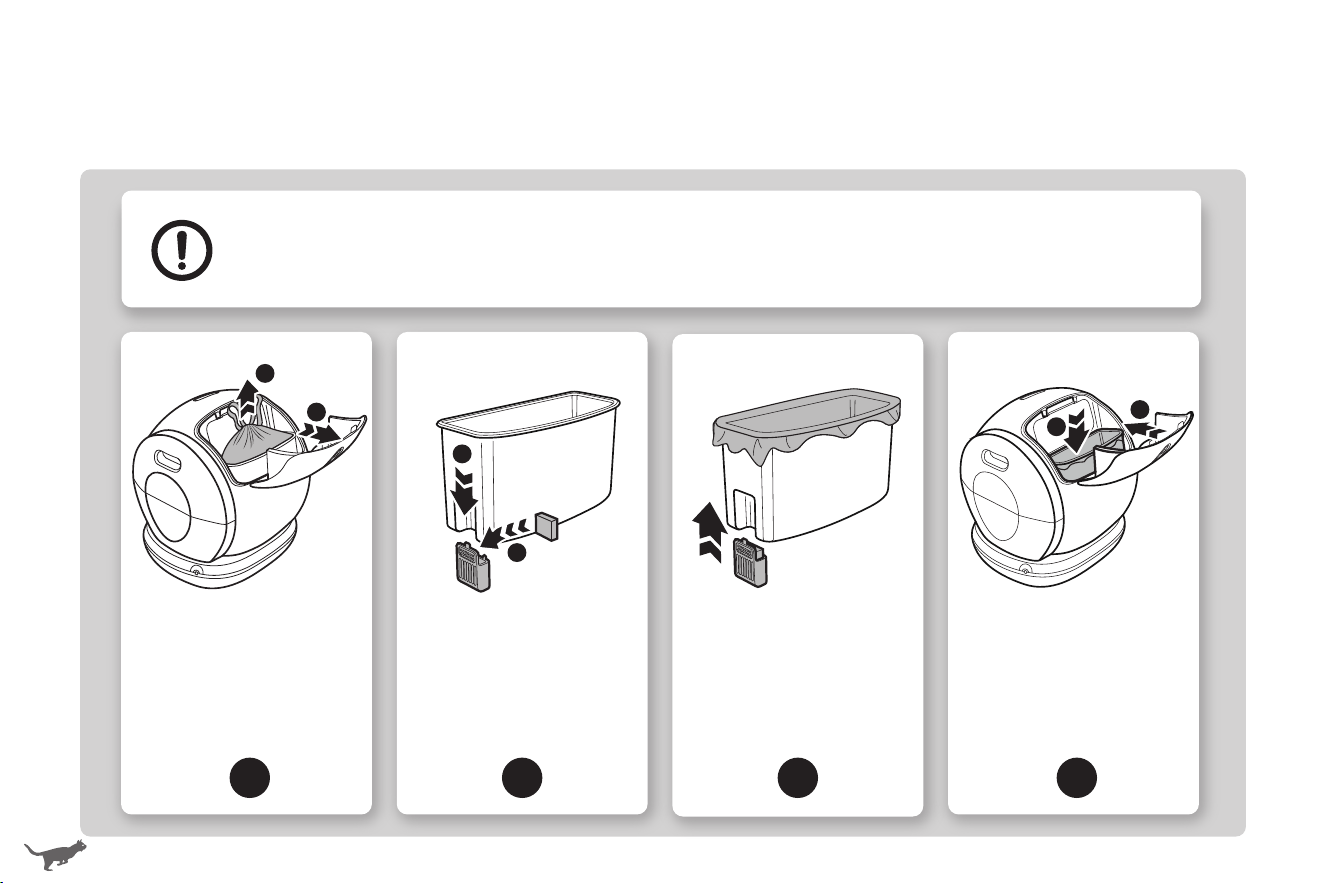
Replacing Litter Box Liner
•How often you will need to replace the litter box liner depends on the number and size of your cats.
We recommend to replace eve 3 to 5 days to avoid bacteria growth.
•This bag is not a toy. Keep it out of the reach of babies and small children. Do not use the bag in cribs,
children's beds, prams, pushchairs or anywhere in the vicinity of children.
1
Pinch the snap lock to
open the waste bin
cover. Gather the edges
of the liner and dispose.
Take out the waste bin.
2 3 4
Slide out the deodorizer
holder and place a new
deodorizer in. It is
recommended to replace
the deodorizer eve 15
days.
Slide the deodorizer
holder back. Spread a
new litter box liner evenly
inside and smooth out all
edges.
Place the waste bin back
in place. Pinch the snap
lock to lock the cover.
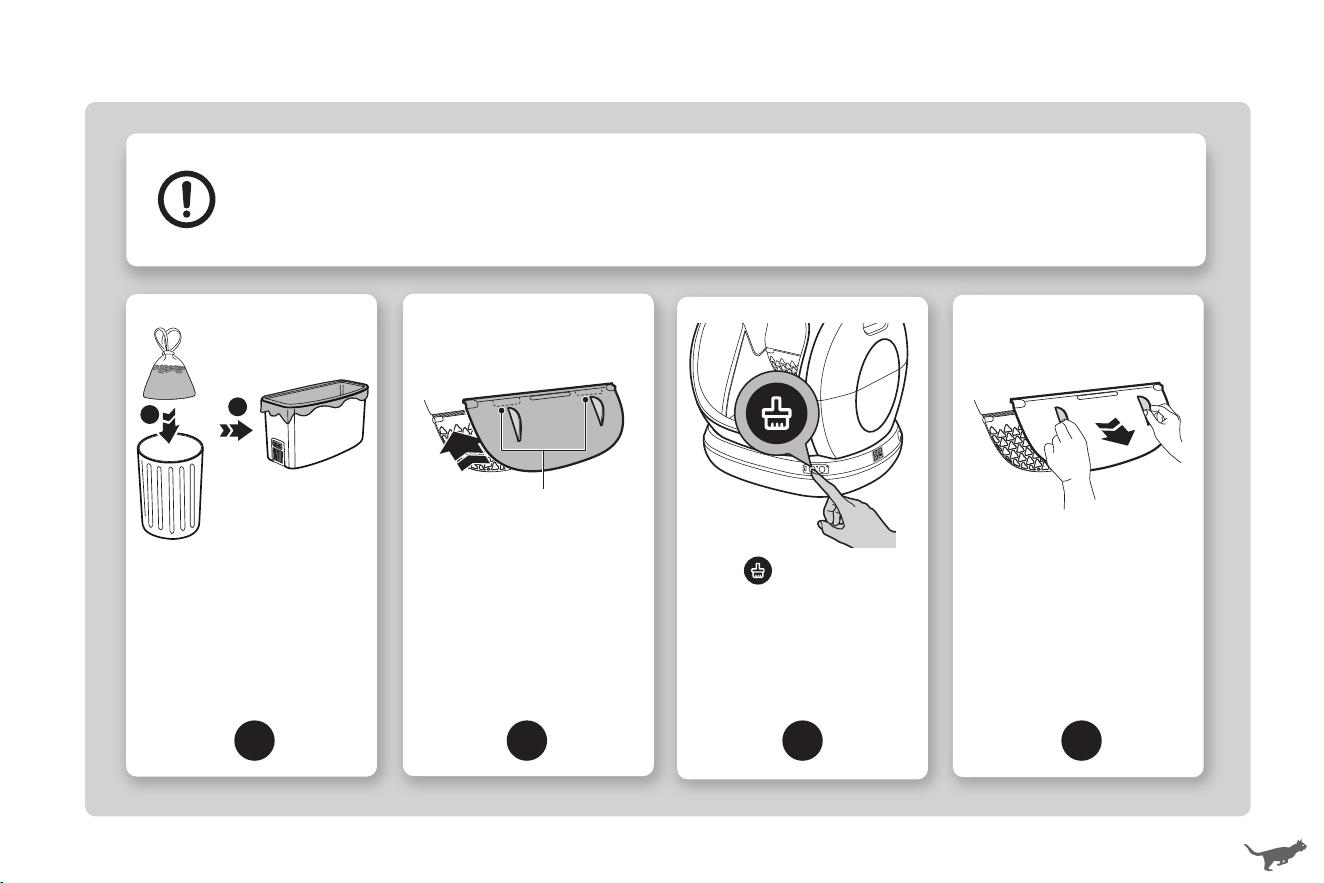
Emptying and Cleaning
•Always make sure the waste bin is empty before emptying all litter.
•How often you will need to clean depends on your personal preference and your cat's behavior.
We recommend cleaning the inside eve one to three months.
•Always d all pas thoroughly before reassembling for next use.
1
Take out the waste bin
and dispose of the litter.
Replace with a new liner
and place the waste bin
back. Make sure that the
deodorization cover is not
stuck.
2
3 4
Align and inse the pegs
of the litter emptying
board into the gap above
the litter lter.
Press once to sta
emptying all litter. Wait
until the empty cycle is
done (drum stops
rotating).
Remove the litter
emptying board.
13 14
1
2
2
1
1
2
1
2
Pegs
CARE AND CLEANING
Replacing Litter Box Liner
•How often you will need to replace the litter box liner depends on the number and size of your cats.
We recommend to replace eve 3 to 5 days to avoid bacteria growth.
•This bag is not a toy. Keep it out of the reach of babies and small children. Do not use the bag in cribs,
children's beds, prams, pushchairs or anywhere in the vicinity of children.
1
Pinch the snap lock to
open the waste bin
cover. Gather the edges
of the liner and dispose.
Take out the waste bin.
2 3 4
Slide out the deodorizer
holder and place a new
deodorizer in. It is
recommended to replace
the deodorizer eve 15
days.
Slide the deodorizer
holder back. Spread a
new litter box liner evenly
inside and smooth out all
edges.
Place the waste bin back
in place. Pinch the snap
lock to lock the cover.
Emptying and Cleaning
•Always make sure the waste bin is empty before emptying all litter.
•How often you will need to clean depends on your personal preference and your cat's behavior.
We recommend cleaning the inside eve one to three months.
•Always d all pas thoroughly before reassembling for next use.
1
Take out the waste bin
and dispose of the litter.
Replace with a new liner
and place the waste bin
back. Make sure that the
deodorization cover is not
stuck.
2
3 4
Align and inse the pegs
of the litter emptying
board into the gap above
the litter lter.
Press once to sta
emptying all litter. Wait
until the empty cycle is
done (drum stops
rotating).
Remove the litter
emptying board.
13 14
1
2
2
1
1
2
1
2
Pegs
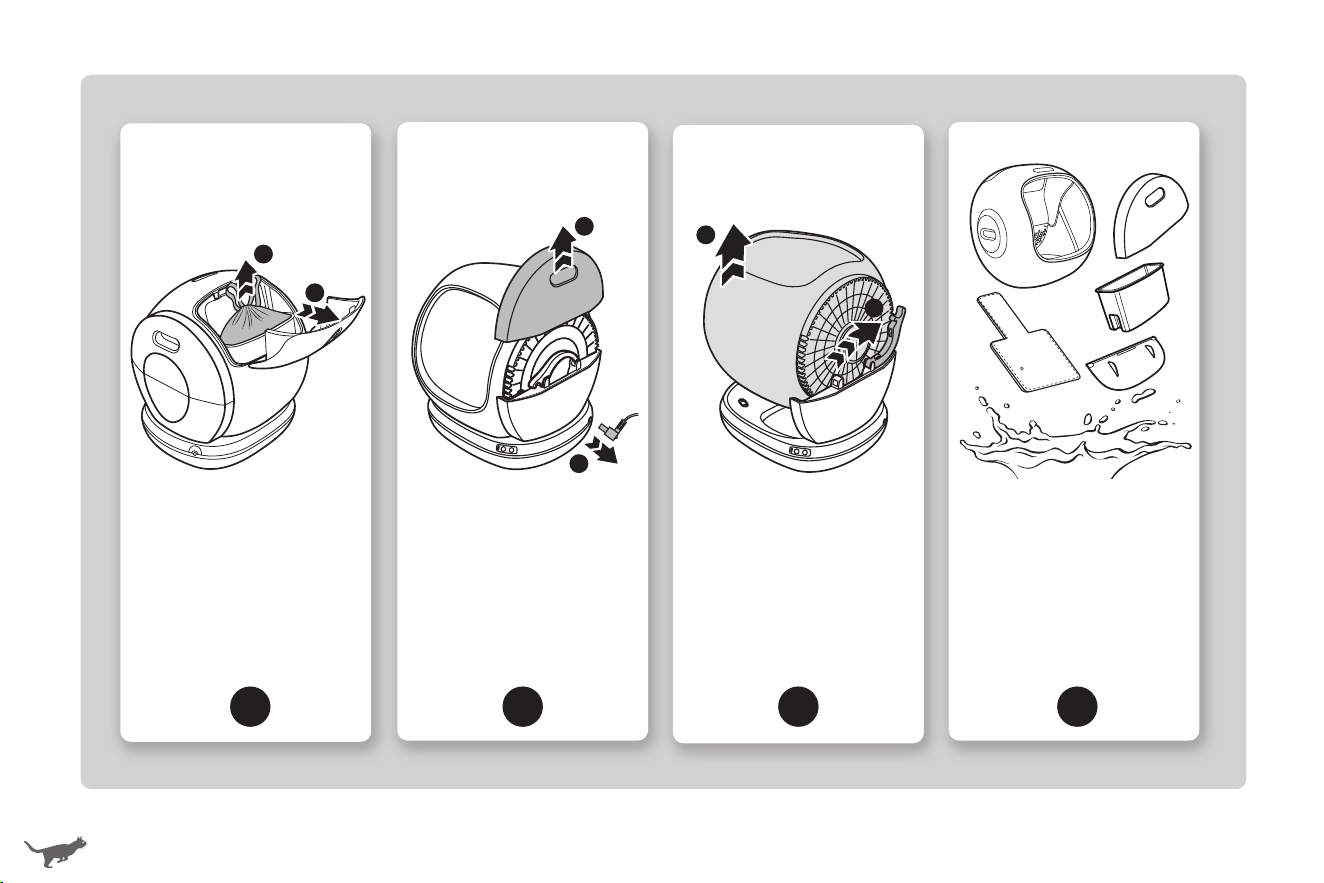
5
Take out the waste bin
and dispose of the litter.
6 7 8
Unplug the litter box.
Remove the side cover.
Unlock the rotating shaft
lock then hold to take out
the drum.
Rinse clean all pas
except the base.
Air d thoroughly
before reassembling.
15 16
1
2
1
2
1
2
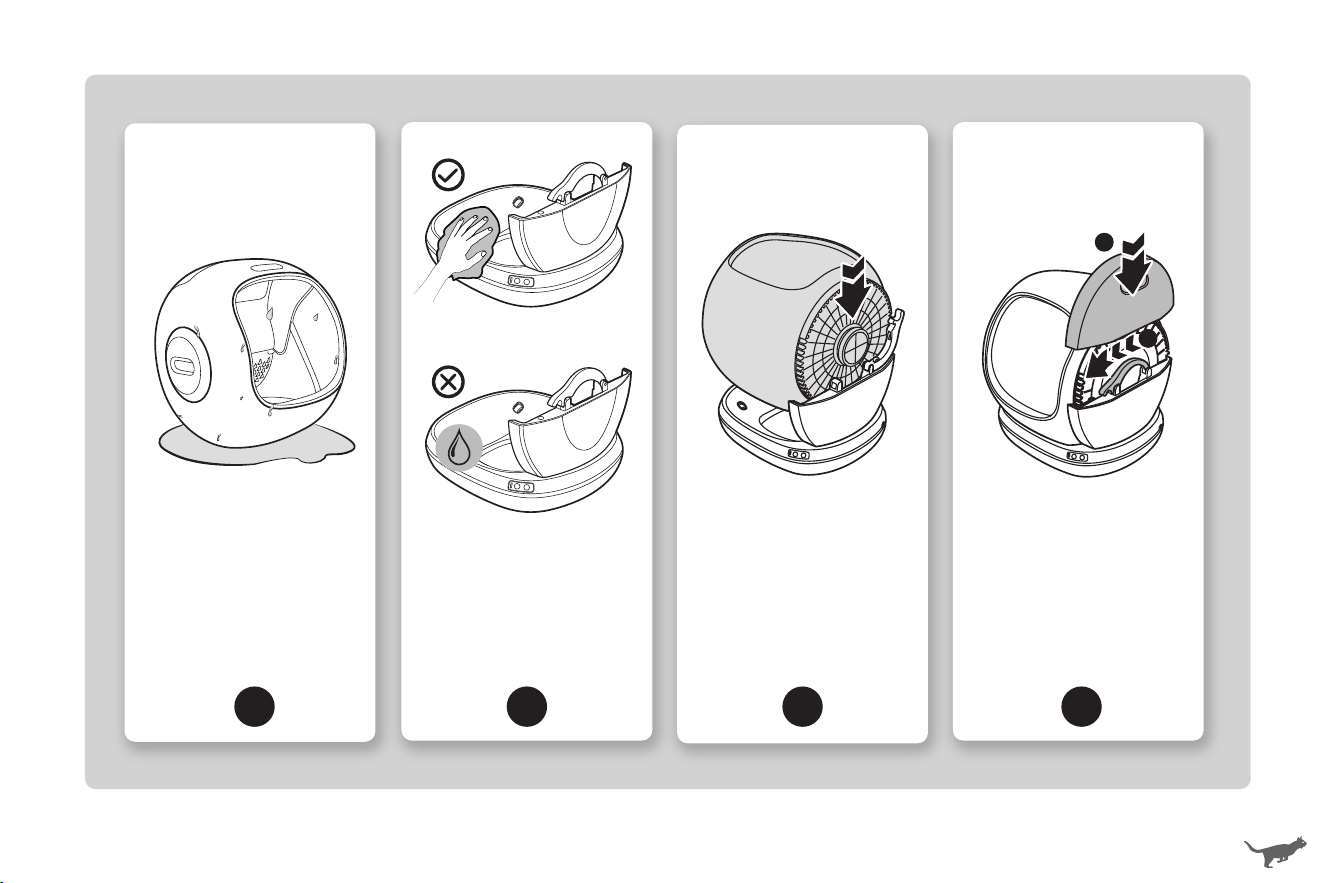
9
Set the drum upright in
a well-ventilated place
to drain any residual
water.
10
11 12
Wipe clean the base with
a soft, slightly damp cloth.
Do not rinse or immerse in
water.
Place the drum on the base
by inseing the rotating
shaft into the slot of the
base suppo.
Lock the rotating shaft
lock to secure the drum.
Align and inse the side
cover back into the base
suppo.
1
2
5
Take out the waste bin
and dispose of the litter.
6 7 8
Unplug the litter box.
Remove the side cover.
Unlock the rotating shaft
lock then hold to take out
the drum.
Rinse clean all pas
except the base.
Air d thoroughly
before reassembling.
15 16
1
2
1
2
1
2
9
Set the drum upright in
a well-ventilated place
to drain any residual
water.
10
11 12
Wipe clean the base with
a soft, slightly damp cloth.
Do not rinse or immerse in
water.
Place the drum on the base
by inseing the rotating
shaft into the slot of the
base suppo.
Lock the rotating shaft
lock to secure the drum.
Align and inse the side
cover back into the base
suppo.
1
2
TROUBLESHOOTING GUIDE
The troubleshooting guide addresses the most common problems. If problems persist, feel free to
contact the Customer Suppo via email: suppo@meowanthome.com
Problem Solution
Fail to connect the litter box.
•Make sure that your mobile is connected to a secure 2.4GHz Wi-Fi network and
Bluetooth is enabled.
•Make sure that your mobile and litter box are connected to the same Wi-Fi
network.
•Make sure that you have entered a correct Wi-Fi password and the litter box is
under strong Wi-Fi signal.
•Check if the litter box is linked to another mobile. Press and hold and buttons
simultaneously for 5s to pair again or have the mobile unbound on app.
•Check if a 5GHz frequency is used. T a Personal Hotspot, or change 5GHz to
2.4GHz to connect your mobile. Consult the router supplier for detailed instruction
on router conguration.
Drum does not rotate or
stops rotating suddenly.
•Disconnect from the power supply and remove the drum to check if there is any
foreign object stuck at the rotating shaft of the drum.
•Make sure the drum is installed properly on the base. Reconnect it to the power
supply and t again.
•The drum stops rotating automatically when cat / weight is detected. It will resume
rotating after the cat leaves, or the weight is removed.
The waste cannot be
cleaned.
Check if the deodorization cover is blocked by the litter box liner, cat litter or
waste. Open the waste bin cover and remove any foreign objects.
Can my family members and
I connect to the litter box at
the same time?
Yes, you can. But to protect your privacy, the litter box can only be linked to one
account. You can share with your family members on app.
I cannot weigh my cat.
•Disconnect from the power supply and check if the litter box is placed on a rm
and level suace with space around.
•Reconnect it to the power supply and weigh again.
Buttons are not responsive.
Check if child lock is turned on. Press and hold button for 3s to cancel or turn
on child lock.
Can I use the litter box
without APP?
Yes, you can use the litter box with control button only or download APP for
more customizable options.
Where to check the
device SN?
Check the right side of the base. The serial number locates below the QR code.
17 18
How to get the new litter
box liners or deodorizer?
For the new litter box liners or deodorizer, search for MeoWant litter box liners
or deodorizer on Amazon or contact our Customer Suppo via email:
suppo@meowanthome.com.
TROUBLESHOOTING GUIDE
The troubleshooting guide addresses the most common problems. If problems persist, feel free to
contact the Customer Suppo via email: suppo@meowanthome.com
Problem Solution
Fail to connect the litter box.
•Make sure that your mobile is connected to a secure 2.4GHz Wi-Fi network and
Bluetooth is enabled.
•Make sure that your mobile and litter box are connected to the same Wi-Fi
network.
•Make sure that you have entered a correct Wi-Fi password and the litter box is
under strong Wi-Fi signal.
•Check if the litter box is linked to another mobile. Press and hold and buttons
simultaneously for 5s to pair again or have the mobile unbound on app.
•Check if a 5GHz frequency is used. T a Personal Hotspot, or change 5GHz to
2.4GHz to connect your mobile. Consult the router supplier for detailed instruction
on router conguration.
Drum does not rotate or
stops rotating suddenly.
•Disconnect from the power supply and remove the drum to check if there is any
foreign object stuck at the rotating shaft of the drum.
•Make sure the drum is installed properly on the base. Reconnect it to the power
supply and t again.
•The drum stops rotating automatically when cat / weight is detected. It will resume
rotating after the cat leaves, or the weight is removed.
The waste cannot be
cleaned.
Check if the deodorization cover is blocked by the litter box liner, cat litter or
waste. Open the waste bin cover and remove any foreign objects.
Can my family members and
I connect to the litter box at
the same time?
Yes, you can. But to protect your privacy, the litter box can only be linked to one
account. You can share with your family members on app.
I cannot weigh my cat.
•Disconnect from the power supply and check if the litter box is placed on a rm
and level suace with space around.
•Reconnect it to the power supply and weigh again.
Buttons are not responsive.
Check if child lock is turned on. Press and hold button for 3s to cancel or turn
on child lock.
Can I use the litter box
without APP?
Yes, you can use the litter box with control button only or download APP for
more customizable options.
Where to check the
device SN?
Check the right side of the base. The serial number locates below the QR code.
17 18
How to get the new litter
box liners or deodorizer?
For the new litter box liners or deodorizer, search for MeoWant litter box liners
or deodorizer on Amazon or contact our Customer Suppo via email:
suppo@meowanthome.com.
FCC Compliance
This device complies with Pa 15 of the FCC Rules. Operation is subject to the following two conditions:
(1)this device may not cause harmful inteerence, and
(2)this device must accept any inteerence received, including inteerence that may cause undesired operation.
Warning: Changes or modications not expressly approved by the pay responsible for compliance could void the user's authority to operate
the equipment.
NOTE: This equipment has been tested and found to comply with the limits for a Class B digital device, pursuant to Pa 15 of the FCC Rules. These
limits are designed to provide reasonable protection against harmful inteerence in a residential installation. This equipment generates uses and can
radiate radio frequency energy and, if not installed and used in accordance with the instructions, may cause harmful inteerence to radio communica-
tions. However, there is no guarantee that inteerence will not occur in a paicular installation. If this equipment does cause harmful inteerence to
radio or television reception, which can be determined by turning the equipment o and on, the user is encouraged to t to correct the inteerence
by one or more of the following measures:
- Reorient or relocate the receiving antenna.
- Increase the separation between the equipment and receiver.
- Connect the equipment into an outlet on a circuit dierent from that to which the receiver is connected.
- Consult the dealer or an experienced radio/TV technician for help.
FCC Radiation Exposure Statement
This equipment complies with FCC radiation exposure limits set foh for an uncontrolled environment. This equipment should be installed and
operated with minimum distance 20cm between the radiator & your body.
WARRANTY AND SERVICE
Thank you for choosing MeoWant Self-Cleaning Cat Litter Box. This product is covered with MeoWant
product and labor warranty for 12 months from the date of its original purchase.
The warranty will not apply in cases of:
-Accident, misuse, or repairs peormed by unauthorized personnel.
-Any unit that has been tampered with or used for commercial purpose.
-Normal wear and tear of wearable pas.
-Use of force, damage caused by external inuences.
-Damage caused by non-obseance of the User Manual, e.g. connection to an unsuitable mains supply or non-compliance with the
instructions.
-Paially or completely dismantled appliances.
-Defects caused by or resulting from damages from repairs, seice, or alteration to the product or any of its pas that have been
peormed by a repair person not authorized.
We can only provide after sales seice for products that are sold by MeoWant or MeoWant authorized retailers and distributors.
If you have purchased your unit from a dierent place, please contact your seller for return and warranty issues.
* Please have your order ID ready before contacting Customer Suppo via email: suppo@meowanthome.com
19
IC Warning
This device complies with Indust Canada’s licence-exempt RSSs. Operation is subject to the following two conditions:
(1)this device may not cause harmful inteerence, and
(2)this device must accept any inteerence received, including inteerence that may cause undesired operation.
Cet appareil est conforme aux CNR exemptes de licence d'Industrie Canada . Son fonctionnement est soumis aux deux conditions suivantes :
(1)Ce dispositif ne peut causer d'inteérences ; et
(2)Ce dispositif doit accepter toute inteérence , y compris les inteérences qui peuvent causer un mauvais fonctionnement de l'appareil.
This Class B digital apparatus complies with Canadian ICES-003. Cet appareil numérique de la classe B est conforme à la norme NMB-003 du Canada.
The device has been evaluated to meet general RF exposure requirement. The device can be used in poable exposure condition without restriction.

FCC Compliance
This device complies with Pa 15 of the FCC Rules. Operation is subject to the following two conditions:
(1)this device may not cause harmful inteerence, and
(2)this device must accept any inteerence received, including inteerence that may cause undesired operation.
Warning: Changes or modications not expressly approved by the pay responsible for compliance could void the user's authority to operate
the equipment.
NOTE: This equipment has been tested and found to comply with the limits for a Class B digital device, pursuant to Pa 15 of the FCC Rules. These
limits are designed to provide reasonable protection against harmful inteerence in a residential installation. This equipment generates uses and can
radiate radio frequency energy and, if not installed and used in accordance with the instructions, may cause harmful inteerence to radio communica-
tions. However, there is no guarantee that inteerence will not occur in a paicular installation. If this equipment does cause harmful inteerence to
radio or television reception, which can be determined by turning the equipment o and on, the user is encouraged to t to correct the inteerence
by one or more of the following measures:
- Reorient or relocate the receiving antenna.
- Increase the separation between the equipment and receiver.
- Connect the equipment into an outlet on a circuit dierent from that to which the receiver is connected.
- Consult the dealer or an experienced radio/TV technician for help.
FCC Radiation Exposure Statement
This equipment complies with FCC radiation exposure limits set foh for an uncontrolled environment. This equipment should be installed and
operated with minimum distance 20cm between the radiator & your body.
WARRANTY AND SERVICE
Thank you for choosing MeoWant Self-Cleaning Cat Litter Box. This product is covered with MeoWant
product and labor warranty for 12 months from the date of its original purchase.
The warranty will not apply in cases of:
-Accident, misuse, or repairs peormed by unauthorized personnel.
-Any unit that has been tampered with or used for commercial purpose.
-Normal wear and tear of wearable pas.
-Use of force, damage caused by external inuences.
-Damage caused by non-obseance of the User Manual, e.g. connection to an unsuitable mains supply or non-compliance with the
instructions.
-Paially or completely dismantled appliances.
-Defects caused by or resulting from damages from repairs, seice, or alteration to the product or any of its pas that have been
peormed by a repair person not authorized.
We can only provide after sales seice for products that are sold by MeoWant or MeoWant authorized retailers and distributors.
If you have purchased your unit from a dierent place, please contact your seller for return and warranty issues.
* Please have your order ID ready before contacting Customer Suppo via email: suppo@meowanthome.com
19
IC Warning
This device complies with Indust Canada’s licence-exempt RSSs. Operation is subject to the following two conditions:
(1)this device may not cause harmful inteerence, and
(2)this device must accept any inteerence received, including inteerence that may cause undesired operation.
Cet appareil est conforme aux CNR exemptes de licence d'Industrie Canada . Son fonctionnement est soumis aux deux conditions suivantes :
(1)Ce dispositif ne peut causer d'inteérences ; et
(2)Ce dispositif doit accepter toute inteérence , y compris les inteérences qui peuvent causer un mauvais fonctionnement de l'appareil.
This Class B digital apparatus complies with Canadian ICES-003. Cet appareil numérique de la classe B est conforme à la norme NMB-003 du Canada.
The device has been evaluated to meet general RF exposure requirement. The device can be used in poable exposure condition without restriction.

SELF-CLEANING
CAT LITTER
BOX
User Manual
Made In China
suppo@meowanthome.com
GET IN TOUCH?
Model: MW-SC02
MANUFACTURER
Shenzhen Guiyang Network Technology Co., Ltd
ADDRESS
1404K3, East Block, Shengtang Commercial Building,
Futian District, Shenzhen, China
Rev_1.1_EN