
DATE:20250912
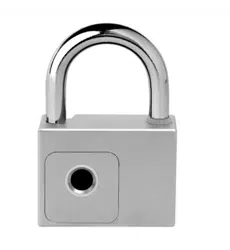
ZMP-52 NFC Padlock
Datasheet
Chengdu Hizima Technology Co., Ltd
ZMP-52 NFC Padlock Datasheet
Chengdu Hizima Technology Co., Ltd.
1
1.
Product overview
1.1. Introduction
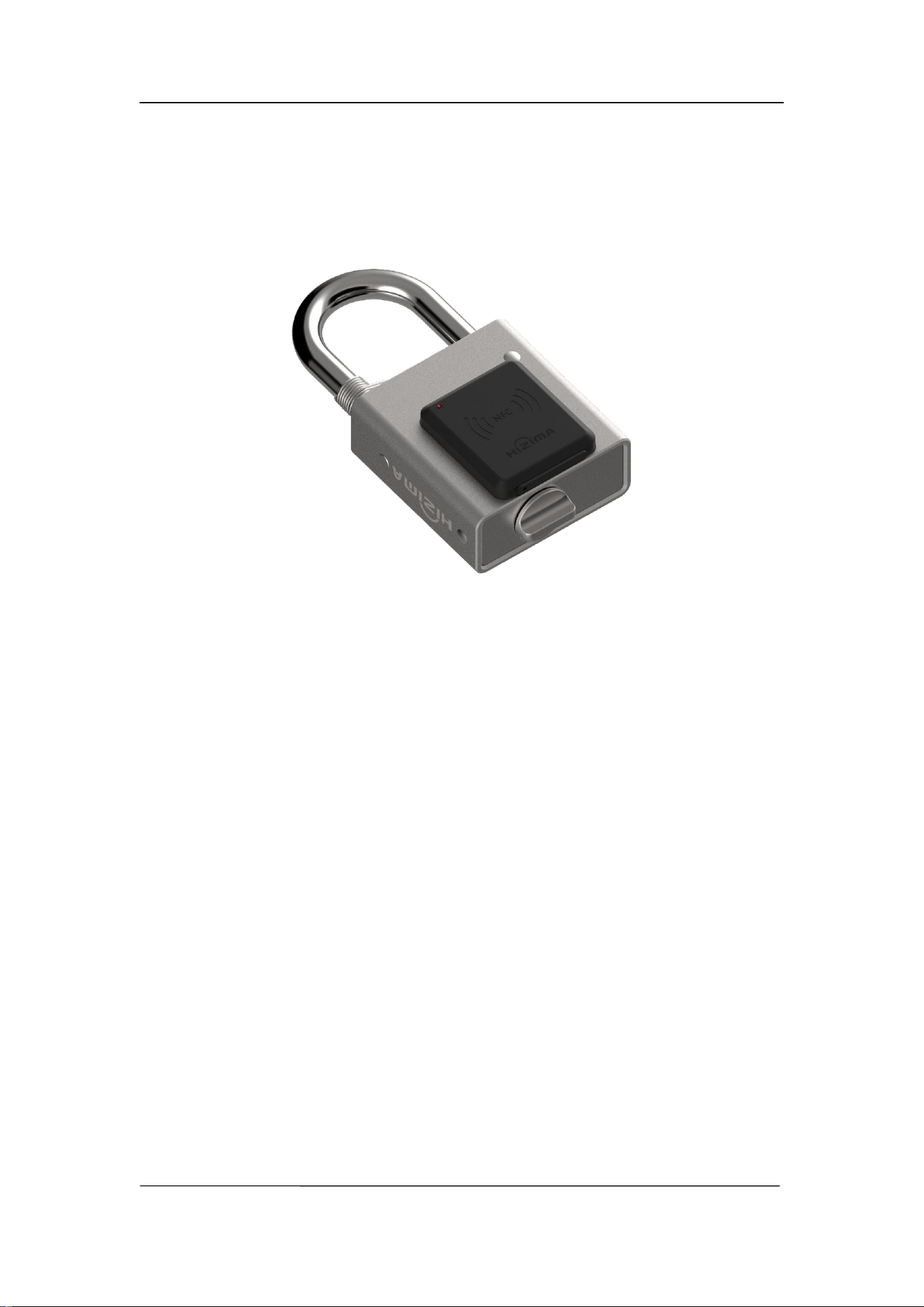
The most significant feature of the ZMP-52 NFC padlock is that it requires neither a
built-in battery nor an external power supply, making it completely maintenance-free
for life. The power required for unlocking is harvested through contactless NFC
inductive coupling from an NFC-enabled smartphone or NFC FOB during
communication.
The ZMP-52 NFC Padlock features a stainless steel lock body and an alloy steel
shackle, offering an overall waterproof rating of IP68. It is especially suitable for
environments with high security requirements. The lock has no built-in battery. It is
powered by an NFC reader (e.g., NFC-enabled smartphone), requiring no batteries or
external power. With keyless operation, it is ideal for applications where external
power is unavailable or battery replacement is impractical.
The ZMP-52 NFC Padlock is integrated with a microprocessor and works in
conjunction with the Hizima management APP to enable functions such as unlocking,
power management, and access log tracking. With internet connectivity, the lock core
supports centralized authorization and can operate in both online and offline modes,
enabling distributed centralized management of large-scale lock networks. It is widely
applicable in industries such as telecommunications, petrochemicals, transportation,
and power utilities.
ZMP-52 NFC Padlock Datasheet
Chengdu Hizima Technology Co., Ltd.
2
1.2. Key Features
Bi-directional encryption and authentication security chip, preventing technical
unlock.
Keyless operations via APP.
Full-metal housing design provides superior resistance against physical attacks.
The dual-side load-bearing locking structure enhances resistance against pulling
force, ensuring greater security.
Pop-up shackle design;
Dual unlocking modes: Bluetooth and NFC;
Powered by NFC reader energy — battery-free operation for NFC unlocking;
USB Type-C emergency power supply for Bluetooth unlocking.
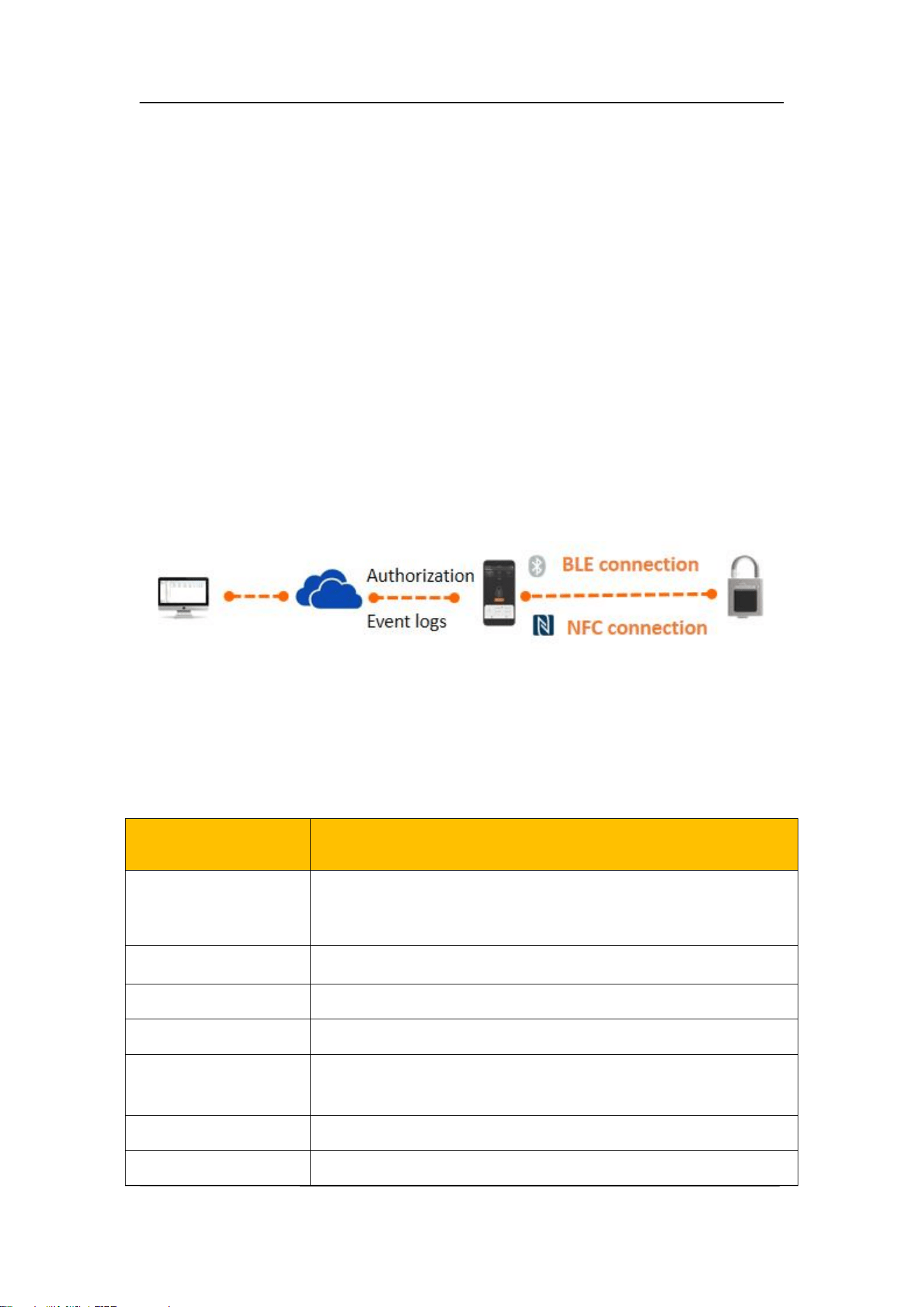
1.3. Workflow
2. Specification
Model
ZMP-52
Communication
NFC(ISO/IEC 14443-2 and 14443-3、13.56MHz)
Bluetooth (BLE 5.0, frequency range: 2402MHz–2480MHz,
transmit power <10mW)
Unlock mode
APP NFC/APP BLE
Logs storage
>1000
Power Supply
NFC/USB Type-C
Lock body materials
SUS304
Shackle diameter
11mm
Shackle materials
Harden alloy steel(HRC 45-50) with chrome plated surface
ZMP-52 NFC Padlock Datasheet
Chengdu Hizima Technology Co., Ltd.
3
Shackle length
62mm(Locked status)
Shackle structure
Pull-apart, dual-side load-bearing locking structure
Tensile Strength: 35kN / 65kN
Working environment
Temperature:-35—70 ℃ (Not freezing below 0 ℃ .)
Humidity:5—90%
IP rating
IP68
Corrosion Resistance
AASS (Acetic Acid Salt Spray) test >96h
Net weight
810g
Lanyard
1pc
External power supply
USB TYPE-C DC5V
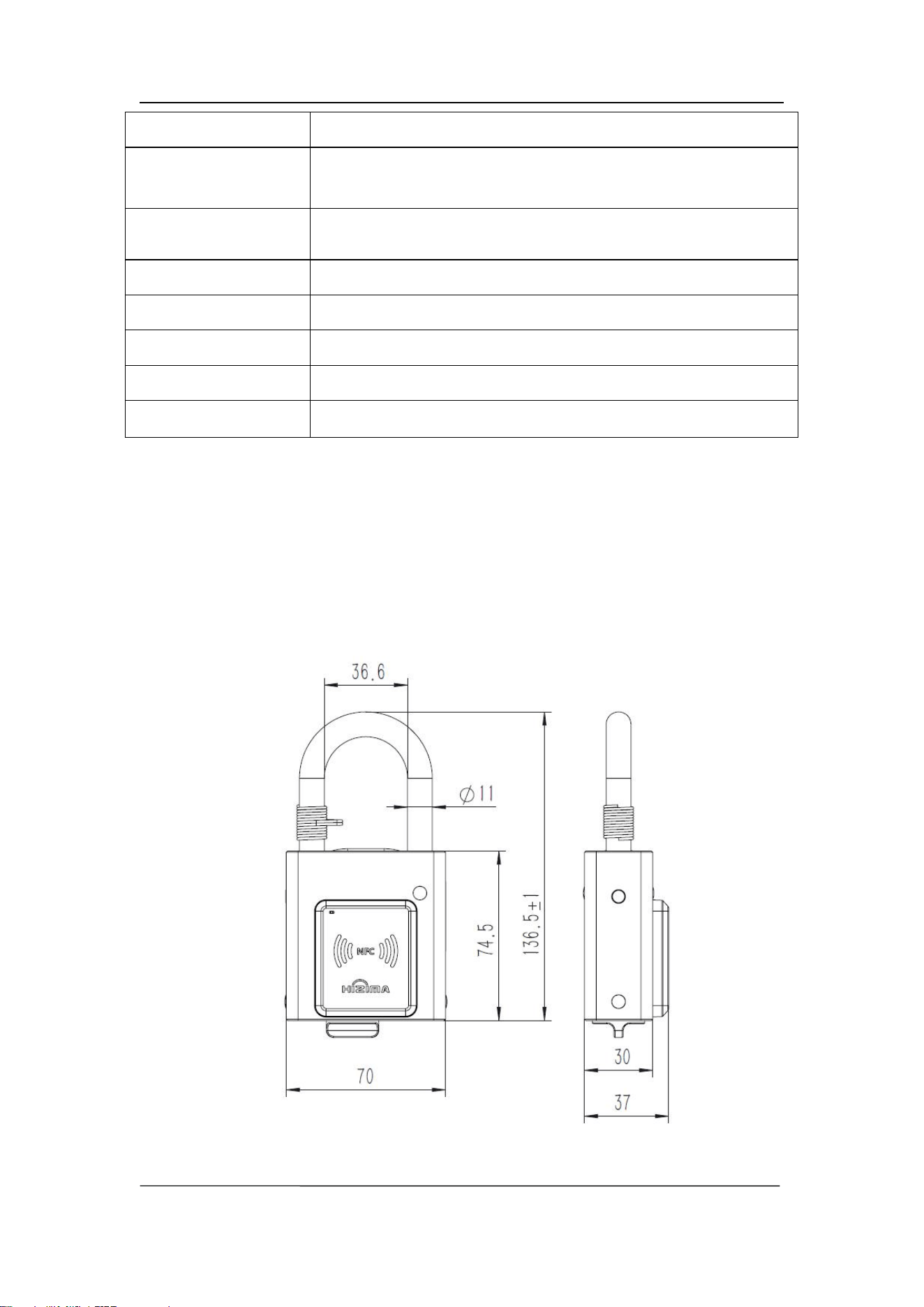
3. Dimensions
Unit: mm
ZMP-52 NFC Padlock Datasheet
Chengdu Hizima Technology Co., Ltd.
4
4.
Operation
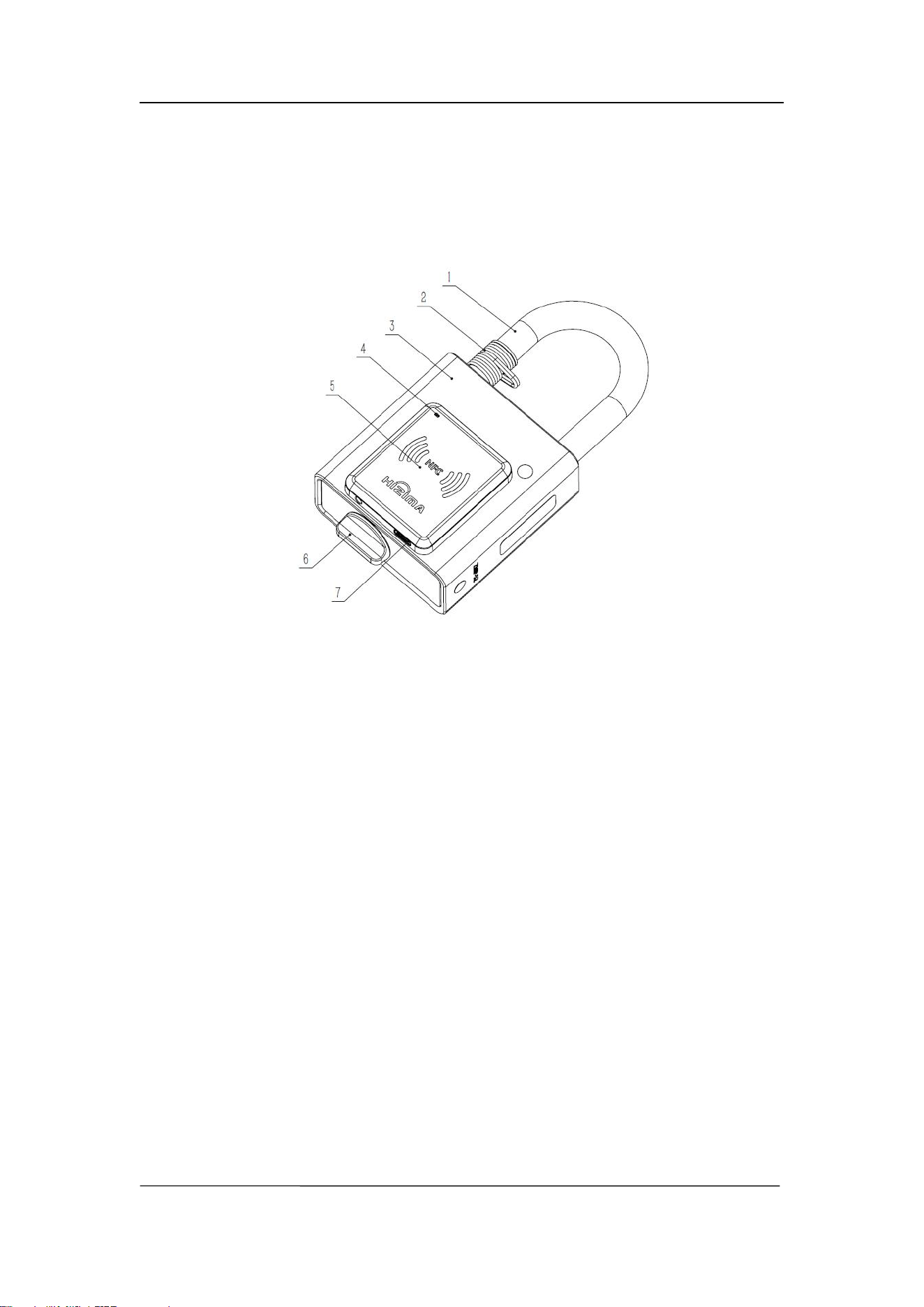
1. Shackle 2. Lanyard hook 3. Lock body 4. Indicator 5. NFC charging area
6. Knob 7. USB Type-C power port
4.1. Power-On
4.1.1. Power-on via NFC
Open the ZMACS APP.
Align the NFC transmission antenna area of an NFC-enabled mobile phone
closely with the center of the lock’s NFC charging area.
Once charging is complete, the APP will provide a notification.
Indicator light behavior:
When the device reaches operating voltage and the NFC field disappears →
indicator light remains steadily on until power is depleted.
When the NFC field is present or the power is insufficient → indicator light
remains off.
Communication mode: When powered on via NFC charging, the
communication method between the APP and the lock is NFC.

ZMP-52 NFC Padlock Datasheet
Chengdu Hizima Technology Co., Ltd.
5
Notes: Charging time may vary significantly depending on the NFC mobile phone
model. In extreme cases, some phones may not be able to charge the lock to operating voltage.
If the phone has a protective case and the lock cannot be powered on, remove the case and try
again.The better the alignment between the phone’s NFC antenna and the lock’s NFC charging
area, and the shorter the distance between them, the shorter the charging time.
4.1.2. Power-on via USB
Connect an external DC 5V power supply to the USB Type-C port at the
bottom of the NFC charging area.
The lock will power on immediately and wait to enter the lock/unlock
process.
Indicator light behavior:
Without Bluetooth connection → indicator light remains steadily on.
With Bluetooth connection → after successful pairing with the APP, the red
indicator flashes once every 2 seconds.
Communication mode: When powered on via NFC charging, the communication
method between the APP and the lock is NFC.
4.1.3. Communication Mode Switching
** Switching between NFC and BLE communication modes can only be performed
when the indicator light is off. If the indicator light is on, the lock will remain in the
previous communication mode.
4.2. Locking and Unlocking
4.2.1. Unlocking
Operate the unlocking function in the APP.
The APP interface will display the lock status (battery level, lock/unlock
status, etc.). For more details, refer to the APP user guide.

ZMP-52 NFC Padlock Datasheet
Chengdu Hizima Technology Co., Ltd.
6
When the APP indicates unlocking is successful, turn the knob clockwise
about 90° → the shackle will automatically pop open.
Log storage: Each unlocking event is recorded in the lock. The lock can store at least
1,000 logs.
4.2.2. Locking
Keep the knob in a free state.
Press down the shackle into the closed position.
Send the locking command via the APP (the lock must be powered on and
have sufficient battery).
For detailed instructions, please refer to the APP user guide.
4.3. Use of the Lanyard
After unlocking, to prevent the lock from being misplaced or dropped, use the lanyard
to secure the lanyard hook of the lock to another object, such as a fence or gate latch.
5.
Dos and Don
’
ts
1. Please DO NOT exceed the limits specified in this document when using it.
2. During use, DO handle with care and avoid dropping to prevent damage to the
device or injury.
3. This product is not explosion-proof and please DO NOT use it in flammable or
explosive environments.
4. DO NOT strike the lock body with force and avoid wiping the surface of the lock
body with corrosive substances.
5. This product is designed to be waterproof. Unauthorized personnel DO NOT
disassemble the product to avoid affecting its waterproof performance. If the drain
hole are blocked by foreign objects, they should be cleaned to ensure proper
drainage

ZMP-52 NFC Padlock Datasheet
Chengdu Hizima Technology Co., Ltd.
7
6. If the lock is deployed outdoors for long periods without using, the shackle and
lock body may be covered with mud or large amounts of dust. DO clean it
thoroughly before unlocking. After unlocking, pull out the shackle and clean it
again, including the shackle hole.
WWW.HIZIMA.COM
D2 Mold Industrial Park, No.199 Xiqu Avenue, Hi-Tech zone, Chengdu, Sichuan,
China
This device complies with Part 15 of the FCC Rules. Operation is subject to the following two conditions:
(1) this device may not cause harmful interference, and (2) this device must accept any interference
received, including interference that may cause undesired operation.
Changes or modifications to this unit not expressly approved by the party responsible for compliance
could void the user’s authority to operate the equipment.
NOTE: This equipment has been tested and found to comply with the limits for a Class B digital device,
pursuant to Part 15 of the FCC Rules. These limits are designed to provide reasonable protection against
harmful interference in a residential installation. This equipment generates uses and can radiate radio
frequency energy and, if not installed and used in accordance with the instructions, may cause harmful
interference to radio communications.
However, there is no guarantee that interference will not occur in a particular installation. If this equipment
does cause harmful interference to radio or television reception, which can be determined by turning the
equipment off and on, the user is encouraged to try to correct the interference by one or more of the
following measures:
Reorient or relocate the receiving antenna.
Increase the separation between the equipment and receiver.
Connect the equipment into an outlet on a circuit different from that to which the receiver is
connected.
Consult the dealer or an experienced radio/TV technician for help.
This equipment complies with FCC radiation exposure limits set forth for an uncontrolled
environment. The device can be used in portable exposure condition without restriction.