User Manual
Portable CD Player
(YR-Q902)
Please read the instructions carefully before use,
which provide the correct usage and product functionality.
Please keep this manual stored properly.
Gentle Reminder
1. Please do not use an adapter rated higher than 5V DC, 1A to charge the CD player,
as this may damage the device.
2. Please close the lid when not in use to prevent dust from entering the CD player.
3. Do not use cracked or damaged CD discs to avoid damaging the laser equipment.
4. Avoid touching the laser with your hands.
5. Do not stare directly at the moving laser head to prevent eye injury.
Product Specifications
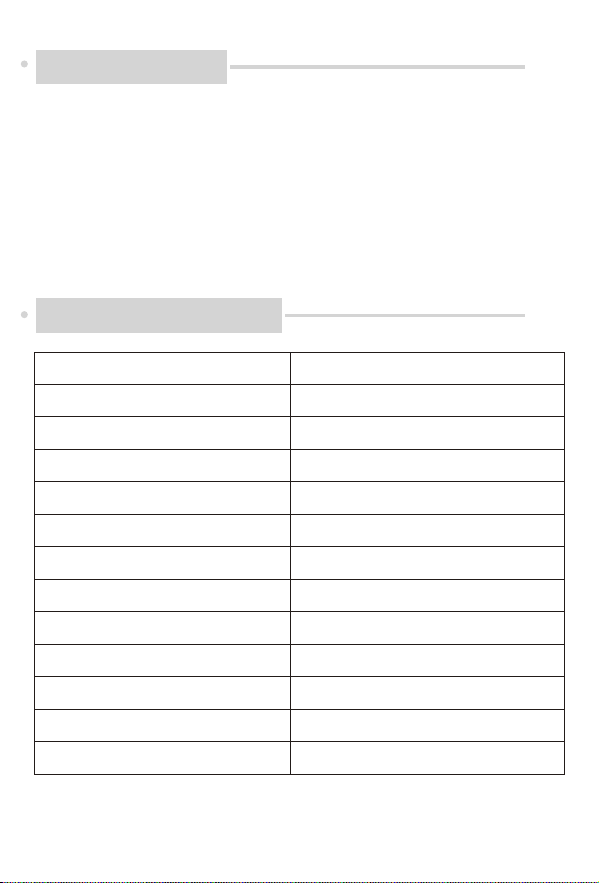
Product Model
Support Formats of Disc
Frequency Response Rate
Headphone Jack
Playback modes
Support
EQ Sound Eect
Battery
Charging Voltage
Output Power
Product size
Product net weight/gross weight
YR-Q902
CD/CD-R/CD-RW/WMA/MP3
60Hz-16KHz, +3db
3.5MM
Single cycle/All/Intro/Shuf/Origin
A-B Repetition
BBS, POP, JAZZ, ROCK, CLASSIC
2*1.5V AA
5V 1A ( socket Type-C)
20MW
140MM*140MM*13MM
210g
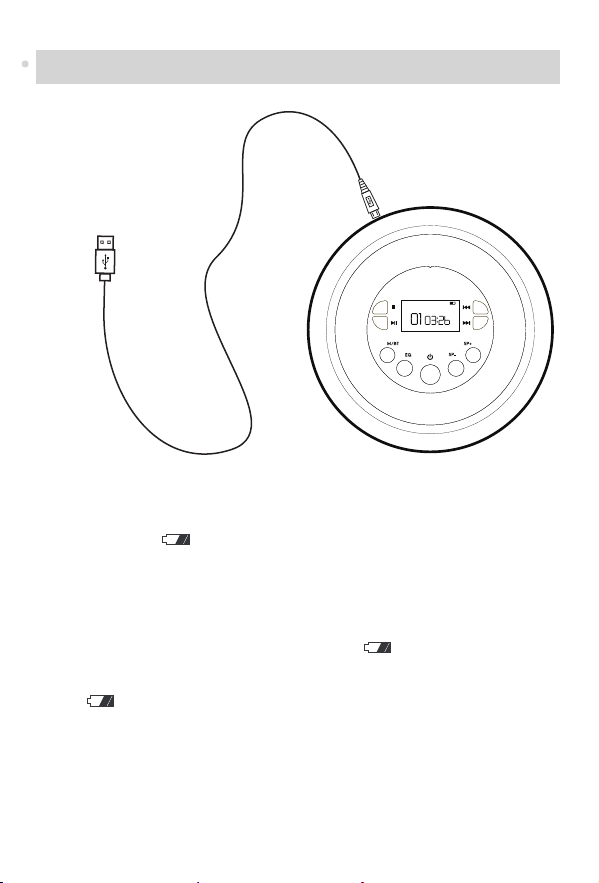
Instructions for Using Power Cord or AA Batteries
1.Power Supply Overview
This device supports two power supply modes to t dierent usage scenarios:
a. DC 5V Power Supply: Powered via a standard Type-C external power source.
The battery icon( )will not be displayed under this mode.
b. 2×AA Battery Power Supply: Operated by 2 series-connected AA batteries (1.5V n
ominal voltage per unit, total output 3V).
2. Battery Icon Display Rules (Only Visible Under Battery Power)
a. Normal Battery Level: A 2-segment battery icon ( )will stay on the screen
steadily when the device runs on AA batteries.
b. Low Battery Alert: When the batteries are nearly drained, the 2-segment battery
icon( ) and the entire display will start ashing simultaneously.
Replace the batteries in time.
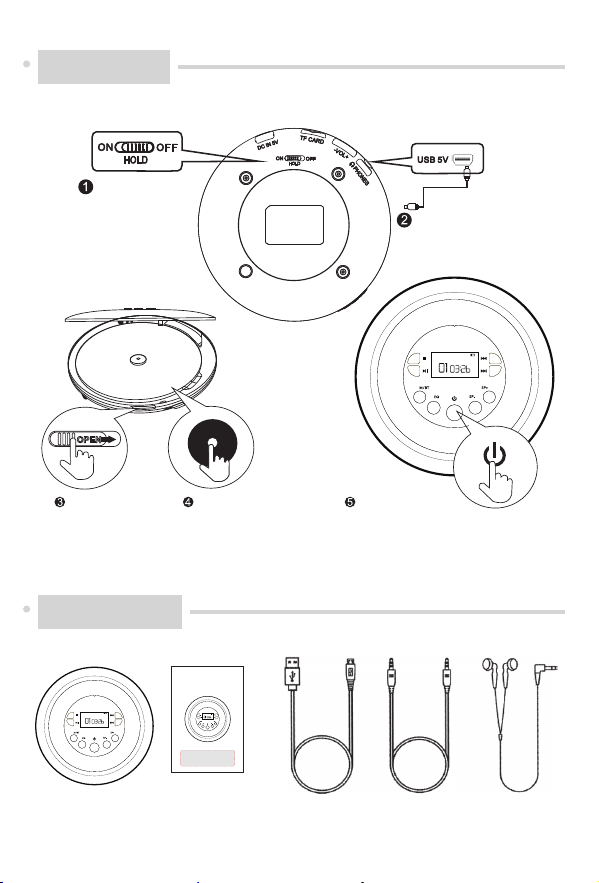
USB Plug in Power
OFF Unlock
Open the door Insert the disc Start playing
CD Player
×1
User Manual
×1
Type-C Power
Cord ×1
3.5mm Audio
Cable ×1
Earphone
×1
Boot Steps
Accessories
User Manual
Portable CD Player
(YR-Q902)
Please read the instructions carefully before use,
which provide the correct usage and product functionality.
Please keep this manual stored properly.
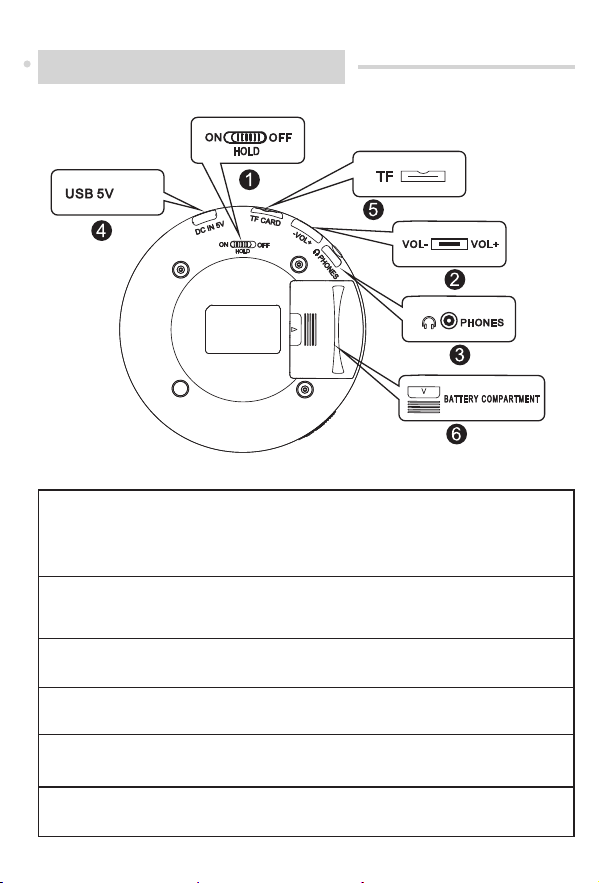
1. HOLD (ON/OFF): Lock/unlock switch control (before starting the
machine, you need to turn the button to the OFF position)
-ON: Button lock -OFF: Button Unlock
2. Volume -/Volume+: Volume control switch, which can adjust the volume
level during playback
3.Headphone jack
4.USB 5V: Power input
5.TF card slot
6.Battery compartment
Back Function Introduction
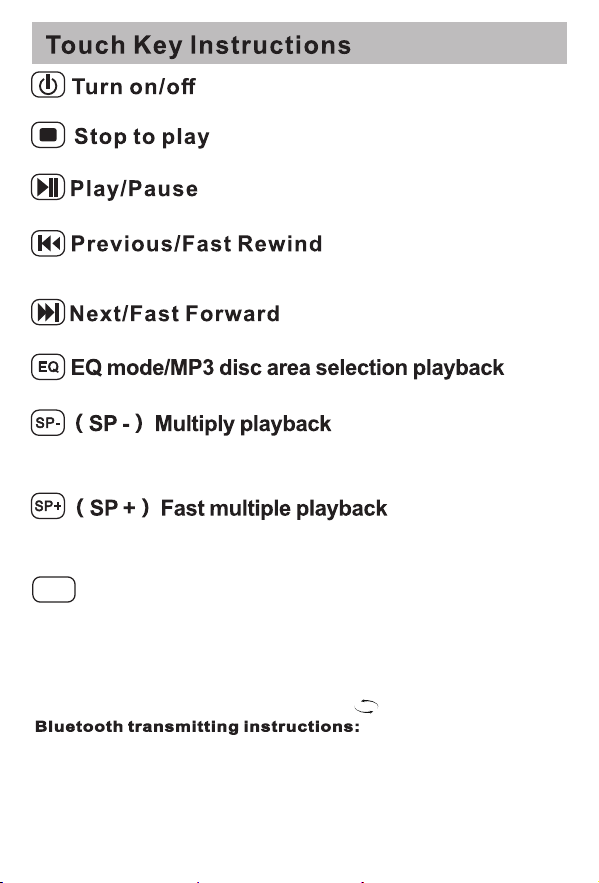
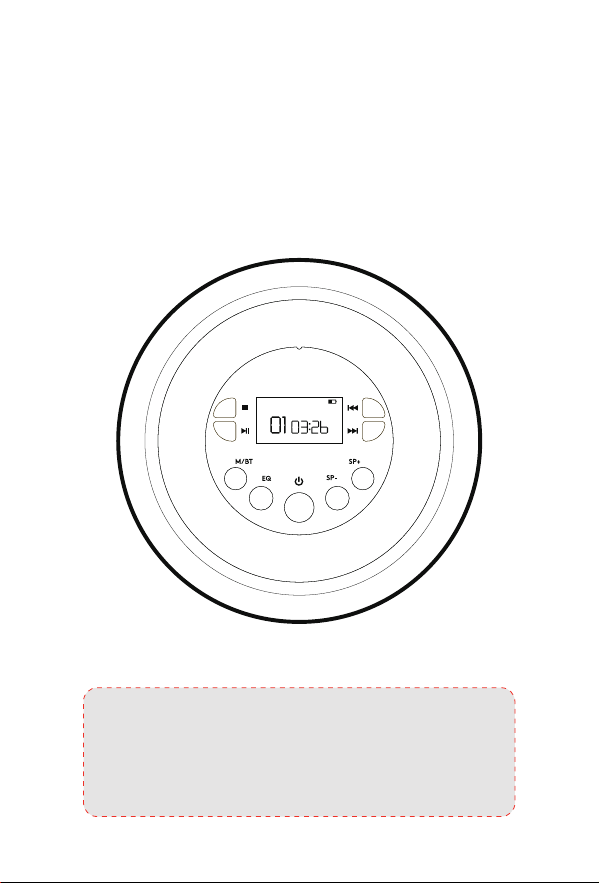
Short press to turn on, long press for two seconds to turn o.
Press the button to stop playback
In playback mode, short press pause/play.
Playing status, short press next song, long press fast forward function.
Playing status, short press to restart the current playing song, short press
twice in a row to skip to the previous song, and long press the fast rewindfunction
(SP-) Slow multiple playback, with 5 slow playback level between SP-1 toSP-5.
Short press to switch between multiple playback level in order/(SPO)normal
playback,short press SP-or SP+to switch to SPO in order.
with 5 Fast playback level between SP-1 to SP-5. Short pressto switch between
multiple playback level in order/(SPO)normal playback, short press SP - or SP+
to switch to SPO in order.
a. Short press MODE key (A-B) repeatthe starting point, the screen display (A-
B)ashing and then short press MODE key A-B repeat the end point, the screen
display A-B stationary, to achieve A-B repeat paragraph playback. (A-B) repeat
with the time set.
b. Short press MODE key again, the screen display (REPEAT) single song loop
playback.
c. Short press MODE key again, the screen display ( )full loop playback.
Long press MODE key after power on
a. Open the Bluetooth start function Bluetooth icon ashing after the connection
is complete, the screen will stop ashing Bluetooth icon <<Note: the rst
connectiogssasinnm about 20 seconds>>, if you want to stop the Bluetooth
connection ee press the MODE button again for 2 seconds
b. The CD player is a transmitter, so it can only connect to Bluetooth devices.
When paired, it will automatically connect to a Bluetooth device
Short press (BBS heavy base)(POP)(JAZZ )(ROCK )(return to original state)
M/BT
Model: YR-Q902
Power input: USB ----5V 1A
Working temperature: -20°C-55°C
Support disc format: CD original disc, MP3 disc, CD-R, CD-RW.
Support music format: CD-DA,MP3,WMA
Play time: >8 hours
Overall size: ∮ >142X 32mm
In order for the user to use the machine correctly, please carefully read and
abide by the following rules.
Do not hit the main unit severely.
Do not touch chemicals such as benzene, diluting agent, etc.
Please keep away from strong magnetic and electric elds.
Please avoid direct light or heating appliances.
Do not heat the battery or throw it into the re.
When riding a bicycle, driving a car or motorcycle, do not use the player and
earphones to avoid danger.
Please sort and properly dispose of discarded packaging, batteries, and old
electronic products.
Important Message:
Acracked disc may cause the player to malfunction. Please do not use it. If the
signal surface of the disc has serious scratches, ngerprints and dirt, etc., it
may cause equipment failure or shorten the life of the laser head to read the
disc.
c. For example, if you want to connect Bluetooth headset, please open the
Bluetooth of the headset rst, then long press the MODE button on the CD
player to start. The headset will be connected automatically soon, when
connecting the Bluetooth headset, please make sure that the Bluetooth
headset is not connected to a Bluetooth device such as a smartphone
d. If you have more than one Bluetooth receiver device when connecting, the
player will connect to the nearest Bluetooth device with the strongest signal
strength. In addition, if you have already connected before, the next connec-
tion will take precedence.
When setting the volume, be careful to prevent excessive output power, so as not to
damage your hearing.
Avoid contacting the machine with moisture, rain, sand or various heat sources. Itis
also not advisable to place objects containing liquids such as vases on the machine.
Clean the device with a clean, damp soft cloth. Do not use Alcohol or any cleaning
agents.
Please turn o the main power switch of this equipment when not in use for a long
time.
Please don’t repair the equipment by yourself. The damage to the equipment
caused by self-repair will be borne by the user.
Q:How to connect the car or stereo to play?
A:There is a3.5mm aux cord with a male plug on each end in the package. One
end goes into the device and the other end plugs into alternative input.
Q:Howttoturn onthe player?
A:Check ifthe HOLD button is in the OFF position, push the HOLD button to the
OFF position and then press the “Power ON/OFF” Button once. Whenadiscis
playedtotheendorthereisno disc, the player willenter astandby mode after
20 seconds. Please press the “Power ON/OFF” button again to restartthe player.
Note:
There is “HOLD” key lock function at the back of the device which is designed
to lock the operation of all the keys. A “HOLD” word will be displayed on the
screen at this time. Do not toggle it to the “HOLD” position before all the
operation is completed.
Q:Will the CD player stop suddenly when it is playing the song?
A:Please check if there is low power of the batteries or if the power adapter is
not connected well. What is more, the condition of the disc (scratches, debris,
cracks, etc.) will aect the performance of the device. Please kindly check
your CD condition, ortryanewCD

Warning
This device complies with Part 15 of the FCC Rules. Operation is subject to the
following two conditions:
(1) this device may not cause harmful interference, and
(2) this device must accept any interference received, including interference that
may cause undesired operation
This device has been tested and found to comply with the limits for a Class B digital
device, pursuant to Part 15 of the FCC Rules. These limits are designed to provide
reasonable protection against harmful interference in a residential installation. This
device generates, uses and can radiate radio frequency energy and, if not installed
and used in accordance with the instructions, may cause harmful interference to
radio communications.
However, there is no guarantee that interference will not occur in a particular
installation. If this device does cause harmful interference to radio or television
reception, which can be determined by turning the device o and on, the user is
encouraged to try to correct the interference by one or more of the following
measures:
--Reorient or relocate the receiving antenna.
--Increase the separation between the device and receiver.
--Connect the device into an outlet on a circuit dierent from that to which the
receiver is connected.
--Consult the dealer or an experienced radio/TV technician for help
Changes or modications not expressly approved by the party responsible for
compliance could void the user's authority to operate the equipment
RF warning for portable device:
The device has been evaluated to meet general RF exposure requirement. The device
can be used in portable exposure condition without restriction.
- element 1a: the symbol ,IEC 60417-6044(2011-01)
- element 2: “High sound pressure” or equivalent text
- element 3: “Hearing damage risk” or equivalent text
- element 4: “Do not listen at high volume levels for long periods.”
or equivalent text